CommandBox 
● CFML CLI, REPL, 
and Package Manager
Who am I? 
● ColdFusion Architect (12 years) 
● Geek 
● Android Lover 
● Blogger (codersrevolution.com) 
● ColdBox Platform Evangelist 
● Musician 
● Shade-Tree Mechanic 
● Husband (11 years) 
● Dad (3 beautiful girls)
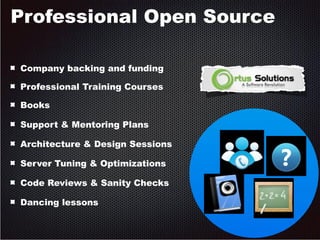
Professional Open Source 
Company backing and funding 
Professional Training Courses 
Books 
Support & Mentoring Plans 
Architecture & Design Sessions 
Server Tuning & Optimizations 
Code Reviews & Sanity Checks 
Dancing lessons
How Do We Work? 
● Tools! 
– IDE 
– RIAForge 
– Copy/paste 
– Scribble page/site 
– Ant 
– Grunt/Gulp
How Should We Work? 
● Better! 
– Automation 
– Share code with community 
– Manage external libs 
– Powerful and expressive tools 
– Easily test out code 
– Scaffolding
Introducing CommandBox! 
● Command Line Interface (CLI) 
● Package Manager 
● Read, Eval, Print, Loop (REPL)
Introducing CommandBox! 
● Native executable for Windows, Mac, Linux 
● First of its kind for CFML devs 
● Fills in the missing tooling gaps
Introducing CommandBox! 
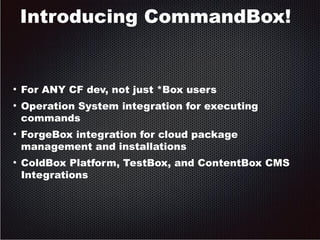
● For ANY CF dev, not just *Box users 
● Operation System integration for executing 
commands 
● ForgeBox integration for cloud package 
management and installations 
● ColdBox Platform, TestBox, and ContentBox CMS 
Integrations
Introducing CommandBox! 
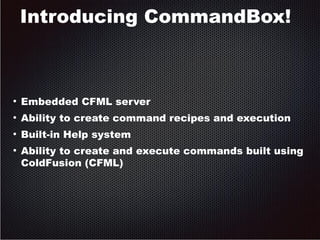
● Embedded CFML server 
● Ability to create command recipes and execution 
● Built-in Help system 
● Ability to create and execute commands built using 
ColdFusion (CFML)
Let's Get Started! 
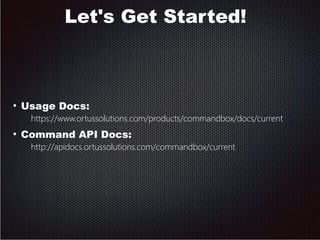
● Usage Docs: 
https://www.ortussolutions.com/products/commandbox/docs/current 
● Command API Docs: 
http://apidocs.ortussolutions.com/commandbox/current
Installation 
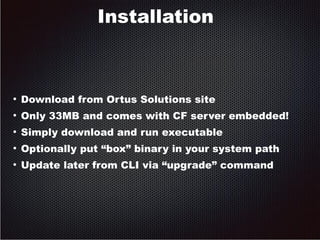
● Download from Ortus Solutions site 
● Only 33MB and comes with CF server embedded! 
● Simply download and run executable 
● Optionally put “box” binary in your system path 
● Update later from CLI via “upgrade” command
Usage - General 
● Multiple commands inside the Box shell 
● “One-off” commands from OS shell 
● Current Working Directory 
● Work with output with grep, more, and file 
redirection
Usage – Commands 
● Help 
● Namespaces 
● Aliases
Usage - Parameters 
● Named parameters 
● Positional parameters 
● Boolean flags 
● Escaping input 
● Required values 
● File paths
Usage – Tab Completion 
● Command 
● Parameter 
● Custom 
● Files path
Usage – History 
● Command 
● REPL 
● Managing history
REPL 
● Run CF code from the command line 
● Supports CFML or CFScript 
● REPL has its own history
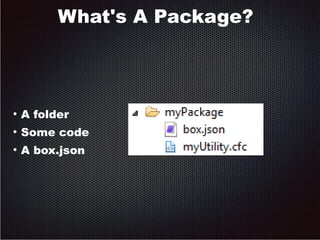
What's A Package? 
● A folder 
● Some code 
● A box.json
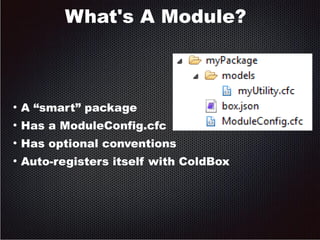
What's A Module? 
● A “smart” package 
● Has a ModuleConfig.cfc 
● Has optional conventions 
● Auto-registers itself with ColdBox
Conventions Are Good! 
● A common way of doing things 
● Makes everyone's code compatible 
● Standardizes extension points 
● Most all current languages enforce 
conventions 
● Increases automatability 
● 91,000 Node modules can't be wrong!
What is box.json 
● A standard package descriptor 
● Declares common package meta data 
● Name 
● Slug 
● Version 
● Author 
● Dependencies 
● Installation details
What is box.json 
{ 
"name" : "Weather By IP", 
"author" : "Brad Wood <brad@codersrevolution.com.com", 
"version" : "1.0.0", 
"slug" : "weather-lookup-by-ip", 
"shortDescription" : "Look up local weather by IP address.", 
"type" : "modules", 
"engines" : [ 
{ "type" : "railo", "version" : ">3.1" }, 
{ "type" : "adobe", "version" : ">9.0" }, 
{ "type" : "coldbox", "version" : ">4.0" } 
], 
"dependencies" : { 
"geolocation-lookup-by-ip" : "2.0.0" 
} 
}
What is ModuleConfig.cfc? 
● Tells the ColdBox app how to load the module 
● Settings 
● auto-map CFCs with WireBox 
● Auto-create app-specific mappings 
● Add SES routes 
● Add menu contributions (ContentBox)
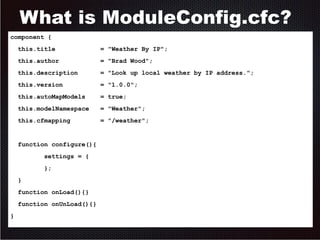
What is ModuleConfig.cfc? 
component { 
this.title = "Weather By IP"; 
this.author = "Brad Wood"; 
this.description = "Look up local weather by IP address."; 
this.version = "1.0.0"; 
this.autoMapModels = true; 
this.modelNamespace = "Weather"; 
this.cfmapping = "/weather"; 
function configure(){ 
settings = { 
}; 
} 
function onLoad(){} 
function onUnLoad(){} 
}
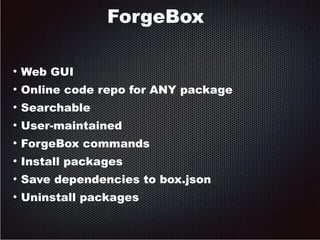
ForgeBox 
● Web GUI 
● Online code repo for ANY package 
● Searchable 
● User-maintained 
● ForgeBox commands 
● Install packages 
● Save dependencies to box.json 
● Uninstall packages
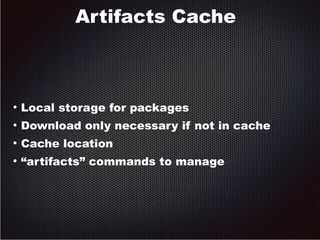
Artifacts Cache 
● Local storage for packages 
● Download only necessary if not in cache 
● Cache location 
● “artifacts” commands to manage
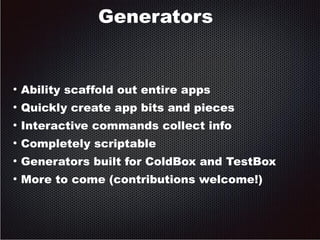
Generators 
● Ability scaffold out entire apps 
● Quickly create app bits and pieces 
● Interactive commands collect info 
● Completely scriptable 
● Generators built for ColdBox and TestBox 
● More to come (contributions welcome!)
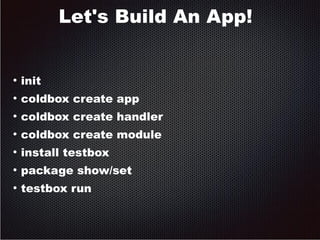
Let's Build An App! 
● init 
● coldbox create app 
● coldbox create handler 
● coldbox create module 
● install testbox 
● package show/set 
● testbox run
Recipes – Yummy! 
● Like a “batch” file 
● Runs multiple commands at once 
● Can accept parameters 
● Great for automation 
● myRecipe.boxr
Packaging with box.json 
● Dependencies are stored in box.json when 
installed 
● You can distribute your app without its 
dependencies 
● Dependencies can have dependencies 
(inception) 
● Use “install” to install them
Packaging with box.json 
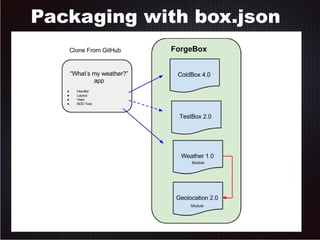
● Weather sample app depends on ColdBox 
● Also depends on weather lookup 
● Weather lookup depends on GeoLocation 
● Developing on the app depeds on TestBox 
● https://github.com/bdw429s/ColdBox-Dependency-Sample-App
Packaging with box.json
Coming Soon! 
● Task Runners/build tools (Ant, Grunt, Gulp) 
● Install repo adapters (Git, RIAForge, Corporate, etc) 
● ForgeBox 2.0 
● More generators and integrations (fw/1 CFWheels) 
● ContentBox integrations 
● More embedded servers supported 
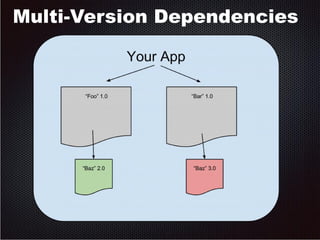
● Multi-version dependencies
Multi-Version Dependencies
Developing Commands 
● CommandBox commands are just CFCs 
● Extend BaseCommand 
● Implement “run()” method 
● Print object for output 
● Managed by WireBox for DI
Snake throwdown 
● Nothing like old school ASCII games 
● Stress reliever 
● Don't let your boss see 
● Can you beat my high score? (141)
Preso Links 
Download CommandBox 
– http://www.ortussolutions.com/products/commandbox 
Source Code 
– https://github.com/Ortus-Solutions/commandbox 
Forgebox 
– http://www.coldbox.org/forgeBox 
Sample App w/Dependencies 
– https://github.com/bdw429s/ColdBox-Dependency-Sample-App
CommandBox Resources 
Official Site 
http://www.ortussolutions.com/products/commandbox 
Documentation 
http://apidocs.ortussolutions.com/commandbox/1.0.0/index.html 
https://www.ortussolutions.com/products/commandbox/docs/current 
Google Group 
https://groups.google.com/a/ortussolutions.com/forum/#!forum/commandbox 
Training 
http://www.ortussolutions.com/services/Training 
Professional Support 
http://www.ortussolutions.com/services/support 
Brad Wood & 
Ortus Solutions, Corp 
brad@ortussolutions.com
Q & A

CBDW2014- Intro to CommandBox; The ColdFusion CLI, Package Manager, and REPL Tool!

  • 1.
    CommandBox ● CFMLCLI, REPL, and Package Manager
  • 2.
    Who am I? ● ColdFusion Architect (12 years) ● Geek ● Android Lover ● Blogger (codersrevolution.com) ● ColdBox Platform Evangelist ● Musician ● Shade-Tree Mechanic ● Husband (11 years) ● Dad (3 beautiful girls)
  • 3.
    Professional Open Source Company backing and funding Professional Training Courses Books Support & Mentoring Plans Architecture & Design Sessions Server Tuning & Optimizations Code Reviews & Sanity Checks Dancing lessons
  • 4.
    How Do WeWork? ● Tools! – IDE – RIAForge – Copy/paste – Scribble page/site – Ant – Grunt/Gulp
  • 5.
    How Should WeWork? ● Better! – Automation – Share code with community – Manage external libs – Powerful and expressive tools – Easily test out code – Scaffolding
  • 6.
    Introducing CommandBox! ●Command Line Interface (CLI) ● Package Manager ● Read, Eval, Print, Loop (REPL)
  • 7.
    Introducing CommandBox! ●Native executable for Windows, Mac, Linux ● First of its kind for CFML devs ● Fills in the missing tooling gaps
  • 8.
    Introducing CommandBox! ●For ANY CF dev, not just *Box users ● Operation System integration for executing commands ● ForgeBox integration for cloud package management and installations ● ColdBox Platform, TestBox, and ContentBox CMS Integrations
  • 9.
    Introducing CommandBox! ●Embedded CFML server ● Ability to create command recipes and execution ● Built-in Help system ● Ability to create and execute commands built using ColdFusion (CFML)
  • 10.
    Let's Get Started! ● Usage Docs: https://www.ortussolutions.com/products/commandbox/docs/current ● Command API Docs: http://apidocs.ortussolutions.com/commandbox/current
  • 11.
    Installation ● Downloadfrom Ortus Solutions site ● Only 33MB and comes with CF server embedded! ● Simply download and run executable ● Optionally put “box” binary in your system path ● Update later from CLI via “upgrade” command
  • 12.
    Usage - General ● Multiple commands inside the Box shell ● “One-off” commands from OS shell ● Current Working Directory ● Work with output with grep, more, and file redirection
  • 13.
    Usage – Commands ● Help ● Namespaces ● Aliases
  • 14.
    Usage - Parameters ● Named parameters ● Positional parameters ● Boolean flags ● Escaping input ● Required values ● File paths
  • 15.
    Usage – TabCompletion ● Command ● Parameter ● Custom ● Files path
  • 16.
    Usage – History ● Command ● REPL ● Managing history
  • 17.
    REPL ● RunCF code from the command line ● Supports CFML or CFScript ● REPL has its own history
  • 18.
    What's A Package? ● A folder ● Some code ● A box.json
  • 19.
    What's A Module? ● A “smart” package ● Has a ModuleConfig.cfc ● Has optional conventions ● Auto-registers itself with ColdBox
  • 20.
    Conventions Are Good! ● A common way of doing things ● Makes everyone's code compatible ● Standardizes extension points ● Most all current languages enforce conventions ● Increases automatability ● 91,000 Node modules can't be wrong!
  • 21.
    What is box.json ● A standard package descriptor ● Declares common package meta data ● Name ● Slug ● Version ● Author ● Dependencies ● Installation details
  • 22.
    What is box.json { "name" : "Weather By IP", "author" : "Brad Wood <brad@codersrevolution.com.com", "version" : "1.0.0", "slug" : "weather-lookup-by-ip", "shortDescription" : "Look up local weather by IP address.", "type" : "modules", "engines" : [ { "type" : "railo", "version" : ">3.1" }, { "type" : "adobe", "version" : ">9.0" }, { "type" : "coldbox", "version" : ">4.0" } ], "dependencies" : { "geolocation-lookup-by-ip" : "2.0.0" } }
  • 23.
    What is ModuleConfig.cfc? ● Tells the ColdBox app how to load the module ● Settings ● auto-map CFCs with WireBox ● Auto-create app-specific mappings ● Add SES routes ● Add menu contributions (ContentBox)
  • 24.
    What is ModuleConfig.cfc? component { this.title = "Weather By IP"; this.author = "Brad Wood"; this.description = "Look up local weather by IP address."; this.version = "1.0.0"; this.autoMapModels = true; this.modelNamespace = "Weather"; this.cfmapping = "/weather"; function configure(){ settings = { }; } function onLoad(){} function onUnLoad(){} }
  • 25.
    ForgeBox ● WebGUI ● Online code repo for ANY package ● Searchable ● User-maintained ● ForgeBox commands ● Install packages ● Save dependencies to box.json ● Uninstall packages
  • 26.
    Artifacts Cache ●Local storage for packages ● Download only necessary if not in cache ● Cache location ● “artifacts” commands to manage
  • 27.
    Generators ● Abilityscaffold out entire apps ● Quickly create app bits and pieces ● Interactive commands collect info ● Completely scriptable ● Generators built for ColdBox and TestBox ● More to come (contributions welcome!)
  • 28.
    Let's Build AnApp! ● init ● coldbox create app ● coldbox create handler ● coldbox create module ● install testbox ● package show/set ● testbox run
  • 29.
    Recipes – Yummy! ● Like a “batch” file ● Runs multiple commands at once ● Can accept parameters ● Great for automation ● myRecipe.boxr
  • 30.
    Packaging with box.json ● Dependencies are stored in box.json when installed ● You can distribute your app without its dependencies ● Dependencies can have dependencies (inception) ● Use “install” to install them
  • 31.
    Packaging with box.json ● Weather sample app depends on ColdBox ● Also depends on weather lookup ● Weather lookup depends on GeoLocation ● Developing on the app depeds on TestBox ● https://github.com/bdw429s/ColdBox-Dependency-Sample-App
  • 32.
  • 33.
    Coming Soon! ●Task Runners/build tools (Ant, Grunt, Gulp) ● Install repo adapters (Git, RIAForge, Corporate, etc) ● ForgeBox 2.0 ● More generators and integrations (fw/1 CFWheels) ● ContentBox integrations ● More embedded servers supported ● Multi-version dependencies
  • 34.
  • 35.
    Developing Commands ●CommandBox commands are just CFCs ● Extend BaseCommand ● Implement “run()” method ● Print object for output ● Managed by WireBox for DI
  • 36.
    Snake throwdown ●Nothing like old school ASCII games ● Stress reliever ● Don't let your boss see ● Can you beat my high score? (141)
  • 37.
    Preso Links DownloadCommandBox – http://www.ortussolutions.com/products/commandbox Source Code – https://github.com/Ortus-Solutions/commandbox Forgebox – http://www.coldbox.org/forgeBox Sample App w/Dependencies – https://github.com/bdw429s/ColdBox-Dependency-Sample-App
  • 38.
    CommandBox Resources OfficialSite http://www.ortussolutions.com/products/commandbox Documentation http://apidocs.ortussolutions.com/commandbox/1.0.0/index.html https://www.ortussolutions.com/products/commandbox/docs/current Google Group https://groups.google.com/a/ortussolutions.com/forum/#!forum/commandbox Training http://www.ortussolutions.com/services/Training Professional Support http://www.ortussolutions.com/services/support Brad Wood & Ortus Solutions, Corp brad@ortussolutions.com
  • 39.