Page | 1
WPU-QSF-ACAD-10A Rev. 01 (01.10.22)
Republic of the Philippines
Western Philippines University A STRONG PARTNER FOR SUSTAINABLE DEVELOPMENT
ACADEMIC AFFAIRS
COURSE SYLLABUS
Comp Ed 101 – Introduction to Computer Education
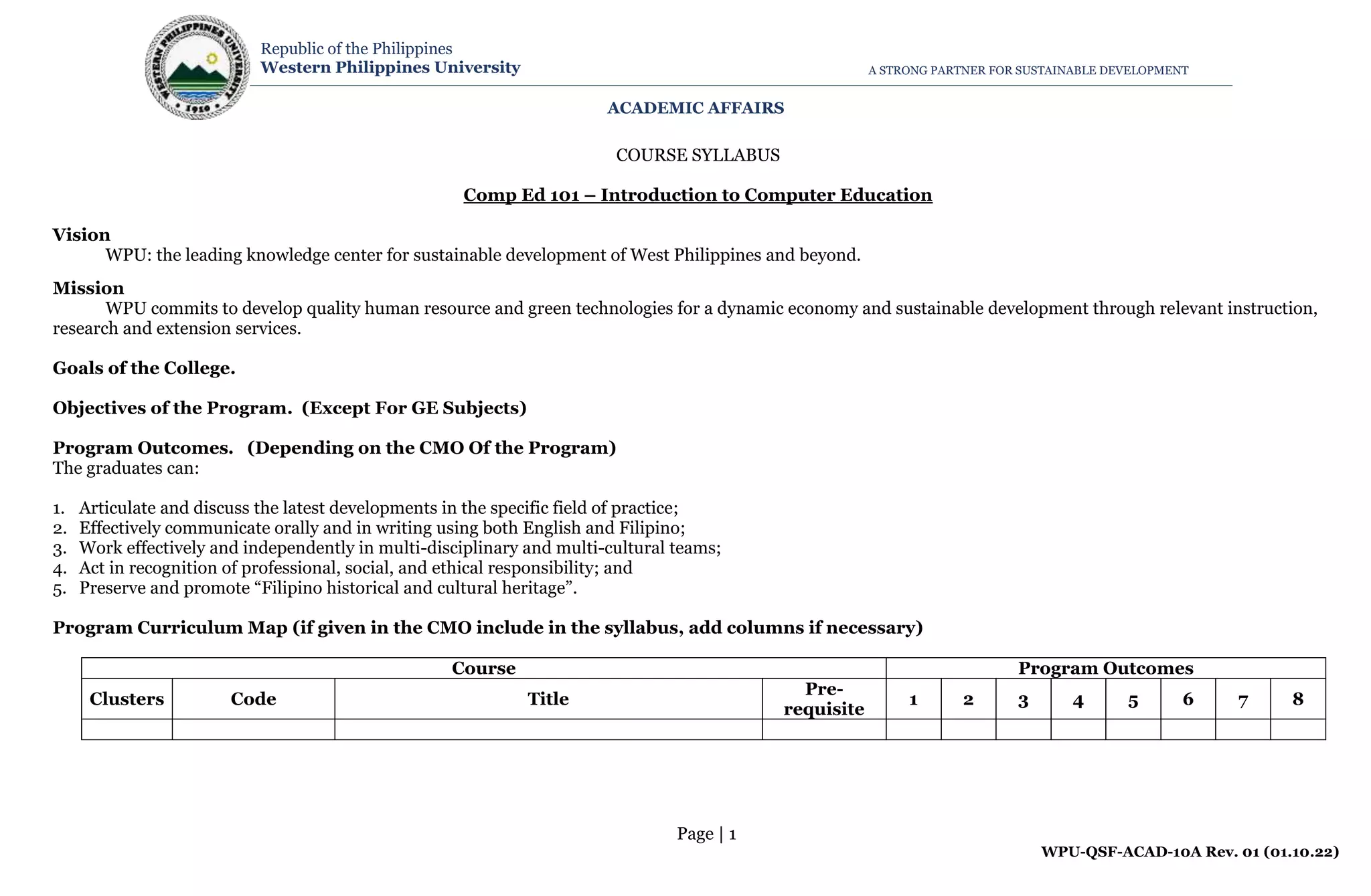
Vision
WPU: the leading knowledge center for sustainable development of West Philippines and beyond.
Mission
WPU commits to develop quality human resource and green technologies for a dynamic economy and sustainable development through relevant instruction,
research and extension services.
Goals of the College.
Objectives of the Program. (Except For GE Subjects)
Program Outcomes. (Depending on the CMO Of the Program)
The graduates can:
1. Articulate and discuss the latest developments in the specific field of practice;
2. Effectively communicate orally and in writing using both English and Filipino;
3. Work effectively and independently in multi-disciplinary and multi-cultural teams;
4. Act in recognition of professional, social, and ethical responsibility; and
5. Preserve and promote “Filipino historical and cultural heritage”.
Program Curriculum Map (if given in the CMO include in the syllabus, add columns if necessary)
Course Program Outcomes
Clusters Code Title
Pre-
requisite
1 2 3 4 5 6 7 8
Page | 2
WPU-QSF-ACAD-10A Rev. 01 (01.10.22)
Republic of the Philippines
Western Philippines University A STRONG PARTNER FOR SUSTAINABLE DEVELOPMENT
ACADEMIC AFFAIRS
A. Course Information
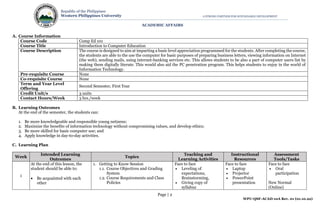
Course Code Comp Ed 101
Course Title Introduction to Computer Education
Course Description The course is designed to aim at imparting a basic level appreciation programmed for the students. After completing the course,
the students are able to the use the computer for basic purposes of preparing business letters, viewing information on Internet
(the web), sending mails, using internet-banking services etc. This allows students to be also a part of computer users list by
making them digitally literate. This would also aid the PC penetration program. This helps students to enjoy in the world of
Information Technology.
Pre-requisite Course None
Co-requisite Course None
Term and Year Level
Offering
Second Semester, First Year
Credit Unit/s 3 units
Contact Hours/Week 3 hrs./week
B. Learning Outcomes
At the end of the semester, the students can:
1. Be more knowledgeable and responsible young netizens;
2. Maximize the benefits of information technology without compromising values, and develop ethics;
3. Be more skilled for basic computer use; and
4. Apply knowledge in day-to-day activities.
C. Learning Plan
Week
Intended Learning
Outcomes
Topics
Teaching and
Learning Activities
Instructional
Resources
Assessment
Tools/Tasks
1
At the end of this lesson, the
student should be able to:
 Be acquainted with each
other
1. Getting to Know Session
1.1. Course Objectives and Grading
System
1.2. Course Requirements and Class
Policies
Face to face
 Leveling of
expectations,
Brainstorming,
 Giving copy of
syllabus
Face to face
 Laptop
 Projector
 PowerPoint
presentation
Face to face
 Oral
participation
New Normal
(Online)
Page | 3
WPU-QSF-ACAD-10A Rev. 01 (01.10.22)
Republic of the Philippines
Western Philippines University A STRONG PARTNER FOR SUSTAINABLE DEVELOPMENT
ACADEMIC AFFAIRS
 Understand the course
objectives, requirement, and
the grading system of the
course.
 State the vision and mission
of the university.
1.3. WPU Vision and Mission
Statement New Normal (Online)
 Leveling of
expectations,
Brainstorming,
 Giving copy of
syllabus
 Oral
participation
2-3
At the end of this lesson, the
student should be able to:
 Acquainted the basic
concept of Computer
Hardware
 Examines the different parts
of the computer system, and
the categories of computer
peripherals.
 Assesses why computers are
considered powerful
thinking machines.
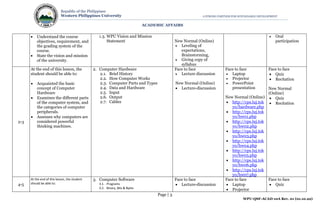
2. Computer Hardware
2.1. Brief History
2.2. How Computer Works
2.3. Computer Parts and Types
2.4. Data and Hardware
2.5. Input
2.6. Output
2.7. Cables
Face to face
 Lecture discussion
New Normal (Online)
 Lecture-discussion
Face to face
 Laptop
 Projector
 PowerPoint
presentation
New Normal (Online)
 http://cps.luj.tok
yo/hardware.php
 http://cps.luj.tok
yo/hw01.php
 http://cps.luj.tok
yo/hw02.php
 http://cps.luj.tok
yo/hw03.php
 http://cps.luj.tok
yo/hw04.php
 http://cps.luj.tok
yo/hw05.php
 http://cps.luj.tok
yo/hw06.php
 http://cps.luj.tok
yo/hw07.php
Face to face
 Quiz
 Recitation
New Normal
(Online)
 Quiz
 Recitation
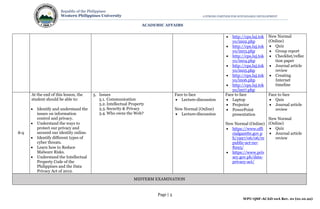
4-5
At the end of this lesson, the student
should be able to:
3. Computer Software
3.1. Programs
3.2. Binary, Bits & Bytes
Face to face
 Lecture-discussion
Face to face
 Laptop
 Projector
Face to face
 Quiz
Page | 4
WPU-QSF-ACAD-10A Rev. 01 (01.10.22)
Republic of the Philippines
Western Philippines University A STRONG PARTNER FOR SUSTAINABLE DEVELOPMENT
ACADEMIC AFFAIRS
 Acquainted the basic
concept of Computer
Hardware
 Examines the different parts
of the computer system, and
the categories of computer
peripherals.
 Assesses why computers are
considered powerful
thinking machines.
3.3. The Operating System
3.4. Interfaces
3.5. Using A computer
3.6.The File System
New Normal (Online)
 Lecture-discussion
 Printed materials
for activity
 PowerPoint
presentation
New Normal (Online)
 http://cps.luj.tok
yo/software.php
 http://cps.luj.tok
yo/sw01.php
 http://cps.luj.tok
yo/sw02.php
 http://cps.luj.tok
yo/sw03.php
 http://cps.luj.tok
yo/sw04.php
 http://cps.luj.tok
yo/sw05.php
 http://cps.luj.tok
yo/sw06.php
 Graded group
activity
New Normal
(Online)
 Quiz
 Graded group
activity
6-7
At the end of this lesson, the
student should be able to:
 Identify network and
internet fundamentals.
 Identify how electronic mail
works.
 Identify different types of
information sources on the
internet.
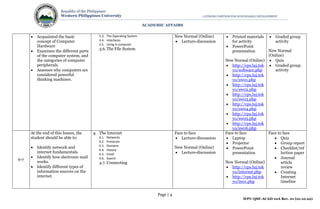
4. The Internet
4.1. Networks
4.2. Protocols
4.3. Domains
4.4. History
4.5. Email
4.6. Search
4.7. Connecting
Face to face
 Lecture-discussion
New Normal (Online)
 Lecture-discussion
Face to face
 Laptop
 Projector
 PowerPoint
presentation
New Normal (Online)
 http://cps.luj.tok
yo/internet.php
 http://cps.luj.tok
yo/in01.php
Face to face
 Quiz
 Group report
 Checklist/ref
lection paper
 Journal
article
review
 Creating
Internet
timeline
Page | 5
WPU-QSF-ACAD-10A Rev. 01 (01.10.22)
Republic of the Philippines
Western Philippines University A STRONG PARTNER FOR SUSTAINABLE DEVELOPMENT
ACADEMIC AFFAIRS
 http://cps.luj.tok
yo/in02.php
 http://cps.luj.tok
yo/in03.php
 http://cps.luj.tok
yo/in04.php
 http://cps.luj.tok
yo/in05.php
 http://cps.luj.tok
yo/in06.php
 http://cps.luj.tok
yo/in07.php
New Normal
(Online)
 Quiz
 Group report
 Checklist/reflec
tion paper
 Journal article
review
 Creating
Internet
timeline
8-9
At the end of this lesson, the
student should be able to:
 Identify and understand the
issues on information
control and privacy.
 Understand the ways to
protect our privacy and
secured our identity online.
 Identify different types of
cyber threats.
 Learn how to Reduce
Malware Risks.
 Understand the Intellectual
Property Code of the
Philippines and the Data
Privacy Act of 2012.
5. Issues
5.1. Communication
5.2. Intellectual Property
5.3. Security & Privacy
5.4. Who owns the Web?
Face to face
 Lecture-discussion
New Normal (Online)
 Lecture-discussion
Face to face
 Laptop
 Projector
 PowerPoint
presentation
New Normal (Online)
 https://www.offi
cialgazette.gov.p
h/1997/06/06/re
public-act-no-
8293/
 https://www.priv
acy.gov.ph/data-
privacy-act/
Face to face
 Quiz
 Journal article
review
New Normal
(Online)
 Quiz
 Journal article
review
MIDTERM EXAMINATION
Page | 6
WPU-QSF-ACAD-10A Rev. 01 (01.10.22)
Republic of the Philippines
Western Philippines University A STRONG PARTNER FOR SUSTAINABLE DEVELOPMENT
ACADEMIC AFFAIRS
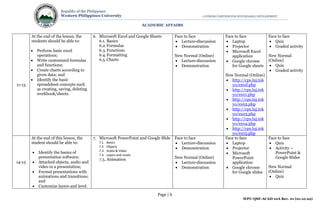
11-13
At the end of the lesson, the
students should be able to:
 Perform basic excel
operations;
 Write customized formulas
and functions;
 Create charts according to
given data; and
 Identify the basic
spreadsheet concepts such
as creating, saving, deleting
workbook/sheets.
6. Microsoft Excel and Google Sheets
6.1. Basics
6.2.Formulas
6.3.Functions
6.4.Formatting
6.5. Charts
Face to face
 Lecture-discussion
 Demonstration
New Normal (Online)
 Lecture-discussion
 Demonstration
Face to face
 Laptop
 Projector
 Microsoft Excel
application
 Google chrome
for Google sheets
New Normal (Online)
 http://cps.luj.tok
yo/excel.php
 http://cps.luj.tok
yo/ex01.php
 http://cps.luj.tok
yo/ex02.php
 http://cps.luj.tok
yo/ex03.php
 http://cps.luj.tok
yo/ex04.php
 http://cps.luj.tok
yo/ex05.php
Face to face
 Quiz
 Graded activity
New Normal
(Online)
 Quiz
 Graded activity
14-15
At the end of this lesson, the
student should be able to:
 Identify the basics of
presentation software;
 Attached objects, audio and
video in a presentation;
 Format presentations with
animations and transitions;
and
 Customize layers and level.
7. Microsoft PowerPoint and Google Slide
7.1. Basics
7.2. Objects
7.3. Audio & Video
7.4. Layers and Levels
7.5. Animation
Face to face
 Lecture-discussion
 Demonstration
New Normal (Online)
 Lecture-discussion
 Demonstration
Face to face
 Laptop
 Projector
 Microsoft
PowerPoint
application
 Google chrome
for Google slides
Face to face
 Quiz
 Activity –
PowerPoint &
Google Slides
New Normal
(Online)
 Quiz
Page | 7
WPU-QSF-ACAD-10A Rev. 01 (01.10.22)
Republic of the Philippines
Western Philippines University A STRONG PARTNER FOR SUSTAINABLE DEVELOPMENT
ACADEMIC AFFAIRS
New Normal (Online)
 http://cps.luj.tok
yo/powerpoint.p
hp
 http://cps.luj.tok
yo/pp01.php
 http://cps.luj.tok
yo/pp02.php
 http://cps.luj.tok
yo/pp03.php
 http://cps.luj.tok
yo/pp04.php
 http://cps.luj.tok
yo/pp05.php
 Activity –
PowerPoint &
Google Slides
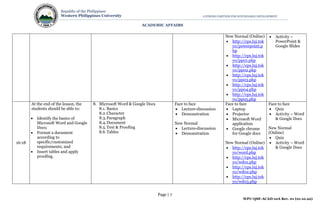
16-18
At the end of the lesson, the
students should be able to:
 Identify the basics of
Microsoft Word and Google
Docs;
 Format a document
according to
specific/customized
requirements; and
 Insert tables and apply
proofing.
8. Microsoft Word & Google Docs
8.1. Basics
8.2.Character
8.3.Paragraph
8.4.Document
8.5.Text & Proofing
8.6.Tables
Face to face
 Lecture-discussion
 Demonstration
New Normal
 Lecture-discussion
 Demonstration
Face to face
 Laptop
 Projector
 Microsoft Word
application
 Google chrome
for Google docs
New Normal (Online)
 http://cps.luj.tok
yo/word.php
 http://cps.luj.tok
yo/wd01.php
 http://cps.luj.tok
yo/wd02.php
 http://cps.luj.tok
yo/wd03.php
Face to face
 Quiz
 Activity – Word
& Google Docs
New Normal
(Online)
 Quiz
 Activity – Word
& Google Docs
Page | 8
WPU-QSF-ACAD-10A Rev. 01 (01.10.22)
Republic of the Philippines
Western Philippines University A STRONG PARTNER FOR SUSTAINABLE DEVELOPMENT
ACADEMIC AFFAIRS
 http://cps.luj.tok
yo/wd04.php
 http://cps.luj.tok
yo/wd05.php
 http://cps.luj.tok
yo/wd06.php
FINAL EXAMINATION
D. References (printed/online resources must be within 10 years)
 http://cps.luj.tokyo/index.php
 https://courses.lumenlearning.com
E. Grading System
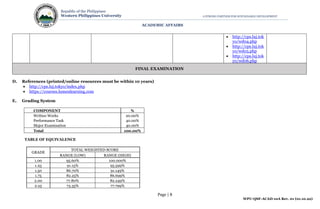
COMPONENT %
Written Works 20.00%
Performance Task 40.00%
Major Examination 40.00%
Total 100.00%
TABLE OF EQUIVALENCE
GRADE
TOTAL WEIGHTED SCORE
RANGE (LOW) RANGE (HIGH)
1.00 95.60% 100.000%
1.25 91.15% 95.599%
1.50 86.70% 91.149%
1.75 82.25% 86.699%
2.00 77.80% 82.249%
2.25 73.35% 77.799%
Page | 9
WPU-QSF-ACAD-10A Rev. 01 (01.10.22)
Republic of the Philippines
Western Philippines University A STRONG PARTNER FOR SUSTAINABLE DEVELOPMENT
ACADEMIC AFFAIRS
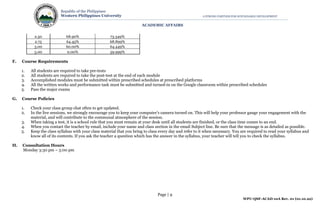
2.50 68.90% 73.349%
2.75 64.45% 68.899%
3.00 60.00% 64.449%
5.00 0.00% 59.999%
F. Course Requirements
1. All students are required to take pre-tests
2. All students are required to take the post-test at the end of each module
3. Accomplished modules must be submitted within prescribed schedules at prescribed platforms
4. All the written works and performance task must be submitted and turned-in on the Google classroom within prescribed schedules
5. Pass the major exams
G. Course Policies
1. Check your class group chat often to get updated.
2. In the live sessions, we strongly encourage you to keep your computer’s camera turned on. This will help your professor gauge your engagement with the
material, and will contribute to the communal atmosphere of the session.
3. When taking a test, it is a school rule that you must remain at your desk until all students are finished, or the class time comes to an end.
4. When you contact the teacher by email, include your name and class section in the email Subject line. Be sure that the message is as detailed as possible.
5. Keep the class syllabus with your class material that you bring to class every day and refer to it when necessary. You are required to read your syllabus and
know all of its contents. If you ask the teacher a question which has the answer in the syllabus, your teacher will tell you to check the syllabus.
H. Consultation Hours
Monday 3:30 pm – 5:00 pm
Page | 10
WPU-QSF-ACAD-10A Rev. 01 (01.10.22)
Republic of the Philippines
Western Philippines University A STRONG PARTNER FOR SUSTAINABLE DEVELOPMENT
ACADEMIC AFFAIRS
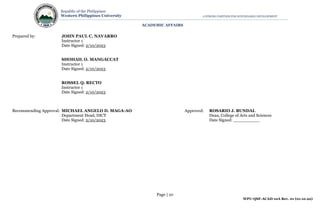
Prepared by: JOHN PAUL C. NAVARRO
Instructor 1
Date Signed: 2/10/2023
SHOHAIL O. MANGACCAT
Instructor 1
Date Signed: 2/10/2023
ROSSEL Q. RECTO
Instructor 1
Date Signed: 2/10/2023
Recommending Approval: MICHAEL ANGELO D. MAGA-AO Approved: ROSARIO J. BUNDAL
Department Head, DICT Dean, College of Arts and Sciences
Date Signed: 2/10/2023 Date Signed: __________

ComEd101 - Introduction to Computer Education NEW.docx

  • 1.
    Page | 1 WPU-QSF-ACAD-10ARev. 01 (01.10.22) Republic of the Philippines Western Philippines University A STRONG PARTNER FOR SUSTAINABLE DEVELOPMENT ACADEMIC AFFAIRS COURSE SYLLABUS Comp Ed 101 – Introduction to Computer Education Vision WPU: the leading knowledge center for sustainable development of West Philippines and beyond. Mission WPU commits to develop quality human resource and green technologies for a dynamic economy and sustainable development through relevant instruction, research and extension services. Goals of the College. Objectives of the Program. (Except For GE Subjects) Program Outcomes. (Depending on the CMO Of the Program) The graduates can: 1. Articulate and discuss the latest developments in the specific field of practice; 2. Effectively communicate orally and in writing using both English and Filipino; 3. Work effectively and independently in multi-disciplinary and multi-cultural teams; 4. Act in recognition of professional, social, and ethical responsibility; and 5. Preserve and promote “Filipino historical and cultural heritage”. Program Curriculum Map (if given in the CMO include in the syllabus, add columns if necessary) Course Program Outcomes Clusters Code Title Pre- requisite 1 2 3 4 5 6 7 8
  • 2.
    Page | 2 WPU-QSF-ACAD-10ARev. 01 (01.10.22) Republic of the Philippines Western Philippines University A STRONG PARTNER FOR SUSTAINABLE DEVELOPMENT ACADEMIC AFFAIRS A. Course Information Course Code Comp Ed 101 Course Title Introduction to Computer Education Course Description The course is designed to aim at imparting a basic level appreciation programmed for the students. After completing the course, the students are able to the use the computer for basic purposes of preparing business letters, viewing information on Internet (the web), sending mails, using internet-banking services etc. This allows students to be also a part of computer users list by making them digitally literate. This would also aid the PC penetration program. This helps students to enjoy in the world of Information Technology. Pre-requisite Course None Co-requisite Course None Term and Year Level Offering Second Semester, First Year Credit Unit/s 3 units Contact Hours/Week 3 hrs./week B. Learning Outcomes At the end of the semester, the students can: 1. Be more knowledgeable and responsible young netizens; 2. Maximize the benefits of information technology without compromising values, and develop ethics; 3. Be more skilled for basic computer use; and 4. Apply knowledge in day-to-day activities. C. Learning Plan Week Intended Learning Outcomes Topics Teaching and Learning Activities Instructional Resources Assessment Tools/Tasks 1 At the end of this lesson, the student should be able to:  Be acquainted with each other 1. Getting to Know Session 1.1. Course Objectives and Grading System 1.2. Course Requirements and Class Policies Face to face  Leveling of expectations, Brainstorming,  Giving copy of syllabus Face to face  Laptop  Projector  PowerPoint presentation Face to face  Oral participation New Normal (Online)
  • 3.
    Page | 3 WPU-QSF-ACAD-10ARev. 01 (01.10.22) Republic of the Philippines Western Philippines University A STRONG PARTNER FOR SUSTAINABLE DEVELOPMENT ACADEMIC AFFAIRS  Understand the course objectives, requirement, and the grading system of the course.  State the vision and mission of the university. 1.3. WPU Vision and Mission Statement New Normal (Online)  Leveling of expectations, Brainstorming,  Giving copy of syllabus  Oral participation 2-3 At the end of this lesson, the student should be able to:  Acquainted the basic concept of Computer Hardware  Examines the different parts of the computer system, and the categories of computer peripherals.  Assesses why computers are considered powerful thinking machines. 2. Computer Hardware 2.1. Brief History 2.2. How Computer Works 2.3. Computer Parts and Types 2.4. Data and Hardware 2.5. Input 2.6. Output 2.7. Cables Face to face  Lecture discussion New Normal (Online)  Lecture-discussion Face to face  Laptop  Projector  PowerPoint presentation New Normal (Online)  http://cps.luj.tok yo/hardware.php  http://cps.luj.tok yo/hw01.php  http://cps.luj.tok yo/hw02.php  http://cps.luj.tok yo/hw03.php  http://cps.luj.tok yo/hw04.php  http://cps.luj.tok yo/hw05.php  http://cps.luj.tok yo/hw06.php  http://cps.luj.tok yo/hw07.php Face to face  Quiz  Recitation New Normal (Online)  Quiz  Recitation 4-5 At the end of this lesson, the student should be able to: 3. Computer Software 3.1. Programs 3.2. Binary, Bits & Bytes Face to face  Lecture-discussion Face to face  Laptop  Projector Face to face  Quiz
  • 4.
    Page | 4 WPU-QSF-ACAD-10ARev. 01 (01.10.22) Republic of the Philippines Western Philippines University A STRONG PARTNER FOR SUSTAINABLE DEVELOPMENT ACADEMIC AFFAIRS  Acquainted the basic concept of Computer Hardware  Examines the different parts of the computer system, and the categories of computer peripherals.  Assesses why computers are considered powerful thinking machines. 3.3. The Operating System 3.4. Interfaces 3.5. Using A computer 3.6.The File System New Normal (Online)  Lecture-discussion  Printed materials for activity  PowerPoint presentation New Normal (Online)  http://cps.luj.tok yo/software.php  http://cps.luj.tok yo/sw01.php  http://cps.luj.tok yo/sw02.php  http://cps.luj.tok yo/sw03.php  http://cps.luj.tok yo/sw04.php  http://cps.luj.tok yo/sw05.php  http://cps.luj.tok yo/sw06.php  Graded group activity New Normal (Online)  Quiz  Graded group activity 6-7 At the end of this lesson, the student should be able to:  Identify network and internet fundamentals.  Identify how electronic mail works.  Identify different types of information sources on the internet. 4. The Internet 4.1. Networks 4.2. Protocols 4.3. Domains 4.4. History 4.5. Email 4.6. Search 4.7. Connecting Face to face  Lecture-discussion New Normal (Online)  Lecture-discussion Face to face  Laptop  Projector  PowerPoint presentation New Normal (Online)  http://cps.luj.tok yo/internet.php  http://cps.luj.tok yo/in01.php Face to face  Quiz  Group report  Checklist/ref lection paper  Journal article review  Creating Internet timeline
  • 5.
    Page | 5 WPU-QSF-ACAD-10ARev. 01 (01.10.22) Republic of the Philippines Western Philippines University A STRONG PARTNER FOR SUSTAINABLE DEVELOPMENT ACADEMIC AFFAIRS  http://cps.luj.tok yo/in02.php  http://cps.luj.tok yo/in03.php  http://cps.luj.tok yo/in04.php  http://cps.luj.tok yo/in05.php  http://cps.luj.tok yo/in06.php  http://cps.luj.tok yo/in07.php New Normal (Online)  Quiz  Group report  Checklist/reflec tion paper  Journal article review  Creating Internet timeline 8-9 At the end of this lesson, the student should be able to:  Identify and understand the issues on information control and privacy.  Understand the ways to protect our privacy and secured our identity online.  Identify different types of cyber threats.  Learn how to Reduce Malware Risks.  Understand the Intellectual Property Code of the Philippines and the Data Privacy Act of 2012. 5. Issues 5.1. Communication 5.2. Intellectual Property 5.3. Security & Privacy 5.4. Who owns the Web? Face to face  Lecture-discussion New Normal (Online)  Lecture-discussion Face to face  Laptop  Projector  PowerPoint presentation New Normal (Online)  https://www.offi cialgazette.gov.p h/1997/06/06/re public-act-no- 8293/  https://www.priv acy.gov.ph/data- privacy-act/ Face to face  Quiz  Journal article review New Normal (Online)  Quiz  Journal article review MIDTERM EXAMINATION
  • 6.
    Page | 6 WPU-QSF-ACAD-10ARev. 01 (01.10.22) Republic of the Philippines Western Philippines University A STRONG PARTNER FOR SUSTAINABLE DEVELOPMENT ACADEMIC AFFAIRS 11-13 At the end of the lesson, the students should be able to:  Perform basic excel operations;  Write customized formulas and functions;  Create charts according to given data; and  Identify the basic spreadsheet concepts such as creating, saving, deleting workbook/sheets. 6. Microsoft Excel and Google Sheets 6.1. Basics 6.2.Formulas 6.3.Functions 6.4.Formatting 6.5. Charts Face to face  Lecture-discussion  Demonstration New Normal (Online)  Lecture-discussion  Demonstration Face to face  Laptop  Projector  Microsoft Excel application  Google chrome for Google sheets New Normal (Online)  http://cps.luj.tok yo/excel.php  http://cps.luj.tok yo/ex01.php  http://cps.luj.tok yo/ex02.php  http://cps.luj.tok yo/ex03.php  http://cps.luj.tok yo/ex04.php  http://cps.luj.tok yo/ex05.php Face to face  Quiz  Graded activity New Normal (Online)  Quiz  Graded activity 14-15 At the end of this lesson, the student should be able to:  Identify the basics of presentation software;  Attached objects, audio and video in a presentation;  Format presentations with animations and transitions; and  Customize layers and level. 7. Microsoft PowerPoint and Google Slide 7.1. Basics 7.2. Objects 7.3. Audio & Video 7.4. Layers and Levels 7.5. Animation Face to face  Lecture-discussion  Demonstration New Normal (Online)  Lecture-discussion  Demonstration Face to face  Laptop  Projector  Microsoft PowerPoint application  Google chrome for Google slides Face to face  Quiz  Activity – PowerPoint & Google Slides New Normal (Online)  Quiz
  • 7.
    Page | 7 WPU-QSF-ACAD-10ARev. 01 (01.10.22) Republic of the Philippines Western Philippines University A STRONG PARTNER FOR SUSTAINABLE DEVELOPMENT ACADEMIC AFFAIRS New Normal (Online)  http://cps.luj.tok yo/powerpoint.p hp  http://cps.luj.tok yo/pp01.php  http://cps.luj.tok yo/pp02.php  http://cps.luj.tok yo/pp03.php  http://cps.luj.tok yo/pp04.php  http://cps.luj.tok yo/pp05.php  Activity – PowerPoint & Google Slides 16-18 At the end of the lesson, the students should be able to:  Identify the basics of Microsoft Word and Google Docs;  Format a document according to specific/customized requirements; and  Insert tables and apply proofing. 8. Microsoft Word & Google Docs 8.1. Basics 8.2.Character 8.3.Paragraph 8.4.Document 8.5.Text & Proofing 8.6.Tables Face to face  Lecture-discussion  Demonstration New Normal  Lecture-discussion  Demonstration Face to face  Laptop  Projector  Microsoft Word application  Google chrome for Google docs New Normal (Online)  http://cps.luj.tok yo/word.php  http://cps.luj.tok yo/wd01.php  http://cps.luj.tok yo/wd02.php  http://cps.luj.tok yo/wd03.php Face to face  Quiz  Activity – Word & Google Docs New Normal (Online)  Quiz  Activity – Word & Google Docs
  • 8.
    Page | 8 WPU-QSF-ACAD-10ARev. 01 (01.10.22) Republic of the Philippines Western Philippines University A STRONG PARTNER FOR SUSTAINABLE DEVELOPMENT ACADEMIC AFFAIRS  http://cps.luj.tok yo/wd04.php  http://cps.luj.tok yo/wd05.php  http://cps.luj.tok yo/wd06.php FINAL EXAMINATION D. References (printed/online resources must be within 10 years)  http://cps.luj.tokyo/index.php  https://courses.lumenlearning.com E. Grading System COMPONENT % Written Works 20.00% Performance Task 40.00% Major Examination 40.00% Total 100.00% TABLE OF EQUIVALENCE GRADE TOTAL WEIGHTED SCORE RANGE (LOW) RANGE (HIGH) 1.00 95.60% 100.000% 1.25 91.15% 95.599% 1.50 86.70% 91.149% 1.75 82.25% 86.699% 2.00 77.80% 82.249% 2.25 73.35% 77.799%
  • 9.
    Page | 9 WPU-QSF-ACAD-10ARev. 01 (01.10.22) Republic of the Philippines Western Philippines University A STRONG PARTNER FOR SUSTAINABLE DEVELOPMENT ACADEMIC AFFAIRS 2.50 68.90% 73.349% 2.75 64.45% 68.899% 3.00 60.00% 64.449% 5.00 0.00% 59.999% F. Course Requirements 1. All students are required to take pre-tests 2. All students are required to take the post-test at the end of each module 3. Accomplished modules must be submitted within prescribed schedules at prescribed platforms 4. All the written works and performance task must be submitted and turned-in on the Google classroom within prescribed schedules 5. Pass the major exams G. Course Policies 1. Check your class group chat often to get updated. 2. In the live sessions, we strongly encourage you to keep your computer’s camera turned on. This will help your professor gauge your engagement with the material, and will contribute to the communal atmosphere of the session. 3. When taking a test, it is a school rule that you must remain at your desk until all students are finished, or the class time comes to an end. 4. When you contact the teacher by email, include your name and class section in the email Subject line. Be sure that the message is as detailed as possible. 5. Keep the class syllabus with your class material that you bring to class every day and refer to it when necessary. You are required to read your syllabus and know all of its contents. If you ask the teacher a question which has the answer in the syllabus, your teacher will tell you to check the syllabus. H. Consultation Hours Monday 3:30 pm – 5:00 pm
  • 10.
    Page | 10 WPU-QSF-ACAD-10ARev. 01 (01.10.22) Republic of the Philippines Western Philippines University A STRONG PARTNER FOR SUSTAINABLE DEVELOPMENT ACADEMIC AFFAIRS Prepared by: JOHN PAUL C. NAVARRO Instructor 1 Date Signed: 2/10/2023 SHOHAIL O. MANGACCAT Instructor 1 Date Signed: 2/10/2023 ROSSEL Q. RECTO Instructor 1 Date Signed: 2/10/2023 Recommending Approval: MICHAEL ANGELO D. MAGA-AO Approved: ROSARIO J. BUNDAL Department Head, DICT Dean, College of Arts and Sciences Date Signed: 2/10/2023 Date Signed: __________