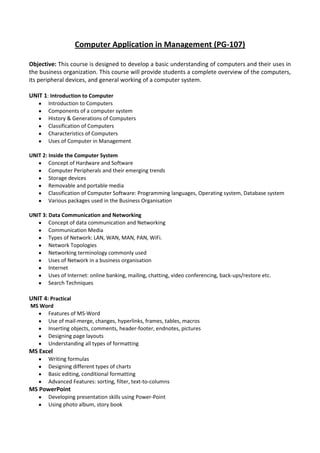
Computer Application in Management (PG-107)

Objective: This course is designed to develop a basic understanding of computers and their uses in
the business organization. This course will provide students a complete overview of the computers,
its peripheral devices, and general working of a computer system.

UNIT 1: Introduction to Computer
        Introduction to Computers
        Components of a computer system
        History & Generations of Computers
        Classification of Computers
        Characteristics of Computers
        Uses of Computer in Management

UNIT 2: Inside the Computer System
        Concept of Hardware and Software
        Computer Peripherals and their emerging trends
        Storage devices
        Removable and portable media
        Classification of Computer Software: Programming languages, Operating system, Database system
        Various packages used in the Business Organisation

UNIT 3: Data Communication and Networking
        Concept of data communication and Networking
        Communication Media
        Types of Network: LAN, WAN, MAN, PAN, WiFi.
        Network Topologies
        Networking terminology commonly used
        Uses of Network in a business organisation
        Internet
        Uses of Internet: online banking, mailing, chatting, video conferencing, back-ups/restore etc.
        Search Techniques

UNIT 4: Practical
MS Word
     Features of MS-Word
     Use of mail-merge, changes, hyperlinks, frames, tables, macros
     Inserting objects, comments, header-footer, endnotes, pictures
     Designing page layouts
     Understanding all types of formatting
MS Excel
        Writing formulas
        Designing different types of charts
        Basic editing, conditional formatting
        Advanced Features: sorting, filter, text-to-columns
MS PowerPoint
        Developing presentation skills using Power-Point
        Using photo album, story book
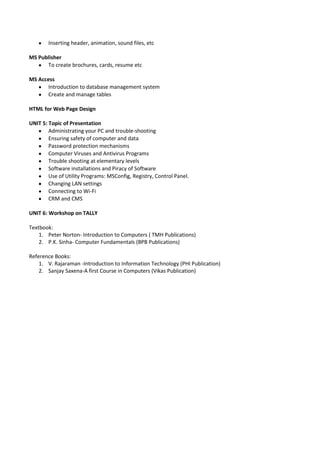
Inserting header, animation, sound files, etc

MS Publisher
      To create brochures, cards, resume etc

MS Access
       Introduction to database management system
       Create and manage tables

HTML for Web Page Design

UNIT 5: Topic of Presentation
        Administrating your PC and trouble-shooting
        Ensuring safety of computer and data
        Password protection mechanisms
        Computer Viruses and Antivirus Programs
        Trouble shooting at elementary levels
        Software installations and Piracy of Software
        Use of Utility Programs: MSConfig, Registry, Control Panel.
        Changing LAN settings
        Connecting to Wi-Fi
        CRM and CMS

UNIT 6: Workshop on TALLY

Textbook:
    1. Peter Norton- Introduction to Computers ( TMH Publications)
    2. P.K. Sinha- Computer Fundamentals (BPB Publications)

Reference Books:
    1. V. Rajaraman -Introduction to Information Technology (PHI Publication)
    2. Sanjay Saxena-A first Course in Computers (Vikas Publication)

Computer application in_management_new_syllabus_

  • 1.
    Computer Application inManagement (PG-107) Objective: This course is designed to develop a basic understanding of computers and their uses in the business organization. This course will provide students a complete overview of the computers, its peripheral devices, and general working of a computer system. UNIT 1: Introduction to Computer Introduction to Computers Components of a computer system History & Generations of Computers Classification of Computers Characteristics of Computers Uses of Computer in Management UNIT 2: Inside the Computer System Concept of Hardware and Software Computer Peripherals and their emerging trends Storage devices Removable and portable media Classification of Computer Software: Programming languages, Operating system, Database system Various packages used in the Business Organisation UNIT 3: Data Communication and Networking Concept of data communication and Networking Communication Media Types of Network: LAN, WAN, MAN, PAN, WiFi. Network Topologies Networking terminology commonly used Uses of Network in a business organisation Internet Uses of Internet: online banking, mailing, chatting, video conferencing, back-ups/restore etc. Search Techniques UNIT 4: Practical MS Word Features of MS-Word Use of mail-merge, changes, hyperlinks, frames, tables, macros Inserting objects, comments, header-footer, endnotes, pictures Designing page layouts Understanding all types of formatting MS Excel Writing formulas Designing different types of charts Basic editing, conditional formatting Advanced Features: sorting, filter, text-to-columns MS PowerPoint Developing presentation skills using Power-Point Using photo album, story book
  • 2.
    Inserting header, animation,sound files, etc MS Publisher To create brochures, cards, resume etc MS Access Introduction to database management system Create and manage tables HTML for Web Page Design UNIT 5: Topic of Presentation Administrating your PC and trouble-shooting Ensuring safety of computer and data Password protection mechanisms Computer Viruses and Antivirus Programs Trouble shooting at elementary levels Software installations and Piracy of Software Use of Utility Programs: MSConfig, Registry, Control Panel. Changing LAN settings Connecting to Wi-Fi CRM and CMS UNIT 6: Workshop on TALLY Textbook: 1. Peter Norton- Introduction to Computers ( TMH Publications) 2. P.K. Sinha- Computer Fundamentals (BPB Publications) Reference Books: 1. V. Rajaraman -Introduction to Information Technology (PHI Publication) 2. Sanjay Saxena-A first Course in Computers (Vikas Publication)