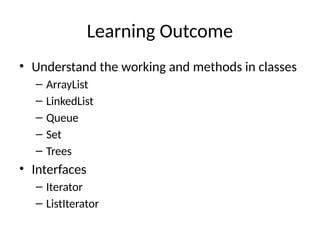
Learning Outcome
• Understandthe working and methods in classes
– ArrayList
– LinkedList
– Queue
– Set
– Trees
• Interfaces
– Iterator
– ListIterator
3.
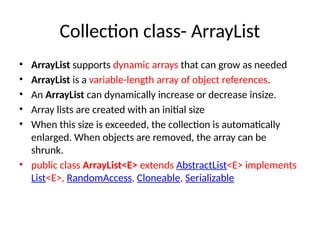
Collection class- ArrayList
•ArrayList supports dynamic arrays that can grow as needed
• ArrayList is a variable-length array of object references.
• An ArrayList can dynamically increase or decrease insize.
• Array lists are created with an initial size
• When this size is exceeded, the collection is automatically
enlarged. When objects are removed, the array can be
shrunk.
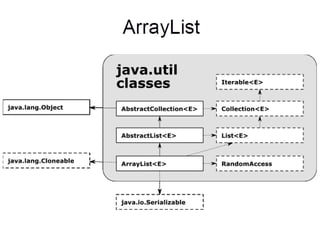
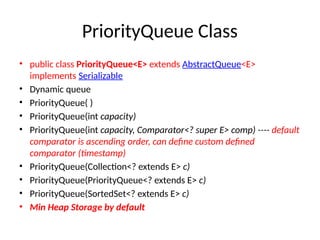
• public class ArrayList<E> extends AbstractList<E> implements
List<E>, RandomAccess, Cloneable, Serializable
Original List: [India,China, US, Germany,
Bhutan]
After add: [India, China, US, SriLanka,
Germany, Bhutan]
After remove: [India, US, SriLanka,
Bhutan]
alist.size() 0
alist.size() 5
ArrayList
7.
After Sort: [Bhutan,India, SriLanka, US]
After reverse: [US, SriLanka, India,
Bhutan]
Using get(): India
After subList: [SriLanka, India]
After set: [Nepal, India]
After Combine: [US, SriLanka, India,
Bhutan, Nepal, India]
8.
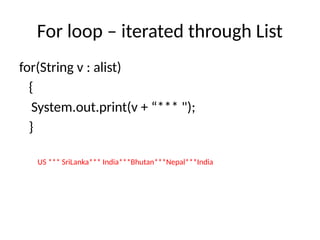
For loop –iterated through List
for(String v : alist)
{
System.out.print(v + “*** ");
}
US *** SriLanka*** India***Bhutan***Nepal***India
9.
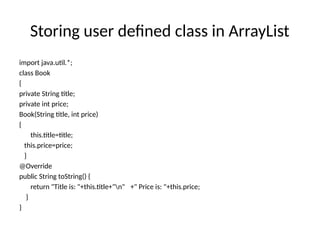
Storing user definedclass in ArrayList
import java.util.*;
class Book
{
private String title;
private int price;
Book(String title, int price)
{
this.title=title;
this.price=price;
}
@Override
public String toString() {
return "Title is: "+this.title+"n" +" Price is: "+this.price;
}
}
10.
Storing user definedclass in ArrayList
class BookList {
public static void main(String args[]) {
ArrayList<Book> al= new ArrayList<Book>();
al.add(new Book("Java Fundamentals", 340));
al.add(new Book("Data Structure", 140));
al.add(new Book("Python Programming", 320));
for (Book tmp: al)
System.out.println(tmp);
}
}
11.
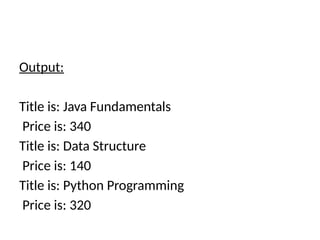
Output:
Title is: JavaFundamentals
Price is: 340
Title is: Data Structure
Price is: 140
Title is: Python Programming
Price is: 320
12.
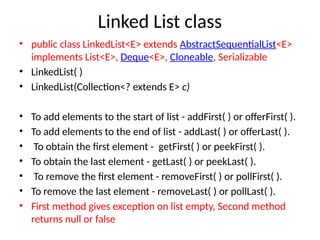
Linked List class
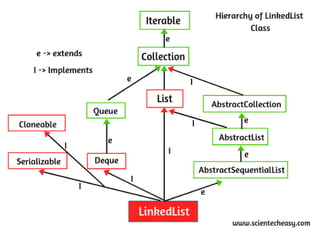
•public class LinkedList<E> extends AbstractSequentialList<E>
implements List<E>, Deque<E>, Cloneable, Serializable
• LinkedList( )
• LinkedList(Collection<? extends E> c)
• To add elements to the start of list - addFirst( ) or offerFirst( ).
• To add elements to the end of list - addLast( ) or offerLast( ).
• To obtain the first element - getFirst( ) or peekFirst( ).
• To obtain the last element - getLast( ) or peekLast( ).
• To remove the first element - removeFirst( ) or pollFirst( ).
• To remove the last element - removeLast( ) or pollLast( ).
• First method gives exception on list empty, Second method
returns null or false
14.
LinkedList class
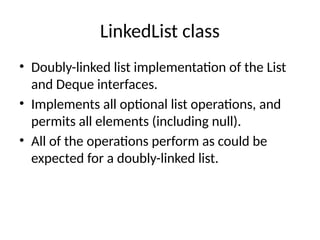
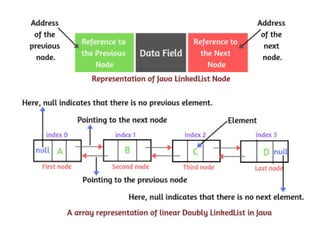
• Doubly-linkedlist implementation of the List
and Deque interfaces.
• Implements all optional list operations, and
permits all elements (including null).
• All of the operations perform as could be
expected for a doubly-linked list.
16.
Operations
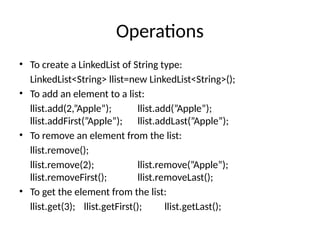
• To createa LinkedList of String type:
LinkedList<String> llist=new LinkedList<String>();
• To add an element to a list:
llist.add(2,”Apple”); llist.add(”Apple”);
llist.addFirst(”Apple”); llist.addLast(”Apple”);
• To remove an element from the list:
llist.remove();
llist.remove(2); llist.remove(”Apple”);
llist.removeFirst(); llist.removeLast();
• To get the element from the list:
llist.get(3); llist.getFirst(); llist.getLast();
17.
Operations
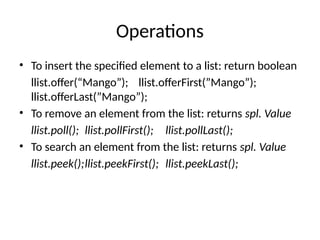
• To insertthe specified element to a list: return boolean
llist.offer(“Mango”); llist.offerFirst(”Mango”);
llist.offerLast(”Mango”);
• To remove an element from the list: returns spl. Value
llist.poll(); llist.pollFirst(); llist.pollLast();
• To search an element from the list: returns spl. Value
llist.peek();llist.peekFirst(); llist.peekLast();
18.
LinkedList
import java.util.*;
class LinkListTest
{
publicstatic void main(String args[])
{
LinkedList<String> llist = new LinkedList<String>();
llist.add("Mango");
llist.add("Grapes");
llist.addLast("Orange");
System.out.println("Original List: "+llist);
llist.addFirst("Apple");
System.out.println("After addFirst: "+llist);
llist.add("Kiwi");
System.out.println("After add: "+llist);
System.out.println("Peek First: "+llist.peekFirst());
Original List: [Mango, Grapes, Orange]
After addFirst: [Apple, Mango, Grapes,
Orange]
After add: [Apple, Mango, Grapes, Orange, Kiwi]
Peek First: Apple
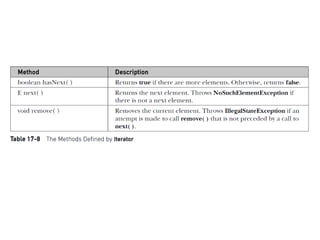
Iterator interface
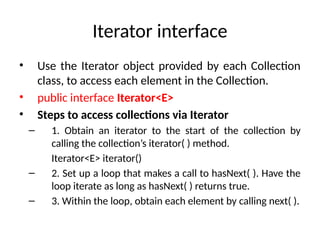
• Usethe Iterator object provided by each Collection
class, to access each element in the Collection.
• public interface Iterator<E>
• Steps to access collections via Iterator
– 1. Obtain an iterator to the start of the collection by
calling the collection’s iterator( ) method.
Iterator<E> iterator()
– 2. Set up a loop that makes a call to hasNext( ). Have the
loop iterate as long as hasNext( ) returns true.
– 3. Within the loop, obtain each element by calling next( ).
22.
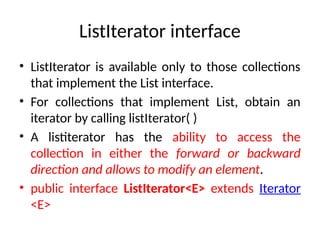
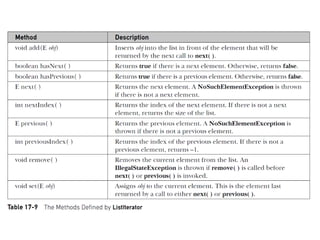
ListIterator interface
• ListIteratoris available only to those collections
that implement the List interface.
• For collections that implement List, obtain an
iterator by calling listIterator( )
• A listiterator has the ability to access the
collection in either the forward or backward
direction and allows to modify an element.
• public interface ListIterator<E> extends Iterator
<E>
24.
import java.util.*;
class ArrIter
{
publicstatic void main(String args[])
{
ArrayList<String> al = new ArrayList<String>();
al.add("C");
al.add("A");
al.add("E");
al.add("B");
al.add("D");
al.add("F");
System.out.print("Original contents of al: ");
Iterator<String> itr = al.iterator();
while(itr.hasNext()) {
String element = itr.next();
System.out.print(element + " ");
}
Original contents of al: C A E B D F
25.
System.out.println(“Original list”+al);
ListIterator<String> litr= al.listIterator();
while(litr.hasNext()) {
String element = litr.next();
litr.set(element + "+");
}
System.out.println(“Modified list ”+al);
System.out.print("Modified list backwards: ");
while(litr.hasPrevious()) {
String element = litr.previous();
System.out.print(element + " ");
}
} //main
} //class
Modified list [C+, A+, E+, B+, D+, F+]
Original list C A E B D F
Modified list backwards:
F+ D+ B+ E+ A+ C+
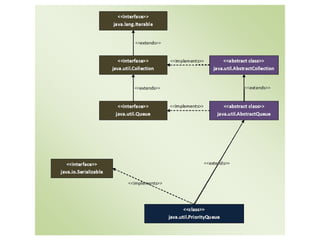
PriorityQueue
import java.util.*;
public classPriorityQueueDemo {
public static void main(String args[])
{
// Creating an empty PriorityQueue
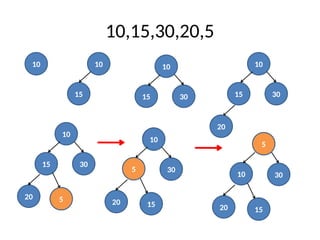
PriorityQueue<Integer> queue = new PriorityQueue<Integer>();
// Use add() method to add elements into the Queue
queue.add(10);
queue.add(15);
queue.add(30);
queue.add(20);
queue.add(5);
queue.add(22);
queue.add(3);
queue.add(50);
queue.add(18);
System.out.println("PriorityQueue: " + queue);
}
}
32.
PriorityQueue
import java.util.*;
public classPriorityQueueDemo {
public static void main(String args[])
{
// Creating an empty PriorityQueue
PriorityQueue<Integer> queue = new PriorityQueue<Integer>();
// Use add() method to add elements into the Queue
queue.add(10);
queue.add(15);
queue.add(30);
queue.add(20);
queue.add(5);
queue.add(22);
queue.add(3);
queue.add(50);
queue.add(18);
System.out.println("PriorityQueue: " + queue);
}
}
PriorityQueue: [3, 10, 5, 18, 15, 30, 22, 50, 20]
33.
Operations
import java.util.*;
public classExample
{
public static void main(String args[])
{
// Creating empty priority queue
PriorityQueue<String> pQueue =
new PriorityQueue<String>();
// Adding items to the pQueue using add()
pQueue.add("C");
pQueue.add("Python");
pQueue.add("C++");
pQueue.add("Java");
System.out.println("Elements in Priority Queue : "+pQueue);
// Printing the most priority element
System.out.println("Head value using peek function:"
+ pQueue.peek());
// Printing all elements
System.out.println("The queue elements:");
Iterator itr = pQueue.iterator();
while (itr.hasNext())
System.out.println(itr.next());
Elements in Priority Queue :
[C, Java, C++, Python]
Head value using peek function:C
The queue elements:
C
Java
C++
Python
34.
Operations
// Removing thetop priority element (or head) and
// printing the modified pQueue using poll()
pQueue.poll();
System.out.println("After removing an element" +
"with poll function: " +pQueue);
// Removing Java using remove()
pQueue.remove("Java");
System.out.println("after removing Java with" +
" remove function: "+pQueue);
Iterator<String> itr3 = pQueue.iterator();
// Check if an element is present using contains()
boolean b = pQueue.contains("C");
System.out.println ( "Priority queue contains C " +
"or not?: " + b);
// Getting objects from the queue using toArray()
// in an array and print the array
Object[] arr = pQueue.toArray();
System.out.println ( "Value in array: ");
for (int i = 0; i<arr.length; i++)
System.out.println ( "Value: " + arr[i].toString()) ;
}
}
After removing an element with
poll function: [C++, Java, Python]
after removing Java with remove function:
[C++, Python]
Priority queue contains C or not?: false
Value in array:
Value: C++
Value: Python
35.
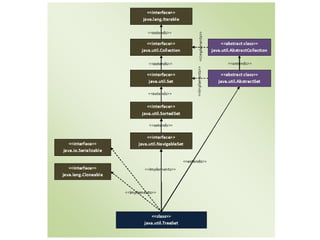
TreeSet Class
• publicclass TreeSet<E> extends AbstractSet<E>
implements NavigableSet<E>, Cloneable,
Serializable
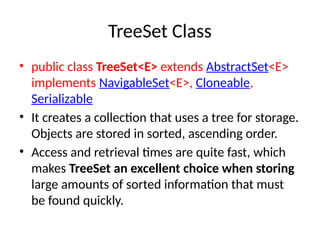
• It creates a collection that uses a tree for storage.
Objects are stored in sorted, ascending order.
• Access and retrieval times are quite fast, which
makes TreeSet an excellent choice when storing
large amounts of sorted information that must
be found quickly.
37.
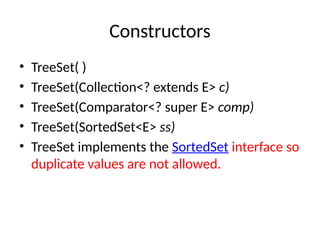
Constructors
• TreeSet( )
•TreeSet(Collection<? extends E> c)
• TreeSet(Comparator<? super E> comp)
• TreeSet(SortedSet<E> ss)
• TreeSet implements the SortedSet interface so
duplicate values are not allowed.
38.
TreeSet
import java.util.TreeSet;
public classTreeSetExample
{ public static void main(String args[]) {
// TreeSet of String Type
TreeSet<String> tset = new TreeSet<String>();
// Adding elements to TreeSet<String>
tset.add("ABC");
tset.add("String");
tset.add("Test");
tset.add("Pen");
tset.add("Ink");
tset.add("Jack");
tset.add("Pen"); // no error. Duplicate value is not inserted
//Displaying TreeSet
System.out.println(tset);
} }
[ABC, Ink, Jack, Pen, String, Test]
39.
System.out.println(tset);
System.out.println("The first elementis: " + tset.first());
// first element is removed
System.out.println("First lowest element " +
"removed is : " + tset.pollFirst()); //pollLast removes last highestelement
System.out.println("After removing element" +
" from TreeSet: " + tset);
System.out.println(tset.lower("SSN")); //< Pen
System.out.println(tset.lower("String")); //< Pen
System.out.println(tset.floor("String")); //<= String
System.out.println(tset.ceiling("String")); //>= String
System.out.println(tset.higher("String")); //> Test
System.out.println(tset.descendingSet()); // [Test, String, Pen, Jack, Ink]
System.out.println(tset.headSet("Pen")); // all elements < [Ink, Jack]
System.out.println(tset.tailSet("Pen")); //all elements >= [Pen, String, Test]
System.out.println(tset.subSet("Jack","String")); //[Jack, Pen]
[ABC, Ink, Jack, Pen, String, Test]
The first element is: ABC
First lowest element removed is : ABC
After removing element from TreeSet:
[Ink, Jack, Pen, String, Test]
![ArrayList- methods
• ArrayList( )
• ArrayList(Collection<? extends E> c)
• ArrayList(int capacity)
• void ensureCapacity(int cap) – to increase
capacity manually to avoid reallocations
• void trimToSize( ) – to reduce size manually
• object[ ] toArray( )
• <T> T[ ] toArray(T array[ ])](https://image.slidesharecdn.com/5-2-collectionimplementations-250313043155-c484759c/85/Collection-implementation-classes-Arraylist-linkedlist-Stack-5-320.jpg)
![Original List: [India, China, US, Germany,
Bhutan]
After add: [India, China, US, SriLanka,
Germany, Bhutan]
After remove: [India, US, SriLanka,
Bhutan]
alist.size() 0
alist.size() 5
ArrayList](https://image.slidesharecdn.com/5-2-collectionimplementations-250313043155-c484759c/85/Collection-implementation-classes-Arraylist-linkedlist-Stack-6-320.jpg)
![After Sort: [Bhutan, India, SriLanka, US]
After reverse: [US, SriLanka, India,
Bhutan]
Using get(): India
After subList: [SriLanka, India]
After set: [Nepal, India]
After Combine: [US, SriLanka, India,
Bhutan, Nepal, India]](https://image.slidesharecdn.com/5-2-collectionimplementations-250313043155-c484759c/85/Collection-implementation-classes-Arraylist-linkedlist-Stack-7-320.jpg)
![Storing user defined class in ArrayList
class BookList {
public static void main(String args[]) {
ArrayList<Book> al= new ArrayList<Book>();
al.add(new Book("Java Fundamentals", 340));
al.add(new Book("Data Structure", 140));
al.add(new Book("Python Programming", 320));
for (Book tmp: al)
System.out.println(tmp);
}
}](https://image.slidesharecdn.com/5-2-collectionimplementations-250313043155-c484759c/85/Collection-implementation-classes-Arraylist-linkedlist-Stack-10-320.jpg)
![LinkedList
import java.util.*;
class LinkListTest
{
public static void main(String args[])
{
LinkedList<String> llist = new LinkedList<String>();
llist.add("Mango");
llist.add("Grapes");
llist.addLast("Orange");
System.out.println("Original List: "+llist);
llist.addFirst("Apple");
System.out.println("After addFirst: "+llist);
llist.add("Kiwi");
System.out.println("After add: "+llist);
System.out.println("Peek First: "+llist.peekFirst());
Original List: [Mango, Grapes, Orange]
After addFirst: [Apple, Mango, Grapes,
Orange]
After add: [Apple, Mango, Grapes, Orange, Kiwi]
Peek First: Apple](https://image.slidesharecdn.com/5-2-collectionimplementations-250313043155-c484759c/85/Collection-implementation-classes-Arraylist-linkedlist-Stack-18-320.jpg)
![System.out.println(llist);
System.out.println("Poll Last: "+llist.pollLast());
System.out.println("Add Banana: “+llist.offerFirst("Banana"));
System.out.println("offFir, pollLast: "+llist);
llist.removeLast();
System.out.println("After removeLast: "+llist);
ListIterator<String> litr = llist.listIterator(2);
while(litr.hasNext()) {
String element = litr.next();
litr.set(element + "+");
}
System.out.println("Modified List: "+llist);
for(String s:llist)
{ System.out.print(s+”---”); }
} //main
}//class
[Apple, Mango, Grapes, Orange, Kiwi]
Poll Last: Kiwi
Add Banana: true
offFir, pollLast: [Banana, Apple, Mango,
Grapes, Orange]
After removeLast: [Banana, Apple,
Mango, Grapes]
Modified List: [Banana, Apple,
Mango+, Grapes+]
Banana---Apple---Mango+---Grapes+---](https://image.slidesharecdn.com/5-2-collectionimplementations-250313043155-c484759c/85/Collection-implementation-classes-Arraylist-linkedlist-Stack-19-320.jpg)
![import java.util.*;
class ArrIter
{
public static void main(String args[])
{
ArrayList<String> al = new ArrayList<String>();
al.add("C");
al.add("A");
al.add("E");
al.add("B");
al.add("D");
al.add("F");
System.out.print("Original contents of al: ");
Iterator<String> itr = al.iterator();
while(itr.hasNext()) {
String element = itr.next();
System.out.print(element + " ");
}
Original contents of al: C A E B D F](https://image.slidesharecdn.com/5-2-collectionimplementations-250313043155-c484759c/85/Collection-implementation-classes-Arraylist-linkedlist-Stack-24-320.jpg)
![System.out.println(“Original list”+al);
ListIterator<String> litr = al.listIterator();
while(litr.hasNext()) {
String element = litr.next();
litr.set(element + "+");
}
System.out.println(“Modified list ”+al);
System.out.print("Modified list backwards: ");
while(litr.hasPrevious()) {
String element = litr.previous();
System.out.print(element + " ");
}
} //main
} //class
Modified list [C+, A+, E+, B+, D+, F+]
Original list C A E B D F
Modified list backwards:
F+ D+ B+ E+ A+ C+](https://image.slidesharecdn.com/5-2-collectionimplementations-250313043155-c484759c/85/Collection-implementation-classes-Arraylist-linkedlist-Stack-25-320.jpg)
![PriorityQueue
import java.util.*;
public class PriorityQueueDemo {
public static void main(String args[])
{
// Creating an empty PriorityQueue
PriorityQueue<Integer> queue = new PriorityQueue<Integer>();
// Use add() method to add elements into the Queue
queue.add(10);
queue.add(15);
queue.add(30);
queue.add(20);
queue.add(5);
System.out.println("PriorityQueue: " + queue);
}
}
PriorityQueue: [5, 10, 30, 20, 15]](https://image.slidesharecdn.com/5-2-collectionimplementations-250313043155-c484759c/85/Collection-implementation-classes-Arraylist-linkedlist-Stack-29-320.jpg)
![PriorityQueue
import java.util.*;
public class PriorityQueueDemo {
public static void main(String args[])
{
// Creating an empty PriorityQueue
PriorityQueue<Integer> queue = new PriorityQueue<Integer>();
// Use add() method to add elements into the Queue
queue.add(10);
queue.add(15);
queue.add(30);
queue.add(20);
queue.add(5);
queue.add(22);
queue.add(3);
queue.add(50);
queue.add(18);
System.out.println("PriorityQueue: " + queue);
}
}](https://image.slidesharecdn.com/5-2-collectionimplementations-250313043155-c484759c/85/Collection-implementation-classes-Arraylist-linkedlist-Stack-31-320.jpg)
![PriorityQueue
import java.util.*;
public class PriorityQueueDemo {
public static void main(String args[])
{
// Creating an empty PriorityQueue
PriorityQueue<Integer> queue = new PriorityQueue<Integer>();
// Use add() method to add elements into the Queue
queue.add(10);
queue.add(15);
queue.add(30);
queue.add(20);
queue.add(5);
queue.add(22);
queue.add(3);
queue.add(50);
queue.add(18);
System.out.println("PriorityQueue: " + queue);
}
}
PriorityQueue: [3, 10, 5, 18, 15, 30, 22, 50, 20]](https://image.slidesharecdn.com/5-2-collectionimplementations-250313043155-c484759c/85/Collection-implementation-classes-Arraylist-linkedlist-Stack-32-320.jpg)
![Operations
import java.util.*;
public class Example
{
public static void main(String args[])
{
// Creating empty priority queue
PriorityQueue<String> pQueue =
new PriorityQueue<String>();
// Adding items to the pQueue using add()
pQueue.add("C");
pQueue.add("Python");
pQueue.add("C++");
pQueue.add("Java");
System.out.println("Elements in Priority Queue : "+pQueue);
// Printing the most priority element
System.out.println("Head value using peek function:"
+ pQueue.peek());
// Printing all elements
System.out.println("The queue elements:");
Iterator itr = pQueue.iterator();
while (itr.hasNext())
System.out.println(itr.next());
Elements in Priority Queue :
[C, Java, C++, Python]
Head value using peek function:C
The queue elements:
C
Java
C++
Python](https://image.slidesharecdn.com/5-2-collectionimplementations-250313043155-c484759c/85/Collection-implementation-classes-Arraylist-linkedlist-Stack-33-320.jpg)
![Operations
// Removing the top priority element (or head) and
// printing the modified pQueue using poll()
pQueue.poll();
System.out.println("After removing an element" +
"with poll function: " +pQueue);
// Removing Java using remove()
pQueue.remove("Java");
System.out.println("after removing Java with" +
" remove function: "+pQueue);
Iterator<String> itr3 = pQueue.iterator();
// Check if an element is present using contains()
boolean b = pQueue.contains("C");
System.out.println ( "Priority queue contains C " +
"or not?: " + b);
// Getting objects from the queue using toArray()
// in an array and print the array
Object[] arr = pQueue.toArray();
System.out.println ( "Value in array: ");
for (int i = 0; i<arr.length; i++)
System.out.println ( "Value: " + arr[i].toString()) ;
}
}
After removing an element with
poll function: [C++, Java, Python]
after removing Java with remove function:
[C++, Python]
Priority queue contains C or not?: false
Value in array:
Value: C++
Value: Python](https://image.slidesharecdn.com/5-2-collectionimplementations-250313043155-c484759c/85/Collection-implementation-classes-Arraylist-linkedlist-Stack-34-320.jpg)
![TreeSet
import java.util.TreeSet;
public class TreeSetExample
{ public static void main(String args[]) {
// TreeSet of String Type
TreeSet<String> tset = new TreeSet<String>();
// Adding elements to TreeSet<String>
tset.add("ABC");
tset.add("String");
tset.add("Test");
tset.add("Pen");
tset.add("Ink");
tset.add("Jack");
tset.add("Pen"); // no error. Duplicate value is not inserted
//Displaying TreeSet
System.out.println(tset);
} }
[ABC, Ink, Jack, Pen, String, Test]](https://image.slidesharecdn.com/5-2-collectionimplementations-250313043155-c484759c/85/Collection-implementation-classes-Arraylist-linkedlist-Stack-38-320.jpg)
![System.out.println(tset);
System.out.println("The first element is: " + tset.first());
// first element is removed
System.out.println("First lowest element " +
"removed is : " + tset.pollFirst()); //pollLast removes last highestelement
System.out.println("After removing element" +
" from TreeSet: " + tset);
System.out.println(tset.lower("SSN")); //< Pen
System.out.println(tset.lower("String")); //< Pen
System.out.println(tset.floor("String")); //<= String
System.out.println(tset.ceiling("String")); //>= String
System.out.println(tset.higher("String")); //> Test
System.out.println(tset.descendingSet()); // [Test, String, Pen, Jack, Ink]
System.out.println(tset.headSet("Pen")); // all elements < [Ink, Jack]
System.out.println(tset.tailSet("Pen")); //all elements >= [Pen, String, Test]
System.out.println(tset.subSet("Jack","String")); //[Jack, Pen]
[ABC, Ink, Jack, Pen, String, Test]
The first element is: ABC
First lowest element removed is : ABC
After removing element from TreeSet:
[Ink, Jack, Pen, String, Test]](https://image.slidesharecdn.com/5-2-collectionimplementations-250313043155-c484759c/85/Collection-implementation-classes-Arraylist-linkedlist-Stack-39-320.jpg)