Java.util
The Collection Framework
Module-1: Chapter – 17
Syllabus Module-1
The Collections Framework (java.util):
• Collections overview,
• Collection Interfaces,
• The Collection classes
- Array List, Linked List, Hash Set, Tree Set, Priority Queue, Array Deque.
• Accessing a collection Via an Iterator
• Storing User Defined Classes in Collections
• The Random Access Interface
• Working With Maps
• Comparators
• The Collection Algorithms
• Arrays
• The legacy Classes and Interfaces
• Parting Thoughts on Collections.
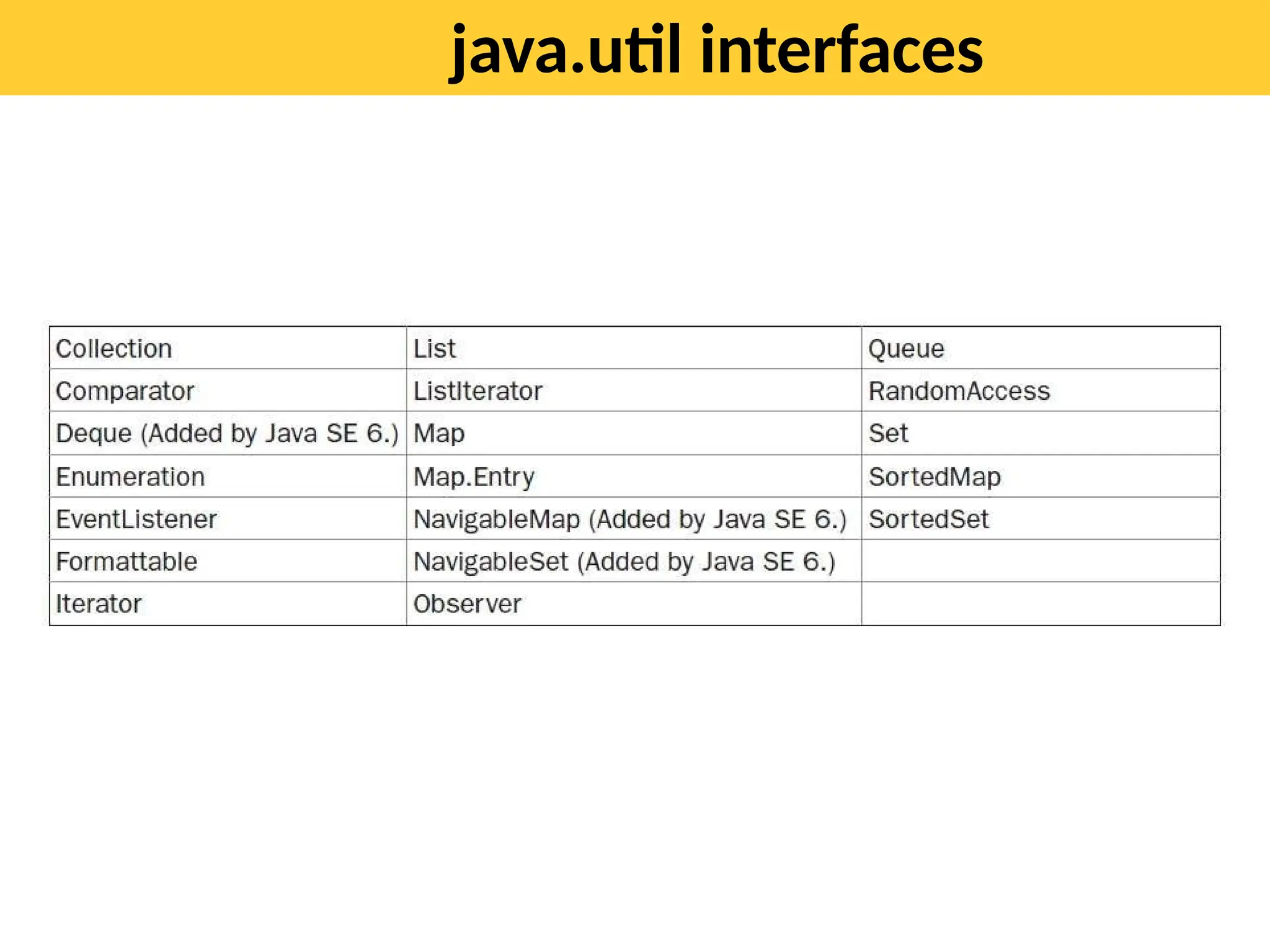
java.util interfaces
The Collection Interfaces
• The Collection Framework defines several interfaces.
• Beginning with the collection interfaces is necessary because they
determine the fundamental nature of the collection classes.
• The interfaces that underpin collections are summarized in the
following table:
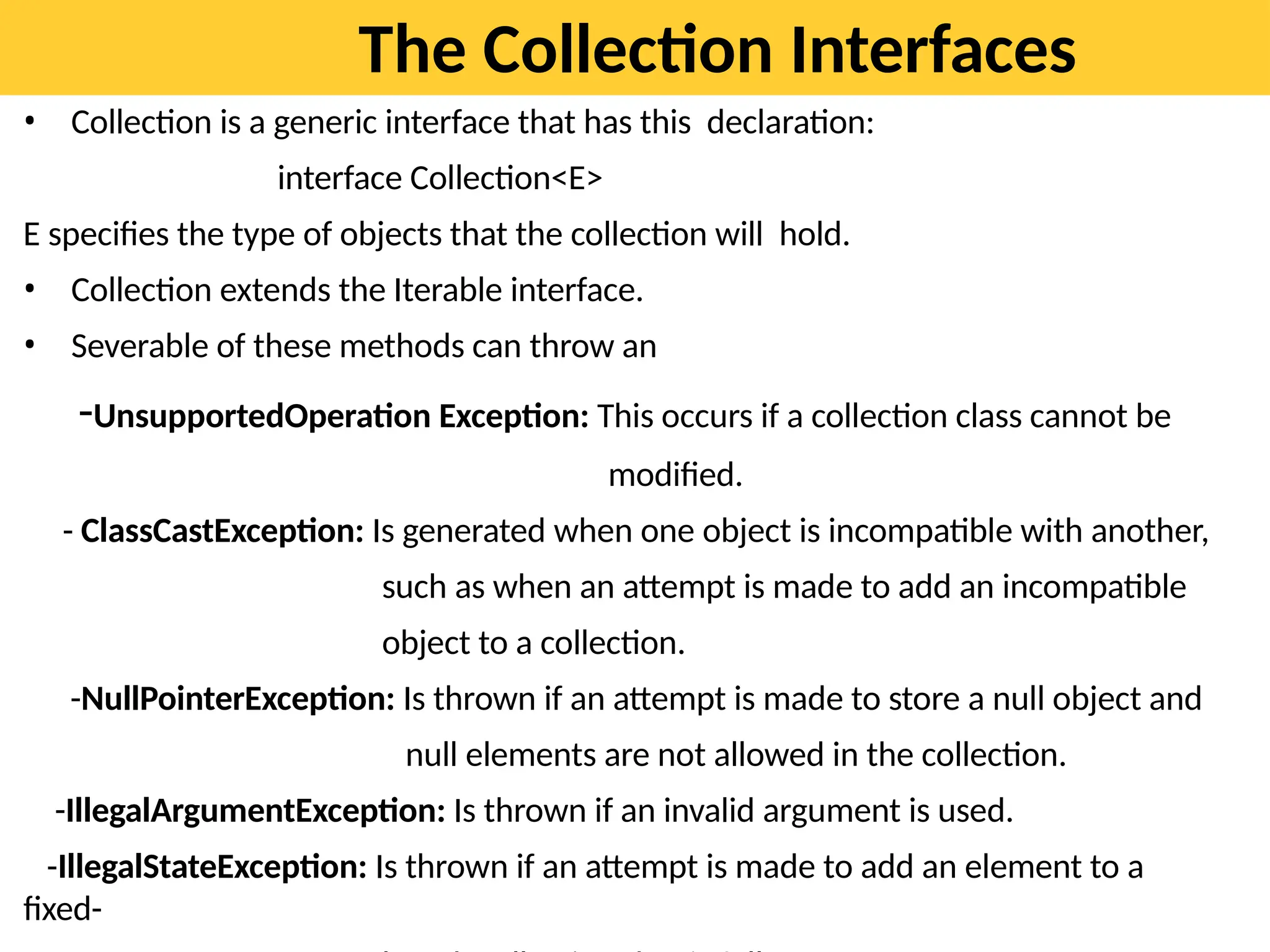
The Collection Interfaces
• Collection is a generic interface that has this declaration:
interface Collection<E>
E specifies the type of objects that the collection will hold.
• Collection extends the Iterable interface.
• Severable of these methods can throw an
-UnsupportedOperation Exception: This occurs if a collection class cannot be
modified.
- ClassCastException: Is generated when one object is incompatible with another,
such as when an attempt is made to add an incompatible
object to a collection.
-NullPointerException: Is thrown if an attempt is made to store a null object and
null elements are not allowed in the collection.
-IllegalArgumentException: Is thrown if an invalid argument is used.
-IllegalStateException: Is thrown if an attempt is made to add an element to a
fixed-
import java.util.*;
public class ListExample1{
public static void main(String args[]){
//Creating a List
List<String> list=new ArrayList<String>();
//Adding elements in the List
list.add("Mango");
list.add("Apple");
list.add("Banana");
list.add("Grapes");
//Iterating the List element using for-each loop
for(String fruit:list)
System.out.println(fruit);
}
}
•Java HashSet class is used to create a collection
that uses a hash table for storage. It inherits
the AbstractSet class and implements Set
interface.
•HashSet stores the elements by using a
mechanism called hashing.
•HashSet contains unique elements
only.
•HashSet allows null value.
•HashSet class is non synchronized.
•HashSet doesn't maintain the insertion order.
Here, elements are inserted on the basis of their
hashcode.
HashSet
import java.util.*;
class HashSet1{
public static void main(String args[]){
//Creating HashSet and adding elements
HashSet<String> set=new HashSet();
set.add("One");
set.add("Two");
set.add("Three");
set.add("Four");
set.add("Five"); Iterator<String>
i=set.iterator();
while(i.hasNext())
{
System.out.println(i.next());
}
}
}
OUTPU
T
Five
One
Four
Two
Hashtable class
Java Hashtable class implements a hashtable, which maps
keys to values. It inherits Dictionary class and implements
the Map interface.
A Hashtable is an array of a list. Each list is known as a
bucket. The position of the bucket is identified by calling
the hashcode() method. A Hashtable contains values based
on the key.
Java Hashtable class contains unique elements.
Java Hashtable class doesn't allow null key or value.
Java Hashtable class is synchronized.
import java.util.*;
class
Hashtable1{
public static void
main(String
args[]){
Hashtable<Integer,String> hm=new Hashtable<Integer,String>();
hm.put(100,"Amit");
hm.put(102,"Ravi");
hm.put(101,"Vijay");
hm.put(103,"Rahul");
for(Map.Entry m:hm.entrySet()){
System.out.println(m.getKey()+" "+m.getValue());
}
}
} Output:
103
Rahul
102 Ravi
101 Vijay
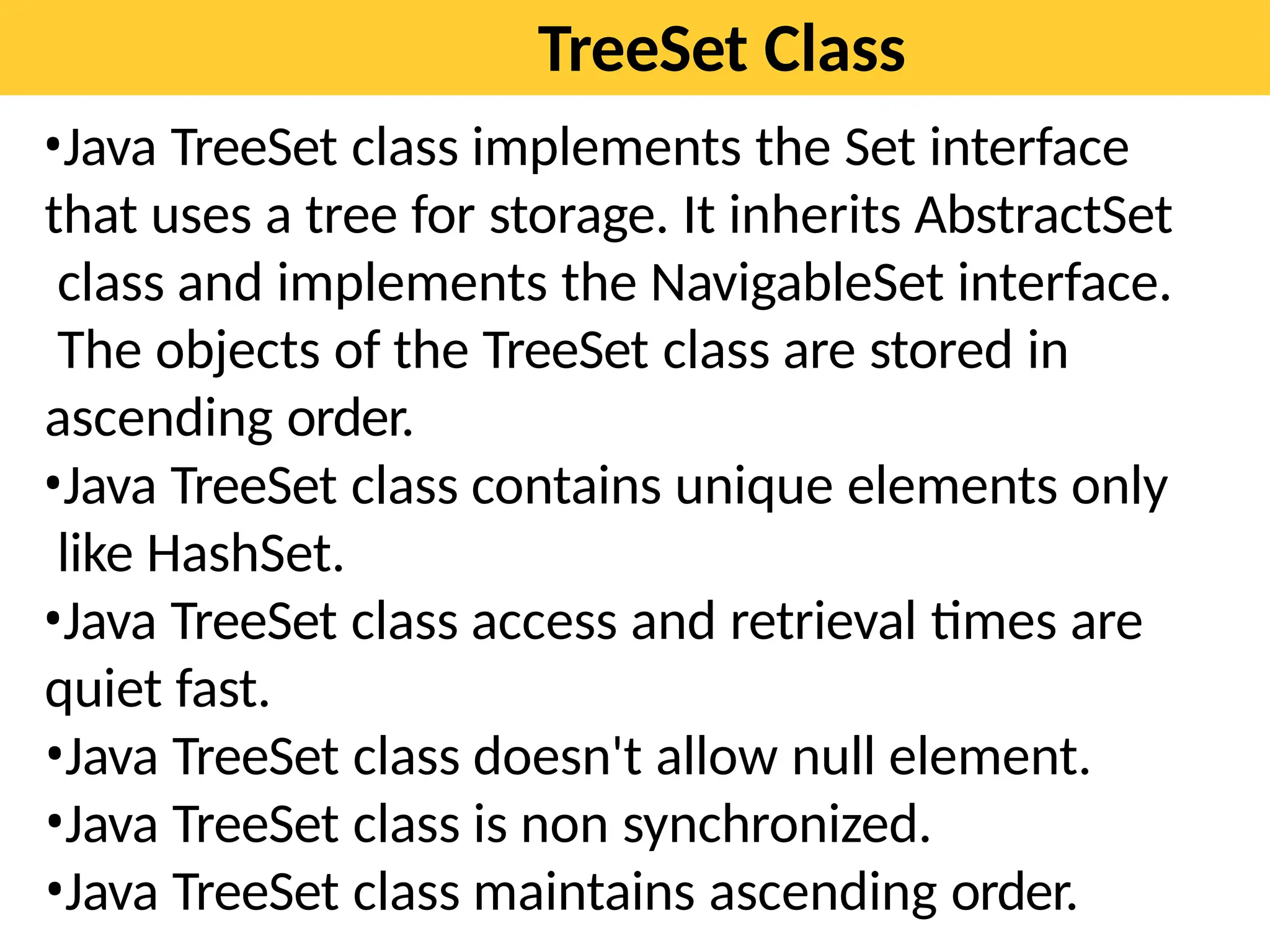
TreeSet Class
•Java TreeSet class implements the Set interface
that uses a tree for storage. It inherits AbstractSet
class and implements the NavigableSet interface.
The objects of the TreeSet class are stored in
ascending order.
•Java TreeSet class contains unique elements only
like HashSet.
•Java TreeSet class access and retrieval times are
quiet fast.
•Java TreeSet class doesn't allow null element.
•Java TreeSet class is non synchronized.
•Java TreeSet class maintains ascending order.
Contd…
TreeSet is a generic class that has this declaration:
class TreeSet<E>
TreeSet has the following constructors:
TreeSet( )
TreeSet(Collection<? extends E> c)
TreeSet(Comparator<? super E> comp)
TreeSet(SortedSet<E> ss)
import java.util.*;
public class TreeSetDemo {
public static void main(String args[]) {
TreeSet<String> ts = new TreeSet<String>();
ts.add("C");
ts.add("A");
ts.add("B");
ts.add("E");
ts.add("F");
ts.add("D");
System.out.println(ts);
}
} Output
// Java program to demonstrate TreeSet
import java.util.*;
class TreeSetExample {
public static void main(String[]
args)
{
TreeSet<Integer> ts1 =
new TreeSet<Integer>();
// Elements are added using add() method
ts1.add(5);
ts1.add(11);
ts1.add(1);
System.out.println(ts1);
}
}
TreeSet implements the NavigableSet interface.
Can use the methods defined by NavigableSet interface to retrieve elements of a
TreeSet.
import java.util.*;
public class TreeSetDemo {
public static void main(String args[]) {
TreeSet<String> ts = new TreeSet<String>();
ts.add("C");
ts.add("A");
ts.add("B");
ts.add("E");
ts.add("F");
ts.add("D");
System.out.println(ts);
System.out.println(ts.subSet("C", "F"));
}
}
PriorityQueue Class
•A PriorityQueue is used when the objects are
supposed to be processed based on the priority.
•It is known that a Queue follows the First-In-First-
Out algorithm, but sometimes the elements of the
queue are needed to be processed according to the
priority, that’s when the PriorityQueue comes into
play.
•The PriorityQueue is based on the priority heap.
•The elements of the priority queue are ordered
according to the natural ordering, or by a
Comparator provided at queue construction time,
depending on which constructor is used.
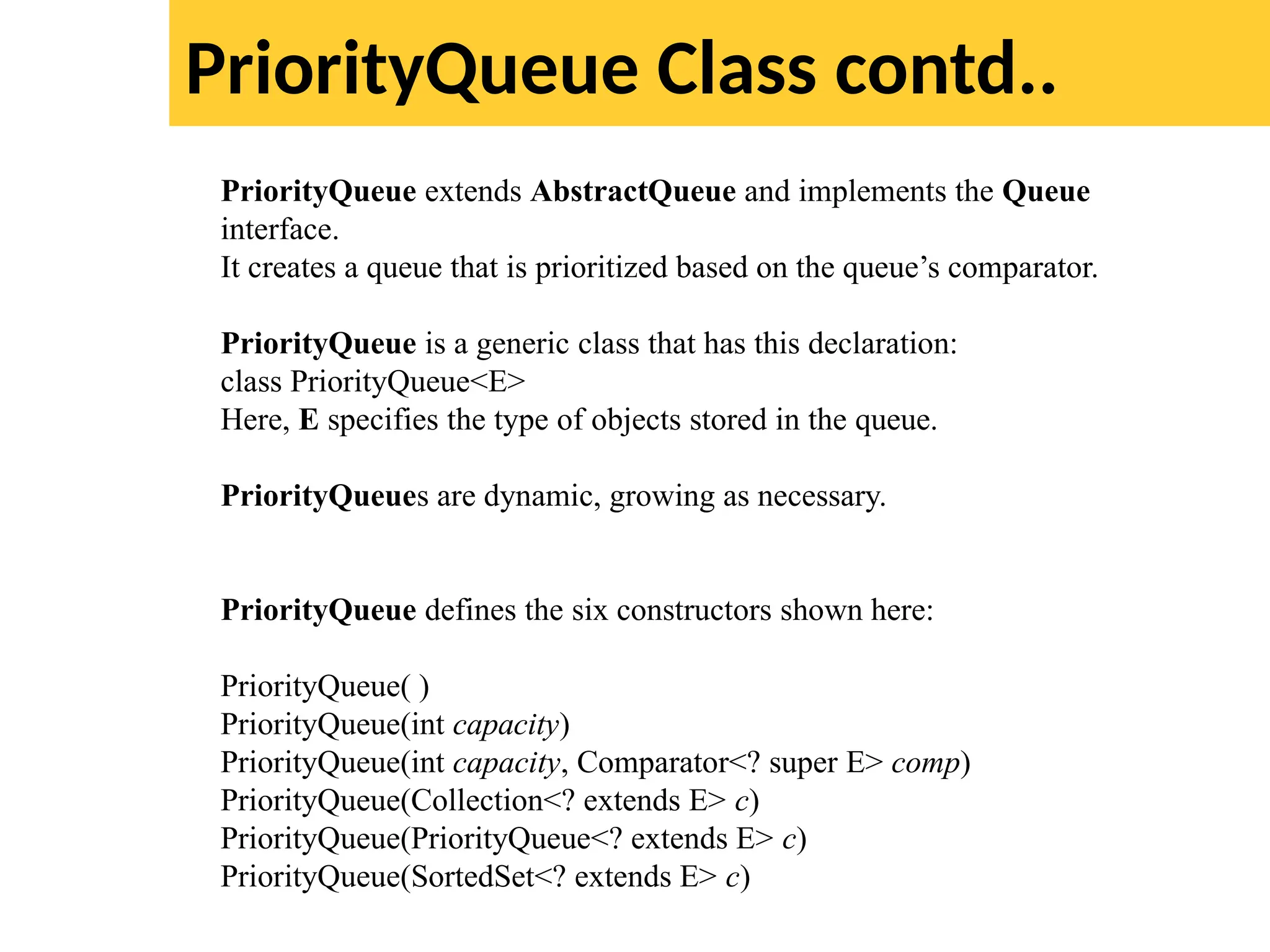
PriorityQueue Class contd..
PriorityQueue extends AbstractQueue and implements the Queue
interface.
It creates a queue that is prioritized based on the queue’s comparator.
PriorityQueue is a generic class that has this declaration:
class PriorityQueue<E>
Here, E specifies the type of objects stored in the queue.
PriorityQueues are dynamic, growing as necessary.
PriorityQueue defines the six constructors shown here:
PriorityQueue( )
PriorityQueue(int capacity)
PriorityQueue(int capacity, Comparator<? super E> comp)
PriorityQueue(Collection<? extends E> c)
PriorityQueue(PriorityQueue<? extends E> c)
PriorityQueue(SortedSet<? extends E> c)
import java.util.*;
public class PriorityQueueDemo {
public static void main(String args[])
{
// Creating empty priority queue
PriorityQueue<Integer> pQueue = new PriorityQueue<Integer>();
// Adding items to the pQueue using add()
pQueue.add(10);
pQueue.add(20);
pQueue.add(15);
// Printing the
top element of
PriorityQueue
System.out.printl
n(pQueue.peek()
);
// Printing the
top element and
removing it
ArrayDeque Class
The ArrayDeque in Java provides a way to apply resizable-array in
addition to the implementation of the Deque interface. It is also
known as Array Double Ended Queue or Array Deck. This is a
special kind of array that grows and allows users to add or remove
an element from both sides of the queue.
Array deques have no capacity restrictions and they grow as
necessary to support usage.
They are not thread-safe which means that in the absence of
external synchronization, ArrayDeque does not support concurrent
access by multiple threads.
Null elements are prohibited in the ArrayDeque.
ArrayDeque class is likely to be faster than Stack when used as a
stack.
ArrayDeque class is likely to be faster than LinkedList when used as
a queue.
Java SE 6 added the ArrayDeque class, which extends AbstractCollection and
implements the Deque interface.
It adds no methods of its own.
ArrayDeque creates a dynamic array and has no capacity restrictions.
ArrayDeque is a generic class that has this declaration:
class ArrayDeque<E>
Here, E specifies the type of objects stored in the collection.
ArrayDeque defines the following constructors:
ArrayDeque( )
ArrayDeque(int size)
ArrayDeque(Collection<? extends E> c)
//Demonstrate ArrayQeque
import java.util.*;
public class ArrayDequeDemo {
public static void main(String args[]) {
//Create a tree set
ArrayDeque<String> adq = new ArrayDeque<String>();
//Use an ArrayQeque like a stack
adq.push("A");
adq.push("B");
adq.push("D");
adq.push("E");
adq.push("F");
System.out.print("Popping the stack: ");
while(adq.peek() != null)
System.out.print(adq.pop() + " ");
System.out.println();
}
}
Accessing a collection Via an Iterator:
Before you can access a collection through an iterator, you must obtain one. Each of
the collection classes provides an iterator( ) method that returns an iterator to the start of
the collection.
By using this iterator object, you can access each element in the collection. Element
at a time. In general, to use an iterator to cycle through the contents of a collection,
follow these steps:
1. Obtain an iterator to the start of the collection by calling the collection’s iterator( )
method.
2. Set up a loop that makes a call to hasNext( ). Have the loop iterate as long as
hasNext( )
returns true.
3. Within the loop, obtain each element by calling next( ).
For collections that implement List, you can also obtain an iterator by calling
listIterator( ).
As explained, a list iterator gives you the ability to access the collection in either
t
the forward or backward direction and lets you modify an element.
Otherwise, ListIterator is used just like Iterator.
Using an Iterator
import java.util.*;
public class IteratorDemo {
public static void main(String args[])
{
ArrayList<String> al = new ArrayList<String>();
al.add("C");
al.add("A");
al.add("E");
al.add("B");
al.add("D");
al.add("F");
//use iterator to display contents of al.
System.out.print("Original contents of al: ");
Iterator<String> itr = al.iterator();
while(itr.hasNext()) {
String element = itr.next();
System.out.print(element + " ");
}
System.out.println();
Contd.. Using an Iterator
//Modify objects being iterated.
ListIterator<String> litr = al.listIterator();
while(litr.hasNext()) {
String element = litr.next();
litr.set(element + "+");
}
System.out.print("Modified contents of al: ");
itr = al.iterator();
while(itr.hasNext()) {
String element = itr.next();
System.out.print(element + " ");
}
System.out.println();
//Display the list backwards.
System.out.print("Modified list backwards: ");
while(litr.hasPrevious()) {
String element = litr.previous();
System.out.print(element + " ");
}
System.out.println();
}
}
For-Each Alternative to iterators
For Each loop for iterating through collection:
import java.util.*;
public class ForEachDemo {
public static void main(String args[]) {
ArrayList<Integer> vals = new ArrayList<Integer>();
vals.add(1);
vals.add(2);
vals.add(3);
vals.add(4);
vals.add(5);
//use for loop to display the values.
System.out.print("Original contents of vals: ");
for(int v : vals)
System.out.print(v + " ");
System.out.println();
//sum the values by using a for loop.
int sum = 0;
for(int v : vals) sum += v;
System.out.println("Sum of values: "
+ sum);
Storing User-Defined Classes in Collections
Collections are not limited to the storage of built-in objects.
The power of collections is that they can store any type of object, including
objects of classes that you create.
User defined objects stored in LinkedList to store mailing addresses:
import java.util.*;
class Address {
private String name;
private String street;
private String city;
private String state;
private String code;
Address(String n, String s, String c,
String st, String cd) {
name = n;
street = s;
city = c;
state = st;
code = cd;
}
Contd…
public String toString() {
return name + "n" + street + "n" +
city + " " + state + " " + code;
}
}
class MailList {
public static void main(String args[]) {
LinkedList<Address> ml = new LinkedList<Address>();
ml.add(new Address("J.W. West", "11 Oak Ave", "Urbana", "IL",
"61801"));
ml.add(new Address("Ralph Baker", "1142 Maple Lane", "Mahomet",
"IL", "61853"));
ml.add(new Address("Tom Carlton", "867 Elm St",
"Champaign", "IL", "61820"));
//Display the mailing List.
for(Address element : ml)
System.out.println(element + "n");
System.out.println();
}
}
A
A
A
A
A
A
A
A

Module-1 Updated Collection Framework.pptx

  • 1.
  • 2.
    Syllabus Module-1 The CollectionsFramework (java.util): • Collections overview, • Collection Interfaces, • The Collection classes - Array List, Linked List, Hash Set, Tree Set, Priority Queue, Array Deque. • Accessing a collection Via an Iterator • Storing User Defined Classes in Collections • The Random Access Interface • Working With Maps • Comparators • The Collection Algorithms • Arrays • The legacy Classes and Interfaces • Parting Thoughts on Collections.
  • 3.
  • 4.
    The Collection Interfaces •The Collection Framework defines several interfaces. • Beginning with the collection interfaces is necessary because they determine the fundamental nature of the collection classes. • The interfaces that underpin collections are summarized in the following table:
  • 5.
    The Collection Interfaces •Collection is a generic interface that has this declaration: interface Collection<E> E specifies the type of objects that the collection will hold. • Collection extends the Iterable interface. • Severable of these methods can throw an -UnsupportedOperation Exception: This occurs if a collection class cannot be modified. - ClassCastException: Is generated when one object is incompatible with another, such as when an attempt is made to add an incompatible object to a collection. -NullPointerException: Is thrown if an attempt is made to store a null object and null elements are not allowed in the collection. -IllegalArgumentException: Is thrown if an invalid argument is used. -IllegalStateException: Is thrown if an attempt is made to add an element to a fixed-
  • 6.
    import java.util.*; public classListExample1{ public static void main(String args[]){ //Creating a List List<String> list=new ArrayList<String>(); //Adding elements in the List list.add("Mango"); list.add("Apple"); list.add("Banana"); list.add("Grapes"); //Iterating the List element using for-each loop for(String fruit:list) System.out.println(fruit); } }
  • 7.
    •Java HashSet classis used to create a collection that uses a hash table for storage. It inherits the AbstractSet class and implements Set interface. •HashSet stores the elements by using a mechanism called hashing. •HashSet contains unique elements only. •HashSet allows null value. •HashSet class is non synchronized. •HashSet doesn't maintain the insertion order. Here, elements are inserted on the basis of their hashcode. HashSet
  • 8.
    import java.util.*; class HashSet1{ publicstatic void main(String args[]){ //Creating HashSet and adding elements HashSet<String> set=new HashSet(); set.add("One"); set.add("Two"); set.add("Three"); set.add("Four"); set.add("Five"); Iterator<String> i=set.iterator(); while(i.hasNext()) { System.out.println(i.next()); } } } OUTPU T Five One Four Two
  • 9.
    Hashtable class Java Hashtableclass implements a hashtable, which maps keys to values. It inherits Dictionary class and implements the Map interface. A Hashtable is an array of a list. Each list is known as a bucket. The position of the bucket is identified by calling the hashcode() method. A Hashtable contains values based on the key. Java Hashtable class contains unique elements. Java Hashtable class doesn't allow null key or value. Java Hashtable class is synchronized.
  • 10.
    import java.util.*; class Hashtable1{ public staticvoid main(String args[]){ Hashtable<Integer,String> hm=new Hashtable<Integer,String>(); hm.put(100,"Amit"); hm.put(102,"Ravi"); hm.put(101,"Vijay"); hm.put(103,"Rahul"); for(Map.Entry m:hm.entrySet()){ System.out.println(m.getKey()+" "+m.getValue()); } } } Output: 103 Rahul 102 Ravi 101 Vijay
  • 11.
    TreeSet Class •Java TreeSetclass implements the Set interface that uses a tree for storage. It inherits AbstractSet class and implements the NavigableSet interface. The objects of the TreeSet class are stored in ascending order. •Java TreeSet class contains unique elements only like HashSet. •Java TreeSet class access and retrieval times are quiet fast. •Java TreeSet class doesn't allow null element. •Java TreeSet class is non synchronized. •Java TreeSet class maintains ascending order.
  • 12.
    Contd… TreeSet is ageneric class that has this declaration: class TreeSet<E> TreeSet has the following constructors: TreeSet( ) TreeSet(Collection<? extends E> c) TreeSet(Comparator<? super E> comp) TreeSet(SortedSet<E> ss) import java.util.*; public class TreeSetDemo { public static void main(String args[]) { TreeSet<String> ts = new TreeSet<String>(); ts.add("C"); ts.add("A"); ts.add("B"); ts.add("E"); ts.add("F"); ts.add("D"); System.out.println(ts); } } Output
  • 13.
    // Java programto demonstrate TreeSet import java.util.*; class TreeSetExample { public static void main(String[] args) { TreeSet<Integer> ts1 = new TreeSet<Integer>(); // Elements are added using add() method ts1.add(5); ts1.add(11); ts1.add(1); System.out.println(ts1); } }
  • 14.
    TreeSet implements theNavigableSet interface. Can use the methods defined by NavigableSet interface to retrieve elements of a TreeSet. import java.util.*; public class TreeSetDemo { public static void main(String args[]) { TreeSet<String> ts = new TreeSet<String>(); ts.add("C"); ts.add("A"); ts.add("B"); ts.add("E"); ts.add("F"); ts.add("D"); System.out.println(ts); System.out.println(ts.subSet("C", "F")); } }
  • 15.
    PriorityQueue Class •A PriorityQueueis used when the objects are supposed to be processed based on the priority. •It is known that a Queue follows the First-In-First- Out algorithm, but sometimes the elements of the queue are needed to be processed according to the priority, that’s when the PriorityQueue comes into play. •The PriorityQueue is based on the priority heap. •The elements of the priority queue are ordered according to the natural ordering, or by a Comparator provided at queue construction time, depending on which constructor is used.
  • 16.
    PriorityQueue Class contd.. PriorityQueueextends AbstractQueue and implements the Queue interface. It creates a queue that is prioritized based on the queue’s comparator. PriorityQueue is a generic class that has this declaration: class PriorityQueue<E> Here, E specifies the type of objects stored in the queue. PriorityQueues are dynamic, growing as necessary. PriorityQueue defines the six constructors shown here: PriorityQueue( ) PriorityQueue(int capacity) PriorityQueue(int capacity, Comparator<? super E> comp) PriorityQueue(Collection<? extends E> c) PriorityQueue(PriorityQueue<? extends E> c) PriorityQueue(SortedSet<? extends E> c)
  • 17.
    import java.util.*; public classPriorityQueueDemo { public static void main(String args[]) { // Creating empty priority queue PriorityQueue<Integer> pQueue = new PriorityQueue<Integer>(); // Adding items to the pQueue using add() pQueue.add(10); pQueue.add(20); pQueue.add(15); // Printing the top element of PriorityQueue System.out.printl n(pQueue.peek() ); // Printing the top element and removing it
  • 18.
    ArrayDeque Class The ArrayDequein Java provides a way to apply resizable-array in addition to the implementation of the Deque interface. It is also known as Array Double Ended Queue or Array Deck. This is a special kind of array that grows and allows users to add or remove an element from both sides of the queue. Array deques have no capacity restrictions and they grow as necessary to support usage. They are not thread-safe which means that in the absence of external synchronization, ArrayDeque does not support concurrent access by multiple threads. Null elements are prohibited in the ArrayDeque. ArrayDeque class is likely to be faster than Stack when used as a stack. ArrayDeque class is likely to be faster than LinkedList when used as a queue.
  • 19.
    Java SE 6added the ArrayDeque class, which extends AbstractCollection and implements the Deque interface. It adds no methods of its own. ArrayDeque creates a dynamic array and has no capacity restrictions. ArrayDeque is a generic class that has this declaration: class ArrayDeque<E> Here, E specifies the type of objects stored in the collection. ArrayDeque defines the following constructors: ArrayDeque( ) ArrayDeque(int size) ArrayDeque(Collection<? extends E> c)
  • 20.
    //Demonstrate ArrayQeque import java.util.*; publicclass ArrayDequeDemo { public static void main(String args[]) { //Create a tree set ArrayDeque<String> adq = new ArrayDeque<String>(); //Use an ArrayQeque like a stack adq.push("A"); adq.push("B"); adq.push("D"); adq.push("E"); adq.push("F"); System.out.print("Popping the stack: "); while(adq.peek() != null) System.out.print(adq.pop() + " "); System.out.println(); } }
  • 21.
    Accessing a collectionVia an Iterator: Before you can access a collection through an iterator, you must obtain one. Each of the collection classes provides an iterator( ) method that returns an iterator to the start of the collection. By using this iterator object, you can access each element in the collection. Element at a time. In general, to use an iterator to cycle through the contents of a collection, follow these steps: 1. Obtain an iterator to the start of the collection by calling the collection’s iterator( ) method. 2. Set up a loop that makes a call to hasNext( ). Have the loop iterate as long as hasNext( ) returns true. 3. Within the loop, obtain each element by calling next( ). For collections that implement List, you can also obtain an iterator by calling listIterator( ). As explained, a list iterator gives you the ability to access the collection in either t the forward or backward direction and lets you modify an element. Otherwise, ListIterator is used just like Iterator.
  • 22.
    Using an Iterator importjava.util.*; public class IteratorDemo { public static void main(String args[]) { ArrayList<String> al = new ArrayList<String>(); al.add("C"); al.add("A"); al.add("E"); al.add("B"); al.add("D"); al.add("F"); //use iterator to display contents of al. System.out.print("Original contents of al: "); Iterator<String> itr = al.iterator(); while(itr.hasNext()) { String element = itr.next(); System.out.print(element + " "); } System.out.println();
  • 23.
    Contd.. Using anIterator //Modify objects being iterated. ListIterator<String> litr = al.listIterator(); while(litr.hasNext()) { String element = litr.next(); litr.set(element + "+"); } System.out.print("Modified contents of al: "); itr = al.iterator(); while(itr.hasNext()) { String element = itr.next(); System.out.print(element + " "); } System.out.println(); //Display the list backwards. System.out.print("Modified list backwards: "); while(litr.hasPrevious()) { String element = litr.previous(); System.out.print(element + " "); } System.out.println(); } }
  • 24.
    For-Each Alternative toiterators For Each loop for iterating through collection: import java.util.*; public class ForEachDemo { public static void main(String args[]) { ArrayList<Integer> vals = new ArrayList<Integer>(); vals.add(1); vals.add(2); vals.add(3); vals.add(4); vals.add(5); //use for loop to display the values. System.out.print("Original contents of vals: "); for(int v : vals) System.out.print(v + " "); System.out.println(); //sum the values by using a for loop. int sum = 0; for(int v : vals) sum += v; System.out.println("Sum of values: " + sum);
  • 25.
    Storing User-Defined Classesin Collections Collections are not limited to the storage of built-in objects. The power of collections is that they can store any type of object, including objects of classes that you create. User defined objects stored in LinkedList to store mailing addresses: import java.util.*; class Address { private String name; private String street; private String city; private String state; private String code; Address(String n, String s, String c, String st, String cd) { name = n; street = s; city = c; state = st; code = cd; }
  • 26.
    Contd… public String toString(){ return name + "n" + street + "n" + city + " " + state + " " + code; } } class MailList { public static void main(String args[]) { LinkedList<Address> ml = new LinkedList<Address>(); ml.add(new Address("J.W. West", "11 Oak Ave", "Urbana", "IL", "61801")); ml.add(new Address("Ralph Baker", "1142 Maple Lane", "Mahomet", "IL", "61853")); ml.add(new Address("Tom Carlton", "867 Elm St", "Champaign", "IL", "61820")); //Display the mailing List. for(Address element : ml) System.out.println(element + "n"); System.out.println(); } }
  • 27.
  • 28.
  • 29.
  • 30.
  • 31.
  • 32.
  • 33.
  • 34.