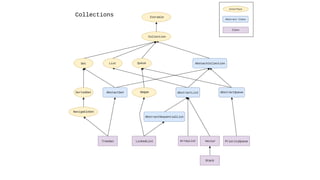
Collections
What are Collections
• Group of Objects treated as a single Object.
• Java provides supports for manipulating collections in the form of
– Collection Interfaces
– Collection Classes
• Collection interfaces provide basic functionalities whereas collection classes provides their
concrete implementation
Collection Classes
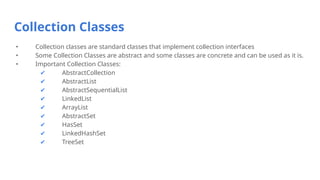
• Collection classes are standard classes that implement collection interfaces
• Some Collection Classes are abstract and some classes are concrete and can be used as it is.
• Important Collection Classes:
✔ AbstractCollection
✔ AbstractList
✔ AbstractSequentialList
✔ LinkedList
✔ ArrayList
✔ AbstractSet
✔ HasSet
✔ LinkedHashSet
✔ TreeSet
ArrayList
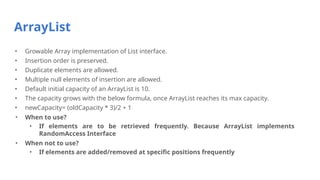
• Growable Array implementation of List interface.
• Insertion order is preserved.
• Duplicate elements are allowed.
• Multiple null elements of insertion are allowed.
• Default initial capacity of an ArrayList is 10.
• The capacity grows with the below formula, once ArrayList reaches its max capacity.
• newCapacity= (oldCapacity * 3)/2 + 1
• When to use?
• If elements are to be retrieved frequently. Because ArrayList implements
RandomAccess Interface
• When not to use?
• If elements are added/removed at specific positions frequently
ArrayList - Example
Output:
[9, 20, 22, 53]
53
import java.util.*;
class Test{
public static void main(String args[]){
ArrayList<Integer> al1 = new
ArrayList<Integer>();
al1.add(20);
al1.add(9);
ArrayList<Integer> al2 = new
ArrayList<Integer>();
al2.add(22);
al2.add(53);
al1.addAll(al2);
Collections.sort(al1);
System.out.println(al1);
System.out.println(al1.get(3));}
}
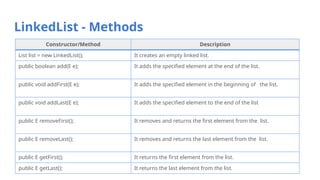
LinkedList - Methods
Constructor/Method Description
List list = new LinkedList(); It creates an empty linked list.
public boolean add(E e); It adds the specified element at the end of the list.
public void addFirst(E e); It adds the specified element in the beginning of the list.
public void addLast(E e); It adds the specified element to the end of the list
public E removeFirst(); It removes and returns the first element from the list.
public E removeLast(); It removes and returns the last element from the list.
public E getFirst(); It returns the first element from the list.
public E getLast(); It returns the last element from the list.
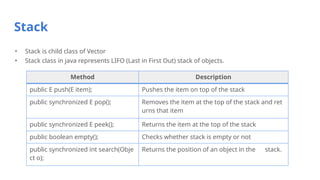
Stack
• Stack is child class of Vector
• Stack class in java represents LIFO (Last in First Out) stack of objects.
Method Description
public E push(E item); Pushes the item on top of the stack
public synchronized E pop(); Removes the item at the top of the stack and ret
urns that item
public synchronized E peek(); Returns the item at the top of the stack
public boolean empty(); Checks whether stack is empty or not
public synchronized int search(Obje
ct o);
Returns the position of an object in the stack.
Set Interface
Set Interface
• The set interface is an unordered collection of objects in which duplicate values cannot be
stored.
• The Java Set does not provide control over the position of insertion or deletion of elements.
• Basically, Set is implemented by HashSet, LinkedHashSet or TreeSet (sorted representation).
HashSet
• Implements Set Interface.
• Underlying data structure for HashSet is hashtable.
• As it implements the Set Interface, duplicate values are not allowed.
• Objects that you insert in HashSet are not guaranteed to be inserted in same order. Objects
are inserted based on their hash code.
• NULL elements are allowed in HashSet.
• Execution time of add(), contains(), remove(), size() is constant even for large sets.
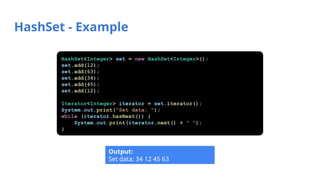
HashSet - Example
Output:
Set data: 34 12 45 63
HashSet<Integer> set = new HashSet<Integer>();
set.add(12);
set.add(63);
set.add(34);
set.add(45);
set.add(12);
Iterator<Integer> iterator = set.iterator();
System.out.print("Set data: ");
while (iterator.hasNext()) {
System.out.print(iterator.next() + " ");
}
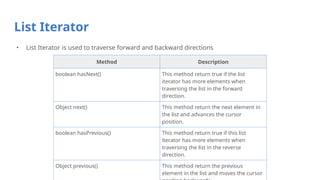
List Iterator
• List Iterator is used to traverse forward and backward directions
Method Description
boolean hasNext() This method return true if the list
iterator has more elements when
traversing the list in the forward
direction.
Object next() This method return the next element in
the list and advances the cursor
position.
boolean hasPrevious() This method return true if this list
iterator has more elements when
traversing the list in the reverse
direction.
Object previous() This method return the previous
element in the list and moves the cursor
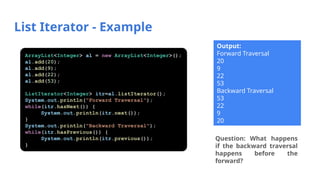
List Iterator - Example
Output:
Forward Traversal
20
9
22
53
Backward Traversal
53
22
9
20
Question: What happens
if the backward traversal
happens before the
forward?
ArrayList<Integer> al = new ArrayList<Integer>();
al.add(20);
al.add(9);
al.add(22);
al.add(53);
ListIterator<Integer> itr=al.listIterator();
System.out.println("Forward Traversal");
while(itr.hasNext()) {
System.out.println(itr.next());
}
System.out.println("Backward Traversal");
while(itr.hasPrevious()) {
System.out.println(itr.previous());
}
Review Question
Find the output
a.Compilation Error
b.Runtime Error
c.[Sachin, Rahul, 10]
[Sachin, Rahul, 10]
Note:
No compilation error because add(Object
o) method in the ArrayList class
Runtime Error because integer object is
type case to String
Solution:
Generics
ArrayList al = new ArrayList();
al.add("Sachin");
al.add("Rahul");
al.add(10);
String s[] = new String[3];
for(int i=0;i<3;i++)
s[i] = (String)al.get(i);
System.out.println(al);
System.out.println(Arrays.toString(s));
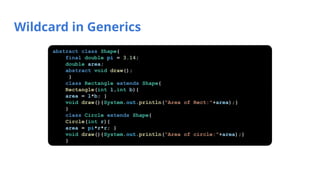
Wildcard in Generics
abstract class Shape{
final double pi = 3.14;
double area;
abstract void draw();
}
class Rectangle extends Shape{
Rectangle(int l,int b){
area = l*b; }
void draw(){System.out.println("Area of Rect:"+area);}
}
class Circle extends Shape{
Circle(int r){
area = pi*r*r; }
void draw(){System.out.println("Area of circle:"+area);}
}
Wildcard in Generics
class test{
//creating a method that accepts only child class of Shape
public static void drawShapes(List<? extends Shape> lists){
for(Shape s:lists){
s.draw();}
}
public static void main(String args[]){
List<Rectangle> list1=new ArrayList<Rectangle>();
list1.add(new Rectangle(3,5));
List<Circle> list2=new ArrayList<Circle>();
list2.add(new Circle(2));
list2.add(new Circle(5));
drawShapes(list1);
drawShapes(list2);
}} Output:
Area of Rect:15.0
Area of circle:12.56
Area of circle:78.5
Wildcard in Generics
class test{
public static void main(String[] args) {
List<Integer> list1= Arrays.asList(1,2,3);
List<Number> list2=Arrays.asList(1.1,2.2,3.3);
List<Double> list3=Arrays.asList(1.1,2.2,3.3);
List<String> list4=Arrays.asList("s","j","r");
printlist(list1);
printlist(list2);
printlist(list3);
printlist(list4);
}
private static void printlist(List<Number> list) {
System.out.println(list);}
}
Output:
list1, list3, list4 – compilation error
Type not applicable for the arguements
Wildcard in Generics
class test{
public static void main(String[] args) {
List<Integer> list1= Arrays.asList(1,2,3);
List<Number> list2=Arrays.asList(1.1,2.2,3.3);
List<Double> list3=Arrays.asList(1.1,2.2,3.3);
List<String> list4=Arrays.asList("s","j","r");
printlist(list1);
printlist(list2);
printlist(list3);
printlist(list4);
}
private static void printlist(List<?> list) {
System.out.println(list);
}
} Output:
[1, 2, 3]
[1.1, 2.2, 3.3]
[1.1, 2.2, 3.3]
[s, j, r]
Upper Bounded Wildcard
class test{
public static void main(String[] args) {
List<Integer> list1= Arrays.asList(1,2,3);
List<Number> list2=Arrays.asList(1.1,2.2,3.3);
List<Double> list3=Arrays.asList(1.1,2.2,3.3);
List<String> list4=Arrays.asList("s","j","r");
printlist(list1);
printlist(list2);
printlist(list3);
printlist(list4);
}
private static void printlist(List<? extends Number> list){
System.out.println(list);}
}
Output:
list4 – compilation error
Type not applicable for the arguements
Lower Bounded Wildcard
Output:
list3 – compilation error
Type not applicable for the
arguements
class test{
public static void main(String[] args) {
List<Integer> list1= Arrays.asList(1,2,3);
List<Number> list2=Arrays.asList(1.1,2.2,3.3);
List<Double> list3=Arrays.asList(1.1,2.2,3.3);
printlist(list1);
printlist(list2);
printlist(list3);
}
private static void printlist(List<? super Integer> list)
{
System.out.println(list);
}
}
Comparable Interface
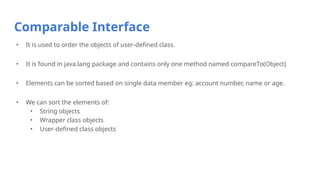
• It is used to order the objects of user-defined class.
• It is found in java.lang package and contains only one method named compareTo(Object)
• Elements can be sorted based on single data member eg: account number, name or age.
• We can sort the elements of:
• String objects
• Wrapper class objects
• User-defined class objects
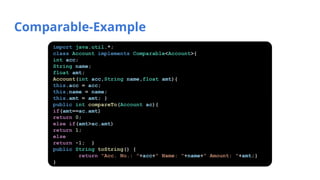
Comparable-Example
import java.util.*;
class Account implements Comparable<Account>{
int acc;
String name;
float amt;
Account(int acc,String name,float amt){
this.acc = acc;
this.name = name;
this.amt = amt; }
public int compareTo(Account ac){
if(amt==ac.amt)
return 0;
else if(amt>ac.amt)
return 1;
else
return -1; }
public String toString() {
return "Acc. No.: "+acc+" Name: "+name+" Amount: "+amt;}
}
Comparable-Example
class Test{
public static void main(String[] args) {
List<Account> al = new ArrayList<Account>();
al.add(new Account(111,"Ankit",5000));
al.add(new Account(112,"Ashok",4000));
al.add(new Account(123,“Ryan",5000));
Collections.sort(al);
for(Account a:al)
System.out.println(a);
}
}
Comparator
Interface
Comparator Interface
• Used to order user defined class
• This interface is found in java.util package and contains 2 methods
• compare(Object obj1,Object obj2)
• equals(Object element)
• It provides multiple sorting sequence
• Elements can be sorted based on any data member
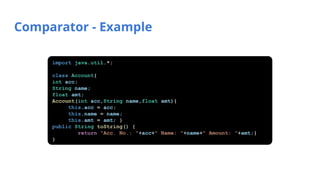
Comparator - Example
import java.util.*;
class Account{
int acc;
String name;
float amt;
Account(int acc,String name,float amt){
this.acc = acc;
this.name = name;
this.amt = amt; }
public String toString() {
return "Acc. No.: "+acc+" Name: "+name+" Amount: "+amt;}
}
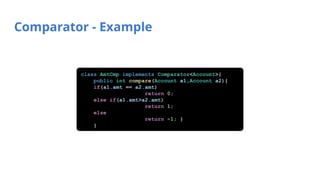
Comparator - Example
class AmtCmp implements Comparator<Account>{
public int compare(Account a1,Account a2){
if(a1.amt == a2.amt)
return 0;
else if(a1.amt>a2.amt)
return 1;
else
return -1; }
}
Comparator - Example
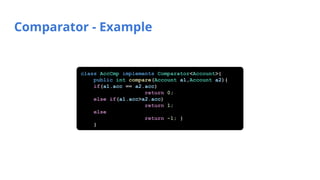
class AccCmp implements Comparator<Account>{
public int compare(Account a1,Account a2){
if(a1.acc == a2.acc)
return 0;
else if(a1.acc>a2.acc)
return 1;
else
return -1; }
}
Comparator - Example
class test {
public static void main(String[] args) {
List<Account> al = new ArrayList<Account>();
al.add(new Account(123,"Ankit",5000));
al.add(new Account(112,"Ashok",4000));
al.add(new Account(111,"Ryan",5000));
System.out.println("Comparison on Amount");
Collections.sort(al,new AmtCmp());
for(Account a:al)
System.out.println(a);
System.out.println("Comparison on Acc. No.");
Collections.sort(al,new AccCmp());
for(Account a:al)
System.out.println(a); }
}
Overriding Equals method
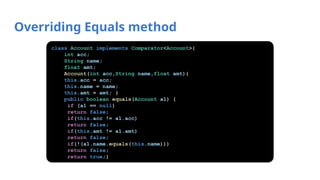
class Account implements Comparator<Account>{
int acc;
String name;
float amt;
Account(int acc,String name,float amt){
this.acc = acc;
this.name = name;
this.amt = amt; }
public boolean equals(Account a1) {
if (a1 == null)
return false;
if(this.acc != a1.acc)
return false;
if(this.amt != a1.amt)
return false;
if(!(a1.name.equals(this.name)))
return false;
return true;}
Overriding Equals method
public String toString() {
return "Acc. No.: "+acc+" Name: "+name+" Amount: "+amt;}
public int compare(Account arg0, Account arg1) {
// TODO Auto-generated method stub
return 0;}
}
class test {
public static void main(String[] args) {
List<Account> al = new ArrayList<Account>();
al.add(new Account(111,"Ryan",5000));
al.add(new Account(112,"Ryan",5000));
al.add(new Account(111,"Ryan",5000));
System.out.println(al.get(0).equals(al.get(2)));
System.out.println(al.get(0).equals(al.get(1))); }
}
Bounds in Generics (Comparator)
public class test {
public static void main(String[] args) {
System.out.printf("Max of %d, %d and %d is %dnn",
3, 4, 5, maximum( 3, 4, 5 ));
System.out.printf("Max of %.1f,%.1f and %.1f is %.1fnn",
6.6, 8.8, 7.7, maximum( 6.6, 8.8, 7.7 ));
System.out.printf("Max of %s,%s and %s is %snn",
"s", "j", "r", maximum( "s", "j", "r" ));
}
public static <T extends Comparable<T>> T maximum(T x, T y, T z) {
T max = x;
if(y.compareTo(max) > 0) {
max = y; }
if(z.compareTo(max) > 0) {
max = z; }
return max; }
}
Output:
Max of 3, 4 and 5 is 5
Max of 6.6,8.8 and 7.7 is 8.8
Max of s,j and r is s
Multiple Bounds in Generics
public class test {
public static void main(String[] args) {
System.out.printf("Max of %d, %d and %d is %dnn",
3, 4, 5, maximum( 3, 4, 5 ));
System.out.printf("Max of %.1f,%.1f and %.1f is %.1fnn",
6.6, 8.8, 7.7, maximum( 6.6, 8.8, 7.7 ));
System.out.printf("Max of %s,%s and %s is %snn",
"s", "j", "r", maximum( "s", "j", "r" ));
}
public static <T extends Number & Comparable<T>> T maximum(T x, T y, T z) {
T max = x;
if(y.compareTo(max) > 0) {
max = y; }
if(z.compareTo(max) > 0) {
max = z; }
return max; } }
Error:
The method maximum(T, T, T) in the type test is not applicable for the arguments (String, String, String)

Collections in object oriented programming

  • 1.
  • 2.
    What are Collections •Group of Objects treated as a single Object. • Java provides supports for manipulating collections in the form of – Collection Interfaces – Collection Classes • Collection interfaces provide basic functionalities whereas collection classes provides their concrete implementation
  • 3.
    Collection Classes • Collectionclasses are standard classes that implement collection interfaces • Some Collection Classes are abstract and some classes are concrete and can be used as it is. • Important Collection Classes: ✔ AbstractCollection ✔ AbstractList ✔ AbstractSequentialList ✔ LinkedList ✔ ArrayList ✔ AbstractSet ✔ HasSet ✔ LinkedHashSet ✔ TreeSet
  • 5.
    ArrayList • Growable Arrayimplementation of List interface. • Insertion order is preserved. • Duplicate elements are allowed. • Multiple null elements of insertion are allowed. • Default initial capacity of an ArrayList is 10. • The capacity grows with the below formula, once ArrayList reaches its max capacity. • newCapacity= (oldCapacity * 3)/2 + 1 • When to use? • If elements are to be retrieved frequently. Because ArrayList implements RandomAccess Interface • When not to use? • If elements are added/removed at specific positions frequently
  • 6.
    ArrayList - Example Output: [9,20, 22, 53] 53 import java.util.*; class Test{ public static void main(String args[]){ ArrayList<Integer> al1 = new ArrayList<Integer>(); al1.add(20); al1.add(9); ArrayList<Integer> al2 = new ArrayList<Integer>(); al2.add(22); al2.add(53); al1.addAll(al2); Collections.sort(al1); System.out.println(al1); System.out.println(al1.get(3));} }
  • 7.
    LinkedList - Methods Constructor/MethodDescription List list = new LinkedList(); It creates an empty linked list. public boolean add(E e); It adds the specified element at the end of the list. public void addFirst(E e); It adds the specified element in the beginning of the list. public void addLast(E e); It adds the specified element to the end of the list public E removeFirst(); It removes and returns the first element from the list. public E removeLast(); It removes and returns the last element from the list. public E getFirst(); It returns the first element from the list. public E getLast(); It returns the last element from the list.
  • 8.
    Stack • Stack ischild class of Vector • Stack class in java represents LIFO (Last in First Out) stack of objects. Method Description public E push(E item); Pushes the item on top of the stack public synchronized E pop(); Removes the item at the top of the stack and ret urns that item public synchronized E peek(); Returns the item at the top of the stack public boolean empty(); Checks whether stack is empty or not public synchronized int search(Obje ct o); Returns the position of an object in the stack.
  • 9.
  • 10.
    Set Interface • Theset interface is an unordered collection of objects in which duplicate values cannot be stored. • The Java Set does not provide control over the position of insertion or deletion of elements. • Basically, Set is implemented by HashSet, LinkedHashSet or TreeSet (sorted representation).
  • 11.
    HashSet • Implements SetInterface. • Underlying data structure for HashSet is hashtable. • As it implements the Set Interface, duplicate values are not allowed. • Objects that you insert in HashSet are not guaranteed to be inserted in same order. Objects are inserted based on their hash code. • NULL elements are allowed in HashSet. • Execution time of add(), contains(), remove(), size() is constant even for large sets.
  • 12.
    HashSet - Example Output: Setdata: 34 12 45 63 HashSet<Integer> set = new HashSet<Integer>(); set.add(12); set.add(63); set.add(34); set.add(45); set.add(12); Iterator<Integer> iterator = set.iterator(); System.out.print("Set data: "); while (iterator.hasNext()) { System.out.print(iterator.next() + " "); }
  • 13.
    List Iterator • ListIterator is used to traverse forward and backward directions Method Description boolean hasNext() This method return true if the list iterator has more elements when traversing the list in the forward direction. Object next() This method return the next element in the list and advances the cursor position. boolean hasPrevious() This method return true if this list iterator has more elements when traversing the list in the reverse direction. Object previous() This method return the previous element in the list and moves the cursor
  • 14.
    List Iterator -Example Output: Forward Traversal 20 9 22 53 Backward Traversal 53 22 9 20 Question: What happens if the backward traversal happens before the forward? ArrayList<Integer> al = new ArrayList<Integer>(); al.add(20); al.add(9); al.add(22); al.add(53); ListIterator<Integer> itr=al.listIterator(); System.out.println("Forward Traversal"); while(itr.hasNext()) { System.out.println(itr.next()); } System.out.println("Backward Traversal"); while(itr.hasPrevious()) { System.out.println(itr.previous()); }
  • 15.
    Review Question Find theoutput a.Compilation Error b.Runtime Error c.[Sachin, Rahul, 10] [Sachin, Rahul, 10] Note: No compilation error because add(Object o) method in the ArrayList class Runtime Error because integer object is type case to String Solution: Generics ArrayList al = new ArrayList(); al.add("Sachin"); al.add("Rahul"); al.add(10); String s[] = new String[3]; for(int i=0;i<3;i++) s[i] = (String)al.get(i); System.out.println(al); System.out.println(Arrays.toString(s));
  • 16.
    Wildcard in Generics abstractclass Shape{ final double pi = 3.14; double area; abstract void draw(); } class Rectangle extends Shape{ Rectangle(int l,int b){ area = l*b; } void draw(){System.out.println("Area of Rect:"+area);} } class Circle extends Shape{ Circle(int r){ area = pi*r*r; } void draw(){System.out.println("Area of circle:"+area);} }
  • 17.
    Wildcard in Generics classtest{ //creating a method that accepts only child class of Shape public static void drawShapes(List<? extends Shape> lists){ for(Shape s:lists){ s.draw();} } public static void main(String args[]){ List<Rectangle> list1=new ArrayList<Rectangle>(); list1.add(new Rectangle(3,5)); List<Circle> list2=new ArrayList<Circle>(); list2.add(new Circle(2)); list2.add(new Circle(5)); drawShapes(list1); drawShapes(list2); }} Output: Area of Rect:15.0 Area of circle:12.56 Area of circle:78.5
  • 18.
    Wildcard in Generics classtest{ public static void main(String[] args) { List<Integer> list1= Arrays.asList(1,2,3); List<Number> list2=Arrays.asList(1.1,2.2,3.3); List<Double> list3=Arrays.asList(1.1,2.2,3.3); List<String> list4=Arrays.asList("s","j","r"); printlist(list1); printlist(list2); printlist(list3); printlist(list4); } private static void printlist(List<Number> list) { System.out.println(list);} } Output: list1, list3, list4 – compilation error Type not applicable for the arguements
  • 19.
    Wildcard in Generics classtest{ public static void main(String[] args) { List<Integer> list1= Arrays.asList(1,2,3); List<Number> list2=Arrays.asList(1.1,2.2,3.3); List<Double> list3=Arrays.asList(1.1,2.2,3.3); List<String> list4=Arrays.asList("s","j","r"); printlist(list1); printlist(list2); printlist(list3); printlist(list4); } private static void printlist(List<?> list) { System.out.println(list); } } Output: [1, 2, 3] [1.1, 2.2, 3.3] [1.1, 2.2, 3.3] [s, j, r]
  • 20.
    Upper Bounded Wildcard classtest{ public static void main(String[] args) { List<Integer> list1= Arrays.asList(1,2,3); List<Number> list2=Arrays.asList(1.1,2.2,3.3); List<Double> list3=Arrays.asList(1.1,2.2,3.3); List<String> list4=Arrays.asList("s","j","r"); printlist(list1); printlist(list2); printlist(list3); printlist(list4); } private static void printlist(List<? extends Number> list){ System.out.println(list);} } Output: list4 – compilation error Type not applicable for the arguements
  • 21.
    Lower Bounded Wildcard Output: list3– compilation error Type not applicable for the arguements class test{ public static void main(String[] args) { List<Integer> list1= Arrays.asList(1,2,3); List<Number> list2=Arrays.asList(1.1,2.2,3.3); List<Double> list3=Arrays.asList(1.1,2.2,3.3); printlist(list1); printlist(list2); printlist(list3); } private static void printlist(List<? super Integer> list) { System.out.println(list); } }
  • 22.
  • 23.
    Comparable Interface • Itis used to order the objects of user-defined class. • It is found in java.lang package and contains only one method named compareTo(Object) • Elements can be sorted based on single data member eg: account number, name or age. • We can sort the elements of: • String objects • Wrapper class objects • User-defined class objects
  • 24.
    Comparable-Example import java.util.*; class Accountimplements Comparable<Account>{ int acc; String name; float amt; Account(int acc,String name,float amt){ this.acc = acc; this.name = name; this.amt = amt; } public int compareTo(Account ac){ if(amt==ac.amt) return 0; else if(amt>ac.amt) return 1; else return -1; } public String toString() { return "Acc. No.: "+acc+" Name: "+name+" Amount: "+amt;} }
  • 25.
    Comparable-Example class Test{ public staticvoid main(String[] args) { List<Account> al = new ArrayList<Account>(); al.add(new Account(111,"Ankit",5000)); al.add(new Account(112,"Ashok",4000)); al.add(new Account(123,“Ryan",5000)); Collections.sort(al); for(Account a:al) System.out.println(a); } }
  • 26.
  • 27.
    Comparator Interface • Usedto order user defined class • This interface is found in java.util package and contains 2 methods • compare(Object obj1,Object obj2) • equals(Object element) • It provides multiple sorting sequence • Elements can be sorted based on any data member
  • 28.
    Comparator - Example importjava.util.*; class Account{ int acc; String name; float amt; Account(int acc,String name,float amt){ this.acc = acc; this.name = name; this.amt = amt; } public String toString() { return "Acc. No.: "+acc+" Name: "+name+" Amount: "+amt;} }
  • 29.
    Comparator - Example classAmtCmp implements Comparator<Account>{ public int compare(Account a1,Account a2){ if(a1.amt == a2.amt) return 0; else if(a1.amt>a2.amt) return 1; else return -1; } }
  • 30.
    Comparator - Example classAccCmp implements Comparator<Account>{ public int compare(Account a1,Account a2){ if(a1.acc == a2.acc) return 0; else if(a1.acc>a2.acc) return 1; else return -1; } }
  • 31.
    Comparator - Example classtest { public static void main(String[] args) { List<Account> al = new ArrayList<Account>(); al.add(new Account(123,"Ankit",5000)); al.add(new Account(112,"Ashok",4000)); al.add(new Account(111,"Ryan",5000)); System.out.println("Comparison on Amount"); Collections.sort(al,new AmtCmp()); for(Account a:al) System.out.println(a); System.out.println("Comparison on Acc. No."); Collections.sort(al,new AccCmp()); for(Account a:al) System.out.println(a); } }
  • 32.
    Overriding Equals method classAccount implements Comparator<Account>{ int acc; String name; float amt; Account(int acc,String name,float amt){ this.acc = acc; this.name = name; this.amt = amt; } public boolean equals(Account a1) { if (a1 == null) return false; if(this.acc != a1.acc) return false; if(this.amt != a1.amt) return false; if(!(a1.name.equals(this.name))) return false; return true;}
  • 33.
    Overriding Equals method publicString toString() { return "Acc. No.: "+acc+" Name: "+name+" Amount: "+amt;} public int compare(Account arg0, Account arg1) { // TODO Auto-generated method stub return 0;} } class test { public static void main(String[] args) { List<Account> al = new ArrayList<Account>(); al.add(new Account(111,"Ryan",5000)); al.add(new Account(112,"Ryan",5000)); al.add(new Account(111,"Ryan",5000)); System.out.println(al.get(0).equals(al.get(2))); System.out.println(al.get(0).equals(al.get(1))); } }
  • 34.
    Bounds in Generics(Comparator) public class test { public static void main(String[] args) { System.out.printf("Max of %d, %d and %d is %dnn", 3, 4, 5, maximum( 3, 4, 5 )); System.out.printf("Max of %.1f,%.1f and %.1f is %.1fnn", 6.6, 8.8, 7.7, maximum( 6.6, 8.8, 7.7 )); System.out.printf("Max of %s,%s and %s is %snn", "s", "j", "r", maximum( "s", "j", "r" )); } public static <T extends Comparable<T>> T maximum(T x, T y, T z) { T max = x; if(y.compareTo(max) > 0) { max = y; } if(z.compareTo(max) > 0) { max = z; } return max; } } Output: Max of 3, 4 and 5 is 5 Max of 6.6,8.8 and 7.7 is 8.8 Max of s,j and r is s
  • 35.
    Multiple Bounds inGenerics public class test { public static void main(String[] args) { System.out.printf("Max of %d, %d and %d is %dnn", 3, 4, 5, maximum( 3, 4, 5 )); System.out.printf("Max of %.1f,%.1f and %.1f is %.1fnn", 6.6, 8.8, 7.7, maximum( 6.6, 8.8, 7.7 )); System.out.printf("Max of %s,%s and %s is %snn", "s", "j", "r", maximum( "s", "j", "r" )); } public static <T extends Number & Comparable<T>> T maximum(T x, T y, T z) { T max = x; if(y.compareTo(max) > 0) { max = y; } if(z.compareTo(max) > 0) { max = z; } return max; } } Error: The method maximum(T, T, T) in the type test is not applicable for the arguments (String, String, String)