Coding data
Boris software
Presented by Asst.Prof.Sakol Teeravarunyou
Learning outcome
• Students are able to use the software for coding behavior.
• Students are able to design the coding scheme (ethogram).
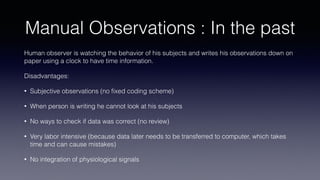
Manual Observations : In the past
Human observer is watching the behavior of his subjects and writes his observations down on
paper using a clock to have time information.
Disadvantages:
• Subjective observations (no fixed coding scheme)
• When person is writing he cannot look at his subjects
• No ways to check if data was correct (no review)
• Very labor intensive (because data later needs to be transferred to computer, which takes
time and can cause mistakes)
• No integration of physiological signals
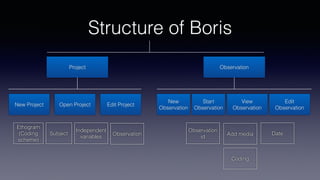
Structure of Boris
Project Observation
New Project Open Project Edit Project
New
Observation
Start
Observation
View
Observation
Edit
Observation
Ethogram
(Coding
scheme)
Subject
Independent
variables
Observation Add media
Observation
id
Date
Coding
Docking
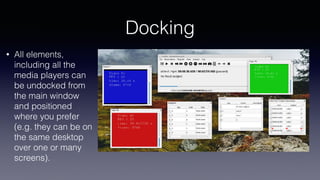
• All elements,
including all the
media players can
be undocked from
the main window
and positioned
where you prefer
(e.g. they can be on
the same desktop
over one or many
screens).
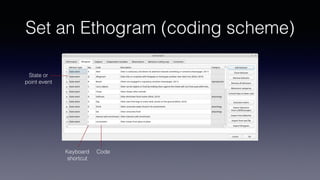
Set an Ethogram (coding scheme)
Keyboard
shortcut
State or
point event
Code
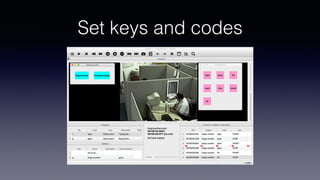
Set keys and codes
Valid Keys for triggering behavior
• keys from a to z
• keys from A to Z
• keys from 0 to 9
• function keys from F1 to F12
• à é è ù ì ç
• ! " £ $ % & / ( ) = ? ^ [ ] { } @ | § ° #
Behavior types
Point event behavior
• A behavior that only takes an
instant of time or the duration is
not of importance
• Example – Frequency of human
error
• No duration
State event behavior
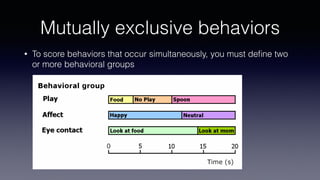
• A behavior that takes a period of time
• Mutually exclusive  sit-stand-run
• Exhaustive (behavior: ‘other’)
• Have a start event and a stop event
Mutually exclusive behaviors
• To score behaviors that occur simultaneously, you must define two
or more behavioral groups
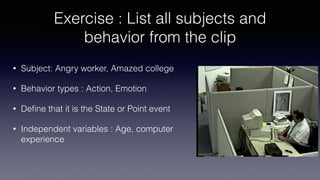
Exercise : List all subjects and
behavior from the clip
• Subject: Angry worker, Amazed college
• Behavior types : Action, Emotion
• Define that it is the State or Point event
• Independent variables : Age, computer
experience
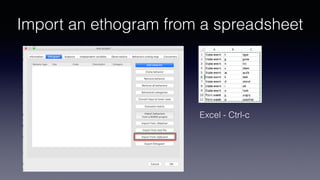
Import an ethogram from a spreadsheet
Excel - Ctrl-c
Import column from excel
• 1st column: Behavior type State event or Point event (mandatory)
• 2nd column: Key (one character - case insensi!ve)
• 3rd column: Behavior code (must be unique)
• 4th column: behavior category (empty if no category)
• 5th column: Descrip!on of behavior(op!onal)
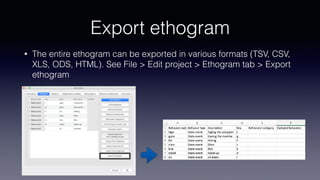
Export ethogram
• The entire ethogram can be exported in various formats (TSV, CSV,
XLS, ODS, HTML). See File > Edit project > Ethogram tab > Export
ethogram
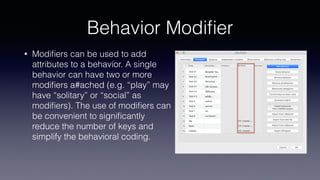
Behavior Modier
• Modifiers can be used to add
attributes to a behavior. A single
behavior can have two or more
modifiers a#ached (e.g. “play” may
have “solitary” or “social” as
modiers). The use of modiers can
be convenient to signicantly
reduce the number of keys and
simplify the behavioral coding.
4 Types of Modiers
• The Single selection type will allow the observer to select only one
modier for the current behavior.
• The Multiple selection type will allow the observer to select one or
more modiers for the current behavior.
• The Numeric type will allow the observer to input a number. For
example a distance of interac!on.
• The Value from external data file type will save the value of a
variable from an external data le.
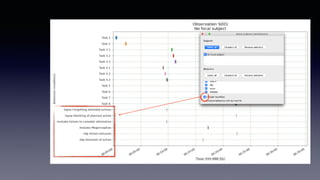
Example : Human Error
• Slip
• Action intrusion
• Omission of action
• Disordering of action
• Mistiming of action
• Lapse
• Omitting of planned action
• Loosing place in action sequence
• Forgetting intended actions
• Mistake
• Misapplication of good
procedure
• Misapplication of bad procedure
• Misperception
• Poor decision making
• Failure to consider alternative
• Overconfidence
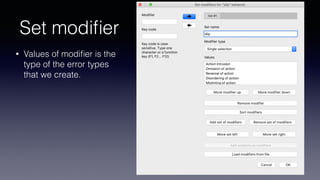
Set modier
• Values of modifier is the
type of the error types
that we create.
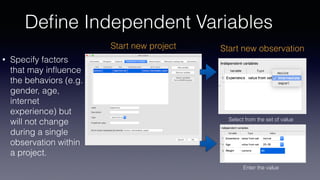
Dene Independent Variables
• Specify factors
that may influence
the behaviors (e.g.
gender, age,
internet
experience) but
will not change
during a single
observation within
a project.
Start new observationStart new project
Enter the value
Select from the set of value
Coding
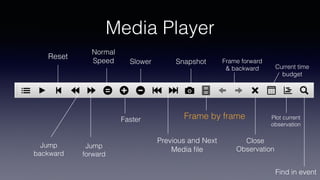
Media Player
Jump
backward
Jump
forward
Reset
Normal
Speed
Faster
Slower
Previous and Next
Media le
Snapshot
Frame by frame
Frame forward
& backward
Close
Observation
Current time
budget
Find in event
Plot current
observation
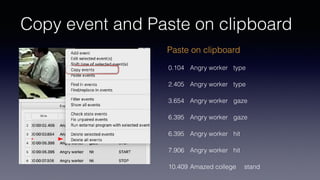
Copy event and Paste on clipboard
0.104 Angry worker type
2.405 Angry worker type
3.654 Angry worker gaze
6.395 Angry worker gaze
6.395 Angry worker hit
7.906 Angry worker hit
10.409 Amazed college stand
Paste on clipboard
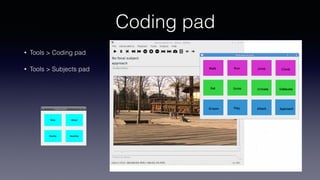
Coding pad
• Tools > Coding pad
• Tools > Subjects pad
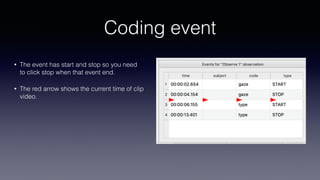
Coding event
• The event has start and stop so you need
to click stop when that event end.
• The red arrow shows the current time of clip
video.
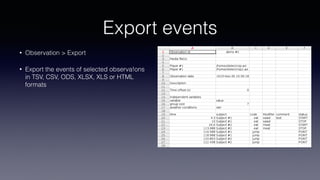
Export events
• Observation > Export
• Export the events of selected observa!ons
in TSV, CSV, ODS, XLSX, XLS or HTML
formats
Summary
• Coding concept such as state or point event, and independent
variables
• Practice how to code

Coding data with Boris software

  • 1.
    Coding data Boris software Presentedby Asst.Prof.Sakol Teeravarunyou
  • 2.
    Learning outcome • Studentsare able to use the software for coding behavior. • Students are able to design the coding scheme (ethogram).
  • 3.
    Manual Observations :In the past Human observer is watching the behavior of his subjects and writes his observations down on paper using a clock to have time information. Disadvantages: • Subjective observations (no fixed coding scheme) • When person is writing he cannot look at his subjects • No ways to check if data was correct (no review) • Very labor intensive (because data later needs to be transferred to computer, which takes time and can cause mistakes) • No integration of physiological signals
  • 4.
    Structure of Boris ProjectObservation New Project Open Project Edit Project New Observation Start Observation View Observation Edit Observation Ethogram (Coding scheme) Subject Independent variables Observation Add media Observation id Date Coding
  • 5.
    Docking • All elements, includingall the media players can be undocked from the main window and positioned where you prefer (e.g. they can be on the same desktop over one or many screens).
  • 6.
    Set an Ethogram(coding scheme) Keyboard shortcut State or point event Code
  • 7.
  • 8.
    Valid Keys fortriggering behavior • keys from a to z • keys from A to Z • keys from 0 to 9 • function keys from F1 to F12 • à é è ù ì ç • ! " £ $ % & / ( ) = ? ^ [ ] { } @ | § ° #
  • 9.
    Behavior types Point event behavior •A behavior that only takes an instant of time or the duration is not of importance • Example – Frequency of human error • No duration State event behavior • A behavior that takes a period of time • Mutually exclusive  sit-stand-run • Exhaustive (behavior: ‘other’) • Have a start event and a stop event
  • 10.
    Mutually exclusive behaviors •To score behaviors that occur simultaneously, you must define two or more behavioral groups
  • 11.
    Exercise : Listall subjects and behavior from the clip • Subject: Angry worker, Amazed college • Behavior types : Action, Emotion • Define that it is the State or Point event • Independent variables : Age, computer experience
  • 12.
    Import an ethogramfrom a spreadsheet Excel - Ctrl-c
  • 13.
    Import column fromexcel • 1st column: Behavior type State event or Point event (mandatory) • 2nd column: Key (one character - case insensi!ve) • 3rd column: Behavior code (must be unique) • 4th column: behavior category (empty if no category) • 5th column: Descrip!on of behavior(op!onal)
  • 14.
    Export ethogram • Theentire ethogram can be exported in various formats (TSV, CSV, XLS, ODS, HTML). See File > Edit project > Ethogram tab > Export ethogram
  • 15.
    Behavior Modifier • Modifierscan be used to add attributes to a behavior. A single behavior can have two or more modifiers a#ached (e.g. “play” may have “solitary” or “social” as modifiers). The use of modifiers can be convenient to significantly reduce the number of keys and simplify the behavioral coding.
  • 16.
    4 Types ofModifiers • The Single selection type will allow the observer to select only one modifier for the current behavior. • The Multiple selection type will allow the observer to select one or more modifiers for the current behavior. • The Numeric type will allow the observer to input a number. For example a distance of interac!on. • The Value from external data file type will save the value of a variable from an external data file.
  • 17.
    Example : HumanError • Slip • Action intrusion • Omission of action • Disordering of action • Mistiming of action • Lapse • Omitting of planned action • Loosing place in action sequence • Forgetting intended actions • Mistake • Misapplication of good procedure • Misapplication of bad procedure • Misperception • Poor decision making • Failure to consider alternative • Overconfidence
  • 18.
    Set modifier • Valuesof modifier is the type of the error types that we create.
  • 20.
    Define Independent Variables •Specify factors that may influence the behaviors (e.g. gender, age, internet experience) but will not change during a single observation within a project. Start new observationStart new project Enter the value Select from the set of value
  • 21.
  • 22.
    Media Player Jump backward Jump forward Reset Normal Speed Faster Slower Previous andNext Media le Snapshot Frame by frame Frame forward & backward Close Observation Current time budget Find in event Plot current observation
  • 23.
    Copy event andPaste on clipboard 0.104 Angry worker type 2.405 Angry worker type 3.654 Angry worker gaze 6.395 Angry worker gaze 6.395 Angry worker hit 7.906 Angry worker hit 10.409 Amazed college stand Paste on clipboard
  • 24.
    Coding pad • Tools> Coding pad • Tools > Subjects pad
  • 25.
    Coding event • Theevent has start and stop so you need to click stop when that event end. • The red arrow shows the current time of clip video.
  • 26.
    Export events • Observation> Export • Export the events of selected observa!ons in TSV, CSV, ODS, XLSX, XLS or HTML formats
  • 27.
    Summary • Coding conceptsuch as state or point event, and independent variables • Practice how to code