CodeIgniter
Weerayut Hongsa
Basic conguration for CodeIgniter
• File and Directory structure of CodeIgniter.
• Environment setting for optimise CodeIgniter.
• Configuration setup for CodeIgniter.
File and Directory
structure
File and Directory structure of CodeIgniter
You don’t to anything in “system”
directory, focus “application”
directory only.
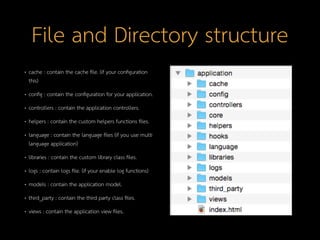
File and Directory structure
• cache : contain the cache file. (if your configuration
this)
• config : contain the configuration for your application.
• controllers : contain the application controllers.
• helpers : contain the custom helpers functions files.
• language : contain the language files (if you use multi
language application)
• libraries : contain the custom library class files.
• logs : contain logs file. (if your enable log functions)
• models : contain the application model.
• third_party : contain the third party class files.
• views : contain the application view files.
Environment setting
Files need to edit for optimise.
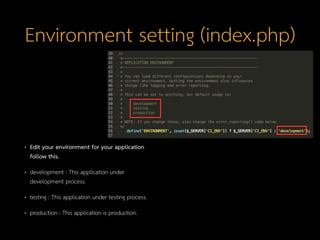
Environment setting (index.php)
• Edit your environment for your application
follow this.
• development : This application under
development process.
• testing : This application under testing process.
• production : This application is production.
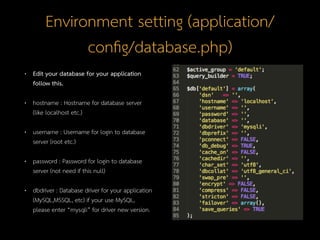
Environment setting (application/
cong/database.php)
• Edit your database for your application
follow this.
• hostname : Hostname for database server
(like localhost etc.)
• username : Username for login to database
server (root etc.)
• password : Password for login to database
server (not need if this null)
• dbdriver : Database driver for your application
(MySQL,MSSQL, etc) if your use MySQL,
please enter “mysqli” for driver new version.
Environment setting (application/
cong/routes.php)
• Edit your routes for your
application follow this.
• $route[‘default_controller’] :
Enter your default controller.
(home controller)
• $route[‘404_override’] : Enter
your custom 404 controller.
Conguration Setup
File need to conguration
Conguration Setup (application/
cong/cong.php)
• $config[‘encryption_key’] : Key for
encrypt your data in class
encryption. (like md5 key)
Conguration Setup (application/
cong/cong.php) [cont.]
• $config[‘sess_driver’] : Driver for session class
(les,database,redis, memcached)
• $config[‘sess_cookie_name’] : Prefix session
cookie name for your application.
• $config[‘sess_expiration’] : Time expiration for
your cookie.
• $config[‘sess_save_path’] : Path for session file.
• $config[‘sess_mach_ip’] : Match cookie session
and IP Address.
Thank you.

Codeigniter Training Part3

  • 1.
  • 2.
    Basic configuration forCodeIgniter • File and Directory structure of CodeIgniter. • Environment setting for optimise CodeIgniter. • Configuration setup for CodeIgniter.
  • 3.
  • 4.
    File and Directorystructure of CodeIgniter
  • 5.
    You don’t toanything in “system” directory, focus “application” directory only.
  • 6.
    File and Directorystructure • cache : contain the cache file. (if your configuration this) • config : contain the configuration for your application. • controllers : contain the application controllers. • helpers : contain the custom helpers functions files. • language : contain the language files (if you use multi language application) • libraries : contain the custom library class files. • logs : contain logs file. (if your enable log functions) • models : contain the application model. • third_party : contain the third party class files. • views : contain the application view files.
  • 7.
  • 8.
    Files need toedit for optimise.
  • 9.
    Environment setting (index.php) •Edit your environment for your application follow this. • development : This application under development process. • testing : This application under testing process. • production : This application is production.
  • 10.
    Environment setting (application/ config/database.php) •Edit your database for your application follow this. • hostname : Hostname for database server (like localhost etc.) • username : Username for login to database server (root etc.) • password : Password for login to database server (not need if this null) • dbdriver : Database driver for your application (MySQL,MSSQL, etc) if your use MySQL, please enter “mysqli” for driver new version.
  • 11.
    Environment setting (application/ config/routes.php) •Edit your routes for your application follow this. • $route[‘default_controller’] : Enter your default controller. (home controller) • $route[‘404_override’] : Enter your custom 404 controller.
  • 12.
  • 13.
    File need toconguration
  • 14.
    Configuration Setup (application/ config/config.php) •$config[‘encryption_key’] : Key for encrypt your data in class encryption. (like md5 key)
  • 15.
    Configuration Setup (application/ config/config.php)[cont.] • $config[‘sess_driver’] : Driver for session class (files,database,redis, memcached) • $config[‘sess_cookie_name’] : Prefix session cookie name for your application. • $config[‘sess_expiration’] : Time expiration for your cookie. • $config[‘sess_save_path’] : Path for session file. • $config[‘sess_mach_ip’] : Match cookie session and IP Address.
  • 16.