Introduction to Asp.Net MVC
Session -2
Agenda
• Asp.Net MVC Application Folders
• Configuration Files
• Asp.net MVC Pipeline
• Routing
• Action Method : Return Types
Application Folders
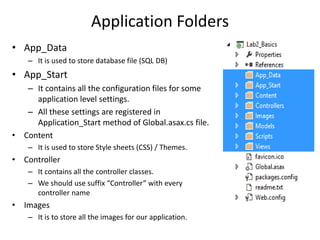
• App_Data
– It is used to store database file (SQL DB)
• App_Start
– It contains all the configuration files for some
application level settings.
– All these settings are registered in
Application_Start method of Global.asax.cs file.
• Content
– It is used to store Style sheets (CSS) / Themes.
• Controller
– It contains all the controller classes.
– We should use suffix “Controller” with every
controller name
• Images
– It is to store all the images for our application.
Application Folders
• Models
– It is used to store model classes for our application
– It could be DTO, Entities (Ado.net / Hibernate), BO
• Scripts
– It contains all the javaScript libraries / files.
– By Default we get some Jquery libraries in this folder.
• Views
– It contains all the Html markup files (Webform or Razor) of our application
– It contains one folder for each controller
– Share folder : It is used to store which are common between
controllers(Master Page)
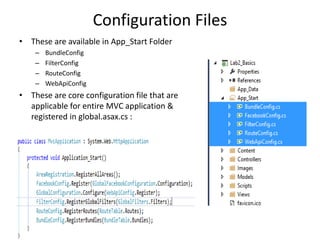
Configuration Files
• These are available in App_Start Folder
– BundleConfig
– FilterConfig
– RouteConfig
– WebApiConfig
• These are core configuration file that are
applicable for entire MVC application &
registered in global.asax.cs :
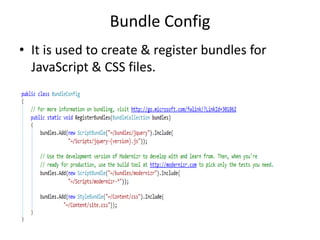
Bundle Config
• It is used to create & register bundles for
JavaScript & CSS files.
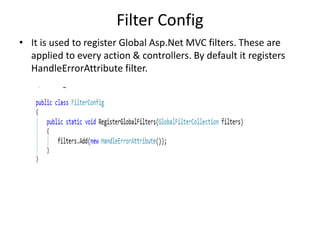
Filter Config
• It is used to register Global Asp.Net MVC filters. These are
applied to every action & controllers. By default it registers
HandleErrorAttribute filter.
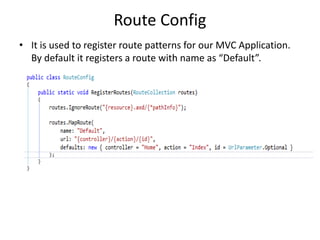
Route Config
• It is used to register route patterns for our MVC Application.
By default it registers a route with name as “Default”.
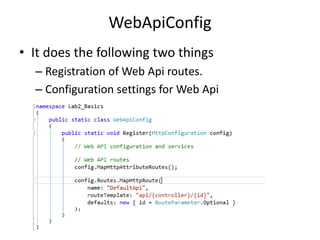
WebApiConfig
• It does the following two things
– Registration of Web Api routes.
– Configuration settings for Web Api
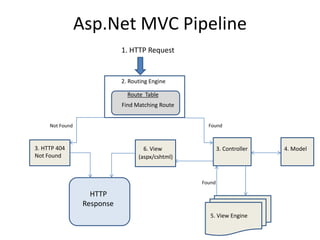
Asp.Net MVC Pipeline
2. Routing Engine
Route Table
Find Matching Route
1. HTTP Request
Not Found Found
3. HTTP 404
Not Found
3. Controller 4. Model
5. View Engine
Found
(aspx/cshtml)
6. View
HTTP
Response
Routing
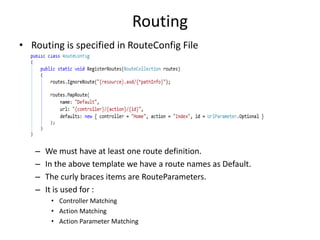
• Routing is specified in RouteConfig File
– We must have at least one route definition.
– In the above template we have a route names as Default.
– The curly braces items are RouteParameters.
– It is used for :
• Controller Matching
• Action Matching
• Action Parameter Matching
Action Method : Return Types
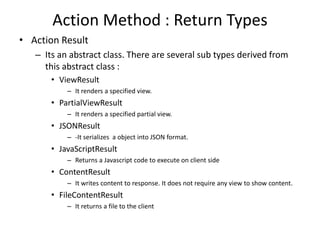
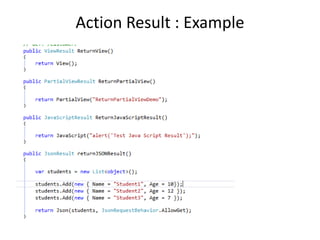
• Action Result
– Its an abstract class. There are several sub types derived from
this abstract class :
• ViewResult
– It renders a specified view.
• PartialViewResult
– It renders a specified partial view.
• JSONResult
– -It serializes a object into JSON format.
• JavaScriptResult
– Returns a Javascript code to execute on client side
• ContentResult
– It writes content to response. It does not require any view to show content.
• FileContentResult
– It returns a file to the client
Action Result : Example

4. introduction to Asp.Net MVC - Part II

  • 1.
  • 2.
    Agenda • Asp.Net MVCApplication Folders • Configuration Files • Asp.net MVC Pipeline • Routing • Action Method : Return Types
  • 3.
    Application Folders • App_Data –It is used to store database file (SQL DB) • App_Start – It contains all the configuration files for some application level settings. – All these settings are registered in Application_Start method of Global.asax.cs file. • Content – It is used to store Style sheets (CSS) / Themes. • Controller – It contains all the controller classes. – We should use suffix “Controller” with every controller name • Images – It is to store all the images for our application.
  • 4.
    Application Folders • Models –It is used to store model classes for our application – It could be DTO, Entities (Ado.net / Hibernate), BO • Scripts – It contains all the javaScript libraries / files. – By Default we get some Jquery libraries in this folder. • Views – It contains all the Html markup files (Webform or Razor) of our application – It contains one folder for each controller – Share folder : It is used to store which are common between controllers(Master Page)
  • 5.
    Configuration Files • Theseare available in App_Start Folder – BundleConfig – FilterConfig – RouteConfig – WebApiConfig • These are core configuration file that are applicable for entire MVC application & registered in global.asax.cs :
  • 6.
    Bundle Config • Itis used to create & register bundles for JavaScript & CSS files.
  • 7.
    Filter Config • Itis used to register Global Asp.Net MVC filters. These are applied to every action & controllers. By default it registers HandleErrorAttribute filter.
  • 8.
    Route Config • Itis used to register route patterns for our MVC Application. By default it registers a route with name as “Default”.
  • 9.
    WebApiConfig • It doesthe following two things – Registration of Web Api routes. – Configuration settings for Web Api
  • 10.
    Asp.Net MVC Pipeline 2.Routing Engine Route Table Find Matching Route 1. HTTP Request Not Found Found 3. HTTP 404 Not Found 3. Controller 4. Model 5. View Engine Found (aspx/cshtml) 6. View HTTP Response
  • 11.
    Routing • Routing isspecified in RouteConfig File – We must have at least one route definition. – In the above template we have a route names as Default. – The curly braces items are RouteParameters. – It is used for : • Controller Matching • Action Matching • Action Parameter Matching
  • 12.
    Action Method :Return Types • Action Result – Its an abstract class. There are several sub types derived from this abstract class : • ViewResult – It renders a specified view. • PartialViewResult – It renders a specified partial view. • JSONResult – -It serializes a object into JSON format. • JavaScriptResult – Returns a Javascript code to execute on client side • ContentResult – It writes content to response. It does not require any view to show content. • FileContentResult – It returns a file to the client
  • 13.