1
Red Hat Clustering:
Best Practices & Pitfalls
Lon Hohberger
Principal Software Engineer
Red Hat
May 2013
2
Red Hat Clustering: Best Practices & Pitfalls
● Why Cluster?
● I/O Fencing and Your Cluster
● 2-Node Clusters and Why they are Special
● Quorum Disks
● Service Structure
● Multipath Considerations in a clustered environment
● GFS2 – Cluster File System
3
Why Cluster?
● Application/Service Failover
● Reduce MTTR
● Meet business needs and SLAs
● Protect against software and hardware faults
● Virtual machine management
● Allow for planned maintenance with minimal downtime
● Load Balancing
● Scale out workloads
● Improve application response times
4
Why not Cluster?
● Often requires additional hardware
● Increases total system complexity
● More possible parts that can fail
● More failure scenarios to evaluate
● Harder to configure
● Harder to debug problems
5
Component Overview
● corosync – Totem SRP/RRP-based membership, VS
messaging, closed process groups
● cman – quorum, voting, quorum disk
● fenced – handles I/O fencing for joined members
● Fencing agents – carry out fencing operations
● DLM – distributed lock manager (kernel)
● clvmd – cluster logical volume manager
● gfs2 – cluster file system
● rgmanager – cold failover for applications
● Pacemaker (TP) – Next-generation CRM
6
Failure Recovery Overview
● corosync - Totem token is lost; Totem forms a new ring
● fenced enters recovery state – quorate partition
initiates fencing of dead node(s)
● DLM enters recovery state – locks on dead node(s) are
dropped
● clvmd, gfs2 enter recovery state – recover / replay
journals
● rgmanager initiates cold failover of user applications
7
I/O Fencing
● An active countermeasure taken by a functioning host
to isolate a misbehaving or presumed dead host from
shared data
● Most critical part of a cluster utilizing SAN or other
shared storage technology
● Despite this, not everyone uses it
● How much is your data worth?
● Required by gfs2, clvmd, and cold failover software
shipped by Red Hat
● Utilized by RHEV, too – Fencing is not a cluster-
specific technology
8
I/O Fencing
● Protects data in the event of planned or unplanned
system downtime
● Kernel panic
● System freeze
● Live hang / recovery
● Enables nodes to safely assume control of shared
resources when booted in a network partition situation
9
I/O Fencing
● SAN fabric and SCSI fencing are not fully recoverable
● Node must typically be rebooted manually
● Enables an autopsy of the node
● Sometimes does not require additional hardware
● Power fencing is usually fully recoverable
● Your system can reboot and rejoin the cluster - thereby
restoring capacity - without administrator intervention
● This is a reduction in MTTR
10
I/O Fencing – Drawbacks
● Difficult to configure
● No automated way to “discover” fencing devices
● Fencing devices are all very different and have different
permission schemes and requirements
● Typically requires additional hardware
● Additional cost often not considered when purchasing
systems
● A given “approved” IHV may not sell the hardware you
want to use
11
I/O Fencing – Best Practices
● Integrated power management
● Use servers with dual power supplies
● Use a backup fencing device
● IPMI over LAN fencing usually requires disabling acpid
● Single-rail switched PDUs
● Use 2 switched PDUs
● Use a PDU with two power rails
● Use a backup fencing device
12
Host Host
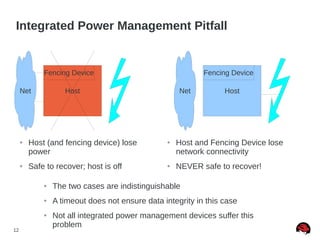
Integrated Power Management Pitfall
Fencing Device
Net
Fencing Device
Net
● Host (and fencing device) lose
power
● Safe to recover; host is off
● Host and Fencing Device lose
network connectivity
● NEVER safe to recover!
● The two cases are indistinguishable
● A timeout does not ensure data integrity in this case
● Not all integrated power management devices suffer this
problem
13
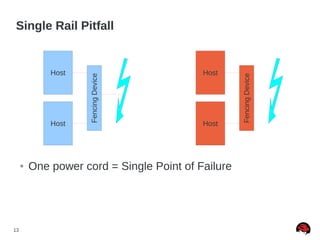
Single Rail Pitfall
Host
Host
FencingDevice
● One power cord = Single Point of Failure
Host
Host
FencingDevice
14
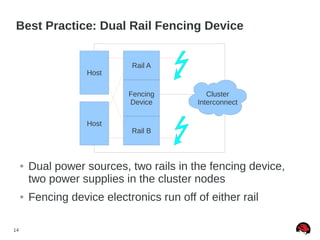
Best Practice: Dual Rail Fencing Device
Host
Host
● Dual power sources, two rails in the fencing device,
two power supplies in the cluster nodes
● Fencing device electronics run off of either rail
Rail B
Rail A
Fencing
Device
Cluster
Interconnect
15
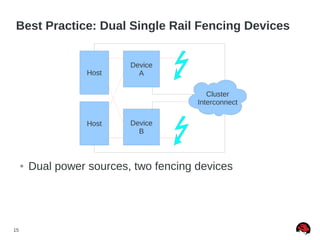
Best Practice: Dual Single Rail Fencing Devices
Host
Host
● Dual power sources, two fencing devices
Device
B
Device
A
Cluster
Interconnect
16
I/O Fencing – Pitfalls
● SAN fabric fencing
● Full recovery typically not automatic
● Unfencing in RHEL6 allows a host to turn on its ports
after reboot
● SCSI-3 PR fencing
● Not all devices support it
● Quorum disk may not reside on a LUN managed by
SCSI fencing due to quorum “chicken and egg” problem
17
I/O Fencing - Pitfalls
● SCSI-3 PR Fencing (cont.)
● Preempt-and-abort command is not required by SCSI-3
specification
● Not all SCSI-3 compliant devices support it
● LUN detection can be done by querying CLVM, looking
for volume groups with the cluster tag set
● On RHEL6, watchdog script allows reboot after fencing
18
2-Node Clusters
● Most common use case in high availability / cold
failover clusters
● Inexpensive to set up; several can fit in a single rack
● Red Hat has had two node failover clustering since
2002
19
Why 2-Node Clusters are Special
● Cluster operates using a simple majority quorum
algorithm
● Best predictability with respect to node failure counts
compared to other quorum algorithms (ex: Grid)
● There is never a majority with one node out of two
● Simple Solution: two_node=”1” mode
● When a node boots, it assumes quorum
● Services, gfs2, etc. are prevented from operating until
fencing completes
20
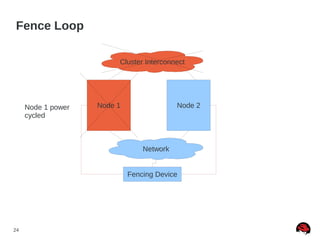
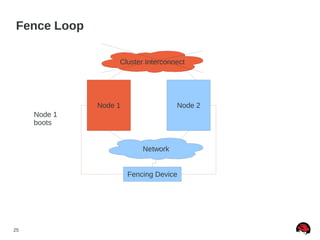
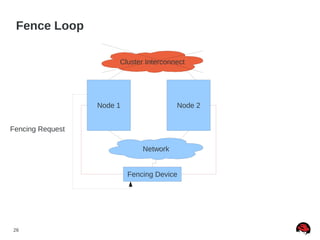
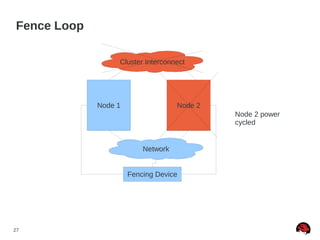
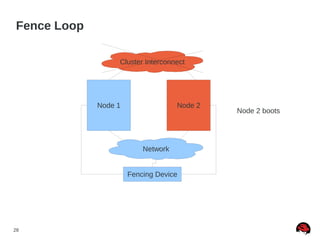
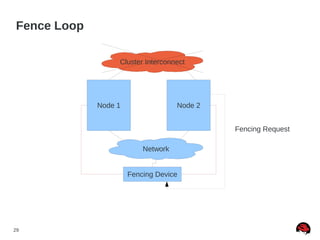
2-Node Pitfalls: Fence Loops
● If two nodes become partitioned, a fence loop can
occur
● Node A kills node B, who reboots and kills node A...
etc.
● Solutions
● Correct network configuration
● Fencing devices on same network used for cluster
communication
● Use fencing delays
● Use a quorum disk
21
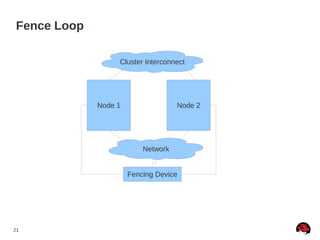
Fence Loop
Node 1 Node 2
Fencing Device
Network
Cluster Interconnect
22
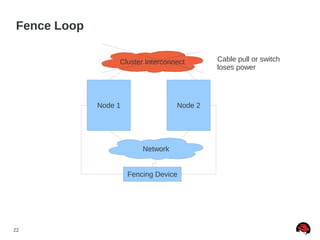
Fence Loop
Node 1 Node 2
Fencing Device
Cluster Interconnect Cable pull or switch
loses power
Network
23
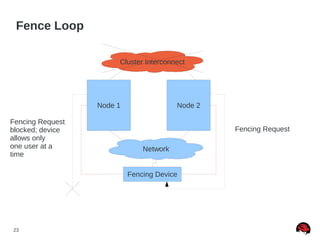
Fence Loop
Node 1 Node 2
Fencing Device
Fencing Request
Fencing Request
blocked; device
allows only
one user at a
time
Cluster Interconnect
Network
24
Fence Loop
Node 1 Node 2
Fencing Device
Node 1 power
cycled
Network
Cluster Interconnect
25
Fence Loop
Node 1 Node 2
Fencing Device
Node 1
boots
Cluster Interconnect
Network
26
Fence Loop
Node 1 Node 2
Fencing Device
Fencing Request
Network
Cluster Interconnect
27
Fence Loop
Node 1 Node 2
Fencing Device
Node 2 power
cycled
Network
Cluster Interconnect
28
Fence Loop
Node 1 Node 2
Fencing Device
Node 2 boots
Network
Cluster Interconnect
29
Fence Loop
Node 1 Node 2
Fencing Device
Fencing Request
Network
Cluster Interconnect
30
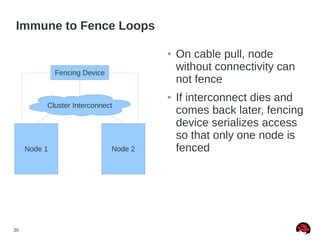
Immune to Fence Loops
● On cable pull, node
without connectivity can
not fence
● If interconnect dies and
comes back later, fencing
device serializes access
so that only one node is
fencedNode 1 Node 2
Fencing Device
Cluster Interconnect
31
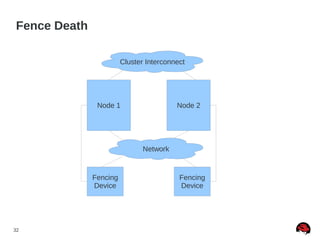
2-Node Pitfalls: Fence Death
● A combined pitfall when using integrated power in two
node clusters
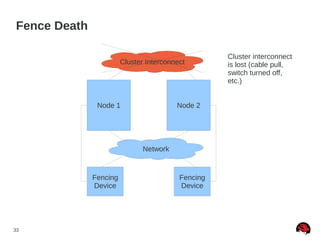
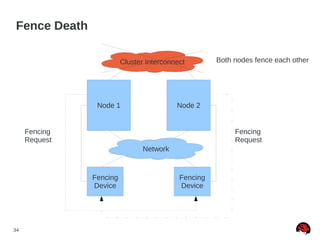
● If a two node cluster becomes partitioned, a fence
death can occur if fencing devices are still accessible
● Two nodes tell each other's fencing device to turn off
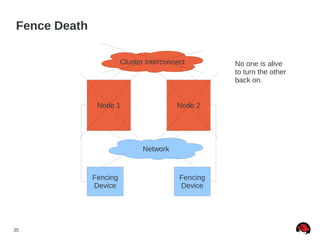
the other node at the same time
● No one is alive to turn either host back on!
● Solutions
● Same as fence loops
● Use a switched PDU which serializes access
32
Fence Death
Node 1 Node 2
Fencing
Device
Fencing
Device
Network
Cluster Interconnect
33
Fence Death
Node 1 Node 2
Fencing
Device
Fencing
Device
Network
Cluster Interconnect
Cluster interconnect
is lost (cable pull,
switch turned off,
etc.)
34
Fence Death
Node 1 Node 2
Fencing
Device
Fencing
Device
Fencing
Request
Fencing
Request
Network
Cluster Interconnect Both nodes fence each other
35
Fence Death
Node 1 Node 2
Fencing
Device
Fencing
Device
Network
Cluster Interconnect No one is alive
to turn the other
back on.
36
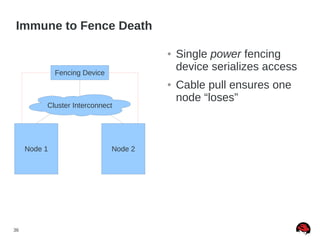
Immune to Fence Death
Node 1 Node 2
Fencing Device
● Single power fencing
device serializes access
● Cable pull ensures one
node “loses”
Cluster Interconnect
37
2-Node Pitfalls: Crossover Cables
● Causes both nodes to lose link on cluster interconnect
when only one link has failed
● Indeterminate state for quorum disk without very clever
heuristics (use master_wins)
● Fencing can't be placed on the same network
● We don't test this
38
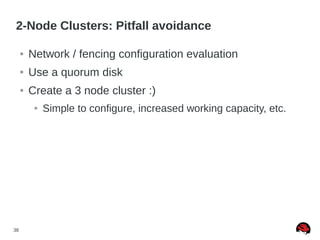
2-Node Clusters: Pitfall avoidance
● Network / fencing configuration evaluation
● Use a quorum disk
● Create a 3 node cluster :)
● Simple to configure, increased working capacity, etc.
39
Quorum Disk - Benefits
● Prevents fence-loop and fence death situations
● Existing cluster member retains quorum until it fails or
cluster connectivity is restored
● Heuristics ensure that administrator-defined “best-fit”
node continues operation in a network partition
● Provides all-but-one or last-man-standing failure mode
● Examples:
● 4 node cluster, and 3 nodes fail
● 4 node cluster and 3 nodes lose access to a critical network
path as decided by the administrator
● Note: Ensure capacity of remaining node is adequate
for all cluster operations before trying this
40
Quorum Disk - Drawbacks
● Used to be complex to configure, but RHEL 6.3 fixes
most of this
● Heuristics need to be written by administrators for their
particular environments
● Incorrect configuration can reduce availability
● Algorithm used is non-traditional
● Backup membership algorithm vs. ownership algorithm
or simple “tie-breaker”
41
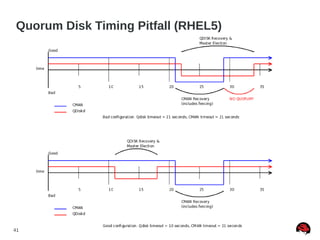
Quorum Disk Timing Pitfall (RHEL5)
42
Quorum Disk Made “Simple” (RHEL5)
● Quorum disk failure recovery should be a bit less than
half of CMAN's failure time
● This allows for the quorum disk arbitration node to fail
over before CMAN times out
● Quorum disk failure recovery should be approximately
30% longer than a multipath failover. Example [1]:
● x = multipath failover
● x * 1.3 = quorum disk failover
● x * 2.7 = CMAN failover
[1] http://kbase.redhat.com/faq/docs/DOC-2882
43
Quorum Disk Best Practices
● Don't use it if you don't need it
● Fencing delays can usually provide adequate decision-
making
● If required, use heuristics for your environment
● Prefer master_wins over heuristics
● I/O Scheduling
● deadline scheduler
● cfq scheduler with realtime prio
● ionice -c 1 -n 0 -p `pidof qdiskd`
44
Clustered Services – Best Practices
● Service structure should be as flat as possible
● Improves readability / maintainability
● Reduces configuration file footprint
● Rgmanager fixes most common ordering mistakes
● The resources block is not required
● Virtual machines should not exceed memory limits of a
host after a failover for best predictability
45
● With SCSI-3 PR Fencing, multipath works, but only
when using device-mapper
● When using multiple paths and SAN fencing, you must
ensure all paths to all storage is fenced for a given
host
● When using multipath with a quorum disk, you must
not use no_path_retry = queue.
● When using multipath with GFS2, you should not use
no_path_retry = queue.
On Multipath
46
On Multipath
● Do not place /var on a multipath device without
relocating the bindings file to the root partition
● Not all SAN fabrics behave the same way in the same
failure scenarios
● Test all failure scenarios you expect to have the cluster
handle
● Use device-mapper multipath rather than vendor
supplied versions for the best support from Red Hat
47
GFS2 – Shared Disk Cluster File System
● Provide uniform views of a file system in a cluster
● POSIX compliant (as much as Linux is, anyway)
● Allow easy management of things like virtual machine
images
● Good for getting lots of data to several nodes quickly
48
GFS2 Considerations
● Journal count (cluster size)
● One journal per node
● File system size
● Online extend supported
● Shrinking is not supported
● Workload requirements & planned usage
49
GFS2 Pitfalls
● Making a file system with lock_nolock as the locking
protocol
● Failure to allocate enough journals at file system
creation time and adding nodes to the cluster (GFS
only)
● NFS lock failover does not work!
● Never use a cluster file system on top of an md-raid
device
● Use of local file systems on md-raid for failover is also
not supported
50
Other Topics
● Stretch clustering – multiple buildings on the same
campus in the same cluster
● Minimal support for this
● Geographic clustering / disaster tolerance – longer-
distance
● Evaluated typically on a case-by-case basis; requires
site to site storage replication and a backup cluster
● Active/active clustering across sites is not supported
51
Troubleshooting corosync & CMAN
● corosync does not have an easy tool to assist
troubleshooting; check system logs (it is very verbose
if problems occur)
● Most common problem w/ corosync is incorrect
multicast configuration on the switch
● UDPU (6.2+) more reliable
● cman_tool status
● Shows cluster states (incl. votes)
● cman_tool nodes
● Show cluster node states
52
Troubleshooting Fencing
● group_tool ls – The fence group should be in NONE
(or “run” depending on version)
● If it is in another state (FAIL_STOP_WAIT,
FAIL_START_WAIT), check logs on the low node ID
● cman_tool nodes -f – Show nodes and the last time
each were fenced (if ever)
● fence_ack_manual -e -n <node> - emergency fencing
override. Use if you are sure the host is dead and the
fencing device is inaccessible (or if fencing is
incorrectly configured) to allow the cluster to recover.
53
Summary
● Choose a fencing configuration which works in the
failure cases you expect
● Test all failure cases you expect the cluster to recover
from
● The more complex the system, the more likely a single
component will fail
● Use the simplest configuration whenever possible
● When using clustered file systems, tune according to
your workload
54
References
● https://access.redhat.com/knowledge/solutions/17784
● https://access.redhat.com/knowledge/node/28603
● https://access.redhat.com/knowledge/node/29440
● https://access.redhat.com/knowledge/articles/40051
● http://people.redhat.com/lhh/ClusterPitfalls.pdf
55
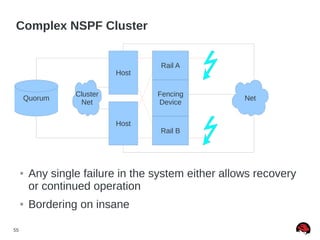
Complex NSPF Cluster
Host
Host
● Any single failure in the system either allows recovery
or continued operation
● Bordering on insane
Rail B
Rail A
Fencing
Device
NetQuorum
Cluster
Net
56
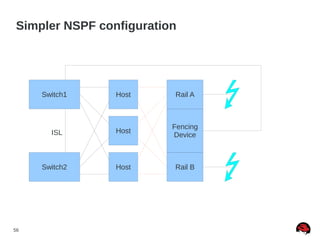
Simpler NSPF configuration
Host
Host
Rail B
Rail A
Fencing
Device
Host
Switch1
Switch2
ISL

Cluster pitfalls recommand

  • 1.
    1 Red Hat Clustering: BestPractices & Pitfalls Lon Hohberger Principal Software Engineer Red Hat May 2013
  • 2.
    2 Red Hat Clustering:Best Practices & Pitfalls ● Why Cluster? ● I/O Fencing and Your Cluster ● 2-Node Clusters and Why they are Special ● Quorum Disks ● Service Structure ● Multipath Considerations in a clustered environment ● GFS2 – Cluster File System
  • 3.
    3 Why Cluster? ● Application/ServiceFailover ● Reduce MTTR ● Meet business needs and SLAs ● Protect against software and hardware faults ● Virtual machine management ● Allow for planned maintenance with minimal downtime ● Load Balancing ● Scale out workloads ● Improve application response times
  • 4.
    4 Why not Cluster? ●Often requires additional hardware ● Increases total system complexity ● More possible parts that can fail ● More failure scenarios to evaluate ● Harder to configure ● Harder to debug problems
  • 5.
    5 Component Overview ● corosync– Totem SRP/RRP-based membership, VS messaging, closed process groups ● cman – quorum, voting, quorum disk ● fenced – handles I/O fencing for joined members ● Fencing agents – carry out fencing operations ● DLM – distributed lock manager (kernel) ● clvmd – cluster logical volume manager ● gfs2 – cluster file system ● rgmanager – cold failover for applications ● Pacemaker (TP) – Next-generation CRM
  • 6.
    6 Failure Recovery Overview ●corosync - Totem token is lost; Totem forms a new ring ● fenced enters recovery state – quorate partition initiates fencing of dead node(s) ● DLM enters recovery state – locks on dead node(s) are dropped ● clvmd, gfs2 enter recovery state – recover / replay journals ● rgmanager initiates cold failover of user applications
  • 7.
    7 I/O Fencing ● Anactive countermeasure taken by a functioning host to isolate a misbehaving or presumed dead host from shared data ● Most critical part of a cluster utilizing SAN or other shared storage technology ● Despite this, not everyone uses it ● How much is your data worth? ● Required by gfs2, clvmd, and cold failover software shipped by Red Hat ● Utilized by RHEV, too – Fencing is not a cluster- specific technology
  • 8.
    8 I/O Fencing ● Protectsdata in the event of planned or unplanned system downtime ● Kernel panic ● System freeze ● Live hang / recovery ● Enables nodes to safely assume control of shared resources when booted in a network partition situation
  • 9.
    9 I/O Fencing ● SANfabric and SCSI fencing are not fully recoverable ● Node must typically be rebooted manually ● Enables an autopsy of the node ● Sometimes does not require additional hardware ● Power fencing is usually fully recoverable ● Your system can reboot and rejoin the cluster - thereby restoring capacity - without administrator intervention ● This is a reduction in MTTR
  • 10.
    10 I/O Fencing –Drawbacks ● Difficult to configure ● No automated way to “discover” fencing devices ● Fencing devices are all very different and have different permission schemes and requirements ● Typically requires additional hardware ● Additional cost often not considered when purchasing systems ● A given “approved” IHV may not sell the hardware you want to use
  • 11.
    11 I/O Fencing –Best Practices ● Integrated power management ● Use servers with dual power supplies ● Use a backup fencing device ● IPMI over LAN fencing usually requires disabling acpid ● Single-rail switched PDUs ● Use 2 switched PDUs ● Use a PDU with two power rails ● Use a backup fencing device
  • 12.
    12 Host Host Integrated PowerManagement Pitfall Fencing Device Net Fencing Device Net ● Host (and fencing device) lose power ● Safe to recover; host is off ● Host and Fencing Device lose network connectivity ● NEVER safe to recover! ● The two cases are indistinguishable ● A timeout does not ensure data integrity in this case ● Not all integrated power management devices suffer this problem
  • 13.
    13 Single Rail Pitfall Host Host FencingDevice ●One power cord = Single Point of Failure Host Host FencingDevice
  • 14.
    14 Best Practice: DualRail Fencing Device Host Host ● Dual power sources, two rails in the fencing device, two power supplies in the cluster nodes ● Fencing device electronics run off of either rail Rail B Rail A Fencing Device Cluster Interconnect
  • 15.
    15 Best Practice: DualSingle Rail Fencing Devices Host Host ● Dual power sources, two fencing devices Device B Device A Cluster Interconnect
  • 16.
    16 I/O Fencing –Pitfalls ● SAN fabric fencing ● Full recovery typically not automatic ● Unfencing in RHEL6 allows a host to turn on its ports after reboot ● SCSI-3 PR fencing ● Not all devices support it ● Quorum disk may not reside on a LUN managed by SCSI fencing due to quorum “chicken and egg” problem
  • 17.
    17 I/O Fencing -Pitfalls ● SCSI-3 PR Fencing (cont.) ● Preempt-and-abort command is not required by SCSI-3 specification ● Not all SCSI-3 compliant devices support it ● LUN detection can be done by querying CLVM, looking for volume groups with the cluster tag set ● On RHEL6, watchdog script allows reboot after fencing
  • 18.
    18 2-Node Clusters ● Mostcommon use case in high availability / cold failover clusters ● Inexpensive to set up; several can fit in a single rack ● Red Hat has had two node failover clustering since 2002
  • 19.
    19 Why 2-Node Clustersare Special ● Cluster operates using a simple majority quorum algorithm ● Best predictability with respect to node failure counts compared to other quorum algorithms (ex: Grid) ● There is never a majority with one node out of two ● Simple Solution: two_node=”1” mode ● When a node boots, it assumes quorum ● Services, gfs2, etc. are prevented from operating until fencing completes
  • 20.
    20 2-Node Pitfalls: FenceLoops ● If two nodes become partitioned, a fence loop can occur ● Node A kills node B, who reboots and kills node A... etc. ● Solutions ● Correct network configuration ● Fencing devices on same network used for cluster communication ● Use fencing delays ● Use a quorum disk
  • 21.
    21 Fence Loop Node 1Node 2 Fencing Device Network Cluster Interconnect
  • 22.
    22 Fence Loop Node 1Node 2 Fencing Device Cluster Interconnect Cable pull or switch loses power Network
  • 23.
    23 Fence Loop Node 1Node 2 Fencing Device Fencing Request Fencing Request blocked; device allows only one user at a time Cluster Interconnect Network
  • 24.
    24 Fence Loop Node 1Node 2 Fencing Device Node 1 power cycled Network Cluster Interconnect
  • 25.
    25 Fence Loop Node 1Node 2 Fencing Device Node 1 boots Cluster Interconnect Network
  • 26.
    26 Fence Loop Node 1Node 2 Fencing Device Fencing Request Network Cluster Interconnect
  • 27.
    27 Fence Loop Node 1Node 2 Fencing Device Node 2 power cycled Network Cluster Interconnect
  • 28.
    28 Fence Loop Node 1Node 2 Fencing Device Node 2 boots Network Cluster Interconnect
  • 29.
    29 Fence Loop Node 1Node 2 Fencing Device Fencing Request Network Cluster Interconnect
  • 30.
    30 Immune to FenceLoops ● On cable pull, node without connectivity can not fence ● If interconnect dies and comes back later, fencing device serializes access so that only one node is fencedNode 1 Node 2 Fencing Device Cluster Interconnect
  • 31.
    31 2-Node Pitfalls: FenceDeath ● A combined pitfall when using integrated power in two node clusters ● If a two node cluster becomes partitioned, a fence death can occur if fencing devices are still accessible ● Two nodes tell each other's fencing device to turn off the other node at the same time ● No one is alive to turn either host back on! ● Solutions ● Same as fence loops ● Use a switched PDU which serializes access
  • 32.
    32 Fence Death Node 1Node 2 Fencing Device Fencing Device Network Cluster Interconnect
  • 33.
    33 Fence Death Node 1Node 2 Fencing Device Fencing Device Network Cluster Interconnect Cluster interconnect is lost (cable pull, switch turned off, etc.)
  • 34.
    34 Fence Death Node 1Node 2 Fencing Device Fencing Device Fencing Request Fencing Request Network Cluster Interconnect Both nodes fence each other
  • 35.
    35 Fence Death Node 1Node 2 Fencing Device Fencing Device Network Cluster Interconnect No one is alive to turn the other back on.
  • 36.
    36 Immune to FenceDeath Node 1 Node 2 Fencing Device ● Single power fencing device serializes access ● Cable pull ensures one node “loses” Cluster Interconnect
  • 37.
    37 2-Node Pitfalls: CrossoverCables ● Causes both nodes to lose link on cluster interconnect when only one link has failed ● Indeterminate state for quorum disk without very clever heuristics (use master_wins) ● Fencing can't be placed on the same network ● We don't test this
  • 38.
    38 2-Node Clusters: Pitfallavoidance ● Network / fencing configuration evaluation ● Use a quorum disk ● Create a 3 node cluster :) ● Simple to configure, increased working capacity, etc.
  • 39.
    39 Quorum Disk -Benefits ● Prevents fence-loop and fence death situations ● Existing cluster member retains quorum until it fails or cluster connectivity is restored ● Heuristics ensure that administrator-defined “best-fit” node continues operation in a network partition ● Provides all-but-one or last-man-standing failure mode ● Examples: ● 4 node cluster, and 3 nodes fail ● 4 node cluster and 3 nodes lose access to a critical network path as decided by the administrator ● Note: Ensure capacity of remaining node is adequate for all cluster operations before trying this
  • 40.
    40 Quorum Disk -Drawbacks ● Used to be complex to configure, but RHEL 6.3 fixes most of this ● Heuristics need to be written by administrators for their particular environments ● Incorrect configuration can reduce availability ● Algorithm used is non-traditional ● Backup membership algorithm vs. ownership algorithm or simple “tie-breaker”
  • 41.
    41 Quorum Disk TimingPitfall (RHEL5)
  • 42.
    42 Quorum Disk Made“Simple” (RHEL5) ● Quorum disk failure recovery should be a bit less than half of CMAN's failure time ● This allows for the quorum disk arbitration node to fail over before CMAN times out ● Quorum disk failure recovery should be approximately 30% longer than a multipath failover. Example [1]: ● x = multipath failover ● x * 1.3 = quorum disk failover ● x * 2.7 = CMAN failover [1] http://kbase.redhat.com/faq/docs/DOC-2882
  • 43.
    43 Quorum Disk BestPractices ● Don't use it if you don't need it ● Fencing delays can usually provide adequate decision- making ● If required, use heuristics for your environment ● Prefer master_wins over heuristics ● I/O Scheduling ● deadline scheduler ● cfq scheduler with realtime prio ● ionice -c 1 -n 0 -p `pidof qdiskd`
  • 44.
    44 Clustered Services –Best Practices ● Service structure should be as flat as possible ● Improves readability / maintainability ● Reduces configuration file footprint ● Rgmanager fixes most common ordering mistakes ● The resources block is not required ● Virtual machines should not exceed memory limits of a host after a failover for best predictability
  • 45.
    45 ● With SCSI-3PR Fencing, multipath works, but only when using device-mapper ● When using multiple paths and SAN fencing, you must ensure all paths to all storage is fenced for a given host ● When using multipath with a quorum disk, you must not use no_path_retry = queue. ● When using multipath with GFS2, you should not use no_path_retry = queue. On Multipath
  • 46.
    46 On Multipath ● Donot place /var on a multipath device without relocating the bindings file to the root partition ● Not all SAN fabrics behave the same way in the same failure scenarios ● Test all failure scenarios you expect to have the cluster handle ● Use device-mapper multipath rather than vendor supplied versions for the best support from Red Hat
  • 47.
    47 GFS2 – SharedDisk Cluster File System ● Provide uniform views of a file system in a cluster ● POSIX compliant (as much as Linux is, anyway) ● Allow easy management of things like virtual machine images ● Good for getting lots of data to several nodes quickly
  • 48.
    48 GFS2 Considerations ● Journalcount (cluster size) ● One journal per node ● File system size ● Online extend supported ● Shrinking is not supported ● Workload requirements & planned usage
  • 49.
    49 GFS2 Pitfalls ● Makinga file system with lock_nolock as the locking protocol ● Failure to allocate enough journals at file system creation time and adding nodes to the cluster (GFS only) ● NFS lock failover does not work! ● Never use a cluster file system on top of an md-raid device ● Use of local file systems on md-raid for failover is also not supported
  • 50.
    50 Other Topics ● Stretchclustering – multiple buildings on the same campus in the same cluster ● Minimal support for this ● Geographic clustering / disaster tolerance – longer- distance ● Evaluated typically on a case-by-case basis; requires site to site storage replication and a backup cluster ● Active/active clustering across sites is not supported
  • 51.
    51 Troubleshooting corosync &CMAN ● corosync does not have an easy tool to assist troubleshooting; check system logs (it is very verbose if problems occur) ● Most common problem w/ corosync is incorrect multicast configuration on the switch ● UDPU (6.2+) more reliable ● cman_tool status ● Shows cluster states (incl. votes) ● cman_tool nodes ● Show cluster node states
  • 52.
    52 Troubleshooting Fencing ● group_toolls – The fence group should be in NONE (or “run” depending on version) ● If it is in another state (FAIL_STOP_WAIT, FAIL_START_WAIT), check logs on the low node ID ● cman_tool nodes -f – Show nodes and the last time each were fenced (if ever) ● fence_ack_manual -e -n <node> - emergency fencing override. Use if you are sure the host is dead and the fencing device is inaccessible (or if fencing is incorrectly configured) to allow the cluster to recover.
  • 53.
    53 Summary ● Choose afencing configuration which works in the failure cases you expect ● Test all failure cases you expect the cluster to recover from ● The more complex the system, the more likely a single component will fail ● Use the simplest configuration whenever possible ● When using clustered file systems, tune according to your workload
  • 54.
    54 References ● https://access.redhat.com/knowledge/solutions/17784 ● https://access.redhat.com/knowledge/node/28603 ●https://access.redhat.com/knowledge/node/29440 ● https://access.redhat.com/knowledge/articles/40051 ● http://people.redhat.com/lhh/ClusterPitfalls.pdf
  • 55.
    55 Complex NSPF Cluster Host Host ●Any single failure in the system either allows recovery or continued operation ● Bordering on insane Rail B Rail A Fencing Device NetQuorum Cluster Net
  • 56.
    56 Simpler NSPF configuration Host Host RailB Rail A Fencing Device Host Switch1 Switch2 ISL