Cloud-In-A-Day !
Build A Cloud In 4 Hours With Apache CloudStack and
Open Source Citrix XenServer
- K B Shiv Kumar, Co-Founder and CTO, IndiQus
Agenda
Gain – Interested in Apache CloudStack
Problems – Nested Virtualization (V on V)
Model – Demo From Scratch
Introductions First !!
2
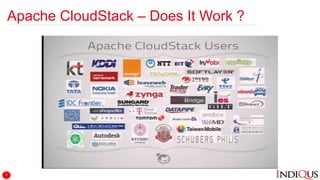
Apache CloudStack – Does It Work ?
3
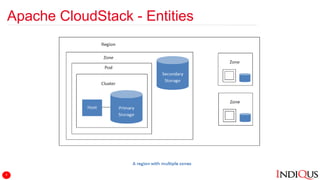
Apache CloudStack - Entities
4
Oracle VirtualBox - Installation
Download VirtualBox
Install VirtualBox
Install Guest Additions
5
Oracle VirtualBox – Configure Networks
Configure HostOnly Network
Configure NatNetwork Network
6
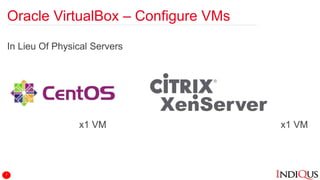
Oracle VirtualBox – Configure VMs
In Lieu Of Physical Servers
x1 VM x1 VM
7
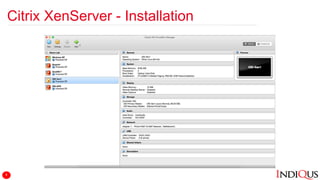
Citrix XenServer - Installation
8
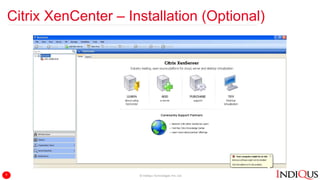
Citrix XenCenter – Installation (Optional)
© IndiQus Technologies Pvt. Ltd.9
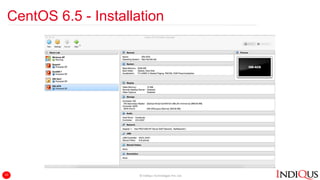
CentOS 6.5 - Installation
© IndiQus Technologies Pvt. Ltd.10
Apache CloudStack - Installation
1. Install minimal ISO
2. Set the hostname in /etc/hosts
3. Check output of hostname –fqdn
4. Configure CloudStack YUM repository
1. vi /etc/yum.repos.d/cloudstack.repo
2. [cloudstack]
name=cloudstack
baseurl=http://cloudstack.apt-get.eu/rhel/4.5/
enabled=1
gpgcheck=0
5. Configure local YUM repository (optional)
1. vi /etc/yum.repos.d/lab.repo
2. [lab]
name=lab
baseurl=http://10.0.2.6/cloudstack452/
enabled=1
gpgcheck=0
11
Apache CloudStack - Installation
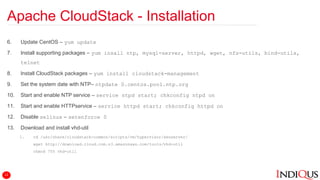
6. Update CentOS – yum update
7. Install supporting packages – yum insall ntp, mysql-server, httpd, wget, nfs-utils, bind-utils,
telnet
8. Install CloudStack packages – yum install cloudstack-management
9. Set the system date with NTP– ntpdate 0.centos.pool.ntp.org
10. Start and enable NTP service – service ntpd start; chkconfig ntpd on
11. Start and enable HTTPservice – service httpd start; chkconfig httpd on
12. Disable selinux – setenforce 0
13. Download and install vhd-util
1. cd /usr/share/cloudstack-common/scripts/vm/hypervisor/xenserver/
wget http://download.cloud.com.s3.amazonaws.com/tools/vhd-util
chmod 755 vhd-util
12
Apache CloudStack - Installation
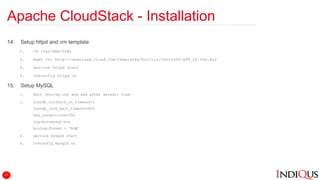
14. Setup httpd and vm template
1. cd /var/www/html
2. wget -nc http://download.cloud.com/templates/builtin/centos56-x86_64.vhd.bz2
3. service httpd start
4. chkconfig httpd on
15. Setup MySQL
1. Edit /etc/my.cnf and add after datadir line.
2. innodb_rollback_on_timeout=1
innodb_lock_wait_timeout=600
max_connections=350
log-bin=mysql-bin
binlog-format = ‘ROW’
3. service mysqld start
4. chkconfig mysqld on
13
Apache CloudStack - Installation
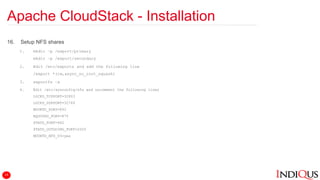
16. Setup NFS shares
1. mkdir –p /export/primary
mkdir –p /export/secondary
2. Edit /etc/exports and add the following line
/export *(rw,async_no_root_squash)
3. exportfs –a
4. Edit /etc/sysconfig/nfs and uncomment the following lines
LOCKD_TCPPORT=32803
LOCKD_UDPPORT=32769
MOUNTD_PORT=892
RQUOTAD_PORT=875
STATD_PORT=662
STATD_OUTGOING_PORT=2020
MOUNTD_NFS_V3=yes
14
Apache CloudStack - Installation
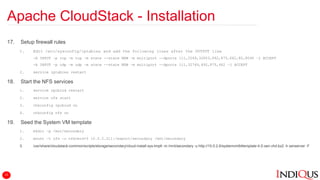
17. Setup firewall rules
1. Edit /etc/sysconfig/iptables and add the following lines after the OUTPUT line
-A INPUT –p tcp –m tcp –m state --state NEW –m multiport --dports 111,2049,32803,892,875,662,80,8096 –j ACCEPT
-A INPUT –p udp –m udp –m state --state NEW –m multiport --dports 111,32769,892,875,662 –j ACCEPT
2. service iptables restart
18. Start the NFS services
1. service rpcbind restart
2. service nfs start
3. chkconfig rpcbind on
4. chkconfig nfs on
19. Seed the System VM template
1. mkdir –p /mnt/secondary
2. mount –t nfs –o nfsvers=3 10.0.2.211:/export/secondary /mnt/secondary
3. /usr/share/cloudstack-common/scripts/storage/secondary/cloud-install-sys-tmplt -m /mnt/secondary -u http://10.0.2.6/systemvm64template-4.5-xen.vhd.bz2 -h xenserver -F
15
Apache CloudStack - Installation
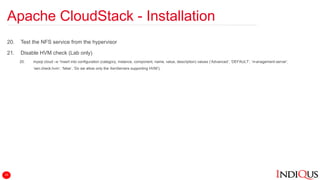
20. Test the NFS service from the hypervisor
21. Disable HVM check (Lab only)
20. mysql cloud –e “insert into configuration (category, instance, component, name, value, description) values (‘Advanced’, ‘DEFAULT’, ‘management-server’,
‘xen.check.hvm’, ‘false’, ‘Do we allow only the XenServers supporting HVM’);
16
Apache CloudStack - Configuration
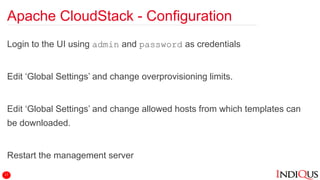
Login to the UI using admin and password as credentials
Edit ‘Global Settings’ and change overprovisioning limits.
Edit ‘Global Settings’ and change allowed hosts from which templates can
be downloaded.
Restart the management server
17
Apache CloudStack - Configuration
Configure the zone, pod, cluster, hosts, primary and secondary storage.
18
Apache CloudStack
Register CentOS 5.6 template
Create the 1st VM
Create the 2nd VM
Configure Firewall, Port Forwarding, Load Balancer
19
Way Forward
Multiple XenServers in a cluster
Multi-Hypervisor zones
Automate installations
Load Tests
SDX – SDN, SDS
20
Resources and Links
VirtualBox
Main Site: https://www.virtualbox.org/
Apache CloudStack
Main Site: https://cloudstack.apache.org/
Documentation: http://docs.cloudstack.apache.org/en/master/
Mailing Lists: https://cloudstack.apache.org/mailing-lists.html
Xen
Main Site: http://xenserver.org/
Documentation: http://xenserver.org/overview-xenserver-open-source-virtualization/documentation.html
Tools
Ansible: http://www.ansible.com/
21
Questions ?
@KBShivKumar @IndiQus
http://in.linkedin.com/in/kbshiv
shiv@indiqus.com
www.indiqus.com
22

OFY-2015-Cloud-In-A-Day

  • 1.
    Cloud-In-A-Day ! Build ACloud In 4 Hours With Apache CloudStack and Open Source Citrix XenServer - K B Shiv Kumar, Co-Founder and CTO, IndiQus
  • 2.
    Agenda Gain – Interestedin Apache CloudStack Problems – Nested Virtualization (V on V) Model – Demo From Scratch Introductions First !! 2
  • 3.
    Apache CloudStack –Does It Work ? 3
  • 4.
  • 5.
    Oracle VirtualBox -Installation Download VirtualBox Install VirtualBox Install Guest Additions 5
  • 6.
    Oracle VirtualBox –Configure Networks Configure HostOnly Network Configure NatNetwork Network 6
  • 7.
    Oracle VirtualBox –Configure VMs In Lieu Of Physical Servers x1 VM x1 VM 7
  • 8.
    Citrix XenServer -Installation 8
  • 9.
    Citrix XenCenter –Installation (Optional) © IndiQus Technologies Pvt. Ltd.9
  • 10.
    CentOS 6.5 -Installation © IndiQus Technologies Pvt. Ltd.10
  • 11.
    Apache CloudStack -Installation 1. Install minimal ISO 2. Set the hostname in /etc/hosts 3. Check output of hostname –fqdn 4. Configure CloudStack YUM repository 1. vi /etc/yum.repos.d/cloudstack.repo 2. [cloudstack] name=cloudstack baseurl=http://cloudstack.apt-get.eu/rhel/4.5/ enabled=1 gpgcheck=0 5. Configure local YUM repository (optional) 1. vi /etc/yum.repos.d/lab.repo 2. [lab] name=lab baseurl=http://10.0.2.6/cloudstack452/ enabled=1 gpgcheck=0 11
  • 12.
    Apache CloudStack -Installation 6. Update CentOS – yum update 7. Install supporting packages – yum insall ntp, mysql-server, httpd, wget, nfs-utils, bind-utils, telnet 8. Install CloudStack packages – yum install cloudstack-management 9. Set the system date with NTP– ntpdate 0.centos.pool.ntp.org 10. Start and enable NTP service – service ntpd start; chkconfig ntpd on 11. Start and enable HTTPservice – service httpd start; chkconfig httpd on 12. Disable selinux – setenforce 0 13. Download and install vhd-util 1. cd /usr/share/cloudstack-common/scripts/vm/hypervisor/xenserver/ wget http://download.cloud.com.s3.amazonaws.com/tools/vhd-util chmod 755 vhd-util 12
  • 13.
    Apache CloudStack -Installation 14. Setup httpd and vm template 1. cd /var/www/html 2. wget -nc http://download.cloud.com/templates/builtin/centos56-x86_64.vhd.bz2 3. service httpd start 4. chkconfig httpd on 15. Setup MySQL 1. Edit /etc/my.cnf and add after datadir line. 2. innodb_rollback_on_timeout=1 innodb_lock_wait_timeout=600 max_connections=350 log-bin=mysql-bin binlog-format = ‘ROW’ 3. service mysqld start 4. chkconfig mysqld on 13
  • 14.
    Apache CloudStack -Installation 16. Setup NFS shares 1. mkdir –p /export/primary mkdir –p /export/secondary 2. Edit /etc/exports and add the following line /export *(rw,async_no_root_squash) 3. exportfs –a 4. Edit /etc/sysconfig/nfs and uncomment the following lines LOCKD_TCPPORT=32803 LOCKD_UDPPORT=32769 MOUNTD_PORT=892 RQUOTAD_PORT=875 STATD_PORT=662 STATD_OUTGOING_PORT=2020 MOUNTD_NFS_V3=yes 14
  • 15.
    Apache CloudStack -Installation 17. Setup firewall rules 1. Edit /etc/sysconfig/iptables and add the following lines after the OUTPUT line -A INPUT –p tcp –m tcp –m state --state NEW –m multiport --dports 111,2049,32803,892,875,662,80,8096 –j ACCEPT -A INPUT –p udp –m udp –m state --state NEW –m multiport --dports 111,32769,892,875,662 –j ACCEPT 2. service iptables restart 18. Start the NFS services 1. service rpcbind restart 2. service nfs start 3. chkconfig rpcbind on 4. chkconfig nfs on 19. Seed the System VM template 1. mkdir –p /mnt/secondary 2. mount –t nfs –o nfsvers=3 10.0.2.211:/export/secondary /mnt/secondary 3. /usr/share/cloudstack-common/scripts/storage/secondary/cloud-install-sys-tmplt -m /mnt/secondary -u http://10.0.2.6/systemvm64template-4.5-xen.vhd.bz2 -h xenserver -F 15
  • 16.
    Apache CloudStack -Installation 20. Test the NFS service from the hypervisor 21. Disable HVM check (Lab only) 20. mysql cloud –e “insert into configuration (category, instance, component, name, value, description) values (‘Advanced’, ‘DEFAULT’, ‘management-server’, ‘xen.check.hvm’, ‘false’, ‘Do we allow only the XenServers supporting HVM’); 16
  • 17.
    Apache CloudStack -Configuration Login to the UI using admin and password as credentials Edit ‘Global Settings’ and change overprovisioning limits. Edit ‘Global Settings’ and change allowed hosts from which templates can be downloaded. Restart the management server 17
  • 18.
    Apache CloudStack -Configuration Configure the zone, pod, cluster, hosts, primary and secondary storage. 18
  • 19.
    Apache CloudStack Register CentOS5.6 template Create the 1st VM Create the 2nd VM Configure Firewall, Port Forwarding, Load Balancer 19
  • 20.
    Way Forward Multiple XenServersin a cluster Multi-Hypervisor zones Automate installations Load Tests SDX – SDN, SDS 20
  • 21.
    Resources and Links VirtualBox MainSite: https://www.virtualbox.org/ Apache CloudStack Main Site: https://cloudstack.apache.org/ Documentation: http://docs.cloudstack.apache.org/en/master/ Mailing Lists: https://cloudstack.apache.org/mailing-lists.html Xen Main Site: http://xenserver.org/ Documentation: http://xenserver.org/overview-xenserver-open-source-virtualization/documentation.html Tools Ansible: http://www.ansible.com/ 21
  • 22.

Editor's Notes

  • #3 Set The Agenda Gain – Will To Learn Interested Tip of Iceberg Problems V on V Fall Back To Working Demo Model From Scratch Demo