CloudMonkey
The Apache CloudStack CLI and
Interactive Shell
Sebastien Goasguen
@sebgoa
CloudMonkey
• The CloudStack CLI and interactive shell,
developed by Rohit Yadav
• ~600 lines of Python
• Lots of features:
– Auto-completion
– Tabular output
– Help , scriptable, interactive shell…
https://cwiki.apache.org/CLOUDSTACK/cloudstack-cloudmonkey-cli.html
https://pypi.python.org/pypi/cloudmonkey/
http://rohityadav.in/logs/cloudmonkey/
http://www.youtube.com/watch?v=BjkGp3egv9g
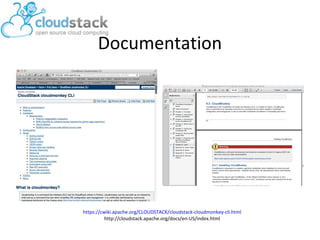
Documentation
https://cwiki.apache.org/CLOUDSTACK/cloudstack-cloudmonkey-cli.html
http://cloudstack.apache.org/docs/en-US/index.html
Requirements
• Cloudmonkey….
– Installed from CloudStack releases
– Installed via pypi
• A CloudStack based cloud (remote or local via
DevCloud):
– URL
– API keys
Installation
• From CloudStack releases
• Unofficial releases via the pypi:
$ pip install cloudmonkey
• Upgrade with:
$ pip install –upgrade cloudmonkey
http://cloudstack.apache.org/downloads.html
https://pypi.python.org/pypi/cloudmonkey/
http://www.pip-installer.org/en/latest/installing.html
API Keys
• Generate API keys for the user that will access
the cloud
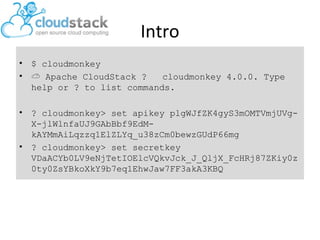
Intro
• $ cloudmonkey
• ☁ Apache CloudStack ? cloudmonkey 4.0.0. Type
help or ? to list commands.
• ? cloudmonkey> set apikey plgWJfZK4gyS3mOMTVmjUVg-
X-jlWlnfaUJ9GAbBbf9EdM-
kAYMmAiLqzzq1ElZLYq_u38zCm0bewzGUdP66mg
• ? cloudmonkey> set secretkey
VDaACYb0LV9eNjTetIOElcVQkvJck_J_QljX_FcHRj87ZKiy0z
0ty0ZsYBkoXkY9b7eq1EhwJaw7FF3akA3KBQ
Set
variables
>set port 8080
>set host localhost
>set color true
>set prompt #
>set tabularize false
List APIs
• To list all APIs available the tab key is your
friend.
• Enter tab twice to list all possibilities
• Enter tab once to auto-complete
• --help to get the help for a specific call,
including the required parameters
Config files
$cd ~/.cloudmonkey
$ls
config history log
$cat config
[core]
cache_file = /Users/sebastiengoasguen/.cloudmonkey/cache
log_file = /Users/sebastiengoasguen/.cloudmonkey/log
asyncblock = true
paramcompletion = false
history_file =
/Users/sebastiengoasguen/.cloudmonkey/history
[ui]
color = false
prompt = #
tabularize = true
…
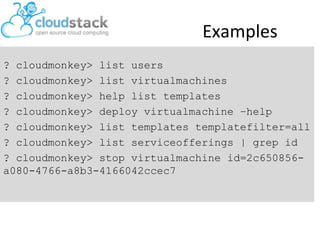
Examples
? cloudmonkey> list users
? cloudmonkey> list virtualmachines
? cloudmonkey> help list templates
? cloudmonkey> deploy virtualmachine –help
? cloudmonkey> list templates templatefilter=all
? cloudmonkey> list serviceofferings | grep id
? cloudmonkey> stop virtualmachine id=2c650856-
a080-4766-a8b3-4166042ccec7
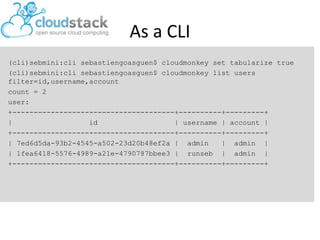
As a CLI
(cli)sebmini:cli sebastiengoasguen$ cloudmonkey set tabularize true
(cli)sebmini:cli sebastiengoasguen$ cloudmonkey list users
filter=id,username,account
count = 2
user:
+--------------------------------------+----------+---------+
| id | username | account |
+--------------------------------------+----------+---------+
| 7ed6d5da-93b2-4545-a502-23d20b48ef2a | admin | admin |
| 1fea6418-5576-4989-a21e-4790787bbee3 | runseb | admin |
+--------------------------------------+----------+---------+
Info
• Apache Top Level Project (TLP)
• http://cloudstack.apache.org
• #cloudstack and #cloudstack-dev on irc.freenode.net
• @CloudStack on Twitter
• http://www.slideshare.net/cloudstack
• dev-subscribe@cloudstack.apache.org
• users-subscribe@cloudstack.apache.org
Welcoming contributions and feedback, Join the fun !

CloudMonkey

  • 1.
    CloudMonkey The Apache CloudStackCLI and Interactive Shell Sebastien Goasguen @sebgoa
  • 2.
    CloudMonkey • The CloudStackCLI and interactive shell, developed by Rohit Yadav • ~600 lines of Python • Lots of features: – Auto-completion – Tabular output – Help , scriptable, interactive shell… https://cwiki.apache.org/CLOUDSTACK/cloudstack-cloudmonkey-cli.html https://pypi.python.org/pypi/cloudmonkey/ http://rohityadav.in/logs/cloudmonkey/ http://www.youtube.com/watch?v=BjkGp3egv9g
  • 3.
  • 4.
    Requirements • Cloudmonkey…. – Installedfrom CloudStack releases – Installed via pypi • A CloudStack based cloud (remote or local via DevCloud): – URL – API keys
  • 5.
    Installation • From CloudStackreleases • Unofficial releases via the pypi: $ pip install cloudmonkey • Upgrade with: $ pip install –upgrade cloudmonkey http://cloudstack.apache.org/downloads.html https://pypi.python.org/pypi/cloudmonkey/ http://www.pip-installer.org/en/latest/installing.html
  • 6.
    API Keys • GenerateAPI keys for the user that will access the cloud
  • 7.
    Intro • $ cloudmonkey •☁ Apache CloudStack ? cloudmonkey 4.0.0. Type help or ? to list commands. • ? cloudmonkey> set apikey plgWJfZK4gyS3mOMTVmjUVg- X-jlWlnfaUJ9GAbBbf9EdM- kAYMmAiLqzzq1ElZLYq_u38zCm0bewzGUdP66mg • ? cloudmonkey> set secretkey VDaACYb0LV9eNjTetIOElcVQkvJck_J_QljX_FcHRj87ZKiy0z 0ty0ZsYBkoXkY9b7eq1EhwJaw7FF3akA3KBQ
  • 8.
    Set variables >set port 8080 >sethost localhost >set color true >set prompt # >set tabularize false
  • 9.
    List APIs • Tolist all APIs available the tab key is your friend. • Enter tab twice to list all possibilities • Enter tab once to auto-complete • --help to get the help for a specific call, including the required parameters
  • 10.
    Config files $cd ~/.cloudmonkey $ls confighistory log $cat config [core] cache_file = /Users/sebastiengoasguen/.cloudmonkey/cache log_file = /Users/sebastiengoasguen/.cloudmonkey/log asyncblock = true paramcompletion = false history_file = /Users/sebastiengoasguen/.cloudmonkey/history [ui] color = false prompt = # tabularize = true …
  • 11.
    Examples ? cloudmonkey> listusers ? cloudmonkey> list virtualmachines ? cloudmonkey> help list templates ? cloudmonkey> deploy virtualmachine –help ? cloudmonkey> list templates templatefilter=all ? cloudmonkey> list serviceofferings | grep id ? cloudmonkey> stop virtualmachine id=2c650856- a080-4766-a8b3-4166042ccec7
  • 12.
    As a CLI (cli)sebmini:clisebastiengoasguen$ cloudmonkey set tabularize true (cli)sebmini:cli sebastiengoasguen$ cloudmonkey list users filter=id,username,account count = 2 user: +--------------------------------------+----------+---------+ | id | username | account | +--------------------------------------+----------+---------+ | 7ed6d5da-93b2-4545-a502-23d20b48ef2a | admin | admin | | 1fea6418-5576-4989-a21e-4790787bbee3 | runseb | admin | +--------------------------------------+----------+---------+
  • 13.
    Info • Apache TopLevel Project (TLP) • http://cloudstack.apache.org • #cloudstack and #cloudstack-dev on irc.freenode.net • @CloudStack on Twitter • http://www.slideshare.net/cloudstack • dev-subscribe@cloudstack.apache.org • users-subscribe@cloudstack.apache.org Welcoming contributions and feedback, Join the fun !