

Innotech Oregon
    Cloud Services 101
    April 21, 2011


1
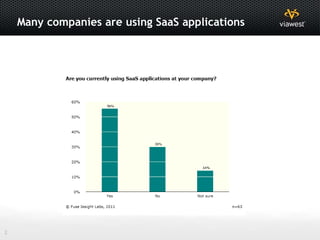
Many companies are using SaaS applications


2
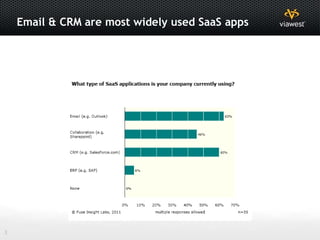
Email & CRM are most widely used SaaS apps


3
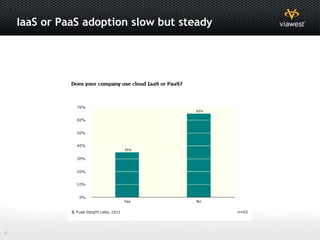
IaaS or PaaS adoption slow but steady


4
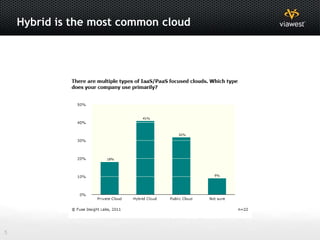
Hybrid is the most common cloud


5
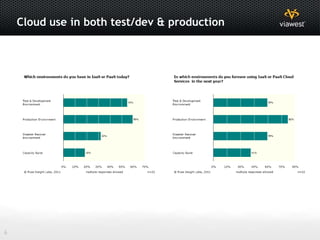
Cloud use in both test/dev & production


6
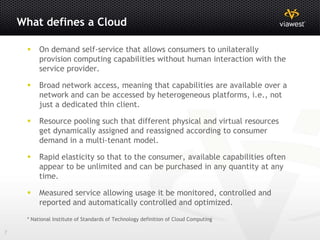
What defines a Cloud

         On demand self-service that allows consumers to unilaterally
          provision computing capabilities without human interaction with the
          service provider.

         Broad network access, meaning that capabilities are available over a
          network and can be accessed by heterogeneous platforms, i.e., not
          just a dedicated thin client.

         Resource pooling such that different physical and virtual resources
          get dynamically assigned and reassigned according to consumer
          demand in a multi-tenant model.

         Rapid elasticity so that to the consumer, available capabilities often
          appear to be unlimited and can be purchased in any quantity at any
          time.

         Measured service allowing usage it be monitored, controlled and
          reported and automatically controlled and optimized.

     * National Institute of Standards of Technology definition of Cloud Computing

7
Types of Clouds

         A private cloud in which the cloud infrastructure is utilized by just
          one organization, though not necessarily operated by that one
          organization.

         A community cloud whereby several organizations with common
          concerns share a cloud.

         The public cloud provided by the private sector for all comers.

         A hybrid cloud in which two or more cloud types are discrete but
          networked together such that a burst of activity beyond the
          capabilities of one cloud is shifted for processing to another.

     * National Institute of Standards of Technology definition of Cloud Computing


8
Types of Cloud Offerings

         Software as a Service (SaaS) - In which applications run on a cloud
          but the user doesn't provision or modify the cloud service, or even
          application capabilities, apart from limited user-specific configuration
          settings.

         Platform as a service (PaaS) - In which users can utilize cloud-
          provided programming tools to deploy applications without controlling
          most of the underlying infrastructure, with the possible exception of
          the application hosting environment configuration.

         Infrastructure as a service (IaaS) - Consumer has control over the
          operating systems, storage, deployed applications, and possibly
          limited control of select networking components (e.g., host firewalls)
          of the cloud environment available to the user via the network.


     * National Institute of Standards of Technology definition of Cloud Computing


9
IT Outsourcing Use Cases
         Colocation - Enterprise with custom application base and large scale hardware
          investments. Supporting legacy investments, proprietary hardware and/or do-it yourself
          customers with CapEx budget focus.

         Dedicated Hosting - SaaS/Software company with limited infrastructure requiring high
          availability and high audit/security standards. Supporting dedicated outsourced solutions
          that require one or more of the following; highly proprietary design and/or applications,
          high availability, high security, high audit and/or compliance requirements with OpEx
          budget focus.

         Cloud “Reserved” - Enterprise with traditional application base looking for cost
          competitive service delivery with high service delivery continuity. Supporting
          standardized (OS, DB and applications) dedicated workload needs with less stringent
          availability and security requirements than Dedicated Hosting and an OpEx budget focus.

         Cloud “Allocated” - Enterprise with traditional application base looking for cost
          competitive service delivery for less critical applications. Supporting standardized
          workload needs that have lower business impact and less stringent availability and
          security requirements including test and development projects with OpEx budget focus.


10
IT Outsourcing Use Cases
         Cloud “Best Efforts” - Enterprise looking for test and sandbox
          environments for development organization allowing them to operate
          via the same platform as their production applications. Supporting
          low priority test, development and sandbox efforts.

         Hybrid Solutions - Enterprise with custom application base and large
          scale hardware investments but that requires individual application to
          be highly available and meet high audit/security standards.
          Supporting customers ability to purchase the best infrastructure for
          each use/application and integrate them into a cohesive and
          interconnected architecture.

         Public Cloud - Enterprise looking for test and sandbox environments
          for development

         Purposes - Supporting low cost workload needs where best efforts
          delivery and cost are the primary drivers.


11
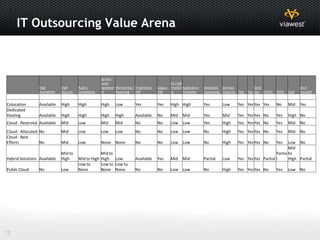
IT Outsourcing Value Arena


                                                        Service
                                                        Level                                       OS / DB
                 High           High       Audit /      Agreeme Monitoring / Proprietary   Legacy   Flexibili Application   Dedicated Services              Sand                      Do It
                 Availability   Security   Compliance   nt      Reporting    HW            HW       ty        Flexibility   Computing Elasticity Test   Dev box CAPEX   OPEX   Cost   Yourself


Colocation       Available      High       High         High     Low         Yes           Yes      High High               Yes        Low       Yes Yes Yes Yes        No     Mid    Yes
Dedicated
Hosting          Available      High       High         High     High        Available     No       Mid     Mid             Yes        Mid       Yes Yes Yes No         Yes    High No
Cloud - Reserved Available      Mid        Low          Mid      Mid         No            No       Low Low                 Yes        High      Yes Yes Yes No         Yes    Mid    No
Cloud - Allocated No            Mid        Low          Low      Low         No            No       Low Low                 No         High      Yes Yes Yes No         Yes    Mid    No
Cloud - Best
Efforts           No            Mid        Low          None     None        No            No       Low Low                 No         High      Yes Yes Yes No         Yes Low No
                                                                                                                                                                            Mid
                                Mid to                 Mid to                                                                                                        Partia to
Hybrid Solutions Available      High       Mid to High High Low              Available     Yes      Mid     Mid             Partial    Low       Yes Yes Yes Partial l      High Partial
                                           Low to      Low to Low to
Public Cloud     No             Low        None        None None             No            No       Low Low                 No         High      Yes Yes Yes No         Yes    Low No


12
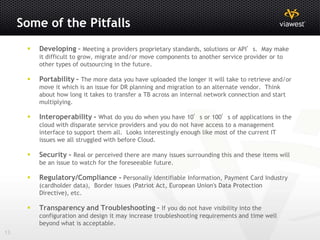
Some of the Pitfalls
         Developing – Meeting a providers proprietary standards, solutions or API’s. May make
          it difficult to grow, migrate and/or move components to another service provider or to
          other types of outsourcing in the future.

         Portability - The more data you have uploaded the longer it will take to retrieve and/or
          move it which is an issue for DR planning and migration to an alternate vendor. Think
          about how long it takes to transfer a TB across an internal network connection and start
          multiplying.

         Interoperability - What do you do when you have 10’s or 100’s of applications in the
          cloud with disparate service providers and you do not have access to a management
          interface to support them all. Looks interestingly enough like most of the current IT
          issues we all struggled with before Cloud.

         Security - Real or perceived there are many issues surrounding this and these items will
          be an issue to watch for the foreseeable future.

         Regulatory/Compliance - Personally Identifiable Information, Payment Card Industry
          (cardholder data), Border issues (Patriot Act, European Union's Data Protection
          Directive), etc.

         Transparency and Troubleshooting - If you do not have visibility into the
          configuration and design it may increase troubleshooting requirements and time well
          beyond what is acceptable.
13
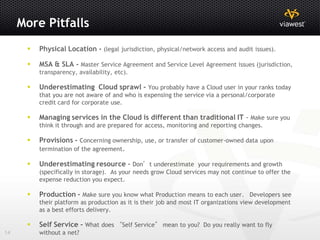
More Pitfalls
         Physical Location - (legal jurisdiction, physical/network access and audit issues).

         MSA & SLA - Master Service Agreement and Service Level Agreement issues (jurisdiction,
          transparency, availability, etc).

         Underestimating Cloud sprawl - You probably have a Cloud user in your ranks today
          that you are not aware of and who is expensing the service via a personal/corporate
          credit card for corporate use.

         Managing services in the Cloud is different than traditional IT - Make sure you
          think it through and are prepared for access, monitoring and reporting changes.

         Provisions - Concerning ownership, use, or transfer of customer-owned data upon
          termination of the agreement.

         Underestimating resource – Don’t underestimate your requirements and growth
          (specifically in storage). As your needs grow Cloud services may not continue to offer the
          expense reduction you expect.

         Production - Make sure you know what Production means to each user. Developers see
          their platform as production as it is their job and most IT organizations view development
          as a best efforts delivery.

         Self Service - What does “Self Service” mean to you? Do you really want to fly
14        without a net?
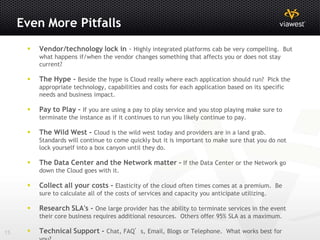
Even More Pitfalls
         Vendor/technology lock in - Highly integrated platforms cab be very compelling. But
          what happens if/when the vendor changes something that affects you or does not stay
          current?

         The Hype - Beside the hype is Cloud really where each application should run? Pick the
          appropriate technology, capabilities and costs for each application based on its specific
          needs and business impact.

         Pay to Play - If you are using a pay to play service and you stop playing make sure to
          terminate the instance as if it continues to run you likely continue to pay.

         The Wild West - Cloud is the wild west today and providers are in a land grab.
          Standards will continue to come quickly but it is important to make sure that you do not
          lock yourself into a box canyon until they do.

         The Data Center and the Network matter - If the Data Center or the Network go
          down the Cloud goes with it.

         Collect all your costs - Elasticity of the cloud often times comes at a premium. Be
          sure to calculate all of the costs of services and capacity you anticipate utilizing.

         Research SLA's - One large provider has the ability to terminate services in the event
          their core business requires additional resources. Others offer 95% SLA as a maximum.

15       Technical Support - Chat, FAQ’s, Email, Blogs or Telephone. What works best for
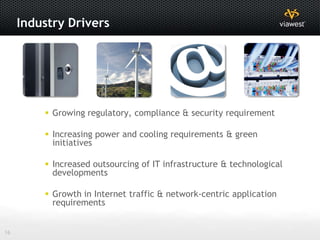
Industry Drivers


          Growing regulatory, compliance & security requirement

          Increasing power and cooling requirements & green
           initiatives

          Increased outsourcing of IT infrastructure & technological
           developments

          Growth in Internet traffic & network-centric application
           requirements


16
ViaWest Clientele


17
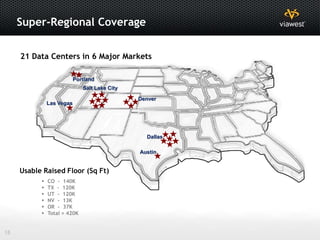
Super-Regional Coverage

     21 Data Centers in 6 Major Markets

                           Portland
                              Salt Lake City

                                               Denver
               Las Vegas


                                                 Dallas

                                               Austin


     Usable Raised Floor (Sq Ft)
              CO - 140K
              TX - 120K
              UT - 120K
              NV - 13K
              OR - 37K
              Total = 420K


18
May 12 Grand Opening – Your invited


                            IT’S AN OPEN HOUSE.
         (If by “house” you mean a 34,500 square foot, SAS-70 type II-compliant data center.)

                                  Please join us as we unveil our
                             Newest state-of-the-art data center facility.

                                       Thursday, May 12th
                                Voodoo Doughnut Tour 8am – 10am
                                 House Spirits Gin Tour 2pm – 6pm

                                    3935 Northwest Aloclek Place
                                        Hillsboro, OR 97124

                                   RSVP to viawest.com/hillsboro


19
For more information, contact us at:
     Thank You         ViaWest Business Development
     Innotech Oregon   (Toll Free) 877-448-9378
                       businessdevelopment@viawest.com
                       www.viawest.com


20

Cloud services 101

  • 1.
    Innotech Oregon Cloud Services 101 April 21, 2011 1
  • 2.
    Many companies areusing SaaS applications 2
  • 3.
    Email & CRMare most widely used SaaS apps 3
  • 4.
    IaaS or PaaSadoption slow but steady 4
  • 5.
    Hybrid is themost common cloud 5
  • 6.
    Cloud use inboth test/dev & production 6
  • 7.
    What defines aCloud  On demand self-service that allows consumers to unilaterally provision computing capabilities without human interaction with the service provider.  Broad network access, meaning that capabilities are available over a network and can be accessed by heterogeneous platforms, i.e., not just a dedicated thin client.  Resource pooling such that different physical and virtual resources get dynamically assigned and reassigned according to consumer demand in a multi-tenant model.  Rapid elasticity so that to the consumer, available capabilities often appear to be unlimited and can be purchased in any quantity at any time.  Measured service allowing usage it be monitored, controlled and reported and automatically controlled and optimized. * National Institute of Standards of Technology definition of Cloud Computing 7
  • 8.
    Types of Clouds  A private cloud in which the cloud infrastructure is utilized by just one organization, though not necessarily operated by that one organization.  A community cloud whereby several organizations with common concerns share a cloud.  The public cloud provided by the private sector for all comers.  A hybrid cloud in which two or more cloud types are discrete but networked together such that a burst of activity beyond the capabilities of one cloud is shifted for processing to another. * National Institute of Standards of Technology definition of Cloud Computing 8
  • 9.
    Types of CloudOfferings  Software as a Service (SaaS) - In which applications run on a cloud but the user doesn't provision or modify the cloud service, or even application capabilities, apart from limited user-specific configuration settings.  Platform as a service (PaaS) - In which users can utilize cloud- provided programming tools to deploy applications without controlling most of the underlying infrastructure, with the possible exception of the application hosting environment configuration.  Infrastructure as a service (IaaS) - Consumer has control over the operating systems, storage, deployed applications, and possibly limited control of select networking components (e.g., host firewalls) of the cloud environment available to the user via the network. * National Institute of Standards of Technology definition of Cloud Computing 9
  • 10.
    IT Outsourcing UseCases  Colocation - Enterprise with custom application base and large scale hardware investments. Supporting legacy investments, proprietary hardware and/or do-it yourself customers with CapEx budget focus.  Dedicated Hosting - SaaS/Software company with limited infrastructure requiring high availability and high audit/security standards. Supporting dedicated outsourced solutions that require one or more of the following; highly proprietary design and/or applications, high availability, high security, high audit and/or compliance requirements with OpEx budget focus.  Cloud “Reserved” - Enterprise with traditional application base looking for cost competitive service delivery with high service delivery continuity. Supporting standardized (OS, DB and applications) dedicated workload needs with less stringent availability and security requirements than Dedicated Hosting and an OpEx budget focus.  Cloud “Allocated” - Enterprise with traditional application base looking for cost competitive service delivery for less critical applications. Supporting standardized workload needs that have lower business impact and less stringent availability and security requirements including test and development projects with OpEx budget focus. 10
  • 11.
    IT Outsourcing UseCases  Cloud “Best Efforts” - Enterprise looking for test and sandbox environments for development organization allowing them to operate via the same platform as their production applications. Supporting low priority test, development and sandbox efforts.  Hybrid Solutions - Enterprise with custom application base and large scale hardware investments but that requires individual application to be highly available and meet high audit/security standards. Supporting customers ability to purchase the best infrastructure for each use/application and integrate them into a cohesive and interconnected architecture.  Public Cloud - Enterprise looking for test and sandbox environments for development  Purposes - Supporting low cost workload needs where best efforts delivery and cost are the primary drivers. 11
  • 12.
    IT Outsourcing ValueArena Service Level OS / DB High High Audit / Agreeme Monitoring / Proprietary Legacy Flexibili Application Dedicated Services Sand Do It Availability Security Compliance nt Reporting HW HW ty Flexibility Computing Elasticity Test Dev box CAPEX OPEX Cost Yourself Colocation Available High High High Low Yes Yes High High Yes Low Yes Yes Yes Yes No Mid Yes Dedicated Hosting Available High High High High Available No Mid Mid Yes Mid Yes Yes Yes No Yes High No Cloud - Reserved Available Mid Low Mid Mid No No Low Low Yes High Yes Yes Yes No Yes Mid No Cloud - Allocated No Mid Low Low Low No No Low Low No High Yes Yes Yes No Yes Mid No Cloud - Best Efforts No Mid Low None None No No Low Low No High Yes Yes Yes No Yes Low No Mid Mid to Mid to Partia to Hybrid Solutions Available High Mid to High High Low Available Yes Mid Mid Partial Low Yes Yes Yes Partial l High Partial Low to Low to Low to Public Cloud No Low None None None No No Low Low No High Yes Yes Yes No Yes Low No 12
  • 13.
    Some of thePitfalls  Developing – Meeting a providers proprietary standards, solutions or API’s. May make it difficult to grow, migrate and/or move components to another service provider or to other types of outsourcing in the future.  Portability - The more data you have uploaded the longer it will take to retrieve and/or move it which is an issue for DR planning and migration to an alternate vendor. Think about how long it takes to transfer a TB across an internal network connection and start multiplying.  Interoperability - What do you do when you have 10’s or 100’s of applications in the cloud with disparate service providers and you do not have access to a management interface to support them all. Looks interestingly enough like most of the current IT issues we all struggled with before Cloud.  Security - Real or perceived there are many issues surrounding this and these items will be an issue to watch for the foreseeable future.  Regulatory/Compliance - Personally Identifiable Information, Payment Card Industry (cardholder data), Border issues (Patriot Act, European Union's Data Protection Directive), etc.  Transparency and Troubleshooting - If you do not have visibility into the configuration and design it may increase troubleshooting requirements and time well beyond what is acceptable. 13
  • 14.
    More Pitfalls  Physical Location - (legal jurisdiction, physical/network access and audit issues).  MSA & SLA - Master Service Agreement and Service Level Agreement issues (jurisdiction, transparency, availability, etc).  Underestimating Cloud sprawl - You probably have a Cloud user in your ranks today that you are not aware of and who is expensing the service via a personal/corporate credit card for corporate use.  Managing services in the Cloud is different than traditional IT - Make sure you think it through and are prepared for access, monitoring and reporting changes.  Provisions - Concerning ownership, use, or transfer of customer-owned data upon termination of the agreement.  Underestimating resource – Don’t underestimate your requirements and growth (specifically in storage). As your needs grow Cloud services may not continue to offer the expense reduction you expect.  Production - Make sure you know what Production means to each user. Developers see their platform as production as it is their job and most IT organizations view development as a best efforts delivery.  Self Service - What does “Self Service” mean to you? Do you really want to fly 14 without a net?
  • 15.
    Even More Pitfalls  Vendor/technology lock in - Highly integrated platforms cab be very compelling. But what happens if/when the vendor changes something that affects you or does not stay current?  The Hype - Beside the hype is Cloud really where each application should run? Pick the appropriate technology, capabilities and costs for each application based on its specific needs and business impact.  Pay to Play - If you are using a pay to play service and you stop playing make sure to terminate the instance as if it continues to run you likely continue to pay.  The Wild West - Cloud is the wild west today and providers are in a land grab. Standards will continue to come quickly but it is important to make sure that you do not lock yourself into a box canyon until they do.  The Data Center and the Network matter - If the Data Center or the Network go down the Cloud goes with it.  Collect all your costs - Elasticity of the cloud often times comes at a premium. Be sure to calculate all of the costs of services and capacity you anticipate utilizing.  Research SLA's - One large provider has the ability to terminate services in the event their core business requires additional resources. Others offer 95% SLA as a maximum. 15  Technical Support - Chat, FAQ’s, Email, Blogs or Telephone. What works best for
  • 16.
    Industry Drivers  Growing regulatory, compliance & security requirement  Increasing power and cooling requirements & green initiatives  Increased outsourcing of IT infrastructure & technological developments  Growth in Internet traffic & network-centric application requirements 16
  • 17.
  • 18.
    Super-Regional Coverage 21 Data Centers in 6 Major Markets Portland Salt Lake City Denver Las Vegas Dallas Austin Usable Raised Floor (Sq Ft)  CO - 140K  TX - 120K  UT - 120K  NV - 13K  OR - 37K  Total = 420K 18
  • 19.
    May 12 GrandOpening – Your invited IT’S AN OPEN HOUSE. (If by “house” you mean a 34,500 square foot, SAS-70 type II-compliant data center.) Please join us as we unveil our Newest state-of-the-art data center facility. Thursday, May 12th Voodoo Doughnut Tour 8am – 10am House Spirits Gin Tour 2pm – 6pm 3935 Northwest Aloclek Place Hillsboro, OR 97124 RSVP to viawest.com/hillsboro 19
  • 20.
    For more information,contact us at: Thank You ViaWest Business Development Innotech Oregon (Toll Free) 877-448-9378 businessdevelopment@viawest.com www.viawest.com 20