CLOUD COMPUTING
AN INTRODUCTION
CREATED BY
KANNAN.K.R
Cloud Computing - Overview
Cloud Computing provides us a
means by which we can access the
applications as utilities, over the
Internet.
It allows us to create, configure, and
customize applications online.
What is Cloud?
The term Cloud refers to a Network or
Internet. In other words, we can say
that Cloud is something, which is
present at remote location.
Cloud can provide services over
network, i.e., on public networks or on
private networks, i.e., WAN, LAN or
VPN. Applications such as e-mail, web
conferencing, customer relationship
management (CRM),all run in cloud.
What is Cloud
Computing?
 Cloud Computing refers to manipulating,
configuring, and accessing the
applications online. It offers online data
storage, infrastructure and application.
 We need not to install a piece of software
on our local PC and this is how the cloud
computing overcomes platform
dependency issues.
 Hence, the Cloud Computing is making
our business application mobile and
collaborative.
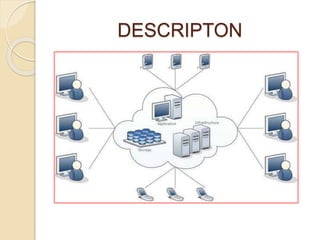
DESCRIPTON
Basic Concepts
There are certain services and models
working behind the scene making the
cloud computing feasible and accessible
to end users.
Following are the working models for
cloud computing:
Deployment Models
Service Models
ACCESS OF DEPLOYMENT MODELS
PUBLIC CLOUD
The Public Cloud allows systems and
services to be easily accessible to the
general public. Public cloud may be
less secure because of its openness,
e.g., e-mail.
PRIVATE CLOUD
The Private Cloud allows systems and
services to be accessible within an
organization. It offers increased
security because of its private nature.
DEPLOYMENT MODELS
 Deployment models define the type of
access to the cloud, i.e., how the
cloud is located?
 Cloud can have any of the four types
of access:
 Public
 Private
 Hybrid and Community
COMMUNITY CLOUD
The Community Cloud allows systems
and services to be accessible by
group of organizations.
HYBRIDCLOUD
The Hybrid Cloud is mixture of public
and private cloud. However, the critical
activities are performed using private
cloud while the non-critical activities
are performed using public cloud.
Service Models
Service Models are the reference models on which
Cloud Computing is based. These can be
categorized into three basic service models as
listed below:
 1. Infrastructure as a Service (IaaS)
 2. Platform as a Service (PaaS)
 3. Software as a Service (SaaS)
 There are many other service models all of
which can take the form like XaaS, i.e., Anything
as a Service. This can be Network as a Service,
Business as a Service, Identity as a Service,
Database as a Service or Strategy as a Service.
 The Infrastructure as a Service (IaaS) is the
most basic level of service.
ACCESS OF SERVICE
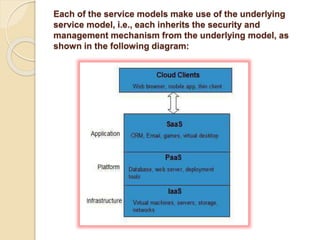
TOOLSINFRASTRUCTURE AS A SERVICE (IAAS)
 IaaS provides access to fundamental
resources such as physical machines,
virtual machines, virtual storage, etc.
PLATFORM AS A SERVICE (PAAS)
 PaaS provides the runtime environment
for applications, development &
deployment tools, etc.
SOFTWARE AS A SERVICE (SAAS)
 SaaS model allows to use software
applications as a service to end users.
Each of the service models make use of the underlying
service model, i.e., each inherits the security and
management mechanism from the underlying model, as
shown in the following diagram:
BENEFITS
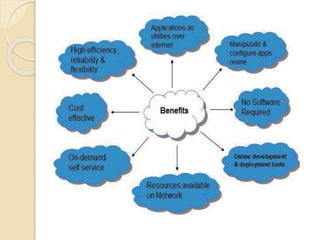
 One can access applications as utilities, over the Internet.
 Manipulate and configure the application online at any time.
 It does not require to install a specific piece of software to
access or manipulate cloud application.
 Cloud Computing offers online development and deployment
tools, programming runtime environment through Platform as
a Service model.
 Cloud resources are available over the network in a manner
that provides platform independent access to any type of
clients.
 Cloud Computing offers on-demand self-service. The
resources can be used without interaction with cloud
service provider.
 Cloud Computing is highly cost effective because it operates
at higher efficiencies with greater utilization. It just requires an
Internet connection.
 Cloud Computing offers load balancing that makes it more
reliable.
History
Risks In Cloud computing
 SECURITY & PRIVACY
It is the biggest concern about cloud computing. Since data
management and infrastructure management in cloud is
provided by third-party, it is always a risk to handover the
sensitive information to such providers.
Although the cloud computing vendors ensure more secure
password protected accounts, any sign of security breach
would result in loss of clients and businesses.
 LOCK-IN
It is very difficult for the customers to switch from one Cloud
Service Provider (CSP) to another. It results in dependency
on a particular CSP for service.
 ISOLATION FAILURE
This risk involves the failure of isolation mechanism that
separates storage, memory, routing between the different
tenants.
 MANAGEMENT INTERFACE
COMPROMISE
In case of public cloud provider, the customer
management interfaces are accessible through the
Internet.
 INSECURE OR INCOMPLETE DATA
DELETION
It is possible that the data requested for deletion may
not get deleted.
It happens either because extra copies of data are
stored but are not available or disk destroyed also
stores data from other tenants.
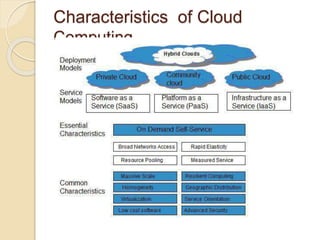
Characteristics of Cloud
Computing
Essential Characterstics of Cloud
Computing
ON DEMAND SELF-SERVICE
Cloud Computing allows the users to use
web services and resources on demand.
One can logon to a website at any time and
use them.
BROAD NETWORK ACCESS
Since Cloud Computing is completely web
based, it can be accessed from anywhere
and at any time
RESOURCE POOLING
Cloud Computing allows multiple tenants
to share a pool of resources.
One can share single physical instance
of hardware, database and basic
infrastructure.
RAPID ELASTICITY
It is very easy to scale up or down the
resources at any time.
Resources used by the customers or
currently assigned to customers are
automatically monitored and resources. It
make it possible

Cloud Computing - FUNDAMENTALS

  • 1.
  • 2.
    Cloud Computing -Overview Cloud Computing provides us a means by which we can access the applications as utilities, over the Internet. It allows us to create, configure, and customize applications online.
  • 3.
    What is Cloud? Theterm Cloud refers to a Network or Internet. In other words, we can say that Cloud is something, which is present at remote location. Cloud can provide services over network, i.e., on public networks or on private networks, i.e., WAN, LAN or VPN. Applications such as e-mail, web conferencing, customer relationship management (CRM),all run in cloud.
  • 4.
    What is Cloud Computing? Cloud Computing refers to manipulating, configuring, and accessing the applications online. It offers online data storage, infrastructure and application.  We need not to install a piece of software on our local PC and this is how the cloud computing overcomes platform dependency issues.  Hence, the Cloud Computing is making our business application mobile and collaborative.
  • 5.
  • 6.
    Basic Concepts There arecertain services and models working behind the scene making the cloud computing feasible and accessible to end users. Following are the working models for cloud computing: Deployment Models Service Models
  • 7.
    ACCESS OF DEPLOYMENTMODELS PUBLIC CLOUD The Public Cloud allows systems and services to be easily accessible to the general public. Public cloud may be less secure because of its openness, e.g., e-mail. PRIVATE CLOUD The Private Cloud allows systems and services to be accessible within an organization. It offers increased security because of its private nature.
  • 8.
    DEPLOYMENT MODELS  Deploymentmodels define the type of access to the cloud, i.e., how the cloud is located?  Cloud can have any of the four types of access:  Public  Private  Hybrid and Community
  • 9.
    COMMUNITY CLOUD The CommunityCloud allows systems and services to be accessible by group of organizations. HYBRIDCLOUD The Hybrid Cloud is mixture of public and private cloud. However, the critical activities are performed using private cloud while the non-critical activities are performed using public cloud.
  • 10.
    Service Models Service Modelsare the reference models on which Cloud Computing is based. These can be categorized into three basic service models as listed below:  1. Infrastructure as a Service (IaaS)  2. Platform as a Service (PaaS)  3. Software as a Service (SaaS)  There are many other service models all of which can take the form like XaaS, i.e., Anything as a Service. This can be Network as a Service, Business as a Service, Identity as a Service, Database as a Service or Strategy as a Service.  The Infrastructure as a Service (IaaS) is the most basic level of service.
  • 11.
    ACCESS OF SERVICE TOOLSINFRASTRUCTUREAS A SERVICE (IAAS)  IaaS provides access to fundamental resources such as physical machines, virtual machines, virtual storage, etc. PLATFORM AS A SERVICE (PAAS)  PaaS provides the runtime environment for applications, development & deployment tools, etc. SOFTWARE AS A SERVICE (SAAS)  SaaS model allows to use software applications as a service to end users.
  • 12.
    Each of theservice models make use of the underlying service model, i.e., each inherits the security and management mechanism from the underlying model, as shown in the following diagram:
  • 13.
    BENEFITS  One canaccess applications as utilities, over the Internet.  Manipulate and configure the application online at any time.  It does not require to install a specific piece of software to access or manipulate cloud application.  Cloud Computing offers online development and deployment tools, programming runtime environment through Platform as a Service model.  Cloud resources are available over the network in a manner that provides platform independent access to any type of clients.  Cloud Computing offers on-demand self-service. The resources can be used without interaction with cloud service provider.  Cloud Computing is highly cost effective because it operates at higher efficiencies with greater utilization. It just requires an Internet connection.  Cloud Computing offers load balancing that makes it more reliable.
  • 15.
  • 16.
    Risks In Cloudcomputing  SECURITY & PRIVACY It is the biggest concern about cloud computing. Since data management and infrastructure management in cloud is provided by third-party, it is always a risk to handover the sensitive information to such providers. Although the cloud computing vendors ensure more secure password protected accounts, any sign of security breach would result in loss of clients and businesses.  LOCK-IN It is very difficult for the customers to switch from one Cloud Service Provider (CSP) to another. It results in dependency on a particular CSP for service.  ISOLATION FAILURE This risk involves the failure of isolation mechanism that separates storage, memory, routing between the different tenants.
  • 17.
     MANAGEMENT INTERFACE COMPROMISE Incase of public cloud provider, the customer management interfaces are accessible through the Internet.  INSECURE OR INCOMPLETE DATA DELETION It is possible that the data requested for deletion may not get deleted. It happens either because extra copies of data are stored but are not available or disk destroyed also stores data from other tenants.
  • 18.
  • 19.
    Essential Characterstics ofCloud Computing ON DEMAND SELF-SERVICE Cloud Computing allows the users to use web services and resources on demand. One can logon to a website at any time and use them. BROAD NETWORK ACCESS Since Cloud Computing is completely web based, it can be accessed from anywhere and at any time
  • 20.
    RESOURCE POOLING Cloud Computingallows multiple tenants to share a pool of resources. One can share single physical instance of hardware, database and basic infrastructure. RAPID ELASTICITY It is very easy to scale up or down the resources at any time. Resources used by the customers or currently assigned to customers are automatically monitored and resources. It make it possible