Cloud Computing
Architecture
As we know, cloud computing technology is used by both
small and large organizations to store the information in cloud and access it
from anywhere at any time using the internet connection.
• Cloud computing architecture is a combination of service-oriented
architecture and event-driven architecture.
• Cloud computing architecture is divided into the following two parts –
o Front End
o Back End
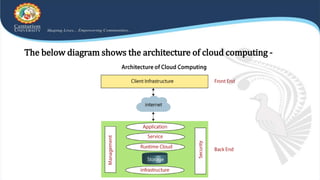
The below diagram shows the architecture of cloud computing -
Front End
The front end is used by the client. It contains client-side interfaces and
applications that are required to access the cloud computing platforms. The
front end includes web servers (including Chrome, Firefox, internet explorer,
etc.), thin & fat clients, tablets, and mobile devices.
Back End
The back end is used by the service provider. It manages all the resources that
are required to provide cloud computing services. It includes a huge amount of
data storage, security mechanism, virtual machines, deploying models,
servers, traffic control mechanisms, etc.
Components of Cloud Computing
Architecture
There are the following components of cloud computing architecture -
a. Client Infrastructure
Client Infrastructure is a Front end component. It provides GUI
(Graphical User Interface) to interact with the cloud.
b. Application
The application may be any software or platform that a client wants to
access.
c. Service
A Cloud Services manages that which type of service you access
according to the client’s requirement.
Cloud computing offers the following three type of services:
i. Software as a Service (SaaS) – It is also known as cloud application services.
Mostly, SaaS applications run directly through the web browser means we do not
require to download and install these applications. Some important example of SaaS
is given below.
Example: Google Apps, Salesforce Dropbox, Slack, Hubspot, Cisco WebEx.
ii. Platform as a Service (PaaS) – It is also known as cloud platform services. It is
quite similar to SaaS, but the difference is that PaaS provides a platform for
software creation, but using SaaS, we can access software over the internet without
the need of any platform.
Example: Windows Azure, Force.com, Magento Commerce Cloud, OpenShift.
iii. Infrastructure as a Service (IaaS) – It is also known as cloud infrastructure
services. It is responsible for managing applications data, middleware, and runtime
environments.
Example: Amazon Web Services (AWS) EC2, Google Compute Engine (GCE), Cisco
Metapod.
iv. Runtime Cloud -
Runtime Cloud provides the execution and runtime environment to the
virtual machines.
v. Storage -
Storage is one of the most important components of cloud computing. It
provides a huge amount of storage capacity in the cloud to store and manage data.
vi. Infrastructure -
It provides services on the host level, application level, and network level. Cloud
infrastructure includes hardware and software components such as servers, storage, network devices,
virtualization software, and other storage resources that are needed to support the cloud computing
model.
vii. Management -
Management is used to manage components such as application, service, runtime cloud,
storage, infrastructure, and other security issues in the backend and establish coordination between
them.
viii. Security -
Security is an in-built back end component of cloud computing. It implements a security
mechanism in the back end.
ix. Internet
The Internet is medium through which front end and back end can interact and communicate
with each other.
How does Cloud Computing Work?
Assume that you are an executive at a very big corporation. Your particular responsibilities
include to make sure that all of your employees have the right hardware and software they need
to do their jobs. To buy computers for everyone is not enough. You also have to purchase software
as well as software licenses and then provide these software’s to your employees as they require.
Whenever you hire a new employee, you need to buy more software or make sure your current
software license allows another user. It is so stressful that you have to spend lots of money.
But, there may be an alternative for executives like you. So, instead of installing a suite of software
for each computer, you just need to load one application. That application will allow the
employees to log-in into a Web-based service which hosts all the programs for the user that is
required for his/her job. Remote servers owned by another company and that will run everything
from e-mail to word processing to complex data analysis programs. It is called cloud computing,
and it could change the entire computer industry.
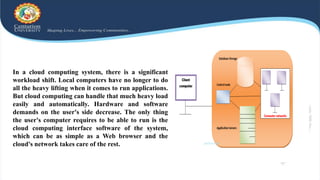
In a cloud computing system, there is a significant
workload shift. Local computers have no longer to do
all the heavy lifting when it comes to run applications.
But cloud computing can handle that much heavy load
easily and automatically. Hardware and software
demands on the user's side decrease. The only thing
the user's computer requires to be able to run is the
cloud computing interface software of the system,
which can be as simple as a Web browser and the
cloud's network takes care of the rest.
Thank You

Clpud-Computing-PPT-3.pptx

  • 1.
  • 2.
    As we know,cloud computing technology is used by both small and large organizations to store the information in cloud and access it from anywhere at any time using the internet connection. • Cloud computing architecture is a combination of service-oriented architecture and event-driven architecture. • Cloud computing architecture is divided into the following two parts – o Front End o Back End
  • 3.
    The below diagramshows the architecture of cloud computing -
  • 4.
    Front End The frontend is used by the client. It contains client-side interfaces and applications that are required to access the cloud computing platforms. The front end includes web servers (including Chrome, Firefox, internet explorer, etc.), thin & fat clients, tablets, and mobile devices. Back End The back end is used by the service provider. It manages all the resources that are required to provide cloud computing services. It includes a huge amount of data storage, security mechanism, virtual machines, deploying models, servers, traffic control mechanisms, etc.
  • 5.
    Components of CloudComputing Architecture There are the following components of cloud computing architecture - a. Client Infrastructure Client Infrastructure is a Front end component. It provides GUI (Graphical User Interface) to interact with the cloud. b. Application The application may be any software or platform that a client wants to access. c. Service A Cloud Services manages that which type of service you access according to the client’s requirement.
  • 6.
    Cloud computing offersthe following three type of services: i. Software as a Service (SaaS) – It is also known as cloud application services. Mostly, SaaS applications run directly through the web browser means we do not require to download and install these applications. Some important example of SaaS is given below. Example: Google Apps, Salesforce Dropbox, Slack, Hubspot, Cisco WebEx. ii. Platform as a Service (PaaS) – It is also known as cloud platform services. It is quite similar to SaaS, but the difference is that PaaS provides a platform for software creation, but using SaaS, we can access software over the internet without the need of any platform. Example: Windows Azure, Force.com, Magento Commerce Cloud, OpenShift.
  • 7.
    iii. Infrastructure asa Service (IaaS) – It is also known as cloud infrastructure services. It is responsible for managing applications data, middleware, and runtime environments. Example: Amazon Web Services (AWS) EC2, Google Compute Engine (GCE), Cisco Metapod. iv. Runtime Cloud - Runtime Cloud provides the execution and runtime environment to the virtual machines. v. Storage - Storage is one of the most important components of cloud computing. It provides a huge amount of storage capacity in the cloud to store and manage data.
  • 8.
    vi. Infrastructure - Itprovides services on the host level, application level, and network level. Cloud infrastructure includes hardware and software components such as servers, storage, network devices, virtualization software, and other storage resources that are needed to support the cloud computing model. vii. Management - Management is used to manage components such as application, service, runtime cloud, storage, infrastructure, and other security issues in the backend and establish coordination between them. viii. Security - Security is an in-built back end component of cloud computing. It implements a security mechanism in the back end. ix. Internet The Internet is medium through which front end and back end can interact and communicate with each other.
  • 9.
    How does CloudComputing Work? Assume that you are an executive at a very big corporation. Your particular responsibilities include to make sure that all of your employees have the right hardware and software they need to do their jobs. To buy computers for everyone is not enough. You also have to purchase software as well as software licenses and then provide these software’s to your employees as they require. Whenever you hire a new employee, you need to buy more software or make sure your current software license allows another user. It is so stressful that you have to spend lots of money. But, there may be an alternative for executives like you. So, instead of installing a suite of software for each computer, you just need to load one application. That application will allow the employees to log-in into a Web-based service which hosts all the programs for the user that is required for his/her job. Remote servers owned by another company and that will run everything from e-mail to word processing to complex data analysis programs. It is called cloud computing, and it could change the entire computer industry.
  • 10.
    In a cloudcomputing system, there is a significant workload shift. Local computers have no longer to do all the heavy lifting when it comes to run applications. But cloud computing can handle that much heavy load easily and automatically. Hardware and software demands on the user's side decrease. The only thing the user's computer requires to be able to run is the cloud computing interface software of the system, which can be as simple as a Web browser and the cloud's network takes care of the rest.
  • 11.