Utilizing the Cloud
        Diana Silveira, Novare Library Services
        www.slideshare.net/dee987
Source: http://holykaw.alltop.com/the-generation-gap-comic?tu2=1
Agenda
•   What is the Cloud?
•   General Considerations
•   Pros and Cons of Popular Services
•   Tips for Success
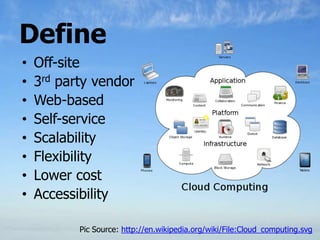
Define
•   Off-site
•   3rd party vendor
•   Web-based
•   Self-service
•   Scalability
•   Flexibility
•   Lower cost
•   Accessibility

           Pic Source: http://en.wikipedia.org/wiki/File:Cloud_computing.svg
“I get that the cloud is coming and one day
we‟ll all be pushed to keep most of our stuff in
the „sky.‟ Just look at Apple‟s new MacBook Air
line. The largest internal flash memory
available is 256 gigabytes. In this digital age
that‟s likely not enough to hold most user‟s
current content. And as more (read: all)
computers move to flash memory eventually,
the cloud will become the offsite storage vessel
for us all.” … Brian Sullivan, CNBC


                                     Source: http://www.cnbc.com/id/44892279
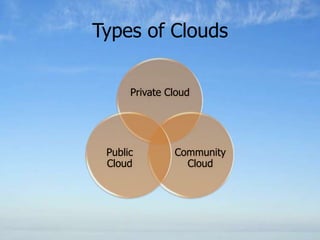
Types of Clouds

      Private Cloud


 Public        Community
 Cloud           Cloud
The Cloud: Advantages
•   Access, Operate anywhere
•   Easy Implementation
•   Disaster Planning
•   Distributed Network
•   Bandwidth
•   Reliability
•   Easy to join, easy to quit
•   Security
•   SaaS (software as a service)
General Considerations
•   Internet-Based
•   Privacy
•   Security
•   Fee v Free
•   heavily transactional applications are not
    recommended
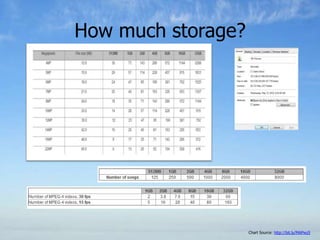
How much storage?


                    Chart Source: http://bit.ly/MAPwz5
Popular Commercial Cloud Services
•   Google Drive
•   SkyDrive
•   DropBox
•   iCloud
•   Amazon
Google Drive
• Document-based
• Upload folders, files, in
  native format
• Create, edit in doc format
• Customizable Privacy Levels
• Android & Apple Apps
• 1,024MB Free with personal
  account ($0-$256 -1TB)
                                https://drive.google.com/
Microsoft SkyDrive
• 25GB of online storage Free
• Stores in either Public, Private or Personal
  folders
• Free access to the Microsoft Office web
  apps can create - Word, Excel, Powerpoint
  or OneNote documents for Free.


                                https://skydrive.live.com/
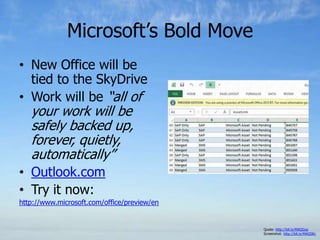
Microsoft‟s Bold Move
• New Office will be
  tied to the SkyDrive
• Work will be “all of
   your work will be
   safely backed up,
   forever, quietly,
   automatically”
• Outlook.com
• Try it now:
http://www.microsoft.com/office/preview/en


                                             Quote: http://bit.ly/MAQGus
                                             Screenshot: http://bit.ly/MAQSKc
Dropbox
• Offline & Online Access
• Access through Web
• Desktop Program (acts like regular PC folder but
  syncs
• Adjustable File Privacy Levels from private to
  public
• 30-day history of work.
  – Back-up and Undos
• SSL
• Up to 2GB Free ($0-$499@yr for 500GB)
• Be aware: Based on Amazon S3 service
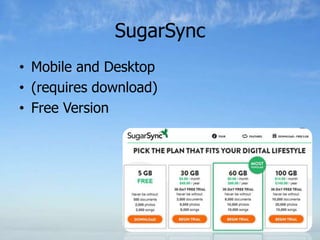
SugarSync
• Mobile and Desktop
• (requires download)
• Free Version
ICloud

•   Mac-based
•   5GB Free
•   Photostream is “free”
•   Automatic cloud storage
•   5GB Free
•   Up to 50GB - $100@yr
Amazon Cloud
• S3 Storage
  – “Simple Storage Service”
  – Pay for what you use
  – For the more advanced user
• Cloud Drive
  – User-Friendly
  – 5GB Free – 1000GB ($1000 @yr)
  – Songs Bought on Amazon Free
  – Works with Amazon Cloud Player
Other Cloud Services
• Egnyte
• OCLC Web Scale
• Box
What‟s the “best cloud service?”
NICHE CLOUD SERVICES
Music Clouds – Marketplace
         Explosion
Cloud-Based Phone Systems
•   “Digital” Phone by your cable company
•   Twilio
•   OneBox
•   Google
Back-up
• Carbonite
• Symantec
Others?
What do you use and why?
• Google Voice
• Kindle Fire
• Google Talk
General Tips for Success
• What is the goal?
  – Collaboration
  – Disaster Planning/Back-up
  – Off-Site Storage
• What are your ACTUAL storage needs?
  – What is the file size today? How fast is it growing?
  – Side Note: Do you need to “digitally declutter”
• How, where, what do you need and when?
• Multiple solutions might be the solution
• Privacy, Security are still concerns
QUESTIONS?
Contact
   @novarelibrary


   facebook.com/novarelibraryservices


   delicious.com/dee987/cloud


   Novarelibrary.com/news

   diana@novarelibrary.com
   877.816.9638
   www.slideshare.net/dee987

TBLC Workshop Lunch & Learn - Utilizing the Cloud

  • 1.
    Utilizing the Cloud Diana Silveira, Novare Library Services www.slideshare.net/dee987
  • 2.
  • 4.
    Agenda • What is the Cloud? • General Considerations • Pros and Cons of Popular Services • Tips for Success
  • 5.
    Define • Off-site • 3rd party vendor • Web-based • Self-service • Scalability • Flexibility • Lower cost • Accessibility Pic Source: http://en.wikipedia.org/wiki/File:Cloud_computing.svg
  • 6.
    “I get thatthe cloud is coming and one day we‟ll all be pushed to keep most of our stuff in the „sky.‟ Just look at Apple‟s new MacBook Air line. The largest internal flash memory available is 256 gigabytes. In this digital age that‟s likely not enough to hold most user‟s current content. And as more (read: all) computers move to flash memory eventually, the cloud will become the offsite storage vessel for us all.” … Brian Sullivan, CNBC Source: http://www.cnbc.com/id/44892279
  • 7.
    Types of Clouds Private Cloud Public Community Cloud Cloud
  • 8.
    The Cloud: Advantages • Access, Operate anywhere • Easy Implementation • Disaster Planning • Distributed Network • Bandwidth • Reliability • Easy to join, easy to quit • Security • SaaS (software as a service)
  • 9.
    General Considerations • Internet-Based • Privacy • Security • Fee v Free • heavily transactional applications are not recommended
  • 10.
    How much storage? Chart Source: http://bit.ly/MAPwz5
  • 11.
    Popular Commercial CloudServices • Google Drive • SkyDrive • DropBox • iCloud • Amazon
  • 12.
    Google Drive • Document-based •Upload folders, files, in native format • Create, edit in doc format • Customizable Privacy Levels • Android & Apple Apps • 1,024MB Free with personal account ($0-$256 -1TB) https://drive.google.com/
  • 13.
    Microsoft SkyDrive • 25GBof online storage Free • Stores in either Public, Private or Personal folders • Free access to the Microsoft Office web apps can create - Word, Excel, Powerpoint or OneNote documents for Free. https://skydrive.live.com/
  • 14.
    Microsoft‟s Bold Move •New Office will be tied to the SkyDrive • Work will be “all of your work will be safely backed up, forever, quietly, automatically” • Outlook.com • Try it now: http://www.microsoft.com/office/preview/en Quote: http://bit.ly/MAQGus Screenshot: http://bit.ly/MAQSKc
  • 15.
    Dropbox • Offline &Online Access • Access through Web • Desktop Program (acts like regular PC folder but syncs • Adjustable File Privacy Levels from private to public • 30-day history of work. – Back-up and Undos • SSL • Up to 2GB Free ($0-$499@yr for 500GB) • Be aware: Based on Amazon S3 service
  • 16.
    SugarSync • Mobile andDesktop • (requires download) • Free Version
  • 17.
    ICloud • Mac-based • 5GB Free • Photostream is “free” • Automatic cloud storage • 5GB Free • Up to 50GB - $100@yr
  • 18.
    Amazon Cloud • S3Storage – “Simple Storage Service” – Pay for what you use – For the more advanced user • Cloud Drive – User-Friendly – 5GB Free – 1000GB ($1000 @yr) – Songs Bought on Amazon Free – Works with Amazon Cloud Player
  • 19.
    Other Cloud Services •Egnyte • OCLC Web Scale • Box
  • 20.
    What‟s the “bestcloud service?”
  • 21.
  • 22.
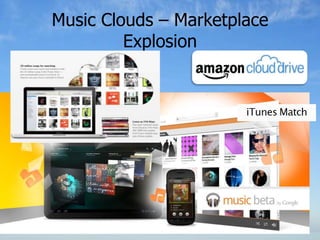
    Music Clouds –Marketplace Explosion
  • 23.
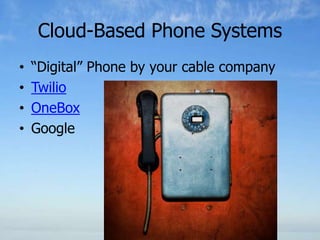
    Cloud-Based Phone Systems • “Digital” Phone by your cable company • Twilio • OneBox • Google
  • 24.
  • 25.
    Others? What do youuse and why? • Google Voice • Kindle Fire • Google Talk
  • 26.
    General Tips forSuccess • What is the goal? – Collaboration – Disaster Planning/Back-up – Off-Site Storage • What are your ACTUAL storage needs? – What is the file size today? How fast is it growing? – Side Note: Do you need to “digitally declutter” • How, where, what do you need and when? • Multiple solutions might be the solution • Privacy, Security are still concerns
  • 27.
  • 28.
    Contact @novarelibrary facebook.com/novarelibraryservices delicious.com/dee987/cloud Novarelibrary.com/news diana@novarelibrary.com 877.816.9638 www.slideshare.net/dee987

Editor's Notes

  • #4 Press F5 or enter presentation mode to view the poll\r\nIn an emergency during your presentation, if the poll isn't showing, navigate to this link in your web browser:\r\nhttp://www.polleverywhere.com/multiple_choice_polls/LTE4NjA5NjYyODgIf you like, you can use this slide as a template for your own voting slides. You might use a slide like this if you feel your audience would benefit from the picture showing a text message on a phone.
  • #8 Public cloudPublic cloud describes cloud computing in the traditional mainstream sense, whereby resources are dynamically provisioned to the general public on a fine-grained, self-service basis over the Internet, via web applications/web services, from an off-site third-party provider who bills on a fine-grained utility computing basis.[13][edit]Community cloudCommunity cloud shares infrastructure between several organizations from a specific community with common concerns (security, compliance, jurisdiction, etc.), whether managed internally or by a third-party and hosted internally or externally. The costs are spread over fewer users than a public cloud (but more than a private cloud), so only some of the benefits of cloud computing are realised.[43][edit]Hybrid cloudHybrid cloud is a composition of two or more clouds (private, community, or public) that remain unique entities but are bound together, offering the benefits of multiple deployment models.[43][edit]Private cloudPrivate cloud is infrastructure operated solely for a single organization, whether managed internally or by a third-party and hosted internally or externally.[43]They have attracted criticism because users "still have to buy, build, and manage them" and thus do not benefit from lower up-front capital costs and less hands-on management,[44]essentially "[lacking] the economic model that makes cloud computing such an intriguing concept".[45][46]http://en.wikipedia.org/wiki/Cloud_computing#Community_cloud
  • #18 - Photo Stream album that holds a rolling collection of your last 1000 photos. iCloud stores new photos for 30 days
  • #20 Box:In addition to storing files, Box provides a number of applications, like Web Documents and Zoho, an online productivity suite. Box also offers a solid app for the iPad and iPhone, which provides much of the service’s functionality on the go. Users can also connect to an Apple-Air-Print-enabled printer for wireless printing.Out of all the sites, Box is easily one of the most user-friendly, especially for those who aren’t as familiar with this type of service.The lowdown: Free 5GB, fast uploads, simple functionality, well-designed site
  • #23 Each of Apple, Amazon and Google is offering a pretty amazing deal for storing your digital music. From zero to $25 per year, the pricing is almost irrelevant considering how much storage you get. If you have a decent music collection, you're talking about archiving 50 GB worth of music at the least.There are tradeoffs with each of the three services. With Amazon or Google, you need to upload all of your music - which will likely be a big bandwidth and time hog. Apple's iTunes Match gets around that pain point by "matching" songs you have with songs on its servers. That's a very compelling advantage to iTunes Match.
  • #27 heavily transactional, are I/O sensitive or involve sensitive data, are not advisable to go shift into a cloud environment.