Cloud Computing…!
Its commercial Aspects

By Swapnil Dharmadhikari
Founder, Director
Splashgain Technology Solutions Pvt Ltd.
www.Splashgain.com
www.ePravesh.com
www.Eklavvya.in
www.Bookshelf.co.in
Agenda
• Traditional Systems
• Systems evolution over the last 2 decades
• Shift towards Web 2.0, internet
• Cloud = Software as a Service +
Infrastructure as a Service + Platform as a
Service
• Instances where cloud is needed
• Advantages
• Barriers to Cloud Computing
• Summary
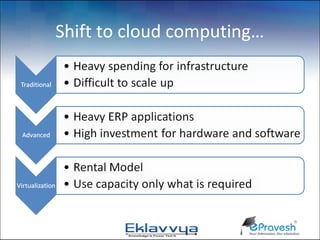
Shift to cloud computing…
Traditional Software Solutions
•   Main Frame
•   Batch Processing
•   Heavy servers
•   Parallel processing units
•   High Cost
•   Disadvantages
    – Underutilization of capacity
    – Not very cost effective
    – Not affordable by small and medium enterprises
Advance Solutions like ERP
• Client Server Architecture
• New approach of system integration
  – XML, SOAP
• Usage of Dedicated servers based on
  maximum load expected for the system
• Capital intensive system with high initial
  investment for hardware and softwares
• Interconnected environment within
  organization
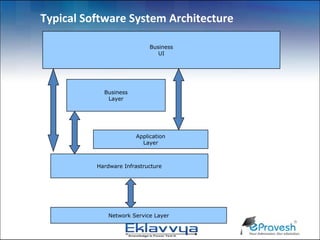
Typical Software System Architecture

                            Business
                               UI


            Business
             Layer


                       Application
                         Layer


          Hardware Infrastructure


              Network Service Layer
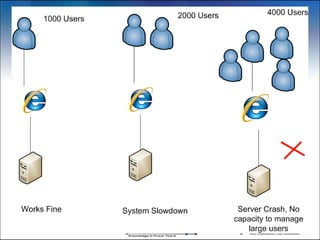
The Traditional Server Concept

• Pros                               • Cons
   –   Easy to conceptualize            – Expensive to acquire and
   –   Fairly easy to deploy              maintain hardware
   –   Easy to backup                   – Not very scalable
   –   Virtually any                    – Difficult to replicate
       application/service can be       – Redundancy is difficult to
       run from this type of setup        implement
                                        – Vulnerable to hardware
                                          outages
                                        – In many cases, processor is
                                          under-utilized
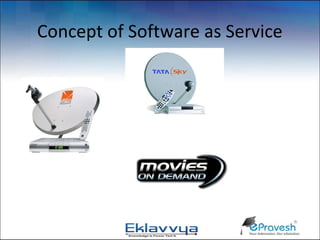
Concept of Software as Service
Software as a Service (SAAS)
• Pricing based on Per Unit Usage of system
  – Transaction
  – Per User
  – Data access
• Examples of SAAS
  – Business Emails
  – Live Chat Solutions ClickDesk
  – Google Apps
  – Android Apps, GotoMeeting
Salesforce.com – SaaS pioneer
• Customer Relationship Management (CRM)
  – availability of 99.9% for cloud infrastructure
  – Sales, Service & Support, Partner Relationship
    Management, Marketing, Content, Ideas and
    Analytics modules
  – Customization on the platform- or the tab-level
• AppExchange
  – Directory of third-party apps for Salesforce
  – over 800 apps from 450 ISV
• Web Services API
  – enables integration with other systems
  – wrapper libraries for Java, and .NET
ClickDesk.com
•   Pricing based on Usage
•   Total No of Live Chat Agents
•   Total Features Subscribed for
•   Plug and Play kind of Solution for Websites
CCAvenue Payment Gateway
• Good Example of Software as A Service
• Pay per Transaction
• Takes care of all credit card,debit card,
  internet banking
• Security and data regulation as per RBI
• Useful Plug and play model for eCommerce
  Web Applications
Infrastructure as a Service (IAAS)
• Choice of Multiple OS, Platforms and
  Databases and Content Delivery Network all in
  one place
  – Service Provides : Amazon EC2, GoGrid
• IAAS Subscribers
  – Farmville, MafiaWars
  – 230 million Users, uses 12000 servers on Amazon
• India IAAS Provides
  – Netmagic Solutions, Insta Compute ( Tata Comm.)
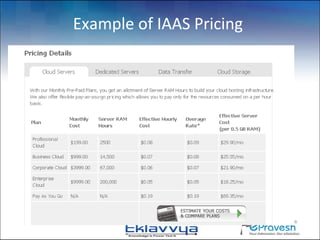
Example of IAAS Pricing
Instances where Cloud is required
• Traffic for the website is variable
• Day Traffic is more
• Seasonal traffic is expected
  – Examination Result Server
  – Online Ticket booking during seasonal period
  – eCommerce site during festival Season
  – Admission Server during admission seasons
Web Site Traffic Analysis
• Number of Visitors at particular instance
• No of processes running on the system
• Complexity involved during the processes
• Complexity of the database operations
• Total processor and RAM memory required to
  execute the process
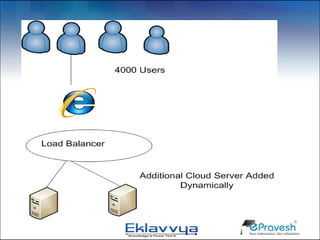
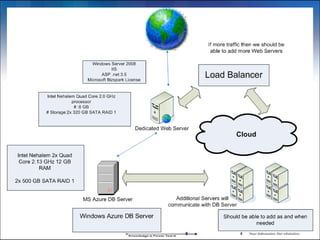
• Load Balancer shifts the traffic to another
  server
Cloud computing takes virtualization
             to the next step
•   You don’t have to own the hardware
•   You “rent” it as needed from a cloud
•   No need to purchase Software Licenses
•   No need to worry about software, hardware
    upgradation


                                                19
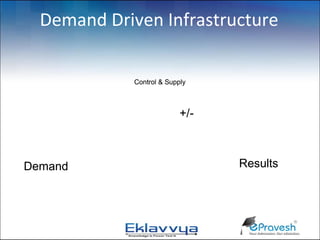
Demand Driven Infrastructure

             Control & Supply


                           +/-


            IT Capability
Demand                           Results
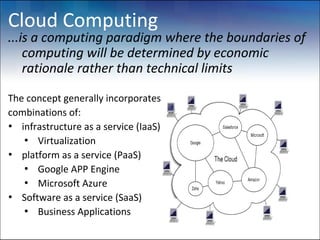
Cloud Computing
...is a computing paradigm where the boundaries of
    computing will be determined by economic
    rationale rather than technical limits

The concept generally incorporates
combinations of:
• infrastructure as a service (IaaS)
   • Virtualization
• platform as a service (PaaS)
   • Google APP Engine
   • Microsoft Azure
• Software as a service (SaaS)
   • Business Applications
Advantages of Cloud Computing
•   Software as Subscription
•   Reduced Software Maintenance
•   Increased Reliability
•   Increased Scalability
•   Cost Reduction
•   Portability/ Accessibility
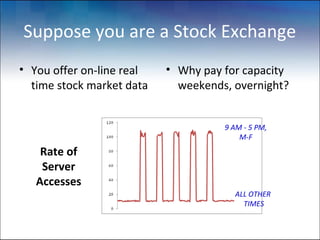
Suppose you are a Stock Exchange
• You offer on-line real   • Why pay for capacity
  time stock market data     weekends, overnight?


                                     9 AM - 5 PM,
                                         M-F
    Rate of
    Server
   Accesses
                                       ALL OTHER
                                         TIMES
Solution for Services like Stock Exchange
 • Host the web site in Amazon's EC2 Elastic
   Compute Cloud
 • Provision new servers every day, and
   deprovision them every night
 • Pay just $0.10* per server per hour
    – * more for higher capacity servers
 • Let Amazon worry about the hardware!
Education Institute on Cloud
• Processes
  – Pre Admission, Admission Processes
  – Student Test Preparations
  – Online Examinations
  – Examination Results Management
• Demand/ Peak Period
  – Admission Season
  – Examination Day
  – Result Day
Education Institute on Cloud…
• Capacity Calculations based on
  – Total No of Students applying to institute
  – Concurrent connections to the server
  – Total memory required for each web request
    connection
  – Concurrent online examination terminals active at
    a time
Barriers to Cloud Computing
#1 Data Security
• Many customers don’t wish to trust their data to
  “the cloud”
• Data must be locally retained for regulatory
  reasons : e.g Govt. confidential data
#2 Application Availability
• Cannot switch from existing legacy applications
• Equivalent cloud applications do not exist
#3 Continuous Internet connection is required
Summary
• 35% of world’s IT systems will be on cloud by
  2013-14
• New projects are being implemented in cloud
• New Services , Softwares would be internet
  based
• Personal computers might not need high
  capacity to run applications
• Cloud services are simpler to acquire and scale
  up or down
Cloud Computing…!
Its commercial Aspects

By Swapnil Dharmadhikari
Founder, Director
Splashgain Technology Solutions Pvt Ltd.
www.Splashgain.com
www.ePravesh.com
www.Eklavvya.in
www.Bookshelf.co.in

Cloud computing

  • 1.
    Cloud Computing…! Its commercialAspects By Swapnil Dharmadhikari Founder, Director Splashgain Technology Solutions Pvt Ltd. www.Splashgain.com www.ePravesh.com www.Eklavvya.in www.Bookshelf.co.in
  • 2.
    Agenda • Traditional Systems •Systems evolution over the last 2 decades • Shift towards Web 2.0, internet • Cloud = Software as a Service + Infrastructure as a Service + Platform as a Service • Instances where cloud is needed • Advantages • Barriers to Cloud Computing • Summary
  • 3.
    Shift to cloudcomputing…
  • 4.
    Traditional Software Solutions • Main Frame • Batch Processing • Heavy servers • Parallel processing units • High Cost • Disadvantages – Underutilization of capacity – Not very cost effective – Not affordable by small and medium enterprises
  • 5.
    Advance Solutions likeERP • Client Server Architecture • New approach of system integration – XML, SOAP • Usage of Dedicated servers based on maximum load expected for the system • Capital intensive system with high initial investment for hardware and softwares • Interconnected environment within organization
  • 6.
    Typical Software SystemArchitecture Business UI Business Layer Application Layer Hardware Infrastructure Network Service Layer
  • 7.
    The Traditional ServerConcept • Pros • Cons – Easy to conceptualize – Expensive to acquire and – Fairly easy to deploy maintain hardware – Easy to backup – Not very scalable – Virtually any – Difficult to replicate application/service can be – Redundancy is difficult to run from this type of setup implement – Vulnerable to hardware outages – In many cases, processor is under-utilized
  • 9.
  • 10.
    Software as aService (SAAS) • Pricing based on Per Unit Usage of system – Transaction – Per User – Data access • Examples of SAAS – Business Emails – Live Chat Solutions ClickDesk – Google Apps – Android Apps, GotoMeeting
  • 11.
    Salesforce.com – SaaSpioneer • Customer Relationship Management (CRM) – availability of 99.9% for cloud infrastructure – Sales, Service & Support, Partner Relationship Management, Marketing, Content, Ideas and Analytics modules – Customization on the platform- or the tab-level • AppExchange – Directory of third-party apps for Salesforce – over 800 apps from 450 ISV • Web Services API – enables integration with other systems – wrapper libraries for Java, and .NET
  • 12.
    ClickDesk.com • Pricing based on Usage • Total No of Live Chat Agents • Total Features Subscribed for • Plug and Play kind of Solution for Websites
  • 13.
    CCAvenue Payment Gateway •Good Example of Software as A Service • Pay per Transaction • Takes care of all credit card,debit card, internet banking • Security and data regulation as per RBI • Useful Plug and play model for eCommerce Web Applications
  • 14.
    Infrastructure as aService (IAAS) • Choice of Multiple OS, Platforms and Databases and Content Delivery Network all in one place – Service Provides : Amazon EC2, GoGrid • IAAS Subscribers – Farmville, MafiaWars – 230 million Users, uses 12000 servers on Amazon • India IAAS Provides – Netmagic Solutions, Insta Compute ( Tata Comm.)
  • 15.
  • 16.
    Instances where Cloudis required • Traffic for the website is variable • Day Traffic is more • Seasonal traffic is expected – Examination Result Server – Online Ticket booking during seasonal period – eCommerce site during festival Season – Admission Server during admission seasons
  • 18.
    Web Site TrafficAnalysis • Number of Visitors at particular instance • No of processes running on the system • Complexity involved during the processes • Complexity of the database operations • Total processor and RAM memory required to execute the process • Load Balancer shifts the traffic to another server
  • 19.
    Cloud computing takesvirtualization to the next step • You don’t have to own the hardware • You “rent” it as needed from a cloud • No need to purchase Software Licenses • No need to worry about software, hardware upgradation 19
  • 21.
    Demand Driven Infrastructure Control & Supply +/- IT Capability Demand Results
  • 22.
    Cloud Computing ...is acomputing paradigm where the boundaries of computing will be determined by economic rationale rather than technical limits The concept generally incorporates combinations of: • infrastructure as a service (IaaS) • Virtualization • platform as a service (PaaS) • Google APP Engine • Microsoft Azure • Software as a service (SaaS) • Business Applications
  • 23.
    Advantages of CloudComputing • Software as Subscription • Reduced Software Maintenance • Increased Reliability • Increased Scalability • Cost Reduction • Portability/ Accessibility
  • 24.
    Suppose you area Stock Exchange • You offer on-line real • Why pay for capacity time stock market data weekends, overnight? 9 AM - 5 PM, M-F Rate of Server Accesses ALL OTHER TIMES
  • 25.
    Solution for Serviceslike Stock Exchange • Host the web site in Amazon's EC2 Elastic Compute Cloud • Provision new servers every day, and deprovision them every night • Pay just $0.10* per server per hour – * more for higher capacity servers • Let Amazon worry about the hardware!
  • 26.
    Education Institute onCloud • Processes – Pre Admission, Admission Processes – Student Test Preparations – Online Examinations – Examination Results Management • Demand/ Peak Period – Admission Season – Examination Day – Result Day
  • 27.
    Education Institute onCloud… • Capacity Calculations based on – Total No of Students applying to institute – Concurrent connections to the server – Total memory required for each web request connection – Concurrent online examination terminals active at a time
  • 28.
    Barriers to CloudComputing #1 Data Security • Many customers don’t wish to trust their data to “the cloud” • Data must be locally retained for regulatory reasons : e.g Govt. confidential data #2 Application Availability • Cannot switch from existing legacy applications • Equivalent cloud applications do not exist #3 Continuous Internet connection is required
  • 29.
    Summary • 35% ofworld’s IT systems will be on cloud by 2013-14 • New projects are being implemented in cloud • New Services , Softwares would be internet based • Personal computers might not need high capacity to run applications • Cloud services are simpler to acquire and scale up or down
  • 30.
    Cloud Computing…! Its commercialAspects By Swapnil Dharmadhikari Founder, Director Splashgain Technology Solutions Pvt Ltd. www.Splashgain.com www.ePravesh.com www.Eklavvya.in www.Bookshelf.co.in