Client Research and
Planning
Charlotte Oliver
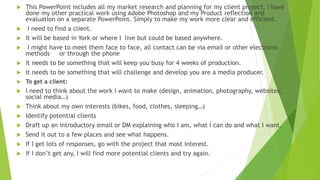
 This PowerPoint includes all my market research and planning for my client project. I have
done my other practical work using Adobe Photoshop and my Product reflection and
evaluation on a separate PowerPoint. Simply to make my work more clear and efficient.
 I need to find a client.
 It will be based in York or where I live but could be based anywhere.
 I might have to meet them face to face, all contact can be via email or other electronic
methods or through the phone
 It needs to be something that will keep you busy for 4 weeks of production.
 It needs to be something that will challenge and develop you are a media producer.
 To get a client:
 I need to think about the work I want to make (design, animation, photography, websites,
social media…)
 Think about my own interests (bikes, food, clothes, sleeping…)
 Identify potential clients
 Draft up an introductory email or DM explaining who I am, what I can do and what I want.
 Send it out to a few places and see what happens.
 If I get lots of responses, go with the project that most interest.
 If I don’t get any, I will find more potential clients and try again.
 Identifying and finding a client.
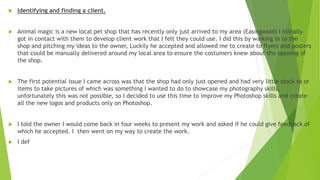
 Animal magic is a new local pet shop that has recently only just arrived to my area (Easingwold) I initially
got in contact with them to develop client work that I felt they could use. I did this by walking in to the
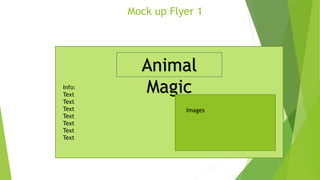
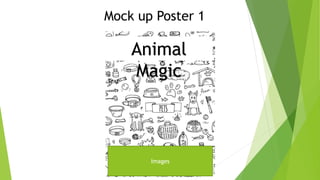
shop and pitching my ideas to the owner, Luckily he accepted and allowed me to create to flyers and posters
that could be manually delivered around my local area to ensure the costumers knew about the opening of
the shop.
 The first potential issue I came across was that the shop had only just opened and had very little stock to or
items to take pictures of which was something I wanted to do to showcase my photography skills,
unfortunately this was not possible, so I decided to use this time to improve my Photoshop skills and create
all the new logos and products only on Photoshop.
 I told the owner I would come back in four weeks to present my work and asked if he could give feedback of
which he accepted. I then went on my way to create the work.
 I def
Mock up Flyer 1
Animal
MagicInfo:
Text
Text
Text
Text
Text
Text
Text
Images
Mock up Poster 1
Animal
Magic
Images
Text
Other existing pet shops
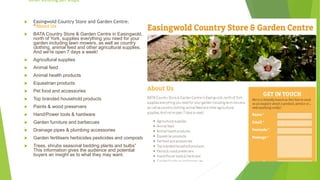
 Easingwold Country Store and Garden Centre.
“About Us
 BATA Country Store & Garden Centre in Easingwold,
north of York, supplies everything you need for your
garden including lawn mowers, as well as country
clothing, animal feed and other agricultural supplies.
And we're open 7 days a week!
 Agricultural supplies
 Animal feed
 Animal health products
 Equestrian products
 Pet food and accessories
 Top branded household products
 Paints & wood preservers
 Hand/Power tools & hardware
 Garden furniture and barbecues
 Drainage pipes & plumbing accessories
 Garden fertilisers herbicides pesticides and composts
 Trees, shrubs seasonal bedding plants and bulbs”
This information gives the audience and potential
buyers an insight as to what they may want.
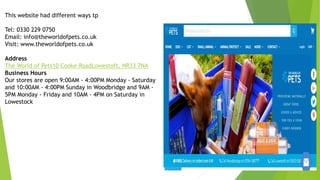
This website had different ways tp
Tel: 0330 229 0750
Email: info@theworldofpets.co.uk
Visit: www.theworldofpets.co.uk
Address
The World of Pets10 Cooke RoadLowestoft, NR33 7NA
Business Hours
Our stores are open 9:00AM - 4:00PM Monday - Saturday
and 10:00AM - 4:00PM Sunday in Woodbridge and 9AM -
5PM Monday - Friday and 10AM - 4PM on Saturday in
Lowestock
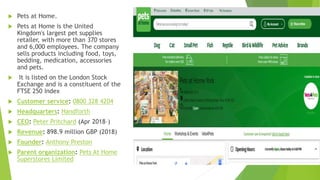
 Pets at Home.
 Pets at Home is the United
Kingdom's largest pet supplies
retailer, with more than 370 stores
and 6,000 employees. The company
sells products including food, toys,
bedding, medication, accessories
and pets.
 It is listed on the London Stock
Exchange and is a constituent of the
FTSE 250 Index
 Customer service: 0800 328 4204
 Headquarters: Handforth
 CEO: Peter Pritchard (Apr 2018–)
 Revenue: 898.9 million GBP (2018)
 Founder: Anthony Preston
 Parent organization: Pets At Home
Superstores Limited
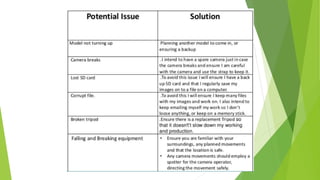
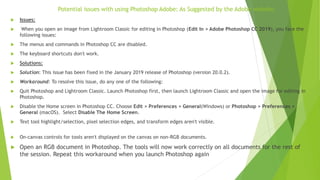
Potential issues with using Photoshop Adobe: As Suggested by the Adobe website.
 Issues:
 When you open an image from Lightroom Classic for editing in Photoshop (Edit In > Adobe Photoshop CC 2019), you face the
following issues:
 The menus and commands in Photoshop CC are disabled.
 The keyboard shortcuts don't work.
 Solutions:
 Solution: This issue has been fixed in the January 2019 release of Photoshop (version 20.0.2).
 Workaround: To resolve this issue, do any one of the following:
 Quit Photoshop and Lightroom Classic. Launch Photoshop first, then launch Lightroom Classic and open the image for editing in
Photoshop.
 Disable the Home screen in Photoshop CC. Choose Edit > Preferences > General(Windows) or Photoshop > Preferences >
General (macOS). Select Disable The Home Screen.
 Text tool highlight/selection, pixel selection edges, and transform edges aren't visible.
 On-canvas controls for tools aren't displayed on the canvas on non-RGB documents.
 Open an RGB document in Photoshop. The tools will now work correctly on all documents for the rest of
the session. Repeat this workaround when you launch Photoshop again
Mock up email to client:
160 Long Street
Easingwold, York
YO61 3JN
7th February 2018
Dear Animal Magic Owner,
I’m writing to introduce myself, my name is Charlotte Oliver, I am currently studying at York College doing a
Creative Media course.
I am currently trying to gain experience on creating media marketing for clients and real life businesses. I was
hoping I could come and pitch my ideas to you in person
Sincerely
Charlotte Oliver
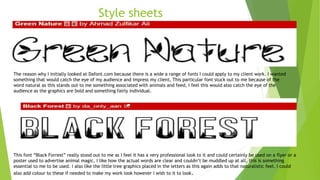
Style sheets
The reason why I initially looked at Dafont.com because there is a wide a range of fonts I could apply to my client work. I wanted
something that would catch the eye of my audience and impress my client, This particular font stuck out to me because of the
word natural as this stands out to me something associated with animals and feed, I feel this would also catch the eye of the
audience as the graphics are bold and something fairly individual.
This font “Black Forrest” really stood out to me as I feel it has a very professional look to it and could certainly be used on a flyer or a
poster used to advertise animal magic, I like how the actual words are clear and couldn’t be muddled up at all, this is something
essential to me to be used. I also like the little tree graphics placed in the letters as this again adds to that naturalistic feel. I could
also add colour to these if needed to make my work look however I wish to it to look.
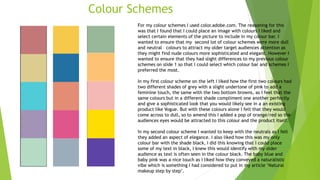
Colour Schemes
For my colour schemes I used color.adobe.com. The reasoning for this
was that I found that I could place an image with colours I liked and
select certain elements of the picture to include in my colour bar. I
wanted to ensure that my second lot of colour schemes were more dull
and neutral colours to attract my older target audiences attention as
they might find nude colours more sophisticated and elegant. However I
wanted to ensure that they had slight differences to my previous colour
schemes on slide 1 so that I could select which colour bar and schemes I
preferred the most.
In my first colour scheme on the left I liked how the first two colours had
two different shades of grey with a slight undertone of pink to add a
feminine touch, the same with the two bottom browns, as I feel that the
same colours but in a different shade compliment one another perfectly
and give a sophisticated look that you would likely see in a an existing
product like Vogue. But with these colours alone I felt that they would
come across to dull, so to amend this I added a pop of orange/red so the
audiences eyes would be attracted to this colour and the product itself.
In my second colour scheme I wanted to keep with the neutrals as I felt
they added an aspect of elegance. I also liked how this was my only
colour bar with the shade black, I did this knowing that I could place
some of my text in black, I knew this would identify with my older
audience as text is often seen in the colour black. The baby blue and
baby pink was a nice touch as I liked how they conveyed a naturalistic
vibe which is something I had considered to put in my article ‘Natural
makeup step by step’.

Client research

  • 1.
  • 2.
     This PowerPointincludes all my market research and planning for my client project. I have done my other practical work using Adobe Photoshop and my Product reflection and evaluation on a separate PowerPoint. Simply to make my work more clear and efficient.  I need to find a client.  It will be based in York or where I live but could be based anywhere.  I might have to meet them face to face, all contact can be via email or other electronic methods or through the phone  It needs to be something that will keep you busy for 4 weeks of production.  It needs to be something that will challenge and develop you are a media producer.  To get a client:  I need to think about the work I want to make (design, animation, photography, websites, social media…)  Think about my own interests (bikes, food, clothes, sleeping…)  Identify potential clients  Draft up an introductory email or DM explaining who I am, what I can do and what I want.  Send it out to a few places and see what happens.  If I get lots of responses, go with the project that most interest.  If I don’t get any, I will find more potential clients and try again.
  • 3.
     Identifying andfinding a client.  Animal magic is a new local pet shop that has recently only just arrived to my area (Easingwold) I initially got in contact with them to develop client work that I felt they could use. I did this by walking in to the shop and pitching my ideas to the owner, Luckily he accepted and allowed me to create to flyers and posters that could be manually delivered around my local area to ensure the costumers knew about the opening of the shop.  The first potential issue I came across was that the shop had only just opened and had very little stock to or items to take pictures of which was something I wanted to do to showcase my photography skills, unfortunately this was not possible, so I decided to use this time to improve my Photoshop skills and create all the new logos and products only on Photoshop.  I told the owner I would come back in four weeks to present my work and asked if he could give feedback of which he accepted. I then went on my way to create the work.  I def
  • 4.
    Mock up Flyer1 Animal MagicInfo: Text Text Text Text Text Text Text Images
  • 5.
    Mock up Poster1 Animal Magic Images Text
  • 8.
    Other existing petshops  Easingwold Country Store and Garden Centre. “About Us  BATA Country Store & Garden Centre in Easingwold, north of York, supplies everything you need for your garden including lawn mowers, as well as country clothing, animal feed and other agricultural supplies. And we're open 7 days a week!  Agricultural supplies  Animal feed  Animal health products  Equestrian products  Pet food and accessories  Top branded household products  Paints & wood preservers  Hand/Power tools & hardware  Garden furniture and barbecues  Drainage pipes & plumbing accessories  Garden fertilisers herbicides pesticides and composts  Trees, shrubs seasonal bedding plants and bulbs” This information gives the audience and potential buyers an insight as to what they may want.
  • 9.
    This website haddifferent ways tp Tel: 0330 229 0750 Email: info@theworldofpets.co.uk Visit: www.theworldofpets.co.uk Address The World of Pets10 Cooke RoadLowestoft, NR33 7NA Business Hours Our stores are open 9:00AM - 4:00PM Monday - Saturday and 10:00AM - 4:00PM Sunday in Woodbridge and 9AM - 5PM Monday - Friday and 10AM - 4PM on Saturday in Lowestock
  • 10.
     Pets atHome.  Pets at Home is the United Kingdom's largest pet supplies retailer, with more than 370 stores and 6,000 employees. The company sells products including food, toys, bedding, medication, accessories and pets.  It is listed on the London Stock Exchange and is a constituent of the FTSE 250 Index  Customer service: 0800 328 4204  Headquarters: Handforth  CEO: Peter Pritchard (Apr 2018–)  Revenue: 898.9 million GBP (2018)  Founder: Anthony Preston  Parent organization: Pets At Home Superstores Limited
  • 11.
    Potential issues withusing Photoshop Adobe: As Suggested by the Adobe website.  Issues:  When you open an image from Lightroom Classic for editing in Photoshop (Edit In > Adobe Photoshop CC 2019), you face the following issues:  The menus and commands in Photoshop CC are disabled.  The keyboard shortcuts don't work.  Solutions:  Solution: This issue has been fixed in the January 2019 release of Photoshop (version 20.0.2).  Workaround: To resolve this issue, do any one of the following:  Quit Photoshop and Lightroom Classic. Launch Photoshop first, then launch Lightroom Classic and open the image for editing in Photoshop.  Disable the Home screen in Photoshop CC. Choose Edit > Preferences > General(Windows) or Photoshop > Preferences > General (macOS). Select Disable The Home Screen.  Text tool highlight/selection, pixel selection edges, and transform edges aren't visible.  On-canvas controls for tools aren't displayed on the canvas on non-RGB documents.  Open an RGB document in Photoshop. The tools will now work correctly on all documents for the rest of the session. Repeat this workaround when you launch Photoshop again
  • 12.
    Mock up emailto client: 160 Long Street Easingwold, York YO61 3JN 7th February 2018 Dear Animal Magic Owner, I’m writing to introduce myself, my name is Charlotte Oliver, I am currently studying at York College doing a Creative Media course. I am currently trying to gain experience on creating media marketing for clients and real life businesses. I was hoping I could come and pitch my ideas to you in person Sincerely Charlotte Oliver
  • 13.
    Style sheets The reasonwhy I initially looked at Dafont.com because there is a wide a range of fonts I could apply to my client work. I wanted something that would catch the eye of my audience and impress my client, This particular font stuck out to me because of the word natural as this stands out to me something associated with animals and feed, I feel this would also catch the eye of the audience as the graphics are bold and something fairly individual. This font “Black Forrest” really stood out to me as I feel it has a very professional look to it and could certainly be used on a flyer or a poster used to advertise animal magic, I like how the actual words are clear and couldn’t be muddled up at all, this is something essential to me to be used. I also like the little tree graphics placed in the letters as this again adds to that naturalistic feel. I could also add colour to these if needed to make my work look however I wish to it to look.
  • 14.
    Colour Schemes For mycolour schemes I used color.adobe.com. The reasoning for this was that I found that I could place an image with colours I liked and select certain elements of the picture to include in my colour bar. I wanted to ensure that my second lot of colour schemes were more dull and neutral colours to attract my older target audiences attention as they might find nude colours more sophisticated and elegant. However I wanted to ensure that they had slight differences to my previous colour schemes on slide 1 so that I could select which colour bar and schemes I preferred the most. In my first colour scheme on the left I liked how the first two colours had two different shades of grey with a slight undertone of pink to add a feminine touch, the same with the two bottom browns, as I feel that the same colours but in a different shade compliment one another perfectly and give a sophisticated look that you would likely see in a an existing product like Vogue. But with these colours alone I felt that they would come across to dull, so to amend this I added a pop of orange/red so the audiences eyes would be attracted to this colour and the product itself. In my second colour scheme I wanted to keep with the neutrals as I felt they added an aspect of elegance. I also liked how this was my only colour bar with the shade black, I did this knowing that I could place some of my text in black, I knew this would identify with my older audience as text is often seen in the colour black. The baby blue and baby pink was a nice touch as I liked how they conveyed a naturalistic vibe which is something I had considered to put in my article ‘Natural makeup step by step’.