Client side and Server side 
Scripting 
Razi Kallayi 
RaziKallayi@gmail.com 
www.facebook.com/RaziKallayi 
twitter.com/RaziKallayi 
in.linkedin.com/in/RaziKallayi 
9746730324 
Typing Speed :26 wpm
Disclaimer: This presentation is prepared by trainees of 
baabtra as a part of mentoring program. This is not official 
document of baabtra –Mentoring Partner 
Baabtra-Mentoring Partner is the mentoring division of baabte System Technologies Pvt . Ltd
Scripting Languages 
• A scripting language is a programming language that supports the writing of 
scripts 
• A single script statement can execute huge number of machine instructions 
• Designed as glue language or system integration language 
• Are normally ‘typeless’ 
• Can create dynamic web page 
• Change based on user input
Features 
Ease of use: 
scripting languages are intended to be very fast to pick up 
Interpreted from source code: 
to give the fastest turnaround between the scripting phase and the 
execution phase
Types of Scripting Languages 
Server-side Scripting Language 
Client-side Scripting Language
Client-side Scripting 
• Client side scripting is used when the users browser already has all the code and the 
page is altered on the basis of the users input. 
• The Web Browser executes the client side scripting that resides at the user’s 
computer. 
• Does not involve server processing 
• Complete application is downloaded to the client browser 
• Client browser executes it locally 
• Are normally used to add functionality to web pages 
e.g. different menu styles, graphic displays or dynamic advertisements
Client-side Scripting [contd.] 
• The browser receives the page sent by the server and executes 
the client-side scripts. 
• Client side scripting cannot be used to connect to the databases 
on the web server. 
• Client side scripting can’t access the file system that resides at 
the web server.
Client-side Scripting [contd.] 
• The files and settings that are local at the user’s computer can be 
accessed using Client side scripting. 
• Response from a client-side script is faster as compared to a server-side 
script because the scripts are processed on the local computer. 
• Examples of Client side scripting languages : Javascript, VB script, etc.
What can JavaScript do? 
• Control document appearance and content 
• Control the browser 
• Interact with the user 
• Read and Write Client State with Cookies 
– my.yahoo.com 
• Interact with Applets 
– Read/write files
List of Client-Side Scripting Languages 
• JavaScript 
• ActionScript 
• Dart 
• VBScript 
• Typescript
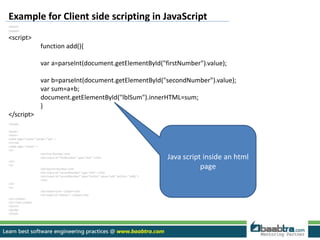
Example for Client side scripting in JavaScript 
<html> 
<head> 
<script> 
function add(){ 
var a=parseInt(document.getElementById("firstNumber").value); 
var b=parseInt(document.getElementById("secondNumber").value); 
var sum=a+b; 
document.getElementById("lblSum").innerHTML=sum; 
} 
</script> 
</head> 
<body> 
<form> 
<table align="center" border="1px" > 
<tr><td> 
<table align="center" > 
<tr> 
<td>First Number:</td> 
<td><input id="firstNumber" type="text" ></td> 
</tr> 
<tr> 
<td>Second Number:</td> 
<td><input id="secondNumber" type="text" ></td> 
<td><input id="secondNumber" type="button" value="add" onClick= "add()"> 
</td> 
</tr> 
<tr> 
<td><label>Sum= </label></td> 
<td><label id="lblSum"> </label></td> 
</tr></table> 
</tr></td></table> 
</form> 
</body> 
</html> 
Java script inside an html 
page
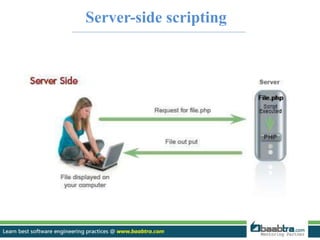
Server-side scripting
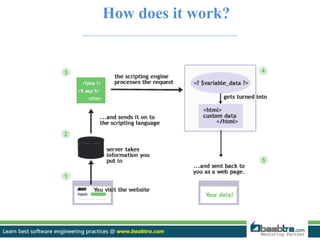
How does it work?
Server-side scripting 
• Can use huge resources of the server 
• Complete all processing in the server and send plain pages to the client 
• Reduces client-side computation overhead 
• The server is where the Web page and other content lives. 
• The server sends pages to the user/client on request. 
• Server-side scripting is about "programming" the behavior of the server.
Server-side scripting [contd.] 
• used to connect to the databases that reside on the web server. 
• can access the file system residing at the web server. 
• Response from a server-side script is slower as compared to a client-side 
script because the scripts are processed on the remote computer. 
• The Web Server executes the server side scripting that produces the 
page to be sent to the browser. 
• Server executes server-side scripts to send out a page but it does not 
execute client-side scripts.
Advantages 
• Interpreted, low processing overhead 
• Interpreter is integrated into web server, so it is fast 
• Secure, code runs on server 
• Content based on live data 
• Can use basic devices, eg phone, browsers as processing is server side 
• does not require the user to download plug-in like Java or Flash (as in 
client-side scripting). 
• Load times are generally faster than client-side scripting. 
• Your scripts are hidden from view.
Disadvantages 
• Debugging tools can be scarce 
• Can be more difficult to develop 
• Requires a running server to test 
• Has no direct control over the user interface
What can server scripts do? 
• Dynamically edit,change or add any content to a web page. 
• Responds to user queries or data submitted from html forms. 
• Access any data or databases & return the result to a browser. 
• Customize a web page to make it more useful for individual users. 
• Provide security since your server code cannot be viewed from a browser.
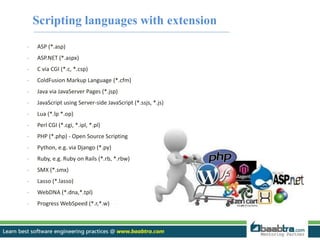
Scripting languages with extension 
- ASP (*.asp) 
- ASP.NET (*.aspx) 
- C via CGI (*.c, *.csp) 
- ColdFusion Markup Language (*.cfm) 
- Java via JavaServer Pages (*.jsp) 
- JavaScript using Server-side JavaScript (*.ssjs, *.js) 
- Lua (*.lp *.op) 
- Perl CGI (*.cgi, *.ipl, *.pl) 
- PHP (*.php) - Open Source Scripting 
- Python, e.g. via Django (*.py) 
- Ruby, e.g. Ruby on Rails (*.rb, *.rbw) 
- SMX (*.smx) 
- Lasso (*.lasso) 
- WebDNA (*.dna,*.tpl) 
- Progress WebSpeed (*.r,*.w)
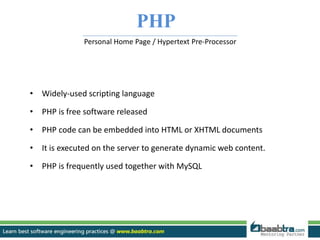
PHP 
Personal Home Page / Hypertext Pre-Processor 
• Widely-used scripting language 
• PHP is free software released 
• PHP code can be embedded into HTML or XHTML documents 
• It is executed on the server to generate dynamic web content. 
• PHP is frequently used together with MySQL
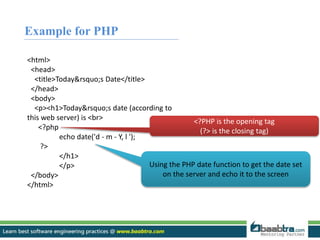
Example for PHP 
<html> 
<head> 
<title>Today&rsquo;s Date</title> 
</head> 
<body> 
<p><h1>Today&rsquo;s date (according to 
this web server) is <br> 
<?php 
echo date('d - m - Y, l '); 
?> 
</h1> 
</p> 
</body> 
</html> 
<?PHP is the opening tag 
(?> is the closing tag) 
Using the PHP date function to get the date set 
on the server and echo it to the screen
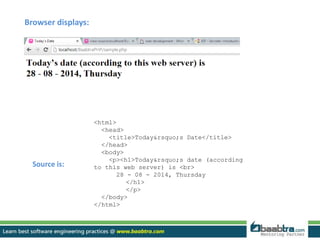
<html> 
<head> 
<title>Today&rsquo;s Date</title> 
</head> 
<body> 
<p><h1>Today&rsquo;s date (according 
to this web server) is <br> 
28 - 08 - 2014, Thursday 
</h1> 
</p> 
</body> 
</html> 
Browser displays: 
Source is:
Java Server Pages (JSP) 
• A Java technology similar to ASP 
• Used to create dynamically generated web pages by embedding Java 
programming code in HTML or XHTML documents 
• A Java Server Page is compiled into a Java servlet by an application server, 
rather than being interpreted 
• a servlet is a Java program that executes on the server to create dynamic 
web pages.
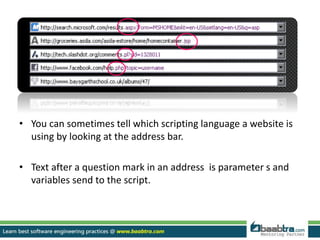
• You can sometimes tell which scripting language a website is 
using by looking at the address bar. 
• Text after a question mark in an address is parameter s and 
variables send to the script.
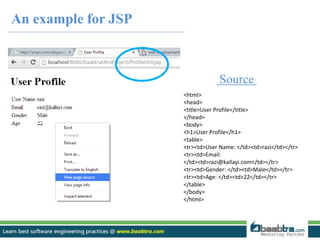
An example for JSP 
Source 
<html> 
<head> 
<title>User Profile</title> 
</head> 
<body> 
<h1>User Profile</h1> 
<table> 
<tr><td>User Name: </td><td>razi</td></tr> 
<tr><td>Email: 
</td><td>razi@kallayi.com</td></tr> 
<tr><td>Gender: </td><td>Male</td></tr> 
<tr><td>Age: </td><td>22</td></tr> 
</table> 
</body> 
</html>
<% @page import="com.baabtra.Service.ProfileService"%> 
<%@page import="com.baabtra.Service.LoginService"%> 
<%@page import="com.baabtra.Bean.RegistrationBean"%> 
<%@ page language="java" contentType="text/html; charset=ISO-8859-1" 
pageEncoding="ISO-8859-1“ %> 
<html> <head><title>User Profile</title></head><body> 
<% 
Integer ses_id=(Integer)session.getAttribute("login_id"); //here Integer is an object. int is converted to 
Integer object 
RegistrationBean objRegistrationBean = new RegistrationBean(); 
ProfileService objProfileService= new ProfileService(); 
objRegistrationBean = objProfileService.profileService(ses_id.intValue());//convert integer object back to int 
primitive data type 
String strUsername =objRegistrationBean.getStrUsername(); 
%> 
<h1>User Profile</h1> 
<table> 
<tr><td>User Name: </td><td><%=objRegistrationBean.getStrUsername()%></td></tr> 
<tr><td>Email: </td><td><%=objRegistrationBean.getStrEmail()%></td></tr> 
<tr><td>Gender: </td><td><%=objRegistrationBean.getStrGender()%></td></tr> 
<tr><td>Age: </td><td><%=objRegistrationBean.getStrDob()%></td></tr> 
</table></body> </html> 
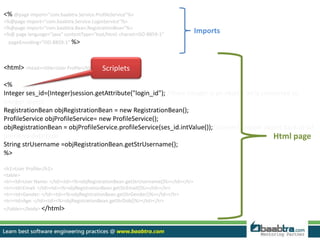
Html page 
Scriplets 
Imports
public RegistrationBean viewProfileDb(int loginId){ 
ConnectionDb objConn= new ConnectionDb(); 
Connection con=objConn.con; 
Statement st=(Statement)con.createStatement(); 
String sql="select vchr_username, vchr_email, vchr_gender, 
timestampdiff(year,dat_dob,current_date) as age from 
tbl_login join tbl_user on pk_int_loginid=fk_int_loginid 
where pk_int_loginid="+loginId+";"; 
ResultSet rs= st.executeQuery(sql); 
RegistrationBean user = new RegistrationBean(); 
/*Get data from db and set it to a bean object*/ 
while(rs.next()){ 
user.setStrUsername(rs.getString("vchr_username")); 
user.setStrEmail(rs.getString("vchr_email")); 
user.setStrGender(rs.getString("vchr_gender")); 
user.setStrDob(rs.getString("age")); 
} 
return user; 
} 
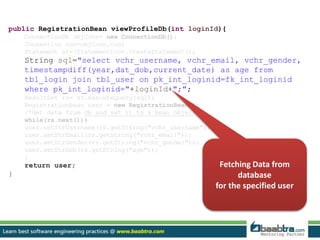
Fetching Data from 
database 
for the specified user
The Combination 
Sites like Google, Amazon, Facebook etc. use both types of scripting: 
• server-side handles logging in, personal information and preferences and provides the 
specific data which the user wants (and allows new data to be stored) 
• client-side makes the page interactive, displaying or sorting data. 
• Can build efficient applications 
• Choice to do the processing in the most appropriate location 
• Choice where to keep up to date multi use data 
• Choose how to optimise the user experience: 
– Performance 
– Appearance 
– Function
tyhoanuk 
RAZI KALLAYI
Want to learn more about programming or Looking to become a good programmer? 
Are you wasting time on searching so many contents online? 
Do you want to learn things quickly? 
Tired of spending huge amount of money to become a Software professional? 
Do an online course 
@ baabtra.com 
We put industry standards to practice. Our structured, activity based courses are so designed 
to make a quick, good software professional out of anybody who holds a passion for coding.
Follow us @ twitter.com/baabtra 
Like us @ facebook.com/baabtra 
Subscribe to us @ youtube.com/baabtra 
Become a follower @ slideshare.net/BaabtraMentoringPartner 
Connect to us @ in.linkedin.com/in/baabtra 
Give a feedback @ massbaab.com/baabtra 
Thanks in advance 
www.baabtra.com | www.massbaab.com |www.baabte.com
Contact Us 
Emarald Mall (Big Bazar Building) 
Mavoor Road, Kozhikode, 
Kerala, India. 
Ph: + 91 – 495 40 25 550 
NC Complex, Near Bus Stand 
Mukkam, Kozhikode, 
Kerala, India. 
Ph: + 91 – 495 40 25 550 
Cafit Square, 
Hilite Business Park, 
Near Pantheerankavu, 
Kozhikode 
Start up Village 
Eranakulam, 
Kerala, India. 
Email: info@baabtra.com

Client and server side scripting

  • 2.
    Client side andServer side Scripting Razi Kallayi RaziKallayi@gmail.com www.facebook.com/RaziKallayi twitter.com/RaziKallayi in.linkedin.com/in/RaziKallayi 9746730324 Typing Speed :26 wpm
  • 3.
    Disclaimer: This presentationis prepared by trainees of baabtra as a part of mentoring program. This is not official document of baabtra –Mentoring Partner Baabtra-Mentoring Partner is the mentoring division of baabte System Technologies Pvt . Ltd
  • 4.
    Scripting Languages •A scripting language is a programming language that supports the writing of scripts • A single script statement can execute huge number of machine instructions • Designed as glue language or system integration language • Are normally ‘typeless’ • Can create dynamic web page • Change based on user input
  • 5.
    Features Ease ofuse: scripting languages are intended to be very fast to pick up Interpreted from source code: to give the fastest turnaround between the scripting phase and the execution phase
  • 6.
    Types of ScriptingLanguages Server-side Scripting Language Client-side Scripting Language
  • 7.
    Client-side Scripting •Client side scripting is used when the users browser already has all the code and the page is altered on the basis of the users input. • The Web Browser executes the client side scripting that resides at the user’s computer. • Does not involve server processing • Complete application is downloaded to the client browser • Client browser executes it locally • Are normally used to add functionality to web pages e.g. different menu styles, graphic displays or dynamic advertisements
  • 8.
    Client-side Scripting [contd.] • The browser receives the page sent by the server and executes the client-side scripts. • Client side scripting cannot be used to connect to the databases on the web server. • Client side scripting can’t access the file system that resides at the web server.
  • 9.
    Client-side Scripting [contd.] • The files and settings that are local at the user’s computer can be accessed using Client side scripting. • Response from a client-side script is faster as compared to a server-side script because the scripts are processed on the local computer. • Examples of Client side scripting languages : Javascript, VB script, etc.
  • 10.
    What can JavaScriptdo? • Control document appearance and content • Control the browser • Interact with the user • Read and Write Client State with Cookies – my.yahoo.com • Interact with Applets – Read/write files
  • 11.
    List of Client-SideScripting Languages • JavaScript • ActionScript • Dart • VBScript • Typescript
  • 12.
    Example for Clientside scripting in JavaScript <html> <head> <script> function add(){ var a=parseInt(document.getElementById("firstNumber").value); var b=parseInt(document.getElementById("secondNumber").value); var sum=a+b; document.getElementById("lblSum").innerHTML=sum; } </script> </head> <body> <form> <table align="center" border="1px" > <tr><td> <table align="center" > <tr> <td>First Number:</td> <td><input id="firstNumber" type="text" ></td> </tr> <tr> <td>Second Number:</td> <td><input id="secondNumber" type="text" ></td> <td><input id="secondNumber" type="button" value="add" onClick= "add()"> </td> </tr> <tr> <td><label>Sum= </label></td> <td><label id="lblSum"> </label></td> </tr></table> </tr></td></table> </form> </body> </html> Java script inside an html page
  • 13.
  • 14.
  • 15.
    Server-side scripting •Can use huge resources of the server • Complete all processing in the server and send plain pages to the client • Reduces client-side computation overhead • The server is where the Web page and other content lives. • The server sends pages to the user/client on request. • Server-side scripting is about "programming" the behavior of the server.
  • 16.
    Server-side scripting [contd.] • used to connect to the databases that reside on the web server. • can access the file system residing at the web server. • Response from a server-side script is slower as compared to a client-side script because the scripts are processed on the remote computer. • The Web Server executes the server side scripting that produces the page to be sent to the browser. • Server executes server-side scripts to send out a page but it does not execute client-side scripts.
  • 17.
    Advantages • Interpreted,low processing overhead • Interpreter is integrated into web server, so it is fast • Secure, code runs on server • Content based on live data • Can use basic devices, eg phone, browsers as processing is server side • does not require the user to download plug-in like Java or Flash (as in client-side scripting). • Load times are generally faster than client-side scripting. • Your scripts are hidden from view.
  • 18.
    Disadvantages • Debuggingtools can be scarce • Can be more difficult to develop • Requires a running server to test • Has no direct control over the user interface
  • 19.
    What can serverscripts do? • Dynamically edit,change or add any content to a web page. • Responds to user queries or data submitted from html forms. • Access any data or databases & return the result to a browser. • Customize a web page to make it more useful for individual users. • Provide security since your server code cannot be viewed from a browser.
  • 20.
    Scripting languages withextension - ASP (*.asp) - ASP.NET (*.aspx) - C via CGI (*.c, *.csp) - ColdFusion Markup Language (*.cfm) - Java via JavaServer Pages (*.jsp) - JavaScript using Server-side JavaScript (*.ssjs, *.js) - Lua (*.lp *.op) - Perl CGI (*.cgi, *.ipl, *.pl) - PHP (*.php) - Open Source Scripting - Python, e.g. via Django (*.py) - Ruby, e.g. Ruby on Rails (*.rb, *.rbw) - SMX (*.smx) - Lasso (*.lasso) - WebDNA (*.dna,*.tpl) - Progress WebSpeed (*.r,*.w)
  • 21.
    PHP Personal HomePage / Hypertext Pre-Processor • Widely-used scripting language • PHP is free software released • PHP code can be embedded into HTML or XHTML documents • It is executed on the server to generate dynamic web content. • PHP is frequently used together with MySQL
  • 22.
    Example for PHP <html> <head> <title>Today&rsquo;s Date</title> </head> <body> <p><h1>Today&rsquo;s date (according to this web server) is <br> <?php echo date('d - m - Y, l '); ?> </h1> </p> </body> </html> <?PHP is the opening tag (?> is the closing tag) Using the PHP date function to get the date set on the server and echo it to the screen
  • 23.
    <html> <head> <title>Today&rsquo;sDate</title> </head> <body> <p><h1>Today&rsquo;s date (according to this web server) is <br> 28 - 08 - 2014, Thursday </h1> </p> </body> </html> Browser displays: Source is:
  • 24.
    Java Server Pages(JSP) • A Java technology similar to ASP • Used to create dynamically generated web pages by embedding Java programming code in HTML or XHTML documents • A Java Server Page is compiled into a Java servlet by an application server, rather than being interpreted • a servlet is a Java program that executes on the server to create dynamic web pages.
  • 25.
    • You cansometimes tell which scripting language a website is using by looking at the address bar. • Text after a question mark in an address is parameter s and variables send to the script.
  • 26.
    An example forJSP Source <html> <head> <title>User Profile</title> </head> <body> <h1>User Profile</h1> <table> <tr><td>User Name: </td><td>razi</td></tr> <tr><td>Email: </td><td>razi@kallayi.com</td></tr> <tr><td>Gender: </td><td>Male</td></tr> <tr><td>Age: </td><td>22</td></tr> </table> </body> </html>
  • 27.
    <% @page import="com.baabtra.Service.ProfileService"%> <%@page import="com.baabtra.Service.LoginService"%> <%@page import="com.baabtra.Bean.RegistrationBean"%> <%@ page language="java" contentType="text/html; charset=ISO-8859-1" pageEncoding="ISO-8859-1“ %> <html> <head><title>User Profile</title></head><body> <% Integer ses_id=(Integer)session.getAttribute("login_id"); //here Integer is an object. int is converted to Integer object RegistrationBean objRegistrationBean = new RegistrationBean(); ProfileService objProfileService= new ProfileService(); objRegistrationBean = objProfileService.profileService(ses_id.intValue());//convert integer object back to int primitive data type String strUsername =objRegistrationBean.getStrUsername(); %> <h1>User Profile</h1> <table> <tr><td>User Name: </td><td><%=objRegistrationBean.getStrUsername()%></td></tr> <tr><td>Email: </td><td><%=objRegistrationBean.getStrEmail()%></td></tr> <tr><td>Gender: </td><td><%=objRegistrationBean.getStrGender()%></td></tr> <tr><td>Age: </td><td><%=objRegistrationBean.getStrDob()%></td></tr> </table></body> </html> Html page Scriplets Imports
  • 28.
    public RegistrationBean viewProfileDb(intloginId){ ConnectionDb objConn= new ConnectionDb(); Connection con=objConn.con; Statement st=(Statement)con.createStatement(); String sql="select vchr_username, vchr_email, vchr_gender, timestampdiff(year,dat_dob,current_date) as age from tbl_login join tbl_user on pk_int_loginid=fk_int_loginid where pk_int_loginid="+loginId+";"; ResultSet rs= st.executeQuery(sql); RegistrationBean user = new RegistrationBean(); /*Get data from db and set it to a bean object*/ while(rs.next()){ user.setStrUsername(rs.getString("vchr_username")); user.setStrEmail(rs.getString("vchr_email")); user.setStrGender(rs.getString("vchr_gender")); user.setStrDob(rs.getString("age")); } return user; } Fetching Data from database for the specified user
  • 29.
    The Combination Siteslike Google, Amazon, Facebook etc. use both types of scripting: • server-side handles logging in, personal information and preferences and provides the specific data which the user wants (and allows new data to be stored) • client-side makes the page interactive, displaying or sorting data. • Can build efficient applications • Choice to do the processing in the most appropriate location • Choice where to keep up to date multi use data • Choose how to optimise the user experience: – Performance – Appearance – Function
  • 30.
  • 31.
    Want to learnmore about programming or Looking to become a good programmer? Are you wasting time on searching so many contents online? Do you want to learn things quickly? Tired of spending huge amount of money to become a Software professional? Do an online course @ baabtra.com We put industry standards to practice. Our structured, activity based courses are so designed to make a quick, good software professional out of anybody who holds a passion for coding.
  • 32.
    Follow us @twitter.com/baabtra Like us @ facebook.com/baabtra Subscribe to us @ youtube.com/baabtra Become a follower @ slideshare.net/BaabtraMentoringPartner Connect to us @ in.linkedin.com/in/baabtra Give a feedback @ massbaab.com/baabtra Thanks in advance www.baabtra.com | www.massbaab.com |www.baabte.com
  • 33.
    Contact Us EmaraldMall (Big Bazar Building) Mavoor Road, Kozhikode, Kerala, India. Ph: + 91 – 495 40 25 550 NC Complex, Near Bus Stand Mukkam, Kozhikode, Kerala, India. Ph: + 91 – 495 40 25 550 Cafit Square, Hilite Business Park, Near Pantheerankavu, Kozhikode Start up Village Eranakulam, Kerala, India. Email: info@baabtra.com