Hands-on with AWS IoT
Julien Simon
Principal Technical Evangelist
Amazon Web Services
julsimon@amazon.fr
@julsimon
Agenda
•  Overview of AWS IoT
•  Devices & SDKs, with a focus on the Arduino Yún
•  The MQTT protocol
•  Creating and securing “things”
•  Routing AWS IoT messages to other AWS services
•  Debugging AWS IoT applications
•  And lots of AWS CLI, yeah!
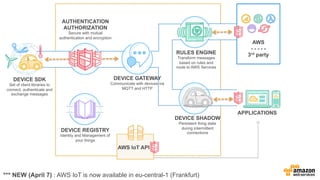
DEVICE SDK
Set of client libraries to
connect, authenticate and
exchange messages
DEVICE GATEWAY
Communicate with devices via
MQTT and HTTP
AUTHENTICATION
AUTHORIZATION
Secure with mutual
authentication and encryption
RULES ENGINE
Transform messages
based on rules and
route to AWS Services
AWS
- - - - -
3rd party
DEVICE SHADOW
Persistent thing state
during intermittent
connections
APPLICATIONS
AWS IoT API
DEVICE REGISTRY
Identity and Management of
your things
*** NEW (April 7) : AWS IoT is now available in eu-central-1 (Frankfurt)
Devices & SDKs
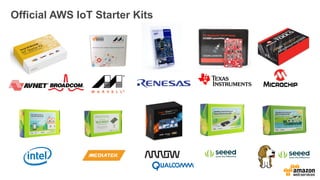
Official AWS IoT Starter Kits
Software platforms supported by AWS IoT
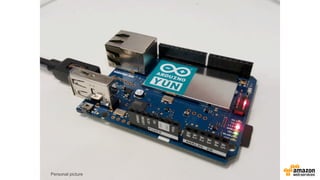
•  Arduino: Arduino Yún platform
•  Node.js: ideal for Embedded Linux
•  C: ideal for embedded OS
Personal picture
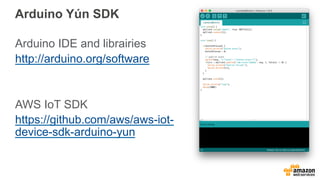
Arduino Yún SDK
Arduino IDE and librairies
http://arduino.org/software
AWS IoT SDK
https://github.com/aws/aws-iot-
device-sdk-arduino-yun
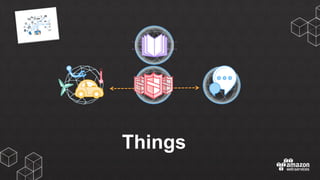
Things
Requirements
•  Thing Registry
•  Secure Identity for Things
•  Secure Communications with Things
•  Fine-grained Authorization for:
–  Thing Management
–  Publish / Subscribe Access
–  AWS Service Access
Creating a thing
% aws iot create-thing --thing-name myThing
% aws iot describe-thing --thing-name myThing
% aws iot list-things
Creating a certificate and keys
% aws iot create-keys-and-certificate
--set-as-active
--certificate-pem-outfile cert.pem
--public-key-outfile publicKey.pem
--private-key-outfile privateKey.pem
*** NEW (April 11) : You can now use your own certificates
The AWS IoT root certificate, the thing certificate and the thing private key must
be installed on your device, e.g.
https://github.com/aws/aws-iot-device-sdk-arduino-yun
Creating a policy
% cat myPolicy.json
{
"Version": "2012-10-17",
"Statement": [{ "Effect": "Allow", "Action":["iot:*"],
"Resource": ["*"] }]
}
% aws iot create-policy
--policy-name PubSubToAnyTopic
--policy-document file://myPolicy.json
Assigning an identity to a Policy and a Thing
% aws iot attach-principal-policy
--policy-name PubSubToAnyTopic
--principal CERTIFICATE_ARN
% aws iot attach-thing-principal
--thing-name myThing
--principal CERTIFICATE_ARN
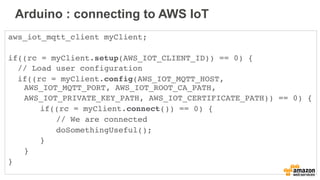
Arduino : connecting to AWS IoT
aws_iot_mqtt_client myClient;
if((rc = myClient.setup(AWS_IOT_CLIENT_ID)) == 0) {
// Load user configuration
if((rc = myClient.config(AWS_IOT_MQTT_HOST,
AWS_IOT_MQTT_PORT, AWS_IOT_ROOT_CA_PATH,
AWS_IOT_PRIVATE_KEY_PATH, AWS_IOT_CERTIFICATE_PATH)) == 0) {
if((rc = myClient.connect()) == 0) {
// We are connected
doSomethingUseful();
}
}
}
The MQTT protocol
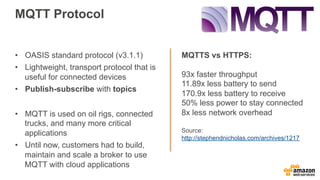
MQTT Protocol
MQTTS vs HTTPS:
93x faster throughput
11.89x less battery to send
170.9x less battery to receive
50% less power to stay connected
8x less network overhead
Source:
http://stephendnicholas.com/archives/1217
•  OASIS standard protocol (v3.1.1)
•  Lightweight, transport protocol that is
useful for connected devices
•  Publish-subscribe with topics
•  MQTT is used on oil rigs, connected
trucks, and many more critical
applications
•  Until now, customers had to build,
maintain and scale a broker to use
MQTT with cloud applications
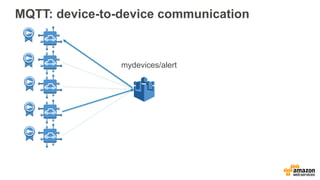
MQTT: device-to-device communication
mydevices/alert
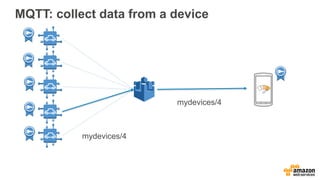
MQTT: collect data from a device
mydevices/4
mydevices/4
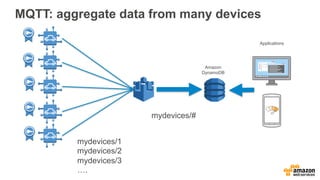
MQTT: aggregate data from many devices
mydevices/#
mydevices/1
mydevices/2
mydevices/3
….
Amazon
DynamoDB
Applications
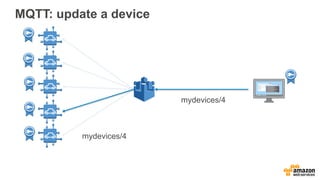
MQTT: update a device
mydevices/4
mydevices/4
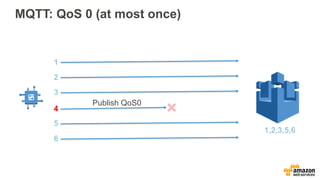
MQTT: QoS 0 (at most once)
1
2
3
4
5
6
1,2,3,5,6
Publish QoS0
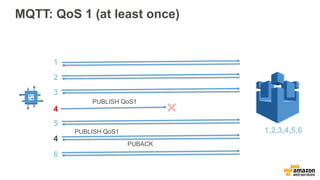
MQTT: QoS 1 (at least once)
1
2
3
4
5
4
1,2,3,4,5,6
6
PUBLISH QoS1
PUBLISH QoS1
PUBACK
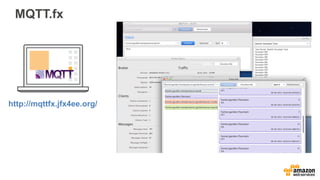
MQTT.fx
http://mqttfx.jfx4ee.org/
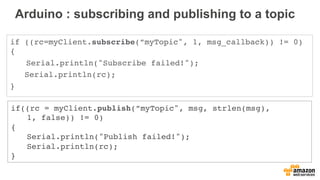
Arduino : subscribing and publishing to a topic
if ((rc=myClient.subscribe(”myTopic", 1, msg_callback)) != 0)
{
Serial.println("Subscribe failed!");
Serial.println(rc);
}
if((rc = myClient.publish(”myTopic", msg, strlen(msg),
1, false)) != 0)
{
Serial.println("Publish failed!");
Serial.println(rc);
}
Arduino : callback for incoming messages
// Basic callback function that prints out the message
void msg_callback(char* src, int len) {
Serial.println("CALLBACK:");
for(int i = 0; i < len; i++) {
Serial.print(src[i]);
}
Serial.println("");
}
Rules
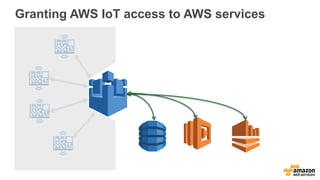
Granting AWS IoT access to AWS services
DynamoDB LambdaAmazon
Kinesis
Defining a trust policy for AWS IoT
% cat iot-role-trust.json
{
"Version":"2012-10-17",
"Statement":[
{
"Sid":"",
"Effect":"Allow",
"Principal":{
"Service":"iot.amazonaws.com"
},
"Action":"sts:AssumeRole"
}
]
}
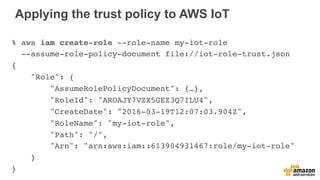
Applying the trust policy to AWS IoT
% aws iam create-role --role-name my-iot-role
--assume-role-policy-document file://iot-role-trust.json
{
"Role": {
"AssumeRolePolicyDocument": {…},
"RoleId": "AROAJY7VZX5GEZ3Q7ILU4",
"CreateDate": "2016-03-19T12:07:03.904Z",
"RoleName": "my-iot-role",
"Path": "/",
"Arn": "arn:aws:iam::613904931467:role/my-iot-role"
}
}
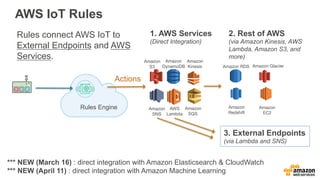
1. AWS Services
(Direct Integration)
Rules Engine
Actions
AWS IoT Rules
AWS
Lambda
Amazon
SNS
Amazon
SQS
Amazon
S3
Amazon
Kinesis
Amazon
DynamoDB Amazon RDS
Amazon 

Redshift
Amazon Glacier
Amazon 

EC2
3. External Endpoints
(via Lambda and SNS)
Rules connect AWS IoT to
External Endpoints and AWS
Services.
2. Rest of AWS
(via Amazon Kinesis, AWS
Lambda, Amazon S3, and
more)
*** NEW (March 16) : direct integration with Amazon Elasticsearch & CloudWatch
*** NEW (April 11) : direct integration with Amazon Machine Learning
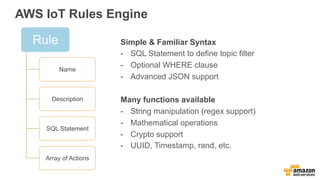
AWS IoT Rules Engine
Rule
Name
Description
SQL Statement
Array of Actions
Simple & Familiar Syntax
-  SQL Statement to define topic filter
-  Optional WHERE clause
-  Advanced JSON support
Many functions available
-  String manipulation (regex support)
-  Mathematical operations
-  Crypto support
-  UUID, Timestamp, rand, etc.
Creating a rule to write to DynamoDB
% cat topic1-dynamodb-rule.json
{
"sql": "SELECT * FROM 'topic1'",
"ruleDisabled": false,
"actions": [{
"dynamoDB": {
"tableName": "iot-topic1-table",
"roleArn": "arn:aws:iam::613904931467:role/my-iot-role",
"hashKeyField": "deviceId",
"hashKeyValue": "${deviceId}",
"rangeKeyField": "timestamp",
"rangeKeyValue": "${timestamp()}"
}
}]
}
% aws iot create-topic-rule --rule-name topic1-dynamodb-rule
--topic-rule-payload file://topic1-dynamodb-rule.json
Debugging
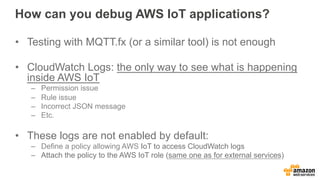
How can you debug AWS IoT applications?
•  Testing with MQTT.fx (or a similar tool) is not enough
•  CloudWatch Logs: the only way to see what is happening
inside AWS IoT
–  Permission issue
–  Rule issue
–  Incorrect JSON message
–  Etc.
•  These logs are not enabled by default:
–  Define a policy allowing AWS IoT to access CloudWatch logs
–  Attach the policy to the AWS IoT role (same one as for external services)
Defining a policy for CloudWatch Logs
% cat iot-policy-logs.json
{
"Version": "2012-10-17",
"Statement": [
{
"Effect": "Allow",
"Action": [
"logs:CreateLogGroup",
"logs:CreateLogStream",
"logs:PutLogEvents",
"logs:PutMetricFilter",
"logs:PutRetentionPolicy"
],
"Resource": [
"*"
]
}
]
}
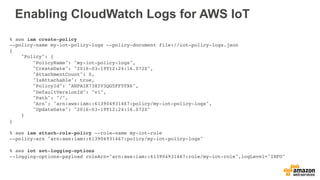
Enabling CloudWatch Logs for AWS IoT
% aws iam create-policy
--policy-name my-iot-policy-logs --policy-document file://iot-policy-logs.json
{
"Policy": {
"PolicyName": "my-iot-policy-logs",
"CreateDate": "2016-03-19T12:24:16.072Z",
"AttachmentCount": 0,
"IsAttachable": true,
"PolicyId": "ANPAIK73XIV3QG5FF5TX6",
"DefaultVersionId": "v1",
"Path": "/",
"Arn": "arn:aws:iam::613904931467:policy/my-iot-policy-logs",
"UpdateDate": "2016-03-19T12:24:16.072Z"
}
}
% aws iam attach-role-policy --role-name my-iot-role
--policy-arn "arn:aws:iam::613904931467:policy/my-iot-policy-logs"
% aws iot set-logging-options
--logging-options-payload roleArn="arn:aws:iam::613904931467:role/my-iot-role",logLevel="INFO"
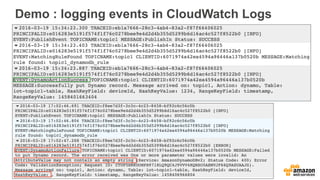
Demo : logging events in CloudWatch Logs
Thank You !
Julien Simon
julsimon@amazon.fr
@julsimon

Hands-on with AWS IoT

  • 1.
    Hands-on with AWSIoT Julien Simon Principal Technical Evangelist Amazon Web Services julsimon@amazon.fr @julsimon
  • 2.
    Agenda •  Overview ofAWS IoT •  Devices & SDKs, with a focus on the Arduino Yún •  The MQTT protocol •  Creating and securing “things” •  Routing AWS IoT messages to other AWS services •  Debugging AWS IoT applications •  And lots of AWS CLI, yeah!
  • 3.
    DEVICE SDK Set ofclient libraries to connect, authenticate and exchange messages DEVICE GATEWAY Communicate with devices via MQTT and HTTP AUTHENTICATION AUTHORIZATION Secure with mutual authentication and encryption RULES ENGINE Transform messages based on rules and route to AWS Services AWS - - - - - 3rd party DEVICE SHADOW Persistent thing state during intermittent connections APPLICATIONS AWS IoT API DEVICE REGISTRY Identity and Management of your things *** NEW (April 7) : AWS IoT is now available in eu-central-1 (Frankfurt)
  • 4.
  • 5.
    Official AWS IoTStarter Kits
  • 6.
    Software platforms supportedby AWS IoT •  Arduino: Arduino Yún platform •  Node.js: ideal for Embedded Linux •  C: ideal for embedded OS
  • 7.
  • 8.
    Arduino Yún SDK ArduinoIDE and librairies http://arduino.org/software AWS IoT SDK https://github.com/aws/aws-iot- device-sdk-arduino-yun
  • 9.
  • 10.
    Requirements •  Thing Registry • Secure Identity for Things •  Secure Communications with Things •  Fine-grained Authorization for: –  Thing Management –  Publish / Subscribe Access –  AWS Service Access
  • 11.
    Creating a thing %aws iot create-thing --thing-name myThing % aws iot describe-thing --thing-name myThing % aws iot list-things
  • 12.
    Creating a certificateand keys % aws iot create-keys-and-certificate --set-as-active --certificate-pem-outfile cert.pem --public-key-outfile publicKey.pem --private-key-outfile privateKey.pem *** NEW (April 11) : You can now use your own certificates The AWS IoT root certificate, the thing certificate and the thing private key must be installed on your device, e.g. https://github.com/aws/aws-iot-device-sdk-arduino-yun
  • 13.
    Creating a policy %cat myPolicy.json { "Version": "2012-10-17", "Statement": [{ "Effect": "Allow", "Action":["iot:*"], "Resource": ["*"] }] } % aws iot create-policy --policy-name PubSubToAnyTopic --policy-document file://myPolicy.json
  • 14.
    Assigning an identityto a Policy and a Thing % aws iot attach-principal-policy --policy-name PubSubToAnyTopic --principal CERTIFICATE_ARN % aws iot attach-thing-principal --thing-name myThing --principal CERTIFICATE_ARN
  • 15.
    Arduino : connectingto AWS IoT aws_iot_mqtt_client myClient; if((rc = myClient.setup(AWS_IOT_CLIENT_ID)) == 0) { // Load user configuration if((rc = myClient.config(AWS_IOT_MQTT_HOST, AWS_IOT_MQTT_PORT, AWS_IOT_ROOT_CA_PATH, AWS_IOT_PRIVATE_KEY_PATH, AWS_IOT_CERTIFICATE_PATH)) == 0) { if((rc = myClient.connect()) == 0) { // We are connected doSomethingUseful(); } } }
  • 16.
  • 17.
    MQTT Protocol MQTTS vsHTTPS: 93x faster throughput 11.89x less battery to send 170.9x less battery to receive 50% less power to stay connected 8x less network overhead Source: http://stephendnicholas.com/archives/1217 •  OASIS standard protocol (v3.1.1) •  Lightweight, transport protocol that is useful for connected devices •  Publish-subscribe with topics •  MQTT is used on oil rigs, connected trucks, and many more critical applications •  Until now, customers had to build, maintain and scale a broker to use MQTT with cloud applications
  • 18.
  • 19.
    MQTT: collect datafrom a device mydevices/4 mydevices/4
  • 20.
    MQTT: aggregate datafrom many devices mydevices/# mydevices/1 mydevices/2 mydevices/3 …. Amazon DynamoDB Applications
  • 21.
    MQTT: update adevice mydevices/4 mydevices/4
  • 22.
    MQTT: QoS 0(at most once) 1 2 3 4 5 6 1,2,3,5,6 Publish QoS0
  • 23.
    MQTT: QoS 1(at least once) 1 2 3 4 5 4 1,2,3,4,5,6 6 PUBLISH QoS1 PUBLISH QoS1 PUBACK
  • 24.
  • 25.
    Arduino : subscribingand publishing to a topic if ((rc=myClient.subscribe(”myTopic", 1, msg_callback)) != 0) { Serial.println("Subscribe failed!"); Serial.println(rc); } if((rc = myClient.publish(”myTopic", msg, strlen(msg), 1, false)) != 0) { Serial.println("Publish failed!"); Serial.println(rc); }
  • 26.
    Arduino : callbackfor incoming messages // Basic callback function that prints out the message void msg_callback(char* src, int len) { Serial.println("CALLBACK:"); for(int i = 0; i < len; i++) { Serial.print(src[i]); } Serial.println(""); }
  • 27.
  • 28.
    Granting AWS IoTaccess to AWS services DynamoDB LambdaAmazon Kinesis
  • 29.
    Defining a trustpolicy for AWS IoT % cat iot-role-trust.json { "Version":"2012-10-17", "Statement":[ { "Sid":"", "Effect":"Allow", "Principal":{ "Service":"iot.amazonaws.com" }, "Action":"sts:AssumeRole" } ] }
  • 30.
    Applying the trustpolicy to AWS IoT % aws iam create-role --role-name my-iot-role --assume-role-policy-document file://iot-role-trust.json { "Role": { "AssumeRolePolicyDocument": {…}, "RoleId": "AROAJY7VZX5GEZ3Q7ILU4", "CreateDate": "2016-03-19T12:07:03.904Z", "RoleName": "my-iot-role", "Path": "/", "Arn": "arn:aws:iam::613904931467:role/my-iot-role" } }
  • 31.
    1. AWS Services (DirectIntegration) Rules Engine Actions AWS IoT Rules AWS Lambda Amazon SNS Amazon SQS Amazon S3 Amazon Kinesis Amazon DynamoDB Amazon RDS Amazon 
 Redshift Amazon Glacier Amazon 
 EC2 3. External Endpoints (via Lambda and SNS) Rules connect AWS IoT to External Endpoints and AWS Services. 2. Rest of AWS (via Amazon Kinesis, AWS Lambda, Amazon S3, and more) *** NEW (March 16) : direct integration with Amazon Elasticsearch & CloudWatch *** NEW (April 11) : direct integration with Amazon Machine Learning
  • 32.
    AWS IoT RulesEngine Rule Name Description SQL Statement Array of Actions Simple & Familiar Syntax -  SQL Statement to define topic filter -  Optional WHERE clause -  Advanced JSON support Many functions available -  String manipulation (regex support) -  Mathematical operations -  Crypto support -  UUID, Timestamp, rand, etc.
  • 33.
    Creating a ruleto write to DynamoDB % cat topic1-dynamodb-rule.json { "sql": "SELECT * FROM 'topic1'", "ruleDisabled": false, "actions": [{ "dynamoDB": { "tableName": "iot-topic1-table", "roleArn": "arn:aws:iam::613904931467:role/my-iot-role", "hashKeyField": "deviceId", "hashKeyValue": "${deviceId}", "rangeKeyField": "timestamp", "rangeKeyValue": "${timestamp()}" } }] } % aws iot create-topic-rule --rule-name topic1-dynamodb-rule --topic-rule-payload file://topic1-dynamodb-rule.json
  • 34.
  • 35.
    How can youdebug AWS IoT applications? •  Testing with MQTT.fx (or a similar tool) is not enough •  CloudWatch Logs: the only way to see what is happening inside AWS IoT –  Permission issue –  Rule issue –  Incorrect JSON message –  Etc. •  These logs are not enabled by default: –  Define a policy allowing AWS IoT to access CloudWatch logs –  Attach the policy to the AWS IoT role (same one as for external services)
  • 36.
    Defining a policyfor CloudWatch Logs % cat iot-policy-logs.json { "Version": "2012-10-17", "Statement": [ { "Effect": "Allow", "Action": [ "logs:CreateLogGroup", "logs:CreateLogStream", "logs:PutLogEvents", "logs:PutMetricFilter", "logs:PutRetentionPolicy" ], "Resource": [ "*" ] } ] }
  • 37.
    Enabling CloudWatch Logsfor AWS IoT % aws iam create-policy --policy-name my-iot-policy-logs --policy-document file://iot-policy-logs.json { "Policy": { "PolicyName": "my-iot-policy-logs", "CreateDate": "2016-03-19T12:24:16.072Z", "AttachmentCount": 0, "IsAttachable": true, "PolicyId": "ANPAIK73XIV3QG5FF5TX6", "DefaultVersionId": "v1", "Path": "/", "Arn": "arn:aws:iam::613904931467:policy/my-iot-policy-logs", "UpdateDate": "2016-03-19T12:24:16.072Z" } } % aws iam attach-role-policy --role-name my-iot-role --policy-arn "arn:aws:iam::613904931467:policy/my-iot-policy-logs" % aws iot set-logging-options --logging-options-payload roleArn="arn:aws:iam::613904931467:role/my-iot-role",logLevel="INFO"
  • 38.
    Demo : loggingevents in CloudWatch Logs
  • 39.
    Thank You ! JulienSimon julsimon@amazon.fr @julsimon