

CI and CD
Zonky 17.1.2017
Ladislav Prskavec, Apiary
ladislav@apiary.io
@abtris
Key concepts
» Continuous Delivery (CD)
» Continuous Integration (CI)
» Continuous Deployment
Continuous
Integration
Continuous Integration (CI)
» is a development practice that requires developers to integrate
code into a shared repository several times a day. Each check-
in is then verified by an automated build, allowing teams to
detect problems early.
Continuous Delivery
Continuous Delivery
» is a software development discipline where you build software
in such a way that the software can be released to production
at any time.
Continuous
Deployment
Continuous Deployment
» means that every change goes through the pipeline and
automatically gets put into production, resulting in many
production deployments every day.
How we do Continuous
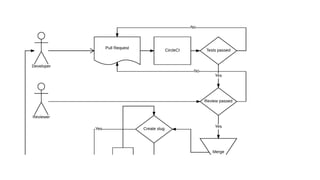
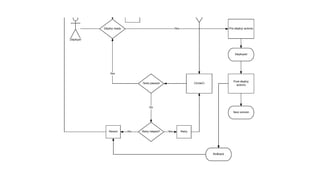
Delivery in Apiary
Continuous
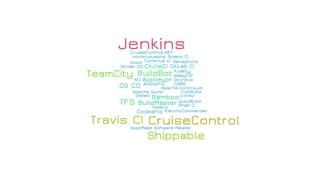
Integration Engines
Key features from CIE
» job definitions in repository
» autoscaling on traffic with lowest possible price
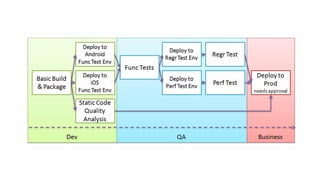
» pipelines
» caching for installations (apt, npm, gem, composer, docker)
» docker support (registry, caching layers)
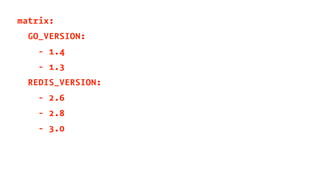
» matrix builds (OSS)
» distributed job across multiple nodes
Job definitions in
repository
sudo: "required"
dist: "trusty"
language: "node_js"
node_js:
- "0.10"
- "0.12"
- "4"
- "6"
env:
global:
# GH_TOKEN and NPM_TOKEN encrypted by 'travis encrypt' utility
- secure: "<<<TOKEN>>>"
cache:
directories:
- "node_modules"
before_install:
- "npm -g install npm@latest"
- "gem install travis"
- "curl -Lo travis_after_all.py https://raw.githubusercontent.com/dmakhno/travis_after_all/master/travis_after_all.py"
before_script:
- "npm run lint"
script:
- "npm test"
- "npm run test:hooks-handlers"
after_success: # travis_after_all.py is needed due to travis-ci/travis-ci#1548 & travis-ci/travis-ci#929
- "npm run coveralls"
- "python travis_after_all.py"
- "export $(cat .to_export_back)"
- "npm run semantic-release || true"
node('node') {
currentBuild.result = "SUCCESS"
try {
stage 'Checkout'
checkout scm
stage 'Test'
env.NODE_ENV = "test"
print "Environment will be : ${env.NODE_ENV}"
sh 'node -v'
sh 'npm prune'
sh 'npm install'
sh 'npm test'
stage 'Build Docker'
sh './dockerBuild.sh'
stage 'Deploy'
echo 'Push to Repo'
sh './dockerPushToRepo.sh'
echo 'ssh to web server and tell it to pull new image'
sh 'ssh deploy@xxxxx.xxxxx.com running/xxxxxxx/dockerRun.sh'
stage 'Cleanup'
echo 'prune and cleanup'
sh 'npm prune'
sh 'rm node_modules -rf'
mail body: 'project build successful',
from: 'xxxx@yyyyy.com',
replyTo: 'xxxx@yyyy.com',
subject: 'project build successful',
to: 'yyyyy@yyyy.com'
}
catch (err) {
currentBuild.result = "FAILURE"
mail body: "project build error: ${err}" ,
from: 'xxxx@yyyy.com',
replyTo: 'yyyy@yyyy.com',
subject: 'project build failed',
to: 'zzzz@yyyyy.com'
throw err
}
}
Autoscaling
Pipelines
Caching
Docker support
machine:
services:
- docker
dependencies:
override:
- docker info
- docker build -t circleci/elasticsearch .
test:
override:
- docker run -d -p 9200:9200 circleci/elasticsearch; sleep 10
- curl --retry 10 --retry-delay 5 -v http://localhost:9200
deployment:
hub:
branch: master
commands:
- docker login -e $DOCKER_EMAIL -u $DOCKER_USER -p $DOCKER_PASS
- docker push circleci/elasticsearch
Matrix builds
matrix:
GO_VERSION:
- 1.4
- 1.3
REDIS_VERSION:
- 2.6
- 2.8
- 3.0
Distributed job across
multiple nodes
Q & A

CI and CD

  • 1.
    CI and CD Zonky17.1.2017 Ladislav Prskavec, Apiary ladislav@apiary.io @abtris
  • 2.
    Key concepts » ContinuousDelivery (CD) » Continuous Integration (CI) » Continuous Deployment
  • 3.
  • 4.
    Continuous Integration (CI) »is a development practice that requires developers to integrate code into a shared repository several times a day. Each check- in is then verified by an automated build, allowing teams to detect problems early.
  • 5.
  • 6.
    Continuous Delivery » isa software development discipline where you build software in such a way that the software can be released to production at any time.
  • 7.
  • 8.
    Continuous Deployment » meansthat every change goes through the pipeline and automatically gets put into production, resulting in many production deployments every day.
  • 9.
    How we doContinuous Delivery in Apiary
  • 13.
  • 15.
    Key features fromCIE » job definitions in repository » autoscaling on traffic with lowest possible price » pipelines » caching for installations (apt, npm, gem, composer, docker) » docker support (registry, caching layers) » matrix builds (OSS) » distributed job across multiple nodes
  • 16.
  • 17.
    sudo: "required" dist: "trusty" language:"node_js" node_js: - "0.10" - "0.12" - "4" - "6" env: global: # GH_TOKEN and NPM_TOKEN encrypted by 'travis encrypt' utility - secure: "<<<TOKEN>>>" cache: directories: - "node_modules" before_install: - "npm -g install npm@latest" - "gem install travis" - "curl -Lo travis_after_all.py https://raw.githubusercontent.com/dmakhno/travis_after_all/master/travis_after_all.py" before_script: - "npm run lint" script: - "npm test" - "npm run test:hooks-handlers" after_success: # travis_after_all.py is needed due to travis-ci/travis-ci#1548 & travis-ci/travis-ci#929 - "npm run coveralls" - "python travis_after_all.py" - "export $(cat .to_export_back)" - "npm run semantic-release || true"
  • 18.
    node('node') { currentBuild.result ="SUCCESS" try { stage 'Checkout' checkout scm stage 'Test' env.NODE_ENV = "test" print "Environment will be : ${env.NODE_ENV}" sh 'node -v' sh 'npm prune' sh 'npm install' sh 'npm test' stage 'Build Docker' sh './dockerBuild.sh' stage 'Deploy' echo 'Push to Repo' sh './dockerPushToRepo.sh' echo 'ssh to web server and tell it to pull new image' sh 'ssh deploy@xxxxx.xxxxx.com running/xxxxxxx/dockerRun.sh' stage 'Cleanup' echo 'prune and cleanup' sh 'npm prune' sh 'rm node_modules -rf' mail body: 'project build successful', from: 'xxxx@yyyyy.com', replyTo: 'xxxx@yyyy.com', subject: 'project build successful', to: 'yyyyy@yyyy.com' } catch (err) { currentBuild.result = "FAILURE" mail body: "project build error: ${err}" , from: 'xxxx@yyyy.com', replyTo: 'yyyy@yyyy.com', subject: 'project build failed', to: 'zzzz@yyyyy.com' throw err } }
  • 19.
  • 21.
  • 23.
  • 25.
  • 26.
    machine: services: - docker dependencies: override: - dockerinfo - docker build -t circleci/elasticsearch . test: override: - docker run -d -p 9200:9200 circleci/elasticsearch; sleep 10 - curl --retry 10 --retry-delay 5 -v http://localhost:9200 deployment: hub: branch: master commands: - docker login -e $DOCKER_EMAIL -u $DOCKER_USER -p $DOCKER_PASS - docker push circleci/elasticsearch
  • 27.
  • 28.
  • 29.
  • 31.