ndjidoardo.bar@hypercube-research.com
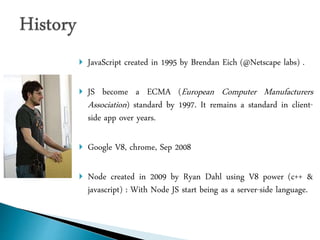
 JavaScript created in 1995 by Brendan Eich (@Netscape labs) .
 JS become a ECMA (European Computer Manufacturers
Association) standard by 1997. It remains a standard in client-
side app over years.
 Google V8, chrome, Sep 2008
 Node created in 2009 by Ryan Dahl using V8 power (c++ &
javascript) : With Node JS start being as a server-side language.
 Highly scalable web servers for web applications.
 Web services (RESTful API)
 Real-Time apps as its supports Web-Sockets.
 App with queued inputs.
 Data streaming apps.
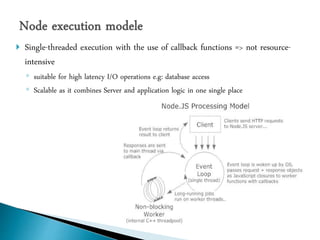
 Single-threaded execution with the use of callback functions => not resource-
intensive
◦ suitable for high latency I/O operations e.g: database access
◦ Scalable as it combines Server and application logic in one single place
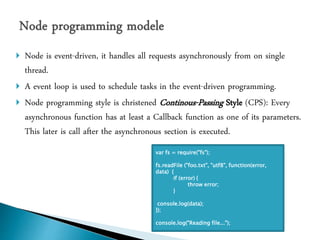
 Node is event-driven, it handles all requests asynchronously from on single
thread.
 A event loop is used to schedule tasks in the event-driven programming.
 Node programming style is christened Continous-Passing Style (CPS): Every
asynchronous function has at least a Callback function as one of its parameters.
This later is call after the asynchronous section is executed.
var fs = require("fs");
fs.readFile ("foo.txt", "utf8", function(error,
data) {
if (error) {
throw error;
}
console.log(data);
});
console.log("Reading file...");
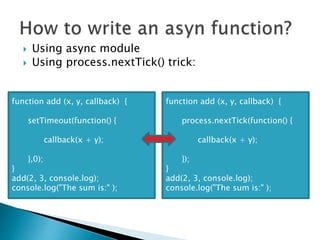
 Using async module
 Using process.nextTick() trick:
function add (x, y, callback) {
setTimeout(function() {
callback(x + y);
},0);
}
add(2, 3, console.log);
console.log("The sum is:" );
function add (x, y, callback) {
process.nextTick(function() {
callback(x + y);
});
}
add(2, 3, console.log);
console.log("The sum is:" );
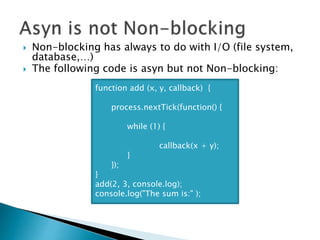
 Non-blocking has always to do with I/O (file system,
database,…)
 The following code is asyn but not Non-blocking:
function add (x, y, callback) {
process.nextTick(function() {
while (1) {
callback(x + y);
}
});
}
add(2, 3, console.log);
console.log("The sum is:" );
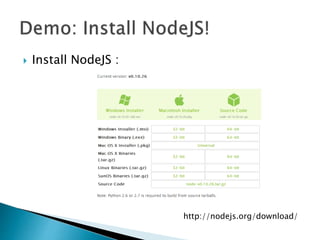
 Install NodeJS :
http://nodejs.org/download/
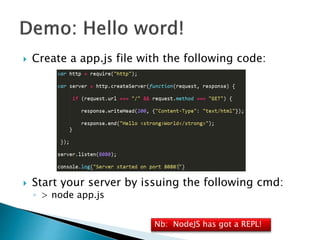
 Create a app.js file with the following code:
 Start your server by issuing the following cmd:
◦ > node app.js
Nb: NodeJS has got a REPL!
 NodeJS extensions are known as modules
 NodeJS is being backed by an active community which provides
an overwhelming number of modules
 NPM command is used to install and manage new modules:
◦ Ex:
 npm install async
 npm install async@1.0.x
 npm install –g async
 npm serach <MODULE_NAME>
 npm outdated
 npm update npm –g
 npm rm asyn
 « require(<MODULE_NAME>)» is used to load a given module
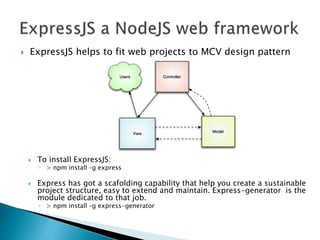
 ExpressJS helps to fit web projects to MCV design pattern
 To install ExpressJS:
◦ > npm install –g express
 Express has got a scafolding capability that help you create a sustainable
project structure, easy to extend and maintain. Express-generator is the
module dedicated to that job.
◦ > npm install –g express-generator
 Find a ExpressJS app example on my GITHUB:
◦ https://github.com/ndjido/NodeJS_intro

Nodejs intro

  • 1.
  • 2.
     JavaScript createdin 1995 by Brendan Eich (@Netscape labs) .  JS become a ECMA (European Computer Manufacturers Association) standard by 1997. It remains a standard in client- side app over years.  Google V8, chrome, Sep 2008  Node created in 2009 by Ryan Dahl using V8 power (c++ & javascript) : With Node JS start being as a server-side language.
  • 3.
     Highly scalableweb servers for web applications.  Web services (RESTful API)  Real-Time apps as its supports Web-Sockets.  App with queued inputs.  Data streaming apps.
  • 5.
     Single-threaded executionwith the use of callback functions => not resource- intensive ◦ suitable for high latency I/O operations e.g: database access ◦ Scalable as it combines Server and application logic in one single place
  • 6.
     Node isevent-driven, it handles all requests asynchronously from on single thread.  A event loop is used to schedule tasks in the event-driven programming.  Node programming style is christened Continous-Passing Style (CPS): Every asynchronous function has at least a Callback function as one of its parameters. This later is call after the asynchronous section is executed. var fs = require("fs"); fs.readFile ("foo.txt", "utf8", function(error, data) { if (error) { throw error; } console.log(data); }); console.log("Reading file...");
  • 7.
     Using asyncmodule  Using process.nextTick() trick: function add (x, y, callback) { setTimeout(function() { callback(x + y); },0); } add(2, 3, console.log); console.log("The sum is:" ); function add (x, y, callback) { process.nextTick(function() { callback(x + y); }); } add(2, 3, console.log); console.log("The sum is:" );
  • 8.
     Non-blocking hasalways to do with I/O (file system, database,…)  The following code is asyn but not Non-blocking: function add (x, y, callback) { process.nextTick(function() { while (1) { callback(x + y); } }); } add(2, 3, console.log); console.log("The sum is:" );
  • 9.
     Install NodeJS: http://nodejs.org/download/
  • 10.
     Create aapp.js file with the following code:  Start your server by issuing the following cmd: ◦ > node app.js Nb: NodeJS has got a REPL!
  • 11.
     NodeJS extensionsare known as modules  NodeJS is being backed by an active community which provides an overwhelming number of modules  NPM command is used to install and manage new modules: ◦ Ex:  npm install async  npm install async@1.0.x  npm install –g async  npm serach <MODULE_NAME>  npm outdated  npm update npm –g  npm rm asyn  « require(<MODULE_NAME>)» is used to load a given module
  • 12.
     ExpressJS helpsto fit web projects to MCV design pattern  To install ExpressJS: ◦ > npm install –g express  Express has got a scafolding capability that help you create a sustainable project structure, easy to extend and maintain. Express-generator is the module dedicated to that job. ◦ > npm install –g express-generator
  • 13.
     Find aExpressJS app example on my GITHUB: ◦ https://github.com/ndjido/NodeJS_intro