CHROMA KEY
COMPOSITING
Introduction
 Chroma key compositing, or Chroma keying, is a
technique for mixing two images or frames
together in which a color from one image is
removed, revealing another image behind it..
 This technique is also referred to as color keying,
color-separation overlay.
History
 In early filmmaking, a complex and time consuming
process known as 'travelling matte'.
 Travelling Matte - A process that was used to
superimpose backdrops with actors performing
against a blank wall.
 In the 1930's, the blue screen method was
developed at RKO Radio pictures to make more
effective films.
Travelling Matte
Process
 The portions of the video which match the
preselected color are replaced by the alternate
background video. This process is commonly
known as "keying", "keying out" or simply a "key".
Backdrop
 Green Backdrop
 Blue Backdrop
These backdrops are usually used because these colors
are considered to be the furthest away from skin tone.
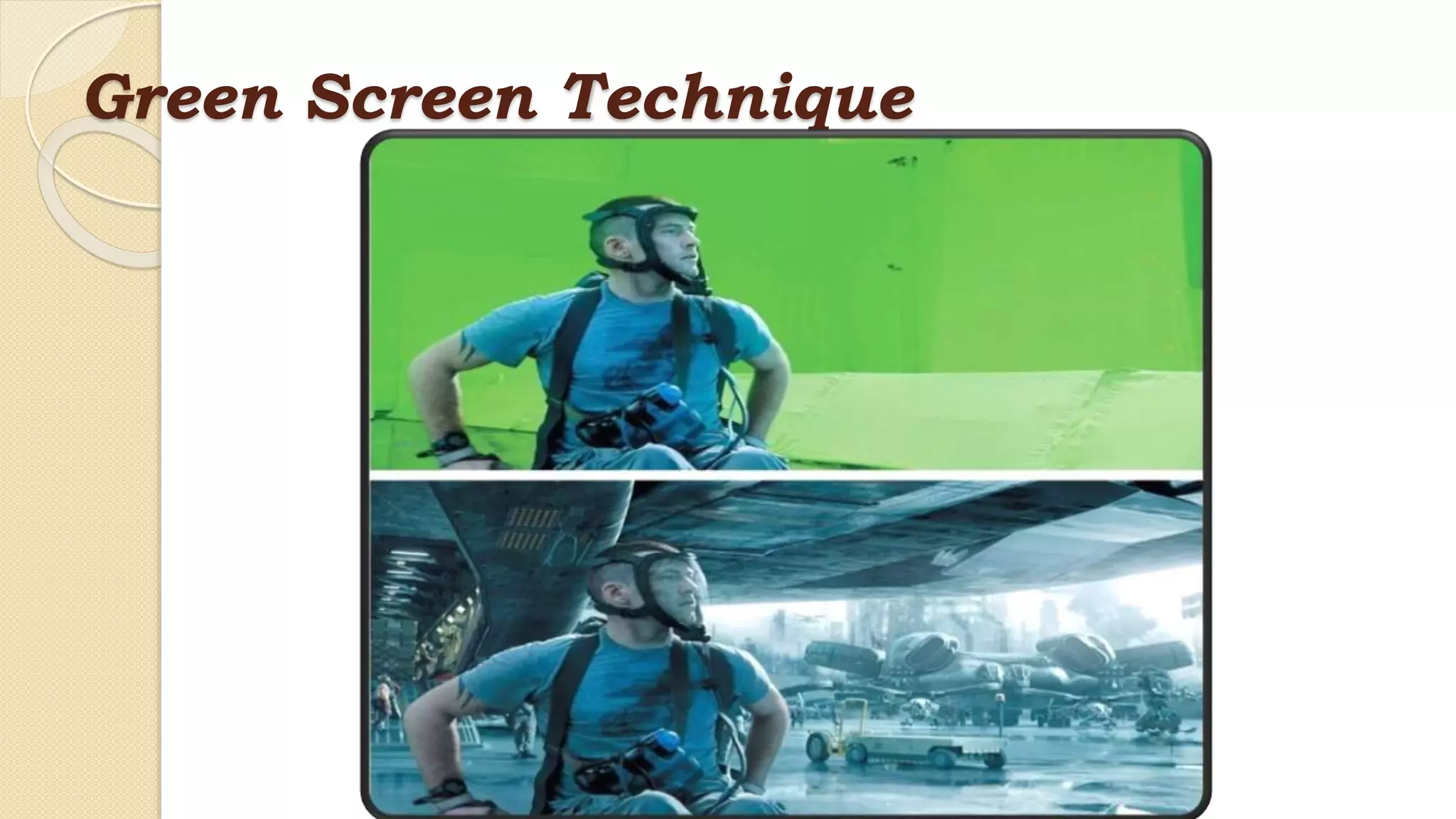
Processing a Green Backdrop
 Green is currently used as a backdrop more than any
other color because image sensors in digital video
cameras are most sensitive to green, due to the Bayer
pattern allocating more pixels to the green channel,
mimicking the human eye's increased sensitivity to
green light.
Green Screen Technique
Processing a Blue backdrop
 Blue was preferred as a backdrop before digital
keying became commonplace because of the
existence of high contrast film that was sensitive
only to the blue color.
Blue Screen Technique
Main elements
 Space
 The Screen
 Lighting
 The Camera
 Post Production
Clothing
 A Chroma key subject must avoid wearing clothes
which are similar in color to the Chroma key
color(s) unless intentional
 Sensors are placed on the areas where the image
must be modified or replaced with some other
image keeping the image position constant.
Programming
 Different quality and speed-optimized techniques are
used for implementing color keying in software
 a function f(r, g, b) → α is applied to every pixel in the
image
 α ≤ 0 means the pixel is the green screen, α ≥ 1 means
the pixel is in the foreground object. Values between 0
and 1 indicate a pixel that is partially covered by the
foreground object
 An example of such an algorithm is the use of active
contour
Applications
 It is commonly used for Weather forecast
broadcasts, wherein the presenter appears to be
standing in front of a large map, but in the studio
it is actually a large blue or green background.
 It is used also used in the entertainment industry
for special effects in movies and video games.
Key Benefits
 The consumption of time is reduced to a maximum
extent.
 Chroma keying reduces the complexity in film
making.
 The production cost is minimized compared to the
cost of making used in Travelling Matte technique.
Drawbacks
 Difficulties emerge with blue or green screen when
a costume in an effects shot must be of the same
color. For example, Spider-Man and the Green
Goblin.
 Underexposing or overexposing a colored backdrop
can lead to poor saturation level
Chroma key compositing

Chroma key compositing

  • 1.
  • 2.
    Introduction  Chroma keycompositing, or Chroma keying, is a technique for mixing two images or frames together in which a color from one image is removed, revealing another image behind it..  This technique is also referred to as color keying, color-separation overlay.
  • 3.
    History  In earlyfilmmaking, a complex and time consuming process known as 'travelling matte'.  Travelling Matte - A process that was used to superimpose backdrops with actors performing against a blank wall.  In the 1930's, the blue screen method was developed at RKO Radio pictures to make more effective films.
  • 4.
  • 5.
    Process  The portionsof the video which match the preselected color are replaced by the alternate background video. This process is commonly known as "keying", "keying out" or simply a "key".
  • 6.
    Backdrop  Green Backdrop Blue Backdrop These backdrops are usually used because these colors are considered to be the furthest away from skin tone.
  • 7.
    Processing a GreenBackdrop  Green is currently used as a backdrop more than any other color because image sensors in digital video cameras are most sensitive to green, due to the Bayer pattern allocating more pixels to the green channel, mimicking the human eye's increased sensitivity to green light.
  • 8.
  • 9.
    Processing a Bluebackdrop  Blue was preferred as a backdrop before digital keying became commonplace because of the existence of high contrast film that was sensitive only to the blue color.
  • 10.
  • 11.
    Main elements  Space The Screen  Lighting  The Camera  Post Production
  • 12.
    Clothing  A Chromakey subject must avoid wearing clothes which are similar in color to the Chroma key color(s) unless intentional
  • 13.
     Sensors areplaced on the areas where the image must be modified or replaced with some other image keeping the image position constant.
  • 14.
    Programming  Different qualityand speed-optimized techniques are used for implementing color keying in software  a function f(r, g, b) → α is applied to every pixel in the image  α ≤ 0 means the pixel is the green screen, α ≥ 1 means the pixel is in the foreground object. Values between 0 and 1 indicate a pixel that is partially covered by the foreground object  An example of such an algorithm is the use of active contour
  • 16.
    Applications  It iscommonly used for Weather forecast broadcasts, wherein the presenter appears to be standing in front of a large map, but in the studio it is actually a large blue or green background.
  • 17.
     It isused also used in the entertainment industry for special effects in movies and video games.
  • 18.
    Key Benefits  Theconsumption of time is reduced to a maximum extent.  Chroma keying reduces the complexity in film making.  The production cost is minimized compared to the cost of making used in Travelling Matte technique.
  • 19.
    Drawbacks  Difficulties emergewith blue or green screen when a costume in an effects shot must be of the same color. For example, Spider-Man and the Green Goblin.  Underexposing or overexposing a colored backdrop can lead to poor saturation level