Systems Analysis and Design
9th Edition
Chapter 11
Managing Systems Implementation
Phase Description
• Systems Implementation is the fourth of five
phases in the systems development life cycle
• Includes application
development, documentation, testing, trainin
g, data conversion, and system changeover
• The deliverable for this phase is a completely
functioning information system
2
Chapter Objectives
• Explain the importance of software quality
assurance and software engineering
• Describe the application development process
for structured, object-oriented, and agile
methods
• Draw a structure chart showing top-down
design, modular design, cohesion, and
coupling
3
Chapter Objectives
• Explain the coding process
• Explain unit, integration, and system testing
• Differentiate between
program, system, operations, and user
documentation
• List the main steps in system installation and
evaluation
4
Chapter Objectives
• Develop training plans for various user
groups, compare in-house and outside
training, and describe effective training
techniques
• Describe data conversion and changeover
methods
• Explain post-implementation evaluation and
the final report to management
5
Introduction
• The system design specification serves as a
blueprint for constructing the new system
• The initial task is application development
• Before a changeover can occur, the system
must be tested and documented
carefully, users must be trained, and existing
data must be converted
• A formal evaluation of the results takes place
as part of a final report to management
6
Software Quality Assurance
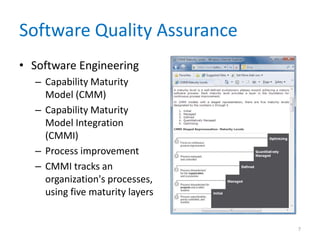
• Software Engineering
– Capability Maturity
Model (CMM)
– Capability Maturity
Model Integration
(CMMI)
– Process improvement
– CMMI tracks an
organization's processes,
using five maturity layers
7
Software Quality Assurance
• International
Organization for
Standardization (ISO)
– Many firms seek
assurance that software
systems will meet rigid
quality standards
– ISO 90003:2004
– ISO requires a specific
development plan
8
Overview of Application Development
• Application development
• Objective is to translate the design into
program and code modules that will function
properly
• Review the System Design
– Tasks produced an overall design and a plan for
physical implementation
9
Overview of Application Development
• Application Development Tasks
– Traditional methods
• Start by reviewing documentation from prior SDLC
phases and creating a set of program designs
• At this point, coding and testing tasks begin
– Agile Methods
• Intense communication and collaboration will now
begin between the IT team and the users or customers
• Objective is to create the system through an iterative
process
10
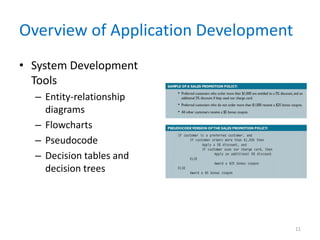
Overview of Application Development
• System Development
Tools
– Entity-relationship
diagrams
– Flowcharts
– Pseudocode
– Decision tables and
decision trees
11
Overview of Application Development
• Project Management
– Even a modest-sized project might have hundreds
or even thousands of modules
– Important to set realistic schedules, meet project
deadlines, control costs, and maintain quality
– Should use project management tools and
techniques
12
Structured Application Development
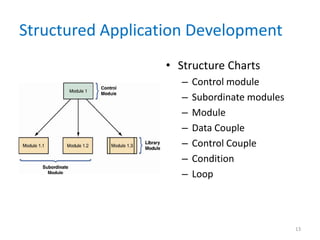
• Structure Charts
– Control module
– Subordinate modules
– Module
– Data Couple
– Control Couple
– Condition
– Loop
13
Structured Application Development
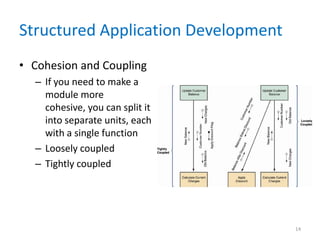
• Cohesion and Coupling
– If you need to make a
module more
cohesive, you can split it
into separate units, each
with a single function
– Loosely coupled
– Tightly coupled
14
Structured Application Development
• Drawing a Structure Chart
– Step 1: Review the DFDs
• Review all DFDs for accuracy and completeness
– Step 2: Identify Modules and Relationships
• Transform functional primitives or object methods into
program modules
• Three-level structure charts relate to the three DFD
levels
15
Structured Application Development
• Steps in Drawing a Structure Chart
– Step 3: Add Couples, Loops, and Conditions
• Identify the data elements that pass from one module
to another
– Step 4: Analyze the Structure Chart and the Data
Dictionary
• Ensure that the chart reflects all previous
documentation and that the logic is correct
16
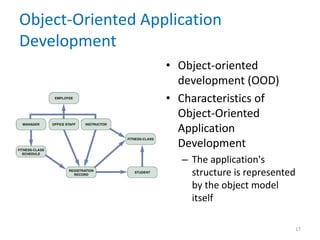
Object-Oriented Application
Development
• Object-oriented
development (OOD)
• Characteristics of
Object-Oriented
Application
Development
– The application's
structure is represented
by the object model
itself
17
Object-Oriented Application
Development
• Implementation of Object-Oriented Designs
– Main objective is to translate object methods into
program code modules and determine what event
or message will trigger the execution of each
module
• Object-Oriented Cohesion and Coupling
– Classes – loosely coupled
– Methods – loosely coupled and highly cohesive
18
Agile Application Development
• Is a distinctly different systems development
method
• Development team is in constant
communication with the customer
• Focuses on small teams, intense
communication, and rapid development
iterations
• Extreme Programming (XP) is one of the
newest agile methods
19
Agile Application Development
• An extreme programming (XP) Example
– User story
– Release plan
– Iteration cycle
– Iteration planning meeting
– Parallel programming
– Test-driven design
20
Agile Application Development
• The Future of Agile Development
– Critics claim it lacks discipline and produces
systems of questionable quality
– Before implementing agile development, the
proposed system and development methods
should be examined carefully
– A one-size-fits-all solution does not exist
21
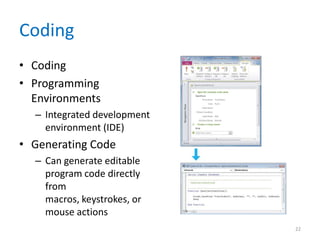
Coding
• Coding
• Programming
Environments
– Integrated development
environment (IDE)
• Generating Code
– Can generate editable
program code directly
from
macros, keystrokes, or
mouse actions
22
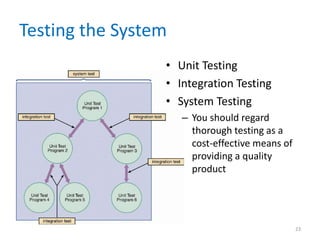
Testing the System
• Unit Testing
• Integration Testing
• System Testing
– You should regard
thorough testing as a
cost-effective means of
providing a quality
product
23
Documentation
• Program Documentation
• System Documentation
• Operations Documentation
• User Documentation
– Systems analysts usually are responsible for
preparing documentation to help users learn the
system
24
Documentation
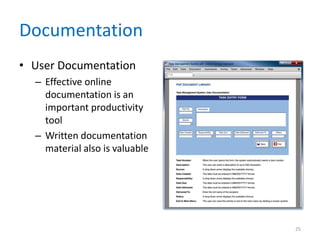
• User Documentation
– Effective online
documentation is an
important productivity
tool
– Written documentation
material also is valuable
25
Management Approval
• After system testing is complete, you present
the results to management
• If system testing produced no
technical, economical, or operational
problems, management determines a
schedule for system installation and
evaluation
26
System Installation and Evaluation
• Remaining steps in systems implementation:
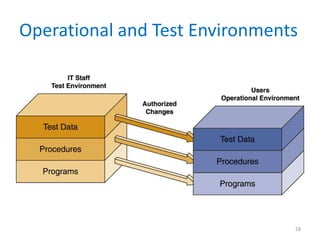
– Prepare a separate operational and test
environment
– Provide training for users, managers, and IT staff
– Perform data conversion and system changeover
– Carry out post-implementation evaluation of the
system
– Present a final report to management
27
Operational and Test Environments
28
Operational and Test Environments
• The operational environment includes
hardware and software configurations and
settings, system utilities, telecommunications
resources, and any other components that
might affect system performance
• If you have to build or upgrade network
resources to support the new system, you
must test the platform rigorously before
system installation begins
29
Training
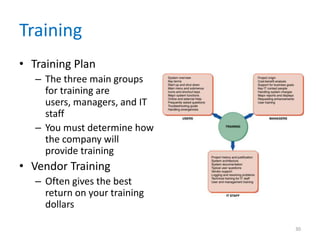
• Training Plan
– The three main groups
for training are
users, managers, and IT
staff
– You must determine how
the company will
provide training
• Vendor Training
– Often gives the best
return on your training
dollars
30
Training
• Vendor Training
– If the system includes the purchase of software or
hardware, then vendor-supplied training is one of
the features you should investigate in the RFPs
(requests for proposal) and RFQs (requests for
quotation) that you send to potential vendors
– Often gives the best return on your training
dollars
31
Training
• Webinars, Podcasts, and Tutorials
– Webcast
– Subscribers
– As technology continues to advance, other
wireless devices such as PDAs and cell phones will
be able to receive podcasts
– Tutorials can be developed by software
vendors, or by a company’s IT team
32
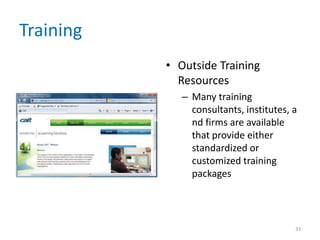
Training
• Outside Training
Resources
– Many training
consultants, institutes, a
nd firms are available
that provide either
standardized or
customized training
packages
33
Training
• Training Tips
– Train people in groups, with separate training
programs for distinct groups
– Select the most effective place to conduct the
training
– Provide for learning by hearing, seeing, and doing
– Prepare effective training materials, including
interactive tutorials
– Rely on previous trainees
34
Training
• Interactive Training
– Usually, a relationship exists between training
methods and costs
– Online training
• Should include step-by-step instructions
– Video tutorials
• You don’t have to be a professional video developer to
create effective training tutorials
35
Data Conversion
• Data Conversion Strategies
– The old system might be capable of exporting data
in an acceptable format for the new system or in a
standard format such as ASCII or ODBC
– If a standard format is not available, you must
develop a program to extract the data and convert
it
– Often requires additional data items, which might
require manual entry
36
Data Conversion
• Data Conversion Security and Controls
– You must ensure that all system control measures
are in place and operational to protect data from
unauthorized access and to help prevent
erroneous input
– Some errors will occur
– It is essential that the new system be loaded with
accurate, error-free data
37
System Changeover
38
System Changeover
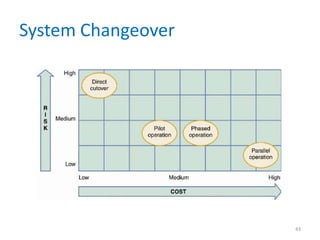
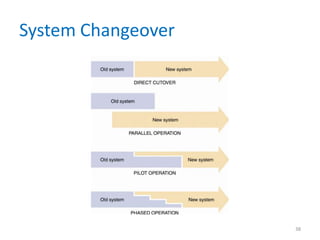
• Direct Cutover
– Involves more risk than other changeover
methods
– Companies often choose the direct cutover
method for implementing commercial software
packages
– Cyclical information systems usually are converted
using the direct cutover method at the beginning
of a quarter, calendar year, or fiscal year
39
System Changeover
• Parallel Operation
– Easier to verify that the new system is working
properly under parallel operation than under direct
cutover
– Running both systems might place a burden on the
operating environment and cause processing delay
– Is not practical if the old and new systems are
incompatible technically
– Also is inappropriate when the two systems perform
different functions
40
System Changeover
• Pilot Operation
– The group that uses the new system first is called the
pilot site
– The old system continues to operate for the entire
organization
– After the system proves successful at the pilot site, it
is implemented in the rest of the organization, usually
using the direct cutover method
– Is a combination of parallel operation and direct
cutover methods
41
System Changeover
• Phased Operation
– You give a part of the system to all users
– The risk of errors or failures is limited to the
implemented module only
– Is less expensive than full parallel operation
– Is not possible, however, if the system cannot be
separated easily into logical modules or segments
42
System Changeover
43
Post-Implementation Tasks
• Post-Implementation Evaluation
• A post-implementation evaluation should examine
all aspects of the development effort and the end
product — the developed information system
• You can apply the same fact-finding techniques in
a post-implementation evaluation that you used
to determine the system requirements during the
systems analysis phase
44
Post-Implementation Tasks
• Final Report to Management
– Your report should include the following:
• Final versions of all system documentation
• Planned modifications and enhancements to the
system that have been identified
• Recap of all systems development costs and schedules
45
Post-Implementation Tasks
• Final Report to Management
– Your report should include the following:
• Comparison of actual costs and schedules to the
original estimates
• Post-implementation evaluation, if it has been
performed
– Marks the end of systems development work
46
Chapter Summary
• The systems implementation phase consists of
application
development, testing, installation, and evaluation
of the new system
• Analysts and technical writers also prepare
operations documentation and user
documentation
• Develop a training program
• A post-implementation evaluation assesses and
reports on the quality of the new system and the
work done by the project team
47
Chapter Summary
• The final report to management includes the
final system documentation, describes any
future system enhancements that already
have been identified, and details the project
costs
• The report represents the end of the
development effort and the beginning of the
new system’s operational life
• Chapter 11 complete
48

chapter11-120827115420-phpapp01.pdf

  • 1.
    Systems Analysis andDesign 9th Edition Chapter 11 Managing Systems Implementation
  • 2.
    Phase Description • SystemsImplementation is the fourth of five phases in the systems development life cycle • Includes application development, documentation, testing, trainin g, data conversion, and system changeover • The deliverable for this phase is a completely functioning information system 2
  • 3.
    Chapter Objectives • Explainthe importance of software quality assurance and software engineering • Describe the application development process for structured, object-oriented, and agile methods • Draw a structure chart showing top-down design, modular design, cohesion, and coupling 3
  • 4.
    Chapter Objectives • Explainthe coding process • Explain unit, integration, and system testing • Differentiate between program, system, operations, and user documentation • List the main steps in system installation and evaluation 4
  • 5.
    Chapter Objectives • Developtraining plans for various user groups, compare in-house and outside training, and describe effective training techniques • Describe data conversion and changeover methods • Explain post-implementation evaluation and the final report to management 5
  • 6.
    Introduction • The systemdesign specification serves as a blueprint for constructing the new system • The initial task is application development • Before a changeover can occur, the system must be tested and documented carefully, users must be trained, and existing data must be converted • A formal evaluation of the results takes place as part of a final report to management 6
  • 7.
    Software Quality Assurance •Software Engineering – Capability Maturity Model (CMM) – Capability Maturity Model Integration (CMMI) – Process improvement – CMMI tracks an organization's processes, using five maturity layers 7
  • 8.
    Software Quality Assurance •International Organization for Standardization (ISO) – Many firms seek assurance that software systems will meet rigid quality standards – ISO 90003:2004 – ISO requires a specific development plan 8
  • 9.
    Overview of ApplicationDevelopment • Application development • Objective is to translate the design into program and code modules that will function properly • Review the System Design – Tasks produced an overall design and a plan for physical implementation 9
  • 10.
    Overview of ApplicationDevelopment • Application Development Tasks – Traditional methods • Start by reviewing documentation from prior SDLC phases and creating a set of program designs • At this point, coding and testing tasks begin – Agile Methods • Intense communication and collaboration will now begin between the IT team and the users or customers • Objective is to create the system through an iterative process 10
  • 11.
    Overview of ApplicationDevelopment • System Development Tools – Entity-relationship diagrams – Flowcharts – Pseudocode – Decision tables and decision trees 11
  • 12.
    Overview of ApplicationDevelopment • Project Management – Even a modest-sized project might have hundreds or even thousands of modules – Important to set realistic schedules, meet project deadlines, control costs, and maintain quality – Should use project management tools and techniques 12
  • 13.
    Structured Application Development •Structure Charts – Control module – Subordinate modules – Module – Data Couple – Control Couple – Condition – Loop 13
  • 14.
    Structured Application Development •Cohesion and Coupling – If you need to make a module more cohesive, you can split it into separate units, each with a single function – Loosely coupled – Tightly coupled 14
  • 15.
    Structured Application Development •Drawing a Structure Chart – Step 1: Review the DFDs • Review all DFDs for accuracy and completeness – Step 2: Identify Modules and Relationships • Transform functional primitives or object methods into program modules • Three-level structure charts relate to the three DFD levels 15
  • 16.
    Structured Application Development •Steps in Drawing a Structure Chart – Step 3: Add Couples, Loops, and Conditions • Identify the data elements that pass from one module to another – Step 4: Analyze the Structure Chart and the Data Dictionary • Ensure that the chart reflects all previous documentation and that the logic is correct 16
  • 17.
    Object-Oriented Application Development • Object-oriented development(OOD) • Characteristics of Object-Oriented Application Development – The application's structure is represented by the object model itself 17
  • 18.
    Object-Oriented Application Development • Implementationof Object-Oriented Designs – Main objective is to translate object methods into program code modules and determine what event or message will trigger the execution of each module • Object-Oriented Cohesion and Coupling – Classes – loosely coupled – Methods – loosely coupled and highly cohesive 18
  • 19.
    Agile Application Development •Is a distinctly different systems development method • Development team is in constant communication with the customer • Focuses on small teams, intense communication, and rapid development iterations • Extreme Programming (XP) is one of the newest agile methods 19
  • 20.
    Agile Application Development •An extreme programming (XP) Example – User story – Release plan – Iteration cycle – Iteration planning meeting – Parallel programming – Test-driven design 20
  • 21.
    Agile Application Development •The Future of Agile Development – Critics claim it lacks discipline and produces systems of questionable quality – Before implementing agile development, the proposed system and development methods should be examined carefully – A one-size-fits-all solution does not exist 21
  • 22.
    Coding • Coding • Programming Environments –Integrated development environment (IDE) • Generating Code – Can generate editable program code directly from macros, keystrokes, or mouse actions 22
  • 23.
    Testing the System •Unit Testing • Integration Testing • System Testing – You should regard thorough testing as a cost-effective means of providing a quality product 23
  • 24.
    Documentation • Program Documentation •System Documentation • Operations Documentation • User Documentation – Systems analysts usually are responsible for preparing documentation to help users learn the system 24
  • 25.
    Documentation • User Documentation –Effective online documentation is an important productivity tool – Written documentation material also is valuable 25
  • 26.
    Management Approval • Aftersystem testing is complete, you present the results to management • If system testing produced no technical, economical, or operational problems, management determines a schedule for system installation and evaluation 26
  • 27.
    System Installation andEvaluation • Remaining steps in systems implementation: – Prepare a separate operational and test environment – Provide training for users, managers, and IT staff – Perform data conversion and system changeover – Carry out post-implementation evaluation of the system – Present a final report to management 27
  • 28.
    Operational and TestEnvironments 28
  • 29.
    Operational and TestEnvironments • The operational environment includes hardware and software configurations and settings, system utilities, telecommunications resources, and any other components that might affect system performance • If you have to build or upgrade network resources to support the new system, you must test the platform rigorously before system installation begins 29
  • 30.
    Training • Training Plan –The three main groups for training are users, managers, and IT staff – You must determine how the company will provide training • Vendor Training – Often gives the best return on your training dollars 30
  • 31.
    Training • Vendor Training –If the system includes the purchase of software or hardware, then vendor-supplied training is one of the features you should investigate in the RFPs (requests for proposal) and RFQs (requests for quotation) that you send to potential vendors – Often gives the best return on your training dollars 31
  • 32.
    Training • Webinars, Podcasts,and Tutorials – Webcast – Subscribers – As technology continues to advance, other wireless devices such as PDAs and cell phones will be able to receive podcasts – Tutorials can be developed by software vendors, or by a company’s IT team 32
  • 33.
    Training • Outside Training Resources –Many training consultants, institutes, a nd firms are available that provide either standardized or customized training packages 33
  • 34.
    Training • Training Tips –Train people in groups, with separate training programs for distinct groups – Select the most effective place to conduct the training – Provide for learning by hearing, seeing, and doing – Prepare effective training materials, including interactive tutorials – Rely on previous trainees 34
  • 35.
    Training • Interactive Training –Usually, a relationship exists between training methods and costs – Online training • Should include step-by-step instructions – Video tutorials • You don’t have to be a professional video developer to create effective training tutorials 35
  • 36.
    Data Conversion • DataConversion Strategies – The old system might be capable of exporting data in an acceptable format for the new system or in a standard format such as ASCII or ODBC – If a standard format is not available, you must develop a program to extract the data and convert it – Often requires additional data items, which might require manual entry 36
  • 37.
    Data Conversion • DataConversion Security and Controls – You must ensure that all system control measures are in place and operational to protect data from unauthorized access and to help prevent erroneous input – Some errors will occur – It is essential that the new system be loaded with accurate, error-free data 37
  • 38.
  • 39.
    System Changeover • DirectCutover – Involves more risk than other changeover methods – Companies often choose the direct cutover method for implementing commercial software packages – Cyclical information systems usually are converted using the direct cutover method at the beginning of a quarter, calendar year, or fiscal year 39
  • 40.
    System Changeover • ParallelOperation – Easier to verify that the new system is working properly under parallel operation than under direct cutover – Running both systems might place a burden on the operating environment and cause processing delay – Is not practical if the old and new systems are incompatible technically – Also is inappropriate when the two systems perform different functions 40
  • 41.
    System Changeover • PilotOperation – The group that uses the new system first is called the pilot site – The old system continues to operate for the entire organization – After the system proves successful at the pilot site, it is implemented in the rest of the organization, usually using the direct cutover method – Is a combination of parallel operation and direct cutover methods 41
  • 42.
    System Changeover • PhasedOperation – You give a part of the system to all users – The risk of errors or failures is limited to the implemented module only – Is less expensive than full parallel operation – Is not possible, however, if the system cannot be separated easily into logical modules or segments 42
  • 43.
  • 44.
    Post-Implementation Tasks • Post-ImplementationEvaluation • A post-implementation evaluation should examine all aspects of the development effort and the end product — the developed information system • You can apply the same fact-finding techniques in a post-implementation evaluation that you used to determine the system requirements during the systems analysis phase 44
  • 45.
    Post-Implementation Tasks • FinalReport to Management – Your report should include the following: • Final versions of all system documentation • Planned modifications and enhancements to the system that have been identified • Recap of all systems development costs and schedules 45
  • 46.
    Post-Implementation Tasks • FinalReport to Management – Your report should include the following: • Comparison of actual costs and schedules to the original estimates • Post-implementation evaluation, if it has been performed – Marks the end of systems development work 46
  • 47.
    Chapter Summary • Thesystems implementation phase consists of application development, testing, installation, and evaluation of the new system • Analysts and technical writers also prepare operations documentation and user documentation • Develop a training program • A post-implementation evaluation assesses and reports on the quality of the new system and the work done by the project team 47
  • 48.
    Chapter Summary • Thefinal report to management includes the final system documentation, describes any future system enhancements that already have been identified, and details the project costs • The report represents the end of the development effort and the beginning of the new system’s operational life • Chapter 11 complete 48