Chapter 1
Introduction to oops concepts
Object-Oriented Programming
Object-oriented programming (OOP) is at the core of Java. In fact, all Java
programs are to at least some extent object-oriented.
Two Paradigms
All computer programs consist of two elements: code and data.
Furthermore, a program can be conceptually organized around its code or
around its data. That is, some programs are written around “what is
happening” and others are written around “who is being affected.”These are
the two paradigms that govern how a program is constructed. The first way
is called the process-oriented model. This approach characterizes a program
as a series of linear steps (that is, code). The process-oriented model can be
thought of as code acting on data. Procedural languages such as C employ
this model to considerable success.
Procedure-Oriented Programming
In the procedure oriented approach, the problem is viewed as the sequence
of things to be done such as reading, calculating and printing such as cobol,
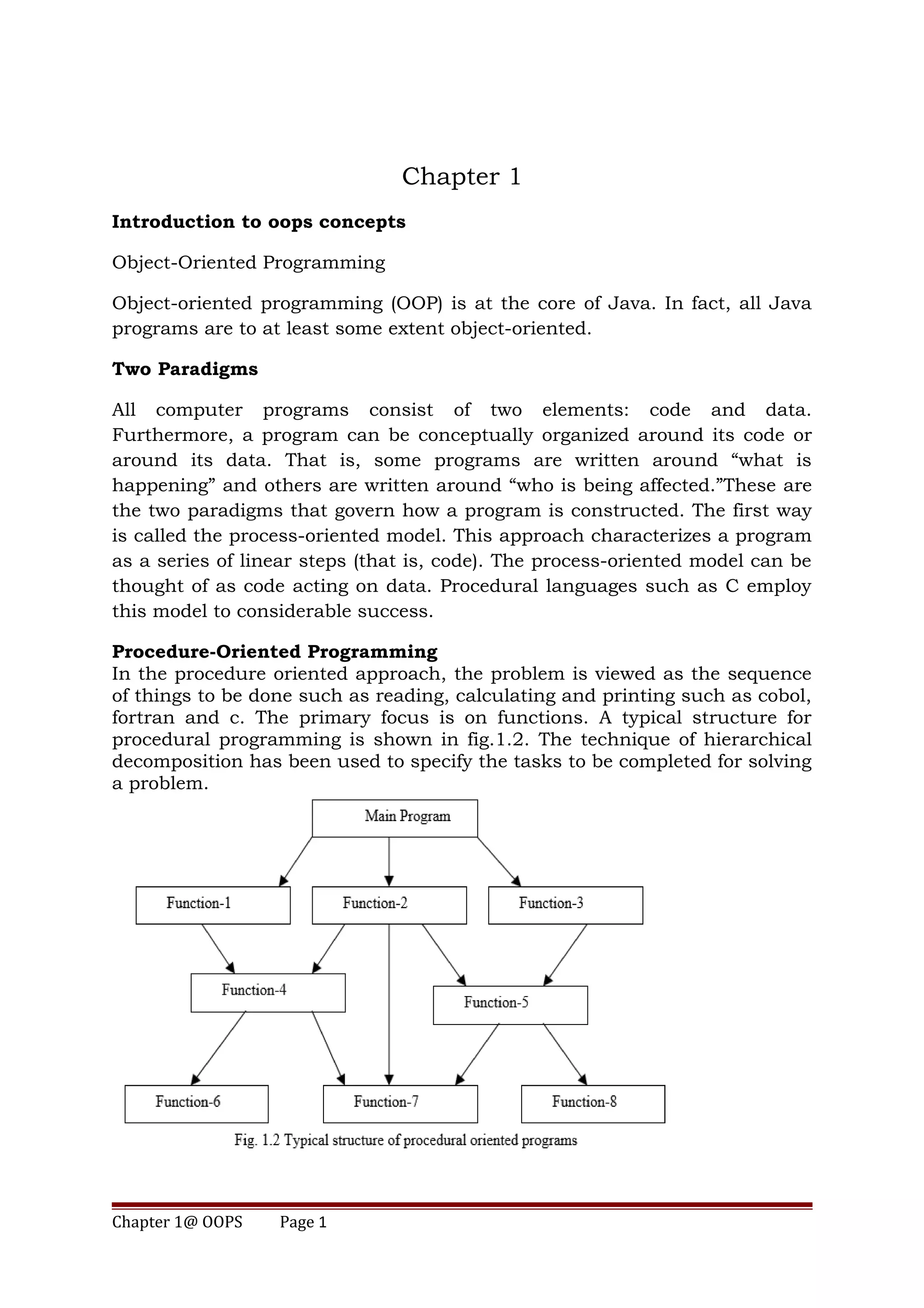
fortran and c. The primary focus is on functions. A typical structure for
procedural programming is shown in fig.1.2. The technique of hierarchical
decomposition has been used to specify the tasks to be completed for solving
a problem.
Chapter 1@ OOPS Page 1
Procedure oriented programming basically consists of writing a list of
instructions for the computer to follow, and organizing these instructions
into groups known as functions.
Some Characteristics exhibited by procedure-oriented programming are:
• Emphasis is on doing things (algorithms).
• Large programs are divided into smaller programs known as functions.
• Most of the functions share global data.
• Data move openly around the system from function to function.
• Functions transform data from one form to another.
• Employs top-down approach in program design.
Object Oriented Paradigm
Object-oriented programming organizes a program around its data (that is,
objects) and a set of well-defined interfaces to that data. An object-oriented
program can be characterized as data controlling access to code.
The major motivating factor in the invention of object-oriented approach is
OOP allows decomposition of a problem into a number of entities called
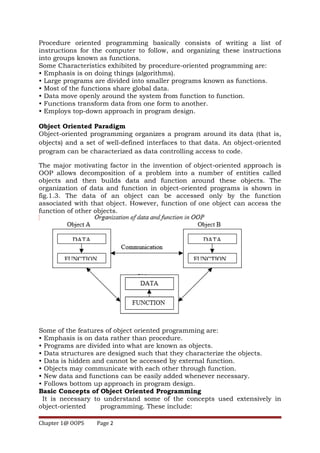
objects and then builds data and function around these objects. The
organization of data and function in object-oriented programs is shown in
fig.1.3. The data of an object can be accessed only by the function
associated with that object. However, function of one object can access the
function of other objects.
Some of the features of object oriented programming are:
• Emphasis is on data rather than procedure.
• Programs are divided into what are known as objects.
• Data structures are designed such that they characterize the objects.
• Data is hidden and cannot be accessed by external function.
• Objects may communicate with each other through function.
• New data and functions can be easily added whenever necessary.
• Follows bottom up approach in program design.
Basic Concepts of Object Oriented Programming
It is necessary to understand some of the concepts used extensively in
object-oriented programming. These include:
Chapter 1@ OOPS Page 2
• Objects
• Classes
• Data abstraction and encapsulation
• Inheritance
• Polymorphism
• Dynamic binding
• Message passing
We shall discuss these concepts in some detail in this section.
Objects
Objects are the basic run time entities in an object-oriented system. They
may represent a person, a place, a bank account, a table of data or any item
that the program has to handle. Programming problem is analyzed in term
of objects and the nature of communication between them.
When a program is executed, the objects interact by sending messages to
one another. For example, if “customer” and “account” are two objects in a
program, then the customer object may send a message to the account
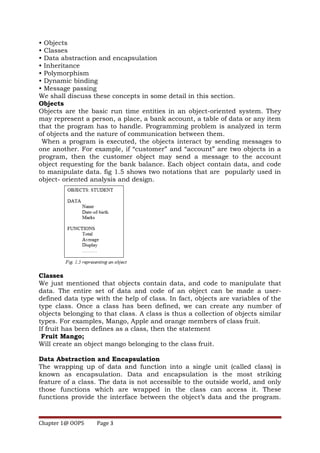
object requesting for the bank balance. Each object contain data, and code
to manipulate data. fig 1.5 shows two notations that are popularly used in
object- oriented analysis and design.
Classes
We just mentioned that objects contain data, and code to manipulate that
data. The entire set of data and code of an object can be made a user-
defined data type with the help of class. In fact, objects are variables of the
type class. Once a class has been defined, we can create any number of
objects belonging to that class. A class is thus a collection of objects similar
types. For examples, Mango, Apple and orange members of class fruit.
If fruit has been defines as a class, then the statement
Fruit Mango;
Will create an object mango belonging to the class fruit.
Data Abstraction and Encapsulation
The wrapping up of data and function into a single unit (called class) is
known as encapsulation. Data and encapsulation is the most striking
feature of a class. The data is not accessible to the outside world, and only
those functions which are wrapped in the class can access it. These
functions provide the interface between the object’s data and the program.
Chapter 1@ OOPS Page 3
This insulation of the data from direct access by the program is called data
hiding or information hiding.
Abstraction refers to the act of representing essential features without
including the background details or explanation. They encapsulate all the
essential properties of the object that are to be created. The attributes are
some time called data members because they hold information. The
functions that operate on these data are sometimes called methods or
member function.
Inheritance
Inheritance is the process by which objects of one class acquired the
properties of objects of another classes. It supports the concept of
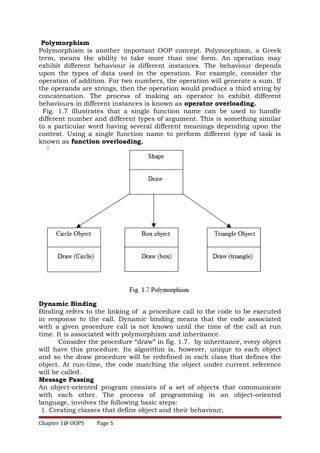
hierarchical classification. For example, the bird, ‘robin’ is a part of class
‘flying bird’ which is again a part of the class ‘bird’. The principal behind this
sort of division is that each derived class shares common characteristics
with the class from which it is derived as illustrated in fig 1.6. In OOP This
means that we can add additional features to an existing class without
modifying it. This is possible by deriving a new class from the existing one.
The new class will have the combined feature of both the classes.
Inheritance Allows the programmer to reuse a class i.e almost, but not
exactly, what he wants.
Chapter 1@ OOPS Page 4
Polymorphism
Polymorphism is another important OOP concept. Polymorphism, a Greek
term, means the ability to take more than one form. An operation may
exhibit different behaviour is different instances. The behaviour depends
upon the types of data used in the operation. For example, consider the
operation of addition. For two numbers, the operation will generate a sum. If
the operands are strings, then the operation would produce a third string by
concatenation. The process of making an operator to exhibit different
behaviours in different instances is known as operator overloading.
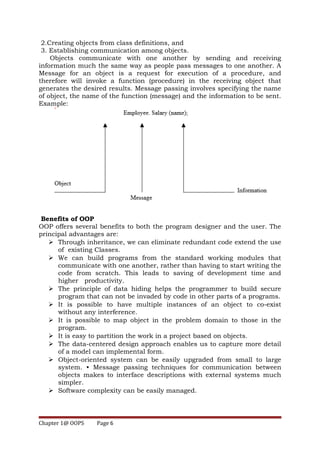
Fig. 1.7 illustrates that a single function name can be used to handle
different number and different types of argument. This is something similar
to a particular word having several different meanings depending upon the
context. Using a single function name to perform different type of task is
known as function overloading.
Dynamic Binding
Binding refers to the linking of a procedure call to the code to be executed
in response to the call. Dynamic binding means that the code associated
with a given procedure call is not known until the time of the call at run
time. It is associated with polymorphism and inheritance.
Consider the procedure “draw” in fig. 1.7. by inheritance, every object
will have this procedure. Its algorithm is, however, unique to each object
and so the draw procedure will be redefined in each class that defines the
object. At run-time, the code matching the object under current reference
will be called.
Message Passing
An object-oriented program consists of a set of objects that communicate
with each other. The process of programming in an object-oriented
language, involves the following basic steps:
1. Creating classes that define object and their behaviour,
Chapter 1@ OOPS Page 5
2.Creating objects from class definitions, and
3. Establishing communication among objects.
Objects communicate with one another by sending and receiving
information much the same way as people pass messages to one another. A
Message for an object is a request for execution of a procedure, and
therefore will invoke a function (procedure) in the receiving object that
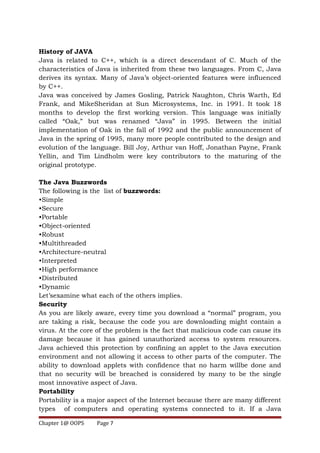
generates the desired results. Message passing involves specifying the name
of object, the name of the function (message) and the information to be sent.
Example:
Benefits of OOP
OOP offers several benefits to both the program designer and the user. The
principal advantages are:
 Through inheritance, we can eliminate redundant code extend the use
of existing Classes.
 We can build programs from the standard working modules that
communicate with one another, rather than having to start writing the
code from scratch. This leads to saving of development time and
higher productivity.
 The principle of data hiding helps the programmer to build secure
program that can not be invaded by code in other parts of a programs.
 It is possible to have multiple instances of an object to co-exist
without any interference.
 It is possible to map object in the problem domain to those in the
program.
 It is easy to partition the work in a project based on objects.
 The data-centered design approach enables us to capture more detail
of a model can implemental form.
 Object-oriented system can be easily upgraded from small to large
system. • Message passing techniques for communication between
objects makes to interface descriptions with external systems much
simpler.
 Software complexity can be easily managed.
Chapter 1@ OOPS Page 6
History of JAVA
Java is related to C++, which is a direct descendant of C. Much of the
characteristics of Java is inherited from these two languages. From C, Java
derives its syntax. Many of Java’s object-oriented features were influenced
by C++.
Java was conceived by James Gosling, Patrick Naughton, Chris Warth, Ed
Frank, and MikeSheridan at Sun Microsystems, Inc. in 1991. It took 18
months to develop the first working version. This language was initially
called “Oak,” but was renamed “Java” in 1995. Between the initial
implementation of Oak in the fall of 1992 and the public announcement of
Java in the spring of 1995, many more people contributed to the design and
evolution of the language. Bill Joy, Arthur van Hoff, Jonathan Payne, Frank
Yellin, and Tim Lindholm were key contributors to the maturing of the
original prototype.
The Java Buzzwords
The following is the list of buzzwords:
•Simple
•Secure
•Portable
•Object-oriented
•Robust
•Multithreaded
•Architecture-neutral
•Interpreted
•High performance
•Distributed
•Dynamic
Let’sexamine what each of the others implies.
Security
As you are likely aware, every time you download a “normal” program, you
are taking a risk, because the code you are downloading might contain a
virus. At the core of the problem is the fact that malicious code can cause its
damage because it has gained unauthorized access to system resources.
Java achieved this protection by confining an applet to the Java execution
environment and not allowing it access to other parts of the computer. The
ability to download applets with confidence that no harm willbe done and
that no security will be breached is considered by many to be the single
most innovative aspect of Java.
Portability
Portability is a major aspect of the Internet because there are many different
types of computers and operating systems connected to it. If a Java
Chapter 1@ OOPS Page 7
program were to be run on virtually any computer connected to the Internet,
there needed to be some way to enable that program to execute on different
systems. It is not practical to have different versions of the applet for
different computers. The same code must work on all computers. Therefore,
some means of generating portable executable code was needed.
Simple
If you have some programming experience, you will not find Java hard to
master. If you already understand the basic concepts of object-oriented
programming, learning Java will be even easier. Best of all, if you are an
experienced C++ programmer, moving to Java will require very little effort.
Because Java inherits the C/C++ syntax and many of the object-oriented
features of C++, most programmers have little trouble learning Java.
Object-Oriented
Java manages to strike a balance between the purist’s “everything is an
object” paradigm and the pragmatist’s “stay out of my way” model. The
object model in Java is simple and easy to extend, while primitive types,
such as integers, are kept as high-performance non objects.
Robust
The ability to create robust programs was given a high priority in the design
of Java. At the same time, Java frees you from having to worry about many
of the most common causes of programming errors. Because Java is a
strictly typed language, it checks your code at compile time. However, it also
checks your code at run time. To better understand how Java is robust,
consider two of the main reasons for program failure: memory management
mistakes and mishandled exceptional conditions (that is,run-time errors).
Multithreaded
Java was designed to meet the real-world requirement of creating
interactive, networked programs. To accomplish this, Java supports
multithreaded programming, which allows you to write programs that do
many things simultaneously.
Architecture-Neutral
A central issue for the Java designers was that of code longevity and
portability. One of the main problems facing programmers is that no
guarantee exists that if you write a program today, it will run tomorrow—
even on the same machine. Operating system upgrades, processor upgrades,
and changes in core system resources can all combine to make a program
malfunction. The Java designers goal was “write once; run anywhere, any
time, forever.” To a great extent, this goal was accomplished.
Interpreted and High Performance
As described earlier, Java enables the creation of cross-platform programs
by compiling into an intermediate representation called Java byte code. This
code can be executed on any system that implements the Java Virtual
Machine. As explained earlier, the Java byte code was carefully designed so
Chapter 1@ OOPS Page 8
that it would be easy to translate directly into native machine code for very
high performance by using a just-in-time compiler. Java run-time systems
that provide this feature lose none of the benefits of the platform-
independent code.
Distributed
Java is designed for the distributed environment of the Internet because it
handles TCP/IPprotocols. In fact, accessing a resource using a URL is not
much different from accessing afile. Java also supports Remote Method
Invocation (RMI).This feature enables a program to invoke methods across a
network.
Dynamic
Java programs carry with them substantial amounts of run-time type
information thatis used to verify and resolve accesses to objects at run time.
This makes it possible todynamically link code in a safe and expedient
manner. This is crucial to the robustness ofthe Java environment, in which
small fragments of bytecode may be dynamically updatedon a running
system.
A First Simple Program
/*
This is a simple Java program.
Call this file "Example.java".
*/
class Example {
// Your program begins with a call to main().
public static void main(String args[])
{
System.out.println("This is a simple Java program.");
}
}
Entering the Program
The first thing that you must learn about Java is that the name you give to a
source file is very important. For this example, the name of the source file
should be Example.java. Let’s see why.
In Java, a source file is officially called a compilation unit. It is a text file that
contains one or more class definitions. The Java compiler requires that a
source file use the .java filename extension.
As you can see by looking at the program, the name of the class defined by
the program is also Example. This is not a coincidence. In Java, all code
must reside inside a class. By convention, the name of that class should
match the name of the file that holds the program.
You should also make sure that the capitalization of the filename matches
the class name.
Chapter 1@ OOPS Page 9
Compiling the Program
To compile the Example program, execute the compiler, javac, specifying
the name of the source file on the command line, as shown here:
C:>javac Example.java
The javac compiler creates a file called Example.class that contains the
bytecode version of the program.
To actually run the program, you must use the Java application launcher,
called java.
To do so, pass the class name Example as a command-line argument, as
shown here:
C:>java Example
When the program is run, the following output is displayed:
This is a simple Java program.
A Closer Look at the First Sample Program
Although Example.java is quite short, it includes several key features that
are common to all Java programs. Let’s closely examine each part of the
program.The program begins with the following lines:
/*
This is a simple Java program.
Call this file "Example.java".
*/
This is a comment.
The next line of code in the program is shown here:
class Example {
This line uses the keyword class to declare that a new class is being defined.
Example is an identifier that is the name of the class.
The entire class definition, including all of its members, will be between the
opening curly brace ({) and the closing curly brace (}).
The next line in the program is the single-line comment, shown here:
// Your program begins with a call to main().
This is the second type of comment supported by Java. A single-line
comment begins with a // and ends at the end of the line.
The next line of code is shown here:
public static void main(String args[]) {
This line begins the main( ) method. As the comment preceding it suggests,
this is the line at which the program will begin executing. All Java
applications begin execution by calling main( ).
The public keyword is an access specifier, which allows the programmer to
control the visibility of class members. When a class member is preceded by
public, then that member may be accessed by code outside the class in
which it is declared. (The opposite of public is private, which prevents a
member from being used by code defined outside of its class.)
In this case, main( ) must be declared as public, since it must be called by
code outside of its class when the program is started. The keyword static
allows main( ) to be called without having to instantiate a particular
Chapter 1@ OOPS Page 10
instance of the class. This is necessary since main( ) is called by the Java
Virtual Machine before any objects are made. The keyword void simply tells
the compiler that main( ) does not return a value.
As stated, main( ) is the method called when a Java application begins.
Keep in mind that Java is case-sensitive. Thus, Main is different from main.
It is important to understand that the Java compiler will compile classes
that do not contain a main( ) method. But java has no way to run these
classes. So, if you had typed Main instead of main, the compiler would still
compile your program. However, java would report an error because it
would be unable to find the main( ) method.
Any information that you need to pass to a method is received by variables
specified within the set of parentheses that follow the name of the method.
These variables are called parameters. If there are no parameters required
for a given method, you still need to include the empty parentheses. In
main( ), there is only one parameter. String args[ ] declares a parameter
named args, which is an array of instances of the class String.
(Arrays are collections of similar objects.) Objects of type String store
character strings. In this case, args receives any command-line arguments
present when the program is executed.
The next line of code is shown here. Notice that it occurs inside main( ).
System.out.println("This is a simple Java program.");
This line outputs the string “This is a simple Java program.” followed by a
new line on the screen. Output is actually accomplished by the built-in
println( ) method. In this case, println( ) displays the string which is passed
to it. As you will see, println( ) can be used to display other types of
information, too. The line begins with System.out. While too complicated to
explain in detail at this time, briefly, System is a predefined class that
provides access to the system, and out is the output stream that is
connected to the console.
Chapter 1@ OOPS Page 11

Chapter1

  • 1.
    Chapter 1 Introduction tooops concepts Object-Oriented Programming Object-oriented programming (OOP) is at the core of Java. In fact, all Java programs are to at least some extent object-oriented. Two Paradigms All computer programs consist of two elements: code and data. Furthermore, a program can be conceptually organized around its code or around its data. That is, some programs are written around “what is happening” and others are written around “who is being affected.”These are the two paradigms that govern how a program is constructed. The first way is called the process-oriented model. This approach characterizes a program as a series of linear steps (that is, code). The process-oriented model can be thought of as code acting on data. Procedural languages such as C employ this model to considerable success. Procedure-Oriented Programming In the procedure oriented approach, the problem is viewed as the sequence of things to be done such as reading, calculating and printing such as cobol, fortran and c. The primary focus is on functions. A typical structure for procedural programming is shown in fig.1.2. The technique of hierarchical decomposition has been used to specify the tasks to be completed for solving a problem. Chapter 1@ OOPS Page 1
  • 2.
    Procedure oriented programmingbasically consists of writing a list of instructions for the computer to follow, and organizing these instructions into groups known as functions. Some Characteristics exhibited by procedure-oriented programming are: • Emphasis is on doing things (algorithms). • Large programs are divided into smaller programs known as functions. • Most of the functions share global data. • Data move openly around the system from function to function. • Functions transform data from one form to another. • Employs top-down approach in program design. Object Oriented Paradigm Object-oriented programming organizes a program around its data (that is, objects) and a set of well-defined interfaces to that data. An object-oriented program can be characterized as data controlling access to code. The major motivating factor in the invention of object-oriented approach is OOP allows decomposition of a problem into a number of entities called objects and then builds data and function around these objects. The organization of data and function in object-oriented programs is shown in fig.1.3. The data of an object can be accessed only by the function associated with that object. However, function of one object can access the function of other objects. Some of the features of object oriented programming are: • Emphasis is on data rather than procedure. • Programs are divided into what are known as objects. • Data structures are designed such that they characterize the objects. • Data is hidden and cannot be accessed by external function. • Objects may communicate with each other through function. • New data and functions can be easily added whenever necessary. • Follows bottom up approach in program design. Basic Concepts of Object Oriented Programming It is necessary to understand some of the concepts used extensively in object-oriented programming. These include: Chapter 1@ OOPS Page 2
  • 3.
    • Objects • Classes •Data abstraction and encapsulation • Inheritance • Polymorphism • Dynamic binding • Message passing We shall discuss these concepts in some detail in this section. Objects Objects are the basic run time entities in an object-oriented system. They may represent a person, a place, a bank account, a table of data or any item that the program has to handle. Programming problem is analyzed in term of objects and the nature of communication between them. When a program is executed, the objects interact by sending messages to one another. For example, if “customer” and “account” are two objects in a program, then the customer object may send a message to the account object requesting for the bank balance. Each object contain data, and code to manipulate data. fig 1.5 shows two notations that are popularly used in object- oriented analysis and design. Classes We just mentioned that objects contain data, and code to manipulate that data. The entire set of data and code of an object can be made a user- defined data type with the help of class. In fact, objects are variables of the type class. Once a class has been defined, we can create any number of objects belonging to that class. A class is thus a collection of objects similar types. For examples, Mango, Apple and orange members of class fruit. If fruit has been defines as a class, then the statement Fruit Mango; Will create an object mango belonging to the class fruit. Data Abstraction and Encapsulation The wrapping up of data and function into a single unit (called class) is known as encapsulation. Data and encapsulation is the most striking feature of a class. The data is not accessible to the outside world, and only those functions which are wrapped in the class can access it. These functions provide the interface between the object’s data and the program. Chapter 1@ OOPS Page 3
  • 4.
    This insulation ofthe data from direct access by the program is called data hiding or information hiding. Abstraction refers to the act of representing essential features without including the background details or explanation. They encapsulate all the essential properties of the object that are to be created. The attributes are some time called data members because they hold information. The functions that operate on these data are sometimes called methods or member function. Inheritance Inheritance is the process by which objects of one class acquired the properties of objects of another classes. It supports the concept of hierarchical classification. For example, the bird, ‘robin’ is a part of class ‘flying bird’ which is again a part of the class ‘bird’. The principal behind this sort of division is that each derived class shares common characteristics with the class from which it is derived as illustrated in fig 1.6. In OOP This means that we can add additional features to an existing class without modifying it. This is possible by deriving a new class from the existing one. The new class will have the combined feature of both the classes. Inheritance Allows the programmer to reuse a class i.e almost, but not exactly, what he wants. Chapter 1@ OOPS Page 4
  • 5.
    Polymorphism Polymorphism is anotherimportant OOP concept. Polymorphism, a Greek term, means the ability to take more than one form. An operation may exhibit different behaviour is different instances. The behaviour depends upon the types of data used in the operation. For example, consider the operation of addition. For two numbers, the operation will generate a sum. If the operands are strings, then the operation would produce a third string by concatenation. The process of making an operator to exhibit different behaviours in different instances is known as operator overloading. Fig. 1.7 illustrates that a single function name can be used to handle different number and different types of argument. This is something similar to a particular word having several different meanings depending upon the context. Using a single function name to perform different type of task is known as function overloading. Dynamic Binding Binding refers to the linking of a procedure call to the code to be executed in response to the call. Dynamic binding means that the code associated with a given procedure call is not known until the time of the call at run time. It is associated with polymorphism and inheritance. Consider the procedure “draw” in fig. 1.7. by inheritance, every object will have this procedure. Its algorithm is, however, unique to each object and so the draw procedure will be redefined in each class that defines the object. At run-time, the code matching the object under current reference will be called. Message Passing An object-oriented program consists of a set of objects that communicate with each other. The process of programming in an object-oriented language, involves the following basic steps: 1. Creating classes that define object and their behaviour, Chapter 1@ OOPS Page 5
  • 6.
    2.Creating objects fromclass definitions, and 3. Establishing communication among objects. Objects communicate with one another by sending and receiving information much the same way as people pass messages to one another. A Message for an object is a request for execution of a procedure, and therefore will invoke a function (procedure) in the receiving object that generates the desired results. Message passing involves specifying the name of object, the name of the function (message) and the information to be sent. Example: Benefits of OOP OOP offers several benefits to both the program designer and the user. The principal advantages are:  Through inheritance, we can eliminate redundant code extend the use of existing Classes.  We can build programs from the standard working modules that communicate with one another, rather than having to start writing the code from scratch. This leads to saving of development time and higher productivity.  The principle of data hiding helps the programmer to build secure program that can not be invaded by code in other parts of a programs.  It is possible to have multiple instances of an object to co-exist without any interference.  It is possible to map object in the problem domain to those in the program.  It is easy to partition the work in a project based on objects.  The data-centered design approach enables us to capture more detail of a model can implemental form.  Object-oriented system can be easily upgraded from small to large system. • Message passing techniques for communication between objects makes to interface descriptions with external systems much simpler.  Software complexity can be easily managed. Chapter 1@ OOPS Page 6
  • 7.
    History of JAVA Javais related to C++, which is a direct descendant of C. Much of the characteristics of Java is inherited from these two languages. From C, Java derives its syntax. Many of Java’s object-oriented features were influenced by C++. Java was conceived by James Gosling, Patrick Naughton, Chris Warth, Ed Frank, and MikeSheridan at Sun Microsystems, Inc. in 1991. It took 18 months to develop the first working version. This language was initially called “Oak,” but was renamed “Java” in 1995. Between the initial implementation of Oak in the fall of 1992 and the public announcement of Java in the spring of 1995, many more people contributed to the design and evolution of the language. Bill Joy, Arthur van Hoff, Jonathan Payne, Frank Yellin, and Tim Lindholm were key contributors to the maturing of the original prototype. The Java Buzzwords The following is the list of buzzwords: •Simple •Secure •Portable •Object-oriented •Robust •Multithreaded •Architecture-neutral •Interpreted •High performance •Distributed •Dynamic Let’sexamine what each of the others implies. Security As you are likely aware, every time you download a “normal” program, you are taking a risk, because the code you are downloading might contain a virus. At the core of the problem is the fact that malicious code can cause its damage because it has gained unauthorized access to system resources. Java achieved this protection by confining an applet to the Java execution environment and not allowing it access to other parts of the computer. The ability to download applets with confidence that no harm willbe done and that no security will be breached is considered by many to be the single most innovative aspect of Java. Portability Portability is a major aspect of the Internet because there are many different types of computers and operating systems connected to it. If a Java Chapter 1@ OOPS Page 7
  • 8.
    program were tobe run on virtually any computer connected to the Internet, there needed to be some way to enable that program to execute on different systems. It is not practical to have different versions of the applet for different computers. The same code must work on all computers. Therefore, some means of generating portable executable code was needed. Simple If you have some programming experience, you will not find Java hard to master. If you already understand the basic concepts of object-oriented programming, learning Java will be even easier. Best of all, if you are an experienced C++ programmer, moving to Java will require very little effort. Because Java inherits the C/C++ syntax and many of the object-oriented features of C++, most programmers have little trouble learning Java. Object-Oriented Java manages to strike a balance between the purist’s “everything is an object” paradigm and the pragmatist’s “stay out of my way” model. The object model in Java is simple and easy to extend, while primitive types, such as integers, are kept as high-performance non objects. Robust The ability to create robust programs was given a high priority in the design of Java. At the same time, Java frees you from having to worry about many of the most common causes of programming errors. Because Java is a strictly typed language, it checks your code at compile time. However, it also checks your code at run time. To better understand how Java is robust, consider two of the main reasons for program failure: memory management mistakes and mishandled exceptional conditions (that is,run-time errors). Multithreaded Java was designed to meet the real-world requirement of creating interactive, networked programs. To accomplish this, Java supports multithreaded programming, which allows you to write programs that do many things simultaneously. Architecture-Neutral A central issue for the Java designers was that of code longevity and portability. One of the main problems facing programmers is that no guarantee exists that if you write a program today, it will run tomorrow— even on the same machine. Operating system upgrades, processor upgrades, and changes in core system resources can all combine to make a program malfunction. The Java designers goal was “write once; run anywhere, any time, forever.” To a great extent, this goal was accomplished. Interpreted and High Performance As described earlier, Java enables the creation of cross-platform programs by compiling into an intermediate representation called Java byte code. This code can be executed on any system that implements the Java Virtual Machine. As explained earlier, the Java byte code was carefully designed so Chapter 1@ OOPS Page 8
  • 9.
    that it wouldbe easy to translate directly into native machine code for very high performance by using a just-in-time compiler. Java run-time systems that provide this feature lose none of the benefits of the platform- independent code. Distributed Java is designed for the distributed environment of the Internet because it handles TCP/IPprotocols. In fact, accessing a resource using a URL is not much different from accessing afile. Java also supports Remote Method Invocation (RMI).This feature enables a program to invoke methods across a network. Dynamic Java programs carry with them substantial amounts of run-time type information thatis used to verify and resolve accesses to objects at run time. This makes it possible todynamically link code in a safe and expedient manner. This is crucial to the robustness ofthe Java environment, in which small fragments of bytecode may be dynamically updatedon a running system. A First Simple Program /* This is a simple Java program. Call this file "Example.java". */ class Example { // Your program begins with a call to main(). public static void main(String args[]) { System.out.println("This is a simple Java program."); } } Entering the Program The first thing that you must learn about Java is that the name you give to a source file is very important. For this example, the name of the source file should be Example.java. Let’s see why. In Java, a source file is officially called a compilation unit. It is a text file that contains one or more class definitions. The Java compiler requires that a source file use the .java filename extension. As you can see by looking at the program, the name of the class defined by the program is also Example. This is not a coincidence. In Java, all code must reside inside a class. By convention, the name of that class should match the name of the file that holds the program. You should also make sure that the capitalization of the filename matches the class name. Chapter 1@ OOPS Page 9
  • 10.
    Compiling the Program Tocompile the Example program, execute the compiler, javac, specifying the name of the source file on the command line, as shown here: C:>javac Example.java The javac compiler creates a file called Example.class that contains the bytecode version of the program. To actually run the program, you must use the Java application launcher, called java. To do so, pass the class name Example as a command-line argument, as shown here: C:>java Example When the program is run, the following output is displayed: This is a simple Java program. A Closer Look at the First Sample Program Although Example.java is quite short, it includes several key features that are common to all Java programs. Let’s closely examine each part of the program.The program begins with the following lines: /* This is a simple Java program. Call this file "Example.java". */ This is a comment. The next line of code in the program is shown here: class Example { This line uses the keyword class to declare that a new class is being defined. Example is an identifier that is the name of the class. The entire class definition, including all of its members, will be between the opening curly brace ({) and the closing curly brace (}). The next line in the program is the single-line comment, shown here: // Your program begins with a call to main(). This is the second type of comment supported by Java. A single-line comment begins with a // and ends at the end of the line. The next line of code is shown here: public static void main(String args[]) { This line begins the main( ) method. As the comment preceding it suggests, this is the line at which the program will begin executing. All Java applications begin execution by calling main( ). The public keyword is an access specifier, which allows the programmer to control the visibility of class members. When a class member is preceded by public, then that member may be accessed by code outside the class in which it is declared. (The opposite of public is private, which prevents a member from being used by code defined outside of its class.) In this case, main( ) must be declared as public, since it must be called by code outside of its class when the program is started. The keyword static allows main( ) to be called without having to instantiate a particular Chapter 1@ OOPS Page 10
  • 11.
    instance of theclass. This is necessary since main( ) is called by the Java Virtual Machine before any objects are made. The keyword void simply tells the compiler that main( ) does not return a value. As stated, main( ) is the method called when a Java application begins. Keep in mind that Java is case-sensitive. Thus, Main is different from main. It is important to understand that the Java compiler will compile classes that do not contain a main( ) method. But java has no way to run these classes. So, if you had typed Main instead of main, the compiler would still compile your program. However, java would report an error because it would be unable to find the main( ) method. Any information that you need to pass to a method is received by variables specified within the set of parentheses that follow the name of the method. These variables are called parameters. If there are no parameters required for a given method, you still need to include the empty parentheses. In main( ), there is only one parameter. String args[ ] declares a parameter named args, which is an array of instances of the class String. (Arrays are collections of similar objects.) Objects of type String store character strings. In this case, args receives any command-line arguments present when the program is executed. The next line of code is shown here. Notice that it occurs inside main( ). System.out.println("This is a simple Java program."); This line outputs the string “This is a simple Java program.” followed by a new line on the screen. Output is actually accomplished by the built-in println( ) method. In this case, println( ) displays the string which is passed to it. As you will see, println( ) can be used to display other types of information, too. The line begins with System.out. While too complicated to explain in detail at this time, briefly, System is a predefined class that provides access to the system, and out is the output stream that is connected to the console. Chapter 1@ OOPS Page 11