Chapter-1
INTRODUCTION
Procedure Oriented Programming
 Also called Structured Programming
 A computer program is a set of instructions for a computer to
perform a specific task.
 The traditional programming languages like C, FORTRAN, Pascal, and
Basic are Procedural Programming Languages.
 A procedural program is written as a list of instructions, telling the
computer, step-by-step, what to do: Get two numbers, add them and
display the sum.
Procedure Oriented Programming
(contd…)
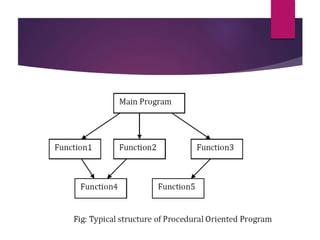
 The problem is divided into a number of functions.
 The primary focus of programmer is on creating functions.
 While developing functions, very little attention is given to data that
are being used by various functions.
 Procedural programming is fine for small projects.
 It does not model real world problems well.
 This is because functions are action oriented and does not really
correspond to the elements of the problems.
Features of Structured Programming
Language
 Emphasis is on algorithm (step by step description of problem solving)
to solve a problem. Each step of algorithm is converted into
corresponding instruction or code in programming language.
 Large program is divided into a number of functions, with each
function having a clearly defined purpose and a clearly defined
interface to other functions in the program. The integration of these
functions constitutes a whole program.
 Uses top-down approach in program design. In top-down
programming, we conceive the program as a whole as a process to
be decomposed.
Features of Structured Programming
Language (contd…)
 Global data are more vulnerable to accidental changes. In multi-
function program, data items that are important and that are used by
more than one functions, are placed as global so that they may be
accessed by all the functions.
 Data move openly around the system from function to function.
Information is passed between functions using parameters or
arguments
Object-Oriented Programming
Language
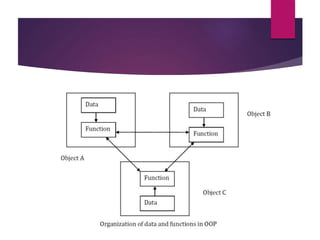
 A program is decomposed into a number of entities called objects.
 Data and the functions that operate on that data are combined into
that object.
 OOP mainly focus on data rather than procedure.
 It considers data as critical element in the program development and
does not allow it to flow freely around the system.
 It ties data more closely to the functions that operate on it.
 It protects it from accidental modification from outside functions.
Features of Object Oriented
Programming Language
 Emphasis is on the data rather than procedure.
 It focuses on security of data from unauthorized modification in the
program.
 A program is divided into a number of objects. Each object has its
own data and functions. These functions are called member functions
and data are known as member data.
 Follows bottom-up approach in program design. The methodology
for constructing an object-oriented program is to discover the related
objects first. Then, appropriate class is formed for similar objects.
These different classes and their objects constitute a program.
Features of Object Oriented
Programming Language
 Data is hidden and cannot be accessed by external functions.
 Object may communicate with each other through functions.
 New data and functions can be easily added whenever necessary.
 Once a class has been written, created and debugged, it can be used
in a number of programs without modification i.e. the same code can
be reused. It is similar to the way a library functions in a procedural
language.
Basic Characteristics of Object-
Oriented Languages
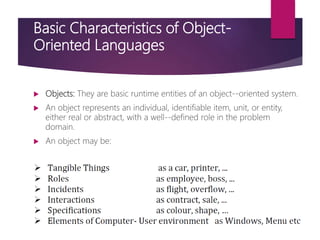
 Objects: They are basic runtime entities of an object-‐oriented system.
 An object represents an individual, identifiable item, unit, or entity,
either real or abstract, with a well-‐defined role in the problem
domain.
 An object may be:
Objects (contd…)
 In object-‐oriented programming, problem is analysed in terms of
objects.
 Programming object should be chosen such that they match closely
with the real world objects.
 Objects take up space in memory.
 During program execution, objects interact by sending message to
one another.
 Each object contains data and code to manipulate them (function).
 It can be defined as Object = Data + Methods or functions
Classes
 A class may be defined as a collection of similar objects.
 In other words, it is a general name for all similar objects.
 For example, mango, apple, banana all may be described under the
common name fruits.
 Thus, fruits is class name for objects like mango, apple, and banana.
 A class is user defined data type and behaves like the built-‐ in data
types of programming languages.
 A class serves as a blue print or a plan or a template.
Classes (contd…)
 It specifies what data and what functions will be included in objects of
that class.
 Once a class has been defined, we can create any number of objects
belonging to that class.
 If fruits has been defined as a class, then statements
fruits mango;
fruits apple;
will create objects mango and apple belonging to the class fruits.
 This is similar to creating variables of built-‐in data types.
Abstraction
 The act of representing essential features without including
background details or explanations is called abstraction.
 Classes use the concept of abstraction.
 Classes are defined as the list of abstract attributes and functions( to
operate on these attributes).
 Classes encapsulate all the properties of the object to be created.
 As classes use the concept of abstraction, they are also called as
abstract data types.
Encapsulation
 Wrapping of data and functions into a single unit is known as data
encapsulation.
 Data and functions of object are encapsulated using class.
 With data encapsulation, data is not accessible to the outside world,
only the functions which are wrapped in the class can access them.
 These member functions act as an interface between object's data and
the program.
 This insulation of data is called data hiding.
Inheritance
 Inheritance is the process by which objects of one class acquires the
properties of objects of another class.
 Inheritance allows us to create classes which are derived from other
classes, so that they automatically include their "parent's" members, plus
their own.
 Thus, a class can be divided into a number of sub classes.
 The derived classes are known as sub classes (or child classes) and original
classes are called base classes or parent classes.
 For example, the class of vehicles can be divided into cars, trucks, buses
and motorcycles.
 Each sub class shares common characteristics with the class (parent class)
from which it is derived.
 Cars, trucks, buses and motorcycles all have wheel and a motor; these are
the defining characteristics of vehicles.
 In addition to these shared characteristics, each sub class also has
its own characteristics: buses have seats for many people while trucks
have space for heavy loads.
 The concept of inheritance provides the idea of reusability, means
additional features can be added to an existing class without modifying
it.
 Thus,
features of derived class = special features of derived class +
common features of parent class
Reusability
 Object-‐oriented programming uses concept of reusability.
 Reusability implies the reuse of existing code in another program
without modification to it.
 The concept of inheritance provides an idea of reusability in OOP.
 Once a class has been written, created and debugged, it can be used
in another program.
 A programmer can use an existing class and without modifying it, add
additional features and capabilities to it.
 This is done by deriving a new class from existing one.
 The new class will inherit the capabilities of the old one but is free to
add new features of its own.
Polymorphism and overloading
 Polymorphism is ability to take more than one form in different instances.
 For example, same function name can be used for different purposes.
 Similarly, same operator can be used for different operations.
 Overloading (both function overloading and operator overloading) is a
kind of polymorphism.
 If an operator exhibits different behaviors in different instances, then it is
known as operator overloading. The type of behavior depends upon the
type of the data used in the operation.
 Similarly, if a same function name is used to perform different types of
tasks, then it is known as function overloading. The task to be performed
by the function is determined by number of arguments and type of
arguments.
Applications of using OOP
 User interface design such as windows, menus.
 Real Time Systems
 Simulation and Modeling
 Object oriented databases
 AI and Expert System
 Neural Networks and parallel programming
 Decision support and office automation system etc
Benefits of OOP
 It is easy to model a real system as programming objects in OOP
represents real objects. The objects are processed by their member
data and functions. It is easy to analyze the user requirements.
 With the help of inheritance, we can reuse the existing class to derive
a new class such that redundant code is eliminated and the use of
existing class is extended. This saves time and cost of program.
 In OOP, data can be made private to a class such that only member
functions of the class can access the data. This principle of data hiding
helps the programmer to build a secure program that cannot be
invaded by code in other part of the program.
Benefits of OOP (contd…)
 With the help of polymorphism, the same function or same operator
can be used for different purposes. This helps to manage software
complexity easily.
 Large problems can be reduced to smaller and more manageable
problems. It is easy to partition the work in a project based on
objects.
 It is possible to have multiple instances of object to co-‐exist without
any interference i.e. each object has its own separate member data
and function.
Event Oriented Programming
 Event oriented Programming means that we program everything as
a response to an event, instead of a top down program where the
ordering of the code determines the order of execution.
 Program code based on what happens when the user does
something.
 Events can be mouse moves, mouse clicks or double-clicks,
keystrokes, changes made in textboxes, timing based on a timer, etc.
 It is quite a bit different from top-down coding.
 An event-oriented language implies that an application (the
computer program) waits for an event to occur before taking any
action.
Difference Between Object Oriented and
Event Oriented Language
 Object oriented programming focuses on performing actions and
manipulation of data that is encapsulated in objects within a
sequential series of steps.
 Event driven is more dynamic and relies on event triggering and
event handling to determine the sequencing of the program.
 Event driven programs can have threads that perform actions based
upon triggers/event in program.
EXAMPLE : fire sprinkler system
 let's say there is a sensor for detecting a fire and, sprinkler system
used to extinguish the fire.
 If we used only object oriented, we would create an endless loop that
constantly checks the status of the sensor.
 If it detects a fire we turn on the sprinkler. The program would work
but it wouldn't be much use for any other task.
 In an event driven program, we could set an event that triggers a
thread when the fire sensor activates and we can create an event
handler that would process the thread in order to tell the sprinkler
system to turn on.
 In this fashion, our event program could also have other functionality,
as it is not stuck in an endless loop.
Visual Programming
 As the time went by, computers have evolved and been put to good
use in a variety of areas.
 Today computers dominate every sphere of life be it entertainment,
education, banking, insurance, research, medicine, design or
manufacturing.
 Any application has two parts:
 User Interface: This is the screen displayed by the application. We interact
with an application via the interface. The application asks for and we
provide the necessary information using the interface.
 Program: how the application performs the specified task. This is what
goes on in the background. We do not know how the application performs
a specified task.
Visual Programming (contd…)
 All interaction between the user and the application are via the user
interface.
 Thus , for any application to be successful it needs to have a good
user interface.
 A good user interface will be
 Easy to learn
 Easy to use
 Attractive
Visual Programming (contd…)
 In Character User Interface (CUI) based applications, text was the
medium of information exchange. (Command Line Interface)
 The application displayed text that promoted the user for the required
information.
 It is specified the valid options. The user than responded to these
prompts by specifying the required information.
 Such application is not very easy to use, essentially because the user
cannot react instinctively to this interface.
 The disadvantage of CUI application was that with each new
application the user had to spend time and effort getting used to the
way it worked.
Visual Programming (contd…)
 With the advent of graphical operating systems like windows, the world of
computing went through a dramatic change. It opened up a whole new
world of graphics.
 Interface that use graphics came to be known as Graphical User Interface
(GUI).
 These became very popular because the user could identify with the
graphics displayed on screen.
 In every day life too, we associate more with imagery than words. The
print icon of any windows based application invokes the mental image of
printer.
 The primary requirement of an interface is that it is easy to use. We must
be able to react intuitively to an interface presented to us.
 This is possible if the interface presented is such that it emulates real life.
Advantages of Visual Programming
 Visual programming enables visual development of graphical user
interface.
 Such user interfaces are easy to use and easy to learn.
 Ready to Use Component
 One of the principal advantages of visual programming environment is that the
programmer need not write code to display the required component.
 The Visual programming environment displays a list of available components.
 The programmer picks up the required components from this list.
 The components can be moved, resized and even deleted, if so required.
 There is no restriction in the number of controls that can be placed this way.
Advantages of Visual Programming
(contd…)
 Built-in Code
 The interface components provided by the visual programming
environment have some code built into them.
 For example, a button ‘knows’ when it has been clicked upon.
 (In the case of conventional programming tools, the programmer has to
write code to determine the component that has been clicked and then
execute the appropriate code.)
 Overall, Visual programming makes it very simple to create complex
user interfaces.
Disadvantages of Visual
Programming
 The entire process of developing an application using a visual
development environment is visual. Thus, the development
environment in itself is highly graphical in nature and therefore
requires more memory.
 Visual development environments require computers of higher
configuration in comparison to the conventional programming tools.
 Larger capacity hard disk
 More RAM
 Faster Processor
 Primarily, Visual development environment can be used only with GUI
operating system such as windows.
Components of Graphical Visual
Interface
 Window: A window sometimes also called a form, is the most
important of all the visual interface components. A window plays the
role as the canvas in a painting. The components that make up the
user interface have to be placed in the window and cannot exist
independent of the window.
 Buttons: A button is used to initiate an action. The text on the button
is indicative of the action that it will initiate. Clicking on a button
initiate the action associated with the button.
 Text boxes: Text boxes are used to accept information from the user.
Components of Graphical Visual
Interface (contd…)
 List Boxes or Pop-up Lists: List boxes are used to present the user with
the possible options. The user can select one or more of the listed
options.
 Label: The label is used to place text in a window. Typically label is
used to identify controls that do not have caption properties of their
own.
 Radio button or Option Button: The radio buttons, also referred as
option buttons, are used when the user can select only one of multiple
options.
Document View Architecture
 MFC (Microsoft Foundation Class) 2.0 changed the way that Windows-based
applications are written by introducing the document/view architecture.
 This architecture is carried through to MFC 4.0.
 In a document/view application, a document object represents an application’s data
and one or more view objects represent views of that data.
 The document and view objects work together to process the user's input and draw
textual and graphical representations of the resulting data.
 MFC's CDocument class serves as the base class for all document objects.
 The CView class and its derivatives serve as base classes for view objects.
 The top-level window, which is derived from either CFrameWnd or
CMDIFrameWnd, is no longer the focal point for message processing, but serves
primarily as a container for views, toolbars, status bars, and other objects.
 The document/view architecture simplifies the development process.
 Code to perform routine tasks is provided for us by the framework.
(such as prompting the user to save unsaved data before a document is
closed )
 MFC supports two types of document/view applications.
 The first is single-document interface (SDI) applications, which
support just one open document at a time.
 The second is multiple-document interface (MDI) applications, which
permit the user to have two or more documents open concurrently.
 MDI apps support multiple views of each document, but SDI apps
generally limited to one view per document.
 The architecture's main elements are
 the Document class and
 the View class.
 Document class can be thought of as a generic container for any kind
of data that an application uses, such as baseball scores, images, files
names, text documents, etc. This class derives from CDocument.
 Its main purpose is
 to load the data when requested,
 to keep the data updated when a user changes it, and
 to save out the data to disk, database, or any other source.
 The View class functions to show the user the data of the application in
a formatted or stylized way.
 This class derives from Cview class.
 It is used to present the data to the user.
 It takes input in the form of mouse and keyboard events from the user.
 It alerts the document of the changes to the data that the user has
requested, and update itself when the data changes.
 MFC document object reads and writes data to persistent storage.
 The document may also provide an interface to the data wherever
it resides (such as in a database).
 A separate view object manages data display, from rendering the
data in a window to user selection and editing of data.
 The view obtains display data from the document and
communicates back to the document on any data changes.
Key Classes of Document/View
Architecture
 The CDocument (or COleDocument) class supports objects used to
store or control our program's data and provides the basic
functionality for programmer-defined document classes.
 A document represents the unit of data that the user typically opens with
the Open command on the File menu and saves with the Save command
on the File menu.
 The CView (or one of its many derived classes) provides the basic
functionality for programmer-defined view classes.
 A view is attached to a document and acts as an intermediary between the
document and the user:
 the view renders an image of the document on the screen and interprets
user input as operations upon the document.
 The view also renders the image for both printing and print preview.
 CFrameView (or one of its variations) supports objects that provides
the frame around one or more views of a document.
 CDocTemplate (or CSingleDocTemplate or CMultiDocTemplate)
supports an object that coordinates one or more existing documents
a given type and manages creating the correct document, view, and
frame window objects for that type.
 The document/view implementation in the class library separates the
data itself from its display and from user operations on the data.
 All changes to the data are managed through the document class.
 The view calls this interface to access and update the data.
 A document template creates documents, their associated views, and
the frame windows that frame the views.
Advantages of the Document/View
Architecture
 The key advantage to using the MFC document/view architecture
is that the architecture supports multiple views of the same
document particularly well.
 Suppose our application lets users view numerical data either in
spreadsheet form or in chart form. A user might want to see
simultaneously both the raw data, in spreadsheet form, and a chart
that results from the data.
 We display these separate views in separate frame windows or in
splitter panes within a single window. Now suppose the user can
edit the data in the spreadsheet and see the changes instantly
reflected in the chart.
 In MFC, the spreadsheet view and the chart view would be based on
different classes derived from CView.
 Both views would be associated with a single document object.
 The document stores the data (or perhaps obtains it from a database).
 Both views access the document and display the data they retrieve
from it.
 When a user updates one of the views, that view object calls
CDocument::UpdateAllViews. That function notifies all of the
document's views, and each view updates itself using the latest data
from the document. The single call to UpdateAllViews synchronizes
the different views.
 This scenario would be difficult to code without the separation of
data from view, particularly if the views stored the data themselves.
 With document/view, it's easy.
 The framework does most of the coordination work for us.
 For the majority of desktop applications, the document/view
architecture is appropriate and efficient application architecture.
 This architecture separates data from viewing and, in most cases,
simplifies our application and reduces redundant code.
 However, the document/view architecture is not appropriate for some
situations. Consider these examples:
 If we are porting an application written in C for Windows, we might
want to complete our port before adding document/view support to
our application.
 For writing a lightweight utility, we might find that we can do without
the document/view architecture.
 If an original code already mixes data management with data viewing,
moving the code to the document/view model is not worth the effort
because we must separate the two.
Integrated Development
Environment
 An integrated development environment (IDE) or interactive
development environment is a software application that provides
comprehensive facilities to computer programmers for software
development.
 An IDE normally consists of a source code editor; build automation
tools and a debugger.
 Several modern IDEs integrate with Intellisense coding features.
 Some examples of IDEs are: Microsoft Visual Studio, Eclipse, NetBeans,
Delphi, JBuilder, Borland C++ Builders, FrontPage, Dreamweaver etc.

Chapter1 introduction

  • 1.
  • 2.
    Procedure Oriented Programming Also called Structured Programming  A computer program is a set of instructions for a computer to perform a specific task.  The traditional programming languages like C, FORTRAN, Pascal, and Basic are Procedural Programming Languages.  A procedural program is written as a list of instructions, telling the computer, step-by-step, what to do: Get two numbers, add them and display the sum.
  • 3.
    Procedure Oriented Programming (contd…) The problem is divided into a number of functions.  The primary focus of programmer is on creating functions.  While developing functions, very little attention is given to data that are being used by various functions.  Procedural programming is fine for small projects.  It does not model real world problems well.  This is because functions are action oriented and does not really correspond to the elements of the problems.
  • 5.
    Features of StructuredProgramming Language  Emphasis is on algorithm (step by step description of problem solving) to solve a problem. Each step of algorithm is converted into corresponding instruction or code in programming language.  Large program is divided into a number of functions, with each function having a clearly defined purpose and a clearly defined interface to other functions in the program. The integration of these functions constitutes a whole program.  Uses top-down approach in program design. In top-down programming, we conceive the program as a whole as a process to be decomposed.
  • 6.
    Features of StructuredProgramming Language (contd…)  Global data are more vulnerable to accidental changes. In multi- function program, data items that are important and that are used by more than one functions, are placed as global so that they may be accessed by all the functions.  Data move openly around the system from function to function. Information is passed between functions using parameters or arguments
  • 7.
    Object-Oriented Programming Language  Aprogram is decomposed into a number of entities called objects.  Data and the functions that operate on that data are combined into that object.  OOP mainly focus on data rather than procedure.  It considers data as critical element in the program development and does not allow it to flow freely around the system.  It ties data more closely to the functions that operate on it.  It protects it from accidental modification from outside functions.
  • 9.
    Features of ObjectOriented Programming Language  Emphasis is on the data rather than procedure.  It focuses on security of data from unauthorized modification in the program.  A program is divided into a number of objects. Each object has its own data and functions. These functions are called member functions and data are known as member data.  Follows bottom-up approach in program design. The methodology for constructing an object-oriented program is to discover the related objects first. Then, appropriate class is formed for similar objects. These different classes and their objects constitute a program.
  • 10.
    Features of ObjectOriented Programming Language  Data is hidden and cannot be accessed by external functions.  Object may communicate with each other through functions.  New data and functions can be easily added whenever necessary.  Once a class has been written, created and debugged, it can be used in a number of programs without modification i.e. the same code can be reused. It is similar to the way a library functions in a procedural language.
  • 11.
    Basic Characteristics ofObject- Oriented Languages  Objects: They are basic runtime entities of an object-‐oriented system.  An object represents an individual, identifiable item, unit, or entity, either real or abstract, with a well-‐defined role in the problem domain.  An object may be:
  • 12.
    Objects (contd…)  Inobject-‐oriented programming, problem is analysed in terms of objects.  Programming object should be chosen such that they match closely with the real world objects.  Objects take up space in memory.  During program execution, objects interact by sending message to one another.  Each object contains data and code to manipulate them (function).  It can be defined as Object = Data + Methods or functions
  • 13.
    Classes  A classmay be defined as a collection of similar objects.  In other words, it is a general name for all similar objects.  For example, mango, apple, banana all may be described under the common name fruits.  Thus, fruits is class name for objects like mango, apple, and banana.  A class is user defined data type and behaves like the built-‐ in data types of programming languages.  A class serves as a blue print or a plan or a template.
  • 14.
    Classes (contd…)  Itspecifies what data and what functions will be included in objects of that class.  Once a class has been defined, we can create any number of objects belonging to that class.  If fruits has been defined as a class, then statements fruits mango; fruits apple; will create objects mango and apple belonging to the class fruits.  This is similar to creating variables of built-‐in data types.
  • 15.
    Abstraction  The actof representing essential features without including background details or explanations is called abstraction.  Classes use the concept of abstraction.  Classes are defined as the list of abstract attributes and functions( to operate on these attributes).  Classes encapsulate all the properties of the object to be created.  As classes use the concept of abstraction, they are also called as abstract data types.
  • 16.
    Encapsulation  Wrapping ofdata and functions into a single unit is known as data encapsulation.  Data and functions of object are encapsulated using class.  With data encapsulation, data is not accessible to the outside world, only the functions which are wrapped in the class can access them.  These member functions act as an interface between object's data and the program.  This insulation of data is called data hiding.
  • 17.
    Inheritance  Inheritance isthe process by which objects of one class acquires the properties of objects of another class.  Inheritance allows us to create classes which are derived from other classes, so that they automatically include their "parent's" members, plus their own.  Thus, a class can be divided into a number of sub classes.  The derived classes are known as sub classes (or child classes) and original classes are called base classes or parent classes.  For example, the class of vehicles can be divided into cars, trucks, buses and motorcycles.  Each sub class shares common characteristics with the class (parent class) from which it is derived.  Cars, trucks, buses and motorcycles all have wheel and a motor; these are the defining characteristics of vehicles.
  • 18.
     In additionto these shared characteristics, each sub class also has its own characteristics: buses have seats for many people while trucks have space for heavy loads.  The concept of inheritance provides the idea of reusability, means additional features can be added to an existing class without modifying it.  Thus, features of derived class = special features of derived class + common features of parent class
  • 19.
    Reusability  Object-‐oriented programminguses concept of reusability.  Reusability implies the reuse of existing code in another program without modification to it.  The concept of inheritance provides an idea of reusability in OOP.  Once a class has been written, created and debugged, it can be used in another program.  A programmer can use an existing class and without modifying it, add additional features and capabilities to it.  This is done by deriving a new class from existing one.  The new class will inherit the capabilities of the old one but is free to add new features of its own.
  • 20.
    Polymorphism and overloading Polymorphism is ability to take more than one form in different instances.  For example, same function name can be used for different purposes.  Similarly, same operator can be used for different operations.  Overloading (both function overloading and operator overloading) is a kind of polymorphism.  If an operator exhibits different behaviors in different instances, then it is known as operator overloading. The type of behavior depends upon the type of the data used in the operation.  Similarly, if a same function name is used to perform different types of tasks, then it is known as function overloading. The task to be performed by the function is determined by number of arguments and type of arguments.
  • 21.
    Applications of usingOOP  User interface design such as windows, menus.  Real Time Systems  Simulation and Modeling  Object oriented databases  AI and Expert System  Neural Networks and parallel programming  Decision support and office automation system etc
  • 22.
    Benefits of OOP It is easy to model a real system as programming objects in OOP represents real objects. The objects are processed by their member data and functions. It is easy to analyze the user requirements.  With the help of inheritance, we can reuse the existing class to derive a new class such that redundant code is eliminated and the use of existing class is extended. This saves time and cost of program.  In OOP, data can be made private to a class such that only member functions of the class can access the data. This principle of data hiding helps the programmer to build a secure program that cannot be invaded by code in other part of the program.
  • 23.
    Benefits of OOP(contd…)  With the help of polymorphism, the same function or same operator can be used for different purposes. This helps to manage software complexity easily.  Large problems can be reduced to smaller and more manageable problems. It is easy to partition the work in a project based on objects.  It is possible to have multiple instances of object to co-‐exist without any interference i.e. each object has its own separate member data and function.
  • 24.
    Event Oriented Programming Event oriented Programming means that we program everything as a response to an event, instead of a top down program where the ordering of the code determines the order of execution.  Program code based on what happens when the user does something.  Events can be mouse moves, mouse clicks or double-clicks, keystrokes, changes made in textboxes, timing based on a timer, etc.  It is quite a bit different from top-down coding.  An event-oriented language implies that an application (the computer program) waits for an event to occur before taking any action.
  • 25.
    Difference Between ObjectOriented and Event Oriented Language  Object oriented programming focuses on performing actions and manipulation of data that is encapsulated in objects within a sequential series of steps.  Event driven is more dynamic and relies on event triggering and event handling to determine the sequencing of the program.  Event driven programs can have threads that perform actions based upon triggers/event in program.
  • 26.
    EXAMPLE : firesprinkler system  let's say there is a sensor for detecting a fire and, sprinkler system used to extinguish the fire.  If we used only object oriented, we would create an endless loop that constantly checks the status of the sensor.  If it detects a fire we turn on the sprinkler. The program would work but it wouldn't be much use for any other task.  In an event driven program, we could set an event that triggers a thread when the fire sensor activates and we can create an event handler that would process the thread in order to tell the sprinkler system to turn on.  In this fashion, our event program could also have other functionality, as it is not stuck in an endless loop.
  • 27.
    Visual Programming  Asthe time went by, computers have evolved and been put to good use in a variety of areas.  Today computers dominate every sphere of life be it entertainment, education, banking, insurance, research, medicine, design or manufacturing.  Any application has two parts:  User Interface: This is the screen displayed by the application. We interact with an application via the interface. The application asks for and we provide the necessary information using the interface.  Program: how the application performs the specified task. This is what goes on in the background. We do not know how the application performs a specified task.
  • 28.
    Visual Programming (contd…) All interaction between the user and the application are via the user interface.  Thus , for any application to be successful it needs to have a good user interface.  A good user interface will be  Easy to learn  Easy to use  Attractive
  • 29.
    Visual Programming (contd…) In Character User Interface (CUI) based applications, text was the medium of information exchange. (Command Line Interface)  The application displayed text that promoted the user for the required information.  It is specified the valid options. The user than responded to these prompts by specifying the required information.  Such application is not very easy to use, essentially because the user cannot react instinctively to this interface.  The disadvantage of CUI application was that with each new application the user had to spend time and effort getting used to the way it worked.
  • 30.
    Visual Programming (contd…) With the advent of graphical operating systems like windows, the world of computing went through a dramatic change. It opened up a whole new world of graphics.  Interface that use graphics came to be known as Graphical User Interface (GUI).  These became very popular because the user could identify with the graphics displayed on screen.  In every day life too, we associate more with imagery than words. The print icon of any windows based application invokes the mental image of printer.  The primary requirement of an interface is that it is easy to use. We must be able to react intuitively to an interface presented to us.  This is possible if the interface presented is such that it emulates real life.
  • 31.
    Advantages of VisualProgramming  Visual programming enables visual development of graphical user interface.  Such user interfaces are easy to use and easy to learn.  Ready to Use Component  One of the principal advantages of visual programming environment is that the programmer need not write code to display the required component.  The Visual programming environment displays a list of available components.  The programmer picks up the required components from this list.  The components can be moved, resized and even deleted, if so required.  There is no restriction in the number of controls that can be placed this way.
  • 32.
    Advantages of VisualProgramming (contd…)  Built-in Code  The interface components provided by the visual programming environment have some code built into them.  For example, a button ‘knows’ when it has been clicked upon.  (In the case of conventional programming tools, the programmer has to write code to determine the component that has been clicked and then execute the appropriate code.)  Overall, Visual programming makes it very simple to create complex user interfaces.
  • 33.
    Disadvantages of Visual Programming The entire process of developing an application using a visual development environment is visual. Thus, the development environment in itself is highly graphical in nature and therefore requires more memory.  Visual development environments require computers of higher configuration in comparison to the conventional programming tools.  Larger capacity hard disk  More RAM  Faster Processor  Primarily, Visual development environment can be used only with GUI operating system such as windows.
  • 34.
    Components of GraphicalVisual Interface  Window: A window sometimes also called a form, is the most important of all the visual interface components. A window plays the role as the canvas in a painting. The components that make up the user interface have to be placed in the window and cannot exist independent of the window.  Buttons: A button is used to initiate an action. The text on the button is indicative of the action that it will initiate. Clicking on a button initiate the action associated with the button.  Text boxes: Text boxes are used to accept information from the user.
  • 35.
    Components of GraphicalVisual Interface (contd…)  List Boxes or Pop-up Lists: List boxes are used to present the user with the possible options. The user can select one or more of the listed options.  Label: The label is used to place text in a window. Typically label is used to identify controls that do not have caption properties of their own.  Radio button or Option Button: The radio buttons, also referred as option buttons, are used when the user can select only one of multiple options.
  • 36.
    Document View Architecture MFC (Microsoft Foundation Class) 2.0 changed the way that Windows-based applications are written by introducing the document/view architecture.  This architecture is carried through to MFC 4.0.  In a document/view application, a document object represents an application’s data and one or more view objects represent views of that data.  The document and view objects work together to process the user's input and draw textual and graphical representations of the resulting data.  MFC's CDocument class serves as the base class for all document objects.  The CView class and its derivatives serve as base classes for view objects.  The top-level window, which is derived from either CFrameWnd or CMDIFrameWnd, is no longer the focal point for message processing, but serves primarily as a container for views, toolbars, status bars, and other objects.
  • 37.
     The document/viewarchitecture simplifies the development process.  Code to perform routine tasks is provided for us by the framework. (such as prompting the user to save unsaved data before a document is closed )  MFC supports two types of document/view applications.  The first is single-document interface (SDI) applications, which support just one open document at a time.  The second is multiple-document interface (MDI) applications, which permit the user to have two or more documents open concurrently.  MDI apps support multiple views of each document, but SDI apps generally limited to one view per document.
  • 38.
     The architecture'smain elements are  the Document class and  the View class.  Document class can be thought of as a generic container for any kind of data that an application uses, such as baseball scores, images, files names, text documents, etc. This class derives from CDocument.  Its main purpose is  to load the data when requested,  to keep the data updated when a user changes it, and  to save out the data to disk, database, or any other source.
  • 39.
     The Viewclass functions to show the user the data of the application in a formatted or stylized way.  This class derives from Cview class.  It is used to present the data to the user.  It takes input in the form of mouse and keyboard events from the user.  It alerts the document of the changes to the data that the user has requested, and update itself when the data changes.
  • 40.
     MFC documentobject reads and writes data to persistent storage.  The document may also provide an interface to the data wherever it resides (such as in a database).  A separate view object manages data display, from rendering the data in a window to user selection and editing of data.  The view obtains display data from the document and communicates back to the document on any data changes.
  • 41.
    Key Classes ofDocument/View Architecture  The CDocument (or COleDocument) class supports objects used to store or control our program's data and provides the basic functionality for programmer-defined document classes.  A document represents the unit of data that the user typically opens with the Open command on the File menu and saves with the Save command on the File menu.  The CView (or one of its many derived classes) provides the basic functionality for programmer-defined view classes.  A view is attached to a document and acts as an intermediary between the document and the user:  the view renders an image of the document on the screen and interprets user input as operations upon the document.  The view also renders the image for both printing and print preview.
  • 42.
     CFrameView (orone of its variations) supports objects that provides the frame around one or more views of a document.  CDocTemplate (or CSingleDocTemplate or CMultiDocTemplate) supports an object that coordinates one or more existing documents a given type and manages creating the correct document, view, and frame window objects for that type.
  • 43.
     The document/viewimplementation in the class library separates the data itself from its display and from user operations on the data.  All changes to the data are managed through the document class.  The view calls this interface to access and update the data.  A document template creates documents, their associated views, and the frame windows that frame the views.
  • 44.
    Advantages of theDocument/View Architecture  The key advantage to using the MFC document/view architecture is that the architecture supports multiple views of the same document particularly well.  Suppose our application lets users view numerical data either in spreadsheet form or in chart form. A user might want to see simultaneously both the raw data, in spreadsheet form, and a chart that results from the data.  We display these separate views in separate frame windows or in splitter panes within a single window. Now suppose the user can edit the data in the spreadsheet and see the changes instantly reflected in the chart.
  • 45.
     In MFC,the spreadsheet view and the chart view would be based on different classes derived from CView.  Both views would be associated with a single document object.  The document stores the data (or perhaps obtains it from a database).  Both views access the document and display the data they retrieve from it.  When a user updates one of the views, that view object calls CDocument::UpdateAllViews. That function notifies all of the document's views, and each view updates itself using the latest data from the document. The single call to UpdateAllViews synchronizes the different views.
  • 46.
     This scenariowould be difficult to code without the separation of data from view, particularly if the views stored the data themselves.  With document/view, it's easy.  The framework does most of the coordination work for us.  For the majority of desktop applications, the document/view architecture is appropriate and efficient application architecture.  This architecture separates data from viewing and, in most cases, simplifies our application and reduces redundant code.
  • 47.
     However, thedocument/view architecture is not appropriate for some situations. Consider these examples:  If we are porting an application written in C for Windows, we might want to complete our port before adding document/view support to our application.  For writing a lightweight utility, we might find that we can do without the document/view architecture.  If an original code already mixes data management with data viewing, moving the code to the document/view model is not worth the effort because we must separate the two.
  • 48.
    Integrated Development Environment  Anintegrated development environment (IDE) or interactive development environment is a software application that provides comprehensive facilities to computer programmers for software development.  An IDE normally consists of a source code editor; build automation tools and a debugger.  Several modern IDEs integrate with Intellisense coding features.  Some examples of IDEs are: Microsoft Visual Studio, Eclipse, NetBeans, Delphi, JBuilder, Borland C++ Builders, FrontPage, Dreamweaver etc.