Copyright © 2016 Ramez Elmasri and Shamkant B. Navathe
CHAPTER 6
Basic SQL
Slide 6- 2
Copyright © 2016 Ramez Elmasri and Shamkant B. Navathe
Chapter 6 Outline
 SQL Data Definition and Data Types
 Specifying Constraints in SQL
 Basic Retrieval Queries in SQL
 INSERT, DELETE, and UPDATE Statements in
SQL
 Additional Features of SQL
Slide 6- 3
Copyright © 2016 Ramez Elmasri and Shamkant B. Navathe
Basic SQL
 SQL language
 Considered one of the major reasons for the
commercial success of relational databases
 SQL
 The origin of SQL is relational predicate calculus called
tuple calculus (see Ch.8) which was proposed initially
as the language SQUARE.
 SQL Actually comes from the word “SEQUEL” which was the
original term used in the paper: “SEQUEL TO SQUARE” by
Chamberlin and Boyce. IBM could not copyright that term, so they
abbreviated to SQL and copyrighted the term SQL.
 Now popularly known as “Structured Query language”.
 SQL is an informal or practical rendering of the
relational data model with syntax Slide 6- 4
Copyright © 2016 Ramez Elmasri and Shamkant B. Navathe
SQL Data Definition, Data Types,
Standards
 Terminology:
 Table, row, and column used for relational model
terms relation, tuple, and attribute
 CREATE statement
 Main SQL command for data definition
 The language has features for : Data definition, Data
Manipulation, Transaction control (Transact-SQL, Ch.
20), Indexing (Ch.17), Security specification (Grant
and Revoke- see Ch.30), Active databases (Ch.26),
Multi-media (Ch.26), Distributed databases (Ch.23)
etc.
Slide 6- 5
Copyright © 2016 Ramez Elmasri and Shamkant B. Navathe
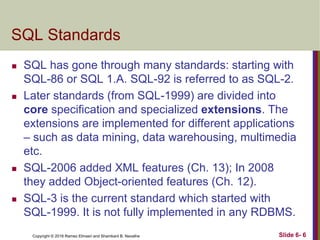
SQL Standards
 SQL has gone through many standards: starting with
SQL-86 or SQL 1.A. SQL-92 is referred to as SQL-2.
 Later standards (from SQL-1999) are divided into
core specification and specialized extensions. The
extensions are implemented for different applications
– such as data mining, data warehousing, multimedia
etc.
 SQL-2006 added XML features (Ch. 13); In 2008
they added Object-oriented features (Ch. 12).
 SQL-3 is the current standard which started with
SQL-1999. It is not fully implemented in any RDBMS.
Slide 6- 6
Copyright © 2016 Ramez Elmasri and Shamkant B. Navathe
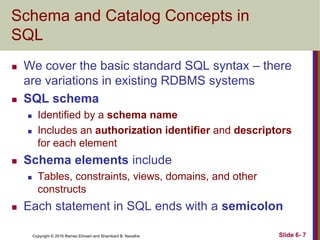
Schema and Catalog Concepts in
SQL
 We cover the basic standard SQL syntax – there
are variations in existing RDBMS systems
 SQL schema
 Identified by a schema name
 Includes an authorization identifier and descriptors
for each element
 Schema elements include
 Tables, constraints, views, domains, and other
constructs
 Each statement in SQL ends with a semicolon
Slide 6- 7
Copyright © 2016 Ramez Elmasri and Shamkant B. Navathe
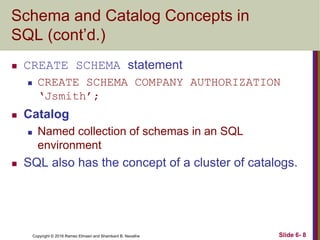
Schema and Catalog Concepts in
SQL (cont’d.)
 CREATE SCHEMA statement
 CREATE SCHEMA COMPANY AUTHORIZATION
‘Jsmith’;
 Catalog
 Named collection of schemas in an SQL
environment
 SQL also has the concept of a cluster of catalogs.
Slide 6- 8
Copyright © 2016 Ramez Elmasri and Shamkant B. Navathe
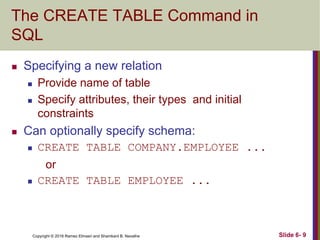
The CREATE TABLE Command in
SQL
 Specifying a new relation
 Provide name of table
 Specify attributes, their types and initial
constraints
 Can optionally specify schema:
 CREATE TABLE COMPANY.EMPLOYEE ...
or
 CREATE TABLE EMPLOYEE ...
Slide 6- 9
Copyright © 2016 Ramez Elmasri and Shamkant B. Navathe
The CREATE TABLE Command in
SQL (cont’d.)
 Base tables (base relations)
 Relation and its tuples are actually created and
stored as a file by the DBMS
 Virtual relations (views)
 Created through the CREATE VIEW statement.
Do not correspond to any physical file.
Slide 6- 10
Copyright © 2016 Ramez Elmasri and Shamkant B. Navathe
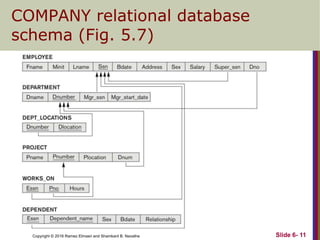
COMPANY relational database
schema (Fig. 5.7)
Slide 6- 11
Copyright © 2016 Ramez Elmasri and Shamkant B. Navathe
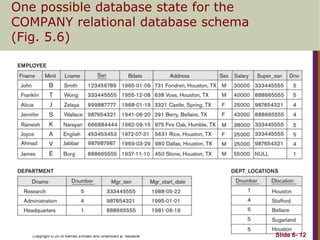
One possible database state for the
COMPANY relational database schema
(Fig. 5.6)
Slide 6- 12
Copyright © 2016 Ramez Elmasri and Shamkant B. Navathe
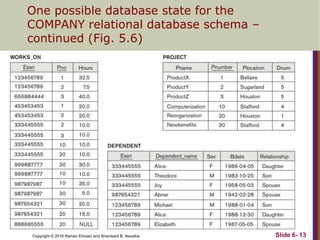
One possible database state for the
COMPANY relational database schema –
continued (Fig. 5.6)
Slide 6- 13
Copyright © 2016 Ramez Elmasri and Shamkant B. Navathe
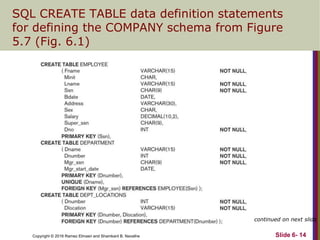
SQL CREATE TABLE data definition statements
for defining the COMPANY schema from Figure
5.7 (Fig. 6.1)
continued on next slide
Slide 6- 14
Copyright © 2016 Ramez Elmasri and Shamkant B. Navathe
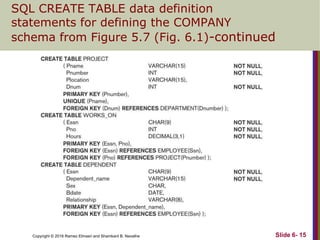
SQL CREATE TABLE data definition
statements for defining the COMPANY
schema from Figure 5.7 (Fig. 6.1)-continued
Slide 6- 15
Copyright © 2016 Ramez Elmasri and Shamkant B. Navathe
Attribute Data Types and Domains in
SQL
 Basic data types
 Numeric data types
 Integer numbers: INTEGER, INT, and SMALLINT
 Floating-point (real) numbers: FLOAT or REAL, and
DOUBLE PRECISION
 Character-string data types
 Fixed length: CHAR(n), CHARACTER(n)
 Varying length: VARCHAR(n), CHAR
VARYING(n), CHARACTER VARYING(n)
Slide 6- 17
Copyright © 2016 Ramez Elmasri and Shamkant B. Navathe
Attribute Data Types and Domains in
SQL (cont’d.)
 Bit-string data types
 Fixed length: BIT(n)
 Varying length: BIT VARYING(n)
 Boolean data type
 Values of TRUE or FALSE or NULL
 DATE data type
 Ten positions
 Components are YEAR, MONTH, and DAY in the
form YYYY-MM-DD
 Multiple mapping functions available in RDBMSs to
change date formats
Slide 6- 18
Copyright © 2016 Ramez Elmasri and Shamkant B. Navathe
Attribute Data Types and Domains in
SQL (cont’d.)
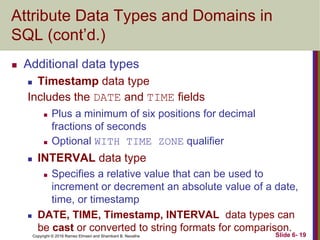
 Additional data types
 Timestamp data type
Includes the DATE and TIME fields
 Plus a minimum of six positions for decimal
fractions of seconds
 Optional WITH TIME ZONE qualifier
 INTERVAL data type
 Specifies a relative value that can be used to
increment or decrement an absolute value of a date,
time, or timestamp
 DATE, TIME, Timestamp, INTERVAL data types can
be cast or converted to string formats for comparison.
Slide 6- 19
Copyright © 2016 Ramez Elmasri and Shamkant B. Navathe
Attribute Data Types and Domains in
SQL (cont’d.)
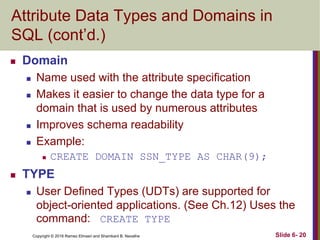
 Domain
 Name used with the attribute specification
 Makes it easier to change the data type for a
domain that is used by numerous attributes
 Improves schema readability
 Example:
 CREATE DOMAIN SSN_TYPE AS CHAR(9);
 TYPE
 User Defined Types (UDTs) are supported for
object-oriented applications. (See Ch.12) Uses the
command: CREATE TYPE
Slide 6- 20
Copyright © 2016 Ramez Elmasri and Shamkant B. Navathe
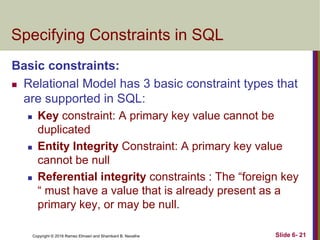
Specifying Constraints in SQL
Basic constraints:
 Relational Model has 3 basic constraint types that
are supported in SQL:
 Key constraint: A primary key value cannot be
duplicated
 Entity Integrity Constraint: A primary key value
cannot be null
 Referential integrity constraints : The “foreign key
“ must have a value that is already present as a
primary key, or may be null.
Slide 6- 21
Copyright © 2016 Ramez Elmasri and Shamkant B. Navathe
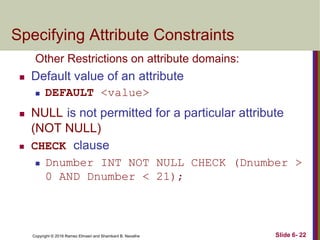
Specifying Attribute Constraints
Other Restrictions on attribute domains:
 Default value of an attribute
 DEFAULT <value>
 NULL is not permitted for a particular attribute
(NOT NULL)
 CHECK clause
 Dnumber INT NOT NULL CHECK (Dnumber >
0 AND Dnumber < 21);
Slide 6- 22
Copyright © 2016 Ramez Elmasri and Shamkant B. Navathe
Specifying Key and Referential
Integrity Constraints
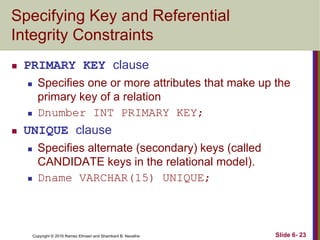
 PRIMARY KEY clause
 Specifies one or more attributes that make up the
primary key of a relation
 Dnumber INT PRIMARY KEY;
 UNIQUE clause
 Specifies alternate (secondary) keys (called
CANDIDATE keys in the relational model).
 Dname VARCHAR(15) UNIQUE;
Slide 6- 23
Copyright © 2016 Ramez Elmasri and Shamkant B. Navathe
Specifying Key and Referential
Integrity Constraints (cont’d.)
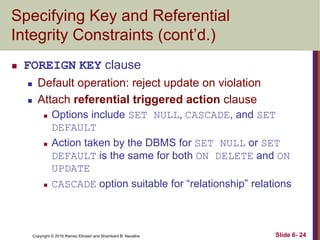
 FOREIGN KEY clause
 Default operation: reject update on violation
 Attach referential triggered action clause
 Options include SET NULL, CASCADE, and SET
DEFAULT
 Action taken by the DBMS for SET NULL or SET
DEFAULT is the same for both ON DELETE and ON
UPDATE
 CASCADE option suitable for “relationship” relations
Slide 6- 24
Copyright © 2016 Ramez Elmasri and Shamkant B. Navathe
Giving Names to Constraints
 Using the Keyword CONSTRAINT
 Name a constraint
 Useful for later altering
Slide 6- 25
Copyright © 2016 Ramez Elmasri and Shamkant B. Navathe
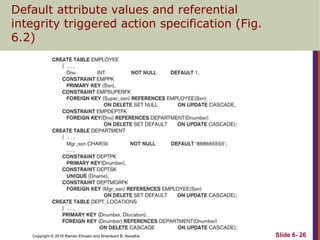
Default attribute values and referential
integrity triggered action specification (Fig.
6.2)
Slide 6- 26
Copyright © 2016 Ramez Elmasri and Shamkant B. Navathe
Specifying Constraints on Tuples
Using CHECK
 Additional Constraints on individual tuples within a
relation are also possible using CHECK
 CHECK clauses at the end of a CREATE TABLE
statement
 Apply to each tuple individually
 CHECK (Dept_create_date <=
Mgr_start_date);
Slide 6- 27
Copyright © 2016 Ramez Elmasri and Shamkant B. Navathe
Basic Retrieval Queries in SQL
 SELECT statement
 One basic statement for retrieving information from
a database
 SQL allows a table to have two or more tuples
that are identical in all their attribute values
 Unlike relational model (relational model is strictly
set-theory based)
 Multiset or bag behavior
 Tuple-id may be used as a key
Slide 6- 28
Copyright © 2016 Ramez Elmasri and Shamkant B. Navathe
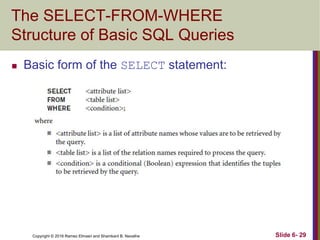
The SELECT-FROM-WHERE
Structure of Basic SQL Queries
 Basic form of the SELECT statement:
Slide 6- 29
Copyright © 2016 Ramez Elmasri and Shamkant B. Navathe
The SELECT-FROM-WHERE Structure
of Basic SQL Queries (cont’d.)
 Logical comparison operators
 =, <, <=, >, >=, and <>
 Projection attributes
 Attributes whose values are to be retrieved
 Selection condition
 Boolean condition that must be true for any
retrieved tuple. Selection conditions include join
conditions (see Ch.8) when multiple relations are
involved.
Slide 6- 30
Copyright © 2016 Ramez Elmasri and Shamkant B. Navathe
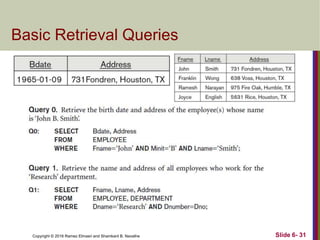
Basic Retrieval Queries
Slide 6- 31
Copyright © 2016 Ramez Elmasri and Shamkant B. Navathe
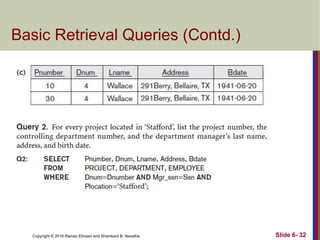
Basic Retrieval Queries (Contd.)
Slide 6- 32
Copyright © 2016 Ramez Elmasri and Shamkant B. Navathe
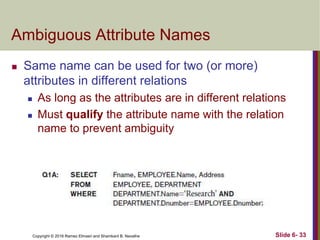
Ambiguous Attribute Names
 Same name can be used for two (or more)
attributes in different relations
 As long as the attributes are in different relations
 Must qualify the attribute name with the relation
name to prevent ambiguity
Slide 6- 33
Copyright © 2016 Ramez Elmasri and Shamkant B. Navathe
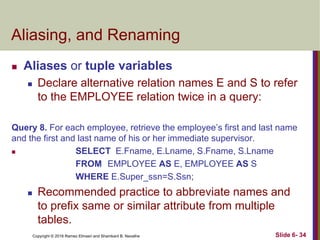
Aliasing, and Renaming
 Aliases or tuple variables
 Declare alternative relation names E and S to refer
to the EMPLOYEE relation twice in a query:
Query 8. For each employee, retrieve the employee’s first and last name
and the first and last name of his or her immediate supervisor.
 SELECT E.Fname, E.Lname, S.Fname, S.Lname
FROM EMPLOYEE AS E, EMPLOYEE AS S
WHERE E.Super_ssn=S.Ssn;
 Recommended practice to abbreviate names and
to prefix same or similar attribute from multiple
tables.
Slide 6- 34
Copyright © 2016 Ramez Elmasri and Shamkant B. Navathe
Aliasing,Renaming and Tuple
Variables (contd.)
 The attribute names can also be renamed
EMPLOYEE AS E(Fn, Mi, Ln, Ssn, Bd,
Addr, Sex, Sal, Sssn, Dno)
 Note that the relation EMPLOYEE now has a
variable name E which corresponds to a tuple
variable
 The “AS” may be dropped in most SQL
implementations
Slide 6- 35
Copyright © 2016 Ramez Elmasri and Shamkant B. Navathe
Unspecified WHERE Clause
and Use of the Asterisk
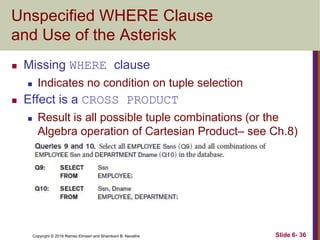
 Missing WHERE clause
 Indicates no condition on tuple selection
 Effect is a CROSS PRODUCT
 Result is all possible tuple combinations (or the
Algebra operation of Cartesian Product– see Ch.8)
result
Slide 6- 36
Copyright © 2016 Ramez Elmasri and Shamkant B. Navathe
Unspecified WHERE Clause
and Use of the Asterisk (cont’d.)
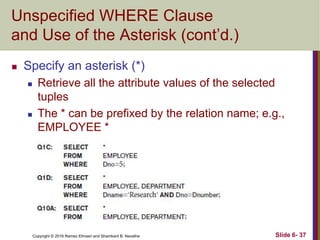
 Specify an asterisk (*)
 Retrieve all the attribute values of the selected
tuples
 The * can be prefixed by the relation name; e.g.,
EMPLOYEE *
Slide 6- 37
Copyright © 2016 Ramez Elmasri and Shamkant B. Navathe
Tables as Sets in SQL
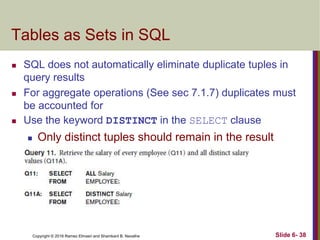
 SQL does not automatically eliminate duplicate tuples in
query results
 For aggregate operations (See sec 7.1.7) duplicates must
be accounted for
 Use the keyword DISTINCT in the SELECT clause
 Only distinct tuples should remain in the result
Slide 6- 38
Copyright © 2016 Ramez Elmasri and Shamkant B. Navathe
Tables as Sets in SQL (cont’d.)
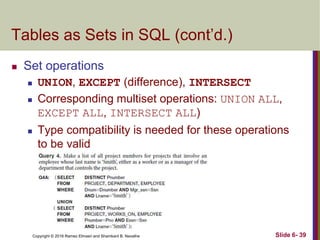
 Set operations
 UNION, EXCEPT (difference), INTERSECT
 Corresponding multiset operations: UNION ALL,
EXCEPT ALL, INTERSECT ALL)
 Type compatibility is needed for these operations
to be valid
Slide 6- 39
Copyright © 2016 Ramez Elmasri and Shamkant B. Navathe
Substring Pattern Matching and
Arithmetic Operators
 LIKE comparison operator
 Used for string pattern matching
 % replaces an arbitrary number of zero or more
characters
 underscore (_) replaces a single character
 Examples: WHERE Address LIKE ‘%Houston,TX%’;
 WHERE Ssn LIKE ‘_ _ 1_ _ 8901’;
 BETWEEN comparison operator
E.g., in Q14 :
WHERE(Salary BETWEEN 30000 AND 40000)
AND Dno = 5;
Slide 6- 40
Copyright © 2016 Ramez Elmasri and Shamkant B. Navathe
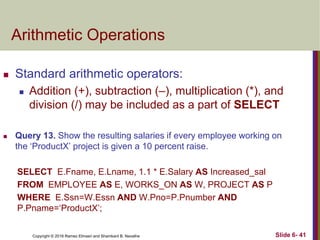
Arithmetic Operations
 Standard arithmetic operators:
 Addition (+), subtraction (–), multiplication (*), and
division (/) may be included as a part of SELECT
 Query 13. Show the resulting salaries if every employee working on
the ‘ProductX’ project is given a 10 percent raise.
SELECT E.Fname, E.Lname, 1.1 * E.Salary AS Increased_sal
FROM EMPLOYEE AS E, WORKS_ON AS W, PROJECT AS P
WHERE E.Ssn=W.Essn AND W.Pno=P.Pnumber AND
P.Pname=‘ProductX’;
Slide 6- 41
Copyright © 2016 Ramez Elmasri and Shamkant B. Navathe
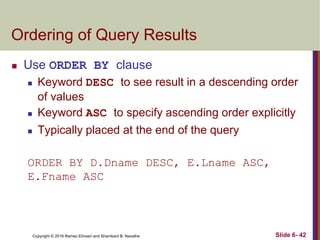
Ordering of Query Results
 Use ORDER BY clause
 Keyword DESC to see result in a descending order
of values
 Keyword ASC to specify ascending order explicitly
 Typically placed at the end of the query
ORDER BY D.Dname DESC, E.Lname ASC,
E.Fname ASC
Slide 6- 42
Copyright © 2016 Ramez Elmasri and Shamkant B. Navathe
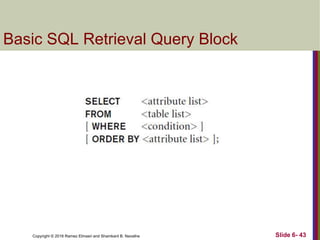
Basic SQL Retrieval Query Block
Slide 6- 43
Copyright © 2016 Ramez Elmasri and Shamkant B. Navathe
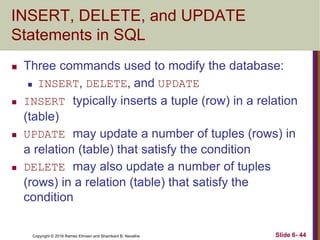
INSERT, DELETE, and UPDATE
Statements in SQL
 Three commands used to modify the database:
 INSERT, DELETE, and UPDATE
 INSERT typically inserts a tuple (row) in a relation
(table)
 UPDATE may update a number of tuples (rows) in
a relation (table) that satisfy the condition
 DELETE may also update a number of tuples
(rows) in a relation (table) that satisfy the
condition
Slide 6- 44
Copyright © 2016 Ramez Elmasri and Shamkant B. Navathe
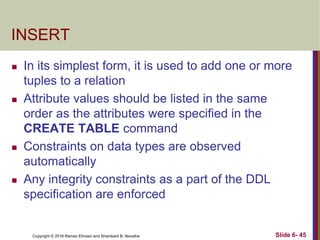
INSERT
 In its simplest form, it is used to add one or more
tuples to a relation
 Attribute values should be listed in the same
order as the attributes were specified in the
CREATE TABLE command
 Constraints on data types are observed
automatically
 Any integrity constraints as a part of the DDL
specification are enforced
Slide 6- 45
Copyright © 2016 Ramez Elmasri and Shamkant B. Navathe
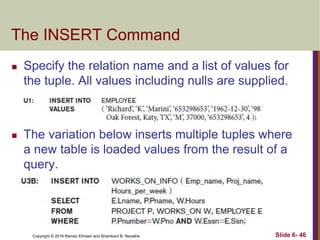
The INSERT Command
 Specify the relation name and a list of values for
the tuple. All values including nulls are supplied.
 The variation below inserts multiple tuples where
a new table is loaded values from the result of a
query.
Slide 6- 46
Copyright © 2016 Ramez Elmasri and Shamkant B. Navathe
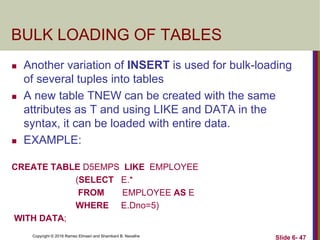
BULK LOADING OF TABLES
 Another variation of INSERT is used for bulk-loading
of several tuples into tables
 A new table TNEW can be created with the same
attributes as T and using LIKE and DATA in the
syntax, it can be loaded with entire data.
 EXAMPLE:
CREATE TABLE D5EMPS LIKE EMPLOYEE
(SELECT E.*
FROM EMPLOYEE AS E
WHERE E.Dno=5)
WITH DATA;
Slide 6- 47
Copyright © 2016 Ramez Elmasri and Shamkant B. Navathe
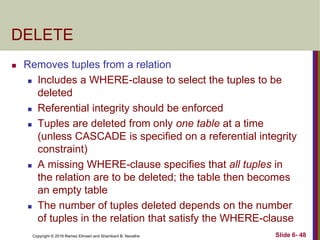
DELETE
 Removes tuples from a relation
 Includes a WHERE-clause to select the tuples to be
deleted
 Referential integrity should be enforced
 Tuples are deleted from only one table at a time
(unless CASCADE is specified on a referential integrity
constraint)
 A missing WHERE-clause specifies that all tuples in
the relation are to be deleted; the table then becomes
an empty table
 The number of tuples deleted depends on the number
of tuples in the relation that satisfy the WHERE-clause
Slide 6- 48
Copyright © 2016 Ramez Elmasri and Shamkant B. Navathe
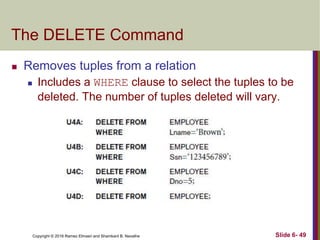
The DELETE Command
 Removes tuples from a relation
 Includes a WHERE clause to select the tuples to be
deleted. The number of tuples deleted will vary.
Slide 6- 49
Copyright © 2016 Ramez Elmasri and Shamkant B. Navathe
UPDATE
 Used to modify attribute values of one or more
selected tuples
 A WHERE-clause selects the tuples to be
modified
 An additional SET-clause specifies the attributes
to be modified and their new values
 Each command modifies tuples in the same
relation
 Referential integrity specified as part of DDL
specification is enforced
Slide 6- 50
Copyright © 2016 Ramez Elmasri and Shamkant B. Navathe
UPDATE (contd.)
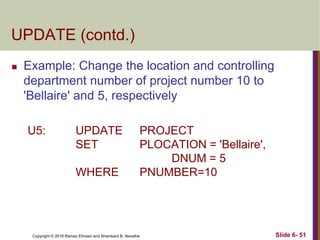
 Example: Change the location and controlling
department number of project number 10 to
'Bellaire' and 5, respectively
U5: UPDATE PROJECT
SET PLOCATION = 'Bellaire',
DNUM = 5
WHERE PNUMBER=10
Slide 6- 51
Copyright © 2016 Ramez Elmasri and Shamkant B. Navathe Slide 6- 52
UPDATE (contd.)
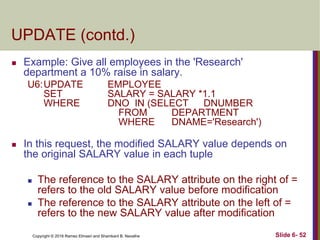
 Example: Give all employees in the 'Research'
department a 10% raise in salary.
U6:UPDATE EMPLOYEE
SET SALARY = SALARY *1.1
WHERE DNO IN (SELECT DNUMBER
FROM DEPARTMENT
WHERE DNAME='Research')
 In this request, the modified SALARY value depends on
the original SALARY value in each tuple
 The reference to the SALARY attribute on the right of =
refers to the old SALARY value before modification
 The reference to the SALARY attribute on the left of =
refers to the new SALARY value after modification
Copyright © 2016 Ramez Elmasri and Shamkant B. Navathe
Additional Features of SQL
 Techniques for specifying complex retrieval queries
(see Ch.7)
 Writing programs in various programming languages
that include SQL statements: Embedded and
dynamic SQL, SQL/CLI (Call Level Interface) and its
predecessor ODBC, SQL/PSM (Persistent Stored
Module) (See Ch.10)
 Set of commands for specifying physical database
design parameters, file structures for relations, and
access paths, e.g., CREATE INDEX
Slide 6- 53
Copyright © 2016 Ramez Elmasri and Shamkant B. Navathe
Additional Features of SQL (cont’d.)
 Transaction control commands (Ch.20)
 Specifying the granting and revoking of privileges
to users (Ch.30)
 Constructs for creating triggers (Ch.26)
 Enhanced relational systems known as object-
relational define relations as classes. Abstract
data types (called User Defined Types- UDTs)
are supported with CREATE TYPE
 New technologies such as XML (Ch.13) and
OLAP (Ch.29) are added to versions of SQL
Slide 6- 54
Copyright © 2016 Ramez Elmasri and Shamkant B. Navathe
Summary
 SQL
 A Comprehensive language for relational database
management
 Data definition, queries, updates, constraint
specification, and view definition
 Covered :
 Data definition commands for creating tables
 Commands for constraint specification
 Simple retrieval queries
 Database update commands
Slide 6- 55

Chapter06.ppt

  • 1.
    Copyright © 2016Ramez Elmasri and Shamkant B. Navathe
  • 2.
    Copyright © 2016Ramez Elmasri and Shamkant B. Navathe CHAPTER 6 Basic SQL Slide 6- 2
  • 3.
    Copyright © 2016Ramez Elmasri and Shamkant B. Navathe Chapter 6 Outline  SQL Data Definition and Data Types  Specifying Constraints in SQL  Basic Retrieval Queries in SQL  INSERT, DELETE, and UPDATE Statements in SQL  Additional Features of SQL Slide 6- 3
  • 4.
    Copyright © 2016Ramez Elmasri and Shamkant B. Navathe Basic SQL  SQL language  Considered one of the major reasons for the commercial success of relational databases  SQL  The origin of SQL is relational predicate calculus called tuple calculus (see Ch.8) which was proposed initially as the language SQUARE.  SQL Actually comes from the word “SEQUEL” which was the original term used in the paper: “SEQUEL TO SQUARE” by Chamberlin and Boyce. IBM could not copyright that term, so they abbreviated to SQL and copyrighted the term SQL.  Now popularly known as “Structured Query language”.  SQL is an informal or practical rendering of the relational data model with syntax Slide 6- 4
  • 5.
    Copyright © 2016Ramez Elmasri and Shamkant B. Navathe SQL Data Definition, Data Types, Standards  Terminology:  Table, row, and column used for relational model terms relation, tuple, and attribute  CREATE statement  Main SQL command for data definition  The language has features for : Data definition, Data Manipulation, Transaction control (Transact-SQL, Ch. 20), Indexing (Ch.17), Security specification (Grant and Revoke- see Ch.30), Active databases (Ch.26), Multi-media (Ch.26), Distributed databases (Ch.23) etc. Slide 6- 5
  • 6.
    Copyright © 2016Ramez Elmasri and Shamkant B. Navathe SQL Standards  SQL has gone through many standards: starting with SQL-86 or SQL 1.A. SQL-92 is referred to as SQL-2.  Later standards (from SQL-1999) are divided into core specification and specialized extensions. The extensions are implemented for different applications – such as data mining, data warehousing, multimedia etc.  SQL-2006 added XML features (Ch. 13); In 2008 they added Object-oriented features (Ch. 12).  SQL-3 is the current standard which started with SQL-1999. It is not fully implemented in any RDBMS. Slide 6- 6
  • 7.
    Copyright © 2016Ramez Elmasri and Shamkant B. Navathe Schema and Catalog Concepts in SQL  We cover the basic standard SQL syntax – there are variations in existing RDBMS systems  SQL schema  Identified by a schema name  Includes an authorization identifier and descriptors for each element  Schema elements include  Tables, constraints, views, domains, and other constructs  Each statement in SQL ends with a semicolon Slide 6- 7
  • 8.
    Copyright © 2016Ramez Elmasri and Shamkant B. Navathe Schema and Catalog Concepts in SQL (cont’d.)  CREATE SCHEMA statement  CREATE SCHEMA COMPANY AUTHORIZATION ‘Jsmith’;  Catalog  Named collection of schemas in an SQL environment  SQL also has the concept of a cluster of catalogs. Slide 6- 8
  • 9.
    Copyright © 2016Ramez Elmasri and Shamkant B. Navathe The CREATE TABLE Command in SQL  Specifying a new relation  Provide name of table  Specify attributes, their types and initial constraints  Can optionally specify schema:  CREATE TABLE COMPANY.EMPLOYEE ... or  CREATE TABLE EMPLOYEE ... Slide 6- 9
  • 10.
    Copyright © 2016Ramez Elmasri and Shamkant B. Navathe The CREATE TABLE Command in SQL (cont’d.)  Base tables (base relations)  Relation and its tuples are actually created and stored as a file by the DBMS  Virtual relations (views)  Created through the CREATE VIEW statement. Do not correspond to any physical file. Slide 6- 10
  • 11.
    Copyright © 2016Ramez Elmasri and Shamkant B. Navathe COMPANY relational database schema (Fig. 5.7) Slide 6- 11
  • 12.
    Copyright © 2016Ramez Elmasri and Shamkant B. Navathe One possible database state for the COMPANY relational database schema (Fig. 5.6) Slide 6- 12
  • 13.
    Copyright © 2016Ramez Elmasri and Shamkant B. Navathe One possible database state for the COMPANY relational database schema – continued (Fig. 5.6) Slide 6- 13
  • 14.
    Copyright © 2016Ramez Elmasri and Shamkant B. Navathe SQL CREATE TABLE data definition statements for defining the COMPANY schema from Figure 5.7 (Fig. 6.1) continued on next slide Slide 6- 14
  • 15.
    Copyright © 2016Ramez Elmasri and Shamkant B. Navathe SQL CREATE TABLE data definition statements for defining the COMPANY schema from Figure 5.7 (Fig. 6.1)-continued Slide 6- 15
  • 16.
    Copyright © 2016Ramez Elmasri and Shamkant B. Navathe Attribute Data Types and Domains in SQL  Basic data types  Numeric data types  Integer numbers: INTEGER, INT, and SMALLINT  Floating-point (real) numbers: FLOAT or REAL, and DOUBLE PRECISION  Character-string data types  Fixed length: CHAR(n), CHARACTER(n)  Varying length: VARCHAR(n), CHAR VARYING(n), CHARACTER VARYING(n) Slide 6- 17
  • 17.
    Copyright © 2016Ramez Elmasri and Shamkant B. Navathe Attribute Data Types and Domains in SQL (cont’d.)  Bit-string data types  Fixed length: BIT(n)  Varying length: BIT VARYING(n)  Boolean data type  Values of TRUE or FALSE or NULL  DATE data type  Ten positions  Components are YEAR, MONTH, and DAY in the form YYYY-MM-DD  Multiple mapping functions available in RDBMSs to change date formats Slide 6- 18
  • 18.
    Copyright © 2016Ramez Elmasri and Shamkant B. Navathe Attribute Data Types and Domains in SQL (cont’d.)  Additional data types  Timestamp data type Includes the DATE and TIME fields  Plus a minimum of six positions for decimal fractions of seconds  Optional WITH TIME ZONE qualifier  INTERVAL data type  Specifies a relative value that can be used to increment or decrement an absolute value of a date, time, or timestamp  DATE, TIME, Timestamp, INTERVAL data types can be cast or converted to string formats for comparison. Slide 6- 19
  • 19.
    Copyright © 2016Ramez Elmasri and Shamkant B. Navathe Attribute Data Types and Domains in SQL (cont’d.)  Domain  Name used with the attribute specification  Makes it easier to change the data type for a domain that is used by numerous attributes  Improves schema readability  Example:  CREATE DOMAIN SSN_TYPE AS CHAR(9);  TYPE  User Defined Types (UDTs) are supported for object-oriented applications. (See Ch.12) Uses the command: CREATE TYPE Slide 6- 20
  • 20.
    Copyright © 2016Ramez Elmasri and Shamkant B. Navathe Specifying Constraints in SQL Basic constraints:  Relational Model has 3 basic constraint types that are supported in SQL:  Key constraint: A primary key value cannot be duplicated  Entity Integrity Constraint: A primary key value cannot be null  Referential integrity constraints : The “foreign key “ must have a value that is already present as a primary key, or may be null. Slide 6- 21
  • 21.
    Copyright © 2016Ramez Elmasri and Shamkant B. Navathe Specifying Attribute Constraints Other Restrictions on attribute domains:  Default value of an attribute  DEFAULT <value>  NULL is not permitted for a particular attribute (NOT NULL)  CHECK clause  Dnumber INT NOT NULL CHECK (Dnumber > 0 AND Dnumber < 21); Slide 6- 22
  • 22.
    Copyright © 2016Ramez Elmasri and Shamkant B. Navathe Specifying Key and Referential Integrity Constraints  PRIMARY KEY clause  Specifies one or more attributes that make up the primary key of a relation  Dnumber INT PRIMARY KEY;  UNIQUE clause  Specifies alternate (secondary) keys (called CANDIDATE keys in the relational model).  Dname VARCHAR(15) UNIQUE; Slide 6- 23
  • 23.
    Copyright © 2016Ramez Elmasri and Shamkant B. Navathe Specifying Key and Referential Integrity Constraints (cont’d.)  FOREIGN KEY clause  Default operation: reject update on violation  Attach referential triggered action clause  Options include SET NULL, CASCADE, and SET DEFAULT  Action taken by the DBMS for SET NULL or SET DEFAULT is the same for both ON DELETE and ON UPDATE  CASCADE option suitable for “relationship” relations Slide 6- 24
  • 24.
    Copyright © 2016Ramez Elmasri and Shamkant B. Navathe Giving Names to Constraints  Using the Keyword CONSTRAINT  Name a constraint  Useful for later altering Slide 6- 25
  • 25.
    Copyright © 2016Ramez Elmasri and Shamkant B. Navathe Default attribute values and referential integrity triggered action specification (Fig. 6.2) Slide 6- 26
  • 26.
    Copyright © 2016Ramez Elmasri and Shamkant B. Navathe Specifying Constraints on Tuples Using CHECK  Additional Constraints on individual tuples within a relation are also possible using CHECK  CHECK clauses at the end of a CREATE TABLE statement  Apply to each tuple individually  CHECK (Dept_create_date <= Mgr_start_date); Slide 6- 27
  • 27.
    Copyright © 2016Ramez Elmasri and Shamkant B. Navathe Basic Retrieval Queries in SQL  SELECT statement  One basic statement for retrieving information from a database  SQL allows a table to have two or more tuples that are identical in all their attribute values  Unlike relational model (relational model is strictly set-theory based)  Multiset or bag behavior  Tuple-id may be used as a key Slide 6- 28
  • 28.
    Copyright © 2016Ramez Elmasri and Shamkant B. Navathe The SELECT-FROM-WHERE Structure of Basic SQL Queries  Basic form of the SELECT statement: Slide 6- 29
  • 29.
    Copyright © 2016Ramez Elmasri and Shamkant B. Navathe The SELECT-FROM-WHERE Structure of Basic SQL Queries (cont’d.)  Logical comparison operators  =, <, <=, >, >=, and <>  Projection attributes  Attributes whose values are to be retrieved  Selection condition  Boolean condition that must be true for any retrieved tuple. Selection conditions include join conditions (see Ch.8) when multiple relations are involved. Slide 6- 30
  • 30.
    Copyright © 2016Ramez Elmasri and Shamkant B. Navathe Basic Retrieval Queries Slide 6- 31
  • 31.
    Copyright © 2016Ramez Elmasri and Shamkant B. Navathe Basic Retrieval Queries (Contd.) Slide 6- 32
  • 32.
    Copyright © 2016Ramez Elmasri and Shamkant B. Navathe Ambiguous Attribute Names  Same name can be used for two (or more) attributes in different relations  As long as the attributes are in different relations  Must qualify the attribute name with the relation name to prevent ambiguity Slide 6- 33
  • 33.
    Copyright © 2016Ramez Elmasri and Shamkant B. Navathe Aliasing, and Renaming  Aliases or tuple variables  Declare alternative relation names E and S to refer to the EMPLOYEE relation twice in a query: Query 8. For each employee, retrieve the employee’s first and last name and the first and last name of his or her immediate supervisor.  SELECT E.Fname, E.Lname, S.Fname, S.Lname FROM EMPLOYEE AS E, EMPLOYEE AS S WHERE E.Super_ssn=S.Ssn;  Recommended practice to abbreviate names and to prefix same or similar attribute from multiple tables. Slide 6- 34
  • 34.
    Copyright © 2016Ramez Elmasri and Shamkant B. Navathe Aliasing,Renaming and Tuple Variables (contd.)  The attribute names can also be renamed EMPLOYEE AS E(Fn, Mi, Ln, Ssn, Bd, Addr, Sex, Sal, Sssn, Dno)  Note that the relation EMPLOYEE now has a variable name E which corresponds to a tuple variable  The “AS” may be dropped in most SQL implementations Slide 6- 35
  • 35.
    Copyright © 2016Ramez Elmasri and Shamkant B. Navathe Unspecified WHERE Clause and Use of the Asterisk  Missing WHERE clause  Indicates no condition on tuple selection  Effect is a CROSS PRODUCT  Result is all possible tuple combinations (or the Algebra operation of Cartesian Product– see Ch.8) result Slide 6- 36
  • 36.
    Copyright © 2016Ramez Elmasri and Shamkant B. Navathe Unspecified WHERE Clause and Use of the Asterisk (cont’d.)  Specify an asterisk (*)  Retrieve all the attribute values of the selected tuples  The * can be prefixed by the relation name; e.g., EMPLOYEE * Slide 6- 37
  • 37.
    Copyright © 2016Ramez Elmasri and Shamkant B. Navathe Tables as Sets in SQL  SQL does not automatically eliminate duplicate tuples in query results  For aggregate operations (See sec 7.1.7) duplicates must be accounted for  Use the keyword DISTINCT in the SELECT clause  Only distinct tuples should remain in the result Slide 6- 38
  • 38.
    Copyright © 2016Ramez Elmasri and Shamkant B. Navathe Tables as Sets in SQL (cont’d.)  Set operations  UNION, EXCEPT (difference), INTERSECT  Corresponding multiset operations: UNION ALL, EXCEPT ALL, INTERSECT ALL)  Type compatibility is needed for these operations to be valid Slide 6- 39
  • 39.
    Copyright © 2016Ramez Elmasri and Shamkant B. Navathe Substring Pattern Matching and Arithmetic Operators  LIKE comparison operator  Used for string pattern matching  % replaces an arbitrary number of zero or more characters  underscore (_) replaces a single character  Examples: WHERE Address LIKE ‘%Houston,TX%’;  WHERE Ssn LIKE ‘_ _ 1_ _ 8901’;  BETWEEN comparison operator E.g., in Q14 : WHERE(Salary BETWEEN 30000 AND 40000) AND Dno = 5; Slide 6- 40
  • 40.
    Copyright © 2016Ramez Elmasri and Shamkant B. Navathe Arithmetic Operations  Standard arithmetic operators:  Addition (+), subtraction (–), multiplication (*), and division (/) may be included as a part of SELECT  Query 13. Show the resulting salaries if every employee working on the ‘ProductX’ project is given a 10 percent raise. SELECT E.Fname, E.Lname, 1.1 * E.Salary AS Increased_sal FROM EMPLOYEE AS E, WORKS_ON AS W, PROJECT AS P WHERE E.Ssn=W.Essn AND W.Pno=P.Pnumber AND P.Pname=‘ProductX’; Slide 6- 41
  • 41.
    Copyright © 2016Ramez Elmasri and Shamkant B. Navathe Ordering of Query Results  Use ORDER BY clause  Keyword DESC to see result in a descending order of values  Keyword ASC to specify ascending order explicitly  Typically placed at the end of the query ORDER BY D.Dname DESC, E.Lname ASC, E.Fname ASC Slide 6- 42
  • 42.
    Copyright © 2016Ramez Elmasri and Shamkant B. Navathe Basic SQL Retrieval Query Block Slide 6- 43
  • 43.
    Copyright © 2016Ramez Elmasri and Shamkant B. Navathe INSERT, DELETE, and UPDATE Statements in SQL  Three commands used to modify the database:  INSERT, DELETE, and UPDATE  INSERT typically inserts a tuple (row) in a relation (table)  UPDATE may update a number of tuples (rows) in a relation (table) that satisfy the condition  DELETE may also update a number of tuples (rows) in a relation (table) that satisfy the condition Slide 6- 44
  • 44.
    Copyright © 2016Ramez Elmasri and Shamkant B. Navathe INSERT  In its simplest form, it is used to add one or more tuples to a relation  Attribute values should be listed in the same order as the attributes were specified in the CREATE TABLE command  Constraints on data types are observed automatically  Any integrity constraints as a part of the DDL specification are enforced Slide 6- 45
  • 45.
    Copyright © 2016Ramez Elmasri and Shamkant B. Navathe The INSERT Command  Specify the relation name and a list of values for the tuple. All values including nulls are supplied.  The variation below inserts multiple tuples where a new table is loaded values from the result of a query. Slide 6- 46
  • 46.
    Copyright © 2016Ramez Elmasri and Shamkant B. Navathe BULK LOADING OF TABLES  Another variation of INSERT is used for bulk-loading of several tuples into tables  A new table TNEW can be created with the same attributes as T and using LIKE and DATA in the syntax, it can be loaded with entire data.  EXAMPLE: CREATE TABLE D5EMPS LIKE EMPLOYEE (SELECT E.* FROM EMPLOYEE AS E WHERE E.Dno=5) WITH DATA; Slide 6- 47
  • 47.
    Copyright © 2016Ramez Elmasri and Shamkant B. Navathe DELETE  Removes tuples from a relation  Includes a WHERE-clause to select the tuples to be deleted  Referential integrity should be enforced  Tuples are deleted from only one table at a time (unless CASCADE is specified on a referential integrity constraint)  A missing WHERE-clause specifies that all tuples in the relation are to be deleted; the table then becomes an empty table  The number of tuples deleted depends on the number of tuples in the relation that satisfy the WHERE-clause Slide 6- 48
  • 48.
    Copyright © 2016Ramez Elmasri and Shamkant B. Navathe The DELETE Command  Removes tuples from a relation  Includes a WHERE clause to select the tuples to be deleted. The number of tuples deleted will vary. Slide 6- 49
  • 49.
    Copyright © 2016Ramez Elmasri and Shamkant B. Navathe UPDATE  Used to modify attribute values of one or more selected tuples  A WHERE-clause selects the tuples to be modified  An additional SET-clause specifies the attributes to be modified and their new values  Each command modifies tuples in the same relation  Referential integrity specified as part of DDL specification is enforced Slide 6- 50
  • 50.
    Copyright © 2016Ramez Elmasri and Shamkant B. Navathe UPDATE (contd.)  Example: Change the location and controlling department number of project number 10 to 'Bellaire' and 5, respectively U5: UPDATE PROJECT SET PLOCATION = 'Bellaire', DNUM = 5 WHERE PNUMBER=10 Slide 6- 51
  • 51.
    Copyright © 2016Ramez Elmasri and Shamkant B. Navathe Slide 6- 52 UPDATE (contd.)  Example: Give all employees in the 'Research' department a 10% raise in salary. U6:UPDATE EMPLOYEE SET SALARY = SALARY *1.1 WHERE DNO IN (SELECT DNUMBER FROM DEPARTMENT WHERE DNAME='Research')  In this request, the modified SALARY value depends on the original SALARY value in each tuple  The reference to the SALARY attribute on the right of = refers to the old SALARY value before modification  The reference to the SALARY attribute on the left of = refers to the new SALARY value after modification
  • 52.
    Copyright © 2016Ramez Elmasri and Shamkant B. Navathe Additional Features of SQL  Techniques for specifying complex retrieval queries (see Ch.7)  Writing programs in various programming languages that include SQL statements: Embedded and dynamic SQL, SQL/CLI (Call Level Interface) and its predecessor ODBC, SQL/PSM (Persistent Stored Module) (See Ch.10)  Set of commands for specifying physical database design parameters, file structures for relations, and access paths, e.g., CREATE INDEX Slide 6- 53
  • 53.
    Copyright © 2016Ramez Elmasri and Shamkant B. Navathe Additional Features of SQL (cont’d.)  Transaction control commands (Ch.20)  Specifying the granting and revoking of privileges to users (Ch.30)  Constructs for creating triggers (Ch.26)  Enhanced relational systems known as object- relational define relations as classes. Abstract data types (called User Defined Types- UDTs) are supported with CREATE TYPE  New technologies such as XML (Ch.13) and OLAP (Ch.29) are added to versions of SQL Slide 6- 54
  • 54.
    Copyright © 2016Ramez Elmasri and Shamkant B. Navathe Summary  SQL  A Comprehensive language for relational database management  Data definition, queries, updates, constraint specification, and view definition  Covered :  Data definition commands for creating tables  Commands for constraint specification  Simple retrieval queries  Database update commands Slide 6- 55