2
Arrays in c++
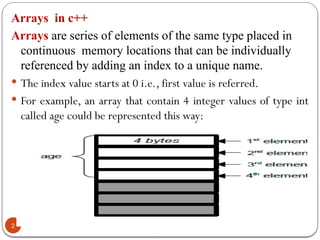
Arraysare series of elements of the same type placed in
continuous memory locations that can be individually
referenced by adding an index to a unique name.
The index value starts at 0 i.e., first value is referred.
For example, an array that contain 4 integer values of type int
called age could be represented this way:
3.
Declaration of arraysin C++:
3
A TYPICAL DECLARATION FOR AN ARRAY IN C++ IS:
Syntax :Data Type array_name[array_size];
where
Data Type is a valid data type in c ++(int, float...),
Array_Name is a valid array identifier and
Array_Size: is enclosed within brackets [], specifies how many of these
elements the array contains.
Example:
int data[5]; // 5 elements all are integers
char ch[10];// 10 elements all are characters
double x[100];// 100 elements all are double
4.
Initializing array inc++.
4
Various types of initializations:
int data[5]={16,2,77,120,9} //The number of elements in the array
that we initialized within curly brackets { } must match with the
array size.
int data[ ]={16,2,77,120,9}; //size of the Array will be
defined by the number of values included between curly
brackets { }.
int data[5]={16,2,77}// the rest of 2 values are 0.
int data[5]={0};// all element will be initialized 0.
5.
5
Arrays can beinitialized, but they cannot be
assigned:
float a[7] = { 22.2,44.4,66.6 };
float b[7] = { 33.3,55.5,77.7 };
b=a; //ERROR: arrays cannot be assigned!
Nor can an array be used to initialize another
array:
float a[7] = { 22.2,44.4,66.6 };
float b[7] = a; // ERROR: arrays cannot
be used as initializers!
6.
Accessing the valuesof an array.
6
Elements of an array are accessed using index.
Syntax: Array name[index];
Index:-is position of each element in an array
Array index is start from 0 To n-1
The first element is the 0th
element!
If you declare an array of n elements, the last element is
number at index n-1.
If you try to access element at index n it is error!
Example:- assume da[5] ={16,2,77,120,9};
da[0] da[1] da[2] da[3] da[4]
16 2 77 120 9
7.
7
To access thefirst element in the given array we can do
it by : da[0];
to assign the value 75 in the third element of da
da[2] = 75; and,
to assign the value of the third element of data to a
variable called a, we could write:
a=data[2];
8.
8
// arrays example
#include<iostream>
using namespace std;
int x[] = {6, 2, 7, 4, 1};
int n, result=0;
int main (){
for ( n=0 ; n<5 ; n++ ){
result += x[n];
}
cout << result;
return 0; }
Output:20
9.
Multidimensional Array
9
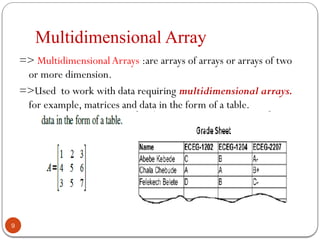
=> MultidimensionalArrays:are arrays of arrays or arrays of two
or more dimension.
=>Used to work with data requiring multidimensional arrays.
for example, matrices and data in the form of a table.
10.
10
Declaration
To declare a2D array, two size specifies are required:
first one is for the number of rows and
second one is for the number of columns.
int a[3][5]; // 2D array
Char x[3][5][9] //3D array
Various Initialization options:
int a[2][3]={{1,5,7},{2,3,6}};
int a[2][3]={0}; all array elements are 0.
int a[2][3]={{1,5},{2}}
11.
11
Accessing the valuesof an array.
To access a certain element indices or subscript corresponding
to each dimension should be supplied.
Each element in a 2D array is accessed with two subscripts: the
first one is for its row and the second for its column.
Example: int score[3][4];
12.
2-D Array Example
12
Example of multidimensional array
#include<iostream.h>
void main(){
int SomeArray[5][2] = {{0,0},{1,2}, {2,4},{3,6}, {4,8}}
for ( int i=0; i<5; i++)
for (int j = 0; j<2;j++)
{
cout<<"SomeArray["<<i<<"]["<<j<<'']: '';
cout<<endl<<SomeArray[i][ j];
}
}
13.
Strings in C++
13
Whatare Strings ?
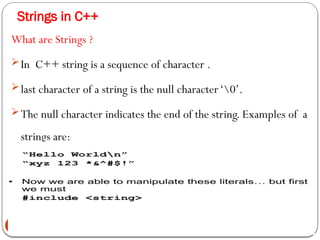
In C++ string is a sequence of character .
last character of a string is the null character‘0’.
The null character indicates the end of the string. Examples of a
strings are:
14.
String declaration
14
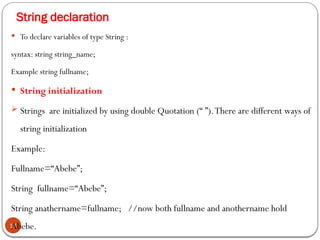
Todeclare variables of type String :
syntax: string string_name;
Example string fullname;
String initialization
Strings are initialized by using double Quotation (“ ”).There are different ways of
string initialization
Example:
Fullname=“Abebe”;
String fullname=“Abebe”;
String anathername=fullname; //now both fullname and anothername hold
Abebe.
16
Any arrayof character can be converted into string type in C++ by
appending the null character at the end of the array sequence.
Example: char name[20];
N.B 1.we need not initialize all the available space (20)
2.the string will terminate by the null character ‘0’
Initialization
char s1[] = "example";
char s2[20] = "another example“
would store the two strings as follows:
s1 |e|x|a|m|p|l|e|0|
s2 |a|n|o|t|h|e|r| |e|x|a|m|p|l|e|0|?|?|?|?|
char my_string[]={‘H’,’e’,’l’,’l’,’o’,’0’} OR char my_string[]=”Hello”;
my_string [0]=’H’; my_string[3]=’l’;
cout<< my_string[2]; cout<<my_string;
cin>> my_string;
17.
17
With cin spacewill not be read.
To read text containing blanks we use a function called cin.get().
Syntax: cin.get(Address to store input, Max length);
Eg. // cin with strings
#include <iostream>
#include <string>
using namespace std;
int main ()
{
char mystr[100];
cout<<"What's your name? ";
cin.get(mystr,100);
cout<<"Hello "<<mystr<< ".n";
cout<<"What is your favorite team? ";
cin.getl(mystr,100);
cout<<"I like "<<mystr<<" too!n";
return 0;
}
18.
String Manipulations functions
18
Stringlength
i) Strlen: returns the length of the string including the spaces without the null character ‘
0’;
Syntax: strlen (Array/string name) ;
#include <iostream>
#include <string>
using namespace std;
int main ()
{
char name[50];
cout<<"EnterYour Name:"" ";
cin>>name;
cout<<"The length ofYour Name is"" "<<strlen(name)<<endl;
return 0;
}
19.
String concatenation
19
ii)strcat: concatenatesor merges two strings
Syntax: strcat(first string, second string);
NB. 1.The first string hold the concatenated string
2.the size of the first string must be large enough to hold both strings.
#include <iostream>
#include <string>
using namespace std;
int main ()
{
char str1[13]="Hello ";
char str2[]="World!";
cout<<"Before: "<<str1<<endl;
cout<<strcat(str1, str2)<<endl;
cout<<"After: "<<str1<<endl;
return 0;
}
20.
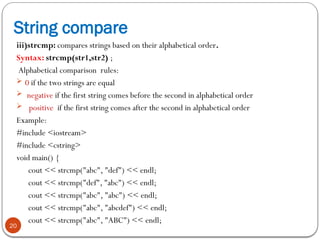
String compare
20
iii)strcmp: comparesstrings based on their alphabetical order.
Syntax: strcmp(str1,str2) ;
Alphabetical comparison rules:
0 if the two strings are equal
negative if the first string comes before the second in alphabetical order
positive if the first string comes after the second in alphabetical order
Example:
#include <iostream>
#include <cstring>
void main() {
cout << strcmp("abc", "def") << endl;
cout << strcmp("def", "abc") << endl;
cout << strcmp("abc", "abc") << endl;
cout << strcmp("abc", "abcdef") << endl;
cout << strcmp("abc", "ABC") << endl;
21.
String copy
21
iv) strcpy:is used to copy the second string to the first.This is because
arrays can't be copied using the assignment operator (=).
Syntax : strcpy(str1,str2);
Example:
char str1[20];
char str2[] = "Second String";
strcpy(str1, str2);
cout<<"str1: "<<str1<<endl;
strcpy(str2, "Another String");
cout<<"str2: "<<str2<<endl;

![Declaration of arrays in C++:
3
A TYPICAL DECLARATION FOR AN ARRAY IN C++ IS:
Syntax :Data Type array_name[array_size];
where
Data Type is a valid data type in c ++(int, float...),
Array_Name is a valid array identifier and
Array_Size: is enclosed within brackets [], specifies how many of these
elements the array contains.
Example:
int data[5]; // 5 elements all are integers
char ch[10];// 10 elements all are characters
double x[100];// 100 elements all are double](https://image.slidesharecdn.com/chapter4arraysstrings-251102192856-9b23ef44/85/Chapter-4-Arrays-Strings-about-pointers-in-programming-3-320.jpg)
![Initializing array in c++.
4
Various types of initializations:
int data[5]={16,2,77,120,9} //The number of elements in the array
that we initialized within curly brackets { } must match with the
array size.
int data[ ]={16,2,77,120,9}; //size of the Array will be
defined by the number of values included between curly
brackets { }.
int data[5]={16,2,77}// the rest of 2 values are 0.
int data[5]={0};// all element will be initialized 0.](https://image.slidesharecdn.com/chapter4arraysstrings-251102192856-9b23ef44/85/Chapter-4-Arrays-Strings-about-pointers-in-programming-4-320.jpg)
![5
Arrays can be initialized, but they cannot be
assigned:
float a[7] = { 22.2,44.4,66.6 };
float b[7] = { 33.3,55.5,77.7 };
b=a; //ERROR: arrays cannot be assigned!
Nor can an array be used to initialize another
array:
float a[7] = { 22.2,44.4,66.6 };
float b[7] = a; // ERROR: arrays cannot
be used as initializers!](https://image.slidesharecdn.com/chapter4arraysstrings-251102192856-9b23ef44/85/Chapter-4-Arrays-Strings-about-pointers-in-programming-5-320.jpg)
![Accessing the values of an array.
6
Elements of an array are accessed using index.
Syntax: Array name[index];
Index:-is position of each element in an array
Array index is start from 0 To n-1
The first element is the 0th
element!
If you declare an array of n elements, the last element is
number at index n-1.
If you try to access element at index n it is error!
Example:- assume da[5] ={16,2,77,120,9};
da[0] da[1] da[2] da[3] da[4]
16 2 77 120 9](https://image.slidesharecdn.com/chapter4arraysstrings-251102192856-9b23ef44/85/Chapter-4-Arrays-Strings-about-pointers-in-programming-6-320.jpg)
![7
To access the first element in the given array we can do
it by : da[0];
to assign the value 75 in the third element of da
da[2] = 75; and,
to assign the value of the third element of data to a
variable called a, we could write:
a=data[2];](https://image.slidesharecdn.com/chapter4arraysstrings-251102192856-9b23ef44/85/Chapter-4-Arrays-Strings-about-pointers-in-programming-7-320.jpg)
![8
// arrays example
#include <iostream>
using namespace std;
int x[] = {6, 2, 7, 4, 1};
int n, result=0;
int main (){
for ( n=0 ; n<5 ; n++ ){
result += x[n];
}
cout << result;
return 0; }
Output:20](https://image.slidesharecdn.com/chapter4arraysstrings-251102192856-9b23ef44/85/Chapter-4-Arrays-Strings-about-pointers-in-programming-8-320.jpg)
![10
Declaration
To declare a 2D array, two size specifies are required:
first one is for the number of rows and
second one is for the number of columns.
int a[3][5]; // 2D array
Char x[3][5][9] //3D array
Various Initialization options:
int a[2][3]={{1,5,7},{2,3,6}};
int a[2][3]={0}; all array elements are 0.
int a[2][3]={{1,5},{2}}](https://image.slidesharecdn.com/chapter4arraysstrings-251102192856-9b23ef44/85/Chapter-4-Arrays-Strings-about-pointers-in-programming-10-320.jpg)
![11
Accessing the values of an array.
To access a certain element indices or subscript corresponding
to each dimension should be supplied.
Each element in a 2D array is accessed with two subscripts: the
first one is for its row and the second for its column.
Example: int score[3][4];](https://image.slidesharecdn.com/chapter4arraysstrings-251102192856-9b23ef44/85/Chapter-4-Arrays-Strings-about-pointers-in-programming-11-320.jpg)
![2-D Array Example
12
Example of multidimensional array
#include<iostream.h>
void main(){
int SomeArray[5][2] = {{0,0},{1,2}, {2,4},{3,6}, {4,8}}
for ( int i=0; i<5; i++)
for (int j = 0; j<2;j++)
{
cout<<"SomeArray["<<i<<"]["<<j<<'']: '';
cout<<endl<<SomeArray[i][ j];
}
}](https://image.slidesharecdn.com/chapter4arraysstrings-251102192856-9b23ef44/85/Chapter-4-Arrays-Strings-about-pointers-in-programming-12-320.jpg)
![16
Any array of character can be converted into string type in C++ by
appending the null character at the end of the array sequence.
Example: char name[20];
N.B 1.we need not initialize all the available space (20)
2.the string will terminate by the null character ‘0’
Initialization
char s1[] = "example";
char s2[20] = "another example“
would store the two strings as follows:
s1 |e|x|a|m|p|l|e|0|
s2 |a|n|o|t|h|e|r| |e|x|a|m|p|l|e|0|?|?|?|?|
char my_string[]={‘H’,’e’,’l’,’l’,’o’,’0’} OR char my_string[]=”Hello”;
my_string [0]=’H’; my_string[3]=’l’;
cout<< my_string[2]; cout<<my_string;
cin>> my_string;](https://image.slidesharecdn.com/chapter4arraysstrings-251102192856-9b23ef44/85/Chapter-4-Arrays-Strings-about-pointers-in-programming-16-320.jpg)
![17
With cin space will not be read.
To read text containing blanks we use a function called cin.get().
Syntax: cin.get(Address to store input, Max length);
Eg. // cin with strings
#include <iostream>
#include <string>
using namespace std;
int main ()
{
char mystr[100];
cout<<"What's your name? ";
cin.get(mystr,100);
cout<<"Hello "<<mystr<< ".n";
cout<<"What is your favorite team? ";
cin.getl(mystr,100);
cout<<"I like "<<mystr<<" too!n";
return 0;
}](https://image.slidesharecdn.com/chapter4arraysstrings-251102192856-9b23ef44/85/Chapter-4-Arrays-Strings-about-pointers-in-programming-17-320.jpg)
![String Manipulations functions
18
String length
i) Strlen: returns the length of the string including the spaces without the null character ‘
0’;
Syntax: strlen (Array/string name) ;
#include <iostream>
#include <string>
using namespace std;
int main ()
{
char name[50];
cout<<"EnterYour Name:"" ";
cin>>name;
cout<<"The length ofYour Name is"" "<<strlen(name)<<endl;
return 0;
}](https://image.slidesharecdn.com/chapter4arraysstrings-251102192856-9b23ef44/85/Chapter-4-Arrays-Strings-about-pointers-in-programming-18-320.jpg)
![String concatenation
19
ii)strcat: concatenates or merges two strings
Syntax: strcat(first string, second string);
NB. 1.The first string hold the concatenated string
2.the size of the first string must be large enough to hold both strings.
#include <iostream>
#include <string>
using namespace std;
int main ()
{
char str1[13]="Hello ";
char str2[]="World!";
cout<<"Before: "<<str1<<endl;
cout<<strcat(str1, str2)<<endl;
cout<<"After: "<<str1<<endl;
return 0;
}](https://image.slidesharecdn.com/chapter4arraysstrings-251102192856-9b23ef44/85/Chapter-4-Arrays-Strings-about-pointers-in-programming-19-320.jpg)
![String copy
21
iv) strcpy: is used to copy the second string to the first.This is because
arrays can't be copied using the assignment operator (=).
Syntax : strcpy(str1,str2);
Example:
char str1[20];
char str2[] = "Second String";
strcpy(str1, str2);
cout<<"str1: "<<str1<<endl;
strcpy(str2, "Another String");
cout<<"str2: "<<str2<<endl;](https://image.slidesharecdn.com/chapter4arraysstrings-251102192856-9b23ef44/85/Chapter-4-Arrays-Strings-about-pointers-in-programming-21-320.jpg)