1
Chapter 1
STARTING WITH MATLAB
2
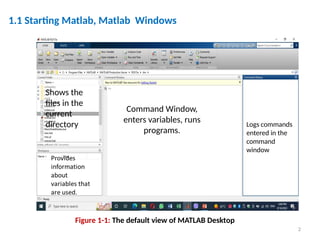
Command Window,
enters variables, runs
programs.
Logs commands
entered in the
command
window
Shows the
files in the
current
directory
1.1 Starting Matlab, Matlab Windows
Figure 1-1: The default view of MATLAB Desktop
3
1.1 Starting Matlab, Matlab Windows
Figure 1-2: Controlling MATLAB Windows
4
|
1.2 Working In The Command Window
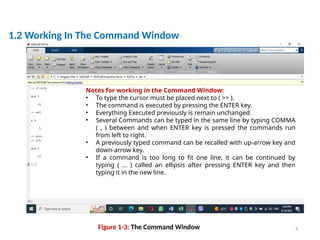
Figure 1-3: The Command Window
Notes for working in the Command Window:
• To type the cursor must be placed next to ( >> ).
• The command is executed by pressing the ENTER key.
• Everything Executed previously is remain unchanged.
• Several Commands can be typed in the same line by typing COMMA
( , ) between and when ENTER key is pressed the commands run
from left to right.
• A previously typed command can be recalled with up-arrow key and
down-arrow key.
• If a command is too long to fit one line, it can be continued by
typing ( … ) called an ellipsis after pressing ENTER key and then
typing it in the new line.
5
1.3 Defining Scalar Variables
Predefined Keywords and Variables
There are 20 words, called keywords, that are reserved by MATLAB for various
purposes and cannot be used as variable names. These words are:
break case catch classdef continue else elseif end
for function global if otherwise parfor
persistent return spmd switch try while.
The keywords can be displayed by typing the command iskeyword.
>> break=71;
??? break=71;
|
Error: The expression to the left of the equals sign is not a valid target
for an assignment.
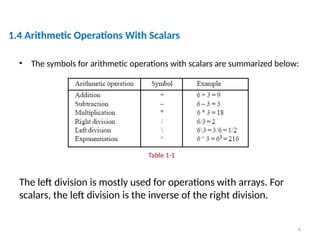
• The symbols for arithmetic operations with scalars are summarized below:
The left division is mostly used for operations with arrays. For
scalars, the left division is the inverse of the right division.
6
1.4 Arithmetic Operations With Scalars
Table 1-1
7
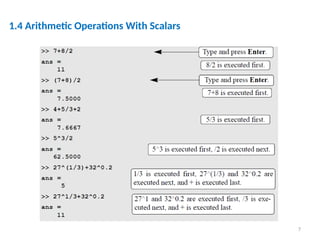
1.4 Arithmetic Operations With Scalars
8
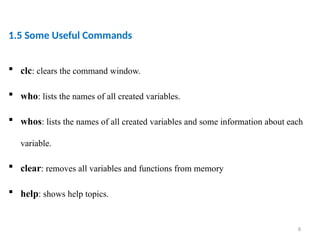
1.5 Some Useful Commands
 clc: clears the command window.
 who: lists the names of all created variables.
 whos: lists the names of all created variables and some information about each
variable.
 clear: removes all variables and functions from memory
 help: shows help topics.
9
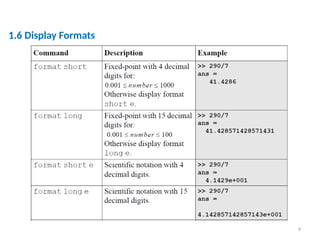
1.6 Display Formats
10
CHAPTER
ONE
1.6 Elementary Math Built-in Functions
11
1.6 Elementary Math Built-in Functions
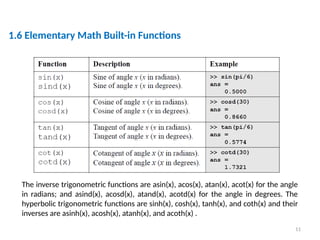
The inverse trigonometric functions are asin(x), acos(x), atan(x), acot(x) for the angle
in radians; and asind(x), acosd(x), atand(x), acotd(x) for the angle in degrees. The
hyperbolic trigonometric functions are sinh(x), cosh(x), tanh(x), and coth(x) and their
inverses are asinh(x), acosh(x), atanh(x), and acoth(x) .
12
CHAPTER
ONE
1.6 ELEMENTARY MATH BUILT-IN FUNCTIONS
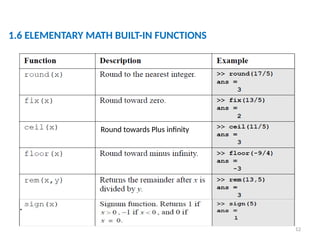
Round towards Plus infinity
13
CHAPTER
ONE
1.6 Elementary Math Built-in Functions
14
Example
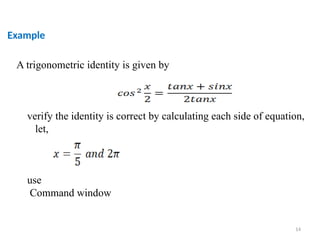
A trigonometric identity is given by
verify the identity is correct by calculating each side of equation,
let,
use
Command window

Chapter 1 Starting With MATLAB matlab.pptx

  • 1.
  • 2.
    2 Command Window, enters variables,runs programs. Logs commands entered in the command window Shows the files in the current directory 1.1 Starting Matlab, Matlab Windows Figure 1-1: The default view of MATLAB Desktop
  • 3.
    3 1.1 Starting Matlab,Matlab Windows Figure 1-2: Controlling MATLAB Windows
  • 4.
    4 | 1.2 Working InThe Command Window Figure 1-3: The Command Window Notes for working in the Command Window: • To type the cursor must be placed next to ( >> ). • The command is executed by pressing the ENTER key. • Everything Executed previously is remain unchanged. • Several Commands can be typed in the same line by typing COMMA ( , ) between and when ENTER key is pressed the commands run from left to right. • A previously typed command can be recalled with up-arrow key and down-arrow key. • If a command is too long to fit one line, it can be continued by typing ( … ) called an ellipsis after pressing ENTER key and then typing it in the new line.
  • 5.
    5 1.3 Defining ScalarVariables Predefined Keywords and Variables There are 20 words, called keywords, that are reserved by MATLAB for various purposes and cannot be used as variable names. These words are: break case catch classdef continue else elseif end for function global if otherwise parfor persistent return spmd switch try while. The keywords can be displayed by typing the command iskeyword. >> break=71; ??? break=71; | Error: The expression to the left of the equals sign is not a valid target for an assignment.
  • 6.
    • The symbolsfor arithmetic operations with scalars are summarized below: The left division is mostly used for operations with arrays. For scalars, the left division is the inverse of the right division. 6 1.4 Arithmetic Operations With Scalars Table 1-1
  • 7.
  • 8.
    8 1.5 Some UsefulCommands  clc: clears the command window.  who: lists the names of all created variables.  whos: lists the names of all created variables and some information about each variable.  clear: removes all variables and functions from memory  help: shows help topics.
  • 9.
  • 10.
  • 11.
    11 1.6 Elementary MathBuilt-in Functions The inverse trigonometric functions are asin(x), acos(x), atan(x), acot(x) for the angle in radians; and asind(x), acosd(x), atand(x), acotd(x) for the angle in degrees. The hyperbolic trigonometric functions are sinh(x), cosh(x), tanh(x), and coth(x) and their inverses are asinh(x), acosh(x), atanh(x), and acoth(x) .
  • 12.
    12 CHAPTER ONE 1.6 ELEMENTARY MATHBUILT-IN FUNCTIONS Round towards Plus infinity
  • 13.
  • 14.
    14 Example A trigonometric identityis given by verify the identity is correct by calculating each side of equation, let, use Command window