Fundamentals of (Java) 
Programming 
Khirulnizam Abd Rahman 
0129034614 (WhatsApp/SMS) 
Khirulnizam@gmail.com 
KERUL.net
About Khirulnizam 
 Lecturer of Computer Science, Faculty of Information 
Science and Technology, Selangor International Islamic 
University College (KUIS) – since 2000. 
 Codes in blog.kerul.net 
 Programming background: C, Java, PHP. 
 Apps in Google Play 
 M-Mathurat – 200K ( bit.ly/m-mathurat ) 
 Peribahasa Dictionary – 20K ( bit.ly/pbahasa) 
 mDictionary – open-sourced ( bit.ly/m-dictionary ) 
 Hijrah Rasul – bit.ly/hijrah-rasul 
 SmartSolat – bit.ly/smartsolat 
 Apps in Windows Store 
 Hijrah Rasul – bit.ly/hijrah-en 
 Peribahasa Dictionary 
2 http://blog.kerul.net 28/11/2014
Course Synopsis 
This course is the continuation of the previous course 
(Algorithm and Problem Solving). It introduces 
complex flow control, method, array, class design, file 
and file I/O. 
Objectives: At the end of this course, students 
should be able to; 
 write and apply complex control structure. 
 create and invoke methods in programs. 
 declare, create and apply arrays and classes. 
 retrieve from and write data into another file. 
Java Programming: From Problem Analysis to 
3 Program Design, 3e
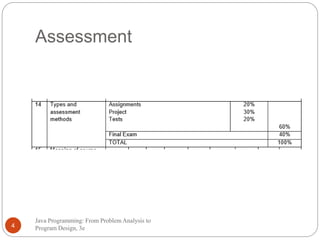
Assessment 
Java Programming: From Problem Analysis to 
4 Program Design, 3e
Main Text 
 Liang Y. Daniel. Introduction to Java 
Programming, Eight Edition, 2011, Pearson 
 F. Joyce. Java Programming, 6th Edition, 2011, 
Course Technology 
 Tool: JDK & Eclipse Java IDE 
Java Programming: From Problem Analysis to 
5 Program Design, 3e
Control Structure I
Control Structures 
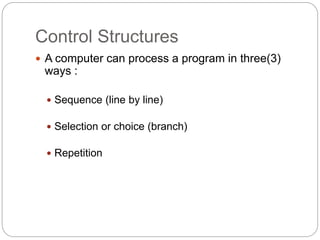
 A computer can process a program in three(3) 
ways : 
 Sequence (line by line) 
 Selection or choice (branch) 
 Repetition
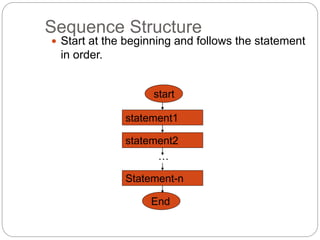
Sequence Structure 
 Start at the beginning and follows the statement 
in order. 
start 
statement1 
statement2 
… 
Statement-n 
End
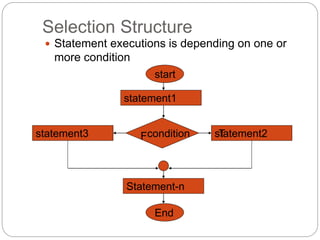
Selection Structure 
 Statement executions is depending on one or 
more condition 
start 
statement1 
statement3 Fcondition T 
statement2 
Statement-n 
End
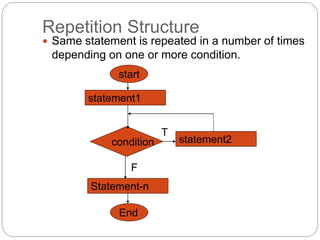
Repetition Structure 
 Same statement is repeated in a number of times 
depending on one or more condition. 
start 
statement1 
statement2 
condition 
Statement-n 
End 
T 
F
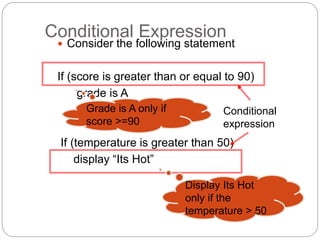
Conditional Expression 
 Consider the following statement 
If (score is greater than or equal to 90) 
grade is A 
If (temperature is greater than 50) 
display “Its Hot” 
Conditional 
expression 
Grade is A only if 
score >=90 
Display Its Hot 
only if the 
temperature > 50
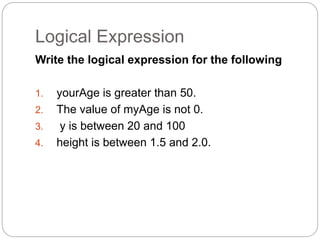
Logical Expression 
Write the logical expression for the following 
1. yourAge is greater than 50. 
2. The value of myAge is not 0. 
3. y is between 20 and 100 
4. height is between 1.5 and 2.0.
Logical Expression 
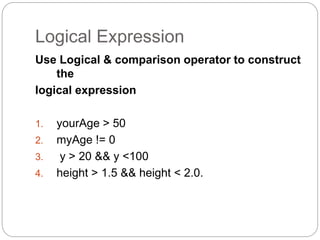
Use Logical & comparison operator to construct 
the 
logical expression 
1. yourAge > 50 
2. myAge != 0 
3. y > 20 && y <100 
4. height > 1.5 && height < 2.0.
Logical Expression 
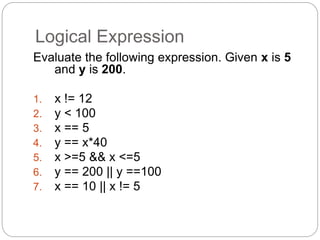
Evaluate the following expression. Given x is 5 
and y is 200. 
1. x != 12 
2. y < 100 
3. x == 5 
4. y == x*40 
5. x >=5 && x <=5 
6. y == 200 || y ==100 
7. x == 10 || x != 5
Logical Expression 
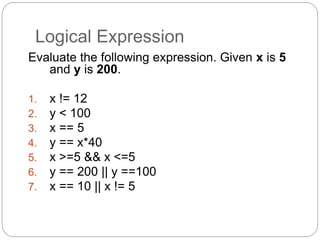
Evaluate the following expression. Given x is 5 
and y is 200. 
1. x != 12 
2. y < 100 
3. x == 5 
4. y == x*40 
5. x >=5 && x <=5 
6. y == 200 || y ==100 
7. x == 10 || x != 5
Selection Structure 
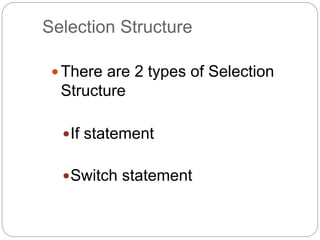
 There are 2 types of Selection 
Structure 
If statement 
Switch statement
Selection Structure – If Statement 
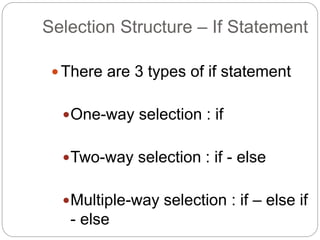
 There are 3 types of if statement 
One-way selection : if 
Two-way selection : if - else 
Multiple-way selection : if – else if 
- else
If Statement : One-Way IF 
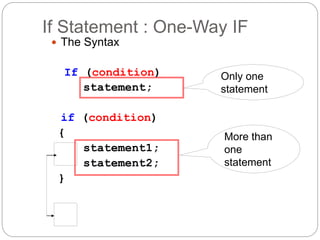
 The Syntax 
If (condition) 
statement; 
if (condition) 
{ 
statement1; 
statement2; 
} 
Only one 
statement 
More than 
one 
statement
If Statement : One-Way If 
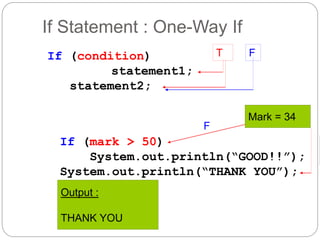
If (condition) 
statement1; 
statement2; 
T F 
If (mark > 50) 
F 
System.out.println(“GOOD!!”); 
System.out.println(“THANK YOU”); 
Output : 
THANK YOU 
Mark = 34
If Statement : One-Way If 
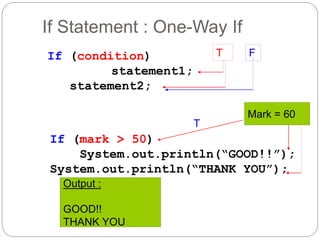
If (condition) 
statement1; 
statement2; 
T F 
If (mark > 50) 
Mark = 60 
T 
System.out.println(“GOOD!!”); 
System.out.println(“THANK YOU”); 
Output : 
GOOD!! 
THANK YOU
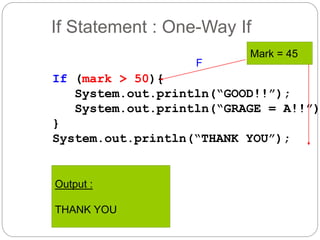
If Statement : One-Way If 
If (mark > 50){ 
Mark = 45 
F 
System.out.println(“GOOD!!”); 
System.out.println(“GRAGE = A!!”); 
} 
System.out.println(“THANK YOU”); 
Output : 
THANK YOU
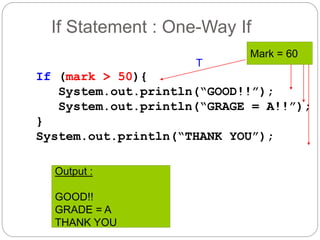
If Statement : One-Way If 
If (mark > 50){ 
Mark = 60 
T 
System.out.println(“GOOD!!”); 
System.out.println(“GRAGE = A!!”); 
} 
System.out.println(“THANK YOU”); 
Output : 
GOOD!! 
GRADE = A 
THANK YOU
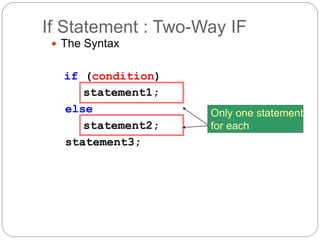
If Statement : Two-Way IF 
 The Syntax 
if (condition) 
statement1; 
else 
statement2; 
statement3; 
Only one statement 
for each
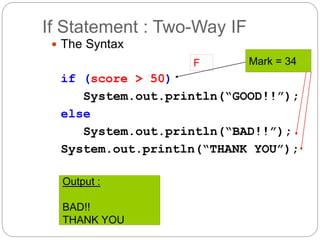
If Statement : Two-Way IF 
 The Syntax 
if (score > 50) 
F Mark = 34 
System.out.println(“GOOD!!”); 
else 
System.out.println(“BAD!!”); 
System.out.println(“THANK YOU”); 
Output : 
BAD!! 
THANK YOU
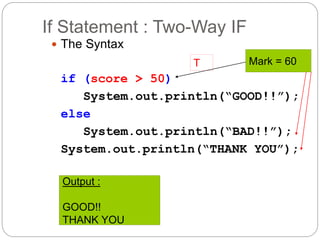
If Statement : Two-Way IF 
 The Syntax 
if (score > 50) 
T Mark = 60 
System.out.println(“GOOD!!”); 
else 
System.out.println(“BAD!!”); 
System.out.println(“THANK YOU”); 
Output : 
GOOD!! 
THANK YOU
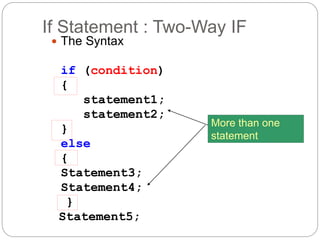
If Statement : Two-Way IF 
 The Syntax 
if (condition) 
{ 
statement1; 
statement2; 
} 
else 
{ 
Statement3; 
Statement4; 
} 
Statement5; 
More than one 
statement
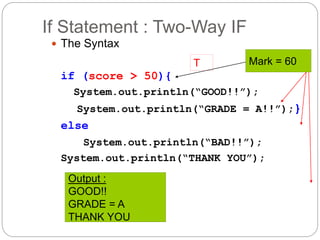
If Statement : Two-Way IF 
 The Syntax 
if (score > 50){ 
T Mark = 60 
System.out.println(“GOOD!!”); 
System.out.println(“GRADE = A!!”);} 
else 
System.out.println(“BAD!!”); 
System.out.println(“THANK YOU”); 
Output : 
GOOD!! 
GRADE = A 
THANK YOU
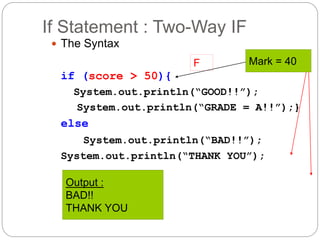
If Statement : Two-Way IF 
 The Syntax 
if (score > 50){ 
F Mark = 40 
System.out.println(“GOOD!!”); 
System.out.println(“GRADE = A!!”);} 
else 
System.out.println(“BAD!!”); 
System.out.println(“THANK YOU”); 
Output : 
BAD!! 
THANK YOU
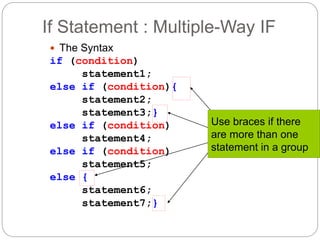
If Statement : Multiple-Way IF 
 The Syntax 
if (condition) 
statement1; 
else if (condition){ 
statement2; 
statement3;} 
else if (condition) 
statement4; 
else if (condition) 
statement5; 
else { 
statement6; 
statement7;} 
Use braces if there 
are more than one 
statement in a group
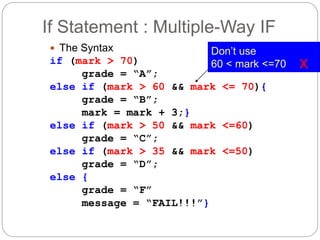
If Statement : Multiple-Way IF 
 The Syntax 
if (mark > 70) 
grade = “A”; 
else if (mark > 60 && mark <= 70){ 
grade = “B”; 
mark = mark + 3;} 
else if (mark > 50 && mark <=60) 
grade = “C”; 
else if (mark > 35 && mark <=50) 
grade = “D”; 
else { 
grade = “F” 
message = “FAIL!!!”} 
Don’t use 
60 < mark <=70 x
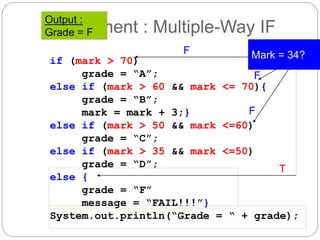
Output : 
Grade = F 
If Statement : Multiple-Way IF 
if (mark > 70) 
grade = “A”; 
F Mark = 34? 
F 
else if (mark > 60 && mark <= 70){ 
grade = “B”; 
mark = mark + 3;} 
F 
else if (mark > 50 && mark <=60) 
grade = “C”; 
else if (mark > 35 && mark <=50) 
grade = “D”; 
else { 
grade = “F” 
message = “FAIL!!!”} 
T 
System.out.println(“Grade = “ + grade);
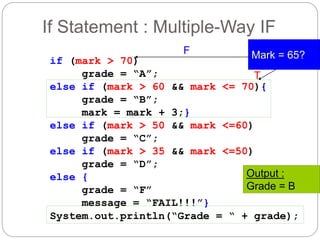
If Statement : Multiple-Way IF 
if (mark > 70) 
grade = “A”; 
F Mark = 65? 
T 
else if (mark > 60 && mark <= 70){ 
grade = “B”; 
mark = mark + 3;} 
else if (mark > 50 && mark <=60) 
grade = “C”; 
else if (mark > 35 && mark <=50) 
grade = “D”; 
else { 
grade = “F” 
message = “FAIL!!!”} 
Output : 
Grade = B 
System.out.println(“Grade = “ + grade);
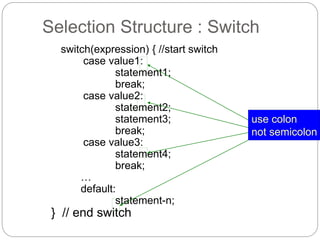
Selection Structure : Switch 
switch(expression) { //start switch 
case value1: 
statement1; 
break; 
case value2: 
statement2; 
statement3; 
break; 
case value3: 
statement4; 
break; 
… 
default: 
statement-n; 
} // end switch 
use colon 
not semicolon
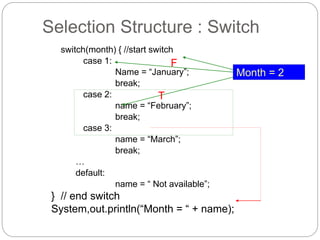
Selection Structure : Switch 
switch(month) { //start switch 
case 1: 
Name = “January”; 
break; 
case 2: 
name = “February”; 
break; 
case 3: 
name = “March”; 
break; 
… 
default: 
name = “ Not available”; 
} // end switch 
System,out.println(“Month = “ + name); 
Month = 2 
F 
T
C1 - COMPLEX FLOW 
CONTROL 
FUNDAMENTALS OF PROGRAMMING 
DTCP 2023
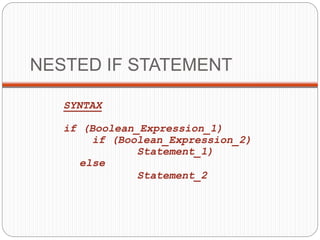
NESTED IF STATEMENT 
SYNTAX 
if (Boolean_Expression_1) 
if (Boolean_Expression_2) 
Statement_1) 
else 
Statement_2
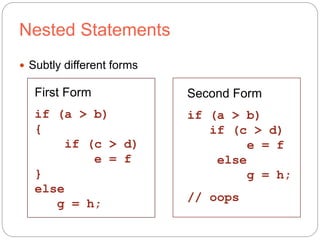
Nested Statements 
 Subtly different forms 
First Form 
if (a > b) 
{ 
if (c > d) 
e = f 
} 
else 
g = h; 
Second Form 
if (a > b) 
if (c > d) 
e = f 
else 
g = h; 
// oops
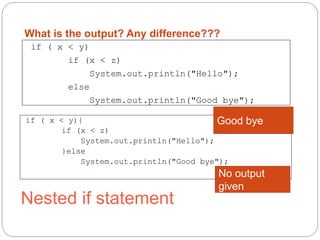
What is the output? Any difference??? 
if ( x < y) 
if (x < z) 
System.out.println("Hello"); 
else 
System.out.println("Good bye"); 
if ( x < y){ 
if (x < z) 
System.out.println("Hello"); 
}else 
Good bye 
System.out.println("Good bye"); 
Nested if statement 
No output 
given
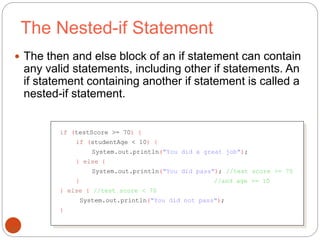
The Nested-if Statement 
 The then and else block of an if statement can contain 
any valid statements, including other if statements. An 
if statement containing another if statement is called a 
nested-if statement. 
39 
if (testScore >= 70) { 
if (studentAge < 10) { 
System.out.println("You did a great job"); 
} else { 
System.out.println("You did pass"); //test score >= 70 
} //and age >= 10 
} else { //test score < 70 
System.out.println("You did not pass"); 
}
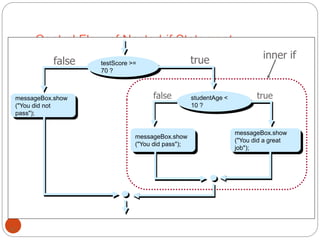
Control Flow of Nested-if Statement 
messageBox.show 
("You did not 
pass"); 
40 
false 
inner if 
false 
testScore >= 
70 ? 
messageBox.show 
("You did pass"); 
true 
studentAge < 
10 ? 
true 
messageBox.show 
("You did a great 
job");
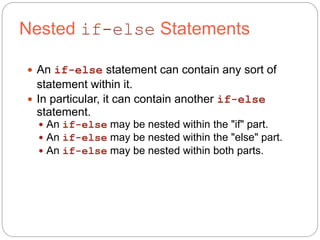
Nested if-else Statements 
 An if-else statement can contain any sort of 
statement within it. 
 In particular, it can contain another if-else 
statement. 
 An if-else may be nested within the "if" part. 
 An if-else may be nested within the "else" part. 
 An if-else may be nested within both parts.
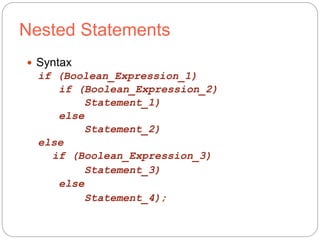
Nested Statements 
 Syntax 
if (Boolean_Expression_1) 
if (Boolean_Expression_2) 
Statement_1) 
else 
Statement_2) 
else 
if (Boolean_Expression_3) 
Statement_3) 
else 
Statement_4);
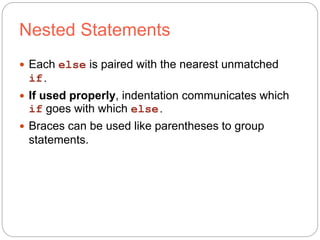
Nested Statements 
 Each else is paired with the nearest unmatched 
if. 
 If used properly, indentation communicates which 
if goes with which else. 
 Braces can be used like parentheses to group 
statements.
TRACE THE OUTPUT 
public class test{ 
public static void main(String[] args){ 
int a=4; 
for (int i=1; i<a;i++ ){ 
for (int j=1; j<=i;j++ ){ 
System.out.print("*"); 
} 
System.out.println(""); 
} 
} 
* 
** 
***
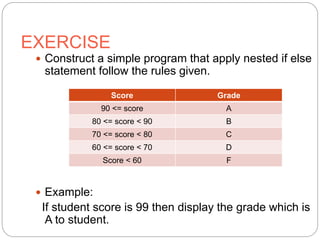
EXERCISE 
 Construct a simple program that apply nested if else 
statement follow the rules given. 
Score Grade 
90 <= score A 
80 <= score < 90 B 
70 <= score < 80 C 
60 <= score < 70 D 
Score < 60 F 
 Example: 
If student score is 99 then display the grade which is 
A to student.
46 
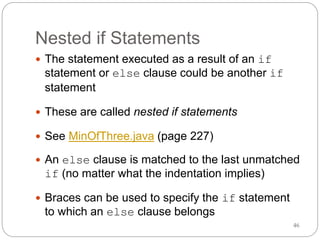
Nested if Statements 
 The statement executed as a result of an if 
statement or else clause could be another if 
statement 
 These are called nested if statements 
 See MinOfThree.java (page 227) 
 An else clause is matched to the last unmatched 
if (no matter what the indentation implies) 
 Braces can be used to specify the if statement 
to which an else clause belongs
Nested Control Structures 
 for loops can be found within other for loops 
47
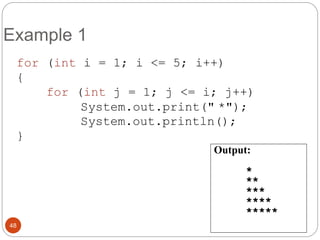
Example 1 
for (int i = 1; i <= 5; i++) 
{ 
for (int j = 1; j <= i; j++) 
System.out.print(" *"); 
System.out.println(); 
} 
48 
Output: 
* 
** 
*** 
**** 
*****
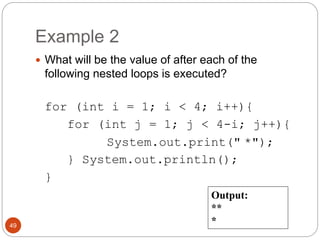
Example 2 
 What will be the value of after each of the 
following nested loops is executed? 
for (int i = 1; i < 4; i++){ 
for (int j = 1; j < 4-i; j++){ 
System.out.print(" *"); 
} System.out.println(); 
} 
49 
Output: 
** 
*
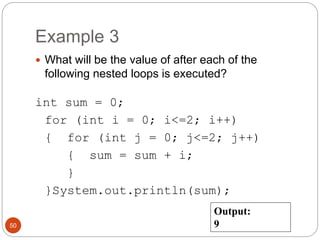
Example 3 
 What will be the value of after each of the 
following nested loops is executed? 
int sum = 0; 
for (int i = 0; i<=2; i++) 
{ for (int j = 0; j<=2; j++) 
{ sum = sum + i; 
} 
}System.out.println(sum); 
50 
Output: 
9
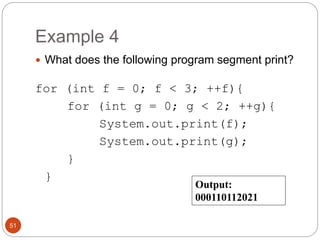
Example 4 
 What does the following program segment print? 
for (int f = 0; f < 3; ++f){ 
for (int g = 0; g < 2; ++g){ 
System.out.print(f); 
System.out.print(g); 
} 
} 
51 
Output: 
000110112021
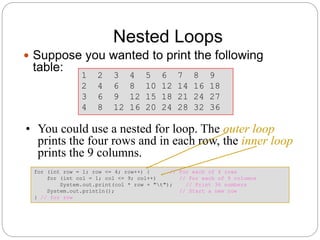
Nested Loops 
 Suppose you wanted to print the following 
table: 
for (int row = 1; row <= 4; row++) { // For each of 4 rows 
for (int col = 1; col <= 9; col++) // For each of 9 columns 
System.out.print(col * row + "t"); // Print 36 numbers 
System.out.println(); // Start a new row 
} // for row 
1 2 3 4 5 6 7 8 9 
2 4 6 8 10 12 14 16 18 
3 6 9 12 15 18 21 24 27 
4 8 12 16 20 24 28 32 36 
• You could use a nested for loop. The outer loop 
prints the four rows and in each row, the inner loop 
prints the 9 columns.
Nested Loops (cont.) 
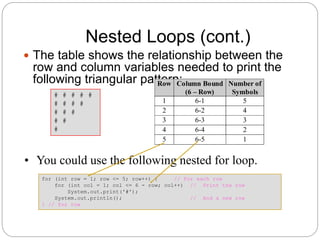
 The table shows the relationship between the 
row and column variables needed to print the 
following triangular pattern: 
# # # # # 
# # # # 
# # # 
# # 
# 
• You could use the following nested for loop. 
for (int row = 1; row <= 5; row++) { // For each row 
for (int col = 1; col <= 6 - row; col++) // Print the row 
System.out.print('#'); 
System.out.println(); // And a new row 
} // for row 
Row Column Bound 
(6 – Row) 
Number of 
Symbols 
1 6-1 5 
2 6-2 4 
3 6-3 3 
4 6-4 2 
5 6-5 1
54 
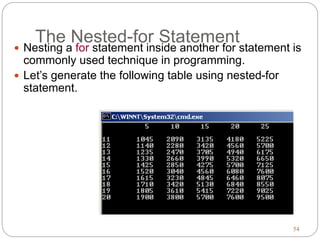
The Nested-for Statement 
 Nesting a for statement inside another for statement is 
commonly used technique in programming. 
 Let’s generate the following table using nested-for 
statement.
55 
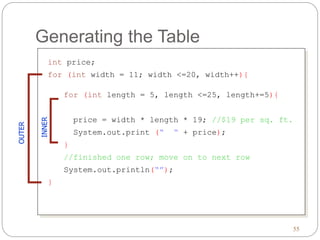
Generating the Table 
int price; 
for (int width = 11; width <=20, width++){ 
for (int length = 5, length <=25, length+=5){ 
price = width * length * 19; //$19 per sq. ft. 
System.out.print (“ “ + price); 
} 
//finished one row; move on to next row 
System.out.println(“”); 
INNER 
} 
OUTER

Chapter 1 nested control structures

  • 1.
    Fundamentals of (Java) Programming Khirulnizam Abd Rahman 0129034614 (WhatsApp/SMS) Khirulnizam@gmail.com KERUL.net
  • 2.
    About Khirulnizam Lecturer of Computer Science, Faculty of Information Science and Technology, Selangor International Islamic University College (KUIS) – since 2000.  Codes in blog.kerul.net  Programming background: C, Java, PHP.  Apps in Google Play  M-Mathurat – 200K ( bit.ly/m-mathurat )  Peribahasa Dictionary – 20K ( bit.ly/pbahasa)  mDictionary – open-sourced ( bit.ly/m-dictionary )  Hijrah Rasul – bit.ly/hijrah-rasul  SmartSolat – bit.ly/smartsolat  Apps in Windows Store  Hijrah Rasul – bit.ly/hijrah-en  Peribahasa Dictionary 2 http://blog.kerul.net 28/11/2014
  • 3.
    Course Synopsis Thiscourse is the continuation of the previous course (Algorithm and Problem Solving). It introduces complex flow control, method, array, class design, file and file I/O. Objectives: At the end of this course, students should be able to;  write and apply complex control structure.  create and invoke methods in programs.  declare, create and apply arrays and classes.  retrieve from and write data into another file. Java Programming: From Problem Analysis to 3 Program Design, 3e
  • 4.
    Assessment Java Programming:From Problem Analysis to 4 Program Design, 3e
  • 5.
    Main Text Liang Y. Daniel. Introduction to Java Programming, Eight Edition, 2011, Pearson  F. Joyce. Java Programming, 6th Edition, 2011, Course Technology  Tool: JDK & Eclipse Java IDE Java Programming: From Problem Analysis to 5 Program Design, 3e
  • 6.
  • 7.
    Control Structures A computer can process a program in three(3) ways :  Sequence (line by line)  Selection or choice (branch)  Repetition
  • 8.
    Sequence Structure Start at the beginning and follows the statement in order. start statement1 statement2 … Statement-n End
  • 9.
    Selection Structure Statement executions is depending on one or more condition start statement1 statement3 Fcondition T statement2 Statement-n End
  • 10.
    Repetition Structure Same statement is repeated in a number of times depending on one or more condition. start statement1 statement2 condition Statement-n End T F
  • 11.
    Conditional Expression Consider the following statement If (score is greater than or equal to 90) grade is A If (temperature is greater than 50) display “Its Hot” Conditional expression Grade is A only if score >=90 Display Its Hot only if the temperature > 50
  • 12.
    Logical Expression Writethe logical expression for the following 1. yourAge is greater than 50. 2. The value of myAge is not 0. 3. y is between 20 and 100 4. height is between 1.5 and 2.0.
  • 13.
    Logical Expression UseLogical & comparison operator to construct the logical expression 1. yourAge > 50 2. myAge != 0 3. y > 20 && y <100 4. height > 1.5 && height < 2.0.
  • 14.
    Logical Expression Evaluatethe following expression. Given x is 5 and y is 200. 1. x != 12 2. y < 100 3. x == 5 4. y == x*40 5. x >=5 && x <=5 6. y == 200 || y ==100 7. x == 10 || x != 5
  • 15.
    Logical Expression Evaluatethe following expression. Given x is 5 and y is 200. 1. x != 12 2. y < 100 3. x == 5 4. y == x*40 5. x >=5 && x <=5 6. y == 200 || y ==100 7. x == 10 || x != 5
  • 16.
    Selection Structure There are 2 types of Selection Structure If statement Switch statement
  • 17.
    Selection Structure –If Statement  There are 3 types of if statement One-way selection : if Two-way selection : if - else Multiple-way selection : if – else if - else
  • 18.
    If Statement :One-Way IF  The Syntax If (condition) statement; if (condition) { statement1; statement2; } Only one statement More than one statement
  • 19.
    If Statement :One-Way If If (condition) statement1; statement2; T F If (mark > 50) F System.out.println(“GOOD!!”); System.out.println(“THANK YOU”); Output : THANK YOU Mark = 34
  • 20.
    If Statement :One-Way If If (condition) statement1; statement2; T F If (mark > 50) Mark = 60 T System.out.println(“GOOD!!”); System.out.println(“THANK YOU”); Output : GOOD!! THANK YOU
  • 21.
    If Statement :One-Way If If (mark > 50){ Mark = 45 F System.out.println(“GOOD!!”); System.out.println(“GRAGE = A!!”); } System.out.println(“THANK YOU”); Output : THANK YOU
  • 22.
    If Statement :One-Way If If (mark > 50){ Mark = 60 T System.out.println(“GOOD!!”); System.out.println(“GRAGE = A!!”); } System.out.println(“THANK YOU”); Output : GOOD!! GRADE = A THANK YOU
  • 23.
    If Statement :Two-Way IF  The Syntax if (condition) statement1; else statement2; statement3; Only one statement for each
  • 24.
    If Statement :Two-Way IF  The Syntax if (score > 50) F Mark = 34 System.out.println(“GOOD!!”); else System.out.println(“BAD!!”); System.out.println(“THANK YOU”); Output : BAD!! THANK YOU
  • 25.
    If Statement :Two-Way IF  The Syntax if (score > 50) T Mark = 60 System.out.println(“GOOD!!”); else System.out.println(“BAD!!”); System.out.println(“THANK YOU”); Output : GOOD!! THANK YOU
  • 26.
    If Statement :Two-Way IF  The Syntax if (condition) { statement1; statement2; } else { Statement3; Statement4; } Statement5; More than one statement
  • 27.
    If Statement :Two-Way IF  The Syntax if (score > 50){ T Mark = 60 System.out.println(“GOOD!!”); System.out.println(“GRADE = A!!”);} else System.out.println(“BAD!!”); System.out.println(“THANK YOU”); Output : GOOD!! GRADE = A THANK YOU
  • 28.
    If Statement :Two-Way IF  The Syntax if (score > 50){ F Mark = 40 System.out.println(“GOOD!!”); System.out.println(“GRADE = A!!”);} else System.out.println(“BAD!!”); System.out.println(“THANK YOU”); Output : BAD!! THANK YOU
  • 29.
    If Statement :Multiple-Way IF  The Syntax if (condition) statement1; else if (condition){ statement2; statement3;} else if (condition) statement4; else if (condition) statement5; else { statement6; statement7;} Use braces if there are more than one statement in a group
  • 30.
    If Statement :Multiple-Way IF  The Syntax if (mark > 70) grade = “A”; else if (mark > 60 && mark <= 70){ grade = “B”; mark = mark + 3;} else if (mark > 50 && mark <=60) grade = “C”; else if (mark > 35 && mark <=50) grade = “D”; else { grade = “F” message = “FAIL!!!”} Don’t use 60 < mark <=70 x
  • 31.
    Output : Grade= F If Statement : Multiple-Way IF if (mark > 70) grade = “A”; F Mark = 34? F else if (mark > 60 && mark <= 70){ grade = “B”; mark = mark + 3;} F else if (mark > 50 && mark <=60) grade = “C”; else if (mark > 35 && mark <=50) grade = “D”; else { grade = “F” message = “FAIL!!!”} T System.out.println(“Grade = “ + grade);
  • 32.
    If Statement :Multiple-Way IF if (mark > 70) grade = “A”; F Mark = 65? T else if (mark > 60 && mark <= 70){ grade = “B”; mark = mark + 3;} else if (mark > 50 && mark <=60) grade = “C”; else if (mark > 35 && mark <=50) grade = “D”; else { grade = “F” message = “FAIL!!!”} Output : Grade = B System.out.println(“Grade = “ + grade);
  • 33.
    Selection Structure :Switch switch(expression) { //start switch case value1: statement1; break; case value2: statement2; statement3; break; case value3: statement4; break; … default: statement-n; } // end switch use colon not semicolon
  • 34.
    Selection Structure :Switch switch(month) { //start switch case 1: Name = “January”; break; case 2: name = “February”; break; case 3: name = “March”; break; … default: name = “ Not available”; } // end switch System,out.println(“Month = “ + name); Month = 2 F T
  • 35.
    C1 - COMPLEXFLOW CONTROL FUNDAMENTALS OF PROGRAMMING DTCP 2023
  • 36.
    NESTED IF STATEMENT SYNTAX if (Boolean_Expression_1) if (Boolean_Expression_2) Statement_1) else Statement_2
  • 37.
    Nested Statements Subtly different forms First Form if (a > b) { if (c > d) e = f } else g = h; Second Form if (a > b) if (c > d) e = f else g = h; // oops
  • 38.
    What is theoutput? Any difference??? if ( x < y) if (x < z) System.out.println("Hello"); else System.out.println("Good bye"); if ( x < y){ if (x < z) System.out.println("Hello"); }else Good bye System.out.println("Good bye"); Nested if statement No output given
  • 39.
    The Nested-if Statement  The then and else block of an if statement can contain any valid statements, including other if statements. An if statement containing another if statement is called a nested-if statement. 39 if (testScore >= 70) { if (studentAge < 10) { System.out.println("You did a great job"); } else { System.out.println("You did pass"); //test score >= 70 } //and age >= 10 } else { //test score < 70 System.out.println("You did not pass"); }
  • 40.
    Control Flow ofNested-if Statement messageBox.show ("You did not pass"); 40 false inner if false testScore >= 70 ? messageBox.show ("You did pass"); true studentAge < 10 ? true messageBox.show ("You did a great job");
  • 41.
    Nested if-else Statements  An if-else statement can contain any sort of statement within it.  In particular, it can contain another if-else statement.  An if-else may be nested within the "if" part.  An if-else may be nested within the "else" part.  An if-else may be nested within both parts.
  • 42.
    Nested Statements Syntax if (Boolean_Expression_1) if (Boolean_Expression_2) Statement_1) else Statement_2) else if (Boolean_Expression_3) Statement_3) else Statement_4);
  • 43.
    Nested Statements Each else is paired with the nearest unmatched if.  If used properly, indentation communicates which if goes with which else.  Braces can be used like parentheses to group statements.
  • 44.
    TRACE THE OUTPUT public class test{ public static void main(String[] args){ int a=4; for (int i=1; i<a;i++ ){ for (int j=1; j<=i;j++ ){ System.out.print("*"); } System.out.println(""); } } * ** ***
  • 45.
    EXERCISE  Constructa simple program that apply nested if else statement follow the rules given. Score Grade 90 <= score A 80 <= score < 90 B 70 <= score < 80 C 60 <= score < 70 D Score < 60 F  Example: If student score is 99 then display the grade which is A to student.
  • 46.
    46 Nested ifStatements  The statement executed as a result of an if statement or else clause could be another if statement  These are called nested if statements  See MinOfThree.java (page 227)  An else clause is matched to the last unmatched if (no matter what the indentation implies)  Braces can be used to specify the if statement to which an else clause belongs
  • 47.
    Nested Control Structures  for loops can be found within other for loops 47
  • 48.
    Example 1 for(int i = 1; i <= 5; i++) { for (int j = 1; j <= i; j++) System.out.print(" *"); System.out.println(); } 48 Output: * ** *** **** *****
  • 49.
    Example 2 What will be the value of after each of the following nested loops is executed? for (int i = 1; i < 4; i++){ for (int j = 1; j < 4-i; j++){ System.out.print(" *"); } System.out.println(); } 49 Output: ** *
  • 50.
    Example 3 What will be the value of after each of the following nested loops is executed? int sum = 0; for (int i = 0; i<=2; i++) { for (int j = 0; j<=2; j++) { sum = sum + i; } }System.out.println(sum); 50 Output: 9
  • 51.
    Example 4 What does the following program segment print? for (int f = 0; f < 3; ++f){ for (int g = 0; g < 2; ++g){ System.out.print(f); System.out.print(g); } } 51 Output: 000110112021
  • 52.
    Nested Loops Suppose you wanted to print the following table: for (int row = 1; row <= 4; row++) { // For each of 4 rows for (int col = 1; col <= 9; col++) // For each of 9 columns System.out.print(col * row + "t"); // Print 36 numbers System.out.println(); // Start a new row } // for row 1 2 3 4 5 6 7 8 9 2 4 6 8 10 12 14 16 18 3 6 9 12 15 18 21 24 27 4 8 12 16 20 24 28 32 36 • You could use a nested for loop. The outer loop prints the four rows and in each row, the inner loop prints the 9 columns.
  • 53.
    Nested Loops (cont.)  The table shows the relationship between the row and column variables needed to print the following triangular pattern: # # # # # # # # # # # # # # # • You could use the following nested for loop. for (int row = 1; row <= 5; row++) { // For each row for (int col = 1; col <= 6 - row; col++) // Print the row System.out.print('#'); System.out.println(); // And a new row } // for row Row Column Bound (6 – Row) Number of Symbols 1 6-1 5 2 6-2 4 3 6-3 3 4 6-4 2 5 6-5 1
  • 54.
    54 The Nested-forStatement  Nesting a for statement inside another for statement is commonly used technique in programming.  Let’s generate the following table using nested-for statement.
  • 55.
    55 Generating theTable int price; for (int width = 11; width <=20, width++){ for (int length = 5, length <=25, length+=5){ price = width * length * 19; //$19 per sq. ft. System.out.print (“ “ + price); } //finished one row; move on to next row System.out.println(“”); INNER } OUTER

Editor's Notes

  • #40 ©The McGraw-Hill Companies, Inc.
  • #41 ©The McGraw-Hill Companies, Inc.
  • #55 ©The McGraw-Hill Companies, Inc.
  • #56 ©The McGraw-Hill Companies, Inc.