Chapter one
Operating System and System
Programming Overview
What is System software?
• Consist of a variety of programs that support the operation of a computer
• Make it possible for the user to focus on an application without needing to
know the details of how the machine works internally.
• System Software is a software designed to run a computer's hardware and
application programs.
• The trait in which system software varies from application software is machine
reliance.
• It consists of variety of programs that supports operation of computers.
• System program: program which are required for the effective execution of
general user programs on computer system.
• System programming: it is an art of designing and implementing system
programs.
Cont.…..
Need of system software
To achieve effective performance of the system
To make effective execution of general user program
To make effective use of human resources
 to make available new, better facilities
The features of System Software are:
• System Software is closer to the system
• Generally written in a low-level language
• The system software is difficult to design and understand
• Fast in speed
• Less interactive
• Smaller in size
• Hard to manipulate
Cont.…..
The important types of System Software are:
• Operating systems: - Operating system software helps you for the effective
utilization of all hardware and software components of a computer system.
• Device Drivers: It is a type of software that controls particular hardware
which is attached to the system.
• Firmware: is the permanent software that is embedded into a read-only
memory. It provides essential information regarding how the device interacts
with other hardware.
• Programming language translators: - Transforms the instructions into a
form that can be interpreted or compiled and executed by a computer system.
• Utility Software: - is a software designed to help to analyze, configure,
optimize or maintain a computer.
Cont.…..
• One characteristic in which most system software differ from application
software is machine dependency
• System programs are intended to support the operation and use of the
computer itself
• Application programs are primary concerned with the solution of some
problem
• Example
• Assembler translates mnemonic instructions into machine code
• Compilers must generate machine language code
• OS is directly concerned with the management of nearly all of the
• resources of a computing system
What is an Operating System?
• A large and complex software component for the operation and
control of the computer system.
• A program that acts as an intermediary between a user of a
computer and the computer hardware
• Examples: Unix, MS Windows, MacOS, Linux, Sun Solaris, DEC VMS,
etc.
7
Design Goals
• Operating system goals:
• Execute user programs and make solving user problems easier
• Make the computer system convenient to use
• Use the computer hardware in an efficient manner
• Ability to evolve
• User goals – operating system should be convenient to use, easy to learn, reliable, safe,
and fast.
• System goals – operating system should be easy to design, implement, and maintain, as
well as flexible, reliable, error-free, and efficient.
• resource allocator
• Manages all resources
• Decides between conflicting requests for efficient and fair resource use
• control program
• Controls execution of programs to prevent errors and improper use of the computer
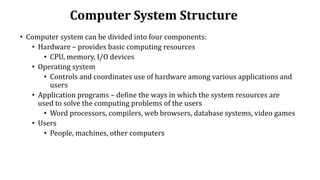
Computer System Structure
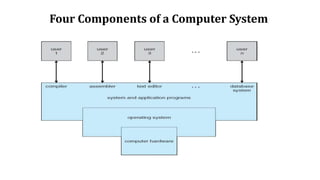
• Computer system can be divided into four components:
• Hardware – provides basic computing resources
• CPU, memory, I/O devices
• Operating system
• Controls and coordinates use of hardware among various applications and
users
• Application programs – define the ways in which the system resources are
used to solve the computing problems of the users
• Word processors, compilers, web browsers, database systems, video games
• Users
• People, machines, other computers
Four Components of a Computer System
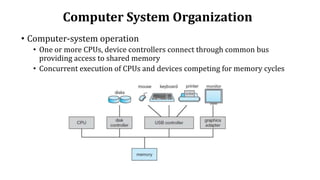
Computer System Organization
• Computer-system operation
• One or more CPUs, device controllers connect through common bus
providing access to shared memory
• Concurrent execution of CPUs and devices competing for memory cycles
Computer-System Operation
• I/O devices and the CPU can execute concurrently
• Each device controller is in charge of a particular device type
• Each device controller has a local buffer
• CPU moves data from/to main memory to/from local buffers
• I/O is from the device to local buffer of controller
• Device controller informs CPU that it has finished its operation by
causing an interrupt
12
Operating Systems User Interfaces
Three levels of interface:
1. Graphics GUI (windows oriented)
2. Command level (also known as the shell).
3. System calls invoked from user programs
13
History of Operating Systems
• First generation - No operating system, bare hardware, machine language.
• Second generation
• Batch systems, assemblers, linkers, loaders, compilers
• Batch systems with Automatic Job Sequencing
• Third generation -- O.S. for complete families of computers (OS/360)
• Batch with Multiprogramming
• Spool (an acronym for simultaneous peripheral operations on-line)
• Timesharing (MULTICS, UNIX, …)
• Fourth generation
• Network and distributed operating systems
14
Modern Operating Systems
• Windows (Microsoft Corporation) these include a family of systems: 98, Me,
CE, 2000, XP, Vista, Windows 7, and others
• Linux (Linus Torvalds, OSF GNU)
• MacOS (Apple)
• Solaris (Sun Microsystems)
• OSF-1 (OSF, DEC)
• IRIX (Silicon Graphics)
• OS2 (IBM)
• OS/390 (IBM)
• VMS (Dec/Compaq/HP)
Types of Operating System
• There are several different types of operating systems present. Some of them are:
• Batch OS: batches are grouped together and executed one by one based on the first-come, first,
serve principle
• Distributed OS: various computers are connected through a single communication channel
• Multitasking OS: each task is given some time so that all the tasks work efficiently.
• Network OS: are the systems that run on a server and manage all the networking functions.
• Real-OS: useful when many events occur in a short time or within certain deadlines, such as
real-time simulations.
• Mobile OS: operating system for smartphones, tablets, and PDA’s. It is a platform on which
other applications can run on mobile devices.
Components of an Operating System
• There are various components of an Operating System to perform well defined
tasks.
• Though most of the Operating Systems differ in structure but logically they
have similar components.
• Each component must be a well-defined portion of a system that appropriately
describes the functions, inputs, and outputs.
• There are following 8-components of an Operating System
Process Management
• A process is program or a fraction of a program that is loaded in main memory.
• It needs certain resources including CPU time, Memory, Files, and I/O devices
to accomplish its task.
• The process management component manages the multiple processes running
simultaneously on the Operating System.
Components of an Operating System…
The operating system is responsible for the following activities in connection with
process management:
• Create, load, execute, suspend, resume, and terminate processes.
• Switch system among multiple processes in main memory.
• Provides communication mechanisms so that processes can communicate
with each others
• Provides synchronization mechanisms to control concurrent access to shared
data to keep shared data consistent.
• Allocate/de-allocate resources properly to prevent or avoid deadlock
situation.
I/O Device Management
• One of the purposes of an operating system is to hide the peculiarities of
specific hardware devices from the user.
Components of an Operating System…
• Following are the tasks of I/O Device Management component:
• Hide the details of H/W devices
• Manage main memory for the devices using cache, buffer, and spooling
• Maintain and provide custom drivers for each device.
File Management
A file is defined as a set of correlated information and it is defined by the creator of the file.
Mostly files represent data, source and object forms, and programs.
• The operating system is responsible for the following activities in connection with file
management:
• File creation and deletion
• Directory creation and deletion
• The support of primitives for manipulating files and directories
• Mapping files onto secondary storage
• File backup on stable (nonvolatile) storage media
Components of an Operating System…
Network Management
• Network management comprises fault analysis, maintaining the quality of service,
provisioning of networks, and performance management.
• It is the process of keeping your network healthy for an efficient communication between
different computers.
• Following are the features of network management:
• Network administration
• Network maintenance
• Network operation
• Network provisioning
• Network security
Components of an Operating System…
Main Memory Management
• It is a repository of quickly accessible data shared by the CPU and I/O devices.
• The main motivation behind Memory Management is to maximize memory utilization
on the computer system.
• The operating system is responsible for the following activities in connections with
memory management:
• Keep track of which parts of memory are currently being used and by whom.
• Decide which processes to load when memory space becomes available.
• Allocate and deallocate memory space as needed.
Secondary Storage Management
• The operating system is responsible for the following activities in connection with disk
management:
• Free space management
• Storage allocation
• Disk scheduling
Components of an Operating System…
Security Management
• Security Management refers to a mechanism for controlling the access of programs,
processes, or users to the resources defined by a computer controls to be imposed,
together with some means of enforcement.
Command Interpreter System
• Command Interpreter System executes a user command by calling one or more
number of underlying system programs or system calls.
• Command Interpreter System allows human users to interact with the Operating
System and provides convenient programming environment to the users.
• Apart from the above mentioned components and responsibilities, it performs
security, control over system performance, job accounting, error detection aid and
coordination between other software and users.
Question
???

Chapter one_oS.ppt

  • 1.
    Chapter one Operating Systemand System Programming Overview
  • 2.
    What is Systemsoftware? • Consist of a variety of programs that support the operation of a computer • Make it possible for the user to focus on an application without needing to know the details of how the machine works internally. • System Software is a software designed to run a computer's hardware and application programs. • The trait in which system software varies from application software is machine reliance. • It consists of variety of programs that supports operation of computers. • System program: program which are required for the effective execution of general user programs on computer system. • System programming: it is an art of designing and implementing system programs.
  • 3.
    Cont.….. Need of systemsoftware To achieve effective performance of the system To make effective execution of general user program To make effective use of human resources  to make available new, better facilities The features of System Software are: • System Software is closer to the system • Generally written in a low-level language • The system software is difficult to design and understand • Fast in speed • Less interactive • Smaller in size • Hard to manipulate
  • 4.
    Cont.….. The important typesof System Software are: • Operating systems: - Operating system software helps you for the effective utilization of all hardware and software components of a computer system. • Device Drivers: It is a type of software that controls particular hardware which is attached to the system. • Firmware: is the permanent software that is embedded into a read-only memory. It provides essential information regarding how the device interacts with other hardware. • Programming language translators: - Transforms the instructions into a form that can be interpreted or compiled and executed by a computer system. • Utility Software: - is a software designed to help to analyze, configure, optimize or maintain a computer.
  • 5.
    Cont.….. • One characteristicin which most system software differ from application software is machine dependency • System programs are intended to support the operation and use of the computer itself • Application programs are primary concerned with the solution of some problem • Example • Assembler translates mnemonic instructions into machine code • Compilers must generate machine language code • OS is directly concerned with the management of nearly all of the • resources of a computing system
  • 6.
    What is anOperating System? • A large and complex software component for the operation and control of the computer system. • A program that acts as an intermediary between a user of a computer and the computer hardware • Examples: Unix, MS Windows, MacOS, Linux, Sun Solaris, DEC VMS, etc.
  • 7.
    7 Design Goals • Operatingsystem goals: • Execute user programs and make solving user problems easier • Make the computer system convenient to use • Use the computer hardware in an efficient manner • Ability to evolve • User goals – operating system should be convenient to use, easy to learn, reliable, safe, and fast. • System goals – operating system should be easy to design, implement, and maintain, as well as flexible, reliable, error-free, and efficient. • resource allocator • Manages all resources • Decides between conflicting requests for efficient and fair resource use • control program • Controls execution of programs to prevent errors and improper use of the computer
  • 8.
    Computer System Structure •Computer system can be divided into four components: • Hardware – provides basic computing resources • CPU, memory, I/O devices • Operating system • Controls and coordinates use of hardware among various applications and users • Application programs – define the ways in which the system resources are used to solve the computing problems of the users • Word processors, compilers, web browsers, database systems, video games • Users • People, machines, other computers
  • 9.
    Four Components ofa Computer System
  • 10.
    Computer System Organization •Computer-system operation • One or more CPUs, device controllers connect through common bus providing access to shared memory • Concurrent execution of CPUs and devices competing for memory cycles
  • 11.
    Computer-System Operation • I/Odevices and the CPU can execute concurrently • Each device controller is in charge of a particular device type • Each device controller has a local buffer • CPU moves data from/to main memory to/from local buffers • I/O is from the device to local buffer of controller • Device controller informs CPU that it has finished its operation by causing an interrupt
  • 12.
    12 Operating Systems UserInterfaces Three levels of interface: 1. Graphics GUI (windows oriented) 2. Command level (also known as the shell). 3. System calls invoked from user programs
  • 13.
    13 History of OperatingSystems • First generation - No operating system, bare hardware, machine language. • Second generation • Batch systems, assemblers, linkers, loaders, compilers • Batch systems with Automatic Job Sequencing • Third generation -- O.S. for complete families of computers (OS/360) • Batch with Multiprogramming • Spool (an acronym for simultaneous peripheral operations on-line) • Timesharing (MULTICS, UNIX, …) • Fourth generation • Network and distributed operating systems
  • 14.
    14 Modern Operating Systems •Windows (Microsoft Corporation) these include a family of systems: 98, Me, CE, 2000, XP, Vista, Windows 7, and others • Linux (Linus Torvalds, OSF GNU) • MacOS (Apple) • Solaris (Sun Microsystems) • OSF-1 (OSF, DEC) • IRIX (Silicon Graphics) • OS2 (IBM) • OS/390 (IBM) • VMS (Dec/Compaq/HP)
  • 15.
    Types of OperatingSystem • There are several different types of operating systems present. Some of them are: • Batch OS: batches are grouped together and executed one by one based on the first-come, first, serve principle • Distributed OS: various computers are connected through a single communication channel • Multitasking OS: each task is given some time so that all the tasks work efficiently. • Network OS: are the systems that run on a server and manage all the networking functions. • Real-OS: useful when many events occur in a short time or within certain deadlines, such as real-time simulations. • Mobile OS: operating system for smartphones, tablets, and PDA’s. It is a platform on which other applications can run on mobile devices.
  • 16.
    Components of anOperating System • There are various components of an Operating System to perform well defined tasks. • Though most of the Operating Systems differ in structure but logically they have similar components. • Each component must be a well-defined portion of a system that appropriately describes the functions, inputs, and outputs. • There are following 8-components of an Operating System Process Management • A process is program or a fraction of a program that is loaded in main memory. • It needs certain resources including CPU time, Memory, Files, and I/O devices to accomplish its task. • The process management component manages the multiple processes running simultaneously on the Operating System.
  • 17.
    Components of anOperating System… The operating system is responsible for the following activities in connection with process management: • Create, load, execute, suspend, resume, and terminate processes. • Switch system among multiple processes in main memory. • Provides communication mechanisms so that processes can communicate with each others • Provides synchronization mechanisms to control concurrent access to shared data to keep shared data consistent. • Allocate/de-allocate resources properly to prevent or avoid deadlock situation. I/O Device Management • One of the purposes of an operating system is to hide the peculiarities of specific hardware devices from the user.
  • 18.
    Components of anOperating System… • Following are the tasks of I/O Device Management component: • Hide the details of H/W devices • Manage main memory for the devices using cache, buffer, and spooling • Maintain and provide custom drivers for each device. File Management A file is defined as a set of correlated information and it is defined by the creator of the file. Mostly files represent data, source and object forms, and programs. • The operating system is responsible for the following activities in connection with file management: • File creation and deletion • Directory creation and deletion • The support of primitives for manipulating files and directories • Mapping files onto secondary storage • File backup on stable (nonvolatile) storage media
  • 19.
    Components of anOperating System… Network Management • Network management comprises fault analysis, maintaining the quality of service, provisioning of networks, and performance management. • It is the process of keeping your network healthy for an efficient communication between different computers. • Following are the features of network management: • Network administration • Network maintenance • Network operation • Network provisioning • Network security
  • 20.
    Components of anOperating System… Main Memory Management • It is a repository of quickly accessible data shared by the CPU and I/O devices. • The main motivation behind Memory Management is to maximize memory utilization on the computer system. • The operating system is responsible for the following activities in connections with memory management: • Keep track of which parts of memory are currently being used and by whom. • Decide which processes to load when memory space becomes available. • Allocate and deallocate memory space as needed. Secondary Storage Management • The operating system is responsible for the following activities in connection with disk management: • Free space management • Storage allocation • Disk scheduling
  • 21.
    Components of anOperating System… Security Management • Security Management refers to a mechanism for controlling the access of programs, processes, or users to the resources defined by a computer controls to be imposed, together with some means of enforcement. Command Interpreter System • Command Interpreter System executes a user command by calling one or more number of underlying system programs or system calls. • Command Interpreter System allows human users to interact with the Operating System and provides convenient programming environment to the users. • Apart from the above mentioned components and responsibilities, it performs security, control over system performance, job accounting, error detection aid and coordination between other software and users.
  • 22.