Copyright © Huawei Technologies Co., Ltd. 2019
Introduction to Virtualization Features
Page 2 Copyright © Huawei Technologies Co., Ltd. 2019
Foreword
 Having attended previous courses about cloud computing, you may already have
a good understanding of virtual machines (VMs) and the resources they use. This
chapter focuses on when and where we would need to use VMs and what
virtualization features VMs provide.
Page 3 Copyright © Huawei Technologies Co., Ltd. 2019
Objectives
 Upon completion of this course, you will:
 Understand virtualization features.
 Understand where and when virtualization features may be used.
Page 4 Copyright © Huawei Technologies Co., Ltd. 2019
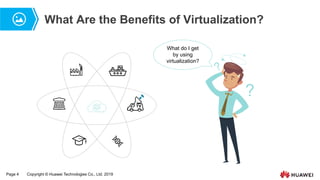
What Are the Benefits of Virtualization?
What do I get
by using
virtualization?
?
Page 6 Copyright © Huawei Technologies Co., Ltd. 2019
Contents
1. Introduction to Cluster Features
2. Introduction to Virtualization Features
3. Introduction to the Features of Huawei’s Virtualization Product
Page 7 Copyright © Huawei Technologies Co., Ltd. 2019
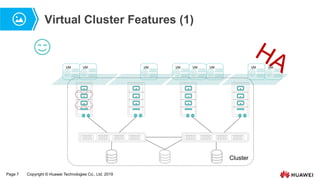
Virtual Cluster Features (1)
Cluster
VM VM VM
VM VM VM VM VM
Page 8 Copyright © Huawei Technologies Co., Ltd. 2019
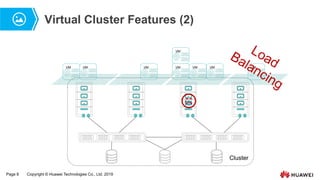
Virtual Cluster Features (2)
Cluster
VM VM VM
VM VM VM VM
VM
Page 9 Copyright © Huawei Technologies Co., Ltd. 2019
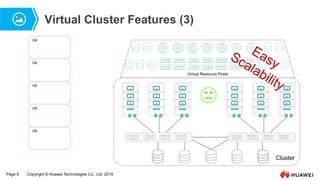
Virtual Cluster Features (3)
Cluster
Virtual Resource Pools
VM
VM
VM
VM
VM
Page 10 Copyright © Huawei Technologies Co., Ltd. 2019
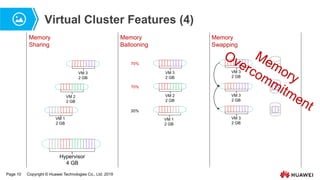
Virtual Cluster Features (4)
Hypervisor
4 GB
VM 1
2 GB
VM 2
2 GB
VM 3
2 GB
VM 1
2 GB
VM 2
2 GB
VM 3
2 GB
20%
70%
70%
VM 3
2 GB
VM 3
2 GB
VM 3
2 GB
Memory
Sharing
Memory
Swapping
Memory
Ballooning
Page 11 Copyright © Huawei Technologies Co., Ltd. 2019
Contents
1. Introduction to Cluster Features
2. Introduction to Virtualization Features
3. Introduction to the Features of Huawei’s Virtualization Product
Page 12 Copyright © Huawei Technologies Co., Ltd. 2019
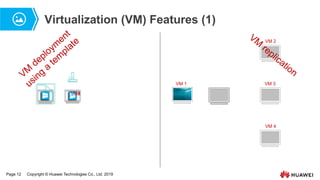
Virtualization (VM) Features (1)
VM1
VM 2
VMn
VM 1
VM 2
VM 3
VM 4
Page 14 Copyright © Huawei Technologies Co., Ltd. 2019
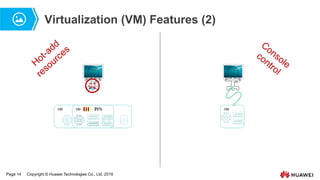
Virtualization (VM) Features (2)
VM 75%
VM 25% VM
Page 15 Copyright © Huawei Technologies Co., Ltd. 2019
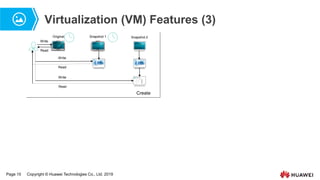
Virtualization (VM) Features (3)
Read
Write
Original Snapshot 1 Snapshot 2
Read
Write
Read
Write
Create
Page 16 Copyright © Huawei Technologies Co., Ltd. 2019
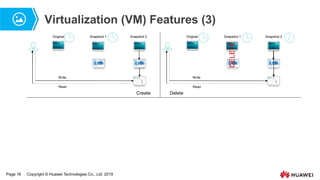
Virtualization (VM) Features (3)
Original Snapshot 1 Snapshot 2
Read
Write
Create
Original Snapshot 1 Snapshot 2
Read
Write
DELETE
Delete
Page 17 Copyright © Huawei Technologies Co., Ltd. 2019
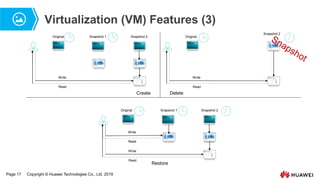
Virtualization (VM) Features (3)
Original Snapshot 1 Snapshot 2
Read
Write
Create
Original
Snapshot 2
Read
Write
Delete
Original Snapshot 1 Snapshot 2
Read
Write
Read
Write
Restore
Page 19 Copyright © Huawei Technologies Co., Ltd. 2019
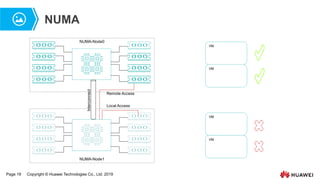
NUMA
NUMA-Node0
NUMA-Node1
Interconnect
Local Access
Remote Access
VM
VM
VM
VM
Page 20 Copyright © Huawei Technologies Co., Ltd. 2019
Contents
1. Introduction to Cluster Features
2. Introduction to Virtualization Features
3. Introduction to the Features of Huawei’s Virtualization Product
Page 21 Copyright © Huawei Technologies Co., Ltd. 2019
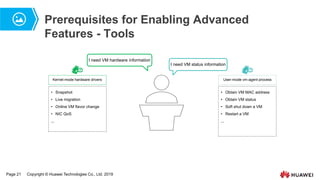
Prerequisites for Enabling Advanced
Features - Tools
I need VM hardware information
I need VM status information
Kernel-mode hardware drivers
• Snapshot
• Live migration
• Online VM flavor change
• NIC QoS
...
User-mode vm-agent process
• Obtain VM MAC address
• Obtain VM status
• Soft shut down a VM
• Restart a VM
...
Page 22 Copyright © Huawei Technologies Co., Ltd. 2019
Contents
1. Introduction to Cluster Features
2. Introduction to Virtualization Features
3. Introduction to the Features of Huawei’s Virtualization Product
 Cluster Features
 VM Features
Page 23 Copyright © Huawei Technologies Co., Ltd. 2019
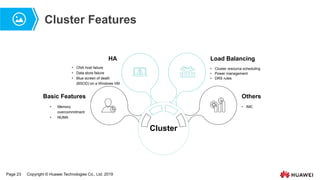
Cluster Features
Cluster
• IMC
Others
• Memory
overcommitment
• NUMA
Basic Features
• CNA host failure
• Data store failure
• Blue screen of death
(BSOD) on a Windows VM
HA
• Cluster resource scheduling
• Power management
• DRS rules
Load Balancing
Page 24 Copyright © Huawei Technologies Co., Ltd. 2019
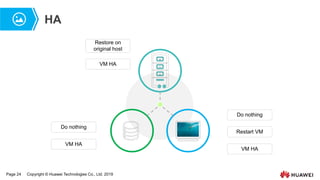
HA
Restore on
original host
VM HA
Do nothing
VM HA
Do nothing
Restart VM
VM HA
Page 25 Copyright © Huawei Technologies Co., Ltd. 2019
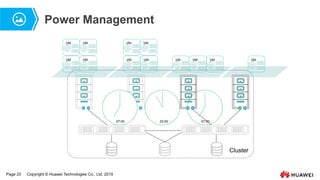
07:00
Power Management
Cluster
VM VM VM
VM VM VM VM
VM
07:00 23:00
VM VM VM VM
Page 26 Copyright © Huawei Technologies Co., Ltd. 2019
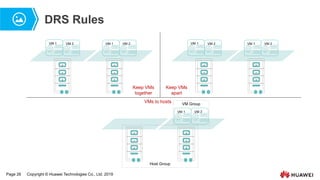
DRS Rules
VM 1 VM 2
VM 1 VM 2 VM 1 VM 2
VM 1 VM 2
Keep VMs
together
Keep VMs
apart
VM 1 VM 2
VMs to hosts
Host Group
VM Group
Page 27 Copyright © Huawei Technologies Co., Ltd. 2019
IMC
 On FusionCompute, enabling incompatible migration cluster (IMC) mode for a cluster allows VMs
to migrate between hosts that are using CPUs with different performance baselines within this
cluster.
 Currently, IMC mode only allows VM live migration between hosts using Intel CPUs.
 IMC mode allows the hosts in a cluster to present the same CPU function set to VMs running on
them, despite the fact that these hosts may be using CPUs with different performance baselines.
 For the IMC mode to work for a cluster that already contains hosts and VMs, ensure that the
following conditions are met:
 The CPU generations of the hosts in the cluster are the same as or later than the target IMC mode.
 The CPU generations of the running or hibernating VMs in the cluster are the same as or earlier than the
target IMC mode. If any VM in the cluster does not meet this requirement, stop this VM or migrate it to
another cluster.
Page 28 Copyright © Huawei Technologies Co., Ltd. 2019
Contents
1. Introduction to Cluster Features
2. Introduction to Virtualization Features
3. Introduction to the Features of Huawei’s Virtualization Product
 Cluster Features
 VM Features
Page 29 Copyright © Huawei Technologies Co., Ltd. 2019
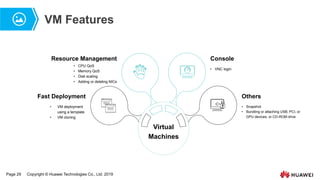
VM Features
Virtual
Machines
• VM deployment
using a template
• VM cloning
• CPU QoS
• Memory QoS
• Disk scaling
• Adding or deleting NICs
• VNC login
Console
Fast Deployment Others
Resource Management
• Snapshot
• Bundling or attaching USB, PCI, or
GPU devices, or CD-ROM drive
Page 30 Copyright © Huawei Technologies Co., Ltd. 2019
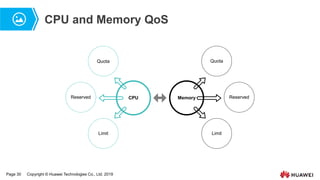
CPU and Memory QoS
Reserved Reserved
Quota
Limit
Quota
Limit
Memory
CPU
Page 31 Copyright © Huawei Technologies Co., Ltd. 2019
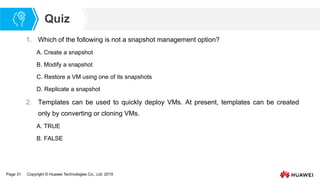
Quiz
1. Which of the following is not a snapshot management option?
A. Create a snapshot
B. Modify a snapshot
C. Restore a VM using one of its snapshots
D. Replicate a snapshot
2. Templates can be used to quickly deploy VMs. At present, templates can be created
only by converting or cloning VMs.
A. TRUE
B. FALSE
Page 32 Copyright © Huawei Technologies Co., Ltd. 2019
Summary
At this point you should:
 Understand virtualization features.
 Understand where and when virtualization features may be used.
Page 33 Copyright © Huawei Technologies Co., Ltd. 2019
Recommendations
 Huawei e-Learning website
 http://support.huawei.com/learning/Index!toTrainIndex
 Huawei Support case library
 http://support.huawei.com/enterprise/servicecenter?lang=en
 HCIA-Cloud Computing v4.0 online forum
 https://forum.huawei.com/enterprise/en/Huawei-Official-Communication-Channel-
HCNA-Cloud-Certification-Course/thread/456287-911
www.huawei.com
Thank You

Chapter 05: introduction to virtualization features

  • 1.
    Copyright © HuaweiTechnologies Co., Ltd. 2019 Introduction to Virtualization Features
  • 2.
    Page 2 Copyright© Huawei Technologies Co., Ltd. 2019 Foreword  Having attended previous courses about cloud computing, you may already have a good understanding of virtual machines (VMs) and the resources they use. This chapter focuses on when and where we would need to use VMs and what virtualization features VMs provide.
  • 3.
    Page 3 Copyright© Huawei Technologies Co., Ltd. 2019 Objectives  Upon completion of this course, you will:  Understand virtualization features.  Understand where and when virtualization features may be used.
  • 4.
    Page 4 Copyright© Huawei Technologies Co., Ltd. 2019 What Are the Benefits of Virtualization? What do I get by using virtualization? ?
  • 5.
    Page 6 Copyright© Huawei Technologies Co., Ltd. 2019 Contents 1. Introduction to Cluster Features 2. Introduction to Virtualization Features 3. Introduction to the Features of Huawei’s Virtualization Product
  • 6.
    Page 7 Copyright© Huawei Technologies Co., Ltd. 2019 Virtual Cluster Features (1) Cluster VM VM VM VM VM VM VM VM
  • 7.
    Page 8 Copyright© Huawei Technologies Co., Ltd. 2019 Virtual Cluster Features (2) Cluster VM VM VM VM VM VM VM VM
  • 8.
    Page 9 Copyright© Huawei Technologies Co., Ltd. 2019 Virtual Cluster Features (3) Cluster Virtual Resource Pools VM VM VM VM VM
  • 9.
    Page 10 Copyright© Huawei Technologies Co., Ltd. 2019 Virtual Cluster Features (4) Hypervisor 4 GB VM 1 2 GB VM 2 2 GB VM 3 2 GB VM 1 2 GB VM 2 2 GB VM 3 2 GB 20% 70% 70% VM 3 2 GB VM 3 2 GB VM 3 2 GB Memory Sharing Memory Swapping Memory Ballooning
  • 10.
    Page 11 Copyright© Huawei Technologies Co., Ltd. 2019 Contents 1. Introduction to Cluster Features 2. Introduction to Virtualization Features 3. Introduction to the Features of Huawei’s Virtualization Product
  • 11.
    Page 12 Copyright© Huawei Technologies Co., Ltd. 2019 Virtualization (VM) Features (1) VM1 VM 2 VMn VM 1 VM 2 VM 3 VM 4
  • 12.
    Page 14 Copyright© Huawei Technologies Co., Ltd. 2019 Virtualization (VM) Features (2) VM 75% VM 25% VM
  • 13.
    Page 15 Copyright© Huawei Technologies Co., Ltd. 2019 Virtualization (VM) Features (3) Read Write Original Snapshot 1 Snapshot 2 Read Write Read Write Create
  • 14.
    Page 16 Copyright© Huawei Technologies Co., Ltd. 2019 Virtualization (VM) Features (3) Original Snapshot 1 Snapshot 2 Read Write Create Original Snapshot 1 Snapshot 2 Read Write DELETE Delete
  • 15.
    Page 17 Copyright© Huawei Technologies Co., Ltd. 2019 Virtualization (VM) Features (3) Original Snapshot 1 Snapshot 2 Read Write Create Original Snapshot 2 Read Write Delete Original Snapshot 1 Snapshot 2 Read Write Read Write Restore
  • 16.
    Page 19 Copyright© Huawei Technologies Co., Ltd. 2019 NUMA NUMA-Node0 NUMA-Node1 Interconnect Local Access Remote Access VM VM VM VM
  • 17.
    Page 20 Copyright© Huawei Technologies Co., Ltd. 2019 Contents 1. Introduction to Cluster Features 2. Introduction to Virtualization Features 3. Introduction to the Features of Huawei’s Virtualization Product
  • 18.
    Page 21 Copyright© Huawei Technologies Co., Ltd. 2019 Prerequisites for Enabling Advanced Features - Tools I need VM hardware information I need VM status information Kernel-mode hardware drivers • Snapshot • Live migration • Online VM flavor change • NIC QoS ... User-mode vm-agent process • Obtain VM MAC address • Obtain VM status • Soft shut down a VM • Restart a VM ...
  • 19.
    Page 22 Copyright© Huawei Technologies Co., Ltd. 2019 Contents 1. Introduction to Cluster Features 2. Introduction to Virtualization Features 3. Introduction to the Features of Huawei’s Virtualization Product  Cluster Features  VM Features
  • 20.
    Page 23 Copyright© Huawei Technologies Co., Ltd. 2019 Cluster Features Cluster • IMC Others • Memory overcommitment • NUMA Basic Features • CNA host failure • Data store failure • Blue screen of death (BSOD) on a Windows VM HA • Cluster resource scheduling • Power management • DRS rules Load Balancing
  • 21.
    Page 24 Copyright© Huawei Technologies Co., Ltd. 2019 HA Restore on original host VM HA Do nothing VM HA Do nothing Restart VM VM HA
  • 22.
    Page 25 Copyright© Huawei Technologies Co., Ltd. 2019 07:00 Power Management Cluster VM VM VM VM VM VM VM VM 07:00 23:00 VM VM VM VM
  • 23.
    Page 26 Copyright© Huawei Technologies Co., Ltd. 2019 DRS Rules VM 1 VM 2 VM 1 VM 2 VM 1 VM 2 VM 1 VM 2 Keep VMs together Keep VMs apart VM 1 VM 2 VMs to hosts Host Group VM Group
  • 24.
    Page 27 Copyright© Huawei Technologies Co., Ltd. 2019 IMC  On FusionCompute, enabling incompatible migration cluster (IMC) mode for a cluster allows VMs to migrate between hosts that are using CPUs with different performance baselines within this cluster.  Currently, IMC mode only allows VM live migration between hosts using Intel CPUs.  IMC mode allows the hosts in a cluster to present the same CPU function set to VMs running on them, despite the fact that these hosts may be using CPUs with different performance baselines.  For the IMC mode to work for a cluster that already contains hosts and VMs, ensure that the following conditions are met:  The CPU generations of the hosts in the cluster are the same as or later than the target IMC mode.  The CPU generations of the running or hibernating VMs in the cluster are the same as or earlier than the target IMC mode. If any VM in the cluster does not meet this requirement, stop this VM or migrate it to another cluster.
  • 25.
    Page 28 Copyright© Huawei Technologies Co., Ltd. 2019 Contents 1. Introduction to Cluster Features 2. Introduction to Virtualization Features 3. Introduction to the Features of Huawei’s Virtualization Product  Cluster Features  VM Features
  • 26.
    Page 29 Copyright© Huawei Technologies Co., Ltd. 2019 VM Features Virtual Machines • VM deployment using a template • VM cloning • CPU QoS • Memory QoS • Disk scaling • Adding or deleting NICs • VNC login Console Fast Deployment Others Resource Management • Snapshot • Bundling or attaching USB, PCI, or GPU devices, or CD-ROM drive
  • 27.
    Page 30 Copyright© Huawei Technologies Co., Ltd. 2019 CPU and Memory QoS Reserved Reserved Quota Limit Quota Limit Memory CPU
  • 28.
    Page 31 Copyright© Huawei Technologies Co., Ltd. 2019 Quiz 1. Which of the following is not a snapshot management option? A. Create a snapshot B. Modify a snapshot C. Restore a VM using one of its snapshots D. Replicate a snapshot 2. Templates can be used to quickly deploy VMs. At present, templates can be created only by converting or cloning VMs. A. TRUE B. FALSE
  • 29.
    Page 32 Copyright© Huawei Technologies Co., Ltd. 2019 Summary At this point you should:  Understand virtualization features.  Understand where and when virtualization features may be used.
  • 30.
    Page 33 Copyright© Huawei Technologies Co., Ltd. 2019 Recommendations  Huawei e-Learning website  http://support.huawei.com/learning/Index!toTrainIndex  Huawei Support case library  http://support.huawei.com/enterprise/servicecenter?lang=en  HCIA-Cloud Computing v4.0 online forum  https://forum.huawei.com/enterprise/en/Huawei-Official-Communication-Channel- HCNA-Cloud-Certification-Course/thread/456287-911
  • 31.