Fundamentals of Engineering Design
CH.2
THE DESIGN PROCESS AND DESIGN TOOLS
1
Chapter Objectives
Defining design term
Defining and understanding design process
 Exploring some of engineering design tools
2
What is a design ?
• The word “design” is often used as a genetic term that refers to
anything that was made by a conscious human effort.
• Design is also a process that is used to systematically solve problems.
3
What is a design process ?
• Design process is a method to solve problems and create things people
want. It's like a step-by-step plan where you come up with many ideas,
but in the end, you choose the best one to meet people's needs.
• There are several design processes used in different technical fields.
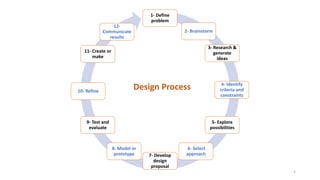
• The following is the most common design process practice:
4
1- Define
problem
2- Brainstorm
3- Research &
generate
ideas
4- Identify
criteria and
constraints
5- Explore
possibilities
6- Select
approach
7- Develop
design
proposal
8- Model or
prototype
9- Test and
evaluate
10- Refine
11- Create or
make
12-
Communicate
results
Design Process
5
1- Define a problem
• Receive a problem to solve from the client.
• Gather information.
• Be inspired through media exposure of a current problem and take
action.
6
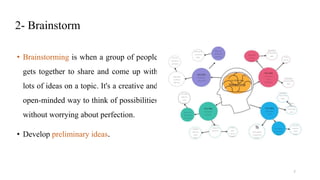
2- Brainstorm
• Brainstorming is when a group of people
gets together to share and come up with
lots of ideas on a topic. It's a creative and
open-minded way to think of possibilities
without worrying about perfection.
• Develop preliminary ideas.
7
3- Research and generate ideas
• Conduct interview with those who affected by problem.
• Research solutions that may already exist; identify shortcomings and
reasons why they are not applicable to this situation.
• Compile ideas and report findings to the team.
8
4- Identify criteria and specify constraints
• Identify what the solution should do and the degree to which the solution
will be pursued.
• Identify constraints ( i.e., budget and time are typical considerations).
• Draft the design brief.
9
5- Explore possibilities.
• Consider further development of brainstorming ideas with constrains
and tradeoffs.
• Explore alternatives ideas based on further knowledge and
technologies.
10
6- Select an approach
• Review brainstormed information and
answer any lingering questions.
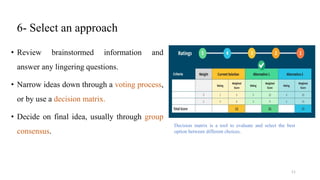
• Narrow ideas down through a voting process,
or by use a decision matrix.
• Decide on final idea, usually through group
consensus.
Decision matrix is a tool to evaluate and select the best
option between different choices.
11
7- Develop a design
proposal
• Making annotated sketches for further
details.
• Make decisions regarding material types
and manufacturing methods.
• Generate computer models to refine the
ideas.
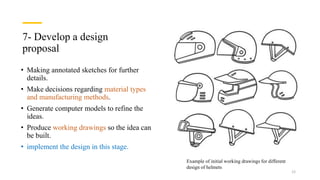
• Produce working drawings so the idea can
be built.
• implement the design in this stage.
Example of initial working drawings for different
design of helmets
12
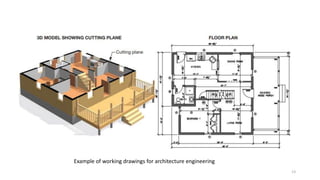
Example of working drawings for architecture engineering
13
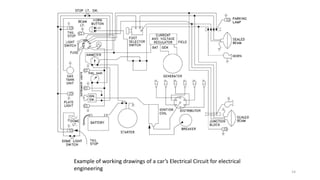
Example of working drawings of a car’s Electrical Circuit for electrical
engineering 14
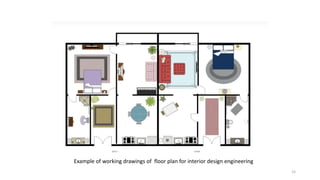
Example of working drawings of floor plan for interior design engineering
15
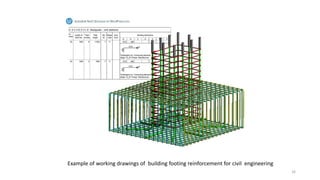
Example of working drawings of building footing reinforcement for civil engineering
16
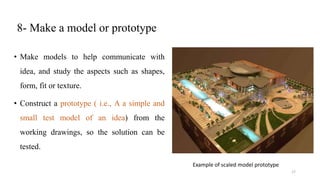
8- Make a model or prototype
• Make models to help communicate with
idea, and study the aspects such as shapes,
form, fit or texture.
• Construct a prototype ( i.e., A a simple and
small test model of an idea) from the
working drawings, so the solution can be
tested.
Example of scaled model prototype
17
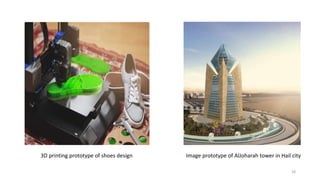
Image prototype of AlJoharah tower in Hail city
3D printing prototype of shoes design
18
9- Design, test and evaluate
• Design experiments and test the prototype in controlled and working
environment.
• Gather performance data; analysis and check results against established
criteria.
• Conduct a formal assessment to flash out areas of concerns, identify
shortcomings, and establish any need for redesign the work.
19
10- Refine the design
• Make design changes; modify or rebuild the prototype.
• Make refinement until accuracy and repeatability of the prototype’s
performance results are consistent.
• Update documentation to reflect changes.
• Get feedback from users to see if the requirements have been met.
20
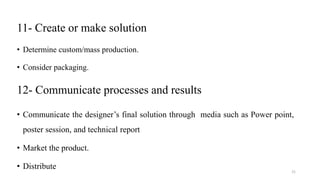
11- Create or make solution
• Determine custom/mass production.
• Consider packaging.
12- Communicate processes and results
• Communicate the designer’s final solution through media such as Power point,
poster session, and technical report
• Market the product.
• Distribute
21
Engineering design tools
• Engineering design involves the use of various digital tools to
facilitate the creation and development of solutions.
• Here are some common engineering design tools for each major:
22
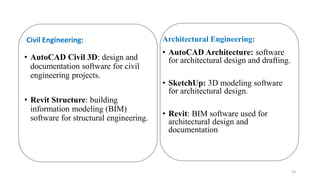
Civil Engineering:
• AutoCAD Civil 3D: design and
documentation software for civil
engineering projects.
• Revit Structure: building
information modeling (BIM)
software for structural engineering.
Architectural Engineering:
• AutoCAD Architecture: software
for architectural design and drafting.
• SketchUp: 3D modeling software
for architectural design.
• Revit: BIM software used for
architectural design and
documentation
23
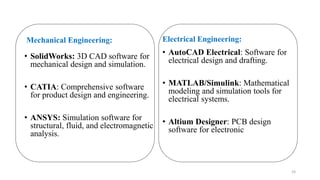
Mechanical Engineering:
• SolidWorks: 3D CAD software for
mechanical design and simulation.
• CATIA: Comprehensive software
for product design and engineering.
• ANSYS: Simulation software for
structural, fluid, and electromagnetic
analysis.
Electrical Engineering:
• AutoCAD Electrical: Software for
electrical design and drafting.
• MATLAB/Simulink: Mathematical
modeling and simulation tools for
electrical systems.
• Altium Designer: PCB design
software for electronic
24
Chemical Engineering:
• Aspen Plus: Process simulation
software for chemical engineering.
• COMSOL Multiphysics:
Multiphysics simulation software for
modeling chemical processes.
• CHEMCAD: Process simulation
software for chemical engineering.
Industrial Engineering:
• Arena Simulation Software:
Discrete event simulation tool for
modeling complex systems.
• Lean Six Sigma Tools: Tools like
Value Stream Mapping and Kaizen
for process improvement.
25
Interior Design Engineering:
• AutoCAD Interior Design: Software
for interior design drafting and
documentation.
• SketchUp: 3D modeling software for
creating interior design concepts.
• Adobe Creative Suite (Photoshop,
Illustrator): Graphic design tools for
creating visual presentations.
26

CH2.pptx

  • 1.
    Fundamentals of EngineeringDesign CH.2 THE DESIGN PROCESS AND DESIGN TOOLS 1
  • 2.
    Chapter Objectives Defining designterm Defining and understanding design process  Exploring some of engineering design tools 2
  • 3.
    What is adesign ? • The word “design” is often used as a genetic term that refers to anything that was made by a conscious human effort. • Design is also a process that is used to systematically solve problems. 3
  • 4.
    What is adesign process ? • Design process is a method to solve problems and create things people want. It's like a step-by-step plan where you come up with many ideas, but in the end, you choose the best one to meet people's needs. • There are several design processes used in different technical fields. • The following is the most common design process practice: 4
  • 5.
    1- Define problem 2- Brainstorm 3-Research & generate ideas 4- Identify criteria and constraints 5- Explore possibilities 6- Select approach 7- Develop design proposal 8- Model or prototype 9- Test and evaluate 10- Refine 11- Create or make 12- Communicate results Design Process 5
  • 6.
    1- Define aproblem • Receive a problem to solve from the client. • Gather information. • Be inspired through media exposure of a current problem and take action. 6
  • 7.
    2- Brainstorm • Brainstormingis when a group of people gets together to share and come up with lots of ideas on a topic. It's a creative and open-minded way to think of possibilities without worrying about perfection. • Develop preliminary ideas. 7
  • 8.
    3- Research andgenerate ideas • Conduct interview with those who affected by problem. • Research solutions that may already exist; identify shortcomings and reasons why they are not applicable to this situation. • Compile ideas and report findings to the team. 8
  • 9.
    4- Identify criteriaand specify constraints • Identify what the solution should do and the degree to which the solution will be pursued. • Identify constraints ( i.e., budget and time are typical considerations). • Draft the design brief. 9
  • 10.
    5- Explore possibilities. •Consider further development of brainstorming ideas with constrains and tradeoffs. • Explore alternatives ideas based on further knowledge and technologies. 10
  • 11.
    6- Select anapproach • Review brainstormed information and answer any lingering questions. • Narrow ideas down through a voting process, or by use a decision matrix. • Decide on final idea, usually through group consensus. Decision matrix is a tool to evaluate and select the best option between different choices. 11
  • 12.
    7- Develop adesign proposal • Making annotated sketches for further details. • Make decisions regarding material types and manufacturing methods. • Generate computer models to refine the ideas. • Produce working drawings so the idea can be built. • implement the design in this stage. Example of initial working drawings for different design of helmets 12
  • 13.
    Example of workingdrawings for architecture engineering 13
  • 14.
    Example of workingdrawings of a car’s Electrical Circuit for electrical engineering 14
  • 15.
    Example of workingdrawings of floor plan for interior design engineering 15
  • 16.
    Example of workingdrawings of building footing reinforcement for civil engineering 16
  • 17.
    8- Make amodel or prototype • Make models to help communicate with idea, and study the aspects such as shapes, form, fit or texture. • Construct a prototype ( i.e., A a simple and small test model of an idea) from the working drawings, so the solution can be tested. Example of scaled model prototype 17
  • 18.
    Image prototype ofAlJoharah tower in Hail city 3D printing prototype of shoes design 18
  • 19.
    9- Design, testand evaluate • Design experiments and test the prototype in controlled and working environment. • Gather performance data; analysis and check results against established criteria. • Conduct a formal assessment to flash out areas of concerns, identify shortcomings, and establish any need for redesign the work. 19
  • 20.
    10- Refine thedesign • Make design changes; modify or rebuild the prototype. • Make refinement until accuracy and repeatability of the prototype’s performance results are consistent. • Update documentation to reflect changes. • Get feedback from users to see if the requirements have been met. 20
  • 21.
    11- Create ormake solution • Determine custom/mass production. • Consider packaging. 12- Communicate processes and results • Communicate the designer’s final solution through media such as Power point, poster session, and technical report • Market the product. • Distribute 21
  • 22.
    Engineering design tools •Engineering design involves the use of various digital tools to facilitate the creation and development of solutions. • Here are some common engineering design tools for each major: 22
  • 23.
    Civil Engineering: • AutoCADCivil 3D: design and documentation software for civil engineering projects. • Revit Structure: building information modeling (BIM) software for structural engineering. Architectural Engineering: • AutoCAD Architecture: software for architectural design and drafting. • SketchUp: 3D modeling software for architectural design. • Revit: BIM software used for architectural design and documentation 23
  • 24.
    Mechanical Engineering: • SolidWorks:3D CAD software for mechanical design and simulation. • CATIA: Comprehensive software for product design and engineering. • ANSYS: Simulation software for structural, fluid, and electromagnetic analysis. Electrical Engineering: • AutoCAD Electrical: Software for electrical design and drafting. • MATLAB/Simulink: Mathematical modeling and simulation tools for electrical systems. • Altium Designer: PCB design software for electronic 24
  • 25.
    Chemical Engineering: • AspenPlus: Process simulation software for chemical engineering. • COMSOL Multiphysics: Multiphysics simulation software for modeling chemical processes. • CHEMCAD: Process simulation software for chemical engineering. Industrial Engineering: • Arena Simulation Software: Discrete event simulation tool for modeling complex systems. • Lean Six Sigma Tools: Tools like Value Stream Mapping and Kaizen for process improvement. 25
  • 26.
    Interior Design Engineering: •AutoCAD Interior Design: Software for interior design drafting and documentation. • SketchUp: 3D modeling software for creating interior design concepts. • Adobe Creative Suite (Photoshop, Illustrator): Graphic design tools for creating visual presentations. 26