1
Chapter 2:
Software Process Models
Chapter 2 & 3 in Software Engineering Book
2
Overview
 What are software process models?
 Why do we need software process models?
 Models:
 Waterfall models.
 Evolutionary models.
 CBSE models.
 Iterative models.
3
By the end of this chapter, you should be able to..
 Describe various software process models.
 Identify advantages and disadvantages of each model.
 Evaluate the applicability of each model for different software
development contexts.
4
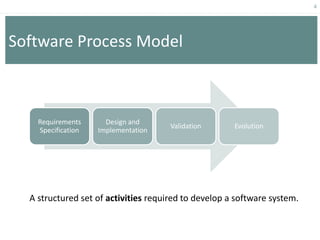
Software Process Model
Requirements
Specification
Design and
Implementation
Validation Evolution
A structured set of activities required to develop a software system.
5
Ad hoc Software Development
 Developing software without planning for each phase, and without
specifying tasks, deliverables, or time constraints.
 Relies entirely on the skills and experience of the individuals
performing the work.
 The software process may change as work progresses.
6
• A structured set of activities required to develop a
software system.
• Many different software processes but all involve:
– Specification – defining what the system should do;
– Design and implementation – defining the organization of the system and
implementing the system;
– Validation – checking that it does what the customer wants;
– Evolution – changing the system in response to changing customer needs.
• A software process model is an abstract representation of a process. It
presents a description of a process from some particular perspective.
Software Process Model
7
Activity: What could go wrong in a software
development project?
SaudiTech is a software company. It has a team of 25 programmers. Faisal has
recently established a dental clinic in Riyadh and asked SaudiTech to develop a
management system for his dental clinic.
Faisal’s request was to develop a system to electronically manage patient records
and perform administrative functions similar to ‘what is being used in other clinics’
but within a budget of 50k Saudi riyals and delivered within 3 months.
SaudiTech adopts an ad hoc approach to software development and has not
worked on large scale projects before. What problems do you anticipate in this
project?
8
How can we overcome problems with ad hoc
software development?
 Problems: (include but not limited to)
 Difficult to distinguish between tasks  important tasks may be ignored.
 Inconsistent schedules, budgets, functionality and product quality.
 Delayed problem discovery  more costly to fix.
 Software Process Models provide guidelines to organize how software process
activities should be performed and in what order.
Solution? Software Process Model
“an abstract representation of a process. It presents a description of a process from
some particular perspective.”
9
Software Process Models
 Waterfall model.
 Evolutionary models.
 Component-Based development model (CBSE).
 Iterative Models.
10
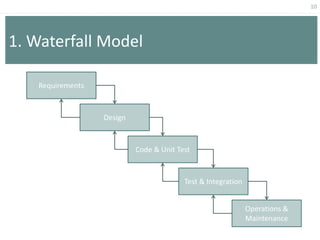
1. Waterfall Model
Requirements
Design
Test & Integration
Code & Unit Test
Operations &
Maintenance
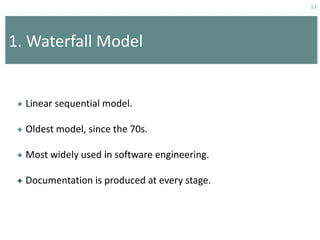
 Linear sequential model.
 Oldest model, since the 70s.
 Most widely used in software engineering.
 Documentation is produced at every stage.
11
1. Waterfall Model
12
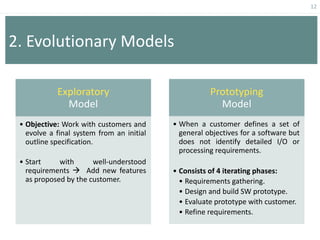
2. Evolutionary Models
Exploratory
Model
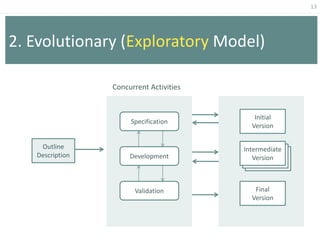
• Objective: Work with customers and
evolve a final system from an initial
outline specification.
• Start with well-understood
requirements  Add new features
as proposed by the customer.
Prototyping
Model
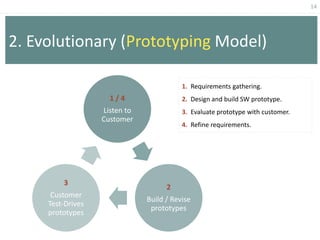
• When a customer defines a set of
general objectives for a software but
does not identify detailed I/O or
processing requirements.
• Consists of 4 iterating phases:
• Requirements gathering.
• Design and build SW prototype.
• Evaluate prototype with customer.
• Refine requirements.
13
2. Evolutionary (Exploratory Model)
Concurrent Activities
Outline
Description
Initial
Version
Final
Version
Intermediate
Version
Specification
Development
Validation
14
2. Evolutionary (Prototyping Model)
1 / 4
Listen to
Customer
2
Build / Revise
prototypes
3
Customer
Test-Drives
prototypes
1. Requirements gathering.
2. Design and build SW prototype.
3. Evaluate prototype with customer.
4. Refine requirements.
15
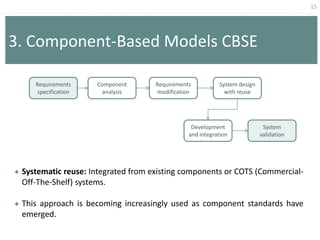
3. Component-Based Models CBSE
 Systematic reuse: Integrated from existing components or COTS (Commercial-
Off-The-Shelf) systems.
 This approach is becoming increasingly used as component standards have
emerged.
Requirements
specification
Component
analysis
Requirements
modification
System design
with reuse
Development
and integration
System
validation
16
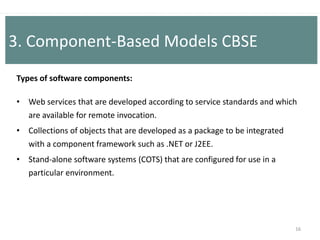
Types of software components:
• Web services that are developed according to service standards and which
are available for remote invocation.
• Collections of objects that are developed as a package to be integrated
with a component framework such as .NET or J2EE.
• Stand-alone software systems (COTS) that are configured for use in a
particular environment.
3. Component-Based Models CBSE
17
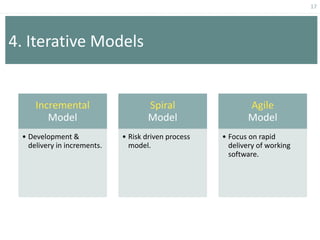
4. Iterative Models
Incremental
Model
• Development &
delivery in increments.
Spiral
Model
• Risk driven process
model.
Agile
Model
• Focus on rapid
delivery of working
software.
18
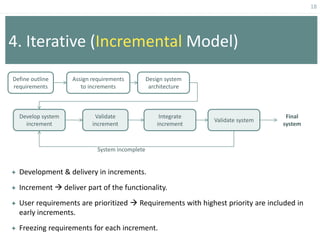
4. Iterative (Incremental Model)
Define outline
requirements
Assign requirements
to increments
Design system
architecture
Develop system
increment
Validate
increment
Integrate
increment
Validate system
Final
system
System incomplete
 Development & delivery in increments.
 Increment  deliver part of the functionality.
 User requirements are prioritized  Requirements with highest priority are included in
early increments.
 Freezing requirements for each increment.
19
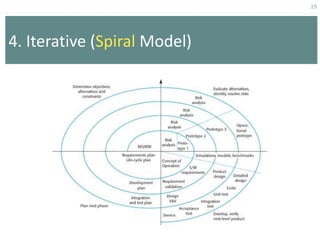
4. Iterative (Spiral Model)
20
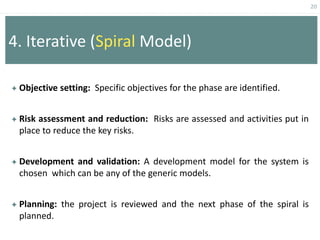
4. Iterative (Spiral Model)
 Objective setting: Specific objectives for the phase are identified.
 Risk assessment and reduction: Risks are assessed and activities put in
place to reduce the key risks.
 Development and validation: A development model for the system is
chosen which can be any of the generic models.
 Planning: the project is reviewed and the next phase of the spiral is
planned.
21
4. Iterative (Spiral Model)
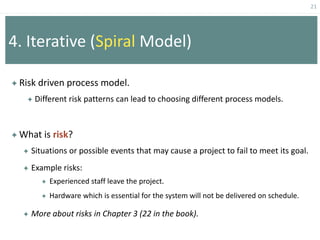
 Risk driven process model.
 Different risk patterns can lead to choosing different process models.
 What is risk?
 Situations or possible events that may cause a project to fail to meet its goal.
 Example risks:
 Experienced staff leave the project.
 Hardware which is essential for the system will not be delivered on schedule.
 More about risks in Chapter 3 (22 in the book).
22
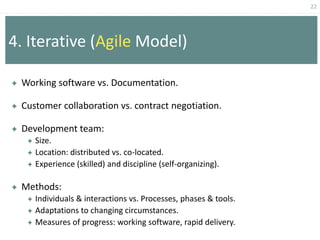
4. Iterative (Agile Model)
 Working software vs. Documentation.
 Customer collaboration vs. contract negotiation.
 Development team:
 Size.
 Location: distributed vs. co-located.
 Experience (skilled) and discipline (self-organizing).
 Methods:
 Individuals & interactions vs. Processes, phases & tools.
 Adaptations to changing circumstances.
 Measures of progress: working software, rapid delivery.
23
Evaluation of Models
24
Activity
 Select one slip from the envelope.
 In teams of 4 people, list the advantages, disadvantages, and
when to use a certain software process model.
 Share your list with the rest of the class.
25
1. Waterfall Model
 Problems: Inflexible partitioning of the project into distinct stages
makes it difficult to respond to changing customer requirements.
 Applicability:
 Appropriate when requirements are well-understood.
 Changes will be fairly limited during the design process.
 Large interactive systems.
 Mostly used for large systems engineering projects.
26
2.(a) Exploratory Model
 Problems:
 Lack of process visibility;
 Systems are often poorly structured;
 Applicability:
 For small or medium-size interactive systems;
 For parts of large systems (e.g. the user interface);
 For short-lifetime systems.
27
2.(b) Prototyping Model
 Advantages:
 Users get a feel for the actual system.
 Developers get to build something immediately.
 Specifications can be developed incrementally.
 Disadvantages:
 Developers may make implementation compromises in order to get a
prototype working quickly.
 The process in not visible (few documents that reflect every version of
the system).
 Systems poorly structured.
28
3. CBSE
 Advantages:
 Reduce amount of software to be developed.
 Reduce costs and risks.
 Faster delivery.
 Disadvantages:
 Requirements compromises’, system does not meet real needs of users.
 Control over system evolution is lost.
29
4.(a) Incremental Model
 Advantages:
 Customer value can be delivered with each increment so system functionality is
available earlier.
 Early increments act as a prototype to help elicit requirements for later increments.
 Lower risk of overall project failure.
 The highest priority system services tend to receive the most testing.
 Disadvantages:
 Increments should be relatively small (20,000 lines of code).
 Can be difficult to map the customer’s requirements onto increments of the right
size.
 Hard to identify common functions.
30
4.(b) Spiral Model
 Advantages:
 Risks are explicitly assessed and resolved throughout the process.
 Software engineers can start working on the project earlier rather than
wading through a lengthy early design process.
 Disadvantages:
 Requires highly skilled people in risk analysis and planning.
 Requires more time, and is more expensive.
 Estimates of budget and time are harder to judge at the beginning of the
project since the requirements evolve through the process.
31
Which software process model is best?
 Depends on the project circumstances and requirements.
 Combinations of models are used sometimes to get the benefits of
more than one model.
 Criteria for evaluating models:
 Risk management.
 Quality / cost control.
 Visibility of progress.
 Early system functionality.
 Customer involvement and feedback.

ch2_processmodels.pptjjgjuuuuugffyuijhgff

  • 1.
    1 Chapter 2: Software ProcessModels Chapter 2 & 3 in Software Engineering Book
  • 2.
    2 Overview  What aresoftware process models?  Why do we need software process models?  Models:  Waterfall models.  Evolutionary models.  CBSE models.  Iterative models.
  • 3.
    3 By the endof this chapter, you should be able to..  Describe various software process models.  Identify advantages and disadvantages of each model.  Evaluate the applicability of each model for different software development contexts.
  • 4.
    4 Software Process Model Requirements Specification Designand Implementation Validation Evolution A structured set of activities required to develop a software system.
  • 5.
    5 Ad hoc SoftwareDevelopment  Developing software without planning for each phase, and without specifying tasks, deliverables, or time constraints.  Relies entirely on the skills and experience of the individuals performing the work.  The software process may change as work progresses.
  • 6.
    6 • A structuredset of activities required to develop a software system. • Many different software processes but all involve: – Specification – defining what the system should do; – Design and implementation – defining the organization of the system and implementing the system; – Validation – checking that it does what the customer wants; – Evolution – changing the system in response to changing customer needs. • A software process model is an abstract representation of a process. It presents a description of a process from some particular perspective. Software Process Model
  • 7.
    7 Activity: What couldgo wrong in a software development project? SaudiTech is a software company. It has a team of 25 programmers. Faisal has recently established a dental clinic in Riyadh and asked SaudiTech to develop a management system for his dental clinic. Faisal’s request was to develop a system to electronically manage patient records and perform administrative functions similar to ‘what is being used in other clinics’ but within a budget of 50k Saudi riyals and delivered within 3 months. SaudiTech adopts an ad hoc approach to software development and has not worked on large scale projects before. What problems do you anticipate in this project?
  • 8.
    8 How can weovercome problems with ad hoc software development?  Problems: (include but not limited to)  Difficult to distinguish between tasks  important tasks may be ignored.  Inconsistent schedules, budgets, functionality and product quality.  Delayed problem discovery  more costly to fix.  Software Process Models provide guidelines to organize how software process activities should be performed and in what order. Solution? Software Process Model “an abstract representation of a process. It presents a description of a process from some particular perspective.”
  • 9.
    9 Software Process Models Waterfall model.  Evolutionary models.  Component-Based development model (CBSE).  Iterative Models.
  • 10.
    10 1. Waterfall Model Requirements Design Test& Integration Code & Unit Test Operations & Maintenance
  • 11.
     Linear sequentialmodel.  Oldest model, since the 70s.  Most widely used in software engineering.  Documentation is produced at every stage. 11 1. Waterfall Model
  • 12.
    12 2. Evolutionary Models Exploratory Model •Objective: Work with customers and evolve a final system from an initial outline specification. • Start with well-understood requirements  Add new features as proposed by the customer. Prototyping Model • When a customer defines a set of general objectives for a software but does not identify detailed I/O or processing requirements. • Consists of 4 iterating phases: • Requirements gathering. • Design and build SW prototype. • Evaluate prototype with customer. • Refine requirements.
  • 13.
    13 2. Evolutionary (ExploratoryModel) Concurrent Activities Outline Description Initial Version Final Version Intermediate Version Specification Development Validation
  • 14.
    14 2. Evolutionary (PrototypingModel) 1 / 4 Listen to Customer 2 Build / Revise prototypes 3 Customer Test-Drives prototypes 1. Requirements gathering. 2. Design and build SW prototype. 3. Evaluate prototype with customer. 4. Refine requirements.
  • 15.
    15 3. Component-Based ModelsCBSE  Systematic reuse: Integrated from existing components or COTS (Commercial- Off-The-Shelf) systems.  This approach is becoming increasingly used as component standards have emerged. Requirements specification Component analysis Requirements modification System design with reuse Development and integration System validation
  • 16.
    16 Types of softwarecomponents: • Web services that are developed according to service standards and which are available for remote invocation. • Collections of objects that are developed as a package to be integrated with a component framework such as .NET or J2EE. • Stand-alone software systems (COTS) that are configured for use in a particular environment. 3. Component-Based Models CBSE
  • 17.
    17 4. Iterative Models Incremental Model •Development & delivery in increments. Spiral Model • Risk driven process model. Agile Model • Focus on rapid delivery of working software.
  • 18.
    18 4. Iterative (IncrementalModel) Define outline requirements Assign requirements to increments Design system architecture Develop system increment Validate increment Integrate increment Validate system Final system System incomplete  Development & delivery in increments.  Increment  deliver part of the functionality.  User requirements are prioritized  Requirements with highest priority are included in early increments.  Freezing requirements for each increment.
  • 19.
  • 20.
    20 4. Iterative (SpiralModel)  Objective setting: Specific objectives for the phase are identified.  Risk assessment and reduction: Risks are assessed and activities put in place to reduce the key risks.  Development and validation: A development model for the system is chosen which can be any of the generic models.  Planning: the project is reviewed and the next phase of the spiral is planned.
  • 21.
    21 4. Iterative (SpiralModel)  Risk driven process model.  Different risk patterns can lead to choosing different process models.  What is risk?  Situations or possible events that may cause a project to fail to meet its goal.  Example risks:  Experienced staff leave the project.  Hardware which is essential for the system will not be delivered on schedule.  More about risks in Chapter 3 (22 in the book).
  • 22.
    22 4. Iterative (AgileModel)  Working software vs. Documentation.  Customer collaboration vs. contract negotiation.  Development team:  Size.  Location: distributed vs. co-located.  Experience (skilled) and discipline (self-organizing).  Methods:  Individuals & interactions vs. Processes, phases & tools.  Adaptations to changing circumstances.  Measures of progress: working software, rapid delivery.
  • 23.
  • 24.
    24 Activity  Select oneslip from the envelope.  In teams of 4 people, list the advantages, disadvantages, and when to use a certain software process model.  Share your list with the rest of the class.
  • 25.
    25 1. Waterfall Model Problems: Inflexible partitioning of the project into distinct stages makes it difficult to respond to changing customer requirements.  Applicability:  Appropriate when requirements are well-understood.  Changes will be fairly limited during the design process.  Large interactive systems.  Mostly used for large systems engineering projects.
  • 26.
    26 2.(a) Exploratory Model Problems:  Lack of process visibility;  Systems are often poorly structured;  Applicability:  For small or medium-size interactive systems;  For parts of large systems (e.g. the user interface);  For short-lifetime systems.
  • 27.
    27 2.(b) Prototyping Model Advantages:  Users get a feel for the actual system.  Developers get to build something immediately.  Specifications can be developed incrementally.  Disadvantages:  Developers may make implementation compromises in order to get a prototype working quickly.  The process in not visible (few documents that reflect every version of the system).  Systems poorly structured.
  • 28.
    28 3. CBSE  Advantages: Reduce amount of software to be developed.  Reduce costs and risks.  Faster delivery.  Disadvantages:  Requirements compromises’, system does not meet real needs of users.  Control over system evolution is lost.
  • 29.
    29 4.(a) Incremental Model Advantages:  Customer value can be delivered with each increment so system functionality is available earlier.  Early increments act as a prototype to help elicit requirements for later increments.  Lower risk of overall project failure.  The highest priority system services tend to receive the most testing.  Disadvantages:  Increments should be relatively small (20,000 lines of code).  Can be difficult to map the customer’s requirements onto increments of the right size.  Hard to identify common functions.
  • 30.
    30 4.(b) Spiral Model Advantages:  Risks are explicitly assessed and resolved throughout the process.  Software engineers can start working on the project earlier rather than wading through a lengthy early design process.  Disadvantages:  Requires highly skilled people in risk analysis and planning.  Requires more time, and is more expensive.  Estimates of budget and time are harder to judge at the beginning of the project since the requirements evolve through the process.
  • 31.
    31 Which software processmodel is best?  Depends on the project circumstances and requirements.  Combinations of models are used sometimes to get the benefits of more than one model.  Criteria for evaluating models:  Risk management.  Quality / cost control.  Visibility of progress.  Early system functionality.  Customer involvement and feedback.