Downloaded 11 times


![VECTORS
• Subscripting or Referencing
• VECTOR[index specification]
• VECTOR[index specification] <- value
• Specification
• Blank [] : all elements
• Positive integers: keep those elements
• Negative integers: drop those elements return rest
• Logical: keep only those which are TRUE in position
• Character: keep whose names are specified
• LETTERS and letters:
• In built vectors for uppercase and lowercase English alphabets](https://image.slidesharecdn.com/ch1rsinglemodeds-161123220647/85/R-DATA-STRUCTURES-1-5-320.jpg)

![MATRICES
• Subscripting or Referencing
• MATRIX[row index, col index]
• MATRIX[row index, col index] <- value
• Specification
• Blank [] : all elements
• Positive integers: keep those elements
• Negative integers: drop those elements return rest
• Logical: keep only those which are TRUE in position
• Character: keep whose names are specified
• Preserving Dimensions of matrix subset
• When one row or one column is returned the dimensions are dropped and a vector is returned
• To preserve dimensions use drop = FALSE option](https://image.slidesharecdn.com/ch1rsinglemodeds-161123220647/85/R-DATA-STRUCTURES-1-7-320.jpg)


![ARRAYS
• Subscripting or Referencing
• ARRAY[dim1 index, dim2 index, dim3 index…]
• ARRAY[dim1 index, dim2 index, dim3 index…] <- value
• Specification
• Blank [] : all elements
• Positive integers: keep those elements
• Negative integers: drop those elements return rest
• Logical: keep only those which are TRUE in position
• Character: keep whose names are specified
• Preserving Dimensions of array subset
• When one row or one column is returned the dimensions are dropped and a vector or matrix is
returned
• To preserve dimensions use drop = FALSE option](https://image.slidesharecdn.com/ch1rsinglemodeds-161123220647/85/R-DATA-STRUCTURES-1-10-320.jpg)


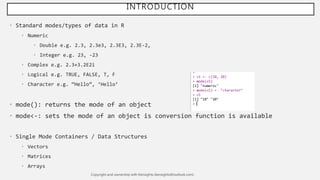
The document provides an overview of single mode data structures in R, detailing types like numeric, integer, complex, logical, and character. It explains the creation and attributes of vectors, matrices, and arrays, including subscripting and referencing techniques. Key functions such as mode(), matrix(), and array() are also highlighted, emphasizing how matrices and arrays can be viewed as multi-dimensional vectors.


![[DSC Europe 25] Slobodan Dolinic - Smart and Intelligent Green Region.pptx](https://cdn.slidesharecdn.com/ss_thumbnails/0bribinjsp6ghwtvsvor-2-sigre-slobodan-dolinic-260115093812-c9c10e90-thumbnail.jpg?width=640&height=640&fit=bounds)

![[DSC Europe 25] Elena Menshikova - AI-Powered Operational Excellence: Revolut...](https://cdn.slidesharecdn.com/ss_thumbnails/es6nholbqy3zaao2c2yd-2-elena-menshikova-data-ai-in-decision-making-260115093812-4fba8b38-thumbnail.jpg?width=640&height=640&fit=bounds)


![[DSC Europe 25] Mijat Kustudic - Building Financial Intelligence with AI Agen...](https://cdn.slidesharecdn.com/ss_thumbnails/38y2lb5lse6wstegtvas-3-mijat-kustudic-building-financial-intelligence-with-ai-agents-260114111931-1a4783ce-thumbnail.jpg?width=640&height=640&fit=bounds)


![[DSC Europe 25] Ivica Milaric - The Future of Gaming and AI Tools.pptx](https://cdn.slidesharecdn.com/ss_thumbnails/tijgzsmgse2kj2y5pzzp-5-ivica-milaric-the-future-of-gaming-x-ai-tools-260114111931-87c2b3ac-thumbnail.jpg?width=640&height=640&fit=bounds)


![[DSC Europe 25] Srba Markovic - From Pilot to Production: Overcoming AI Deplo...](https://cdn.slidesharecdn.com/ss_thumbnails/yjjmrtytmwbalxlba7px-4-srba-markovic-from-pilot-to-production-overcoming-ai-deployment-blockers-with-260114111931-4a892d44-thumbnail.jpg?width=640&height=640&fit=bounds)
![[DSC Europe 25] Dragan Jerosimovic - The Anatomy of a Narrative Simulation.pdf](https://cdn.slidesharecdn.com/ss_thumbnails/vzputuprdqr6zwbrwdcw-1-dragan-jerosimovic-the-anatomy-of-a-narrative-simulation-260114111931-9d04fba2-thumbnail.jpg?width=640&height=640&fit=bounds)

