Better lives through livestock
Reporting publications – CGSpace and AReS
briefing for ILRI scientists
Abenet Yabowork and Peter Ballantyne
International Livestock Research Institute
16 – 17 December 2020
2
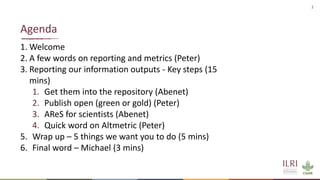
1. Welcome
2. A few words on reporting and metrics (Peter)
3. Reporting our information outputs - Key steps (15
mins)
1. Get them into the repository (Abenet)
2. Publish open (green or gold) (Peter)
3. AReS for scientists (Abenet)
4. Quick word on Altmetric (Peter)
5. Wrap up – 5 things we want you to do (5 mins)
6. Final word – Michael (3 mins)
Agenda
3
• How (and why) to add your outputs to our CGSpace
repository
• How to use AReS to visualize your repository outputs
and produce a list for ILRI management
• How to use Altmetric to see the reach and impact of
your outputs
Welcome, today we’ll cover
Reporting …
5
We need to show and report on what we produce
• To monitor results
• To monitor performance
• To inform future work
Usually requiring that we generate lists of outputs:
• With indicators of use and reach
• With indicators of openness
• Views and downloads
• Citations
• Mentions
Reporting, reporting
6
CRPs – and other funders - want to know:
• How many outputs we produced
• How many by each type – article, training material, policy, etc
• Whether they are ‘ISI’ or not - with an impact factor
• Whether they are open access or not – without restrictions
• How much attention they attracted – across social and other
media
• How many citations they received – in other academic journals
ILRI management wants to see:
• A list of the outputs each scientist produced in a year
Indicators and metrics
Key step 1: add your outputs to CGSpace
8
• CGSpace is the open digital repository of information products
by ILRI and some partners (CGIAR centers, SMO, CRP)
• It is a complete index (many full-text) of publications, reports,
articles, presentations, videos, policy briefs, posters, etc. of ILRI
staff and projects
• ALL your publications, articles and so on should be listed in
CGSpace, even if the actual item is published elsewhere
• All CGSpace items have a unique permanent identifier that can
be used for links
CGSpace
9
• CGSpace is updated by comms and KM staff at ILRI as well as
program comms staff
• They monitor what’s published and constantly update the
database
• They don’t catch everything, so YOU need to make sure
what we have is complete
• You can check if we miss something and alert us
Submitting to CGSpace
10
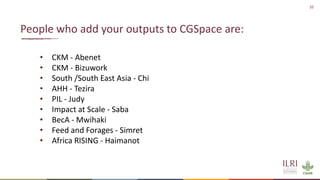
• CKM - Abenet
• CKM - Bizuwork
• South /South East Asia - Chi
• AHH - Tezira
• PIL - Judy
• Impact at Scale - Saba
• BecA - Mwihaki
• Feed and Forages - Simret
• Africa RISING - Haimanot
People who add your outputs to CGSpace are:
11
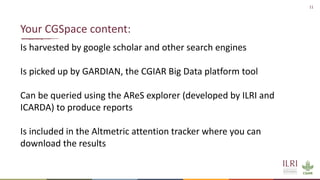
Is harvested by google scholar and other search engines
Is picked up by GARDIAN, the CGIAR Big Data platform tool
Can be queried using the AReS explorer (developed by ILRI and
ICARDA) to produce reports
Is included in the Altmetric attention tracker where you can
download the results
Your CGSpace content:
12
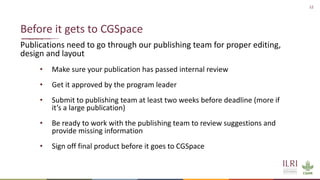
Publications need to go through our publishing team for proper editing,
design and layout
• Make sure your publication has passed internal review
• Get it approved by the program leader
• Submit to publishing team at least two weeks before deadline (more if
it’s a large publication)
• Be ready to work with the publishing team to review suggestions and
provide missing information
• Sign off final product before it goes to CGSpace
Before it gets to CGSpace
Key step 2: publish open access
14
Is required by ILRI and CGIAR policies
Applies to all information products
Is achieved when we deposit ‘full text’ outputs into CGSpace
Is achieved when you publish in an open access journal
Is achieved when you pay a journal to make your article open
access [it normally also gets a creative commons license]
Open access
15
All formal ILRI publications, reports and mutimedia products are
automatically published in CGSpace with an open license
• the publishing team has templates you can use and takes care of
final design/layout, branding and editorial quality
We also try to deposit all posters, presentations, manuals, briefs,
brochures and the like
Since we usually produce these, it is not a big problem to include
them in CGSpace – we just need to intercept them
The main challenge is with articles!
Routes to open access
16
For articles:
The gold route to open access is for you to pay the publisher to make the
article open access. This requires that you or your project budget these
costs
• (BMGF-funded projects can submit through Chronos:
https://chronos.gatesfoundation.org)
The green route is to deposit the final PDF ‘author version’ of the article in
CGSpace
Gold is preferred, green is acceptable; both will make sure that CGIAR
performance reports show our work to be open.
Green and gold – pathways to open access
Key step 3: produce reports using AReS
18
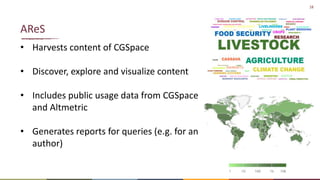
• Harvests content of CGSpace
• Discover, explore and visualize content
• Includes public usage data from CGSpace
and Altmetric
• Generates reports for queries (e.g. for an
author)
AReS
19
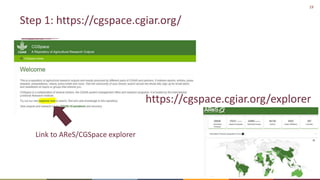
Step 1: https://cgspace.cgiar.org/
https://cgspace.cgiar.org/explorer
Link to AReS/CGSpace explorer
20
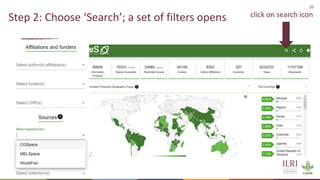
Step 2: Choose ‘Search’; a set of filters opens click on search icon
21
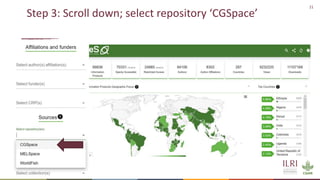
Step 3: Scroll down; select repository ‘CGSpace’
22
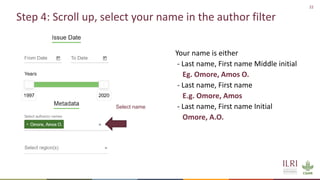
Step 4: Scroll up, select your name in the author filter
Your name is either
- Last name, First name Middle initial
Eg. Omore, Amos O.
- Last name, First name
E.g. Omore, Amos
- Last name, First name Initial
Omore, A.O.
Select name
23
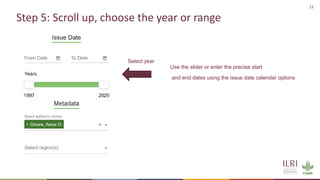
Step 5: Scroll up, choose the year or range
Select year
Use the slider or enter the precise start
and end dates using the issue date calendar options
24
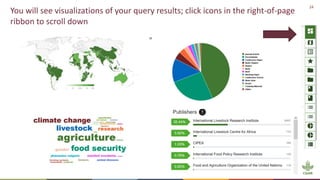
You will see visualizations of your query results; click icons in the right-of-page
ribbon to scroll down
25
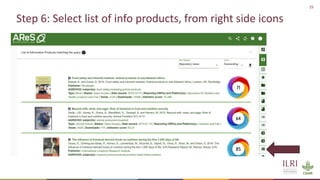
Step 6: Select list of info products, from right side icons
side icon
26
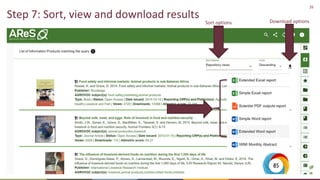
Step 7: Sort, view and download results
Sort options Download options
27
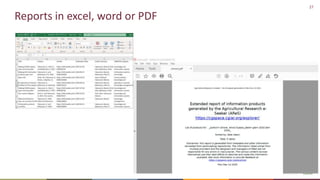
Reports in excel, word or PDF
28
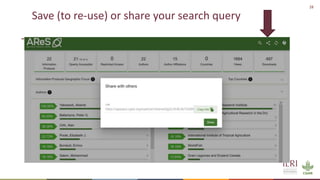
Save (to re-use) or share your search query
29
1. Select CGSpace repository
2. Select your name as author
3. Specify a year or range of years
4. View the results
5. Export the results in excel, word or PDF; format for your needs
6. [notify CKM or Comms if something is missing]
Recap: Search your outputs on AReS
Key step 4: check attention in Altmetric
31
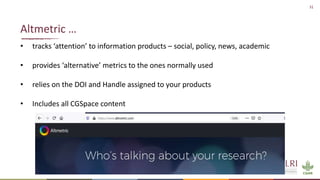
• tracks ‘attention’ to information products – social, policy, news, academic
• provides ‘alternative’ metrics to the ones normally used
• relies on the DOI and Handle assigned to your products
• Includes all CGSpace content
Altmetric …
32
• ILRI scientists can search the Altmetric explorer using
a custom login (get from Abenet)
• Search for an author, an institution or topic:
• Who mentions your work
• Where it was mentioned, and when
• Altmetric gives each product a composite score –
visualized as a donut; you can see this on CGSpace items,
publisher websites; it is used by CGIAR performance
dashboards
• In Altmetric, you can search, save searches, get alerts, and
save (most) data
Using altmetric
Q&A
34
• How to submit an item to CGSpace
• How to use AReS
• How to make an output open
• How to use Altmetric
… or contact a.yabowork@cgiar.org
Post any queries to the chat
Wrap up
36
What the most useful thing you gained from this session?
Chat
37
1. Make sure your publications are in CGSpace
2. Make sure your articles are open
3. Promote handles and DOI, social media, articles, web
4. Produce AReS reports
5. Try out Altmetric – Contact Abenet for the correct login
Wrap up – actions you can take
38
Final word - Michael
THANK YOU

Reporting publications–CGSpace and AReS briefing for ILRI scientists

  • 1.
    Better lives throughlivestock Reporting publications – CGSpace and AReS briefing for ILRI scientists Abenet Yabowork and Peter Ballantyne International Livestock Research Institute 16 – 17 December 2020
  • 2.
    2 1. Welcome 2. Afew words on reporting and metrics (Peter) 3. Reporting our information outputs - Key steps (15 mins) 1. Get them into the repository (Abenet) 2. Publish open (green or gold) (Peter) 3. AReS for scientists (Abenet) 4. Quick word on Altmetric (Peter) 5. Wrap up – 5 things we want you to do (5 mins) 6. Final word – Michael (3 mins) Agenda
  • 3.
    3 • How (andwhy) to add your outputs to our CGSpace repository • How to use AReS to visualize your repository outputs and produce a list for ILRI management • How to use Altmetric to see the reach and impact of your outputs Welcome, today we’ll cover
  • 4.
  • 5.
    5 We need toshow and report on what we produce • To monitor results • To monitor performance • To inform future work Usually requiring that we generate lists of outputs: • With indicators of use and reach • With indicators of openness • Views and downloads • Citations • Mentions Reporting, reporting
  • 6.
    6 CRPs – andother funders - want to know: • How many outputs we produced • How many by each type – article, training material, policy, etc • Whether they are ‘ISI’ or not - with an impact factor • Whether they are open access or not – without restrictions • How much attention they attracted – across social and other media • How many citations they received – in other academic journals ILRI management wants to see: • A list of the outputs each scientist produced in a year Indicators and metrics
  • 7.
    Key step 1:add your outputs to CGSpace
  • 8.
    8 • CGSpace isthe open digital repository of information products by ILRI and some partners (CGIAR centers, SMO, CRP) • It is a complete index (many full-text) of publications, reports, articles, presentations, videos, policy briefs, posters, etc. of ILRI staff and projects • ALL your publications, articles and so on should be listed in CGSpace, even if the actual item is published elsewhere • All CGSpace items have a unique permanent identifier that can be used for links CGSpace
  • 9.
    9 • CGSpace isupdated by comms and KM staff at ILRI as well as program comms staff • They monitor what’s published and constantly update the database • They don’t catch everything, so YOU need to make sure what we have is complete • You can check if we miss something and alert us Submitting to CGSpace
  • 10.
    10 • CKM -Abenet • CKM - Bizuwork • South /South East Asia - Chi • AHH - Tezira • PIL - Judy • Impact at Scale - Saba • BecA - Mwihaki • Feed and Forages - Simret • Africa RISING - Haimanot People who add your outputs to CGSpace are:
  • 11.
    11 Is harvested bygoogle scholar and other search engines Is picked up by GARDIAN, the CGIAR Big Data platform tool Can be queried using the AReS explorer (developed by ILRI and ICARDA) to produce reports Is included in the Altmetric attention tracker where you can download the results Your CGSpace content:
  • 12.
    12 Publications need togo through our publishing team for proper editing, design and layout • Make sure your publication has passed internal review • Get it approved by the program leader • Submit to publishing team at least two weeks before deadline (more if it’s a large publication) • Be ready to work with the publishing team to review suggestions and provide missing information • Sign off final product before it goes to CGSpace Before it gets to CGSpace
  • 13.
    Key step 2:publish open access
  • 14.
    14 Is required byILRI and CGIAR policies Applies to all information products Is achieved when we deposit ‘full text’ outputs into CGSpace Is achieved when you publish in an open access journal Is achieved when you pay a journal to make your article open access [it normally also gets a creative commons license] Open access
  • 15.
    15 All formal ILRIpublications, reports and mutimedia products are automatically published in CGSpace with an open license • the publishing team has templates you can use and takes care of final design/layout, branding and editorial quality We also try to deposit all posters, presentations, manuals, briefs, brochures and the like Since we usually produce these, it is not a big problem to include them in CGSpace – we just need to intercept them The main challenge is with articles! Routes to open access
  • 16.
    16 For articles: The goldroute to open access is for you to pay the publisher to make the article open access. This requires that you or your project budget these costs • (BMGF-funded projects can submit through Chronos: https://chronos.gatesfoundation.org) The green route is to deposit the final PDF ‘author version’ of the article in CGSpace Gold is preferred, green is acceptable; both will make sure that CGIAR performance reports show our work to be open. Green and gold – pathways to open access
  • 17.
    Key step 3:produce reports using AReS
  • 18.
    18 • Harvests contentof CGSpace • Discover, explore and visualize content • Includes public usage data from CGSpace and Altmetric • Generates reports for queries (e.g. for an author) AReS
  • 19.
  • 20.
    20 Step 2: Choose‘Search’; a set of filters opens click on search icon
  • 21.
    21 Step 3: Scrolldown; select repository ‘CGSpace’
  • 22.
    22 Step 4: Scrollup, select your name in the author filter Your name is either - Last name, First name Middle initial Eg. Omore, Amos O. - Last name, First name E.g. Omore, Amos - Last name, First name Initial Omore, A.O. Select name
  • 23.
    23 Step 5: Scrollup, choose the year or range Select year Use the slider or enter the precise start and end dates using the issue date calendar options
  • 24.
    24 You will seevisualizations of your query results; click icons in the right-of-page ribbon to scroll down
  • 25.
    25 Step 6: Selectlist of info products, from right side icons side icon
  • 26.
    26 Step 7: Sort,view and download results Sort options Download options
  • 27.
  • 28.
    28 Save (to re-use)or share your search query
  • 29.
    29 1. Select CGSpacerepository 2. Select your name as author 3. Specify a year or range of years 4. View the results 5. Export the results in excel, word or PDF; format for your needs 6. [notify CKM or Comms if something is missing] Recap: Search your outputs on AReS
  • 30.
    Key step 4:check attention in Altmetric
  • 31.
    31 • tracks ‘attention’to information products – social, policy, news, academic • provides ‘alternative’ metrics to the ones normally used • relies on the DOI and Handle assigned to your products • Includes all CGSpace content Altmetric …
  • 32.
    32 • ILRI scientistscan search the Altmetric explorer using a custom login (get from Abenet) • Search for an author, an institution or topic: • Who mentions your work • Where it was mentioned, and when • Altmetric gives each product a composite score – visualized as a donut; you can see this on CGSpace items, publisher websites; it is used by CGIAR performance dashboards • In Altmetric, you can search, save searches, get alerts, and save (most) data Using altmetric
  • 33.
  • 34.
    34 • How tosubmit an item to CGSpace • How to use AReS • How to make an output open • How to use Altmetric … or contact a.yabowork@cgiar.org Post any queries to the chat
  • 35.
  • 36.
    36 What the mostuseful thing you gained from this session? Chat
  • 37.
    37 1. Make sureyour publications are in CGSpace 2. Make sure your articles are open 3. Promote handles and DOI, social media, articles, web 4. Produce AReS reports 5. Try out Altmetric – Contact Abenet for the correct login Wrap up – actions you can take
  • 38.
  • 39.