



1Built-to-Spec | Product Approval | Engineering Services | Software Development
Solvers: Incompressible
Flow
Introduction to Solver Terminologies
2
©ZeusNumerixPvtLtd:ConfidentialDocument
Overview of Presentation
07-Mar-2020 Incompressible Flow: Zeus Numerix
 FlowZ™ - Pressure Based (henceforth FlowZ™)
 Introduction
 Graphical User Interface ( GUI )
 Description of Solver Options
 Natural Convection inside Enclosure
 Hands-On
2
3
©ZeusNumerixPvtLtd:ConfidentialDocument
FlowZ™ – Pressure Based
Introduction, User Interface & Solver Options
07-Mar-2020 Incompressible Flow: Zeus Numerix
3
4
©ZeusNumerixPvtLtd:ConfidentialDocument
Introduction
07-Mar-2020 Incompressible Flow: Zeus Numerix
 FlowZ™-Pressure Based is the flow solver module of CFDExpert™, esp. meant for
incompressible flow simulations
 Pressure correction based family of schemes
 Implemented on polyhedral mesh data-structure (Tet / Hex)
 Requires finite volume methodology
 Includes K Epsilon turbulence model & energy equation
 Additional features like buoyancy terms, conjugate heat transfer & porosity model
 Flow acceleration achieved using AMG Linear solver
4
5
©ZeusNumerixPvtLtd:ConfidentialDocument
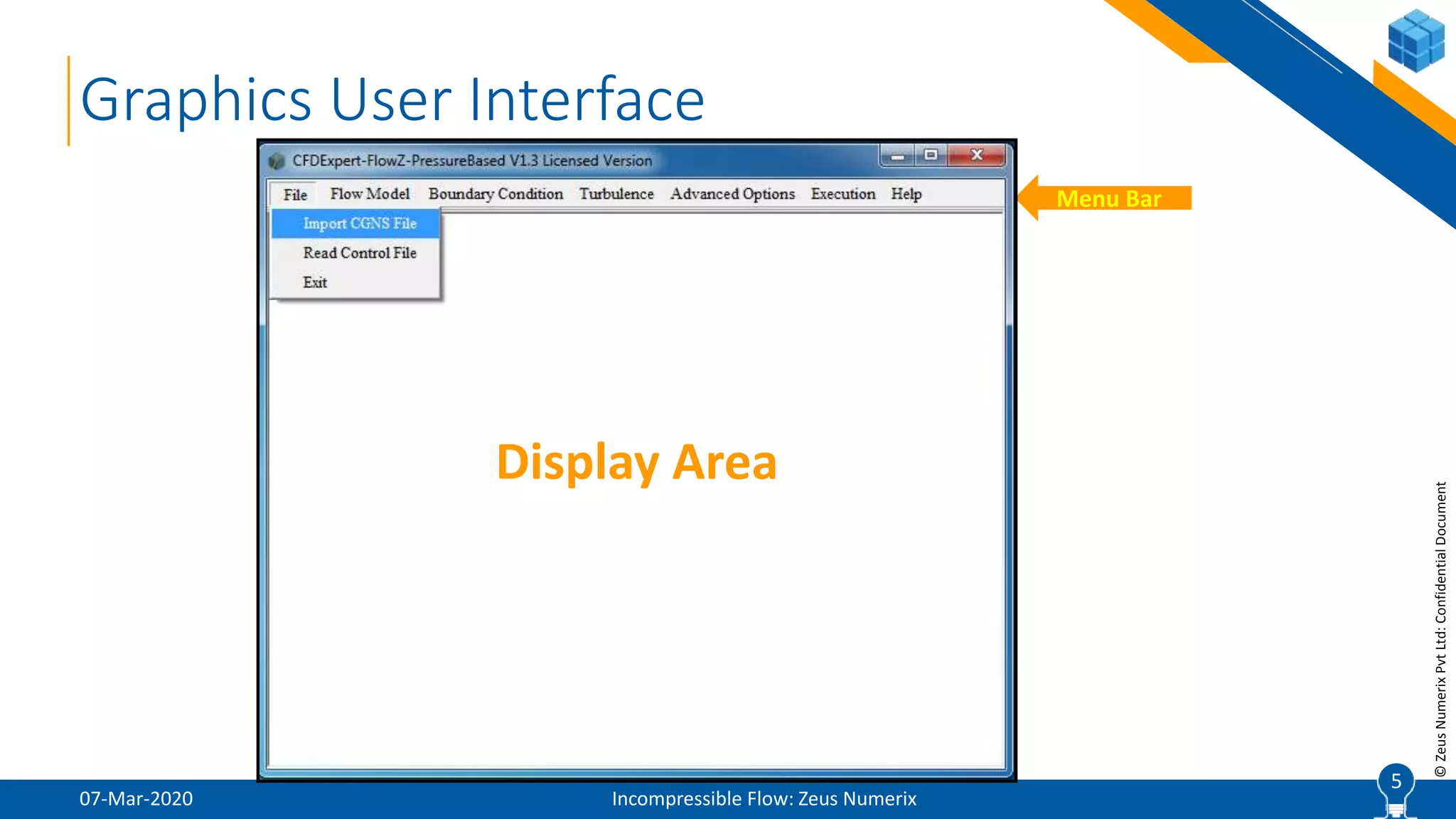
Graphics User Interface
07-Mar-2020 Incompressible Flow: Zeus Numerix
5
Menu Bar
Display Area
6
©ZeusNumerixPvtLtd:ConfidentialDocument
File Menu
07-Mar-2020 Incompressible Flow: Zeus Numerix
 Import CGNS File
 Imports CGNS mesh file into the solver
 CGNS – CFD General Notation System
 Internationally recognized ISO file format
 Binary file format to prevent data loss
 Approved by NASA, Boeing & used by all standard software
 Stores grid coordinates, connectivity, boundary conditions, interface data and solution fields
 CGNSViewer is a freeware developed by CGNS committee to view CGNS files. Can be
downloaded from www.cgns.org
 CGNSPlot facility for viewing of CGNS files
6
7
©ZeusNumerixPvtLtd:ConfidentialDocument
File Menu (Contd.)
07-Mar-2020 Incompressible Flow: Zeus Numerix
 Read Control File
 At the software level, GUI is meant to help user setup the simulation parameters, which gets
stored in a “solver control file (.scf / .zcf)”. This is read by core solver program
 GUI can import a pre-existing solver control file, mainly for two purposes:
 If user intends to modify an existing setup
 If user intends to continue the simulation
 Exit
 Exits from the software and closes window
7
8
©ZeusNumerixPvtLtd:ConfidentialDocument
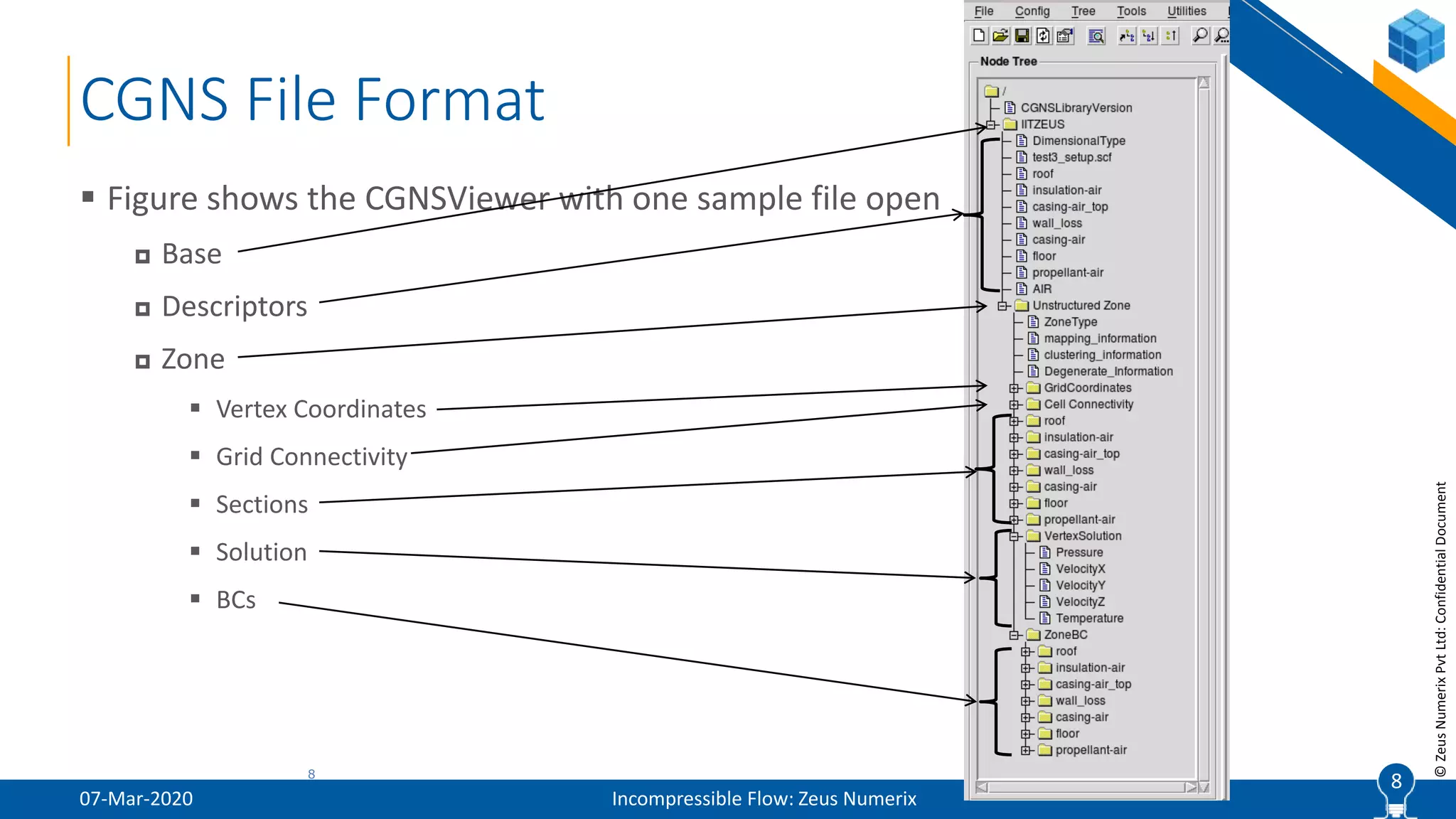
 Figure shows the CGNSViewer with one sample file open
 Base
 Descriptors
 Zone
 Vertex Coordinates
 Grid Connectivity
 Sections
 Solution
 BCs
CGNS File Format
07-Mar-2020 Incompressible Flow: Zeus Numerix
88
9
©ZeusNumerixPvtLtd:ConfidentialDocument
Conversion to Unstructured Mesh
07-Mar-2020 Incompressible Flow: Zeus Numerix
 Conversion to Unstructured Format
 Note: FlowZTM is built on polyhedral mesh data-structure
 Such implementation is very different from typical structured mesh based implementation, primarily in:
 Identification of cell neighborhood indices
 Reconstruction for second order schemes
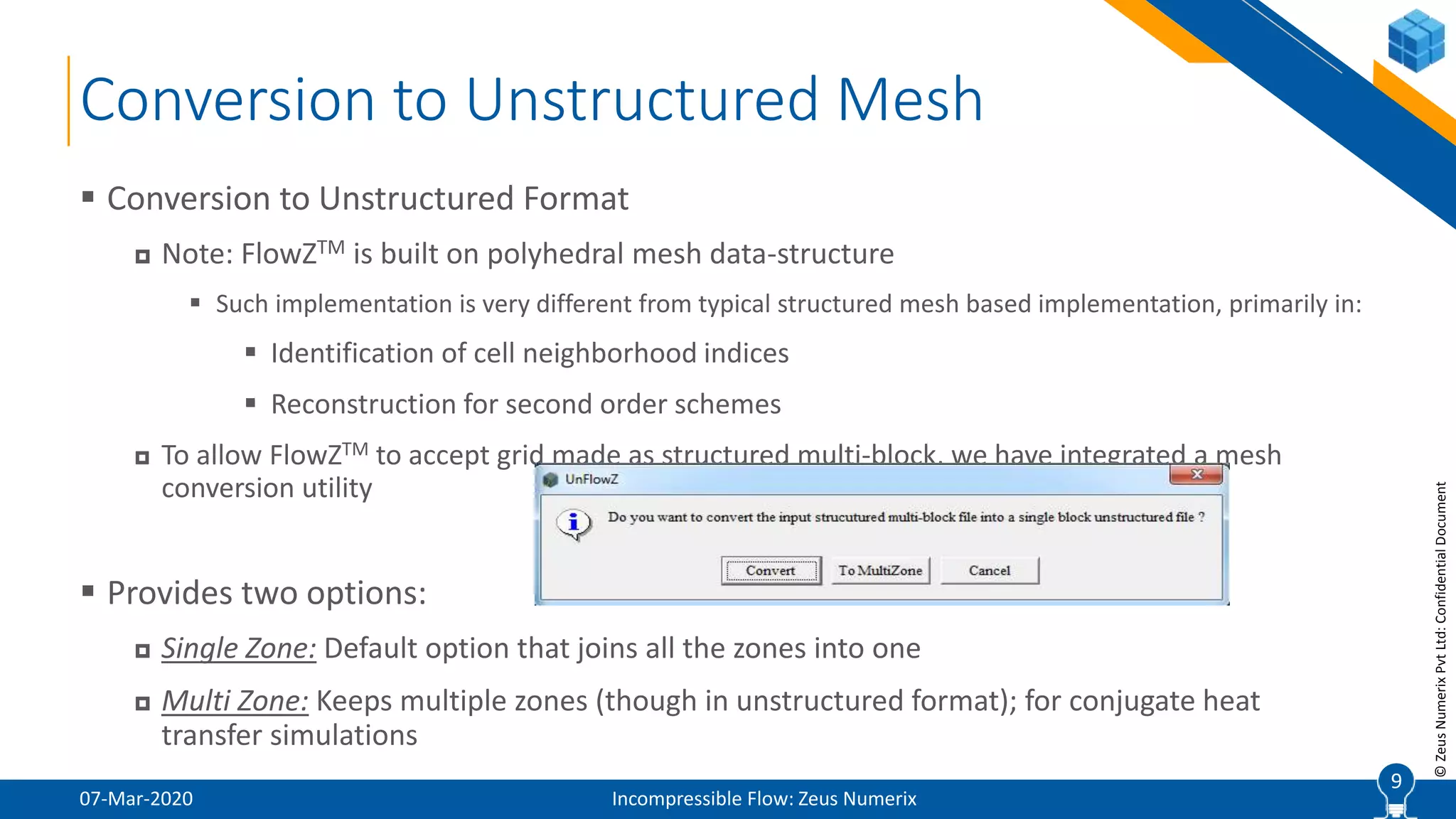
 To allow FlowZTM to accept grid made as structured multi-block, we have integrated a mesh
conversion utility
 Provides two options:
 Single Zone: Default option that joins all the zones into one
 Multi Zone: Keeps multiple zones (though in unstructured format); for conjugate heat
transfer simulations
9
10
©ZeusNumerixPvtLtd:ConfidentialDocument
Initial Inputs
07-Mar-2020 Incompressible Flow: Zeus Numerix
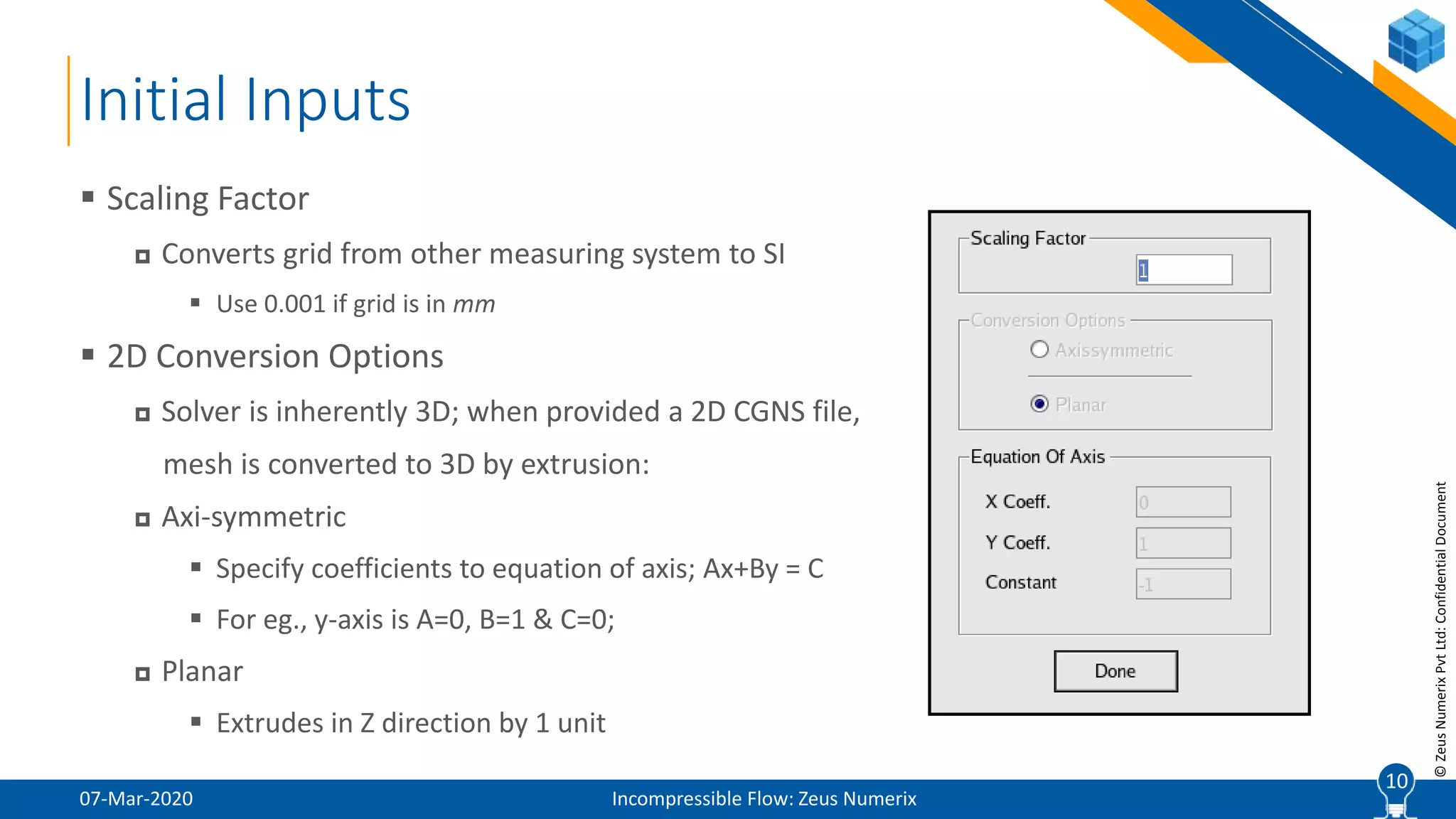
 Scaling Factor
 Converts grid from other measuring system to SI
 Use 0.001 if grid is in mm
 2D Conversion Options
 Solver is inherently 3D; when provided a 2D CGNS file,
mesh is converted to 3D by extrusion:
 Axi-symmetric
 Specify coefficients to equation of axis; Ax+By = C
 For eg., y-axis is A=0, B=1 & C=0;
 Planar
 Extrudes in Z direction by 1 unit
10
11
©ZeusNumerixPvtLtd:ConfidentialDocument
07-Mar-2020 Incompressible Flow: Zeus Numerix
11
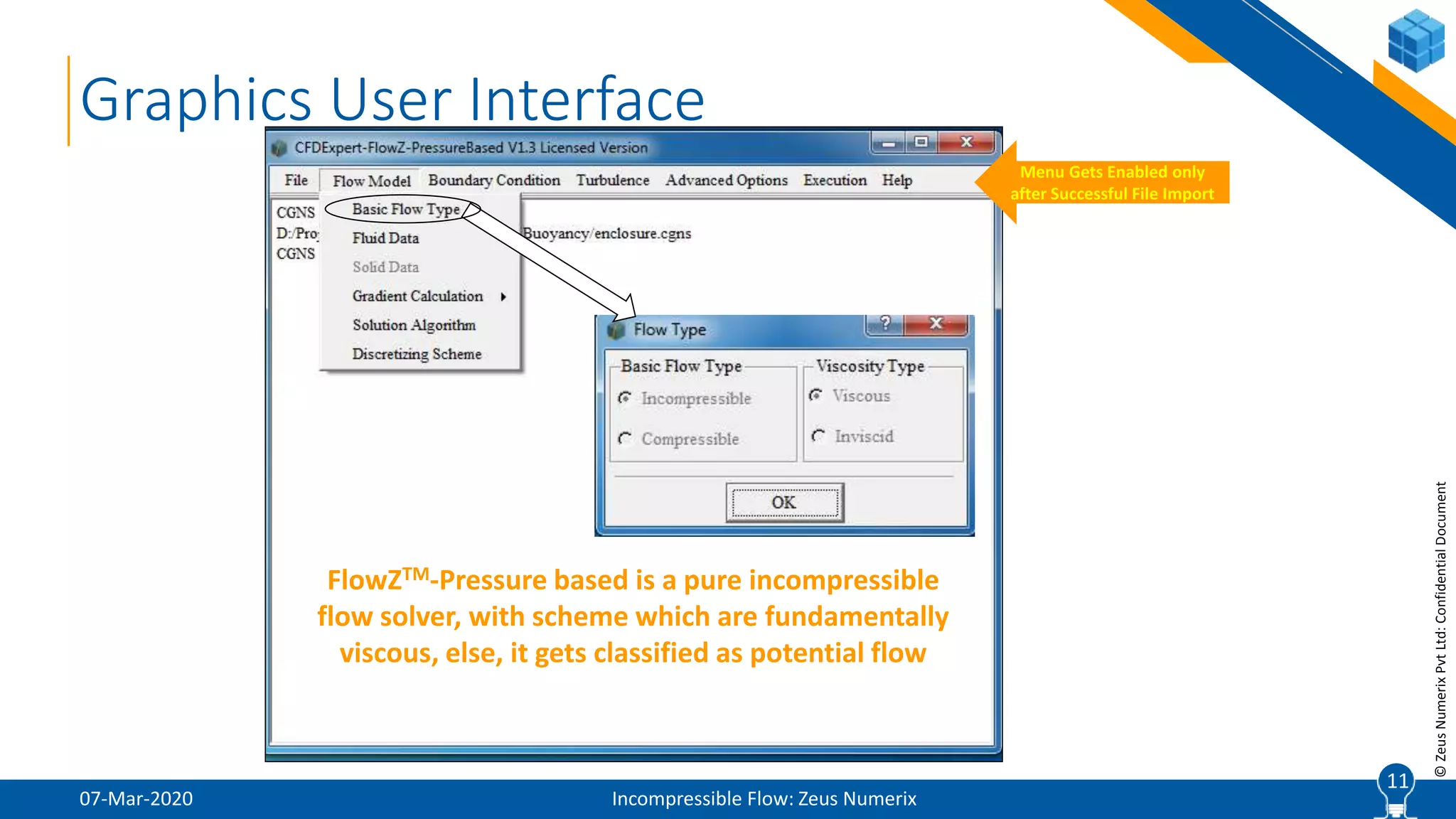
Graphics User Interface
Menu Gets Enabled only
after Successful File Import
FlowZTM-Pressure based is a pure incompressible
flow solver, with scheme which are fundamentally
viscous, else, it gets classified as potential flow
12
©ZeusNumerixPvtLtd:ConfidentialDocument
Fluid Data
07-Mar-2020 Incompressible Flow: Zeus Numerix
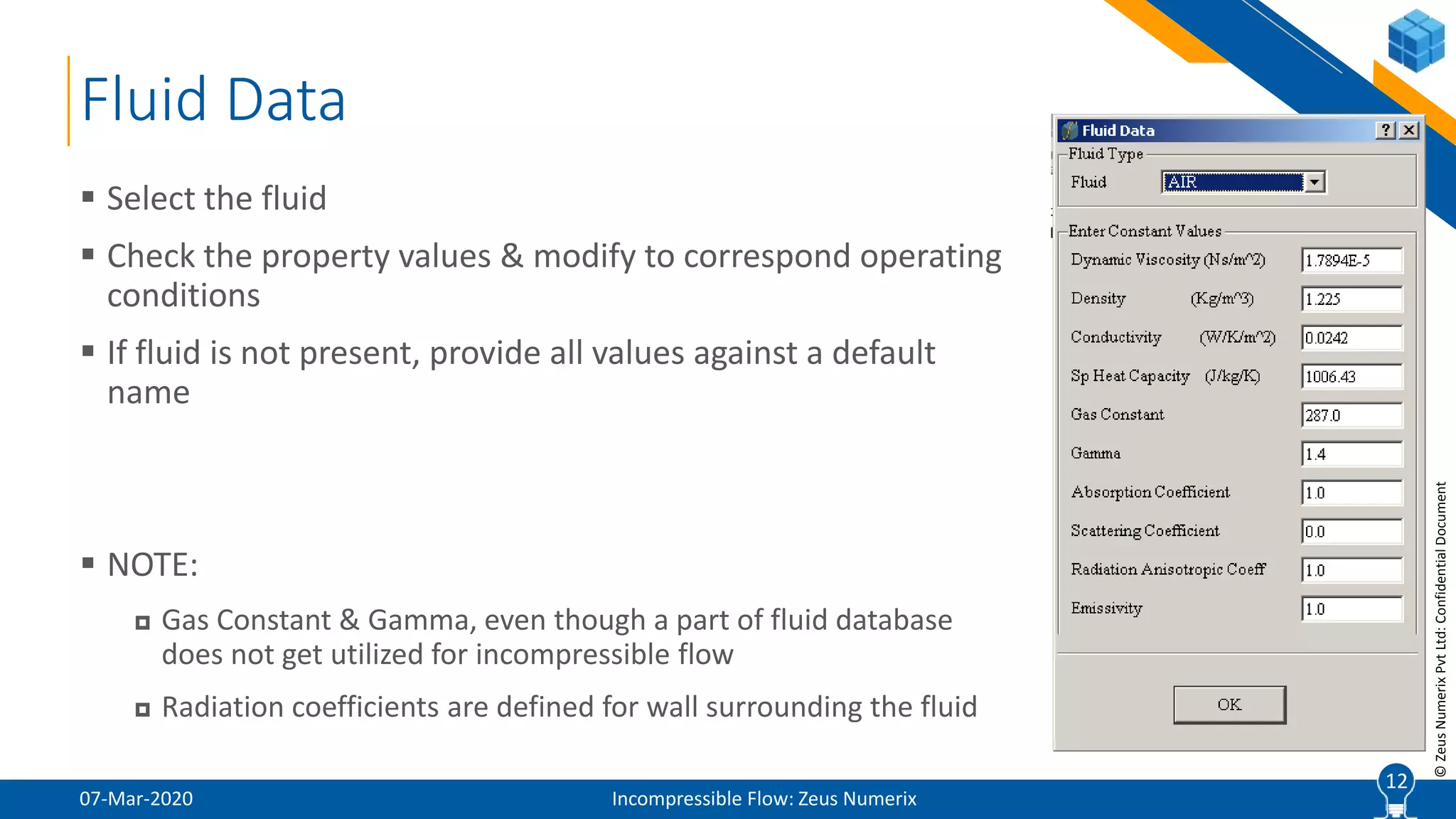
 Select the fluid
 Check the property values & modify to correspond operating
conditions
 If fluid is not present, provide all values against a default
name
 NOTE:
 Gas Constant & Gamma, even though a part of fluid database
does not get utilized for incompressible flow
 Radiation coefficients are defined for wall surrounding the fluid
12
13
©ZeusNumerixPvtLtd:ConfidentialDocument
Solid Data
07-Mar-2020 Incompressible Flow: Zeus Numerix
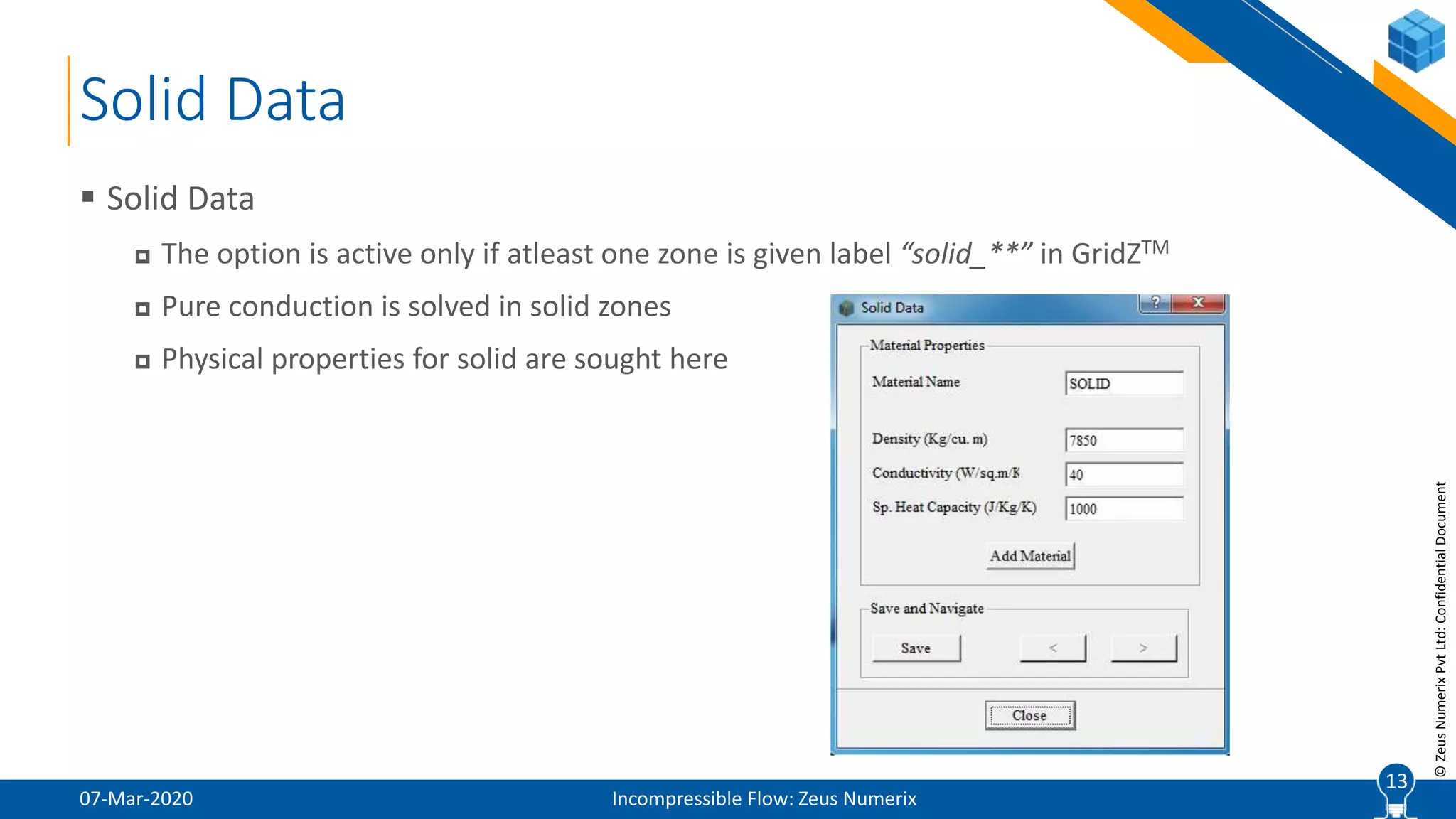
 Solid Data
 The option is active only if atleast one zone is given label “solid_**” in GridZTM
 Pure conduction is solved in solid zones
 Physical properties for solid are sought here
13
14
©ZeusNumerixPvtLtd:ConfidentialDocument
Gradient Calculation
07-Mar-2020 Incompressible Flow: Zeus Numerix
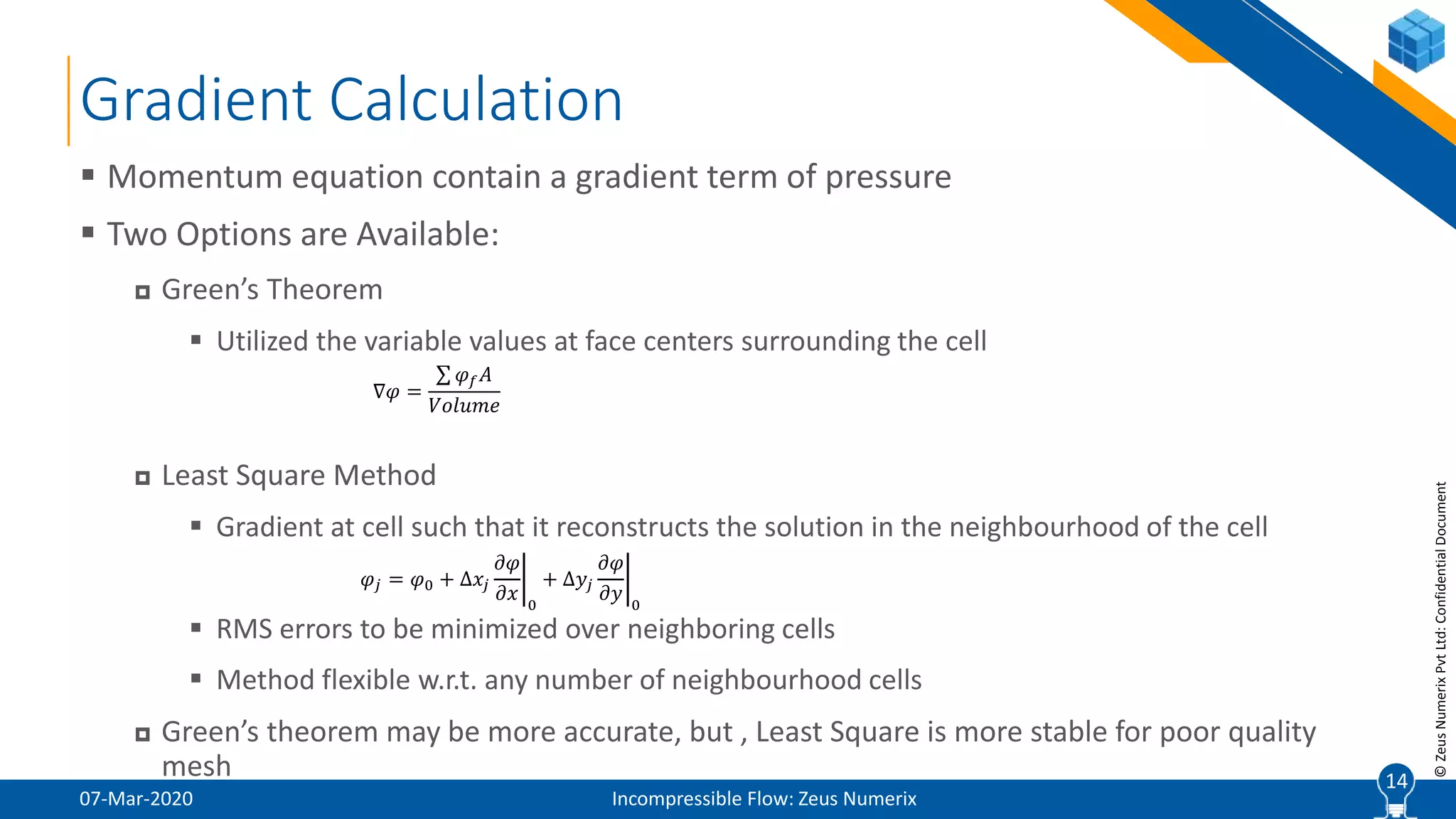
 Momentum equation contain a gradient term of pressure
 Two Options are Available:
 Green’s Theorem
 Utilized the variable values at face centers surrounding the cell
 Least Square Method
 Gradient at cell such that it reconstructs the solution in the neighbourhood of the cell
 RMS errors to be minimized over neighboring cells
 Method flexible w.r.t. any number of neighbourhood cells
 Green’s theorem may be more accurate, but , Least Square is more stable for poor quality
mesh 14
∇𝜑 =
𝜑 𝑓 𝐴
𝑉𝑜𝑙𝑢𝑚𝑒
𝜑𝑗 = 𝜑0 + Δ𝑥𝑗
𝜕𝜑
𝜕𝑥 0
+ Δ𝑦𝑗
𝜕𝜑
𝜕𝑦 0
15
©ZeusNumerixPvtLtd:ConfidentialDocument
Solution Algorithm
07-Mar-2020 Incompressible Flow: Zeus Numerix
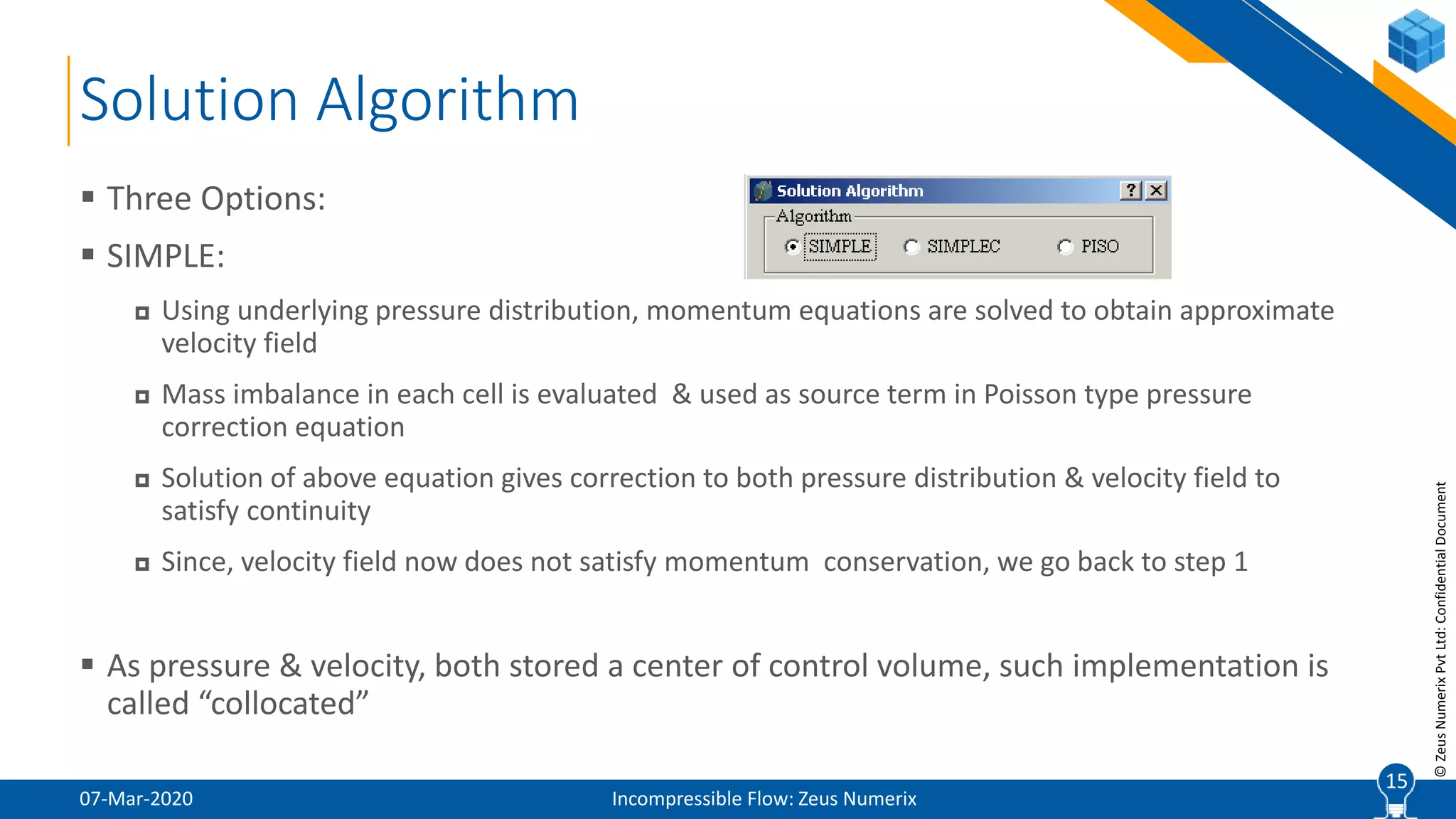
 Three Options:
 SIMPLE:
 Using underlying pressure distribution, momentum equations are solved to obtain approximate
velocity field
 Mass imbalance in each cell is evaluated & used as source term in Poisson type pressure
correction equation
 Solution of above equation gives correction to both pressure distribution & velocity field to
satisfy continuity
 Since, velocity field now does not satisfy momentum conservation, we go back to step 1
 As pressure & velocity, both stored a center of control volume, such implementation is
called “collocated”
15
16
©ZeusNumerixPvtLtd:ConfidentialDocument
Solution Algorithm (Contd.)
07-Mar-2020 Incompressible Flow: Zeus Numerix
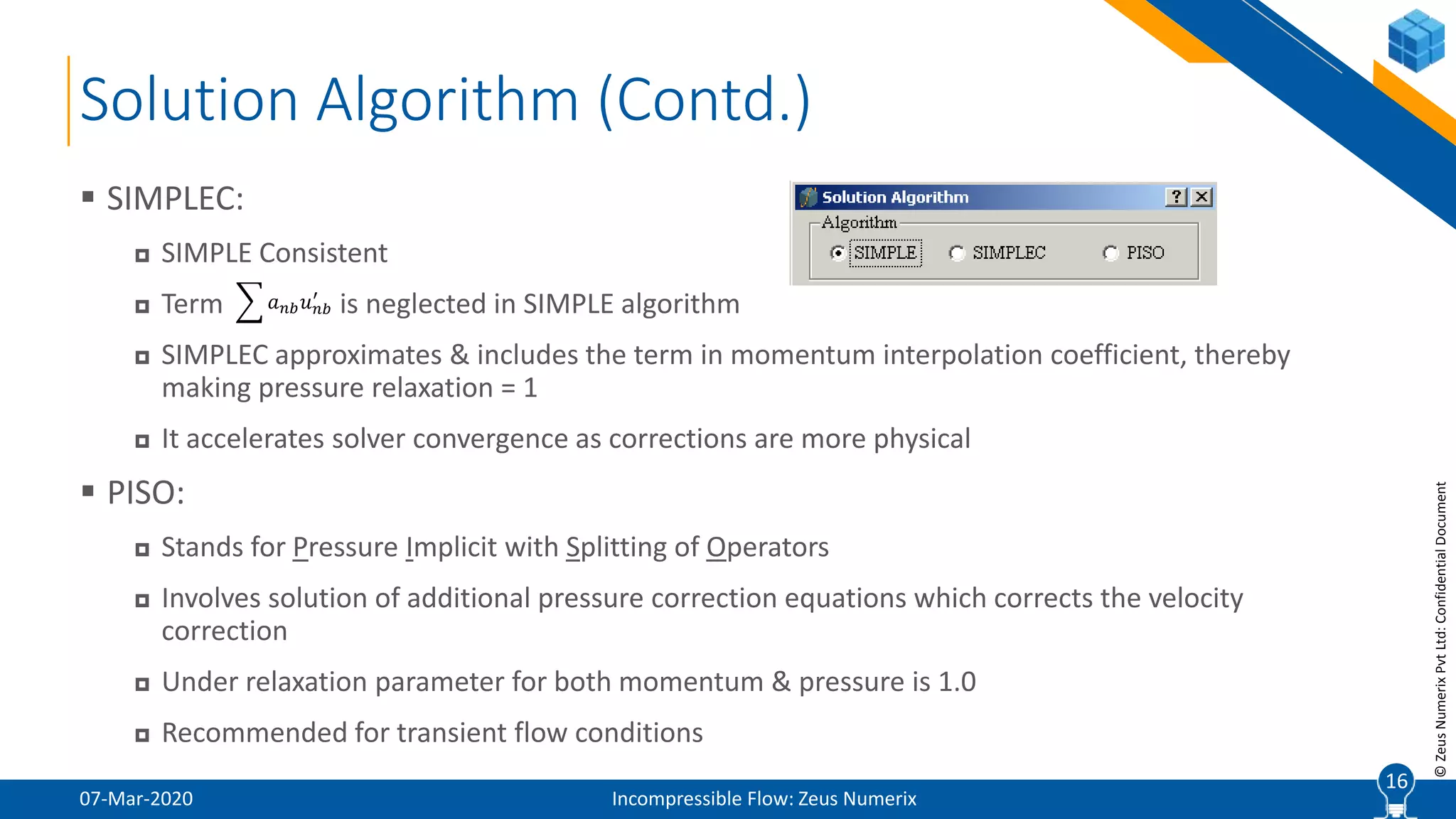
 SIMPLEC:
 SIMPLE Consistent
 Term is neglected in SIMPLE algorithm
 SIMPLEC approximates & includes the term in momentum interpolation coefficient, thereby
making pressure relaxation = 1
 It accelerates solver convergence as corrections are more physical
 PISO:
 Stands for Pressure Implicit with Splitting of Operators
 Involves solution of additional pressure correction equations which corrects the velocity
correction
 Under relaxation parameter for both momentum & pressure is 1.0
 Recommended for transient flow conditions
16
𝑎 𝑛𝑏 𝑢 𝑛𝑏
′
17
©ZeusNumerixPvtLtd:ConfidentialDocument
Solution Algorithm (Contd.)
07-Mar-2020 Incompressible Flow: Zeus Numerix
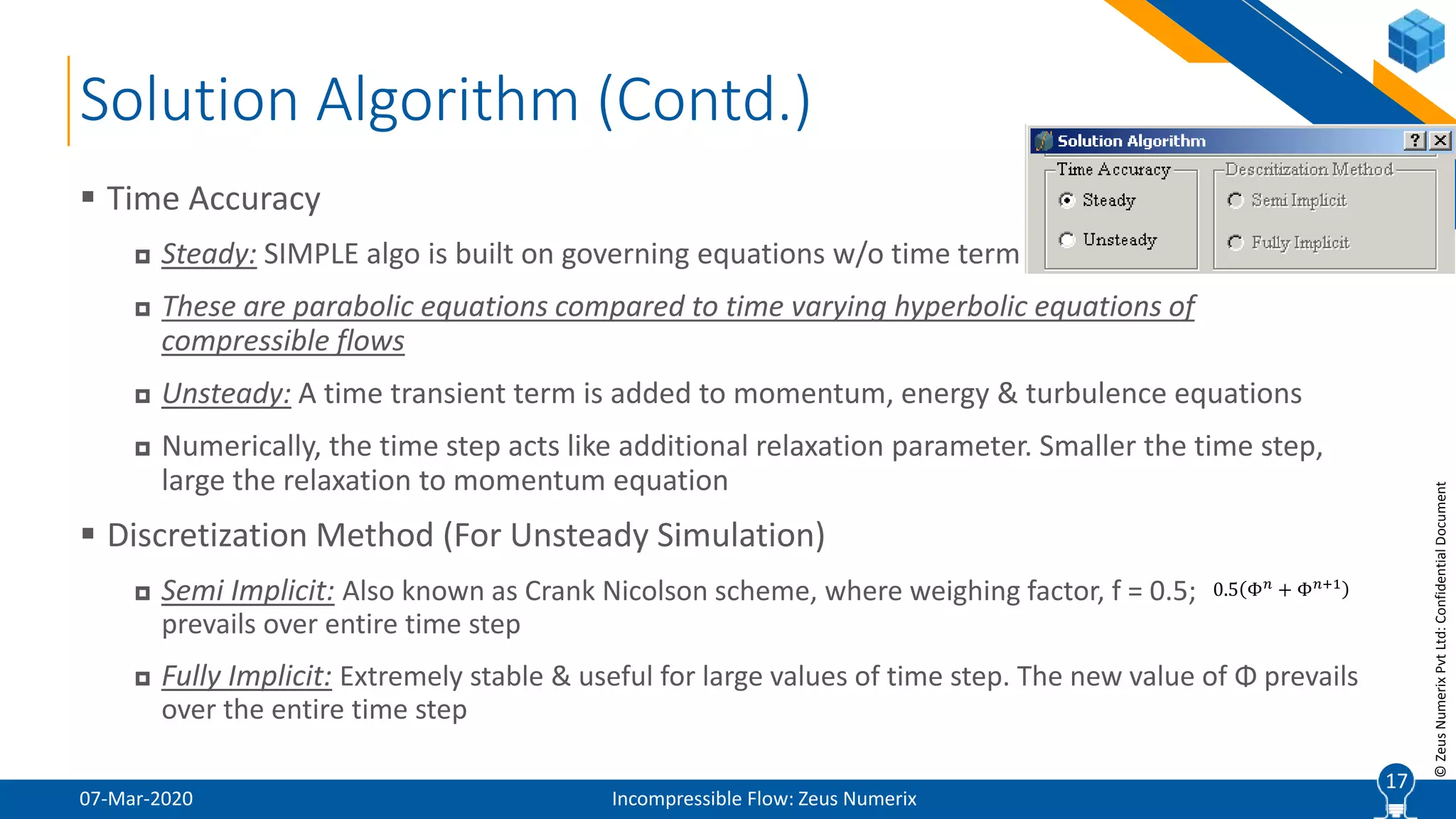
 Time Accuracy
 Steady: SIMPLE algo is built on governing equations w/o time term
 These are parabolic equations compared to time varying hyperbolic equations of
compressible flows
 Unsteady: A time transient term is added to momentum, energy & turbulence equations
 Numerically, the time step acts like additional relaxation parameter. Smaller the time step,
large the relaxation to momentum equation
 Discretization Method (For Unsteady Simulation)
 Semi Implicit: Also known as Crank Nicolson scheme, where weighing factor, f = 0.5;
prevails over entire time step
 Fully Implicit: Extremely stable & useful for large values of time step. The new value of Φ prevails
over the entire time step
17
0.5 Φ 𝑛
+ Φ 𝑛+1
18
©ZeusNumerixPvtLtd:ConfidentialDocument
Solution Algorithm (Contd.)
07-Mar-2020 Incompressible Flow: Zeus Numerix
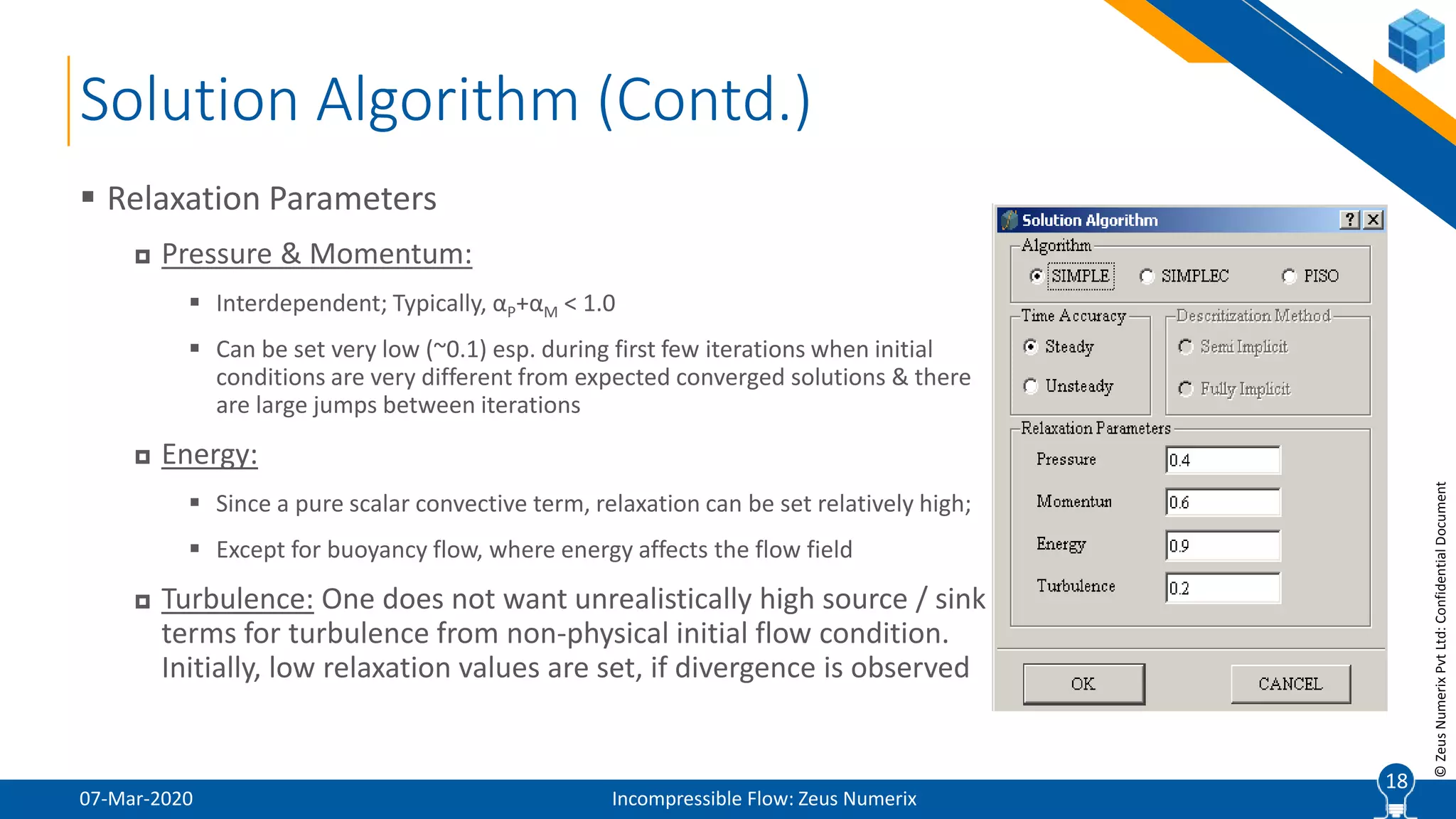
 Relaxation Parameters
 Pressure & Momentum:
 Interdependent; Typically, αP+αM < 1.0
 Can be set very low (~0.1) esp. during first few iterations when initial
conditions are very different from expected converged solutions & there
are large jumps between iterations
 Energy:
 Since a pure scalar convective term, relaxation can be set relatively high;
 Except for buoyancy flow, where energy affects the flow field
 Turbulence: One does not want unrealistically high source / sink
terms for turbulence from non-physical initial flow condition.
Initially, low relaxation values are set, if divergence is observed
18
19
©ZeusNumerixPvtLtd:ConfidentialDocument
Discretizing Scheme
07-Mar-2020 Incompressible Flow: Zeus Numerix
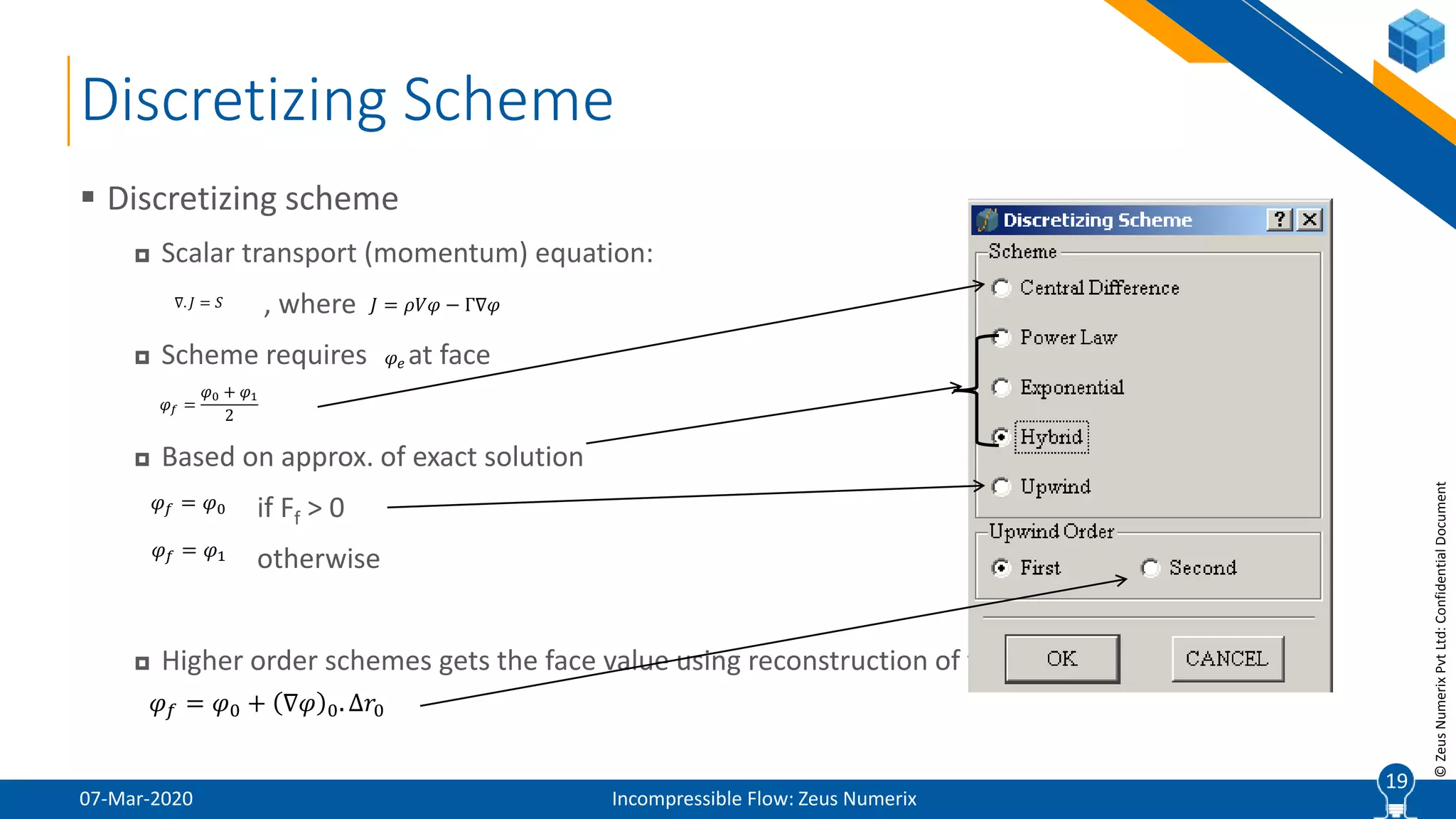
 Discretizing scheme
 Scalar transport (momentum) equation:
, where
 Scheme requires at face
 Based on approx. of exact solution
if Ff > 0
otherwise
 Higher order schemes gets the face value using reconstruction of variables
19
∇. 𝐽 = 𝑆 𝐽 = 𝜌𝑉𝜑 − Γ∇𝜑
𝜑 𝑒
𝜑 𝑓 =
𝜑0 + 𝜑1
2
𝜑 𝑓 = 𝜑0
𝜑 𝑓 = 𝜑1
𝜑 𝑓 = 𝜑0 + ∇𝜑 0. Δ𝑟0
20
©ZeusNumerixPvtLtd:ConfidentialDocument
07-Mar-2020 Incompressible Flow: Zeus Numerix
20
Graphics User Interface
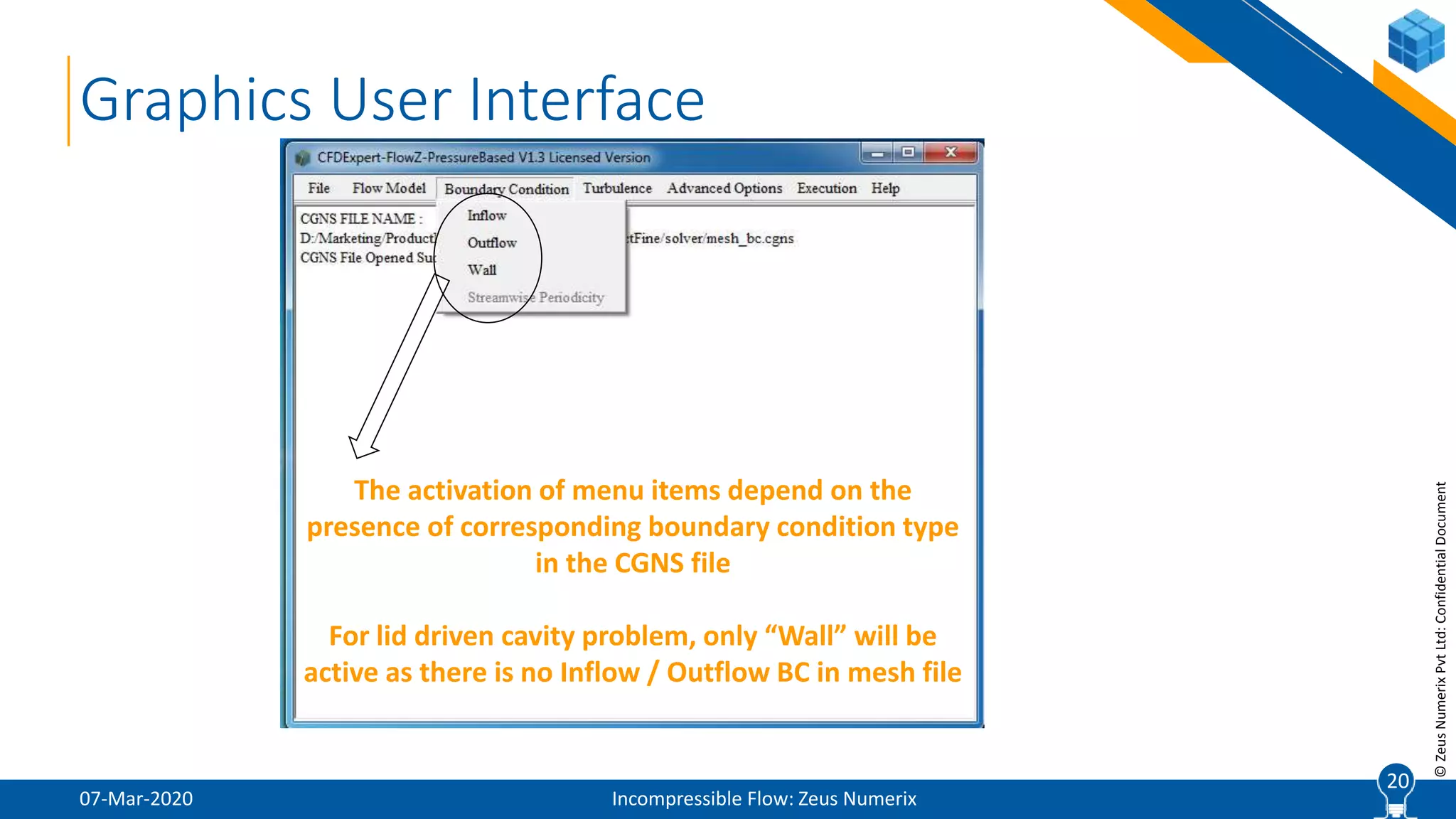
The activation of menu items depend on the
presence of corresponding boundary condition type
in the CGNS file
For lid driven cavity problem, only “Wall” will be
active as there is no Inflow / Outflow BC in mesh file
21
©ZeusNumerixPvtLtd:ConfidentialDocument
Boundary Attributes
07-Mar-2020 Incompressible Flow: Zeus Numerix
 Each domain boundary is specified two attributes:
 Label
 General name given by user for identification of boundary sections
 Boundary Condition Type
 CGNS defined reserved keywords (BCInflow, BCOutflow, BCWallViscousIsothermal,
BCWallViscousHeatFlux etc.)
 There can be multiple Labels of same BCType, but there cannot be multiple BCTypes
of same Label
 This allows user to simulate problems with multiple inflows, outflows or walls with
different thermal conditions
 Use GridZ / ViewZ to visualize Labels & BCTypes
21
22
©ZeusNumerixPvtLtd:ConfidentialDocument
Inflow Boundary Condition
07-Mar-2020 Incompressible Flow: Zeus Numerix
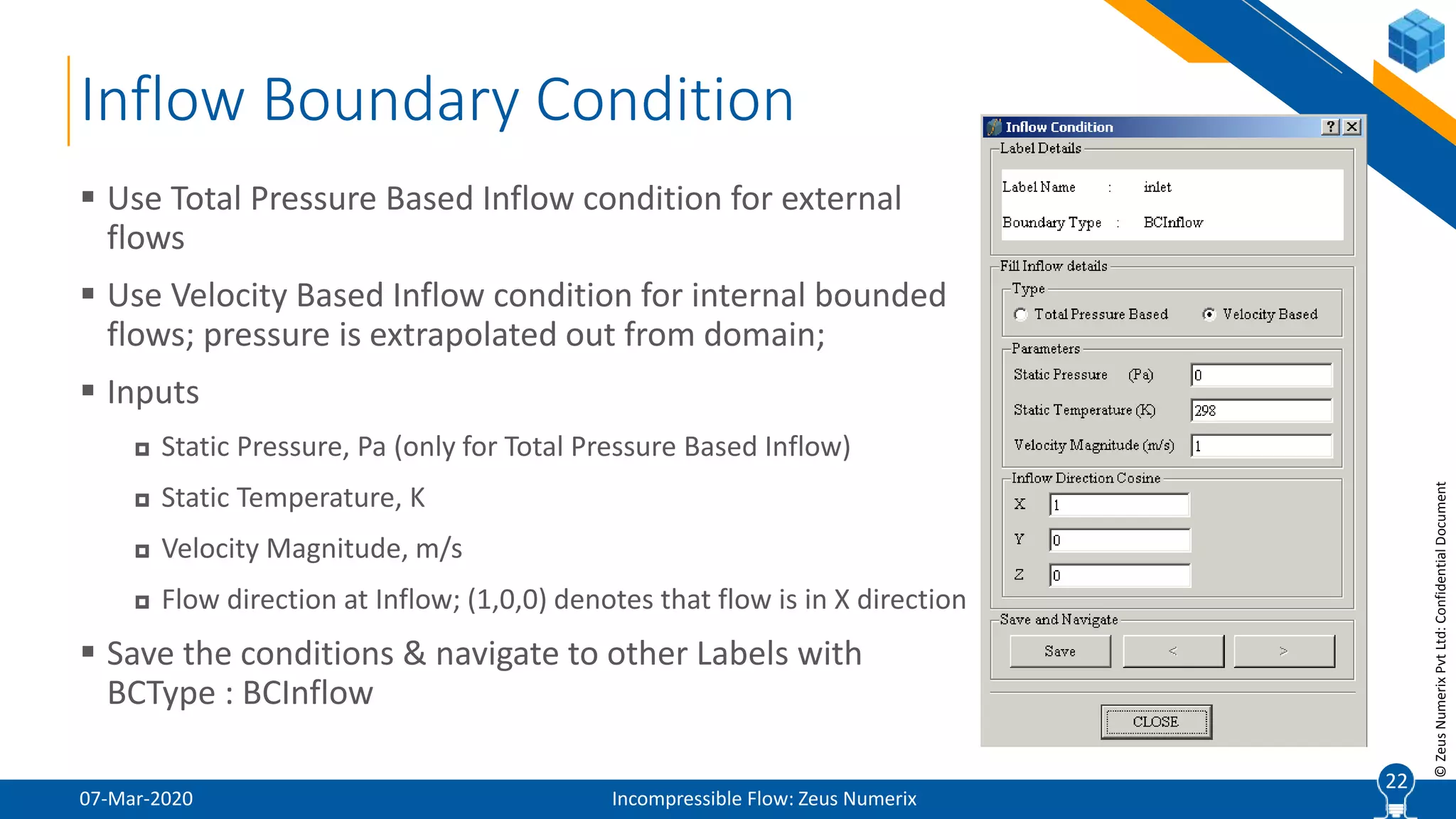
 Use Total Pressure Based Inflow condition for external
flows
 Use Velocity Based Inflow condition for internal bounded
flows; pressure is extrapolated out from domain;
 Inputs
 Static Pressure, Pa (only for Total Pressure Based Inflow)
 Static Temperature, K
 Velocity Magnitude, m/s
 Flow direction at Inflow; (1,0,0) denotes that flow is in X direction
 Save the conditions & navigate to other Labels with
BCType : BCInflow
22
23
©ZeusNumerixPvtLtd:ConfidentialDocument
Outflow Boundary Condition
07-Mar-2020 Incompressible Flow: Zeus Numerix
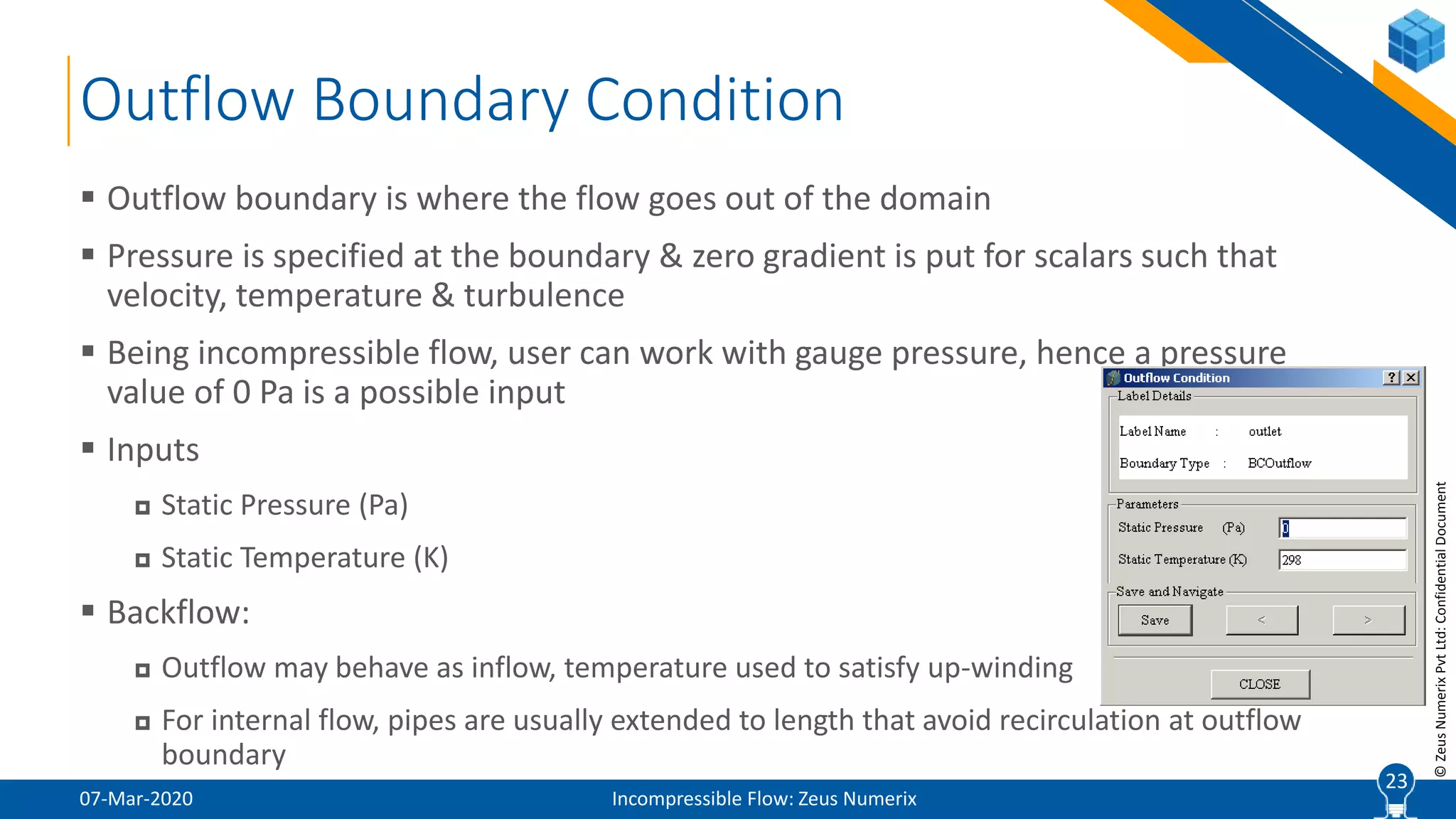
 Outflow boundary is where the flow goes out of the domain
 Pressure is specified at the boundary & zero gradient is put for scalars such that
velocity, temperature & turbulence
 Being incompressible flow, user can work with gauge pressure, hence a pressure
value of 0 Pa is a possible input
 Inputs
 Static Pressure (Pa)
 Static Temperature (K)
 Backflow:
 Outflow may behave as inflow, temperature used to satisfy up-winding
 For internal flow, pipes are usually extended to length that avoid recirculation at outflow
boundary
23
24
©ZeusNumerixPvtLtd:ConfidentialDocument
Wall Boundary Condition
07-Mar-2020 Incompressible Flow: Zeus Numerix
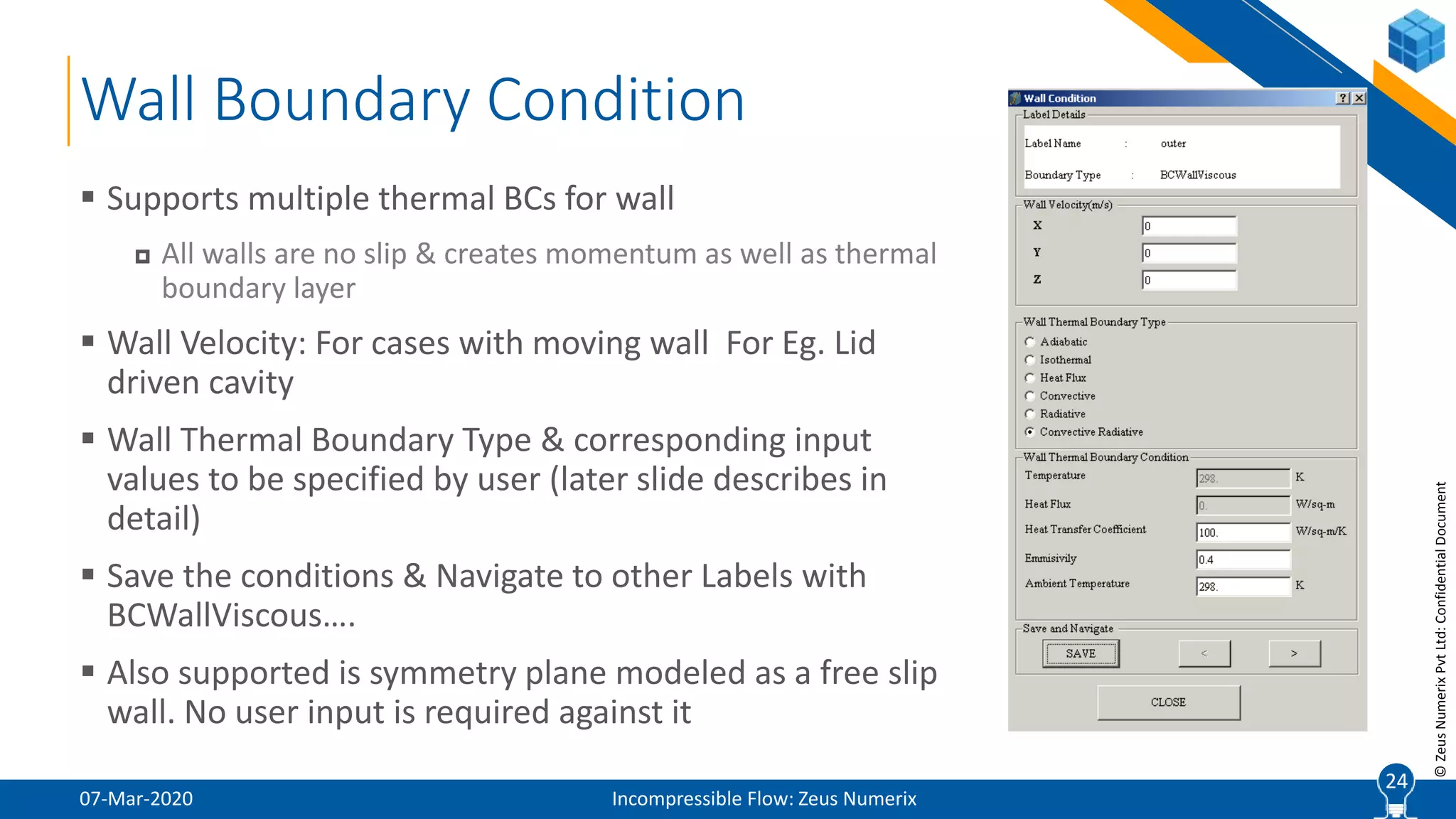
 Supports multiple thermal BCs for wall
 All walls are no slip & creates momentum as well as thermal
boundary layer
 Wall Velocity: For cases with moving wall For Eg. Lid
driven cavity
 Wall Thermal Boundary Type & corresponding input
values to be specified by user (later slide describes in
detail)
 Save the conditions & Navigate to other Labels with
BCWallViscous….
 Also supported is symmetry plane modeled as a free slip
wall. No user input is required against it
24
25
©ZeusNumerixPvtLtd:ConfidentialDocument
Wall Boundary Condition (Contd.)
07-Mar-2020 Incompressible Flow: Zeus Numerix
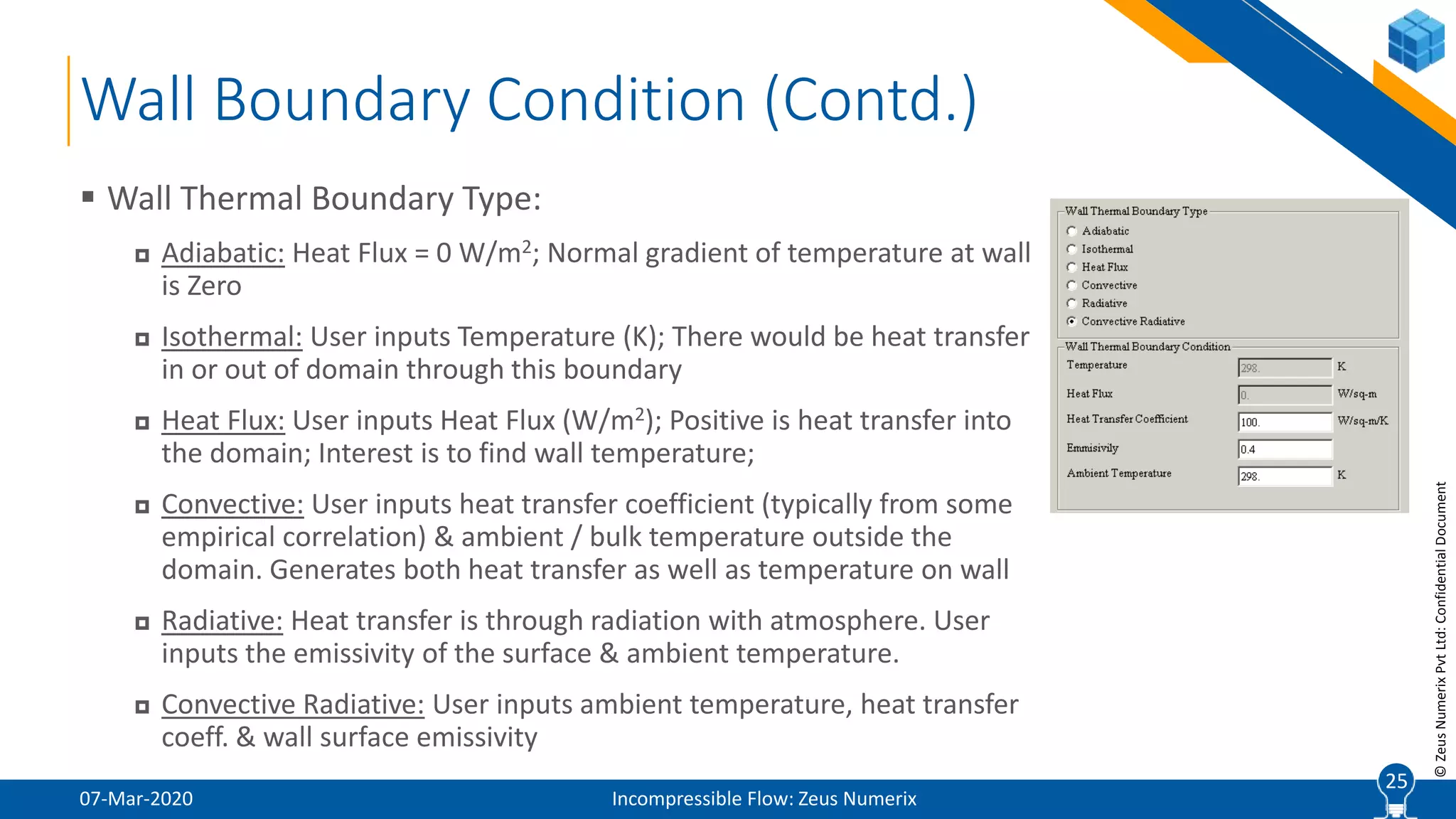
 Wall Thermal Boundary Type:
 Adiabatic: Heat Flux = 0 W/m2; Normal gradient of temperature at wall
is Zero
 Isothermal: User inputs Temperature (K); There would be heat transfer
in or out of domain through this boundary
 Heat Flux: User inputs Heat Flux (W/m2); Positive is heat transfer into
the domain; Interest is to find wall temperature;
 Convective: User inputs heat transfer coefficient (typically from some
empirical correlation) & ambient / bulk temperature outside the
domain. Generates both heat transfer as well as temperature on wall
 Radiative: Heat transfer is through radiation with atmosphere. User
inputs the emissivity of the surface & ambient temperature.
 Convective Radiative: User inputs ambient temperature, heat transfer
coeff. & wall surface emissivity
25
26
©ZeusNumerixPvtLtd:ConfidentialDocument
07-Mar-2020 Incompressible Flow: Zeus Numerix
26
Graphics User Interface
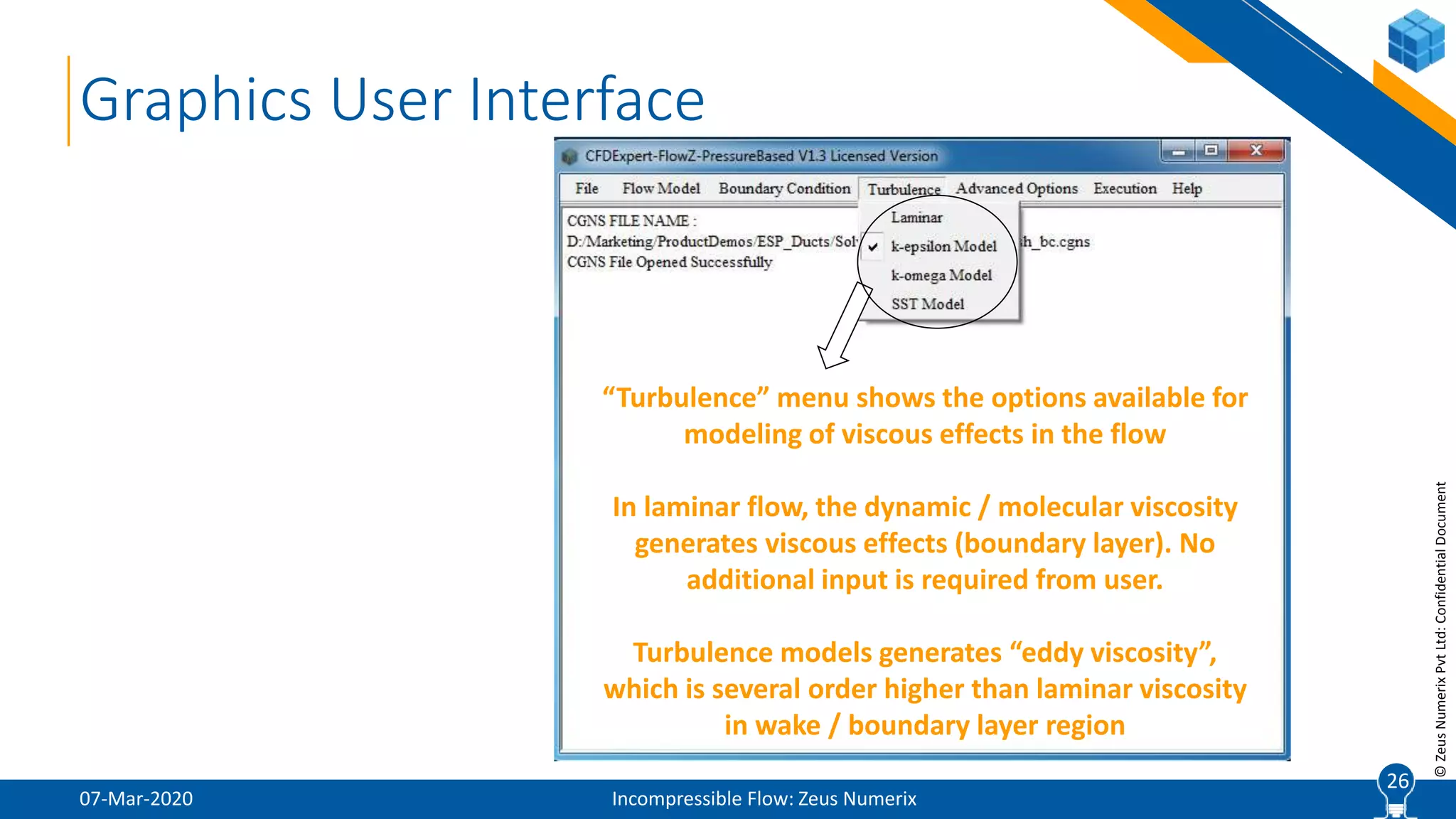
“Turbulence” menu shows the options available for
modeling of viscous effects in the flow
In laminar flow, the dynamic / molecular viscosity
generates viscous effects (boundary layer). No
additional input is required from user.
Turbulence models generates “eddy viscosity”,
which is several order higher than laminar viscosity
in wake / boundary layer region
27
©ZeusNumerixPvtLtd:ConfidentialDocument
Turbulence Model
07-Mar-2020 Incompressible Flow: Zeus Numerix
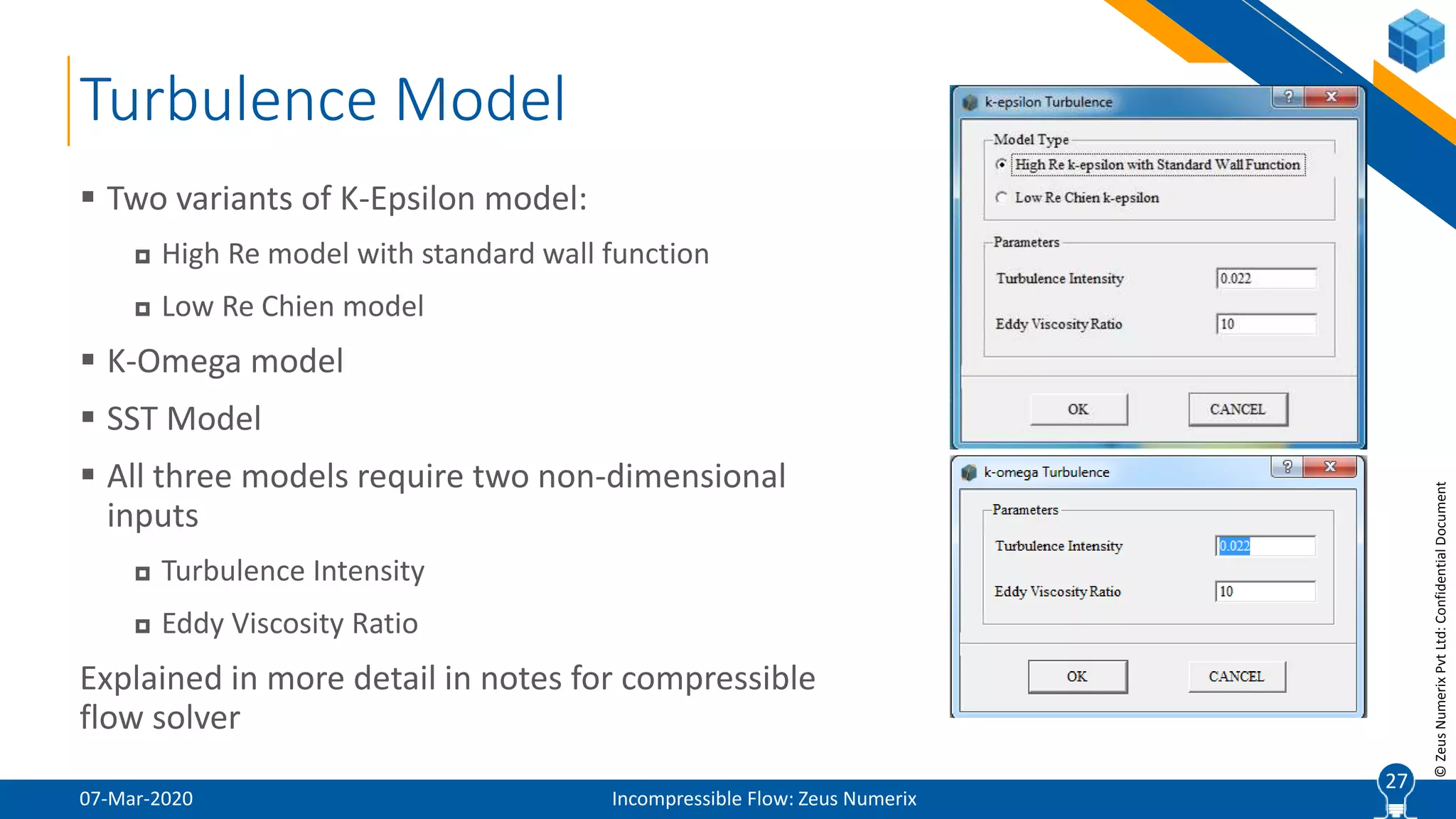
 Two variants of K-Epsilon model:
 High Re model with standard wall function
 Low Re Chien model
 K-Omega model
 SST Model
 All three models require two non-dimensional
inputs
 Turbulence Intensity
 Eddy Viscosity Ratio
Explained in more detail in notes for compressible
flow solver
27
28
©ZeusNumerixPvtLtd:ConfidentialDocument
07-Mar-2020 Incompressible Flow: Zeus Numerix
28
Graphics User Interface
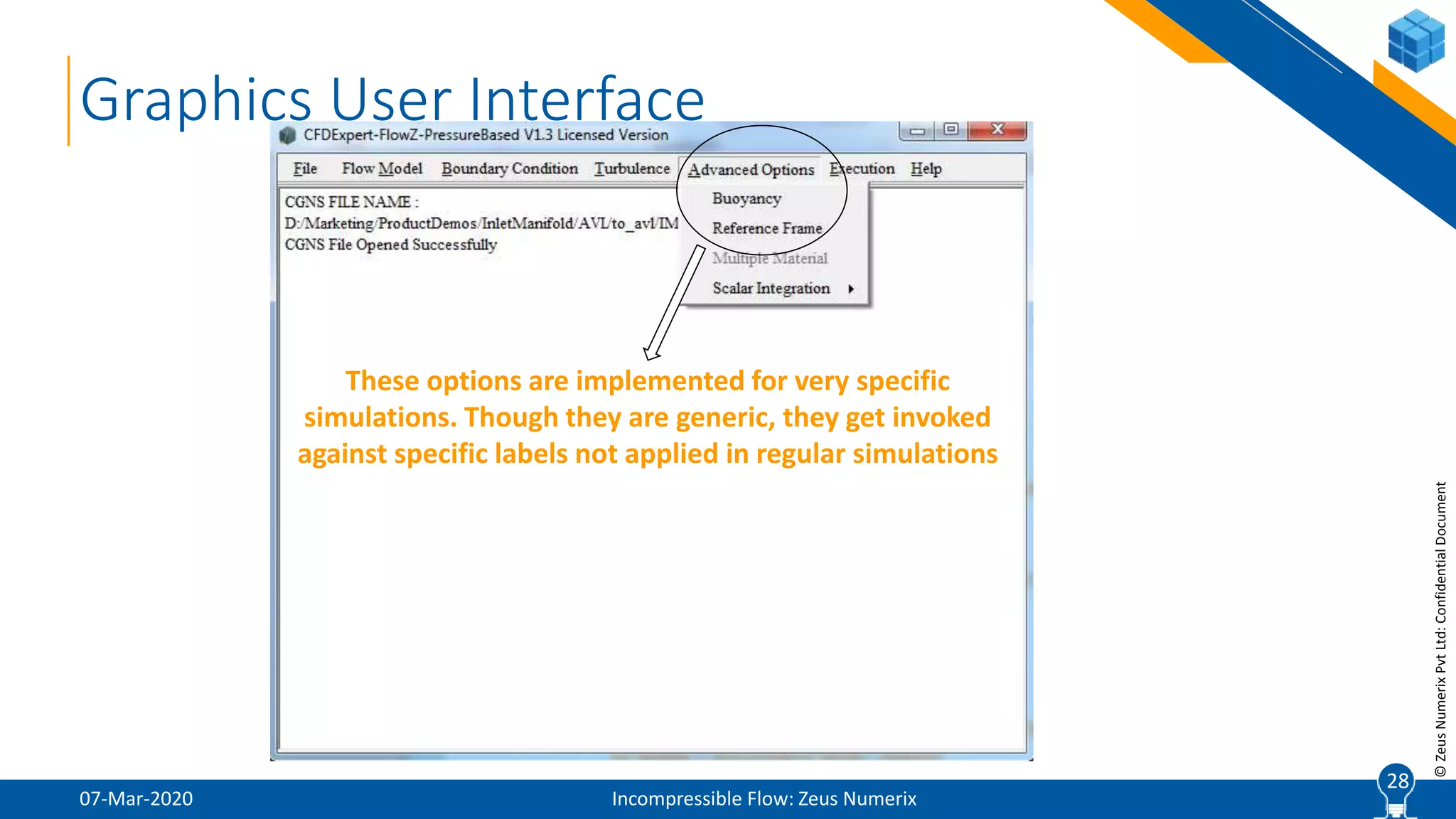
These options are implemented for very specific
simulations. Though they are generic, they get invoked
against specific labels not applied in regular simulations
29
©ZeusNumerixPvtLtd:ConfidentialDocument
Buoyancy
07-Mar-2020 Incompressible Flow: Zeus Numerix
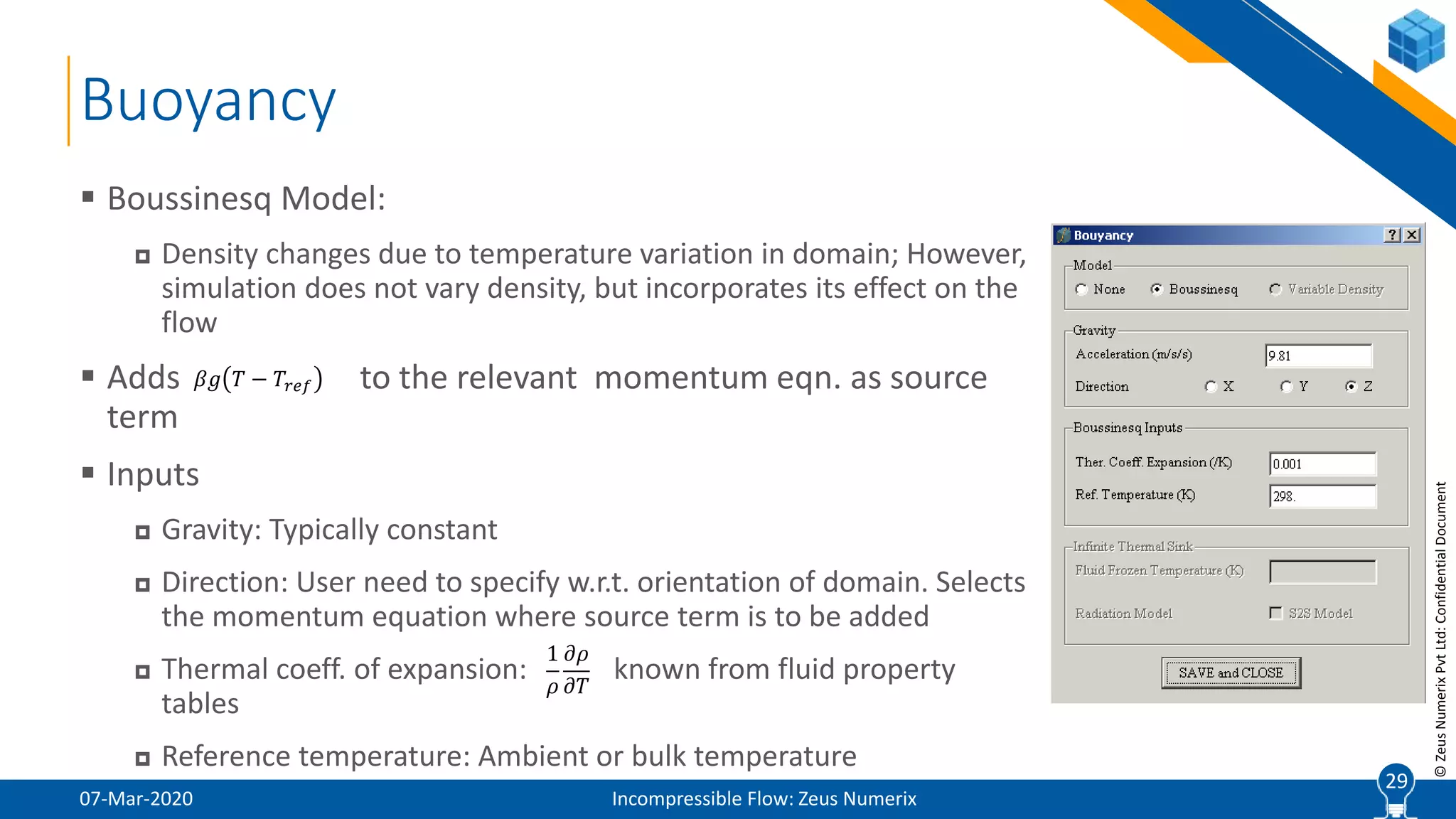
 Boussinesq Model:
 Density changes due to temperature variation in domain; However,
simulation does not vary density, but incorporates its effect on the
flow
 Adds to the relevant momentum eqn. as source
term
 Inputs
 Gravity: Typically constant
 Direction: User need to specify w.r.t. orientation of domain. Selects
the momentum equation where source term is to be added
 Thermal coeff. of expansion: known from fluid property
tables
 Reference temperature: Ambient or bulk temperature
29
𝛽𝑔 𝑇 − 𝑇𝑟𝑒𝑓
1
𝜌
𝜕𝜌
𝜕𝑇
30
©ZeusNumerixPvtLtd:ConfidentialDocument
Reference Frame
07-Mar-2020 Incompressible Flow: Zeus Numerix
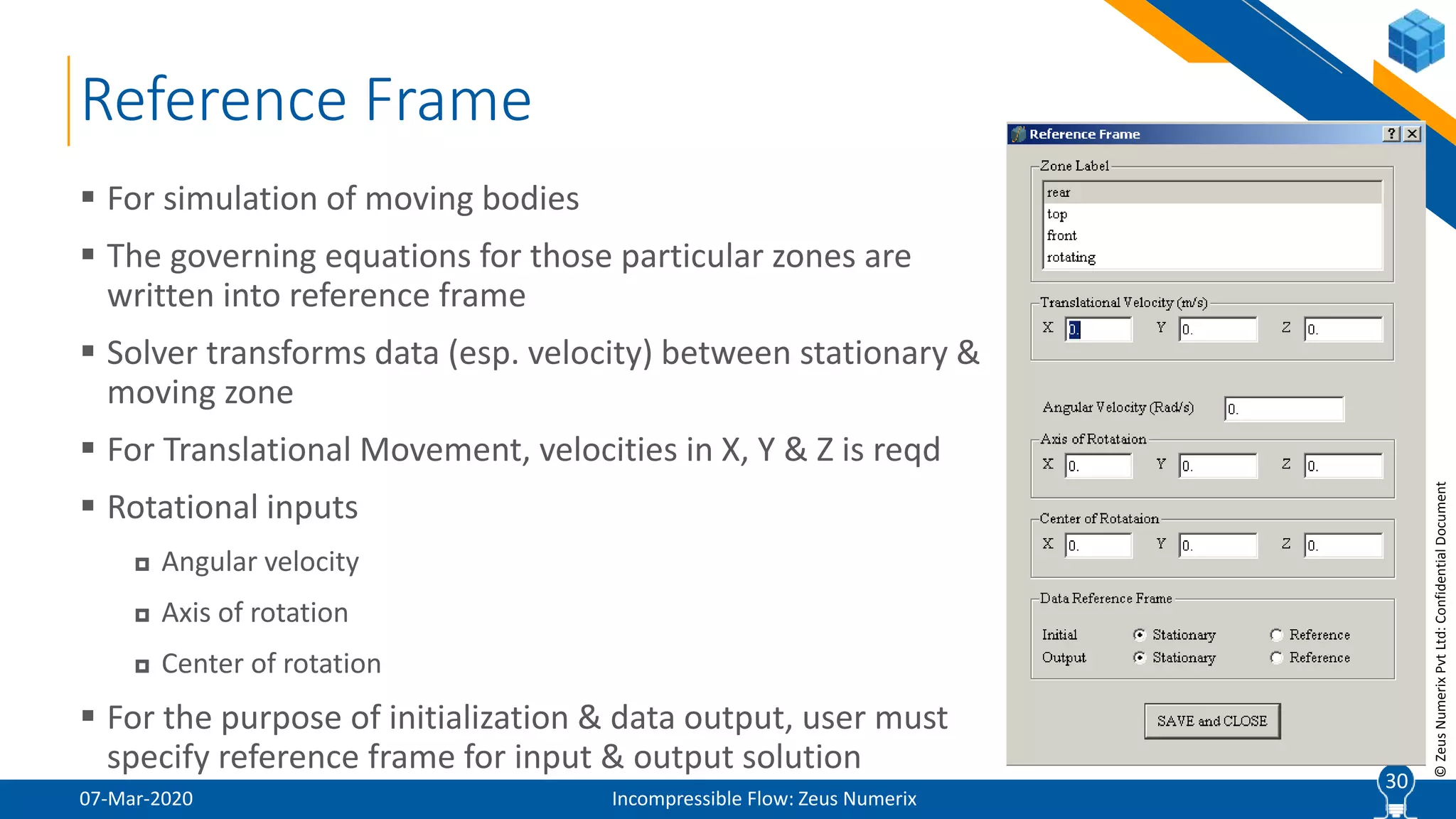
 For simulation of moving bodies
 The governing equations for those particular zones are
written into reference frame
 Solver transforms data (esp. velocity) between stationary &
moving zone
 For Translational Movement, velocities in X, Y & Z is reqd
 Rotational inputs
 Angular velocity
 Axis of rotation
 Center of rotation
 For the purpose of initialization & data output, user must
specify reference frame for input & output solution
30
31
©ZeusNumerixPvtLtd:ConfidentialDocument
07-Mar-2020 Incompressible Flow: Zeus Numerix
31
Graphics User Interface
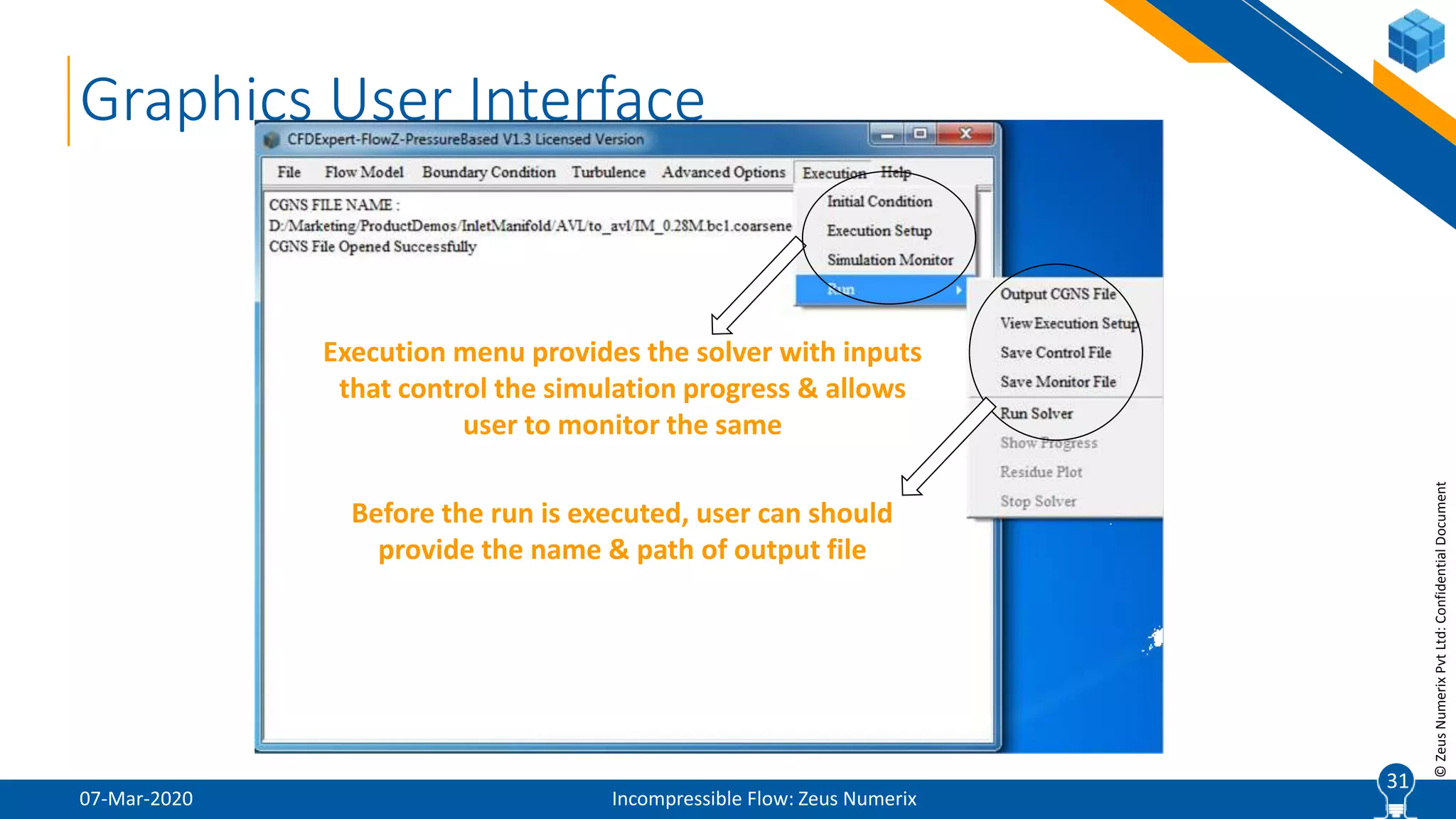
Execution menu provides the solver with inputs
that control the simulation progress & allows
user to monitor the same
Before the run is executed, user can should
provide the name & path of output file
32
©ZeusNumerixPvtLtd:ConfidentialDocument
Initial Conditions
07-Mar-2020 Incompressible Flow: Zeus Numerix
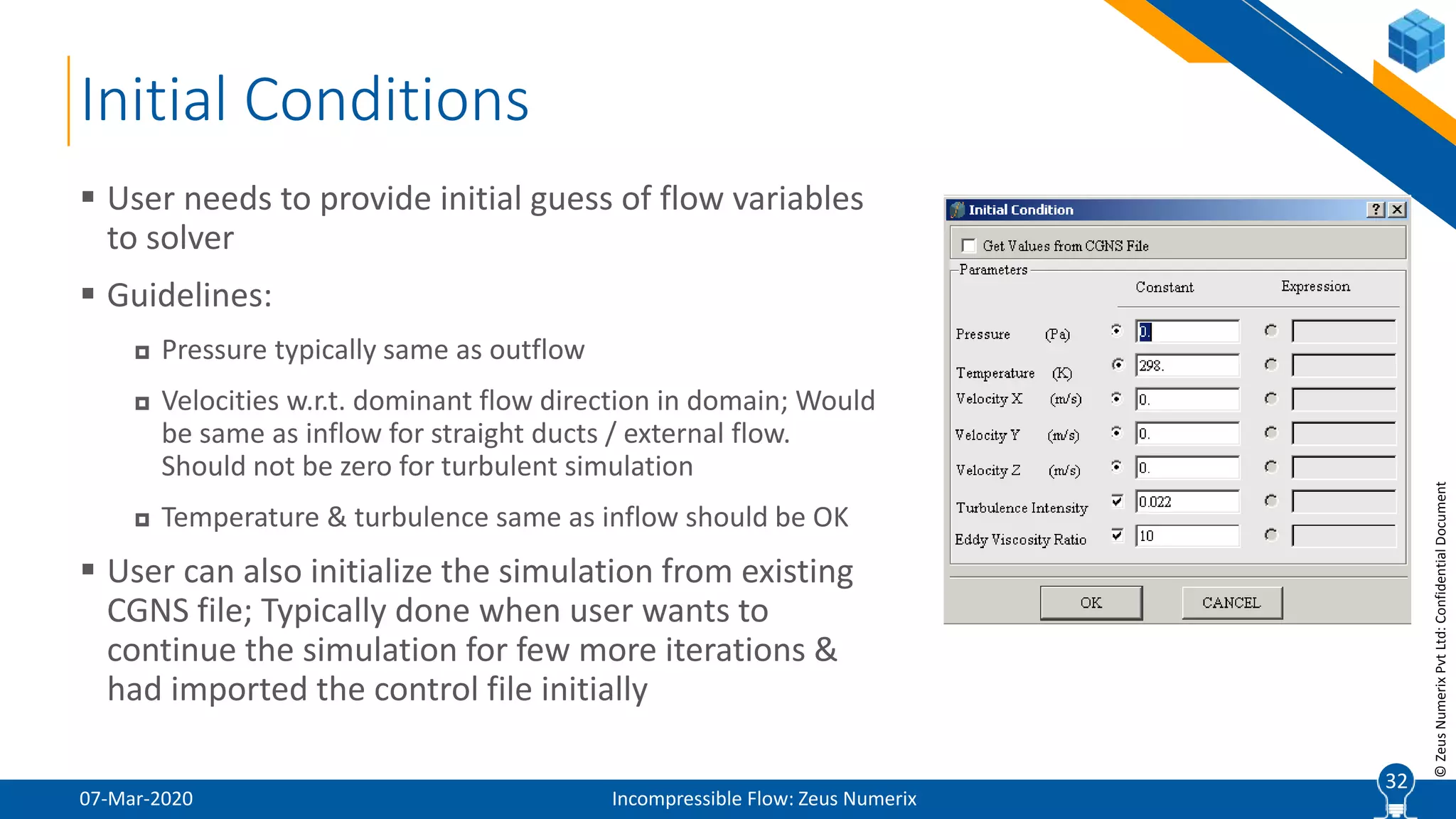
 User needs to provide initial guess of flow variables
to solver
 Guidelines:
 Pressure typically same as outflow
 Velocities w.r.t. dominant flow direction in domain; Would
be same as inflow for straight ducts / external flow.
Should not be zero for turbulent simulation
 Temperature & turbulence same as inflow should be OK
 User can also initialize the simulation from existing
CGNS file; Typically done when user wants to
continue the simulation for few more iterations &
had imported the control file initially
32
33
©ZeusNumerixPvtLtd:ConfidentialDocument
Execution Set-up
07-Mar-2020 Incompressible Flow: Zeus Numerix
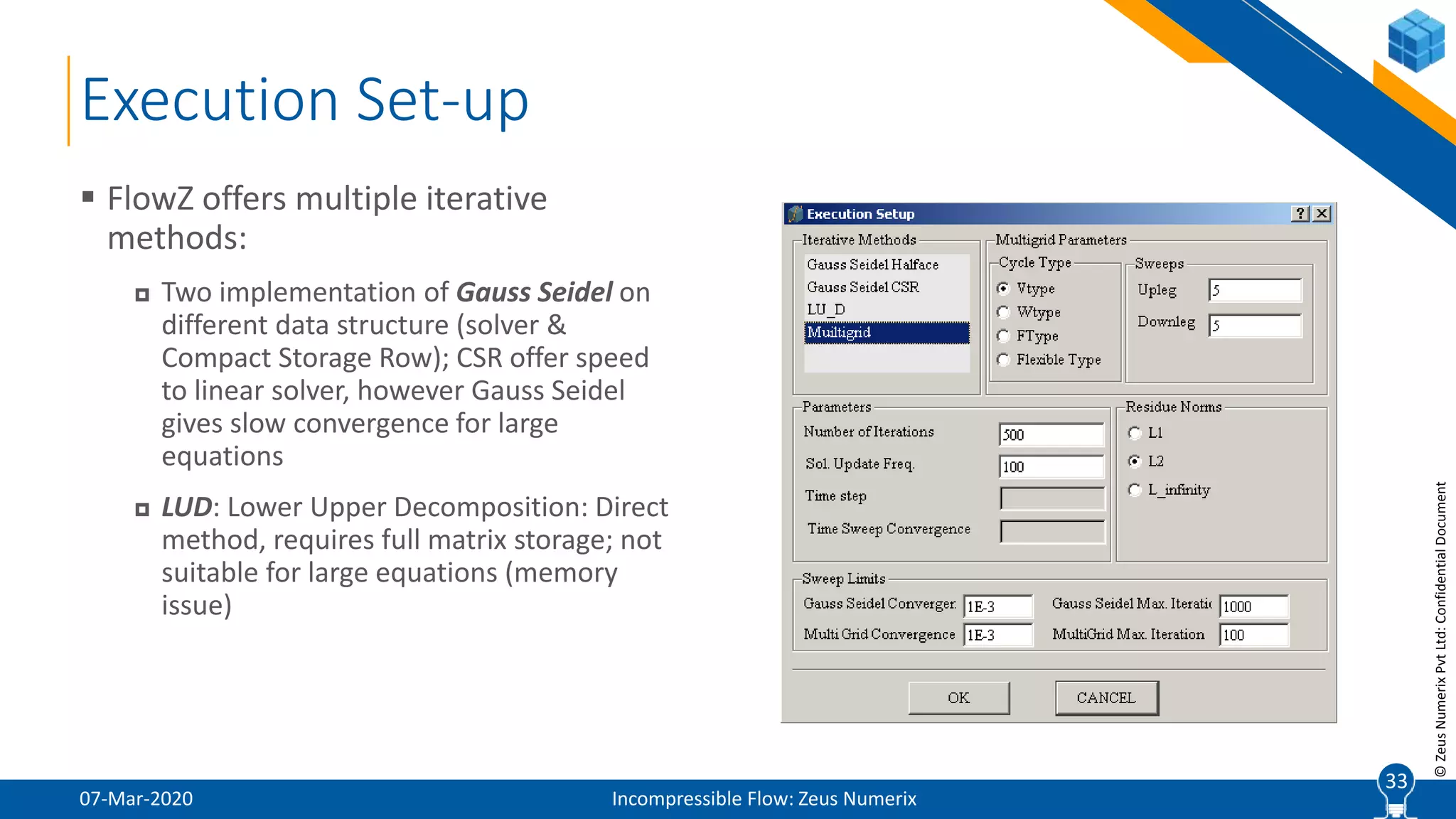
 FlowZ offers multiple iterative
methods:
 Two implementation of Gauss Seidel on
different data structure (solver &
Compact Storage Row); CSR offer speed
to linear solver, however Gauss Seidel
gives slow convergence for large
equations
 LUD: Lower Upper Decomposition: Direct
method, requires full matrix storage; not
suitable for large equations (memory
issue)
33
34
©ZeusNumerixPvtLtd:ConfidentialDocument
Execution Set-up (Contd.)
07-Mar-2020 Incompressible Flow: Zeus Numerix
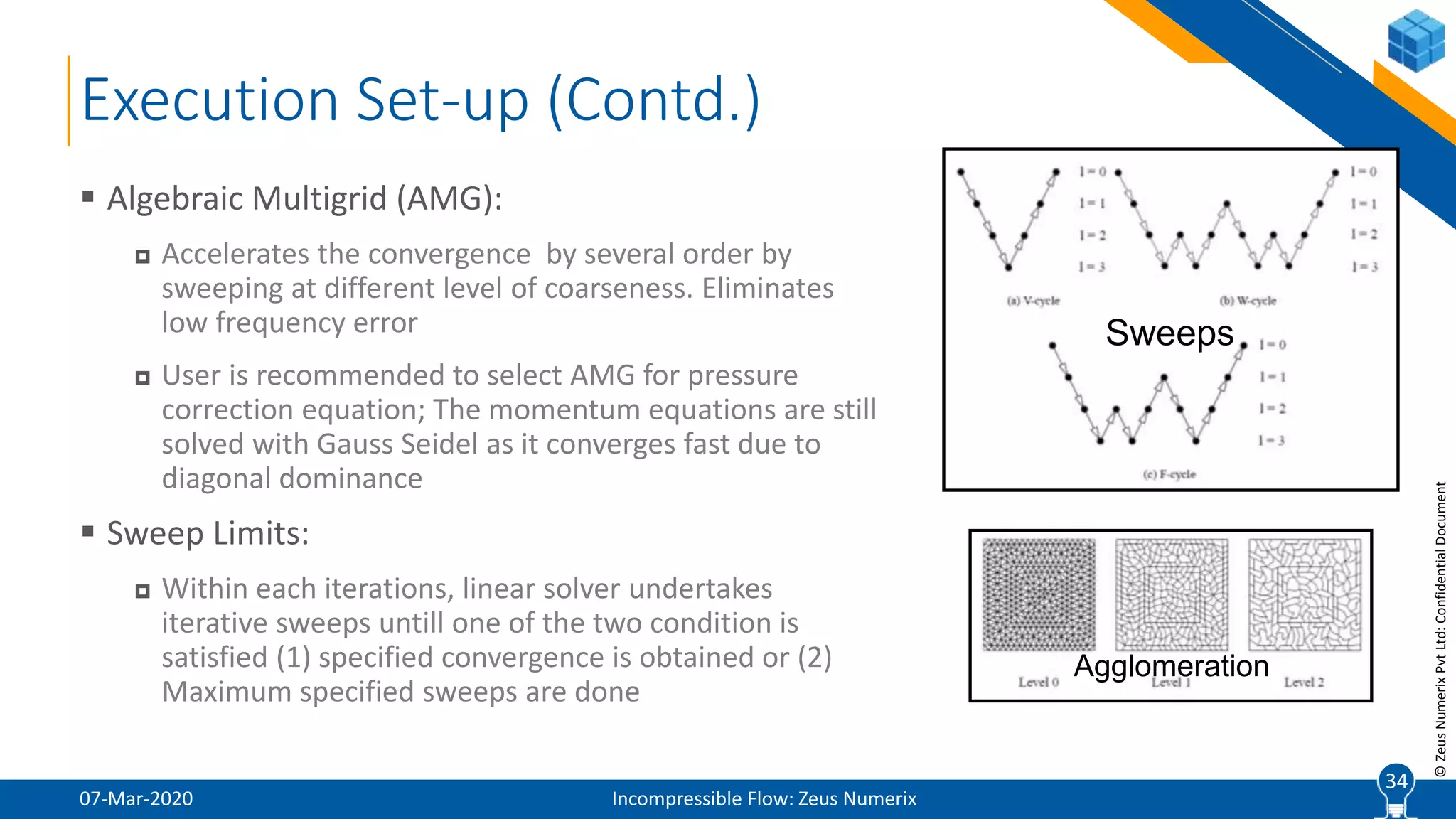
 Algebraic Multigrid (AMG):
 Accelerates the convergence by several order by
sweeping at different level of coarseness. Eliminates
low frequency error
 User is recommended to select AMG for pressure
correction equation; The momentum equations are still
solved with Gauss Seidel as it converges fast due to
diagonal dominance
 Sweep Limits:
 Within each iterations, linear solver undertakes
iterative sweeps untill one of the two condition is
satisfied (1) specified convergence is obtained or (2)
Maximum specified sweeps are done
34
Agglomeration
Sweeps
35
©ZeusNumerixPvtLtd:ConfidentialDocument
Execution Set-up
07-Mar-2020 Incompressible Flow: Zeus Numerix
 Parameters
 Number of Iterations: A representative simulation would take between 500 to 1000 iteration for
convergence in residues (1E-3) & other monitoring parameters.
 Solution Update Frequency: Solver dumps an output CGNS file after every specified iterations for
user to visualize the intermediate results
 Time Step: To be provided for unsteady simulations as solution marches in time. Difficult to
provide in first guess and is derived from user’s knowledge on event duration, Strouhal
frequency, etc.
 Time Step Convergence: Convergence level to be achieved within every time step of unsteady
simulation. Typically, 1E-3.
 Residue Norms
 L1: Find the arithmetic mean of absolute residues across domain;
 L2: Find the RMS mean of residues across domain; Recommended;
 L∞: Pick the max absolute residue value in domain
35
36
©ZeusNumerixPvtLtd:ConfidentialDocument
Simulation Monitor
07-Mar-2020 Incompressible Flow: Zeus Numerix
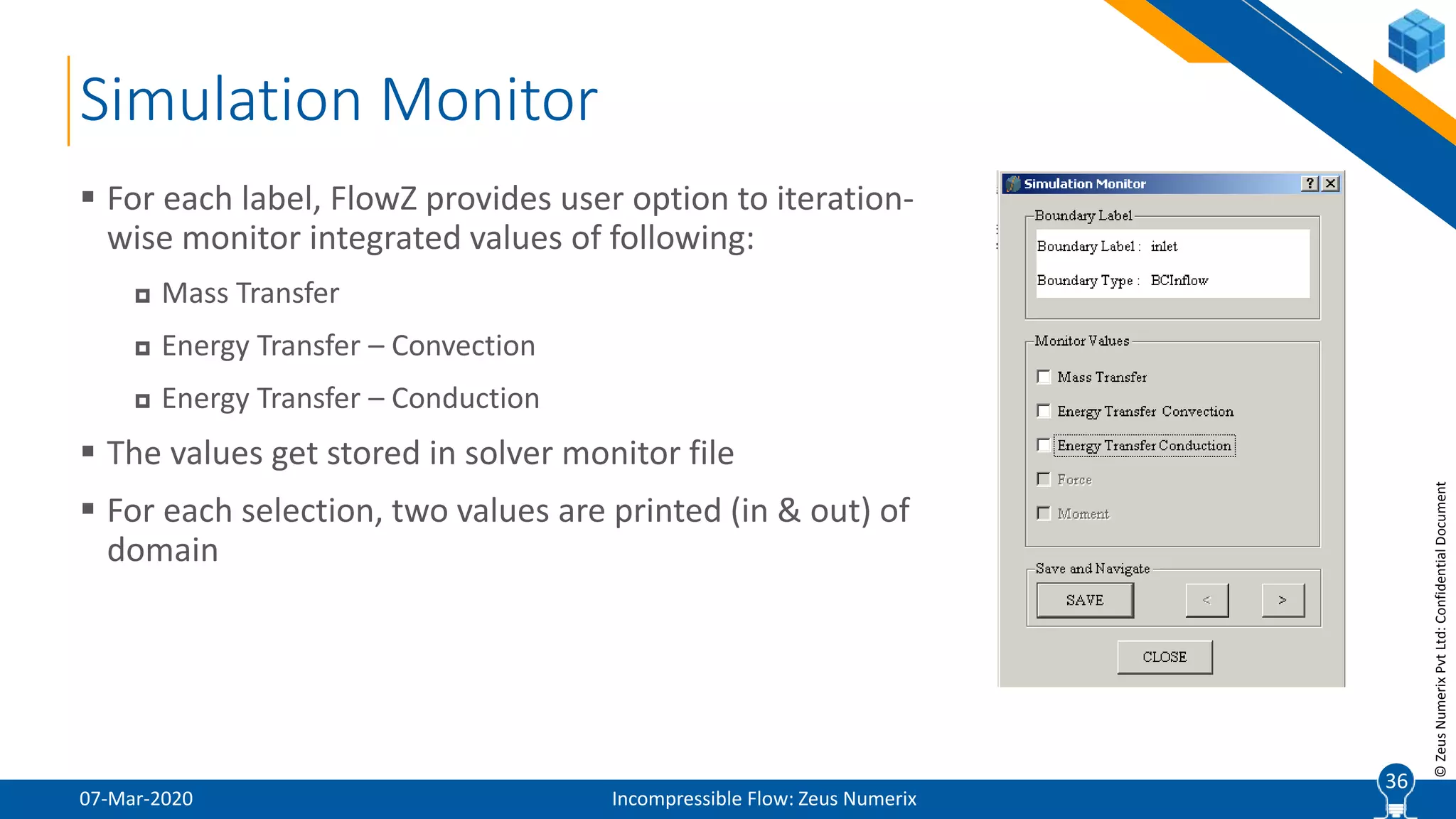
 For each label, FlowZ provides user option to iteration-
wise monitor integrated values of following:
 Mass Transfer
 Energy Transfer – Convection
 Energy Transfer – Conduction
 The values get stored in solver monitor file
 For each selection, two values are printed (in & out) of
domain
36
37
©ZeusNumerixPvtLtd:ConfidentialDocument
Control File
07-Mar-2020 Incompressible Flow: Zeus Numerix
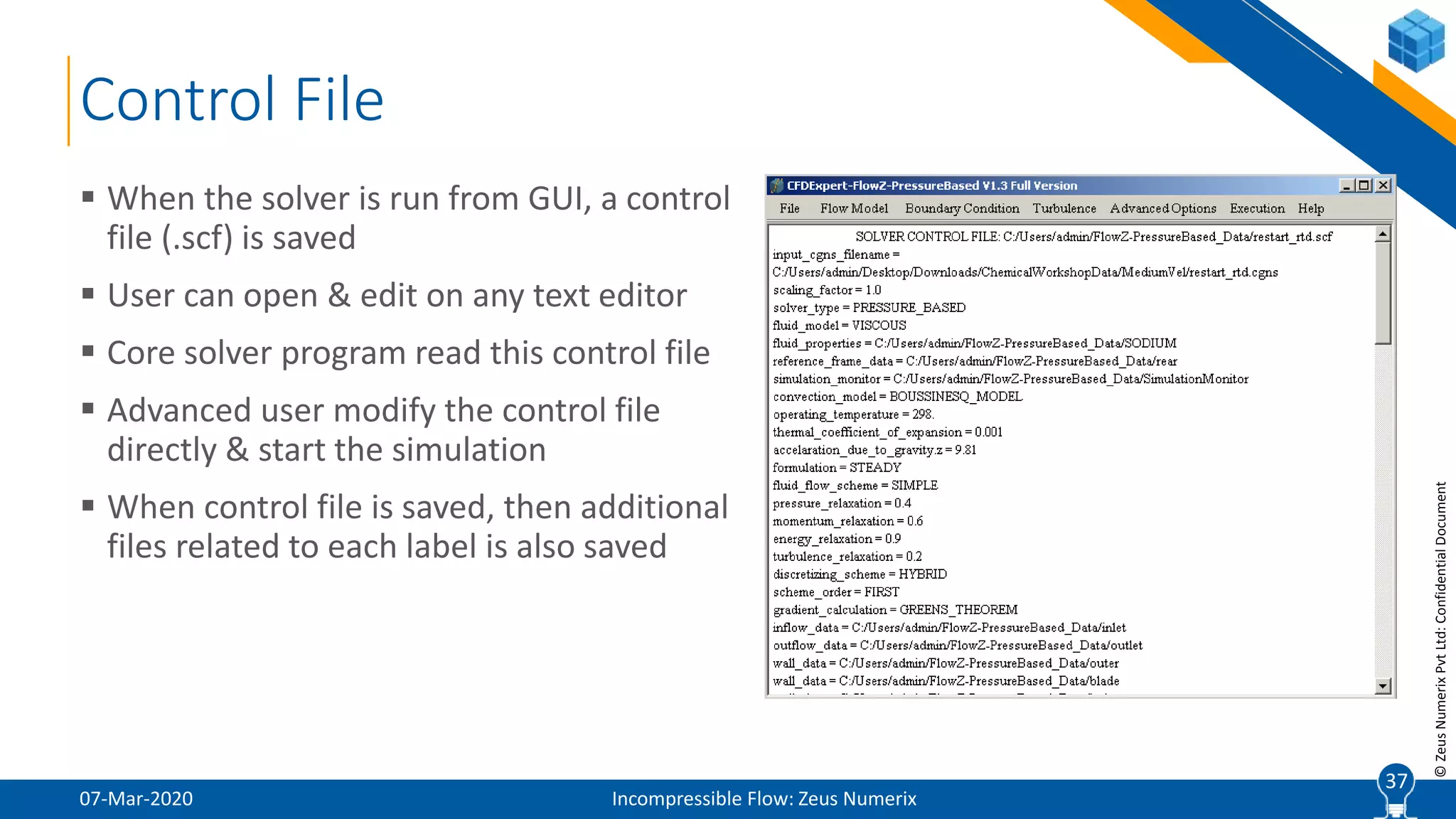
 When the solver is run from GUI, a control
file (.scf) is saved
 User can open & edit on any text editor
 Core solver program read this control file
 Advanced user modify the control file
directly & start the simulation
 When control file is saved, then additional
files related to each label is also saved
37
38
©ZeusNumerixPvtLtd:ConfidentialDocument
Monitor File
07-Mar-2020 Incompressible Flow: Zeus Numerix
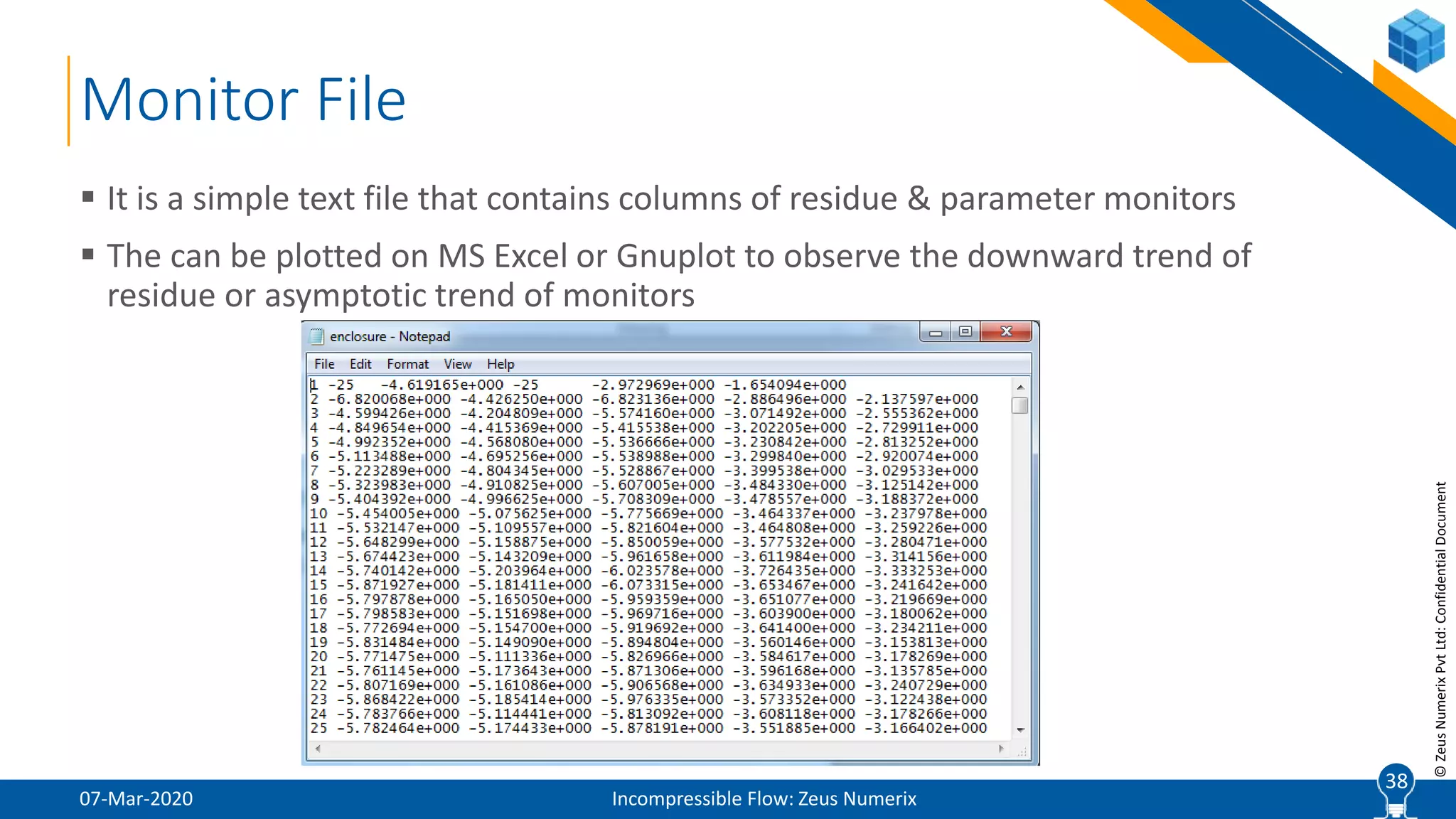
 It is a simple text file that contains columns of residue & parameter monitors
 The can be plotted on MS Excel or Gnuplot to observe the downward trend of
residue or asymptotic trend of monitors
38
39
©ZeusNumerixPvtLtd:ConfidentialDocument
Final Steps
07-Mar-2020 Incompressible Flow: Zeus Numerix
 Save CGNS File: Specify name of CGNS file & path
 Run Solver: Start the solver execution
 Stop Solver: Stop the solver
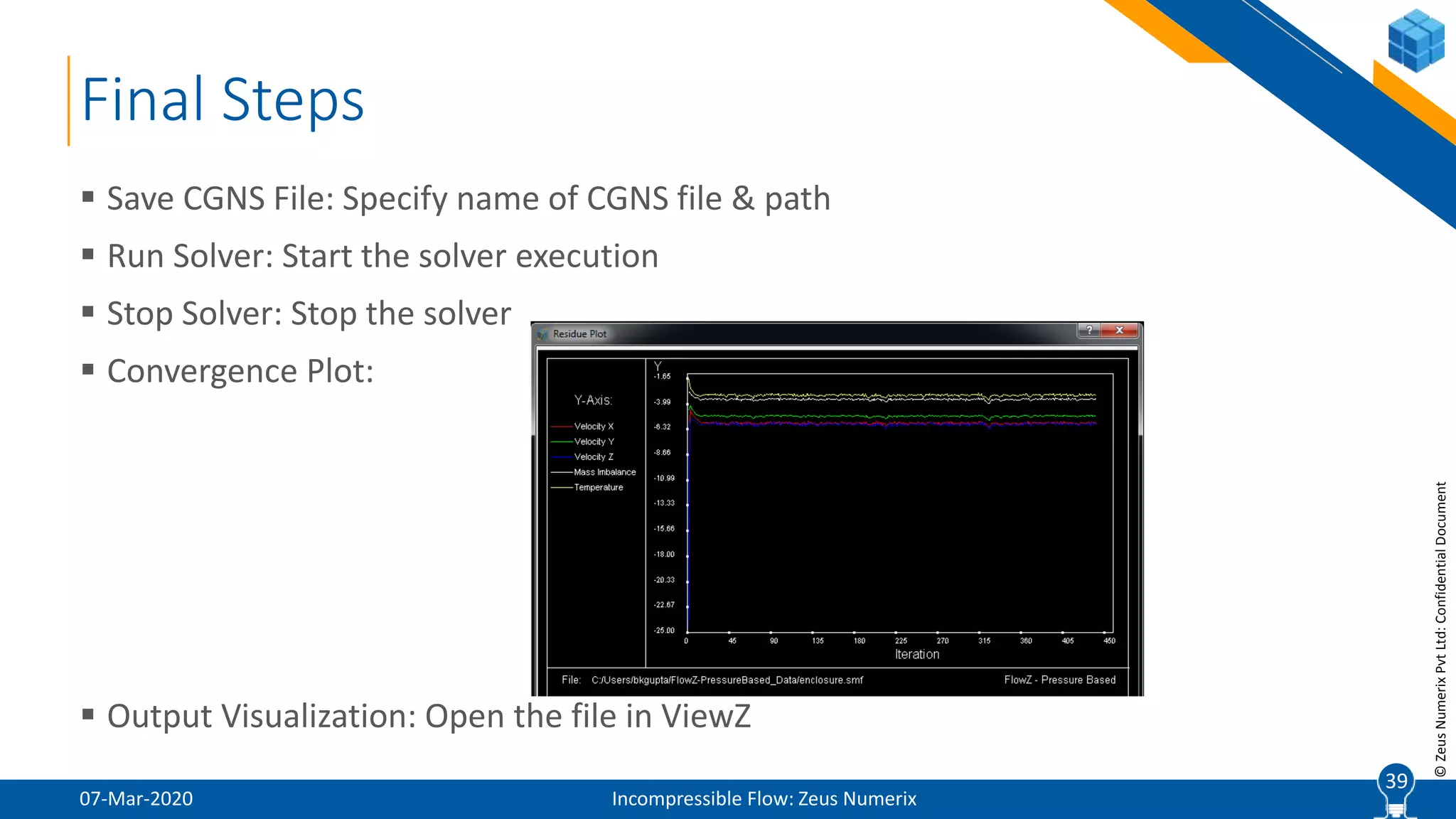
 Convergence Plot:
 Output Visualization: Open the file in ViewZ
39
40
©ZeusNumerixPvtLtd:ConfidentialDocument
Hands-On
Natural Convection inside Enclosure
07-Mar-2020 Incompressible Flow: Zeus Numerix
40
41
©ZeusNumerixPvtLtd:ConfidentialDocument
Setup Conditions
07-Mar-2020 Incompressible Flow: Zeus Numerix
 Visualize mesh on GridZ with Labels
 Import CGNS file with scaling factor of 0.001
 Keep default flow model i.e. steady incompressible simulation using hybrid scheme
& air as working fluid
 Provide left wall with high temperature of 350K; Right, top & bottom at 300K & rear
& front walls be adiabatic
 Laminar flow conditions
 Set buoyancy driven flow with gravity direction in “–y”
 Stagnant initial condition
 Run for 500 iterations (convergence is achieved before that)
 Visualize temperature, velocity & streamlines in ViewZ
41
42
©ZeusNumerixPvtLtd:ConfidentialDocument
Project Portfolio
Typical Incompressible Flow Requirements
07-Mar-2020 Incompressible Flow: Zeus Numerix
42
43
©ZeusNumerixPvtLtd:ConfidentialDocument
Few Typical Incompressible CFD Requirements
07-Mar-2020 Incompressible Flow: Zeus Numerix
 CFD Analysis for Selection of Optimum Thermal Sink Design
 CFD Analysis of Control Valve for Pressure Drop Estimation
 Identification of Root Cause for Dust Ingress Analysis in SUV
 Wind Flow over High-Rise Building for Forces on Balcony Facade
 Ducting Layout of ESP for Optimum Flow Distribution
 Thermal Hydraulic Analysis of Nuclear Fuel Pin Bundle & Blockages
 Jet Fan Layout Optimization in Basement Ventilation
 Analysis of Protective Thermal Ablative Layer over Nozzle
 Aerodynamic Analysis of Low-Speed UAV / MAVs
 Hydrodynamic Analysis of Underwater Hydrofoil
43
44
www.zeusnumerix.com
+91 72760 31511
Abhishek Jain
abhishek@zeusnumerix.com
Thank You !

CFD Lecture (6/8): Solvers- Incompressible Flow

  • 1.
    1Built-to-Spec | ProductApproval | Engineering Services | Software Development Solvers: Incompressible Flow Introduction to Solver Terminologies
  • 2.
    2 ©ZeusNumerixPvtLtd:ConfidentialDocument Overview of Presentation 07-Mar-2020Incompressible Flow: Zeus Numerix  FlowZ™ - Pressure Based (henceforth FlowZ™)  Introduction  Graphical User Interface ( GUI )  Description of Solver Options  Natural Convection inside Enclosure  Hands-On 2
  • 3.
    3 ©ZeusNumerixPvtLtd:ConfidentialDocument FlowZ™ – PressureBased Introduction, User Interface & Solver Options 07-Mar-2020 Incompressible Flow: Zeus Numerix 3
  • 4.
    4 ©ZeusNumerixPvtLtd:ConfidentialDocument Introduction 07-Mar-2020 Incompressible Flow:Zeus Numerix  FlowZ™-Pressure Based is the flow solver module of CFDExpert™, esp. meant for incompressible flow simulations  Pressure correction based family of schemes  Implemented on polyhedral mesh data-structure (Tet / Hex)  Requires finite volume methodology  Includes K Epsilon turbulence model & energy equation  Additional features like buoyancy terms, conjugate heat transfer & porosity model  Flow acceleration achieved using AMG Linear solver 4
  • 5.
    5 ©ZeusNumerixPvtLtd:ConfidentialDocument Graphics User Interface 07-Mar-2020Incompressible Flow: Zeus Numerix 5 Menu Bar Display Area
  • 6.
    6 ©ZeusNumerixPvtLtd:ConfidentialDocument File Menu 07-Mar-2020 IncompressibleFlow: Zeus Numerix  Import CGNS File  Imports CGNS mesh file into the solver  CGNS – CFD General Notation System  Internationally recognized ISO file format  Binary file format to prevent data loss  Approved by NASA, Boeing & used by all standard software  Stores grid coordinates, connectivity, boundary conditions, interface data and solution fields  CGNSViewer is a freeware developed by CGNS committee to view CGNS files. Can be downloaded from www.cgns.org  CGNSPlot facility for viewing of CGNS files 6
  • 7.
    7 ©ZeusNumerixPvtLtd:ConfidentialDocument File Menu (Contd.) 07-Mar-2020Incompressible Flow: Zeus Numerix  Read Control File  At the software level, GUI is meant to help user setup the simulation parameters, which gets stored in a “solver control file (.scf / .zcf)”. This is read by core solver program  GUI can import a pre-existing solver control file, mainly for two purposes:  If user intends to modify an existing setup  If user intends to continue the simulation  Exit  Exits from the software and closes window 7
  • 8.
    8 ©ZeusNumerixPvtLtd:ConfidentialDocument  Figure showsthe CGNSViewer with one sample file open  Base  Descriptors  Zone  Vertex Coordinates  Grid Connectivity  Sections  Solution  BCs CGNS File Format 07-Mar-2020 Incompressible Flow: Zeus Numerix 88
  • 9.
    9 ©ZeusNumerixPvtLtd:ConfidentialDocument Conversion to UnstructuredMesh 07-Mar-2020 Incompressible Flow: Zeus Numerix  Conversion to Unstructured Format  Note: FlowZTM is built on polyhedral mesh data-structure  Such implementation is very different from typical structured mesh based implementation, primarily in:  Identification of cell neighborhood indices  Reconstruction for second order schemes  To allow FlowZTM to accept grid made as structured multi-block, we have integrated a mesh conversion utility  Provides two options:  Single Zone: Default option that joins all the zones into one  Multi Zone: Keeps multiple zones (though in unstructured format); for conjugate heat transfer simulations 9
  • 10.
    10 ©ZeusNumerixPvtLtd:ConfidentialDocument Initial Inputs 07-Mar-2020 IncompressibleFlow: Zeus Numerix  Scaling Factor  Converts grid from other measuring system to SI  Use 0.001 if grid is in mm  2D Conversion Options  Solver is inherently 3D; when provided a 2D CGNS file, mesh is converted to 3D by extrusion:  Axi-symmetric  Specify coefficients to equation of axis; Ax+By = C  For eg., y-axis is A=0, B=1 & C=0;  Planar  Extrudes in Z direction by 1 unit 10
  • 11.
    11 ©ZeusNumerixPvtLtd:ConfidentialDocument 07-Mar-2020 Incompressible Flow:Zeus Numerix 11 Graphics User Interface Menu Gets Enabled only after Successful File Import FlowZTM-Pressure based is a pure incompressible flow solver, with scheme which are fundamentally viscous, else, it gets classified as potential flow
  • 12.
    12 ©ZeusNumerixPvtLtd:ConfidentialDocument Fluid Data 07-Mar-2020 IncompressibleFlow: Zeus Numerix  Select the fluid  Check the property values & modify to correspond operating conditions  If fluid is not present, provide all values against a default name  NOTE:  Gas Constant & Gamma, even though a part of fluid database does not get utilized for incompressible flow  Radiation coefficients are defined for wall surrounding the fluid 12
  • 13.
    13 ©ZeusNumerixPvtLtd:ConfidentialDocument Solid Data 07-Mar-2020 IncompressibleFlow: Zeus Numerix  Solid Data  The option is active only if atleast one zone is given label “solid_**” in GridZTM  Pure conduction is solved in solid zones  Physical properties for solid are sought here 13
  • 14.
    14 ©ZeusNumerixPvtLtd:ConfidentialDocument Gradient Calculation 07-Mar-2020 IncompressibleFlow: Zeus Numerix  Momentum equation contain a gradient term of pressure  Two Options are Available:  Green’s Theorem  Utilized the variable values at face centers surrounding the cell  Least Square Method  Gradient at cell such that it reconstructs the solution in the neighbourhood of the cell  RMS errors to be minimized over neighboring cells  Method flexible w.r.t. any number of neighbourhood cells  Green’s theorem may be more accurate, but , Least Square is more stable for poor quality mesh 14 ∇𝜑 = 𝜑 𝑓 𝐴 𝑉𝑜𝑙𝑢𝑚𝑒 𝜑𝑗 = 𝜑0 + Δ𝑥𝑗 𝜕𝜑 𝜕𝑥 0 + Δ𝑦𝑗 𝜕𝜑 𝜕𝑦 0
  • 15.
    15 ©ZeusNumerixPvtLtd:ConfidentialDocument Solution Algorithm 07-Mar-2020 IncompressibleFlow: Zeus Numerix  Three Options:  SIMPLE:  Using underlying pressure distribution, momentum equations are solved to obtain approximate velocity field  Mass imbalance in each cell is evaluated & used as source term in Poisson type pressure correction equation  Solution of above equation gives correction to both pressure distribution & velocity field to satisfy continuity  Since, velocity field now does not satisfy momentum conservation, we go back to step 1  As pressure & velocity, both stored a center of control volume, such implementation is called “collocated” 15
  • 16.
    16 ©ZeusNumerixPvtLtd:ConfidentialDocument Solution Algorithm (Contd.) 07-Mar-2020Incompressible Flow: Zeus Numerix  SIMPLEC:  SIMPLE Consistent  Term is neglected in SIMPLE algorithm  SIMPLEC approximates & includes the term in momentum interpolation coefficient, thereby making pressure relaxation = 1  It accelerates solver convergence as corrections are more physical  PISO:  Stands for Pressure Implicit with Splitting of Operators  Involves solution of additional pressure correction equations which corrects the velocity correction  Under relaxation parameter for both momentum & pressure is 1.0  Recommended for transient flow conditions 16 𝑎 𝑛𝑏 𝑢 𝑛𝑏 ′
  • 17.
    17 ©ZeusNumerixPvtLtd:ConfidentialDocument Solution Algorithm (Contd.) 07-Mar-2020Incompressible Flow: Zeus Numerix  Time Accuracy  Steady: SIMPLE algo is built on governing equations w/o time term  These are parabolic equations compared to time varying hyperbolic equations of compressible flows  Unsteady: A time transient term is added to momentum, energy & turbulence equations  Numerically, the time step acts like additional relaxation parameter. Smaller the time step, large the relaxation to momentum equation  Discretization Method (For Unsteady Simulation)  Semi Implicit: Also known as Crank Nicolson scheme, where weighing factor, f = 0.5; prevails over entire time step  Fully Implicit: Extremely stable & useful for large values of time step. The new value of Φ prevails over the entire time step 17 0.5 Φ 𝑛 + Φ 𝑛+1
  • 18.
    18 ©ZeusNumerixPvtLtd:ConfidentialDocument Solution Algorithm (Contd.) 07-Mar-2020Incompressible Flow: Zeus Numerix  Relaxation Parameters  Pressure & Momentum:  Interdependent; Typically, αP+αM < 1.0  Can be set very low (~0.1) esp. during first few iterations when initial conditions are very different from expected converged solutions & there are large jumps between iterations  Energy:  Since a pure scalar convective term, relaxation can be set relatively high;  Except for buoyancy flow, where energy affects the flow field  Turbulence: One does not want unrealistically high source / sink terms for turbulence from non-physical initial flow condition. Initially, low relaxation values are set, if divergence is observed 18
  • 19.
    19 ©ZeusNumerixPvtLtd:ConfidentialDocument Discretizing Scheme 07-Mar-2020 IncompressibleFlow: Zeus Numerix  Discretizing scheme  Scalar transport (momentum) equation: , where  Scheme requires at face  Based on approx. of exact solution if Ff > 0 otherwise  Higher order schemes gets the face value using reconstruction of variables 19 ∇. 𝐽 = 𝑆 𝐽 = 𝜌𝑉𝜑 − Γ∇𝜑 𝜑 𝑒 𝜑 𝑓 = 𝜑0 + 𝜑1 2 𝜑 𝑓 = 𝜑0 𝜑 𝑓 = 𝜑1 𝜑 𝑓 = 𝜑0 + ∇𝜑 0. Δ𝑟0
  • 20.
    20 ©ZeusNumerixPvtLtd:ConfidentialDocument 07-Mar-2020 Incompressible Flow:Zeus Numerix 20 Graphics User Interface The activation of menu items depend on the presence of corresponding boundary condition type in the CGNS file For lid driven cavity problem, only “Wall” will be active as there is no Inflow / Outflow BC in mesh file
  • 21.
    21 ©ZeusNumerixPvtLtd:ConfidentialDocument Boundary Attributes 07-Mar-2020 IncompressibleFlow: Zeus Numerix  Each domain boundary is specified two attributes:  Label  General name given by user for identification of boundary sections  Boundary Condition Type  CGNS defined reserved keywords (BCInflow, BCOutflow, BCWallViscousIsothermal, BCWallViscousHeatFlux etc.)  There can be multiple Labels of same BCType, but there cannot be multiple BCTypes of same Label  This allows user to simulate problems with multiple inflows, outflows or walls with different thermal conditions  Use GridZ / ViewZ to visualize Labels & BCTypes 21
  • 22.
    22 ©ZeusNumerixPvtLtd:ConfidentialDocument Inflow Boundary Condition 07-Mar-2020Incompressible Flow: Zeus Numerix  Use Total Pressure Based Inflow condition for external flows  Use Velocity Based Inflow condition for internal bounded flows; pressure is extrapolated out from domain;  Inputs  Static Pressure, Pa (only for Total Pressure Based Inflow)  Static Temperature, K  Velocity Magnitude, m/s  Flow direction at Inflow; (1,0,0) denotes that flow is in X direction  Save the conditions & navigate to other Labels with BCType : BCInflow 22
  • 23.
    23 ©ZeusNumerixPvtLtd:ConfidentialDocument Outflow Boundary Condition 07-Mar-2020Incompressible Flow: Zeus Numerix  Outflow boundary is where the flow goes out of the domain  Pressure is specified at the boundary & zero gradient is put for scalars such that velocity, temperature & turbulence  Being incompressible flow, user can work with gauge pressure, hence a pressure value of 0 Pa is a possible input  Inputs  Static Pressure (Pa)  Static Temperature (K)  Backflow:  Outflow may behave as inflow, temperature used to satisfy up-winding  For internal flow, pipes are usually extended to length that avoid recirculation at outflow boundary 23
  • 24.
    24 ©ZeusNumerixPvtLtd:ConfidentialDocument Wall Boundary Condition 07-Mar-2020Incompressible Flow: Zeus Numerix  Supports multiple thermal BCs for wall  All walls are no slip & creates momentum as well as thermal boundary layer  Wall Velocity: For cases with moving wall For Eg. Lid driven cavity  Wall Thermal Boundary Type & corresponding input values to be specified by user (later slide describes in detail)  Save the conditions & Navigate to other Labels with BCWallViscous….  Also supported is symmetry plane modeled as a free slip wall. No user input is required against it 24
  • 25.
    25 ©ZeusNumerixPvtLtd:ConfidentialDocument Wall Boundary Condition(Contd.) 07-Mar-2020 Incompressible Flow: Zeus Numerix  Wall Thermal Boundary Type:  Adiabatic: Heat Flux = 0 W/m2; Normal gradient of temperature at wall is Zero  Isothermal: User inputs Temperature (K); There would be heat transfer in or out of domain through this boundary  Heat Flux: User inputs Heat Flux (W/m2); Positive is heat transfer into the domain; Interest is to find wall temperature;  Convective: User inputs heat transfer coefficient (typically from some empirical correlation) & ambient / bulk temperature outside the domain. Generates both heat transfer as well as temperature on wall  Radiative: Heat transfer is through radiation with atmosphere. User inputs the emissivity of the surface & ambient temperature.  Convective Radiative: User inputs ambient temperature, heat transfer coeff. & wall surface emissivity 25
  • 26.
    26 ©ZeusNumerixPvtLtd:ConfidentialDocument 07-Mar-2020 Incompressible Flow:Zeus Numerix 26 Graphics User Interface “Turbulence” menu shows the options available for modeling of viscous effects in the flow In laminar flow, the dynamic / molecular viscosity generates viscous effects (boundary layer). No additional input is required from user. Turbulence models generates “eddy viscosity”, which is several order higher than laminar viscosity in wake / boundary layer region
  • 27.
    27 ©ZeusNumerixPvtLtd:ConfidentialDocument Turbulence Model 07-Mar-2020 IncompressibleFlow: Zeus Numerix  Two variants of K-Epsilon model:  High Re model with standard wall function  Low Re Chien model  K-Omega model  SST Model  All three models require two non-dimensional inputs  Turbulence Intensity  Eddy Viscosity Ratio Explained in more detail in notes for compressible flow solver 27
  • 28.
    28 ©ZeusNumerixPvtLtd:ConfidentialDocument 07-Mar-2020 Incompressible Flow:Zeus Numerix 28 Graphics User Interface These options are implemented for very specific simulations. Though they are generic, they get invoked against specific labels not applied in regular simulations
  • 29.
    29 ©ZeusNumerixPvtLtd:ConfidentialDocument Buoyancy 07-Mar-2020 Incompressible Flow:Zeus Numerix  Boussinesq Model:  Density changes due to temperature variation in domain; However, simulation does not vary density, but incorporates its effect on the flow  Adds to the relevant momentum eqn. as source term  Inputs  Gravity: Typically constant  Direction: User need to specify w.r.t. orientation of domain. Selects the momentum equation where source term is to be added  Thermal coeff. of expansion: known from fluid property tables  Reference temperature: Ambient or bulk temperature 29 𝛽𝑔 𝑇 − 𝑇𝑟𝑒𝑓 1 𝜌 𝜕𝜌 𝜕𝑇
  • 30.
    30 ©ZeusNumerixPvtLtd:ConfidentialDocument Reference Frame 07-Mar-2020 IncompressibleFlow: Zeus Numerix  For simulation of moving bodies  The governing equations for those particular zones are written into reference frame  Solver transforms data (esp. velocity) between stationary & moving zone  For Translational Movement, velocities in X, Y & Z is reqd  Rotational inputs  Angular velocity  Axis of rotation  Center of rotation  For the purpose of initialization & data output, user must specify reference frame for input & output solution 30
  • 31.
    31 ©ZeusNumerixPvtLtd:ConfidentialDocument 07-Mar-2020 Incompressible Flow:Zeus Numerix 31 Graphics User Interface Execution menu provides the solver with inputs that control the simulation progress & allows user to monitor the same Before the run is executed, user can should provide the name & path of output file
  • 32.
    32 ©ZeusNumerixPvtLtd:ConfidentialDocument Initial Conditions 07-Mar-2020 IncompressibleFlow: Zeus Numerix  User needs to provide initial guess of flow variables to solver  Guidelines:  Pressure typically same as outflow  Velocities w.r.t. dominant flow direction in domain; Would be same as inflow for straight ducts / external flow. Should not be zero for turbulent simulation  Temperature & turbulence same as inflow should be OK  User can also initialize the simulation from existing CGNS file; Typically done when user wants to continue the simulation for few more iterations & had imported the control file initially 32
  • 33.
    33 ©ZeusNumerixPvtLtd:ConfidentialDocument Execution Set-up 07-Mar-2020 IncompressibleFlow: Zeus Numerix  FlowZ offers multiple iterative methods:  Two implementation of Gauss Seidel on different data structure (solver & Compact Storage Row); CSR offer speed to linear solver, however Gauss Seidel gives slow convergence for large equations  LUD: Lower Upper Decomposition: Direct method, requires full matrix storage; not suitable for large equations (memory issue) 33
  • 34.
    34 ©ZeusNumerixPvtLtd:ConfidentialDocument Execution Set-up (Contd.) 07-Mar-2020Incompressible Flow: Zeus Numerix  Algebraic Multigrid (AMG):  Accelerates the convergence by several order by sweeping at different level of coarseness. Eliminates low frequency error  User is recommended to select AMG for pressure correction equation; The momentum equations are still solved with Gauss Seidel as it converges fast due to diagonal dominance  Sweep Limits:  Within each iterations, linear solver undertakes iterative sweeps untill one of the two condition is satisfied (1) specified convergence is obtained or (2) Maximum specified sweeps are done 34 Agglomeration Sweeps
  • 35.
    35 ©ZeusNumerixPvtLtd:ConfidentialDocument Execution Set-up 07-Mar-2020 IncompressibleFlow: Zeus Numerix  Parameters  Number of Iterations: A representative simulation would take between 500 to 1000 iteration for convergence in residues (1E-3) & other monitoring parameters.  Solution Update Frequency: Solver dumps an output CGNS file after every specified iterations for user to visualize the intermediate results  Time Step: To be provided for unsteady simulations as solution marches in time. Difficult to provide in first guess and is derived from user’s knowledge on event duration, Strouhal frequency, etc.  Time Step Convergence: Convergence level to be achieved within every time step of unsteady simulation. Typically, 1E-3.  Residue Norms  L1: Find the arithmetic mean of absolute residues across domain;  L2: Find the RMS mean of residues across domain; Recommended;  L∞: Pick the max absolute residue value in domain 35
  • 36.
    36 ©ZeusNumerixPvtLtd:ConfidentialDocument Simulation Monitor 07-Mar-2020 IncompressibleFlow: Zeus Numerix  For each label, FlowZ provides user option to iteration- wise monitor integrated values of following:  Mass Transfer  Energy Transfer – Convection  Energy Transfer – Conduction  The values get stored in solver monitor file  For each selection, two values are printed (in & out) of domain 36
  • 37.
    37 ©ZeusNumerixPvtLtd:ConfidentialDocument Control File 07-Mar-2020 IncompressibleFlow: Zeus Numerix  When the solver is run from GUI, a control file (.scf) is saved  User can open & edit on any text editor  Core solver program read this control file  Advanced user modify the control file directly & start the simulation  When control file is saved, then additional files related to each label is also saved 37
  • 38.
    38 ©ZeusNumerixPvtLtd:ConfidentialDocument Monitor File 07-Mar-2020 IncompressibleFlow: Zeus Numerix  It is a simple text file that contains columns of residue & parameter monitors  The can be plotted on MS Excel or Gnuplot to observe the downward trend of residue or asymptotic trend of monitors 38
  • 39.
    39 ©ZeusNumerixPvtLtd:ConfidentialDocument Final Steps 07-Mar-2020 IncompressibleFlow: Zeus Numerix  Save CGNS File: Specify name of CGNS file & path  Run Solver: Start the solver execution  Stop Solver: Stop the solver  Convergence Plot:  Output Visualization: Open the file in ViewZ 39
  • 40.
    40 ©ZeusNumerixPvtLtd:ConfidentialDocument Hands-On Natural Convection insideEnclosure 07-Mar-2020 Incompressible Flow: Zeus Numerix 40
  • 41.
    41 ©ZeusNumerixPvtLtd:ConfidentialDocument Setup Conditions 07-Mar-2020 IncompressibleFlow: Zeus Numerix  Visualize mesh on GridZ with Labels  Import CGNS file with scaling factor of 0.001  Keep default flow model i.e. steady incompressible simulation using hybrid scheme & air as working fluid  Provide left wall with high temperature of 350K; Right, top & bottom at 300K & rear & front walls be adiabatic  Laminar flow conditions  Set buoyancy driven flow with gravity direction in “–y”  Stagnant initial condition  Run for 500 iterations (convergence is achieved before that)  Visualize temperature, velocity & streamlines in ViewZ 41
  • 42.
    42 ©ZeusNumerixPvtLtd:ConfidentialDocument Project Portfolio Typical IncompressibleFlow Requirements 07-Mar-2020 Incompressible Flow: Zeus Numerix 42
  • 43.
    43 ©ZeusNumerixPvtLtd:ConfidentialDocument Few Typical IncompressibleCFD Requirements 07-Mar-2020 Incompressible Flow: Zeus Numerix  CFD Analysis for Selection of Optimum Thermal Sink Design  CFD Analysis of Control Valve for Pressure Drop Estimation  Identification of Root Cause for Dust Ingress Analysis in SUV  Wind Flow over High-Rise Building for Forces on Balcony Facade  Ducting Layout of ESP for Optimum Flow Distribution  Thermal Hydraulic Analysis of Nuclear Fuel Pin Bundle & Blockages  Jet Fan Layout Optimization in Basement Ventilation  Analysis of Protective Thermal Ablative Layer over Nozzle  Aerodynamic Analysis of Low-Speed UAV / MAVs  Hydrodynamic Analysis of Underwater Hydrofoil 43
  • 44.
    44 www.zeusnumerix.com +91 72760 31511 AbhishekJain abhishek@zeusnumerix.com Thank You !