Centralized payments - Vendor and Customer payments
The Centralized payment feature in D365 can be used by organizations that have multiple legal entities,
but payments are made in one legal entity on behalf of the other legal entities. Using this feature, you can
settle invoices and payments in one legal entity across several legal entities.
Scenario
The Contoso group of companies is an organization that has three legal entities USMF, USSI and USRT
located in different part of the United States. While all these companies process transactions, all customer
and vendor payments are solely handled by USMF.
Prerequisites
Before you begin using the centralized payment feature, you need to ensure you have some basic setup:
A. The Organization hierarchy
An organization hierarchy must be setup to include all the legal entities that will form the
structure for Centralized payments.
To setup the Organizational hierarchy, go to Organization administration> Organizations>
Organization hierarchies.
Click on New and enter a Name to create a new Organization hierarchy. Once you have created a
new hierarchy name click on View.
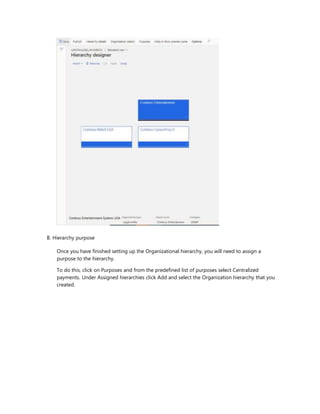
You can then click on Edit and click on Insert> Legal entity. You can start inserting the main legal
entity and its subsidiaries. In this example I have added USMF as the main company and two
subsidiaries, USSI and USRT. I can make payments in USMF on behalf of USSI and USRT through
the Centralized payments feature.
B. Hierarchy purpose
Once you have finished setting up the Organizational hierarchy, you will need to assign a
purpose to the hierarchy.
To do this, click on Purposes and from the predefined list of purposes select Centralized
payments. Under Assigned hierarchies click Add and select the Organization hierarchy that you
created.
You will now have to publish the Organization hierarchy to make Centralized payments. To
publish the hierarchy, you can click on View hierarchy in the Organization hierarchy purposes
form and click on View hierarchy. Click on Publish and give the effective date and click on Publish
again.
C. Intercompany accounting
The next basic setup to be done is the Intercompany accounting setup. Navigate to General
ledger> Posting setup> Intercompany accounting to complete this step.
In this setup you can define whether to post cash discounts and exchange rate gains or losses to
the legal entity of the invoice or to the legal entity of the payment.
0 Save New III Delete Create reciprocal relationship Options P
Y P Filter
Originating ..
t Destination co... |
demf USMF
frsi USSI
gbsi USSI
irimf USSI
usmf DEMF
usmf USRT
usmf USSI
usrt USMF
ussi FRSI
ussi GBSI
ussi USMF
Intercompany accounting | My view v ORIGINATING
COMPANY Originating company Company name usrt
Contoso Retail USA
Debit account Credit account
DESTINATION COMPANY
Destination company Company name USMF Contoso Entertainment
System ..
Debit account Credit account
CENTRALIZED CUSTOMER PAYMENTS
Post cash discount
CENTRALIZED VENDOR PAYMENTS
Post cash discount
Legal entity of the invoice
v |
Post currency exchange gain or loss
Legal entity of the invoice
v |
*ost interest
Legal entity of the invoice -
Post fine
Legal entity of the invoice
-
Legal entity of the invoice
v |
Post currency exchange gain or loss
Legal entity of the invoice
Post interest
Legal entity of the invoice V
Post fine
Legal entity of the invoice
133330
'| 231365
' 133330 ^ 231365
Journal
IntJm
Centralized payments
D. Mapping vendor/ customer accounts
Vendors must be mapped to the Global address book between each legal entity. If a payment is
being made to a vendor, then you need to make sure that the Vendor account which is setup
across several legal entities is associated to the same Party ID. Similarly, if you have a customer
that you sell to or transact with across various legal entities, that customer account must be
setup across different legal entities but needs to be mapped to the same Party ID.
In the image below I have included an example of a vendor organization that is set up across
USMF, USRT and USSI but is mapped to the same Party ID.
Centralized payments process - Vendor payments
After you have completed the basic setup listed above, you can process payments for all the legal
entities from one legal entity.
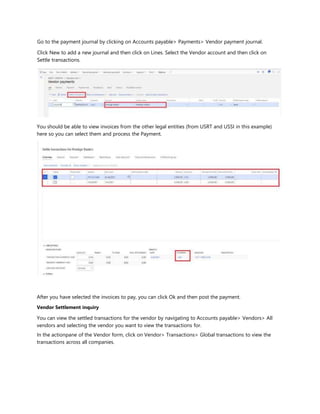
Go to the payment journal by clicking on Accounts payable> Payments> Vendor payment journal.
Click New to add a new journal and then click on Lines. Select the Vendor account and then click on
Settle transactions.
You should be able to view invoices from the other legal entities (from USRT and USSI in this example)
here so you can select them and process the Payment.
After you have selected the invoices to pay, you can click Ok and then post the payment.
Vendor Settlement inquiry
You can view the settled transactions for the vendor by navigating to Accounts payable> Vendors> All
vendors and selecting the vendor you want to view the transactions for.
In the actionpane of the Vendor form, click on Vendor> Transactions> Global transactions to view the
transactions across all companies.
PRESTIGE TRADERS: PRESTIGE TRADERS | Standard view v
Vendor transactions
Company Show Date
MQ3;GLSI;dat:THMF... v | [AII V 6/9/2021 | | Hide currency revaluations
list General Payment Promissory note Settlement Remittance History 1099 Financial dimensions
I v/ Voucher
Vendor account T Legal entity Date Invoice Description Amount in transaction cur... Bala nceintran...Currency Amount Balance
APPM001218 Prestige Traders usmf 3/5/2021 6,000.00 0,00USD 6,000,00 0,00
140000656 Prestige Traders usmf 6/4/2021 2.500.00 0.00USD 2.500.00 0.00
140000657 Prestige Traders usmf 6/4/2021 3.500.00 0.00USD 3.500.00 0.00
140001124 Prestige Traders usrt 6/4/2021 POINV1668 2,500.00 0.00USD 2,500.00 0.00
Q PIV-110001258
Prestige Traders usrt 6/4/2021 PO IN VI668 2.500.00 0,00USD 2,500,00 0,00
110000212 US_SI_000054 ussi 6/4/2021 INV00001 3.500.00 0,00USD 3,500,00 0,00
140000200 US_SI_000054 ussi 6/4/2021 INV00001 3.500.00
0.00
USD 3.500.00
0.00
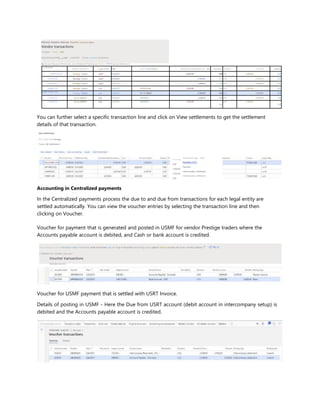
You can further select a specific transaction line and click on View settlements to get the settlement
details of that transaction.
View settlements
PIV-11000125B: Prestige
Traders All settlements
nt in rep...
0.00
2,500,00 -
2,500.00
0.00
Transaction type Payn
Purchase order
Payment
Intercompany settlement
Accounting in Centralized payments
In the Centralized payments process the due to and due from transactions for each legal entity are
settled automatically. You can view the voucher entries by selecting the transaction line and then
clicking on Voucher.
Voucher for payment that is generated and posted in USMF for vendor Prestige traders where the
Accounts payable account is debited, and Cash or bank account is credited.
View subledger journal Transaction origin Transactions Audit trail Posted sales tax Original document Accounting source explorer Related vouchers All related vouchers Options P o:'Cl Po ci
Y APPM001218: 3/5/2021 | My view ^
Voucher transactions
Overview General
Voucher for USMF payment that is settled with USRT Invoice.
Details of posting in USMF - Here the Due from USRT account (debit account in intercompany setup) is
debited and the Accounts payable account is credited.
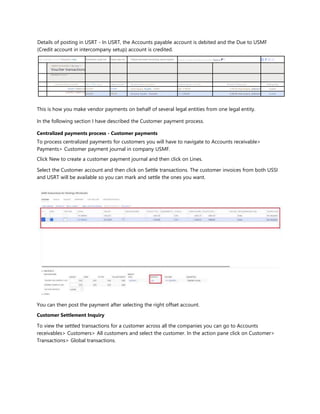
Details of posting in USRT - In USRT, the Accounts payable account is debited and the Due to USMF
(Credit account in intercompany setup) account is credited.
View subledger journal Transaction origin Transactions Audit trail Posted sales tax Original document Accounting source explorer Related vouchers All related vouchers Options P o:-
0) P O ci
Y
140001124:6/4/2021 | My view ^
Voucher transactions
Overview General
v' Journal number Voucher Date T Year ctosec Ledger account Account name Description Currency Amou nt in tran... Amount Posting type Posting layer
033297 1400011246/4/2021 231365- Intercompany Payable - USMF/,.. USD -2.500,00 2,500,00 Intercompany settlement Current
| 033297 | 140001124
6/4/2021 200100- Accounts Payable - Domestic USD 2,500,00 2,500,00 Intercompany settlement Current
This is how you make vendor payments on behalf of several legal entities from one legal entity.
In the following section I have described the Customer payment process.
Centralized payments process - Customer payments
To process centralized payments for customers you will have to navigate to Accounts receivable>
Payments> Customer payment journal in company USMF.
Click New to create a customer payment journal and then click on Lines.
Select the Customer account and then click on Settle transactions. The customer invoices from both USSI
and USRT will be available so you can mark and settle the ones you want.
You can then post the payment after selecting the right offset account.
Customer Settlement Inquiry
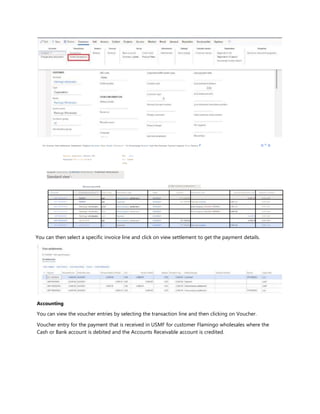
To view the settled transactions for a customer across all the companies you can go to Accounts
receivables> Customers> All customers and select the customer. In the action pane click on Customer>
Transactions> Global transactions.
Edit Voucher View settlements Settlementv Original document Open details Collections'^ Bill of exchange Reversev Cash flow forecasts Payment requests Prints Options P o 0 o
Security diagnostics Record info
Advanced filter or sort Go to V
See your
flov Create
a flov
Customer transactions | FLAMINGO WHOLESALES : FLAMINGO WHOLESALES
Standard view'-
M03;GLSI;dat;THMF... | | Hide currency revaluations
V" Voucher Customer account T Legal entity Transaction type Date Invoice Description Am. junt in transaction cur... Balance Currency
ARP-80000001 004047 usrt Intercompany settlement 6/4/2021 FTI-Q00002 2.681.25 0.00 USD
FIV-30000001 004047 usrt Customer 6/4/2021 FTI-000002Free text invoice 2.681.25 0.00 USD
ARP-80000004 Flamingo wholesales usmf Intercompany settlement 6/4/2021 Intercompany 6/4/2021 ARPM0... 2.681.25 0.00 USD
ARP-80000005 Flamingo wholesales usmf Intercompany settlement 6/4/2021 Intercompany 6/4/2021 ARPM0... 2,949.38 0.00 USD
ARPM000938 Flamingo wholesales usmf Payment 6/4/2021 5.630.63 0.00 USD
ARP-80000050 US_5I_0137 ussi Intercompany settlement 6/4/2021 FTI-000002 2,949.38 0.00 USD
FIV-30000001 US_SI_0137 ussi Customer 6/4/2021 FTI-000002Free text invoice 2,949.38 0.00 USD
You can then select a specific invoice line and click on view settlement to get the payment details.
Accounting
You can view the voucher entries by selecting the transaction line and then clicking on Voucher.
Voucher entry for the payment that is received in USMF for customer Flamingo wholesales where the
Cash or Bank account is debited and the Accounts Receivable account is credited.
ARPM000938 : 6/4/2021 | My view ^
Voucher transactions
Overview General
v'' Journal number Voucher Date T Year closed Ledger account Account name Description Currency Amount in tran... Amount Posting type
021042 ARPM000938 6/4/2021 130100-- Accounts Receivable - Domestic USD -5,630,63 5,630,63 Customer balance
1021042 | ARPM000938 6/4/2021 110110-001- Bank Account - USD USD 5,630.63 5.630.63 Bank
Posting layer
Current
Current
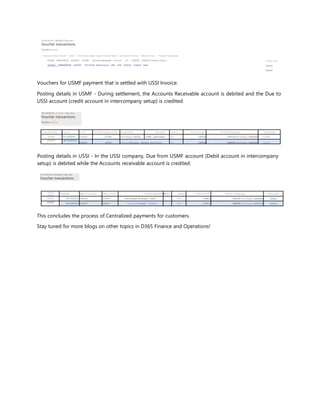
Vouchers for USMF payment that is settled with USSI Invoice.
Posting details in USMF - During settlement, the Accounts Receivable account is debited and the Due to
USSI account (credit account in intercompany setup) is credited.
ARP-80000005 : 6/4/2021 | My view--'
Voucher transactions
Overview General
V' Journal number Voucher Date T rear closed Ledger account Account name Description Currency Amount in tran... Amount Posting type Posting layer
021041 ARP-80000005 6/4/2021 231300- Intercompany Payable - USMF.,. Intercompan... USD -2,949,38 2,949,38 Intercompany settlement Current
| 021041 l ARP-80000005
6/4/2021 130100- Accounts Receivable - Domestic Intercompan... USD 2,949,38 2,949,38 Intercompany settlement Current
Posting details in USSI - In the USSI company, Due from USMF account (Debit account in intercompany
setup) is debited while the Accounts receivable account is credited.
ARP-80000050; 6/4/2021 | My view
Voucher transactions
Journal
numb
er Voucher Date T Year closed Ledger account Account name Desci■iption Currency Amount in tran... Amount Posting type Posting layer
002801 ARP-800000506/4/2021 133300— Intercompany Receivable - USMF... USD 2.949.38 2.949.38 Intercompany settlement Current
|002801
ARP-800000506/4/2021 130100— Accounts Receivable - Domestic USD -2,949,38 2,949.38 Intercompany settlement Current
This concludes the process of Centralized payments for customers.
Stay tuned for more blogs on other topics in D365 Finance and Operations!

Centralized payments-vendor-and-customer-payments

  • 1.
    Centralized payments -Vendor and Customer payments The Centralized payment feature in D365 can be used by organizations that have multiple legal entities, but payments are made in one legal entity on behalf of the other legal entities. Using this feature, you can settle invoices and payments in one legal entity across several legal entities. Scenario The Contoso group of companies is an organization that has three legal entities USMF, USSI and USRT located in different part of the United States. While all these companies process transactions, all customer and vendor payments are solely handled by USMF. Prerequisites Before you begin using the centralized payment feature, you need to ensure you have some basic setup: A. The Organization hierarchy An organization hierarchy must be setup to include all the legal entities that will form the structure for Centralized payments. To setup the Organizational hierarchy, go to Organization administration> Organizations> Organization hierarchies. Click on New and enter a Name to create a new Organization hierarchy. Once you have created a new hierarchy name click on View. You can then click on Edit and click on Insert> Legal entity. You can start inserting the main legal entity and its subsidiaries. In this example I have added USMF as the main company and two subsidiaries, USSI and USRT. I can make payments in USMF on behalf of USSI and USRT through the Centralized payments feature.
  • 2.
    B. Hierarchy purpose Onceyou have finished setting up the Organizational hierarchy, you will need to assign a purpose to the hierarchy. To do this, click on Purposes and from the predefined list of purposes select Centralized payments. Under Assigned hierarchies click Add and select the Organization hierarchy that you created.
  • 3.
    You will nowhave to publish the Organization hierarchy to make Centralized payments. To publish the hierarchy, you can click on View hierarchy in the Organization hierarchy purposes form and click on View hierarchy. Click on Publish and give the effective date and click on Publish again. C. Intercompany accounting The next basic setup to be done is the Intercompany accounting setup. Navigate to General ledger> Posting setup> Intercompany accounting to complete this step. In this setup you can define whether to post cash discounts and exchange rate gains or losses to the legal entity of the invoice or to the legal entity of the payment.
  • 4.
    0 Save NewIII Delete Create reciprocal relationship Options P Y P Filter Originating .. t Destination co... | demf USMF frsi USSI gbsi USSI irimf USSI usmf DEMF usmf USRT usmf USSI usrt USMF ussi FRSI ussi GBSI ussi USMF Intercompany accounting | My view v ORIGINATING COMPANY Originating company Company name usrt Contoso Retail USA Debit account Credit account DESTINATION COMPANY Destination company Company name USMF Contoso Entertainment System .. Debit account Credit account CENTRALIZED CUSTOMER PAYMENTS Post cash discount CENTRALIZED VENDOR PAYMENTS Post cash discount Legal entity of the invoice v | Post currency exchange gain or loss Legal entity of the invoice v | *ost interest Legal entity of the invoice - Post fine Legal entity of the invoice - Legal entity of the invoice v | Post currency exchange gain or loss Legal entity of the invoice Post interest Legal entity of the invoice V Post fine Legal entity of the invoice 133330 '| 231365 ' 133330 ^ 231365 Journal IntJm Centralized payments D. Mapping vendor/ customer accounts Vendors must be mapped to the Global address book between each legal entity. If a payment is being made to a vendor, then you need to make sure that the Vendor account which is setup across several legal entities is associated to the same Party ID. Similarly, if you have a customer that you sell to or transact with across various legal entities, that customer account must be setup across different legal entities but needs to be mapped to the same Party ID. In the image below I have included an example of a vendor organization that is set up across USMF, USRT and USSI but is mapped to the same Party ID. Centralized payments process - Vendor payments After you have completed the basic setup listed above, you can process payments for all the legal entities from one legal entity.
  • 5.
    Go to thepayment journal by clicking on Accounts payable> Payments> Vendor payment journal. Click New to add a new journal and then click on Lines. Select the Vendor account and then click on Settle transactions. You should be able to view invoices from the other legal entities (from USRT and USSI in this example) here so you can select them and process the Payment. After you have selected the invoices to pay, you can click Ok and then post the payment. Vendor Settlement inquiry You can view the settled transactions for the vendor by navigating to Accounts payable> Vendors> All vendors and selecting the vendor you want to view the transactions for. In the actionpane of the Vendor form, click on Vendor> Transactions> Global transactions to view the transactions across all companies.
  • 6.
    PRESTIGE TRADERS: PRESTIGETRADERS | Standard view v Vendor transactions Company Show Date MQ3;GLSI;dat:THMF... v | [AII V 6/9/2021 | | Hide currency revaluations list General Payment Promissory note Settlement Remittance History 1099 Financial dimensions I v/ Voucher Vendor account T Legal entity Date Invoice Description Amount in transaction cur... Bala nceintran...Currency Amount Balance APPM001218 Prestige Traders usmf 3/5/2021 6,000.00 0,00USD 6,000,00 0,00 140000656 Prestige Traders usmf 6/4/2021 2.500.00 0.00USD 2.500.00 0.00 140000657 Prestige Traders usmf 6/4/2021 3.500.00 0.00USD 3.500.00 0.00 140001124 Prestige Traders usrt 6/4/2021 POINV1668 2,500.00 0.00USD 2,500.00 0.00 Q PIV-110001258 Prestige Traders usrt 6/4/2021 PO IN VI668 2.500.00 0,00USD 2,500,00 0,00 110000212 US_SI_000054 ussi 6/4/2021 INV00001 3.500.00 0,00USD 3,500,00 0,00 140000200 US_SI_000054 ussi 6/4/2021 INV00001 3.500.00 0.00 USD 3.500.00 0.00 You can further select a specific transaction line and click on View settlements to get the settlement details of that transaction. View settlements PIV-11000125B: Prestige Traders All settlements nt in rep... 0.00 2,500,00 - 2,500.00 0.00 Transaction type Payn Purchase order Payment Intercompany settlement Intercompany settlement Accounting in Centralized payments In the Centralized payments process the due to and due from transactions for each legal entity are settled automatically. You can view the voucher entries by selecting the transaction line and then clicking on Voucher. Voucher for payment that is generated and posted in USMF for vendor Prestige traders where the Accounts payable account is debited, and Cash or bank account is credited. View subledger journal Transaction origin Transactions Audit trail Posted sales tax Original document Accounting source explorer Related vouchers All related vouchers Options P o:'Cl Po ci Y APPM001218: 3/5/2021 | My view ^ Voucher transactions Overview General Voucher for USMF payment that is settled with USRT Invoice. Details of posting in USMF - Here the Due from USRT account (debit account in intercompany setup) is debited and the Accounts payable account is credited.
  • 7.
    Details of postingin USRT - In USRT, the Accounts payable account is debited and the Due to USMF (Credit account in intercompany setup) account is credited. View subledger journal Transaction origin Transactions Audit trail Posted sales tax Original document Accounting source explorer Related vouchers All related vouchers Options P o:- 0) P O ci Y 140001124:6/4/2021 | My view ^ Voucher transactions Overview General v' Journal number Voucher Date T Year ctosec Ledger account Account name Description Currency Amou nt in tran... Amount Posting type Posting layer 033297 1400011246/4/2021 231365- Intercompany Payable - USMF/,.. USD -2.500,00 2,500,00 Intercompany settlement Current | 033297 | 140001124 6/4/2021 200100- Accounts Payable - Domestic USD 2,500,00 2,500,00 Intercompany settlement Current This is how you make vendor payments on behalf of several legal entities from one legal entity. In the following section I have described the Customer payment process. Centralized payments process - Customer payments To process centralized payments for customers you will have to navigate to Accounts receivable> Payments> Customer payment journal in company USMF. Click New to create a customer payment journal and then click on Lines. Select the Customer account and then click on Settle transactions. The customer invoices from both USSI and USRT will be available so you can mark and settle the ones you want. You can then post the payment after selecting the right offset account. Customer Settlement Inquiry To view the settled transactions for a customer across all the companies you can go to Accounts receivables> Customers> All customers and select the customer. In the action pane click on Customer> Transactions> Global transactions.
  • 8.
    Edit Voucher Viewsettlements Settlementv Original document Open details Collections'^ Bill of exchange Reversev Cash flow forecasts Payment requests Prints Options P o 0 o Security diagnostics Record info Advanced filter or sort Go to V See your flov Create a flov Customer transactions | FLAMINGO WHOLESALES : FLAMINGO WHOLESALES Standard view'- M03;GLSI;dat;THMF... | | Hide currency revaluations V" Voucher Customer account T Legal entity Transaction type Date Invoice Description Am. junt in transaction cur... Balance Currency ARP-80000001 004047 usrt Intercompany settlement 6/4/2021 FTI-Q00002 2.681.25 0.00 USD FIV-30000001 004047 usrt Customer 6/4/2021 FTI-000002Free text invoice 2.681.25 0.00 USD ARP-80000004 Flamingo wholesales usmf Intercompany settlement 6/4/2021 Intercompany 6/4/2021 ARPM0... 2.681.25 0.00 USD ARP-80000005 Flamingo wholesales usmf Intercompany settlement 6/4/2021 Intercompany 6/4/2021 ARPM0... 2,949.38 0.00 USD ARPM000938 Flamingo wholesales usmf Payment 6/4/2021 5.630.63 0.00 USD ARP-80000050 US_5I_0137 ussi Intercompany settlement 6/4/2021 FTI-000002 2,949.38 0.00 USD FIV-30000001 US_SI_0137 ussi Customer 6/4/2021 FTI-000002Free text invoice 2,949.38 0.00 USD You can then select a specific invoice line and click on view settlement to get the payment details. Accounting You can view the voucher entries by selecting the transaction line and then clicking on Voucher. Voucher entry for the payment that is received in USMF for customer Flamingo wholesales where the Cash or Bank account is debited and the Accounts Receivable account is credited.
  • 9.
    ARPM000938 : 6/4/2021| My view ^ Voucher transactions Overview General v'' Journal number Voucher Date T Year closed Ledger account Account name Description Currency Amount in tran... Amount Posting type 021042 ARPM000938 6/4/2021 130100-- Accounts Receivable - Domestic USD -5,630,63 5,630,63 Customer balance 1021042 | ARPM000938 6/4/2021 110110-001- Bank Account - USD USD 5,630.63 5.630.63 Bank Posting layer Current Current Vouchers for USMF payment that is settled with USSI Invoice. Posting details in USMF - During settlement, the Accounts Receivable account is debited and the Due to USSI account (credit account in intercompany setup) is credited. ARP-80000005 : 6/4/2021 | My view--' Voucher transactions Overview General V' Journal number Voucher Date T rear closed Ledger account Account name Description Currency Amount in tran... Amount Posting type Posting layer 021041 ARP-80000005 6/4/2021 231300- Intercompany Payable - USMF.,. Intercompan... USD -2,949,38 2,949,38 Intercompany settlement Current | 021041 l ARP-80000005 6/4/2021 130100- Accounts Receivable - Domestic Intercompan... USD 2,949,38 2,949,38 Intercompany settlement Current Posting details in USSI - In the USSI company, Due from USMF account (Debit account in intercompany setup) is debited while the Accounts receivable account is credited. ARP-80000050; 6/4/2021 | My view Voucher transactions Journal numb er Voucher Date T Year closed Ledger account Account name Desci■iption Currency Amount in tran... Amount Posting type Posting layer 002801 ARP-800000506/4/2021 133300— Intercompany Receivable - USMF... USD 2.949.38 2.949.38 Intercompany settlement Current |002801 ARP-800000506/4/2021 130100— Accounts Receivable - Domestic USD -2,949,38 2,949.38 Intercompany settlement Current This concludes the process of Centralized payments for customers. Stay tuned for more blogs on other topics in D365 Finance and Operations!