See it.   Hear it.   Respond.


         CEBP Solutions
  Communication Enabled Business
           Processes
See it.   Hear it.   Respond.


                           Agenda
• What is CEBP? -definition
• Examples of CEBP apps
• Apps created by ETCDevCorp.
     – Time Tracker
     – IRIS
     – Secure Dialer
     – Passkey
• Ways Enabling Can help you
See it.   Hear it.   Respond.


          CEBP Definition
Communications Enabled Business
Processes (CEBP)- is the integration of
communications capabilities into software-enabled
business procedures, applications and technologies. CEBP
enables communication between applications as well as
between applications and humans to automate many
components of business processes. The purpose is to
optimize those processes and to ensure continuous, low-
latency, real-time communications among the customers,
suppliers and employees of an enterprise.
See it.   Hear it.   Respond.


   Examples of CEBP Apps

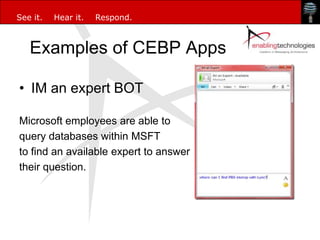
• IM an expert BOT

Microsoft employees are able to
query databases within MSFT
to find an available expert to answer
their question.
See it.       Hear it.        Respond.


     Examples of CEBP Apps

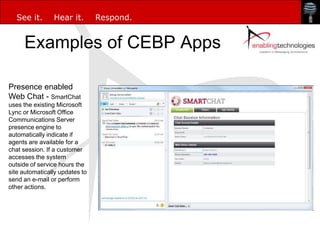
Presence enabled
Web Chat - SmartChat
uses the existing Microsoft
Lync or Microsoft Office
Communications Server
presence engine to
automatically indicate if
agents are available for a
chat session. If a customer
accesses the system
outside of service hours the
site automatically updates to
send an e-mail or perform
other actions.
See it.   Hear it.   Respond.


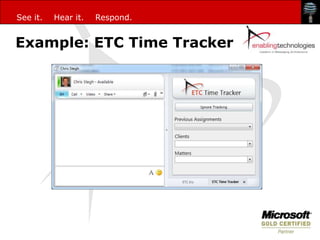
Example: ETC Time Tracker
See it.   Hear it.   Respond.


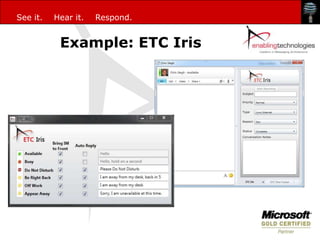
           Example: ETC Iris
See it.   Hear it.      Respond.


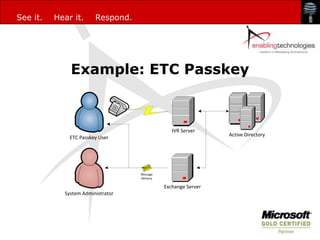
              Example: ETC Passkey


                                                 IVR Server
                                                                Active Directory
              ETC Passkey User


                                   Message
                                   Delivery

                                              Exchange Server
            System Administrator
See it.   Hear it.   Respond.


 How Can Enabling Help You?
• Explore how Lync can be further embedded in
  your business
• Develop custom apps for your business
• Leverage Microsoft subsidy
• Offer free 60-day trials of any Enabling app
• Train your developers on how to develop CEBP
  apps


                           Microsoft Customer Ready
See it.      Hear it.           Respond.


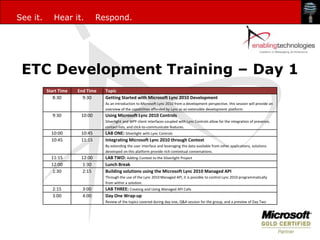
 ETC Development Training – Day 1
          Start Time   End Time   Topic
             8:30        9:30     Getting Started with Microsoft Lync 2010 Development
                                  As an introduction to Microsoft Lync 2010 from a development perspective, this session will provide an
                                  overview of the capabilities afforded by Lync as an extensible development platform.
            9:30        10:00     Using Microsoft Lync 2010 Controls
                                  Silverlight and WPF client interfaces coupled with Lync Controls allow for the integration of presence,
                                  contact lists, and click-to-communicate features.
            10:00       10:45     LAB ONE: Silverlight with Lync Controls
            10:45       11:15     Integrating Microsoft Lync 2010 through Context
                                  By extending the user interface and leveraging the data available from other applications, solutions
                                  developed on this platform provide rich contextual conversations.
            11:15       12:00     LAB TWO: Adding Context to the Silverlight Project
            12:00        1:30     Lunch Break
            1:30         2:15     Building solutions using the Microsoft Lync 2010 Managed API
                                  Through the use of the Lync 2010 Managed API, it is possible to control Lync 2010 programmatically
                                  from within a solution.
            2:15         3:00     LAB THREE: Creating and Using Managed API Calls
            3:00         4:00     Day One Wrap-up
                                  Review of the topics covered during day one, Q&A session for the group, and a preview of Day Two
See it.      Hear it.           Respond.


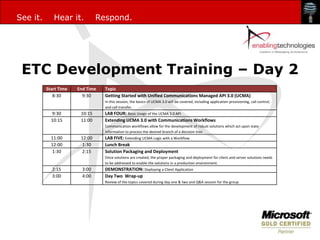
 ETC Development Training – Day 2
          Start Time   End Time   Topic
             8:30        9:30     Getting Started with Unified Communications Managed API 3.0 (UCMA)
                                  In this session, the basics of UCMA 3.0 will be covered, including application provisioning, call control,
                                  and call transfer.
            9:30        10:15     LAB FOUR: Basic Usage of the UCMA 3.0 API
            10:15       11:00     Extending UCMA 3.0 with Communications Workflows
                                  Communication workflows allow for the development of robust solutions which act upon state
                                  information to process the desired branch of a decision tree.
            11:00       12:00     LAB FIVE: Extending UCMA Logic with a Workflow
            12:00        1:30     Lunch Break
            1:30         2:15     Solution Packaging and Deployment
                                  Once solutions are created, the proper packaging and deployment for client and server solutions needs
                                  to be addressed to enable the solutions in a production environment.
            2:15         3:00     DEMONSTRATION: Deploying a Client Application
            3:00         4:00     Day Two Wrap-up
                                  Review of the topics covered during day one & two and Q&A session for the group
See it.   Hear it.   Respond.


                         Questions?

Cebp webinar 11 02

  • 1.
    See it. Hear it. Respond. CEBP Solutions Communication Enabled Business Processes
  • 2.
    See it. Hear it. Respond. Agenda • What is CEBP? -definition • Examples of CEBP apps • Apps created by ETCDevCorp. – Time Tracker – IRIS – Secure Dialer – Passkey • Ways Enabling Can help you
  • 3.
    See it. Hear it. Respond. CEBP Definition Communications Enabled Business Processes (CEBP)- is the integration of communications capabilities into software-enabled business procedures, applications and technologies. CEBP enables communication between applications as well as between applications and humans to automate many components of business processes. The purpose is to optimize those processes and to ensure continuous, low- latency, real-time communications among the customers, suppliers and employees of an enterprise.
  • 4.
    See it. Hear it. Respond. Examples of CEBP Apps • IM an expert BOT Microsoft employees are able to query databases within MSFT to find an available expert to answer their question.
  • 5.
    See it. Hear it. Respond. Examples of CEBP Apps Presence enabled Web Chat - SmartChat uses the existing Microsoft Lync or Microsoft Office Communications Server presence engine to automatically indicate if agents are available for a chat session. If a customer accesses the system outside of service hours the site automatically updates to send an e-mail or perform other actions.
  • 6.
    See it. Hear it. Respond. Example: ETC Time Tracker
  • 7.
    See it. Hear it. Respond. Example: ETC Iris
  • 8.
    See it. Hear it. Respond. Example: ETC Passkey IVR Server Active Directory ETC Passkey User Message Delivery Exchange Server System Administrator
  • 9.
    See it. Hear it. Respond. How Can Enabling Help You? • Explore how Lync can be further embedded in your business • Develop custom apps for your business • Leverage Microsoft subsidy • Offer free 60-day trials of any Enabling app • Train your developers on how to develop CEBP apps Microsoft Customer Ready
  • 10.
    See it. Hear it. Respond. ETC Development Training – Day 1 Start Time End Time Topic 8:30 9:30 Getting Started with Microsoft Lync 2010 Development As an introduction to Microsoft Lync 2010 from a development perspective, this session will provide an overview of the capabilities afforded by Lync as an extensible development platform. 9:30 10:00 Using Microsoft Lync 2010 Controls Silverlight and WPF client interfaces coupled with Lync Controls allow for the integration of presence, contact lists, and click-to-communicate features. 10:00 10:45 LAB ONE: Silverlight with Lync Controls 10:45 11:15 Integrating Microsoft Lync 2010 through Context By extending the user interface and leveraging the data available from other applications, solutions developed on this platform provide rich contextual conversations. 11:15 12:00 LAB TWO: Adding Context to the Silverlight Project 12:00 1:30 Lunch Break 1:30 2:15 Building solutions using the Microsoft Lync 2010 Managed API Through the use of the Lync 2010 Managed API, it is possible to control Lync 2010 programmatically from within a solution. 2:15 3:00 LAB THREE: Creating and Using Managed API Calls 3:00 4:00 Day One Wrap-up Review of the topics covered during day one, Q&A session for the group, and a preview of Day Two
  • 11.
    See it. Hear it. Respond. ETC Development Training – Day 2 Start Time End Time Topic 8:30 9:30 Getting Started with Unified Communications Managed API 3.0 (UCMA) In this session, the basics of UCMA 3.0 will be covered, including application provisioning, call control, and call transfer. 9:30 10:15 LAB FOUR: Basic Usage of the UCMA 3.0 API 10:15 11:00 Extending UCMA 3.0 with Communications Workflows Communication workflows allow for the development of robust solutions which act upon state information to process the desired branch of a decision tree. 11:00 12:00 LAB FIVE: Extending UCMA Logic with a Workflow 12:00 1:30 Lunch Break 1:30 2:15 Solution Packaging and Deployment Once solutions are created, the proper packaging and deployment for client and server solutions needs to be addressed to enable the solutions in a production environment. 2:15 3:00 DEMONSTRATION: Deploying a Client Application 3:00 4:00 Day Two Wrap-up Review of the topics covered during day one & two and Q&A session for the group
  • 12.
    See it. Hear it. Respond. Questions?

Editor's Notes

  • #3 This will be a very informal webinar so please feel free to ask questions at any time via the Q and A section.
  • #4 People in general do not like to leave an application in order to perform a routine task. CEBP lets them work within their normal business apps.
  • #5 Microsoft is currently using the next two CEBP applications in order to streamline their business procedures whether it is finding information or translating that information to other countries.