Instructor Materials
Chapter 3: Dynamic Routing
CCNA Routing and Switching
Routing and Switching Essentials v6.0
3
© 2016 Cisco and/or its affiliates. All rights reserved. Cisco Confidential
Chapter 3: Dynamic Routing
Routing and Switching Essentials v6.0
Planning Guide
Chapter 3: Dynamic Routing
CCNA Routing and Switching
Routing and Switching Essentials v6.0
13
© 2016 Cisco and/or its affiliates. All rights reserved. Cisco Confidential
 3.1 Dynamic Routing Protocols
• Explain the function of dynamic routing protocols.
• Explain the purpose of dynamic routing protocols.
• Explain the use of dynamic routing and static routing.
 3.2 RIPv2
• Implement RIPv2.
• Configure the RIPv2 routing protocol.
• 3.3 The Routing Table
• Determine the route source, administrative distance, and metric for a given route.
• Explain the components of an IPv4 routing table entry for a given route.
• Explain the parent/child relationship in a dynamically built routing table.
• Determine which route will be used to forward a IPv4 packet.
• Determine which route will be used to forward a IPv6 packet.
Chapter 3 - Sections & Objectives
14
© 2016 Cisco and/or its affiliates. All rights reserved. Cisco Confidential
3.1 Dynamic Routing
Protocols
15
© 2016 Cisco and/or its affiliates. All rights reserved. Cisco Confidential
Dynamic Routing Protocol Overview
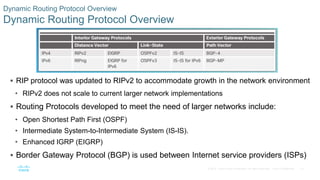
 RIP protocol was updated to RIPv2 to accommodate growth in the network environment
• RIPv2 does not scale to current larger network implementations
 Routing Protocols developed to meet the need of larger networks include:
• Open Shortest Path First (OSPF)
• Intermediate System-to-Intermediate System (IS-IS).
• Enhanced IGRP (EIGRP)
 Border Gateway Protocol (BGP) is used between Internet service providers (ISPs)
16
© 2016 Cisco and/or its affiliates. All rights reserved. Cisco Confidential
Dynamic Routing Protocol Overview
Dynamic Routing Protocol Components
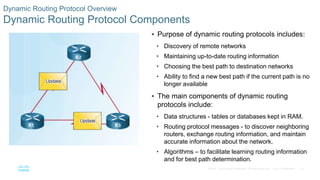
 Purpose of dynamic routing protocols includes:
• Discovery of remote networks
• Maintaining up-to-date routing information
• Choosing the best path to destination networks
• Ability to find a new best path if the current path is no
longer available
 The main components of dynamic routing
protocols include:
• Data structures - tables or databases kept in RAM.
• Routing protocol messages - to discover neighboring
routers, exchange routing information, and maintain
accurate information about the network.
• Algorithms – to facilitate learning routing information
and for best path determination.
17
© 2016 Cisco and/or its affiliates. All rights reserved. Cisco Confidential
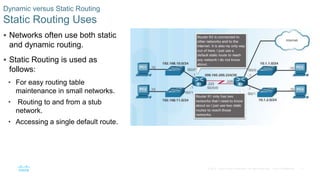
Dynamic versus Static Routing
Static Routing Uses
 Networks often use both static
and dynamic routing.
 Static Routing is used as
follows:
• For easy routing table
maintenance in small networks.
• Routing to and from a stub
network.
• Accessing a single default route.
18
© 2016 Cisco and/or its affiliates. All rights reserved. Cisco Confidential
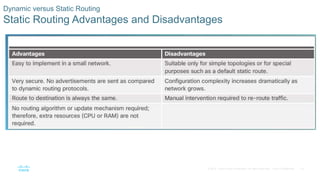
Dynamic versus Static Routing
Static Routing Advantages and Disadvantages
19
© 2016 Cisco and/or its affiliates. All rights reserved. Cisco Confidential
Dynamic versus Static Routing
Dynamic Routing Protocols Uses
 Dynamic routing is the best
choice for large networks
 Dynamic routing protocols help
the network administrator
manage the network:
• Providing redundant paths
• Automatically implementing the
alternate path when a link goes
down.
20
© 2016 Cisco and/or its affiliates. All rights reserved. Cisco Confidential
Dynamic versus Static Routing
Dynamic Routing Advantages and Disadvantages
21
© 2016 Cisco and/or its affiliates. All rights reserved. Cisco Confidential
3.2 RIPv2
22
© 2016 Cisco and/or its affiliates. All rights reserved. Cisco Confidential
 Use the router rip command to enable RIP v1
 Use the no router rip command to disable RIP
Dynamic versus Static Routing
Router RIP Configuration Mode
23
© 2016 Cisco and/or its affiliates. All rights reserved. Cisco Confidential
Configuring the RIP Protocol
Advertise Networks
 The network network-address
router configuration mode
command:
• Enables RIP on all interfaces that
belong to a specific network
• Advertises the network in RIP routing
updates sent to other routers every 30
seconds.
Note: RIPv1 is a classful routing protocol
for IPv4.
24
© 2016 Cisco and/or its affiliates. All rights reserved. Cisco Confidential
Configuring the RIP Protocol
Verify RIP Routing
show ip protocols – displays IPv4 routing
protocols configured on the router.
show ip route – displays RIP routes
installed in the routing table.
25
© 2016 Cisco and/or its affiliates. All rights reserved. Cisco Confidential
Configuring the RIP Protocol
Enable and Verify RIPv2
 Use the version 2 router
configuration mode command to
enable RIPv2
 Use the show ip protocols
command to verify that RIPv2 is
configured.
 Use the show ip route
command to verify the RIPv2
routes in the routing table.
26
© 2016 Cisco and/or its affiliates. All rights reserved. Cisco Confidential
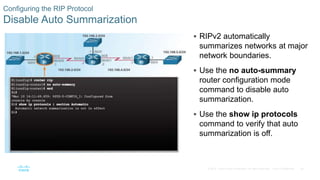
Configuring the RIP Protocol
Disable Auto Summarization
 RIPv2 automatically
summarizes networks at major
network boundaries.
 Use the no auto-summary
router configuration mode
command to disable auto
summarization.
 Use the show ip protocols
command to verify that auto
summarization is off.
27
© 2016 Cisco and/or its affiliates. All rights reserved. Cisco Confidential
Configuring the RIP Protocol
Configure Passive Interfaces
 RIP updates:
• Are forwarded out all RIP-enabled interfaces
by default.
• Only need to be sent out interfaces that are
connected to other RIP-enabled routers.
 Sending RIP updates to LANs wastes
bandwidth, wastes resources, and is a
security risk.
 Use the passive-interface router
configuration command to stop routing
updates out the interface. Still allows
that network to be advertised to other
routers.
28
© 2016 Cisco and/or its affiliates. All rights reserved. Cisco Confidential
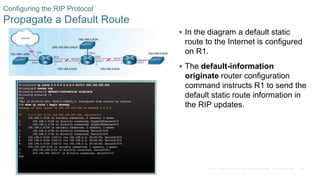
Configuring the RIP Protocol
Propagate a Default Route
 In the diagram a default static
route to the Internet is configured
on R1.
 The default-information
originate router configuration
command instructs R1 to send the
default static route information in
the RIP updates.
29
© 2016 Cisco and/or its affiliates. All rights reserved. Cisco Confidential
Configuring the RIP Protocol
Packet Tracer - Configuring RIPv2
30
© 2016 Cisco and/or its affiliates. All rights reserved. Cisco Confidential
Configuring the RIP Protocol
Lab - Configuring Basic RIPv2
31
© 2016 Cisco and/or its affiliates. All rights reserved. Cisco Confidential
3.3 The Routing Table
32
© 2016 Cisco and/or its affiliates. All rights reserved. Cisco Confidential
Parts of an IPv4 Route Entry
Routing Table Entries
Routing Table for R1
33
© 2016 Cisco and/or its affiliates. All rights reserved. Cisco Confidential
Parts of an IPv4 Route Entry
Directly Connected Entries  Directly Connected Networks (C) are
automatically added to the routing table
when the interface is configured and
activated.
 Entries contain the following information:
• Route source - how the route was learned.
• Destination network – remote network.
• Outgoing Interface – exit interface used to
forward packets to destination.
 Other route source entries include:
• S –Static Route
• D – EIGRP routing protocol
• O – OSPF routing protocol
• R - RIP routing protocol
34
© 2016 Cisco and/or its affiliates. All rights reserved. Cisco Confidential
Parts of an IPv4 Route Entry
Remote Network Entries
 Routes to remote networks contain the
following information:
• Route source – how route was learned
• Destination network
• Administrative distance (AD) -
trustworthiness of the route.
• Metric – value assigned to reach the remote
network. Lower is better.
• Next hop – IPv4 address of the next router
that the packet should be forwarded to.
• Route timestamp – time since the route was
updated.
• Outgoing interface - the exit interface to use
to forward the packet
35
© 2016 Cisco and/or its affiliates. All rights reserved. Cisco Confidential
Dynamically Learned IPv4 Routes
Routing Table Terms
 The routing table is a hierarchical
structure that is used to speed up the
lookup process when locating routes
and forwarding packets.
 The hierarchy includes:
• Ultimate Routes
• Level 1 routes
• Level 1 parent routes
• Level 2 child routes
36
© 2016 Cisco and/or its affiliates. All rights reserved. Cisco Confidential
Dynamically Learned IPv4 Routes
Ultimate Route
 An ultimate route is a routing table
entry that contains either a next-hop
IPv4 address or an exit interface.
 Directly connected, dynamically
learned, and local routes are
ultimate routes.
37
© 2016 Cisco and/or its affiliates. All rights reserved. Cisco Confidential
Dynamically Learned IPv4 Routes
Level 1 Route
 A level 1 route can be a:
• Network route - a network route that
has a subnet mask equal to that of the
classful mask.
• Supernet route - a network address
with a mask less than the classful
mask, for example, a summary
address.
• Default route - a static route with the
address 0.0.0.0/0
38
© 2016 Cisco and/or its affiliates. All rights reserved. Cisco Confidential
Dynamically Learned IPv4 Routes
Level 1 Parent Route
 A parent route is a level 1 network
route that is subnetted.
 In the routing table, it basically
provides a heading for the specific
subnets it contains.
39
© 2016 Cisco and/or its affiliates. All rights reserved. Cisco Confidential
Dynamically Learned IPv4 Routes
Level 2 Child Route
 A level 2 child route is a route that
is a subnet of a classful network
address.
 Level 1 parent routes contain level
2 child routes.
 Level 2 child routes are also
ultimate routes.
40
© 2016 Cisco and/or its affiliates. All rights reserved. Cisco Confidential
The IPv4 Route Lookup Process
Route Lookup Process  Router lookup process:
• If the best match is a level 1 ultimate
route, then this route is used to forward
the packet.
• If the best match is a level 1 parent
route, the router then examines child
routes (the subnet routes).
• If there is a match with a level 2 child
route, that is used to forward the packet.
• If there is no match with level 2 child
routes, the router searches level 1
supernet or default routes. If there is a
match, that route is used.
• If there is no match found in the routing
table the packet is dropped.
41
© 2016 Cisco and/or its affiliates. All rights reserved. Cisco Confidential
The IPv4 Route Lookup Process
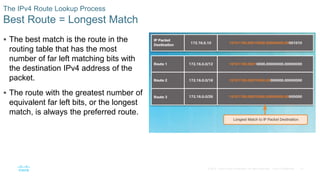
Best Route = Longest Match
 The best match is the route in the
routing table that has the most
number of far left matching bits with
the destination IPv4 address of the
packet.
 The route with the greatest number of
equivalent far left bits, or the longest
match, is always the preferred route.
42
© 2016 Cisco and/or its affiliates. All rights reserved. Cisco Confidential
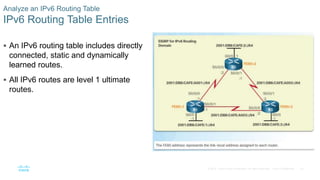
Analyze an IPv6 Routing Table
IPv6 Routing Table Entries
 An IPv6 routing table includes directly
connected, static and dynamically
learned routes.
 All IPv6 routes are level 1 ultimate
routes.
43
© 2016 Cisco and/or its affiliates. All rights reserved. Cisco Confidential
Analyze an IPv6 Routing Table
Directly Connected Entries
 Use the show ipv6 route command to
display the IPv6 routing table.
 The directly connected route entries
include the following:
• Route source – How the route was learned.
Directly connected indicated with a C and L
for local route.
• Directly connected network address.
• Administrative distance – Trustworthiness of
the route (lower more trustworthy).
• Metric – Value assigned to reach the network
(lower is preferred route).
• Outgoing interface – Exit interface used to
forward packet.
44
© 2016 Cisco and/or its affiliates. All rights reserved. Cisco Confidential
Analyze an IPv6 Routing Table
Remote IPv6 Network Entries
 The remote IPv6 route entries also
include the following:
• Route source – How the route was
learned. Common codes include O
(OSPF), D (EIGRP), R (RIP), and S
(Static route).
• Next hop - Identifies the IPv6 address
of the next router to forward the packet
to.
 The IPv6 router lookup process:
• Examines level 1 network routes for the
best match.
• Longest match is the best match.
45
© 2016 Cisco and/or its affiliates. All rights reserved. Cisco Confidential
3.4 Chapter Summary
46
© 2016 Cisco and/or its affiliates. All rights reserved. Cisco Confidential
Conclusion
Chapter 3: Dynamic Routing
 Explain the function of dynamic routing protocols.
 Implement RIPv2.
 Determine the route source, administrative distance, and
metric for a given route.
CCNA_RSE_Chp3_Dynamic Routing NETWORKINGFBU.pptx

CCNA_RSE_Chp3_Dynamic Routing NETWORKINGFBU.pptx

  • 1.
    Instructor Materials Chapter 3:Dynamic Routing CCNA Routing and Switching Routing and Switching Essentials v6.0
  • 2.
    3 © 2016 Ciscoand/or its affiliates. All rights reserved. Cisco Confidential Chapter 3: Dynamic Routing Routing and Switching Essentials v6.0 Planning Guide
  • 3.
    Chapter 3: DynamicRouting CCNA Routing and Switching Routing and Switching Essentials v6.0
  • 4.
    13 © 2016 Ciscoand/or its affiliates. All rights reserved. Cisco Confidential  3.1 Dynamic Routing Protocols • Explain the function of dynamic routing protocols. • Explain the purpose of dynamic routing protocols. • Explain the use of dynamic routing and static routing.  3.2 RIPv2 • Implement RIPv2. • Configure the RIPv2 routing protocol. • 3.3 The Routing Table • Determine the route source, administrative distance, and metric for a given route. • Explain the components of an IPv4 routing table entry for a given route. • Explain the parent/child relationship in a dynamically built routing table. • Determine which route will be used to forward a IPv4 packet. • Determine which route will be used to forward a IPv6 packet. Chapter 3 - Sections & Objectives
  • 5.
    14 © 2016 Ciscoand/or its affiliates. All rights reserved. Cisco Confidential 3.1 Dynamic Routing Protocols
  • 6.
    15 © 2016 Ciscoand/or its affiliates. All rights reserved. Cisco Confidential Dynamic Routing Protocol Overview Dynamic Routing Protocol Overview  RIP protocol was updated to RIPv2 to accommodate growth in the network environment • RIPv2 does not scale to current larger network implementations  Routing Protocols developed to meet the need of larger networks include: • Open Shortest Path First (OSPF) • Intermediate System-to-Intermediate System (IS-IS). • Enhanced IGRP (EIGRP)  Border Gateway Protocol (BGP) is used between Internet service providers (ISPs)
  • 7.
    16 © 2016 Ciscoand/or its affiliates. All rights reserved. Cisco Confidential Dynamic Routing Protocol Overview Dynamic Routing Protocol Components  Purpose of dynamic routing protocols includes: • Discovery of remote networks • Maintaining up-to-date routing information • Choosing the best path to destination networks • Ability to find a new best path if the current path is no longer available  The main components of dynamic routing protocols include: • Data structures - tables or databases kept in RAM. • Routing protocol messages - to discover neighboring routers, exchange routing information, and maintain accurate information about the network. • Algorithms – to facilitate learning routing information and for best path determination.
  • 8.
    17 © 2016 Ciscoand/or its affiliates. All rights reserved. Cisco Confidential Dynamic versus Static Routing Static Routing Uses  Networks often use both static and dynamic routing.  Static Routing is used as follows: • For easy routing table maintenance in small networks. • Routing to and from a stub network. • Accessing a single default route.
  • 9.
    18 © 2016 Ciscoand/or its affiliates. All rights reserved. Cisco Confidential Dynamic versus Static Routing Static Routing Advantages and Disadvantages
  • 10.
    19 © 2016 Ciscoand/or its affiliates. All rights reserved. Cisco Confidential Dynamic versus Static Routing Dynamic Routing Protocols Uses  Dynamic routing is the best choice for large networks  Dynamic routing protocols help the network administrator manage the network: • Providing redundant paths • Automatically implementing the alternate path when a link goes down.
  • 11.
    20 © 2016 Ciscoand/or its affiliates. All rights reserved. Cisco Confidential Dynamic versus Static Routing Dynamic Routing Advantages and Disadvantages
  • 12.
    21 © 2016 Ciscoand/or its affiliates. All rights reserved. Cisco Confidential 3.2 RIPv2
  • 13.
    22 © 2016 Ciscoand/or its affiliates. All rights reserved. Cisco Confidential  Use the router rip command to enable RIP v1  Use the no router rip command to disable RIP Dynamic versus Static Routing Router RIP Configuration Mode
  • 14.
    23 © 2016 Ciscoand/or its affiliates. All rights reserved. Cisco Confidential Configuring the RIP Protocol Advertise Networks  The network network-address router configuration mode command: • Enables RIP on all interfaces that belong to a specific network • Advertises the network in RIP routing updates sent to other routers every 30 seconds. Note: RIPv1 is a classful routing protocol for IPv4.
  • 15.
    24 © 2016 Ciscoand/or its affiliates. All rights reserved. Cisco Confidential Configuring the RIP Protocol Verify RIP Routing show ip protocols – displays IPv4 routing protocols configured on the router. show ip route – displays RIP routes installed in the routing table.
  • 16.
    25 © 2016 Ciscoand/or its affiliates. All rights reserved. Cisco Confidential Configuring the RIP Protocol Enable and Verify RIPv2  Use the version 2 router configuration mode command to enable RIPv2  Use the show ip protocols command to verify that RIPv2 is configured.  Use the show ip route command to verify the RIPv2 routes in the routing table.
  • 17.
    26 © 2016 Ciscoand/or its affiliates. All rights reserved. Cisco Confidential Configuring the RIP Protocol Disable Auto Summarization  RIPv2 automatically summarizes networks at major network boundaries.  Use the no auto-summary router configuration mode command to disable auto summarization.  Use the show ip protocols command to verify that auto summarization is off.
  • 18.
    27 © 2016 Ciscoand/or its affiliates. All rights reserved. Cisco Confidential Configuring the RIP Protocol Configure Passive Interfaces  RIP updates: • Are forwarded out all RIP-enabled interfaces by default. • Only need to be sent out interfaces that are connected to other RIP-enabled routers.  Sending RIP updates to LANs wastes bandwidth, wastes resources, and is a security risk.  Use the passive-interface router configuration command to stop routing updates out the interface. Still allows that network to be advertised to other routers.
  • 19.
    28 © 2016 Ciscoand/or its affiliates. All rights reserved. Cisco Confidential Configuring the RIP Protocol Propagate a Default Route  In the diagram a default static route to the Internet is configured on R1.  The default-information originate router configuration command instructs R1 to send the default static route information in the RIP updates.
  • 20.
    29 © 2016 Ciscoand/or its affiliates. All rights reserved. Cisco Confidential Configuring the RIP Protocol Packet Tracer - Configuring RIPv2
  • 21.
    30 © 2016 Ciscoand/or its affiliates. All rights reserved. Cisco Confidential Configuring the RIP Protocol Lab - Configuring Basic RIPv2
  • 22.
    31 © 2016 Ciscoand/or its affiliates. All rights reserved. Cisco Confidential 3.3 The Routing Table
  • 23.
    32 © 2016 Ciscoand/or its affiliates. All rights reserved. Cisco Confidential Parts of an IPv4 Route Entry Routing Table Entries Routing Table for R1
  • 24.
    33 © 2016 Ciscoand/or its affiliates. All rights reserved. Cisco Confidential Parts of an IPv4 Route Entry Directly Connected Entries  Directly Connected Networks (C) are automatically added to the routing table when the interface is configured and activated.  Entries contain the following information: • Route source - how the route was learned. • Destination network – remote network. • Outgoing Interface – exit interface used to forward packets to destination.  Other route source entries include: • S –Static Route • D – EIGRP routing protocol • O – OSPF routing protocol • R - RIP routing protocol
  • 25.
    34 © 2016 Ciscoand/or its affiliates. All rights reserved. Cisco Confidential Parts of an IPv4 Route Entry Remote Network Entries  Routes to remote networks contain the following information: • Route source – how route was learned • Destination network • Administrative distance (AD) - trustworthiness of the route. • Metric – value assigned to reach the remote network. Lower is better. • Next hop – IPv4 address of the next router that the packet should be forwarded to. • Route timestamp – time since the route was updated. • Outgoing interface - the exit interface to use to forward the packet
  • 26.
    35 © 2016 Ciscoand/or its affiliates. All rights reserved. Cisco Confidential Dynamically Learned IPv4 Routes Routing Table Terms  The routing table is a hierarchical structure that is used to speed up the lookup process when locating routes and forwarding packets.  The hierarchy includes: • Ultimate Routes • Level 1 routes • Level 1 parent routes • Level 2 child routes
  • 27.
    36 © 2016 Ciscoand/or its affiliates. All rights reserved. Cisco Confidential Dynamically Learned IPv4 Routes Ultimate Route  An ultimate route is a routing table entry that contains either a next-hop IPv4 address or an exit interface.  Directly connected, dynamically learned, and local routes are ultimate routes.
  • 28.
    37 © 2016 Ciscoand/or its affiliates. All rights reserved. Cisco Confidential Dynamically Learned IPv4 Routes Level 1 Route  A level 1 route can be a: • Network route - a network route that has a subnet mask equal to that of the classful mask. • Supernet route - a network address with a mask less than the classful mask, for example, a summary address. • Default route - a static route with the address 0.0.0.0/0
  • 29.
    38 © 2016 Ciscoand/or its affiliates. All rights reserved. Cisco Confidential Dynamically Learned IPv4 Routes Level 1 Parent Route  A parent route is a level 1 network route that is subnetted.  In the routing table, it basically provides a heading for the specific subnets it contains.
  • 30.
    39 © 2016 Ciscoand/or its affiliates. All rights reserved. Cisco Confidential Dynamically Learned IPv4 Routes Level 2 Child Route  A level 2 child route is a route that is a subnet of a classful network address.  Level 1 parent routes contain level 2 child routes.  Level 2 child routes are also ultimate routes.
  • 31.
    40 © 2016 Ciscoand/or its affiliates. All rights reserved. Cisco Confidential The IPv4 Route Lookup Process Route Lookup Process  Router lookup process: • If the best match is a level 1 ultimate route, then this route is used to forward the packet. • If the best match is a level 1 parent route, the router then examines child routes (the subnet routes). • If there is a match with a level 2 child route, that is used to forward the packet. • If there is no match with level 2 child routes, the router searches level 1 supernet or default routes. If there is a match, that route is used. • If there is no match found in the routing table the packet is dropped.
  • 32.
    41 © 2016 Ciscoand/or its affiliates. All rights reserved. Cisco Confidential The IPv4 Route Lookup Process Best Route = Longest Match  The best match is the route in the routing table that has the most number of far left matching bits with the destination IPv4 address of the packet.  The route with the greatest number of equivalent far left bits, or the longest match, is always the preferred route.
  • 33.
    42 © 2016 Ciscoand/or its affiliates. All rights reserved. Cisco Confidential Analyze an IPv6 Routing Table IPv6 Routing Table Entries  An IPv6 routing table includes directly connected, static and dynamically learned routes.  All IPv6 routes are level 1 ultimate routes.
  • 34.
    43 © 2016 Ciscoand/or its affiliates. All rights reserved. Cisco Confidential Analyze an IPv6 Routing Table Directly Connected Entries  Use the show ipv6 route command to display the IPv6 routing table.  The directly connected route entries include the following: • Route source – How the route was learned. Directly connected indicated with a C and L for local route. • Directly connected network address. • Administrative distance – Trustworthiness of the route (lower more trustworthy). • Metric – Value assigned to reach the network (lower is preferred route). • Outgoing interface – Exit interface used to forward packet.
  • 35.
    44 © 2016 Ciscoand/or its affiliates. All rights reserved. Cisco Confidential Analyze an IPv6 Routing Table Remote IPv6 Network Entries  The remote IPv6 route entries also include the following: • Route source – How the route was learned. Common codes include O (OSPF), D (EIGRP), R (RIP), and S (Static route). • Next hop - Identifies the IPv6 address of the next router to forward the packet to.  The IPv6 router lookup process: • Examines level 1 network routes for the best match. • Longest match is the best match.
  • 36.
    45 © 2016 Ciscoand/or its affiliates. All rights reserved. Cisco Confidential 3.4 Chapter Summary

  • 37.
    46 © 2016 Ciscoand/or its affiliates. All rights reserved. Cisco Confidential Conclusion Chapter 3: Dynamic Routing  Explain the function of dynamic routing protocols.  Implement RIPv2.  Determine the route source, administrative distance, and metric for a given route.