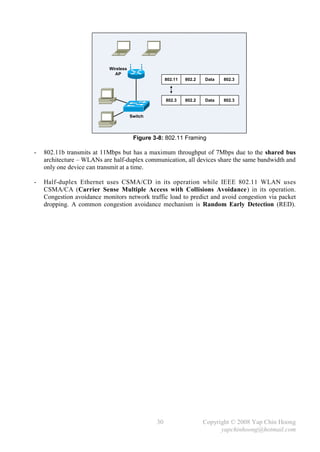
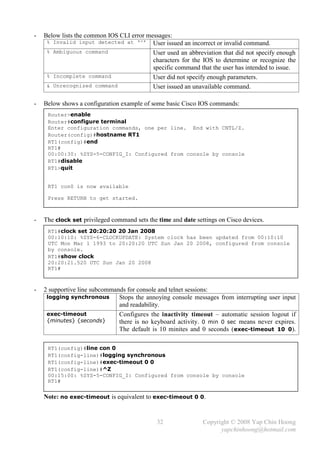
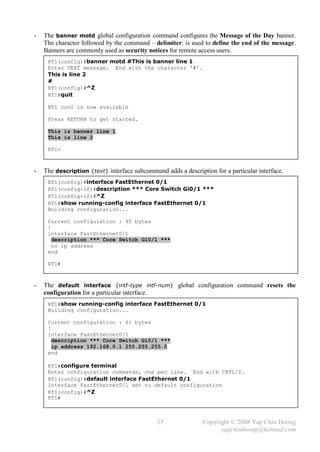
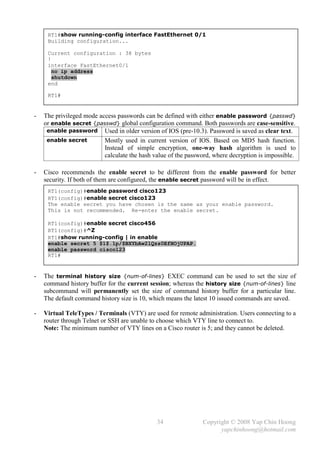
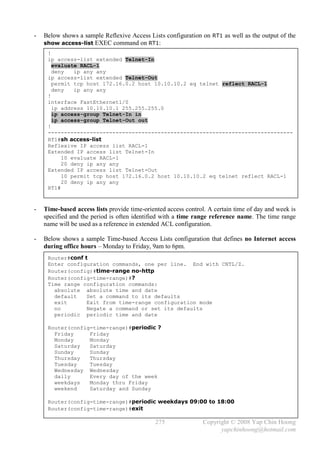
CCNA Complete Guide
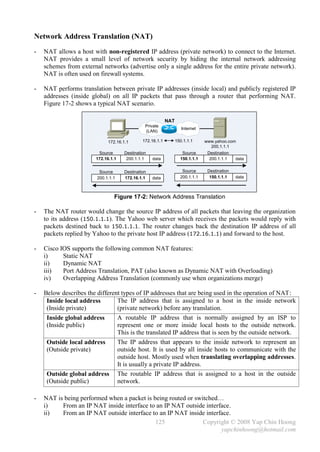
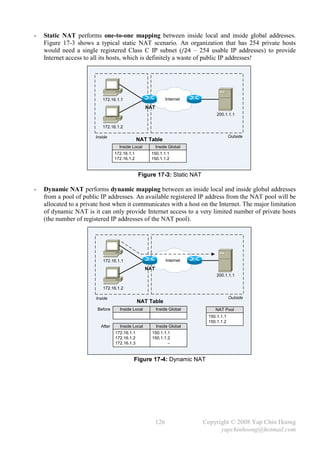
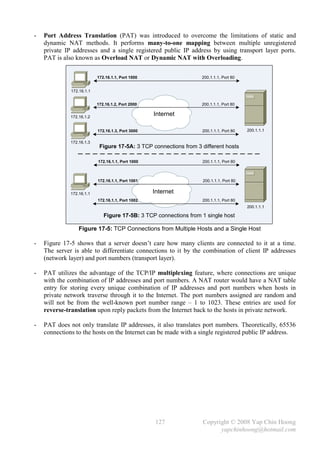
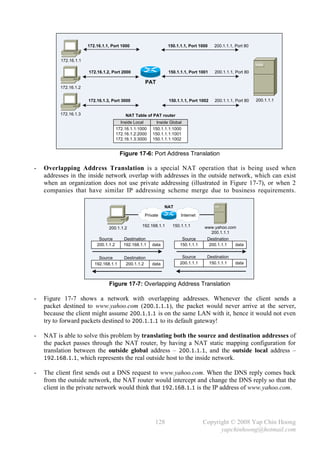
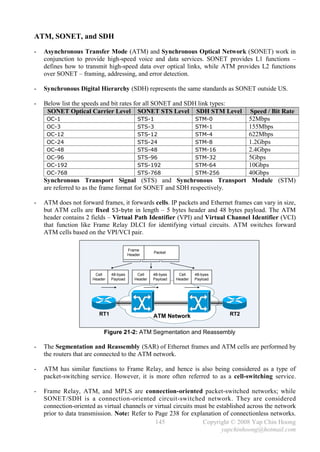
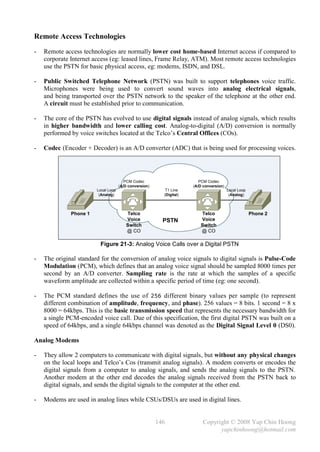
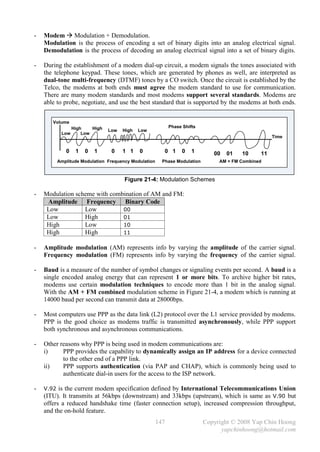
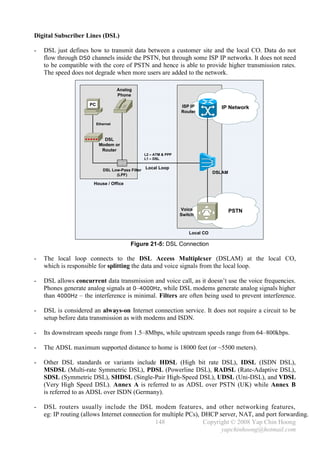
             2nd Edition


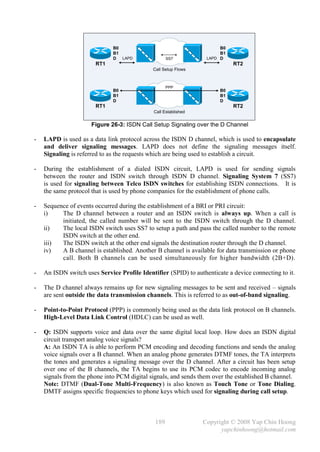
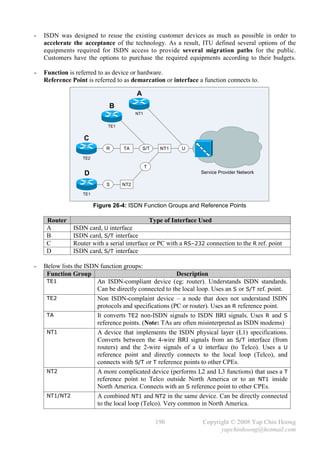
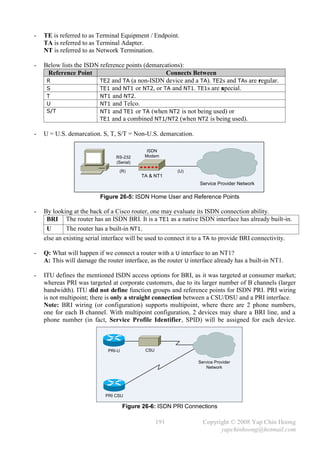
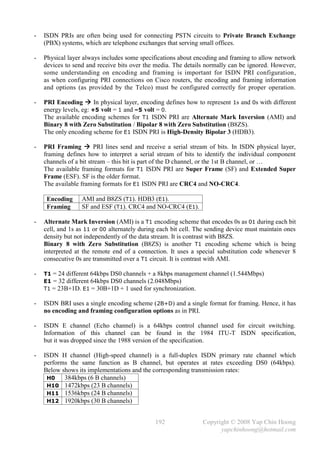
            Yap Chin Hoong
CCNA Complete Guide 2nd Edition covers the syllabus of the latest CCNA 640-802 Exam.
Written with the mindset to become the best CCNA self-study guide ever, it contains all the
theory and practical knowledge that an accomplished CCNA must obtain to ace both the
CCNA exam and the challenging real-life working environments.

If you have just begun your CCNA journey, CCNA Complete Guide 2nd Edition will save you
hours of research and trial-and-error learning. If you are well into your CCNA preparation,
CCNA Complete Guide 2nd Edition will provide you with an excellent baseline on how well
you are progressing, and fill all the gaps in your knowledge holes.

CCNA Complete Guide 2nd Edition includes all the lab setups built using the Dynamips,
the Cisco router emulation software. Practical knowledge is vital for a CCNA candidate and
you can horn this invaluable skill by launching the pseudo-real-devices in seconds and
proceed to the lab guides.

How to be sure whether something works as it claimed to be? Prove it!
The companion CD-ROM includes all the detailed outputs of the important configuration and
debug commands, as well as packet dump captures that verify all the concepts and facts
presented in the main text. This ensures the information provided in the main text is as
precise as possible!

Last but not least, obtaining and reading the CCNA Complete Study Guide 2nd Edition is the
best investment you will ever make to become an accomplished network engineer!
CCNA Complete Guide 2nd Edition
Copyright © 2008 Yap Chin Hoong
yapchinhoong@hotmail.com

Chapter    Title                                                                    Page
Chapter 1  Introduction to Computer Networking (Lecture)                            1
Chapter 2  Transport and Network Layers (Lecture)                                   7
Chapter 3  Data Link and Physical Layers featuring The Ethernet (Lecture)           17
Chapter 4  Introduction to Cisco IOS (Lab)                                          31
Chapter 5  Spanning Tree Protocol (Lecture)                                         39
Chapter 6  Spanning Tree Protocol Lab (Lab)                                         45
Chapter 7  Virtual LAN and VLAN Trunking Protocol (Lecture)                         51
Chapter 8  Virtual LAN and VLAN Trunking Protocol Lab (Lab)                         57
Chapter 9  IP Addressing and Subnetting (Lecture)                                   61
Chapter 10 Managing a Cisco Internetwork (Lab)                                      67
Chapter 11 Distance-Vector Routing Protocols – RIP and IGRP (Lecture)               75
Chapter 12 Static Routing, Default Routing, RIP, and IGRP Lab (Lab)                 81
Chapter 13 OSPF and EIGRP (Lecture)                                                 91
Chapter 14 OSPF and EIGRP Lab (Lab)                                                 99
Chapter 15 Variable-Length Subnet Masks and Route Summarization (Lecture + Lab)     111
Chapter 16 Classful and Classless Routing, and MISC TCP/IP Topics (Lecture + Lab)   117
Chapter 17 Scaling the Internet with CIDR and NAT (Lecture)                         123
Chapter 18 Network Address Translation Lab (Lab)                                    131
Chapter 19 IP Access Control Lists (Lecture)                                        135
Chapter 20 IP Access Control Lists Lab (Lab)                                        139
Chapter 21 WAN Basics, Remote Access Technologies, and Serial PPP (Lecture)         143
Chapter 22 Serial PPP Connections Lab (Lab)                                         153
Chapter 23 Frame Relay (Lecture)                                                    157
Chapter 24 Frame Relay Lab (Lab)                                                    165
Chapter 25 Wireless Networking (Lecture + Lab)                                      173
Bonus Chapters
Chapter 26 ISDN                                                                     187
Chapter 27 ISDN and Dial-on-Demand Routing Lab                                      193
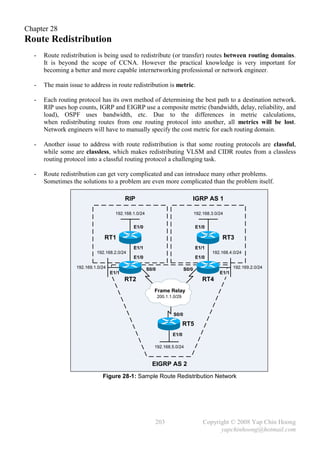
Chapter 28 Route Redistribution                                                     203
Appendix 1 Cisco IOS Upgrade and Password Recovery Procedures                       207
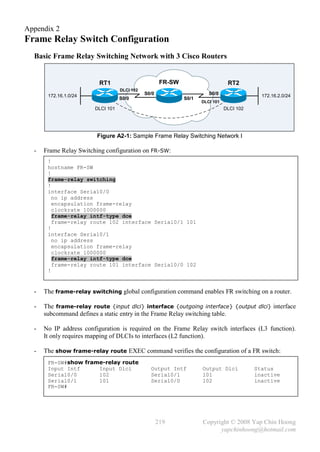
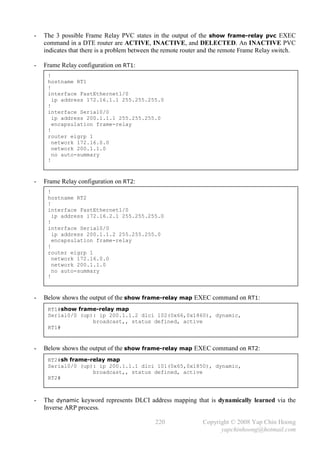
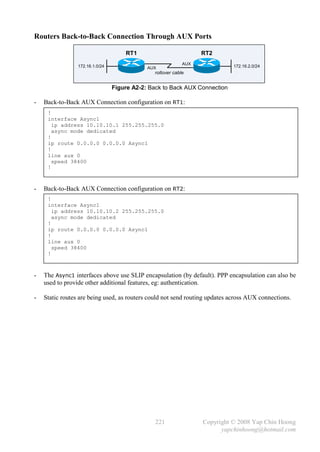
Appendix 2 Frame Relay Switch Configuration                                         219
Appendix 3 The IP Routing Process                                                   225
Appendix 4 Dissecting the Windows Routing Table                                     229
Appendix 5 Decimal-Hex-Binary Conversion Chart                                      231
Appendix 6 CCNA Extra Knowledge                                                     235


                            Behind the Scene
                            Yap Chin Hoong
                            San Francisco, United States.


Facebook:             http://www.facebook.com/yapchinhoong
Facebook Fans Page:   http://tinyurl.com/yapch-fb-fans
Website:              http://itcertguides.blogspot.com/
YouTube:              http://www.youtube.com/user/yapchinhoong
Chapter 1
Introduction to Computer Networking
  -   Welcome to the wonderful and exciting world of computer networking and Cisco certification!

  -   There are 3 levels of Cisco certification:
                            Associate level
       CCNA        Cisco Certified Network Associate
       CCDA        Cisco Certified Design Associate
                          Professional level
       CCNP        Cisco Certified Network Professional
       CCDP        Cisco Certified Design Professional
       CCSP        Cisco Certified Security Professional
       CCIP        Cisco Certified Internetwork Professional
       CCVP        Cisco Certified Voice Professional
                             Expert level
       CCIE        Cisco Certified Internetwork Expert
       - Routing and Switching
       - Security
       - Service Provider
       - Voice
       - Storage Networking
       - Wireless

  -   Below are the available paths to become a CCNA:
       1 One exam: CCNA (640-802), 50-60 questions, 90 minutes, USD$250.
       2 Two exams: ICND1 (640-822), 50-60 questions, 90 minutes, USD$125.
                      .ICND2 (640-816), 45-55 questions, 75 minute, USD$125.


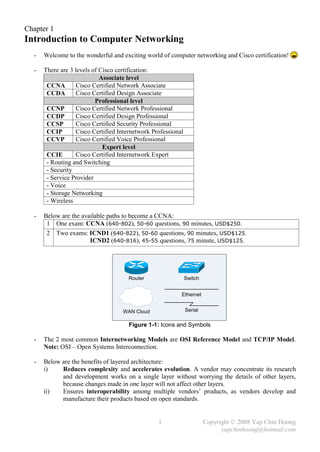
                                      Router                   Switch


                                                           Ethernet


                                    WAN Cloud                  Serial

                                      Figure 1-1: Icons and Symbols

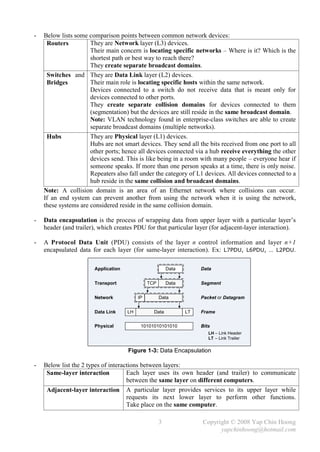
  -   The 2 most common Internetworking Models are OSI Reference Model and TCP/IP Model.
      Note: OSI – Open Systems Interconnection.

  -   Below are the benefits of layered architecture:
      i)    Reduces complexity and accelerates evolution. A vendor may concentrate its research
            and development works on a single layer without worrying the details of other layers,
            because changes made in one layer will not affect other layers.
      ii)   Ensures interoperability among multiple vendors’ products, as vendors develop and
            manufacture their products based on open standards.


                                                  1                     Copyright © 2008 Yap Chin Hoong
                                                                              yapchinhoong@hotmail.com
Application
                                                                            Process /
                 Upper Layers   Presentation          Application
                                                                           Application
                                  Session
                                 Transport            Transport            Host-to-Host
                                  Network              Network               Internet
                 Lower Layers
                                 Data Link            Data Link              Network
                                  Physical             Physical              Access

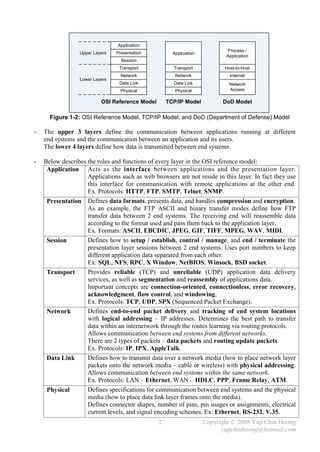
                          OSI Reference Model       TCP/IP Model          DoD Model

      Figure 1-2: OSI Reference Model, TCP/IP Model, and DoD (Department of Defense) Model

-   The upper 3 layers define the communication between applications running at different
    end systems and the communication between an application and its users.
    The lower 4 layers define how data is transmitted between end systems.

-   Below describes the roles and functions of every layer in the OSI reference model:
     Application Acts as the interface between applications and the presentation layer.
                    Applications such as web browsers are not reside in this layer. In fact they use
                    this interface for communication with remote applications at the other end.
                    Ex. Protocols: HTTP, FTP, SMTP, Telnet, SNMP.
     Presentation Defines data formats, presents data, and handles compression and encryption.
                    As an example, the FTP ASCII and binary transfer modes define how FTP
                    transfer data between 2 end systems. The receiving end will reassemble data
                    according to the format used and pass them back to the application layer.
                    Ex. Formats: ASCII, EBCDIC, JPEG, GIF, TIFF, MPEG, WAV, MIDI.
     Session        Defines how to setup / establish, control / manage, and end / terminate the
                    presentation layer sessions between 2 end systems. Uses port numbers to keep
                    different application data separated from each other.
                    Ex: SQL, NFS, RPC, X Window, NetBIOS, Winsock, BSD socket.
     Transport      Provides reliable (TCP) and unreliable (UDP) application data delivery
                    services, as well as segmentation and reassembly of applications data.
                    Important concepts are connection-oriented, connectionless, error recovery,
                    acknowledgment, flow control, and windowing.
                    Ex. Protocols: TCP, UDP, SPX (Sequenced Packet Exchange).
     Network        Defines end-to-end packet delivery and tracking of end system locations
                    with logical addressing – IP addresses. Determines the best path to transfer
                    data within an internetwork through the routes learning via routing protocols.
                    Allows communication between end systems from different networks.
                    There are 2 types of packets – data packets and routing update packets.
                    Ex. Protocols: IP, IPX, AppleTalk.
     Data Link      Defines how to transmit data over a network media (how to place network layer
                    packets onto the network media – cable or wireless) with physical addressing.
                    Allows communication between end systems within the same network.
                    Ex. Protocols: LAN – Ethernet, WAN – HDLC, PPP, Frame Relay, ATM.
     Physical       Defines specifications for communication between end systems and the physical
                    media (how to place data link layer frames onto the media).
                    Defines connector shapes, number of pins, pin usages or assignments, electrical
                    current levels, and signal encoding schemes. Ex: Ethernet, RS-232, V.35.
                                                2                   Copyright © 2008 Yap Chin Hoong
                                                                          yapchinhoong@hotmail.com
-   Below lists some comparison points between common network devices:
     Routers          They are Network layer (L3) devices.
                      Their main concern is locating specific networks – Where is it? Which is the
                      shortest path or best way to reach there?
                      They create separate broadcast domains.
     Switches and They are Data Link layer (L2) devices.
     Bridges          Their main role is locating specific hosts within the same network.
                      Devices connected to a switch do not receive data that is meant only for
                      devices connected to other ports.
                      They create separate collision domains for devices connected to them
                      (segmentation) but the devices are still reside in the same broadcast domain.
                      Note: VLAN technology found in enterprise-class switches are able to create
                      separate broadcast domains (multiple networks).
     Hubs             They are Physical layer (L1) devices.
                      Hubs are not smart devices. They send all the bits received from one port to all
                      other ports; hence all devices connected via a hub receive everything the other
                      devices send. This is like being in a room with many people – everyone hear if
                      someone speaks. If more than one person speaks at a time, there is only noise.
                      Repeaters also fall under the category of L1 devices. All devices connected to a
                      hub reside in the same collision and broadcast domains.
    Note: A collision domain is an area of an Ethernet network where collisions can occur.
    If an end system can prevent another from using the network when it is using the network,
    these systems are considered reside in the same collision domain.

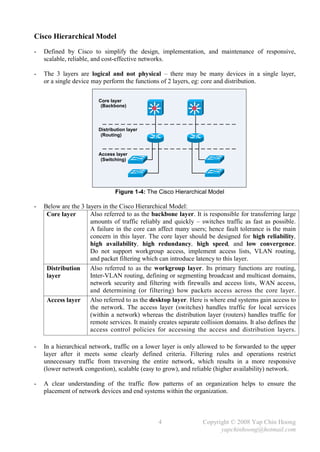
-   Data encapsulation is the process of wrapping data from upper layer with a particular layer’s
    header (and trailer), which creates PDU for that particular layer (for adjacent-layer interaction).

-   A Protocol Data Unit (PDU) consists of the layer n control information and layer n+1
    encapsulated data for each layer (for same-layer interaction). Ex: L7PDU, L6PDU, … L2PDU.

                       Application                       Data        Data


                       Transport               TCP       Data        Segment


                       Network            IP         Data            Packet or Datagram


                       Data Link     LH          Data           LT   Frame

                       Physical            10101010101010            Bits
                                                                        LH – Link Header
                                                                        LT – Link Trailer
                                                                            .


                                     Figure 1-3: Data Encapsulation

-   Below list the 2 types of interactions between layers:
     Same-layer interaction          Each layer uses its own header (and trailer) to communicate
                                     between the same layer on different computers.
     Adjacent-layer interaction A particular layer provides services to its upper layer while
                                     requests its next lower layer to perform other functions.
                                     Take place on the same computer.

                                                     3               Copyright © 2008 Yap Chin Hoong
                                                                           yapchinhoong@hotmail.com
Cisco Hierarchical Model
-   Defined by Cisco to simplify the design, implementation, and maintenance of responsive,
    scalable, reliable, and cost-effective networks.

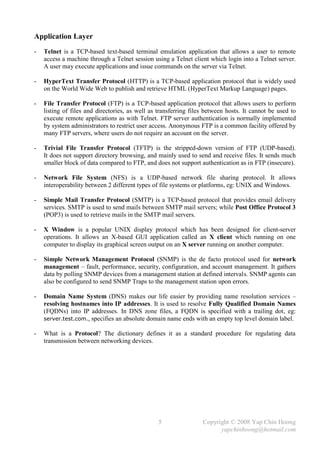
-   The 3 layers are logical and not physical – there may be many devices in a single layer,
    or a single device may perform the functions of 2 layers, eg: core and distribution.

                         Core layer
                          (Backbone)


                         Distribution layer
                          (Routing)


                         Access layer
                          (Switching)



                                Figure 1-4: The Cisco Hierarchical Model

-   Below are the 3 layers in the Cisco Hierarchical Model:
     Core layer       Also referred to as the backbone layer. It is responsible for transferring large
                      amounts of traffic reliably and quickly – switches traffic as fast as possible.
                      A failure in the core can affect many users; hence fault tolerance is the main
                      concern in this layer. The core layer should be designed for high reliability,
                      high availability, high redundancy, high speed, and low convergence.
                      Do not support workgroup access, implement access lists, VLAN routing,
                      and packet filtering which can introduce latency to this layer.
     Distribution     Also referred to as the workgroup layer. Its primary functions are routing,
     layer            Inter-VLAN routing, defining or segmenting broadcast and multicast domains,
                      network security and filtering with firewalls and access lists, WAN access,
                      and determining (or filtering) how packets access across the core layer.
     Access layer Also referred to as the desktop layer. Here is where end systems gain access to
                      the network. The access layer (switches) handles traffic for local services
                      (within a network) whereas the distribution layer (routers) handles traffic for
                      remote services. It mainly creates separate collision domains. It also defines the
                      access control policies for accessing the access and distribution layers.

-   In a hierarchical network, traffic on a lower layer is only allowed to be forwarded to the upper
    layer after it meets some clearly defined criteria. Filtering rules and operations restrict
    unnecessary traffic from traversing the entire network, which results in a more responsive
    (lower network congestion), scalable (easy to grow), and reliable (higher availability) network.

-   A clear understanding of the traffic flow patterns of an organization helps to ensure the
    placement of network devices and end systems within the organization.


                                                 4                 Copyright © 2008 Yap Chin Hoong
                                                                         yapchinhoong@hotmail.com
Application Layer
-   Telnet is a TCP-based text-based terminal emulation application that allows a user to remote
    access a machine through a Telnet session using a Telnet client which login into a Telnet server.
    A user may execute applications and issue commands on the server via Telnet.

-   HyperText Transfer Protocol (HTTP) is a TCP-based application protocol that is widely used
    on the World Wide Web to publish and retrieve HTML (HyperText Markup Language) pages.

-   File Transfer Protocol (FTP) is a TCP-based application protocol that allows users to perform
    listing of files and directories, as well as transferring files between hosts. It cannot be used to
    execute remote applications as with Telnet. FTP server authentication is normally implemented
    by system administrators to restrict user access. Anonymous FTP is a common facility offered by
    many FTP servers, where users do not require an account on the server.

-   Trivial File Transfer Protocol (TFTP) is the stripped-down version of FTP (UDP-based).
    It does not support directory browsing, and mainly used to send and receive files. It sends much
    smaller block of data compared to FTP, and does not support authentication as in FTP (insecure).

-   Network File System (NFS) is a UDP-based network file sharing protocol. It allows
    interoperability between 2 different types of file systems or platforms, eg: UNIX and Windows.

-   Simple Mail Transfer Protocol (SMTP) is a TCP-based protocol that provides email delivery
    services. SMTP is used to send mails between SMTP mail servers; while Post Office Protocol 3
    (POP3) is used to retrieve mails in the SMTP mail servers.

-   X Window is a popular UNIX display protocol which has been designed for client-server
    operations. It allows an X-based GUI application called an X client which running on one
    computer to display its graphical screen output on an X server running on another computer.

-   Simple Network Management Protocol (SNMP) is the de facto protocol used for network
    management – fault, performance, security, configuration, and account management. It gathers
    data by polling SNMP devices from a management station at defined intervals. SNMP agents can
    also be configured to send SNMP Traps to the management station upon errors.

-   Domain Name System (DNS) makes our life easier by providing name resolution services –
    resolving hostnames into IP addresses. It is used to resolve Fully Qualified Domain Names
    (FQDNs) into IP addresses. In DNS zone files, a FQDN is specified with a trailing dot, eg:
    server.test.com., specifies an absolute domain name ends with an empty top level domain label.

-   What is a Protocol? The dictionary defines it as a standard procedure for regulating data
    transmission between networking devices.


                                                 5                Copyright © 2008 Yap Chin Hoong
                                                                        yapchinhoong@hotmail.com
This page is intentionally left blank


               6                 Copyright © 2008 Yap Chin Hoong
                                       yapchinhoong@hotmail.com
Chapter 2
Transport and Network Layers
  Transport Layer
  -   Transport layer protocols provide reliable and unreliable application data delivery services.
      The Transmission Control Protocol (TCP) and User Datagram Protocol (UDP) are the most
      common transport layer protocols. There are many differences between them.

                                                     SYN, SEQ = 0
                                      1         SPORT = 1024, DPORT = 80

                                               SYN, ACK, SEQ = 0, ACK = 1
                                      2        SPORT = 80, DPORT = 1024

                                                  ACK, SEQ = 1, ACK = 1
                              Web     3         SPORT = 1024, DPORT = 80                   Web
                            Browser                                                       Server
                                                Connection established.
                                      4          Data transfer allowed.

                                             Notes:
                                             Source port numbers are greater than 1023 and dynamically
                                             allocated by the operating system on the client side.

                          Figure 2-1: Connection-Oriented Session Establishment

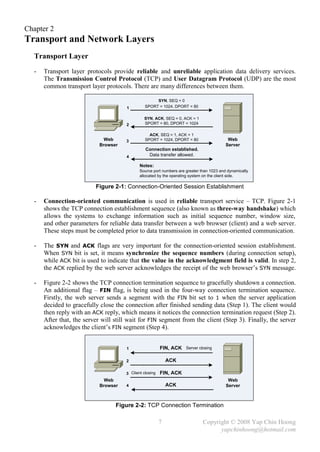
  -   Connection-oriented communication is used in reliable transport service – TCP. Figure 2-1
      shows the TCP connection establishment sequence (also known as three-way handshake) which
      allows the systems to exchange information such as initial sequence number, window size,
      and other parameters for reliable data transfer between a web browser (client) and a web server.
      These steps must be completed prior to data transmission in connection-oriented communication.

  -   The SYN and ACK flags are very important for the connection-oriented session establishment.
      When SYN bit is set, it means synchronize the sequence numbers (during connection setup),
      while ACK bit is used to indicate that the value in the acknowledgment field is valid. In step 2,
      the ACK replied by the web server acknowledges the receipt of the web browser’s SYN message.

  -   Figure 2-2 shows the TCP connection termination sequence to gracefully shutdown a connection.
      An additional flag – FIN flag, is being used in the four-way connection termination sequence.
      Firstly, the web server sends a segment with the FIN bit set to 1 when the server application
      decided to gracefully close the connection after finished sending data (Step 1). The client would
      then reply with an ACK reply, which means it notices the connection termination request (Step 2).
      After that, the server will still wait for FIN segment from the client (Step 3). Finally, the server
      acknowledges the client’s FIN segment (Step 4).


                                      1                  FIN, ACK    Server closing


                                      2                      ACK

                                      3 Client closing   FIN, ACK
                              Web                                                          Web
                            Browser   4                      ACK                          Server


                                  Figure 2-2: TCP Connection Termination

                                                         7                    Copyright © 2008 Yap Chin Hoong
                                                                                    yapchinhoong@hotmail.com
32 bits


                                Source Port (16)                         Destination Port (16)

                                                 Sequence Number (32)

                                             Acknowledgment Number (32)                                 20 Bytes
                                         U   A   P   R    S    F
                    Header      Unused
                   Length (4)
                                         R   C   S   S    Y    I         Receive Window (16)
                                  (6)    G   K   H   T    N    N


                                Checksum (16)                           Urgent Data Pointer (16)

                                         Options and Padding (0 or 32 if any)


                                                 Application Layer Data


                                         Figure 2-3: TCP Segment Structure

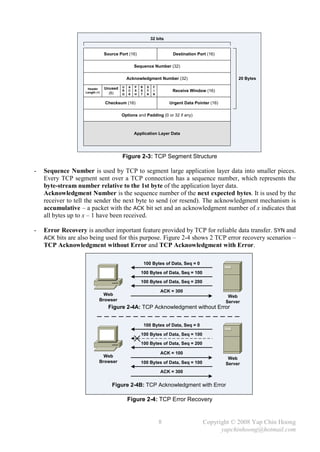
-   Sequence Number is used by TCP to segment large application layer data into smaller pieces.
    Every TCP segment sent over a TCP connection has a sequence number, which represents the
    byte-stream number relative to the 1st byte of the application layer data.
    Acknowledgment Number is the sequence number of the next expected bytes. It is used by the
    receiver to tell the sender the next byte to send (or resend). The acknowledgment mechanism is
    accumulative – a packet with the ACK bit set and an acknowledgment number of x indicates that
    all bytes up to x – 1 have been received.

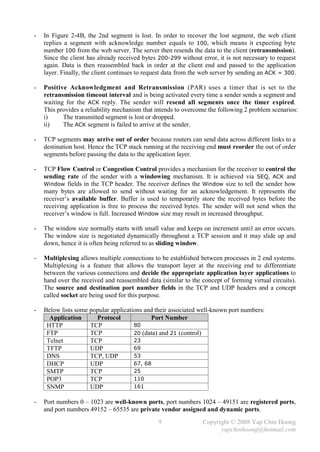
-   Error Recovery is another important feature provided by TCP for reliable data transfer. SYN and
    ACK bits are also being used for this purpose. Figure 2-4 shows 2 TCP error recovery scenarios –
    TCP Acknowledgment without Error and TCP Acknowledgment with Error.

                                                         100 Bytes of Data, Seq = 0

                                                     100 Bytes of Data, Seq = 100
                                                     100 Bytes of Data, Seq = 200

                                                                   ACK = 300
                              Web                                                                   Web
                            Browser                                                                Server
                                  Figure 2-4A: TCP Acknowledgment without Error


                                                         100 Bytes of Data, Seq = 0

                                                     100 Bytes of Data, Seq = 100
                                                     100 Bytes of Data, Seq = 200

                                                                   ACK = 100
                              Web                                                                   Web
                            Browser                  100 Bytes of Data, Seq = 100                  Server
                                                                   ACK = 300


                                   Figure 2-4B: TCP Acknowledgment with Error

                                             Figure 2-4: TCP Error Recovery


                                                                   8                    Copyright © 2008 Yap Chin Hoong
                                                                                              yapchinhoong@hotmail.com
-   In Figure 2-4B, the 2nd segment is lost. In order to recover the lost segment, the web client
    replies a segment with acknowledge number equals to 100, which means it expecting byte
    number 100 from the web server. The server then resends the data to the client (retransmission).
    Since the client has already received bytes 200-299 without error, it is not necessary to request
    again. Data is then reassembled back in order at the client end and passed to the application
    layer. Finally, the client continues to request data from the web server by sending an ACK = 300.

-   Positive Acknowledgment and Retransmission (PAR) uses a timer that is set to the
    retransmission timeout interval and is being activated every time a sender sends a segment and
    waiting for the ACK reply. The sender will resend all segments once the timer expired.
    This provides a reliability mechanism that intends to overcome the following 2 problem scenarios:
    i)     The transmitted segment is lost or dropped.
    ii)    The ACK segment is failed to arrive at the sender.

-   TCP segments may arrive out of order because routers can send data across different links to a
    destination host. Hence the TCP stack running at the receiving end must reorder the out of order
    segments before passing the data to the application layer.

-   TCP Flow Control or Congestion Control provides a mechanism for the receiver to control the
    sending rate of the sender with a windowing mechanism. It is achieved via SEQ, ACK and
    Window fields in the TCP header. The receiver defines the Window size to tell the sender how
    many bytes are allowed to send without waiting for an acknowledgement. It represents the
    receiver’s available buffer. Buffer is used to temporarily store the received bytes before the
    receiving application is free to process the received bytes. The sender will not send when the
    receiver’s window is full. Increased Window size may result in increased throughput.

-   The window size normally starts with small value and keeps on increment until an error occurs.
    The window size is negotiated dynamically throughout a TCP session and it may slide up and
    down, hence it is often being referred to as sliding window.

-   Multiplexing allows multiple connections to be established between processes in 2 end systems.
    Multiplexing is a feature that allows the transport layer at the receiving end to differentiate
    between the various connections and decide the appropriate application layer applications to
    hand over the received and reassembled data (similar to the concept of forming virtual circuits).
    The source and destination port number fields in the TCP and UDP headers and a concept
    called socket are being used for this purpose.

-   Below lists some popular applications and their associated well-known port numbers:
      Application      Protocol             Port Number
     HTTP            TCP              80
     FTP             TCP              20 (data) and 21 (control)
     Telnet          TCP              23
     TFTP            UDP              69
     DNS             TCP, UDP         53
     DHCP            UDP              67, 68
     SMTP            TCP              25
     POP3            TCP              110
     SNMP            UDP              161

-   Port numbers 0 – 1023 are well-known ports, port numbers 1024 – 49151 are registered ports,
    and port numbers 49152 – 65535 are private vendor assigned and dynamic ports.
                                                9                Copyright © 2008 Yap Chin Hoong
                                                                       yapchinhoong@hotmail.com
-   Socket is a communication channel between 2 TCP processes. A client socket is created by
    specifying the IP address and the destination port to connect to the server; whereas a server
    socket binds to a specified port number and listens for incoming connections upon started a
    server application.

-   User Datagram Protocol (UDP) is a connectionless (does not contact the destination before
    data transmission) and unreliable data delivery service, which also known as best effort service.
    No sequencing. No reordering. No acknowledgment. No error recovery. No congestion control.

-   Applications uses UDP are either tolerant to data lost, or perform error recovery themselves
    (perform error recovery in application layer instead of transport layer).
    i)     Tolerant to data lost: video streaming.
    ii)    Handles its own reliability issues: NFS and TFTP (hence the use of TCP is unnecessary).

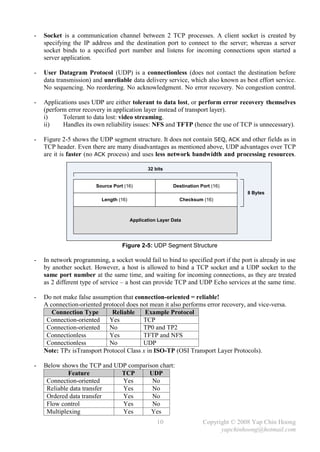
-   Figure 2-5 shows the UDP segment structure. It does not contain SEQ, ACK and other fields as in
    TCP header. Even there are many disadvantages as mentioned above, UDP advantages over TCP
    are it is faster (no ACK process) and uses less network bandwidth and processing resources.

                                               32 bits


                        Source Port (16)                  Destination Port (16)
                                                                                     8 Bytes
                          Length (16)                        Checksum (16)


                                        Application Layer Data


                                   Figure 2-5: UDP Segment Structure

-   In network programming, a socket would fail to bind to specified port if the port is already in use
    by another socket. However, a host is allowed to bind a TCP socket and a UDP socket to the
    same port number at the same time, and waiting for incoming connections, as they are treated
    as 2 different type of service – a host can provide TCP and UDP Echo services at the same time.

-   Do not make false assumption that connection-oriented = reliable!
    A connection-oriented protocol does not mean it also performs error recovery, and vice-versa.
       Connection Type       Reliable     Example Protocol
     Connection-oriented    Yes          TCP
     Connection-oriented    No           TP0 and TP2
     Connectionless         Yes          TFTP and NFS
     Connectionless         No           UDP
    Note: TPx isTransport Protocol Class x in ISO-TP (OSI Transport Layer Protocols).

-   Below shows the TCP and UDP comparison chart:
             Feature          TCP      UDP
     Connection-oriented      Yes       No
     Reliable data transfer   Yes       No
     Ordered data transfer    Yes       No
     Flow control             Yes       No
     Multiplexing             Yes       Yes
                                                   10                  Copyright © 2008 Yap Chin Hoong
                                                                             yapchinhoong@hotmail.com
Network Layer
-   The main functions performed by network layer (L3) protocols are routing and addressing.

-   All devices connected to a common L2 network usually share the same network address space.
    A flat network is a network which all network devices reside in a same broadcast domain.


                            PC1


                                                       RT1
                                                                       PC3


                            PC2

                               Figure 2-6: Network Setup for IP Routing

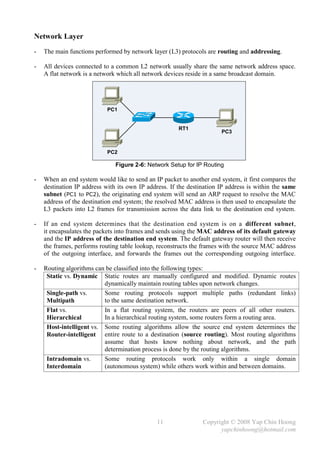
-   When an end system would like to send an IP packet to another end system, it first compares the
    destination IP address with its own IP address. If the destination IP address is within the same
    subnet (PC1 to PC2), the originating end system will send an ARP request to resolve the MAC
    address of the destination end system; the resolved MAC address is then used to encapsulate the
    L3 packets into L2 frames for transmission across the data link to the destination end system.

-   If an end system determines that the destination end system is on a different subnet,
    it encapsulates the packets into frames and sends using the MAC address of its default gateway
    and the IP address of the destination end system. The default gateway router will then receive
    the frames, performs routing table lookup, reconstructs the frames with the source MAC address
    of the outgoing interface, and forwards the frames out the corresponding outgoing interface.

-   Routing algorithms can be classified into the following types:
     Static vs. Dynamic Static routes are manually configured and modified. Dynamic routes
                          dynamically maintain routing tables upon network changes.
     Single-path vs.      Some routing protocols support multiple paths (redundant links)
     Multipath            to the same destination network.
     Flat vs.             In a flat routing system, the routers are peers of all other routers.
     Hierarchical         In a hierarchical routing system, some routers form a routing area.
     Host-intelligent vs. Some routing algorithms allow the source end system determines the
     Router-intelligent entire route to a destination (source routing). Most routing algorithms
                          assume that hosts know nothing about network, and the path
                          determination process is done by the routing algorithms.
     Intradomain vs.      Some routing protocols work only within a single domain
     Interdomain          (autonomous system) while others work within and between domains.


                                               11               Copyright © 2008 Yap Chin Hoong
                                                                      yapchinhoong@hotmail.com
-   The length of an IP address is 32-bit or 4 bytes, and usually written in dotted-decimal notation,
    where each byte (8 bits) of the 32-bit IP address is converted to its decimal equivalent.
    Each of the decimals numbers in an IP address is called an octet.
    Ex: IP address = 192.168.0.1. 1st octet = 192, 2nd octet = 168, 3rd octet = 0, and 4th octet = 1.

-   Each network interface in an end system will be assigned a unique IP address.

-   Network layer addresses were designed to allow logical grouping of addresses.
     TCP/IP        network or subnet
     IPX           network
     AppleTalk cable range

-   IP addressing and grouping of IP addresses ease the routing process by assisting routers in
    building their routing tables. The general ideas of IP addresses grouping are:
         All IP addresses in the same group must not be separated by a router.
         IP addresses separated by a router must be in different groups.

-   IP subnetting allows the creation of larger numbers of smaller groups of IP addresses,
    instead of simply using the class A, B, and C conventional rules. Subnetting treats a subdivision
    of a single class A, B, or C network as a network itself – a single class A, B, or C network can be
    subdivided into many smaller groups and non-overlapping subnets.

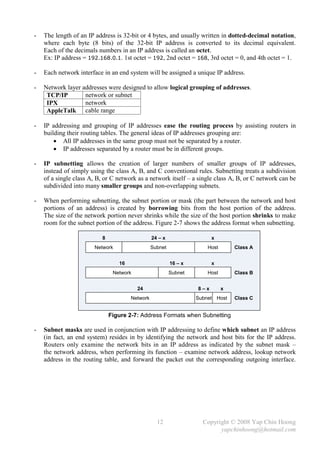
-   When performing subnetting, the subnet portion or mask (the part between the network and host
    portions of an address) is created by borrowing bits from the host portion of the address.
    The size of the network portion never shrinks while the size of the host portion shrinks to make
    room for the subnet portion of the address. Figure 2-7 shows the address format when subnetting.

                           8                     24 – x                  x
                       Network                   Subnet                Host       Class A


                                  16                      16 – x         x
                                Network                   Subnet       Host       Class B


                                          24                       8–x        x
                                       Network                     Subnet Host    Class C


                               Figure 2-7: Address Formats when Subnetting

-   Subnet masks are used in conjunction with IP addressing to define which subnet an IP address
    (in fact, an end system) resides in by identifying the network and host bits for the IP address.
    Routers only examine the network bits in an IP address as indicated by the subnet mask –
    the network address, when performing its function – examine network address, lookup network
    address in the routing table, and forward the packet out the corresponding outgoing interface.


                                                   12                Copyright © 2008 Yap Chin Hoong
                                                                           yapchinhoong@hotmail.com
32 bits


                  Version    Header       Precedence and
                    (4)     Length (4)   Type of Service (8)
                                                                         Total Length (16)

                                                               Flags
                            Identification (16)                 (3)
                                                                        Fragmentation Offset (13)

                  Time To Live (8)         Protocol (8)                Header Checksum (16)         20 Bytes

                                               Source IP Address (32)

                                            Destination IP Address (32)

                                         Options and Padding (0 or 32 if any)


                                                  Packet Payload
                                               (Transport Layer Data)


                                           Figure 2-8: IPv4 Datagram Format

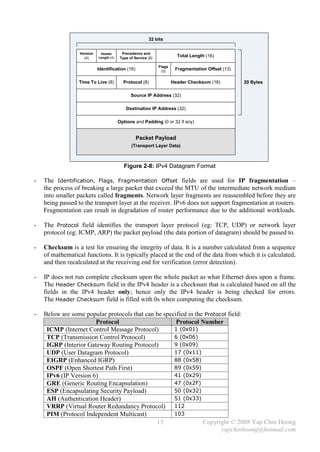
-   The Identification, Flags, Fragmentation Offset fields are used for IP fragmentation –
    the process of breaking a large packet that exceed the MTU of the intermediate network medium
    into smaller packets called fragments. Network layer fragments are reassembled before they are
    being passed to the transport layer at the receiver. IPv6 does not support fragmentation at routers.
    Fragmentation can result in degradation of router performance due to the additional workloads.

-   The Protocol field identifies the transport layer protocol (eg: TCP, UDP) or network layer
    protocol (eg: ICMP, ARP) the packet payload (the data portion of datagram) should be passed to.

-   Checksum is a test for ensuring the integrity of data. It is a number calculated from a sequence
    of mathematical functions. It is typically placed at the end of the data from which it is calculated,
    and then recalculated at the receiving end for verification (error detection).

-   IP does not run complete checksum upon the whole packet as what Ethernet does upon a frame.
    The Header Checksum field in the IPv4 header is a checksum that is calculated based on all the
    fields in the IPv4 header only; hence only the IPv4 header is being checked for errors.
    The Header Checksum field is filled with 0s when computing the checksum.

-   Below are some popular protocols that can be specified in the Protocol field:
                       Protocol                       Protocol Number
     ICMP (Internet Control Message Protocol)        1 (0x01)
     TCP (Transmission Control Protocol)             6 (0x06)
     IGRP (Interior Gateway Routing Protocol)        9 (0x09)
     UDP (User Datagram Protocol)                    17 (0x11)
     EIGRP (Enhanced IGRP)                           88 (0x58)
     OSPF (Open Shortest Path First)                 89 (0x59)
     IPv6 (IP Version 6)                             41 (0x29)
     GRE (Generic Routing Encapsulation)             47 (0x2F)
     ESP (Encapsulating Security Payload)            50 (0x32)
     AH (Authentication Header)                      51 (0x33)
     VRRP (Virtual Router Redundancy Protocol) 112
     PIM (Protocol Independent Multicast)            103
                                              13                 Copyright © 2008 Yap Chin Hoong
                                                                        yapchinhoong@hotmail.com
-   The following section discusses several TCP/IP network layer utility protocols.

-   Address Resolution Protocol (ARP)  When IP (L3) has a packet to send, it must supply the
    destination host’s hardware address to a network access protocol, eg: Ethernet or Token Ring.
    IP will first try to find the information from the ARP cache. If IP is unable to find it from the
    ARP cache, it uses ARP to dynamically discover or learn the MAC address for a particular IP
    network layer address. A sender must know the physical or MAC address of the destination host
    before sending out the data. Basically ARP resolves an IP address (software logical address)
    to a MAC address (hardware physical address).

-   ARP Requests are L2 broadcasts. Since Ethernet is a broadcast media, hence all devices on a
    segment will receive an ARP Request. However, only the device with the requested L3 address
    will answer the ARP Request by sending a unicast ARP Reply back to the device that sent the
    ARP Request. The sender will then have the IP and MAC addresses for data transmission.
    Note: The sender might need to send out DNS request to resolve the hostname of the destination
    host into IP address prior to the ARP Request-Reply process.

-   Hubs and repeaters are typically signal amplifiers, while switches do forward broadcasts out all
    ports except the incoming port. In fact they have no impact on ARP traffic.

-   The show arp EXEC command displays the entries in the ARP cache.

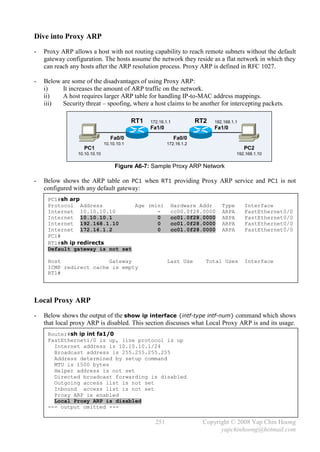
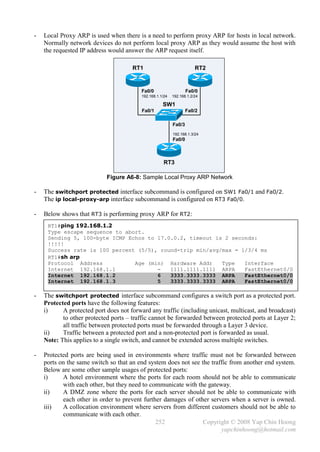
-   Proxy ARP happens when a network device replies to an ARP Request on behave of another
    device with the MAC address of the interface that received the ARP Request. The ARP caches of
    end systems might need to be flushed (with the arp –d command) whenever a Proxy ARP
    device is being introduced into a network.


                                                E0           E1

                                                       RT1
                           PC1             E0 IP: 10.1.1.1 / 24                  PC2
                  IP: 10.1.1.2 / 16        E0 MAC: BB-BB-BB-BB-BB-BB IP: 10.1.2.2 / 16
                  MAC: AA-AA-AA-AA-AA-AA   E1 IP: 10.1.2.1 / 24      MAC: DD-DD-DD-DD-DD-DD
                                           E1 MAC: CC-CC-CC-CC-CC-CC


                                 Figure 2-9: Network Setup for Proxy ARP

-   Routers do not forward L2 and L3 broadcasts. Figure 2-9 shows a typical Proxy ARP scenario.
    Since PC1 and PC2 IP addresses are reside in the same subnet (10.1.0.0/16), PC1 will assume it
    is in the same segment with PC2. Problems arise as there is a router separates the 2 devices into
    different broadcast domains, which the ARP broadcast traffic will not be forwarded.

-   RT1, the Cisco router will answer the ARP Request sent by PC1 on behave of PC2 with the MAC
    address of the interface that received the ARP Request – BB-BB-BB-BB-BB-BB. When PC1
    receives the ARP Reply from RT1, it assumes the MAC address of PC2 is BB-BB-BB-BB-BB-BB.
    Finally, further traffic destined to PC2 will have 10.1.2.2 as the destination IP address and
    encapsulated with the MAC address BB-BB-BB-BB-BB-BB instead of DD-DD-DD-DD-DD-DD.

-   Proxy ARP is enabled by default on Cisco routers. It can be enabled or disabled with the
    [no] ip proxy-arp interface subcommand respectively. Proxy ARP is not really a protocol;
    it is a service offered by routers.

                                                  14                Copyright © 2008 Yap Chin Hoong
                                                                          yapchinhoong@hotmail.com
-   Reverse ARP (RARP), Boot Protocol (BOOTP) and Dynamic Host Configuration Protocol
    (DHCP) allow a host computer to discover the IP address it should use.

-   RARP and BOOTP requests which are sent out as broadcasts would include a host MAC
    address to request for an IP address assigned to that MAC address. RARP is only able to ask for
    an IP address, it can’t even ask for the subnet mask; whereas BOOTP which was defined later,
    allows many more information to be announced to a BOOTP client, eg: IP address, subnet mask,
    default gateway, other servers IP addresses, and the name of the file the client computer should
    download (a more sophisticated OS) into the client computer’s RAM. Both protocols were
    created to allow diskless workstations to initialize, boot up, and start operating once turned on.

-   However, both protocols are not in use today as an RARP or BOOTP server is required to know
    all computers MAC addresses – a MAC-to-IP-address mapping table, and the corresponding
    configuration parameters for each computer, which is a nightmare of network administration.

-   Dynamic Host Configuration Protocol (DHCP), which is widely used in today’s networks,
    solves the scaling and configuration issues in RARP and BOOTP. DHCP uses the same concept
    of BOOTP – a client makes a request, the server supplies the IP address, subnet mask,
    default gateway, DNS server IP address, and other information. The biggest advantage of DHCP
    is a DHCP server does not need to be configured with the MAC-to-IP-address mapping table.

-   ARP and RARP are network and data link layer protocols whereas DHCP and BOOTP are
    application layer protocols.

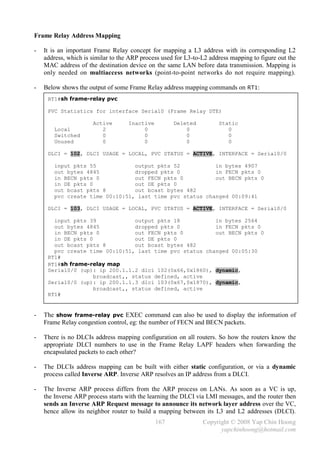
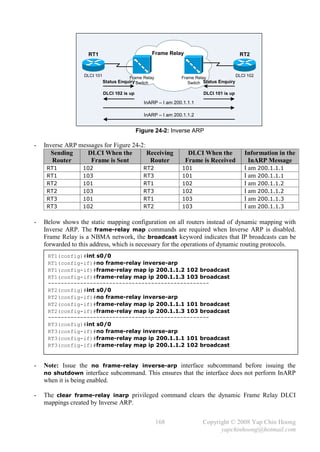
-   Inverse ARP (InARP) doesn’t deal with IP and MAC addresses. It is used to dynamically create
    the mapping between local DLCIs and remote IP addresses in Frame Relay networks.
    However, many organizations prefer to statically create those mappings. This default behavior
    can be disabled with the no frame-relay inverse-arp interface subcommand.

-   Internet Control Message Protocol (ICMP) is a management and control protocol for IP.
    It is often used by hosts and routers to exchange network layer info and problem notification.
    ICMP messages are encapsulated within IP packets and sent using the basic IP header only.

-   Hops or TTL (Time-to-Live)  Each IP packet needs to pass through a certain number of
    routers (hops) before arrive to the destination. When a packet reaches its limit of existence in the
    network (TTL expired) before arrives to its destination, the last router that receives the packet
    will discard it, and sends an ICMP message to the sender to inform the dropping of its packet.
    This mechanism is used to prevent IP packets from being forwarded forever upon routing loops.

-   ping (Packet INternet Groper) is a basic network utility that uses ICMP to test for physical and
    logical network connectivity by sending out an ICMP Echo Request message to an IP address,
    and expects the end system with that IP address will reply with an ICMP Echo Reply message.
    The ICMP identifier, sequence number, and data received in an Echo Request message must be
    returned unaltered in the Echo Reply message to the sender.

-   Traceroute is another network utility that is being used to discover the path to a remote host by
    utilizing ICMP Time Exceeded messages.


                                                15                 Copyright © 2008 Yap Chin Hoong
                                                                         yapchinhoong@hotmail.com
This page is intentionally left blank


               16                Copyright © 2008 Yap Chin Hoong
                                       yapchinhoong@hotmail.com
Chapter 3
Data Link and Physical Layers featuring The Ethernet
  Data Link Layer
  -   The data link layer defines the standards and protocols used to control the transmission of data
      across a physical network. The data link and physical layers work together to provide the
      physical delivery of data across various media types. L1 is about encoding and sending bits;
      whereas L2 is about knowing when to send the bits, noticing when errors occurred when
      sending bits, and identifying the computer that needs to get the bits.

  -   Routers, which work at the network layer, don’t care about where a particular host is located;
      they only concern about where the networks are located, and the best way to reach them.
      Data link layer is the one that responsible to identify all devices resides on a local network,
      ensures messages are delivered to the appropriate device on a LAN using hardware addresses,
      and translates messages from the network layer into bits for the physical layer to transmit.

  -   The data link layer encapsulates network layer packets into frames with a header that contains
      the source and destination hardware addresses, as well as a trailer that contains the FCS field.
      Packets are never altered. In fact they are framed and encapsulated / decapsulated continuously
      with the corresponding type of data link layer control information that is required to pass it onto
      different physical media types.

  -   Switches operate faster than routers because they perform lesser job – they don’t need to
      process L3 headers to lookup for destination addresses as with routers. Adding routers (or hops)
      increases the latency – the amount of time a packet takes to get to its destination.

  -   Most data link protocols perform the following functions:
       Arbitration           Determines the appropriate timing to use the physical media to avoid
                             collisions. If all devices in a LAN are allowed to send at any time as they
                             wanted, the data frames can collide, and data in the frames are messed up.
                             Carrier sense multiple access with collision detection (CSMA/CD)
                             algorithm is used by Ethernet for arbitration.
       Addressing            Ensures that the correct device listens, receives, and processes the frame.
                             Ethernet uses a 6-byte Media Access Control (MAC) address while
                             Frame Relay uses a 10-bit Data Link Connection Identifier (DLCI)
                             address for L2 addressing.
       Error Detection       Discovers whether bit errors occurred during the transmission of a frame.
                             Most data link layer protocols include a Frame Check Sequence (FCS)
                             or Cyclical Redundancy Check (CRC) field in the data link trailer,
                             which allowed the receiver to notice if there is any error. This value is
                             calculated with a mathematical formula applied to the data in the frame.
                             Error detection does not include recovery – a frame is discarded if the
                             calculated value and the FCS value are mismatched. Error recovery is the
                             responsibility of other protocols, eg: TCP.
       Identifying           Determines the data or protocol that resides in the Data field of a frame.
       Encapsulated Data The Protocol Type field in IEEE Ethernet 802.2 Logical Link Control
                             (LLC) header is being used for this purpose.


                                                  17                Copyright © 2008 Yap Chin Hoong
                                                                          yapchinhoong@hotmail.com
-   Below lists the 2 sublayers in the IEEE Ethernet data link layer:
     Logical Link Control         Provides an interface for upper layers to work with any type of
     (LLC) (IEEE 802.2)           MAC sublayer, eg: 802.3 Ethernet CSMA/CD, 802.5 Token Ring
                                  Token Passing, to achieve physical media independence.
                                  Responsible for logical identification and encapsulation of the
                                  network layer protocols. The Type field – the DSAP and SNAP
                                  fields are used to identify the network layer protocol the frame
                                  should be destined for after a frame is received. The LLC can also
                                  provide error recovery, and flow control (windowing).
                                  Note: LLC is the same for various physical media.
     Media Access Control         Defines how to place and transmit data over the physical media
     (MAC) (IEEE 802.3)           (framing), provides physical addressing, error detection
                                  (but no correction), and flow control (optional).

-   Below lists the early Ethernet standards:
     10Base5 and 10Base2 The early DIX Ethernet specifications. All devices were connected by
                                coaxial cables, and there is no hub, switch, and patch panel.
                                When a device sends some bits (electrical signals) to another device
                                on the same bus, the electricity propagates to all devices on the LAN.
                                The CSMA/CD algorithm is developed to prevent collisions
                                and recover when collisions occur.
                                DIX = DEC (Digital Equipment Corporation), Intel, and Xerox.
     10Base-T                   Solved the high cabling costs and availability problems in 10Base5
                                and 10Base2 Ethernet networks with the introduction of hubs.
                                Electrical signals that come in one port were regenerated by hubs and
                                sends out to all other ports. 10Base-T networks were physical star,
                                logical bus topology. In 10base5 and 10Base2 networks,
                                a single cable problem could take down the whole network;
                                whereas in 10Base-T networks it affects only a single device.

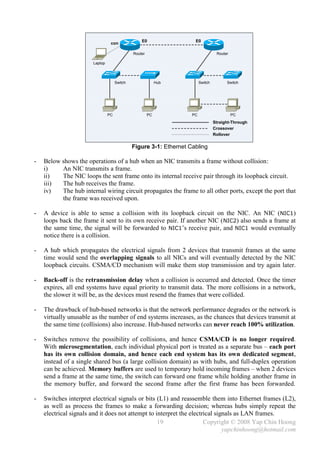
-   Straight-through cables are used to connect PCs and routers to hubs or switches. When a PC
    sends data on pins 1 and 2, the hub receives the electrical signal on pins 1 and 2. Hubs and
    switches must think oppositely compared to PCs and routers in order to correctly receive data.

-   Crossover cables are used to connect devices that use the same pair of pins for transmitting data,
    eg: hub to hub, switch to switch, hub to switch, PC to PC, and PC to router.

-   Carrier Sense Multiple Access with Collision Detection (CSMA/CD) logic or algorithm:
    i)     Senses or listens for electrical signal before transmitting a frame (carrier sensing).
    ii)    If the network media is idle, begins frame transmission; else, activates a random timer.
           Once the random timer expires, try to transmit again by first sensing the network media.
           If no signal is sensed, it presumes that the previous device has finished its frame
           transmission and now is its turn for frame transmission.
    iii)   Once begin transmitting frame, listens (via the NIC loopback circuit) to detect collision
           that may occur if another device also begin frame transmission at the same time.
    iv)    If a collision is detected, sends a jamming signal to ensure that all devices on the
           segment notice the collision and stop frame transmission.
    v)     All devices start a timer and stop transmitting for that period (back-off mechanism).
    vi)    Once the back-off timer expires, try to transmit again by first sensing the network media.
    Note: CSMA/CD is defined in IEEE 802.3 MAC sublayer specification.

                                               18                Copyright © 2008 Yap Chin Hoong
                                                                       yapchinhoong@hotmail.com
E0                 E0
                                 con

                                              Router                               Router

                       Laptop


                                     Switch                 Hub          Switch         Switch


                                PC                     PC           PC                      PC
                                                                                  Straight-Through
                                                                                  Crossover
                                                                                  Rollover


                                              Figure 3-1: Ethernet Cabling

-   Below shows the operations of a hub when an NIC transmits a frame without collision:
    i)    An NIC transmits a frame.
    ii)   The NIC loops the sent frame onto its internal receive pair through its loopback circuit.
    iii)  The hub receives the frame.
    iv)   The hub internal wiring circuit propagates the frame to all other ports, except the port that
          the frame was received upon.

-   A device is able to sense a collision with its loopback circuit on the NIC. An NIC (NIC1)
    loops back the frame it sent to its own receive pair. If another NIC ( NIC2) also sends a frame at
    the same time, the signal will be forwarded to NIC1’s receive pair, and NIC1 would eventually
    notice there is a collision.

-   A hub which propagates the electrical signals from 2 devices that transmit frames at the same
    time would send the overlapping signals to all NICs and will eventually detected by the NIC
    loopback circuits. CSMA/CD mechanism will make them stop transmission and try again later.

-   Back-off is the retransmission delay when a collision is occurred and detected. Once the timer
    expires, all end systems have equal priority to transmit data. The more collisions in a network,
    the slower it will be, as the devices must resend the frames that were collided.

-   The drawback of hub-based networks is that the network performance degrades or the network is
    virtually unusable as the number of end systems increases, as the chances that devices transmit at
    the same time (collisions) also increase. Hub-based networks can never reach 100% utilization.

-   Switches remove the possibility of collisions, and hence CSMA/CD is no longer required.
    With microsegmentation, each individual physical port is treated as a separate bus – each port
    has its own collision domain, and hence each end system has its own dedicated segment,
    instead of a single shared bus (a large collision domain) as with hubs, and full-duplex operation
    can be achieved. Memory buffers are used to temporary hold incoming frames – when 2 devices
    send a frame at the same time, the switch can forward one frame while holding another frame in
    the memory buffer, and forward the second frame after the first frame has been forwarded.

-   Switches interpret electrical signals or bits (L1) and reassemble them into Ethernet frames (L2),
    as well as process the frames to make a forwarding decision; whereas hubs simply repeat the
    electrical signals and it does not attempt to interpret the electrical signals as LAN frames.
                                                   19                 Copyright © 2008 Yap Chin Hoong
                                                                              yapchinhoong@hotmail.com
-   Each switch port does not share the bandwidth, it has it own separate bandwidth, which means
    a switch has 100Mbps of bandwidth per port. The bandwidth will be either dedicated to a single
    device (direct connection, full-duplex, 200Mbps – 100Mbps TX + 100Mbps RX) or shared by
    devices in the same collision domain (connected via a hub, half-duplex, 100Mbps).

-   Switches (and bridges) learn and build their bridging tables by listening to incoming frames
    and examining the source MAC addresses of the incoming frames. An entry for a new MAC
    address along with the interface that received the frame will be created in the bridging table.
    This information is needed for the forwarding (or switching) and filtering operations.

-   Below describe the forwarding (or switching) and filtering operations of switches (and bridges):
    i)    A frame is received. If the MAC address of the frame is not yet in the bridging table, the
          switch adds the address and interface into its bridging table (it learned the MAC address).
    ii)   If the destination is a broadcast or multicast, forward the frame out all interfaces
          (flooding) except the interface that received the frame (incoming interface).
    iii)  If the destination is a unicast address that is not yet in the bridging table (unknown
          unicast frame), forward (flood) the frame out all interfaces except the incoming interface.
          The switch expects to learn the MAC address of the destination device as another frame
          will eventually passes through the switch when the destination replies the source.
    iv)   If the destination is a unicast address in the bridging table, and the associated interface is
          not same with the incoming interface, forward the frame out the destination interface.
          This means the switch will not forward the frame to other segment if the destination is on
          the same segment as the source. It forwards traffic from one segment to another only
          when necessary to preserve bandwidth on other segments (segment = collision domain).
    v)    Otherwise, filter (do not forward) the frame.

-   Both transparent bridges and switches use Spanning Tree Protocol to perform loop avoidance.

-   Internet Group Management Protocol (IGMP) snooping is a multicast feature in switches
    which can be used to limit the flooding of multicasts and optimize multicast forwarding.

-   The early Ethernet specifications use shared bus architecture, where a particular device cannot
    send and receive frames at the same time, as this would lead to an occurrence of collision.
    Devices operating in half-duplex mode cannot send a frame while receiving another frame.

-   Ethernet switches allow multiple frames to be transmitted across different ports at the same time.
    Full-duplex operation uses 2 pairs of wires instead of 1 pair of wires as in half-duplex operation.
    No collisions will occur because different pairs of wires are used for sending and receiving data.
    If only one device is connected to a switch port, no collision can occur as there is only one device
    connected in the segment, and this allows the operation of full-duplex – the operation mode that
    enables concurrent sending and receiving frames between an Ethernet NIC and a switch port.
    An NIC must disable its loopback circuit if intends to operate in full-duplex mode.

-   If a hub with multiple devices is connected to a switch port, collisions can still occur and thus
    half-duplex operation must be used. A collision domain defines a group of devices that
    connected to the same physical media (shared media) where collisions can occur when
    2 devices transmit frames at the same time.

-   Full-duplex operation requires a point-to-point connection:
    i)     A connection between a switch and a host.
    ii)    A connection between a switch and another switch.
    iii)   A connection between a host and another host (with a crossover cable).
                                               20               Copyright © 2008 Yap Chin Hoong
                                                                       yapchinhoong@hotmail.com
-   Bridges were introduced to connect different type of networks, eg: Ethernet and Token Ring.
    Switches and bridges can communicate with each other with a bridging protocol. Cisco routers
    (acting as bridges) and switches support the following types of bridging protocols:
     Transparent Bridging               Found primarily in Ethernet networks. This switching method
                                        used by device that forwards frames between LAN segments
                                        based on the bridging table. Transparent refers to the
                                        presence of bridge is transparent to end systems – they never
                                        notice the existence of a bridge. End systems behave the
                                        same in networks with or without transparent bridges.
     Source-Route Bridging (SRB) Found exclusively in Token Ring networks.
     Translational Bridging             Facilitates communications between Ethernet transparent
                                        bridging and Token Ring source-route bridging networks.
                                        There is no open implementation standard. It was replaced by
                                        source-route transparent (SRT) bridging.
     Encapsulating Bridging             Allows packets to cross a bridged backbone network.
     Source-Route Transparent           Allows a bridge to function as both a source-route and
     Bridging (SRT)                     transparent bridge to enable communications in mixed
                                        Ethernet and Token Ring environments, hence fulfilling the
                                        needs of all end systems in a single device. SRT only allows
                                        transparent and source-route hosts to communicate with other
                                        hosts of the same type; hence it is not the perfect solution to
                                        the incompatibility problem of mixed-media bridging.
     Source-Route Translational         Allows a bridge to function as both a source-route and
     Bridging (SR/TLB)                  transparent bridge. SR/TLB translates between Ethernet and
                                        Token Ring protocols to allow communication between hosts
                                        from source-route and transparent bridging networks.

-   Switches behave identically to bridges in terms of the learning and forwarding operations.
    Generally, switches are bridges with more ports and faster processing capability. Although they
    have many similar attributes, there are still some differences between the their technologies.
                        Switches                                            Bridges
     Faster processing (also known as wire-speed) Slower processing because switch in software
     because switch in hardware (ASICs –                – bridges are implemented using software.
     Application-Specific Integrated Circuits).
     Able to interconnect LANs of unlike                Unable to interconnect LANs of unlike
     bandwidth. (Connecting a 10Mbps LAN and a bandwidth.
     100Mbps LAN)
     Support higher port density than bridges.          Normally available in 4 – 16 ports.
     Support both cut-through switching and             Only support store-and-forward switching.
     store-and-forward switching.
     Support VLANs.                                     Do not support VLANs.
     Support full-duplex operation.                     Do not support full-duplex operation.
     Support multiple spanning tree instances.          Only support one spanning tree instance.

-   Fast-forward switching and fragment-free switching are the 2 forms of cut-through switching.
    Cut-through switching operates at wire-speed and has constant latency regardless of frame size.
    Fragment-free is also referred to as modified cut-through.

                                                21                Copyright © 2008 Yap Chin Hoong
                                                                        yapchinhoong@hotmail.com
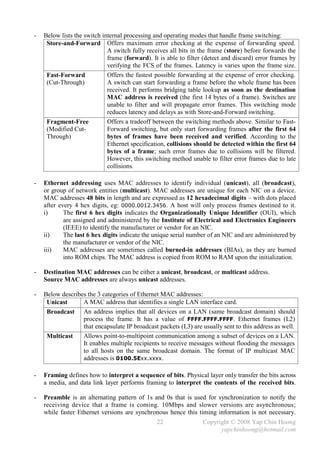
-   Below lists the switch internal processing and operating modes that handle frame switching:
     Store-and-Forward Offers maximum error checking at the expense of forwarding speed.
                             A switch fully receives all bits in the frame (store) before forwards the
                             frame (forward). It is able to filter (detect and discard) error frames by
                             verifying the FCS of the frames. Latency is varies upon the frame size.
     Fast-Forward            Offers the fastest possible forwarding at the expense of error checking.
     (Cut-Through)           A switch can start forwarding a frame before the whole frame has been
                             received. It performs bridging table lookup as soon as the destination
                             MAC address is received (the first 14 bytes of a frame). Switches are
                             unable to filter and will propagate error frames. This switching mode
                             reduces latency and delays as with Store-and-Forward switching.
     Fragment-Free           Offers a tradeoff between the switching methods above. Similar to Fast-
     (Modified Cut-          Forward switching, but only start forwarding frames after the first 64
     Through)                bytes of frames have been received and verified. According to the
                             Ethernet specification, collisions should be detected within the first 64
                             bytes of a frame; such error frames due to collisions will be filtered.
                             However, this switching method unable to filter error frames due to late
                             collisions.

-   Ethernet addressing uses MAC addresses to identify individual (unicast), all (broadcast),
    or group of network entities (multicast). MAC addresses are unique for each NIC on a device.
    MAC addresses 48 bits in length and are expressed as 12 hexadecimal digits – with dots placed
    after every 4 hex digits, eg: 0000.0012.3456. A host will only process frames destined to it.
    i)      The first 6 hex digits indicates the Organizationally Unique Identifier (OUI), which
            are assigned and administered by the Institute of Electrical and Electronics Engineers
            (IEEE) to identify the manufacturer or vendor for an NIC.
    ii)     The last 6 hex digits indicate the unique serial number of an NIC and are administered by
            the manufacturer or vendor of the NIC.
    iii)    MAC addresses are sometimes called burned-in addresses (BIAs), as they are burned
            into ROM chips. The MAC address is copied from ROM to RAM upon the initialization.

-   Destination MAC addresses can be either a unicast, broadcast, or multicast address.
    Source MAC addresses are always unicast addresses.

-   Below describes the 3 categories of Ethernet MAC addresses:
     Unicast      A MAC address that identifies a single LAN interface card.
     Broadcast An address implies that all devices on a LAN (same broadcast domain) should
                  process the frame. It has a value of FFFF.FFFF.FFFF. Ethernet frames (L2)
                  that encapsulate IP broadcast packets (L3) are usually sent to this address as well.
     Multicast    Allows point-to-multipoint communication among a subset of devices on a LAN.
                  It enables multiple recipients to receive messages without flooding the messages
                  to all hosts on the same broadcast domain. The format of IP multicast MAC
                  addresses is 0100.5Exx.xxxx.

-   Framing defines how to interpret a sequence of bits. Physical layer only transfer the bits across
    a media, and data link layer performs framing to interpret the contents of the received bits.

-   Preamble is an alternating pattern of 1s and 0s that is used for synchronization to notify the
    receiving device that a frame is coming. 10Mbps and slower versions are asynchronous;
    while faster Ethernet versions are synchronous hence this timing information is not necessary.
                                                22                Copyright © 2008 Yap Chin Hoong
                                                                        yapchinhoong@hotmail.com
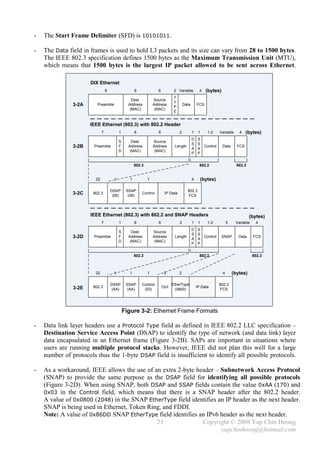
-   The Start Frame Delimiter (SFD) is 10101011.

-   The Data field in frames is used to hold L3 packets and its size can vary from 28 to 1500 bytes.
    The IEEE 802.3 specification defines 1500 bytes as the Maximum Transmission Unit (MTU),
    which means that 1500 bytes is the largest IP packet allowed to be sent across Ethernet.

                      DIX Ethernet
                                 8                  6             6           2 Variable          4     (bytes)
                                                                              T
                                                  Dest.         Source
                                                                              Y
               3-2A      Preamble               Address         Address
                                                                              P
                                                                                      Data       FCS
                                                 (MAC)           (MAC)
                                                                              E


                      IEEE Ethernet (802.3) with 802.2 Header
                             7            1         6              6              2          1    1      1-2    Variable     4    (bytes)
                                                                                             D    S
                                          S       Dest.         Source
                                                                                             S    S
               3-2B    Preamble           F     Address         Address       Length
                                                                                             A    A
                                                                                                    Control       Data      FCS
                                          D      (MAC)           (MAC)
                                                                                             P    P


                                                    802.3                                          802.2                    802.3


                        22            1         1           1                                4        (bytes)

                                     DSAP      SSAP                                     802.3
               3-2C    802.3
                                      (06)      (06)
                                                        Control         IP Data
                                                                                        FCS


                      IEEE Ethernet (802.3) with 802.2 and SNAP Headers                                                             (bytes)
                             7            1         6              6              2          1    1      1-2          5    Variable    4
                                                                                             D    S
                                          S       Dest.         Source
                                                                                             S    S
               3-2D    Preamble           F     Address         Address       Length
                                                                                             A    A
                                                                                                    Control       SNAP       Data     FCS
                                          D      (MAC)           (MAC)
                                                                                             P    P


                                                    802.3                                          802.2                              802.3


                        22            1         1           1           3         2                               4       (bytes)

                                     DSAP      SSAP     Control              EtherType                          802.3
               3-2E    802.3                                           OUI                       IP Data
                                      (AA)      (AA)     (03)                  (0800)                           FCS


                                              Figure 3-2: Ethernet Frame Formats

-   Data link layer headers use a Protocol Type field as defined in IEEE 802.2 LLC specification –
    Destination Service Access Point (DSAP) to identify the type of network (and data link) layer
    data encapsulated in an Ethernet frame (Figure 3-2B). SAPs are important in situations where
    users are running multiple protocol stacks. However, IEEE did not plan this well for a large
    number of protocols thus the 1-byte DSAP field is insufficient to identify all possible protocols.

-   As a workaround, IEEE allows the use of an extra 2-byte header – Subnetwork Access Protocol
    (SNAP) to provide the same purpose as the DSAP field for identifying all possible protocols
    (Figure 3-2D). When using SNAP, both DSAP and SSAP fields contain the value 0xAA (170) and
    0x03 in the Control field, which means that there is a SNAP header after the 802.2 header.
    A value of 0x0800 (2048) in the SNAP EtherType field identifies an IP header as the next header.
    SNAP is being used in Ethernet, Token Ring, and FDDI.
    Note: A value of 0x86DD SNAP EtherType field identifies an IPv6 header as the next header.
                                             23               Copyright © 2008 Yap Chin Hoong
                                                                     yapchinhoong@hotmail.com
Physical Layer
-   The physical layer defines the standards used to send and receive bits between 2 devices across
    physical network media, eg: maximum length of each type of cable, the number of wires inside
    the cable, the shape of the connector on the end of the cable, and the purpose of each pin or wire.

-   The Electronic Industries Association and the newer Telecommunications Industry Alliance
    (EIA/TIA) are the standard organizations that define the Ethernet physical layer specifications.

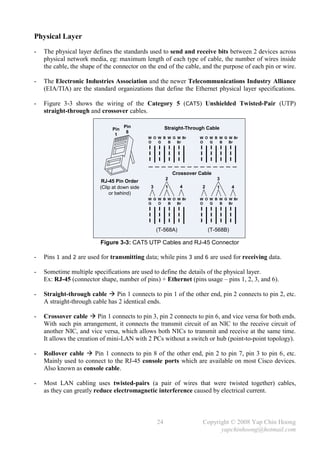
-   Figure 3-3 shows the wiring of the Category 5 (CAT5) Unshielded Twisted-Pair (UTP)
    straight-through and crossover cables.

                                     Pin                 Straight-Through Cable
                               Pin
                                      8
                                1
                                               W O W B W G W Br        W O W B W G W Br
                                               O   G   B   Br          O   G   B   Br


                                                             Crossover Cable
                                                         2                     3
                           RJ-45 Pin Order
                          (Clip at down side    3        1     4        2      1       4
                              or behind)
                                               W G W B W O W Br        W O W B W G W Br
                                               G   O   B   Br          O   G   B   Br


                                                    (T-568A)                (T-568B)

                          Figure 3-3: CAT5 UTP Cables and RJ-45 Connector

-   Pins 1 and 2 are used for transmitting data; while pins 3 and 6 are used for receiving data.

-   Sometime multiple specifications are used to define the details of the physical layer.
    Ex: RJ-45 (connector shape, number of pins) + Ethernet (pins usage – pins 1, 2, 3, and 6).

-   Straight-through cable  Pin 1 connects to pin 1 of the other end, pin 2 connects to pin 2, etc.
    A straight-through cable has 2 identical ends.

-   Crossover cable  Pin 1 connects to pin 3, pin 2 connects to pin 6, and vice versa for both ends.
    With such pin arrangement, it connects the transmit circuit of an NIC to the receive circuit of
    another NIC, and vice versa, which allows both NICs to transmit and receive at the same time.
    It allows the creation of mini-LAN with 2 PCs without a switch or hub (point-to-point topology).

-   Rollover cable  Pin 1 connects to pin 8 of the other end, pin 2 to pin 7, pin 3 to pin 6, etc.
    Mainly used to connect to the RJ-45 console ports which are available on most Cisco devices.
    Also known as console cable.

-   Most LAN cabling uses twisted-pairs (a pair of wires that were twisted together) cables,
    as they can greatly reduce electromagnetic interference caused by electrical current.


                                                    24                  Copyright © 2008 Yap Chin Hoong
                                                                              yapchinhoong@hotmail.com
10Base5 and 10Base2                10BaseT                      100BaseTX


                                                                  Hub                        Switch


                   - Physical Bus               - Physical Star                - Physical Star
                   - Logical Bus                - Logical Bus                  - Logical Star


                                    Figure 3-4: Common Network Topologies

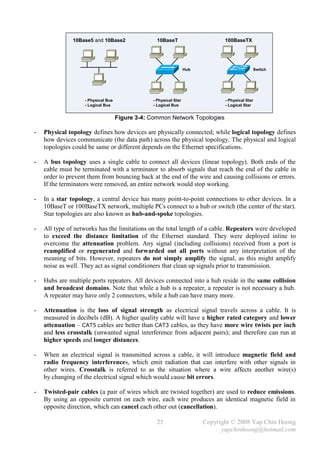
-   Physical topology defines how devices are physically connected; while logical topology defines
    how devices communicate (the data path) across the physical topology. The physical and logical
    topologies could be same or different depends on the Ethernet specifications.

-   A bus topology uses a single cable to connect all devices (linear topology). Both ends of the
    cable must be terminated with a terminator to absorb signals that reach the end of the cable in
    order to prevent them from bouncing back at the end of the wire and causing collisions or errors.
    If the terminators were removed, an entire network would stop working.

-   In a star topology, a central device has many point-to-point connections to other devices. In a
    10BaseT or 100BaseTX network, multiple PCs connect to a hub or switch (the center of the star).
    Star topologies are also known as hub-and-spoke topologies.

-   All type of networks has the limitations on the total length of a cable. Repeaters were developed
    to exceed the distance limitation of the Ethernet standard. They were deployed inline to
    overcome the attenuation problem. Any signal (including collisions) received from a port is
    reamplified or regenerated and forwarded out all ports without any interpretation of the
    meaning of bits. However, repeaters do not simply amplify the signal, as this might amplify
    noise as well. They act as signal conditioners that clean up signals prior to transmission.

-   Hubs are multiple ports repeaters. All devices connected into a hub reside in the same collision
    and broadcast domains. Note that while a hub is a repeater, a repeater is not necessary a hub.
    A repeater may have only 2 connectors, while a hub can have many more.

-   Attenuation is the loss of signal strength as electrical signal travels across a cable. It is
    measured in decibels (dB). A higher quality cable will have a higher rated category and lower
    attenuation – CAT5 cables are better than CAT3 cables, as they have more wire twists per inch
    and less crosstalk (unwanted signal interference from adjacent pairs); and therefore can run at
    higher speeds and longer distances.

-   When an electrical signal is transmitted across a cable, it will introduce magnetic field and
    radio frequency interferences, which emit radiation that can interfere with other signals in
    other wires. Crosstalk is referred to as the situation where a wire affects another wire(s)
    by changing of the electrical signal which would cause bit errors.

-   Twisted-pair cables (a pair of wires which are twisted together) are used to reduce emissions.
    By using an opposite current on each wire, each wire produces an identical magnetic field in
    opposite direction, which can cancel each other out (cancellation).

                                                  25                    Copyright © 2008 Yap Chin Hoong
                                                                              yapchinhoong@hotmail.com
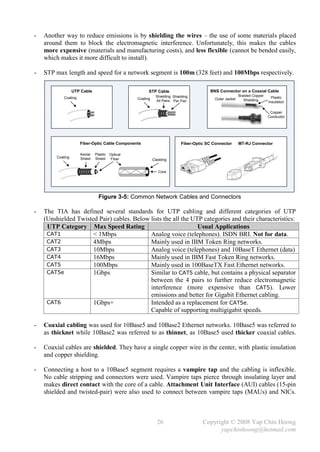
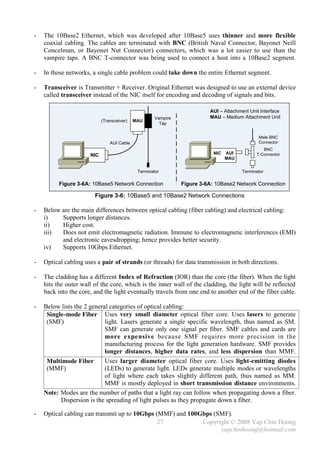
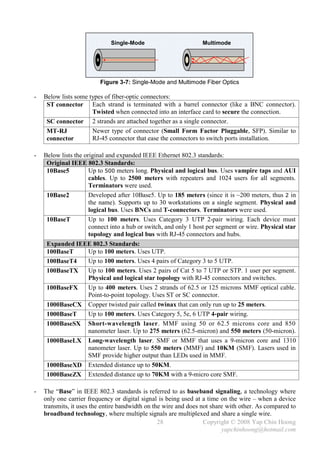
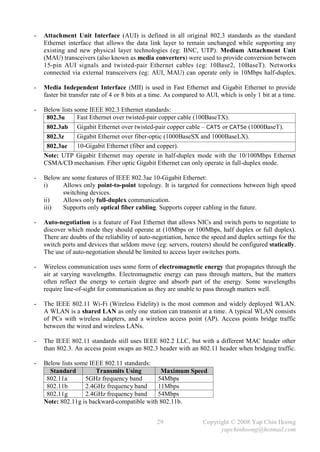
-   Another way to reduce emissions is by shielding the wires – the use of some materials placed
    around them to block the electromagnetic interference. Unfortunately, this makes the cables
    more expensive (materials and manufacturing costs), and less flexible (cannot be bended easily,
    which makes it more difficult to install).

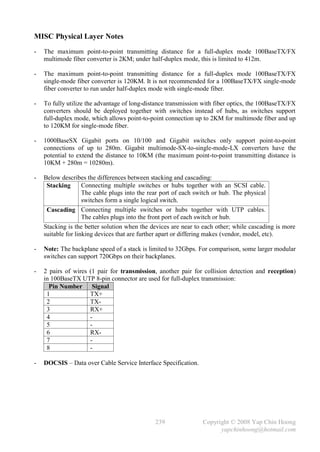
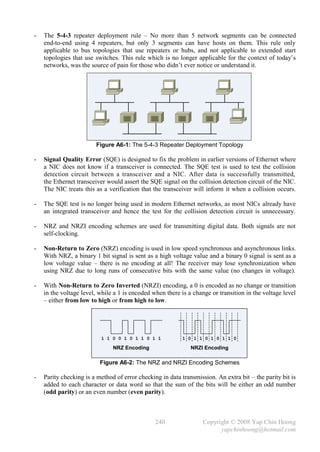
-   STP max length and speed for a network segment is 100m (328 feet) and 100Mbps respectively.

                   UTP Cable                            STP Cable                         BNS Connector on a Coaxial Cable
                                                              Shielding Shielding                           Braided Copper
             Coating                              Coating                                    Outer Jacket                      Plastic
                                                              All Pairs Per Pair                               Shielding
                                                                                                                             Insulation

                                                                                                                              Copper
                                                                                                                             Conductor


                       Fiber-Optic Cable Components                          Fiber-Optic SC Connector       MT-RJ Connector

                       Kevlar   Plastic Optical
         Coating       Shield   Shield Fiber                Cladding


                                                               Core


                                  Figure 3-5: Common Network Cables and Connectors

-   The TIA has defined several standards for UTP cabling and different categories of UTP
    (Unshielded Twisted Pair) cables. Below lists the all the UTP categories and their characteristics:
     UTP Category Max Speed Rating                              Usual Applications
     CAT1             < 1Mbps               Analog voice (telephones). ISDN BRI. Not for data.
     CAT2             4Mbps                 Mainly used in IBM Token Ring networks.
     CAT3             10Mbps                Analog voice (telephones) and 10BaseT Ethernet (data)
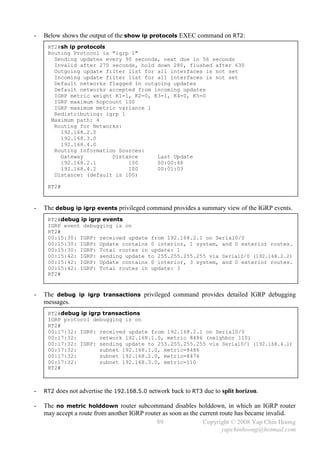
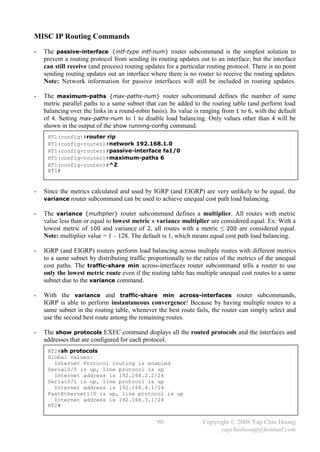
     CAT4             16Mbps                Mainly used in IBM Fast Token Ring networks.
     CAT5             100Mbps               Mainly used in 100BaseTX Fast Ethernet networks.
     CAT5e            1Gbps                 Similar to CAT5 cable, but contains a physical separator
                                            between the 4 pairs to further reduce electromagnetic
                                            interference (more expensive than CAT5). Lower
                                            emissions and better for Gigabit Ethernet cabling.
     CAT6             1Gbps+                Intended as a replacement for CAT5e.
                                            Capable of supporting multigigabit speeds.

-   Coaxial cabling was used for 10Base5 and 10Base2 Ethernet networks. 10Base5 was referred to
    as thicknet while 10Base2 was referred to as thinnet, as 10Base5 used thicker coaxial cables.

-   Coaxial cables are shielded. They have a single copper wire in the center, with plastic insulation
    and copper shielding.

-   Connecting a host to a 10Base5 segment requires a vampire tap and the cabling is inflexible.
    No cable stripping and connectors were used. Vampire taps pierce through insulating layer and
    makes direct contact with the core of a cable. Attachment Unit Interface (AUI) cables (15-pin
    shielded and twisted-pair) were also used to connect between vampire taps (MAUs) and NICs.


                                                              26                       Copyright © 2008 Yap Chin Hoong
                                                                                             yapchinhoong@hotmail.com
-   The 10Base2 Ethernet, which was developed after 10Base5 uses thinner and more flexible
    coaxial cabling. The cables are terminated with BNC (British Naval Connector, Bayonet Neill
    Concelman, or Bayonet Nut Connector) connectors, which was a lot easier to use than the
    vampire taps. A BNC T-connector was being used to connect a host into a 10Base2 segment.

-   In those networks, a single cable problem could take down the entire Ethernet segment.

-   Transceiver is Transmitter + Receiver. Original Ethernet was designed to use an external device
    called transceiver instead of the NIC itself for encoding and decoding of signals and bits.

                                                                        AUI – Attachment Unit Interface
                                                    Vampire             MAU – Medium Attachment Unit
                            (Transceiver)   MAU
                                                      Tap


                                                                                             Male BNC
                                AUI Cable                                                    Connector
                                                                                               BNC
                                                                          NIC   AUI         T-Connector
                      NIC
                                                                                MAU


                                             Terminator                               Terminator

          Figure 3-6A: 10Base5 Network Connection             Figure 3-6A: 10Base2 Network Connection

                        Figure 3-6: 10Base5 and 10Base2 Network Connections

-   Below are the main differences between optical cabling (fiber cabling) and electrical cabling:
    i)    Supports longer distances.
    ii)   Higher cost.
    iii)  Does not emit electromagnetic radiation. Immune to electromagnetic interferences (EMI)
          and electronic eavesdropping; hence provides better security.
    iv)   Supports 10Gbps Ethernet.

-   Optical cabling uses a pair of strands (or threads) for data transmission in both directions.

-   The cladding has a different Index of Refraction (IOR) than the core (the fiber). When the light
    hits the outer wall of the core, which is the inner wall of the cladding, the light will be reflected
    back into the core, and the light eventually travels from one end to another end of the fiber cable.

-   Below lists the 2 general categories of optical cabling:
     Single-mode Fiber Uses very small diameter optical fiber core. Uses lasers to generate
     (SMF)                  light. Lasers generate a single specific wavelength, thus named as SM.
                            SMF can generate only one signal per fiber. SMF cables and cards are
                            more expensive because SMF requires more precision in the
                            manufacturing process for the light generation hardware. SMF provides
                            longer distances, higher data rates, and less dispersion than MMF.
     Multimode Fiber        Uses larger diameter optical fiber core. Uses light-emitting diodes
     (MMF)                  (LEDs) to generate light. LEDs generate multiple modes or wavelengths
                            of light where each takes slightly different path, thus named as MM.
                            MMF is mostly deployed in short transmission distance environments.
    Note: Modes are the number of paths that a light ray can follow when propagating down a fiber.
          Dispersion is the spreading of light pulses as they propagate down a fiber.

-   Optical cabling can transmit up to 10Gbps (MMF) and 100Gbps (SMF).
                                               27           Copyright © 2008 Yap Chin Hoong
                                                                  yapchinhoong@hotmail.com
Single-Mode                        Multimode


                         Figure 3-7: Single-Mode and Multimode Fiber Optics

-   Below lists some types of fiber-optic connectors:
     ST connector Each strand is terminated with a barrel connector (like a BNC connector).
                      Twisted when connected into an interface card to secure the connection.
     SC connector 2 strands are attached together as a single connector.
     MT-RJ            Newer type of connector (Small Form Factor Pluggable, SFP). Similar to
     connector        RJ-45 connector that ease the connectors to switch ports installation.

-   Below lists the original and expanded IEEE Ethernet 802.3 standards:
     Original IEEE 802.3 Standards:
     10Base5          Up to 500 meters long. Physical and logical bus. Uses vampire taps and AUI
                      cables. Up to 2500 meters with repeaters and 1024 users for all segments.
                      Terminators were used.
     10Base2          Developed after 10Base5. Up to 185 meters (since it is ~200 meters, thus 2 in
                      the name). Supports up to 30 workstations on a single segment. Physical and
                      logical bus. Uses BNCs and T-connectors. Terminators were used.
     10BaseT          Up to 100 meters. Uses Category 3 UTP 2-pair wiring. Each device must
                      connect into a hub or switch, and only 1 host per segment or wire. Physical star
                      topology and logical bus with RJ-45 connectors and hubs.
     Expanded IEEE 802.3 Standards:
     100BaseT    Up to 100 meters. Uses UTP.
     100BaseT4   Up to 100 meters. Uses 4 pairs of Category 3 to 5 UTP.
     100BaseTX   Up to 100 meters. Uses 2 pairs of Cat 5 to 7 UTP or STP. 1 user per segment.
                 Physical and logical star topology with RJ-45 connectors and switches.
     100BaseFX   Up to 400 meters. Uses 2 strands of 62.5 or 125 microns MMF optical cable.
                 Point-to-point topology. Uses ST or SC connector.
     1000BaseCX Copper twisted pair called twinax that can only run up to 25 meters.
     1000BaseT   Up to 100 meters. Uses Category 5, 5e, 6 UTP 4-pair wiring.
     1000BaseSX Short-wavelength laser. MMF using 50 or 62.5 microns core and 850
                 nanometer laser. Up to 275 meters (62.5-micron) and 550 meters (50-micron).
     1000BaseLX Long-wavelength laser. SMF or MMF that uses a 9-micron core and 1310
                 nanometer laser. Up to 550 meters (MMF) and 10KM (SMF). Lasers used in
                 SMF provide higher output than LEDs used in MMF.
     1000BaseXD Extended distance up to 50KM.
     1000BaseZX Extended distance up to 70KM with a 9-micro core SMF.

-   The “Base” in IEEE 802.3 standards is referred to as baseband signaling, a technology where
    only one carrier frequency or digital signal is being used at a time on the wire – when a device
    transmits, it uses the entire bandwidth on the wire and does not share with other. As compared to
    broadband technology, where multiple signals are multiplexed and share a single wire.
                                                 28               Copyright © 2008 Yap Chin Hoong
                                                                         yapchinhoong@hotmail.com
-   Attachment Unit Interface (AUI) is defined in all original 802.3 standards as the standard
    Ethernet interface that allows the data link layer to remain unchanged while supporting any
    existing and new physical layer technologies (eg: BNC, UTP). Medium Attachment Unit
    (MAU) transceivers (also known as media converters) were used to provide conversion between
    15-pin AUI signals and twisted-pair Ethernet cables (eg: 10Base2, 10BaseT). Networks
    connected via external transceivers (eg: AUI, MAU) can operate only in 10Mbps half-duplex.

-   Media Independent Interface (MII) is used in Fast Ethernet and Gigabit Ethernet to provide
    faster bit transfer rate of 4 or 8 bits at a time. As compared to AUI, which is only 1 bit at a time.

-   Below lists some IEEE 802.3 Ethernet standards:
     802.3u      Fast Ethernet over twisted-pair copper cable (100BaseTX).
     802.3ab Gigabit Ethernet over twisted-pair copper cable – CAT5 or CAT5e (1000BaseT).
     802.3z      Gigabit Ethernet over fiber-optic (1000BaseSX and 1000BaseLX).
     802.3ae     10-Gigabit Ethernet (fiber and copper).
    Note: UTP Gigabit Ethernet may operate in half-duplex mode with the 10/100Mbps Ethernet
    CSMA/CD mechanism. Fiber optic Gigabit Ethernet can only operate in full-duplex mode.

-   Below are some features of IEEE 802.3ae 10-Gigabit Ethernet:
    i)    Allows only point-to-point topology. It is targeted for connections between high speed
          switching devices.
    ii)   Allows only full-duplex communication.
    iii)  Supports only optical fiber cabling. Supports copper cabling in the future.

-   Auto-negotiation is a feature of Fast Ethernet that allows NICs and switch ports to negotiate to
    discover which mode they should operate at (10Mbps or 100Mbps, half duplex or full duplex).
    There are doubts of the reliability of auto-negotiation, hence the speed and duplex settings for the
    switch ports and devices that seldom move (eg: servers, routers) should be configured statically.
    The use of auto-negotiation should be limited to access layer switches ports.

-   Wireless communication uses some form of electromagnetic energy that propagates through the
    air at varying wavelengths. Electromagnetic energy can pass through matters, but the matters
    often reflect the energy to certain degree and absorb part of the energy. Some wavelengths
    require line-of-sight for communication as they are unable to pass through matters well.

-   The IEEE 802.11 Wi-Fi (Wireless Fidelity) is the most common and widely deployed WLAN.
    A WLAN is a shared LAN as only one station can transmit at a time. A typical WLAN consists
    of PCs with wireless adapters, and a wireless access point (AP). Access points bridge traffic
    between the wired and wireless LANs.

-   The IEEE 802.11 standards still uses IEEE 802.2 LLC, but with a different MAC header other
    than 802.3. An access point swaps an 802.3 header with an 802.11 header when bridging traffic.

-   Below lists some IEEE 802.11 standards:
      Standard         Transmits Using        Maximum Speed
     802.11a       5GHz frequency band       54Mbps
     802.11b       2.4GHz frequency band     11Mbps
     802.11g       2.4GHz frequency band     54Mbps
    Note: 802.11g is backward-compatible with 802.11b.


                                                 29                Copyright © 2008 Yap Chin Hoong
                                                                         yapchinhoong@hotmail.com
Wireless
                              AP
                                                     802.11   802.2   Data   802.3


                                                     802.3    802.2   Data   802.3


                                       Switch


                                        Figure 3-8: 802.11 Framing

-   802.11b transmits at 11Mbps but has a maximum throughput of 7Mbps due to the shared bus
    architecture – WLANs are half-duplex communication, all devices share the same bandwidth and
    only one device can transmit at a time.

-   Half-duplex Ethernet uses CSMA/CD in its operation while IEEE 802.11 WLAN uses
    CSMA/CA (Carrier Sense Multiple Access with Collisions Avoidance) in its operation.
    Congestion avoidance monitors network traffic load to predict and avoid congestion via packet
    dropping. A common congestion avoidance mechanism is Random Early Detection (RED).


                                                30                    Copyright © 2008 Yap Chin Hoong
                                                                            yapchinhoong@hotmail.com
Chapter 4
Introduction to Cisco IOS
  -   Almost all current Cisco routers and switches run Cisco IOS (Internetwork Operating System),
      the routing and switching software in Cisco devices.

  -   Cisco IOS command-line interface (CLI) is the text-based user interface to a Cisco device for
      configuring, administering, and managing the Cisco device.

  -   CLI can be accessed through:
      i)     Console with a rollover cable and terminal emulator application. [line console 0]
      ii)    AUX through a dialup device such as modem for out-of-band management. The modem
             is connected with a straight-through cable to the auxiliary port. [line aux 0]
      iii)   In-band management through the network via Telnet or SSH. [line vty 0 4]

  -   Below lists the main Cisco IOS modes:
       User EXEC mode          Least privileges and limited access. Only provides a set of non-
                               destructive show commands that allow examination of configuration.
       Privileged mode         More show commands, and limited configuration commands.
       Configuration mode Configuration commands are being entered in this mode. Unable to
                               check status with the series of show commands. Sub-divided into
                               some child modes, eg: interface configuration mode, line configuration
                               mode, router configuration mode, etc.
                               Commands entered in this mode update the active or running
                               configuration immediately after the Enter button is pressed.
                               Configuration commands can be divided into global configuration
                               commands and subcommands, eg: interface subcommand,
                               subinterface subcommand, controller subcommand, line subcommand,
                               router subcommand, etc.

  -   Below describes some basic Cisco IOS commands:
       enable                Switches from EXEC mode to privileged mode.
       disable               Switches from privileged mode back to EXEC mode.
       show version          Views the basic configuration of the system hardware, software
                             version, the name and source of the system boot image, etc.
       configure terminal Switches from privileged mode to global configuration mode.
       hostname              Changes the hostname of a Cisco device.
       ^Z / end / exit       Exits from the global configuration mode back to privileged mode.
       exit / quit           Exits from the EXEC mode.

  -   Some special IOS CLI features are Context-Sensitive Help with [?] and Auto-Completion
      with [TAB] can be used to display or auto-complete the available commands or parameters.

  -   The context-sensitive help is divided into word help and command syntax help.
       word help                  Ex: cl? – Displays any command or syntax that starts with cl.
       command syntax help Ex: clock ? – Displays the available parameters after the clock
                                  command.
      Note: The escape sequence for entering the ? character is Ctrl+V.


                                                31               Copyright © 2008 Yap Chin Hoong
                                                                       yapchinhoong@hotmail.com
-   Below lists the common IOS CLI error messages:
     % Invalid input detected at ‘^’ User issued an incorrect or invalid command.
     % Ambiguous command                   User used an abbreviation that did not specify enough
                                           characters for the IOS to determine or recognize the
                                           specific command that the user has intended to issue.
     % Incomplete command                  User did not specify enough parameters.
     & Unrecognized command                User issued an unavailable command.

-   Below shows a configuration example of some basic Cisco IOS commands:
     Router>enable
     Router#configure terminal
     Enter configuration commands, one per line. End with CNTL/Z.
     Router(config)#hostname RT1
     RT1(config)#end
     RT1#
     00:00:30: %SYS-5-CONFIG_I: Configured from console by console
     RT1#disable
     RT1>quit


     RT1 con0 is now available

     Press RETURN to get started.


-   The clock set privileged command sets the time and date settings on Cisco devices.
     RT1#clock set 20:20:20 20 Jan 2008
     00:10:10: %SYS-6-CLOCKUPDATE: System clock has been updated from 00:10:10
     UTC Mon Mar 1 1993 to 20:20:20 UTC Sun Jan 20 2008, configured from console
     by console.
     RT1#show clock
     20:20:21.520 UTC Sun Jan 20 2008
     RT1#


-   2 supportive line subcommands for console and telnet sessions:
     logging synchronous       Stops the annoying console messages from interrupting user input
                               and readability.
     exec-timeout              Configures the inactivity timeout – automatic session logout if
     {minutes} {seconds}       there is no keyboard activity. 0 min 0 sec means never expires.
                               The default is 10 minites and 0 seconds ( exec-timeout 10 0).

     RT1(config)#line con 0
     RT1(config-line)#logging synchronous
     RT1(config-line)#exec-timeout 0 0
     RT1(config-line)#^Z
     00:15:00: %SYS-5-CONFIG_I: Configured from console by console
     RT1#

    Note: no exec-timeout is equivalent to exec-timeout 0 0.


                                              32               Copyright © 2008 Yap Chin Hoong
                                                                     yapchinhoong@hotmail.com
-   The banner motd global configuration command configures the Message of the Day banner.
    The character followed by the command – delimiter, is used to define the end of the message.
    Banners are commonly used as security notices for remote access users.
     RT1(config)#banner motd #This is banner line 1
     Enter TEXT message. End with the character '#'.
     This is line 2
     #
     RT1(config)#^Z
     RT1#quit

     RT1 con0 is now available

     Press RETURN to get started.

     This is banner line 1
     This is line 2

     RT1>


-   The description {text} interface subcommand adds a description for a particular interface.
     RT1(config)#interface FastEthernet 0/1
     RT1(config-if)#description *** Core Switch Gi0/1 ***
     RT1(config-if)#^Z
     RT1#show running-config interface FastEthernet 0/1
     Building configuration...

     Current configuration : 95 bytes
     !
     interface FastEthernet0/1
       description *** Core Switch Gi0/1 ***
       no ip address
     end

     RT1#


-   The default interface {intf-type intf-num} global configuration command resets the
    configuration for a particular interface.
     RT1#show running-config interface FastEthernet 0/1
     Building configuration...

     Current configuration : 61 bytes
     !
     interface FastEthernet0/1
       description *** Core Switch Gi0/1 ***
       ip address 192.168.0.1 255.255.255.0
     end

     RT1#configure terminal
     Enter configuration commands, one per line. End with CNTL/Z.
     RT1(config)#default interface FastEthernet 0/1
     Interface FastEthernet0/1 set to default configuration
     RT1(config)#^Z
     RT1#


                                              33               Copyright © 2008 Yap Chin Hoong
                                                                     yapchinhoong@hotmail.com
RT1#show running-config interface FastEthernet 0/1
     Building configuration...

     Current configuration : 38 bytes
     !
     interface FastEthernet0/1
       no ip address
       shutdown
     end

     RT1#


-   The privileged mode access passwords can be defined with either enable password {passwd}
    or enable secret {passwd} global configuration command. Both passwords are case-sensitive.
     enable password Used in older version of IOS (pre-10.3). Password is saved as clear text.
     enable secret        Mostly used in current version of IOS. Based on MD5 hash function.
                          Instead of simple encryption, one-way hash algorithm is used to
                          calculate the hash value of the password, where decryption is impossible.

-   Cisco recommends the enable secret to be different from the enable password for better
    security. If both of them are configured, the enable secret password will be in effect.
     RT1(config)#enable password cisco123
     RT1(config)#enable secret cisco123
     The enable secret you have chosen is the same as your enable password.
     This is not recommended. Re-enter the enable secret.

     RT1(config)#enable secret cisco456
     RT1(config)#^Z
     RT1#show running-config | in enable
     enable secret 5 $1$.1p/$BXYbAw2lQzs0EfHOjUPAP.
     enable password cisco123
     RT1#


-   The terminal history size {num-of-lines} EXEC command can be used to set the size of
    command history buffer for the current session; whereas the history size {num-of-lines} line
    subcommand will permanently set the size of command history buffer for a particular line.
    The default command history size is 10, which means the latest 10 issued commands are saved.

-   Virtual TeleTypes / Terminals (VTY) are used for remote administration. Users connecting to a
    router through Telnet or SSH are unable to choose which VTY line to connect to.
    Note: The minimum number of VTY lines on a Cisco router is 5; and they cannot be deleted.


                                              34               Copyright © 2008 Yap Chin Hoong
                                                                     yapchinhoong@hotmail.com
-   The password {passwd} and login line subcommands are used in conjunction to configure the
    password for console and remote access login. The password {passwd} command specifies the
    login password; while the login command tells the router to display a password login prompt.
     RT1(config)#line con 0
     RT1(config-line)#password cisco123
     RT1(config-line)#login
     RT1(config-line)#line vty 0 4
     RT1(config-line)#password cisco123
     RT1(config-line)#login
     RT1(config-line)#^Z
     RT1#exit

     RT1 con0 is now available

     Press RETURN to get started.


     User Access Verification

     Password:


-   The service password-encryption global configuration command encrypts the system
    passwords, eg: console and Telnet passwords.
     RT1#show running-config | begin line con 0
     line con 0
       password cisco123
       login
     line vty 0 4
       password cisco123
       login
     line vty 5 15
       no login
     !
     !
     end

     RT1#configure terminal
     RT1(config)#service password-encryption
     RT1(config)#^Z
     RT1#
     RT1#show running-config | begin line con 0
     line con 0
       password 7 060506324F41584B56
       login
     line vty 0 4
       password 7 060506324F41584B56
       login
     !
     end

     RT1#


                                             35               Copyright © 2008 Yap Chin Hoong
                                                                    yapchinhoong@hotmail.com
-   Cisco IOS treats a mistyped command as a hostname and will try to resolve it using DNS.
    DNS resolution is a time consuming process and is enabled by default, but DNS server is rarely
    deployed in lab environments. The no ip domain-lookup global configuration command
    disables this default feature.

-   The erase startup-config and erase nvram: privileged commands can be used to erase the
    startup-config in the NVRAM, which cause a Cisco router or switch to perform factory reset and
    enter into the initial configuration dialog upon next reboot.

-   The reload [at hh:mm day month | in reload-delay] [reason] privileged command warm
    boot a Cisco device. The reload cancel privileged command cancels a scheduled reboot.

-   Below lists the types of memory that can be found in Cisco devices:
     RAM                Used as working storage for packet buffers, ARP cache, routing tables, etc.
                        The running-config is being stored here.
     ROM                Normally stores a limited-function bootable IOS image – bootstrap code,
                        which is not intended for normal operation and is loaded after the POST to
                        locate and load the full IOS image or ROMmon (the bootstrap code itself)
                        by examining the configuration register.
     Flash memory Either an Intel EEPROM or a PCMCIA card. It is an erasable, rewriteable
                        and permanent storage. It stores fully functional IOS images and is the
                        default location where a device obtains its IOS at boot time. It can be used to
                        store any other files as well (some routers can store configuration files here).
                        The show flash: privileged command can be used to view the contents of
                        the Flash memory.
     NVRAM              Nonvolatile RAM that stores the startup-config.
    EEPROM – Electronically Erasable Programmable Read-Only Memory.

-   The copy {source-file} {destination-file} privileged command is used to copy files.
    It is mainly used to duplicate configuration files as well as backup and upgrade of IOS images.

                        copy running-config startup-config                 copy startup-config tftp

                 RAM                                     NVRAM                                        TFTP
                        copy startup-config running-config                 copy tftp startup-config
                                    (merge)
                                                    copy running-config tftp

                                                    copy tftp running-config   (merge)


                                     Figure 4-1: The IOS Copy Operations

-   During the IOS upgrade process, the device will try to obtain the following information:
    i)     The IP address of the TFTP server.
    ii)    The name of the IOS image file.
    iii)   Does the Flash memory have available space for the file?
    iv)    Does the TFTP server actually have the specified file?
    v)     Does it need to erase or delete the old IOS image?

-   The TFTP server can either resides on the same subnet with an interface; or a remote subnet
    (requires the default route configuration).
                                                36           Copyright © 2008 Yap Chin Hoong
                                                                    yapchinhoong@hotmail.com
-   Below lists some image name decodes for Cisco IOS:
     Code                                  Features and Descriptions
     j      Enterprise feature set, which contains most features.
     z      The IOS file is compressed. Decompression is needed when it is being loaded.
     m      The IOS runs in the RAM.
     k3     56-bit SSH encryption.

-   Below shows the Cisco IOS software boot sequence when a device is powered on or reloaded:
    i)     Performs a power-on self-test (POST) to discover and verify the present and operability
           of the hardware, eg: memory, interfaces.
    ii)    Loads and runs the bootstrap or bootloader (which performs task iii) from ROM.
    iii)   Finds the software (normally IOS) in the order of Flash, TFTP, and ROM
           (for the limited-function IOS – RXBOOT) and loads it.
    iv)    Finds the startup-config configuration file and loads it into running-config. If the router
           is unable to find the startup-config file, it enters into the initial configuration dialog.
    Note: bootstrap and bootloader are different!

-   Below list the categories of Cisco IOS operating systems:
       Operating System                                      Purposes
     Full-featured IOS         Resides in Flash memory. Loaded most of the time for operations.
     Limited-function IOS Also known as the bootloader. Basic IP capabilities. No IP routing
     (RXBoot)                  capability. Normally loaded during IOS upgrade or when replacing a
                               faulty Flash memory. Enter with configuration register 0x2101.
                               Resides in either ROM or Flash memory.
     ROMmon                    Loaded by the bootstrap code when there is an error in the POST.
     (ROM Monitor)             Normally used for manufacturing, low-level debugging by the Cisco
                               TAC engineers, and password recovery. Enter by sending a
                               break sequence upon system boot up. Resides in ROM.

-   Below are the methods that are used to define which OS to load upon system boot up:
     Configuration Register A 16-bit software register that used to control how the router boots
                               up by telling which OS to use. Its value can be viewed from the last
                               line of the output of the show version command, and is set with
                               the config-register global configuration command. Its typical
                               value on most Cisco routers is 0x2102, which tells the router to load
                               the IOS from Flash memory and configuration from NVRAM.
                               Configuration register is written and stored into the NVRAM.
                               A reboot is required for the new settings to take effective,
                               as the register value is examined only during the boot up process.
     boot system command Whenever the configuration register is set to load a full-featured
                               IOS, the boot system command at the startup-config will be
                               parsed to locate and load the IOS image file. The first IOS file in the
                               Flash memory will be loaded if there is no boot system command.

-   Below are some reasons for changing the configuration register:
    i)    To force the system to boot into the ROM monitor mode upon next reboot for
          debugging or password recovery purpose.
    ii)   To enable or disable the Break function.
    iii)  To set the console terminal baud rate.

                                               37                Copyright © 2008 Yap Chin Hoong
                                                                       yapchinhoong@hotmail.com
This page is intentionally left blank


               38                Copyright © 2008 Yap Chin Hoong
                                       yapchinhoong@hotmail.com
Chapter 5
Spanning Tree Protocol
  -   Most network engineers design LANs with redundant links between switches in order to provide
      higher availability as switch hardware and cable problems might occur.

  -   Broadcast frames could loop forever in networks with redundant links – broadcast storm.
      Switching or bridging loops might caused by broadcast of ARP requests for locating an unknown
      or shutdown device, as switches were designed to forward unknown unicast frames.

  -   Another problem is multiple frame copies, which could occur when a frame arrives from
      different segments at the same time, which could also lead to MAC address table thrashing.

  -   Spanning Tree Protocol (STP) was introduced to solve these problems by placing switch ports
      in either forwarding or blocking state in forming a single active path called the spanning tree.
      The purpose of STP is to maintain a loop-free network topology in networks with redundant
      links. STP is enabled by default in Cisco Catalyst switches.

  -   Switch ports in forwarding state can receive and forward frames.
      Switch ports in blocking state cannot receive and forward frames (but can still receive BPDUs).
      Note: If a blocking state port can receive frames, it will process and forward broadcast frames!

                                           PC2                                        PC2


                                  Fa0/1          SW2                          Fa0/1         SW2
                                             Fa0/2                                       Fa0/2
                          Fa0/1                                       Fa0/1


                        SW1               Blocking                  SW1               Forwarding
               PC1       Fa0/2                Fa0/2        PC1        Fa0/2              Fa0/2
                                  Fa0/1           SW3                         Fa0/1         SW3


                                           PC3                                        PC3
                          Figure 5-1A                                Figure 5-1B

                           Figure 5-1: Network Setup for Spanning Tree Protocol

  -   Figure 5-1A shows a network after the STP convergence – SW3’s Fa0/2 port is in blocking state.
      When PC1 sends a broadcast frame, SW1 will forward the broadcast frame to both SW2 and
      SW3. SW2 can forward the frame to SW3 as its Fa0/2 port is in forwarding state; whereas SW3
      cannot forward the frame to SW2 as its Fa0/2 port is in blocking state.

  -   When the link between SW1 and SW3 fails (Figure 5-1B), SW3 will react as it no longer
      receiving any BPDU via its root port (Fa0/1). After the STP convergence, SW3 Fa0/2 will be
      changed to forwarding state, which allows SW3 to exchange frames with other switches.

  -   The drawback of STP is it would cause some frames to traverse a longer and less-efficient path.
      Ex: If PC3 wants to send a frame to PC2, the frame will be traversed from SW3  SW1  SW2.


                                                     39            Copyright © 2008 Yap Chin Hoong
                                                                         yapchinhoong@hotmail.com
-   Below describes the STP convergence process:
    i)    Elect the root bridge. There is only one root bridge per network. All root bridge’s ports
          (which are also designated ports) are placed in forwarding state.
    ii)   Selects the root port on all non-root bridges. Root port is the port that is closest to the
          root bridge, which means it is the port that receiving the lowest-cost BPDU from the root.
          Every non-root bridge must have a root port. All root ports are placed in forwarding state.
          Note: It is not always the shortest path but the fastest path to reach the root bridge.
    iii) Selects the designated port from the designated bridge for each LAN segment.
          Designated bridge is the lowest-cost bridge on each segment that forwards the lowest-
          cost BPDUs into the segment. If the costs are the same, the port of the lower BID bridge
          will be selected as the designated port. If there is a tie in the BID, the port with the
          lowest port ID will be used as the final tiebreaker (this happens when a switch connects
          back to itself with a cross cable). All designated ports are placed in forwarding state.
    iv)   All other ports – non-designated ports, are placed in blocking state.

-   STP root bridge election process started with each bridge claiming itself as the root bridge by
    sending out multicast frames called Bridge Protocol Data Units (BPDUs), which are used to
    exchange STP information between bridges. A BPDU contains the following important values:
     The Bridge IDs of the BID is an 8-byte field that is composed of the bridge priority value
     Root Bridge and the (0-65535, 2 bytes) and the bridge MAC address (6 bytes). The root
     Transmitting Bridge bridge is the bridge with the lowest bridge ID. A bridge can become
                             the root bridge by lowering the priority value (eventually the BID),
                             which is normally being practiced in large switched networks.
     The cost to reach the This value is set to 0 at the beginning of STP root bridge election
     root from this bridge process since all bridges claim to be the root. The lower the cost,
     (Root Path Cost)        the better chance to become a designated port. The range is 0-65535.
     Port ID                 The port ID of the originating switch port of the BPDU frame.

-   The bridge with the lowest priority becomes the root. 32768 is the default bridge priority value.
    If there is a tie occurred on priority, the bridge with the lowest MAC address becomes the root.

                 Root BID: 32768:1111.1111.1111            Fa0/1       SW2
                 Cost: 0
                 Local BID: 32768:1111.1111.1111                   Fa0/2
                                                                           Root BID: 32768:1111.1111.1111
                                                                           Cost: 100
                                     Fa0/1
                                                                           Local BID: 32768:2222.2222.2222
                           SW1
                                     Fa0/2                               Root BID: 32768:3333.3333.3333
                                                                         Cost: 0
                 Root BID: 32768:1111.1111.1111
                 Cost: 0                                           Fa0/2 Local BID: 32768:3333.3333.3333
                 Local BID: 32768:1111.1111.1111                       SW3
                                                           Fa0/1
                         Root BID: 32768:3333.3333.3333
                         Cost: 0
                         Local BID: 32768:3333.3333.3333


                                        Figure 5-2: Root Bridge Election

-   Figure 5-2 shows the STP root bridge election process. Each switch sends out BPDUs to claim
    itself as the root. Assume that SW2 receives the BPDU from SW1 faster than SW3, SW2 agrees
    that SW1 is the root and start forwards out SW1 BPDUs to SW3 with the accumulated cost.
    After a while, SW3 will also agree that SW1 is the root bridge after received BPDU from SW1.


                                                      40                     Copyright © 2008 Yap Chin Hoong
                                                                                   yapchinhoong@hotmail.com
Fa0/1        SW2
                                 SW1 is root                  Fa0/2
                                 Cost: 0                          SW1 is root
                                     Fa0/1                        Cost: 100
                           SW1
                                     Fa0/2
                                                                  SW1 is root
                                 SW1 is root                      Cost: 100
                                 Cost: 0                      Fa0/2
                                                    Fa0/1        SW3


                               Figure 5-3: Electing the Designated Port

-   SW2’s Fa0/2 port will be selected as the designated port for the segment between SW2 and
    SW3 even both switches forward the same cost BPDUs into the segment, because SW2 has the
    lower BID (same priority but lower MAC address) than SW3. Below lists the state of all switch
    ports after the STP convergence:
         Port           State                  Why is it in Forwarding state
     SW1, Fa0/1 Forwarding        Root bridge’s interface.
     SW1, Fa0/2 Forwarding        Root bridge’s interface.
     SW2, Fa0/1 Forwarding        Root port.
     SW2, Fa0/2 Forwarding        Designated port for the segment between SW2 and SW3.
     SW3, Fa0/1 Forwarding        Root port.
     SW3, Fa0/2 Blocking          –

-   Below list the default IEEE STP port costs:
       Speed       Port Cost
     10Gbps       2
     1Gbps        4
     100Mbps 19
     10Mbps       100

-   In a stable topology, the root bridge will be continuously generating BPDUs every 2 seconds.
    Other bridges will change the Root Path Cost in the received BPDUs to the accumulated cost
    of the particular bridge to the root and propagate the BPDUs out their designated ports.
    Ex: A root bridge will send out BPDUs with Root Path Cost of 0. A non-root bridge that
    connects to the root bridge via Fast Ethernet will send out BPDUs with Root Path Cost of 19.

-   A bridge assumes the path to the root is active by constantly receiving BPDUs from the root. A
    non-root bridge will declare itself as the root bridge if it does not receive the BPDUs from the
    root for the MaxAge period, which could be caused by the spanning-tree bpdufilter enable
    interface subcommand that configures an interface to not send and receive (ignore) BPDUs.

-   A BPDU also defines the following timers:
     Hello Time The time a root bridge should wait before sending out periodical BPDUs.
                 The default interval is 2 seconds.
     MaxAge      The time a bridge should wait before trying to change the STP topology after it
                 fails to receive the BPDUs from the root. The default interval is 20 seconds.
     Forward     The time a bridge should spend for the listening and learning states when
     Delay       an interface needs to be changed from blocking to forwarding state.
                 The default interval for both states is 15 seconds.
                                              41                Copyright © 2008 Yap Chin Hoong
                                                                      yapchinhoong@hotmail.com
-   Refer back to Figure 5-1B, assume the Metro Ethernet WAN link between SW1 and SW3
    experiencing problems and frames (including BPDUs) are unable to traverse across the link even
    the interface and line protocol are active, SW3 will react after it fails to receive the BPDUs from
    SW1 for the MaxAge period. SW2 does not react since it still can receive the BPDUs from SW1.

-   SW3 will declare itself as the root bridge and start generating BPDUs after its MaxAge expires.
    However, it will receive a better BPDU (SW1 root bridge BPDUs) from SW2. SW3’s Fa0/2 will
    become the root port and transitioned from blocking to forwarding state (after the listening and
    learning states). SW3 will send out a TCN BPDU out Fa0/2 when Fa0/2 is transitioned to
    forwarding state in order to inform the root bridge regarding the spanning tree topology change.

-   A switch port cannot be immediately transitioned from blocking state to forwarding state,
    as broadcast storms (due to switching loop) could occur if other switches were also converging.
    STP uses the following 2 intermediate (or transition) states to prevent switching loop problems:
     Listening Listens for BPDUs to make sure that no loops will occur once the port is
                  transitioned to forwarding state. Build another active topology and change the root
                  port if necessary if found a better path to the root bridge. A port in listening state
                  only listens for BPDUs and is not used to populate the MAC address table.
     Learning Learns the new location of MAC addresses and builds the bridging table.
                  Does not forward frames yet.
    Note: Blocking and Forwarding are known as stable states.

-   By using default timers, a port takes up to 50 seconds to transition from blocking to forwarding
    state [20 seconds MaxAge + 15 seconds Listening + 15 seconds Learning forward delays].
    It is not recommended to modify the default STP timer intervals.

-   Below summarizes the STP port states:
                   Forwards Data          Leans MACs from
         State                                                         Transitory / Stable
                       Frames?            Received Frames?
     Blocking    No                     No                            Stable
     Listening   No                     No                            Transitory
     Learning    No                     Yes                           Transitory
     Forwarding Yes                     Yes                           Stable

-   EtherChannel provides a way to prevent the need of STP convergence when a cable failure
    (fault-tolerant). STP can combine 2 to 8 parallel Ethernet links (same speed) between 2 switches
    into an EtherChannel which is treated as a single logical link. EtherChannel allows a switch to
    forward traffic over all the trunk links (load balancing) which provides more bandwidth.
    No STP convergence will occur as long as at least one of the links in the EtherChannel group is
    still up. In normal operation, STP blocks all links except one when there are multiple parallel
    links between 2 switches; whereas with EtherChannel, STP allows all the parallel links up
    and working at the same time, all trunks will be either in forwarding or blocking state.

-   PortFast causes a switch port to enter the forwarding state immediately as soon as the
    port is physically up, without the waiting of 50 seconds (MaxAge + 2 forward delays).
    PortFast should only be enabled on access ports that do not expect to receive STP BPDUs.

-   Enabling PortFast on a port connected to another switch can create spanning tree loops. The
    Cisco BPDU Guard feature (enable with the spanning-tree portfast bpduguard default
    global configuration command) allows a port to be automatically disabled if a BPDU is received
    from a PortFast port, which can prevent accidental or malicious intended STP convergence.
                                             42                Copyright © 2008 Yap Chin Hoong
                                                                       yapchinhoong@hotmail.com
Rapid Spanning Tree Protocol
-   Rapid Spanning Tree Protocol (RSTP) is introduced to reduce the convergence time upon
    network topology changes. RSTP uses the same process as STP in selecting the root bridge,
    root ports, and designated ports, as well as the same rules applied when determining the blocking
    and forwarding states of switch ports. RSTP only works in switches that support it and is
    backward-compatible with switches that only support traditional STP, just that the RSTP fast
    convergence ability is sacrificed or lost when it interoperates with STP.

-   Link ports are connections between 2 switches.
    Edge ports are connections to end systems, eg: PC, printer. No bridging loop can ever occur.
     Switch Switch (full-duplex) Link-type Point-to-point (P2p Peer)
     Switch  Hub (half-duplex)        Link-type Shared (Shr Peer))
     Switch  PC (full-duplex)         Edge-type Point-to-point (Edge P2p)
     Switch  PC (half-duplex)         Edge-type Shared (Edge Shr)

-   RSTP works same as STP, but does not work in hub-based networks – link-type shared;
    it only works in switched networks – link-type point-to-point and edge-type point-to-point.

-   STP and RSTP port states:
     Operational State     STP State (802.1D)         RSTP State (802.1w)
     Disabled             Disabled                   Disabled
     Enabled              Blocking                   Discarding
     Enabled              Listening                  Discarding
     Enabled              Learning                   Learning
     Enabled              Forwarding                 Forwarding

-   RSTP added 2 more port roles. Both types of port do not forward traffic (discarding state).
     Alternate Port Alternate path to the root bridge (backup of the root port). The port that
                    received the second best BPDU from another switch. Can be immediately
                    placed in forwarding state and act as the root port if the current root port fails.
     Backup Port    Backup of the designated port for a segment. Exists only when a switch
                    has 2 or more connections to a shared LAN segment (connect using a hub).
                    The port that received the same BPDU from the same switch .
                    Onl y either one of the links will be placed in forwarding state.
                    Can be immediately placed in forwarding state if the other link fails.


                                                            SW2           Backup
                                                                  Fa0/3
                                               Root
                                                    Fa0/1                  Port
                                               Port
                                  Designated                   Fa0/2
                                     Port                    Designated
                                    Fa0/1                       Port

                          SW1                        Hub
                                    Fa0/2
                                  Designated                      Alternate
                                     Port                      Fa0/2 Port
                                               Root
                                               Port
                                                    Fa0/1
                                                            SW3

                                  Figure 5-4: RSTP Port Designations
                                                43                Copyright © 2008 Yap Chin Hoong
                                                                        yapchinhoong@hotmail.com
-   A switch running RSTP only need 6 seconds (misses 3 consecutive BPDUs) to realize a lost
    connectivity to its direct neighbor and start to converge. In RSTP, BPDUs are also being used as
    keepalive mechanism between switches.

-   STP and RSTP generate BPDUs differently. In 802.1D STP, a non-root bridge only generates or
    propagates BPDUs when it receives a BPDU (originated from the root bridge) on the root port.
    In 802.1w RSTP, a non-root bridge generates BPDUs with its current information every 2
    seconds by default (Hello Time), even if it does not receive any BPDU from the root bridge.

-   During spanning tree topology convergence, STP passively waits for new BPDUs; while RSTP
    can proactively negotiate with neighboring switches. When a suitable port is discovered,
    RSTP can immediately place it in forwarding state. Normally this can be done within 2 seconds
    for the whole RSTP domain.


                                               44               Copyright © 2008 Yap Chin Hoong
                                                                      yapchinhoong@hotmail.com
Chapter 6
Spanning Tree Protocol Lab
  Basic Catalyst Switch Configuration
  -   All current Cisco routers and Catalyst switches run Cisco IOS software (legacy Catalyst switches
      run CatOS with a series of set-based and show commands), hence Catalyst switches share a lot
      of command syntaxes and similarity with the configuration and administration of Cisco routers.

  -   Below list some basic Catalyst switch show commands:
       show interfaces status                   Displays a summary view of all interfaces status.
       show mac-address-table dynamic           Displays the dynamically learned MAC addresses in
                                                the bridging table.

       Switch#show interfaces status

       Port      Name                    Status          Vlan       Duplex    Speed     Type
       Fa0/1                             connected       1          a-full    a-100   10/100BaseTX
       Fa0/2                             connected       1          a-full    a-100   10/100BaseTX
       Fa0/3                             notconnect      1            auto     auto   10/100BaseTX
       Fa0/4                             notconnect      1            auto     auto   10/100BaseTX
       Fa0/5                             notconnect      1            auto     auto   10/100BaseTX
       Fa0/6                             notconnect      1            auto     auto   10/100BaseTX
       Fa0/7                             notconnect      1            auto     auto   10/100BaseTX
       Fa0/8                             notconnect      1            auto     auto   10/100BaseTX

       Switch#
       Switch#show mac-address-table dynamic
                 Mac Address Table
       -------------------------------------------

       Vlan    Mac Address       Type        Ports
       ----    -----------       --------    -----
          1    aaaa.aaaa.aaaa    DYNAMIC     Fa0/1
          1    bbbb.bbbb.bbbb    DYNAMIC     Fa0/2
       Total Mac Addresses for this criterion: 2
       Switch#


  -   A switch is normally configured with a management IP address for remote access management.
      The IP address is configured on the Vlan1 interface. A switch also needs a default gateway,
      which can be configured with the ip default-gateway {gw-ip-addr} global configuration
      command. The show running-config privileged command can be used to view these settings.
       Switch#conf t
       Enter configuration commands, one per line. End with CNTL/Z.
       Switch(config)#int vlan 1
       Switch(config-if)#ip add 192.168.0.11 255.255.255.0
       Switch(config-if)#no shut
       Switch(config-if)#exit
       00:03:01: %LINK-3-UPDOWN: Interface Vlan1, changed state to up
       00:03:02: %LINEPROTO-5-UPDOWN: Line protocol on Interface Vlan1, changed
       state to up
       Switch(config)#ip default-gateway 192.168.0.1
       Switch(config)#^Z
       Switch#

                                                 45               Copyright © 2008 Yap Chin Hoong
                                                                        yapchinhoong@hotmail.com
Port Security Configuration
-   Port security can be used to restrict access to a switch port by limiting or identifying the MAC
    addresses of the expected devices. Whenever a wrong or unauthorized device connects to the
    secure port, the switch can issue information messages, discard frames from that device,
    and even shutdown the interface.

-   Enabling port security on a particular switch interface:
    i)     Issue the switchport mode access interface subcommand as port security is only
           allowed on non-trunking (or access) ports.
    ii)    Enable port security with the switchport port-security interface subcommand.
    iii)   Statically configure the MAC addresses with the switchport port-security
           mac-address {H.H.H} interface subcommand.

-   In the following scenario, the only device authorized for network access via Fa0/1 is
    aaaa.aaaa.aaaa, but another device – bbbb.bbbb.bbbb has attempted an illegal network access.

     Switch#conf t
     Enter configuration commands, one per line. End with CNTL/Z.
     Switch(config)#int fa0/1
     Switch(config-if)#switchport mode access
     Switch(config-if)#spanning-tree portfast
     Switch(config-if)#switchport port-security
     Switch(config-if)#switchport port-security mac-address aaaa.aaaa.aaaa
     Switch(config-if)#^Z
     Switch#
     Switch#show port-security int fa0/1
     Port Security               : Enabled
     Port Status                 : Secure-down
     Violation Mode              : Shutdown
     Aging Time                  : 0 mins
     Aging Type                  : Absolute
     SecureStatic Address Aging : Disabled
     Maximum MAC Addresses       : 1
     Total MAC Addresses         : 1
     Configured MAC Addresses    : 1
     Sticky MAC Addresses        : 0
     Last Source Address         : 0000.0000.0000
     Security Violation Count    : 0

     Switch#show port-security int fa0/1 address
               Secure Mac Address Table
     ------------------------------------------------------------------------
     Vlan    Mac Address        Type                    Ports   Remaining Age
                                                                   (mins)
     ----    -----------        ----                    -----   -------------
        1    aaaa.aaaa.aaaa     SecureConfigured        Fa0/1        -
     ------------------------------------------------------------------------
     Total Addresses: 1

     Switch#
     00:10:01: %PM-4-ERR_DISABLE: psecure-violation error detected on Fa0/1,
     putting Fa0/1 in err-disable state
     Switch#
     00:10:01: %PORT_SECURITY-2-PSECURE_VIOLATION: Security violation occurred,
     caused by MAC address bbbb.bbbb.bbbb on port FastEthernet0/1.
     Switch#


                                               46               Copyright © 2008 Yap Chin Hoong
                                                                      yapchinhoong@hotmail.com
-   When a secure port is in the error-disabled (shutdown) state caused by a security violation,
    it can be re-enabled with the series of shutdown and no shutdown interface subcommands.

-   The switchport port-security mac-address sticky interface subcommand enables sticky
    learning – dynamically learn the MAC address from the first frame sent into a secure port,
    and add the MAC address as a secure MAC address to the running configuration.

-   The switchport port-security violation {protect | restrict | shutdown} interface
    subcommand configures the violation mode for a secure port. The default action is shutdown.
    In restrict and protect modes, frames with unauthorized MAC addresses are discarded instead of
    shutting down the secure port, and a log entry will ( restrict) or will not (protect) be made.

-   The switchport port-security maximum [num] interface subcommand changes the
    maximum secure MAC addresses that will be allowed for a secure port. The default value is 1.


Spanning Tree Protocol Configuration
-   STP is enabled by default in Catalyst switches, and hence no configuration is needed when
    connecting new switches that are out of the boxes, as STP will ensure that no loop can exist.

-   In the following example, SW1 and SW2 were connected together at Fa0/1 and Fa0/2, and SW1
    as the initial root bridge. Let’s begin by listing the spanning tree information, followed by
    configuring SW2’s Fa0/2 as the root port by changing the STP port cost. Finally, SW2 has been
    configured as the root bridge by changing the bridge priority with the spanning-tree vlan
    {vlan-id} root primary global configuration command.

     SW2#sh spanning-tree

     VLAN0001
       Spanning tree enabled protocol ieee
       Root ID    Priority    32768
                  Address     aaaa.aaaa.aaaa
                  Cost        19
                  Port        1 (FastEthernet0/1)
                  Hello Time   2 sec Max Age 20 sec               Forward Delay 15 sec

       Bridge ID     Priority    32769 (priority 32768 sys-id-ext 1)
                     Address     bbbb.bbbb.bbbb
                     Hello Time   2 sec Max Age 20 sec Forward Delay 15 sec
                     Aging Time 300

     Interface           Role   Sts   Cost         Prio.Nbr   Type
     ----------------    ----   ---   ---------    --------   -------------------------------
     Fa0/1               Root   FWD   19           128.1      P2p
     Fa0/2               Altn   BLK   19           128.2      P2p

     SW2#debug spanning-tree events
     Spanning Tree event debugging is on
     SW2#
     SW2#conf t
     Enter configuration commands, one per line.              End with CNTL/Z.
     SW2(config)#int fa0/2
     SW2(config-if)#spanning-tree cost 10
     SW2(config-if)#^Z
     SW2#

                                              47                 Copyright © 2008 Yap Chin Hoong
                                                                       yapchinhoong@hotmail.com
SW2#
00:25:00: STP: VLAN0001    new root port Fa0/2, cost 10
00:25:00: STP: VLAN0001    sent Topology Change Notice on Fa0/2
00:25:00: STP: VLAN0001    Fa0/1 -> blocking
00:25:00: STP: VLAN0001    Fa0/2 -> listening
00:25:15: STP: VLAN0001    Fa0/2 -> learning
00:25:30: STP: VLAN0001    Fa0/2 -> forwarding
SW2#
SW2#sh spanning-tree

VLAN0001
  Spanning tree enabled protocol ieee
  Root ID    Priority    32768
             Address     aaaa.aaaa.aaaa
             Cost        10
             Port        2 (FastEthernet0/2)
             Hello Time   2 sec Max Age 20 sec             Forward Delay 15 sec

 Bridge ID   Priority    32769 (priority 32768 sys-id-ext 1)
             Address     bbbb.bbbb.bbbb
             Hello Time   2 sec Max Age 20 sec Forward Delay 15 sec
             Aging Time 300

Interface          Role   Sts   Cost        Prio.Nbr   Type
----------------   ----   ---   ---------   --------   -------------------------------
Fa0/1              Altn   BLK   19          128.1      P2p
Fa0/2              Root   FWD   10          128.2      P2p

SW2#conf t
Enter configuration commands, one per line. End with CNTL/Z.
SW2(config)#spanning-tree vlan 1 root primary
SW2(config)#
00:30:00: setting bridge id (which=1) prio 24577 prio cfg 24576 sysid 1 (on)
id 6001.bbbb.bbbb.bbbb
00:30:00: STP: VLAN0001 we are the spanning tree root
00:30:00: STP: VLAN0001 Fa0/1 -> listening
00:30:00: STP: VLAN0001 Topology Change rcvd on Fa0/1
00:30:15: STP: VLAN0001 Fa0/1 -> learning
00:30:30: STP: VLAN0001 Fa0/1 -> forwarding
SW2(config)#^Z
SW2#sh spanning-tree

VLAN0001
  Spanning tree enabled protocol ieee
  Root ID    Priority    24577
             Address     bbbb.bbbb.bbbb
             This bridge is the root
             Hello Time   2 sec Max Age 20 sec             Forward Delay 15 sec

 Bridge ID   Priority    24577 (priority 24576 sys-id-ext 1)
             Address     bbbb.bbbb.bbbb
             Hello Time    2 sec Max Age 20 sec Forward Delay 15 sec
             Aging Time 15

Interface          Role   Sts   Cost        Prio.Nbr   Type
----------------   ----   ---   ---------   --------   -------------------------------
Fa0/1              Desg   FWD   19          128.1      P2p
Fa0/2              Desg   FWD   10          128.2      P2p

SW2#


                                       48                 Copyright © 2008 Yap Chin Hoong
                                                                yapchinhoong@hotmail.com
EtherChannel Configuration
-   In this section, both the trunks between SW1 and SW2 are configured as an EtherChannel.

-   The channel-group [channel-group-number] mode on interface subcommand configures
    an interface as an EtherChannel interface and assigns it to an EtherChannel channel group.

-   Below shows the other 2 EtherChannel modes that allow a switch to automatically negotiate
    with its neighboring switch in establishing an EtherChannel.
     auto          If configured on both switch ports, an EtherChannel will never be established.
     desirable As long as one of the switch ports is configured with this mode, an EtherChannel
                   will be established.

-   EtherChannel configuration on SW2:
     SW2#conf t
     Enter configuration commands, one per line. End with CNTL/Z.
     SW2(config)#int fa0/1
     SW2(config-if)#channel-group 1 mode on
     SW2(config-if)#
     00:40:00: %LINK-3-UPDOWN: Interface Port-channel1, changed state to up
     00:40:01: %LINEPROTO-5-UPDOWN: Line protocol on Interface Port-channel1,
     changed state to up
     SW2(config-if)#int fa0/2
     SW2(config-if)#channel-group 1 mode on
     SW2(config-if)#^Z
     SW2#sh spanning-tree

     VLAN0001
       Spanning tree enabled protocol ieee
       Root ID    Priority    24577
                  Address     bbbb.bbbb.bbbb
                  This bridge is the root
                  Hello Time   2 sec Max Age 20 sec             Forward Delay 15 sec

       Bridge ID     Priority    24577 (priority 24576 sys-id-ext 1)
                     Address     bbbb.bbbb.bbbb
                     Hello Time    2 sec Max Age 20 sec Forward Delay 15 sec
                     Aging Time 15

     Interface        Role Sts Cost      Prio.Nbr Type
     ---------------- ---- --- --------- -------- -------------------------------
     Po1              Desg FWD 12        128.65   P2p

     SW2#sh etherchannel 1 summary
     Flags: D - down          P - in port-channel
             I - stand-alone s - suspended
             R - Layer3       S - Layer2
             u - unsuitable for bundling
             U – port-channel in use
             d - default port

     Group Port-channel Protocol      Ports
     ------+-------------+-----------+-------------------------------------------
     1      Po1(SU)          -        Fa0/1(P)    Fa0/2(P)

     SW2#


                                              49               Copyright © 2008 Yap Chin Hoong
                                                                     yapchinhoong@hotmail.com
This page is intentionally left blank


               50                Copyright © 2008 Yap Chin Hoong
                                       yapchinhoong@hotmail.com
Chapter 7
Virtual LAN and VLAN Trunking Protocol
  -   All devices reside in the same LAN are in the same broadcast domain. All devices connected to a
      switch are normally reside in the same broadcast domain. However, a technology called VLAN
      allows a switch to create multiple broadcast domains.

  -   A Virtual LAN (VLAN) is a broadcast domain created by one or more switches.
      A switch creates VLANs by assigning its interfaces to different VLANs.

  -   Below are some benefits of implementing VLANs:
      i)    Allows logical grouping of users or devices based on their functions or departments
            instead of their physical locations.
      ii)   Reduces network overhead by limiting the size of each broadcast domain.
      iii)  Offers enhanced network security by keeping sensitive devices on a separate VLAN.

  -   VLAN trunking is used when a VLAN span across multiple switches. When a switch receives a
      frame from another switch, it uses the frame tag created by other switch to identify the VLAN
      membership of the frame and forwards it out to ports associated for the corresponding VLAN.

                          VLAN 2          VLAN 3              VLAN 2             VLAN 3


                                    0/2   0/3                              0/2   0/3
                           0/1                  0/4           0/1                      0/4
                                                SW1                                    SW2
                                 0/12                 Trunk         0/12

                                          VLAN ID Ethernet Frame


                                 Figure 7-1: Network Setup for VLAN Trunking

  -   When SW1 receives a broadcast from a device in VLAN 2, it will add a header to the frame and
      forward to SW2. SW2 will know which interfaces it should forward to all other members of
      VLAN 2. The VLAN identifier will be removed when the frame is forwarded out an access link.

  -   Where is VLAN 1? VLAN 1 is the administrative VLAN which is recommended for
      management purposes only; even though it still can be used for workgroup access purpose.

  -   Cisco Catalyst switches support 2 trunking protocols for inter-switch VLAN communication:
                  ISL – Inter-Switch Link                                IEEE 802.1Q
       Cisco-proprietary.                              Industry standard. Standardized by IEEE.
       Encapsulates the entire original frame with a Does not encapsulate the original frame.
       new header and trailer (CRC), increasing the Adds a 4-byte tag to the original Ethernet
       network overhead.                               header and a recalculated FCS to the trailer.
       Supports multiple spanning trees (one STP Supports multiple spanning trees (one STP
       instance per VLAN) with PVST+.                  instance per VLAN) with PVST+ and 802.1S
                                                       Multiple Spanning Tree Protocol (MSTP).
       Does not have the concept of native VLAN.       Uses a native VLAN.
                                                      51             Copyright © 2008 Yap Chin Hoong
                                                                           yapchinhoong@hotmail.com
-   Both protocols utilize a 12-bit VLAN ID field, and hence support the same number of VLANs.

                ISL Header        Encapsulated      CRC                                             Original
                                                                   Dest     Src     Data      FCS
                 (26 bytes)      Ethernet Frame   (4 bytes)                                         Frame

              ISL Header                      ISL Trailer

                                                                   Dest     Src   Tag      Data     FCS    Tagged
                                                                                                           Frame

                                                                             802.1Q Tag

                                 Figure 7-2: Trunking Protocol Encapsulation Formats

-   Below shows the trunking actions for different types of switch port modes:
      Switch Port Mode                                    Trunking Action
     access                  Never try to trunk.
     trunk                   Permanent trunking mode – always becomes a trunk link even if the
                             interface at the other end is not configured as a trunk port.
     dynamic desirable Trunks to trunk, dynamic desirable, and dynamic auto interfaces.
     dynamic auto            Trunks to trunk and dynamic desirable interfaces.
    Note: A trunk link will never be established if the interfaces at both ends of a trunk link were
    configured as the dynamic auto mode!

-   The switchport nonegotiate interface subcommand prevents an interface from generating
    Dynamic Trunking Protocol (DTP) frames, which are used for trunking negotiation.

-   Per-VLAN Spanning Tree Plus (PVST+) allows each VLAN to have its own instance of
    spanning tree. Figure 7-3 shows 6 interfaces on 3 switches with 2 VLANs. STP parameters in
    each VLAN are configured to block different interfaces in different spanning trees for VLAN
    2 and VLAN 3 on SW3. SW3 would use the link to SW1 for traffic in VLAN 3 and link to SW2
    for traffic in VLAN 2. STP will converge to find a new path for a VLAN if one of the links fails.

                                       SW1                                              SW2
                 VLAN 3                                                                               VLAN 2
               Root Bridge                                                                          Root Bridge
                (Odd VLANs)                                                                         (Even VLANs)
                 (eg: 1. 3. 5)                                                                       (eg: 2, 4, 6)


                                    Forwarding – VLAN 3                   Forwarding – VLAN 2
                                    Blocking – VLAN 2                     Blocking – VLAN 3
                                                               SW3


                                 Figure 7-3: Per-VLAN Spanning Tree Plus (PVST+)

-   802.1Q defines a VLAN on a trunk as the native VLAN, where frames associated with the
    native VLAN are not tagged. A switch recognizes a native VLAN frame when a frame
    without 802.1Q tag is received from an 802.1Q trunk. ISL does not have this concept –
    every frame will be encapsulated and has an ISL header.


                                                              52                   Copyright © 2008 Yap Chin Hoong
                                                                                         yapchinhoong@hotmail.com
VLAN 1
                                   PC1                       PC2
                                                                          (Native VLAN)


                                   IP Phone 1                IP Phone 2     VLAN 2


                                   SW1                       SW2


                              Figure 7-4: Network Setup for Native VLAN

-   Figure 7-4 shows the usage of native VLAN. 2 PCs are connected to 2 separate switches.
    The organization would like to install an IP phone near each PC. Normal PCs do not understand
    802.1Q but the built-in switches in the IP phones do. The IP phones are reside between the PCs
    and switches, and the PCs and IP phones are assigned to different VLANs. All the switch ports
    are configured for 802.1Q while the PCs are placed in the native VLAN. IP phones and switches
    can understand 802.1Q traffic between them. The IP phones can simply forward the native
    VLAN traffic (frames without 802.1Q tags) between the PCs and the switches.

-   Switches use the same switching logic when implemented VLANs, but in per-VLAN basis –
    there is a MAC address table for each VLAN and the tables are separated for different VLANs.
    Hence, unicasts and broadcasts for a VLAN cannot be forwarded out to ports in other VLANs.

-   L2 switches are unable to forward traffic between VLANs. L3 to L7 switches are able to perform
    multilayer switching. Below are the available methods for passing traffic between VLANs:
     L3 Forwarding using a Router            In the 1st option (Figure 7-5A), each router interface is
                                             connected to an access link to a VLAN of the switch.
                                             Each router interface’s IP address would be the default
                                             gateway address for each host in each VLAN.
                                             In the 2nd option (Figure 7-5B), instead of using a router
                                             interface for each VLAN, just a single Fast Ethernet
                                             interface that supports ISL or 802.1Q trunking is used,
                                             which allows all VLANs to communicate through one
                                             interface. This setup is also known as router-on-a-stick.
     L3 Forwarding using a L3 switch         L3 switches are switches that have L2 switching and L3
                                             routing capabilities. Performing routing with an external
                                             router and with the internal processing of an L3 switch
                                             provide the same result. L3 switches are able to run
                                             routing protocols to build their routing table, and make
                                             forwarding decisions based on destination IP addresses.


                                                53                 Copyright © 2008 Yap Chin Hoong
                                                                         yapchinhoong@hotmail.com
Layer 4 Switching                      L4 switches consider the information in the L4 headers
(Content Switching)                    when forwarding packets. The forwarding decision can
                                       either be based upon information in the L4 headers
                                       (typically the port numbers), the IP addresses
                                       (L3 forwarding), and even the MAC addresses.
                                       L4 switches support accounting by keeping track of the
                                       numbers of packets and bytes sent per TCP port number.
                                       Ex: A server farm consists of 2 replicated web servers
                                       and a FTP server. Clients’ requests are directed to a
                                       single IP address which has been associated to all 3
                                       servers. Packets destined to port 80 will be switched to
                                       either of the web servers and packets destined to port 21
                                       will be switched to the only single FTP server.
                                       The first request of a client will be directed to either web
                                       servers and subsequent connections for that client will
                                       be switched to the same server. L4 switching requires
                                       more processing capacity that L3 switching.
                                       NetFlow switching can be enabled on Cisco Catalyst
                                       switches to perform L4 (and network traffic) accounting.
Layer 5 – Layer 7 Switching            Refers to the type of switching that able to look into the
(Content Switching)                    application layer headers to make switching decisions.
                                       Also known as L7 switching, application layer
                                       switching, and content switching. It falls into a category
                                       of products called Content Delivery Networks (CDN).


               VLAN      VLAN        VLAN             VLAN      VLAN        VLAN
                 2         3           4                2         3           4


                                 switchport                             switchport
                                mode access                             mode trunk


                      Figure 7-5A:                           Figure 7-5B:
              One interface for each VLAN               Using only one interface

                         Figure 7-5: L3 Forwarding using a Router


                                              54             Copyright © 2008 Yap Chin Hoong
                                                                   yapchinhoong@hotmail.com
VLAN Trunking Protocol
-   VLAN Trunking Protocol (VTP) is the Cisco-proprietary L2 protocol used to exchange and
    maintain a consistent VLAN database across Catalyst switches in an administrative domain.
    VTP minimizes misconfiguration and eases the configuration task by reducing manual
    configuration needs. VTP facilitates centralized VLAN management – VLAN configuration
    (eg: addition, deletion, and renaming of VLANs) only needs to be made on a single switch and
    the configuration will be propagated to all other switches in the same VTP domain.
    Ex: The changing of the name for a particular VLAN on a switch will be distributed to other
    switches. Hence no configuration is needed on those switches.

-   Below lists the operation of VTP:
    i)     Modification of VLAN information in a VTP server.
    ii)    Increments the VLAN configuration revision number (+1).
    iii)   The VTP server sends out a VTP advertisement with a higher revision number.
    iv)    VTP clients notice the configuration when the revision number larger than its current one.
    v)     VTP clients synchronize their VLAN configurations with the new VLAN information.

-   By default, VTP servers flood VTP advertisements throughout a VTP domain every 10 minutes,
    or whenever there is a VLAN configuration change. VTP advertisements are sent as multicasts.
    A VTP domain is also known as a VLAN management domain.

-   A higher configuration revision number indicates that the received VLAN information is more
    current than the current information. A switch would ignore a VTP advertisement with a revision
    number that is the same or lower with its current revision number.

-   Caution: Inserting a VTP client or server with a higher configuration revision number
    into a VTP domain can overwrite the VLAN information on existing VTP servers and clients.

-   The methods that can be used to reset the VTP configuration revision number of a switch are:
    i)    Change the VTP domain name, and change back to the original VTP domain name.
    ii)   Change to VTP Transparent mode, and change back to VTP Server mode.

-   Below list the VTP operation modes:
     Server          There must be at least one VTP server in a VTP domain. Only VTP server
     (default)       switches are allowed to create, add, modify, and delete VLANs.
                     Changes made on a VTP server switch will be advertised throughout the entire
                     VTP domain. Can save VLAN config in NVRAM.
     Client          Can receive and forward VTP advertisements, but cannot create, add, modify,
                     nor delete VLANs. They process received advertisements and synchronize
                     their VLAN configuration. Cannot save VLAN configuration in NVRAM.
                     They synchronize the VLAN configuration with other switches upon reboot.
     Transparent Do not participate in the VTP domain (ignore VTP advertisements), but still
                     forward VTP advertisements. Switches operate in this mode can create, add,
                     modify, and delete their own VLANs but do not advertise the configuration to
                     other switches (locally significant only). Can save VLAN config in NVRAM.

-   Note: VTP advertisements are only propagated across (or sent over) trunk links. VTP
    advertisements can be sent over all types of trunk links, eg: ISL, 802.1Q, and ATM LANE.
    Additionally, all switches in the VTP domain must be configured to use the same VTP version.

                                               55                Copyright © 2008 Yap Chin Hoong
                                                                       yapchinhoong@hotmail.com
-   VTP Pruning provides a way to preserve bandwidth by configuring switches to only send
    broadcasts and unknown unicasts to the trunks to other switches that need the information
    (contain ports in a particular VLAN). VTP pruning is disabled by default, which means
    broadcasts and unknown unicasts in every VLAN is forwarded to all switches in the network.
    Ex: SW1 does not have any ports configured for VLAN 2, thus broadcasts sent to VLAN 2
    should not be forwarded to the trunk to SW1 (pruning flooded traffic to conserve bandwidth).
    Note: VLAN 1 can never be pruned because it is an administrative VLAN.

-   The [no] vtp pruning privileged or global configuration command is used to enable or disable
    VTP pruning respectively. VTP pruning only need to be enabled on a single VTP server mode
    switch throughout a VTP domain. VTP pruning utilizes VLAN advertisements for its operation.

-   Note: VTP pruning requires all switches in the VTP domain to be configured in server mode,
    which can create havoc if multiple administrators are making VLAN changes on multiple server
    switches at the same time.

-   When PVST is in use, STP optimization for each VLAN and VTP pruning are important to
    ensure STP changes that occur in a particular VLAN will not affect other STP instances for other
    VLANs, which results in a more stable network.


                                               56               Copyright © 2008 Yap Chin Hoong
                                                                      yapchinhoong@hotmail.com
Chapter 8
Virtual LAN and VLAN Trunking Protocol Lab
  VLAN Configuration
                                             SW1
                                                         Fa0/12


                               Fa0/1 - 4   Fa0/5 - 8      Fa0/9 - 10


                          VLAN 1            VLAN 2                VLAN 3
                                                       Fa0/5
                                                         Fa0/12            Trunk
                                            VLAN 2

                                             SW2

                  Figure 8-1: Network Setup for VLAN and VLAN Trunking Protocol

       SW1#conf t
       Enter configuration commands, one per line. End with CNTL/Z.
       SW1(config)#vlan 1
       SW1(config-vlan)#name IT
       Default VLAN 1 may not have its name changed.
       SW1(config-vlan)#vlan 2
       SW1(config-vlan)#name Sales
       SW1(config-vlan)#vlan 3
       SW1(config-vlan)#name Marketing
       SW1(config-vlan)#exit
       SW1(config)#
       SW1(config)#int range fa0/5 – 8
       SW1(config-if-range)#switchport mode access
       SW1(config-if-range)#switchport access vlan 2
       SW1(config-if-range)#spanning-tree portfast
       SW1(config-if-range)#int range fa0/9 – 10
       SW1(config-if-range)#switchport mode access
       SW1(config-if-range)#switchport access vlan 3
       SW1(config-if-range)#spanning-tree portfast
       SW1(config-if-range)#^Z
       SW1#sh vlan

       VLAN Name                           Status    Ports
       ---- ------------------------------ --------- ----------------------------
       1    default                        active    Fa0/1, Fa0/2, Fa0/3, Fa0/4
                                                     Fa0/11, Fa0/12
       2    Sales                          active    Fa0/5, Fa0/6, Fa0/7, Fa0/8
       3    Marketing                      active    Fa0/9, Fa0/10
       1002 fddi-default                   act/unsup
       1003 token-ring-default             act/unsup
       1004 fddinet-default                act/unsup
       1005 trnet-default                  act/unsup
       SW1#


                                           57                     Copyright © 2008 Yap Chin Hoong
                                                                        yapchinhoong@hotmail.com
VLAN Trunking Protocol Configuration
-   VTP configuration on SW1:
     SW1#conf t
     Enter configuration commands, one per line. End with CNTL/Z.
     SW1(config)#int fa0/12
     SW1(config-if)#switchport trunk encapsulation dot1q
     SW1(config-if)#switchport mode trunk
     SW1(config-if)#no shut
     SW1(config-if)#^Z
     SW1#
     SW1#sh int fa0/12 switchport
     Name: Fa0/12
     Switchport: Enabled
     Administrative Mode: trunk
     Operational Mode: trunk
     Administrative Trunking Encapsulation: dot1q
     Operational Trunking Encapsulation: dot1q
     Negotiation of Trunking: On
     Access Mode VLAN: 1 (default)
     Trunking Native Mode VLAN: 1 (default)
     Administrative Native VLAN tagging: enabled
     --- output omitted ---

     SW1#sh int fa0/12 trunk

     Port         Mode          Encapsulation   Status           Native vlan
     Fa0/12       on            802.1q          trunking         1

     Port         Vlans allowed on trunk
     Fa0/12       1-4094

     Port         Vlans allowed and active in management domain
     Fa0/12       1-3

     Port         Vlans in spanning tree forwarding state and not pruned
     Fa0/12       1-3
     SW1#conf t
     Enter configuration commands, one per line. End with CNTL/Z.
     SW1(config)#vtp domain building01
     Changing VTP domain name from NULL to building01
     SW1(config)#vtp password pass123
     Setting device VLAN database password to pass123
     SW1(config)#^Z
     SW1#sh vtp status
     VTP Version                      : 2
     Configuration Revision           : 2
     Maximum VLANs supported locally : 1005
     Number of existing VLANs         : 7
     VTP Operating Mode               : Server
     VTP Domain Name                  : building01
     VTP Pruning Mode                 : Disabled
     VTP V2 Mode                      : Disabled
     VTP Traps Generation             : Disabled
     MD5 digest                       : 0x82 0x47 0xB0 0x3D 0x78 0xFE 0xCF 0x47
     Configuration last modified by 0.0.0.0 at 3-1-93 00:06:10
     Local updater ID is 0.0.0.0 (no valid interface found)
     SW1#


                                        58                 Copyright © 2008 Yap Chin Hoong
                                                                 yapchinhoong@hotmail.com
-   VTP configuration on SW2:
     SW2#conf t
     Enter configuration commands, one per line. End with CNTL/Z.
     SW2(config)#int fa0/12
     SW2(config-if)#switchport trunk encapsulation dot1q
     SW2(config-if)#switchport mode trunk
     SW2(config-if)#no shut
     SW2(config-if)#exit
     SW2(config)#vtp mode client
     Setting device to VTP CLIENT mode.
     SW2(config)#vtp domain building01
     Changing VTP domain name from NULL to building01
     SW2(config)#vtp password pass123
     Setting device VLAN database password to pass123
     SW2(config)#vlan 4
     VTP VLAN configuration not allowed when device is in CLIENT mode.
     SW2(config)#no vlan 3
     VTP VLAN configuration not allowed when device is in CLIENT mode.
     SW2(config)#int fa0/5
     SW2(config-if)#spanning-tree portfast
     SW2(config-if)#switchport mode access
     SW2(config-if)#switchport access vlan 2
     SW2(config-if)#^Z
     SW2#


-   Verify the VTP configuration on SW2 with the sh vlan and sh int fa0/12 switchport
    commands. Verify PC1 and PC2 (in the same VLAN) communication with the ping command.

-   Below lists the 2 types of VLAN membership:
                     Static VLANs                                 Dynamic VLANs
     - The most usual and secure way of creating -     Automatically determines the VLAN
        VLANs by manual configuration of               assignment for an end system based on the
        VLAN assignment.                               MAC address.
     - A switch port always maintains its VLAN -       Easier management and configuration –
        association.                                   switches will correctly assign the
     - Works well in networks with minimal             appropriate VLAN for moved end systems.
        user movement.                           -     VLAN Management Policy Server
                                                       (VMPS) is being used for setting up a
                                                       MAC-address-to-VLAN mapping database.
    Note: Catalyst 4500 and 6500 switches can be configured as a VMPS.

-   Below lists the 2 types of links in switched networks:
     Access links Belongs to only one VLAN at a time and only allow a single VLAN to be used
                      across the link (directly connected hosts are communicating in one VLAN
                      only). VLAN information associated to a frame is removed before the frame is
                      being forwarded out an access link. Hence hosts are unaware of the usage of
                      VLAN and are just assume in a broadcast domain. Connecting hosts and hubs.
     Trunk links Can be part of multiple VLANs at a time and able to carry traffic for multiple
                      VLANs when VLANs span across multiple switches. They are point-to-point
                      links between 2 switches, switch-router, or switch-host. They are not shown in
                      the output of show vlan EXEC command. The term trunk was inspired by
                      the telephone system trunks which carry multiple conversations at a time.
                                               59               Copyright © 2008 Yap Chin Hoong
                                                                      yapchinhoong@hotmail.com
-   VLAN information will not be propagated over a network until a domain name is specified.
    A switch in a domain will ignore VTP advertisements from switches in other domains.
    A password must also be configured on all switches when VTP is operating in secure mode.
    Note: VTP domain names and passwords are case-sensitive.


Inter-VLAN Routing Configuration
-   By implementing VLAN, hosts are only able to communicate with other members from the same
    VLAN. Inter-VLAN communication can be achieved with an external router or a L3 switch.


                     VLAN 1           VLAN 2              VLAN 3          PCx TCP/IP Properties
                   192.168.1.0/24   192.168.2.0/24   192.168.3.0/24      IP Address: 192.168.x.2 / 24

                                                                         Default Gateway: 192.168.x.1
                       PC1              PC2                PC3


                     Fa0/1-2          Fa0/3-4             Fa0/5-6


                                                 Fa0/12          Fa0/0
                                       SW1                               RT1

                         Figure 8-2: Inter-VLAN Routing with Router-on-a-Stick

-   Fast Ethernet router interfaces are recommended for the router-on-a-stick setup. Note that the
    physical router interface is being divided into logical interfaces called subinterfaces.

-   Inter-VLAN Routing configuration on SW1:
     SW1(config)#int fa0/12
     SW1(config-if)#switchport trunk encapsulation dot1q
     SW1(config-if)#switchport mode trunk


-   Inter-VLAN Routing configuration on RT1:
     RT1(config)#int fa0/0
     RT1(config-if)#no ip address
     RT1(config-if)#no shut
     RT1(config-if)#int fa0/0.1
     RT1(config-subif)#encapsulation dot1q 1 native
     RT1(config-subif)#ip add 192.168.1.1 255.255.255.0
     RT1(config-subif)#exit
     RT1(config)#int fa0/0.2
     RT1(config-subif)#encapsulation dot1q 2
     RT1(config-subif)#ip add 192.168.2.1 255.255.255.0
     RT1(config-subif)#exit
     RT1(config)#int fa0/0.3
     RT1(config-subif)#encapsulation dot1q 3
     RT1(config-subif)#ip add 192.168.3.1 255.255.255.0

                                                     60                    Copyright © 2008 Yap Chin Hoong
                                                                                 yapchinhoong@hotmail.com
Chapter 9
IP Addressing and Subnetting
  -       4 bits – nibble. 8 bits – byte / octet. The values in a byte are 128 64 32 16 8 4 2 1.

  -       Binary to Decimal memorization chart:        Decimal to Binary to Hex chart:
           Binary Value Decimal Value                   Decimal Binary Hexadecimal
             10000000           128                         1        0001           1
             11000000           192                         2        0010           2
             11100000           224                         3        0011           3
             11110000           240                         4        0100           4
             11111000           248                         5        0101           5
             11111100           252                         6        0110           6
             11111110           254                         7        0111           7
             11111111           255                         8        1000           8
                                                            9        1001           9
                                                           10        1010           A
                                                           11        1011           B
                                                           12        1100           C
                                                           13        1101           D
                                                           14        1110           E
                                                           15        1111           F

  -       IP addresses are normally written in dotted-decimal format, eg: 192.168.0.100, 172.16.10.10.

  -       An IP address can be divided into 2 portions:
          Network address that is used to identify the network.
          Host address or node address that is used to identify the end system on the network.

  -       5 different classes of IP address were designed for efficient routing by defining different
          leading-bits sections for the address of different class. A router is able to identify an IP address
          quickly by only reading the first few bits of the address, eg: if the address starts with 0,
          it is a Class A address, etc. Classful routing protocols also use the first octet rule to determine
          the class of an address when assigning subnet masks for their routing operation.

                                        Valid Network           Default   Max number           Max number
      Class     First Octet Range
                                          Numbers            Subnet Mask   of networks              of hosts
      A         00000000 – 0          1.0.0.0 –             8 bits,       27 – 2,                24
                                                                                               2 – 2,
                01111111 – 127        126.0.0.0             255.0.0.0     126                  16777214
      B         10000000 – 128        128.0.0.0 –           16 bits,      214, [1]             216 – 2,
                10111111 – 191        191.255.0.0           255.255.0.0   16384                65534
      C         11000000 – 192        192.0.0.0 –           24 bits,      221, [2]             28 – 2,
                11011111 – 223        223.255.255.0         255.255.255.0 2097152              254
      D [3]     11100000  – 224 224.0.0.0 –                 –             –                    –
                11101111  – 239 239.255.255.255
     [4]
   E            11110000  – 240 240.0.0.0 –               –                 –                  –
                11111111  – 255 255.255.255.255
  [1] 14 = 6 bits in 1st octet + 8 bits in 2nd octet.
  [2] 21 = 5 bits in 1st octet + 8 bits in 2nd octet + 8 bits in 3rd octet.
  [3] Class D addresses are used for multicasting.
  [4] Class E addresses are reserved for experimental and testing purposes.

                                                      61                 Copyright © 2008 Yap Chin Hoong
                                                                               yapchinhoong@hotmail.com
-   Private IP addresses are non-routable addresses that can only be used for private networking;
    they cannot be routed through the public Internet. They were introduced for address allocation
    for the communication between systems within an organization that has no intention to connect
    to the Internet, as well as to extend the life of the IPv4 address space.

-   Below lists the reserved private IP addresses. Note that the masks or these private address ranges
    are not the default subnet masks for the IP address classes – /8, /16, /24.
     Address Class                   Reserved Address Space                     Number of Networks
     Class A            10.0.0.0 – 10.255.255.255         .(10.0.0.0/8)         1 Class A network
     Class B            172.16.0.0 – 172.31.255.255 .(172.16.0.0/12)            16 Class B networks
     Class C            192.168.0.0 – 192.168.255.255 (192.168.0.0/16) 256 Class C networks
    Reference: RFC 1918 – Address Allocation for Private Internets.

-   Some other special-purpose reserved IP addresses are 127.0.0.1, the loopback address that
    allows a host to test whether its TCP/IP stack is operational; and 0.0.0.0 that is used by Cisco
    routers to indicate the default route. Network 128.0.0.0, 191.255.0.0, 192.0.0.0,
    and 223.255.255.0 are also reserved.
    Note: In fact, any IP address starting with decimal 127 (127.0.0.0/8) is reserved for loopback.
    Note: Ping from Cisco devices to 127.0.0.1 would fail, as the route is not in their routing tables.


IP Subnetting
-   Classful addressing uses the subnet masks of standard classes to determine the network and host
    portions of an address. IPv4 networks can be divided into smaller networks called subnets.
    Subnetting allows the breaking of a large network into a number of smaller networks (subnets)
    using subnet masks other than the convention or standard Class A, B, and C subnet masks
    (/8, /16, and /24).

-   Some benefits of subnetting are:
    i)    Reduced network traffic and bandwidth utilization, as well as optimized network
          performance (as a result of reduced broadcast traffic).
    ii)   More efficient use and allocation of network addresses.
    iii)  Simplified administration and management.

-   A subnet address is created by borrowing bits from the host portion of an IP address – host bits.
    A subnet mask is a 32-bit number that is associated with an IP address. 1 indicates subnet bit
    and 0 indicates host bit. The subnet mask indicates the number of bits that have been borrowed
    from the host portion for the subnet portion. Subnet mask is also known as prefix length
    in classless addressing rule.

-   Subnet masks are assigned on end systems for them to know which subnet they resides in by
    knowing the network and host portions of an IP address.

-   Prefix notation or slash notation indicates the number of binary 1s in a mask with a slash (/).
    Ex: 192.168.0.100/24  IP address = 192.168.0.100, subnet mask = 255.255.255.0.

-   The largest subnet mask can only be /30 because at least 2 bits are required for host bits.


                                                62                Copyright © 2008 Yap Chin Hoong
                                                                        yapchinhoong@hotmail.com
-   The Boolean AND operation:
     1st Bit 2nd Bit Operation          Result
     0        0           AND          0
     0        1           AND          0
     1        0           AND          0
     1        1           AND          1

-   The bitwise Boolean AND operation between an IP address and its subnet mask is used to
    discover the subnet number for the IP address.

-   First address  Add 1 to the 4th octet of the subnet number.
    Broadcast address  Change the values of all host bits in the subnet number to binary 1s.
    Last address (or largest valid IP address)  Broadcast address – 1.

-   Example 1: 10.0.0.1/16
     IP Address            10.0.0.1                00001010    00000000   00000000    00000001
     Subnet Mask           255.255.0.0             11111111    11111111   00000000    00000000
     Subnet Number         10.0.0.0                00001010    00000000   00000000    00000000
     First Address         10.0.0.1                00001010    00000000   00000000    00000001
     Broadcast Address     10.0.255.255            00001010    00000000   11111111    11111111
     Last Address          10.0.255.254            00001010    00000000   11111111    11111110

-   Example 2: 172.16.0.1/24
     IP Address           172.16.0.1               10101100    00010000   00000000    00000001
     Subnet Mask          255.255.255.0            11111111    11111111   11111111    00000000
     Subnet Number        172.16.0.0               10101100    00010000   00000000    00000000
     First Address        172.16.0.1               10101100    00010000   00000000    00000001
     Broadcast Address    172.16.0.255             10101100    00010000   00000000    11111111
     Last Address         172.16.0.254             10101100    00010000   00000000    11111110

-   Example 3: 192.168.100.100/28
     IP Address           192.168.100.100          11000000    10101000   01100100    01100100
     Subnet Mask          255.255.255.240          11111111    11111111   11111111    11110000
     Subnet Number        192.168.100.96           11000000    10101000   01100100    01100000
     First Address        192.168.100.97           11000000    10101000   01100100    01100001
     Broadcast Address    192.168.100.111          11000000    10101000   01100100    01101111
     Last Address         192.168.100.110          11000000    10101000   01100100    01101110


-   Total number of subnets  2n – 2, where n is the number of subnet bits. [1]
    Total number of hosts  2n – 2, where n is the number of host bits. [2]
    [1] minus the subnet zero and the broadcast subnet.
    [2] minus the network address (all-0s bit pattern) and the broadcast address (all-1s bit pattern).

     Subnet zero            It has all binary 0s in the subnet portion. Also known as all-0s subnet.
     Broadcast subnet       It has all binary 1s in the subnet portion. Also known as all-1s subnet.

-   Ex: In 172.16.0.0, 255.255.255.0, 8 bits are borrowed from the 16 host bits for subnet bits.
    With these 8 subnet bits, there are 2 8 – 2 = 254 subnets, and each subnet has 8 host bit,
    which are 28 – 2 = 254 hosts are available on each subnet.


                                                 63                Copyright © 2008 Yap Chin Hoong
                                                                         yapchinhoong@hotmail.com
-   Some materials calculate the number of subnets with the 2n formula, which includes the subnet
    zero and the broadcast subnet. All-0s subnet (subnet zero) must be allowed with the ip subnet-
    zero global configuration command, which is enabled by default in IOS Release 12.0 and later.
    All-0s subnet and all-1s subnet (broadcast subnet) are legal subnets according to RFC 1812.
    Tips: When answering CCNA subnetting questions, use the 2n for TOTAL subnets, and 2n – 2
    for USABLE or VALID subnets.

-   Subnetting decisions should always be based on growth estimations rather than current needs.

-   The 6-step approach to plan for the IP addressing needs in a network:
    i)     Figure out the network and host requirements
    ii)    Figure out the subnet mask
    iii)   Figure out the network addresses
    iv)    Figure out the broadcast addresses for the networks
    v)     Figure out the host addresses for the networks

-   The following formulas can be used when performing subnetting:
    1)     2x ≥ number of required subnets
    2)     2y – 2 ≥ number of required hosts
    3)     x + y ≤ total number of host bits

-   The 1st formula defines how many bits need to be borrowed from the host bits to create the
    number of required subnets. The 2nd formula defines how many host bits are needed to
    accommodate the number of required hosts. Lastly, the 3rd formula makes sure that the network
    and host bits do not exceed the original number of host bits.
    Ex: Given a Class C network for subnetting. 5 bits are required for network bits and 4 bits are
    required for host bits to fulfill the requirements. 5 + 4 = 9 bits, but Class C networks only have 8
    host bits. Hence it is impossible to meet the requirement!

-   Block size is the number of hosts that can be used in a subnet. Block sizes are typically in
    increments of 2n, eg: 2, 4, 8, 16, 32, 64, and 128.

-   As a qualified CCNA, one must be able to demonstrate the ability to answer subnetting questions
    confidently, accurately, and fast!

-   Practice Makes Perfect. PRACTICE! PRACTICE!! PRACTICE!!!


                                                64                 Copyright © 2008 Yap Chin Hoong
                                                                         yapchinhoong@hotmail.com
IP Version 6 (IPv6)
-   Private addressing and Network Address Translation (NAT) were being used in conjunction
    as the short-term solution for the depletion or exhaustion of IPv4 global addresses.
    IPv6, the new version of the IP protocol, is the long-term solution for the problem.

-   IPv6 uses 128 bits for IP addressing, as compared to the 32-bit in IPv4.

-   IPv6 addresses are represented in 8 16-bit hexadecimal segments and are written in hexadecimal
    notation, with colons between each quartet.
    Ex: 10.1.1.1 in IPv4, is 0000:0000:0000:0000:0000:FFFF:FFFF:0A01:0101 in IPv6.

-   The number of possible addresses in IPv6 is 2128 – approximately 3.4 x 1038 addresses.

-   Besides providing a larger address space, some other additional benefits of IPv6 are:
    i)     Simplified header
    ii)    Autoconfiguration
    iii)   Security with mandatory IPSec for all IPv6 devices
    iv)    Mobility
    v)     Enhanced multicast support
    vi)    Extension headers
    vii)   Flow labels
    viii) Improved address allocation
    ix)    Address aggregation

-   Although IPv6 has many advanced features, the primary reason for the move to IPv6 is the
    depletion of IPv4 addresses. IPv6 provides greater flexibility in assigning addresses.

-   IPv6 does not use nor send out broadcasts.

-   IPv6 provides solutions to some other challenges and problems found in IPv4,
    eg: broadcast storm, address renumbering, network layer security (IP is vulnerable to attacks).


                                                 65               Copyright © 2008 Yap Chin Hoong
                                                                        yapchinhoong@hotmail.com
This page is intentionally left blank


               66                Copyright © 2008 Yap Chin Hoong
                                       yapchinhoong@hotmail.com
Chapter 10
Managing a Cisco Internetwork
  Resolving Hostnames
  -   By properly setting up hostname resolution or translation service, a hostname instead of an IP
      address can be used to communicate with a device.

  -   Below lists the 2 available methods used to resolve hostnames to IP addresses:
      i)     Build a host table on each device (static host table).
      ii)    Setup a Domain Name System (DNS) server (dynamic host table).

  -   Below lists some Cisco IOS IP naming services commands:
       ip domain-name {name} Defines the default domain name of a device.
                                    Global configuration command.
       ip domain-lookup             Tells the IOS to resolve unknown hostnames and wrongly typed
                                    commands using DNS. Global configuration command.
       ip name-server {svr1}        Configures the DNS name server IP addresses (max of 6).
       [svr2… svr6]                 Global configuration command.
       ip host {name} {ip-addr} Creates a static entry in the host table.
                                    Global configuration command.
       no ip host {name}            Removes a static entry from the host table.
                                    Global configuration command.
       show hosts                   Lists DNS and host table information. EXEC command.


       Switch#conf t
       Switch(config)#ip host router01 192.168.0.1
       Switch(config)#ip host router02 192.168.0.2
       Switch(config)#ip name-server 172.16.0.1 172.16.0.2
       Switch(config)#^Z
       Switch#
       Switch#sh hosts
       Default domain is not set
       Name/address lookup uses domain service
       Name servers are 172.16.0.3, 172.16.1.3

       Codes: u - unknown, e - expired, * - OK, ? - revalidate
              t - temporary, p - permanent

       Host                            Port    Flags     Age Type         Address(es)
       router01                        None    (perm, OK) 0   IP            192.168.0.1
       router02                        None    (perm, OK) 0   IP            192.168.0.2
       Switch#

      Note: The perm in the Flags column represents a manually configured entry; while the temp
      represents a cached DNS-resolved entry.

  -   It is recommended to have at least 2 name servers for redundancy and availability purposes.


                                                 67                Copyright © 2008 Yap Chin Hoong
                                                                         yapchinhoong@hotmail.com
Cisco Discovery Protocol (CDP)

                  c2500                Cat3550                  Cat2900XL
                              E0   Fa0/1             Fa0/2   Fa0/1


                192.168.0.1            192.168.0.2               192.168.0.3
                                                                                  192.168.0.11

                       Figure 10-1: Network Setup for Cisco Discovery Protocol

-   Cisco Discovery Protocol (CDP) is a Cisco-proprietary data link layer device discovery
    protocol designed for gathering hardware and software information of neighboring devices.
    Such info is useful for troubleshooting and documenting a network.

-   CDP updates are sent as multicasts. It is a L2 protocol and runs on all physical interfaces that
    support SNAP (Subnetwork Access Protocol), eg: all LAN protocols, HDLC, Frame Relay,
    and ATM. The only media type CDP cannot operate over is X.25, as it does not support SNAP.

-   CDP is a L2 protocol, hence it is independent on any L3 protocol – Cisco devices are able to
    discover L3 addressing details of neighboring devices even without any network layer (L3)
    addressing configuration.

-   The show cdp neighbors detail EXEC displays many useful information regarding all
    neighboring devices.

-   CDP frames do not pass through switches, they are only sent to directly connected devices.
    Ex: In Figure 10-1, c2500’s CDP neighbor is only Cat3550; Cat2900XL is not its CDP neighbor.

-   Below interprets the fields of the output of the show cdp neighbors EXEC command:
           Field                                         Description
     Device ID          The hostname of the directly connected device.
     Local Interface The interface of the local device that received the CDP packet from the
                        directly connected device.
     Holdtime           The amount of time a device will hold (keep) the received CDP information
                        before discarding it if no more CDP packets are received.
     Capability         The capabilities of the directly connected device, eg: router, switch, etc.
                        The device capability codes are listed at the top of the command output.
     Platform           The model of the directly connected device.
     Port ID            The interface of the neighboring device that transmitted the CDP packet.


                                                 68                    Copyright © 2008 Yap Chin Hoong
                                                                             yapchinhoong@hotmail.com
-   Below shows some CDP command outputs on Cat3550:
     Cat3550#sh cdp ?
       entry      Information for specific neighbor entry
       interface CDP interface status and configuration
       neighbors CDP neighbor entries
       traffic    CDP statistics
       |          Output modifiers
       <cr>

     Cat3550#sh cdp neighbors
     Capability Codes: R - Router, T - Trans Bridge, B - Source Route Bridge
                       S - Switch, H - Host, I - IGMP, r - Repeater, P - Phone

     Device ID        Local Intrfce          Holdtme     Capability       Platform   Port ID
     Cat2900XL        Fas 0/2                 152          T S            WS-C2924-X Fas0/1
     c2500            Fas 0/1                 137           R             2500       Eth0

     Cat3550#sh cdp entry Cat2900XL
     -------------------------
     Device ID: Cat2900XL
     Entry address(es):
       IP address: 192.168.0.251
     Platform: cisco WS-C2924-XL, Capabilities: Trans-Bridge Switch
     Interface: FastEthernet0/2, Port ID (outgoing port): FastEthernet0/1
     Holdtime : 142 sec

     Version :
     Cisco Internetwork Operating System Software
     IOS (tm) C2900XL Software (C2900XL-C3H2S-M), Version 12.0(5)WC10, RELEASE
     SOFTWARE (fc1)
     Copyright (c) 1986-2004 by cisco Systems, Inc.
     Compiled Fri 28-May-04 09:52 by antonino

     advertisement version: 2
     Protocol Hello: OUI=0x00000C, Protocol ID=0x0112; payload len=27,
     value=0000000
     0FFFFFFFF010121FF000000000000000427C1D3C0FF0001
     VTP Management Domain: ''
     Native VLAN: 1
     Duplex: full

     Cat3550#


-   CDP global parameters can be modified using the following global configuration commands:
     cdp timer {sec}       Used to define how often to send the periodical CDP updates out to all
                           CDP enabled interfaces.
     cdp holdtime {sec} Used to define how long a device will hold (keep) the received CDP
                           information before discarding it if no more CDP update is received.

-   CDP Version 2 (CDPv2) is the most recent release of the Cisco Discovery Protocol. It provides a
    reporting mechanism which can send error messages to the console or a Syslog logging server
    upon occurrences of unmatched 802.1Q native VLAN ID, unmatched port duplex states, etc.


                                              69                Copyright © 2008 Yap Chin Hoong
                                                                      yapchinhoong@hotmail.com
-   CDP is enabled by default.
    The no cdp run global configuration command completely disables CDP on a device.
    The no cdp enable interface subcommand disables CDP for an interface – stop sending out
    and ignore CDP packets on the interface.

     Cat3550#sh cdp int fa0/1
     FastEthernet0/1 is up, line protocol is up
       Encapsulation ARPA
       Sending CDP packets every 60 seconds
       Holdtime is 180 seconds
     Cat3550#conf t
     Enter configuration commands, one per line. End with CNTL/Z.
     Cat3550(config)#cdp ?
       advertise-v2 CDP sends version-2 advertisements
       holdtime       Specify the holdtime (in sec) to be sent in packets
       run            Enable CDP
       timer          Specify the rate at which CDP packets are sent      (in sec)

     Cat3550(config)#int fa0/1
     Cat3550(config-if)#no cdp enable
     Cat3550(config-if)#^Z
     Cat3550#sh cdp int fa0/1

     Cat3550#


Telnet
-   Cisco IOS allows Telnet from a Cisco device to another Cisco device. An important feature of
    the telnet EXEC command is the suspend feature.

-   Lab setup: Setup the sample network as in Figure 10-1. Configure the hostname and IP address
    on every device, and create a host table consisting static entries for all devices on every device.

-   Below lists some Cisco IOS Telnet-related commands:
     telnet {hostname | ip-addr}     Used to Telnet from a device to another device.
     show sessions or where          Used to list the suspended telnet sessions.
     resume {connection-id}          Used to resume a suspended telnet session.
     disconnect {connection-id}      Used to terminate a suspended telnet session.

-   A Telnet session can be suspended with the following key sequence:
    Ctrl + Shift + 6, release, then x.

-   In the show sessions or where EXEC commands output, an asterisk [*] will be shown at the
    left of the most recently suspended Telnet session, which can be resumed by using the resume
    EXEC command, or by pressing Enter or Tab in EXEC or privileged mode. Connection ID
    is the identification for a Telnet session.


                                                70                Copyright © 2008 Yap Chin Hoong
                                                                        yapchinhoong@hotmail.com
-   Below demonstrates the usage of Telnet suspension:
     Cat3550>telnet Cat2900XL
     Trying Cat2900XL (192.168.0.3)... Open

     Cat2900XL>
     Cat2900XL> [Ctrl+Shift+6, x]
     Cat3550>telnet c2500
     Trying c2500 (192.168.0.1)... Open

     c2500>
     c2500> [Ctrl+Shift+6, x]
     Cat3550>sh sessions
     Conn Host                Address                    Byte   Idle Conn Name
        1 Cat2900XL           192.168.0.3                   0      0 Cat2900XL
     * 2 c2500                192.168.0.1                   0      0 c2500

     Cat3550> [Enter]
     [Resuming connection 2 to c2500 ... ]

     c2500> [Ctrl+Shift+6, x]
     Cat3550>resume 1
     [Resuming connection 1 to Cat2900XL ... ]

     Cat2900XL> [Ctrl+Shift+6, x]
     Cat3550>where
     Conn Host                Address                    Byte   Idle Conn Name
     * 1 Cat2900XL            192.168.0.3                   0      0 Cat2900XL
        2 c2500               192.168.0.1                   0      0 c2500

     Cat3550>disconnect 1
     Closing connection to Cat2900XL [confirm] [Enter]
     Cat3550> [Enter]
     [Resuming connection 2 to c2500 ... ]

     c2500> [Ctrl+Shift+6, x]
     Cat3550>where
     Conn Host                Address                    Byte   Idle Conn Name
     * 2 c2500                192.168.0.1                   0      0 c2500

     Cat3550> [Enter]
     [Resuming connection 2 to c2500 ... ]

     c2500>
     c2500>exit

     [Connection to c2500 closed by foreign host]
     Cat3550>
     Cat3550>where
     % No connections open
     Cat3550>


                                             71             Copyright © 2008 Yap Chin Hoong
                                                                  yapchinhoong@hotmail.com
Troubleshooting IP
-   Internet Control Message Protocol (ICMP) is a TCP/IP protocol that was designed specifically
    to help manage and control the operation of TCP/IP networks. It provides a wide variety of
    information about the operational status of a network.

-   ICMP is considered as a part of the network layer. ICMP messages are encapsulated within
    IP packets and sent using the basic IP header only, with no transport layer header at all –
    it is really just an extension of the network layer.

-   Below lists some ICMP message types and their usages:
              Message                                        Usage
     Echo Request (Type 8)      Used by the ping command when testing network connectivity.
     and Echo Reply (Type 0)
     Destination Unreachable Used to notify the source host that there is a problem when
     (Type 3)                   delivering a packet.
     Redirect (Type 5)          Sent by a router to notify the sender to use a better route for
                                subsequent connection attempts.
     Time Exceeded              Used to notify a host when a packet sent by it has been discarded
     (Type 11)                  due the time for a packet to exist in a network (Time-to-Live,
                                TTL) when being delivered to the destination has expired.

-   ICMP Destination Unreachable messages are sent to notify the sender when a message cannot
    be delivered to the destination host. Packet delivery can fail with many reasons. Below lists the 5
    common ICMP Unreachable codes that can be sent in ICMP Destination Unreachable messages:
       Unreachable Code                      When it is being sent?                Typically sent by
     Network Unreachable Unable to match a packet’s destination network Routers
     (Code 0)                   in the routing table and therefore unable to
                                forward the packet.
     Host Unreachable           A packet has reached the router attached to the Routers
     (Code 1)                   destination network, but the destination host is
                                not responding to ARP Request sent by the
                                router.
                                Note: Cisco routers do not generate
                                Host Unreachable ICMP messages.
     Can’t Fragment            A packet has the Don’t Fragment (DF) bit set, Routers
     (Code 4)                  but the router must fragment the packet in order
                               to forward it.
     Protocol Unreachable      A packet is delivered to the destination host, Endpoint hosts
     (Code 2)                  but the transport layer protocol is not available
                               or running on that host. This is very unlikely to
                               happen as most operating systems that support
                               TCP/IP should have provided IP, TCP and UDP
                               services.
     Port Unreachable          A packet is delivered to the destination host, Endpoint hosts
     (Code 3)                  but there is no application listening to the
                               destination port number.


                                                72                Copyright © 2008 Yap Chin Hoong
                                                                        yapchinhoong@hotmail.com
-   Below lists the Cisco IOS ping response codes:
     Response Code                                       Description
     !                  ICMP Echo Reply message received.
     .                  The ping command timed out while waiting for a reply.
     N                  ICMP Network Unreachable message received.
     U
                        ICMP Destination Unreachable – Host Unreachable (ICMP Type 3 Code 1)
                        message received.
     M                  ICMP Can’t Fragment message received.
     Q
                        ICMP Source Quench message received, which normally indicates the
                        destination host does not have sufficient processing buffer.
     P
                        ICMP Destination Unreachable – Port Unreachable (ICMP Type 3 Code 3)
                        message received.
     A                  Packet denied by access list.
     &                  TTL of packet (packet lifetime) was exceeded.
     ?                  Unknown packet received.

-   Troubleshooting scenario:
    Q: A host is able to ping to other hosts in the same subnet, but is unable to ping to a server in
    another subnet. What are the potential causes of this problem?
    A: Most likely due to subnet mask or default gateway misconfiguration on the host.

-   ICMP Source Quench messages are used for congestion control. They are sent by a congested
    router to notify the sending host to reduce its transmission rate as packets were discarded due to
    insufficient packet queue buffer. It is seldom being used as congestion control is often being
    performed by TCP at the transport layer.

-   ICMP Time Exceeded messages utilize the Time-to-Live (TTL) field in the IP header that
    indicates the period a packet can exist on a network when being delivered to the destination.
    Routers decrement the TTL by 1 whenever they forward a packet. Packets with TTL = 0 will be
    discarded, which can prevent IP packets from being circulated forever when routing loops occur.
    Upon decrementing the TTL value, a router must recalculate the Header Checksum of a packet.

-   Figure 10-2 shows how the Traceroute program on PC1, a Windows workstation, utilizes the IP
    TTL field (in ICMP Echo Requests) and ICMP TTL Exceeded messages to find the path to PC2.


                                  10.10.10.1         11.11.11.1   .2          12.12.12.1

                       PC1                     RT1                     RT2                   PC2
                     10.10.10.2                                                            12.12.12.2

                          TTL = 1 ICMP Echo Request

                          ICMP TTL Exceeded Message

                          TTL = 2 ICMP Echo Request

                          ICMP TTL Exceeded Message

                          TTL = 3 ICMP Echo Request

                          ICMP Echo Reply


                     Figure 10-2: Traceroute and ICMP TTL Exceeded Messages

                                                      73                     Copyright © 2008 Yap Chin Hoong
                                                                                   yapchinhoong@hotmail.com
-   Firstly, PC1 purposely sends out an ICMP Echo Request packet with TTL = 1. RT1 which
    receives the packet will discard it and send out a ICMP TTL Exceeded message to PC1 as the
    TTL of the packet is decremented to 0. PC1 continues to send out another ICMP packet with TTL
    = 2, which causes RT2 to discard the packet and send out another ICMP TTL Exceeded message.

-   Standard Traceroute program sends sets of 3 ICMP Echo Requests for each increased TTL value.
    Hence the output provides 3 results for each TTL. Below shows the output of the tracert
    command on PC1:
     C:>tracert -d 12.12.12.2

     Tracing route to 12.12.12.2 over a maximum of 30 hops

        1     <1 ms      <1 ms           <1 ms   10.10.10.1
        2      1 ms      <1 ms           <1 ms   11.11.11.2
        3      2 ms      <1 ms           <1 ms   12.12.12.2

     Trace complete.

     C:>


-   Note: Cisco Standard and Extended Traceroute send out UDP packets instead of ICMP Echo
    Request messages to detect intermediate hops and destination host via ICMP TTL Exceeded
    messages and ICMP Destination Unreachable – Port Unreachable messages respectively.

-   ICMP Redirect messages are used when a router (RT1) processes a packet sent by an endpoint
    host (PC1) and notices that there is another router (RT2) with better metric to the network of the
    destination host (PC3), it will send out an ICMP Redirect message to the sending host (PC1) to
    notify it to forward future packets destined to the destination host to the better router (RT2).
    However, the host (PC1) can decide whether to accept or ignore the ICMP Redirect message.
    Note: PC1, RT1, and RT2 reside on the same network. The default gateway of PC1 is RT1.
    PC1 is sending packets to PC3 (via RT1).


                                            10.10.10.1         172.16.1.1


                                                         RT1                  PC2
                                                                            172.16.1.2


                             PC1
                           10.10.10.11
                                            10.10.10.2         172.16.2.1
                                                         RT2                  PC3
                                                                            172.16.2.2


                             Figure 10-3: Network Setup for ICMP Redirect


                                                    74                Copyright © 2008 Yap Chin Hoong
                                                                            yapchinhoong@hotmail.com
Chapter 11
Distance-Vector Routing Protocols – RIP and IGRP
  -   IP routing is the process of transmitting packets from a network to another network. The main
      concern of routers is networks instead of hosts. A router can only forward packets to routes
      (or subnets) in its routing table. Routers are also known as gateways. A host would send packets
      destined to another network to its default gateway of the local network.

  -   Routing protocols are used by routers to figure out the network topology, find paths to all the
      networks in an internetwork, determine the best path to a network, and fill the routing tables with
      the routing information. Ex: RIP, IGRP, OSPF, and EIGRP.
      Routed protocols are used to define and assign logical addressing on physical interfaces,
      encapsulate data into packets, and liaise with the data link layer to deliver packets through an
      internetwork. These protocols allow packets to be forwarded by routing protocols. Ex: IP, IPX,
      and AppleTalk. Note: IBM SNA, NetBIOS, and NetBEUI are non-routable protocols.

  -   A router always has the routes to directly connected networks. For non-directly connected
      networks, the router must learn and know how to get to there. The information can be manually
      configured (static routing), or learn from other routers using routing protocols (dynamic routing).

  -   Below list the 2 types of routing protocols:
       Interior Gateway Protocols Used for exchanging routing information between routers
                                         within an autonomous system (Intra-AS or intradomain).
                                         Ex: RIP, IGRP, OSPF, and EIGRP.
       Exterior Gateway Protocols Used for communication between autonomous systems
                                         (Inter-AS or interdomain). Out of the scope of CCNA.
                                         Ex: BGP.
      Note: In the past, the term gateway was used to define a router.

  -   Autonomous system (AS) is a collection of networks that is within the administration control of
      a company or organization that shares a common routing strategy.

  -   Static routing is the most basic way to tell a router where to forward packets to non-directly
      connected networks. Static routes are manually added to and removed from a router’s routing
      table; hence it is very tedious and impractical to implement static routing in large networks.

  -   Below list the 3 classes of dynamic routing protocols:
       Distance-Vector Simple routing algorithm. Less effective and efficient compared to other
                            classes of routing protocols. Targeted for small networks. Ex: RIP, IGRP.
       Link-State           Complex routing algorithm. Frequently used in large and complex
                            networks. Ex: OSPF.
       Balanced Hybrid Consists of both DV and LS concepts and features. Ex: EIGRP.

  -   Every routing protocol has its pros and cons. Good understanding of them is required to choose
      and implement the best solution for specific situation and requirement.

  -   With Distance-Vector routing protocols, every router in a network advertises all its known
      routes (complete routing table) to its neighboring routers. Finally, each router would have a
      complete routing table to all the subnets in the network by combining the received routing
      updates with its own routing table entries. A router running a Distance-Vector routing protocol
      does not know the topology of the entire network.
                                                  75               Copyright © 2008 Yap Chin Hoong
                                                                          yapchinhoong@hotmail.com
-   Below describes the operation of Distance-Vector or Bellman-Ford algorithm:
    i)    RT1 advertises all its directly connected networks out all its interfaces.
    ii)   RT2 which received RT1 routing updates would advertise all its directly connected
          networks and the routes learned from RT1 out all its interfaces (RT1 would receive it too).
    iii)  Routers send and receive periodic routing updates to and from their neighboring routers.
    iv)   When a router fails to receive the routing updates from a neighbor, all the routes learned
          from the neighbor will be removed from its routing table.

-   Below shows the operation of Distance-Vector routing protocols. The routing table of each router
    includes the network number, outgoing interface, and metric (hop count) to all networks.

                     RT1                                  RT2                                   RT3
                                   192.168.2.0/24                        192.168.4.0/24
                                                    S0                                    S0
                              S0                                    S1
                         E0                                   E0                               E0
                         192.168.1.0/24                       192.168.3.0/24     192.168.5.0/24


               Before convergence, each router has only the routes to its directly connected networks.
               RT1 Routing Table                    RT2 Routing Table                 RT3 Routing Table
               192.168.1.0 E0 0                     192.168.2.0 S0 0                  192.168.4.0 S0 0
               192.168.2.0 S0 0                     192.168.3.0 E0 0                  192.168.5.0 E0 0
                                                    192.168.4.0 S1 0


               After convergence, every router has all the routes to all networks.
               RT1 Routing Table                    RT2 Routing Table                 RT3 Routing Table
               192.168.1.0 E0 0                     192.168.2.0 S0 0                  192.168.4.0 S0 0
               192.168.2.0 S0 0                     192.168.3.0 E0 0                  192.168.5.0 E0 0
               192.168.3.0 S0 1                     192.168.4.0 S1 0                  192.168.1.0 S0 2
               192.168.4.0 S0 1                     192.168.1.0 S0 1                  192.168.2.0 S0 1
               192.168.5.0 S0 2                     192.168.5.0 S1 1                  192.168.3.0 S0 1


                    Figure 11-1: The Operation of Distance-Vector Routing Protocols

-   Below are the main disadvantages of Distance-Vector routing protocols:
    i)     High network load, as complete routing tables (routing updates) are sent as broadcasts.
    ii)    Inconsistent routing tables and tends to have routing loops due to slow convergence.
    Note: Convergence is referred to as the process of finding the new path upon a network failure.

-   Distance-Vector routing protocols are also said to be “routing by rumor” or “gossip protocols”,
    as each router depends on its neighbors for routing information.

-   Routing loops can occur when all routers are not updated at the same time. Figure 11-2 shows a
    routing loop scenario. Below describes how a routing loop could occur (refer to Figure 11-2):
         All routers have route to Network 4. At one time, link to Network 4 fails. RT4 would
           inform RT3 about the bad news and RT3 would stop routing to Network 4 through RT4.
         RT2 would notice this a while later when RT3 send out its latest routing update.
         RT1 which was not received the routing update would send out its regular routing update.
           RT2 received that and was told that Network 4 can be reach through RT1!
         Routing loop occurred at this point where packets destined to Network 4 would send to
           RT1, then to RT2, and back to RT1…
                                               76               Copyright © 2008 Yap Chin Hoong
                                                                       yapchinhoong@hotmail.com
Network 1                  Network 2             Network 3            Network 4


           RT1                     RT2                      RT3                     RT4

                                Figure 11-2: Sample Routing Loop Network

-   It is very high probability that routers send routing updates to each other at about the same time.
    Figure 11-3 shows another routing loop scenario – counting to infinity. Imagine that RT2 sends
    out an update to RT1 when the link to 172.16.3.0 is failed (metric 16 represents an unreachable
    network in RIP). Unfortunately RT1 send out an update to RT2 at about the same time and hence
    RT2 learns that 172.16.3.0 can be reach through RT1. As a result, 2 versions of updates (infinite
    metric (16) and metric x) are sent out continuously until both numbers reach infinity ( 16).
    Although eventually the routing loop is being resolved, it still slow down the convergence time.

                                     RT1                              RT2
                                                    172.16.2.0


                                  172.16.1.0                       172.16.3.0

                            1   172.16.3.0   1                    172.16.3.0   16


                            2   172.16.3.0   16                   172.16.3.0   2

                            3   172.16.3.0   3                    172.16.3.0   16


                                      Figure 11-3: Counting to Infinity

-   Below lists the solutions for preventing routing loops (Distance-Vector loop-avoidance features):
     Split Horizon              Prevent a router from re-advertising the routing update information
                                back to the same interface which the route(s) was learned, which also
                                prohibits a router from advertising a route through an interface that
                                the router itself is using to reach the destination.
                                It is able to prevent counting to infinity problem over a single link.
     Route Poisoning            A router will advertise a route to an unreachable network with an
                                infinite metric to ensure all routers do not believe any rumor about the
                                availability of the unreachable network. Poisoned routes are placed
                                into holddown instead of waiting for the invalid timer to expire.
                                It is used to prevent routing loops due to inconsistent routing updates
                                through alternative or redundant paths.
     Poison Reverse             When the network is stable, routers use split horizon. When a link has
                                failed and a router received an infinite metric route, the route will be
                                advertised out to all interfaces (route poisoning), including those
                                prevented by split horizon. This ensures that all routers on the
                                segment receive the poisoned route and will not use the invalid route.
                                It is able to prevent counting to infinity problem.
                                It is also known as split horizon with poison reverse.


                                                    77                Copyright © 2008 Yap Chin Hoong
                                                                            yapchinhoong@hotmail.com
Maximum Hop Count          Hop count metric increases each time a route passes through a router.
                                It is able to solve counting to infinity problem by defining a
                                maximum hop count. This is not a good solution since packets will
                                still loop in the network until all routers removed or flushed the bad
                                route from their routing tables.
     Holddown                   When a router (RT1) did not receive the periodic routing update for a
                                particular subnet from another router (RT2) after the invalid timer is
                                expired (due to the passive interface configuration or RT2 is down),
                                the route will be placed into holddown state (x is possibly down).
                                During this period, the router will ignore or suppress any incoming
                                updates about alternative routes to that subnet (from routers other
                                than RT2) until either a route with better metric is received
                                (from RT2) or the holddown timer expires.
                                It is able to prevent counting to infinity problem that split horizon
                                does not solve, eg: networks with redundant links (Figure 11-4).
     Triggered Updates          Without waiting for the regular scheduled routing update timer to
                                expire, a router will immediately send out an update as soon as a
                                directly connected subnet has changed state (up or down), which
                                intends to speed up convergence time. Also known as flash updates.

-   Note: Some loop-avoidance features, eg: holddown, slow down convergence. Loop-avoidance
    features on distance-vector routing protocols are enabled and activated by default.

                                                   RT1
                            172.16.3.0     1

                                         1                             1
                                                                             172.16.3.0   16


                                  RT2                                      RT3


                              172.16.3.0       2   172.16.3.0   16

                                     2                   1
                                                                     172.16.3.0

                        Figure 11-4: Counting to Infinity on Redundant Network

-   Figure 11-4 shows another routing loop scenario – counting to infinity on redundant network
    (network with redundant links).

-   Imagine that RT3 send out an update to RT1 and RT2 right after the link to 172.16.3.0 has failed.
    However, RT1’s update timer expires at the same time and it sends out an update contains route
    to 172.16.3.0 to RT2 (RT1 does not send the update to RT3 due to split horizon). RT2 chooses
    the metric 2 route through RT1 between the RT3 infinite metric route and RT1 metric 1 route.
    Note: Routers normally (and should) advertise the metric to a destination network based on the
    metric in the routing table. However, RIP advertises metric + 1 in the routing updates.

-   On RT2’s next update, it does not advertise the infinite metric route to 172.16.3.0 to RT3 (due to
    split horizon), but it does advertise the route with metric 2 to RT3. After a while, RT3 also
    advertise the route with metric 3 to RT1 after its update timer expires. Counting to infinity occurs
    in this scenario even with split horizon enabled. Holddown is used to prevent this problem.
                                                 78                Copyright © 2008 Yap Chin Hoong
                                                                           yapchinhoong@hotmail.com
RIP and IGRP
-   Routing Information Protocol (RIP) and Interior Gateway Routing Protocol (IGRP) are DV
    routing protocols. Both are designed for small networks and have many similarities.
    The main advantage of IGRP over RIP is it provides a better measurement when determining
    the best route, and better scalability (overcomes the limitation of RIP maximum hop count – 15).

-   Metric is the distance to a remote or destination network.

-   RIP uses only hop count to determine the best route to a subnet. If there are multiple routes to a
    same network with the same hop counts, RIP can perform load balancing over those equal-cost
    links. The total number of equal-cost routes that can be included in the routing table can be
    changed with the maximum-paths {num} router subcommand (max of 6, default is 4).

-   Pinhole congestion is a problem scenario where RIP treats links with different bandwidth or
    speeds (T1 vs. 56K dial up) as equal cost due to same hop count – the main disadvantage of RIP.

-   IGRP is a Cisco-proprietary DV routing protocol, which means all routers must be
    Cisco routers in order to use IGRP as the routing protocol throughout the network.

-   IGRP uses multiple factors in determining the best path to a remote network. By default, IGRP
    composite metrics are calculated via a function based on the bandwidth and delay of the link.
    The reliability and load utilization can also be used; whereas the MTU size is never been used.

-   The unit of bandwidth is kbps.
    Ex: bandwidth is defaults to 1544 on serial interfaces. (1544kbps = 1.544Mbps = T1 speed)

-   RIP is only able to load balance over paths with the same hop count (equal cost paths) whereas
    IGRP is able to load balance over unequal cost paths (unequal metric load balancing).
    The variance router subcommand configures IGRP load balancing over unequal cost paths.

-   Cisco routers perform 2 types of load balancing over parallel paths in a round robin basis.
    Each type has its own pros and cons.
     Round robin on the per-packet basis        The router simply takes turn when selecting the
     (Process Switching)                        path for sending packets. This option provides
                                                the most even distribution across parallel paths
                                                but does not preserve packet order.
     Round robin on the per-destination or      The router distributes packets based on the
     per-session basis (Fast Switching)         destination address (all packets for Host1 go over
                                                first path, all packets for Host2 go over second
                                                path, etc). This option preserves packet order.

-   Below compares RIP and IGRP features with their default values:
            Feature           RIP                               IGRP
     Metric              Hop count      Bandwidth, delay, reliability, and load utilization.
     Update Timer        30 seconds     90 seconds
     Invalid Timer       180 seconds    270 seconds (3 x update timers)
     Holddown Timer      180 seconds    280 seconds (3 x update timers + 10 seconds)
     Flush Timer         240 seconds    630 (7 x update timers)
     Triggered Updates   Yes            Yes
     Infinite Metric     16             4,294,967,295
                                            79                 Copyright © 2008 Yap Chin Hoong
                                                                     yapchinhoong@hotmail.com
-   Invalid Timer specifies how long a router should wait before determine a route is invalid when
    it does not receive any update about that particular route. An invalid route will enter into a
    holddown state and is advertised as unreachable by the router to all its neighbors. Invalid or
    holddown state routes still used to forward packets until the holddown timer expires.

-   Flush Timer specifies how long a router should wait before removing an invalid route from its
    routing table. Flush timer interval value should always greater than the value of invalid timer.
    When the flush timer has expired for a route, it is removed from the routing table. The invalid
    and flush timers start at the same time and run concurrently. For RIP, the flush timer expires
    before the holddown timer; hence it never has the chance to complete its holddown cycle.

-   IGRP has a maximum hop count of 255 while RIP can only have a maximum hop count of 15.
    Hence IGRP should be selected over RIP when implementing routing on large networks.

-   Both RIP and IGRP are classful routing protocols, which means subnet mask information are
    not sent along with the routing updates and do not support Variable-Length Subnet Masks
    (VLSMs). A router running a classful routing protocol assume that all remote networks have the
    same subnet mask as the exiting interface, and all subnetworks of the same major network use
    the same subnet mask.

Administrative Distance
-   Metrics cannot be used to select the best path from the routes learned from different routing
    protocols because different routing protocols calculate their metrics differently. Ex: The metric
    for a route learned by RIP could be 1 while the metric for another route learned by IGRP could
    be 8539. Administrative distance is used to select the best path to use for this kind of situation.

-   The administrative distance (AD) is used by routers to rate the trustworthiness of routing
    information sources. When a router learned multiple routes from different routing protocols to a
    same network, the AD will be first considered to select the best route to be stored into its
    routing table (the lower the better). If the multiple routes to the same network have the same AD
    (learnt from the same routing protocol), then only the metric will be used to select the best route.
    If multiple routes have the same AD and metric, which are normally equal-cost links,
    they will be used for load balancing when sending packets to the same destination network.

-   Default administrative distance values:
         Route Type         Default AD
     Directly connected 0
     Static                1
     EIGRP (internal)      90
     IGRP                  100
     OSPF                  110
     RIP                   120
     External EIGRP        170

-   As seen in the table above, IGRP is more believable than OSPF. Take caution of this because
    when both IGRP and OSPF routing protocols are being used to learn routes to the same subnet,
    only the routes learned by IGRP will be added into the routing table.

-   The decimal values of AD (8-bit variable) is 0 – 255. Routes with an AD of 255 will never be
    used. AD values can be changed on a router and will not be exchanged with other routers.
                                                80                 Copyright © 2008 Yap Chin Hoong
                                                                         yapchinhoong@hotmail.com
Chapter 12
Static Routing, Default Routing, RIP, and IGRP Lab
                      RT1                                    RT2                               RT3
                                          192.168.2.2                         192.168.4.2
                                                S0/0                                S0/0
                                 S0/0                                S0/1
                                 192.168.2.1                         192.168.4.1
                         Fa1/0                                 Fa1/0                    Fa1/0
                         192.168.1.1                           192.168.3.1         192.168.5.1


                             PC1               PC2                      PC3          PC4

                   192.168.1.2                   192.168.3.2 192.168.3.3                    192.168.5.2

                          Figure 12-1: Network Setup for IP Routing Configuration

  -   Figure 12-1 shows the network setup for static routing, default routing, RIP, and IGRP
      configurations. Note: Both RT2 serial interfaces are DCEs.

  -   Initial configuration on RT1:
       Router>en
       Router#conf t
       Enter configuration commands, one per line. End with CNTL/Z.
       Router(config)#hostname RT1
       RT1(config)#int fa1/0
       RT1(config-if)#ip add 192.168.1.1 255.255.255.0
       RT1(config-if)#no shut
       RT1(config-if)#int s0/0
       RT1(config-if)#ip add 192.168.2.1 255.255.255.0
       RT1(config-if)#no shut
       RT1(config-if)#^Z
       RT1#
       RT1#sh ip route
       Codes: C - connected, S - static, I - IGRP, R - RIP, M - mobile, B - BGP
              D - EIGRP, EX - EIGRP external, O - OSPF, IA - OSPF inter area
              E1 - OSPF external type 1, E2 - OSPF external type 2, E – EGP

       Gateway of last resort is not set

       C    192.168.1.0/24 is directly connected, FastEthernet1/0
       RT1#


  -   Route to 192.168.2.0/24 is not shown in the routing table as the line protocol of S0/0 is down.
      This happens because the DCE end (RT2) does not provide the clocking yet. The clock rate
      interface subcommand defines the timing of data transmission over a synchronous serial link
      when back-to-back DTE/DCE serial cables instead of CSU/DSU are being used.


                                                        81                   Copyright © 2008 Yap Chin Hoong
                                                                                   yapchinhoong@hotmail.com
-   Initial configuration on RT2:
     Router>en
     Router#conf t
     Enter configuration commands, one per line. End with CNTL/Z.
     Router(config)#hostname RT2
     RT2(config)#int s0/0
     RT2(config-if)#ip add 192.168.2.2 255.255.255.0
     RT2(config-if)#clock rate 56000
     RT2(config-if)#no shut
     RT2(config-if)#int fa1/0
     RT2(config-if)#ip add 192.168.3.1 255.255.255.0
     RT2(config-if)#no shut
     RT2(config-if)#int s0/1
     RT2(config-if)#ip add 192.168.4.1 255.255.255.0
     RT2(config-if)#clock rate 56000
     RT2(config-if)#no shut
     RT2(config-if)#^Z
     RT2#
     RT2#sh ip route
     Codes: C - connected, S - static, I - IGRP, R - RIP, M - mobile, B - BGP
            D - EIGRP, EX - EIGRP external, O - OSPF, IA - OSPF inter area
            E1 - OSPF external type 1, E2 - OSPF external type 2, E – EGP

     Gateway of last resort is not set

     C    192.168.2.0/24 is directly connected, Serial0/0
     C    192.168.3.0/24 is directly connected, FastEthernet1/0
     RT2#


-   Initial configuration on RT3:
     Router>en
     Router#conf t
     Enter configuration commands, one per line. End with CNTL/Z.
     Router(config)#hostname RT3
     RT3(config)#int s0/0
     RT3(config-if)#ip add 192.168.4.2 255.255.255.0
     RT3(config-if)#no shut
     RT3(config-if)#int fa1/0
     RT3(config-if)#ip add 192.168.5.1 255.255.255.0
     RT3(config-if)#no shut
     RT3(config-if)#^Z
     RT3#
     RT3#sh ip route
     Codes: C - connected, S - static, I - IGRP, R - RIP, M - mobile, B - BGP
            D - EIGRP, EX - EIGRP external, O - OSPF, IA - OSPF inter area
            E1 - OSPF external type 1, E2 - OSPF external type 2, E – EGP

     Gateway of last resort is not set
     C    192.168.4.0/24 is directly connected, Serial0/0
     C    192.168.5.0/24 is directly connected, FastEthernet1/0
     RT3#


-   Test the network connectivity on all devices with the ping command.

                                              82               Copyright © 2008 Yap Chin Hoong
                                                                     yapchinhoong@hotmail.com
-   Tips: The show controllers {intf-type intf-num} EXEC command can be used to find out
    which end (DTE or DCE) is plugged into a serial interface:
     Router#show controllers serial 0/0
     HD unit 0, idb = 0xC2518, driver structure at 0xC79B0
     buffer size 1524 HD unit 0, V.35 DCE cable
     cpb = 0xE1, eda = 0x4940, cda = 0x4800
     RX ring with 16 entries at 0xE14800


-   The terminal ip netmask-format {bit-count | decimal} EXEC command can be used to
    change the network mask format (prefix notation – /xx or dotted decimal – x.x.x.x)
    in the output of the series of show command, eg: show ip route.

-   Troubleshooting network problems with ping:
           Error Message                                    Possible Cause
     Destination host unreachable Packet dropped on the way to the destination.
                                  Normally returned by an intermediate router when it is not able
                                  to find a route to the destination network.
     Request timed out            Packet dropped on the way to the destination.
                                  Another possible cause is an intermediate router does not have a
                                  route to the network of the source host when the packet is on
                                  the way back from the destination network.


Static Routing Configuration
-   Currently, a Request timed out error message would be received when trying to ping
    192.168.2.2 from PC1. This is due to RT2 does not have a route to 192.168.1.0/24 network!
    This section shows the static routing configuration on all routers for them to reach all networks.

-   The ip route {destination-network} {subnet-mask} {next-hop-addr | outgoing-intf}
    [administrative-distance] [permanent] global configuration command defines static routes.
    Note: Static routes that use the outgoing interface option instead of the next-hop address option
    are considered as directly connected static routes.
    Note: Only configure static routes pointing to an outgoing interface on point-to-point links,
    as the router won’t be able to resolve a next-hop address in point-to-multipoint topologies.

-   Static Routing configuration on RT1:
     RT1(config)#ip route 192.168.3.0 255.255.255.0 192.168.2.2
     RT1(config)#ip route 192.168.4.0 255.255.255.0 192.168.2.2
     RT1(config)#ip route 192.168.5.0 255.255.255.0 192.168.2.2
     RT1(config)#^Z
     RT1#
     RT1#sh ip route
     Gateway of last resort is not set

     C     192.168.1.0/24     is directly connected, FastEthernet1/0
     C     192.168.2.0/24     is directly connected, Serial0/0
     S     192.168.3.0/24     [1/0] via 192.168.2.2
     S     192.168.4.0/24     [1/0] via 192.168.2.2
     S     192.168.5.0/24     [1/0] via 192.168.2.2


                                               83                Copyright © 2008 Yap Chin Hoong
                                                                       yapchinhoong@hotmail.com
-   Static Routing configuration on RT2:
     RT2(config)#ip route 192.168.1.0 255.255.255.0 192.168.2.1
     RT2(config)#ip route 192.168.5.0 255.255.255.0 192.168.4.2
     RT2(config)#^Z
     RT2#


-   Static Routing configuration on RT3:
     RT3(config)#ip route 192.168.1.0 255.255.255.0 192.168.4.1
     RT3(config)#ip route 192.168.2.0 255.255.255.0 192.168.4.1
     RT3(config)#ip route 192.168.3.0 255.255.255.0 192.168.4.1
     RT3(config)#^Z
     RT3#


-   The values in the bracket [x/y] of the routes shown in the show ip route EXEC command
    represent the administrative distance and metric respectively.


Default Routing Configuration
-   Default routing is very useful in situations where learning all the more specific networks is
    not desirable or not feasible due to limited system resources, eg: memory, processing power.
    Packets destined to networks that are not in the routing table – unknown destination networks
    will be directed to the default route. A default route is also known as the gateway of last resort.

-   Default routing can only be used on stub networks – networks with only one entry and exit
    point to all outside networks. RT1 and RT3 are considered in stub networks.

-   Default routes can be configured by substituting the destination network and subnet mask with
    wildcards (0.0.0.0) in the ip route static routing configuration command.

-   Default Routing configuration on RT1:
     RT1(config)#no ip route 192.168.3.0 255.255.255.0
     RT1(config)#no ip route 192.168.4.0 255.255.255.0
     RT1(config)#no ip route 192.168.5.0 255.255.255.0
     RT1(config)#ip route 0.0.0.0 0.0.0.0 192.168.2.2
     RT1(config)#^Z
     RT1#
     RT1#sh ip route
     Codes: C - connected, S - static, I - IGRP, R - RIP, M - mobile, B - BGP
            D - EIGRP, EX - EIGRP external, O - OSPF, IA - OSPF inter area
            E1 - OSPF external type 1, E2 - OSPF external type 2, E – EGP

     Gateway of last resort is 192.168.2.2 to network 0.0.0.0

     C    192.168.1.0/24 is directly connected, FastEthernet1/0
     C    192.168.2.0/24 is directly connected, Serial0/0
     S*   0.0.0.0/0 [1/0] via 192.168.2.2
     RT1#


-   Notice the Gateway of last resort in the routing table. An asterisk (*) indicates a default route.

                                                84                 Copyright © 2008 Yap Chin Hoong
                                                                         yapchinhoong@hotmail.com
-   The ip classless global configuration command is important when using default routing.
    It is enabled by default in Cisco IOS release 12.0 and later. Default routing and classless routing
    are discussed further in Chapter 16 – Classful and Classless Routing and MISC TCP/IP Topics.

-   Multiple routes can be configured and flagged as candidate default routes. The candidate default
    route with the lowest metric will be selected as the default route.


RIP Configuration
-   The main command when configuring RIP and IGRP is the network {classful-network-addr}
    router subcommand. It matches one or more interfaces on a router and causes the router to
    perform 3 tasks on the matched directly-connected interfaces:
    i)     Broadcast routing updates out the matched interfaces.
    ii)    Listen and process incoming routing updates from the matched interfaces.
    iii)   Include the subnet of the matched interfaces in the routing updates to other routers.

-   RIP configuration on RT1:
     RT1(config)#no ip route 0.0.0.0 0.0.0.0 192.168.2.2
     RT1(config)#router rip
     RT1(config-router)#network 192.168.1.0
     RT1(config-router)#network 192.168.2.0
     RT1(config-router)#^Z
     RT1#


-   RIP configuration on RT2:
     RT2(config)#no ip route 192.168.1.0 255.255.255.0 192.168.2.1
     RT2(config)#no ip route 192.168.5.0 255.255.255.0 192.168.4.2
     RT2(config)#router rip
     RT2(config-router)#network 192.168.2.0
     RT2(config-router)#network 192.168.3.0
     RT2(config-router)#network 192.168.4.0
     RT2(config-router)#^Z
     RT2#


-   RIP configuration on RT3:
     RT3(config)#no ip route 192.168.1.0 255.255.255.0 192.168.4.1
     RT3(config)#no ip route 192.168.2.0 255.255.255.0 192.168.4.1
     RT3(config)#no ip route 192.168.3.0 255.255.255.0 192.168.4.1
     RT3(config)#router rip
     RT3(config-router)#network 192.168.4.0
     RT3(config-router)#network 192.168.5.0
     RT3(config-router)#^Z
     RT3#


-   Note: Remember that the administrative distances of static routes and RIP routers are 1 and 120
    respectively, hence static routes must to be removed in order to use the routes learnt via RIP.


                                                85                Copyright © 2008 Yap Chin Hoong
                                                                        yapchinhoong@hotmail.com
-   RIPv1 and IGRP are classful routing protocols and therefore use classful network addresses in
    their configuration, which means that they must consider which class an interface resides in
    (Class A, B, or C network) when performing tasks. Classful routing protocols do not send
    subnet mask information along routing updates as they assume that all hosts and router
    interfaces connected to all segments throughout the network belongs to the same classful
    network and use the same subnet mask! RIPv1 and IGRP, which are distance-vector classful
    routing protocols, do not support VLSM and route summarization. Note: RIPv2 supports VLSM.

-   The network {classful-network-addr} router subcommand is able to figure out the IP
    address class of the network address that is entered along with the command (similar to the IP
    address configuration dialog in Microsoft Windows). The command will change the network
    number entered along with the command to its classful entry or the major network number.
    Ex: 10.1.1.0  10.0.0.0; 172.16.1.0  172.16.0.0.

-   Verify the RIP configuration on RT1, RT2 and RT3 with the show ip route EXEC command:
     RT1#show ip route
     Gateway of last resort is not set

     C      192.168.1.0/24    is directly     connected, FastEthernet1/0
     C      192.168.2.0/24    is directly     connected, Serial0/0
     R      192.168.3.0/24    [120/1] via     192.168.2.2, 00:00:10, Serial0/0
     R      192.168.4.0/24    [120/1] via     192.168.2.2, 00:00:10, Serial0/0
     R      192.168.5.0/24    [120/2] via     192.168.2.2, 00:00:10, Serial0/0
     RT1#


-   The show ip protocols EXEC command provides an overview of all running routing
    protocols when multiple routing protocols are running on a single router. It also displays other
    routers that sending routing updates to the router, and all the timer values used for the operation
    of the routing protocols.
     RT2#sh ip protocols
     Routing Protocol is "rip"
       Sending updates every 30 seconds, next due in 18 seconds
       Invalid after 180 seconds, hold down 180, flushed after 240
       Outgoing update filter list for all interfaces is not set
       Incoming update filter list for all interfaces is not set
       Redistributing: rip
       Default version control: send version 1, receive any version
         Interface              Send Recv Triggered RIP Key-chain
         FastEthernet1/0        1    1 2
         Serial0/0              1    1 2
         Serial0/1              1    1 2
       Automatic network summarization is in effect
       Maximum path: 4
       Routing for Networks:
         192.168.2.0
         192.168.3.0
         192.168.4.0
       Routing Information Sources:
         Gateway         Distance      Last Update
         192.168.2.1           120     00:00:10
         192.168.4.2           120     00:00:05
       Distance: (default is 120)

     RT2#


                                                86                Copyright © 2008 Yap Chin Hoong
                                                                        yapchinhoong@hotmail.com
-   An RIP routing update packet can only carry network information up to 25 networks or subnets.
    Updates are sent out as broadcasts (with an IP address of 255.255.255.255) every 30 seconds.

-   The debug ip rip privileged command is the most useful and important command for
    troubleshooting RIP. Issue the terminal monitor privileged command in order to view the
    debug output from a Telnet session. Notice that split horizon is enabled.
     RT2#debug ip rip
     RIP protocol debugging is on
     RT2#
     00:10:54: RIP: received v1 update from 192.168.2.1 on Serial0/0
     00:10:54:       192.168.1.0 in 1 hops
     00:11:01: RIP: received v1 update from 192.168.4.2 on Serial0/1
     00:11:01:       192.168.5.0 in 1 hops
     00:11:07: RIP: sending v1 update to 255.255.255.255 via FastEthernet1/0
     (192.168.3.1)
     00:11:07: RIP: build update entries
     00:11:07:   network 192.168.1.0 metric 2
     00:11:07:   network 192.168.2.0 metric 1
     00:11:07:   network 192.168.4.0 metric 1
     00:11:07:   network 192.168.5.0 metric 2
     00:11:07: RIP: sending v1 update to 255.255.255.255 via Serial0/0
     (192.168.2.2)
     00:11:07: RIP: build update entries
     00:11:07:   network 192.168.3.0 metric 1
     00:11:07:   network 192.168.4.0 metric 1
     00:11:07:   network 192.168.5.0 metric 2
     00:11:07: RIP: sending v1 update to 255.255.255.255 via Serial0/1
     (192.168.4.1)
     00:11:07: RIP: build update entries
     00:11:07:   network 192.168.1.0 metric 2
     00:11:07:   network 192.168.2.0 metric 1
     00:11:07:   network 192.168.3.0 metric 1
     RT2#


-   The terminal monitor privileged command allows console messages to be viewed in a VTY
    (Telnet or SSH) session.


IGRP Configuration
-   IGRP configuration is very similar to RIP configuration except that IGRP needs an extra
    parameter – the autonomous system (AS) number. IGRP routers only exchange routing updates
    with routers within the same autonomous system.

-   IGRP configuration on RT1:
     RT1(config)#router igrp ?
       <1-65535> Autonomous system number
     RT1(config)#router igrp 1
     RT1(config-router)#network 192.168.1.0
     RT1(config-router)#network 192.168.2.0
     RT1(config-router)#^Z
     RT1#


                                             87               Copyright © 2008 Yap Chin Hoong
                                                                    yapchinhoong@hotmail.com
-   IGRP configuration on RT2:
     RT2(config)#router igrp 1
     RT2(config-router)#network 192.168.2.0
     RT2(config-router)#network 192.168.3.0
     RT2(config-router)#network 192.168.4.0
     RT2(config-router)#^Z
     RT2#


-   IGRP configuration on RT3:
     RT3(config)#router igrp 1
     RT3(config-router)#network 192.168.4.0
     RT3(config-router)#network 192.168.5.0
     RT3(config-router)#^Z
     RT3#


-   Verify the IGRP configuration on RT1, RT2 and RT3.
     RT1#show ip route
     Gateway of last resort is not set

     C      192.168.1.0    is directly connected, FastEthernet1/0
     C      192.168.2.0    is directly connected, Serial0/0
     I      192.168.3.0    [100/8486] via 192.168.2.2, 00:00:09, Serial0/0
     I      192.168.4.0    [100/10476] via 192.168.2.2, 00:00:09, Serial0/0
     I      192.168.5.0    [100/10486] via 192.168.2.2, 00:00:09, Serial0/0
     RT1#


-   Q: If RIP and IGRP are running at the same time, routes from which protocol will be selected?
    A: IGRP has a lower administrative distance value than RIP; hence IGRP routes will be selected.
    Anyway, take note that if RIP is still running in the background, it can consume unnecessary
    router CPU resources and network bandwidth.

-   The information after the next hop IP address for a route indicates the invalid timer for a route
    in hh:mm:ss format. The timer is reset to all 0s upon an update for a particular route is received.
    When the invalid timer for a route is expired, the route will be marked as possibly down and the
    router will start the holddown cycle for the particular route.

-   A router will still use routes in holddown state when forward packets destined to the network.
    This is a standard behavior of many IP routing protocols, which is based on the assumption that
    temporary packet loss due to using routes to networks that might not be viable is better
    than immediately accepting a less desirable route to the destination network.

-   DV routing protocols do not support discontiguous networks. When a router running RIP or
    IGRP receives a route, it checks if the routing update information contains the same major
    network number that is configured on the receiving interface. If it does, it applies the subnet
    mask that is configured on the receiving interface to the newly received route; else if it doesn’t
    (the routing update information contains a different major network number than the receiving
    interface), it applies the default classful subnet mask accordingly.
    Ex: A router receives a route to 172.16.2.0 from an interface 172.16.1.1/24, it applies the /24
    mask to the route and becomes 172.16.2.0/24. Else, it applies the default /16 mask to the route
    and becomes 172.16.0.0/16.
                                                  88              Copyright © 2008 Yap Chin Hoong
                                                                         yapchinhoong@hotmail.com
-   Below shows the output of the show ip protocols EXEC command on RT2:
     RT2#sh ip protocols
     Routing Protocol is "igrp 1"
       Sending updates every 90 seconds, next due in 56 seconds
       Invalid after 270 seconds, hold down 280, flushed after 630
       Outgoing update filter list for all interfaces is not set
       Incoming update filter list for all interfaces is not set
       Default networks flagged in outgoing updates
       Default networks accepted from incoming updates
       IGRP metric weight K1=1, K2=0, K3=1, K4=0, K5=0
       IGRP maximum hopcount 100
       IGRP maximum metric variance 1
       Redistributing: igrp 1
      Maximum path: 4
       Routing for Networks:
         192.168.2.0
         192.168.3.0
         192.168.4.0
       Routing Information Sources:
         Gateway         Distance      Last Update
         192.168.2.1          100      00:00:48
         192.168.4.2          100      00:01:03
       Distance: (default is 100)

     RT2#


-   The debug ip igrp events privileged command provides a summary view of the IGRP events.
     RT2#debug ip igrp events
     IGRP event debugging is on
     RT2#
     00:15:30: IGRP: received update from 192.168.2.1 on Serial0/0
     00:15:30: IGRP: Update contains 0 interior, 1 system, and 0 exterior routes.
     00:15:30: IGRP: Total routes in update: 1
     00:15:42: IGRP: sending update to 255.255.255.255 via Serial0/0 (192.168.2.2)
     00:15:42: IGRP: Update contains 0 interior, 3 system, and 0 exterior routes.
     00:15:42: IGRP: Total routes in update: 3
     RT2#


-   The debug ip igrp transactions privileged command provides detailed IGRP debugging
    messages.
     RT2#debug ip igrp transactions
     IGRP protocol debugging is on
     RT2#
     00:17:32: IGRP: received update from 192.168.2.1 on Serial0/0
     00:17:32:        network 192.168.1.0, metric 8486 (neighbor 110)
     00:17:32: IGRP: sending update to 255.255.255.255 via Serial0/1 (192.168.4.1)
     00:17:32:        subnet 192.168.1.0, metric=8486
     00:17:32:        subnet 192.168.2.0, metric=8476
     00:17:32:        subnet 192.168.3.0, metric=110
     RT2#


-   RT2 does not advertise the 192.168.5.0 network back to RT3 due to split horizon.

-   The no metric holddown router subcommand disables holddown, in which an IGRP router
    may accept a route from another IGRP router as soon as the current route has became invalid.
                                             89                 Copyright © 2008 Yap Chin Hoong
                                                                        yapchinhoong@hotmail.com
MISC IP Routing Commands
-   The passive-interface {intf-type intf-num} router subcommand is the simplest solution to
    prevent a routing protocol from sending its routing updates out to an interface; but the interface
    can still receive (and process) routing updates for a particular routing protocol. There is no point
    sending routing updates out an interface where there is no router to receive the routing updates.
    Note: Network information for passive interfaces will still be included in routing updates.

-   The maximum-paths {max-paths-num} router subcommand defines the number of same
    metric parallel paths to a same subnet that can be added to the routing table (and perform load
    balancing over the links in a round-robin basis). Its value is ranging from 1 to 6, with the default
    of 4. Setting max-paths-num to 1 to disable load balancing. Only values other than 4 will be
    shown in the output of the show running-config command.
     RT1(config)#router rip
     RT1(config-router)#network 192.168.1.0
     RT1(config-router)#passive-interface fa1/0
     RT1(config-router)#maximum-paths 6
     RT1(config-router)#^Z
     RT1#


-   Since the metrics calculated and used by IGRP (and EIGRP) are very unlikely to be equal, the
    variance router subcommand can be used to achieve unequal cost path load balancing.

-   The variance {multiplier} router subcommand defines a multiplier. All routes with metric
    value less than or equal to lowest metric x variance multiplier are considered equal. Ex: With a
    lowest metric of 100 and variance of 2, all routes with a metric ≤ 200 are considered equal.
    Note: multiplier value = 1 – 128. The default is 1, which means equal cost path load balancing.

-   IGRP (and EIGRP) routers perform load balancing across multiple routes with different metrics
    to a same subnet by distributing traffic proportionally to the ratios of the metrics of the unequal
    cost paths. The traffic-share min across-interfaces router subcommand tells a router to use
    only the lowest metric route even if the routing table has multiple unequal cost routes to a same
    subnet due to the variance command.

-   With the variance and traffic-share min across-interfaces router subcommands,
    IGRP is able to perform instantaneous convergence! Because by having multiple routes to a
    same subnet in the routing table, whenever the best route fails, the router can simply select and
    use the second best route among the remaining routes.

-   The show protocols EXEC command displays all the routed protocols and the interfaces and
    addresses that are configured for each protocol.
     RT2#sh protocols
     Global values:
       Internet Protocol routing is enabled
     Serial0/0 is up, line protocol is up
       Internet address is 192.168.2.2/24
     Serial0/1 is up, line protocol is up
       Internet address is 192.168.4.1/24
     FastEthernet1/0 is up, line protocol is up
       Internet address is 192.168.3.1/24
     RT2#


                                                90                 Copyright © 2008 Yap Chin Hoong
                                                                         yapchinhoong@hotmail.com
Chapter 13
OSPF and EIGRP
  -   Distance-Vector routing protocols were designed to use little memory and processing power,
      as routers had slow processors, less memory and processing power, and were connected with
      slow links. They advertise just the basic routing information in order to conserve bandwidth.

  -   Link-State and Balanced Hybrid routing protocols were designed under the assumptions of faster
      links and more processing power in the routers. By sending more information and more
      processing cycles on the routers, faster convergence can be achieved.

  -   DV protocols say nothing about the routers beyond the neighboring router in a routing update.
      LS protocols advertise a large amount of the network topology information which describes the
      whole network topology in the routing updates. The routers will also perform some
      CPU-intensive computations upon the topology information.


  Open Shortest Path First (OSPF)
  -   Dijkstra Shortest Path First (SPF) algorithm is used by LS protocols to determine the best path
      to a network. An OSPF router contains the map of an area (the topology of the network or area)
      in its topology database. It then runs SPF algorithm to process all the topology information to
      come up with the best route to each network, based on the metrics or costs of all potential paths
      to a network in the same area. SPF calculations are not performed for routes from other areas.

  -   LS protocols must calculate the metric instead of simply using what have been received in
      routing updates as with DV protocols. The metric of a route to a network is calculated by
      totaling the costs associated with all links to the network as saved in the topology database.

  -   Cisco OSPF cost calculation is 108 / bandwidth (in bps). 100Mbps FE  1, 10Mbps  10.
      Ex: An interface with bandwidth of 64000  1563.

  -   LS protocols need to use a process to dynamically discover neighbors instead of just start
      broadcasting topology information out every interface upon initialization.

  -   Neighbors are routers running the same LS protocol and have an interface on a common subnet.
      As soon as routers know that they are neighbors, they can exchange their own copies of topology
      information as saved in the topology database, and then run SPF to calculate new routes.

  -   The process of identifying neighbors can be complicated, and it must happen before exchanging
      any topology information. CCNP syllabus covers more details about neighbor relationships.

  -   Adjacency is a relationship between 2 OSPF routers that allows the exchange of routing updates.
      OSPF routers only exchange routes with neighbors that have established adjacencies.
      Adjacency depends upon both the network type and router configuration. Unlike EIGRP
      which directly exchanges routes with all neighbors, OSPF is very choosy in forming adjacencies.
      Ex: Hello and dead timer values must be the same in order for routers to form adjacency.

  -   Link-State Updates (LSUs) are the routing updates sent by OSPF to routers that have
      established adjacencies. Link-State Advertisements (LSAs) are the items sent in an LSU.
      An individual LSA describes the subnet number and mask, the cost (metric), and link type
      about a particular subnet. OSPF sends out self-originated LSAs every 30 mins (LS refresh time).
                                                 91                Copyright © 2008 Yap Chin Hoong
                                                                         yapchinhoong@hotmail.com
-   OSPF uses a reliable protocol to exchange routing information, which ensures that lost LSU
    packets are retransmitted; hence OSPF routers can certainly assure whether a neighbor has
    received all the LSAs when exchanging routing information with the replied acknowledgment.

-   Below lists the process or sequence of learning OSPF routes for the first time:
    i)     Each router discovers its neighbors and forms neighbor relationship on each interface
           (with Hello packets). The list of neighbors is kept in the neighbor table (or adjacency
           database), which maintains a variety of details, eg: Router IDs and OSPF neighbor state.
    ii)    Each router exchanges topology information (LSAs) with its neighbors reliably.
    iii)   Each router places the learned topology information in its topology database.
    iv)    Each router runs the SPF algorithm upon all information its topology database
           to calculate the shortest path (best route) to each subnet in the database.
    v)     Each router places the best route to each subnet in its routing table.

-   LS protocols require more memory and processing cycles than DV protocols due to the SPF
    calculations. Additionally, their routing updates use more bytes compared to DV routing updates.
    However, the overall number of bytes can be smaller as OSPF does not advertise all routes in
    every update interval as in DV protocols. Some good design practices must be followed to reduce
    the memory and processing requirements.

-   Router ID (RID) is an IP address that is used to identify a router in the OSPF neighbor and
    topology databases. The highest IP address of any configured loopback interface will be selected.
    If no loopback interface is configured with an address, the highest IP address of all physical
    interfaces will be selected. Note: Logical interfaces have higher priority than physical interfaces.

-   Designated Router (DR) is elected whenever OSPF routers are connected to the same
    multi-access or broadcast network in order to minimize the number of adjacencies formed and
    the overhead when exchanging routing updates. The DR is elected to receive and disseminate
    routing information with the other routers on the broadcast network, link, or segment, which can
    ensure the synchronization of their topology databases. All routers in the shared network only
    required to establish adjacencies and exchange routing updates with the DR and BDR.
    The highest priority interface will become the DR for a segment, and the Router ID is used as
    the tiebreaker if the priority values are the same. The priority value range is 0 – 255, with a
    default value of 1. A priority value of 0 indicates an interface that is not intended to be elected as
    a DR or BDR – a DROTHER on the segment. Note: Do not confuse multi-access with multipoint!

-   Backup Designated Router (BDR) is the standby for the DR on multi-access networks. A BDR
    also forms adjacency with all OSPF routers on the same network and becomes the DR when the
    current DR fails. A BDR receives routing updates from adjacent routers, but doesn’t flood LSUs.

-   For each multi-access network segment, there is a DR and a BDR as well as other routers.
    Ex: 10 VLANs in a switching domain will have 10 DRs and 10 BDRs; one pair per VLAN.

-   DR and BDR are elected on both broadcast and non-broadcast multi-access (NBMA) networks.
    Broadcast multi-access networks allow multiple devices to connect and access to the same
    network, and provide broadcast ability (a single packet can be delivered to all nodes on the
    network), eg: Ethernet. Non-broadcast multi-access (NBMA) networks allow multi-access,
    but do not have the broadcast ability like Ethernet, eg: X.25, Frame Relay, and ATM.
    They require special configuration to function properly and neighbors are manually defined.
    When an OSPF router initializes, it will form adjacencies only with the DR and the BDR on the
    multi-access segment that it is connected to. It does not simply form adjacency with a router.

                                                 92                 Copyright © 2008 Yap Chin Hoong
                                                                          yapchinhoong@hotmail.com
-   Point-to-point is a type of network topology which consists a direct connection between 2
    routers that provides a single communication path either physically (a direct serial connection)
    or logically (a point-to-point Frame Relay virtual circuit). This type of topology does not elect a
    DR or BDR.

-   Point-to-multipoint is a special type of NBMA network topology which consists of a series of
    connections between an interface on one router and multiple interfaces on other routers, and all
    the interfaces belong to a same network. This type of topology does not elect a DR or BDR.

-   Routers running LS routing protocols establish and maintain (during steady state) neighbor
    relationships by exchanging periodical small messages called Hello packets. Hello packets are
    sent by DR and BDR to all routers with the IP multicast address 224.0.0.5 (AllSPFRouters).
    The Hello interval varies upon media types – 30 seconds for NBMA and 10 seconds for others
    (faster links receive more-frequent Hellos). As long as a router continues to receive Hello
    packets from its neighbors, the link and the neighboring router are considered up and running.
    Hello packets serve the same purpose as periodical full routing updates in DV routing protocols
    which notify neighbor routers that a router is up and running and the routes through it are valid.

-   When a router fails to receive Hellos from a neighbor for the dead interval, the router believes
    the silent router has failed. The router will mark the silent router as ‘ down’ in its topology
    database and then converge by running SPF algorithm to calculate the new routes. Dead timer
    interval is 4 x Hello interval, which is 120 seconds for NBMA and 40 seconds for others.

-   LS routing protocols do not need loop avoidance features as in DV routing protocols, eg: split
    horizon, poison reverse, and holddown. SPF algorithm prevents loops as natural due to the
    processing of the topology database and maintaining the knowledge of the network topology.

-   OSPF sends LSUs only when a topology change is detected (event-triggered updates).
    When a link or router fails, a router that noticed the failure will immediately flood the new status
    to its neighbors, and from those routers to their neighbors. Eventually all routers will receive the
    new status information. This is similar to triggered updates in DV routing protocols,
    but this behavior is just a feature of LS routing protocols and does not have a specific term.

-   In DV routing protocols, most of the convergence time is taken by the loop-avoidance features;
    whereas in LS routing protocols, there is no such time-consuming loop-avoidance features,
    which means LS protocols can converge very quickly.

-   With proper design, OSPF can convergence as fast as 5 seconds after a router notices a failure.
    Good design is also very important for OSPF scalability in large networks.

-   The 3 scalability issues in large OSPF networks are:
    i)     Large topology database requires more memory on each router.
    ii)    Calculation and processing grow exponentially with the size of the topology database.
    iii)   A single interface or link status change (up – down) forces every router to run SPF!

-   Unlike RIP, OSPF can operate in a hierarchy basis. Areas are used to establish a hierarchical
    network and the largest entity within the hierarchy is an area. Although it is capable of receiving
    routes from and sending routes to other areas, OSPF is still an interior gateway routing protocol.
    An AS can be divided into a number of areas, which are groups of networks and routers.

-   Hierarchical OSPF implementations reduce routing overhead, speed up convergence,
    confine network instability to a single area, and scalable to very large networks.
                                                  93                Copyright © 2008 Yap Chin Hoong
                                                                           yapchinhoong@hotmail.com
-   OSPF areas break up a network so that routers in one area know less topology information about
    the subnets in other area and do not need to know about the routers in other area. With smaller
    topology databases, routers consume less memory and processing power for SPF calculations.
    Areas are considered as logical subdivisions of an autonomous system.

                         Area 1                      Area 0 (Backbone Area)
                                    Area
                             RT2   Border
                                   Router                            RT6
                                                                           10.1.6.0
                   RT1              RT4        RT5
                                                                     RT7
                                                                           10.1.7.0
                                                                     RT8
                                                                           10.1.8.0
                             RT3


                             RT2

                   RT1              RT4         10.1.6.0
                                                10.1.7.0
                                                10.1.8.0


                             RT3

                         Figure 13-1: OSPF Scalability with Hierarchical Design

-   By dividing the network into multiple areas, the routers reside in Area 1 are shielded from the
    details of Area 0. RT4 is known as an OSPF Area Border Router (ABR), as it resides on the
    border of 2 different areas and belongs to both areas. RT4 only advertises summary information
    about the subnets in Area 0 instead of full topology information of Area 0. In such a way, RT1,
    RT2, and RT3 would think the network topology as the lower part of Figure 13-1 (fewer routers).
    Eventually, SPF calculations would take less time and memory due to smaller topology databases.
    Note: Routers in Area 0 are also shielded from the details of Area 1.
    Note: Router that connects autonomous systems together is known as Autonomous System
    Boundary Router (ASBR).

-   There must be an area 0 (backbone area) in OSPF, which is typically configured on the routers
    that resides in the backbone of the network. All other OSPF areas must connect to area 0.

-   Using areas improves all 3 of the scaling problems discussed earlier.
    i)     Smaller topology databases require less memory and processing time and hence faster
           convergence.
    ii)    Confine network instability to single areas of the network – when a link in an area
           changes state, the routers in other areas do not need to perform SPF calculation.

-   Do not confuse this concept with route summarization, which reduces the number of subnets
    advertised to other routers, as OSPF ABRs do not reduce the number of subnets
    when advertising routing updates to another area. Both concepts are different!

-   The ABR has the topology database for both areas and runs SPF when a link changes its state in
    either area. Using areas does not actually reduce memory requirements and the number of
    SPF calculations for ABRs. ABRs often have more memory and much powerful processors.


                                               94                Copyright © 2008 Yap Chin Hoong
                                                                       yapchinhoong@hotmail.com
-   Stub area is an OSPF feature for further reduce the size of the topology database for routers in a
    stub area. Variants of areas are Totally Stubby Area, Not-So-Stubby Area (NSSA),
    and Totally Not-So-Stubby Area. CCNP syllabus covers more details on this topic.

-   The main disadvantages of LS protocols are the extra planning and design effort, and the
    consumption of CPU and memory resources which might affect the overall router performance.


Enhanced Interior Gateway Routing Protocol (EIGRP)
-   EIGRP has many similar attributes to OSPF:
    i)    Dynamically discovers each other as neighbors using Hello packets.
    ii)   Synchronizes routing tables between neighbors after established neighbor relationships.
    iii)  Uses EIGRP Hello packets (keepalives) to maintain neighbor relationships.

-   EIGRP reliably exchanges or advertises its entire / full routing table when it discovers a new
    EIGRP neighbor. Besides that, it sends traditional distance-vector updates instead of link-state
    updates as with OSPF. Those updates contain information about destination networks and the
    cost of reaching them in the perspective of the advertising router.

-   A proprietary reliable multicast protocol, Reliable Transport Protocol (RTP) is being used by
    EIGRP to exchange routing update messages between EIGRP routers.

-   EIGRP does not send out periodic routing updates as with DV routing protocols and OSPF.
    Routing updates are sent only when link or topology changes occur – triggered updates.

-   EIGRP sends multicasts to the 224.0.0.10 Class D multicast IP address. Each EIGRP router is
    aware of who are its neighbors, and maintains a list of neighbors that have replied for each
    multicast it sends out. EIGRP will resend the same data by unicasts if it doesn’t get any reply
    from a neighbor. A neighbor is declared dead after it didn’t get a reply after 16 unicast attempts.
    EIGRP also assigns sequence number to each packet in order for it to detect old, redundant,
    or out-of-sequence information. These features are very important for EIGRP, as any loss of
    update packet or out-of-order update packet processing can cause routing database corruption.

-   EIGRP routers must become neighbors before exchanging routing information between them.
    The following conditions must be met for establishing neighbor relationship successfully:
    i)     Hello or ACK received.
    ii)    Same AS number (only routers reside in the same AS would share route information).
    iii)   Same EIGRP K values.

-   Every EIGRP router would maintain a neighbor table, which contains the information about
    EIGRP adjacencies and neighbors.

-   EIGRP (and IGRP) is able to add multiple unequal-metric routes in its routing table and perform
    unequal cost path load balancing with the variance {multiplier} router subcommand.
    Note: A path must also a feasible successor (backup route) for it to be used for load balancing.

-   EIGRP Loop Avoidance  DV avoids loops by having a variety of features. LS avoids loops
    by having all routers to aware of the full network topology. EIGRP avoids loops by building a
    topology table that includes the best backup routes for used when the current best route fails.
    EIGRP runs Diffusing Update Algorithm (DUAL) to identify which backup or alternative route
    to use immediately when the best route fails, without the worry of causing a loop.
                                                95                Copyright © 2008 Yap Chin Hoong
                                                                         yapchinhoong@hotmail.com
-   EIGRP uses the same formula as used by IGRP, which is based on bandwidth and delay to
    calculate the metric associated with a route. EIGRP metric = IGRP metric multiplied by 256.

-   EIGRP (and IGRP) uses 4 elements or factors in calculating the best route: bandwidth, delay,
    reliability, and load utilization. The bandwidth and delay factors are being used by default.
    The 5th element – Maximum Transmission Unit (MTU), which is never been used in EIGRP
    metric calculation, is important when performing route redistribution upon EIGRP routes.

-   Successor or Feasible Distance is the lowest metric best path as populated in the topology and
    routing tables. Feasible Successor is the best alternative loop-free backup path that can be
    used without causing a loop. EIGRP is able to maintain unlimited number of feasible successors
    per destination in the topology table (only in the topology table, not the routing table).
    The topology table is populated by the PDMs to store the routing information from the neighbors
    – destination networks, advertised routers, and advertised distance. EIGRP selects the best route
    to be inserted into the routing table based on the routing information stored in the topology table.

                                                          RT2      Subnet 1 Metric = 15000
                                                                    10
                                                                         00
                                                0                             0
                                         2   00                                         Subnet 1 Metric = 13000
                                RT1                       RT3                               RT5
                                              2000
                                                                                                          Subnet 1
                                                                                                   5000
                      Subnet 1 Metric = 14000,              3000
                      Through RT4
                                                                                       00
                                                40                                50
                                                     00
                                                                   Subnet 1 Metric = 10000
                                                          RT4

                      Figure 13-2: EIGRP Successor and Feasible Successors

-   A feasible successor route for a particular destination network is selected when the computed
    metric of a particular neighbor to the destination network – advertised distance, is less than the
    local computed metric to the destination network – feasible distance. In Figure 13-2,
    RT1 computes the best route to Subnet 1 with a metric of 14000, through RT4. Route through
    RT3 is considered as a feasible successor as RT3’s computed metric to Subnet 1 is 13000,
    and EIGRP believes that using the route will not cause a loop and will be added into RT1’s
    topology table as a feasible successor route. Finally, RT2’s computed metric is 15000, which is
    larger than 14000, and thus RT1 does not consider the route through RT2 as a feasible successor.

-   When a successor route fails and the router has a feasible successor route, convergence can occur
    instantly without the worry of causing a loop. What if there is no feasible successor route?
    EIGRP uses a distributed proprietary algorithm called Diffusing Update Algorithm (DUAL) to
    send queries to neighbors asking for a loop-free route to the subnet when there is no backup
    route (feasible successor) exists. The newly learned route will be added to the routing table.

-   EIGRP converges quickly while avoiding loops. It converges much more quickly than DV
    protocols, as it does not implement the loop-avoidance features which slow down convergence.
    EIGRP does not face the scaling issues in LS protocols, and hence extra design effort is not
    required; additionally it also uses less memory and processing resources than LS protocols.
    EIGRP sends only partial routing updates instead of full routing table updates as with DV
    protocols or periodic updates as with LS protocols, which reduces the network overhead.
    Finally, EIGRP also supports VLSM and multiple network layer routed protocols, eg: IP, IPX,
    and AppleTalk with Protocol Dependent Modules (PDMs).
                                               96               Copyright © 2008 Yap Chin Hoong
                                                                      yapchinhoong@hotmail.com
-   The only limitation of EIGRP is that it is Cisco-proprietary, which means it cannot be
    implemented in environments with routers from various vendors. Anyway, a possible solution is
    route redistribution, where a router exchanges routes between 2 routing protocols.

-   EIGRP is suitable for very large networks. These networks are normally divided into multiple
    EIGRP autonomous systems (ASs). Route information can be shared among different ASs via
    redistribution. Internal EIGRP routes (AD = 90), are routes that originated by EIGRP routers
    within an AS. Another type of routes – external EIGRP routes (AD = 170), are routes that
    originated from another EIGRP AS, or redistributed from another routing protocol, eg: OSPF.
    Note: The maximum hop count for EIGRP (and IGRP) is 255, with the default value 100.
    The metric maximum-hops {hop-count} router subcommand changes this value.

-   IGRP, OSPF, and EIGRP features comparison chart:
                                Feature                                                         IGRP            OSPF        EIGRP
     Discover neighbors before exchanging routing information                                  No              Yes          Yes
     Build some form of topology table besides the routing table                               No              Yes          Yes
     Converge quickly                                                                          No              Yes          Yes
     Calculate metric based on bandwidth and delay (by default)                                Yes             No. Cost     Yes
     Send full routing information on every routing update cycle                               Yes             No           No
     Implement distance-vector loop-avoidance features                                         Yes             No           No
     Public standard                                                                           No              Yes          No

-   RIPv2, OSPF, and EIGRP support variable length subnet mask and discontiguous networks.
    When selecting the suitable routing protocol to be implemented on a network environment, the
    simplest routing protocol that meets the requirements should be selected.
                          Type of Network                          Suitable Routing Protocol
     - No redundant links or parallel paths.                      RIPv1
     - Not requires VLSM or discontiguous subnets.
     - Has redundant links or parallel paths.                     IGRP
     - Not requires VLSM or discontiguous subnets.
     - No redundant links or parallel paths.                      RIPv2
     - Requires VLSM and/or support of discontiguous subnets.
     - Has redundant links or parallel paths.                     OSPF or EIGRP
     - Requires VLSM and/or support of discontiguous subnets.

-   Discontiguous networks are networks that have subnets of a major network separated by a
    different major network. Figure 13-3A shows a typical discontiguous network where subnets
    172.16.10.0 and 172.16.20.0 are connected together with (or separated by) a 10.1.1.0 network.
    Discontiguous networks won’t ever work with RIPv1 and IGRP; and they don’t work by default
    with RIPv2 and EIGRP as well, as they perform autosummarization by default.

     172.16.10.0/24                 172.16.20.0/24   172.16.10.0/24          172.16.20.0/24   192.168.1.0/26          192.168.1.64/26

                      10.1.1.0/24                                172.17.10.0/24                           192.168.2.0/24


                 Figure 13-3A                                    Figure 13-3B                             Figure 13-3C

                                          Figure 13-3: Sample Discontiguous Networks


                                                                  97                    Copyright © 2008 Yap Chin Hoong
                                                                                              yapchinhoong@hotmail.com
-   Autosummarization  EIGRP supports route summarization, which is commonly used to
    reduce the size of routing tables. However, EIGRP performs autosummarization by default,
    which means routes belong to the classful networks different than the classful network of the
    interface that sends out the routing updates (routing updates cross 2 major networks) will be
    summarized as a single summary route up to the classful network boundary of the addresses.
    Figure 13-4 shows a discontiguous network with autosummarization, which would never work!
    RIP, RIPv2, and IGRP also perform autosummarization by default, except OSPF.
    The autosummarization feature can be disabled. The best practice is disable autosummarization
    with the no auto-summary router subcommand and performs manual route summarization
    with the ip summary-address interface subcommand when necessary.
    Classful network boundary: 172.16.10.0/24  172.16.0.0/16. 10.1.1.0/24  10.0.0.0/8.

                          172.16.10.0/24                         172.16.20.0/24

                                                 10.1.1.0/24


                            Network 172.16.0.0                 Network 172.16.0.0
                               is over here!                      is over here!


                                Figure 13-4: EIGRP Autosummarization

-   Figure 13-4 shows 2 EIGRP routers advertise the same network – 172.16.0.0/16, which in fact
    they should advertise 2 different networks – 172.16.10.0/24 and 172.16.20.0/24.

-   RIPv2 and EIGRP do not support discontiguous networks by default due to autosummarization;
    OSPF supports discontiguous networks by default as it does not perform autosummarization.

-   The EIGRP automatic redistribution feature eases IGRP to EIGRP routing protocol migration.
    Introduce a router to reside between the IGRP and EIGRP domains which runs IGRP and EIGRP
    concurrently, and configure all EIGRP routers with the same AS number of IGRP domain.
    EIGRP will automatically redistribute IGRP routes into EIGRP (as external routes, AD 170).
    Note: However, EIGRP routes are not automatically distributed into the IGRP domain.

-   Comparison between Distance-Vector, Link-State, and Balanced Hybrid routing protocols:
     Distance-Vector Uses Bellman-Ford algorithm for route computation. Each router sends all
                          its routing table entries (large updates) only to neighboring routers. [1]
     Link-State           Uses Shortest Path First algorithm for route computations. Each router
                          sends only a portion of its routing table (small partial updates) that
                          describes its link status (up/down, cost) to all routers within an area. [1]
                          LS protocols flood routing updates to all routers within an area. [2]
     Balanced Hybrid Have attributes associated with both DV and LS protocols – uses the
                          routing-by-rumor mechanism (DV feature) and uses the Hello packets in
                          neighbor discovery and maintenance (LS feature). Balanced Hybrid
                          protocols send small updates only to neighboring routers. [2]
    [1] and [2] are comparison points between DV and LS protocols, as well as between LS and BH
    protocols respectively.

-   For environments with routers from various vendors, use OSPF. For environments with only
    Cisco routers, use EIGRP.

                                                 98                Copyright © 2008 Yap Chin Hoong
                                                                         yapchinhoong@hotmail.com
Chapter 14
OSPF and EIGRP Lab
  OSPF Single-Area Configuration

                                                      10.1.1.1
                                                       Fa1/0


                                          10.1.2.1               10.1.3.1
                                             S0/0                S0/1
                                                          RT1


                                S0/0                                          S0/0
                             10.1.2.2                                         10.1.3.2
                                                                   10.1.5.2
                                                                      S0/1
                      RT2                                                                RT3
                                        S0/1
                                        10.1.5.1
                              Fa1/0                                            Fa1/0
                             10.1.4.1                                         10.1.6.1


                            Figure 14-1: Network Setup for OSPF Single-Area

  -   The router ospf {process-id} global configuration command enables an OSPF process and
      enters into the OSPF configuration mode. It requires a parameter called the OSPF Process ID.
      When a router runs multiple OSPF processes, the Process IDs are used to distinguish the
      processes and databases. Unlink the autonomous system number in EIGRP router configuration,
      the OSPF Process ID is locally significant and does not need to match the Process IDs on other
      routers in order for the OSPF routers to establish adjacency and exchange routing information.

  -   Running multiple OSPF processes on a router is not recommended, as it creates multiple
      independent database instances that add extra overhead to the router.
      Note: Running multiple OSPF processes on a router is not the same as running multi-area OSPF.

  -   OSPF Single-Area configuration on RT1:
       RT1(config)#router ospf ?
         <1-65535> Process ID
       RT1(config)#router ospf 1
       RT1(config-router)#network 10.0.0.0 0.255.255.255 area ?
         <0-4294967295> OSPF area ID as a decimal value
         A.B.C.D         OSPF area ID in IP address format

       RT1(config-router)#network 10.0.0.0 0.255.255.255 area 0
       RT1(config-router)#^Z
       RT1#


  -   OSPF Single-Area configuration on RT2:
       RT2(config)#router ospf 1
       RT2(config-router)#network 10.1.0.0 0.0.255.255 area 0
       RT2(config-router)#^Z
       RT2#

                                                     99                 Copyright © 2008 Yap Chin Hoong
                                                                              yapchinhoong@hotmail.com
-   OSPF Single-Area configuration on RT3:
     RT3(config)#router ospf 1
     RT3(config-router)#network 10.1.3.2 0.0.0.0 area 0
     RT3(config-router)#network 10.1.5.2 0.0.0.0 area 0
     RT3(config-router)#network 10.1.6.1 0.0.0.0 area 0
     RT3(config-router)#^Z
     RT3#


-   The network {ip-addr} {wildcard-mask} area {area-id} router subcommand identifies the
    interfaces that belong to an OSPF process, the interfaces to transmit and receive routing updates,
    the OSPF area that the interfaces reside on, and the networks to be included in the routing updates.

-   OSPF network router subcommand differs from RIP and IGRP network router subcommands
    in its way of matching interfaces. It includes a parameter called the wildcard mask. Binary 1s in
    the wildcard mask are considered wildcard bits or don’t care bits, means that the router does not
    need to care what binary value is in the corresponding bits. Wildcard masks are also used in
    access control list configuration.

-   Binary 0s in the wildcard mask indicates that the corresponding bits of an interface IP address
    must be matched exactly. Ex: 1.1.1.1 and 0.0.0.0 would match 1.1.1.1 only. 1.1.0.0 and
    0.0.255.255 would match anything in the range 1.1.0.0 – 1.1.255.255. It is often simpler
    and safer to use the 0.0.0.0 wildcard mask to identify each OSPF interface individually.

-   Verify the OSPF Single-Area configuration on RT1:
     RT1#sh ip route
     Gateway of last resort is not set

            10.0.0.0/24 is subnetted, 6 subnets
     C         10.1.1.0 is directly connected, FastEthernet1/0
     C         10.1.2.0 is directly connected, Serial0/0
     C         10.1.3.0 is directly connected, Serial0/1
     O         10.1.4.0 [110/65] via 10.1.2.2, 00:00:32, Serial0/0
     O         10.1.5.0 [110/128] via 10.1.2.2, 00:00:32, Serial0/0
                        [110/128] via 10.1.3.2, 00:00:32, Serial0/1
     O         10.1.6.0 [110/65] via 10.1.3.2, 00:00:32, Seria0/1
     RT1#


-   Verify the OSPF Single-Area configuration on RT2:
     RT2#sh ip route
     Gateway of last resort is not set

            10.0.0.0/24 is subnetted, 6 subnets
     O         10.1.1.0 [110/65] via 10.1.2.1, 00:00:48, Serial0/0
     C         10.1.2.0 is directly connected, Serial0/0
     O         10.1.3.0 [110/128] via 10.1.2.1, 00:00:48, Serial0/0
                        [110/128] via 10.1.5.2, 00:00:48, Serial0/1
     C         10.1.4.0 is directly connected, FastEthernet1/0
     C         10.1.5.0 is directly connected, Serial0/1
     O         10.1.6.0 [110/65] via 10.1.5.2, 00:00:48, Serial0/1
     RT2#


                                               100                Copyright © 2008 Yap Chin Hoong
                                                                        yapchinhoong@hotmail.com
-   Verify the OSPF Single-Area configuration on RT3:
     RT3#sh ip route
     Gateway of last resort is not set

            10.0.0.0/24 is subnetted, 6 subnets
     O         10.1.1.0 [110/65] via 10.1.3.1, 00:01:09, Serial0/0
     O         10.1.2.0 [110/128] via 10.1.3.1, 00:01:09, Serial0/0
                        [110/128] via 10.1.5.1, 00:01:09, Serial0/1
     C         10.1.3.0 is directly connected, Serial0/0
     O         10.1.4.0 [110/65] via 10.1.5.1, 00:01:09, Serial0/1
     C         10.1.5.0 is directly connected, Serial0/1
     C         10.1.6.0 is directly connected, FastEthernet1/0
     RT3#


MISC OSPF Commands
-   The show ip route ospf EXEC command displays only OSPF routes in the routing table.
     RT1#sh ip route ospf
          10.0.0.0/24 is subnetted, 3 subnets
     O        10.1.4.0 [110/65] via 10.1.2.2, 00:02:01, Serial0/0
     O        10.1.5.0 [110/128] via 10.1.2.2, 00:02:01, Serial0/0
                       [110/128] via 10.1.3.2, 00:02:01, Serial0/1
     O        10.1.6.0 [110/65] via 10.1.3.2, 00:02:01, Serial0/1
     RT1#


-   The show ip ospf EXEC command displays OSPF information for all OSPF processes running
    on a router, eg: Router ID, area information, SPF statistics, LSA timer information, etc.
    Notice that the RID on RT1 is 10.1.3.1, which is the highest IP address (physical) of the router.
     RT1#sh ip ospf
      Routing Process "ospf 1" with ID 10.1.3.1
      Supports only single TOS(TOS0) routes
      Supports opaque LSA
      SPF schedule delay 5 secs, Hold time between two SPFs 10 secs
      Minimum LSA interval 5 secs. Minimum LSA arrival 1 secs
      Number of external LSA 0. Checksum Sum 0x0
      Number of opaque AS LSA 0. Checksum Sum 0x0
      Number of DCbitless external and opaque AS LSA 0
      Number of DoNotAge external and opaque AS LSA 0
      Number of areas in this router is 1. 1 normal 0 stub 0 nssa
      External flood list length 0
         Area BACKBONE(0)
              Number of interfaces in this area is 3
              Area has no authentication
              SPF algorithm last executed 00:03:10 ago
              SPF algorithm executed 3 times
              Area ranges are
              Number of LSA 3. Checksum Sum 0x015FCD
              Number of opaque link LSA 0. Checksum Sum 0x0
              Number of DCbitless LSA 0
              Number of indication LSA 0
              Number of DoNotAge LSA 0
              Flood list length 0

     RT1#


                                              101                Copyright © 2008 Yap Chin Hoong
                                                                       yapchinhoong@hotmail.com
-   The show ip ospf database EXEC command displays the OSPF topology database, which
    contains the number of routers in the autonomous system and the RID of the neighboring router.
    It shows the Router ID (Link ID), the RID of the advertising router (ADV Router), the version of
    the OSPF database which used to detect old or duplicate LSUs ( Seq#), and the number of links
    (including point-to-point links, transit links, stub networks, and virtual links) detected for a
    particular router (Link count). The output is broken down by the OSPF processes and areas.
     RT1#sh ip ospf database

              OSPF Router with ID (10.1.3.1) (Process ID 1)


                          Router Link States (Area 0)

     Link ID              ADV Router          Age            Seq#          Checksum    Link count
     10.1.3.1             10.1.3.1            170            0x80000003    0x00234A    5
     10.1.5.1             10.1.5.1            172            0x80000003    0x0066FC    5
     10.1.6.1             10.1.6.1            169            0x80000003    0x00D587    5
     RT1#


-   The show ip ospf interface [intf-type intf-num] EXEC command displays all interface-
    related OSPF information for all interfaces or a particular interface. It shows the interface state,
    interface IP address, area assignment, Process ID, Router ID, network type, cost, priority,
    DR/BDR election information (if applicable), timer intervals, adjacent neighbor information,
    and authentication configuration information (if applicable).
     RT1#sh ip ospf interface
     FastEthernet1/0 is up, line protocol is up
       Internet Address 10.1.1.1/24, Area 0
       Process ID 1, Router ID 10.1.3.1, Network Type BROADCAST, Cost: 1
       Transmit Delay is 1 sec, State DR, Priority 1
       Designated Router (ID) 10.1.3.1, Interface address 10.1.1.1
       No backup designated router on this network
       Timer intervals configured, Hello 10, Dead 40, Wait 40, Retransmit 5
         Hello due in 00:00:00
       Index 1/1, flood queue length 0
       Next 0x0(0)/0x0(0)
       Last flood scan length is 0, maximum is 0
       Last flood scan time is 0 msec, maximum is 0 msec
       Neighbor Count is 0, Adjacent neighbor count is 0
       Suppress hello for 0 neighbor(s)
     --- output omitted ---


-   The show ip ospf neighbor [intf-type intf-num] [neighbor-id] [detail] EXEC command is a
    very useful command because it summarizes the important OSPF information regarding
    neighbors and the adjacency state, as well as the DR/BDR information (only if applicable, as DR
    and BDR are not used on point-to-point and point-to-multipoint interfaces) for all interfaces or a
    particular interface. The neighbors are identified with their Router IDs (highest IP address).
     RT1#sh ip ospf neighbor

     Neighbor ID          Pri    State                Dead Time      Address          Interface
     10.1.5.1               1    FULL/    -           00:00:29       10.1.2.2         Serial0/0
     10.1.6.1               1    FULL/    -           00:00:35       10.1.3.2         Serial0/1
     RT1#


                                                102                Copyright © 2008 Yap Chin Hoong
                                                                         yapchinhoong@hotmail.com
-   The show ip protocols EXEC command provides an overview of all running routing
    protocols when multiple routing protocols are running on a single router. The following
    command output shows the Process ID, Router ID, the number of OSPF areas and their types,
    networks and areas configured for OSPF, and OSPF Router IDs of the neighbors.
     RT1#sh ip protocols
     Routing Protocol is "ospf 1"
       Outgoing update filter list for all interfaces is not set
       Incoming update filter list for all interfaces is not set
       Router ID 10.1.3.1
       Number of areas in this router is 1. 1 normal 0 stub 0 nssa
       Maximum path: 4
       Routing for Networks:
         10.0.0.0 0.255.255.255 area 0
       Routing Information Sources:
         Gateway          Distance     Last Update
         10.1.3.1              110     00:02:21
         10.1.6.1              110     00:02:21
         10.1.5.1              110     00:02:21
       Distance: (default is 110)

     RT1#


-   The debug ip ospf adj privileged command displays the OSPF adjacency events,
    eg: DR/BDR election.

-   The debug ip ospf events privileged command displays information on OSPF-related events,
    eg: adjacency formation, flooding information, DR/BDR election, and SPF calculation.

-   The debug ip ospf packet privileged command displays the contents of all sent and received
    OSPF packets.

-   Cisco OSPF link cost is calculated based on bandwidth, whereas other vendors may use other
    methods for link cost / metric calculation. Hence when connecting routers from different
    vendors, the OSPF cost might need to be adjusted to match other vendor’s router.
    Both routers must have the same cost for a particular link for the OSPF to operate properly.

-   Since OSPF cost is based on bandwidth, the OSPF cost of an interface can also be changed with
    the bandwidth {bw} interface subcommand. If an interface’s cost is not set, the formula 108 /
    bandwidth is used by default. Changing an interface’s bandwidth changes its OSPF cost as well.
    Cisco OSPF cost calculation  108 / bandwidth (in bps). 100Mbps FE  1, 10Mbps  10.
    A higher bandwidth indicates a lower cost, making higher speed links more preferable.

-   Gigabit Ethernet = 0.1, but since only integer value can be used, so OSPF uses a cost of 1 for
    both FE and GE links. The reference bandwidth, which is the value of the numerator in the cost
    calculation formula, can be changed with the auto-cost reference-bandwidth 1000 router
    subcommand. This command changes the numerator to 1000Mbps (109), and hence the formula
    becomes 109 / bandwidth. Finally, the cost calculation will be 1 for GE and 10 for FE.
    * 108 = 100’000’000 = 100Mbps
    * 109 = 1’000’000’000 = 1000Mbps = 1Gbps
    Note: OSPF always rounds down when the calculation results in a fraction.

-   The ip ospf cost {cost} interface subcommand manipulates the OSPF cost associated with a
    particular interface. This command overrides the default formulated cost. The OSPF cost value
    ranges from 1 – 65535. The OSPF cost has no unit of measurement, it is just a number.
                                             103                Copyright © 2008 Yap Chin Hoong
                                                                      yapchinhoong@hotmail.com
OSPF Multiarea Configuration

                                          Area 0
                                                    10.1.1.1
                                                     Fa1/0


                                        10.1.2.1               10.1.3.1
                                           S0/0                S0/1
                         Area 1                      RT1


                             S0/0                                            S0/0
                          10.1.2.2                                           10.1.3.2
                                                                 10.1.5.2
                                                                    S0/1
                   RT2                                                                  RT3
                                      S0/1
                                      10.1.5.1
                            Fa1/0                                             Fa1/0
                           10.1.4.1                                          10.1.6.1


                            Figure 14-2: Network Setup for OSPF Multiarea

-   OSPF hierarchical and multiarea design adds complexity to the router configuration. However,
    OSPF multiarea configuration is simple once understood OSPF single-area configuration. The
    difficult part would be network design – deciding which subnets should be placed in which areas.
    After the area design is complete, the configuration would be straightforward and easy.

-   OSPF Multiarea configuration on RT1:
     RT1#router ospf 1
     RT1(config-router)#network 10.1.1.1 0.0.0.0 area 0
     RT1(config-router)#network 10.1.2.1 0.0.0.0 area 1
     RT1(config-router)#network 10.1.3.1 0.0.0.0 area 0
     RT1(config-router)#^Z
     RT1#


-   OSPF Multiarea configuration on RT2:
     RT2#router ospf 1
     RT2(config-router)#network 10.0.0.0 0.255.255.255 area 1
     RT2(config-router)#^Z
     RT2#


-   OSPF Multiarea configuration on RT3:
     RT3#router ospf 1
     RT3(config-router)#network 10.1.3.2 0.0.0.0 area 0
     RT3(config-router)#network 10.1.5.2 0.0.0.0 area 1
     RT3(config-router)#network 10.1.6.1 0.0.0.0 area 0
     RT3(config-router)#^Z
     RT3#


                                                   104                    Copyright © 2008 Yap Chin Hoong
                                                                                yapchinhoong@hotmail.com
-   RT1 and RT3 cannot match all their 3 interfaces with a single network router subcommand,
    as both routers have an interface that resides in a different area than the other 2 interfaces.
    However, this is possible for RT2 since all its interfaces are in the same area.

-   Verify the OSPF Multiarea configuration on RT1:
     RT1#sh ip route
     Gateway of last resort is not set

            10.0.0.0/24   is subnetted, 6 subnets
     C         10.1.1.0   is directly connected, FastEthernet10
     C         10.1.2.0   is directly connected, Serial0/0
     C         10.1.3.0   is directly connected, Serial0/1
     O         10.1.4.0   [110/65] via 10.1.2.2, 00:02:04, Serial0/0
     O         10.1.5.0   [110/128] via 10.1.2.2, 00:02:04, Serial0/0
     O         10.1.6.0   [110/65] via 10.1.3.2, 00:07:41, Serial0/1
     RT1#


-   Verify the OSPF Multiarea configuration on RT2:
     RT2#sh ip route
     Gateway of last resort is not set

            10.0.0.0/24 is subnetted, 6 subnets
     O IA      10.1.1.0 [110/65] via 10.1.2.1, 00:03:05, Serial0/0
     C         10.1.2.0 is directly connected, Serial0/0
     O IA      10.1.3.0 [110/128] via 10.1.2.1, 00:03:05, Serial0/0
                        [110/128] via 10.1.5.2, 00:03:05, Serial0/1
     C         10.1.4.0 is directly connected, FastEthernet1/0
     C         10.1.5.0 is directly connected, Serial0/1
     O IA      10.1.6.0 [110/65] via 10.1.5.2, 00:03:05, Serial/01
     RT2#


-   Verify the OSPF Multiarea configuration on RT3:
     RT3#sh ip route
     Gateway of last resort is not set

            10.0.0.0/24   is subnetted, 6 subnets
     O         10.1.1.0   [110/74] via 10.1.3.1, 00:09:48, Serial0/0
     O         10.1.2.0   [110/128] via 10.1.5.1, 00:04:11, Serial0/1
     C         10.1.3.0   is directly connected, Serial0/0
     O         10.1.4.0   [110/74] via 10.1.5.1, 00:04:11, Serial0/1
     C         10.1.5.0   is directly connected, Serial/01
     C         10.1.6.0   is directly connected, FastEthernet1/0
     RT3#


-   Note: The routes learned by RT2 from the other 2 routers are shown as OSPF interarea (IA)
    routes, as those subnets are reside in Area 0, while RT2 resides in Area 1.


                                              105               Copyright © 2008 Yap Chin Hoong
                                                                      yapchinhoong@hotmail.com
-   Below lists the different terminology used for the OSPF tables:
     OSPF neighbor table         OSPF adjacency database
     OSPF topology table         OSPF topology database or link-state database
     OSPF routing table          OSPF forwarding database

-   A router requires an operational interface (line up, protocol up) with an IP address when
    initializing the OSPF process; or else the can’t allocate router-id error message will be
    generated and the OSPF process will not be started.

-   Loopback interfaces are logical interfaces (not real router interfaces). They are important in
    OSPF configuration. Without using loopback interfaces, the highest physical IP address on a
    router will become the RID, which is used for DR election and link-state database exchange.
    When using loopback interfaces in OSPF configuration, the RID of a router will never change as
    they never go down (always active) and hence can produce a stable network. Cisco suggests to
    use logical interfaces (eventually become the RIDs) as the best practice for OSPF configuration.

-   MISC OSPF Router ID notes:
    i)      Use a private IP addressing scheme for loopback interface IP address configuration.
    ii)     A newly configured and enabled loopback interface with an IP address higher than the
            current RID will only take effect as the new RID when after a router reboot or set the
            loopback interface address as the RID with the router-id router subcommand followed
            by issuing the clear ip ospf process privileged command. This prevents a newly
            enabled loopback interface with an IP address higher than the current RID from restarting
            the OSPF process which will trigger SPF calculation and network service interruption.
            Note: The clear ip ospf process privileged command is unable to make the IP address
            of a loopback interface to take effect as the new RID.
    iii)    RID is selected at the moment when the OSPF process starts. It will remain even if the
            interface with the IP address that is selected as the RID is disabled and even removed.
            A router reboot or the router-id router subcommand is required to change the RID.
    iv)     Loopback interface address overrides any physical interface address even if there is a
            physical interface address that is numerically higher than the loopback interface address.
            Additionally, the highest IP address of any logical interface will be selected as the RID.
    v)      RID can also be set persistently with the router-id {rid-ip-addr} router subcommand.
            The RID set with this command overrides loopback interface address, which means a
            physical interface address can be set as the RID even it is numerically lower than the
            current RID selected from a loopback interface address. The RID set with the router-id
            OSPF router subcommand requires a router reboot or issue the clear ip ospf process
            privileged command for it to take effect as the new RID.
    Note: The router-id OSPF router subcommand behaves differently on stand-alone routers and
    routers with established OSPF neighbors. It takes effect immediately on stand-alone routers –
    the RID is changed immediately upon issuing the command; while the clear ip ospf process
    privileged command must be issued on latter situation for a newly configured RID to take effect.

-   The formula for calculating the number of adjacencies will to be formed between DROTHER
    routers with the DR and BDR routers on a multi-access network is 2(n – 1), where n is the
    number of routers on the network.

-   OSPF does not support unequal-cost load balancing. If OSPF has 2 unequal cost links to a
    destination network, only the lowest-cost link will be used, and the other link will remain idle.
    One may manually change the cost of the interfaces with the ip ospf cost {cost} interface
    subcommand in order to utilize both links for load balancing purpose.

                                               106               Copyright © 2008 Yap Chin Hoong
                                                                       yapchinhoong@hotmail.com
EIGRP Configuration

                   RT1                               RT2                                 RT3
                                     192.168.2.2                        192.168.4.2
                                           S0/0                               S0/0
                            S0/0                               S0/1
                            192.168.2.1                        192.168.4.1
                      Fa1/0                              Fa1/0                    Fa1/0
                      192.168.1.1                        192.168.3.1         192.168.5.1


                          PC1             PC2                     PC3          PC4

                192.168.1.2                 192.168.3.2 192.168.3.3                   192.168.5.2

                                 Figure 14-3: Sample EIGRP Network

-   All routers in an EIGRP domain must be configured in the same AS number.

-   EIGRP configuration on RT1:
     RT1(config)#router eigrp ?
       <1-65535> Autonomous system number

     RT1(config)#router eigrp 10
     RT1(config-router)#network 192.168.1.0
     RT1(config-router)#network 192.168.2.0
     RT1(config-router)#^Z
     RT1#


-   EIGRP configuration on RT2:
     RT2(config)#router eigrp 10
     RT2(config-router)#network 192.168.2.0
     RT2(config-router)#network 192.168.3.0
     RT2(config-router)#network 192.168.4.0
     RT2(config-router)#^Z
     RT2#


-   EIGRP configuration on RT3:
     RT3(config)#router eigrp 10
     RT3(config-router)#network 192.168.4.0
     RT3(config-router)#network 192.168.5.0
     RT3(config-router)#^Z
     RT3#


                                                   107                Copyright © 2008 Yap Chin Hoong
                                                                            yapchinhoong@hotmail.com
-   Verify the EIGRP configuration on RT1:
     RT1#sh ip route
     Gateway of last resort is not set

     C      192.168.1.0/24   is directly connected, FastEthernet1/0
     C      192.168.2.0/24   is directly connected, Serial0/0
     D      192.168.3.0/24   [90/2172416] via 192.168.2.2, 00:04:41, Serial0/0
     D      192.168.4.0/24   [90/2681856] via 192.168.2.2, 00:04:41, Serial0/0
     D      192.168.5.0/24   [90/2684416] via 192.168.2.2, 00:04:41, Serial0/0
     RT1#


-   Verify the EIGRP configuration on RT2:
     RT2#sh ip route
     Gateway of last resort is not set

     D      192.168.1.0/24   [90/2172416] via 192.168.2.1, 00:05:25, Serial0/0
     C      192.168.2.0/24   is directly connected, Serial0/0
     C      192.168.3.0/24   is directly connected, FastEthernet1/0
     C      192.168.4.0/24   is directly connected, Serial0/1
     D      192.168.5.0/24   [90/2172416] via 192.168.4.2, 00:05:25, Serial0/1
     RT2#


-   Verify the EIGRP configuration on RT3:
     RT3#sh ip route
     Gateway of last resort is not set

     D      192.168.1.0/24   [90/2684416] via 192.168.4.1, 00:05:57, Serial0/0
     D      192.168.2.0/24   [90/2681856] via 192.168.4.1, 00:05:58, Serial0/0
     D      192.168.3.0/24   [90/2172416] via 192.168.4.1, 00:05:58, Serial0/0
     C      192.168.4.0/24   is directly connected, Serial0/0
     C      192.168.5.0/24   is directly connected, FastEthernet1/0
     RT3#


-   The show ip eigrp interfaces EXEC command displays the information about
    EIGRP-enabled interfaces.
     RT2#sh ip eigrp interfaces
     IP-EIGRP interfaces for process 10

                             Xmit Queue      Mean   Pacing Time   Multicast     Pending
     Interface      Peers    Un/Reliable     SRTT   Un/Reliable   Flow Timer    Routes
     Se0/0            1          0/0          207       5/190        250            0
     Se0/1            1          0/0          217       5/190        250            0
     Fa1/0            1          0/0            1       0/10          50            0
     RT2#


                                             108            Copyright © 2008 Yap Chin Hoong
                                                                  yapchinhoong@hotmail.com
-   The show ip eigrp neighbors EXEC command displays the information about EIGRP
    adjacencies and discovered neighbors.
     RT2#sh ip eigrp neighbors
     H   Address            Interface                Hold Uptime  SRTT         RTO Q     Seq
                                                     (sec)        (ms)            Cnt    Num
     1    192.168.2.1           Se0/0                  10 00:16:07 207        1242 0     7
     0    192.168.4.2           Se0/1                  13 00:16:03 217        1302 0     5

    Below explains the fields in the output of the command:
     H (handle) Indicates the order by time a particular neighbor was discovered.
     Hold        Hold time. Indicates how long this router will wait for a Hello packet from a
     (in second) particular neighbor before declaring the neighbor is down.
     Uptime      Indicates how long the neighbor relationship has been established.
     SRTT        Smooth Round-Trip Time. Indicates how long it takes for an EIGRP packet to
     (in ms)     be sent from this router to a neighbor, and receiving an acknowledgment for the
                 multicast packet sent to the neighbor. If an ACK packet isn’t received within this
                 interval, EIGRP will switch to unicasts to attempt to complete the communication.
                 The interval between the multicast-to-unicast attempt is specified by the RTO.
     RTO         Retransmission Time Out. Indicates how long EIGRP should wait for an ACK
     (in ms)     packet before retransmitting a packet from the retransmission queue to a neighbor.
     Queue       Indicates the numbers of outstanding Update, Query, or Reply packets waiting for
     Count       retransmission. Consistently large values often indicate a problem.
     Seq Num     Indicates the sequence number of the last update from a neighbor. Used to
                 maintain synchronization, avoid duplicate and out-of-sequence messages.

-   The show ip eigrp topology EXEC command displays all EIGRP successor and feasible
    successor routes in the EIGRP topology table. Routes preceded by a P are passive state routes.
    Note: Successor routes are stored in both routing and topology tables, while feasible successor
    routes are stored only in the topology table.
     RT2#sh ip eigrp topology
     IP-EIGRP Topology Table for AS(10)/ID(192.168.4.1)

     Codes: P - Passive, A - Active, U - Update, Q - Query, R - Reply,
            r - reply Status, s - sia Status

     P 192.168.1.0/24, 1 successors, FD is 2172416
              via 192.168.2.1 (2172416/28160), Serial0/0
     P 192.168.2.0/24, 1 successors, FD is 2169856
              via Connected, Serial0/0
     P 192.168.3.0/24, 1 successors, FD is 28160
              via Connected, FastEthernet1/0
     P 192.168.4.0/24, 1 successors, FD is 2169856
              via Connected, Serial0/1
     P 192.168.5.0/24, 1 successors, FD is 2172416
              via 192.168.4.2 (2172416/28160), Serial0/1


     Passive    The router has path to this network and is not performing route computation for it.
     Active     The router has lost the path to this network and is performing route computation to
                search for a replacement route. An active route exists when the router has no feasible
                successor to a destination network. A route never needs to enter into active state
                when the router always has feasible successors for the particular destination network.
                                               109               Copyright © 2008 Yap Chin Hoong
                                                                       yapchinhoong@hotmail.com
-   When a link to a neighbor fails, all successor and feasible successor routes through that neighbor
    enter into active state and the router is required to perform route computation.

-   The xxx and yyy in the via A.B.C.D (xxx/yyy), interface entry in the show ip eigrp topology
    EXEC command represent feasible distance and advertised distance respectively.

-   EIGRP uses the following 5 types of packets:
     Hellos   Used for neighbor discovery. Do not require acknowledgement.
     Updates Used to tell a newly discovered neighbor the reachability of destination networks.
              Requires acknowledgment.
     Queries Used to ask for a replacement route when there is no feasible successor to a network.
              Requires acknowledgment.
     Replies Used to response to query packets to tell the originator not to recompute the route as
              there is feasible successor. Requires acknowledgment.
     ACKs     Used to acknowledge updates, queries, and replies.

-   The EIGRP passive-interface {intf-type intf-num} router subcommand prevents an interface
    from sending and receiving Hello packets, which eventually stop it from forming adjacencies and
    exchanging routing updates with other routers which reside on the passive interface subnet.

-   RIP passive interfaces prevent the sending but allow the receiving of routing updates.
    Hence the router can still learn about the networks advertised by other routers.
    EIGRP passive interfaces neither send nor receive routing updates. Additionally no neighbor
    relationship will be formed, as EIGRP passive interfaces suppress the exchange of Hello packets.

-   EIGRP performs autosummarization in discontiguous networks by default, and some networks
    might not work due to this feature. The best practice is disable autosummarization and performs
    manual summarization with ip summary-address interface subcommand when necessary.
    EIGRP autosummarization can be disabled with the no auto-summary router subcommand.
     Router(config)#router eigrp 10
     Router(config-router)#network 10.0.0.0
     Router(config-router)#network 172.16.0.0
     Router(config-router)#no auto-summary

    Note: classful network addresses are used in EIGRP (and IGRP) configuration.

-   The maximum-paths {num} router subcommand defines the total number of links allowed for
    equal-cost path load balancing. Its value is ranging from 1 to 6, with the default of 4.
    The variance router subcommand can be used to achieve unequal cost path load balancing.

-   EIGRP (and IGRP) has a default maximum hop count of 100, but it can be changed to 255.
    Normally it is unnecessary to change the value, as hop count isn’t used in the path metric
    calculation. It is only being used to limit the scope of an autonomous system.
     Router(config)#router eigrp 10
     Router(config-router)#metric maximum-hops ?
       <1-255> Hop count


                                               110               Copyright © 2008 Yap Chin Hoong
                                                                       yapchinhoong@hotmail.com
Chapter 15
Variable-Length Subnet Masks and Route Summarization
  Variable-Length Subnet Masks
  -   VLSM allows more than one subnet mask to be used within a single Class A, B, or C network.
      VLSM allows the creation of efficient network addressing plan by using different subnet masks
      for different networks – some subnets to be larger and some to be smaller, which is able to
      reduce the wasted IP addresses in each subnet, and hence allows the creation of more subnets.

  -   A routing protocol that supports VLSM (eg: RIPv2, EIGRP, and OSPF) must be used for routers
      to learn VLSM routes in a network. A routing protocol that supports VLSM advertises not only
      the subnet number, but also the subnet mask along with its routing updates.

  -   The most efficient subnet mask for point-to-point links is 255.255.255.252 (/30).
      It provides 1 network address, 2 host addresses, and 1 broadcast address, which is sufficient for
      2 end systems on a point-to-point link.

  -   The following table shows the network addresses for the common subnet masks:
       Mask Subnet Bits Host Bits          Block Size                   Network Addresses
       /24     0              8          256 addresses     .0
       /25     1              7          128 addresses .0, or .128
       /26     2              6          64 addresses      .0, .64, .128, or .192
       /27     3              5          32 addresses      .0, .32, .64, .96, .128, .160, .192, or .224
       /28     4              4          16 addresses      .0, .16, .32, … (multiplier of 16)
       /29     5              3          8 addresses       .0, .8, .16, … (multiplier of 8)
       /30     6              2          4 addresses       .0, .4, .8, … (multiplier of 4)

  -   Caution: Watch out for the subnets overlap issue when implementing VLSM networks.

                              RT1        10.1.2.0/30      RT2         10.1.3.0/30      RT3
              10.2.1.0                                                                            10.3.4.0
              10.2.2.0                          S0/0                         S0/0                 10.3.5.0
              10.2.3.0                   S0/0                         S0/1                        10.3.6.0
              10.2.4.0                                                                            10.3.7.0
                           10.2.0.0/16                                              10.3.0.0/16
                                                        10.1.1.0/24

                                     Figure 15-1: Sample VLSM Network

  -   Below shows the routing table on RT2 in the sample VLSM network with 2 separate masks (/24
      and /30) configured on interfaces, along with autosummarized EIGRP routes from other routers:
       RT2#sh ip route
       Gateway of last resort is not set

              10.0.0.0/8 is variably subnetted, 5 subnets, 3 masks
       D         10.2.0.0/16 [90/2195456] via 10.1.2.1, 00:00:07, Serial0/0
       D         10.3.0.0/16 [90/2195456] via 10.1.3.2, 00:06:27, Serial0/1
       C         10.1.1.0/24 is directly connected, Ethernet1/0
       C         10.1.2.0/30 is directly connected, Serial0/0
       C         10.1.3.0/30 is directly connected, Serial0/1
       RT2#

      Note: EIGRP autosummarization is enabled in this scenario.
                                                       111                   Copyright © 2008 Yap Chin Hoong
                                                                                   yapchinhoong@hotmail.com
-   Below shows the beauty of VLSM. By having just a single Class C network – 192.168.0.0/24,
    an amount of 12 networks can be created with VLSM!

                      0
                      4
                      8
                     12
                     16
                     20
                     24
                     28
                     32                 192.168.0.0 / 26 (62 hosts)
                     36
                     40
                     44
                     48
                     52
                     56
                     60
                     64
                     68
                     72
                     76
                     80
                     84
                     88
                     92
                     96                 192.168.0.64 / 26 (62 hosts)
                    100
                    104
                    108
                    112
                    116
                    120
                    124
                    128
                    132
                    136
                    140
                    144                192.168.0.128 / 27 (30 hosts)
                    148
                    152
                    156
                    160
                    164
                    168
                    172
                    176                192.168.0.160 / 27 (30 hosts)
                    180
                    184
                    188
                    192
                    196
                    200                192.168.0.192 / 28 (14 hosts)
                    204
                    208
                    212
                    216                192.168.0.208 / 28 (14 hosts)
                    220
                    224
                    230                 192.168.0.224 / 29 (6 hosts)
                    232
                    236                 192.168.0.232 / 29 (6 hosts)
                    240
                    244
                                        192.168.0.240 / 30 (2 hosts)
                                        192.168.0.244 / 30 (2 hosts)
                    248
                                        192.168.0.248 / 30 (2 hosts)
                    252
                                        192.168.0.252 / 30 (2 hosts)
                    256


                                Figure 15-2: Sample VLSM Table


                                            112                   Copyright © 2008 Yap Chin Hoong
                                                                        yapchinhoong@hotmail.com
Route Summarization
-   The larger the network, more routes to advertise, larger routing update packets, more bandwidth
    the updates take, and hence reducing the bandwidth available for data transmission. Besides that,
    large IP networks also produce large routing tables, which consume more router memory,
    and take more time and CPU cycles to perform routing table lookup when routing a packet.

-   Route summarization reduces the size of routing updates and tables while still maintain routing
    information to all destination networks. It is also known as route aggregation or supernetting.

-   Route summarization also able to reduce convergences. Upstream routers that received the
    summary route do not have to reconverge whenever there is a status change in the component
    subnets, which can effectively insulate upstream routers from problems such as route flapping.
    Route flapping is when a network goes up and down on a router, causing it to constantly
    advertise the status about the network.

-   A requirement for route summarization is a classless routing protocol (eg: RIPv2, EIGRP, OSPF,
    IS-IS, and BGP) must be running, as they support variable-length subnet masks (VLSMs)
    and carry subnet mask information along with the routing updates.

-   A summary route substitutes multiple original component routes. Once configured, the routing
    protocol advertises only the single summary route instead of multiple specific component routes.

-   Route summarization works great in contiguous networks that were designed and planned for it.

                            RT1      10.1.2.0/30      RT2          10.1.3.0/30   RT3
            10.2.1.0                                                                        10.3.4.0
            10.2.2.0                        S0/0                          S0/0              10.3.5.0
            10.2.3.0                S0/0                          S0/1                      10.3.6.0
            10.2.4.0                                                                        10.3.7.0

                                                    10.1.1.0/24

                Figure 15-3: A Network Designed and Planned for Route Summarization

-   Below shows the routing table on RT2 before route summarization, with EIGRP as the routing
    protocol. It shows 4 routes to 10.2.x.x subnets out its Serial0/0 interface to RT1, and 4 routes to
    10.3.x.x subnets out its Serial0/1 interface to RT3:

     RT2#sh ip route
     Gateway of last resort is not set

            10.0.0.0/8 is variably subnetted, 11 subnets, 2 masks
     C         10.1.1.0/24 is directly connected, Ethernet1/0
     C         10.1.2.0/30 is directly connected, Serial0/0
     C         10.1.3.0/30 is directly connected, Serial0/1
     D         10.2.1.0/24 [90/2195456] via 10.1.2.1, 00:02:13, Serial0/0
     D         10.2.2.0/24 [90/2195456] via 10.1.2.1, 00:02:13, Serial0/0
     D         10.2.3.0/24 [90/2195456] via 10.1.2.1, 00:02:13, Serial0/0
     D         10.2.4.0/24 [90/2195456] via 10.1.2.1, 00:02:13, Serial0/0
     D         10.3.4.0/24 [90/2195456] via 10.1.3.2, 00:00:18, Serial0/1
     D         10.3.5.0/24 [90/2195456] via 10.1.3.2, 00:00:18, Serial0/1
     D         10.3.6.0/24 [90/2195456] via 10.1.3.2, 00:00:19, Serial0/1
     D         10.3.7.0/24 [90/2195456] via 10.1.3.2, 00:00:19, Serial0/1
     RT2#


                                                   113                    Copyright © 2008 Yap Chin Hoong
                                                                                yapchinhoong@hotmail.com
-   RT1 and RT3 are summarizing routers, which advertise summary routes to other routers.

-   Route summarization configuration differs with different routing protocols. The ip summary-
    address eigrp {as-num} {address} {mask} interface subcommand is used to create a
    summary route that is to be advertised out an interface for an EIGRP autonomous system.
    Note: EIGRP route summarization takes effect immediately upon the issuance of the
    manual summarization command and would tear down EIGRP neighbor relationship;
    this ensure neighbors remove previous topology information, and accept to the new topology
    information upon the neighborship is recovered.

-   Route Summarization configuration on RT1 and RT3:
     RT1#conf t
     Enter configuration commands, one per line. End with CNTL/Z.
     RT1(config)#int s0/0
     RT1(config-if)#ip summary-address eigrp 100 10.2.0.0 255.255.0.0
     RT1(config-if)#
     ----------------------------------------------------------------------
     RT3#conf t
     Enter configuration commands, one per line. End with CNTL/Z.
     RT3(config)#int s0/0
     RT3(config-if)#ip summary-address eigrp 100 10.3.0.0 255.255.0.0
     RT3(config-if)


-   Below shows the routing tables on RT1 and RT3 after route summarization:
     RT1#sh ip route

     Gateway of last resort is not set

          10.0.0.0/8 is variably subnetted, 9 subnets, 2 masks
     D        10.1.1.0/24 [90/2195456] via 10.1.2.2, 00:04:36, Serial0/0
     C        10.1.2.0/30 is directly connected, Serial0/0
     D        10.1.3.0/30 [90/2681856] via 10.1.2.2, 00:04:36, Serial0/0
     D        10.2.0.0/16 is a summary, 00:04:41, Null0
     C        10.2.1.0/24 is directly connected, Ethernet1/0
     C        10.2.2.0/24 is directly connected, Ethernet1/1
     C        10.2.3.0/24 is directly connected, Ethernet1/2
     C        10.2.4.0/24 is directly connected, Ethernet1/3
     D        10.3.0.0/16 [90/2707456] via 10.1.2.2, 00:03:05, Serial0/0
     RT1#
     ----------------------------------------------------------------------
     RT3#sh ip route

     Gateway of last resort is not set

            10.0.0.0/8 is variably subnetted, 9 subnets, 2 masks
     D         10.1.1.0/24 [90/2195456] via 10.1.3.1, 00:05:32, Serial0/0
     D         10.1.2.0/30 [90/2681856] via 10.1.3.1, 00:05:34, Serial0/0
     C         10.1.3.0/30 is directly connected, Serial0/0
     D         10.2.0.0/16 [90/2707456] via 10.1.3.1, 00:05:32, Serial0/0
     D         10.3.0.0/16 is a summary, 00:05:37, Null0
     C         10.3.4.0/24 is directly connected, Ethernet1/0
     C         10.3.5.0/24 is directly connected, Ethernet1/1
     C         10.3.6.0/24 is directly connected, Ethernet1/2
     C         10.3.7.0/24 is directly connected, Ethernet1/3
     RT3#


                                             114              Copyright © 2008 Yap Chin Hoong
                                                                    yapchinhoong@hotmail.com
-   Static routes can be said to support VLSM, as they can be used to define summary routes for
    routing protocols that do not support VLSM, eg: RIP and IGRP.

-   Below shows the routing table on RT2 after route summarization:
     RT2#sh ip route
     Gateway of last resort is not set

            10.0.0.0/8 is variably subnetted, 5 subnets, 2 masks
     D         10.2.0.0/16 [90/2195456] via 10.1.2.1, 00:03:34, Serial0/0
     D         10.3.0.0/16 [90/2195456] via 10.1.3.2, 00:02:06, Serial0/1
     C         10.1.1.0/24 is directly connected, Ethernet1/0
     C         10.1.2.0/30 is directly connected, Serial0/0
     C         10.1.3.0/30 is directly connected, Serial0/1
     RT2#


-   RT1 no longer seeing the 4 10.3.x.x routes, and RT3 no longer seeing the 4 10.2.x.x routes.
    With route summarization, both routers advertise only the summary routes.
    Route summarization conserve great amount of bandwidth (smaller routing update packets)
    and minimizes processing for routing updates.

-   EIGRP route summarization configuration introduces a route destined to the Null0 interface,
    where packets matching the route will be discarded. Whenever the summarizing router receives a
    packet destined for the summary route but the specific route does not exist in the routing table,
    the packet will be matched to the null route and being discarded. This prevents the summarizing
    router from forwarding the packet to its default route which would possibly create a routing loop.
    The null route will only be seen on the summarizing router.

-   To find the best summary route, locate the bits of the subnet numbers that have the common bit
    pattern, from left to right (highest-order bits) – this is the subnet mask for the summary route.

-   Best summary route for RT1:
    00001010    00000010   00000001 00000000 – 10.2.1.0
    00001010    00000010   00000010 00000000 – 10.2.2.0
    00001010    00000010   00000011 00000000 – 10.2.3.0
    00001010    00000010   00000100 00000000 – 10.2.4.0
    The best summary route for RT1 is 10.2.0.0, subnet mask 255.255.248.0.

-   Best summary route for RT3:
    00001010    00000011   00000100 00000000 – 10.3.4.0
    00001010    00000011   00000101 00000000 – 10.3.5.0
    00001010    00000011   00000110 00000000 – 10.3.6.0
    00001010    00000011   00000111 00000000 – 10.3.7.0
    The best summary route for RT3 is 10.3.4.0, subnet mask 255.255.252.0.


                                               115               Copyright © 2008 Yap Chin Hoong
                                                                       yapchinhoong@hotmail.com
This page is intentionally left blank


              116                Copyright © 2008 Yap Chin Hoong
                                       yapchinhoong@hotmail.com
Chapter 16
Classful and Classless Routing, and MISC TCP/IP Topics
  Classful and Classless Routing
  -   Routing protocols can be classified into different categories. eg: distance-vector, link-state,
      and balanced-hybrid. Routing protocols can also be classified as either classful or classless.

  -   Classful routing protocols must consider class rules when making a routing decision. They were
      designed to use little memory and processing power; hence they advertise just the basic routing
      information and do not send subnet mask information along with the subnet number in the
      routing updates in order to conserve bandwidth. A router running a classful routing protocol
      assume that all remote networks have the same subnet mask as the exiting interface,
      and all subnetworks of the same major network use the same subnet mask.

  -   Classless routing (prefix routing) protocols ignores class rules when making a routing decision.
      They transmit the subnet mask information along with the subnet number in the routing updates,
      which is also known as prefix routing.

  -   The class rules imply that a routing protocol must consider the Class A, B, or C network number
      that a subnet resides when performing its tasks.

  -   Interior IP routing protocols comparison chart:
        Routing       Classful / Sends Subnet Mask along      Supports      Supports Route
        Protocol      Classless      with Routing Updates      VLSM          Summarization
       RIPv1         Classful     No                          No            No
       IGRP          Classful     No                          No            No
       RIPv2         Classless    Yes                         Yes           Yes
       EIGRP         Classless    Yes                         Yes           Yes
       OSPF          Classless    Yes                         Yes           Yes

  -   As classful routing protocols do not advertise subnet mask information along the routing updates,
      a router will guess the subnet mask when it received a classful routing protocol routing updates.
      Classful routing protocols expect a Fixed-Length Subnet Mask (FLSM) throughout a network,
      and this does not cause any problem as long as all subnets are in the same class.

  -   Classless routing protocols have more advantages over classful routing protocols as they support
      some advanced and important features, eg: VLSM and route summarization. Besides that,
      classless routing protocols also overcome some network design issues that exist only in classful
      routing protocols, eg: autosummarization.

  -   Autosummarization happens when a router has interfaces in more than one Class A, B, or C
      networks. When advertising routes with classful addresses different than the classful address of
      the interface that sends out the routing updates, the routes will be summarized as a single
      summary route up to the classful network boundary of the addresses.
      Ex: 172.16.1.0/24 and 172.16.2.0/24 (Class C) are summarized as 172.16.0.0/16 (Class B).

  -   Autosummarization works fine in contiguous networks, but this behavior can causes problems in
      discontiguous networks – networks that have 2 subnets of a classful network separated by
      another different classful network. Classful routing protocols do not support discontiguous
      networks; while classless routing protocols do support discontiguous networks.

                                                117                Copyright © 2008 Yap Chin Hoong
                                                                         yapchinhoong@hotmail.com
-   RIPv1 and IGRP perform autosummarization by default, and cannot be disabled – it is a feature
    of classful routing protocols. For RIPv2 and EIGRP, the autosummarization feature which
    enabled by default can be disabled with the no auto-summary router subcommand.
    Autosummarization allows RIPv2 and EIGRP to be backward-compatible with their predecessors
    – RIPv1 and IGRP.

-   OSPF and IS-IS do no perform autosummarization and do not even have this feature.

                                       RT1         172.16.3.0
                                                                      RT2
                                                                                         10.3.4.0
                                                            S0                           10.3.5.0
                                                 S1                                      10.3.6.0
                                                                                         10.3.7.0
                                                                  10.0.0.0 / 8
                                 172.16.2.0


                                         Figure 16-1: Autosummarization

-   Below shows the routing table on RT1 with just a single route to network 10.0.0.0/8 due to the
    autosummarization feature of RT2 (RIPv1).
     RT1#sh ip route
     Gateway of last resort is not set

          172.16.0.0/24 is subnetted, 2 subnets
     C       172.16.2.0 is directly connected, Ethernet0
     C       172.16.3.0 is directly connected, Serial1
     R    10.0.0.0/8 [120/1] via 172.16.3.2, 00:00:15, Serial1
     RT1#
     RT1#debug ip rip
     RIP protocol debugging is on
     RT1#
     00:08:54: RIP: received v1 update from 172.16.3.2 on Serial1
     00:08:54:       10.0.0.0 in 1 hops
     RT1#


                                                                      Which route to 10.0.0.0/8 ?!?


                            RT1                                 RT2                           RT3
            10.2.1.0                         172.16.1.0                     172.16.3.0                      10.3.4.0
            10.2.2.0                                  S0                            S0                      10.3.5.0
            10.2.3.0                     S0                               S1                                10.3.6.0
            10.2.4.0                                                                                        10.3.7.0
                        10.0.0.0 / 8                                                         10.0.0.0 / 8
                                                            172.16.2.0


                              Figure 16-2: The Pitfall of Autosummarization


                                                           118                     Copyright © 2008 Yap Chin Hoong
                                                                                         yapchinhoong@hotmail.com
-   Below shows the routing table of RT2, with RIPv1 as the routing protocol. RT2 has 2 routes to
    10.0.0.0/8 network due to autosummarization. RT2 will perform load balancing across the paths
    since they are equal-cost paths to the same destination, which will definitely cause
    malfunctioning on applications!
     RT2#sh ip route
     Gateway of last resort is not set

            172.16.0.0/24 is subnetted, 3 subnets
     C         172.16.1.0 is directly connected, Serial0
     C         172.16.2.0 is directly connected, Ethernet0
     C         172.16.3.0 is directly connected, Serial1
     R      10.0.0.0/8 [120/1] via 172.16.1.1, 00:00:20, Serial0
                       [120/1] via 172.16.3.2, 00:00:15, Serial1
     RT2#


-   This problem can be solved by migrating to a classless routing protocol with autosummarization
    disabled, eg: RIPv2, EIGRP. Remember to disable autosummarization as it is enabled by default.

-   As mentioned before, routing protocols are considered either classful or classless. Nevertheless,
    IP routing can also be considered either classful or classless as well.

-   The concepts of classful and classless routing are independent of any routing protocol,
    as the concepts still applicable to IP routing even if only static routes are being used.
    Note: Classlessness can be a characteristic of a routing protocol or a router.

-   Classful or classless routing affects how a router uses its default route. A very good topic for the
    discussion of classful and classless routing is default routing, where packets destined to
    networks with no specific routes in the routing table will be directed to the default route.

-   The [no] ip classless global configuration command enables and disables classless routing
    respectively. Disabling classless routing is equivalent to enabling classful routing.

-   Note: The classless IP behavior is enabled by default in Cisco IOS Release 12.0 and later.
    Note: The classless IP behavior has no effect on some later Cisco IOS 12.3 releases.

                                                                 150.15.100.0/24
                                  RT1     150.15.1.0/24    ISP
                                                      .1
                                          .2


                                                                   10.1.1.0/24

                             Figure 16-3: Sample Default Routing Network

     RT1#conf t
     Enter configuration commands, one per line. End with CNTL/Z.
     RT1(config)#no ip classless
     RT1(config)#ip route 0.0.0.0 0.0.0.0 150.15.1.1
     RT1(config)#^Z
     RT1#


                                                119                Copyright © 2008 Yap Chin Hoong
                                                                         yapchinhoong@hotmail.com
RT1#sh ip route
     Gateway of last resort is 150.15.1.1 to network 0.0.0.0

          150.15.0.0/24 is subnetted, 1 subnets
     C       150.15.1.0 is directly connected, Serial0/0
     S*   0.0.0.0/0 [1/0] via 150.15.1.1
     RT1#
     RT1#ping 10.1.1.1

     Type escape sequence to abort.
     Sending 5, 100-byte ICMP Echos to 10.1.1.1, timeout is 2 seconds:
     !!!!!
     Success rate is 100 percent (5/5), round-trip min/avg/max = 36/36/40 ms
     RT1#ping 150.15.100.1

     Type escape sequence to abort.
     Sending 5, 100-byte ICMP Echos to 150.15.100.1, timeout is 2 seconds:
     .....
     Success rate is 0 percent (0/5)
     RT1#conf t
     Enter configuration commands, one per line. End with CNTL/Z.
     RT1(config)#ip classless
     RT1(config)#^Z
     RT1#ping 150.15.100.1

     Type escape sequence to abort.
     Sending 5, 100-byte ICMP Echos to 150.15.100.1, timeout is 2 seconds:
     !!!!!
     Success rate is 100 percent (5/5), round-trip min/avg/max = 36/38/40 ms
     RT1#


-   As seen from the output above, ping to 150.15.100.1 with classful routing failed, but ping has
    succeeded with classless routing. This shows even if there is a default route in the routing table,
    it might not be used!

-   Cisco IOS uses either classful or classless routing logic when matching a destination IP address
    with the routes in the routing table and decide when to use the default route.

-   The classful logic – no ip classless:
    i)     RT1 needs to send a packet to 150.15.100.1.
    ii)    RT1 matches Class B network – 150.15.0.0, a directly connected network.
           Due to it is running classful routing, the default route cannot be used!
    iii)   RT1 does not have a more specific route to 150.15.100.0 from its routing table.
    iv)    RT1 discards the packet as the default route cannot be used.

-   The classless logic – ip classless:
    i)     RT1 needs to sends a packet to 150.15.100.1.
    ii)    RT1 does not have a more specific route to 150.15.100.0.
    iii)   The default route is being used as there is no specific route matched.

-   With classful routing, the default route is only being used when a packet’s destination Class A,
    B, or C major network number is not in the routing table.
    Ex: A packet destined to 10.2.1.1 is discarded by a classful router with a routing table that
    consisting routes to 10.0.0.0/8, 10.1.1.0/24, 10.1.2.0/24, as the major network of 10.2.1.1 –
    10.0.0.0/8, is in the routing table.

                                               120                Copyright © 2008 Yap Chin Hoong
                                                                        yapchinhoong@hotmail.com
-   With classless routing, the default route is used whenever a packet does not match a more
    specific route in the routing table (unknown subnets of known a classful network).

-   If the supernet or default route is learned via a classless routing protocol (eg: OSPF, IS-IS),
    the classful nature (the no ip classless global configuration command is configured) of a router
    is ignored – a classful router may use a default route to reach networks that are not listed in the
    routing table regardless of the ip classless command.


Secondary IP Addressing
-   Secondary addressing provides a solution to the problem of running out of addresses in a subnet
    (due to poor network design) by allowing multiple networks (or subnets) to reside on the same
    data link media. An interface may have an unlimited number of secondary addresses.

                             RT1
                                         Fa1/0         PC1
                                         10.1.1.1
                           S0/0
                                                      10.1.1.2
                                    10.1.2.0/24                          PC2


                                  S0/0
                                                                        10.1.3.2
                                         Fa1/0
                                         10.1.3.1
                             RT2         10.1.4.1 secondary
                                                                         PC3


                                                                        10.1.4.2


                        Figure 16-4: Sample Secondary IP Addressing Network

-   Secondary IP Addressing configuration on RT2:
     RT2(config)#int fa1/0
     RT2(config-if)#ip add 10.1.3.1 255.255.255.0
     RT2(config-if)#ip add 10.1.4.1 255.255.255.0 secondary
     RT2(config-if)#no shut
     RT2(config-if)#^Z
     RT2#
     RT2#sh ip route
     Gateway of last resort is not set

            10.0.0.0/24    is subnetted, 4 subnets
     R         10.1.1.0    [120/1] via 10.1.2.1, 00:00:10, Serial0/0
     C         10.1.2.0    is directly connected, Serial0/0
     C         10.1.3.0    is directly connected, FastEthernet1/0
     C         10.1.4.0    is directly connected, FastEthernet1/0
     RT2#


-   By implementing secondary IP addressing on RT2, all PCs are able to ping each other.

-   Note: RT2 would use its primary IP address (10.1.3.1) as the source IP address when it
    communicates with hosts in the secondary network (10.1.4.0/24).
                                             121              Copyright © 2008 Yap Chin Hoong
                                                                    yapchinhoong@hotmail.com
MTU and Fragmentation
-   Maximum Transmission Unit (MTU) defines the maximum amount of network layer data that
    a data link layer frame can carry; or the largest packet size that an interface can handle.
    This ensures that an IP packet that encapsulates a TCP segment will fit into a single frame.
    The default MTU value on Ethernet interfaces is 1500 bytes.

-   The following information can be gathered with a packet sniffer, eg: Ethereal, Wireshark:
     Max application data size       1460 bytes
     Max TCP segments size           1480 bytes
     Max IP packets size             1500 bytes
                                                [1]
     Max Ethernet frames size        1514 bytes
    TCP and IP headers are 20 bytes in length.
    [1] 14 bytes = 6 bytes Source MAC address + 6 bytes Destination MAC address + 2 bytes Type.
    The actual Ethernet frame size should be 1518 bytes (1514 bytes + 4 bytes FCS).

-   Routers are unable to forward a packet out an interface if the packet is larger than the MTU.
    Fragmentation is the process of breaking an IP packet into smaller pieces (≤ MTU).
    Fragmented packets are reassembled before being passed to the transport layer protocol.

-   Fragmentation is performed at network layer (L3) using the 16-bit Identification, 3-bit Flags,
    and 13-bit Fragmentation Offset bits in the IP header. The 3-bit Flags field contains the
    Don’t fragment bit, More fragments bit, and a reserved bit.


                                             122               Copyright © 2008 Yap Chin Hoong
                                                                     yapchinhoong@hotmail.com
Chapter 17
Scaling the Internet with CIDR and NAT
  -   In the early era of Internet, an organization would ask for and get assigned one or more registered
      (public) IP addresses. However, the very fast growing of Internet has resulted the depletion or
      exhaustion of registered IP addresses.

  -   One of the solutions is increase the number of IP addresses, which IPv6 was introduced for this
      purpose. IPv6 has been developed but will take times to be implemented, as it requires
      modifications of the Internet infrastructure. IPv5 is an experimental protocol and never deployed.

  -   Private addressing and NAT work in conjunction to provide the short-term solution to IPv4
      address depletion or exhaustion. The long-term solution is still IPv6.

  -   Classless Interdomain Routing (CIDR) was introduced to address the problem of large routing
      tables in the Internet backbone routers.


  Classless Interdomain Routing (CIDR)
  -   An Internet router with routes to every Class A, B, and C networks on Earth is impossible!
      CIDR is basically subnetting and summarization performed at the Internet Service Provider level.

  -   CIDR allows routers to summarize or aggregate a group of IP addresses to appear as a unified
      and larger entity to other routers – supernetting. IP addresses and subnet masks are written in
      the slash notation (/) format in CIDR. Border Gateway Protocol Version 4 (BGP4) is the most
      commonly used interdomain or exterior routing protocol in the Internet that supports CIDR to
      reduce the detailed routing information to other organization networks in order to reduce the
      routes in the Internet router routing tables (smaller routing tables).

  -   Subnetting creates networks with masks that are longer than the classful network masks.
      Normally VLSM is being used.
      Supernetting creates networks with masks that are shorter than the classful network masks.
      Normally CIDR is being used.
      Note: Classful network masks are /8, /16, and /24.

  -   CIDR values:
         Subnet Mask          CIDR Value            Subnet Mask         CIDR Value
       255.0.0.0             /8                  225.255.240.0         /20
       255.128.0.0           /9                  255.255.248.0         /21
       255.192.0.0           /10                 255.255.252.0         /22
       255.224.0.0           /11                 255.255.254.0         /23
       255.240.0.0           /12                 255.255.255.0         /24
       255.248.0.0           /13                 255.255.255.128       /25
       255.252.0.0           /14                 255.255.255.192       /26
       255.254.0.0           /15                 255.255.255.224       /27
       255.255.0.0           /16                 255.255.255.240       /28
       255.255.128.0         /17                 255.255.255.248       /29
       255.255.192.0         /18                 255.255.255.252       /30
       255.255.224.0         /19


                                                 123                Copyright © 2008 Yap Chin Hoong
                                                                          yapchinhoong@hotmail.com
-   Figure 17-1 shows the usage of CIDR – multiple routes to multiple Class C networks are grouped
    into a single route, which can reduces the size of ISP 2, ISP 3, and ISP 4 routing tables.


                     ISP 2

                Route to 198.0.0.0
                 Mask 255.0.0.0
                 Points to ISP #1
                                                                                   Customer 1
                                                                                   198.1.1.0/24

                     ISP 3                          ISP 1

                Route to 198.0.0.0                                                 Customer 2
                 Mask 255.0.0.0                                                    198.2.2.0/24
                 Points to ISP #1           198.0.0.0 – 198.255.255.0

                     ISP 4
                                                                                   Customer 3
                Route to 198.0.0.0
                                                                                   198.3.3.0/24
                 Mask 255.0.0.0
                 Points to ISP #1

                                          Figure 17-1: CIDR

-   Without using CIDR, all ISPs routing tables would have a separate route to each of 2 16 Class C
    networks that begin with 198. By implementing CIDR, a single route to 198.0.0.0/8 is sufficient
    to route all networks whose IP addresses begin with 198 to ISP 1. CIDR helps Internet routers to
    reduce the size of their routing tables by reducing the number of entries in the routing tables.

-   CIDR is an extension to VLSM and route summarization. It is also referred to as prefix routing.

-   The difference between route summarization and CIDR is as below:
    i)     Route summarization is generally done up to the classful network number boundary.
           (Fixed masks – /8, /16, /24).
    ii)    CIDR is commonly used to combine and summarize several classful networks and goes
           beyond the classful network number boundary. (Flexible masks).


Private Addressing

     Address Class               Reserved Address Space                           Number of Networks
     Class A        10.0.0.0 – 10.255.255.255        .(10.0.0.0/8)                1 Class A network
     Class B        172.16.0.0 – 172.31.255.255 .(172.16.0.0/12)                  16 Class B network
     Class C        192.168.0.0 – 192.168.255.255 (192.168.0.0/16)                256 Class C network
    Reference: RFC 1918 – Address Allocation for Private Internets.

-   Public IP addresses cannot be duplicated in the Internet. However, organizations may use the
    mentioned private IP addresses when assigning IP addresses for hosts within the organizations.
    NAT is commonly being used to provide Internet access for organizations that using private
    addressing by performing translation between private and public addresses.

-   Private addressing and NAT work in conjunction to provide the short-term solution to IPv4
    address depletion or exhaustion.


                                              124                       Copyright © 2008 Yap Chin Hoong
                                                                              yapchinhoong@hotmail.com
Network Address Translation (NAT)
-   NAT allows a host with non-registered IP address (private network) to connect to the Internet.
    NAT provides a small level of network security by hiding the internal network addressing
    schemes from external networks (advertise only a single address for the entire private network).
    NAT is often used on firewall systems.

-   NAT performs translation between private IP addresses (inside local) and publicly registered IP
    addresses (inside global) on all IP packets that pass through a router that performing NAT.
    Figure 17-2 shows a typical NAT scenario.

                                                           NAT
                                               Private
                                                                    Internet
                                               (LAN)

                             172.16.1.1       172.16.1.1         150.1.1.1     www.yahoo.com
                                                                                 200.1.1.1
                         Source      Destination                    Source      Destination
                        172.16.1.1    200.1.1.1    data            150.1.1.1     200.1.1.1    data


                         Source      Destination                    Source      Destination
                        200.1.1.1    172.16.1.1    data            200.1.1.1     150.1.1.1    data


                                Figure 17-2: Network Address Translation

-   The NAT router would change the source IP address of all packets that leaving the organization
    to its address (150.1.1.1). The Yahoo web server which receives the packets would reply with
    packets destined back to 150.1.1.1. The router changes back the destination IP address of all
    packets replied by Yahoo to the private host IP address (172.16.1.1) and forward to the host.

-   Cisco IOS supports the following common NAT features:
    i)     Static NAT
    ii)    Dynamic NAT
    iii)   Port Address Translation, PAT (also known as Dynamic NAT with Overloading)
    iv)    Overlapping Address Translation (commonly use when organizations merge)

-   Below describes the different types of IP addresses that are being used in the operation of NAT:
     Inside local address       The IP address that is assigned to a host in the inside network
     (Inside private)           (private network) before any translation.
     Inside global address      A routable IP address that is normally assigned by an ISP to
     (Inside public)            represent one or more inside local hosts to the outside network.
                                This is the translated IP address that is seen by the outside network.
     Outside local address      The IP address that appears to the inside network to represent an
     (Outside private)          outside host. It is used by all inside hosts to communicate with the
                                outside host. Mostly used when translating overlapping addresses.
                                It is usually a private IP address.
     Outside global address The routable IP address that is assigned to a host in the outside
     (Outside public)           network.

-   NAT is being performed when a packet is being routed or switched…
    i)    From an IP NAT inside interface to an IP NAT outside interface.
    ii)   From an IP NAT outside interface to an IP NAT inside interface.
                                             125               Copyright © 2008 Yap Chin Hoong
                                                                     yapchinhoong@hotmail.com
-   Static NAT performs one-to-one mapping between inside local and inside global addresses.
    Figure 17-3 shows a typical static NAT scenario. An organization that has 254 private hosts
    would need a single registered Class C IP subnet (/24 – 254 usable IP addresses) to provide
    Internet access to all its hosts, which is definitely a waste of public IP addresses!


                           172.16.1.1                          Internet
                                                   NAT
                                                                               200.1.1.1

                           172.16.1.2

                        Inside                                                         Outside
                                               NAT Table
                                    Inside Local         Inside Global
                                  172.16.1.1        150.1.1.1
                                  172.16.1.2        150.1.1.2


                                               Figure 17-3: Static NAT

-   Dynamic NAT performs dynamic mapping between an inside local and inside global addresses
    from a pool of public IP addresses. An available registered IP address from the NAT pool will be
    allocated to a private host when it communicates with a host on the Internet. The major limitation
    of dynamic NAT is it can only provide Internet access to a very limited number of private hosts
    (the number of registered IP addresses of the NAT pool).


                           172.16.1.1                          Internet
                                                   NAT
                                                                               200.1.1.1


                           172.16.1.2

                        Inside                                                         Outside
                                               NAT Table
                         Before     Inside Local         Inside Global        NAT Pool
                                                                           150.1.1.1
                                                                           150.1.1.2
                          After     Inside Local         Inside Global
                                  172.16.1.1         150.1.1.1
                                  172.16.1.2         150.1.1.2
                                  172.16.1.3                 –


                                           Figure 17-4: Dynamic NAT


                                                         126              Copyright © 2008 Yap Chin Hoong
                                                                                yapchinhoong@hotmail.com
-   Port Address Translation (PAT) was introduced to overcome the limitations of static and
    dynamic NAT methods. It performs many-to-one mapping between multiple unregistered
    private IP addresses and a single registered public IP address by using transport layer ports.
    PAT is also known as Overload NAT or Dynamic NAT with Overloading.

                           172.16.1.1, Port 1000                   200.1.1.1, Port 80


              172.16.1.1


                           172.16.1.2, Port 2000                   200.1.1.1, Port 80


              172.16.1.2
                                                   Internet

                           172.16.1.3, Port 3000                   200.1.1.1, Port 80    200.1.1.1

              172.16.1.3
                            Figure 17-5A: 3 TCP connections from 3 different hosts

                           172.16.1.1, Port 1000                   200.1.1.1, Port 80


                           172.16.1.1, Port 1001                    200.1.1.1, Port 80


              172.16.1.1                           Internet
                           172.16.1.1, Port 1002                   200.1.1.1, Port 80
                                                                                         200.1.1.1

                              Figure 17-5B: 3 TCP connections from 1 single host

                  Figure 17-5: TCP Connections from Multiple Hosts and a Single Host

-   Figure 17-5 shows that a server doesn’t care how many clients are connected to it at a time.
    The server is able to differentiate connections to it by the combination of client IP addresses
    (network layer) and port numbers (transport layer).

-   PAT utilizes the advantage of the TCP/IP multiplexing feature, where connections are unique
    with the combination of IP addresses and port numbers. A NAT router would have a NAT table
    entry for storing every unique combination of IP addresses and port numbers when hosts in
    private network traverse through it to the Internet. The port numbers assigned are random and
    will not be from the well-known port number range – 1 to 1023. These entries are used for
    reverse-translation upon reply packets from the Internet back to the hosts in private network.

-   PAT does not only translate IP addresses, it also translates port numbers. Theoretically, 65536
    connections to the hosts on the Internet can be made with a single registered public IP address.


                                                   127              Copyright © 2008 Yap Chin Hoong
                                                                          yapchinhoong@hotmail.com
172.16.1.1, Port 1000                       150.1.1.1, Port 1000    200.1.1.1, Port 80


          172.16.1.1

                       172.16.1.2, Port 2000                        150.1.1.1, Port 1001   200.1.1.1, Port 80

                                                        PAT
          172.16.1.2


                       172.16.1.3, Port 3000                        150.1.1.1, Port 1002   200.1.1.1, Port 80   200.1.1.1


          172.16.1.3                       NAT Table of PAT router
                                         Inside Local         Inside Global
                                       172.16.1.1:1000      150.1.1.1:1000
                                       172.16.1.2:2000      150.1.1.1:1001
                                       172.16.1.3:3000      150.1.1.1:1002


                                        Figure 17-6: Port Address Translation

-   Overlapping Address Translation is a special NAT operation that is being used when
    addresses in the inside network overlap with addresses in the outside network, which can exist
    when an organization does not use private addressing (illustrated in Figure 17-7), or when 2
    companies that have similar IP addressing scheme merge due to business requirements.

                                                                  NAT
                                                        Private           Internet

                                                    192.168.1.1       150.1.1.1       www.yahoo.com
                                 200.1.1.2
                                                                                        200.1.1.1
                            Source        Destination                      Source      Destination
                           200.1.1.2      192.168.1.1      data           150.1.1.1     200.1.1.1     data


                            Source         Destination                     Source      Destination
                          192.168.1.1       200.1.1.2      data           200.1.1.1     150.1.1.1     data


                                 Figure 17-7: Overlapping Address Translation

-   Figure 17-7 shows a network with overlapping addresses. Whenever the client sends a
    packet destined to www.yahoo.com (200.1.1.1), the packet would never arrive at the server,
    because the client might assume 200.1.1.1 is on the same LAN with it, hence it would not even
    try to forward packets destined to 200.1.1.1 to its default gateway!

-   NAT is able to solve this problem by translating both the source and destination addresses of
    the packet passes through the NAT router, by having a NAT static mapping configuration for
    translation between the outside global address – 200.1.1.1, and the outside local address –
    192.168.1.1, which represents the real outside host to the inside network.

-   The client first sends out a DNS request to www.yahoo.com. When the DNS reply comes back
    from the outside network, the NAT router would intercept and change the DNS reply so that the
    client in the private network would think that 192.168.1.1 is the IP address of www.yahoo.com.


                                                             128                      Copyright © 2008 Yap Chin Hoong
                                                                                            yapchinhoong@hotmail.com
-   Finally, the NAT router would change both the source and destination addresses for all packets
    send to (SRC: inside local  inside global; DST: outside local  outside global) and reply from
    (SRC: outside global  outside local; DST: inside global  inside local) www.yahoo.com.

                                           Inside Local           Inside Global
                                                           NAT
                                                Private            Internet

                                               192.168.1.1     150.1.1.1     www.yahoo.com
                              200.1.1.2
                                                                                200.1.1.1
                                          Outside Local          Outside Global
                         Source      Destination                   Source         Destination
                        200.1.1.2    192.168.1.1    data          150.1.1.1        200.1.1.1    data

                                                             IL  IG
                                                                           OL  OG

                         Source      Destination                   Source         Destination
                       192.168.1.1    200.1.1.2     data          200.1.1.1        150.1.1.1    data


                                             IG  IL
                              OG  OL


                                          Figure 17-8: NAT Terminology

                            NAT Terminology                  IP address in Figure 17-8
                           Inside local                    200.1.1.2
                           Inside global                   150.1.1.1
                           Outside local                   192.168.1.1
                           Outside global                  200.1.1.1

-   The main disadvantage of implementing NAT is the loss of end-to-end IP traceability and hence
    some new applications or technologies such as mobile IP and end-to-end security cannot be
    implemented in NAT environments.


                                                     129                      Copyright © 2008 Yap Chin Hoong
                                                                                    yapchinhoong@hotmail.com
This page is intentionally left blank


              130                Copyright © 2008 Yap Chin Hoong
                                       yapchinhoong@hotmail.com
Chapter 18
Network Address Translation Lab
  Static NAT Configuration


                                     PC1
                                     172.16.1.2                                 ServerA

                                                  E0/0         E0/1
                                           172.16.1.1          200.1.1.254
                                                         NAT
                                     PC2                                        200.1.1.200
                                     172.16.1.3


                          Inside                                                      Outside

                                    Figure 18-1: Network Setup for NAT

  -   Static NAT requires the fewest configuration steps as compared to other NAT implementations.
      Each interface needs to be identified as either an inside or outside interface with the ip nat
      {inside | outside} interface subcommand, as well as the configuration for static mapping
      between each pair of inside local and inside global addresses. Only packets arriving on an inside
      or outside NAT interface are subject for translation.

  -   Static NAT configuration on NAT:
       NAT#conf t
       Enter configuration commands, one per line. End with CNTL/Z.
       NAT(config)#int e0/0
       NAT(config-if)#ip nat inside
       NAT(config-if)#int e0/1
       NAT(config-if)#ip nat outside
       NAT(config-if)#exit
       NAT(config)#ip nat inside source static 172.16.1.2 200.1.1.2
       NAT(config)#ip nat inside source static 172.16.1.3 200.1.1.3
       NAT(config)#^Z
       NAT#
       NAT#sh ip nat translations
       Pro Inside global        Inside local        Outside local   Outside global
       --- 200.1.1.2            172.16.1.2          ---             ---
       --- 200.1.1.3            172.16.1.3          ---             ---
       NAT#
       NAT#sh ip nat statistics
       Total active translations: 2 (2 static, 0 dynamic; 0 extended)
       Outside interfaces:
         Ethernet0/1
       Inside interfaces:
         Ethernet0/0
       Hits: 0 Misses: 0
       Expired translations: 0
       Dynamic mappings:
       NAT#


                                                     131                     Copyright © 2008 Yap Chin Hoong
                                                                                   yapchinhoong@hotmail.com
-   Below shows the IP NAT debugging messages when PC1 (172.16.1.2) telnet into ServerA
    (200.1.1.200). The debug ip nat privileged command displays every packet that is being
    translated by the NAT operation.
     NAT#debug ip nat
     IP NAT debugging is on
     NAT#
     00:10:10: NAT: s=172.16.1.2->200.1.1.2, d=200.1.1.200 [0]
     00:10:10: NAT: s=200.1.1.200, d=200.1.1.2->172.16.1.2 [0]
     00:10:10: NAT*: s=172.16.1.2->200.1.1.2, d=200.1.1.200 [1]
     00:10:10: NAT*: s=172.16.1.2->200.1.1.2, d=200.1.1.200 [2]
     00:10:10: NAT*: s=172.16.1.2->200.1.1.2, d=200.1.1.200 [3]
     00:10:10: NAT*: s=200.1.1.200, d=200.1.1.2->172.16.1.2 [1]
     00:10:10: NAT*: s=200.1.1.200, d=200.1.1.2->172.16.1.2 [2]
     00:10:10: NAT*: s=200.1.1.200, d=200.1.1.2->172.16.1.2 [3]
     NAT#


-   Below shows the output of netstat command at ServerA.
     C:>netstat -a

     Active Connections

        Proto    Local Address                Foreign Address               State
        TCP      ServerA:telnet               200.1.1.2:1050                ESTABLISHED


-   The static mappings are created with the ip nat inside source static {inside-local-addr}
    {inside-global-addr} global configuration command. The inside keyword tells NAT to translate
    the IP addresses in packets sourced from the inside network destined to the outside network.
    The source keyword tells NAT to translate the source IP address of the packets.
    The static keyword indicates a static entry, which will not be removed from the NAT table
    due to timeout or the clear ip nat translation * privileged command.

-   The show ip nat translations EXEC command displays the active NAT mappings.

-   The show ip nat statistics EXEC command displays the counters for translated packets and
    NAT table entries, as well as some basic configuration information.

-   The ip nat inside source static {tcp | udp} {inside-local-addr} {local-port-num} {inside-
    global-addr | interface {inside-global-intf intf-type intf-num}} {global-port-num} global
    configuration command can be used when outside users would like to access an inside resource,
    eg: an FTP Server. This command seems to be difficult to understand at the first glance.
    However, it would work, as inside source would translate the destination IP addresses in
    packets that travel from outside to inside network. This is also known as port forwarding.

-   inside source translates the source IP addresses in packets traverse from inside to outside,
    and translates the destination IP addresses in packets traverse from outside to inside.

-   inside destination translates the destination IP addresses in packets traverse from inside to
    outside, and translates the source IP addresses in packets traverse from outside to inside.

-   outside source translates the source IP addresses in packets traverse from outside to inside,
    and translates the destination IP addresses in packets traverse from inside to outside.
    Mostly used when translating overlapping addresses.
                                             132           Copyright © 2008 Yap Chin Hoong
                                                                  yapchinhoong@hotmail.com
Dynamic NAT Configuration
-   An access list is created to include all the hosts on the inside network that are allowed to use
    NAT to communicate with outside network. The ip nat pool {pool-name} {start-ip} {end-ip}
    {netmask netmask | prefix-length prefix-length} global configuration command defines the
    pool of inside global addresses that can be dynamically allocated for dynamic NAT operation.

-   Dynamic NAT configuration on NAT:
     NAT#conf t
     Enter configuration commands, one per line. End with CNTL/Z.
     NAT(config)#no ip nat inside source static 172.16.1.2 200.1.1.2
     NAT(config)#no ip nat inside source static 172.16.1.3 200.1.1.3
     NAT(config)#
     NAT(config)#access-list 1 permit 172.16.1.2
     NAT(config)#access-list 1 permit 172.16.1.3
     NAT(config)#ip nat pool pool01 200.1.1.1 200.1.1.2 netmask 255.255.255.252
     NAT(config)#ip nat inside source list 1 pool pool01
     NAT(config)#^Z
     NAT#
     NAT#sh ip nat translations
     NAT#sh ip nat statistics
     Total active translations: 0 (0 static, 0 dynamic; 0 extended)
     Outside interfaces:
       Ethernet0/1
     Inside interfaces:
       Ethernet0/0
     Hits: 250 Misses: 0
     Expired translations: 0
     Dynamic mappings:
     -- Inside Source
     access-list 1 pool pool01 refcount 0
      pool pool01: netmask 255.255.255.252
              start 200.1.1.1 end 200.1.1.2
              type generic, total addresses 2, allocated 0 (0%), misses 0
     NAT# [PC1 Telnet into ServerA]
     00:15:33: NAT: s=172.16.1.2->200.1.1.1, d=200.1.1.200 [0]
     00:15:33: NAT: s=200.1.1.200, d=200.1.1.1->172.16.1.2 [0]
     00:15:33: NAT*: s=172.16.1.2->200.1.1.1, d=200.1.1.200 [1]
     00:15:33: NAT*: s=172.16.1.2->200.1.1.1, d=200.1.1.200 [2]
     NAT#
     NAT#sh ip nat translations
     Pro Inside global        Inside local         Outside local     Outside global
     --- 200.1.1.1            172.16.1.2           ---               ---
     NAT#sh ip nat statistics
     Total active translations: 1 (0 static, 1 dynamic; 0 extended)
     Outside interfaces:
       Ethernet0/1
     Inside interfaces:
       Ethernet0/0
     Hits: 260 Misses: 1
     Expired translations: 0
     Dynamic mappings:
     -- Inside Source
     access-list 1 pool pool01 refcount 1
      pool pool01: netmask 255.255.255.252
              start 200.1.1.1 end 200.1.1.2
              type generic, total addresses 2, allocated 1 (50%), misses 0
     NAT#

                                              133               Copyright © 2008 Yap Chin Hoong
                                                                      yapchinhoong@hotmail.com
-   The access list indicates whether a NAT router should translate the source IP address in a packet.
    Only packets with the source or destination addresses that are permitted (matched) in the access
    list will be translated. Packets with the source or destination addresses that are not matched by
    the access list will not be translated and the will be forwarded normally.

-   With the ip nat inside source list 1 pool pool01 command configured, packets that traverse
    from inside to outside with a source IP address matched by ACL 1 (172.16.1.2, 172.16.1.3)
    will be translated to the an inside global address in the NAT pool pool01 (200.1.1.1, 200.1.1.2).

-   The entries in the NAT table will be removed after a period of inactivity (timeout). The clear ip
    nat translation * privileged command can be used to forcefully remove all dynamic NAT
    entries in the NAT table. The NAT table is stored in memory and is cleared upon router reboot.
    Note: Static NAT entries can only be removed with the no form of the static NAT commands in
    the global configuration mode.


PAT Configuration
-   PAT configuration on NAT:
     NAT#conf t
     Enter configuration commands, one per line. End with CNTL/Z.
     NAT(config)#no ip nat pool pool01
     %Pool pool01 in use, cannot destroy
     NAT(config)#^Z
     NAT#
     NAT#clear ip nat translation *
     NAT#conf t
     NAT(config)#no ip nat pool pool01
     NAT(config)#no ip nat inside source list 1 pool pool01
     NAT(config)#
     NAT(config)#ip nat inside source list 1 interface Ethernet0/1 overload
     NAT(config)#^Z
     NAT#
     NAT# [PC1 and PC2 Telnet into ServerA]
     NAT#
     NAT#sh ip nat translations
     Pro Inside global         Inside local         Outside local      Outside global
     tcp 200.1.1.254:1055      172.16.1.2:1055     200.1.1.200:23    200.1.1.200:23
     tcp 200.1.1.254:1060      172.16.1.3:1060     200.1.1.200:23    200.1.1.200:23
     NAT#
     NAT#sh ip nat statistics
     Total active translations: 2 (0 static, 2 dynamic; 2 extended)
     Outside interfaces:
       Ethernet0/1
     Inside interfaces:
       Ethernet0/0
     Hits: 285 Misses: 3
     Expired translations: 0
     Dynamic mappings:
     -- Inside Source
     access-list 1 interface Ethernet0/1 refcount 2

    Alternative configuration:
    NAT(config)#ip nat pool pool02 200.1.1.254 200.1.1.254 netmask 255.255.255.252
    NAT(config)#ip nat inside source list 1 pool pool02 overload

                                               134               Copyright © 2008 Yap Chin Hoong
                                                                       yapchinhoong@hotmail.com
Chapter 19
IP Access Control Lists
  -   Access control list (ACL) is an effective and important network security feature. With the ability
      to classify inbound and outbound packets going through the router or switch interfaces, Access
      lists are able to define rules that allow or deny certain type of packets flowing through a network.
      Ex: Employees in Department A, Building A are not allowed to access Server B in Building B;
      Everyone is denied the access to Server C except Department B.

  -   ACLs are categorized as Standard (simpler logic) and Extended (more complex logic) ACLs.

  -   ACLs can permit and deny packets based on L3 (IP address) and L4 (port number) information.


  Standard IP Access Lists

                                                              RT1
                         1                         Fa1/0              S0
                                                                        /1
                                                                                RT3
                      172.16.1.2                           S0/0       S0
                                                                        /0            Fa1/0
                                Access denied
                                 to ServerA                    S0/0              /1
                          2                                                    S0
                                                   Fa1/0
                                                                          /1
                                                                       S0

                      172.16.2.2                              RT2

                                   3              4
                                                                                               ServerA
                                                                                              172.16.3.2
                               172.16.2.3    172.16.2.4

                              Figure 19-1: Network Setup for Access Control List

  -   Figure 19-1 shows a sample scenario that demonstrates the usage of ACLs – deny the access of
      PC2 to ServerA. It shows the packet flow for PC2 to access ServerA would typically go through
      a switch, RT2, RT3, another switch, and finally ServerA. In order to block the packets sent by
      PC2 to arrive at ServerA, the best place to apply ACL filtering logic would be on RT2 or RT3.
      Figure 19-2 shows the internal processing in RT3 when a packet enters it through S0/1 and exits
      through Fa1/0.


                      S0/1                     Permit      Routing                          Permit   Fa1/0
                                   Inbound                                       Outbound
                                     ACL                    Logic                  ACL


                                        Deny                                          Deny


                                                         Discard


                                   Figure 19-2: Internal Processing in RT3


                                                        135                      Copyright © 2008 Yap Chin Hoong
                                                                                       yapchinhoong@hotmail.com
-   Access Control List (ACL) is the term used by Cisco for packet filtering.

-   Below are some key features and terminology of Cisco IOS access lists:
    i)    Filter can be applied when packets entering an interface (before the routing decision).
    ii)   Filter can be applied when packets leaving an interface (after the routing decision).
    iii)  Permit  Do not filter a packet (forward).
    iv)   Deny  Filter out a packet (discard).

-   ACLs are being processed in sequential order. There is always an implicit deny any statement
    at the end of every access list. Packets which do not match any permit statement through out an
    access list will be filtered due to the implicit deny any rule. The implicit deny any rule can be
    overridden with an explicit permit any rule as the last entry in the ACL. An access list should
    always have at least one permit statement.

-   There are 2 major operations upon an access list: matching and action.
     Matching Examines every packet and determines whether it matches a particular ACL
                 statement.
     Action      Performs an action (forward or discard) upon the packet when it matches a
                 particular ACL statement.

-   IP, TCP, UDP packets headers are examined in order to retrieve the IP addresses and port
    numbers information used in the matching operation.

-   What Cisco IOS ACLs examine?
    Standard ACLs Only source IP address. Decisions are made based on source IP addresses.
                     Do not differentiate the types of traffic, eg: WWW, Telnet.
    Extended ACLs Source and destination IP addresses, source and destination port numbers,
                     and specific TCP/IP protocols, eg: ICMP, GRE, etc.

-   Below describes the steps of how Cisco IOS processes a packet that enters or exits an interface
    with an inbound or outbound access list applied respectively:
    i)     The matching parameters of the first access-list statement are compared with the packet.
    ii)    If there is a match, the action defined in the particular access-list statement is
           performed (forward or discard). Processing ended for this packet.
    iii)   If the matching parameters of a particular access-list statement are not matched,
           repeat Step 1 and Step 2 with the next statement in the access list until there is a match
           (top-down processing).
    iv)    If there is no match after processing all access list entries, drop the packet
           (due to the implicit deny any statement).

-   Below lists the syntax of a standard access list statement:
    access-list {access-list-number} {deny | permit} {source-addr} [source-wildcard]

-   The matching of access-list can be either an entire IP address or just part of an IP address.
    Refer back to Figure 19-1, ACLs can be defined to only deny the access of PC2
    (match any packet with the source IP address of 172.16.2.2) or all PCs in PC2 subnet
    (match any packet with a source IP address that begins with 172.16.2.x).

-   Wildcard masks are used in access lists to match a single host, a subnet, or a range of networks
    by specifying the portion of an IP address that should be examined by the ACL process.
    Its usage is identically in both standard and extended IP access lists.
                                                 136               Copyright © 2008 Yap Chin Hoong
                                                                            yapchinhoong@hotmail.com
-   Do not confuse wildcard masks with subnet masks!
    0s indicate bits in the address that must be exactly matched.
    1s indicate bits in the address that do not need to be matched. Also known as “don’t care” bits.

-   Below lists 2 wildcard mask examples:
    0.0.0.0   00000000.00000000.00000000.00000000. The entire IP address must be matched.
               .


    0.0.0.255 00000000.00000000.00000000.11111111. Just the first 24 bits must be matched.

-   A wildcard mask can be calculated by subtracting the subnet mask from 255.255.255.255:
    i)     To match all hosts in a network with subnet mask of 255.255.240.0, the wildcard mask
           is 255.255.255.255 – 255.255.240.0 = 0.0.15.255.
    ii)    To match all hosts in a network with subnet mask of 255.255.128.0, the wildcard mask
           is 255.255.255.255 – 255.255.128.0 = 0.0.127.255.

Extended IP Access Lists
-   Extended ACLs provide complex and powerful matching logic with the ability to examine many
    parts of a packet. A match of an extended access list entry requires that all defined matching
    parameters are matched. Action will be taken after the matching process.

-   Below lists the syntax of an extended access list statement:
    access-list {access-list-number} {deny | permit} {protocol} [host] {source-addr}
    [source-wildcard] [src-port] [host] {destination-addr} [destination-wildcard] [dst-port]

-   Extended ACL examples:
                       access-list Statement                                  What It Matches
     access-list 101 deny ip any host 172.16.1.1                        Any IP packet, any source
                                                                        IP address, with a
                                                                        destination of 172.16.1.1.
     access-list 101 deny tcp any gt 1023 host 172.16.1.1 eq 23         TCP segments with any
                                                                        source address, source port
                                                                        greater than 1023, with a
                                                                        destination of 172.16.1.1
                                                                        and destination port of 23.
     access-list 101 deny tcp any host 172.16.1.1 eq 23                 Same as previous example,
                                                                        but any source port can be
                                                                        matched as the source port
                                                                        parameter is removed.
     access-list 101 deny udp 172.16.2.0 0.0.0.255 lt 1023 any          UDP segments with a source
                                                                        address in network
                                                                        172.16.2.0, source port less
                                                                        than 1023, with any
                                                                        destination IP address.

-   Below lists the Cisco IOS ACL operators used for matching TCP and UDP port numbers:
     lt           Less than
     gt           Greater than
     eq           Equal to
     neq          Not equal to
     range        Range of port numbers

                                               137                 Copyright © 2008 Yap Chin Hoong
                                                                         yapchinhoong@hotmail.com
-   Below lists some other usages of ACLs:
    i)     Permit or deny remove access (Telnet) to a device via the VTY lines. This is achieved by
           defining the host(s) that granted the access. Access by undefined hosts will be denied.
    ii)    Defining interesting traffic that triggers dialing to remote locations (dial-on-demand).
    iii)   Categorizing or classifying packets for queuing (eg: which queue a packet should enter)
           or other QoS-type services.
    iv)    Route filtering when applied to routing protocols as distribute lists, which controls the
           networks that will or will not be advertised by the routing updates.


Named IP Access Lists
-   Named ACLs work just like numbered standard and extended ACLs. There is no difference
    between items that can be matched with numbered ACLs and named ACLs. However, they made
    our life easier as human prefer to remember names than numbers. Besides that, lines or entries in
    a named IP access list can be deleted (and added) individually; whereas the whole list of a
    numbered access list will be removed when the no access-list {acl-num} command is issued.

-   It can take large amount of time and effort in creating, troubleshooting, and updating ACLs in
    real environments. Below shows some guidelines and considerations when implementing ACLs:
    i)      Only one ACL per direction, per (routed) protocol, per interface; which means only one
            inbound ACL and one outbound ACL per routed protocol can be applied on an interface.
    ii)     A newly added entry will be placed at the bottom of the access list. A text-editor
            is highly recommended for creating and editing ACLs.
    iii)    Create or modify ACLs with a text editor. Copy and paste the configuration to the router
            upon creation or modification.
    iv)     Place IP standard ACLs as close to the destination as possible. Because standard ACLs
            can prevent the source from accessing other allowed services in the network when they
            are placed close to the source.
    v)      Place IP extended ACLs as close to the source as possible to ensure that the matched
            packets are discarded as soon as possible in order to filter unwanted traffic and
            preserve network bandwidth.
    vi)     ACLs are only able to filter traffic that passes through a router. They cannot filter traffic
            that originates from a router – an outbound access list applied on a router interface
            would not stop the communication (eg: Telnet, SSH) with the router.
    vii)    Inbound access lists are more effective than outbound access lists, as they can minimize
            the overhead of routing table lookups.
    viii) Disable an ACL from its associated interface with the no ip access-group {acl-num}
            interface subcommand before making changes to it. This is to avoid packets from being
            filtered temporarily when adding ACL statements into an active ACL on an interface.
            Note: If an empty access list is applied to an interface, all traffic through it is permitted.
    ix)     Organize the ACLs to place the more specific statements / entries / tests early in an ACL.
            Ex1: 1st statement permits all packets from 10.1.1.1, 2nd statement denies all packets
            from 10.1.1.0/24 subnet. The 1st permit statement tends to be more specific than the
            more general deny statement and hence should be place earlier in the ACL.
            Ex2: 1st statement denies all packets from 172.16.0.0/16 subnet, 2nd statement permits
            all packets from 172.16.10.10. The 2nd permit statement tends to be more specific than
            the more general deny statement and hence should be placed earlier in the ACL.
    x)      An undefined ACL equals to permit any. Applying an ACL to an interface before
            defining the access list entries is dangerous, because the result goes from permit any to a
            deny most (due to the implicit deny any) as soon as the first ACL entry is entered!
            Always define the access list before applying it to an interface!
                                                  138               Copyright © 2008 Yap Chin Hoong
                                                                            yapchinhoong@hotmail.com
Chapter 20
IP Access Control Lists Lab
  -   Remember that access lists use excessive router processing resources. Hence always implement
      access lists as short as possible, as effective as possible, and as efficient as possible.

  Standard IP Access Lists Configuration

                                                          RT1
                         1                      Fa1/0              S0
                                                                     /1
                                                                             RT3
                      172.16.1.2                         S0/0      S0
                                                                     /0            Fa1/0
                                Access denied
                                 to ServerA                 S0/0              /1
                         2                                                  S0
                                                Fa1/0
                                                                       /1
                                                                    S0

                      172.16.2.2                          RT2

                                   3            4
                                                                                           ServerA
                                                                                           172.16.3.2
                               172.16.2.3   172.16.2.4

                             Figure 20-1: Network Setup for Access Control List

  -   Standard IP ACLs filter packets by examining only the source IP address in a packet. Standard
      ACLs are created with the access-list number 1-99 or 1300-1999 (expanded range), inclusively.
      There is no difference between a number to another.

  -   IP ACLs configuration commands:
                           Command                                                       Description
       access-list {access-list-num} {deny | permit}                      Global configuration command used to
       [host] {source-addr} [source-wildcard]                             add an entry into a standard access list.
       access-list {access-list-num} remark {text}                        Global configuration command used to
                                                                          add a comment for an access list.
       ip access-group {access-list-num} {in | out}                       Interface subcommand used to apply an
                                                                          access list on an interface.
       access-class {access-list-num} {in | out}                          Line subcommand used to apply an
                                                                          access list on VTY remote access lines.
       no access-list {access-list-num}                                   Global configuration command used to
                                                                          remove an access list entirely.

  -   TO-DO: Implement standard ACLs to deny the access of PC2 to ServerA.

  -   Standard ACLs should be placed as near to the destination as possible, as standard ACLs often
      discard packets that are allowed to forward (or pass) when they are placed close to the source.
      Ex: If an inbound ACL is placed on RT2’s Fa1/0, PC2 will never go further than RT2!
      Hence the best place to deploy the ACL is on RT3’s Fa1/0 with an outbound standard ACL.

  -   Another reason is security loopholes might exist when a link between routers fails – packets that
      pass through another new path might no longer be passing through the ACL-secured interface.


                                                    139                       Copyright © 2008 Yap Chin Hoong
                                                                                    yapchinhoong@hotmail.com
-   Standard IP Access Lists configuration on RT3:
     RT3(config)#access-list 10 remark *** Deny PC2 – ServerA ***
     RT3(config)#access-list 10 deny 172.16.2.2
     RT3(config)#access-list 10 permit any
     RT3(config)#int fa1/0
     RT3(config-if)#ip access-group 10 out
     RT3(config-if)#^Z
     RT3#


-   The following 2 standard access list statements are identical:
    access-list 10 permit any
    access-list 10 permit 0.0.0.0 255.255.255.255

-   The log parameter can be specified at the end of an access list to sends a message to the console
    (and logging facilities) every time the access list is matched.

-   Note: Whenever there is a deny statement in an ACL, remember to create an explicit permit
    statement to allow valid traffic to pass through (all ACLs have an implicit deny statement).


Extended IP Access Lists Configuration
-   An extended access list statement can be used to examine multiple portions of a packet header,
    and all parameters must be matched in order to match a particular packet to the ACL statement.
    This feature makes extended ACLs much more complex and powerful than standard ACLs.

-   Extended ACLs are created with the access-list number 100-199 or 2000-2699
    (expanded range), inclusively.

-   TO-DO: Implement extended ACLs to achieve the following security policies:
    i)   Deny PC2 access to ServerA’s web server.
    ii)  Deny PC1 access to hosts on RT2 Ethernet.
    iii) Allow PC3, a NMS, access to ServerA’s SNMP service.
    iv)  All other combinations are allowed.

-   Extended IP Access Lists configuration on RT2:
     RT2(config)#access-list 110 deny tcp host 172.16.2.2 host 172.16.3.2 eq www
     RT2(config)#access-list 110 deny ip 172.16.2.0 0.0.0.255 host 172.16.1.2
     RT2(config)#access-list 110 permit udp host 172.16.2.3 host 172.16.3.2 eq snmp
     RT2(config)#access-list 110 permit ip any any
     RT2(config)#int fa1/0
     RT2(config-if)#ip access-group 110 in


-   Extended ACLs should be placed as close to the source as possible to ensure that the matched
    packets are discarded as soon as possible to preserve network bandwidth.

-   The second line of configuration which denying packets flow from RT2 Ethernet subnet to PC1
    effectively stops the communication between them, which is how the 2nd requirement is met.
    Else the extended ACL will be placed at RT1 Fa1/0 (as close to the source as possible).
                                                140                  Copyright © 2008 Yap Chin Hoong
                                                                           yapchinhoong@hotmail.com
-   The show ip interface [intf-type intf-num] EXEC command displays the placement and
    direction of the ACLs applied on a router or a particular interface.
     RT2#sh ip interface fa1/0
     FastEthernet1/0 is up, line protocol is up
       Internet address is 172.16.2.1/24
       Broadcast address is 255.255.255.255
       Address determined by setup command
       MTU is 1500 bytes
       Helper address is not set
       Directed broadcast forwarding is disabled
       Outgoing access list is not set
       Inbound access list is 110
       Proxy ARP is enabled
       Local Proxy ARP is disabled
       Security level is default
       Split horizon is enabled
       ICMP redirects are always sent
       ICMP unreachables are always sent
       ICMP mask replies are never sent
       IP fast switching is enabled
       IP fast switching on the same interface is disabled
       IP Flow switching is disabled
       IP CEF switching is disabled
       IP Feature Fast switching turbo vector
       IP multicast fast switching is enabled
       IP multicast distributed fast switching is disabled
     --- output omitted ---


-   The show access-lists [acl-num] EXEC command displays all ACLs with their configured
    parameters. However, it does not show the association between access lists and interfaces.


Named IP Access Lists Configuration
-   Benefits of using named ACLs instead of numbered ACLs:
    i)     Human have better chance to remember names than numbers.
    ii)    Deleting individual lines in an access list is possible with the no {acl} negate statement.

-   Named ACLs use a global configuration command to enter into ACL configuration mode,
    which is the mode for configuring named ACLs statements.

-   Named IP Access Lists configuration on RT2:
     RT2#conf t
     Enter configuration commands, one per line. End with CNTL/Z.
     RT2(config)#ip access-list extended example01
     RT2(config-ext-nacl)#deny tcp host 172.16.2.2 host 172.16.3.2 eq www
     RT2(config-ext-nacl)#deny ip 172.16.2.0 0.0.0.255 host 172.16.3.2
     RT2(config-ext-nacl)#permit udp host 172.16.2.3 host 172.16.3.2 eq snmp
     RT2(config-ext-nacl)#permit ip any any
     RT2(config-ext-nacl)#int fa1/0
     RT2(config-if)#ip access-group example01 in
     RT2(config-if)#^Z
     RT2#


                                               141                Copyright © 2008 Yap Chin Hoong
                                                                        yapchinhoong@hotmail.com
RT2#sh access-lists example01
     Extended IP access list example01
          10 deny tcp host 172.16.2.2 host 172.16.3.2 eq www
          20 deny ip 172.16.2.0 0.0.0.255 host 172.16.3.2
          30 permit udp host 172.16.2.3 host 172.16.3.2 eq snmp
          40 permit ip any any
     RT2#
     RT2#conf t
     Enter configuration commands, one per line. End with CNTL/Z.
     RT2(config)#ip access-list extended example01
     RT2(config-ext-nacl)#no permit udp host 172.16.2.3 host 172.16.3.2 eq snmp
     RT2(config-ext-nacl)#^Z
     RT2#sh access-lists example01
     Extended IP access list example01
          10 deny tcp host 172.16.2.2 host 172.16.3.2 eq www
          20 deny ip 172.16.2.0 0.0.0.255 host 172.16.3.2
          40 permit ip any any
     RT2#


Restricting VTY (Telnet) Access
-   Controlling Telnet access to a large router with hundreds of interfaces by applying inbound
    extended IP ACLs that limit the Telnet traffic on each interface is inefficient and impractical!
    This approach also affects router performance and introduces more data transmission delay as a
    router would examine every packet that is entering and leaving an interface with ACLs applied.
    The common solution is apply a standard IP access list to the VTY lines, where only Telnet
    packets destined to the router will be examined.

-   Steps for creating standard ACLs to restrict Telnet access:
    i)      Create a standard IP access list that permits only the host or hosts in a particular subnet
            that are granted for Telnet access. Due to the implicit deny any at the end of the list,
            it will deny the access for other hosts that are not specified within the permit lists.
    ii)     Apply the access list to the VTY lines with the access-class {acl-num} {in | out}
            line subcommand. The in keyword controlling incoming remote access connections;
            while the out keyword controlling outgoing remote access connections to other devices.

-   In the sample configuration below, only the host 192.168.0.2 and hosts in the 192.168.1.0/24
    subnet will be granted for Telnet access to the router.
     Router(config)#access-list 10 permit 192.168.0.2
     Router(config)#access-list 10 permit 192.168.1.0 0.0.0.255
     Router(config)#line vty 0 4
     Router(config-line)#access-class 10 in


MISC Access Lists Configuration Notes
-   Cisco IOS will convert {ip-addr} 0.0.0.0 into host {ip-addr};
    and 0.0.0.0 255.255.255.255 into the any keyword.

-   The host keyword or the 0.0.0.0 wildcard mask is mandatory when defining a single host in
    extended ACLs; but it is optional when defining a single host in standard ACLs configuration.
                                             142                 Copyright © 2008 Yap Chin Hoong
                                                                         yapchinhoong@hotmail.com
Chapter 21
WAN Basics, Remote Access Technologies, and Serial PPP
  -   Organizations often extend their LANs to WANs, Wide Area Networks for connections to
      remote sites. WANs allow the information exchange, communication and collaboration
      between customers, suppliers, and among employees effectively.

  -   Cisco supports many types of WAN protocols. CCNA covers Serial PPP (leased lines), ISDN,
      and Frame Relay.

  -   Below lists some common WAN terminologies:
      i)     Customer Premises Equipment (CPE) is the equipment that is owned by the service
             subscriber and is located at the subscriber’s premise, eg: router.
      ii)    Demarcation Point is the spot where the responsibility of the service provider ends and
             the CPE begins. The demarc is not a device or cable – it is a concept of where each party
             responsibility starts and ends. When someone reported a WAN problem to the Telco and
             the Telco replied that they have performed tests and are fine up to the demarc,
             the problem must be caused by the CPE and is not the responsibility of the Telco.
      iii)   Local Loop is the connection from the demarc to the Telco switch in the closest service
             provider switching office – the local CO (central office).
      iv)    Toll network is a collection of trunk links inside a service provider’s network.

  -   Below lists the common WAN connection types in the order of costing (from higher to lower):
       Leased Lines Also referred to as PPP or dedicated connections. They are pre-established
                        connections which allow communication at any time (hence a circuit does not
                        need to be established before data transmission). Their cost is very high.
                        HDLC and PPP encapsulation protocols are frequently used on them.
                        They provide high bandwidth and constant data rate for data transfer.
       Packet           This WAN service allows the sharing of bandwidth with other companies to
       Switching        save money. It only works well for data transfer in bursty nature; hence leased
                        lines would be the better choice if constant data transfer is required.
                        Ex: X.25, Frame Relay, and ATM.
       Circuit          Circuit switching operates much like a normal telephone call. The advantage
       Switching        of this WAN service is low cost, where subscribers only pay for the duration of
                        the usage. A dedicated circuit is established, maintained, and terminated for
                        each communication session (hence a circuit needs to be established before
                        data communication). In circuit-switched networks, the resources along the
                        path are reserved for the duration of the communication session.
                        It normally provides low bandwidth for data transfer.
                        Ex: Modem dial-ups and ISDN.

  -   Data Terminal Equipment (DTE) and Data Communications Equipment (DCE):
      DTEs are mostly router interfaces that connect to DCEs, eg: Channel Service Unit / Data
      Service Unit (CSU/DSU), which are connects into the demarcation point (the start of the Telco
      responsibility). CSUs/DSUs provide signal timing (clocking) for communication between DTEs
      and DCE devices (Telco switch). CSUs/DSUs reside in the physical layer of the OSI model.

  -   A WAN network normally consists of 2 DTE networks connect through a DCE network.
      The DCE network includes the CSU/DSU at both ends, the Telco wiring, and Telco switches.
      DCE devices provide clocking to DTE interfaces, eg: router serial interfaces.

                                                143                Copyright © 2008 Yap Chin Hoong
                                                                         yapchinhoong@hotmail.com
Short cables (usually less than 50 feet)

                                              Long cables (several miles long)


                                                      WAN Network


               RT1         CSU/DSU                                                            CSU/DSU         RT2
                                         WAN Switch                     WAN Switch

                                     demarc                                          demarc             CPE
                     CPE

                           Figure 21-1: Basic WAN Components and Terminology

-   The demarc points are not always fixed. In some cases, the CSU/DSU might owned by the Telco.
    In some other cases, the Telco even owns and manages the routers at customer sites.

-   Cisco routers mostly manufactured with an internal CSU/DSU, hence eliminates the connection
    to an external CSU/DSU.

-   Clock rate is important when defining the speed of a circuit or link. Both CSU/DSU and router
    need to be configured to operate and communicate at an agreed same speed. CSUs/DSUs
    provide clocking signal to routers for them to react, send and receive data at the correct rate.
    Hence the CSU/DSU is considered clocking the synchronous link.

-   DCE – data communication equipment. Device that provides clocking. Typically a CSU/DSU.
    DTE – data terminal equipment. Device that receives clocking. Typically a router located at
    subscriber premise.

-   DCE cables are very useful for home labs. 2 routers, a DTE cable and a DCE cable
    (used to form a back-to-back serial connection) is sufficient to simulate a point-to-point WAN
    link connection without the purchase of CSU/DSU.

-   DCE cables swap the transmission and reception circuits on the DTE cables.

-   A back-to-back serial cable incorporates both DCE and DTE ends.

-   Cisco offers a variety of WAN interface cards (WICs), eg: synchronous and asynchronous serial
    WICs, ISDN BRI WICs, DSL WICs, and Analog Modem WICs.

-   Below list the speeds or bit rates of common WAN link types:
     Line Type Name of Signaling Type                          Speed / Bit Rate
     64            DS0                         64kbps
     T1            DS1                         1.544Mbps (24 DS0s + 8kbps management overhead)
     T3            DS3                         44.736Mbps (28 T1s + management overhead)
     E1            ZM                          2.048Mbps (32 DS0s)
     E3            M3                          34.368Mbps (16 E1s + management overhead)
     J1            Y1                          2.048Mbps (32 DS0s. Japan standard.)
    * DSx = Digital Signal level x
    * kbps = kilo bits per second
    * T1 and T3 = US standards. E1 and E3 = Europe standards.
    * T3 = 28 T1s. E3 = 16 E1s.
                                                      144                        Copyright © 2008 Yap Chin Hoong
                                                                                       yapchinhoong@hotmail.com
ATM, SONET, and SDH
-   Asynchronous Transfer Mode (ATM) and Synchronous Optical Network (SONET) work in
    conjunction to provide high-speed voice and data services. SONET provides L1 functions –
    defines how to transmit high-speed data over optical links, while ATM provides L2 functions
    over SONET – framing, addressing, and error detection.

-   Synchronous Digital Hierarchy (SDH) represents the same standards as SONET outside US.

-   Below list the speeds and bit rates for all SONET and SDH link types:
     SONET Optical Carrier Level SONET STS Level SDH STM Level          Speed / Bit Rate
     OC-1                                STS-1              STM-0       52Mbps
     OC-3                                STS-3              STM-1       155Mbps
     OC-12                               STS-12             STM-4       622Mbps
     OC-24                               STS-24             STM-8       1.2Gbps
     OC-48                               STS-48             STM-16      2.4Gbps
     OC-96                               STS-96             STM-32      5Gbps
     OC-192                              STS-192            STM-64      10Gbps
     OC-768                              STS-768            STM-256     40Gbps
    Synchronous Transport Signal (STS) and Synchronous Transport Module (STM)
    are referred to as the frame format for SONET and SDH respectively.

-   ATM does not forward frames, it forwards cells. IP packets and Ethernet frames can vary in size,
    but ATM cells are fixed 53-byte in length – 5 bytes header and 48 bytes payload. The ATM
    header contains 2 fields – Virtual Path Identifier (VPI) and Virtual Channel Identifier (VCI)
    that function like Frame Relay DLCI for identifying virtual circuits. ATM switches forward
    ATM cells based on the VPI/VCI pair.

                                         Frame
                                                     Packet
                                         Header


                       Cell    48-byes       Cell    48-byes    Cell    48-byes
                      Header   Payload      Header   Payload   Header   Payload


                         RT1                         ATM Network                  RT2


                           Figure 21-2: ATM Segmentation and Reassembly

-   The Segmentation and Reassembly (SAR) of Ethernet frames and ATM cells are performed by
    the routers that are connected to the ATM network.

-   ATM has similar functions to Frame Relay, and hence is also being considered as a type of
    packet-switching service. However, it is more often referred to as a cell-switching service.

-   Frame Relay, ATM, and MPLS are connection-oriented packet-switched networks; while
    SONET/SDH is a connection-oriented circuit-switched network. They are considered
    connection-oriented as virtual channels or virtual circuits must be established across the network
    prior to data transmission. Note: Refer to Page 238 for explanation of connectionless networks.
                                               145                Copyright © 2008 Yap Chin Hoong
                                                                          yapchinhoong@hotmail.com
Remote Access Technologies
-   Remote access technologies are normally lower cost home-based Internet access if compared to
    corporate Internet access (eg: leased lines, Frame Relay, ATM). Most remote access technologies
    use the PSTN for basic physical access, eg: modems, ISDN, and DSL.

-   Public Switched Telephone Network (PSTN) was built to support telephones voice traffic.
    Microphones were being used to convert sound waves into analog electrical signals,
    and being transported over the PSTN network to the speaker of the telephone at the other end.
    A circuit must be established prior to communication.

-   The core of the PSTN has evolved to use digital signals instead of analog signals, which results
    in higher bandwidth and lower calling cost. Analog-to-digital (A/D) conversion is normally
    performed by voice switches located at the Telco’s Central Offices (COs).

-   Codec (Encoder + Decoder) is an A/D converter (ADC) that is being used for processing voices.


                                        PCM Codec                        PCM Codec
                                     (A/D conversion)                 (A/D conversion)
                        Local Loop                         T1 Line                       Local Loop
                         (Analog)                         (Digital)                       (Analog)


              Phone 1                   Telco                            Telco                        Phone 2
                                        Voice             PSTN           Voice
                                        Switch                           Switch
                                        @ CO                             @ CO

                         Figure 21-3: Analog Voice Calls over a Digital PSTN

-   The original standard for the conversion of analog voice signals to digital signals is Pulse-Code
    Modulation (PCM), which defines that an analog voice signal should be sampled 8000 times per
    second by an A/D converter. Sampling rate is the rate at which the samples of a specific
    waveform amplitude are collected within a specific period of time (eg: one second).

-   The PCM standard defines the use of 256 different binary values per sample (to represent
    different combination of amplitude, frequency, and phase). 256 values = 8 bits. 1 second = 8 x
    8000 = 64kbps. This is the basic transmission speed that represents the necessary bandwidth for
    a single PCM-encoded voice call. Due of this specification, the first digital PSTN was built on a
    speed of 64kbps, and a single 64kbps channel was denoted as the Digital Signal Level 0 (DS0).

Analog Modems

-   They allow 2 computers to communicate with digital signals, but without any physical changes
    on the local loops and Telco’s Cos (transmit analog signals). A modem converts or encodes the
    digital signals from a computer to analog signals, and sends the analog signals to the PSTN.
    Another modem at the other end decodes the analog signals received from the PSTN back to
    digital signals, and sends the digital signals to the computer at the other end.

-   Modems are used in analog lines while CSUs/DSUs are used in digital lines.


                                                        146                Copyright © 2008 Yap Chin Hoong
                                                                                 yapchinhoong@hotmail.com
-   Modem  Modulation + Demodulation.
    Modulation is the process of encoding a set of binary digits into an analog electrical signal.
    Demodulation is the process of decoding an analog electrical signal into a set of binary digits.

-   During the establishment of a modem dial-up circuit, a modem signals the tones associated with
    the telephone keypad. These tones, which are generated by phones as well, are interpreted as
    dual-tone multi-frequency (DTMF) tones by a CO switch. Once the circuit is established by the
    Telco, the modems at both ends must agree the modem standard to use for communication.
    There are many modem standards and most modems support several standards. Modems are
    able to probe, negotiate, and use the best standard that is supported by the modems at both ends.


       Volume
                High    High                               Phase Shifts
                               Low   High   Low
          Low       Low
                                                                                                   Time


            0    1   0   1      0    1 1    0           0 1      0   1       00   01   10     11
         Amplitude Modulation Frequency Modulation     Phase Modulation        AM + FM Combined


                                     Figure 21-4: Modulation Schemes

-   Modulation scheme with combination of AM and FM:
     Amplitude Frequency Binary Code
     Low          Low          00
     Low          High         01
     High         Low          10
     High         High         11

-   Amplitude modulation (AM) represents info by varying the amplitude of the carrier signal.
    Frequency modulation (FM) represents info by varying the frequency of the carrier signal.

-   Baud is a measure of the number of symbol changes or signaling events per second. A baud is a
    single encoded analog energy that can represent 1 or more bits. To archive higher bit rates,
    modems use certain modulation techniques to encode more than 1 bit in the analog signal.
    With the AM + FM combined modulation scheme in Figure 21-4, a modem which is running at
    14000 baud per second can transmit data at 28000bps.

-   Most computers use PPP as the data link (L2) protocol over the L1 service provided by modems.
    PPP is the good choice as modems traffic is transmitted asynchronously, while PPP support
    both synchronous and asynchronous communications.

-   Other reasons why PPP is being used in modem communications are:
    i)     PPP provides the capability to dynamically assign an IP address for a device connected
           to the other end of a PPP link.
    ii)    PPP supports authentication (via PAP and CHAP), which is commonly being used to
           authenticate dial-in users for the access to the ISP network.

-   V.92 is the current modem specification defined by International Telecommunications Union
    (ITU). It transmits at 56kbps (downstream) and 33kbps (upstream), which is same as V.90 but
    offers a reduced handshake time (faster connection setup), increased compression throughput,
    and the on-hold feature.
                                                     147                  Copyright © 2008 Yap Chin Hoong
                                                                                yapchinhoong@hotmail.com
Digital Subscriber Lines (DSL)

-   DSL just defines how to transmit data between a customer site and the local CO. Data do not
    flow through DS0 channels inside the PSTN, but through some ISP IP networks. It does not need
    to be compatible with the core of PSTN and hence is able to provide higher transmission rates.
    The speed does not degrade when more users are added to the network.

                                     Analog
                                     Phone

                     PC                                             ISP IP          IP Network
                                                                    Router

                          Ethernet


                             DSL
                           Modem or
                            Router
                                                   L2 – ATM & PPP
                                                   L1 – DSL


                             DSL Low-Pass Filter
                                                   Local Loop
                                                                                  DSLAM
                                   (LPF)

                       House / Office


                                                                    Voice                 PSTN
                                                                    Switch


                                                                       Local CO

                                          Figure 21-5: DSL Connection

-   The local loop connects to the DSL Access Multiplexer (DSLAM) at the local CO,
    which is responsible for splitting the data and voice signals from the local loop.

-   DSL allows concurrent data transmission and voice call, as it doesn’t use the voice frequencies.
    Phones generate analog signals at 0–4000Hz, while DSL modems generate analog signals higher
    than 4000Hz – the interference is minimal. Filters are often being used to prevent interference.

-   DSL is considered an always-on Internet connection service. It does not require a circuit to be
    setup before data transmission as with modems and ISDN.

-   Its downstream speeds range from 1.5–8Mbps, while upstream speeds range from 64–800kbps.

-   The ADSL maximum supported distance to home is 18000 feet (or ~5500 meters).

-   Other DSL standards or variants include HDSL (High bit rate DSL), IDSL (ISDN DSL),
    MSDSL (Multi-rate Symmetric DSL), PDSL (Powerline DSL), RADSL (Rate-Adaptive DSL),
    SDSL (Symmetric DSL), SHDSL (Single-Pair High-Speed DSL), UDSL (Uni-DSL), and VDSL
    (Very High Speed DSL). Annex A is referred to as ADSL over PSTN (UK) while Annex B
    is referred to as ADSL over ISDN (Germany).

-   DSL routers usually include the DSL modem features, and other networking features,
    eg: IP routing (allows Internet connection for multiple PCs), DHCP server, NAT, and port forwarding.
                                                148               Copyright © 2008 Yap Chin Hoong
                                                                        yapchinhoong@hotmail.com
-   DSL is a L1 service. It uses ATM as the L2 protocol for the communication between the DSL
    modem (or router) and the ISP router. DSL uses PPP over ATM (PPPoA) protocol to
    encapsulate PPP frames in the ATM AAL5 (ATM Adaptation Layer 5) cells. DSL transmit ATM
    cells over DSL, instead of SONET. ATM cells are received and processed by the ISP router.
    PPP and ATM are both L2 protocols, but they provide different functions in DSL connections.
    PPP provides features such as address assignment, authentication, encryption, and compression.

-   A DSL modem (or router) uses PPP over Ethernet (PPPoE) when performing bridging function
    for a PC and a DSLAM when the PC connects to the DSL network using a PPPoE client.
    The WAN IP address is dynamically assigned to the PC instead of the DSL router.

Cable Modems

-   This remote access technology does not use a phone line for physical connectivity. It transmits
    computer data in digital signals over cable TV coaxial cabling (analog). A splitter called
    f-connector, is being used to split data received from drop cable to multiple cable TVs and the
    cable modem in a subscriber house.

-   Cable Modem Termination System (CMTS) is deployed at various concentration points or
    hubs in the cable network to provide high-speed Internet access, voice, and other networking
    services to home and business subscribers. The Cisco uBR (Universal Broadband Router)
    CMTS Series is designed for deployments at MTUs (multi-tenant units), eg: apartments and hotels.

-   The speed degrades as more subscribers are added to the network, as the bandwidth is shared
    among subscribers.

-   Downstream data referred to as the data going toward the home.
    Upstream data referred to as the data going outward the home.

-   Cable networks broadcast downstream traffic (logical bus networks). Security is a main concern.

-   CATV (Community Antenna Television) standards use Multimedia Cable Network System
    (MCNS) as the data link protocol for arbitration, addressing, and error detection.

-   As the cables could be very long, the CSMA/CD algorithm used in Ethernet is not effective
    to detect collisions in cable networks. MCNS defines some multiplexing methods –
    Time-Division Multi Access (TDMA), where home users are allocated time slots per second to
    send upstream data, and Frequency-Division Multiplexing (FDM) to receive downstream data.
    FDM is a form of signal multiplexing where multiple baseband signals are modulated at different
    frequency and bundled as a composite signal that could be transmit over a single physical circuit.
    FDM was normally used in traditional analog telephone networks. Modern telephone networks
    that employ digital transmission use Time-Division Multiplexing (TDM) instead of FDM.

-   Multiplexing is the process of converting multiple logical signals into a single physical signal
    for transmission across a physical channel.

-   MCNS defines the following encoding schemes (QAM = Quadrature Amplitude Modulation):
    i)   QAM-64  6 bits per baud.
    ii)  QAM-256  8 bits per baud.

-   MISC Notes: Analog modems and DSL support both symmetric and asymmetric speeds;
    while ISDN, Frame Relay, and cable modems can only run across synchronous links or circuits.
                                           149              Copyright © 2008 Yap Chin Hoong
                                                                   yapchinhoong@hotmail.com
Point-to-Point Serial Links (Leased Lines)
-   The 2 most popular data link (L2) protocols that are being used over point-to-point serial links:
     HDLC High-Level Data Link Control. It was derived from Synchronous Data Link Control
             (SDLC) created by IBM. The HDLC specification was not intended to encapsulate
             (or support) multiple network layer protocols across the same link. It does not include
             a Protocol Type field and hence unable to identify the encapsulated network layer
             packets. Vendors that support HDLC must define their own proprietary HDLC
             headers that contain the Protocol Type field to identify the network layer protocols.
             Due to this reason, HDLC implementations are proprietary – Cisco routers will not
             work in connections to other vendor routers. It is the default encapsulation type
             used on Cisco synchronous serial interfaces. HDLC does not support error recovery.
     PPP     Point-to-Point Protocol. It is an industry-standard protocol that provides an open
             standard for creating point-to-point links between different vendor equipments.
             It uses a standardized Protocol Type field – Network Control Protocol (NCP)
             field in the header to identify the encapsulated network layer packets.
             It supports authentication, multilink connections, and can operates over synchronous
             and asynchronous links. PPP uses HDLC to encapsulate and transmit packets over
             point-to-point links. PPP supports error recovery but is disabled by default.
    Note: HDLC was developed by the International Organization for Standardization (ISO).

-   HDLC does not need the arbitration feature as in Ethernet. Because on point-to-point serial links,
    routers can send over the 4 wires (2 twisted-pair wires) circuit at any time, and the signal
    (eventually data) will arrived at the other end of the link.

-   Both HDLC and PPP frames include an address field, but it is not being used and not really
    needed over point-to-point links.

-   Do not confuse error detection with error recovery! Almost all data link layer protocols including
    HDLC and PPP perform error detection with the FCS field in their trailers. Frames that fail the
    FCS check will be noticed and discarded (error detection). Error recovery is normally being
    performed by higher-layer protocols, eg: TCP.

Point-to-Point Protocol (PPP)

-   When PPP was being developed, it includes many additional features that never been seen in
    other WAN data link protocols up to that time.

-   The PPP specification includes the following 2 subprotocols or sublayers:
    i)    Link Control Protocol (LCP). Responsible for establishing, configuring, testing,
          maintaining, and terminating PPP connections. PPP was designed to work with several
          network layer protocols, hence each PPP link has a LCP and a NCP for the corresponding
          L3 protocol encapsulated and transmitted over the PPP link.
    ii)   Network Control Protocols (NCPs). Responsible for encapsulating network layer
          protocols and assigning network layer addresses to the remote end over PPP links after
          the link establishment and authentication phases. The negotiated network layer protocols
          can then be transmitted across the PPP connection.
          Ex: IP Control Protocol (IPCP) for IP, IPX Control Protocol (IPXCP) for IPX, and
          AppleTalk Control Protocol (ATCP) for AppleTalk. A router configured for PPP
          encapsulation will try to identify the network layer protocol and use the appropriate
          network control protocol for the corresponding L3 protocol transmitted over the PPP link.
                                               150               Copyright © 2008 Yap Chin Hoong
                                                                       yapchinhoong@hotmail.com
-   PPP establishes a connection in 3 phases – link establishment (LCP negotiation), authentication
    (optional), and network layer protocol negotiation (NCP negotiation). Both ends must agree on
    the same parameters to establish a link, and authenticate each other using the authentication
    protocol and option negotiated during the LCP negotiation. Authentication must be success prior
    to NCP negotiation.

                                  (IP, IPX, AppleTalk)      Network Layer
                                         NCP
                                         LCP                PPP (Data-Link Layer)
                                        HDLC

                                 Sync or Async Media
                                                            Physical Layer
                              (Modem, ISDN, Leased Line)


                               Figure 21-6: Point-to-Point Protocol Stack

-   PPP also uses LCP to negotiate the following functions or features:
        Function             LCP Feature                                Description
     Error            Link Quality Monitoring        Monitors link quality. PPP LCP at the
     Detection        (LQM)                          receiving end sends messages that describe the
                                                     number of correctly received packets and bytes
                                                     to the other end. The sending end calculates the
                                                     percent of loss. A link can be terminated after a
                                                     configured error rate is exceeded.
     Looped Link      Magic number                   Endpoints send PPP LCP messages that
     Detection                                       include a magic number, which is different for
                                                     each endpoint. A looped link is detected when
                                                     an endpoint receives an LCP message with its
                                                     own magic number instead of the magic
                                                     number of t he ot her peer. PPP ca n be
                                                     configured to terminate detected looped links.
     Multilink        Multilink PPP                  Allows connections of multiple parallel
                                                     channels between 2 routers, and perform
                                                     load balancing across the multiple links.
                                                     Commonly used in ISDN links.
     Authentication Password Authentication          PPP initiates an authentication process to
                      Protocol (PAP) and             verify the identity of the device on the other
                      Challenge Handshake            end of the serial link. Normally used in dial-up
                      Authen. Protocol (CHAP)        links (eg: modems, ISDN, and DSL).
     Callback         PPP Callback                   The calling router (client) first contacts the
                                                     remote router (server) and authenticates itself.
                                                     After the authentication process, the remote
                                                     router terminates the connection and then
                                                     reinitiates a connection to the calling router.
                                                     Normally used to minimize the long distance
                                                     dialing cost on the client side.
     Compression      Stacker and Predictor          Compresses data at source and reproduces data
                                                     at destination. Predictor uses more memory
                                                     than Stacker; while Stacker is more CPU
                                                     intensive than Predictor.
                                                  151             Copyright © 2008 Yap Chin Hoong
                                                                        yapchinhoong@hotmail.com
-   Comparisons between synchronous and asynchronous links:
                    Synchronous Links                                Asynchronous Links
     Have identical frequencies. Each individual       Send digital signals without timing. They
     character is encapsulated in control bits – the   agree on the same speed, but there is no
     Start / Stop bits, which designate the beginning checking or adjustment of the rates if they are
     and ending of each character.                     slightly different.
     Send frame continuously. Send idle frames         No bits are sent during idle times. Only 1 byte
     called Receiver Ready when there is no data       is sent per transfer.
     transmission over the link. The purpose is to
     maintain the clock synchronization.
     Allow more throughputs (due to clock              Require less expensive hardware (do not
     synchronization).                                 require clock synchronization).
     Normally used for links between routers.          Normally used for dial-up links (modems).
    Isochronous transmission allows asynchronous data transfer over a synchronous link. It
    requires constant bit rate for reliable transport.

-   Below list some other common WAN data link protocols:
                                   Error        Protocol
             Protocol                                                  Other Attributes
                                 Recovery?    Type Field?
     Synchronous Data Link Yes                No             Developed by IBM. Supports
     Control (SDLC)                                          multipoint links. It assumes an
                                                             IBM SNA header after the SDLC
                                                             header. Replaced by HDLC.
                                                  [1]
     High-level Data Link     No              No             Developed by IBM. Default on
     Control (HDLC)                                          Cisco synchronous serial links.
     Qualified Logical Link                                  Developed by IBM to transport
     Control (QLLC)                                          SNA traffic over X.25 networks.
                                                  [1]
     Link Access Procedure, Yes               No             Mainly used in X.25 networks.
     Balanced (LAPB)                                         LAPB operates similar to HDLC,
                                                             but is restricted to be used only in
                                                             point-to-point links.
     Link Access Procedure No                 No             Mainly used on ISDN D channels
     – D Channel (LAPD)                                      for signaling in establishing and
                                                             terminating ISDN circuits.
                                                             Evolved from LAPB.
     Link Access Procedure No                 Yes            Mainly used over Frame Relay
     for Frame-Mode Bearer                                   links (between a DCE and a DTE).
     Services (LAPF)                                         Similar to LAPD.
     Point-to-Point Protocol Yes but disabled Yes            Designed for multiprotocol
     (PPP)                    by default                     interoperability.
    [1] Cisco’s implementation of LAPB and HDLC includes a proprietary Protocol Type field.

-   PPP and ATM can operate on synchronous and asynchronous links; while HDLC and
    Frame Relay can only operate on synchronous links.

-   PPP, HDLC, and LAPB are the data link layer protocols (or encapsulations) that can be used on
    ISDN B channels. PPP uses HDLC to encapsulate and transmit packets over point-to-point links.


                                               152               Copyright © 2008 Yap Chin Hoong
                                                                       yapchinhoong@hotmail.com
Chapter 22
Serial PPP Connections Lab
  PPP Encapsulation Configuration
  -   In a point-to-point link with 2 serial interfaces (eg: leased line), A DCE supplies clocking for
      both serial interfaces. The clock rate {num} interface subcommand sets the clock rate (in bps)
      on the interface that connects to a DCE cable.

  -   Ensure that the same WAN data link protocol (eg: HDLC or PPP) is configured on both ends of a
      point-to-point link. Otherwise the routers will misinterpret the incoming frames due to different
      frame formats of different WAN data link protocols.

  -   The encapsulation {encap-type} interface subcommand sets the encapsulation type on serial
      interfaces.

  -   Serial interfaces do not support Ethernet and Token Ring encapsulations.

                                                            10.10.10.2/30
                                                                   S0/0
                                            S0/0
                                            10.10.10.1/30
                                    RT1                                     RT2
                                Figure 22-1: Network Setup for Serial PPP

  -   PPP Encapsulation configuration on RT1:
       RT1#sh int s0/0
       Serial0/0 is administratively down, line protocol is down
         Hardware is M4T
         MTU 1500 bytes, BW 1544 Kbit, DLY 20000 usec,
            reliability 255/255, txload 1/255, rxload 1/255
         Encapsulation HDLC, crc 16, loopback not set
         Keepalive set (10 sec)
       --- output omitted ---
       RT1#
       RT1#conf t
       Enter configuration commands, one per line. End with CNTL/Z.
       RT1(config)#int s0/0
       RT1(config-if)#encapsulation ppp
       RT1(config-if)#clock rate 56000
       RT1(config-if)#ip add 10.10.10.1 255.255.255.252
       RT1(config-if)#no shut
       RT1(config-if)#^Z
       RT1#


  -   The subnet mask 255.255.255.252 (/30) provides 4 IP addresses – 1 network address,
      2 host addresses, and 1 broadcast address.


                                                   153                      Copyright © 2008 Yap Chin Hoong
                                                                                  yapchinhoong@hotmail.com
-   PPP Encapsulation configuration on RT2:
     RT2#conf t
     Enter configuration commands, one per line. End with CNTL/Z.
     RT2(config)#int s0/0
     RT2(config-if)#encapsulation ppp
     RT2(config-if)#ip add 10.10.10.2 255.255.255.252
     RT2(config-if)#no shut
     RT2(config-if)#^Z
     RT2#
     00:10:10: %LINK-3-UPDOWN: Interface Serial0/0, changed state to up
     00:10:13: %LINEPROTO-5-UPDOWN: Line protocol on Interface Serial0/0, changed
     state to up
     RT2#ping 10.10.10.1

     Type escape sequence to abort.
     Sending 5, 100-byte ICMP Echos to 10.10.10.1, timeout is 2 seconds:
     !!!!!
     Success rate is 100 percent (5/5), round-trip min/avg/max = 36/37/40 ms
     RT2#


-   Verify the PPP Encapsulation configuration on RT2:
     RT2#sh int s0/0
     Serial0/0 is up, line protocol is up
       Hardware is M4T
       Internet address is 10.10.10.2/30
       MTU 1500 bytes, BW 1544 Kbit, DLY 20000 usec,
          reliability 255/255, txload 1/255, rxload 1/255
       Encapsulation PPP, crc 16, loopback not set
       Keepalive set (10 sec)
       LCP Open
       Open: IPCP, CDPCP
     --- output omitted ---


-   The debug ppp negotiation privileged command displays PPP link establishment and
    negotiation information, including LCP and NCP information.

-   The debug ppp error privileged command displays the errors related to PPP.

-   Serialx is xxxx, line protocol is xxxx
    The 1st parameter refers to status of the physical layer (L1). It is up when it receives carrier
    detect; while it is down when there is a cable or interface problem (hardware failure).
    The 2nd parameter refers to status of the data link layer (L2). It is down when there is a
    keepalive, clocking (clock rate), framing (encapsulation type), or authentication (password and
    authentication protocol) misconfiguration. Note: Usernames are not case-sensitive.
    Note: Both interface ends must be configured with the same keepalive value or setting.

-   The clear counters [intf-type intf-num] privileged command clears the statistic counters for
    all interfaces or a particular interface.

-   The no encapsulation ppp command is equivalent to the encapsulation hdlc command,
    as it causes routers to revert back to the default encapsulation type – HDLC.


                                              154               Copyright © 2008 Yap Chin Hoong
                                                                      yapchinhoong@hotmail.com
PPP Authentication Configuration
-   Authentication allows a device to ensure that it is communicating with the correct device.
    Authentication is normally being initiated by the called party.

-   The 2 authentication protocols that can be used on PPP links are Password Authentication
    Protocol (PAP) and Challenge Handshake Authentication Protocol (CHAP).

-   PAP sends the username and password in clear text (very insecure) across a PPP link in the first
    message during the link establishment phase.

-   During the PAP authentication phase, the calling device will sends its username (or hostname)
    and password to the called device. The called device compares this information with a list of
    locally stored usernames and passwords and will reply with an accept or reject message
    accordingly. PAP is a two-way handshake mechanism.

-   CHAP does not send passwords directly; CHAP passwords are exchanged as MD5 hash values.
    The authentication phase takes place after the link establishment phase. CHAP begins with a
    challenge message, which states a random number. The challenged router (2nd router) replies
    with a calculated Message Digest 5 (MD5) one-way hash result based on the password and the
    random number. The 1st router calculates the same hash result with the same set of password and
    random number, and compares its result with the result replied from the challenged router.
    CHAP is a three-way handshake mechanism.

-   PPP authentication is defined as a one-way authentication method (the ppp authentication
    {pap | chap} command can be just issued on either end of a PPP link). However, two-way
    authentication can be achieved by issuing the ppp authentication command on both ends.

-   one-way authentication is the minimum possible authentication. The called party verifies the
    identity of the calling party. Also known as unidirectional authentication.
    two-way authentication is where the calling party can also verify the identity of the called party.
    Also known as bidirectional authentication.

-   If both PAP and CHAP are enabled with the ppp authentication {chap pap | pap chap}
    interface subcommand, the 1st method specified is used. If another peer suggests the 2nd method
    or refuses the 1st method, the 2nd method is used.

-   For one-way PAP authentication, the username {remote-hostname} password {passwd}
    statement is only required on the called device to verify the username and password sent by the
    calling device; whereas for two-way PAP authentication, it is required on both devices.

-   The username password statement is required on both devices for both unidirectional and
    bidirectional CHAP authentication. In unidirectional CHAP authentication (a local device
    authenticating a remote device), it is first used by the remote device ( RT2) to response to the
    challenge generated by the local device (RT1), and then used by the local device (RT1) to verify
    the response from the remote device (RT2).

-   In PPP authentication configuration, the hostname of the remote router will be configured as the
    username on the local router, and the same shared secret password will be configured on both
    routers. Note: Passwords are case sensitive but usernames are not case-sensitive.


                                               155                Copyright © 2008 Yap Chin Hoong
                                                                        yapchinhoong@hotmail.com
-   The function of the username {remote-username} password {passwd} statement is
    different for PAP and CHAP. With PAP, it is only used to verify that an incoming username and
    password; whereas CHAP uses it to generate the response to a challenge (on remote router)
    and verify a response (on local router).

-   Bidirectional (two-way) CHAP Authentication configuration on RT1:
     RT1#conf t
     Enter configuration commands, one per line. End with CNTL/Z.
     RT1(config)#username RT2 password cisco123
     RT1(config)#int s0/0
     RT1(config-if)#ppp authentication chap
     00:15:21: %LINEPROTO-5-UPDOWN: Line protocol on Interface Serial0/0, changed
     state to down
     RT1(config-if)#^Z
     RT1#


-   Bidirectional (two-way) CHAP Authentication configuration on RT2:
     RT2#conf t
     Enter configuration commands, one per line. End with CNTL/Z.
     RT2(config)#username RT1 password cisco123
     00:16:01: %LINEPROTO-5-UPDOWN: Line protocol on Interface Serial0/0, changed
     state to up
     RT2(config)#int s0/0
     RT2(config-if)#ppp authentication chap
     RT2(config-if)#^Z
     RT2#


-   Below shows the output of the debug ppp authentication privileged command on RT2 when
    the serial link was disconnected and connected back again. It shows the inner scenes behind the
    PPP link establishment and authentication phases.
    Note: With bidirectional authentication, each router sends and receives CHAP challenges.
     RT2#debug ppp authentication
     PPP authentication debugging is on
     RT2#
     00:21:35: %LINK-3-UPDOWN: Interface Serial0/0, changed state to up
     00:21:35: Se0/0 PPP: Using default call direction
     00:21:35: Se0/0 PPP: Treating connection as a dedicated line
     00:21:35: Se0/0 CHAP: O CHALLENGE id 40 len 24 from "RT2"
     00:21:35: Se0/0 CHAP: I CHALLENGE id 9 len 24 from "RT1"
     00:21:35: Se0/0 CHAP: O RESPONSE id 9 len 24 from "RT2"
     00:21:35: Se0/0 CHAP: I RESPONSE id 40 len 24 from "RT1"
     00:21:35: Se0/0 CHAP: O SUCCESS id 40 len 4
     00:21:35: Se0/0 CHAP: I SUCCESS id 9 len 4
     00:21:35: %LINEPROTO-5-UPDOWN: Line protocol on Interface Serial0/0, changed
     state to up
     RT2#


-   An O indicates an outgoing message while an I indicates an incoming message.


                                              156              Copyright © 2008 Yap Chin Hoong
                                                                     yapchinhoong@hotmail.com
Chapter 23
Frame Relay
  -   Frame Relay is one of the most common WAN protocols used today. It is a high performance
      WAN protocol that provides L2 and L1 services. It provides features such as dynamic
      bandwidth allocation and congestion control. It relies on upper-layer protocols (eg: TCP) for
      error recovery. Remember Frame Relay with the word “frame”, the data link layer (L2) PDU.

  -   Frame Relay is a packet-switched technology, where packets are being switched to the
      destination end device, as the cloud normally have dozens of Frame Relay switches. End devices
      in a packet-switched network are able to share the network media and the available bandwidth.
      Frame Relay assumes that all customers will never constantly transfer data at the same time.
      LAN protocols, eg: Ethernet and Token Ring are also categorized packet-switched networks.

  -   Frame Relay, X.25, and ATM networks are non-broadcast multi-access (NBMA) networks –
      multi-access networks that allow more than 2 devices to access or attach to a network,
      but do not support broadcast as in multi-access environments (eg: Ethernet).

  -   Frame Relay is a successor to X.25. However, some error-correction features, eg: windowing
      (flow control) and retransmission of lost data offered by X.25 have been removed. This is
      because Frame Relay operates on links with high reliability compared to links in X.25 networks
      (noisy lines in the old X.25 networks). X.25 provides Layer 3 services while Frame Relay is
      strictly a Layer 2 protocol, which allows Frame Relay to provide higher performance than X.25
      since it doesn’t need to spend time in processing Layer 3 PDUs. Frame Relay can only run across
      synchronous links while X.25 can run across both asynchronous and synchronous links.


                               Access Link            Frame Relay             Access Link
                                                DCE                 DCE
                         DTE                                                                DTE


                         RT1                 Frame Relay        Frame Relay                 RT2
                                   LMI                                          LMI
                                                Switch             Switch
                                 Messages                                     Messages


                                    Figure 23-1: Frame Relay Components

  -   Figure 23-1 shows the basic components of a Frame Relay network. Access link is a leased line
      installed between a router and a nearby Frame Relay switch. The routers are considered as DTEs
      and the Frame Relay switches are considered as DCEs.

  -   Frame Relay only defines the communication between the routers and the Frame Relay switches.
      It does not define the data transmission within the Frame Relay network.

  -   Local Management Interface (LMI) protocol defines the signaling standard which is exchanged
      regularly between a router and a Frame Relay switch (between DTE and DCE), and not between
      routers (DTE and DTE). It supports keepalive messages for monitoring the status of the local
      link between the DTE and DCE (up or down) to verify that data is flowing, and status messages
      for monitoring VC status (which VC is up and which VC is down). It also provides
      multicasting support and global DLCI addressing.

  -   Keepalive messages ensure that PVCs remain up and running even without any network activity.
      They are originated from the DTE and responded by the DCE with status reply messages.
                                             157               Copyright © 2008 Yap Chin Hoong
                                                                     yapchinhoong@hotmail.com
-   3 LMI protocol options are available in Cisco IOS – cisco (default), q933a (ITU-T), and ansi.
    LMI is locally significant, hence the routers at both ends do not need to use the same LMI type.
    LMI must be configured to match the LMI configuration on the local Frame Relay switch.

-   Frame Relay uses virtual circuit (VC) – the logical connection created between 2 DTE devices.
    Thousands of devices are connected to a Frame Relay network, and VC is used to represent a
    link between 2 routers. A VC can be either a PVC or SVC.

                                                                                    DLCI 300


                                                                                                  RT2
                                 DLCI 100                            uit
                                                        a   l Circ
                                                  Virtu

                                                 Frame Relay
                           RT1 DLCI 200                          Virtu
                                                                       a   l Circ
                                                                                    uit


                                                                                    DLCI 400
                                                                                                  RT3

                          Figure 23-2: Frame Relay Virtual Circuits and DLCIs

-   Permanent Virtual Circuits (PVCs) are permanent established connections that allow
    communication without call setup. PVCs are being setup and preconfigured by service provider
    (the leased line concept). PVCs are the most common type in use today.

-   Switched Virtual Circuits (SVCs) are temporary established connections that are dynamically
    established when needed. A VC is established before data transmission and terminated after data
    transmission (the dial-up or phone call concept). SVCs are very rarely being used today.

-   Data Link Connection Identifier (DLCI) is the Frame Relay address in a Frame Relay header
    (10-bit number) that used to identify a VC between 2 DTEs. It allows a Frame Relay interface to
    distinguish between different VCs as many VCs can be terminated on a same interface.
    Ex: 3 branch offices are connected to the HQ. Without Frame Relay, the HQ router would need 3
    serial interfaces for point-to-point connections (leased lines) to all branches (a scalability issue).
    With Frame Relay, the HQ router just needs a single physical access link to a service provider’s
    Frame Relay network and use DLCI to identify all the PVCs to branch offices. Frame Relay is
    less expensive than point-to-point links (leased lines) when connecting multiple sites together.

-   The DLCI addresses in Frame Relay perform the same functions as MAC addresses on Ethernet.
    Frame Relay is a L2 protocol. Whenever a Frame Relay switch forwards an IP datagram
    encapsulated in a Frame Relay frame, it would read the destination DLCI address in the frame
    and forward to the corresponding VC accordingly.

-   In Figure 23-2, RT1 has 2 VCs but only one access link (multiple VCs can share the same
    access link). A DLCI of 100 identifies the VC that connects to RT2 and a DLCI of 300 identifies
    the VC that connects to RT3. Whenever RT1 would like to forward a packet to RT2,
    it encapsulates the Layer 3 packet with a Frame Relay header with a DLCI of 100 which
    represents the VC to RT2, and a trailer and send out the frame (it becomes a L2 frame).
    The Frame Relay switches will then correctly forward the frame to RT2. On RT2, a different
    DLCI number can be used to identify the same VC.

                                                 158                                      Copyright © 2008 Yap Chin Hoong
                                                                                                yapchinhoong@hotmail.com
-   Frame Relay DLCIs are locally significant, which means that addresses only need to be unique
    on a particular local access link – there can be only one 123, Jalan ABC, 58000, Kuala Lumpur,
    but there can be a 123, Jalan ABC in every city.

                                                                                                               Global
                                                                                                               DLCI 200
                                       DLCI 100                                                     DLCI 100


                                                                                DLCI 200
                                                   RT2            Global                                        RT2
               DLCI 100
                                                                  DLCI 100


         RT1                                                       RT1
               DLCI 200                                                      DLCI 300                          Global
                                                                                                               DLCI 300

                                                                                                   DLCI 100
                                       DLCI 100                          FR Frame

                                                   RT3                                                          RT3
       Figure 23-3A: Frame Relay Local Addressing               Figure 23-3B: Frame Relay Global Addressing

                    Figure 23-3: Frame Relay Local Addressing and Global Addressing

-   Local addressing  DLCIs must be unique on an access link to represent different VCs, but the
    same DLCI number can be used on multiple access links in the Frame Relay network.

-   Global addressing is a way of choosing DLCI numbers when planning a Frame Relay network
    by making DLCI addressing look like LAN addressing. But a Frame Relay header only has a
    single DLCI field, not both Source and Destination DLCI fields as expected in data link headers.
    Figure 23-3B shows a frame sent by RT1 to RT2 with DLCI 200 in the header, the Frame Relay
    switch which RT2 connected to will change the field to DLCI 100 before it forwards to RT2.
    As a result, the sender treats the DLCI field as a destination address while the receiver
    treats the DLCI field as a source address.

-   Link Access Procedure Frame Bearer Services (LAPF) specification defines the Frame Relay
    frame header and trailer used to encapsulate L3 packets. Always remember that the header only
    has a single DLCI field, not both Source and Destination DLCI fields as in other L2 headers.


                               LAPF Header              Encapsulate Layer 3                LAPF Trailer
                          DLCI (10 bits)                     Packet                     FCS
                          FECN, BECN, DE (1 bit each)


                                        Figure 23-4: LAPF Header and Trailer

-   The LAPF specification does not have a Protocol Type field which is important to identify the
    encapsulated Layer 3 protocols, eg: IP, IPX, AppleTalk. The 2 implementations are the default
    Cisco-proprietary encapsulation and RFC 1490 / 2427 IETF encapsulation (enabled with the
    encapsulation frame-relay ietf interface subcommand) when connecting to non-Cisco router.

-   Frame Relay switches don’t care and ignore the Frame Relay encapsulation type, but the DTEs at
    both ends must be configured to use the same encapsulation type. Additionally, the encapsulation
    type can be different for each VC.


                                                         159                    Copyright © 2008 Yap Chin Hoong
                                                                                      yapchinhoong@hotmail.com
-   Comparisons between Frame Relay LMI and Encapsulation:
                       LMI                                   Encapsulation
     Defines the messages used between a DTE Defines the headers used between 2 DTEs.
     and a DCE.
     Important for managing and monitoring the Important for DTEs to support multiprotocol
     access link and VC status.                traffic.
     The LMI type must match between the The encapsulation type must match between
     DTE and DCE                               the DTEs.

-   Access Rate (AR) is the maximum speed or bandwidth rate of a circuit or access link.

-   When Frame Relay was introduced, people who were using leased line services were reluctant to
    switch to it as the bandwidth is shared among customers (packet-switched networks).
    Committed Information Rate (CIR) is the minimum guaranteed or agreed bandwidth on a
    VC by the service provider. If the Frame Relay network has extra available bandwidth, users are
    allowed to temporary exceed their guaranteed bandwidth up to the access rate (bursting).
    The Discard Eligibility (DE) bit of the frames that are sent in excess of the CIR is marked,
    which means they can be discarded when congestion occurs in the Frame Relay network.


                         Full Mesh Topology I                 Partial Mesh Topology I


                         Full Mesh Topology II                Partial Mesh Topology II


                                        Star (Hub and Spoke) Topology

                                  Figure 23-5: Frame Relay Topologies

-   Below list the common Frame Relay topologies:
     Full-Mesh        Each router has direct connections to every router to provide redundancy.
     (any-to-any)     Very robust architecture as if a link fails, a router still able to reach another
                      router via another link. Disadvantage is it is the most expensive to implement.
     Partial-Mesh Less expensive than full-mesh topology. This approach mostly used to
                      implement redundant connections between important sites and single
                      connections to connect less important sites into a central site.
     Star (Hub and Consists of a central site with connections to all remote sites.
     Spoke)           The most common Frame Relay topology, and the least expensive topology as
                      it requires the least number of VCs.


                                                 160                    Copyright © 2008 Yap Chin Hoong
                                                                              yapchinhoong@hotmail.com
n (n  1)
-   The formula for calculating the number of links in a full-mesh network that has n nodes is                      .
                                                                                                              2
-   Below list the options for assigning IP subnets and IP addresses on Frame Relay interfaces:
     One IP subnet                Mostly used in full-mesh Frame Relay networks. This approach
     containing all               does not need subinterfaces configuration. Less usage nowadays as
     Frame Relay DTEs             most organizations implement partial-mesh networks.
     One IP subnet per VC         Mostly used in partial-mesh Frame Relay networks. Look like a set
                                  of point-to-point serial links. This approach needs point-to-point
                                  subinterfaces configuration. Most commonly implemented.
     Hybrid approach              Mostly used in networks with a mixture of full-mesh and
                                  partial-mesh Frame Relay networks.


                                                               200.1.1.1             200.1.1.2 S0
                                             RT2
                                                               200.1.2.1
                    200.1.1.1            S0 200.1.1.2          200.1.3.1                            RT2
                            S0                                             S0
                                                                                     200.1.2.2 S0

                      RT1                S0 200.1.1.3             RT1                               RT3

                                                                                     200.1.3.2 S0
                                       RT3                                                          RT4


                                      Subnet 1
                                                                                Full Mesh

                                                    Subnet 2


                                                                                Subnet 3

                                 Figure 23-6: Frame Relay Layer 3 Addressing

-   Subinterface is a Cisco IOS configuration feature that allows a physical interface to be
    partitioned into multiple virtual interfaces and have multiple IP addresses on multiple interfaces.
    Subinterfaces allow a partial-mesh network to be divided into smaller full-mesh networks.

-   Cisco routers support point-to-point and multipoint subinterfaces:
     Point-to-Point Used to establish a single PVC to another router. A single VC is considered
                       in the same group that consists of 2 routers (Subnet 1 and 2 in Figure 23-6).
                       Each PPP connection has its own subnet and acts like a leased line.
     Multipoint        Used to establish multiple PVCs to multiple routers. More than 2 routers are
                       considered in the same group (Subnet 3 in Figure 23-6). All participating
                       [sub]interfaces are in the same subnet and act like a multi-access network.

-   Point-to-point subinterfaces can be used to handle the issues caused by split horizon in partial-
    mesh and hub-and-spoke Frame Relay networks implemented with multipoint [sub]interfaces.

-   Q: When the term multipoint interface and multiple subinterface are used?
    A: Multipoint interface refers to FR multipoint configuration on a main interface, eg: Serial0.
       Multipoint subinterface refers to FR multipoint configuration on a subinterface, eg: Serial0.1.


                                                   161                           Copyright © 2008 Yap Chin Hoong
                                                                                       yapchinhoong@hotmail.com
RT1                                   RT1


                     RT2                    RT3            RT2                   RT3
                      Figure 23-7A: RT1 with                Figure 23-7B: RT1 with
                      Multipoint (Sub)interface           Point-to-Point Subinterfaces

                          Figure 23-7: Split Horizon in Frame Relay Networks

-   Split horizon defines that a routing update received from an interface cannot be readvertised back
    to that same interface, hence this prevents RT1 (with a multipoint [sub]interface) from
    forwarding the routing updates received from RT2 to RT3 and vice versa. Migration to point-to-
    point subinterfaces configuration is recommended to overcome this problem. By having each
    subinterface in a separate subnet, routing updates received from a subinterface can be propagated
    to other subinterfaces, even though they belong to the same physical interface.

-   Another possible solution is disable split horizon on a particular multipoint [sub]interface.
    The no ip split-horizon eigrp {as-num} interface subcommand disables split horizon for
    EIGRP on a particular multipoint [sub]interface.
    Note: Changing the split horizon configuration of an interface would reset EIGRP neighbor
    relationships with other routers connected to the interface.
     00:04:45: %DUAL-5-NBRCHANGE: IP-EIGRP(0) 100: Neighbor 200.1.1.2 (Serial0/0)
     is down: split horizon changed
     00:05:40: %DUAL-5-NBRCHANGE: IP-EIGRP(0) 100: Neighbor 200.1.1.2 (Serial0/0)
     is up: new adjacency


-   Note: EIGRP is categorized as a distance-vector routing protocol hence it inherits the split
    horizon feature of DV routing protocols.

-   Frame Relay does require Layer 3 broadcast support, eg: routing updates. However, Frame Relay
    cannot simply send a single frame to a Frame Relay network and get forwarded to multiple
    destinations as like LAN broadcasts; it sends copies of the broadcast to each VC. Broadcast
    overhead exists when sending routing updates in networks with large number of routes and VCs.
    The issues regarding Frame Relay broadcasts are out of the scope of CCNA.

-   ATM are normally being used to build the core of the Frame Relay networks due to the
    advantages of ATM. Frame Relay Network and Service Interworking refers to the use of
    ATM between 2 Frame Relay switches. Both types use ATM as a transport media.
     FRF.5 Defines how a Frame Relay switch can convert a Frame Relay VC to an ATM VC and
             back to a Frame Relay VC. The result is transparent to both the end devices (routers).
     FRF.8 Defines how 2 end devices (routers) can communicate when a router is connected to a
             Frame Relay network and another one is connected to an ATM network.


                                                  162            Copyright © 2008 Yap Chin Hoong
                                                                       yapchinhoong@hotmail.com
-   FRF.5  Both DTEs are connected to Frame Relay switches, and ATM is deployed between the
    Frame Relay switches. Frame Relay end devices communicate over an intermediate ATM network.
    FRF.8  One DTE is connected to a Frame Relay switch while another one is connected to an
    ATM switch. It allows a Frame Relay end device to communicate with an ATM end device.


                                 FR                                         FR
                                PVC            ATM Network                 PVC


                         RT1        Frame Relay             Frame Relay
                                                                                 RT2
                                     Switch with Frame Relay Switch with
                                   ATM interface. Network ATM interface.
                                    Using FRF.5             Using FRF.5

                                      FRF.5 Network Interworking


                                 FR                   ATM Network          ATM
                                PVC                                        PVC


                         RT1        Frame Relay             ATM Switch           RT2
                                     Switch with
                                   ATM interface.
                                    Using FRF.8

                                      FRF.8 Service Interworking

                                Figure 23-8: Frame Relay Interworking

-   Frame Relay reduces network overhead with several congestion notification mechanisms.
    Frame Relay uses 3 bits in the Frame Relay LAPF header for congestion control:
     DE (Discard Eligibility) The DE bit for Frame Relay frames which transmit exceed the CIR
                                is set to 1 (oversubscription), which means the frames can be
                                discarded by Frame Relay switches when the network is congested
                                (lower delivery priority or best-effort delivery).
     FECN                       Indicates that congestion is occurring in the same direction to the
     (Forward Explicit          destination DTE – the path from the source to the destination DTE.
     Congestion Notification)
     BECN                       Indicates that congestion is occurring in the opposite direction to
     (Backward Explicit         the destination DTE.
     Congestion Notification)

-   When a frame arrives at a carrier switch that is experiencing congestion, the FECN bit of the
    frame is set to 1, and the frame would then be forwarded to the receiving DTE to inform the
    destination DTE that the path the frame just traversed is congested. Similarly, the BECN bit can
    be set in the return frame going back to the sending DTE. However, both bits are up to the
    upper-layer protocols (eg: TCP) of the receiving DTEs or routers (which receive frames with
    FECN or BECN set) for reaction – ignore the notification or activate flow control.

-   An IOS feature called Traffic Shaping can be configured to send data at an average sending rate
    that is slower than the actual clock rate of an interface, eg: a T1 link with a 128-kbps CIR.


                                                    163              Copyright © 2008 Yap Chin Hoong
                                                                           yapchinhoong@hotmail.com
This page is intentionally left blank


              164                Copyright © 2008 Yap Chin Hoong
                                       yapchinhoong@hotmail.com
Chapter 24
Frame Relay Lab
  Full-Mesh Frame Relay Network with One IP Subnet (Multipoint Interfaces)

                                                              RT2 DLCI 102
                                                                                172.16.2.0

                                                                   S0/0
                                               200.1.1.1
                                                                    200.1.1.2
                                                  S0/0
                                                      Full-Mesh
                        172.16.1.0
                                                     Frame Relay
                                         RT1                        200.1.1.3
                                       DLCI 101                    S0/0

                                                                                172.16.3.0

                                                              RT3 DLCI 103

                     Figure 24-1: Full-Mesh Frame Relay Network with One IP Subnet

  -   Frame Relay configuration on RT1, RT2, and RT3:
       RTx(config)#int s0/0
       RTx(config-if)#encapsulation frame-relay
       RTx(config-if)#ip add 200.1.1.{x} 255.255.255.0
       RTx(config-if)#no shut
       RTx(config-if)#exit
       RTx(config)#router eigrp 1
       RTx(config-router)#network 200.1.1.0
       RTx(config-router)#network 172.16.0.0
       RTx(config-router)#no auto-summary


  -   Note: Watch out for split horizon issues on multipoint [sub]interfaces. Refer to Page 162 for the
      discussion and the resolution of this issue.

  -   Frame Relay configuration can be relatively simple due to the following default IOS settings:
      i)     The LMI type is automatically sensed. LMI information is exchanged every 10 seconds.
             If a router unable to autosense the LMI type, it would use Cisco as the LMI type.
      ii)    The encapsulation type (of the LAPF headers) is Cisco, instead of IETF.
      iii)   PVC DLCIs are learned via LMI status messages.
      iv)    Inverse ARP is enabled by default. It is triggered when a router received the LMI Status
             Reply message that declares a VC is active. The router then uses Inverse ARP to discover
             and determine the network address of a remote device by advertising itself by sending an
             Inverse ARP to each active local DLCI. Inverse ARP messages are sent every 60 seconds.
      Note: LMI keepalive messages and LMI status messages are different! LMI keepalive messages
      are exchanged between DTE and DCE while LMI status messages are only sent in LMI Status
      Reply messages which are sent from DCE to DTE.

  -   Frame Relay switches do not care about the encapsulation type and IP addressing. They only care
      about the LMI type and the CIR.

  -   A router will be able to figure out the LMI type used in the Frame Relay switch without manual
      configuration (with the autosense feature). Manual configuration disables the autosense feature.
                                                 165               Copyright © 2008 Yap Chin Hoong
                                                                          yapchinhoong@hotmail.com
-   IETF Frame Relay encapsulation type must be used when there is a non-Cisco router (RT3).
    Below shows the new configuration on all routers to support the following new requirements:
    i)    RT3 uses IETF encapsulation on all VCs on the interface.
    ii)   RT1 and RT2 LMI type should be ANSI, and LMI autosense should not be used.
     RT1 and RT2 configuration:
     !
     interface Serial0/0
       encapsulation frame-relay
       frame-relay lmi-type ansi
       frame-relay interface-dlci 103 ietf
       ip address 200.1.1.{x} 255.255.255.0
     !

     RT3 configuration:
     !
     interface Serial0/0
       encapsulation frame-relay ietf
       ip address 200.1.1.3 255.255.255.0
     !


-   RT3 changes its encapsulation type on both VCs on the interface with the ietf keyword in the
    encapsulation command. However, RT1 and RT2 cannot change their configuration in this
    way, as only one of their VCs needs to use IETF encapsulation, another one still use Cisco
    encapsulation. The encapsulation type can be changed in per-VC basis (use IETF encapsulation
    on VC to RT3) with the frame-relay interface-dlci {dest-dlci} ietf interface subcommand.

-   Service provider’s Frame Relay switches (DCE) send LMI status messages to routers (DTE) to
    update the virtual circuit status to one of the following 3 states:
     ACTIVE       Everything is up, the connection is active, and the routers can exchange data.
     INACTIVE The router’s interface is up and communicating with the local Frame Relay switch,
                  but the remote router’s connection to its Frame Relay switch is having problem.
     DELETED No LMI message is being received from the local Frame Relay switch. It could be
                  a DLCI mapping problem, a line failure, or no service exists between the router
                  and the Frame Relay switch.


                                             166              Copyright © 2008 Yap Chin Hoong
                                                                    yapchinhoong@hotmail.com
Frame Relay Address Mapping

-   It is an important Frame Relay concept for mapping a L3 address with its corresponding L2
    address, which is similar to the ARP process used for L3-to-L2 address mapping to figure out the
    MAC address of the destination device on the same LAN before data transmission. Mapping is
    only needed on multiaccess networks (point-to-point networks do not require mapping).

-   Below shows the output of some Frame Relay address mapping commands on RT1:
     RT1#sh frame-relay pvc

     PVC Statistics for interface Serial0 (Frame Relay DTE)

                      Active        Inactive         Deleted          Static
        Local            2               0               0               0
        Switched         0               0               0               0
        Unused           0               0               0               0

     DLCI = 102, DLCI USAGE = LOCAL, PVC STATUS = ACTIVE, INTERFACE = Serial0/0

        input pkts 55            output pkts 52           in bytes 4907
        out bytes 4845           dropped pkts 0           in FECN pkts 0
        in BECN pkts 0           out FECN pkts 0          out BECN pkts 0
        in DE pkts 0             out DE pkts 0
        out bcast pkts 8         out bcast bytes 482
        pvc create time 00:10:51, last time pvc status changed 00:09:41

     DLCI = 103, DLCI USAGE = LOCAL, PVC STATUS = ACTIVE, INTERFACE = Serial0/0

       input pkts 39             output pkts 18          in bytes 2564
       out bytes 4845            dropped pkts 0          in FECN pkts 0
       in BECN pkts 0            out FECN pkts 0         out BECN pkts 0
       in DE pkts 0              out DE pkts 0
       out bcast pkts 8          out bcast bytes 482
       pvc create time 00:10:51, last time pvc status changed 00:05:30
     RT1#
     RT1#sh frame-relay map
     Serial0/0 (up): ip 200.1.1.2 dlci 102(0x66,0x1860), dynamic,
                    broadcast,, status defined, active
     Serial0/0 (up): ip 200.1.1.3 dlci 103(0x67,0x1870), dynamic,
                    broadcast,, status defined, active
     RT1#


-   The show frame-relay pvc EXEC command can also be used to display the information of
    Frame Relay congestion control, eg: the number of FECN and BECN packets.

-   There is no DLCIs address mapping configuration on all routers. So how the routers know the
    appropriate DLCI numbers to use in the Frame Relay LAPF headers when forwarding the
    encapsulated packets to each other?

-   The DLCIs address mapping can be built with either static configuration, or via a dynamic
    process called Inverse ARP. Inverse ARP resolves an IP address from a DLCI.

-   The Inverse ARP process differs from the ARP process on LANs. As soon as a VC is up,
    the Inverse ARP process starts with the learning the DLCI via LMI messages, and the router then
    sends an Inverse ARP Request message to announce its network layer address over the VC,
    hence allow its neighbor router to build a mapping between its L3 and L2 addresses (DLCI).
                                               167              Copyright © 2008 Yap Chin Hoong
                                                                      yapchinhoong@hotmail.com
RT1                               Frame Relay                          RT2


                   DLCI 101               Frame Relay            Frame Relay              DLCI 102
                              Status Enquiry Switch                 Switch Status Enquiry

                              DLCI 102 is up                              DLCI 101 is up

                                                 InARP – I am 200.1.1.1

                                                 InARP – I am 200.1.1.2


                                               Figure 24-2: Inverse ARP

-   Inverse ARP messages for Figure 24-2:
       Sending     DLCI When the          Receiving                  DLCI When the           Information in the
       Router       Frame is Sent          Router                   Frame is Received          InARP Message
     RT1          102                            RT2             101                         I am 200.1.1.1
     RT1          103                            RT3             101                         I am 200.1.1.1
     RT2          101                            RT1             102                         I am 200.1.1.2
     RT2          103                            RT3             102                         I am 200.1.1.2
     RT3          101                            RT1             103                         I am 200.1.1.3
     RT3          102                            RT2             103                         I am 200.1.1.3

-   Below shows the static mapping configuration on all routers instead of dynamic mapping with
    Inverse ARP. The frame-relay map commands are required when Inverse ARP is disabled.
    Frame Relay is a NBMA network, the broadcast keyword indicates that IP broadcasts can be
    forwarded to this address, which is necessary for the operations of dynamic routing protocols.
     RT1(config)#int s0/0
     RT1(config-if)#no frame-relay inverse-arp
     RT1(config-if)#frame-relay map ip 200.1.1.2 102 broadcast
     RT1(config-if)#frame-relay map ip 200.1.1.3 103 broadcast
     --------------------------------------------------
     RT2(config)#int s0/0
     RT2(config-if)#no frame-relay inverse-arp
     RT2(config-if)#frame-relay map ip 200.1.1.1 101 broadcast
     RT2(config-if)#frame-relay map ip 200.1.1.3 103 broadcast
     --------------------------------------------------
     RT3(config)#int s0/0
     RT3(config-if)#no frame-relay inverse-arp
     RT3(config-if)#frame-relay map ip 200.1.1.1 101 broadcast
     RT3(config-if)#frame-relay map ip 200.1.1.2 102 broadcast


-   Note: Issue the no frame-relay inverse-arp interface subcommand before issuing the
    no shutdown interface subcommand. This ensures that the interface does not perform InARP
    when it is being enabled.

-   The clear frame-relay inarp privileged command clears the dynamic Frame Relay DLCI
    mappings created by Inverse ARP.


                                                        168               Copyright © 2008 Yap Chin Hoong
                                                                                yapchinhoong@hotmail.com
Partial-Mesh Frame Relay Network with One IP Subnet Per VC
(Point-to-Point Subinterfaces Configuration)

                                                                             S0/0
                                                                                                 172.16.2.0
                                                                        24
                                                                .   1.0/
                                                      2   0 0. 1
                                  DLCI 101
                                                                                    RT2   DLCI 102
                                             S0/0
                                                      200.1.2.0/24 S0/0
                   172.16.1.0                                                                    172.16.3.0
                                                      200
                                   RT1                   .1.3
                                                             .0/2
                                                                         4          RT3   DLCI 103
                                              Partial-Mesh
                                                                                                 172.16.4.0
                                              Frame Relay                    S0/0
                                                                                    RT4   DLCI 104


              Figure 24-3: Partial-Mesh Frame Relay Network with One IP Subnet Per VC

-   Figure 24-3 shows a Frame Relay network with point-to-point subinterfaces configuration.
    IP address is not configured on the physical interface in Frame Relay subinterfaces configuration.

-   Frame Relay Point-to-Point Subinterfaces configuration on RT1:
     RT1(config)#int s0/0
     RT1(config-if)#encapsulation frame-relay
     RT1(config-if)#no shut
     RT1(config-if)#
     RT1(config-if)#int s0/0.102 point-to-point
     RT1(config-subif)#ip add 200.1.1.1 255.255.255.0
     RT1(config-subif)#frame-relay interface-dlci 102
     RT1(config-fr-dlci)#exit
     RT1(config-subif)#int s0/0.103 point-to-point
     RT1(config-subif)#ip add 200.1.2.1 255.255.255.0
     RT1(config-subif)#frame-relay interface-dlci 103
     RT1(config-fr-dlci)#exit
     RT1(config-subif)#int s0/0.104 point-to-point
     RT1(config-subif)#ip add 200.1.3.1 255.255.255.0
     RT1(config-subif)#frame-relay interface-dlci 104
     RT1(config-fr-dlci)#exit
     RT1(config-subif)#


-   Frame Relay Point-to-Point Subinterfaces configuration on RT2, RT3, and RT4:
     RTx(config)#int s0/0
     RTx(config-if)#encapsulation frame-relay
     RTx(config-if)#no shut
     RTx(config-if)#int s0/0.101 point-to-point
     RTx(config-subif)#ip add 200.1.{x-1}.2 255.255.255.0
     RTx(config-subif)#frame-relay interface-dlci 101
     RTx(config-fr-dlci)#exit
     RTx(config-subif)#


-   Inverse ARP is not required for point-to-point subinterfaces; hence it is disabled by default.

                                                    169                             Copyright © 2008 Yap Chin Hoong
                                                                                          yapchinhoong@hotmail.com
-   The interface serialx.y point-to-point global configuration command creates a logical
    subinterface numbered y under physical interface serialx, and the frame-relay interface-dlci
    {dlci} subinterface subcommand statically associates and maps a local DLCI with an IP address
    on a subinterface. This ensures a router associate the correct PVC with the corresponding
    subinterface when it receives LMI messages regarding a PVC (up / down).

-   The subinterface and DLCI number do not have to be matched on both end routers of a PVC.
    However, it is a best practice to assign a subinterface number that matches the DLCI value
    assigned to the subinterface for easier administration and troubleshooting.

-   Below shows the output of the show frame-relay map EXEC command on RT1:
     RT1#sh frame-relay map
     Serial0/0.102 (up): point-to-point dlci, dlci 102(0x66,0x1860), broadcast
               status defined, active
     Serial0/0.103 (up): point-to-point dlci, dlci 103(0x67,0x1870), broadcast
               status defined, active
     Serial0/0.104 (up): point-to-point dlci, dlci 104(0x68,0x1880), broadcast
               status defined, active
     RT1#


-   The output is different from the output of the same command in previous example of full-mesh
    network without subinterfaces – there is no corresponding Layer 3 address for each entry. This is
    because these subinterfaces are point-to-point subinterfaces. Whenever a packet is being sent out
    from a particular subinterface, the router would know the DLCI to use to encapsulate the packet
    (similar to using an outgoing interface in static routing – a router sends data without knowing the
    IP address of the router at the other end). Mapping with Inverse ARP or static mapping
    configuration is only needed when more than one VC associated with a particular interface or
    subinterface, as this is the time when a router would confuse about which DLCI to use.

-   LMI messages are exchanged between a DTE (router) and DCE (Frame Relay switch) which
    allows the DTE to detect whether it has connectivity to its local Frame Relay switch. The debug
    frame-relay lmi privileged command displays the information about the exchange of LMI
    messages. LMI keepalive messages (Status Enquiry messages) are originated from the DTE,
    as indicated with the out keyword; and the DCE would response with Status Reply messages,
    as indicated with the in keyword. LMI status messages are originated from the DCE to inform
    the DTE regarding the status of virtual circuits. The no keepalive interface subcommand
    disables the use of LMI messages, which include LMI keepalive and status messages.
     RT1#debug frame-relay lmi
     Frame Relay LMI debugging is on
     Displaying all Frame Relay LMI data
     RT1#
     00:14:30: Serial0/0(out): StEnq, myseq 44, yourseen 43, DTE up
     00:14:30: datagramstart = 0xE015DC, datagramsize = 13
     00:14:30: FR encap = 0xFCF10309
     00:14:30: 00 75 01 01 01 03 02 2C 2B
     00:14:30:
     00:14:30: Serial0/0(in): Status, myseq 44, pak size 13
     00:14:30: RT IE 1, length 1, type 1
     00:14:30: KA IE 3, length 2, yourseq 44, myseq 44
     RT1#
     _


                                               170                Copyright © 2008 Yap Chin Hoong
                                                                        yapchinhoong@hotmail.com
Hybrid Full and Partial-Mesh Frame Relay Network
(Point-to-Point and Multipoint Subinterfaces Configuration)
                                                                      DLCI 101
                                                                       RT1


                                                                                             Full-Mesh
                                                   / 24


                                                                /24
                                               0                                            Frame Relay
                                            .1.
                                        0.1


                                                              0
                                                           .2.
                                   20


                                                          0.1
                              Partial-Mesh


                                                          20
                              Frame Relay                                           200.1.3.0/24


                        RT2                         RT3                           RT4                 RT5
                      DLCI 102                DLCI 103                           DLCI 104            DLCI 105


                Figure 24-4: Hybrid Full-Mesh and Partial-Mesh Frame Relay Network

-   Frame Relay Point-to-Point and Multipoint Subinterfaces configuration on RT1:
     !
     interface Serial0/0
       encapsulation frame-relay
     !
     interface Serial0/0.102 point-to-point
       ip address 200.1.1.1 255.255.255.0
       frame-relay interface-dlci 102
     !
     interface Serial0/0.103 point-to-point
       ip address 200.1.2.1 255.255.255.0
       frame-relay interface-dlci 103
     !
     interface Serial0/0.888 multipoint
       ip address 200.1.3.1 255.255.255.0
       frame-relay interface-dlci 104
       frame-relay interface-dlci 105
     !
     interface FastEthernet1/0
       ip address 172.16.1.1 255.255.255.0
     !


-   Frame Relay Point-to-Point Subinterface configuration on RT2 and RT3:
     !
     interface Serial0/0
       encapsulation frame-relay
     !
     interface Serial0/0.101 point-to-point
       ip address 200.1.{x-1}.2 255.255.255.0
       frame-relay interface-dlci 101
     !
     interface FastEthernet1/0
       ip address 172.16.x.1 255.255.255.0
     !


                                                                  171                       Copyright © 2008 Yap Chin Hoong
                                                                                                  yapchinhoong@hotmail.com
-   Frame Relay Multipoint Subinterface configuration on RT4:
     !
     interface Serial0/0
       encapsulation frame-relay
     !
     interface Serial0/0.888 multipoint
       ip address 200.1.3.2 255.255.255.0
       frame-relay interface-dlci 101
       frame-relay interface-dlci 105
     !
     interface FastEthernet1/0
       ip address 172.16.4.1 255.255.255.0


-   Frame Relay Multipoint Subinterface configuration on RT5:
     !
     interface Serial0/0
       encapsulation frame-relay
     !
     interface Serial0/0.888 multipoint
       ip address 200.1.3.3 255.255.255.0
       frame-relay interface-dlci 101
       frame-relay interface-dlci 104
     !
     interface FastEthernet1/0
       ip address 172.16.5.1 255.255.255.0


-   A multipoint subinterface is used when multiple VCs are associated with a subinterface.

-   No mapping configuration is required, as Inverse ARP is enabled by default on multipoint
    subinterfaces; while point-to-point subinterfaces never require mapping co nfiguration.

-   The output of the show frame-relay map EXEC command on RT1 includes the L3 address
    mapping information on multipoint subinterfaces (learnt via Inverse ARP):
     RT1#sh frame-relay map
     Serial0/0.102 (up): point-to-point dlci, dlci 102(0x66,0x1860), broadcast
               status defined, active
     Serial0/0.103 (up): point-to-point dlci, dlci 103(0x67,0x1870), broadcast
               status defined, active
     Serial0/0.888 (up): ip 200.1.3.2 dlci 104(0x68,0x1880), dynamic,
                   broadcast,, status defined, active
     Serial0/0.888 (up): ip 200.1.3.3 dlci 105(0x69,0x1890), dynamic,
                   broadcast,, status defined, active


-   The disadvantage of Inverse ARP is whenever the PVC data link layer is up, a DTE router needs
    to learn the status and DLCIs of VCs and waits for the Inverse ARP process to occur, which can
    take a considerable amount of time! Whereas with manually resolved PVCs, data transmission
    is allowed as soon as the data link layer is up. Routers send InARP Request packets every 1 min.
    A remote router that receives the InARP Request packet would reply with an InARP Reply
    packet. Eventually both routers would have the L3-to-L2 address mapping to reach each other.

-   The no interface {subif-num} global configuration command is insufficient to remove a
    subinterface. The subinterface will still exist in the router’s memory. A router reboot is required.
    This also applied when changing the subinterface type (reboot is required).
                                                 172                 Copyright © 2008 Yap Chin Hoong
                                                                           yapchinhoong@hotmail.com
Chapter 25
Wireless Networking
  -   Wireless LAN technologies provide mobility, flexibility, increased productivity, and cost savings
      compared to wired LAN deployment. WLANs allow users to access resources regardless their
      location, as long as within the wireless signal coverage area. However, wireless communication
      brings a trade-off between flexibility and mobility versus battery life and usable bandwidth.
      Wireless LANs are not the replacement for wired LANs, but an extension of the wired LANs.

  -   Wireless data transmission is similar to data transmission in a hub-based Ethernet network,
      which both use the same frequency to transmit and receive data – half-duplex communication.
      Additionally, all the users within the same access point range share the available bandwidth.

  -   Radio Frequencies (RFs) are radio waves that are radiated into the air from an antenna. They
      can be absorbed, refracted, or reflected by walls, water, and metal, which resulting in low signal
      strength. WLANs still worth the existence and deployment even though they don’t offer the same
      robustness as wired networks due to the vulnerability to these surrounding environmental factors.

  -   Higher frequencies provide higher data rates, but shorter transmitting distances.
      Lower frequencies provide greater transmitting distances, but lower data rates. Hence a good
      understanding of all the various types of WLANs is vital for implementing and deploying the
      best WLAN solutions that meet the specific requirements of different situations.

  -   Wireless Access Points (WAPs) provide connectivity between wireless client devices and the
      wired network. Additionally, 2 wireless end systems can form an exclusive point-to-point
      independent ad-hoc wireless network without using an access point.

  -   802.11 specifications were developed to have no licensing and operating requirement (or fees) in
      most countries to ensure users the freedom to install and operation WLANs.

  -   Below lists the various agencies that create, maintain, govern, and enforce the use of wireless
      standards worldwide – wireless devices, frequencies, and how the frequency spectrums operate:
       Institute of Electrical and Electronics       Creates and maintains the series of 802.11
       Engineers (IEEE – www.ieee.org)               wireless standards.
       Federal Communications Commission             Regulates the use of wireless devices in the US
       (FCC – www.fcc.gov, wireless.fcc.gov)         by releasing public safety policies.
       European Telecommunications                   Chartered to produce communications standards
       Standards Institute (ETSI – www.etsi.org) in Europe. Similar to FCC in US.
       Wi-Fi Alliance (www.wi-fi.com)                Tests and promotes WLAN interoperability.
                                                     Grants certifications for interoperability among
                                                     802.11 products from various vendors.
       WLAN Association                              Educates and raises consumer awareness
       (WLANA – www.wlana.org)                       regarding WLAN technologies and security.

  -   As WLANs transmit over radio frequencies, the FCC regulates WLAN usages with the same
      types of laws used to govern AM/FM radios. The IEEE creates standards based on the
      frequencies released by FCC for public use. The FCC has released 3 unlicensed (license-free)
      bands for public use – 900MHz, 2.4GHz, and 5.8GHz. The 900MHz and 2.4GHz bands are
      referred to as the Industrial, Scientific, and Medical (ISM) bands, while the 5GHz band is
      referred to as the Unlicensed National Information Infrastructure (UNII) band. Deploying
      WLANs in a range other than the 3 public bands needs to obtain a specific license from the FCC.
                                                 173             Copyright © 2008 Yap Chin Hoong
                                                                         yapchinhoong@hotmail.com
-   Rate Shifting or Adaptive Rate Selection (ARS) is the ability of WLAN clients to change data
    transfer rates while moving, without losing connectivity and does not require user intervention.
    An access point can support multiple clients at varying speeds depending upon the client
    locations. WLAN clients will always try to communicate with the highest possible data rates.
    A device operating at 802.11b 11Mbps can shift down to 5.5Mbps, 2Mbps, and 1Mbps farthest
    from the access point.
    A device operating at 802.11a or 802.11g 54Mbps can shift down to 48Mbps, 36Mbps, 24Mbps,
    18Mbps, 12Mbps, 9Mbps, and 6Mbps farthest from the access point.

                                              Request to Send (RTS)

                                               Clear to Send (CTS)

                                                      Data

                                                      ACK
                             Source                                           Destination

                         Figure 25-1: 802.11b CSMA/CA RTS/CTS Mechanism

-   Carrier Sense Multiple Access with Collision Avoidance (CSMA/CA) is used in wireless
    networking, where CSMA/CD cannot be implemented – it is impossible to listen while sending.
    CSMA/CA is vital in wireless networking environments where the common hidden terminal
    and exposed terminal wireless networking problems exist.


                                                              Transmitting          Would like to Transmit


           NodeA       AP1      NodeB                        R1          S1           S2            R2


      Figure 25-2A: Hidden Terminal Problem                  Figure 25-2B: Exposed Terminal Problem

                     Figure 25-2: Hidden Terminal and Exposed Terminal Problems

-   The hidden terminal problem is where nodes are out of range of other nodes – A is in range of B,
    but not in range of C; A cannot know that B is transmitting to C. Figure 25-2A shows a scenario
    where NodeA is visible from AP1, but is not visible from NodeB, which is also visible from AP1.
    Collisions occur when NodeA and NodeB transmit data simultaneously to AP1.

-   The exposed terminal problem is where a node is prevented from transmitting to other nodes
    due to a neighboring transmitter. Figure 25-2B shows a scenario with 2 transmitters ( S1 and S2)
    and 2 receivers ( R1 and R2), where the receivers are out of range of each other, and the
    transmitters are in range of each other. When S1 is transmitting to R1, S2 is prevented from
    transmitting to R2, as S2 concludes after the carrier sense process that it will interfere S1 and R1
    transmission. Actually S2 can transmit to R2 without interference, as R2 is out of range of S1.

-   The RTS/CTS mechanism intends to reduce frame collisions caused by the hidden terminal and
    exposed terminal problems by alerting all nodes within the range of the sender and/or receiver to
    stop transmitting data for a certain period. A sender would send a RTS frame when it would like
    to transmit data, while the intended receiver would then reply with a CTS frame. The RTS/CTS
    mechanism is considered a 2-way handshake process before transmitting a data frame.


                                                  174                   Copyright © 2008 Yap Chin Hoong
                                                                              yapchinhoong@hotmail.com
-   Nodes that receive only the CTS frame are prevented from transmitting data for a certain period,
    which solving the hidden terminal problem. A node that receives only the RTS frame but not the
    corresponding CTS frame are allowed to transmit to other neighboring nodes, which solving the
    exposed terminal problem.

-   Below lists the 3 factors that can affect radio wave propagation:
     Reflection      Occurs when RF waves bounce off objects, eg: metal, glass.
     Scattering      Occurs when RF waves strike uneven surfaces.
     Absorption Occurs when RF waves are absorbed by objects, eg: water.


                   1    2     3   4   5   6   7     8   9 10 11 12 13                14


       2.400    2.410    2.420    2.430   2.440     2.450   2.460    2.470   2.480        2.490   2.500
       GHz      GHz      GHz      GHz     GHz       GHz     GHz      GHz     GHz          GHz     GHz

                            Figure 25-3: ISM 2.4GHz DSSS Frequency Channels

-   Figure 25-3 shows the 14 different channels that the FCC released in the 2.4GHz range,
    each channel with 22MHz wide. In the US, only the first 11 channels are configurable. 802.11b
    and 802.11g specifications utilize these channels. 802.11g is backward compatible with 802.11b.

-   Each channel delivers 11Mbps or 54Mbps of bandwidth. All clients that associate with an access
    point on a channel share the available bandwidth. Additional access points must be added for
    more bandwidth capacity.

-   Channels 1 (2.412GHz), 6 (2.437GHz), and 11 (2.462GHz), with the separation of 25MHz
    between their center frequencies are considered non-overlapping, which allows the deployment
    of 3 access points in the same area (either in the same or different subnet) without experiencing
    interference (error-tolerant mechanism).

-   Communication between a wireless network adapter and an access point occurs over the same
    radio frequency channel. A channel is first configured in the access point, and the wireless
    adapter automatically tunes its transceiver to the radio frequency channel of the access point with
    the strongest signal. Wireless clients perform roaming by periodically scans all access points and
    reassociates with the access point with the strongest signal. Access points within range of each
    other and having overlapping signals should be configured with non-overlapping frequency
    channels in order to provide seamless roaming.

-   The 802.11a standard delivers a maximum data rate of 54Mbps with 12 non-overlapping
    frequency channels that divided into 3 5GHz UNII bands – Lower (for indoor),
    Middle (for indoor and outdoor), and Upper (for outdoor). Each UNII band is 100MHz wide.
    Note: 5.8GHz to be precise.


                                                  175               Copyright © 2008 Yap Chin Hoong
                                                                          yapchinhoong@hotmail.com
-   By operating in the 5GHz radio band, 802.11a is also immune to interference from devices that
    are operating in the 2.4GHz band, eg: microwave ovens, cordless phones, and Bluetooth devices.
    However, 802.11a is restricted to almost line of sight, hence requiring the installation of more
    access points than 802.11b/g to cover an area. The strength of 2.4GHz band wireless signals is
    that they are not affected by water, metal, and thick walls.

-   802.11a is not backward compatible with 802.11b/g because they operate in different frequencies
    – 5GHz and 2.4GHz.

-   The FCC added 11 new channels for the 5GHz 802.11a band in the 802.11h specification,
    which apparently provide the public to access to up to 23 non-overlapping channels!

-   Dynamic Frequency Selection (DFS) is an 802.11h mechanism that continuously monitors,
    tests, and detects a device’s operating range for the presence of radar signal that using the same
    5GHz frequency band as the UNII band. If it discovers any radar signal, it will either ceases its
    operations at the occupied channel or chooses different channel to transmit and inform all the
    associated stations in order to prevent interference from occurring between the UNII band
    802.11a WLANs and radar systems.

-   Transmit Power Control (TPC) is another 802.11h mechanism that prevents too much
    unwanted interference between different wireless networks by automatically reduce the device
    transmission output power when there are other WLANs exist within the operating range.
    Another advantage is allowing a wireless adapter to dynamically fine-tune its transmission power
    to use just enough power to preserve its connection to the access point, which conserving its
    battery power and reducing interference with neighboring WLAN nodes. TPC is being widely
    used in the mobile phone industry. Note: Increasing the power increase the range of a WLAN.


                                     54Mbps
                                        48Mbps
                                          36Mbps
            802.11a                            24Mbps
             (5GHz)                                18Mbps
                                                      12Mbps
                                                        9Mbps
                                                          6Mbps

                                                     11Mbps
            802.11b                                      5.5Mbps
            (2.4GHz)                                                      2Mbps
                                                                                             1Mbps

                                        54Mbps
                                          48Mbps
                                           36Mbps
            802.11g                                 24Mbps
            (2.4GHz)                                         18Mbps
                                                                 12Mbps
                                                                             9Mbps
                                                                                     6Mbps


                              50       100      150           200     250         300     350
                             feets    feets    feets         feets   feets       feets   feets

                        Figure 25-4: Standards Range and Speed Comparisons

-   Figure 25-4 shows the range and speed comparisons between 802.11 standards using an indoor
    open-office environment as a factor and the default power settings. It shows that in order to
    obtain the full 54Mbps data rate of both 802.11a and 802.11g, a wireless client needs to be within
    50 – 100 feets away from the access point.
                                               176                   Copyright © 2008 Yap Chin Hoong
                                                                           yapchinhoong@hotmail.com
-   Upgrading from 802.11b to 802.11g requires purchasing of new wireless hardware instead of
    software upgrade, as 802.11g radios use different chipsets in order to deliver higher data rates.

-   802.11b uses the Direct Sequence Spread Spectrum (DSSS) modulation technique for data
    transmission which is not as robust as the Orthogonal Frequency Division Multiplexing
    (OFDM) modulation technique used in both 802.11g and 802.11a.
    Note: When 802.11g devices are operating at the 802.11b transfer rates, they are actually using
    the same modulation technique as 802.11b uses – DSSS. A WLAN with 4 802.11g clients and 1
    802.11b client that connected to the same access point are forced to run the 802.11b CSMA/CA
    mechanism which really makes throughput suffer. It is recommended to enable the 802.11g-only
    mode on an access point in order to optimize performance.

-   802.11n is a new WLAN standard that allows even higher speeds at greater distances. 802.11n is
    built upon the 802.11 standards by adding Multiple-Input Multiple-Output (MIMO), which
    employs multiple transmitter and receiver antennas to achieve higher data rates and throughput.
    802.11n can have up to 8 [smart] antennas, but most of today’s 802.11n access points use 4 – 2
    for transmitting simultaneously while another 2 for receiving simultaneously. 802.11n uses wider
    channel bandwidth (40MHz) for operation compared to 22MHz as in legacy 802.11 operation.

-   The 802.11n standard is not yet been ratified, which means that the “Pre-N” products on the shelf
    today are proprietary.

-   Bluetooth is another wireless standard for short-range radio connections between laptops,
    mobiles phones, digital cameras, headsets, and other portable devices. It can be considered as a
    standard for Personal Area Networks (PANs).

-   Cisco offers a complete line of indoor and outdoor wireless LAN solutions,
    eg: access points, WLAN controllers, WLAN client adapters, security and management servers,
    wireless management devices, as well as wireless integrated switches and routers.

-   An Infrastructure mode WLAN is either as a Basic Service Set (BSS) with an access point or as
    an Extended Service Set (ESS) with multiple access points where multiple BSSs connected by a
    common distribution system with all configured with the same SSID for roaming purposes.
    Non-root devices (eg: bridges, repeater APs) can only connect to a root device as repeaters.

-   Cisco Unified Wireless Network Solution (UWN) allows intelligent Cisco access points and
    Cisco WLAN Controllers (WLCs) to be managed through the controller web interface,
    the controller itself, or via the Cisco Wireless Control System (WCS). The Cisco WCS works in
    conjunction with Cisco Aironet Series Lightweight Access Points, Cisco WLAN Controllers,
    and Cisco Wireless Location Appliance to provide a centralized management platform for the
    planning, designing, configuring, controlling, managing, and monitoring of enterprise WLANs.

-   The Cisco WCS can manage the WLAN controllers and eventually the entire WLAN from a
    single GUI interface. It can also provide a detailed insight into the network coverage,
    the trending of network statistics, device locations, etc.

-   An access point in this type of network requires zero configuration after initial installation,
    which means that it can be connected in an indoor or outdoor environment and configured
    automatically based on the information provided by WLAN controller. It will even check for
    channel overlapping and interference and assign a non-overlapping channel. If it detects an
    overlapping channel within its area, it will lower its transmitting level to limit interference –
    the automated RF/radio management and automated channel planning features.
                                              177                Copyright © 2008 Yap Chin Hoong
                                                                        yapchinhoong@hotmail.com
-   Every packet from every access point must go to the WLAN controller in order to be placed
    either on the wired network or back to the wireless network. The WLAN controller decides the
    packet’s destiny based on the Cisco-proprietary Lightweight Access Point Protocol (LWAPP)
    information that is encapsulated on it. The WLAN controller may analyze the data collected by
    the LWAPP-based lightweight access points. LWAPP can control multiple access points at once,
    which can reduce the effort for configuring, monitoring, and troubleshooting large WLANs.

-   Deploy at least 2 redundant WLAN controllers to avoid the single point of failure. The WLAN
    controllers can be managed either at the WCS or the individual controller.

-   Traditional WAPs which function on a stand-alone basis are also known as fat or autonomous
    APs which contain all wireless processing capabilities. The access points operate in isolation and
    the 802.11 traffic is visible to an individual access point only. They are difficult for management,
    as they must be managed individually, which can increase operation costs and staffing
    requirements. Fat access point deployments are fine for small deployments, but are impractical
    for enterprise-class WLAN deployments, which normally supporting hundreds of clients.
    Note: There is also a security risk if a fat access point is stolen or compromised.

-   Split-MAC architecture splits the processing of the 802.11 protocol between a Cisco LWAPP-
    based lightweight (thin) access point that handles real-time aspects of the 802.11 specification
    and a centralized Cisco WLAN controller that handles functions that are not time-sensitive.

               WLAN                                        WLAN
                                                                             PP
              Controller   Switch                         Controller     LWA
                                      Lightweight                                  Lightweight
                                          AP                                           AP
                                                                        LWA
                                                                            PP

                                      Lightweight                                  Lightweight
                                          AP                                           AP
              Figure 25-5A: Physical Connections           Figure 25-5B: Logical Connections

                 Figure 25-5: Split-MAC Architecture Physical and Logical Connections

-   Figure 25-5 shows the physical and logical connections between the lightweight access points
    and the WLAN controller in the Split-MAC architecture. The access points are not directly
    connected to the controller. They are connected to 10/100/1000Mbps switch ports.
    Note: Another class of the Centralized WLAN Architecture family is Local-MAC architecture.

-   LWAPP defines the following activities that governs the communications between access points
    and WLAN controllers:
    i)    Access point device discovery and authentication. When an access point is being
          connected to a WLAN, it uses LWAPP to discover an available WLAN controller in
          order to certify itself as a valid network device.
    ii)   Access point information exchange, as well as configuration and software control.
          The access point download and upgrade its software if its code version is differs from the
          WLAN controller code version, and configure itself with the appropriate information,
          eg: SSID, channel assignment, and security parameters.
    iii)  Communication control and management between access point and wireless devices.
          LWAPP handles packet encapsulation, fragmentation and reassembly, and formatting of
          the data that is being transferred between access points and WLAN controllers.


                                                   178             Copyright © 2008 Yap Chin Hoong
                                                                         yapchinhoong@hotmail.com
-   Cisco lightweight access points handle the following 802.11 real-time requirements:
    i)      The frame exchange handshake between a client and AP when transferring a frame.
    ii)     Transmitting beacon frames.
    iii)    Buffering and transmitting frames for clients in power save operations.
    iv)     Responding to Probe Request frames originated from clients.
    v)      Forwarding notifications for the received probe requests to the controller.
    vi)     Providing real-time signal quality information of every received frame to the controller.
    vii)    Monitoring each radio channel for noise, interference, and the existence of other WLANs.
    viii) Monitoring for the presence or introduction (newly installed) of other access points.
    ix)     Encryption and decryption except in the case of VPN/IPSec clients.

-   All other remaining functionalities that are not time-sensitive are handled by WLAN controllers.
    Time sensitivity is not a concern but controller-wide visibility is required. The following are
    some of the MAC-layer functions that are provided and handled by Cisco WLAN controllers:
    i)     802.11 authentication (security).
    ii)    802.11 association, reassociation, and disassociation (mobility).
    iii)   802.11 frame translation and bridging.

-   LWAPP reduces the amount of processing of access points, and allows the resources on the
    access point to focus on wireless access, rather than traffic handling, authentication, encryption,
    filtering, and policy enforcement which are handled by WLAN controllers.
    This approach improves the effectiveness of centralized WLAN management and security.

-   Below lists the operation modes of Cisco WLAN controllers:
     Direct Connect Mode The access points directly connected to the Ethernet or PoE interfaces
                               on a WLAN controller. The WLAN controller connects back to the
                               existing LAN infrastructure for seamless network integration.
     Appliance Mode            The access points directly connected to the existing LAN switches.
                               They communicate with the WLAN controller via LWAPP.
     Hybrid Mode               The WLAN controller operates in both Direct Connect and Appliance
                               modes.

-   Below lists the ports and interfaces of Cisco WLAN controllers:
     Distribution System Port Connects a WLAN controller to a switch port for communication
     (built-in)                      between the WLAN controller and wired LAN.
     Service Port                    Reserved for out-of-band management, similar to the console port
     (built-in)                      of routers and switches. It is managed via the Service-Port interface
                                     and must be connected to an access mode switch port.
                                     Only Cisco 4400 series WLAN controllers have a service port.
     Management Interface            The default interface for in-band management. It is also used for
     (mandatory)                     Layer 2 communications between the WLAN controller and
                                     lightweight access points in Layer 2 LWAPP communication mode
                                     (same subnet). It may reside on the same VLAN or subnet as the
                                     AP-manager interface.
     AP-Manager Interface            A WLAN controller may have one or more AP-manager interfaces
     (mandatory)                     for Layer 3 communications between the WLAN controller and
                                     lightweight access points in Layer 3 LWAPP communication mode
                                     (different subnets). Configuring an AP-manager interface on the
                                     same VLAN or subnet as the management interface results in
                                     optimal access point association, but this is not a requirement.
                                                179                Copyright © 2008 Yap Chin Hoong
                                                                         yapchinhoong@hotmail.com
Virtual Interface              It is used to support mobility management, DHCP relay, and serves
     (mandatory)                    as the redirect address for guest web authentication login window.
                                    All WLAN controllers within a mobility group must be configured
                                    with the same virtual interface IP address in order to support
                                    inter-controller roaming.
     Service-Port Interface         It is mapped by the system to the service port. It must be configured
     (optional)                     with an IP address on a different supernet from the management,
                                    AP-manager, and any dynamic interfaces. Static routes must be
                                    configured instead of default gateway for remote network access to
                                    the service port.
     Dynamic Interface              Dynamic interfaces, which are also known as VLAN interfaces,
     (optional)                     are used to define VLANs for WLAN clients. A WLAN controller
                                    can support up to 512 dynamic interfaces (VLANs).

-   If a WLAN controller in appliance mode fails, its dropped access points will poll the network for
    another WLAN controller. Another online WLAN controller’s management interface that listens
    to the network for AP polling messages will auto-discover, re-associate, and communicate with
    as many access points as it can.

-   The Cisco Wireless Mesh networking architecture is decentralized where each node only needs
    to transmit as far as to the next nearest node. Wireless nodes act as repeaters to transmit data
    from nearly nodes to peers that are too far away or impractical for a wired deployment – network
    solution for networks that span a really large distance, as well as over rough or difficult terrains.

-   Mesh networks are extremely reliable where nodes are connected with many redundant
    connections between nodes. If a node is out of service due to hardware or software failure,
    its neighbors can simply find another route – self-healing. Extra capacity and higher fault
    tolerance can be achieved by adding more nodes.

                                WLAN
                               Controller          MAP
                                                              W
                                                             Ba irele
                                                               ck ss
                                                                  ha
                                                                     ul
                                            Wireless
                                            Backhaul

                                                                       s
                                                                           MAP
                                                                   les
                                                                ire haul
                                                              W ck
                                Switch              RAP        Ba
                                              (Mesh Controller)

                       Figure 25-6: Cisco Wireless Mesh Networking Architecture

-   Figure 25-6 shows a typical mesh network deployment – a RAP connected to the infrastructure,
    and the MAPs connect to each other as well as the WLAN controller through the RAP.

-   Backhaul interface is the 5GHz 802.11a protocol used to route packets between access points.
    Ex: A MAP/PAP serves wireless clients on the 2.4GHz 802.11b wireless protocol but routes the
    packets to its parent (RAP) on the 5GHz 802.11a band.


                                                180                  Copyright © 2008 Yap Chin Hoong
                                                                           yapchinhoong@hotmail.com
-   Root Access Points or Roof-top Access Points (RAPs) are connected to the wired network and
    serves as the root or gateway to the wired network. RAPs have a wired connection to a Cisco
    WLAN controller. They use backhaul wireless interface to communicate with neighboring MAPs
    / PAPs. RAPs are the parent node that connect a bridged or mesh network to the wired network,
    hence there can only be one RAP for any bridged or mesh network segment.

-   Mesh Access Points (MAPs) or Pole-top Access Points (PAPs) are remote access points that do
    not have wired connection to a Cisco WLAN controller – they are completely wireless!
    If a MAP/PAP is connected to the wired network, it will try to become a RAP upon boot up.
    If a RAP loses its wired network connection, it will attempt to become a MAP/PAP and will
    search for and connect to a RAP. A MAP/PAP may also have a wired connection to another
    remote network segment to extend a local network by bridging the network segments.

-   The Cisco Aironet series lightweight access points can operate in either RAP or MAP/PAP mode
    (or role).

-   Cisco LWAPP-enabled mesh access points must be configured, monitored, and operated through
    a Cisco WLAN Controller deployed in the Cisco Mesh Networking Solution.

-   Wireless mesh connections between access points are formed with radio to provide many
    possible paths from a single node to other nodes. The paths through a mesh network can change
    in response to traffic loads, radio conditions, and traffic prioritization.

                 WLAN                                                           WLAN
                Controller          MAP                        MAP             Controller


                                                MAP


                 Switch         RAP                               RAP            Switch
                     (Mesh Controller)                            (Mesh Controller)

                                                MAP

                                    MAP                        MAP

                             Figure 25-7: Large Meshed Outdoor Deployment

-   Every Mesh AP runs the Adaptive Wireless Path Protocol (AWPP), a new Cisco-proprietary
    protocol designed specifically for wireless mesh networks. Mesh APs run AWPP continuously to
    identify and communicate among them to determine and establish the best and alternate paths
    back to the wired network via the RAP, results in self-configuring and self-healing mesh
    networks that provide consistent coverage upon topology changes or other conditions that
    weaken the signal strength. AWPP choose the paths back to the wired network by considering all
    the relevant wireless network elements for each path, eg: interference, signal strength,
    and the number of hops required to get to a WLAN controller.


                                              181              Copyright © 2008 Yap Chin Hoong
                                                                     yapchinhoong@hotmail.com
Wireless Security
-   Organizations that are not deploying WLANs fast enough often find their employees take the
    matter themselves and deploy unauthorized access points and WLANs – rogue access points,
    which would create significant security breaches in the network infrastructure.

-   Wireless eavesdropping, war driving hacking, and rogue access points (unauthorized access
    points that allow unauthorized access to a network) are the main security concerns of WLANs.

-   Below lists the 3 categories of wireless network security:
     Basic Wireless Security           Achieved via SSID, WEP, and MAC address filtering.
     Enhanced Wireless Security 802.1X Port-based Network Access Control Authentication
                                       and 802.11i (WPA and WPA2).
     Wireless Intrusion Detection Provides detections of rogue access point, unauthorized access,
                                       and intrusions by using access points to scan the RF airwaves
                                       and report the activity in the wireless network.

-   All wireless access points are shipped with open access mode and broadcast their identity –
    Service Set Identifier (SSID). An SSID identifies the membership with an access point and
    eventually a WLAN. All wireless devices that would like to communicate are configured with
    the SSID of an access point to establish connectivity to the access point. SSIDs are case sensitive
    and should not exceed 32 characters. Joining an open access wireless network (eg: hot spots) by
    only knowing its SSID is referred to as open authentication. The reason for shipping open
    access products is a common marketing plan to penetrate the networking newbie markets.
    Note: Even if SSID broadcasting is turned off, it is possible to discover the SSID by monitoring
    the network and wait for a client communicate with the access point. SSIDs are sent in clear text
    as regulated in the original 802.11 specification!

-   An access point periodically broadcasts its SSID and other network information every few
    seconds by default. This action can be stopped in order to prevent a war driving hacker from
    discovering the SSID and the WLAN. However, as the SSID is included in wireless beacon
    management frames, a sniffing device is able to discover the SSID and eventually the WLAN.

-   Wired Equivalent Privacy (WEP) addresses the problem of SSID broadcasts by encrypting the
    traffic between wireless clients and access points. When joining a WEP-protected wireless
    network, an access point would send a clear-text challenge to the wireless client who must return
    it encrypted using the correct WEP key. Once the access point able to decipher the client’s
    response, it proves that the client has valid keys and therefore has the rights to join the WLAN.
    WEP comes in 2 encryption strengths – 64-bit and 128-bit. Joining a WEP wireless network is
    referred to as shared-key authentication. WEP authentication architecture is not scalable due to
    the lack of centralized authentication platforms. In contrast, 802.1X-based solutions provide
    centralized and scalable security management platforms which can support dynamic per-user,
    per-session authentication (and encryption) for wireless connections.

-   However, WEP is not considered secure – the challenges and the encrypted responses could be
    sniffed and reverse-engineered to deduce the keys used by the wireless clients and access points.

-   MAC address filtering can be configured on an access point for the MAC addresses of the
    wireless clients that are granted access to a WLAN. However, this approach is also not secure as
    wireless data frames could be sniffed to discover and spoof the valid MAC addresses.

                                               182                Copyright © 2008 Yap Chin Hoong
                                                                        yapchinhoong@hotmail.com
-   Stronger security enhancement standards were created to mitigate the weaknesses of the security
    features provided by the original 802.11 standards. 802.1X provides enhanced authentication
    upon open and shared-key authentications; while 802.11i (WPA and WPA2) provides enhanced
    encryption upon WEP.

-   802.1X provides access control per-user, per-session via mutual strong authentication for both
    wired and wireless networks. It can also provide encryption depends on the authentication
    method used. It allows wireless clients and access points to exchange WEP encryption keys
    automatically based on the IEEE Extensible Authentication Protocol (EAP), where an access
    point acts as a proxy that perform the heavier encryption computational.

-   Wi-Fi Protected Access (WPA) is introduced by the Wi-Fi Alliance as an intermediate solution
    to WEP while the IEEE 802.11i standard is being fully ratified. The 802.11i standard will
    formally replace WEP. WPA supports both authentication and encryption.

-   WPA is implemented by granting access to an access point only to the wireless clients that have
    the correct passphrase. Although WPA is more secure than WEP, if the pre-shared key is stored
    on the wireless client and the client is lost or stolen, the PSK stored in the client device can be
    compromised (even though isn’t that easy to do so) and establish access to the wireless network.
    WPA Personal performs authentication using less scalable pre-shared keys (PSK) only;
    while WPA Enterprise performs authentication using 802.1X and EAP.

-   WPA uses the Temporal Key Integrity Protocol (TKIP) as the encryption algorithm, which
    dynamically change keys during its operation. The key mixing and rekeying mechanisms
    increase the complexities of decoding the keys and improve protection against the well-known
    key recovery attack on WEP. TKIP also incorporated with a message integrity check (MIC)
    algorithm that prevents the packet payload from being altered and retransmitted (replay attack).
    Note: The main flaw of CRC mechanism used in WEP is that it is possible to alter the packet
    payload and update the CRC without even knowing the WEP key.

-   WPA implements a subset of the 802.11i specification; while WPA2 implements all the
    mandatory elements of the 802.11i specification, notably a new AES-based encryption algorithm
    – CCMP (Counter Mode with Cipher Block Chaining Message Authentication Code Protocol),
    which is considered fully secure. In addition to stricter encryption requirements, WPA2 also
    enhanced to support fast roaming by allowing a wireless client to pre-authenticate with the access
    point which it is moving toward to, while maintaining a connection to the access point which it is
    moving away from. 802.11i is often referred to as WPA2 or RSN (Robust Security Network).

-   Extensible Authentication Protocol (EAP) is an authentication framework that is frequently
    used in WLANs and Point-to-Point connections. It supports multiple authentication methods, eg;
    EAP-MD5, EAP-TLS, EAP-TTLS, EAP-PSK, EAP-IKEv2, EAP-SIM, and EAP-AKA.
    802.11i security standard (WPA2) has adopted 5 EAP types as its authentication mechanisms.

-   Lightweight Extensible Authentication Protocol (LEAP) is a Cisco-proprietary EAP method
    developed prior to the ratification of the 802.11i security standard.


                                               183                Copyright © 2008 Yap Chin Hoong
                                                                        yapchinhoong@hotmail.com
Wireless Management
-   WLANs require the same level of management that wired networks do. WLANs network
    management tasks include site survey, interference detection, and RF/radio management services
    (scanning and monitoring).

-   Cisco Unified Wireless Network (UWN) is an evolution of the Cisco Structured Wireless-
    Aware Network (SWAN). The main components of UWN are Cisco Aironet wireless access
    points and clients, SWAN-aware Cisco routers and Catalyst switches, as well as CiscoWorks
    Wireless LAN Solution Engine (WLSE) wireless security and management servers.

-   Cisco UWN addresses all the wireless deployment, management, control, and security issues.
    It provides the same level of scalability, reliability, ease of deployment, security,
    and management for WLANs as is expected for wired LANs.

-   Cisco UWN requires wireless clients to send RF/radio management (RM) data to a Cisco Aironet
    access point, Cisco router, or Catalyst switch running Wireless Domain Services (WDS),
    which is basically a set of Cisco IOS software features that enhance client mobility and simplify
    WLAN deployment and management. All access points and clients that register themselves with
    WDS and participate in radio management and WLAN monitoring would forward information
    about the radio environment (eg: interference and rogue access point detections, as well as client
    association and disassociation activities) to the WDS device. The WDS device aggregates all the
    RM data and authentication information and forwards them to a WLSE.

-   Cisco UWN has the ability to generate alert when a rouge WAP or client connect to the network,
    as all connecting devices report to the WDS device for authentication.

-   Fast Secure Roaming is a new feature included in WDS. It provides seamless roaming and rapid
    reauthentication when wireless clients switch between access points reside in the same subnet.


Wireless Network Design
-   Site surveys are treated as unnecessary in this age of inexpensive wireless access points, where
    wireless deployment is economical. However, site surveys should still be performed to determine
    the optimal access point locations to minimize channel interference while maximizing the range.

-   The following questions should be asked during WLAN site surveys:
    i)     Which wireless system and solution is best suited for the environments and requirements?
    ii)    Does the line-of-sight requirement exist between antennas?
    iii)   Where should the access point to be placed for it to be as close as possible to clients?
    iv)    What are the potential sources of interference in the building (eg: cordless phones,
           microwave ovens, natural interference, other access points that using the same channel,
           and other WLANs that deployed by other organizations within the same building)?
    v)     Should any federal, provincial, or local regulations and legislations be considered in the
           deployment?


                                               184               Copyright © 2008 Yap Chin Hoong
                                                                       yapchinhoong@hotmail.com
-   Some access points have an autoconfiguration option which can autoconfigure themselves for the
    least-used wireless channel after listening on the network. However, this is not always desirable.
    As an example, an access point that is installed on the 6th floor might select a channel that it
    perceived to be available. If the channel is already used by a WAP on the 1st floor, a wireless
    client on the 3rd floor could have connectivity issues due to the overlapping channels at there.
    Note: The access points can belong to either same or different subnets.

-   Overlapping channels in a wireless network operate similarly to an overcrowded wired network
    plagued by continuous collisions. Performance will suffer and wireless clients might not be able
    to establish stable connections. This can be easily solved by using non-overlapping channels.

-   As WLAN deployments are relatively inexpensive compared to wired network, and throughput is
    proportionally to the proximity of access points, network engineers often install access points to
    provide overlapping signals. Using the overlapping signal design, the coverage area (radius) is
    narrower but the overall throughput is improved. Overlapping signals also eliminate dead spots.
    Note: Overlapping signals must be radiated in non-overlapping channels.

-   Signal strength is the measurement of the connection between a client and an access point;
    while link quality is the measurement of bandwidth after the noise or interference is removed.

-   Access points can operate in a dedicated point-to-point bridging mode when joining the LANs in
    2 buildings. However, the access points no longer operate as access point for wireless clients.

-   Wireless IP phones have different requirements of wireless network connectivity than common
    wireless clients. The main consideration for deploying wireless IP phones is roaming. With
    Layer 2 roaming, a device switches connectivity to another access point within its original subnet
    – the device keeps its IP addresses and hence switching between access points would not be
    noticed by users; while with Layer 3 roaming, a device switches connectivity from an access
    point in its subnet to another access point in another subnet – the device would have to change its
    IP address and default gateway. There will be an interruption to the connection and an IP phone
    call would be disconnected, which is unacceptable to users.

-   When deploying wireless IP phones, the network needs to be equipped with a Cisco Catalyst
    6500 Series Wireless LAN Services Module (WiSM) that runs WDS and aggregates access
    point RF/radio management information to an WLSM in order to enable seamless L2 and L3
    roaming as well as client mobility management.

-   Prior to WLSE, L3 roaming was an issue because an IP phone would end up in another subnet
    which is different from its IP address and default gateway.


                                               185                Copyright © 2008 Yap Chin Hoong
                                                                        yapchinhoong@hotmail.com
Cisco Wireless LAN Configuration
-   A wireless interface is just another interface on a router. However, enabling the wireless interface
    requires more configurations than enabling a FastEthernet interface. Unlike access points,
    the interface on the following router is a routed interface, which is the reason why the IP address
    is configured under the physical interface. Normally the IP address is configured under the
    management VLAN or Bridge Virtual Interface (BVI) on access points.
     Router(config)#int dot11radio0/3/0
     Router(config-if)#desc *** 1stFloor WLAN ***
     Router(config-if)#ip add 10.10.10.1 255.255.255.0
     Router(config-if)#no shut
     Router(config-if)#ssid 1stFloor-WLAN
     Router(config-if-ssid)#guest-mode [1]
     Router(config-if-ssid)#authentication open [2]
     Router(config-if-ssid)#infrastructure-ssid [3]
     Router(config-if-ssid)#no shut

    [1] .– .The guest-mode SSID subcommand configures the radio interface to broadcast the SSID.
    [2] – Open authentication allows wireless clients to join the open access wireless network
            (eg: hot spots) by only knowing its SSID. Additionally, the authentication shared
            SSID subcommand configures an access point for shared-key authentication.
    [3] – .The infrastructure-ssid SSID subcommand designates a SSID as an infrastructure SSID,
            which allows an access point to communicate to other access points, or other devices on
            the wired network. Repeater access points and non-root bridges use the specified SSID to
            associate with root access points and root bridges respectively (infrastructure associations).

-   In Infrastructure mode, all wireless clients communicate with each other through an access
    point instead of direct communication; whereas in Ad hoc mode, wireless clients communicate
    directly with each other without using an access point.

-   Below shows the configuration on a Cisco Aironet access point. Note that the IP address is
    configured under the Bridge Virtual Interface (BVI) instead of the Dot11radio interface,
    as the interface is not a routed interface as in the previous example. Additionally, the IP address
    is used for management only and does not affect the operation of the access point nor the WLAN.
     CiscoAP(config)#int dot11Radio0
     CiscoAP(config-if)#desc *** 2ndFloor WLAN ***
     CiscoAP(config-if)#no shut
     CiscoAP(config-if)#ssid 2ndFloor-WLAN
     CiscoAP(config-if-ssid)#guest-mode
     CiscoAP(config-if-ssid)#authentication open
     CiscoAP(config-if-ssid)#infrastructure-ssid
     CiscoAP(config-if-ssid)#no shut
     CiscoAP(config-if-ssid)#exit
     CiscoAP(config)#int bvi1
     CiscoAP(config-if)#ip add 11.11.11.1 255.255.255.0
     CiscoAP(config-if)#no shut


                                                 186                Copyright © 2008 Yap Chin Hoong
                                                                          yapchinhoong@hotmail.com
Chapter 26
ISDN
  -   Most organizations have permanent and always-on WAN connections (eg: leased line, Frame
      Relay) to their branch offices. Backup WAN connections are also important, as the primary
      WAN connections might fail for some reasons. ISDN is a popular choice for backup connections.

  -   Integrated Services Digital Network (ISDN) is a circuit-switched and dialed digital WAN
      service. Dialed circuits are cheaper than leased-lines and packet-switched WAN services, and
      supports concurrent and integrated voice, data, and video transmission over existing PSTNs.

  -   ISDN uses digital signals, which allows faster transmission speed compared to analog lines.
      ISDN bandwidth is measured in increments of 64kbps.

  -   ISDN was introduced after analog modems. It has phased out as a home-based Internet access
      technology due to the existence of other competing remote access technologies, eg: DSL.


                                      (With PCM Codec)                (With PCM Codec)
                            Local Loop                     T1 Line                   Local Loop
                           (Digital BRI)                  (Digital)                 (Digital PRI)
                      TA

                                           Telco                          Telco                     Router with
                                            ISDN                           ISDN                       Internal
                                           Switch
                                                          PSTN            Switch                    ISDN Card
                                           @ CO                           @ CO

                              Figure 26-1: ISDN Local Loops and Equipments

  -   Routers often use ISDN interfaces that can directly connect to the Telco, while PCs typically
      require an ISDN device called an ISDN terminal adapter (TA). Most people misinterpret it as
      ISDN modem, as it was connected like an external modem. However, this is inaccurate, as
      ISDN uses digital signals and there is no modulation and demodulation processing as in analog
      modem communications. The functionality of TA has been incorporated into most ISDN routers.

  -   ISDN requires the installation of new line from Telco ISDN switch, as analog phone lines
      normally connect to a voice switch (for processing analog voice signals) whereas ISDN uses
      digital signals.

  -   ISDN has 2 types of interfaces: Basic Rate Interface (BRI) and Primary Rate Interface (PRI).
      Both provide multiple digital bearer channels (B channels) for data communication. Multiple B
      channels can be bundled together to increase the available bandwidth to a remote site.

  -   B channels are the bearer channels (bear or carry the data). It used for data transmission.
      A single B channel operates at the speed of 64kbps.

  -   D channels are the signaling channels. Phone number for dialing to the destination site is sent
      through D channel during the establishment phase of an ISDN connection. It is used for call
      control functions, which are call setup, signaling, and call termination.

                                                    187                Copyright © 2008 Yap Chin Hoong
                                                                             yapchinhoong@hotmail.com
-   ISDN offers very fast call setup than analog modem dialup connections, which may take 30 – 60
    seconds. ISDN circuits can be established in a second or two.

-   Below lists the B and D channels on ISDN BRI and PRI:
                             Number of Bearer Number of Signaling
        Interface Type                                                      Descriptive Term
                                (B) Channels            (D) Channels
     BRI                     2 (64kbps)             1 (16kbps)              2B+D
     T1 PRI (1.544Mbps) 23 (64kbps)                 1 (64kbps)              23B+D
     E1 PRI (2.048Mbps) 30 (64kbps)                 1 (64kbps)              30B+D
    Note: E1 PRIs are being used in most parts of the world.

                           2B
           BRI                            NT1
                            D
                           23B or 30B

           PRI                           CSU/DSU
                           D                                        Service Provider Network

                      Figure 26-2: The B and D Channels on ISDN BRI and PRI

-   Below lists the ITU-T ISDN standards and protocols:
           Dealing With        Protocols                        Key Examples
     ISDN on existing         E-series      E.163 – International telephone numbering plan
     telephone network                      E.164 – International ISDN addressing
     ISDN concepts, aspects, I-series       I.100 series – Concepts, structures, and terminology
     interfaces, and services               I.400 series – User-Network Interface (UNI)
     Switching and signaling Q-series       Q.921 – Link Access Procedure – D Channel (LAPD)
                                            Q.931 – ISDN network layer between terminal and
                                                     .ISDN switch (SS7, DSS1)


-   Below lists the ISDN I-Series and Q-Series specifications:
      Layer as in                  Equivalent Q-Series
                       I-Series                                           Description
      OSI Model                        Specification
           3         ITU-T I.450 ITU-T Q.930               Defines ISDN signaling messages – call
                     ITU-T I.451 ITU-T Q.931               setup and termination messages. Ex: SS7.
           2         ITU-T I.440 ITU-T Q.920               Defines the LAPD protocol used on the D
                     ITU-T I.441 ITU-T Q.921               channel for encapsulating and ensures
                                                           the delivery of the signaling information.
           1         ITU-T I.430 –                         Defines connectors, encoding, framing,
                     ITU-T I.431 –                         and reference points.
    Tips: From the 2nd digit of a standard, Q-series matches OSI Layers. For I-Series, minus 2.
    Note: The ISDN D signaling channel comprises of the functionalities of Layer 1 to 3 of the OSI
    reference model.

-   ISDN standards were published by International Telecommunications Union Telecommunication
    Standardization Sector (ITU-T).


                                                188             Copyright © 2008 Yap Chin Hoong
                                                                      yapchinhoong@hotmail.com
B0                                       B0
                              B1                                       B1
                              D LAPD                SS7           LAPD D
                       RT1                                                  RT2
                                             Call Setup Flows


                                                    PPP
                              B0                                       B0
                              B1                                       B1
                              D                                        D
                       RT1                                                  RT2
                                              Call Established


                      Figure 26-3: ISDN Call Setup Signaling over the D Channel

-   LAPD is used as a data link protocol across the ISDN D channel, which is used to encapsulate
    and deliver signaling messages. LAPD does not define the signaling messages itself.
    Signaling is referred to as the requests which are being used to establish a circuit.

-   During the establishment of a dialed ISDN circuit, LAPD is used for sending signals
    between the router and ISDN switch through ISDN D channel. Signaling System 7 (SS7)
    is used for signaling between Telco ISDN switches for establishing ISDN connections. It is
    the same protocol that is used by phone companies for the establishment of phone calls.

-   Sequence of events occurred during the establishment of a BRI or PRI circuit:
    i)    The D channel between a router and an ISDN switch is always up. When a call is
          initiated, the called number will be sent to the ISDN switch through the D channel.
    ii)   The local ISDN switch uses SS7 to setup a path and pass the called number to the remote
          ISDN switch at the other end.
    iii)  The ISDN switch at the other end signals the destination router through the D channel.
    iv)   A B channel is established. Another B channel is available for data transmission or phone
          call. Both B channels can be used simultaneously for higher bandwidth (2B+D).

-   An ISDN switch uses Service Profile Identifier (SPID) to authenticate a device connecting to it.

-   The D channel always remains up for new signaling messages to be sent and received – signals
    are sent outside the data transmission channels. This is referred to as out-of-band signaling.

-   Point-to-Point Protocol (PPP) is commonly being used as the data link protocol on B channels.
    High-Level Data Link Control (HDLC) can be used as well.

-   Q: ISDN supports voice and data over the same digital local loop. How does an ISDN digital
    circuit transport analog voice signals?
    A: An ISDN TA is able to perform PCM encoding and decoding functions and sends the analog
    voice signals over a B channel. When an analog phone generates DTMF tones, the TA interprets
    the tones and generates a signaling message over the D channel. After a circuit has been setup
    over one of the B channels, the TA begins to use its PCM codec to encode incoming analog
    signals from the phone into PCM digital signals, and sends them over the established B channel.
    Note: DTMF (Dual-Tone Multi-Frequency) is also known as Touch Tone or Tone Dialing.
    DMTF assigns specific frequencies to phone keys which used for signaling during call setup.


                                              189                Copyright © 2008 Yap Chin Hoong
                                                                       yapchinhoong@hotmail.com
-   ISDN was designed to reuse the existing customer devices as much as possible in order to
    accelerate the acceptance of the technology. As a result, ITU defined several options of the
    equipments required for ISDN access to provide several migration paths for the public.
    Customers have the options to purchase the required equipments according to their budgets.

-   Function is referred to as device or hardware.
    Reference Point is referred to as demarcation or interface a function connects to.

                                         A
                             B
                                         NT1


                             TE1


                   C
                            R      TA        S/T      NT1     U

                  TE2

                                               T
                   D                                                 Service Provider Network

                            S      NT2
                  TE1

                        Figure 26-4: ISDN Function Groups and Reference Points

     Router                                        Type of Interface Used
     A         ISDN card, U interface
     B         ISDN card, S/T interface
     C         Router with a serial interface or PC with a RS–232 connection to the R ref. point
     D         ISDN card, S/T interface

-   Below lists the ISDN function groups:
     Function Group                                    Description
     TE1                An ISDN-compliant device (eg: router). Understands ISDN standards.
                        Can be directly connected to the local loop. Uses an S or S/T ref. point.
     TE2                Non ISDN-complaint device – a node that does not understand ISDN
                        protocols and specifications (PC or router). Uses an R reference point.
     TA                 It converts TE2 non-ISDN signals to ISDN BRI signals. Uses R and S
                        reference points. (Note: TAs are often misinterpreted as ISDN modems)
     NT1                A device that implements the ISDN physical layer (L1) specifications.
                        Converts between the 4-wire BRI signals from an S/T interface (from
                        routers) and the 2-wire signals of a U interface (to Telco). Uses a U
                        reference point and directly connects to the local loop (Telco), and
                        connects with S/T or T reference points to other CPEs.
     NT2                A more complicated device (performs L2 and L3 functions) that uses a T
                        reference point to Telco outside North America or to an NT1 inside
                        North America. Connects with an S reference point to other CPEs.
     NT1/NT2            A combined NT1 and NT2 in the same device. Can be directly connected
                        to the local loop (Telco). Very common in North America.

                                                     190             Copyright © 2008 Yap Chin Hoong
                                                                           yapchinhoong@hotmail.com
-   TE is referred to as Terminal Equipment / Endpoint.
    TA is referred to as Terminal Adapter.
    NT is referred to as Network Termination.

-   Below lists the ISDN reference points (demarcations):
      Reference Point                             Connects Between
     R                   TE2 and TA (a non-ISDN device and a TA). TE2s and TAs are regular.
     S                   TE1 and NT1 or NT2, or TA and NT1. TE1s are special.
     T                   NT1 and NT2.
     U                   NT1 and Telco.
     S/T                 NT1 and TE1 or TA (when NT2 is not being used) or
                         TE1 and a combined NT1/NT2 (when NT2 is being used).

-   U = U.S. demarcation. S, T, S/T = Non-U.S. demarcation.

                                             ISDN
                                RS-232      Modem
                                (Serial)

                                  (R)                    (U)
                                           TA & NT1
                                                                 Service Provider Network

                          Figure 26-5: ISDN Home User and Reference Points

-   By looking at the back of a Cisco router, one may evaluate its ISDN connection ability.
     BRI The router has an ISDN BRI. It is a TE1 as a native ISDN interface has already built-in.
     U       The router has a built-in NT1.
    else an existing serial interface will be used to connect it to a TA to provide BRI connectivity.

-   Q: What will happen if we connect a router with a U interface to an NT1?
    A: This will damage the router interface, as the router U interface already has a built-in NT1.

-   ITU defines the mentioned ISDN access options for BRI, as it was targeted at consumer market;
    whereas PRI was targeted at corporate customers, due to its larger number of B channels (larger
    bandwidth). ITU did not define function groups and reference points for ISDN PRI. PRI wiring
    is not multipoint; there is only a straight connection between a CSU/DSU and a PRI interface.
    Note: BRI wiring (or configuration) supports multipoint, where there are 2 phone numbers,
    one for each B channel. With multipoint configuration, 2 devices may share a BRI line, and a
    phone number (in fact, Service Profile Identifier, SPID) will be assigned for each device.


                             PRI-U           CSU

                                                                 Service Provider
                                                                     Network


                            PRI CSU

                                     Figure 26-6: ISDN PRI Connections

                                                   191             Copyright © 2008 Yap Chin Hoong
                                                                         yapchinhoong@hotmail.com
-   ISDN PRIs are often being used for connecting PSTN circuits to Private Branch Exchange
    (PBX) systems, which are telephone exchanges that serving small offices.

-   Physical layer always includes some specifications about encoding and framing to allow network
    devices to send and receive bits over the media. The details normally can be ignored. However,
    some understanding on encoding and framing is important for ISDN PRI configuration,
    as when configuring PRI connections on Cisco routers, the encoding and framing information
    and options (as provided by the Telco) must be configured correctly for proper operation.

-   PRI Encoding  In physical layer, encoding defines how to represent 1s and 0s with different
    energy levels, eg: +5 volt = 1 and –5 volt = 0.
    The available encoding schemes for T1 ISDN PRI are Alternate Mark Inversion (AMI) and
    Binary 8 with Zero Substitution / Bipolar 8 with Zero Substitution (B8ZS).
    The only encoding scheme for E1 ISDN PRI is High-Density Bipolar 3 (HDB3).

-   PRI Framing  PRI lines send and receive a serial stream of bits. In ISDN physical layer,
    framing defines how to interpret a serial stream of bits to identify the individual component
    channels of a bit stream – this bit is part of the D channel, or the 1st B channel, or …
    The available framing formats for T1 ISDN PRI are Super Frame (SF) and Extended Super
    Frame (ESF). SF is the older format.
    The available framing formats for E1 ISDN PRI are CRC4 and NO-CRC4.

     Encoding     AMI and B8ZS (T1). HDB3 (E1).
     Framing      SF and ESF (T1). CRC4 and NO-CRC4 (E1).

-   Alternate Mark Inversion (AMI) is a T1 encoding scheme that encodes 0s as 01 during each bit
    cell, and 1s as 11 or 00 alternately during each bit cell. The sending device must maintain ones
    density but not independently of the data stream. It is contrast with B8ZS.
    Binary 8 with Zero Substitution (B8ZS) is another T1 encoding scheme which is being
    interpreted at the remote end of a connection. It uses a special substitution code whenever 8
    consecutive 0s are transmitted over a T1 circuit. It is contrast with AMI.

-   T1 = 24 different 64kbps DS0 channels + a 8kbps management channel (1.544Mbps)
    E1 = 32 different 64kbps DS0 channels (2.048Mbps)
    T1 = 23B+1D. E1 = 30B+1D + 1 used for synchronization.

-   ISDN BRI uses a single encoding scheme ( 2B+D) and a single format for framing. Hence, it has
    no encoding and framing configuration options as in PRI.

-   ISDN E channel (Echo channel) is a 64kbps control channel used for circuit switching.
    Information of this channel can be found in the 1984 ITU-T ISDN specification,
    but it was dropped since the 1988 version of the specification.

-   ISDN H channel (High-speed channel) is a full-duplex ISDN primary rate channel which
    performs the same function as B channel, but operates at rates exceeding DS0 (64kbps).
    Below shows its implementations and the corresponding transmission rates:
     H0    384kbps (6 B channels)
     H10 1472kbps (23 B channels)
     H11 1536kbps (24 B channels)
     H12 1920kbps (30 B channels)


                                              192               Copyright © 2008 Yap Chin Hoong
                                                                      yapchinhoong@hotmail.com
Chapter 27
ISDN and Dial-on-Demand Routing Lab
  Dial-on-Demand Routing
  -   DDR is an important and useful IOS feature when using dialed connections, eg: ISDN.
      It allows routers to dynamically initiate and terminate circuit-switched connections.

  -   A router can be configured to consider certain traffic as interesting traffic while other traffic as
      boring traffic. When a router receives interesting traffic that is destined for a remote network,
      a circuit is established, and the traffic is transmitted normally. If the router receives boring traffic
      when a circuit is already established, that traffic is also being transmitted normally. The router
      maintains an idle timer that is reset only when it receives interesting traffic. When there is no
      more interesting traffic is being transmitted over the circuit for a certain period (the idle timer),
      the established circuit would be terminated.

  -   Below are some examples of interesting traffic:
      i)    Traffic destined to a particular host.
      ii)   Traffic destined to a particular application layer protocol, eg: HTTP, FTP, SSH, etc.
      iii)  Traffic from a particular network layer protocol, eg: ICMP, OSPF, EIGRP, etc.

  -   DDR can be used to establish dial circuit on asynchronous and synchronous serial interfaces,
      as well as ISDN BRI and PRI interfaces. An established ISDN link acts like a leased line.


  Legacy DDR Configuration
                                        RT1                                     RT2
                                                        ISDN Cloud
                                  E0          BRI0                     BRI0           E0
                        172.16.1.1/24         10.10.10.1/30     10.10.10.2/30         172.16.2.1/24
                 PC1                                                                              ServerA

                          Figure 27-1: Sample ISDN Network with One Remote Site

  -   Figure 27-1 shows an ISDN network with 1 remote site, with RT1 as the ISDN dialing router.

  -   The 4 main steps in Legacy DDR configuration:
      i)     Routing packets out the dial interface.
      ii)    Determining the subset of the routed packets (interesting packets) that triggers the
             dialing process.
      iii)   Dialing (or Signaling).
      iv)    Determining when to terminate the connection.

  DDR Step 1: Routing packets out the dial interface.

  -   DDR does not dial until some traffic is routed out the dial interface. A packet must pass through
      some routing processes, and decided by the dialing router to route it through the dial interface.

  -   Notes on static routes configuration:
      i)     All routers must have static routes to all known networks.
      ii)    Default routing can be used on stub networks.

                                                      193                  Copyright © 2008 Yap Chin Hoong
                                                                                 yapchinhoong@hotmail.com
-   Routing protocols are unable to learn routes over inactive links. In Figure 27-1, RT1 unable to
    learn routes to 172.16.2.0/24 via a routing protocol, as the BRI connection is not yet established.
    Static routes are normally being used for this kind of scenario.

-   Static Route configuration on RT1:
     RT1#conf t
     Enter configuration commands, one per line. End with CNTL/Z.
     RT1(config)#ip route 172.16.2.0 255.255.255.0 10.10.10.2
     RT1(config)#


DDR Step 2: Determining the subset of the routed packets (interesting packets) that triggers the
dialing process.

-   Only interesting packets can cause a dial to occur. But when the dialed circuit is established,
    both interesting and boring traffic can be transmitted across the circuit.

-   There are 2 methods of defining interesting packets to trigger a DDR call:
    i)     All packets. Any packet from any host in RT1 Ethernet subnet destined to any host in
           172.16.3.0/24 network can trigger the dialing process.
    ii)    Packets that are permitted by an access list. Ex: Only packets from hosts in RT1
           Ethernet subnet destined to ServerA, a web server, can trigger the dialing process.

-   ISDN Interesting Traffic configuration on RT1:
     RT1(config)#access-list 101 permit tcp any host 172.16.2.2 eq www
     RT1(config)#dialer-list 1 protocol ip permit (not being used in this configuration)
     RT1(config)#dialer-list 2 protocol ip list 101
     RT1(config)#
     RT1(config)#int bri0
     RT1(config-if)#ip address 10.10.10.1 255.255.255.248
     RT1(config-if)#dialer-group 2
     RT1(config-if)#


-   The dialer-group 2 interface subcommand associates RT1 BRI0 interface with dialer list 2,
    which refers to the IP extended ACL 101. The interesting packets are HTTP packets that destined
    to ServerA, a web server. The dialer-list global configuration command is used to specify the
    DDR interesting traffic.

-   With dialer-group 1 configured on the BRI0 interface, any IP traffic that tries to exit the
    interface is considered interesting traffic and can cause a dial to occur.

DDR Step 3: Dialing (or Signaling).

-   The dialing router needs to know the phone number of the other router for the dialing process to
    establish a circuit.

-   The dialer string {string} interface subcommand specifies the dialing string (phone number)
    to be used for signaling when there is only a single remote site.


                                               194                Copyright © 2008 Yap Chin Hoong
                                                                        yapchinhoong@hotmail.com
-   ISDN Signaling configuration on RT1 with a single remote site:
     RT1(config-if)#dialer string 11111111
     RT1(config-if)#^Z
     RT1#


                                                                               RT2
                                                              10.10.10.2/29
                                                                     BRI0            E0
                                                                                     172.16.2.1/24
                                       RT1                                                       ServerA
                                                       ISDN Cloud
                                 E0          BRI0
                       172.16.1.1/24         10.10.10.1/29
                 PC1                                                           RT3
                                                                     BRI0
                                                              10.10.10.3/29
                                                                                     E0
                                                                                     172.16.3.1/24
                                                                                                 ServerB

                    Figure 27-2: Sample ISDN Network with Multiple Remote Sites

-   However, with multiple remote sites, the dialing router must know the phone number of the sites,
    as well as the phone number to use when calling to each site.

-   The dialer map interface subcommand specifies the parameters to reach a destination router,
    eg: next-hop address, hostname, and the phone number (dial string).

-   Note: PAP or CHAP authentication is required when dialing to more than one site with ISDN.
    Both authentication methods require PPP encapsulation. CHAP is used in this example.

-   Since RT1 receives CHAP challenges from 2 different remote sites, thus it must know which
    router is sending the CHAP request. The name {hostname} parameter in the dialer map
    command tells the router which username command to use for the CHAP authentication.

-   The broadcast keyword indicates whether broadcasts (eg: routing updates) can be sent across a
    PPP link. It does not really forward data link broadcasts.

-   ISDN Signaling configuration on RT1 with multiple remote sites:
     RT1#conf t
     Enter configuration commands, one per line. End with CNTL/Z.
     RT1(config)#ip route 172.16.3.0 255.255.255.0 10.10.10.3
     RT1(config)#access-list 101 permit tcp any host 172.16.3.2 eq ftp
     RT1(config)#username RT2 password cisco123
     RT1(config)#username RT3 password cisco456
     RT1(config)#
     RT1(config)#int bri0
     RT1(config-if)#encapsulation ppp
     RT1(config-if)#ppp authentication chap
     RT1(config-if)#no dialer string 11111111
     RT1(config-if)#dialer map ip 10.10.10.2 broadcast name RT2 11111111
     RT1(config-if)#dialer map ip 10.10.10.3 broadcast name RT3 22222222


                                                     195                      Copyright © 2008 Yap Chin Hoong
                                                                                    yapchinhoong@hotmail.com
DDR Step 4: Determining when to terminate the connection.

-   Both interesting and boring packets can be transmitted through an established circuit, but only
    the interesting packets are considered worthy of keeping the link up and spending more money.
    An idle timer is able to track the time since the last interesting packet is sent across the circuit.
    When there is no more interesting traffic is being transmitted over the circuit for a certain period
    (the idle timer), the established circuit will be terminated.

-   The idle-timeout timer specifies the idle timer for a call. This timer terminates the call if no
    interesting traffic has been transmitted for the specified period. The default is 120 seconds.

-   The fast-idle timer is another shorter idle timer that specifies a faster disconnect timer when
    there is another call waiting for an interface and the interface is idle. The waiting call does not
    have to wait for the idle timer to expire to terminate an idle circuit. The default is 20 seconds.

-   ISDN Idle Timers configuration on RT1:
     RT1(config)#int bri0
     RT1(config-if)#dialer idle-timeout 300            (5 minutes)
     RT1(config-if)#dialer fast-idle 10


ISDN BRI Configuration
-   An ISDN router needs to know the type of ISDN switch it connects to. This can be done with the
    isdn switch-type {sw-type} global command or interface subcommand. The switch type
    configured in interface configuration mode overrides the global setting for a particular interface.

-   ISDN switches use a free-form decimal value – Service Profile Identifier (SPID) to authenticate
    the device that is connecting to it. Before any Q.931 call setup messages are accepted,
    the dialed-in ISDN switch will ask for the configured SPIDs. The call setup flows are accepted
    only if the SPIDs match as what is configured in the ISDN switch. The SPIDs are given by the
    service provider and are configured on the ISDN BRI D channel.

-   ISDN BRI configuration on RT1:
     RT1(config)#isdn switch-type basic-ni
     RT1(config)#int bri0
     RT1(config-if)#isdn spid1 12345678 (setting the SPID for the 1st B channel)
     RT1(config-if)#isdn spid2 87654321 (setting the SPID for the 2nd B channel)


-   Complete ISDN BRI and DDR configuration on RT2 and RT3:
     RTx(config)#username RT1 password cisco{xxx} (123 for RT2, 456 for RT3)
     RTx(config)#ip route 172.16.1.0 255.255.255.0 172.16.2.1
     RTx(config)#int bri0
     RTx(config-if)#ip add 10.10.10.{x} 255.255.255.0
     RTx(config-if)#encapsulation ppp
     RTx(config-if)#ppp authentication chap
     RTx(config-if)#isdn switch-type basic-ni
     RTx(config-if)#no shut


                                                196                Copyright © 2008 Yap Chin Hoong
                                                                         yapchinhoong@hotmail.com
-   Complete ISDN BRI and DDR configurations on RT1:
     !
     username RT2 password 0 cisco123
     username RT3 password 0 cisco456
     !
     isdn switch-type basic-ni
     !
     interface BRI0
       ip address 10.10.10.1 255.255.255.248
       encapsulation ppp
       dialer idle-timeout 300
       dialer fast-idle 60
       dialer map ip 10.10.10.2 name RT2 broadcast 11111111
       dialer map ip 10.10.10.3 name RT3 broadcast 22222222
       dialer-group 2
       isdn switch-type basic-ni
       isdn spid1 12345678
       isdn spid2 87654321
       ppp authentication chap
     !
     ip route 172.16.2.0 255.255.255.0 10.10.10.2
     ip route 172.16.3.0 255.255.255.0 10.10.10.3
     !
     access-list 101 permit tcp any host 172.16.2.2 eq www
     access-list 101 permit tcp any host 172.16.3.2 eq ftp
     dialer-list 1 protocol ip permit
     dialer-list 2 protocol ip list 101
     !


MISC ISDN BRI and DDR show and debug Commands
-   The show dialer interface {intf-type intf-num} EXEC command displays useful diagnosis
    information, eg: timer values, call setup reason, call length, and the hostname of the remote router.
     RT1#sh dialer int bri0

     BRI0 - dialer type = ISDN

     Dial String      Successes   Failures     Last DNIS                 Last status
     11111111                 6          3      00:00:00                  successful       Default
     22222222                 5          2      00:15:09                      failed       Default
     0 incoming call(s) have been screened.
     0 incoming call(s) rejected for callback.

     BRI0:1 - dialer type = ISDN
     Idle timer (300 secs), Fast idle timer (60 secs)
     Wait for carrier (30 secs), Re-enable (15 secs)
     Dialer state is data link layer up
     Dial reason: ip (s=172.16.1.2, d=172.16.2.2)
     Time until disconnect 30 secs
     Current call connected 00:12:30
     Connected to 11111111 (RT2)

     BRI0:2 - dialer type = ISDN
     Idle timer (300 secs), Fast idle timer (60 secs)
     Wait for carrier (30 secs), Re-enable (15 secs)
     Dialer state is idle
     RT1#

                                                197                Copyright © 2008 Yap Chin Hoong
                                                                         yapchinhoong@hotmail.com
-   The show interfaces bri{num:0 | 1} EXEC command displays the ISDN B channel status,
    configurations, and statistics, eg: the number of input and output packets.
     RT1#sh int bri0:1
     BRI0:1 is up, line protocol is up
       Hardware is BRI
       MTU 1500 bytes, BW 64 Kbit, DLY 20000 usec,
          reliability 255/255, txload 1/255, rxload 1/255
       Encapsulation PPP, LCP Open
       Open: CDPCP, IPCP, loopback not set
       Keepalive set (10 sec)
      --More—


-   The show isdn active EXEC command displays general information about active calls.

-   The show isdn status EXEC command can be used to display information of ISDN Layer 1,
    2, and 3 statuses between a router ISDN interface and the ISDN switch, which are very useful for
    ISDN troubleshooting.
     RT1#sh isdn status
     Global ISDN Switchtype = basic-ni
     ISDN BRI0 interface
          Layer 1 Status:
              ACTIVE
          Layer 2 Status:
              TEI = 64, State = MULTIPLE_FRAME_ESTABLISHED
          Layer 3 Status:
              1 Active Layer 3 Call(s)
          Active dsl 0 CCBs = 1
              CCB:callid=8003, callref-0, sapi=0, ces=1, B-chan=1
          Number of active calls = 1
          Number of available B channels = 1
          Total Allocated ISDN CCBs = 1
     RT1#


                                         B Channel                D Channel

                             Layer 3       IP / IPX          SS7 / DSS1 (Q.931)

                             Layer 2     HDLC / PPP              LAPD (Q.921)

                             Layer 1                  I.430 / I.431


                        Figure 27-3: ISDN Standards on B and D Channels

-   The debug isdn q921 privileged command displays the details of the LAPD protocol on the
    ISDN D channel between a router ISDN interface and the ISDN switch (Layer 2 information).

-   The debug isdn q931 privileged command displays the information of ISDN call setup and
    termination activities (Layer 3 information).

-   The debug dialer events and debug dialer packets privileged commands display the
    packets that were routed out the dial interface and triggered the dialing process.


                                               198                     Copyright © 2008 Yap Chin Hoong
                                                                             yapchinhoong@hotmail.com
ISDN PRI Configuration
-   The 4 main steps in ISDN PRI configuration:
    i)     Configure the ISDN switch type to be connected to.
    ii)    Configure the T1 or E1 encoding and framing options.
    iii)   Configure the T1 or E1 channel range for the DS0 channels used on this PRI.
    iv)    Configure the interface settings (eg: PPP encapsulation, PPP authentication, IP address,
           dialer configuration) on the subinterface that representing the D channel.

-   The controller configuration mode is being used to configure ISDN PRI physical layer
    parameters, eg: encoding, framing, and the number of DS0 channels used on the PRI.
    Note: controller interface – L1 configuration; serial interface – L2 and L3 configurations.

-   Normally all 24 DS0 channels in the PRI will be fully utilized – 23 B channels and a D channel.

-   ISDN PRI T1 controller configuration on RT1:
     RT1#conf t
     Enter configuration commands, one per line. End with CNTL/Z.
     RT1(config)#controller t1 1/0
     RT1(config-controller)#linecode b8zs
     RT1(config-controller)#framing esf
     RT1(config-controller)#pri-group timeslots 1-24
     RT1(config-controller)#no shut
     RT1(config-controller)#exit
     RT1(config)#

    Note: The pri-group timeslots 1-31 controller subcommand is used instead when configuring
    ISDN E1 controllers.

-   ISDN PRI T1 configuration on RT1:
     RT1(config)#int serial1/0:23
     RT1(config-if)#ip add 10.10.10.1 255.255.255.248
     RT1(config-if)#encapsulation ppp
     RT1(config-if)#ppp authentication chap
     RT1(config-if)#dialer idle-timeout 300
     RT1(config-if)#dialer fast-idle 10
     RT1(config-if)#dialer map ip 10.10.10.2 broadcast name RT2 11111111
     RT1(config-if)#dialer map ip 10.10.10.3 broadcast name RT3 22222222
     RT1(config-if)#dialer-group 2
     RT1(config-if)#no shut
     RT1(config-if)#^Z
     RT1#


-   DDR configuration is configured on the D channel. A T1 connection consists of 24 channels
    (numbered from 0 to 23); while an E1 connection consists of 31 channels (numbered from 0 to
    31). The subinterfaces 23 and 15 represent the D channel of T1 and E1 respectively.
    Note: T1 = US standards.

-   There is no SPID configuration required, as ISDN PRI circuits do not use SPID.


                                              199               Copyright © 2008 Yap Chin Hoong
                                                                      yapchinhoong@hotmail.com
DDR Dialer Profiles Configuration
-   Legacy DDR associates dial configuration details with physical interfaces. When there are
    multiple BRIs or PRIs available, legacy DDR is only able to dial to a set of sites with an
    interface, and another set of sites with the other interface.


                                                                                                  A
                  Routes to          DDR     interesting
                                                                BRI0
                   A&B                1
                                       boring                                   PSTN              B
                                   Discard

                  Routes to                  interesting
                                     DDR                        BRI1                              C
                   C&D                2
                                       boring
                                   Discard                                                        D


                           Figure 27-4: Legacy DDR with 2 BRIs and 4 Remote Sites

-   The router in Figure 27-4 can be configured to route packets to site A and B through BRI0, and
    route packets to site C and D through BRI1, with 2 different dialer groups on the BRI interfaces.

-   The limitation of legacy DDR in this scenario is it cannot be configured to dial to all remote sites
    with any available B channel on either BRI, as the configured static routes would route packets
    out a single BRI and hence only a single BRI can be used to reach a particular remote site.

-   Dialer profiles overcome the limitation and allow greater flexibility by disassociating the dial
    configuration details from the physical interfaces, and pool multiple interfaces to allow a router
    to use an available B channel on any interface in the pool to dial and connect to a remote site.


                                                                                                      A
                                                                        BRI0

               Routes to       DDR    interesting     Dialer                       PSTN               B
                A–D             1                   Interface

                                  boring
                              Discard                                   BRI1                          C
                                                                 Pool of BRIs

                                                                                                      D


                       Figure 27-5: DDR Dialer Pool with 2 BRIs and 4 Remote Sites

-   With DDR dialer profiles configuration, most of the DDR interface configurations are moved
    from physical interfaces to virtual interfaces called dialer interfaces.

-   A BRI or PRI physical interface can be a member of a pool of available ISDN interfaces.
    Whenever an interesting packet is being routed out the dialer interface and triggered ISDN DDR,
    any ISDN interface with an available B channel will be selected from the pool for dialing.


                                                                200             Copyright © 2008 Yap Chin Hoong
                                                                                      yapchinhoong@hotmail.com
-   DDR Dialer Profiles configuration on RT1:
      !
      username RT2 password 0 cisco123
      username RT3 password 0 cisco456
      !
      isdn switch-type basic-ni
      !
      interface BRI0
        no ip address
        encapsulation ppp
[7]     dialer pool-member 1
        isdn switch-type basic-ni
        isdn spid1 12345678
        isdn spid2 87654321
        ppp authentication chap
      !
      interface BRI1
        no ip address
        encapsulation ppp
[7]     dialer pool-member 1
        isdn switch-type basic-ni
        isdn spid1 23456789
        isdn spid2 98765432
        ppp authentication chap
      !
[3]   interface Dialer1
        ip address 10.10.10.1 255.255.255.252
        encapsulation ppp
[6]     dialer pool 1
[4]     dialer remote-name RT2
        dialer idle-timeout 300
        dialer fast-idle 60
        dialer string 11111111
        dialer-group 1
        ppp authentication chap
      !
[3]   interface Dialer2
        ip address 11.11.11.1 255.255.255.252
        encapsulation ppp
[6]     dialer pool 1
[4]     dialer remote-name RT3
        dialer idle-timeout 300
        dialer fast-idle 60
[5]     dialer string 22222222 class dclass-56kpbs
        dialer-group 2
        ppp authentication chap
      !
[1]   ip route 172.16.2.0 255.255.255.0 10.10.10.2
      ip route 172.16.3.0 255.255.255.0 11.11.11.2
      !
[5]   map-class dialer dclass-56kpbs
        dialer isdn speed 56
      !
[2]   access-list 101 permit tcp any host 172.16.2.2 eq www
      access-list 102 permit tcp any host 172.16.3.2 eq ftp
      dialer-list 1 protocol ip list 101
      dialer-list 2 protocol ip list 102
      !


-   Note: IP addresses are configured on dialer interfaces instead of the physical interfaces.

                                                201                Copyright © 2008 Yap Chin Hoong
                                                                         yapchinhoong@hotmail.com
-   With DDR dialer profiles configuration, a dialer interface is created for each remote site.
    The dialer string command is used instead of the dialer map command since there is only one
    remote site associated with each dialer interface. All dialer interfaces reside in different subnets,
    which is like having virtual point-to-point links to each remote site.

-   DDR dialer profiles configuration explanations:
    1) Each ip route command points to a different next-hop address in different subnet.
    2) There are 2 different ACLs as different dialer-list commands were created for each site.
    3) The 2 different virtual dialer interfaces contain the commands for dialing to each site.
    4) The name of a remote router which was configured as a parameter in the dialer-map
       command is replaced with the dialer remote-name {name} interface subcommand.
    5) The dialer interface 2 is configured to use a 56kbps B channel with a dialer class.
    6) Dialer interfaces are logical and not physical, hence are unable to dial an actual call.
       The dialer pool logic associated with a dialer interface will pick an available B channel from
       a dialer pool when initiating a call.
    7) The 2 BRI interfaces (total 4 B channels) are configured with their corresponding SPIDs, and
       are associated to a pool with the dialer pool-member 1 interface subcommand.


Multilink PPP (MLP / MLPPP) Configuration
-   It allows the creation of multiple links between routers, which traffic can be load balanced upon.

-   Load balancing over parallel links without MLPPP is unpredictable and can be underutilized,
    as the Cisco routers default switching mode – fast switching would send all packets destined to
    the same IP address over the same link. Whenever some high volume data is being transmitted to
    a single IP address, the packets would only be transmitted over a same single link.

-   A PC can dial 2 ISDN B channels instead of one for faster connection. MLPPP breaks or
    fragments each packet into 2 equal-sized packets, sends each fragment across each link, and
    reassembles them back at the other end of the link.

-   The dialer load-threshold {load} [inbound | outbound | either] interface subcommand
    defines when to bring up the 2nd B channel. The load threshold range is 1 – 255, where 255 tells
    the BRI to bring up the 2nd B channel only when the 1st channel is 100% loaded. The second
    parameter is inbound, outbound, or either. It calculates the actual load on the interface either on
    inbound traffic, outbound traffic, or either direction. The default is outbound.
    Note: Multilink PPP is also referred as Bandwidth on Demand (BoD).

-   PPP Multilink configuration:
     Router(config)#int bri0
     Router(config-if)#ppp multilink
     Router(config-if)#dialer load-threshold 190 either


-   Ex: The dialer load-threshold 190 either interface subcommand tells the BRI interface to
    bring up the 2nd B channel if either the inbound or outbound traffic load excesses 75%.


                                                202                Copyright © 2008 Yap Chin Hoong
                                                                         yapchinhoong@hotmail.com
Chapter 28
Route Redistribution
  -   Route redistribution is being used to redistribute (or transfer) routes between routing domains.
      It is beyond the scope of CCNA. However the practical knowledge is very important for
      becoming a better and more capable internetworking professional or network engineer.

  -   The main issue to address in route redistribution is metric.

  -   Each routing protocol has its own method of determining the best path to a destination network.
      RIP uses hop counts, IGRP and EIGRP use a composite metric (bandwidth, delay, reliability, and
      load), OSPF uses bandwidth, etc. Due to the differences in metric calculations,
      when redistributing routes from one routing protocol into another, all metrics will be lost.
      Network engineers will have to manually specify the cost metric for each routing domain.

  -   Another issue to address with route redistribution is that some routing protocols are classful,
      while some are classless, which makes redistributing VLSM and CIDR routes from a classless
      routing protocol into a classful routing protocol a challenging task.

  -   Route redistribution can get very complicated and can introduce many other problems.
      Sometimes the solutions to a problem are even more complicated than the problem itself.

                                          RIP                                  IGRP AS 1

                                     192.168.1.0/24                                192.168.3.0/24


                                             E1/0                                  E1/0

                               RT1                                                              RT3
                                             E1/1                                  E1/1
                           192.168.2.0/24                                                  192.168.4.0/24
                                             E1/0                                  E1/0

                  192.169.1.0/24                      S0/0                  S0/0                      192.169.2.0/24
                                   E1/1                                                        E1/1
                                          RT2                                          RT4
                                                         Frame Relay
                                                             200.1.1.0/29


                                                                     S0/0

                                                                            RT5
                                                                    E1/0

                                                         192.168.5.0/24


                                                        EIGRP AS 2
                              Figure 28-1: Sample Route Redistribution Network


                                                         203                           Copyright © 2008 Yap Chin Hoong
                                                                                             yapchinhoong@hotmail.com
-   Below show the routing tables on all routers before route redistribution:
     RT1#sh ip route
     Gateway of last resort is not set

     C     192.168.1.0/24 is directly connected, Ethernet1/0
     C     192.168.2.0/24 is directly connected, Ethernet1/1

     --------------------------------------------------
     RT2#sh ip route
     Gateway of last resort is not set

     R     192.168.1.0/24 [120/1] via 192.168.2.1, 00:00:10, Ethernet1/0
     C     192.168.2.0/24 is directly connected, Ethernet1/0
     D     192.168.5.0/24 [90/1787392] via 200.1.1.3, 00:00:35, Serial0/0
     C     192.169.1.0/24 is directly connected, Ethernet1/1
     D     192.169.2.0/24 [90/1787392] via 200.1.1.2, 00:00:35, Serial0/0
     C     200.1.1.0/29 is directly connected, Serial0/0

     --------------------------------------------------
     RT3#sh ip route
     Gateway of last resort is not set

     C     192.168.3.0/24 is directly connected, Ethernet1/0
     C     192.168.4.0/24 is directly connected, Ethernet1/1

     --------------------------------------------------
     RT4#sh ip route
     Gateway of last resort is not set

     I     192.168.3.0/24 [100/1200] via 192.168.4.1, 00:00:25, Ethernet1/0
     C     192.168.4.0/24 is directly connected, Ethernet1/0
     D     192.168.5.0/24 [90/1787392] via 200.1.1.3, 00:07:30, Serial0/0
     D     192.169.1.0/24 [90/1787392] via 200.1.1.1, 00:07:30, Serial0/0
     C     192.169.2.0/24 is directly connected, Ethernet1/1
     C     200.1.1.0/29 is directly connected, Serial0/0

     --------------------------------------------------
     RT5#sh ip route
     Gateway of last resort is not set

     C     192.168.5.0/24 is directly connected, Ethernet1/0
     D     192.169.1.0/24 [90/1787392] via 200.1.1.1, 00:08:15, Serial0/0
     D     192.169.2.0/24 [90/1787392] via 200.1.1.2, 00:08:15, Serial0/0
     C     200.1.1.0/29 is directly connected, Serial0/0


                                               204                Copyright © 2008 Yap Chin Hoong
                                                                        yapchinhoong@hotmail.com
Route Redistribution Configuration
-   Route redistribution redistributes routes from the source protocol into the destination protocol,
    which is achieved by entering the router configuration mode for the destination protocol and
    followed by the redistribute router subcommand to bring in the routes of the source protocol.

-   The redistribute {protocol} {as-num | process-id} {metric} router subcommand is used to
    redistributes routes from one routing protocol to another routing protocol.

-   The as-num parameter is applicable only to routing protocols that use AS number identifiers,
    eg: IGRP and EIGRP; while the process-id parameter is applicable only to OSPF.

-   RT2 is the boundary of for RIP and EIGRP, while RT4 is the boundary of IGRP and EIGRP.
    These are the places to redistribute routes between routing domains (or protocols).

-   Route Redistribution from EIGRP into RIP configuration on RT2:
     RT2(config)#router rip
     RT2(config-router)#redistribute eigrp 2 metric 1
     RT2(config-router)#


-   The configuration above set all routes coming from EIGRP AS 2 as 1 hop count since RIP uses
    hop counts as the metric.

-   Below shows the routing table on RT1 to verify the EIGRP is properly redistributed into RIP:
     RT1#sh ip route
     Gateway of last resort is not set

     C      192.168.1.0/24 is directly connected, Ethernet1/0
     C      192.168.2.0/24 is directly connected, Ethernet1/1
     R      192.168.5.0/24 [120/1] via 192.168.2.2, 00:00:15, Ethernet1/1
     R      192.169.1.0/24 [120/1] via 192.168.2.2, 00:00:15, Ethernet1/1
     R      192.169.2.0/24 [120/1] via 192.168.2.2, 00:00:15, Ethernet1/1
     R      200.1.1.0/24 [120/1] via 192.168.2.2, 00:00:15, Ethernet1/1

     RT1#


-   Route Redistribution from RIP into EIGRP configuration on RT2:
     RT2(config)#router eigrp 2
     RT2(config-router)#redistribute rip metric ?
       <1-4294967295> Bandwidth metric in Kbits per second
     RT2(config-router)#redistribute rip metric 2000 ?
       <0-4294967295> EIGRP delay metric, in 10 microsecond units
     RT2(config-router)#redistribute rip metric 2000 200 ?
       <0-255> EIGRP reliability metric where 255 is 100% reliable
     RT2(config-router)#redistribute rip metric 2000 200 255 ?
       <1-255> EIGRP Effective bandwidth metric (Loading) where 255 is 100% loaded
     RT2(config-router)#redistribute rip metric 2000 200 255 1 ?
       <1-65535> EIGRP MTU of the path
     RT2(config-router)#redistribute rip metric 2000 200 255 1 1500
     RT2(config-router)#


                                               205                Copyright © 2008 Yap Chin Hoong
                                                                        yapchinhoong@hotmail.com
-   The configuration above defines 2000 bandwidth metric, 200 microseconds delay, and considers
    all links to be 100% reliable and have minimum traffic for all routes redistributed from RIP.
    EIGRP route redistribution configuration requires configuring all the composite metric values.

-   Note: The subnet mask of the route to the Frame Relay network is /24 instead of /29. This is
    because EIGRP has summarized the route to its classful boundary. Additionally, classful routing
    protocols (eg: RIP) which do not understand VLSM and CIDR would drop the routing updates.

-   Below shows the routing table on RT5 to verify the RIP is properly redistributed into EIGRP:
     RT5#sh ip route
     Gateway of last resort is not set

     D EX 192.168.1.0/24 [170/2221056] via 200.1.1.1, 00:15:30, Serial0/0
     D EX 192.168.2.0/24 [170/2221056] via 200.1.1.1, 00:15:30, Serial0/0
     C    192.168.5.0/24 is directly connected, Ethernet1/0
     D    192.169.1.0/24 [90/2195456] via 200.1.1.1, 00:08:15, Serial0/0
     D    192.169.2.0/24 [90/2195456] via 200.1.1.2, 00:08:15, Serial0/0
     C    200.1.1.0/29 is directly connected, Serial0/0

     RT5#


-   Route Redistribution from EIGRP into IGRP configuration on RT4:
     RT4(config)#router igrp 1
     RT4(config-router)#redistribute eigrp 2 metric 2000 200 255 1 1500
     RT4(config-router)#


-   Route Redistribution from IGRP into EIGRP configuration on RT4:
     RT4(config)#router eigrp 2
     RT4(config-router)#redistribute igrp 1 metric 2000 200 255 1 1500
     RT4(config-router)#


-   Below shows the routing table on RT3 to verify the EIGRP is properly redistributed into IGRP:
     RT3#sh ip route
     Gateway of last resort is not set

     I      192.168.1.0/24 [100/8776] via 192.168.4.2, 00:00:30, Ethernet1/1
     I      192.168.2.0/24 [100/8776] via 192.168.4.2, 00:00:30, Ethernet1/1
     C      192.168.3.0/24 is directly connected, Ethernet1/0
     C      192.168.4.0/24 is directly connected, Ethernet1/1
     I      192.168.5.0/24 [100/8676] via 192.168.4.2, 00:00:30, Ethernet1/1
     I      192.169.1.0/24 [100/8676] via 192.168.4.2, 00:00:30, Ethernet1/1
     I      192.169.2.0/24 [100/1200] via 192.168.4.2, 00:00:30, Ethernet1/1
     I      200.1.1.0/24 [100/8576] via 192.168.4.2, 00:00:30, Ethernet1/1

     RT3#


-   Note: All RIP routes are also shown in RT3 routing table, as the RIP routes have been
    redistributed into EIGRP at RT2. So when EIGRP routes are being redistributed into IGRP at
    RT4, all the RIP routes are being redistributed into IGRP as well.


                                              206               Copyright © 2008 Yap Chin Hoong
                                                                      yapchinhoong@hotmail.com
Appendix 1
Cisco IOS Upgrade and Password Recovery Procedures
  Cisco Router IOS Upgrade Procedure

      Router>
      Router>en
      Router#conf t
      Enter configuration commands, one per line. End with CNTL/Z.
      Router(config)#config-register 0x2101
      Router(config)#^Z
      Router#
      Router#sh ver
      Cisco Internetwork Operating System Software
      IOS (tm) 2500 Software (C2500-IS-L), Version 12.3(12), RELEASE SOFTWARE
      (fc3)
      Technical Support: http://www.cisco.com/techsupport
      Copyright (c) 1986-2004 by cisco Systems, Inc.
      Compiled Tue 30-Nov-04 02:33 by kellythw
      Image text-base: 0x03094EA4, data-base: 0x00001000

      ROM: System Bootstrap, Version 5.2(8a), RELEASE SOFTWARE
      BOOTLDR: 3000 Bootstrap Software (IGS-RXBOOT), Version 10.2(8a), RELEASE
      SOFTWARE (fc1)

      Router uptime is 1 minutes
      System returned to ROM by power-on
      System image file is "flash:c2500-is-l.123-12.bin"

      cisco 2500 (68030) processor (revision N) with 14336K/2048K bytes of memory.
      Processor board ID 05534538, with hardware revision 00000000
      Bridging software.
      X.25 software, Version 3.0.0.
      Basic Rate ISDN software, Version 1.1.
      1 Ethernet/IEEE 802.3 interface(s)
      2 Serial network interface(s)
      1 ISDN Basic Rate interface(s)
      32K bytes of non-volatile configuration memory.
      16384K bytes of processor board System flash (Read ONLY)

      Configuration register is 0x2102 (will be 0x2101 at next reload)

      Router#reload

      System configuration has been modified. Save? [yes/no]: no
      Proceed with reload? [confirm]
      *Mar 1 00:01:33.871: %SYS-5-RELOAD: Reload requested by console. Reload
      Reason: Reload command.
      System Bootstrap, Version 5.2(8a), RELEASE SOFTWARE
      Copyright (c) 1986-1995 by cisco Systems
      2500 processor with 14336 Kbytes of main memory

                      Restricted Rights Legend

      Use, duplication, or disclosure by the Government is
      subject to restrictions as set forth in subparagraph
      (c) of the Commercial Computer Software - Restricted
      Rights clause at FAR sec. 52.227-19 and subparagraph
      (c) (1) (ii) of the Rights in Technical Data and Computer
      Software clause at DFARS sec. 252.227-7013.

                                         207          Copyright © 2008 Yap Chin Hoong
                                                            yapchinhoong@hotmail.com
cisco Systems, Inc.
           170 West Tasman Drive
           San Jose, California 95134-1706


Cisco Internetwork Operating System Software
IOS (tm) 3000 Bootstrap Software (IGS-RXBOOT), Version 10.2(8a), RELEASE
SOFTWARE (fc1)
Copyright (c) 1986-1995 by cisco Systems, Inc.
Compiled Tue 24-Oct-95 15:46 by mkamson
Image text-base: 0x01020000, data-base: 0x00001000

cisco 2500 (68030) processor (revision N) with 14332K/2048K bytes of memory.
Processor board serial number 05534538 with hardware revision 00000000
X.25 software, Version 2.0, NET2, BFE and GOSIP compliant.
ISDN software, Version 1.0.
1 Ethernet/IEEE 802.3 interface.
2 Serial network interfaces.
1 ISDN Basic Rate interface.
32K bytes of non-volatile configuration memory.
16384K bytes of processor board System flash (Read/Write)


Press RETURN to get started!


Router(boot)>
Router(boot)>en
Router(boot)#conf t
Enter configuration commands, one per line. End with CNTL/Z.
Router(boot)(config)#int e0
Router(boot)(config-if)#ip add 172.16.0.1 255.255.255.0
Router(boot)(config-if)#no shut
Router(boot)(config-if)#^Z
Router(boot)#
Router(boot)#ping 172.16.0.2
Type escape sequence to abort.
Sending 5, 100-byte ICMP Echos to 172.16.0.2, timeout is 2 seconds:
!!!!!
Success rate is 100 percent (5/5), round-trip min/avg/max = 1/203/1004 ms
Router(boot)#copy tftp flash

System flash directory:
File Length    Name/status
  1   16522128 c2500-is-l.123-12.bin
[16522192 bytes used, 255024 available, 16777216 total]
Address or name of remote host [255.255.255.255]? 172.16.0.2
Source file name? c2500-is-l.123-18.bin
Destination file name [c2500-is-l.123-18.bin]?
Accessing file 'c2500-is-l.123-18.bin' on 172.16.0.2...
Loading c2500-is-l.123-18.bin from 172.16.0.2 (via Ethernet0): ! [OK]

Erase flash device before writing? [confirm]
Flash contains files. Are you sure you want to erase? [confirm]


                                 208            Copyright © 2008 Yap Chin Hoong
                                                      yapchinhoong@hotmail.com
Copy 'c2500-is-l.123-18.bin' from server
       as 'c2500-is-l.123-18.bin' into Flash WITH erase? [yes/no]yes
     Erasing device... eeeeeeeeeeeeeeeeeeee ...erased
     Loading c2500-is-l.123-18.bin from 172.16.0.2 (via Ethernet0): !!!!!!!!!!!!!
     !!!!!!!!!!!!!!!!!!!!!!!!!!!!!!!!!!!!!!!!!!!!!!!!!!!!!!!!!!!!!!!!!!!!!!!!!!!!
     !!!!!!!!!!!!!!!!!!!!!!!!!!!!!!!!!!!!!!!!!!!!!!!!!!!!!!!!!!!!!!!!!!!!!!!!!!!!
     !!!!!!!!!!!!!!!!!!!!!!!!!!!!!!!!!!!!!!!!!!!!!!!!!!!!!!!!!!!!!!!!!!!!!!!!!!!!
     [OK - 16265152/16777216 bytes]

     Verifying checksum... OK (0x40BF)
     Flash copy took 0:09:10 [hh:mm:ss]
     Router(boot)#
     Router(boot)#conf t
     Enter configuration commands, one per line. End with CNTL/Z.
     Router(boot)(config)#config-register 0x2102
     Router(boot)(config)#^Z
     Router(boot)#sh ver
     Cisco Internetwork Operating System Software
     IOS (tm) 3000 Bootstrap Software (IGS-RXBOOT), Version 10.2(8a), RELEASE
     SOFTWARE (fc1)
     Copyright (c) 1986-1995 by cisco Systems, Inc.
     Compiled Tue 24-Oct-95 15:46 by mkamson
     Image text-base: 0x01020000, data-base: 0x00001000

     ROM: System Bootstrap, Version 5.2(8a), RELEASE SOFTWARE

     Router uptime is 11 minutes
     System restarted by reload
     Running default software

     cisco 2500 (68030) processor (revision N) with 14332K/2048K bytes of memory.
     Processor board serial number 05534538 with hardware revision 00000000
     X.25 software, Version 2.0, NET2, BFE and GOSIP compliant.
     ISDN software, Version 1.0.
     1 Ethernet/IEEE 802.3 interface.
     2 Serial network interfaces.
     1 ISDN Basic Rate interface.
     32K bytes of non-volatile configuration memory.
     16384K bytes of processor board System flash (Read/Write)

     Configuration register is 0x2101 (will be 0x2102 at next reload)

     Router(boot)#reload
     System configuration has been modified. Save? [yes/no]: no
     Proceed with reload? [confirm]


-   Note: Issue the boot system global configuration command if applicable.


                                            209               Copyright © 2008 Yap Chin Hoong
                                                                    yapchinhoong@hotmail.com
Catalyst Switch IOS Upgrade Procedure (Cisco IOS Release 12.0)

    Switch>
    Switch>en
    Switch#conf t
    Enter configuration commands, one per line. End with CNTL/Z.
    Switch(config)#int vlan 1
    Switch(config-if)#ip add 172.16.0.1 255.255.255.0
    Switch(config-if)#no shut
    Switch(config-if)#^Z
    Switch#
    Switch#ping 172.16.0.2

    Type escape sequence to abort.
    Sending 5, 100-byte ICMP Echos to 172.16.0.2, timeout is 2 seconds:
    !!!!!
    Success rate is 100 percent (5/5), round-trip min/avg/max = 1/202/1002 ms
    Switch#
    Switch#dir
    Directory of flash:/

      2   -rwx    1809119   Aug   10   2004   23:04:33   c2900xl-c3h2s-mz.120-5.WC10.bin
      3   -rwx     105970   Jul   18   2000   01:26:29   c2900XL-diag-mz-120.5.2-XU
      4   drwx        704   Aug   10   2004   23:05:26   html
     18   -rwx        994   Mar   01   1993   00:00:46   config.text
     20   -rwx        329   Mar   01   1993   00:00:50   env_vars
      5   -rwx       8192   Aug   10   2004   23:04:34   e2rb.bin
     17   -rwx        109   Aug   10   2004   23:05:28   info

    3612672 bytes total (571392 bytes free)
    Switch#
    Switch#del flash:c2900xl-c3h2s-mz.120-5.WC10.bin
    Delete filename [c2900xl-c3h2s-mz.120-5.WC10.bin]?
    Delete flash:c2900xl-c3h2s-mz.120-5.WC10.bin? [confirm]
    Switch#del flash:html/*.*
    Delete filename [html/*.*]?
    Delete flash:html/homepage.htm? [confirm]
    --- output omitted ---
    Switch#rmdir flash:html
    Rmdir filename [html]?
    Delete flash:html? [confirm]
    Removed dir flash:html
    Switch#dir
    Directory of flash:/

      3   -rwx     105970   Jul   18   2000   01:26:29   c2900XL-diag-mz-120.5.2-XU
     18   -rwx        994   Mar   01   1993   00:00:46   config.text
     20   -rwx        329   Mar   01   1993   00:00:50   env_vars
      5   -rwx       8192   Aug   10   2004   23:04:34   e2rb.bin
     17   -rwx        109   Aug   10   2004   23:05:28   info

    3612672 bytes total (3495424 bytes free)
    Switch#


                                         210               Copyright © 2008 Yap Chin Hoong
                                                                 yapchinhoong@hotmail.com
Switch#tar /xtract tftp://172.16.0.2/c2900xl-c3h2s-tar.120-5.WC14.tar flash:
Loading c2900xl-c3h2s-tar.120-5.WC14.tar from 172.16.0.2 (via VLAN1): !!!!!!
extracting c2900xl-c3h2s-mz.120-5.WC14.bin (1811599 bytes)!!!!!!!!!!!!!!!!!!
!!!!!!!!!!!!!!!!!!!!!!!!!!!!!!!!!!!!!!!!!!!!!!!!!!!!!!!!!!!!!!!!!!!!!!!!!!!!
!!!!!!!!!!!!!!!!!!!!!!!!!!!!!!!!!!!!!!!!!!!!!!!!!!!!!!!!!!!!!!!!!!!!!!!!!!!!
extracting e2rb.bin (8192 bytes)!
html/ (directory)
--- output omitted ---
 [OK - 2946560 bytes]

Switch#
Switch#dir
Directory of flash:/

  2   -rwx    1811599   Mar   01   1993   00:07:37   c2900xl-c3h2s-mz.120-5.WC14.bin
  3   -rwx     105970   Jul   18   2000   01:26:29   c2900XL-diag-mz-120.5.2-XU
  4   drwx        704   Mar   01   1993   00:08:32   html
 18   -rwx        994   Mar   01   1993   00:00:46   config.text
 20   -rwx        329   Mar   01   1993   00:00:50   env_vars
  5   -rwx       8192   Mar   01   1993   00:07:38   e2rb.bin
 17   -rwx        109   Mar   01   1993   00:08:33   info
 19   -rwx        109   Mar   01   1993   00:08:33   info.ver

3612672 bytes total (565760 bytes free)
Switch#
Switch#conf t
Enter configuration commands, one per line. End with CNTL/Z.
Switch(config)#boot system flash:c2900xl-c3h2s-mz.120-5.WC14.bin
Switch(config)#^Z
Switch#
Switch#sh boot
BOOT path-list:      flash:c2900xl-c3h2s-mz.120-5.WC14.bin
Config file:         flash:config.text
Enable Break:        no
Manual Boot:         no
HELPER path-list:
NVRAM/Config file
      buffer size:   32768
Switch#
Switch#reload

System configuration has been modified. Save? [yes/no]: no
Proceed with reload? [confirm]


                                     211               Copyright © 2008 Yap Chin Hoong
                                                             yapchinhoong@hotmail.com
Catalyst Switch IOS Upgrade Procedure (Cisco IOS Release 12.1 and later)

    Switch>
    Switch>en
    Switch#conf t
    Enter configuration commands, one per line. End with CNTL/Z.
    Switch(config)#int vlan 1
    Switch(config-if)#ip add 172.16.0.1 255.255.255.0
    Switch(config-if)#no shut
    Switch(config-if)#^Z
    Switch#
    Switch#ping 172.16.0.2

    Type escape sequence to abort.
    Sending 5, 100-byte ICMP Echos to 172.16.0.2, timeout is 2 seconds:
    !!!!!
    Success rate is 100 percent (5/5), round-trip min/avg/max = 1/200/1000 ms
    Switch#
    Switch#dir
    Directory of flash:/

        2 -rwx         2126   Mar 1 1993 00:01:15 +00:00   config.text
        4 -rwx           24   Mar 1 1993 00:01:15 +00:00   private-config.text
        7 drwx          192   Mar 1 1993 00:13:41 +00:00   c3550-i5k91l2q3-
    mz.122-25.SE
        8 drwx         192    Mar 1 1993 00:04:27 +00:00   c3550-i9q3l2-mz.121-
    19.EA1c
      420 -rwx          350   Mar 1 1993 00:13:41 +00:00   system_env_vars
      419 -rwx            0   Mar 1 1993 00:13:41 +00:00   env_vars

    15998976 bytes total (1409024 bytes free)
    Switch#
    Switch#delete /force /recursive flash:c3550-i5k91l2q3-mz.122-25.SE
    Delete filename [c3550-i5k91l2q3-mz.122-25.SE]?
    Switch#
    Switch#archive download-sw tftp://172.16.0.2/c3550-ipservicesk9-tar.122-
    25.SEE.tar
    Loading c3550-ipservicesk9-tar.122-25.SEE.tar from 172.16.0.2 (via Vlan1): !
    !!!!!!!!!!!!!!!!!!!!!!!!!!!!!!!!!!!!!!!!!!!!!!!!!!!!!!!!!!!!!!!!!!!!!!!!!!!!
    !!!!!!!!!!!!!!!!!!!!!!!!!!!!!!!!!!!!!!!!!!!!!!!!!!!!!!!!!!!!!!!!!!!!!!!!!!!!
    !!!!!!!!!!!!!!!!!!!!!!!!!!!!!!!!!!!!!!!!!!!!!!!!!!!!!!!!!!!!!!!!!!!!!!!!!!!!
    [OK - 8878080 bytes]
    examining image...
    extracting info (287 bytes)
    Image info:
        Version Suffix: ipservicesk9-122-25.SEE
        Image Name: c3550-ipservicesk9-mz.122-25.SEE.bin
        Version Directory: c3550-ipservicesk9-mz.122-25.SEE
        Ios Image Size: 7137792
        Total Image Size: 8878592
        Image Feature: IP|LAYER_3|PLUS|SSH|3DES|MIN_DRAM_MEG=64
        Image Family: C3550


                                     212            Copyright © 2008 Yap Chin Hoong
                                                          yapchinhoong@hotmail.com
Extracting files...
extracting info (287 bytes)
extracting c3550-ipservicesk9-mz.122-25.SEE/c3550-ipservicesk9-mz.122-
25.SEE.bin (7131928 bytes)
c3550-ipservicesk9-mz.122-25.SEE/html/ (directory)
extracting c3550-ipservicesk9-mz.122-25.SEE/html/layers.js (1616 bytes)
--- output omitted ---
extracting info.ver (287 bytes)
New software image installed in flash:c3550-ipservicesk9-mz.122-25.SEE
Configuring system to use new image...done.
Switch#
Switch#sh boot
BOOT path-list:       flash:c3550-ipservicesk9-mz.122-25.SEE/c3550-
ipservicesk9-mz.122-25.SEE.bin
Config file:          flash:/config.text
Private Config file: flash:/private-config.text
Enable Break:         no
Manual Boot:          no
HELPER path-list:
NVRAM/Config file
      buffer size:    393216
Switch#
Switch#reload

System configuration has been modified. Save? [yes/no]: no
Proceed with reload? [confirm]


                                 213            Copyright © 2008 Yap Chin Hoong
                                                      yapchinhoong@hotmail.com
Cisco Router Password Recovery Procedure
-   Power on the router, and then send a break sequence (Ctrl-Break) to enter ROMmon.
     System Bootstrap, Version 5.2(11a), RELEASE SOFTWARE
     Copyright (c) 1986-1995 by cisco Systems
     4000 processor with 16384 Kbytes of main memory

     Abort at 0x10fb602 (PC)
     >o
     Configuration register = 0xffff2102 at last boot
     Bit#    Configuration register option settings:
     15      Diagnostic mode disabled
     14      IP broadcasts do not have network numbers
     13      Boot default ROM software if network boot fails
     12-11   Console speed is 9600 baud
     10      IP broadcasts with ones
     08      Break disabled
     07      OEM disabled
     06      Ignore configuration disabled
     03-00   Boot file is cisco2-4000 (or 'boot system' command)

     >
                    [1]
     >o/r 0x2142
          [2]
     >i

     System Bootstrap, Version 5.2(11a), RELEASE SOFTWARE
     Copyright (c) 1986-1995 by cisco Systems
     4000 processor with 16384 Kbytes of main memory
     F3: 9248+6029511+165008 at 0x12000
     Self decompressing the image :
     ############################################################################
     ############################################################################
     ########################################################## [OK]

                      Restricted Rights Legend

     Use, duplication, or disclosure by the Government is
     subject to restrictions as set forth in subparagraph
     (c) of the Commercial Computer Software - Restricted
     Rights clause at FAR sec. 52.227-19 and subparagraph
     (c) (1) (ii) of the Rights in Technical Data and Computer
     Software clause at DFARS sec. 252.227-7013.

                  cisco Systems, Inc.
                  170 West Tasman Drive
                  San Jose, California 95134-1706


     Cisco Internetwork Operating System Software
     IOS (tm) 4000 Software (C4000-JS-M), Version 12.1(27b), RELEASE SOFTWARE
     (fc1)
     Copyright (c) 1986-2005 by cisco Systems, Inc.
     Compiled Tue 16-Aug-05 16:53 by pwade
     Image text-base: 0x00012000, data-base: 0x00C19718

    [1] – Change the configuration register to ignore the contents of NVRAM.
          .Issue the confreg command instead on Cisco 2600 Series and later.

    [2] – Issue the reset command instead on Cisco 2600 Series and later.

                                             214               Copyright © 2008 Yap Chin Hoong
                                                                     yapchinhoong@hotmail.com
cisco 4000 (68030) processor (revision 0xA0) with 16384K/4096K bytes of
memory.
Processor board ID 5079453
G.703/E1 software, Version 1.0.
Bridging software.
X.25 software, Version 3.0.0.
SuperLAT software (copyright 1990 by Meridian Technology Corp).
TN3270 Emulation software.
2 Ethernet/IEEE 802.3 interface(s)
2 Serial network interface(s)
128K bytes of non-volatile configuration memory.
8192K bytes of processor board System flash (Read/Write)


         --- System Configuration Dialog ---

Would you like to enter the initial configuration dialog? [yes/no]: no


Press RETURN to get started!


Router>
Router>en
Router#copy startup-config running-config
Router#
Router#conf t
Enter configuration commands, one per line. End with CNTL/Z.
Router(config)#no enable secret
Router(config)#enable secret cisco
Router(config)#
Router(config)#config-register 0x2102
Router(config)#^Z
Router#
Router#sh ver
Cisco Internetwork Operating System Software
IOS (tm) 4000 Software (C4000-JS-M), Version 12.1(27b), RELEASE SOFTWARE
(fc1)
Copyright (c) 1986-2005 by cisco Systems, Inc.
Compiled Tue 16-Aug-05 16:53 by pwade
Image text-base: 0x00012000, data-base: 0x00C19718

--- output omitted ---

Configuration register is 0x2142 (will be 0x2102 at next reload)

Router#
Router#copy running-config startup-config
Building configuration...
[OK]
Router#


                                  215           Copyright © 2008 Yap Chin Hoong
                                                      yapchinhoong@hotmail.com
Catalyst Switch Password Recovery Procedure
-   Hold down the Mode button located on the left side of the front panel while powering the switch.
    Release the Mode button after the Port 1 LED goes out (older models, or the SYST LED stables
    (recent models).
     C2900XL Boot Loader (C2900-HBOOT-M) Version 12.0(5.2)XU, MAINTENANCE INTERIM
     SOFTWARE
     Compiled Mon 17-Jul-00 18:19 by ayounes
      starting...
     Base ethernet MAC Address: 00:04:27:c1:d3:c0
     Xmodem file system is available.

     The system has been interrupted prior to initializing the
     flash filesystem. The following commands will initialize
     the flash filesystem, and finish loading the operating
     system software:

          flash_init
          load_helper
          boot

     switch: flash_init
     Initializing Flash...
     flashfs[0]: 18 files, 2 directories
     flashfs[0]: 0 orphaned files, 0 orphaned directories
     flashfs[0]: Total bytes: 3612672
     flashfs[0]: Bytes used: 3046912
     flashfs[0]: Bytes available: 565760
     flashfs[0]: flashfs fsck took 6 seconds.
     ...done Initializing Flash.
     Boot Sector Filesystem (bs:) installed, fsid: 3
     Parameter Block Filesystem (pb:) installed, fsid: 4
     switch: load_helper
     switch: rename flash:config.text flash:config.old
     switch: boot
     Loading "flash:c2900xl-c3h2s-mz.120-5.WC14.bin"...##########################
     ############################################################################
     ############################################################################

     File "flash:c2900xl-c3h2s-mz.120-5.WC14.bin" uncompressed and installed,
     entry point: 0x3000
     executing...

                      Restricted Rights Legend

     Use, duplication, or disclosure by the Government is
     subject to restrictions as set forth in subparagraph
     (c) of the Commercial Computer Software - Restricted
     Rights clause at FAR sec. 52.227-19 and subparagraph
     (c) (1) (ii) of the Rights in Technical Data and Computer
     Software clause at DFARS sec. 252.227-7013.

                   cisco Systems, Inc.
                   170 West Tasman Drive
                   San Jose, California 95134-1706


                                              216               Copyright © 2008 Yap Chin Hoong
                                                                      yapchinhoong@hotmail.com
Cisco Internetwork Operating System Software
IOS (tm) C2900XL Software (C2900XL-C3H2S-M), Version 12.0(5)WC14, RELEASE
SOFTWARE (fc1)
Copyright (c) 1986-2006 by cisco Systems, Inc.
Compiled Thu 16-Feb-06 14:39 by antonino
Image text-base: 0x00003000, data-base: 0x00352454


Initializing C2900XL flash...
flashfs[1]: 18 files, 2 directories
flashfs[1]: 0 orphaned files, 0 orphaned directories
flashfs[1]: Total bytes: 3612672
flashfs[1]: Bytes used: 3046912
flashfs[1]: Bytes available: 565760
flashfs[1]: flashfs fsck took 8 seconds.
flashfs[1]: Initialization complete.
...done Initializing C2900XL flash.
C2900XL POST: System Board Test: Passed
--- output omitted ---
cisco WS-C2924-XL (PowerPC403GA) processor (revision 0x11) with 8192K/1024K
bytes of memory.
Processor board ID FAB0444S155, with hardware revision 0x01
Last reset from power-on

Processor is running Enterprise Edition Software
Cluster command switch capable
Cluster member switch capable
24 FastEthernet/IEEE 802.3 interface(s)

32K bytes of flash-simulated non-volatile configuration memory.
Base ethernet MAC Address: 00:04:27:C1:D3:C0
Motherboard assembly number: 73-3382-08
Power supply part number: 34-0834-01
Motherboard serial number: FAB044313HR
Power supply serial number: DAB04232RDQ
Model revision number: A0
Motherboard revision number: C0
Model number: WS-C2924-XL-EN
System serial number: FAB0444S155
C2900XL INIT: Complete

00:00:30: %SYS-5-RESTART: System restarted --
Cisco Internetwork Operating System Software
IOS (tm) C2900XL Software (C2900XL-C3H2S-M), Version 12.0(5)WC14, RELEASE
SOFTWARE (fc1)
Copyright (c) 1986-2006 by cisco Systems, Inc.
Compiled Thu 16-Feb-06 14:39 by antonino

         --- System Configuration Dialog ---

At any point you may enter a question mark '?' for help.
Use ctrl-c to abort configuration dialog at any prompt.
Default settings are in square brackets '[]'.

Continue with configuration dialog? [yes/no]: no
Press RETURN to get started.


                                 217               Copyright © 2008 Yap Chin Hoong
                                                         yapchinhoong@hotmail.com
Switch>
Switch>en
Switch#rename config.old config.text
Destination filename [config.text]?
Switch#
Switch#copy config.text running-config
Destination filename [running-config]?
994 bytes copied in 2.301 secs (497 bytes/sec)
Switch#
Switch#conf t
Enter configuration commands, one per line. End with CNTL/Z.
Switch(config)#no enable secret
Switch(config)#enable secret cisco
Switch(config)#^Z
Switch#
Switch#copy running-config startup-config
Building configuration...
[OK]
Switch#


                                218            Copyright © 2008 Yap Chin Hoong
                                                     yapchinhoong@hotmail.com
Appendix 2
Frame Relay Switch Configuration
  Basic Frame Relay Switching Network with 3 Cisco Routers


                          RT1                         FR-SW                      RT2
                                   DLCI 102
       172.16.1.0/24                          S0/0                      S0/0                 172.16.2.0/24
                                   S0/0                       S0/1
                                                                     DLCI 101
                        DLCI 101                                                DLCI 102


                         Figure A2-1: Sample Frame Relay Switching Network I

  -   Frame Relay Switching configuration on FR-SW:
       !
       hostname FR-SW
       !
       frame-relay switching
       !
       interface Serial0/0
         no ip address
         encapsulation frame-relay
         clockrate 1000000
         frame-relay intf-type dce
         frame-relay route 102 interface Serial0/1 101
       !
       interface Serial0/1
         no ip address
         encapsulation frame-relay
         clockrate 1000000
         frame-relay intf-type dce
         frame-relay route 101 interface Serial0/0 102
       !


  -   The frame-relay switching global configuration command enables FR switching on a router.

  -   The frame-relay route {input dlci} interface {outgoing interface} {output dlci} interface
      subcommand defines a static entry in the Frame Relay switching table.

  -   No IP address configuration is required on the Frame Relay switch interfaces (L3 function).
      It only requires mapping of DLCIs to interfaces (L2 function).

  -   The show frame-relay route EXEC command verifies the configuration of a FR switch:
       FR-SW#show frame-relay route
       Input Intf     Input Dlci                Output Intf          Output Dlci           Status
       Serial0/0      102                       Serial0/1            101                   inactive
       Serial0/1      101                       Serial0/0            102                   inactive
       FR-SW#


                                                     219             Copyright © 2008 Yap Chin Hoong
                                                                           yapchinhoong@hotmail.com
-   The 3 possible Frame Relay PVC states in the output of the show frame-relay pvc EXEC
    command in a DTE router are ACTIVE, INACTIVE, and DELECTED. An INACTIVE PVC
    indicates that there is a problem between the remote router and the remote Frame Relay switch.

-   Frame Relay configuration on RT1:
     !
     hostname RT1
     !
     interface FastEthernet1/0
       ip address 172.16.1.1 255.255.255.0
     !
     interface Serial0/0
       ip address 200.1.1.1 255.255.255.0
       encapsulation frame-relay
     !
     router eigrp 1
       network 172.16.0.0
       network 200.1.1.0
       no auto-summary
     !


-   Frame Relay configuration on RT2:
     !
     hostname RT2
     !
     interface FastEthernet1/0
       ip address 172.16.2.1 255.255.255.0
     !
     interface Serial0/0
       ip address 200.1.1.2 255.255.255.0
       encapsulation frame-relay
     !
     router eigrp 1
       network 172.16.0.0
       network 200.1.1.0
       no auto-summary
     !


-   Below shows the output of the show frame-relay map EXEC command on RT1:
     RT1#show frame-relay map
     Serial0/0 (up): ip 200.1.1.2 dlci 102(0x66,0x1860), dynamic,
                   broadcast,, status defined, active
     RT1#
     _

-   Below shows the output of the show frame-relay map EXEC command on RT2:
     RT2#sh frame-relay map
     Serial0/0 (up): ip 200.1.1.1 dlci 101(0x65,0x1850), dynamic,
                   broadcast,, status defined, active
     RT2#


-   The dynamic keyword represents DLCI address mapping that is dynamically learned via the
    Inverse ARP process.

                                             220               Copyright © 2008 Yap Chin Hoong
                                                                     yapchinhoong@hotmail.com
Routers Back-to-Back Connection Through AUX Ports

                                     RT1                          RT2
                                                            AUX
                 172.16.1.0/24               AUX                            172.16.2.0/24
                                               rollover cable


                                 Figure A2-2: Back to Back AUX Connection

-   Back-to-Back AUX Connection configuration on RT1:
     !
     interface Async1
       ip address 10.10.10.1 255.255.255.0
       async mode dedicated
     !
     ip route 0.0.0.0 0.0.0.0 Async1
     !
     line aux 0
       speed 38400
     !


-   Back-to-Back AUX Connection configuration on RT2:
     !
     interface Async1
       ip address 10.10.10.2 255.255.255.0
       async mode dedicated
     !
     ip route 0.0.0.0 0.0.0.0 Async1
     !
     line aux 0
       speed 38400
     !


-   The Async1 interfaces above use SLIP encapsulation (by default). PPP encapsulation can also be
    used to provide other additional features, eg: authentication.

-   Static routes are being used, as routers could not send routing updates across AUX connections.


                                                221               Copyright © 2008 Yap Chin Hoong
                                                                        yapchinhoong@hotmail.com
Constructing a Compound Frame Relay Switch

                                                                         DLCI 102

                                                                            RT2

                                                             DLCI 101
                  DLCI 101                                               DLCI 103
                    RT1
                             DLCI 102

                             DLCI 103
                                           Frame Relay
                                                                            DLCI 102
                                              Cloud           DLCI 101


                                                                            RT3
                                                                         DLCI 103


                  Figure A2-3: Sample Frame Relay Switching Network II

                                                                         DLCI 102

                                                                            RT2


                  DLCI 101

                    RT1
                                                 AUX             S0
                                   S0
                                                                 S1
                                        FR-SW1          FR-SW2


                                                                            RT3
                                                                         DLCI 103


          Figure A2-4: Physical Connections with a Compound Frame Relay Switch

                                                                            DLCI 102
                                                                 DLCI 101


                        DLCI 102            DLCI 1001
                DLCI 101
                                             Tunnel0


                       DLCI 103             DLCI 1002


                                                                 DLCI 101
                                                                            DLCI 103


                    Figure A2-5: Complex Frame Relay DLCIs Mapping
                                           222                   Copyright © 2008 Yap Chin Hoong
                                                                       yapchinhoong@hotmail.com
-   Frame Relay Switch configuration on FR-SW1:
     !
     frame-relay switching
     !
     interface Tunnel0
       no ip address
       tunnel source Async1
       tunnel destination 10.10.10.2
     !
     interface Serial0
       no ip address
       encapsulation frame-relay
       clockrate 1000000
       frame-relay intf-type dce
       frame-relay route 102 interface Tunnel0 1001
       frame-relay route 103 interface Tunnel0 1002
     !
     interface Async1
       ip address 10.10.10.1 255.255.255.0
       async mode dedicated
     !
     line aux 0
       speed 38400
     !


-   Frame Relay Switch configuration on FR-SW2:
     !
     frame-relay switching
     !
     interface Tunnel0
       no ip address
       tunnel source Async1
       tunnel destination 10.10.10.1
     !
     interface Serial0
       no ip address
       encapsulation frame-relay
       clockrate 1000000
       frame-relay intf-type dce
       frame-relay route 101 interface Tunnel0    1001
       frame-relay route 103 interface Serial1    102
     !
     interface Serial1
       no ip address
       encapsulation frame-relay
       clockrate 1000000
       frame-relay intf-type dce
       frame-relay route 101 interface Tunnel0    1002
       frame-relay route 102 interface Serial0    103
     !
     interface Async1
       ip address 10.10.10.2 255.255.255.0
       async mode dedicated
     !
     line aux 0
       speed 38400
     !
     _


                                           223           Copyright © 2008 Yap Chin Hoong
                                                               yapchinhoong@hotmail.com
This page is intentionally left blank


              224                Copyright © 2008 Yap Chin Hoong
                                       yapchinhoong@hotmail.com
Appendix 3
The IP Routing Process
  The IP routing process is fairly simple and doesn’t change, regardless of the size network you have.
  For an example, we’ll use Figure A3-1 to describe step by step what happens when PC1 wants to
  communicate with PC2 on a different network.

                                PC1                    RT1                  PC2


                                                 E0          E1
                                          172.16.1.1         172.16.2.1
                             172.16.1.2                                   172.16.2.2

                                   Figure A3-1: The IP Routing Process

  In this example, a user on PC1 pings PC2’s IP address. Routing doesn’t get simpler than this,
  but it still involves a lot of steps. Let’s work through them:

  1. Internet Control Message Protocol (ICMP) creates an Echo Request payload (which is just the
     alphabet in the data field).
  2. ICMP hands that payload to Internet Protocol (IP), which then creates a packet. At a minimum,
     this packet contains an IP source address, an IP destination address, and a Protocol field with 01h
     (remember that Cisco likes to use 0x in front of hex characters, so this could look like 0x01).
     All of that tells the receiving host to whom it should hand the payload when the destination is
     reached – in this example, ICMP.
  3. Once the packet is created, IP determines whether the destination IP address is on the local
     network or a remote one.
  4. Since IP determines this is a remote request, the packet needs to be sent to the default gateway so
     the packet can be routed to the remote network. The Registry in Windows is parsed to find the
     configured default gateway.
  5. The default gateway of host 172.16.1.2 (PC1) is configured to 172.16.1.1. To be able to send
     this packet to the default gateway, the hardware address of the router’s interface Ethernet0
     (configured with the IP address of 172.16.1.1) must be known. Why? So the packet can be
     handled down to the Data Link layer, framed, and sent to the router’s interface connected to the
     172.16.1.0 network. Hosts communicate only via hardware address on the local LAN.
     It is important to understand that PC1, in order to communicate to PC2, must send the packets to
     the MAC address of the default gateway on the local network.
  6. Next, the ARP cache is checked to see if the IP address of the default gateway has already been
     resolved to a hardware address:
           If it has, the packet is then free to be handed to the Data Link layer for framing.
             (The hardware destination address is also handed down with that packet.)
           If the hardware address isn’t already in the ARP cache of the host, an ARP broadcast is
             sent out onto the local network to search for the hardware address of 172.16.1.1.
             The router responds to the request and provides the hardware address of Ethernet0,
             and the host caches this address. The router also caches the hardware address of PC1 in its
             ARP cache.
  7. Once the packet and destination hardware address are handed to the Data Link layer, the LAN
     driver is used to provide media access via the type of LAN being used (in this example,
     Ethernet). A frame is then generated, encapsulating the packet with control information.
     Within that frame are the hardware destination and source addresses, plus in this case,
     an Ether-Type field that describes the Network layer protocol that handed the packet to the
     Data Link layer – in this case, IP. At the end of the frame is something called a Frame Check
     Sequence (FCS) field that houses the result of the Cyclic Redundancy Check (CRC).
                                                 225                Copyright © 2008 Yap Chin Hoong
                                                                           yapchinhoong@hotmail.com
8. Once the frame is completed, it’s handed down to the Physical layer to be put on the physical
    medium (in this example, twisted-pair wire) one bit at a time.
9. Every device in the collision domain receives these bits and builds the frame. They each run a
    CRC and check the answer in the FCS field. If the answers don’t match, the frame is discarded.
          If the CRC matches, then the hardware destination address is checked to see if it matches
             too (which, in this example, is the router’s interface Ethernet0).
          If it’s a match, then the Ether-Type field is checked to find the protocol used at the
             Network layer.
10. The packet is pulled from the frame, and what is left of the frame is discarded. The packet is
    handed to the protocol listed in the Ether-Type field – it’s given to IP.
11. IP receives the packet and checks the IP destination address. Since the packet’s destination
    address doesn’t match any of the address configured on the receiving router itself, the router will
    look up the destination IP network address in its routing table.
12. The routing table must have an entry for the network 172.16.2.0, or the packet will be discarded
    immediately and an ICMP message will be sent back to the originating device with a
    “destination network unreachable” message.
13. If the router does find an entry for the destination network in its table, the packet is switched to
    the exit interface – in this example, interface Ethernet1.
14. The router packet-switches the packet to the Ethernet1 buffer.
15. The Ethernet buffer needs to know the hardware address of the destination host and first check
    the ARP cache.
          If the hardware address of PC2 has already been resolved, then the packet and the
             hardware address are handed down to the Data Link layer to be framed.
          If the hardware address has not already been resolved, the router sends an ARP request
             out E1 looking for the hardware address of 172.16.2.2.
             PC2 responds with its hardware address, and the packet and destination hardware address
             are both sent to the Data Link layer for framing.
16. The Data Link layer creates a frame with the destination and source hardware addresses,
    Ether-Type field, and FCS field at the end of the frame. The frame is handed to the Physical layer
    to be sent out on the physical medium one bit at a time.
17. PC2 receives the frame and immediately runs a CRC. If the result matches what’s in the FCS
    field, the hardware destination address is then checked. If the host finds a match, the Ether-Type
    field is then checked to determine the protocol that the packet should be handed to at athe
    Network layer – IP, in this example.
18. At the Network layer, IP receives the packet and checks the IP destination address. Since there’s
    finally a match made, the Protocol field is checked to find out to whom the payload should be
    given.
19. The payload is handed to ICMP, which understands that this is an Echo Request. ICMP responds
    to this by immediately discarding the packet and generating a new payload as an Echo Reply.
20. A packet is then created including the source and destination IP addresses, Protocol field,
    and payload. The destination device is now PC1.
21. IP then checks to see whether the destination IP address is a device on the local LAN or on a
    remote network. Since the destination device is on a remote network, the packet needs to be sent
    to the default gateway.

22. The default gateway IP address is found in the Registry of the Windows device, and the ARP
    cache is checked to see if the hardware address has already been resolved from an IP address.
23. Once the hardware address of the default gateway is found, the packet and destination hardware
    address are handed down to the Data Link layer for framing.


                                                226                Copyright © 2008 Yap Chin Hoong
                                                                         yapchinhoong@hotmail.com
24. The Data Link layer frames the packet of information and includes the following in the header:
          The destination and source hardware addresses
          The Ether-Type field with 0x0800 (IP) in it
          The FCS field with the CRC result in row
25. The frame in now handed down to the Physical layer to be sent out over the network medium one
    bit at a time.
26. The router’s Ethernet1 interface receives the bits and builds a frame. The CRC is run,
    and the FCS field is checked to make sure the answers match.
27. Once the CRC is found to be okay, the hardware destination address is checked. Since the
    router’s interface is a match, the packet is pulled from the frame and the Ether-Type field is
    checked to see what protocol at the Network layer the packet should be delivered to.
28. The protocol is determined to be IP, so it gets the packet. IP runs a CRC check on the IP header
    first, and then checks the destination IP address. (IP does not run a complete CRC as the Data
    Link layer does, it only checks the header for errors)
29. Since the router does know how to get to network 172.16.1.0 – the exit interface is Ethernet0,
    so the packet is switched to interface Ethernet0.
30. The router checks the ARP cache to determine whether the hardware address for 172.16.1.2 has
    already been resolved.
31. Since he hardware address to 172.16.1.2 is already cached from the originating trip to PC2,
    the packet and destination hardware address are handed t the Data Link layer.
32. The Data Link layer builds a frame with the destination hardware address and source hardware
    address, and then puts IP in the Ether-Type field (0x0800). A CRC is run on the frame,
    and the result is placed in the FCS field.
33. The frame is then handed to the Physical layer to be sent out onto the local network one bit at a
    time.
34. The destination host receives the frame, runs a CRC, checks the destination hardware address,
    and looks in the Ether-Type field to find out whom to hand the packet to.
35. IP is the designated receiver, and after the packet is handed to IP at the Network layer, it checks
    the Protocol field for further direction. IP finds instructions to give the payload to ICMP,
    and ICMP determines the packet to be an ICMP Echo Reply.
36. ICMP acknowledges that is has received the reply by sending an exclamation point (!) to the user
    interface. ICMP then attempts to send 4 more Echo Requests to the destination host.
    Note: PC1 is assumed to be a device running Cisco IOS, which sending 5 ICMP Echo Requests
    by default, and display an exclamation mark upon each successful ping.


                                               227                Copyright © 2008 Yap Chin Hoong
                                                                        yapchinhoong@hotmail.com
This page is intentionally left blank


              228                Copyright © 2008 Yap Chin Hoong
                                       yapchinhoong@hotmail.com
Appendix 4
Dissecting the Windows Routing Table
       C:>ipconfig

       Windows IP Configuration


       Ethernet adapter Local Area Connection:

                 Connection-specific       DNS   Suffix    .   :
                 IP Address. . . . .       . .   . . . .   .   : 172.16.0.2
                 Subnet Mask . . . .       . .   . . . .   .   : 255.255.255.0
                 Default Gateway . .       . .   . . . .   .   : 172.16.0.1

       C:>route print or netstat –r
       ===========================================================================
       Network Destination           Netmask       Gateway       Interface Metric
       1         0.0.0.0             0.0.0.0    172.16.0.1      172.16.0.2       1
       2       127.0.0.0          255.0.0.0      127.0.0.1       127.0.0.1       1
       3      172.16.0.0     255.255.255.0      172.16.0.2      172.16.0.2       20
       4      172.16.0.2 255.255.255.255         127.0.0.1       127.0.0.1       20
       5 172.16.255.255 255.255.255.255         172.16.0.2      172.16.0.2       20
       6       224.0.0.0          240.0.0.0     172.16.0.2      172.16.0.2       20
       7 255.255.255.255 255.255.255.255        172.16.0.2      172.16.0.2       1
       Default Gateway:          172.16.0.1
       ===========================================================================


  -   Gateway is the IP address of the next-hop router inbound interface.
      Interface is the IP address of the local router outbound interface.
      Metric is the distance to a remote (or destination) network. If there are multiple routes to a same
      network, the route with the lowest metric will be used to forward packets to the network.

  -   Generally, gateway and interface reside in the same subnet.

  -   Below describes all the routes displayed in the routing table above:
      1) Default route or default gateway.
      2) Loopback network – destine all packets to the 127.0.0.0/8 network to itself (127.0.0.1).
      3) Route to local network – the directly attached network.
      4) Route to local host (127.0.0.1), which is identified as a host route.
      5) Route to directed broadcast, the broadcast which is sent to all hosts of a particular subnet or
         a group of subnets. It is identified as a host route. May be forwarded by a router (normally
         the default gateway) configured with the ip directed-broadcast interface subcommand.
      6) Route to multicast networks.
      7) Route to flooded / limited broadcast, the local broadcast within a subnet. It is identified as a
         host route. Normally sent by hosts that do not know their network numbers and addresses and
         are querying some servers for those information (eg: DHCP). May be forwarded by routers
         with the ip helper-address {ip-addr} interface subcommand.
      Note: Host routes are destinations with the subnet mask of 255.255.255.255.

  -   Below shows the command syntax for adding a [persistent] route:
      route [-p] add {dest-net-addr} mask {netmask} {gw-ip-addr} [metric {metric}]

  -   Below shows the command syntax for deleting or removing an existing [persistent] route:
      route delete {dest-net-addr} [mask {netmask} [gw-ip-addr]]
                                                  229                Copyright © 2008 Yap Chin Hoong
                                                                           yapchinhoong@hotmail.com
This page is intentionally left blank


              230                Copyright © 2008 Yap Chin Hoong
                                       yapchinhoong@hotmail.com
Appendix 5
Decimal-Hex-Binary Conversion Chart
Decimal   Hex    Binary    Decimal   Hex    Binary        Decimal   Hex     Binary
   0      00    00000000     32      20    00100000         64       40    01000000
   1      01    00000001     33      21    00100001         65       41    01000001
   2      02    00000010     34      22    00100010         66       42    01000010
   3      03    00000011     35      23    00100011         67       43    01000011
   4      04    00000100     36      24    00100100         68       44    01000100
   5      05    00000101     37      25    00100101         69       45    01000101
   6      06    00000110     38      26    00100110         70       46    01000110
   7      07    00000111     39      27    00100111         71       47    01000111
   8      08    00001000     40      28    00101000         72       48    01001000
   9      09    00001001     41      29    00101001         73       49    01001001
  10      0A    00001010     42      2A    00101010         74       4A    01001010
  11      0B    00001011     43      2B    00101011         75       4B    01001011
  12      0C    00001100     44      2C    00101100         76       4C    01001100
  13      0D    00001101     45      2D    00101101         77       4D    01001101
  14      0E    00001110     46      2E    00101110         78       4E    01001110
  15      0F    00001111     47      2F    00101111         79       4F    01001111
  16      10    00010000     48      30    00110000         80       50    01010000
  17      11    00010001     49      31    00110001         81       51    01010001
  18      12    00010010     50      32    00110010         82       52    01010010
  19      13    00010011     51      33    00110011         83       53    01010011
  20      14    00010100     52      34    00110100         84       54    01010100
  21      15    00010101     53      35    00110101         85       55    01010101
  22      16    00010110     54      36    00110110         86       56    01010110
  23      17    00010111     55      37    00110111         87       57    01010111
  24      18    00011000     56      38    00111000         88       58    01011000
  25      19    00011001     57      39    00111001         89       59    01011001
  26      1A    00011010     58      3A    00111010         90       5A    01011010
  27      1B    00011011     59      3B    00111011         91       5B    01011011
  28      1C    00011100     60      3C    00111100         92       5C    01011100
  29      1D    00011101     61      3D    00111101         93       5D    01011101
  30      1E    00011110     62      3E    00111110         94       5E    01011110
  31      1F    00011111     63      3F    00111111         95       5F    01011111


                                     231              Copyright © 2008 Yap Chin Hoong
                                                            yapchinhoong@hotmail.com
Decimal   Hex    Binary    Decimal   Hex    Binary        Decimal   Hex     Binary
  96      60    01100000     128     80    10000000         160      A0    10100000
  97      61    01100001     129     81    10000001         161      A1    10100001
  98      62    01100010     130     82    10000010         162      A2    10100010
  99      63    01100011     131     83    10000011         163      A3    10100011
  100     64    01100100     132     84    10000100         164      A4    10100100
  101     65    01100101     133     85    10000101         165      A5    10100101
  102     66    01100110     134     86    10000110         166      A6    10100110
  103     67    01100111     135     87    10000111         167      A7    10100111
  104     68    01101000     136     88    10001000         168      A8    10101000
  105     69    01101001     137     89    10001001         169      A9    10101001
  106     6A    01101010     138     8A    10001010         170      AA    10101010
  107     6B    01101011     139     8B    10001011         171      AB    10101011
  108     6C    01101100     140     8C    10001100         172      AC    10101100
  109     6D    01101101     141     8D    10001101         173      AD    10101101
  110     6E    01101110     142     8E    10001110         174      AE    10101110
  111     6F    01101111     143     8F    10001111         175      AF    10101111
  112     70    01110000     144     90    10010000         176      B0    10110000
  113     71    01110001     145     91    10010001         177      B1    10110001
  114     72    01110010     146     92    10010010         178      B2    10110010
  115     73    01110011     147     93    10010011         179      B3    10110011
  116     74    01110100     148     94    10010100         180      B4    10110100
  117     75    01110101     149     95    10010101         181      B5    10110101
  118     76    01110110     150     96    10010110         182      B6    10110110
  119     77    01110111     151     97    10010111         183      B7    10110111
  120     78    01111000     152     98    10011000         184      B8    10111000
  121     79    01111001     153     99    10011001         185      B9    10111001
  122     7A    01111010     154     9A    10011010         186      BA    10111010
  123     7B    01111011     155     9B    10011011         187      BB    10111011
  124     7C    01111100     156     9C    10011100         188      BC    10111100
  125     7D    01111101     157     9D    10011101         189      BD    10111101
  126     7E    01111110     158     9E    10011110         190      BE    10111110
  127     7F    01111111     159     9F    10011111         191      BF    10111111


                                     232              Copyright © 2008 Yap Chin Hoong
                                                            yapchinhoong@hotmail.com
Decimal   Hex    Binary    Decimal   Hex    Binary
  192     C0    11000000     224     E0    11100000
  193     C1    11000001     225     E1    11100001
  194     C2    11000010     226     E2    11100010
  195     C3    11000011     227     E3    11100011
  196     C4    11000100     228     E4    11100100
  197     C5    11000101     229     E5    11100101
  198     C6    11000110     230     E6    11100110
  199     C7    11000111     231     E7    11100111
  200     C8    11001000     232     E8    11101000
  201     C9    11001001     233     E9    11101001
  202     CA    11001010     234     EA    11101010
  203     CB    11001011     235     EB    11101011
  204     CC    11001100     236     EC    11101100
  205     CD    11001101     237     ED    11101101
  206     CE    11001110     238     EE    11101110
  207     CF    11001111     239     EF    11101111
  208     D0    11010000     240     F0    11110000
  209     D1    11010001     241     F1    11110001
  210     D2    11010010     242     F2    11110010
  211     D3    11010011     243     F3    11110011
  212     D4    11010100     244     F4    11110100
  213     D5    11010101     245     F5    11110101
  214     D6    11010110     246     F6    11110110
  215     D7    11010111     247     F7    11110111
  216     D8    11011000     248     F8    11111000
  217     D9    11011001     249     F9    11111001
  218     DA    11011010     250     FA    11111010
  219     DB    11011011     251     FB    11111011
  220     DC    11011100     252     FC    11111100
  221     DD    11011101     253     FD    11111101
  222     DE    11011110     254     FE    11111110
  223     DF    11011111     255     FF    11111111


                                     233              Copyright © 2008 Yap Chin Hoong
                                                            yapchinhoong@hotmail.com
This page is intentionally left blank


              234                Copyright © 2008 Yap Chin Hoong
                                       yapchinhoong@hotmail.com
Appendix 6
CCNA Extra Knowledge
                                         Topic                                        Page
   MISC Basic Networking Notes                                                       236
   The LLC – Logical Link Control (IEEE 802.2)                                       236
   Late Collision                                                                    236
   Duplex and Simple Communications                                                  237
   Manually Configured (Static) MAC Address                                          237
   MISC Data Link Layer Notes                                                        238
   MISC Physical Layer Notes                                                         239
   Multiplexing Methods                                                              241
   Ethernet Autonegotiation and Duplex Mismatch                                      242
   ISO-TP: OSI Transport Layer Protocols                                             243
   The TCP Connection States                                                         244
   HTTP and TCP TIME_WAIT State                                                      247
   Dissecting TCP and IP Header Fields                                               247
   TCP Selective Acknowledgment (SACK) and Fast Retransmission                       250
   Dive into Proxy ARP                                                               251
   Local Proxy ARP                                                                   251
   Determining Cisco Router Memory Size                                              253
   The Myth of the Running Configuration file                                        253
   Spanning Tree Protocol Port ID                                                    254
   Router-on-a-Stick VLAN Trunking Encapsulation and IP Address Configuration        254
   switchport trunk encapsulation and switchport mode trunk Configuration            255
   The Problem of Router-on-a-Stick Configuration on Ethernet Interface              256
   Switching Technologies                                                            257
   Dissecting Subnet Zero                                                            257
   Default Route (Gateway of Last Resort) Configurations                             259
   The passive-interface Router Subcommand                                           259
   The permanent keyword in the Static Route Configuration                           260
   RIPv1 and VLSM                                                                    262
   Fun with NATs and ACLs (Firewalls)                                                263
   Bidirectional (2-Way) NAT                                                         266
   NAT Attack Session – ip nat inside source and ip nat outside source               267
   Complex ACL                                                                       269
   The Access Control List established Keyword                                       270
   The Access Control List fragments Keyword                                         271
   Switch Port Access Control Lists                                                  272
   Advanced Access Control List Configurations                                       273
   Optional PPP Commands                                                             278
   Unidirectional PPP PAP Authentication                                             278
   Unidirectional PPP CHAP Authentication                                            283
   Frame Relay DLCIs                                                                 285
   IEEE 802.11 Standards and Specifications                                          286
   IEEE 802.11 Frame Types                                                           287
   IEEE 802.11 Types and Subtypes                                                    292
   IEEE 802.1X Port-Based Authentication                                             293
   VPN and IPsec Basics                                                              295
   Troubleshooting ISDN                                                              303

                                           235              Copyright © 2008 Yap Chin Hoong
                                                                  yapchinhoong@hotmail.com
MISC Basic Networking Notes
-   The most common network user applications on today’s networks are email, web browsers,
    instant messaging, collaboration, and databases.

-   Below are the 3 categories of network applications:
    i)    Batch applications are started by a human complete with no other interaction,
          eg: FTP and TFTP.
    ii)   Interactive applications include database updates and queries. A person requests data
          from the server and waits for a reply. Response time depends more on the server than the
          network.
    iii)  Real-time applications include VoIP and video. Network bandwidth is critical as these
          applications are time critical. Quality of Service (QoS) and sufficient network bandwidth
          are mandatory for these applications.


The LLC – Logical Link Control (IEEE 802.2)
-   LLC was originated from the High-Level Data Link Control (HDLC) and uses a subset of the
    HDLC specification. It is the upper data link sublayer that provides an interface for upper layers
    to deal with any type of MAC lower sublayer, eg: 802.3 Ethernet and 802.5 Token Ring in order
    to achieve physical media independence. It is used for managing the data link communication,
    defining Service Access Points (SAPs) to identify and encapsulate network layer protocols.
    Note: LLC is the same for various physical media, eg: Ethernet, Token Ring, and WLAN.

-   LLC defines 3 types of operations (or services) for data communication:
     LLC Type 1      Connectionless and unreliable. Allows network layer protocols to run on it.
                     Generally used by network layer protocols that using a transport layer.
     LLC Type 2      Connection-oriented and reliable. Allows the LLC sublayer to provide
                     connection establishment, data acknowledgement, error recovery, and flow
                     control (windowing or sliding window). A retransmission timer is started when
                     an endpoint sends frames to its peer. The frames will be retransmitted if an
                     acknowledgment is not received within the timeout interval.
                     Generally used in LAN environments where network and transport layer
                     protocols are not involved.
     LLC Type 3      Connectionless and reliable.

-   Connection-oriented LLC (LLC2) uses a 2-byte Control field (in the 802.2 LLC header).


Late Collision
-   Late collision is a type of collisions found in the CSMA/CD environment where a collision error
    is detected after the first 64 bytes of the frame have been sent. It occurs when 2 end systems
    encounter a collision upon frame transmission even they have performed collision detection.
    This condition can occur when the network is so large that the frame propagation from one end
    to another takes longer than the time used to perform collision detection.

-   Late collisions are not retransmitted by the NIC (Layer 2). They are left for the upper layers
    (eg: TCP) to detect and recover the loss of data.
                                               236               Copyright © 2008 Yap Chin Hoong
                                                                       yapchinhoong@hotmail.com
Duplex VS Simplex Communications

    Duplex          2 directly connected devices can communicate with another in both directions.
    Half-Duplex     Allows communication in both directions, but only 1 direction at a time.
                    1 way (lane) with 2 directions.
                    Ex: walkie-talkie – both speakers cannot speak and be heard at the same time.
                    One must use “Over” to indicate the end of a speech before another one can speak.
    Full-Duplex     Allows communication in both directions at the same time.
                    2 ways (lanes) with 2 directions (a two-lane road with one lane for each direction).
                    Ex: Telephone – it allows both callers to speak and be heard at the same time.
    Simplex         2 directly connected devices can communicate with another only in 1 direction.
                    1 way (lane) and 1 direction.
                    Ex: Fiber optic strands (a pair of TX and RX strands is used to connect 2 devices).


Manually Configured (Static) MAC Address
-     A static address for a device can be restricted to a specific port, with a specific VLAN.
      A static address will not be removed from the MAC address table when an interface link is down
      – it is bound to the assigned interface and non-movable. When a static address is seen on another
      interface, the address will be ignored and will not be written to the address table. A static address
      cannot be (dynamically) learnt on another port until it is being removed from the running-config.

-     The syntax for configuring a static MAC address is
      mac-address-table static {mac-addr} vlan {vlan-id} interface {intf-type intf-num}
      mac-address-table static {mac-addr} {intf-type intf-num} vlan {vlan-id}
      (Cisco IOS Release 12.0)

-     The example below configures a static MAC entry for the NIC with 1111.1111.1111.
      Connection of the NIC to interfaces other than Fa0/1 will have connectivity but no accessibility.
       Switch(config)#mac-address-table static 1111.1111.1111 vlan 1 int Fa0/1


                                                  237                Copyright © 2008 Yap Chin Hoong
                                                                           yapchinhoong@hotmail.com
MISC Data Link Layer Notes
-   Ethernet is an example of connectionless networks, which means that the destination end
    systems are not contacted prior to communication, nor is there any mechanism for the sender to
    know whether a frame has reached its intended destination.

-   Every time a transparent bridge learns a MAC address, it would timestamp the entry.
    When the bridge sees a frame from this MAC address, it refreshes the timestamp.
    If the bridge does not hear from this source for a specific amount of time (aging timer),
    the bridge deletes the entry from its bridging table. The default MAC address table aging timer is
    5 minutes.

-   Content-Addressable Memory (CAM) is a special type of computer memory that implements
    the lookup-table function in a single clock cycle (single operation) using dedicated comparison
    circuitry. CAMs are hardware-based search engines that are much faster than algorithmic
    approaches for search-intensive applications. CAMs are especially popular in network devices,
    which require high-speed table lookup for packet switching and forwarding.

-   The default ARP table aging time is 4 hours (14400 seconds); while the default MAC address
    table aging time is 5 minutes (300 seconds). Aging time is the period that an entry is being kept.

-   The arp timeout {seconds} interface subcommand and mac-address-table aging-time
    {seconds} global configuration command modify the ARP table aging timer and MAC address
    table aging timer respectively.

-   A balanced line is a transmission line that consists of 2 connectors of the same type which there
    is no master-slave relationship – the DTE and DCE are treated as equals. Each station may
    initialize, supervise, recovery from errors, and send frames at any time.

-   A balun can be used to convert balanced signal to unbalanced signal.

-   Alignment error is an error that occurs in Ethernet networks, where a received frame has extra
    bits – a number that is not divisible by 8. Alignment errors are generally caused by collisions and
    eventually frame damage.

-   Bit-oriented protocols are data link layer protocols that transmit frames regardless of the frame
    content. Byte-oriented protocols use a specific character from the user character set to mark the
    boundaries of frames. As compared with byte-oriented protocols, bit-oriented protocols are more
    efficient and support full-duplex operation. As a result, byte-oriented protocols have been
    superceded or replaced by bit-oriented protocols.

-   Broadcasts and IP networks are not limited to VLANs, even though it is very tempting to think so.
    If 2 switches are connected with a crossover cable, with one configured with VLAN 10 on all
    ports, and another configured with VLAN 20 on all ports; hosts that connected to the switches
    are able to communicate as they as on the same IP network!


                                               238                Copyright © 2008 Yap Chin Hoong
                                                                        yapchinhoong@hotmail.com
MISC Physical Layer Notes
-   The maximum point-to-point transmitting distance for a full-duplex mode 100BaseTX/FX
    multimode fiber converter is 2KM; under half-duplex mode, this is limited to 412m.

-   The maximum point-to-point transmitting distance for a full-duplex mode 100BaseTX/FX
    single-mode fiber converter is 120KM. It is not recommended for a 100BaseTX/FX single-mode
    fiber converter to run under half-duplex mode with single-mode fiber.

-   To fully utilize the advantage of long-distance transmission with fiber optics, the 100BaseTX/FX
    converters should be deployed together with switches instead of hubs, as switches support
    full-duplex mode, which allows point-to-point connection up to 2KM for multimode fiber and up
    to 120KM for single-mode fiber.

-   1000BaseSX Gigabit ports on 10/100 and Gigabit switches only support point-to-point
    connections of up to 280m. Gigabit multimode-SX-to-single-mode-LX converters have the
    potential to extend the distance to 10KM (the maximum point-to-point transmitting distance is
    10KM + 280m = 10280m).

-   Below describes the differences between stacking and cascading:
     Stacking       Connecting multiple switches or hubs together with an SCSI cable.
                    The cable plugs into the rear port of each switch or hub. The physical
                    switches form a single logical switch.
     Cascading Connecting multiple switches or hubs together with UTP cables.
                    The cables plugs into the front port of each switch or hub.
    Stacking is the better solution when the devices are near to each other; while cascading is more
    suitable for linking devices that are further apart or differing makes (vendor, model, etc).

-   Note: The backplane speed of a stack is limited to 32Gbps. For comparison, some larger modular
    switches can support 720Gbps on their backplanes.

-   2 pairs of wires (1 pair for transmission, another pair for collision detection and reception)
    in 100BaseTX UTP 8-pin connector are used for full-duplex transmission:
      Pin Number Signal
     1               TX+
     2               TX-
     3               RX+
     4               -
     5               -
     6               RX-
     7               -
     8               -

-   DOCSIS – Data over Cable Service Interface Specification.


                                              239               Copyright © 2008 Yap Chin Hoong
                                                                      yapchinhoong@hotmail.com
-   The 5-4-3 repeater deployment rule – No more than 5 network segments can be connected
    end-to-end using 4 repeaters, but only 3 segments can have hosts on them. This rule only
    applicable to bus topologies that use repeaters or hubs, and not applicable to extended start
    topologies that use switches. This rule which is no longer applicable for the context of today’s
    networks, was the source of pain for those who didn’t ever notice or understand it.


                        Figure A6-1: The 5-4-3 Repeater Deployment Topology

-   Signal Quality Error (SQE) is designed to fix the problem in earlier versions of Ethernet where
    a NIC does not know if a transceiver is connected. The SQE test is used to test the collision
    detection circuit between a transceiver and a NIC. After data is successfully transmitted,
    the Ethernet transceiver would assert the SQE signal on the collision detection circuit of the NIC.
    The NIC treats this as a verification that the transceiver will inform it when a collision occurs.

-   The SQE test is no longer being used in modern Ethernet networks, as most NICs already have
    an integrated transceiver and hence the test for the collision detection circuit is unnecessary.

-   NRZ and NRZI encoding schemes are used for transmitting digital data. Both signals are not
    self-clocking.

-   Non-Return to Zero (NRZ) encoding is used in low speed synchronous and asynchronous links.
    With NRZ, a binary 1 bit signal is sent as a high voltage value and a binary 0 signal is sent as a
    low voltage value – there is no encoding at all! The receiver may lose synchronization when
    using NRZ due to long runs of consecutive bits with the same value (no changes in voltage).

-   With Non-Return to Zero Inverted (NRZI) encoding, a 0 is encoded as no change or transition
    in the voltage level, while a 1 is encoded when there is a change or transition in the voltage level
    – either from low to high or from high to low.


                          1 1 0 0 1 0 1 1 0 1 1            1 0 1 1 0 1 0 1 1 0

                               NRZ Encoding                   NRZI Encoding

                          Figure A6-2: The NRZ and NRZI Encoding Schemes

-   Parity checking is a method of error checking in data transmission. An extra bit – the parity bit is
    added to each character or data word so that the sum of the bits will be either an odd number
    (odd parity) or an even number (even parity).


                                                240                Copyright © 2008 Yap Chin Hoong
                                                                         yapchinhoong@hotmail.com
Multiplexing Methods
-   Multiplexing is a technology that is used to combine and send multiple digital signals
    simultaneously across a single physical transmission channel (wire, fiber, or link).

-   Multiplexing occurs on the physical layer, as it combines multiple signals across a single
    physical channel.

-   Time-Division Multiplexing (TDM) is a technique for assigning bandwidth on a single wire to
    data from several channels based on pre-assigned time slots. Bandwidth is allocated to each
    channel based on time slots, regardless of whether there is data to be transferred. Bandwidth will
    be wasted when there is no data to transfer. The SDH/SONET is an example application of TDM.
    Note: Statistical Time-Division Multiplexing (STDM) is an advanced version of TDM.

-   Frequency-Division Multiplexing (FDM) is a form of signal multiplexing where multiplex
    baseband signals are modulated on different frequency carrier waves and combined together to
    create a composite signal. Data channels are allocated bandwidth based on the signal frequency
    of the traffic. Ex: FM radio.

-   The concept corresponding to FDM in the optical domain is known as Wavelength-Division
    Multiplexing (WDM). Wavelength-Division Multiplexing (WDM) and Dense WDM
    (DWDM) are technologies that are being used in fiber-optic communications which multiplex
    multiple optical carrier signals of a single fiber optic by using different wavelengths (colours) of
    laser light to carry different signals. Data channels are allocated bandwidth based on wavelength
    (inverse of frequency).

-   With Statistical-Division Multiplexing (SDM), the link sharing is adapted to the instantaneous
    traffic demands of the data streams that are translated over each channel (bandwidth is
    dynamically allocated to data channels). SDM is an alternative to multiplexing methods that
    create a fixed sharing of a link, eg: TDM and FDM.

-   Asynchronous Time-Division Multiplexing (ATDM) is differs from normal TDM in which the
    time slots are assigned when necessary rather than pre-assigned to certain transmitters.


                                                241                Copyright © 2008 Yap Chin Hoong
                                                                         yapchinhoong@hotmail.com
Ethernet Autonegotiation and Duplex Mismatch
-   Ethernet autonegotiation uses FLPs (Fast Link Pulses) and NLPs (Normal Link Pulses) bursts
    (or signals) to negotiate the speed and duplex settings as well as other autonegotiation parameters
    between 2 NICs to allow them to operate at the highest possible performance mode.

-   Autonegotiation is an active method that negotiates the speed and duplex settings; while auto-
    sensing is a rather passive method that only detects the speed of operation – it is impossible to
    passively determine the duplex mode.

-   Autonegotiation is a protocol; hence it only works if it is running on both sides of a link.
    Setting a switch port to a specific speed and duplex disables autonegotiation for duplex mode.
    As a result, the end system connecting to the switch port is not able to see autonegotiation
    parameters, and hence connects only at half-duplex – duplex mismatch is occurred.

-   Duplex mismatch normally produce poor performance and data link errors (eg: input errors,
    CRC errors). Always remember to hardcode the speed and duplex settings at both ends or
    configure autonegotiation at both ends in order to avoid duplex mismatch!
    Note: The end system performs auto-sensing when the autonegotiation process fails.

-   In half-duplex operation, the RX line is being monitored for frames. If the RX line is receiving a
    frame, no frames are sent until the RX line is clear. A collision would occur when a frame is
    received on the RX line while a frame is being sent on the TX line.

-   In full-duplex operation, the RX line is not being monitored, and the TX line is always
    considered available. Collisions do not occur as the TX and RX lines are completely independent.

                          Full-Duplex                                        Half-Duplex
                          Server NIC                                         Switch Port
                                     Transmission is     RX line monitored
                                     always allowed         for frames
                              TX                                                 RX

                              RX                                                 TX
                                                        Only transmit when
                                                          no RX activity


                        Figure A6-3: Common Autonegotiation Failure Scenario

-   When one side of a link operates in full-duplex, and another side operates in half-duplex, a large
    number of collisions will occur on the half-duplex side; due to the full-duplex side transmits
    frames without checking its RX line, and chances are it will be sending frames constantly.
    The chances of collision is high, as when the half-duplex side transmit a frame after it sees the
    RX line is not receiving any frame, the full-duplex side also transmit a frame as it never check its
    RX line. The half-duplex side does not expect a frame to be received when it is sending a frame –
    a collision occurs.

-   Additionally, the half-duplex side would have a hard-time for getting a chance to transmit,
    resulting in poor performance for communication with the device.

-   Gigabit Ethernet uses a more robust autonegotiation mechanism and has low chances to fail.
    Therefore Gigabit Ethernet interfaces should always be set to autonegotiation.

                                                  242                  Copyright © 2008 Yap Chin Hoong
                                                                             yapchinhoong@hotmail.com
ISO-TP: OSI Transport Layer Protocols
-   The OSI suite defines the following 5 transport layers protocols:
     TP0 (Transport Protocol Class 0)      Performs segmentation and reassembly functions.
     TP1 (Transport Protocol Class 1)      Performs segmentation, reassembly, and error recovery.
                                           It segments and sequences PDUs and retransmits them or
                                           reinitiates the connection if an excessive number of PDUs
                                           are unacknowledged.
     TP2 (Transport Protocol Class 2)      Performs segmentation, reassembly, and multiplexing.
     TP3 (Transport Protocol Class 3)      Performs segmentation, reassembly, error recovery, and
                                           multiplexing. It segments and sequences PDUs and
                                           retransmits them or reinitiates the connection if an
                                           excessive number of PDUs are unacknowledged.
     TP4 (Transport Protocol Class 4)      Same with TP3. It is the most commonly used among OSI
                                           transport protocols. Similar to TCP in the TCP/IP suite.

-   The protocols increase in complexity from Class 0 to 4.


                                              243               Copyright © 2008 Yap Chin Hoong
                                                                      yapchinhoong@hotmail.com
The TCP Connection States

                                                           CLOSED
                                                                                  App: active open
                                                                                        send: SYN
                                  App: passive open
                                             send: -

           timeout
        send: RST                                           LISTEN


                                               K
                                       YN YN


                                                                             Ap sen
                                             C
                                          ,A
                                    :S :S                   passive open


                                                                               p:
                                 n d e cv


                                                                                  se : SY
                                                                                    nd N
                                    ST
                                     r


                                                                                   .
                                                                                     d
                                :R                        recv: RST


                                                                                       da
                          se


                             cv


                                                                                          ta
                          re


                                                                  recv: SYN                                            App: close
          SYN_RECEIVED                                                 .
                                                                                                  SYN_SENT                 .

                                                               send: SYN, ACK                                          or timeout


                                                                                     C CK
                                                           simultaneous open                      active open
                                  re


                                                                                   :A A
                                     cv


                                                                                n d N,

                                                                                      K
                                        :


                                                                              se SY
                                           A


                                                                                       .
                                               C


                                                                                   :
                                                   K


                                                                                cv
                                                                             re
        App: close                                                            recv: FIN
                                                        ESTABLISHED                .
                                                                                                 CLOSE_WAIT
         send: FIN                                                           send: ACK
                                     : F se


                                                       data transfer state
                                           lo
                                        IN
                                        :c


                                                                                                          App: close
                                               .
                                    p
                                 Ap

                                               nd


                                                                                                          send: FIN
                                      se


                                                       simultaneous close
                               recv: FIN                                                                                recv: ACK
             FIN_WAIT_1                .
                                                           CLOSING                                LAST_ACK                     .

                               send: ACK                                                                                  send: -
                                re
                                  cv


                                                                                                  passive close
                               :F :A
                                se

                                 IN CK


        recv: ACK                                                 recv: ACK
                                   nd
                                           .

                                    ,A
                                       C
                                         K


                               recv: FIN
             FIN_WAIT_2                .
                                                          TIME_WAIT
                               send: ACK                                          2 x MSL timeout

                             active close                                                        Normal transition for client
                                                                                                 Normal transition for server
                                                                                            App: Application issues operation
                                                                                           recv: Transition when segment received
                                                                                           send: Transition when segment sent


                                    Figure A6-4: The TCP Finite State Machine

-   In this context of discussion, a client is the peer that requests a connection; and a server is the
    peer that accepts a connection.

-   Handshake is a series of information exchanged between devices to ensure both ends are
    synchronized for data transmission and operation.


                                                                 244                           Copyright © 2008 Yap Chin Hoong
                                                                                                     yapchinhoong@hotmail.com
Active open   A client socket initiates a connection by sending a SYN segment which
                   contains the server’s port number and the client’s Initial Sequence Number
                   (ISN). The client socket enters into the SYN_SENT state.
     Passive open Indicates a server socket is opened and listening or waiting for incoming SYN.
     Active close  Initiated by the client socket when it finished receiving data. The client socket
                   sends a FIN segment and enters into the FIN_WAIT_1 or FIN_WAIT_2 state.
                   The connection is now a half-closed connection, where the client no longer
                   sends data but still able to receive data from the server.
                   The server socket enters into the passive close state upon receiving the FIN
                   segment from the client.
     Passive close Occurs when the server socket receives the FIN segment from the client active
                   close. The server socket enters into the CLOSE_WAIT state. The server socket
                   is waiting for the server application to close. The server sends its FIN when the
                   server application is closed.
     Simultaneous Occurs when both client and server applications send a SYN to each other to
     open          establish a TCP connection. However, the possibly is small, as the server
                   required to know the port of the client host that the SYN should destined to.
                   TCP simultaneous open is normally found in P2P applications.
     Simul. close  Occurs when both client and server applications perform active close.

-   A connection goes through the following states during its lifetime:
           State                                            Description
     LISTEN               The server socket waits for a connection request from any remote client host.
     SYN_SENT             The client socket waits for an acknowledgment after a connection request is
                          sent.
     SYN_RECEIVED The server socket receives a connection request and pending to reply an
                          acknowledgment to the client. The SYN Flood DoS attack would typically
                          cause a lot of TCP connections in this state.
     ESTABLISHED          Represents an established connection. Data communication is allowed.
                          The normal state for the data transfer phase of a connection.
     FIN_WAIT_1           The client socket has initiated active close and wait for an acknowledgment
                          from the server after a connection termination request (FIN segment) is sent.
     FIN_WAIT_2           The client socket has received an acknowledgment for its connection
                          termination request but is still waiting for the connection termination request
                          (FIN segment) from the server.
     CLOSE_WAIT           The remote client socket is closed. The server socket enters into passive
                          close state and waits for a connection termination request from the server
                          application.
     CLOSING              The client socket waiting for a connection termination acknowledgment from
                          the remote server socket.
     LAST_ACK             The server application and socket are closed. Waiting for the final ACK
                          for the connection termination request from the remote client socket.
     TIME_WAIT            The client socket waiting for enough time to pass to make sure the stray
                          packets destined to the closed socket are flushed out from the network.
    Note: Application layer protocol (eg: HTTP and Telnet) servers tend to initiates active close than
    clients, which reverse the client and server roles in TCP. TCP assumes that clients tend to initiate
    active close (by first sending a segment with the FIN bit set).
                                                245                Copyright © 2008 Yap Chin Hoong
                                                                         yapchinhoong@hotmail.com
-   Q: How does a client application enter the ESTABLISHED state from the CLOSED state?
    A: The client application calls the connect() socket function, which causes TCP to send an
    empty segment with the SYN bit set and enters into the SYN_SENT state. The server then replies
    with an empty segment with the SYN and ACK bits set. When the client receives the SYN/ACK
    segment, it replies with and ACK segment, and reports a successful connection establishment to
    the client application.

-   Q: What is the normal TCP shutdown sequence?
    A: TCP is a bidirectional protocol – the connection is shutdown in 2 identical phases, one for
    each direction. When the server finished sending data (the application protocol has finished using
    the connection, but TCP still has some works to perform), it sends a segment with the FIN bit set,
    which the client replies with a segment with ACK bit set. This sequence happens again when the
    server waits for the FIN segment from the client, and replies with an ACK segment to the client.
    Note: This is the normal TCP shutdown sequence observed in application layer protocols
    (eg: HTTP and Telnet), which reverse the client and server roles in TCP, as TCP assumes that
    clients tend to initiate active close (by first sending a segment with the FIN bit set).

-   Q: What is the usage of the RST bit?
    A: It represents an abnormal close, which happens under several circumstances. The 2 common
    TCP reset occurrences are “connection refused” and “connection terminated by remote host”.
    The 1st case happens when trying to connect to a non-open port on a remote host, while the 2nd
    case happens when the remote host interrupts the connection, the application crashes, or there is
    a malicious insertion of a segment with the correct IP and TCP information (eg: source and
    destination IP addresses, source and destination port numbers, sequence number) and RST bit set.
    A TCP session that ends with a TCP reset may not indicate a problem. Sometimes TCP resets
    indicate a network problem (misconfigured IPS), but there are cases in which a TCP reset is OK.
    Application developers may elect to issue a TCP reset instead of the exchange of FIN-ACK
    packets to free up resources more quickly when tearing down a connection-oriented TCP session.

-   Q: What’s wrong when connections keep getting into the FIN_WAIT_x state?
    A: Either the application or remote host is not closing the connection properly. Since FIN_WAIT
    states often last up to 10 minutes, it is well worth the effort to find and fix the root cause.

-   Q: What’s wrong when there are many connections in the TIME_WAIT state?
    A: Nothing wrong. TIME_WAIT is absolutely normal. Every socket that gets closed normally
    goes through this state after it is closed. This state is a safety mechanism that catches stray
    packets that are destined for a closed connection. Since the maximum time that such stray
    packets can exist is 2 times the maximum segment lifetime, hence the TIME_WAIT state lasts
    for 2 x MSL. However, there is no easy way to estimate MSL on the fly, so protocol stacks
    normally hard-code a value (15 – 60 sec) for it. Hence, TIME_WAIT usually lasts 30 – 120 sec.
    Glossary:
     Stray packets Duplicate packets that are still in the network when a connection is closed.
     MSL              The maximum length of time a TCP segment can exist (or alive) in a network.
     Stack            The software implementation of a network protocol suite (eg: TCP/IP).


                                               246               Copyright © 2008 Yap Chin Hoong
                                                                       yapchinhoong@hotmail.com
HTTP and TCP TIME_WAIT State
-   Due to the nature of TCP/IP, it is possible that after an active close has commenced, there are
    duplicate packets that traversing around the network and trying to reach their destination sockets.
    If a new socket binds to the same port before these old packets are flushed out from the network,
    old and new data could be mixed up.

-   In HTTP, active close always initiated by the server. A server socket enters the TIME_WAIT state
    when it receives the last FIN from the client and replies with an ACK.

-   Application protocol (eg: HTTP and Telnet) servers tend to initiates active close than clients,
    which reversed the client and server roles in TCP, as TCP assumes that clients tend to initiate
    active close. If that is the case, TIME_WAITs won’t be existed in a busy web server as they do.
    When the active close is initiated by clients, the TIME_WAIT state and the responsibility of
    keeping old and new data from intermixing would tend to be on the client sockets.


Dissecting TCP and IP Header Fields

     4-bit      Nibble
     8-bit      Byte / Octet
     32-bit     Word

-   Header Length or Data Offset (4 bits) specifies the number of 32-bit words in the TCP header,
    which indirectly indicates where the application data begins.

-   Unused or Reserved (6 bits) bits are reserved for future use. All must be 0s.

-   Flags or Control Bits (6 bits):
     URG Indicates that the Urgent Data Pointer field is significant – data is sent out-of-band.
             Indicates that the Acknowledgment Number field is significant. The receiver will send
      ACK an ACK that equals to the sender’s sequence number plus the length (amount of data),
             which is also the sequence number of the next octet the receiver expects to receive.
             The Push function forces data delivery without waiting for buffers to fill. The data will
      PSH
             also be delivered to the user-level application on the receiving end without buffering.
      RST    Reset – instantaneous abort a connection in both directions – an abnormal session close.
      SYN Synchronize the initial sequence numbers during the session establishment process.
      FIN    Used by a graceful session close which shows that the sender has no more data to send.

-   Whenever a receiving TCP sees the PUSH flag, it will pass the data to the receiving process
    without waiting for more data – the receiving buffer that contains data associated with a PUSH
    flag will be passed to application for processing even if the buffer is not fully filled.

-   Checksum (16 bits) is the 16-bit one’s complement of the one’s complement sum of the header,
    options, and application data. This field is filled with 0s when computing the checksum.
    Note: The Header Checksum field in the IPv4 header is a checksum that is calculated based on
    all the fields in the IPv4 header only; hence only the IPv4 header is being checked for errors.
    The Header Checksum field is filled with 0s when computing the checksum.


                                               247                Copyright © 2008 Yap Chin Hoong
                                                                        yapchinhoong@hotmail.com
-   Urgent Data Pointer (16 bits) indicates a positive offset from the current sequence number in
    the segment. It points to the sequence number of the octet following the urgent data (the end of
    the urgent data). This field is only being interpreted when the URG control bit in a segment is set.
    TCP must inform the application layer how much urgent data remains to be read from the
    connection whenever it receives a segment with an urgent data pointer.

-   Options (variable) may exist at the end of the TCP header. Their lengths are multiple of 8 bits.
    The TCP checksum covers all the TCP options.

-   Below lists some common TCP options:
     Kind (8-bit) Length (8-bit)                            Description
     0             -             EOL – End of Option List. Indicates the end of the option list.
                                 Used at the end of all options, not the end of each option.
     1             -             NOP – No Operation. May be used between options to align
                                 the beginning of a subsequent option to a word boundary.
     2             4             MSS – Maximum Segment Size. Indicates the maximum
                                 receive segment size at the TCP that sent out this segment.
                                 This option must only be sent in the initial connection request –
                                 connection request segments with SYN control bit set.
                                 Any segment size is allowed if this option is not used.
     4             2             SACK permitted. The Selective Acknowledgment (SACK)
                                 extension uses 2 forms of TCP options: an enabling option –
                                 SACK permitted, that may be sent in a SYN segment to
                                 indicate the use of SACK option in an established connection;
                                 and the SACK option, which may be sent over an established
                                 connection after the SACK permitted is granted operation.
     5             Variable      SACK options. They are used to convey extended
                                 acknowledgment information over an established connection.
                                 It is normally sent by a receiver to inform the sender about the
                                 non-contiguous blocks of received data, which mostly caused
                                 by the lost of a TCP segment. The receiver will wait for the
                                 retransmissions of the missing block of data to fill in the gap.
                                 A TCP client includes the SACK options along with the ACK
                                 segment to the TCP server whenever there is queued and
                                 unacknowledged data. SACK optimizes TCP retransmissions
                                 with selective retransmission, which skips the retransmission
                                 of selectively acknowledged segments. The SACK option can
                                 be sent only when the TCP client has received the SACK
                                 permitted option in the SYN segment from the TCP server,
                                 which indicates that the server supports SACK.

-   The SACK option fields:
     Left Edge    The first sequence number of this queued and unacknowledged data block.
     Right Edge The last sequence number of this queued and unacknowledged data block.
    Reference: RFC 2018 – TCP Selective Acknowledgment Options.


                                                248                Copyright © 2008 Yap Chin Hoong
                                                                         yapchinhoong@hotmail.com
8 bits


                               EOL     00000000
                                        Kind = 0

                               NOP     00000001
                                        Kind = 1

                               MSS     00000010 00000100              MSS (16 bits)
                                        Kind = 2      Length = 4
                           SACK
                                       00000100 00000010
                          permitted                                             Variable
                                        Kind = 4      Length = 2
                                                                     Kind = 5   Length
                            SACK
                                                                   00000101 xxxxxxxx
                            option
                                                   Left Edge of 1st Block
                                                   Right Edge of 2nd Block
                                                               ...
                                                   Left Edge of nth Block
                                                   Right Edge of nth Block


                                       Figure A6-5: TCP Options

-   Padding (variable) which is comprised of 0s is used to ensure the TCP header is 32-bit aligned.

-   The Type of Service (TOS) field in the IP header was intended to use for TOS routing, in which
    a router would have separate routing tables for different TOS values. When forwarding a packet,
    the router would first choose a routing table based on the packet’s TOS, followed by normal
    routing table lookup. TOS routing has rarely been implemented in the Internet. Only 2 routing
    protocols – OSPF and IS-IS have ever supported the calculation of separate paths based on TOS.

-   The first 3 bits in the TOS field in the IP header were being used for IP Precedence, in which
    values from 0 – 7 can be used to specify the transmission priority of packets at each router hop.
    IP Precedence does not affect the path of a packet as with TOS. IP Precedence is being phased
    out in favor of DSCP, but is supported by many applications and routers.

-   Differentiated Services Code Point (DSCP) is a modification of the TOS field. 6 bits of the
    field are being reallocated for use as the DSCP field. DSCP is not compatible with IP Precedence.

-   An application can modify the handling of IP packets by extending the IP header with IP options.
    IP options are rarely used for regular IP packets, as most routers are heavily optimized for
    forwarding IP packets without IP options. The use of IP options introduces a potential DoS
    vulnerability against routers due to the additional processing workload of packets with IP options.

-   Most IP options (eg: the record-route and timestamp options) are used for statistics collection
    and do not affect the forwarding path of packets. However, the strict-source route and
    loose-source route options can be utilized by the originator of a packet to control the forwarding
    path the packet.

-   IP source routing is often considered as a security hole, as even with security is being provided
    through address filtering, the final destination of a packet might buried in the IP options field.
    As a result, most routers are configured to discard packets containing source routing options with
    the no ip source-route global configuration command.
                                                249               Copyright © 2008 Yap Chin Hoong
                                                                          yapchinhoong@hotmail.com
TCP Selective Acknowledgment (SACK) and Fast Retransmission


                           Client
                         172.16.0.1                                             Server
                                                                               10.10.10.1
                         1            TCP, SYN, MSS = 1460, SACK Permitted

                                  TCP, SYN, ACK, MSS = 1400, SACK Permitted            2
                         3                          TCP, ACK

                         4            HTTP, GET / HTTP/1.1, SEQ = 1, ACK = 1

                                       TCP, SEQ = 1, LEN = 1400, ACK = 300             5
                                      TCP, SEQ = 1401, LEN = 1400, ACK = 300           6
                         7                 TCP, SEQ = 300, ACK = 2801

                                      TCP, SEQ = 4201, LEN = 1400, ACK = 300           8
                         9      TCP, SEQ = 300, ACK = 2801, SACK = 4201 - 5601

                                      TCP, SEQ = 5601, LEN = 1400, ACK = 300          10
                         11     TCP, SEQ = 300, ACK = 2801, SACK = 4201 - 7001

                                      TCP, SEQ = 2801, LEN = 1400, ACK = 300          12
                         13                TCP, SEQ = 300, ACK = 7001


                         Figure A6-6: TCP Selection Acknowledgment (SACK)

-   In the above scenario, there are total of 5 segments to be sent from 10.0.0.1 to 172.16.0.1:
    1) 1 – 1400, 2) 1401 – 2800, 3) 2801 – 4200, 4) 4201 – 5600, and 5) 5601 – 7000.

-   Below describes the steps involved in the scenario:
    i)    Steps 1, 2, and 3 show the TCP three-way handshake connection establishment phase.
          Both end systems agree to use SACK. The agreed MSS is 1460 bytes.
    ii)   10.10.10.1 transmits the 1st and 2nd segments to 172.16.0.1 (Steps 5 and 6).
          172.16.0.1 acknowledges the segments (Step 7).
    iii)  10.10.10.1 transmits the 4th and 5th segments to 172.16.0.1 (Step 8 and 10). The 3rd
          segment is lost. With selective acknowledgment, 172.16.0.1 selectively acknowledges
          the out-of-order segments, instead of cumulatively acknowledging the last in-order
          segment received (Step 9 and 11).
    iv)   With fast retransmission, which skips the retransmission of selectively acknowledged
          segments, 10.10.10.1 retransmits the 3rd segment to 172.16.0.1 (Step 12).
    v)    Finally, 172.16.0.1 cumulatively acknowledges the receipt of all segments (Step 13).


                                                   250                  Copyright © 2008 Yap Chin Hoong
                                                                              yapchinhoong@hotmail.com
Dive into Proxy ARP
-   Proxy ARP allows a host with not routing capability to reach remote subnets without the default
    gateway configuration. The hosts assume the network they reside as a flat network in which they
    can reach any hosts after the ARP resolution process. Proxy ARP is defined in RFC 1027.

-   Below are some of the disadvantages of using Proxy ARP:
    i)    It increases the amount of ARP traffic on the network.
    ii)   A host requires larger ARP table for handling IP-to-MAC address mappings.
    iii)  Security threat – spoofing, where a host claims to be another for intercepting packets.

                                            RT1   172.16.1.1           RT2   192.168.1.1
                                                  Fa1/0                      Fa1/0
                                  Fa0/0                        Fa0/0
                               10.10.10.1                 172.16.1.2
                   PC1                                                                     PC2
                 10.10.10.10                                                           192.168.1.10

                                    Figure A6-7: Sample Proxy ARP Network

-   Below shows the ARP table on PC1 when RT1 providing Proxy ARP service and PC1 is not
    configured with any default gateway:
     PC1#sh arp
     Protocol Address           Age (min)                  Hardware Addr        Type       Interface
     Internet 10.10.10.10              -                   cc00.0f28.0000       ARPA       FastEthernet0/0
     Internet 10.10.10.1               0                   cc01.0f28.0000       ARPA       FastEthernet0/0
     Internet 192.168.1.10             0                   cc01.0f28.0000       ARPA       FastEthernet0/0
     Internet 172.16.1.2               0                   cc01.0f28.0000       ARPA       FastEthernet0/0
     PC1#
     RT1#sh ip redirects
     Default gateway is not set

     Host               Gateway                           Last Use       Total Uses        Interface
     ICMP redirect cache is empty
     RT1#


Local Proxy ARP
-   Below shows the output of the show ip interface {intf-type intf-num} command which shows
    that local proxy ARP is disabled. This section discusses what Local Proxy ARP is and its usage.
     Router#sh ip int fa1/0
     FastEthernet1/0 is up, line protocol is up
       Internet address is 10.10.10.1/24
       Broadcast address is 255.255.255.255
       Address determined by setup command
       MTU is 1500 bytes
       Helper address is not set
       Directed broadcast forwarding is disabled
       Outgoing access list is not set
       Inbound access list is not set
       Proxy ARP is enabled
       Local Proxy ARP is disabled
     --- output omitted ---

                                                    251                  Copyright © 2008 Yap Chin Hoong
                                                                               yapchinhoong@hotmail.com
-   Local Proxy ARP is used when there is a need to perform proxy ARP for hosts in local network.
    Normally network devices do not perform local proxy ARP as they would assume the host with
    the requested IP address would answer the ARP request itself.

                                      RT1                              RT2


                                          Fa0/0                    Fa0/0
                                          192.168.1.1/24   192.168.1.2/24

                                                     SW1
                                          Fa0/1                    Fa0/2

                                                           Fa0/3
                                                           192.168.1.3/24
                                                           Fa0/0


                                                      RT3

                            Figure A6-8: Sample Local Proxy ARP Network

-   The switchport protected interface subcommand is configured on SW1 Fa0/1 and Fa0/2.
    The ip local-proxy-arp interface subcommand is configured on RT3 Fa0/0.

-   Below shows that RT3 is performing proxy ARP for RT2:
     RT1#ping 192.168.1.2
     Type escape sequence to abort.
     Sending 5, 100-byte ICMP Echos to 17.0.0.2, timeout is 2 seconds:
     !!!!!
     Success rate is 100 percent (5/5), round-trip min/avg/max = 1/3/4 ms
     RT1#sh arp
     Protocol Address           Age (min) Hardware Addr    Type   Interface
     Internet 192.168.1.1              -   1111.1111.1111 ARPA    FastEthernet0/0
     Internet 192.168.1.2              6   3333.3333.3333 ARPA    FastEthernet0/0
     Internet 192.168.1.3              5   3333.3333.3333 ARPA    FastEthernet0/0

-   The switchport protected interface subcommand configures a switch port as a protected port.
    Protected ports have the following features:
    i)     A protected port does not forward any traffic (including unicast, multicast, and broadcast)
           to other protected ports – traffic cannot be forwarded between protected ports at Layer 2;
           all traffic between protected ports must be forwarded through a Layer 3 device.
    ii)    Traffic between a protected port and a non-protected port is forwarded as usual.
    Note: This applies to a single switch, and cannot be extended across multiple switches.

-   Protected ports are being used in environments where traffic must not be forwarded between
    ports on the same switch so that an end system does not see the traffic from another end system.
    Below are some other sample usages of protected ports:
    i)     A hotel environment where the ports for each room should not be able to communicate
           with each other, but they need to communicate with the gateway.
    ii)    A DMZ zone where the ports for each server should not be able to communicate with
           each other in order to prevent further damages of other servers when a server is owned.
    iii)   A collocation environment where servers from different customers should not be able to
           communicate with each other.
                                               252               Copyright © 2008 Yap Chin Hoong
                                                                        yapchinhoong@hotmail.com
Determining Cisco Router Memory Size
-   The show version EXEC command is able to tell how much Dynamic RAM (DRAM)
    and packet memory (separate SRAM or shared memory) are installed in a Cisco router.

-   The Cisco 4000, 4500, 4700, and 7500 series routers have separate DRAM and packet memory.
    The example below shows a router with 64M of DRAM and 2M of SRAM (packet memory):
    cisco RSP4 (R5000) processor with 65536K/2072K bytes of memory.
    The example below shows a router with 256M of DRAM and 8M of SRAM (packet memory):
    cisco RSP8 (R7000) processor with 262144K/8216K bytes of memory.

-   The Cisco 1600, 2500, 2600, 3600, and 7200 series routers use a fraction of their DRAM as
    packet memory. Hence both numbers need to be added to find out the real amount of DRAM.
    The example below shows a router with 29696K + 3072K = 32768K = 32M of DRAM.
    cisco 2611 (MPC860) processor (revision x) with 29696K/3072K bytes of memory.
    The example below shows a router with 93184K + 5120K = 98304K = 98M of DRAM.
    cisco 2621XM (MPC860P) processor (revision) with 93184K/5120K bytes of memory.

-   DRAM is mainly used for system processing, eg: storing routing tables, routing protocols data,
    network accounting information, and running the Cisco IOS software; while packet memory is
    used for packet buffering of the router network interfaces and CPU cache memory functions.
    The packet memory on Cisco 4000, 4500, 4700, and 7500 series routers is the total physical I/O
    memory (also known as SRAM or Fast Memory); while the packet memory on Cisco 1600,
    2500, 2600, 3600, and 7200 series routers is the amount of shared memory, which is a portion
    of the DRAM.

-   The terms I/O memory (iomem), shared memory, Fast Memory, and PCI memory are all refer to
    Packet Memory, which is either a separate physical RAM stick or module, or shared DRAM.

-   Static RAM (SRAM) is a type of semiconductor memory that does not need to be periodically
    refreshed as Dynamic RAM (DRAM). Memory refresh is the process of periodically reading
    information from an area of computer memory, and rewriting the read information back to the
    same area immediately without any modification. SRAM is still volatile, as the data stored in it is
    eventually lost when the memory is not powered.

-   SRAM is more expensive, but faster and far less power hungry when idle (no periodical refresh)
    compared to DRAM. Additionally, due to a more complex internal structure, SRAM is less dense
    that DRAM and hence not used for high-capacity, low-cost applications, eg: PC main memory.


The Myth of the Running Configuration file
-   The reload privileged command is the only way to restore the configuration of a device into its
    last reboot state. Replacing the running-config with the startup-config or a configuration file
    from a TFTP server will be unsuccessful – configuration is merged instead of being overwritten.

-   The Configuration Replace and Configuration Rollback feature which introduced in Cisco IOS
    Release 12.3(7)T and 12.2(25)S provides the capability to replace the current running
    configuration with any configuration file. The configure replace privileged command can be
    used to overwrite the running configuration.


                                               253                Copyright © 2008 Yap Chin Hoong
                                                                        yapchinhoong@hotmail.com
Spanning Tree Protocol Port ID
-   When 2 switches are interconnected with multiple cross cables, the root port of the non-root
    bridge switch (SW2) is the port that connects to the lowest Port ID of the root bridge (SW1).


                   SW1                         SW1                     SW1                     SW1
            (1111.1111.1111)             (1111.1111.1111)        (1111.1111.1111)        (1111.1111.1111)
             0/1   0/2   0/3   0/4       0/1   0/2   0/3   0/4   0/1   0/2   0/3   0/4   0/1   0/2   0/3   0/4


             0/1   0/2   0/3   0/4       0/1   0/2   0/3   0/4   0/1   0/2   0/3   0/4   0/1   0/2   0/3   0/4

                   SW2                         SW2                     SW2                     SW2
            (2222.2222.2222)             (2222.2222.2222)        (2222.2222.2222)        (2222.2222.2222)


                                     Figure A6-8: Spanning Tree Protocol Port ID


Router-on-a-Stick VLAN Trunking Encapsulation and IP Address Configuration
-   Below shows the configuration sequence of VLAN trunking encapsulation and IP address on a
    router subinterface in Router-on-a-Stick setup. The VLAN trunking encapsulation must be
    configured prior to configuring an IP address.
     RT1#conf t
     Enter configuration commands, one per line. End with CNTL/Z.
     RT1(config)#int fa0/0.1
     RT1(config-subif)#ip add 192.168.1.1 255.255.255.0

     % Configuring IP routing on a LAN subinterface is only allowed if that
     subinterface is already configured as part of an IEEE 802.10, IEEE 802.1Q,
     or ISL VLAN.

     RT1(config-subif)#
     RT1(config-subif)#encapsulation ?
       dot1Q IEEE 802.1Q Virtual LAN
       isl    Inter Switch Link - Virtual LAN encapsulation
       sde    IEEE 802.10 Virtual LAN - Secure Data Exchange

     RT1(config-subif)#encapsulation dot1Q 1
     RT1(config-subif)#ip add 192.168.1.1 255.255.255.0
     RT1(config-subif)#^Z
     RT1#
     RT1#sh int fa0/0.1
     FastEthernet0/0.1 is up, line protocol is up
       Hardware is AmdFE, address is cc01.0520.0000 (bia cc01.0520.0000)
       Internet address is 192.168.1.1/24
       MTU 1500 bytes, BW 100000 Kbit, DLY 100 usec,
          reliability 255/255, txload 1/255, rxload 1/255
       Encapsulation 802.1Q Virtual LAN, Vlan ID 1.
       ARP type: ARPA, ARP Timeout 04:00:00
     RT1#

                                                           254                 Copyright © 2008 Yap Chin Hoong
                                                                                     yapchinhoong@hotmail.com
switchport trunk encapsulation and switchport mode trunk Configuration

-   Below shows the configuration sequence of VLAN trunking on a Fast Ethernet interface.
    The VLAN trunking encapsulation must be configured (with the switchport trunk
    encapsulation interface subcommand) prior to configuring a trunking interface with the
    switchport mode trunk interface subcommand.

     Switch#sh run int fa0/1
     Building configuration...

     Current configuration : 68 bytes
     !
     interface FastEthernet0/1
       switchport mode dynamic desirable
     end

     Switch#
     Switch#sh int fa0/1 trunk

     Port         Mode           Encapsulation   Status         Native vlan
     Fa0/12       desirable      negotiate       other          1

     Port         Vlans allowed on trunk
     Fa0/12       none

     Port         Vlans allowed and active in management domain
     Fa0/12       none

     Port         Vlans in spanning tree forwarding state and not pruned
     Fa0/12       none
     Switch#
     Switch#conf t
     Enter configuration commands, one per line. End with CNTL/Z.
     Switch(config)#int fa0/1
     Switch(config-if)#switchport mode trunk
     Command rejected: An interface whose trunk encapsulation is "Auto" can not
     be configured to "trunk" mode.
     Switch(config-if)#
     Switch(config-if)#switchport trunk encapsulation ?
       dot1q       Interface uses only 802.1q trunking encapsulation when trunking
       isl         Interface uses only ISL trunking encapsulation when trunking
       negotiate Device will negotiate trunking encapsulation with peer on
                   interface

     Switch(config-if)#switchport trunk encapsulation dot1q
     Switch(config-if)#switchport mode trunk
     Switch(config-if)#^Z
     Switch#


                                          255             Copyright © 2008 Yap Chin Hoong
                                                                yapchinhoong@hotmail.com
The Problem of Router-on-a-Stick Configuration on Ethernet Interface
-   RT1 with router-on-a-stick configuration on an Ethernet interface was unable to communicate
    with PC1 resides in Native VLAN due to confusion of using the main interface and subinterface.
    Note: This problem does not happen on Fast Ethernet interfaces.

-   Below shows the configuration on RT1 which experienced the above describe problem scenario:
     !
     interface Ethernet0/0
       no ip address
       full-duplex
     !
     interface Ethernet0/0.1
       encapsulation dot1Q 1 native
       ip address 192.168.1.1 255.255.255.0
     !
     interface Ethernet0/0.2
       encapsulation dot1Q 2
       ip address 192.168.2.1 255.255.255.0
     !
     interface Ethernet0/0.3
       encapsulation dot1Q 3
       ip address 192.168.3.1 255.255.255.0
     !


-   Below shows the root cause of the problem – RT1 unable to communicate with PC1:
     RT1#debug arp
     ARP packet debugging is on
     RT1#
     RT1#ping 192.168.1.2 rep 1

     Type escape sequence to abort.
     Sending 1, 100-byte ICMP Echos to 192.168.1.2, timeout is 2 seconds:
     .
     Success rate is 0 percent (0/1)
     RT1#
     RT1#sh arp
     Protocol Address           Age (min) Hardware Addr    Type    Interface
     Internet 192.168.1.1              -   cc01.01c4.0000 ARPA     Ethernet0/0.1
     Internet 192.168.1.2              0   Incomplete      ARPA
     RT1#
     RT1#sh log | in ARP
     00:07:31: IP ARP: sent req src 192.168.1.1 cc01.01c4.0000,
     00:07:31: IP ARP rep filtered src 192.168.1.2 cc02.01c4.0000, dst
     192.168.1.1 cc01.01c4.0000 wrong cable, interface Ethernet0/0
     RT1#


-   Below shows the output of the show arp command after implemented a workaround –
    configure the native VLAN IP address on the main interface instead of the subinterface:
     RT1#sh arp
     Protocol Address                 Age (min)     Hardware Addr     Type    Interface
     Internet 192.168.1.1                    -      cc01.01c4.0000    ARPA    Ethernet0/0
     Internet 192.168.1.2                    0      cc02.01c4.0000    ARPA    Ethernet0/0


                                              256               Copyright © 2008 Yap Chin Hoong
                                                                      yapchinhoong@hotmail.com
Switching Technologies
-   The load balancing method chosen for packet forwarding depends on the type of switching
    performed by a router. Cisco IOS supports the following 2 common switching methods:
     Process           Performs packet-by-packet load balancing.
     Switching         Utilizes CPU resource for looking up the next hop in the routing table for
                       every packet that needs to be forwarded.
     Fast Switching Performs destination-by-destination or session-by-session load balancing.
                       Uses a route cache for determining the destination IP address and the next
                       hop IP address, which is less CPU intensive than process switching.

-   The first packet to any host is always process switched. If fast switching is enabled on the
    outbound interface, the router would create a cache entry for the destination host after it
    forwarded the first packet. The cache entry is then used to forward all subsequent packets
    destined to the same host. Route cache lookup is much faster than routing table lookup.

-   Cisco IOS offers other technologies and methods of switching IP packets depend on the
    hardware platform and IOS version.


Dissecting Subnet Zero
-   Traditionally, it was strongly recommended not to use subnet zero (all-0s) and broadcast subnet
    for addressing (RFC 950 – Internet Standard Subnetting Procedure). This is to avoid the
    confusion of having a network and a subnet with indistinguishable addresses.

-   Below shows a Class B network – 172.16.0.0/16 is subnetted with /18 subnet mask:
     Subnet Address Subnet Mask         Broadcast Address             Valid Host Range
     172.16.0.0         255.255.192.0     172.16.63.255          172.16.0.1 – 172.16.63.254
     172.16.64.0        255.255.192.0     172.16.127.255         172.16.64.1 – 172.16.127.254
     172.16.128.0       255.255.192.0     172.16.191.255         172.16.128.1 – 172.16.191.254
     172.16.192.0       255.255.192.0     172.16.255.255         172.16.192.1 – 172.16.255.254

-   As shown in the example above, 172.16.16.16 is resides in the 172.16.0.0 subnet (subnet zero).
    This subnet address is same with the network address – a network and subnet with
    indistinguishable addresses.

-   RFC 1878 – Variable Length Subnet Table For IPv4 states that the practice of excluding all-
    0s and all-1s subnets is obsolete.

-   MISC Note: Broadcast address is used in both logical (L3) and hardware (L2) addressing.
    With logical addressing, the host address will be all 1s. With hardware addressing,
    the hardware address will be all 1s in binary (all Fs in hexadecimal).


                                              257              Copyright © 2008 Yap Chin Hoong
                                                                     yapchinhoong@hotmail.com
-   Sample Subnet Zero configuration:
     Router(config)#no ip subnet-zero
     Router(config)#int fa0/0
     Router(config-if)#ip address 10.0.0.1 255.255.255.0                 (1)
     Bad mask /24 for address 10.0.0.1
     Router(config-if)#ip address 10.1.0.1 255.255.255.0                 (2)
     Router(config-if)#ip address 172.16.0.1 255.255.255.0               (3)
     Bad mask /24 for address 172.16.0.1
     Router(config-if)#ip address 172.16.1.1 255.255.255.0               (4)
     Router(config-if)#ip address 192.168.0.1 255.255.255.192            (5)
     Bad mask /26 for address 192.168.0.1
     Router(config-if)#ip address 192.168.0.65 255.255.255.192           (6)
     Router(config-if)#exit
     Router(config)#
     Router(config)#ip subnet-zero
     Router(config)#int fa0/0
     Router(config-if)#ip address 10.0.0.1 255.255.255.0
     Router(config-if)#ip address 172.16.0.1 255.255.255.0
     Router(config-if)#ip address 192.168.0.1 255.255.255.192
     Router(config-if)#


-   Subnet Zero explanation:
     1 10.0.0.1/24. Class A. Default subnet mask is /8.
        10            0             0             1
        00000000 00000000 00000000 00000001                    Subnet Zero

     2 10.1.0.1/24. Class A. Default subnet mask is /8.
       10            1              0             1
       00000000 00000001 00000000 00000001                     Not Subnet Zero

     3 172.16.0.1/24. Class B. Default subnet mask is /16.
       172          16             0             1
       10101100 00010000 00000000 00000001                     Subnet Zero

     4 172.16.1.1/24. Class B. Default subnet mask is /16.
       172          16             1             1
       10101100 00010000 00000001 00000001                     Not Subnet Zero

     5 192.168.0.1/26. Class C. Default subnet mask is /24.
       192          168            0             1
       11000000 10101000 00000000 00000001                     Subnet Zero

     6 192.168.0.65/26. Class C. Default subnet mask is /24.
       192          168           0              65
       11000000 10101000 00000000 01000001                     Not Subnet Zero

-   Note: The no ip subnet-zero global configuration command only affects the subnet zero;
    it does not affect the broadcast (all-1s) subnet.


                                           258             Copyright © 2008 Yap Chin Hoong
                                                                 yapchinhoong@hotmail.com
Default Route (Gateway of Last Resort) Configurations
-   The ip default-gateway {ip-addr} command should only be used when ip routing is
    disabled on the Cisco device (eg: switch); or used to reach the TFTP server during IOS upgrade,
    as a limited-function IOS (RXBOOT) with no routing capability will be loaded.

-   The ip default-network {classful-net-addr} and ip route 0.0.0.0 0.0.0.0 {classful-net-
    addr | ip-addr} commands can be used when ip routing is enabled on the Cisco device.
    The major difference between these 2 commands is that configuring a static default route only
    defines a default route for a single router, while ip default-network {classful-net-addr}
    is able to propagate the default route to other routers via a routing protocol.


The passive-interface Router Subcommand
-   The passive-interface router subcommand on most routing protocols (eg: RIP) would restrict
    outgoing routing updates only. The router would still receive and process incoming routing
    updates from other routers which reside on the passive interface subnet of the router.

-   In EIGRP, the passive-interface {intf-type intf-num} router subcommand suppresses the
    exchange of Hello packets between 2 routers, resulting in their neighbor relationship will never
    be formed and hence will never exchange routing updates. This suppresses not only outgoing
    routing updates, but also incoming routing updates.


                                              259               Copyright © 2008 Yap Chin Hoong
                                                                      yapchinhoong@hotmail.com
The permanent keyword in the Static Route Configuration
-   Without the permanent keyword in a static route statement, an inactive interface will cause the
    directly connected network and all the associated static routes removed from the routing table.

-   Adding the permanent keyword to a static route statement will keep the static route remains in
    the routing table no matter what happens, even if the interface associated with the static route
    goes down (or shutdown) or the directly-connected network is removed from the routing table.

-   The advantage of this option is that static routes do not need to be processed for insertion into /
    removal from the routing table upon interface status change, hence saving processing resources.
    The processing time for static routing insertion into / removal from the routing table is 1 second.
    Prior to Cisco IOS Release 12.0, this processing time was 5 seconds.

-   Note: Configuring static routes with the permanent keyword could make a subnet that doesn’t
    even exist to be shown in the routing table!

-   Below shows the behavior of the routing table before and after using the permanent keyword:
     Router#sh run | in ip route
     ip route 172.16.1.0 255.255.255.0 10.10.10.2
     Router#
     Router#sh ip route

     Gateway of last resort is not set

          172.16.0.0/24 is subnetted, 1 subnets
     S       172.16.1.0 [1/0] via 10.10.10.2
          10.0.0.0/30 is subnetted, 1 subnets
     C       10.10.10.0 is directly connected, Serial1/0
     Router#
     Router#debug ip routing
     IP routing debugging is on
     Router#
     00:03:34: is_up: 1 state: 4 sub state: 1 line: 0
     00:03:42: %LINEPROTO-5-UPDOWN: Line protocol on Interface Serial1/0, changed
     state to down
     00:03:42: is_up: 0 state: 4 sub state: 1 line: 0
     00:03:42: RT: interface Serial1/0 removed from routing table
     00:03:42: RT: del 10.10.10.0/30 via 0.0.0.0, connected metric [0/0]
     00:03:42: RT: delete subnet route to 10.10.10.0/30
     00:03:42: RT: delete network route to 10.0.0.0
     00:03:43: RT: del 172.16.1.0/24 via 10.10.10.2, static metric [1/0]
     00:03:43: RT: delete subnet route to 172.16.1.0/24
     00:03:43: RT: delete network route to 172.16.0.0
     Router#
     Router#sh ip route

     Gateway of last resort is not set

     Router#


                                               260                Copyright © 2008 Yap Chin Hoong
                                                                        yapchinhoong@hotmail.com
Router#conf t
Enter configuration commands, one per line. End with CNTL/Z.
Router(config)#no ip route 172.16.1.0 255.255.255.0
Router(config)#ip route 172.16.1.0 255.255.255.0 10.10.10.2 permanent
Router(config)#^Z
Router#
00:05:22: %LINEPROTO-5-UPDOWN: Line protocol on Interface Serial1/0, changed
state to up
00:05:22: is_up: 1 state: 4 sub state: 1 line: 0
00:05:22: RT: add 10.10.10.0/30 via 0.0.0.0, connected metric [0/0]
00:05:22: RT: interface Serial1/0 added to routing table
00:05:23: RT: add 172.16.1.0/24 via 10.10.10.2, static metric [1/0]
Router#
Router#sh ip route

Gateway of last resort is not set

     172.16.0.0/24 is subnetted, 1 subnets
S       172.16.1.0 [1/0] via 10.10.10.2
     10.0.0.0/30 is subnetted, 1 subnets
C       10.10.10.0 is directly connected, Serial1/0
Router#
Router#
00:06:04: is_up: 1 state: 4 sub state: 1 line: 0
00:06:12: %LINEPROTO-5-UPDOWN: Line protocol on Interface Serial1/0, changed
state to down
00:06:12: is_up: 0 state: 4 sub state: 1 line: 0
00:06:12: RT: interface Serial1/0 removed from routing table
00:06:12: RT: del 10.10.10.0/30 via 0.0.0.0, connected metric [0/0]
00:06:12: RT: delete subnet route to 10.10.10.0/30
00:06:12: RT: delete network route to 10.0.0.0
Router#
Router#sh ip route

Gateway of last resort is not set

     172.16.0.0/24 is subnetted, 1 subnets
S       172.16.1.0 [1/0] via 10.10.10.2
Router#
Router#conf t
Enter configuration commands, one per line. End with CNTL/Z.
Router(config)#int s1/0
Router(config-if)#shut
Router(config-if)#^Z
Router#
00:06:35: is_up: 0 state: 6 sub state: 1 line: 0
00:06:37: %LINK-5-CHANGED: Interface Serial1/0, changed state to
administratively down
00:06:37: is_up: 0 state: 6 sub state: 1 line: 0
Router#
Router#sh ip route

Gateway of last resort is not set

     172.16.0.0/24 is subnetted, 1 subnets
S       172.16.1.0 [1/0] via 10.10.10.2
Router#


                                    261         Copyright © 2008 Yap Chin Hoong
                                                      yapchinhoong@hotmail.com
RIPv1 and VLSM

                    192.168.0.1/28                         192.168.0.33/28                     192.168.0.65/28
                       Fa0/0                                     Fa0/0                              Fa0/0

                                             192.168.0.18/28                     192.168.0.50/28
                                                        S1/0                                S1/0
             RT1                     S1/1                                S1/1                                    RT3
                                     192.168.0.17/28                     192.168.0.49/28
                     S1/0                                        RT2                               S1/1
            192.168.0.81/28                                                           192.168.0.97/28


                            192.168.0.82/28                                                               192.168.0.98/28
                              S1/0          192.168.0.130/28
                                                                 RT5              192.168.0.162/28        S1/1
                                                        S1/0                                S1/0
             RT4                     S1/1                                S1/1
                                                                                                                 RT6
                                     192.168.0.129/28                    192.168.0.161/28


                       Fa0/0                                     Fa0/0                              Fa0/0
                  192.168.0.113/28                        192.168.0.145/28                     192.168.0.177/28


                                     Figure A6-9: Sample RIPv1 and VLSM Network

-   The network above is subnetted using a Class C address block. In the network above, there are a
    total of 12 networks (6 LANs and 6 point-to-point WANs). The 255.255.255.240 (/28) subnet
    mask is used to support a maximum of 16 networks with 14 usable IP addresses on each LAN.

-   RIPv1 does not support VLSM information, so all networks must have the same subnet mask.

-   This sample setup shows that even RIP does not support VLSM, such networks can be setup
    when all subnets are using the same subnet mask.

-   Below shows the routing table on RT1:
     RT1#sh ip route

             192.168.0.0/28 is subnetted, 12 subnets
     C          192.168.0.0 is directly connected, FastEthernet0/0
     C          192.168.0.16 is directly connected, Serial1/1
     R          192.168.0.32 [120/1] via 192.168.0.18, 00:00:01, Serial1/1
     R          192.168.0.48 [120/1] via 192.168.0.18, 00:00:01, Serial1/1
     R          192.168.0.64 [120/2] via 192.168.0.18, 00:00:01, Serial1/1
     C          192.168.0.80 is directly connected, Serial1/0
     R          192.168.0.96 [120/2] via 192.168.0.18, 00:00:01, Serial1/1
     R          192.168.0.112 [120/1] via 192.168.0.82, 00:00:12, Serial1/0
     R          192.168.0.128 [120/1] via 192.168.0.82, 00:00:12, Serial1/0
     R          192.168.0.144 [120/2] via 192.168.0.82, 00:00:13, Serial1/0
     R          192.168.0.160 [120/2] via 192.168.0.82, 00:00:12, Serial1/0
     R          192.168.0.176 [120/3] via 192.168.0.18, 00:00:01, Serial1/1
                              [120/3] via 192.168.0.82, 00:00:12, Serial1/0
     RT1#


                                                               262                Copyright © 2008 Yap Chin Hoong
                                                                                        yapchinhoong@hotmail.com
Fun with NATs and ACLs (Firewalls)

                                           NAT                                     NAT
                           172.16.1.3             192.168.1.2     172.16.1.2              192.168.1.3
                                           RT1                                     RT2
                                                          10.10.10.0/30
                                    .1                                      .2            .1
                                                  .1
                              acl 101 in         acl 102 in          acl 103 in          acl 104 in
                PC1                                                                                        PC2
                                 nat               nat                      nat            nat
              172.16.1.2                                                                                192.168.1.2
                               outside           inside                   inside         outside


                src          dest                      src          dest                       src          dest
             172.16.1.2    172.16.1.3              172.16.1.2    192.168.1.2              192.168.1.3    192.168.1.2

                src          dest                      src          dest                       src          dest
             172.16.1.3    172.16.1.2             192.168.1.2     172.16.1.2              192.168.1.2    192.168.1.3


                src          dest                      src          dest                       src          dest
             172.16.1.3    172.16.1.2             192.168.1.2     172.16.1.2              192.168.1.2    192.168.1.3

                src          dest                      src          dest                       src          dest
             172.16.1.2    172.16.1.3              172.16.1.2    192.168.1.2              192.168.1.3    192.168.1.2


                              Figure A6-10: Network Setup for NATs and ACLs

-   NAT configuration on RT1 for PC1 to remote access PC2 192.168.1.2 via NAT IP 172.16.1.3:
    RT1(config)# ip nat inside source static 192.168.1.2 172.16.1.3

-   NAT configuration on RT2 for PC2 to remote access PC1 172.16.1.2 via NAT IP 192.168.1.3:
    RT2(config)#ip nat inside source static tcp 172.16.1.2 23 192.168.1.3 23

-   Extended IP Access Lists configuration on RT1 and RT2 for PC1 to remote access (Telnet) PC2:
     PC1 to PC2:
     RT1(config)#access-list 101 permit tcp host 172.16.1.2 host 172.16.1.3 eq 23
     RT2(config)#access-list 103 permit tcp host 172.16.1.2 host 192.168.1.2 eq 23

     PC2 back to PC1:
     RT2(config)#access-list 104 permit tcp host 192.168.1.2 eq 23 host 192.168.1.3
     RT1(config)#access-list 102 permit tcp host 192.168.1.2 eq 23 host 172.16.1.2


-   Extended IP Access Lists configuration on RT1 and RT2 for PC2 to remote access (Telnet) PC1:
     PC2 to PC1:
     RT2(config)#access-list 104 permit tcp host 192.168.1.2 host 192.168.1.3 eq 23
     RT1(config)#access-list 102 permit tcp host 192.168.1.2 host 172.16.1.2 eq 23

     PC1 back to PC2:
     RT1(config)#access-list 101 permit tcp host 172.16.1.2 eq 23 host 172.16.1.3
     RT2(config)#access-list 103 permit tcp host 172.16.1.2 eq 23 host 192.168.1.2

                                                          263                      Copyright © 2008 Yap Chin Hoong
                                                                                         yapchinhoong@hotmail.com
-   Below shows the NAT operations on RT1 and RT2 and ACL hit counts when PC1 accesses PC2:
     RT1#debug ip nat
     IP NAT debugging is on
     RT1#
     00:02:30: NAT: s=172.16.1.2, d=172.16.1.3->192.168.1.2 [14748]
     00:02:32: NAT: s=172.16.1.2, d=172.16.1.3->192.168.1.2 [14748]
     00:02:36: NAT: s=172.16.1.2, d=172.16.1.3->192.168.1.2 [14748]
     00:02:38: NAT*: s=192.168.1.2->172.16.1.3, d=172.16.1.2 [19343]
     00:02:38: NAT*: s=172.16.1.2, d=172.16.1.3->192.168.1.2 [14749]
     00:02:38: NAT*: s=172.16.1.2, d=172.16.1.3->192.168.1.2 [14750]
     --- output omitted ---
     RT1#
     RT1#sh access-list
     Extended IP access list 101
          10 permit tcp host 172.16.1.2 host 172.16.1.3 eq telnet (28 matches)
          20 permit tcp host 172.16.1.2 eq telnet host 172.16.1.3
     Extended IP access list 102
          10 permit tcp host 192.168.1.2 eq telnet host 172.16.1.2 (14 matches)
          20 permit tcp host 192.168.1.2 host 172.16.1.2 eq telnet
     RT1#
     RT1#sh ip nat statistics
     Total active translations: 1 (1 static, 0 dynamic; 0 extended)
     Outside interfaces:
       FastEthernet0/0
     Inside interfaces:
       FastEthernet1/0
     Hits: 36 Misses: 0
     Expired translations: 0
     Dynamic mappings:
     RT1#
     ----------------------------------------------------------------------
     RT2#
     00:02:31: NAT: s=172.16.1.2->192.168.1.3, d=192.168.1.2 [14748]
     00:02:37: NAT*: s=192.168.1.2, d=192.168.1.3->172.16.1.2 [19343]
     00:02:37: NAT*: s=172.16.1.2->192.168.1.3, d=192.168.1.2 [14749]
     --- output omitted ---
     RT2#sh access-list
     Extended IP access list 103
          10 permit tcp host 172.16.1.2 host 192.168.1.2 eq telnet (25 matches)
          20 permit tcp host 172.16.1.2 eq telnet host 192.168.1.2
     Extended IP access list 104
          10 permit tcp host 192.168.1.2 eq telnet host 192.168.1.3 (14 matches)
          20 permit tcp host 192.168.1.2 host 192.168.1.3 eq telnet
     RT2#
     ----------------------------------------------------------------------
     PC1#telnet 172.16.1.3
     Trying 172.16.1.3 ... Open


     User Access Verification

     Password:
     PC2>who
         Line         User        Host(s)                 Idle       Location
        0 con 0                   idle                    00:00:56
     * 66 vty 0                   idle                    00:00:00 192.168.1.3

       Interface      User                  Mode          Idle      Peer Address

     PC2>


                                            264            Copyright © 2008 Yap Chin Hoong
                                                                 yapchinhoong@hotmail.com
-   Below shows the NAT operations on RT2 and RT1 and ACL hit counts when PC2 accesses PC1:
     RT2#debug ip nat
     IP NAT debugging is on
     RT2#
     00:04:42: NAT: s=192.168.1.2, d=192.168.1.3->172.16.1.2 [50878]
     00:04:42: NAT*: s=172.16.1.2->192.168.1.3, d=192.168.1.2 [2634]
     00:04:42: NAT*: s=192.168.1.2, d=192.168.1.3->172.16.1.2 [50879]
     00:04:42: NAT*: s=192.168.1.2, d=192.168.1.3->172.16.1.2 [50880]
     --- output omitted ---
     RT2#
     RT2#sh access-list
     Extended IP access list 103
          10 permit tcp host 172.16.1.2 host 192.168.1.2 eq telnet
          20 permit tcp host 172.16.1.2 eq telnet host 192.168.1.2 (17 matches)
     Extended IP access list 104
          10 permit tcp host 192.168.1.2 eq telnet host 192.168.1.3
          20 permit tcp host 192.168.1.2 host 192.168.1.3 eq telnet (25 matches)
     RT2#
     RT2#sh ip nat statistics
     Total active translations: 1 (1 static, 0 dynamic; 0 extended)
     Outside interfaces:
       FastEthernet0/0
     Inside interfaces:
       FastEthernet1/0
     Hits: 40 Misses: 0
     Expired translations: 0
     Dynamic mappings:
     RT2#
     ----------------------------------------------------------------------
     RT1#
     00:04:43: NAT: s=192.168.1.2->172.16.1.3, d=172.16.1.2 [50878]
     00:04:43: NAT*: s=172.16.1.2, d=172.16.1.3->192.168.1.2 [2634]
     00:04:43: NAT*: s=192.168.1.2->172.16.1.3, d=172.16.1.2 [50879]
     00:04:43: NAT*: s=172.16.1.2, d=172.16.1.3->192.168.1.2 [2635]
     --- output omitted ---
     RT1#sh access-list
     Extended IP access list 101
          10 permit tcp host 172.16.1.2 host 172.16.1.3 eq telnet
          20 permit tcp host 172.16.1.2 eq telnet host 172.16.1.3 (17 matches)
     Extended IP access list 102
          10 permit tcp host 192.168.1.2 eq telnet host 172.16.1.2
          20 permit tcp host 192.168.1.2 host 172.16.1.2 eq telnet (25 matches)
     RT1#
     ----------------------------------------------------------------------
     PC2#telnet 192.168.1.3
     Trying 192.168.1.3 ... Open


     User Access Verification

     Password:
     PC1>
     PC1>who
          Line        User        Host(s)                 Idle       Location
        0 con 0                   idle                    00:00:35
     * 66 vty 0                   idle                    00:00:00 172.16.1.3

       Interface      User                  Mode          Idle      Peer Address

     PC1>


                                            265            Copyright © 2008 Yap Chin Hoong
                                                                 yapchinhoong@hotmail.com
Bidirectional (2-Way) NAT

                                                         RT1
                                                  .1             .1
                                                  nat            nat
                                                inside         outside
                                PC1                                               PC2
                              172.16.1.2          Outbound NAT                 192.168.1.2
                                           172.16.1.2            192.168.1.3
                                                   Inbound NAT
                                           172.16.1.3            192.168.1.2

                  RT1#show ip nat translations
                  Pro Inside global     Inside local           Outside local            Outside global
                  --- ---               ---                    172.16.1.3               192.168.1.2
                  --- 192.168.1.3       172.16.1.2             ---                      ---
                  --- 192.168.1.3       172.16.1.2             172.16.1.3               192.168.1.2
                  RT1#

                      Figure A6-11: Network Setup for Bidirectional (2-Way) NAT

-   Traditional Outbound NAT is designed to handle outbound connections, in which clients of the
    inside local network initiate requests to outside global Internet hosts. Bidirectional NAT,
    2-Way NAT, or Inbound NAT is an enhancement upon NAT to handle connections initiated
    from the outside network.

-   The network setup on Figure A6-10 can be achieved using a single router. PC1 accesses PC2
    using 172.16.1.3 outside local; while PC2 accesses PC1 using 192.168.1.3 inside global.

-   Bidirectional NAT configuration on RT1:
     !
     interface FastEthernet0/0
       ip address 172.16.1.1 255.255.255.0
       ip nat inside
     !
     interface FastEthernet1/0
       ip address 192.168.1.1 255.255.255.0
       ip nat outside
     !
     ip nat inside source static 172.16.1.2 192.168.1.3
     ip nat outside source static 192.168.1.2 172.16.1.3 add-route
     !


-   The add-route keyword adds a static /32 host route for the outside local address. This route is
    used for routing and translating packets that travel from the inside to the outside of the network.
     RT1#sh ip route

     Gateway of last resort is not set

          172.16.0.0/16 is variably subnetted, 2 subnets, 2 masks
     C       172.16.1.0/24 is directly connected, FastEthernet0/0
     S       172.16.1.3/32 [1/0] via 192.168.1.2
     C    192.168.1.0/24 is directly connected, FastEthernet1/0
     RT1#


                                                    266                        Copyright © 2008 Yap Chin Hoong
                                                                                     yapchinhoong@hotmail.com
NAT Attack Session – ip nat inside source and ip nat outside source
                                                                            NAT
                                                          172.16.10.10                192.168.1.10

                                  10.10.10.1                  172.16.1.2
                                     Fa0/0                       Fa0/0
                                                      Fa1/0                           Fa1/0
                  PC1                                 172.16.1.1            RT1       192.168.1.1
               10.10.10.10                     FW1                                                     ServerA
                                                                                                      192.168.1.10
                             Figure A6-12A: Sample Network for NAT Attack Session

                                          172.16.10.10        RT1
                                        (Inside Global)
                        10.10.10.10                                                       192.168.1.10
                      (Outside Global)                                                   (Inside Local)
                                                ip nat                     ip nat
                                               outside                     inside

                                  src             dest                     src            dest
                               10.10.10.10     172.16.10.10            10.10.10.10     192.168.1.10

                                  src             dest
                                                                     *** src ***          dest
                              172.16.10.10     10.10.10.10            192.168.1.10     10.10.10.10


                                 Figure A6-12B: ip nat inside source Operation


                                         172.16.10.10         RT1
                                        (Outside Local)
                           10.10.10.10                                                     192.168.1.10
                         (Inside Local)                                                  (Outside Global)
                                               ip nat                       ip nat
                                               inside                      outside

                                  src             dest                     src            dest
                               10.10.10.10     172.16.10.10            10.10.10.10     192.168.1.10

                                  src             dest
                              172.16.10.10     10.10.10.10
                                                                     *** src ***
                                                                      192.168.1.10
                                                                                          dest
                                                                                       10.10.10.10


                                Figure A6-12C: ip nat outside source Operation

                                        Figure A6-12: NAT Attack Session

-   This section shows how to achieve the same result – ServerA communicates with PC1 using
    172.16.10.10 NAT IP instead of 192.168.1.10 real IP with inside source and outside source
    NAT configurations. This is a knowledge attack session which strengthens the understanding of
    NAT terminologies and operations.

-   The *** indicates where the NAT operations are initiated according to the ip nat commands.


                                                          267                        Copyright © 2008 Yap Chin Hoong
                                                                                           yapchinhoong@hotmail.com
-   Note: A router does not require a physical nor logical interface to reside in the NAT IP address
    subnet for the operation of NAT – 172.16.10.0/24 in this case. As compared to the previous
    section – NAT with Virtual Interface, which the router has a logical loopback interface and
    advertising the NAT IP subnet (10.2.2.0/24) using EIGRP.

-   RT1 configuration for ip nat inside source operation:
     !
     interface FastEthernet0/0
       ip address 172.16.1.2 255.255.255.0
       ip nat outside
     !
     interface FastEthernet1/0
       ip address 192.168.1.1 255.255.255.0
       ip nat inside
     !
     ip nat inside source static 192.168.1.10 172.16.10.10
     !


-   Below shows the NAT debug messages on RT1 for the configuration above:
     RT1#debug ip nat
     IP NAT debugging is on
     RT1#
     00:04:29: NAT*: s=10.10.10.10, d=172.16.10.10->192.168.1.10               [15]
     00:04:29: NAT*: s=192.168.1.10->172.16.10.10, d=10.10.10.10               [15]
     00:04:29: NAT*: s=10.10.10.10, d=172.16.10.10->192.168.1.10               [16]
     00:04:29: NAT*: s=192.168.1.10->172.16.10.10, d=10.10.10.10               [16]
     00:04:29: NAT*: s=10.10.10.10, d=172.16.10.10->192.168.1.10               [17]
     00:04:29: NAT*: s=192.168.1.10->172.16.10.10, d=10.10.10.10               [17]


-   RT1 configuration for ip nat outside source operation:
     !
     interface FastEthernet0/0
       ip address 172.16.1.2 255.255.255.0
       ip nat inside
     !
     interface FastEthernet1/0
       ip address 192.168.1.1 255.255.255.0
       ip nat outside
     !
     ip nat outside source static 192.168.1.10 172.16.10.10
     ip route 172.16.10.10 255.255.255.255 FastEthernet1/0
     !


                                              268               Copyright © 2008 Yap Chin Hoong
                                                                      yapchinhoong@hotmail.com
Complex ACL

                                                             VLAN 11 – 10.10.11.1/24
                           RT1
                      S0             Fa0
                                                               VLAN 12 – 10.10.12.1/24
                               Fa1
                                                             VLAN 13 – 10.10.13.1/24
                       HR Network
                       11.11.11.1/24

                             Figure A6-13: Sample Complex ACL Network

-   The user requirement for the sample network above is to deny all access (Microsoft file sharing,
    Remote Desktop, ICMP ping, etc) from PCs in VLAN 11, 12, and 13 to the PCs in HR Network.

-   Below shows a sample solution by applying an inbound access list to RT1 Fa1 interface:
     access-list 101 deny tcp 11.11.11.0 0.0.0.255 eq 135 10.10.11.0 0.0.0.255
     access-list 101 deny tcp 11.11.11.0 0.0.0.255 eq 139 10.10.11.0 0.0.0.255
     access-list 101 deny tcp 11.11.11.0 0.0.0.255 eq 445 10.10.11.0 0.0.0.255
     access-list 101 deny udp 11.11.11.0 0.0.0.255 eq 137 10.10.11.0 0.0.0.255
     access-list 101 deny udp 11.11.11.0 0.0.0.255 eq 138 10.10.11.0 0.0.0.255
     access-list 101 deny tcp 11.11.11.0 0.0.0.255 eq 3389 10.10.11.0 0.0.0.255
     access-list 101 deny icmp 11.11.11.0 0.0.0.255 10.10.11.0 0.0.0.255 echo-reply
     ! --------------------------------------------------
     access-list 101 deny tcp 11.11.11.0 0.0.0.255 eq 135 10.10.12.0 0.0.0.255
     access-list 101 deny tcp 11.11.11.0 0.0.0.255 eq 139 10.10.12.0 0.0.0.255
     access-list 101 deny tcp 11.11.11.0 0.0.0.255 eq 445 10.10.12.0 0.0.0.255
     access-list 101 deny udp 11.11.11.0 0.0.0.255 eq 137 10.10.12.0 0.0.0.255
     access-list 101 deny udp 11.11.11.0 0.0.0.255 eq 138 10.10.12.0 0.0.0.255
     access-list 101 deny tcp 11.11.11.0 0.0.0.255 eq 3389 10.10.12.0 0.0.0.255
     access-list 101 deny icmp 11.11.11.0 0.0.0.255 10.10.12.0 0.0.0.255 echo-reply
     ! --------------------------------------------------
     access-list 101 deny tcp 11.11.11.0 0.0.0.255 eq 135 10.10.13.0 0.0.0.255
     access-list 101 deny tcp 11.11.11.0 0.0.0.255 eq 139 10.10.13.0 0.0.0.255
     access-list 101 deny tcp 11.11.11.0 0.0.0.255 eq 445 10.10.13.0 0.0.0.255
     access-list 101 deny udp 11.11.11.0 0.0.0.255 eq 137 10.10.13.0 0.0.0.255
     access-list 101 deny udp 11.11.11.0 0.0.0.255 eq 138 10.10.13.0 0.0.0.255
     access-list 101 deny tcp 11.11.11.0 0.0.0.255 eq 3389 10.10.13.0 0.0.0.255
     access-list 101 deny icmp 11.11.11.0 0.0.0.255 10.10.13.0 0.0.0.255 echo-reply
     ! --------------------------------------------------
     access-list 101 permit ip any any
     !
     interface FastEthernet1
       ip address 11.11.11.1 255.255.255.0
       ip access-group 101 in
     !


                                              269               Copyright © 2008 Yap Chin Hoong
                                                                      yapchinhoong@hotmail.com
The Access Control List established Keyword
-   The established keyword is only applicable to TCP access list entries to match TCP segments
    that have the ACK and / or RST control bit set (regardless of the source and destination ports),
    which assumes that a TCP connection has already been established in one direction only.
    Non-matching cases are initial TCP connection-establishment segments with only the SYN bit set.

-   A typically usage is to distinguish the connections originating inside from connections
    originating elsewhere. Figure below shows a scenario which allowing internal systems to initiate
    Telnet connections to any Internet site (outside network), but not the other way around. A simple
    solution is to block incoming packets that don’t have the ACK or RST bits set by using the
    established keyword, which permitting return traffic for connections that are established and
    initiated from the inside, and denying connections initiated from outside to inside.


                                                  S0             E0
                           Internet
                                                          RT1
                        RT1 configuration:

                        access-list 101 permit tcp any any established
                        access-list 102 permit tcp any any eq telnet
                        !
                        interface Serial0
                          ip access-group 101 in
                          ip access-group 102 out


                           Figure A6-14: Sample ACL established Network I

-   Note: This method of blocking unwanted traffic originating outside the network can be
    circumvented – it is possible to forge a packet with the appropriate bits set.

-   Another usage is to allow connections to be initiated from client systems only, but not from the
    server to the others. This can prevent abuse from the server and tighten the server to offer only
    the necessary services.


                                             E0             E1


                                                    RT1
                  RT1 configuration:                                  10.10.10.10

                  access-list 101 permit tcp host 10.10.10.10 any established
                  access-list 102 permit tcp any host 10.10.10.10 eq telnet
                  !
                  interface Ethernet1
                    ip access-group 101 in
                    ip access-group 102 out


                           Figure A6-15: Sample ACL established Network II

-   The access-list 101 permit tcp any any established is equivalent to access-list 101
    permit tcp any any ack rst.

                                              270                 Copyright © 2008 Yap Chin Hoong
                                                                        yapchinhoong@hotmail.com
The Access Control List fragments Keyword
-   The fragments keyword indicates that an access list entry is only applied to non-initial packet
    fragments (L3). The fragment is either permitted or denied accordingly. The default behavior is
    without the fragments keyword.

-   The fragments keyword cannot be configured for an access list entry that contains any L4
    information. Ex: access-list 101 permit tcp host 1.1.1.1 host 2.2.2.2 eq 80 fragments
    is invalid.

-   Without the fragments keyword (default), an access list entry that contains only L3 information
    (eg: access-list 101 permit ip host 10.10.10.1 host 10.10.10.2 ) is matched with all
    types of packets – non-fragmented packets, initial and non-initial packet fragments.
    Note: The fragments keyword indicates that an access list entry will be matched with
    non-initial fragments.

-   Without the fragments keyword (default), an access list entry that contains L3 and L4
    information (eg: access-list 101 permit tcp host 10.10.10.1 host 10.10.10.2 eq telnet)
    is matched with non-fragmented packets and initial packet fragments and is either permitted or
    denied accordingly.
        o When a permit statement (without the fragments keyword) is matched with non-initial
           packet fragments, the non-initial fragments are permitted.
        o When a deny statement (without the fragments keyword) is matched with non-initial
           packet fragments, the next access list entry is processed, and the fragments are not being
           denied!
    Summary: The deny statements (without the fragments keyword) are handled differently for
    non-initial packet fragments than the permit statements (without the fragments keyword).

-   Do not simply add the fragments keyword to every access list entry, as the 1st fragment
    (initial fragment) will not be matched with an access list permit or deny entry that contains the
    fragments keyword – the packet is compared to the next access list entry, until it is either
    permitted or denied by an access list entry that does not contain the fragments keyword.
    Therefore, 2 deny access list entries are needed for every deny entry. The 1st deny entry of the
    pair will not include the fragments keyword to be applied for initial fragments; the 2nd deny
    entry of the pair will include the fragments keyword to be applied for non-initial fragments.

-   Note: Packet fragments are considered individual packets and each is counted individually as a
    packet in access list accounting.

-   When there are multiple deny access list entries for a particular host with different L4 ports,
    only a single deny access list entry with the fragments keyword for the host is required. All
    the packet fragments are handled in the same manner by the access list.

-   The fragment control feature affect policy routing if the policy routing is based on the match ip
    address command and the access list has entries that match L4 through L7 information.
    It is possible for non-initial fragments to be matched with the access list and are policy routed,
    even if the 1st fragment was not policy routed (or the reverse).

-   This feature provides a better match capability between initial and non-initial fragments and
    hence allows the configuration of advanced policy routing.


                                               271               Copyright © 2008 Yap Chin Hoong
                                                                       yapchinhoong@hotmail.com
Switch Port Access Control Lists
-   Switch port ACLs can only be applied as inbound lists with extended named access lists to
    L2 switch interfaces.

-   MAC extended access lists perform filtering based on the source and destination MAC addresses,
    as well as the optional EtherType information.
     Switch#conf t
     Enter configuration commands, one per line.           End with CNTL/Z.
     Switch(config)#mac access-list ?
       extended Extended Access List

     Switch(config)#mac access-list extended ?
       WORD access-list name

     Switch(config)#mac access-list extended example01
     Switch(config-ext-macl)#deny any host ?
       H.H.H 48-bit destination MAC address

     Switch(config-ext-macl)#deny any host 1111.1111.1111
     Switch(config-ext-macl)#permit any any
     Switch(config-ext-macl)#^Z
     Switch#
     Switch#sh access-list
     Extended MAC access list example01
         deny   any host 1111.1111.1111
         permit any any
     Switch#
     Switch#conf t
     Enter configuration commands, one per line. End with CNTL/Z.
     Switch(config)#int fa0/1
     Switch(config-if)#mac access-group example01 ?
       in Apply to Ingress

     Switch(config-if)#mac access-group example01 in
     Switch(config-if)#^Z
     Switch#
     Switch#sh mac access-group int fa0/1
     Interface FastEthernet0/1:
        Inbound access-list is example01
     Switch#


-   The question is do we really want to deny MAC addresses? Deny access based on the EtherType
    field in the Ethernet frame header is usually the better option.

-   Blocking 0x0800 would mean blocking all IP traffic, which could be handy in the future when
    forcing everyone to run IPv6!


                                             272               Copyright © 2008 Yap Chin Hoong
                                                                     yapchinhoong@hotmail.com
-   MAC access lists can filter traffic based on various EtherType:
     Switch(config-ext-macl)#deny any any ?
       <0-65535>     An arbitrary EtherType in decimal, hex, or octal
       aarp          EtherType: AppleTalk ARP
       amber         EtherType: DEC-Amber
       appletalk     EtherType: AppleTalk/EtherTalk
       cos           CoS value
       dec-spanning EtherType: DEC-Spanning-Tree
       decnet-iv     EtherType: DECnet Phase IV
       diagnostic    EtherType: DEC-Diagnostic
       dsm           EtherType: DEC-DSM
       etype-6000    EtherType: 0x6000
       etype-8042    EtherType: 0x8042
       lat           EtherType: DEC-LAT
       lavc-sca      EtherType: DEC-LAVC-SCA
       lsap          LSAP value
       mop-console   EtherType: DEC-MOP Remote Console
       mop-dump      EtherType: DEC-MOP Dump
       msdos         EtherType: DEC-MSDOS
       mumps         EtherType: DEC-MUMPS
       netbios       EtherType: DEC-NETBIOS
       vines-echo    EtherType: VINES Echo
       vines-ip      EtherType: VINES IP
       xns-idp       EtherType: XNS IDP
       <cr>


Advanced Access Control List Configurations


                                             Fa0/0            Fa1/0
                                         172.16.0.1     RT1   10.10.10.1
                              PC1
                            172.16.0.2                                     ServerA
                                                                           10.10.10.2

            Figure A6-16: Network Setup for Advanced Access Control List Configurations

-   Dynamic access lists or Lock-and-Key Security is a type of ACL traffic filtering security
    feature that dynamically filters IP protocol traffic. Users that would like to traverse through the
    router are normally blocked by the extended ACL until they authenticates themselves to the
    router through a Telnet session with a username and password. After the user is authenticated,
    the Telnet connection is dropped, and a dynamic ACL entry is appended to the existing extended
    ACL to temporary allow the user to access resources that are blocked behind the router for
    certain duration until the specified timeout expires.


                                                  273                 Copyright © 2008 Yap Chin Hoong
                                                                            yapchinhoong@hotmail.com
-     Below shows a sample Dynamic Access Lists configuration on RT1:
[1]    Router(config)#username remote password cisco123
[1]    Router(config)#username remote autocommand access-enable host timeout 10
[2]    Router(config)#access-list 101 permit tcp any host 172.16.0.1 eq telnet
[3]    Router(config)#access-list 101 dynamic remote-access01 timeout 15 permit ip
       172.16.0.0 0.0.0.255 10.10.10.0 0.0.0.255
       Router(config)#int fa0/0
       Router(config-if)#ip access-group 101 in
       Router(config-if)#exit
       Router(config)#line vty 0 4
[4]    Router(config-line)#login local

      Note: Configuring the autocommand access-enable host timeout 10 line command under
      line vty 0 4 which is normally found in other configuration examples is not as flexible as
      configuring the autocommand for particular users with the username privileged commands.

-     Below describes the configuration steps for the sample dynamic access list configuration:
      1)    Create a user authentication method on the router. This can either be local authentication
            or remote security database using RADIUS or TACACS+ server. This sample
            configuration defines a user named remote with a password of cisco123 and a line of
            command (access-enable host timeout 10 in this case) which will be issued
            automatically (due to the autocommand keyword) after the user is authenticated via the
            Telnet session to the router.
            Note: The access-enable EXEC command creates a temporary access-list entry.
      2)    Define an extended ACL to allow only Telnet access to the router (for authentication),
            but block all other traffic.
      3)    Create a dynamic ACL that applies to the extended access list 101 after the user is
            authenticated via the Telnet session to the router.
      4)    Since this sample configuration is using local authentication, the router needs to be
            configured to locally authenticate when a user connects to its VTY ports.

-     Reflexive access lists are dynamic access lists that allow traffic based on the detection of traffic
      in the opposite direction as well as upper-layer session information. They often permit outbound
      traffic which originated from an inside network but deny inbound traffic which originated from
      an outside network.

-     Reflexive ACLs cannot be defined with standard or numbered ACLs; they can only be defined
      with extended named ACLs and can be used along with other standard or extended ACLs.
      They are temporary entries that are created when a new IP session begins and are removed when
      the session ends (when the last segment with FIN or RST is seen or the idle timeout expires).
      Reflexive ACLs are not applied directly to an interface, but are “nested” within an extended
      named IP ACL that is applied to an interface.


                                                  274                Copyright © 2008 Yap Chin Hoong
                                                                           yapchinhoong@hotmail.com
-   Below shows a sample Reflexive Access Lists configuration on RT1 as well as the output of the
    show access-list EXEC command on RT1:
     !
     ip access-list extended Telnet-In
       evaluate RACL-1
       deny   ip any any
     ip access-list extended Telnet-Out
       permit tcp host 172.16.0.2 host 10.10.10.2 eq telnet reflect RACL-1
       deny   ip any any
     !
     interface FastEthernet1/0
       ip address 10.10.10.1 255.255.255.0
       ip access-group Telnet-In in
       ip access-group Telnet-Out out
     !
     ----------------------------------------------------------------------------
     RT1#sh access-list
     Reflexive IP access list RACL-1
     Extended IP access list Telnet-In
          10 evaluate RACL-1
          20 deny ip any any
     Extended IP access list Telnet-Out
          10 permit tcp host 172.16.0.2 host 10.10.10.2 eq telnet reflect RACL-1
          20 deny ip any any
     RT1#


-   Time-based access lists provide time-oriented access control. A certain time of day and week is
    specified and the period is often identified with a time range reference name. The time range
    name will be used as a reference in extended ACL configuration.

-   Below shows a sample Time-based Access Lists configuration that defines no Internet access
    during office hours – Monday to Friday, 9am to 6pm.
     Router#conf t
     Enter configuration commands, one per line. End with CNTL/Z.
     Router(config)#time-range no-http
     Router(config-time-range)#?
     Time range configuration commands:
       absolute absolute time and date
       default    Set a command to its defaults
       exit       Exit from time-range configuration mode
       no         Negate a command or set its defaults
       periodic periodic time and date

     Router(config-time-range)#periodic ?
       Friday     Friday
       Monday     Monday
       Saturday   Saturday
       Sunday     Sunday
       Thursday   Thursday
       Tuesday    Tuesday
       Wednesday Wednesday
       daily      Every day of the week
       weekdays   Monday thru Friday
       weekend    Saturday and Sunday

     Router(config-time-range)#periodic weekdays 09:00 to 18:00
     Router(config-time-range)#exit

                                              275               Copyright © 2008 Yap Chin Hoong
                                                                      yapchinhoong@hotmail.com
Router(config)#ip access-list extended Time_no-http
     Router(config-ext-nacl)#deny tcp any any eq www time-range no-http
     Router(config-ext-nacl)#permit tcp any any
     Router(config-ext-nacl)#exit
     Router(config)#int fa0/0
     Router(config-if)#ip access-group Time_no-http in
     Router(config-if)#^Z
     Router#
     Router#sh clock
     10:00:01.835 UTC Sun Jan 6 2008
     Router#sh time-range
     time-range entry: no-http (inactive)
        periodic weekdays 9:00 to 18:00
        used in: IP ACL entry
     Router#sh access-list
     Extended IP access list Time_no-http
         deny tcp any any eq www time-range no-http (inactive)
         permit tcp any any
     Router#
     ----------------------------------------------------------------------------
     Router#sh clock
     10:00:01.139 UTC Mon Jan 7 2008
     Router#sh time-range
     time-range entry: no-http (active)
        periodic weekdays 9:00 to 18:00
        used in: IP ACL entry
     Router#sh access-list
     Extended IP access list Time_no-http
         deny tcp any any eq www time-range no-http (active)
         permit tcp any any
     Router#


-   Context-Based Access Control (CBAC) is a Cisco IOS Firewall feature which provides
    advanced traffic filtering functionality and secure access control on a per-application basis.
    CBAC is often referred to as Stateful IOS Firewall Inspection.

-   CBAC provides multiple levels of network protection with the following functions:
     Traffic Filtering         Intelligently filters TCP and UDP segments based on application
                               layer protocol information (eg: FTP connection informatio n).
                               Without CBAC, traffic filtering is limited to access list
                               implementations which only able to examine the information at the
                               network and transport layers. Due to the capability of learning the
                               state information of the sessions and control them, CBAC supports
                               filtering for application layer protocols that involve multiple
                               channels created as a result of negotiations in the control channel.
                               Many multimedia protocols and other protocols (eg: FTP, RPC,
                               SQL*Net) involve multiple channels in their communications.
                               CBAC can be configured to inspect application layer traffic for
                               sessions and connections that are originated from either side of a
                               firewall and permit the specified traffic through it; hence it can be
                               used for intranet, extranet, and Internet perimeters of a network.


                                              276               Copyright © 2008 Yap Chin Hoong
                                                                      yapchinhoong@hotmail.com
Traffic Inspection          Inspects traffic that passes through a firewall to discover and
                                 manage state information for TCP and UDP sessions. The state
                                 information is used to create temporary openings in the access lists
                                 to allow return traffic for permissible sessions. With the capabilities
                                 of inspecting and maintaining TCP and UDP session information,
                                 CBAC is able to detect and prevent certain types of network
                                 attacks, eg: SYN Flooding. CBAC helps to protect against DoS
                                 attacks with the following approaches:
                                     i) Inspects TCP sequence numbers in to see if they are within
                                          expected ranges and drops the suspicious packets.
                                     ii) Drops half-open connections, which require firewall
                                          processing and memory resources to maintain.
                                     iii) Detects unusually high rates of new connections and issue
                                          alert messages.
                                 Besides that, CBAC can also help to protect against certain DoS
                                 attacks which involve fragmented IP packets. Even though the
                                 firewall prevents an attacker from establishing actual connections to
                                 an end system, the attacker can disrupt services on the end system
                                 by sending many non-initial IP fragments, which can eventually tie
                                 up resources on the target end system as it tries to reassemble the
                                 incomplete packets.
     Alerts and Audit Trails     Generates real-time alerts and audit trails for tracking suspicious
                                 activities and network transactions (eg: time stamps, source and
                                 destination hosts, ports, total number of transmitted bytes, etc).
                                 With CBAC inspection rules, alerts and audit trail information can
                                 be configured on a per-application protocol basis.
     Intrusion Prevention        Provides a limited amount of intrusion detection to protect against
                                 specific SMTP attacks. With intrusion detection, SYSLOG
                                 messages are reviewed and monitored for specific attack signatures.
                                 When CBAC detects an attack, it resets the offending connections
                                 and generates a SYSLOG message to a SYSLOG server.

-   CBAC only effective for the specified protocols. If a particular is not specified for CBAC, the
    existing access lists will determine how the traffic for the particular protocol is being processed.
    No temporary openings will be created for protocols that are not specified for CBAC inspection.

-   CBAC can only provide protection against certain types of attacks, but not all types of attacks.
    CBAC should not be considered as a perfect defense; there is no such thing as a perfect defense.
    CBAC detects and prevents most types of popular network attacks.

-   Authentication Proxy requires the Cisco IOS Firewall feature set as well. It is able to
    authenticate inbound and/or outbound users and grant the access to the resources that are blocked
    behind a firewall. By launching a browser to access resources behind the firewall, the firewall
    would respond to the HTTP session and redirect the user to an authentication page which a valid
    username and password must be supplied for authentication purpose. An authentication entry
    will be created for the user. There is no intervention by the authentication proxy for subsequent
    HTTP sessions through the firewall as long as a valid authentication entry exists for the user.


                                                277                Copyright © 2008 Yap Chin Hoong
                                                                         yapchinhoong@hotmail.com
Optional PPP Commands
-   The compress predictor interface subcommand enables the PPP Predictor compression
    algorithm; while the compress stac interface subcommand enables the PPP Stacker
    compression algorithm.

-   The ppp quality {percent} interface subcommand ensures a PPP link meets a percentage of
    quality during the optional link-quality determination phase in the PPP link establishment phase.
    This is to determine whether the link quality is sufficient to bring up any Layer 3 protocols.
    The link will not be established if it does not meet the percentage level.
    Note: PPP link establishment is handled by Link Control Protocol (LCP).

-   The ppp authentication {pap | chap} {chap | pap} interface subcommand defines a PPP
    link to use the 1st authentication protocol, but will try 2nd authentication protocol if the 1st
    authentication protocol fails or rejected by the other side.

-   The ppp sent-username {username} password {password} interface subcommand is
    mandate in PAP configuration.

-   In PPP authentication configuration, passwords are case sensitive but usernames are not
    case-sensitive.


Unidirectional PPP PAP Authentication

                                                           10.10.10.2/30
                                                                  S0/0
                                           S0/0
                                           10.10.10.1/30
                                Client                                      NAS
                               (Calling)                                   (Called)
                                                PPP Direction


                                      Send Username and Password
                              Authenticate – Verify Username and Password
                                           with Local Database


                         Figure A6-17: Unidirectional PPP PAP Authentication

-   Unidirectional PPP PAP authentication configuration on Client:
     interface Serial0/0
      ip address 10.10.10.1 255.255.255.252
      encapsulation ppp
      ppp direction callout
      ppp pap sent-username Client password 0 cisco

    Note: The ppp authentication pap interface subcommand is not required on Client.


                                                  278                      Copyright © 2008 Yap Chin Hoong
                                                                                 yapchinhoong@hotmail.com
-   Unidirectional PPP PAP authentication configuration on NAS:
     username Client password 0 cisco
     !
     interface Serial0/0
       ip address 10.10.10.2 255.255.255.252
       encapsulation ppp
       ppp authentication pap [callin]
       ppp direction callin

    Note: The callin keyword of the ppp authentication pap interface subcommand is optional

-   A router configured with the ppp authentication pap interface subcommand will use PAP to
    verify the identity of the peer, which means that the peer must present its username and password
    to the local device for verification. The local device would use the local username-based
    authentication system to verify and authenticate its peer.

-   The function of the username {remote-username} password {passwd} statement is
    different for PAP and CHAP. With PAP, it is only used to verify that an incoming username and
    password; whereas CHAP uses it to generate the response to a challenge and verify a response.

-   For one-way PAP authentication, the username {remote-hostname} password {passwd}
    statement is only required on the called device to verify the username and password sent by the
    calling device; whereas for two-way PAP authentication, it is required on both devices.

-   A router configured with the ppp authentication pap callin interface subcommand
    configured will only authenticate the peer during incoming calls – it will not authenticate the
    peer for outgoing calls.

-   The ppp pap sent -username {local-username} password {passwd} interface
    subcommand is configured on the calling device to authenticate itself to a remote called device.
    The remote device must have the same set of username – password statement configured.

-   The ppp direction {callin | callout | dedicated} interface subcommand is introduced in
    Cisco IOS Release 12.2T. This command is useful when a router is connected to an interface
    type where there is no inherent call direction, eg: a back-to-back or leased-line connection.


                                              279                Copyright © 2008 Yap Chin Hoong
                                                                       yapchinhoong@hotmail.com
-   Below shows the output of the PPP authentication debug messages for a successful unidirectional
    PAP authentication on Client:
     Client#sh debug
     PPP:
       PPP authentication debugging is on
       PPP protocol negotiation debugging is on

     Client#conf t
     Enter configuration commands, one per line. End with CNTL/Z.
     Client(config)#int s1/0
     Client(config-if)#no shut
     Client(config-if)#
     00:07:14: %LINK-3-UPDOWN: Interface Serial0/0, changed state to up
     00:07:14: Se0/0 PPP: Using configured call direction
     00:07:14: Se0/0 PPP: Treating connection as a callout
     00:07:14: Se0/0 PPP: Session handle[5A000003] Session id[25]
     00:07:14: Se0/0 PPP: Phase is ESTABLISHING, Active Open
     00:07:14: Se0/0 PPP: Authorization required
     00:07:14: Se0/0 PPP: No remote authentication for call-out
     00:07:14: Se0/0 LCP: O CONFREQ [Closed] id 25 len 10
     00:07:14: Se0/0 LCP:    MagicNumber 0x0013D707 (0x05060013D707)
     00:07:14: Se0/0 LCP: I CONFREQ [REQsent] id 83 len 14
     00:07:14: Se0/0 LCP:    AuthProto PAP (0x0304C023)
     00:07:14: Se0/0 LCP:    MagicNumber 0x0113BFC6 (0x05060113BFC6)
     00:07:14: Se0/0 LCP: O CONFACK [REQsent] id 83 len 14
     00:07:14: Se0/0 LCP:    AuthProto PAP (0x0304C023)
     00:07:14: Se0/0 LCP:    MagicNumber 0x0113BFC6 (0x05060113BFC6)
     00:07:14: Se0/0 LCP: I CONFACK [ACKsent] id 25 len 10
     00:07:14: Se0/0 LCP:    MagicNumber 0x0013D707 (0x05060013D707)
     00:07:14: Se0/0 LCP: State is Open
     00:07:14: Se0/0 PPP: No authorization without authentication
     00:07:15: Se0/0 PPP: Phase is AUTHENTICATING, by the peer
     00:07:15: Se0/0 PAP: Using hostname from interface PAP
     00:07:15: Se0/0 PAP: Using password from interface PAP
     00:07:15: Se0/0 PAP: O AUTH-REQ id 25 len 17 from "Client"
     00:07:15: Se0/0 PAP: I AUTH-ACK id 25 len 5
     00:07:15: Se0/0 PPP: Phase is FORWARDING, Attempting Forward
     00:07:15: Se0/0 PPP: Queue IPCP code[1] id[1]
     00:07:15: Se0/0 PPP: Phase is ESTABLISHING, Finish LCP
     00:07:15: Se0/0 PPP: Phase is UP
     00:07:15: Se0/0 IPCP: O CONFREQ [Closed] id 1 len 10
     00:07:15: Se0/0 IPCP:    Address 10.10.10.1 (0x03060A0A0A01)
     00:07:15: Se0/0 CDPCP: O CONFREQ [Closed] id 1 len 4
     00:07:15: Se0/0 PPP: Process pending ncp packets
     00:07:15: Se0/0 IPCP: Redirect packet to Se1/0
     00:07:15: Se0/0 IPCP: I CONFREQ [REQsent] id 1 len 10
     00:07:15: Se0/0 IPCP:    Address 10.10.10.2 (0x03060A0A0A02)
     00:07:15: Se0/0 IPCP: O CONFACK [REQsent] id 1 len 10
     00:07:15: Se0/0 IPCP:    Address 10.10.10.2 (0x03060A0A0A02)
     00:07:15: Se0/0 CDPCP: I CONFREQ [REQsent] id 1 len 4
     00:07:15: Se0/0 CDPCP: O CONFACK [REQsent] id 1 len 4
     00:07:15: Se0/0 IPCP: I CONFACK [ACKsent] id 1 len 10
     00:07:15: Se0/0 IPCP:    Address 10.10.10.1 (0x03060A0A0A01)
     00:07:15: Se0/0 IPCP: State is Open
     00:07:15: Se0/0 IPCP: Add link info for cef entry 10.1.1.2
     00:07:15: Se0/0 IPCP: Install route to 10.1.1.2
     00:07:15: Se0/0 CDPCP: I CONFACK [ACKsent] id 1 len 4
     00:07:15: Se0/0 CDPCP: State is Open
     00:07:16: %LINEPROTO-5-UPDOWN: Line protocol on Interface Serial0/0, changed
     state to up
     Client(config-if)#

                                              280              Copyright © 2008 Yap Chin Hoong
                                                                     yapchinhoong@hotmail.com
-   Below shows the output of the PPP authentication debug messages for a successful unidirectional
    PAP authentication on NAS:
     NAS#
     00:07:08: Se0/0 LCP: I CONFREQ [Listen] id 25 len 10
     00:07:08: Se0/0 LCP:    MagicNumber 0x0013D707 (0x05060013D707)
     00:07:08: Se0/0 PPP: Authorization required
     00:07:08: Se0/0 LCP: O CONFREQ [Listen] id 83 len 14
     00:07:08: Se0/0 LCP:    AuthProto PAP (0x0304C023)
     00:07:08: Se0/0 LCP:    MagicNumber 0x0113BFC6 (0x05060113BFC6)
     00:07:08: Se0/0 LCP: O CONFACK [Listen] id 25 len 10
     00:07:08: Se0/0 LCP:    MagicNumber 0x0013D707 (0x05060013D707)
     00:07:09: Se0/0 LCP: I CONFACK [ACKsent] id 83 len 14
     00:07:09: Se0/0 LCP:    AuthProto PAP (0x0304C023)
     00:07:09: Se0/0 LCP:    MagicNumber 0x0113BFC6 (0x05060113BFC6)
     00:07:09: Se0/0 LCP: State is Open
     00:07:09: Se0/0 PPP: Phase is AUTHENTICATING, by this end
     00:07:09: Se0/0 PAP: I AUTH-REQ id 25 len 17 from "Client"
     00:07:09: Se0/0 PAP: Authenticating peer Client
     00:07:09: Se0/0 PPP: Phase is FORWARDING, Attempting Forward
     00:07:09: Se0/0 PPP: Phase is AUTHENTICATING, Unauthenticated User
     00:07:09: Se0/0 PPP: Sent PAP LOGIN Request
     00:07:09: Se0/0 PPP: Received LOGIN Response PASS
     00:07:09: Se0/0 PPP: Phase is FORWARDING, Attempting Forward
     00:07:09: Se0/0 PPP: Phase is AUTHENTICATING, Authenticated User
     00:07:09: Se0/0 PPP: Sent LCP AUTHOR Request
     00:07:09: Se0/0 PPP: Sent IPCP AUTHOR Request
     00:07:09: Se0/0 LCP: Received AAA AUTHOR Response PASS
     00:07:09: Se0/0 IPCP: Received AAA AUTHOR Response PASS
     00:07:09: Se0/0 PAP: O AUTH-ACK id 25 len 5
     00:07:09: Se0/0 PPP: Phase is UP
     00:07:09: Se0/0 IPCP: O CONFREQ [Closed] id 1 len 10
     00:07:09: Se0/0 IPCP:    Address 10.10.10.2 (0x03060A0A0A02)
     00:07:09: Se0/0 PPP: Sent CDPCP AUTHOR Request
     00:07:09: Se0/0 PPP: Process pending ncp packets
     00:07:09: Se0/0 CDPCP: Received AAA AUTHOR Response PASS
     00:07:09: Se0/0 CDPCP: O CONFREQ [Closed] id 1 len 4
     00:07:09: Se0/0 IPCP: I CONFREQ [REQsent] id 1 len 10
     00:07:09: Se0/0 IPCP:    Address 10.10.10.1 (0x03060A0A0A01)
     00:07:09: Se0/0 AAA/AUTHOR/IPCP: Start. Her address 10.1.1.1, we want
     0.0.0.0
     00:07:09: Se0/0 PPP: Sent IPCP AUTHOR Request
     00:07:09: Se0/0 AAA/AUTHOR/IPCP: Reject 10.1.1.1, using 0.0.0.0
     00:07:09: Se0/0 AAA/AUTHOR/IPCP: Done. Her address 10.1.1.1, we want
     0.0.0.0
     00:07:09: Se0/0 IPCP: O CONFACK [REQsent] id 1 len 10
     00:07:09: Se0/0 IPCP:    Address 10.10.10.1 (0x03060A0A0A01)
     00:07:09: Se0/0 CDPCP: I CONFREQ [REQsent] id 1 len 4
     00:07:09: Se0/0 CDPCP: O CONFACK [REQsent] id 1 len 4
     00:07:09: Se0/0 IPCP: I CONFACK [ACKsent] id 1 len 10
     00:07:09: Se0/0 IPCP:    Address 10.10.10.2 (0x03060A0A0A02)
     00:07:09: Se0/0 IPCP: State is Open
     00:07:09: Se0/0 CDPCP: I CONFACK [ACKsent] id 1 len 4
     00:07:09: Se0/0 CDPCP: State is Open
     00:07:09: Se0/0 IPCP: Add link info for cef entry 10.1.1.1
     00:07:09: Se0/0 IPCP: Install route to 10.1.1.1
     00:07:10: %LINEPROTO-5-UPDOWN: Line protocol on Interface Serial0/0, changed
     state to up
     NAS#


                                              281              Copyright © 2008 Yap Chin Hoong
                                                                     yapchinhoong@hotmail.com
-   Below shows the output of the PPP authentication debug messages for a failed unidirection PAP
    authentication (wrong username password statement configured on NAS) on Client and NAS:
     Client(config-if)#no shut
     Client(config-if)#
     00:12:38: Se0/0 PPP: Phase is ESTABLISHING, Passive Open
     00:12:38: Se0/0 LCP: State is Listen
     00:12:38: Se0/0 LCP: State is Open
     00:12:38: Se0/0 PPP: No authorization without authentication
     00:12:38: Se0/0 PPP: Phase is AUTHENTICATING, by the peer
     00:12:38: Se0/0 PAP: Using hostname from interface PAP
     00:12:38: Se0/0 PAP: Using password from interface PAP
     00:12:38: Se0/0 PAP: O AUTH-REQ id 40 len 17 from "Client"
     00:12:39: Se0/0 PAP: I AUTH-NAK id 40 len 26 msg is "Authentication failed"
     00:12:39: Se0/0 LCP: I TERMREQ [Open] id 134 len 4
     00:12:39: Se0/0 LCP: O TERMACK [Open] id 134 len 4
     00:12:39: Se0/0 PPP: Sending Acct Event[Down] id[29]
     00:12:39: Se0/0 PPP: Phase is TERMINATING
     00:12:41: Se0/0 LCP: TIMEout: State TERMsent
     00:12:41: Se0/0 LCP: State is Closed
     00:12:41: Se0/0 PPP: Phase is DOWN
     --------------------------------------------------
     NAS#
     00:12:30: Se0/0 PPP: Phase is ESTABLISHING, Passive Open
     00:12:30: Se0/0 LCP: State is Listen
     00:12:32: Se0/0 LCP: TIMEout: State Listen
     00:12:32: Se0/0 PPP: Authorization required
     00:12:32: Se0/0 LCP: State is Open
     00:12:32: Se0/0 PPP: Phase is AUTHENTICATING, by this end
     00:12:32: Se0/0 PAP: I AUTH-REQ id 40 len 17 from "Client"
     00:12:32: Se0/0 PAP: Authenticating peer Client
     00:12:32: Se0/0 PPP: Phase is FORWARDING, Attempting Forward
     00:12:32: Se0/0 PPP: Phase is AUTHENTICATING, Unauthenticated User
     00:12:32: Se0/0 PPP: Sent PAP LOGIN Request
     00:12:32: Se0/0 PPP: Received LOGIN Response FAIL
     00:12:32: Se0/0 PAP: O AUTH-NAK id 40 len 26 msg is "Authentication failed"
     00:12:32: Se0/0 PPP: Sending Acct Event[Down] id[28]
     00:12:32: Se0/0 PPP: Phase is TERMINATING
     00:12:32: Se0/0 LCP: O TERMREQ [Open] id 134 len 4
     00:12:33: Se0/0 LCP: I TERMACK [TERMsent] id 134 len 4
     00:12:33: Se0/0 LCP: State is Closed
     00:12:33: Se0/0 PPP: Phase is DOWN


                                             282              Copyright © 2008 Yap Chin Hoong
                                                                    yapchinhoong@hotmail.com
Unidirectional PPP CHAP Authentication

                                                         10.10.10.2/30
                                                                S0/0
                                         S0/0
                                         10.10.10.1/30
                                 RT1                                      RT2

                                          CHALLENGE (RT2)

                                           RESPONSE (RT1)

                                                SUCCESS


                        Figure A6-18: Unidirectional PPP CHAP Authentication

-   This lab demonstrates the mechanisms of unidirectional (one-way) PPP CHAP authentication.
    Below describes the situation of the initial lab setup:
    i)     Both routers have no username and PPP authentication configurations.
    ii)    Both routers can ping each other.
    iii)   Both routers have enabled PPP authentication debugging with debug ppp authentication.

-   The username password statement is required on both devices for both unidirectional and
    bidirectional CHAP authentication. In unidirectional CHAP authentication (a local device
    authenticating a remote device), it is first used by the remote device ( RT1) to response to the
    challenge generated by the local device (RT2), and then used by the local device (RT2) to verify
    the response from the remote device (RT1).

-   Below enable PPP CHAP authentication on RT2. The debugging messages show RT2 challenges
    RT2 but RT1 is unable to response to RT2’s challenge.

     RT2(config)#int s0/0
     RT2(config-if)#ppp authentication chap
     RT2(config-if)#
     00:15:52: Se0/0 CHAP: O CHALLENGE id 1 len 24 from "RT2"
     00:15:53: %LINEPROTO-5-UPDOWN: Line protocol on Interface Serial0/0, changed
     state to down
     00:15:54: Se0/0 CHAP: O CHALLENGE id 2 len 24 from "RT2"
     00:15:56: Se0/0 CHAP: O CHALLENGE id 3 len 24 from "RT2"
     ----------------------------------------------------------------------
     RT1#
     00:15:52: Se0/0 CHAP: I CHALLENGE id 1 len 24 from "RT2"
     00:15:52: Se0/0 CHAP: Username RT2 not found
     00:15:52: Se0/0 CHAP: Unable to authenticate for peer
     00:15:52: %LINEPROTO-5-UPDOWN: Line protocol on Interface Serial0/0, changed
     state to down
     00:15:54: Se0/0 PPP: Using default call direction
     00:15:54: Se0/0 PPP: Treating connection as a dedicated line
     00:15:54: Se0/0 CHAP: I CHALLENGE id 2 len 24 from "RT2"
     00:15:54: Se0/0 CHAP: Username RT1 not found
     00:15:54: Se0/0 CHAP: Unable to authenticate for peer
     00:15:56: Se0/0 CHAP: I CHALLENGE id 3 len 24 from "RT2"
     00:15:56: Se0/0 CHAP: Username RT1 not found
     00:15:56: Se0/0 CHAP: Unable to authenticate for peer


                                                283                      Copyright © 2008 Yap Chin Hoong
                                                                               yapchinhoong@hotmail.com
-   Below configure the username and password on RT1. The debugging message show RT1 is able
    to response to RT2’s challenge but RT2 is unable to validate RT1’s response.
     RT1(config)#username RT2 password cisco123
     RT1(config)#
     00:18:24: Se0/0 CHAP: I CHALLENGE id 67 len 24 from "RT2"
     00:18:24: Se0/0 CHAP: O RESPONSE id 67 len 24 from "RT1"
     00:18:24: Se0/0 CHAP: I FAILURE id 67 len 26 msg is "Authentication failure"
     00:18:26: Se0/0 CHAP: I CHALLENGE id 68 len 24 from "RT2"
     00:18:26: Se0/0 CHAP: O RESPONSE id 68 len 24 from "RT1"
     00:18:26: Se0/0 CHAP: I FAILURE id 68 len 26 msg is "Authentication failure”
     ----------------------------------------------------------------------
     RT2#
     00:18:24: Se0/0 CHAP: O CHALLENGE id 67 len 24 from "RT2"
     00:18:24: Se0/0 CHAP: I RESPONSE id 67 len 24 from "RT1"
     00:18:24: Se0/0 CHAP: Unable to validate Response. Username RT1 not found
     00:18:24: Se0/0 CHAP: O FAILURE id 67 len 26 msg is "Authentication failure"
     00:18:26: Se0/0 CHAP: O CHALLENGE id 68 len 24 from "RT2"
     00:18:26: Se0/0 CHAP: I RESPONSE id 68 len 24 from "RT1"
     00:18:26: Se0/0 CHAP: Unable to validate Response. Username RT1 not found
     00:18:26: Se0/0 CHAP: O FAILURE id 68 len 26 msg is "Authentication failure"

    Note: The alternative configuration on RT1 is the ppp chap hostname RT1 and ppp chap
    password cisco123 interface subcommands.

-   Below configure the username and password on RT2 for RT2 to validate RT1’s response. Finally
    the unidirectional (one-way) PPP CHAP authentication is successful.
     RT2(config)#username RT1 password cisco123
     RT2(config)#
     00:20:54: Se0/0 CHAP: O CHALLENGE id 127 len 24 from "RT2"
     00:20:54: Se0/0 CHAP: I RESPONSE id 127 len 24 from "RT1"
     00:20:54: Se0/0 CHAP: O SUCCESS id 127 len 4
     00:20:54: %LINEPROTO-5-UPDOWN: Line protocol on Interface Serial0/0, changed
     state to up
     ----------------------------------------------------------------------
     RT1#
     00:20:48: Se0/0 CHAP: I CHALLENGE id 127 len 24 from "RT2"
     00:20:48: Se0/0 CHAP: O RESPONSE id 127 len 24 from "RT1"
     00:20:48: Se0/0 CHAP: I SUCCESS id 127 len 4
     00:20:49: %LINEPROTO-5-UPDOWN: Line protocol on Interface Serial0/0, changed
     state to up
     00:20:50: Se0/0 PPP: Using default call direction
     00:20:50: Se0/0 PPP: Treating connection as a dedicated line


-   LCP packets are sent during the PPP link establishment phase. These packets contain several
    Configuration Option fields that allow PPP devices to negotiate how they want the link to be
    established – the maximum datagram size the link can carry, authentication, quality monitoring,
    and compression. If no Configuration Option field is present, the default configurations are used.


                                               284               Copyright © 2008 Yap Chin Hoong
                                                                       yapchinhoong@hotmail.com
Frame Relay DLCIs
-   DLCIs are 10 bits long. Below shows the range of Frame Relay DLCI. Practically, it allows up
    to 992 PVCs per Frame Relay physical link.
       DLCI Range                                     Usage
     0                 LMI for ANSI Annex D and CCITT/ITU-T Q.933A type LMIs
     1 – 15            Reserved for future use
     16 – 1007         User traffic
     1008 – 1022       Reserved for future use
     1023              Reserved for LMI and CLLM messages for Cisco type LMI
    Note: CLLM is referred to as Consolidated Link Layer Management.

-   The LMI DLCI in the show interface EXEC command defines the type of LMI being used.
     ANSI                   LMI DLCI 0 LMI type is ANSI Annex D frame relay DTE
     Cisco                  LMI DLCI 1023 LMI type is CISCO frame relay DTE
     CCITT/ITU-T Q.933A LMI DLCI 0 LMI type is CCITT frame relay DTE

     Router#sh int s0/0
     Serial0/0 is up, line protocol is up
       Hardware is M4T
       Internet address is 10.10.10.10/24
       MTU 1500 bytes, BW 1544 Kbit, DLY 20000 usec,
          reliability 255/255, txload 1/255, rxload 1/255
       Encapsulation FRAME-RELAY, crc 16, loopback not set
       Keepalive set (10 sec)
       LMI enq sent 75, LMI stat recvd 76, LMI upd recvd 0, DTE LMI up
       LMI enq recvd 0, LMI stat sent 0, LMI upd sent 0
       LMI DLCI 0 LMI type is ANSI Annex D frame relay DTE
     --- output omitted ---


-   The ITU Telecommunication Standardization Sector (ITU-T) coordinates standards for
    telecommunications on behalf of International Telecommunication Union (ITU). The Comité
    Consultatif International Téléphonique et Télégraphique (CCITT) or International Telegraph
    and Telephone Consultative Committee was created in 1956. It was renamed to ITU-T in 1993.

-   Multicasting support is an extension of the LMI specification that allows efficient distribution of
    routing information and ARP requests across a Frame Relay network. Multicasting uses the
    reserved DLCIs from 1019 to 1022.


                                               285                Copyright © 2008 Yap Chin Hoong
                                                                        yapchinhoong@hotmail.com
IEEE 802.11 Standards and Specifications
-   Below lists the IEEE 802.11 Standards / Specifications as well as their purpose:
     IEEE 802.11a      54Mbps 5GHz standard.
     IEEE 802.11b      Enhancements to 802.11 to support 5.5Mbps and 11Mbps.
     IEEE 802.11c      Bridge operation procedures. Included in the IEEE 802.1d standard.
     IEEE 802.11d      International (country-to-country) roaming extensions.
     IEEE 802.11e      Enhancements to 802.11 – Quality of Service. Including packet bursting.
     IEEE 802.11F      Inter-Access Point Protocol.
     IEEE 802.11g      54Mbps 2.4GHz standard. Backward compatible with 802.11b.
     IEEE 802.11h      Spectrum Managed 5GHz 802.11a – Dynamic Frequency Selection (DFS)
                       and Transmit Power Control (TPC).
     IEEE 802.11i      Wi-Fi Protected Access 2 (WPA2) for enhanced security (authentication
                       and encryption). Also referred to as Robust Security Network (RSN).
     IEEE 802.11j      Extensions for Japan and US public safety.
     IEEE 802.11k      Enhancements to 802.11 – Radio Resource Management (RRM).
     IEEE 802.11m Maintenance of the standard, odds and ends.
     IEEE 802.11n      Higher throughput improvements using Multiple Input, Multiple Output
                       (MIMO) antennas.
     IEEE 802.11p      Wireless Access for the Vehicular Environment (WAVE) for vehicular
                       environments, eg: ambulances and passenger cars.
     IEEE 802.11r      Fast roaming.
     IEEE 802.11s      Extended Service Set (ESS) Mesh Networking.
     IEEE 802.11T Wireless Performance Prediction (WPP).
     IEEE 802.11u      Internetworking with non-802 networks, eg: cellular networks.
     IEEE 802.11v      Wireless network management.
     IEEE 802.11w Protected Management Frames.
     IEEE 802.11y      3650–3700 operation in the US.
     IEEE 802.11z      Extensions to Direct Link Setup (DLS).

-   The IEEE project naming convention uses upper-case letters (eg: 802.1Q) to identify standalone
    standards, and lower-case letters to identify amendments (previously known as supplements) to
    existing standards. There should never be 2 projects differing only in the case of letters!

-   The REV notation (eg: 802.1Q-REV) is used to identify a revision of an existing standard,
    which has more extensive changes to the existing standard than an amendment.
    Previously, revisions also had their own project names.


                                             286               Copyright © 2008 Yap Chin Hoong
                                                                     yapchinhoong@hotmail.com
IEEE 802.11 Frame Types

                                                                         802.2 Logical Link Control (LLC)
                                      Data Link
                                                            MAC
                                                                                        802.5           802.11
                                                                         802.3
                                                                                        Token           Wireless
                                      Physical                 PHY      Ethernet
                                                                                         Ring            LAN


                                Figure A6-19: 802.11 in the OSI Reference Model

-   The IEEE 802.11 architecture resides in the Data Link Media Access Control (MAC) sublayer
    and the Physical layer in the OSI reference model.

-   The Basic Service Set (BSS) and Extended Services Set (ESS) are the 2 available
    infrastructure modes of WLAN. Another mode of WLAN is ad-hoc mode.

-   Basic Service Set (BSS) is the basic building block of a WLAN. It is often being referred to as
    the coverage area of an access point. An access point acts as a master to control the wireless
    stations within a BSS. A BSS is identified by an SSID. The most basic BSS is Independent
    Basic Service Set (IBSS) or ad-hoc mode BSS, which comprised of 2 wireless clients; whereas
    the most basic infrastructure mode BSS is comprised of an access point and a wireless client.

-   The IEEE 802.11 WLAN specification defines various frame types than Ethernet for wireless
    communications, as well as managing and controlling wireless connections. The types of frames
    in the IEEE 802.11 specification are management, control, and data frames. Understanding
    the different IEEE 802.11 frame types is essential for analyzing and troubleshooting the
    operation of WLANs.

-   Every IEEE 802.11 WLAN frame contains the MAC addresses of the source and destination
    wireless stations, a Frame Control field that indicates the 802.11 protocol version, frame type,
    and various indicators (eg: whether WEP is enabled, power management is active, etc ),
    a Sequence Control field, the frame body, and the Frame Check Sequence for error detection.

                  2           2             6              6           6               2                  6        0-2312         4 (bytes)

               Frame     Duration /     Address          Address     Address     Sequence           Address           Frame
                                                                                                                              FCS
               Control      ID             1                2           3         Control              4              Body


                                                                            4 bits            12 bits

                                                                           Fragment        Sequence
                                                                            Number          Number


                2 bits   2 bits    4 bits        1 bit      1 bit       1 bit         1 bit       1 bit       1 bit       1 bit      1 bit

              Protocol                            To        From        More                    Power         More
                         Type     Subtype                                            Retry                              Protected Order
              Version                             DS         DS      Fragments                  Mgmt.         Data


                                                                                        Flags

                                         Figure A6-20: 802.11 Frame Format


                                                                 287                            Copyright © 2008 Yap Chin Hoong
                                                                                                      yapchinhoong@hotmail.com
-   Figure A6-20 shows the frame format of the IEEE 802.11 WLAN specification. Below describes
    the subfields and flags in the Frame Control field:
     Protocol Version        Indicates the version of the 802.11 protocol. A receiving station uses this
                             value to determine whether it supports the version of the protocol of the
                             received frame.
     Type and Subtype Determine the function of the frame – management, control, or data.
                             The type and subtype fields for each frame type determine the specific
                             function to perform.
     To DS and               Indicates whether the frame is destined to or exiting from the distributed
     From DS                 system (DS). All frames of wireless stations that are associated with an
                             access point (infrastructure mode) will have one of the DS bits set. The
                             interpretation of the Address fields depends on the setting of these bits.
     More Fragments          Indicates whether there are more subsequent fragments for a particular
                             management or data frame are to follow. Control frames are not
                             fragmented, hence this bit is always set to 0 for control frames.
     Retry                   Indicates whether the management or data frame is being retransmitted.
     Power                   Indicates whether the sending wireless station is in active or
     Management              power-saving mode.
     More Data               Used to inform a wireless station which is in power-saving mode that the
                             access point has more frames to send to it. Also used by an access points
                             to indicate that additional broadcast or multicast frames are to follow.
                             This bit is only being used in management and data frames; hence this bit
                             is always set to 0 for control frames.
     Protected               Indicates whether encryption and authentication are used for the frame.
                             Control frames may not be encrypted; hence this bit is always set to 0 for
                             control frames.
     Order                   Indicates that all received data frames must be processed in sequence.

-   Below shows how to interpret the To DS and From DS bits:
                              From DS = 0                            From DS = 1
                All management, control, and data       Data frames arrived at a wireless station
     To DS = 0
                frames within an IBSS (ad-hoc).         (from AP) in an infra. WLAN.
                Data frames transmitted from a wireless Data frames on a wireless bridge
     To DS = 1
                station (to AP) in an infra. WLAN.      (WDS, Wireless Distribution System).

-   The Duration/ID field is used in all control frames (except with the subtype of PS-Poll)
    to indicate the remaining duration needed to receive the next frame transmission.

-   Wireless stations may want to save battery power by turning off antennas. When the subtype is
    PS-Poll, it contains the association identity (AID) of the waking transmitting station,
    which indicates which BSS the station belongs to. Note: PS is referred to as Power Save.


                                                288                Copyright © 2008 Yap Chin Hoong
                                                                         yapchinhoong@hotmail.com
-   An 802.11 frame may contain up to 4 Address fields. The general rule is that Address 1 indicates
    the receiver of a frame, Address 2 as the transmitter, and Address 3 for filtering by the receiver.
    Depends upon the type of frame, the 4 Address fields will contain a combination of the following
    address types:
     BSS Identifier (BSSID)          Used to uniquely identify each BSS (WLAN). When the frame
                                     is from a wireless station in an infrastructure BSS, the BSSID is
                                     the MAC address of the access point; when the frame is from a
                                     wireless station in an IBSS (ad-hoc) mode, the BSSID is a
                                     locally administered MAC address generated with a 46-bit
                                     random number, and is generated by the wireless station that
                                     initiated the IBSS.
     Source Address (SA)             Indicates the 48-bit MAC address of the source station that
                                     created and transmitted the frame (source of the transmission).
                                     Only 1 station can be the source of a frame.
     Destination Address (DA)        Indicates the 48-bit MAC address of the destination station to
                                     receive the frame (recipient).
     Transmitter Address (TA) Indicates the 48-bit MAC address of the wireless interface that
                                     transmitted the frame onto the wireless medium. The TA is only
                                     being used in wireless bridging.
     Receiver Address (RA)           Indicates the 48-bit MAC address of the (immediate) wireless
                                     station which should receive and process the frame. If it is a
                                     wireless station, the RA is the DA. For frames destined to a
                                     node on an Ethernet network connected to an access point, the
                                     RA is the wireless interface of the access point, and the DA may
                                     be a node attached to the Ethernet.

-   Below shows the usage of the Address fields in data frames:
     Function To DS From DS Address 1 (RX) Address 2 (TX) Address 3                        Address 4
     IBSS          0          0              DA                 SA             BSSID          -
     From AP       0          1              DA               BSSID              SA           -
     To AP         1          0             BSSID               SA              DA            -
     WDS           1          1              RA                 TA              DA           SA
    Note: Address 1 indicates the receiver; while Address 2 indicates the transmitter.

-   The Sequence Control field contains the following 2 subfields:
     Fragment Number Indicates the number of each frame of a fragmented upper-layer packet.
                         The 1st fragment will have a fragment number of 0, and each subsequent
                         fragment of a fragmented packet increments the fragment number
                         incremented by one.
     Sequence Number Indicates the sequence number of each frame. It begins at 0 and
                         incremented by 1 until 4095 and rollovers to zero and begins again
                         (modulo-4096). All fragments of a fragmented packet as well as
                         retransmitted frames will have the same sequence number.


                                               289                Copyright © 2008 Yap Chin Hoong
                                                                        yapchinhoong@hotmail.com
-   Below lists the IEEE 802.11 management frames that allow wireless stations to establish and
    maintain communications:
     Association Request       The 802.11 association process allows an access point to
                               synchronize and allocate resources for a wireless adapter.
                               A wireless adapter begins the process by sending an Association
                               Request frame to an access point. Upon receiving the Association
                               Request frame, the access point is considered associated with the
                               wireless adapter and would allocate an association ID and resources
                               for the wireless adapter. An Association Request frame contains
                               information such as the SSID of the WLAN the wireless client
                               wishes to associate with and the supported data rates.
     Association Response      An access point would send an Association Response frame
                               containing an acceptance or rejection notice to the wireless adapter
                               requesting association. An Association Response frame contains
                               information, eg: the association ID and the supported data rates.
     Reassociation Request     When a wireless adapter roams away from its currently associated
                               access point after found another access point with a stronger beacon
                               signal, the wireless adapter would send a Reassociation Request
                               frame to the new access point. The new access point would then
                               coordinate with the previous access point to forward the data frames
                               meant for the wireless adapter that may still be in the buffer of the
                               previous access point.
     Reassociation Response An access point sends a Reassociation Response frame containing
                               an acceptance or rejection notice to a wireless adapter requesting
                               reassociation. Similar to the Association Response frame,
                               the Reassociation Response frame contains information regarding
                               an association – the association ID and the supported data rates.
     Probe Request             A wireless station sends a Probe Request frame when it would like
                               to obtain information of another wireless station.
                               Ex: A wireless adapter sends a Probe Request frame to determine
                               the access points that are within range.
     Probe Response            A wireless station receives a Probe Request frame would respond
                               with a Probe Response frame that contains capability information,
                               eg: the supported data rates.
     Beacon                    An access point sends Beacon frames periodically to announce its
                               presence and the services if offers using SSID, timestamp, and other
                               access point parameters to wireless adapters that are within range.
                               Wireless adapters continuously scan all 802.11 radio channels for
                               beacon frames to choose the best access point to associate with.
                               Beacon frames are also used to logically separate WLANs.
     Disassociation            A wireless station sends a Disassociation frame to another wireless
                               station when it would like to terminate the association.
                               Ex: A wireless adapter that is shutting down gracefully can send a
                               Disassociation frame to notify its associated access point that it is
                               powering off. The access point can then remove the wireless
                               adapter from the association table and release the allocated memory
                               resources.


                                              290               Copyright © 2008 Yap Chin Hoong
                                                                      yapchinhoong@hotmail.com
Authentication              The 802.11 authentication process is where an access point accepts
                                 or rejects the identity of a wireless adapter. A wireless adapter
                                 begins the process by sending an Authentication frame that contains
                                 its identity to the access point. For open authentication, the access
                                 point responds with an Authentication frame as a response to
                                 indicate the acceptance or rejection; while for shared-key
                                 authentication, the access point responds with an Authentication
                                 frame containing challenge text, which the wireless client must
                                 response with an Authentication frame containing the encrypted
                                 version of the challenge text using the shared-key for the access
                                 point to verify its identity. WLAN authentication occurs at L2 and
                                 is authenticating devices instead of users. The authentication and
                                 association processes are occurred in sequence.
                                 Note: Authentication occurs first and then followed by association.
     Deauthentication            A wireless station sends a Deauthentication frame to another
                                 wireless station in order to terminate a secure connection.

-   Below lists the IEEE 802.11 control frames that assist the delivery of data frames between
    wireless stations:
     Request to Send (RTS)        A station sends a RTS frame to another station as the 1st phase of
                                  the necessary 2-way handshake before transmitting a data frame.
     Clear to Send (CTS)          A station response to a RTS frame with the CTS frame to provide
                                  the clearance for the source station to transmit a data frame.
                                  The CTS frame contains a time value which would cause all
                                  nearby stations (including hidden stations) to hold off data
                                  transmission for a certain period of time necessary for the source
                                  station to transmit its frames.
     Acknowledgement (ACK) A destination station would run an error checking process to
                                  detect the presence of errors upon received a data frame.
                                  The destination station would send an ACK frame to the source
                                  station if no errors are found. The source station will retransmit
                                  the frame if it doesn’t receive an ACK for the frame for a certain
                                  period of time.
    Note: Kindly refer to Page 174 for the discussion of the CSMA/CA and RTS/CTS mechanisms.

-   Finally, data frames are used to carry upper layers data – packets.

-   Below shows the wireless client association process:
    i)     Access points send out beacons announcing the SSID and supported data rates.
    ii)    A wireless client scans all changes and sends out Probe Request frames to all access
           points within range.
    iii)   All access points within range reply with a Probe Response frame, and the wireless client
           listens for the responses from the access points.
    iv)    The wireless client associates with the access point with the strongest signal.
           Authentication and other security information are sent to the access point.
    v)     The access point accepts the association request and associated with the wireless client.
    Note: 802.1X authentication could occur straight after the association process is completed.

-   The maximum Ethernet frame size is 1518 bytes whereas a wireless frame could be as large as
    2346 bytes. Usually the WLAN frame size is limited to 1518 bytes as WLANs are often
    connected to and communicating with wired Ethernet networks.
                                               291                Copyright © 2008 Yap Chin Hoong
                                                                        yapchinhoong@hotmail.com
IEEE 802.11 Types and Subtypes

   Type Value                      Subtype Value
                Type Description                           Subtype Description
     b3 b2                          B7 b6 b5 b4
      00        Management              0000       Association Request
      00        Management              0001       Association Response
      00        Management              0010       Reassociation Request
      00        Management              0011       Reassociation Response
      00        Management              0100       Probe Request
      00        Management              0101       Probe Response
      00        Management           0110-0111     Reserved
      00        Management              1000       Beacon
      00        Management              1001       ATIM
      00        Management              1010       Disassociation
      00        Management              1011       Authentication
      00        Management              1100       Deauthentication
      00        Management           1101-1111     Reserved
      01        Control              0000-1001     Reserved
      01        Control                 1010       PS-Poll
      01        Control                 1011       RTS
      01        Control                 1100       CTS
      01        Control                 1101       ACK
      01        Control                 1110       CF End
      01        Control                 1111       CF End + CF-ACK
      10        Data                    0000       Data
      10        Data                    0001       Data + CF-ACK
      10        Data                    0010       Data + CF-Poll
      10        Data                    0011       Data + CF-ACK + CF-Poll
      10        Data                    0100       Null function (no data)
      10        Data                    0101       CF-ACK (no data)
      10        Data                    0110       CF-Poll (no data)
      10        Data                    0111       CF-ACK + CF-Poll (no data)
      10        Data                 1000-1111     Reserved
      11        Reserved             0000-1111     Reserved


                                      292             Copyright © 2008 Yap Chin Hoong
                                                            yapchinhoong@hotmail.com
IEEE 802.1X Port-Based Authentication
-   The IEEE 802.1X standard defines a client-server-based access control and authentication
    protocol that restricts unauthorized devices from gaining access to a network through publicly
    accessible ports. The authentication server authenticates a client connects to a switch port before
    granting the available network services to the client.

-   802.1X allows only Extensible Authentication Protocol over LAN (EAPOL) traffic through
    the switch port which an unauthenticated client is connected to. Normal traffic can pass through
    the switch port after authentication is completed successfully.

-   With 802.1X port-based authentication, network devices have the following device roles:
     Client           The device (workstation) that requires access to the LAN. Responds to the
     (Supplicant)     requests from the switch. Must be running 802.1X-compliant client software.
     Switch or        Controls the physical access to the network based on the authentication status
     Access Point     of the client. Acts as a proxy between the client and authentication server,
     (Authenticator) which requests identity information from the client, verify the information
                      with the authentication server, and relays the response to the client.
                      It is responsible for the re-encapsulation of the EAP and RADIUS frames
                      for communication with a client and an authentication server respectively.
     Authentication Performs the authentication of the client. It validates the identity of the client
     Server           and notifies the switch or access point whether the client is authorized to
                      access the network. Currently, the RADIUS security system with EAP
                      extensions is the only supported authentication server.
    Note: RADIUS is referred to as Remote Authentication Dial-In User Service.

                                                       AKA/      Token
                                   Methods    TLS
                                                       SIM        Card


                                                       EAP

                                    Link
                                              PPP      802.3    802.11
                                   Layers


                                  Figure A6-21: The EAP Architecture

-   EAP is designed to run over any link layer and use any number of authentication methods.


                                               293                Copyright © 2008 Yap Chin Hoong
                                                                        yapchinhoong@hotmail.com
Client                                                Authentication
                                          Switch or Access Point
                   (Supplicant)                                                Server
                                              (Authenticator)
                                                                              (RADIUS)
                                  EAPOL-Start

                              EAP-Request/Identity

                             EAP-Response/Identity         RADIUS Access-Request

                              EAP-Request/Method          RADIUS Access-Challenge


                             EAP-Response/Method           RADIUS Access-Request

                                  EAP-Success               RADIUS Access-Accept

                                                 Port Authorized
                                  EAPOL-Logoff

                                             Port Unauthorized

                          App06-22: 802.1X Authentication Message Exchange

-   Below describes a typical WLAN 802.1X authentication process:
    1)    A wireless client becomes active on the medium. After the IEEE 802.11 WLAN
          Probe Request/Response, Authentication, and Association processes, the access point
          forces the port into an unauthorized state, which only 802.1X traffic is forwarded.
    2)    The access point replies with an EAP-Request Identity message to the wireless client to
          obtain the client’s identity. The wireless client’s EAP-Response Identity message,
          which contains the client’s identity, is forwarded to the authentication server.
    3)    The authentication server authenticates the wireless client and sends an Access Accept (or
          Access Reject) message to the access point.
    4)    Upon receiving the Access Accept message, the access point relays the EAP-Success
          message to the wireless client and transitions the client’s port to an authorized state and
          normal traffic is forwarded.

-   Note: Below lists the sequence of establishing WLAN connectivity with 802.1X authentication:
    Probe Request, Probe Response, Authentication, Association, 802.1X authentication…

-   When 802.1X is enabled, ports are authenticated before any other L2 or L3 features are enabled.

-   Note: 802.1X is also considered as an efficient and effective alternative solution to port security.


                                                   294               Copyright © 2008 Yap Chin Hoong
                                                                           yapchinhoong@hotmail.com
VPN and IPsec Basics
-   Virtual Private Networks (VPNs) allow the creation of private networks across a public domain
    (eg: Internet) for private and secured data transmission.

-   VPNs are secure and inexpensive. There are 2 types of VPN implementation – using IPsec to
    create authentication and encryption services; and establishing tunnels via tunneling protocols.

-   Tunneling is method of overcoming protocol restrictions by encapsulating or wrapping packets
    from a protocol in another protocol and transmits the encapsulated packet over a network that
    supports the encapsulating protocol.

-   Below describes the most common tunneling protocols:
     Layer 2 Forwarding (L2F)              A Cisco-proprietary tunneling protocol created for
                                           Virtual Private Dial-Up Networks (VPDNs),
                                           where devices create secure connections to a corporate
                                           network using dial-up connections. L2F was later
                                           replaced by L2TP (backward compatible with L2F).
     Point-to-Point Tunneling Protocol Created by Microsoft for secure data transmission
     (PPTP)                                between remote networks and corporate network.
     Layer 2 Tunneling Protocol            Created by Cisco and Microsoft to replace L2F and
     (L2TP)                                PPTP. L2TP merged both L2F and PPTP capabilities
                                           into one tunneling protocol.
     Generic Routing Encapsulation         Another Cisco-proprietary tunneling protocol. It forms
     (GRE)                                 (unencrypted) virtual point-to-point links which are able
                                           to encapsulate a variety of protocols inside IP packets.
                                           It can also be used to protect the private address space
                                           from being advertised to any public domain.
    Note: There are many types of tunnels. VPNs are tunnels; GRE creates tunnels; Secure Shell
    (SSH) is also a form of tunnel. Tunnels can encrypt data so that only the other side can see it,
    as with SSH; they can make a remote network appears local, as with GRE; or they can do both,
    as with VPN.

-   IPsec is a suite of industry standard network layer (L3) protocols and algorithms for securing
    communications over the IP-based networks by authenticating and/or encrypting IP packets.
    IPsec also includes the IKE protocol for establishing shared security information (Security
    Association, SA) between 2 network devices or end systems to support secure communication.
    Note: Other Internet security protocols, eg: SSL and SSH, are operate from the Transport layer
    up to the Application layer (L4 – L7).
    Note: The official term of “IPsec” as defined by the IETF is often wrongly addressed as “IPSec”.

-   IPsec secures a path between a pair of gateways, a pair of hosts, or a gateway and a host.

-   IPsec unable to encrypt non-IP traffic. For such a situation, a GRE tunnel would first be created
    to encrypt the non-IP traffic and followed by using IPsec to encrypt the GRE tunnel.
    Additionally, Multicast can only be passed on GRE tunnels.


                                               295                Copyright © 2008 Yap Chin Hoong
                                                                        yapchinhoong@hotmail.com
-   IPsec-based VPN is comprised of 2 parts – Internet Key Exchange (IKE) protocol and IPsec
    security protocols – Authentication Header (AH) and Encapsulating Security Payload (ESP).
    Below describes the flow of IPsec events:
    i)      IKE Phase 1: IKE Security Negotiation – IKE negotiates how to protect IKE by
            establishing an authenticated and secure channel between 2 IKE peers called the
            IKE Security Association. IKE Phase 1 is consists of Main Mode or Aggressive Mode.
            The peer that initiates the session will propose or offer at least one or more configured
            ISAKMP policies which specify a combination of encryption algorithm, hash algorithm,
            authentication type, Diffie-Hellman group, and the lifetime. The remote peer will then try
            to find a matching configured policy that has the same parameters as the one being sent
            by its peer. If no matching policy is found, IKE will terminate the negotiation. If a policy
            is mutually agreed upon, IKE will complete the negotiation process and an ISAKMP SA
            will be created. Additionally, peers in an IPsec session must authenticate themselves
            among each other during IKE Phase 1 Main Mode exchange before IKE can proceed.
    ii)     IKE Phase 2: IPsec Security Negotiation – IKE negotiates how to protect IPsec by
            negotiating the IPsec security associations (SAs) and generating the keys for IPsec.
            IKE Phase 2 negotiation is done in only 1 mode – Quick Mode. The peer that initiates
            the session will propose or offer at least one or more configured transforms which specify
            a combination of authentication and/or encryption algorithm. The remote peer will then
            try to find a matching configured transform that has the same parameters as the one being
            sent by its peer. If no matching transform is found, IKE will terminate negotiation and an
            IPsec VPN will not be established. If a policy is mutually agreed upon, IKE will complete
            the negotiation process and an IPsec SA will be created.
    iii)    IPsec transfers the actual data in the VPN tunnel using the authentication and encryption
            methods agreed upon the IKE negotiation process.

-   Internet Key Exchange (IKE) allows 2 VPN endpoints verify the identity of each other
    (using pre-shared keys or RSA) in IKE Phase 1, and negotiate the methods (security policies)
    for secured data transmission in IKE Phase 2. IKE manages VPN connections by defining a set
    of Security Associations (SAs) for each connection. Each SA has its own SAID.

-   In a VPN, before a communication path is considered secure, the VPN endpoints must be
    authenticated. IPsec uses the following authentication methods to authenticate peers:
     Pre-Shared Keys Secret key values that are manually configured on each peer.
     RSA signatures       Use the exchange of digital certificates to authenticate the peers.

-   IKE is a hybrid protocol that uses part of Oakley and part of SKEME inside the ISAKMP
    framework; hence IKE is formerly known as ISAKMP/Oakley. IKE typically uses ISAKMP for
    key exchange and establishment of SAs, although other methods can be used.

-   IKE establishes both ISAKMP and IPsec SAs for an IPsec VPN session. IKE first negotiates an
    ISAKMP SA with the peer. It is possible to configure multiple policy statements with different
    parameters, and then allow the peers to negotiate and establish a mutual agreement.

-   An IPsec SA defines the security algorithms or parameters associated with particular connection
    – the IPsec protocol (AH, ESP, or both), the session keys used for data encryption, etc.
    IPsec SAs are unidirectional (simplex); hence there is always more than 1 IPsec SA per IPsec
    connection. In cases where only either AH or ESP is used, 2 SAs will be created for each
    connection – one for each the incoming and outgoing traffic. In cases where AH and ESP are
    used in conjunction, 4 SAs will be created.

                                                296                Copyright © 2008 Yap Chin Hoong
                                                                         yapchinhoong@hotmail.com
-   The Internet Security Association and Key Management Protocol (ISAKMP) defines the
    procedures for authenticating peers, IKASAMP and IPsec SAs establishment, negotiation,
    modification, and deletion; key generation, and threat mitigation (eg: DoS and replay attacks).

-   Instead of ISAKMP (the use of ipsec-isakmp keyword along with the crypto map global
    configuration command), manual keying (the use of ipsec-manual keyword along with the
    crypto map global configuration command) which require manual entry of the shared secret
    session keys (used for hashing and encryption) on both crypto endpoints is also possible.

-   IPsec operation requires both ends to be configured with the same transform set, which
    specifies the methods for encrypt and decrypt the data. IPsec uses 2 primary security protocols –
    Authentication Header (AH) and Encapsulating Security Payload (ESP). These protocols are
    used for secured data transmission through an IPsec-based VPN tunnel. IPsec-based VPNs can
    be established using AH only, ESP only, or both AH and ESP.

-   The Authentication Header (AH) protocol provides authentication for both the IP header and
    data of a packet using a one-way hash function. The sender first generates a one-way hash, and
    then the receiver generates the same one-way hash. If the packet has changed in any way,
    it won’t be authenticated and will be dropped. IPsec relies upon AH to guarantee authenticity.
    AH provides integrity check on the entire packet, but it doesn’t provide any encryption services.

-   ESP only provides integrity check (and encrypts) on the data of a packet (and the ESP header);
    while AH checks the entire packet – both header and data. AH is used for authentication only,
    while ESP can be used for either encryption or authentication only; or both.

-   Although AH and ESP are typically used independently, they are often being used together to
    provide data encryption service. Note: It is important to use authentication even if encryption is
    used, as encrypt-only implementations are subject to some forms of effective attacks.

-   ESP provides the following 4 functionalities or capabilities:
     Confidentiality (Encryption) Provided through the use of symmetric encryption algorithms,
                                     eg: DES, 3DES. Confidentiality can be selected separately
                                     from all other services, but the confidentiality selected must be
                                     the same on all VPN endpoints.
     Data Origin Authentication Joint services offered as an option in conjunction with the
     and Connectionless Integrity confidentiality option. Authentication ensures that the
                                     connection is established with the desired system.
     Anti-Replay Protection          This service works only if data origin authentication is
                                     selected. It is based upon the receiver – it is effective only if
                                     the receiver checks the sequence number of the received
                                     packets with a sliding window of the destination gateway or
                                     host to prevent replay attacks.
     Traffic Flow Confidentiality This service works only when tunnel mode is selected.
                                     It is most effective if implemented at a security gateway,
                                     where the source-destination patterns of attacks is visible.

-   The degree of security of IPsec VPN is based on the encryption algorithm used and the length of
    the pre-shared key. The longer the key, the harder it is to be broken.

-   IPsec is not bound to any specific encryption or authentication algorithm, keying or technology,
    or security algorithms, which allows IPsec to support newer and better algorithms.
                                               297               Copyright © 2008 Yap Chin Hoong
                                                                        yapchinhoong@hotmail.com
-   IPsec supports the following 3 types of encryption algorithms:
     Data Encryption Standard Uses a 56-bit key that ensures high performance encryption.
     (DES)                           Uses a symmetric key cryptosystem.
     Triple DES (3DES)               A variant of DES that breaks data into 64-bit blocks. 3DES then
                                     processes each block 3 times, each time with an independent 56-
                                     bit key, hence providing significant improvement in encryption
                                     strength over DES. Uses a symmetric key cryptosystem.
     Advanced Encryption             Provides stronger encryption than DES and is more efficient
     Standard (AES)                  than 3DES. Key lengths can be 128-, 192-, and 256-bit keys.

-   Encryption algorithms (eg: DES, 3DES, and AES) require a symmetric shared secret key to
    perform encryption and decryption. The Diffie-Hellman Key Exchange (D-H) is a public key
    exchange process that allows 2 parties that have no prior knowledge of each other to negotiate
    symmetric shared secret keys used for encryption and decryption over an insecure channel.
    The shared secret keys are negotiated between crypto endpoints dynamically, which only the
    prime modulus size for use in the D-H exchange is needed to be specified. IKE uses the D-H
    keys to encrypt the ISAKMP SA when establishing the IPsec SAs. Additionally, D-H is also
    used to generate shared secret keys to be used in the ciphers specified in the IPsec transforms,
    which are then used in conjunction with the D-H keys by the IPsec to encrypt and decrypt the
    data passes through the IPsec VPN tunnel.

-   IPsec uses a data integrity algorithm called Hash-based Message Authentication Code
    (HMAC) that adds a hash to the message to ensure data integrity. The hash guarantees the
    integrity of the original message. If the transmitted hash matches the received hash,
    the message is considered has not been tampered.

-   IPsec uses the following 2 HMAC algorithms:
     Message Digest Algorithm 5     Uses a 128-bit shared secret key. The message and 128-bit
     (MD5)                          shared secret key are combined and run through the MD5 hash
                                    algorithm, producing a 128-bit hash. This hash is then added
                                    to the original message and sent to the destination host.
     Secure Hash Algorithm 1        Uses a 160-bit shared secret key. The message and 160-bit
     (SHA-1)                        shared secret key are combined and run through the SHA-1
                                    hash algorithm, producing a 160-bit hash. This hash is then
                                    added to the original message and sent to the destination host.

-   Below lists the 2 modes of IPsec operation:
     Transport Only the payload of the IP packet is encrypted and/or authenticated. The routing is
                   intact, as the IP header is neither modified nor encrypted. It is used for host-to-host
                   or end-to-end communications (end systems perform the security processing).
     Tunnel        The entire IP packet is encrypted and/or authenticated. The original packet is
                   encapsulated entirely into a new packet with a new set of source and destination IP
                   addresses for routing to work. It is used for network-to-network or portal-to-portal
                   communications (gateways or routers perform the security processing). It is the
                   traditional and default mode of IPsec VPNs.

-   The Tunnel mode is most commonly used to secure existing IP traffic for communication
    between end systems on networks connected to IPsec-enabled routers. With routers or VPN
    endpoints performing the IPsec encryption, no changes are required to the software and drivers
    on the end systems – the IPsec implementation is transparent to end systems.
                                             298               Copyright © 2008 Yap Chin Hoong
                                                                       yapchinhoong@hotmail.com
Original IPv4 Datagram                                                       New IPv4 Datagram
          Header                                                                   Header
Version
          Length
                   Type of Service             Total Length              Version
                                                                                   Length
                                                                                             Type of Service             Total Length

          Identification             Flags    Fragmentation Offset                 Identification              Flags    Fragmentation Offset

Time To Live Protocol = TCP                  Header Checksum             Time To Live        Protocol = AH             Header Checksum

                        Source IP Address                                                         Source IP Address

                     Destination IP Address                                                    Destination IP Address

                            TCP Header                                   Next Header = TCP    AH Length                   Reserved

                                                                                         AH SPI (Security Parameters Index)
                           TCP Payload
                                                                                                AH Sequence Number

                                                                                     Authentication Data (MD5 or SHA-1 hash)

                                                                                                      TCP Header

                                                      Protected by
                                                      AH Auth Data                                   TCP Payload


                                       Figure A6-23: IPsec in AH Transport Mode

                   Original IPv4 Datagram                                                       New IPv4 Datagram
          Header                                                                   Header
Version
          Length
                   Type of Service             Total Length              Version
                                                                                   Length
                                                                                             Type of Service             Total Length

          Identification             Flags    Fragmentation Offset                 Identification              Flags    Fragmentation Offset

Time To Live Protocol = TCP                  Header Checksum             Time To Live        Protocol = AH             Header Checksum

                        Source IP Address                                                         Source IP Address

                     Destination IP Address                                                    Destination IP Address

                            TCP Header                                    Next Header = IP    AH Length                   Reserved

                                                                                         AH SPI (Security Parameters Index)
                           TCP Payload
                                                                                                AH Sequence Number

                                                                                     Authentication Data (MD5 or SHA-1 hash)
                                                                                   Header
                                                                         Version
                                                                                   Length
                                                                                             Type of Service             Total Length

                                                      Protected by                 Identification              Flags    Fragmentation Offset
                                                      AH Auth Data
                                                                         Time To Live Protocol = TCP                   Header Checksum
                                              Original IP Packet
                                                                                                  Source IP Address

                                                                                               Destination IP Address

                                                                                                      TCP Header


                                                                                                     TCP Payload


                                             Figure A6-24: IPsec in AH Tunnel Mode


                                                                   299                       Copyright © 2008 Yap Chin Hoong
                                                                                                   yapchinhoong@hotmail.com
Original IPv4 Datagram                                                       New IPv4 Datagram
          Header                                                                    Header
Version
          Length
                   Type of Service             Total Length               Version
                                                                                    Length
                                                                                             Type of Service             Total Length

          Identification             Flags    Fragmentation Offset                  Identification             Flags    Fragmentation Offset

Time To Live Protocol = TCP                  Header Checksum              Time To Live Protocol = ESP                  Header Checksum

                        Source IP Address                                                         Source IP Address

                     Destination IP Address                                                     Destination IP Address

                            TCP Header                                                 ESP SPI (Security Parameters Index)

                                                                                                ESP Sequence Number
                           TCP Payload
                                                                                                      TCP Header


                                                                                                     TCP Payload


                                                     Encrypted Data
                                                                                Padding (variable)
                                                                                                                Padding Length   Next Header = TCP


                                                          Authenticated                      Authentication Data (optional)
                                                              Data

                                      Figure A6-25: IPsec in ESP Transport Mode

                   Original IPv4 Datagram                                                       New IPv4 Datagram
          Header                                                                    Header
Version
          Length
                   Type of Service             Total Length               Version
                                                                                    Length
                                                                                             Type of Service             Total Length

          Identification             Flags    Fragmentation Offset                  Identification             Flags    Fragmentation Offset

Time To Live Protocol = TCP                  Header Checksum              Time To Live Protocol = ESP                  Header Checksum

                        Source IP Address                                                         Source IP Address

                     Destination IP Address                                                     Destination IP Address

                            TCP Header                                                 ESP SPI (Security Parameters Index)

                                                                                                ESP Sequence Number
                           TCP Payload
                                                                                    Header
                                                                          Version
                                                                                    Length
                                                                                             Type of Service             Total Length

                                                                                    Identification             Flags    Fragmentation Offset

                                                                          Time To Live Protocol = TCP                  Header Checksum

                                                      Protected by                                Source IP Address
                                                      AH Auth Data
                                                                                                Destination IP Address
                                              Original IP Packet
                                                                                                      TCP Header


                                                                                                     TCP Payload


                                                                                Padding (variable)
                                                                                                                Padding Length   Next Header = IP


                                                          Authenticated                      Authentication Data (optional)
                                                              Data

                                         Figure A6-26: IPsec in ESP Tunnel Mode


                                                                   300                       Copyright © 2008 Yap Chin Hoong
                                                                                                   yapchinhoong@hotmail.com
-   The main challenge and problem faced by IKE and IPsec is NAT, as both protocols were not
    designed to work through NAT. NAT Traversal (NAT-T) has evolved as a method of enabling
    IPsec-protected IP packets to work well in NAT environments by encapsulating ISAKMP and
    ESP packets into UDP Port 4500 packets.
    The IPsec NAT Transparency feature was introduced in Cisco IOS Release 12.2T.
    The access control list configuration named UDP Port 4500 as “ non500-isakmp”.


IPsec Configuration


                                 Fa0/0   RT1                       RT2   Fa0/0
                                                      10.10.10.2
                           172.16.1.1                       S1/0         172.16.2.1
                                               S1/0
                                               10.10.10.1
                    PC1                                                               PC2
                  172.16.1.2                                                      172.16.2.2

                               Figure A6-27: Sample IPsec-Based VPN Network

-   IPsec configuration on RT1:
     hostname RT1
     !
     crypto isakmp policy 1
       encr 3des
       authentication pre-share
       group 2
     crypto isakmp key CISCO-1234 address 10.10.10.2
     !
     !
     crypto ipsec transform-set ESP-3DES-SHA esp-3des esp-sha-hmac
     !
     crypto map CMAP-Site2 1 ipsec-isakmp
       description *** IPsec Tunnel to RT2 ***
       set peer 10.10.10.2
       set transform-set ESP-3DES-SHA
       match address 102
     !
     interface Serial1/0
       crypto map CMAP-Site2
     !
     ip route 172.16.2.0 255.255.255.0 10.10.10.2
     !
     access-list 102 permit ip 172.16.1.0 0.0.0.255 172.16.2.0 0.0.0.255


-   IPsec configuration starts with configuring the ISAKMP protection suite. The crypto isakmp
    policy global configuration command first defines an ISAKMP policy. It is possible to define
    multiple policies; the priorities of the policies determine the sequence of the policies during the
    IKE negotiation phase (IKE Phase 1).


                                                301                  Copyright © 2008 Yap Chin Hoong
                                                                           yapchinhoong@hotmail.com
-   The authentication pre-share ISAKMP subcommand tells IKE to use the manual key
    configured with the crypto isakmp key global configuration command for authentication.
    Note: The other 2 options beside the pre-share keyword are rsa-encr and rsa-sig, which
    configures RSA Encryption and RSA Signature respectively. These keywords are used when
    configuring ISAKMP using a CA (Certification Authority) instead of pre-shared keys.
    Note: CA is a 3rd-party entity which is responsible for issuing and revoking digital certificates.
    Each device that has its own certificate and public key of the CA can authenticate other devices
    within a particular CA domain.

-   The group {Diffie-Hellman group} ISAKMP subcommand defines the size of the modulus to
    use for Diffie-Hellman calculation. Group 1 is 768-bit long, group 2 is 1024-bit long, and group
    5 is 1536-bit long. The higher-number groups are significantly more CPU intensive but are more
    secure than other lower-number groups. The default is group 1.

-   It is possible to specify up to 6 transform sets for a particular crypto map and allow the peers to
    negotiate a mutually agreed transform.
     !
     crypto ipsec transform-set ESP-DES-MD5 esp-des esp-md5-hmac
     crypto ipsec transform-set ESP-3DES-SHA esp-3des esp-sha-hmac
     !
     crypto map CMAP-Site2 1 ipsec-isakmp
       description *** IPsec Tunnel to RT2 ***
       set peer 10.10.10.2
       set transform-set ESP-DES-MD5 ESP-3DES-SHA
       match address 102
     !
     _


                                               302                Copyright © 2008 Yap Chin Hoong
                                                                        yapchinhoong@hotmail.com
Troubleshooting ISDN
Troubleshooting ISDN BRI Layer 1

-   This section is only applicable to troubleshooting ISDN BRI Layer 1 deactivated status.
    If the ISDN BRI Layer 1 is up and active as shown in the show isdn status EXEC command,
    kindly proceed to Troubleshooting ISDN BRI Layer 2.

-   Detailed information on ISDN Layer 1 states and signals are defined in the ITU-T I.430 standard.

-   The show controller bri {num} EXEC command is used for advanced ISDN Layer 1
    troubleshooting by displaying the information about the ISDN Layer 1 activation status.
     Router>sh controllers bri0/0
     BRI unit 0:
     Layer 1 is ACTIVATED. (ISDN L1 State F7)
     --- output omitted ---


-   Use the following table to interpret the ISDN Layer 1 states:
     L1 State L1 State Name                                 L1 State Description
        F1       Inactive             In this inactive (powered off) state, the terminal equipment (TE)
                                      is not transmitting and cannot detect the presence of any input
                                      signal.
        F2       Sensing              This state is entered after the TE has been powered on but has
                                      not determined the type of signal (if any) that the TE is
                                      receiving. When in this state, a TE may go into a lower power
                                      consumption state.
        F3       Deactivated          This is the deactivated state of the physical protocol. Neither the
                                      network termination (NT) nor the TE is transmitting. When in
                                      this state, a TE may go to a low power consumption mode.
        F4       Awaiting Signal      When the TE wishes to initiate activation, it sends an Activation
                                      signal to the NT and awaits a response.
        F5       Identifying Input At the first receipt of any signal from the NT, the TE stops
                                      sending Activation signals and awaits the activation signal or
                                      synchronized frame from the NT.
        F6       Synchronized         When the TE has received an Activation signal from the NT,
                                      it responds with a synchronized frame and is awaiting a
                                      synchronized frame from the NT.
        F7       Activated            This is the normal active state, with the protocol activated in
                                      both directions. Both the NT and the TE are transmitting normal
                                      frames. State F7 is the only state where the B and D channels
                                      contain operational data.
        F8       Lost Framing         This is the condition when the TE has lost frame
                                      synchronization and is awaiting re-synchronization.

-   Note: Most of the ISDN Layer 1 states are temporary and can be cleared with the clear
    interface bri {num} privileged command or a router reboot. Contact the Telco for further
    troubleshooting if those states persist for a long period.


                                                303                Copyright © 2008 Yap Chin Hoong
                                                                         yapchinhoong@hotmail.com
Troubleshooting ISDN E1/T1 Physical Layer Alarms and Error Events

-   This section explains the common alarm types and error events that may appear during the
    operations of ISDN E1/T1 as well as the troubleshooting techniques.

-   The show controller e1 | t1 {num} EXEC command displays the controller status specific to
    the controller hardware, error statistics about the E1/T1 link, local or remote alarm information,
    and information for identifying and troubleshooting ISDN physical and data link layer problems.

-   Issue the show controller e1 | t1 {num} EXEC command repeatedly to see if the counters
    for the frame loss, line code, and slip seconds errors and various alarms are increasing for a
    particular duration of time, eg: 1 minute, 5 minutes.

-   Below shows the sample output of the show controller e1 | t1 {num} EXEC command.
    The output comprises of the alarm and error event sections.
     Router>sh controller e1
     E1 1/0 is up.
       Applique type is Channelized E1 - balanced
       No alarms detected.
       alarm-trigger is not set
       Framing is CRC4, Line Code is HDB3, Clock Source is Line.
       Module type is Channelized E1/T1 PRI
       Version info Firmware: 0000001D, FPGA: C
       Hardware revision is 0.0         , Software revision is 29
       Protocol revision is 1
       number of CLI resets is 16
       Last clearing of alarm counters 1d22h
         receive remote alarm :     0,
         transmit remote alarm :    0,
         receive AIS alarm      :   0,
         transmit AIS alarm     :   0,
         loss of frame          :   0,
         loss of signal         :   0,
         Loopback test          :   0,
         transmit AIS in TS 16 :    0,
         receive LOMF alarm     :   0,
         transmit LOMF alarm    :   0,
       MIB data updated every 10 seconds.
       Data in current interval (443 seconds elapsed):
          0 Line Code Violations, 0 Path Code Violations
          0 Slip Secs, 0 Fr Loss Secs, 0 Line Err Secs, 0 Degraded Mins
          0 Errored Secs, 0 Bursty Err Secs, 0 Severely Err Secs, 0 Unavail Secs
       Total Data (last 24 hours)
          0 Line Code Violations, 0 Path Code Violations,
          0 Slip Secs, 0 Fr Loss Secs, 0 Line Err Secs, 0 Degraded Mins,
          0 Errored Secs, 0 Bursty Err Secs, 0 Severely Err Secs, 0 Unavail Secs
     Router>


-   Contact the Telco for encoding and framing settings. HDB3 is the only defined encoding scheme
    for E1 links, while CRC4 framing format is most widely used. Look for Clock Source is Line
    in the output of the show controller e1 | t1 {num} EXEC command to verify that the
    clocking is derived from the Telco.


                                               304               Copyright © 2008 Yap Chin Hoong
                                                                       yapchinhoong@hotmail.com
-   Alarms are serious conditions that require attentions. Excessive errors, hardware problems,
    and signal disruption can trigger alarms. The alarms are coded as colors. Different vendors
    define alarm differently, and finding the details descriptions of the alarms can be challenging.
    RFC 1232 describes most alarms; however, they are defined for use in SNMP and are not
    intended to become a standard for hardware implementation.

-   A Red Alarm is triggered when a Loss of Signal (LoS) or Loss of Frame (LoF) error is detected.
    After a local device has a red alarm, it would send a yellow alarm to the far-end. When the far-
    end receives the yellow alarm, it would trigger a yellow alarm.
    Note: A red alarm is usually indicated on the opposite end of the yellow alarm, and vice versa.

-   Loss of Signal (LoS) is the state where no electrical pulses have been detected – the line is dead,
    there is no alarm and signal. LoS is equivalent to not connecting any cable to the interface.
    Loss of Frame (LoF) indicates that a certain number of frames have been received with framing
    bits in error. The data is considered garbage as the synchronization between both ends is invalid.

-   A sample scenario of red alarm is when something has failed on an ISDN switch, the switch
    would trigger a local red alarm and sends out yellow alarm signal to alert the neighboring router
    regarding the problem. Another sample scenario is when an ISDN switch is sending garbled
    frame to the neighboring router, which sees consecutive LoF errors and declares a red alarm.
    When the router declares a red alarm, a yellow alarm is sent back out across the link.

-   Interpreting the behaviors of red alarms can be challenging and confusing. Generally, a red alarm
    indicates that there is a problem happening on the local device. However, the router in the 2nd
    scenario above was receiving too much LoF errors until it is unable to recognize the signals and
    frames from the ISDN switch.

-   A Yellow Alarm is also known as a Remote Alarm Indication (RAI). A yellow alarm is
    declared when a yellow alarm signal is received from the far-end. A yellow alarm does not
    necessarily indicate a problem on the local device; rather there is a problem at the far-end device,
    which has declared a red alarm and notifies the local device. Generally, a yellow alarm indicates
    that the far-end receiver is in a LoS or LoF state. When the receiver experiences LoS or LoF,
    the transmitter sends a yellow alarm. The circuit is considered as a one-way link –
    the transmitting line towards the far-end device is experiencing problem while the transmitting
    line towards the local device is functioning as it is able to receive the Yellow Alarm signal.
    Note: A yellow alarm is usually indicated on the opposite end of the red alarm, and vice versa.

-   A Blue Alarm is also known as an Alarm Indication Signal (AIS). RFC 1232 does not define
    about this condition. A blue alarm is triggered when the receiver receives an AIS. Generally,
    a blue alarm indicates that there is a problem upstream. An AIS in a framed or unframed all-1s
    signal which is transmitted to maintain transmission continuity. It typically occurs when the
    far-end CSU has lost its terminal side equipment or a cable is disconnected.

-   The blue alarm is often sent from the service provider to both ends of the circuit to notify them
    that there is a problem within the service provider’s network.


                                                305                Copyright © 2008 Yap Chin Hoong
                                                                         yapchinhoong@hotmail.com
-   Below addresses ISDN E1/T1 controller alarms along with the procedures to correct them:
     Receive Alarm Indication Signal       Indicates that a stream of framed or unframed all-1s
     (rxAIS)                               signal is received. This problem should be cleared
                                           when the LoF error is rectified. Change the framing
                                           format with the framing {esf | sf | crc4 | no-crc4}
                                           interface subcommand.
     Receive Remote Alarm Indication       Indicates that the far-end device has a problem with
     (rxRAI)                               the signal which is receiving from the local device.
                                           Perform hard plug loopback tests to verify the ISDN
                                           controller hardware is OK. Check or replace cables to
                                           isolate cabling problems.
     Transmit Remote Alarm Indication Indicates that the ISDN interface has a problem with
     (txRAI)                               the signal it receives from the far-end equipment.
                                           Check the settings at the remote end to ensure that they
                                           match the local port settings.
     Transmit Alarm Indication Signal      Indicates that the ISDN controller is shut down.
     (txAIS)                               Issue the show controller e1 | t1 {num} EXEC
                                           command to verify that the ISDN controller is up. If
                                           the ISDN controller is down, issue the no shutdown
                                           interface subcommand to bring it up.

-   Below describes the various error events that occur on ISDN E1/T1 lines along with the
    troubleshooting guidelines for them:
      Linecode Violations           Indicates that either a Bipolar Violation (BPV) or excessive zero
                                    error event is present. BPVs are inserted upon the synchronization
                                    of circuits with B8ZS linecoding. Linecode errors occur when
                                    BPVs that are used for synchronization are received. Excessive
                                    zero errors occur when 8 or more 0s in sequence are received on
                                    circuits with AMI linecoding. These errors normally occur due to
                                    an AMI/B8ZS linecoding misconfiguration on the intermediate
                                    devices along the transmission path.
      Pathcode Violations           Examples are frame synchronization errors for SF and cyclic
                                    redundancy check (CRC) errors for ESF. Both linecode and
                                    pathcode violations are often present at the same time; hence
                                    always verify the linecoding configuration. Note that some errors
                                    can occur due to impulse noise, in which the errors might appear
                                    only a few times a day and the impact or interrupt is minimal.
      Slip Seconds                  Indicates a clocking problem. The ISDN network would provide
                                    the clocking in which the CPE must synchronize. Look for Clock
                                    Source is Line in the output of the show controller e1 | t1
                                    {num} EXEC command to verify that the clocking is derived
                                    from the Telco.
      Loss of Frame                 Triggered when the receiver detects multiple framing-bit errors.
                                    The data is considered garbage as the synchronization between
                                    both ends is invalid. When this state is triggered, the framer starts
                                    searching for a correct framing pattern. The LoS state ends when
                                    reframe occurs. Ensure the framing format is configured correctly.
                                    Change the framing format with the framing {esf | sf | crc4 |
                                    no-crc4} interface subcommand.

                                                306                Copyright © 2008 Yap Chin Hoong
                                                                         yapchinhoong@hotmail.com
Loss of Signal            Triggered upon observing 175 +/- 75 contiguous pulse positions
                          with no pulses of either positive or negative polarity for T1 lines;
                          or when more than 10 consecutive 0s are detected for E1 lines.
Code Violation Error      The CRC value in the received frame does not match with the
                          corresponding locally calculated CRC value.
Bipolar Violation         Occurs when 2 mark signals (1s) occur in sequence with the same
                          polarity (when not part of a B8ZS substitution). T1 signaling
                          specifies that each mark must be the opposite polarity of the one
                          preceding it. It also includes other error patterns such as 8 or more
                          consecutive 0s and incorrect parity.
Errored Second            A second with one or more Code Violation Error or Loss of
                          Frame events have occurred. The presence of Bipolar Violations
                          also triggers an Errored Second. Some errored seconds may occur
                          on a normal circuit.
Severely Errored Second   A second with 320 or more Code Violation Error or Loss of
                          Frame events have occurred. Also known as Extreme Errored
                          Second (EES).
Unavailable Second        A second that the CSU is in the Unavailable Signal state,
                          including the initial 10 seconds to enter the state, but excluding
                          the 10 seconds to exit the state.


                                      307                Copyright © 2008 Yap Chin Hoong
                                                               yapchinhoong@hotmail.com
Troubleshooting ISDN Layer 2

-   Understanding the output messages of the debug isdn q921 command is vital in
    troubleshooting ISDN Layer 2 Firstly, issue the debug isdn q921 to enable the ISDN Layer 2
    debugging which provides the details of ISDN Layer 2 transactions between the router and the
    Telco ISDN switch. Subsequently, issue the clear interface bri {num} or clear interface
    serial {num:15} privileged command to reset the ISDN interface which forces the router to
    renegotiate ISDN Layer 2 information with the Telco ISDN switch.

-   Below shows the sample output messages of the debug isdn q921 command:
     Router#debug isdn q921
     debug isdn q921 is               ON.
     Router#
     Router#sh isdn status
     Global ISDN Switchtype = basic-net3
     ISDN BRI0/0 interface
              dsl 0, interface ISDN Switchtype = basic-net3
         Layer 1 Status:
              ACTIVE
         Layer 2 Status:
              TEI = 76, Ces = 1, SAPI = 0, State = TEI_ASSIGNED
         Layer 3 Status:
              0 Active Layer 3 Call(s)
         Active dsl 0 CCBs = 0
         The Free Channel Mask: 0x80000003
         Total Allocated ISDN CCBs = 0
     Router#
     Router#clear int bri0/0
     Router#
     23:20:28: ISDN BR0/0 Q921: User TX -> IDREQ ri=24872 ai=127
     23:20:28: ISDN BR0/0 Q921: User RX <- IDASSN ri=24872 ai=75
     23:20:28: ISDN BR0/0 Q921: L2_EstablishDataLink: sending SABME
     23:20:28: ISDN BR0/0 Q921: User TX -> SABMEp sapi=0 tei=75
     23:20:28: ISDN BR0/0 Q921: User RX <- UAf sapi=0 tei=75
     23:20:28: %ISDN-6-LAYER2UP: Layer 2 for Interface BR0/0, TEI 75 changed to
     up
     23:20:38: ISDN BR0/0 Q921: User RX <- RRp sapi=0 tei=75 nr=0
     23:20:38: ISDN BR0/0 Q921: User TX -> RRf sapi=0 t     Total Allocated ISDN
     CCBs = 0
     23:20:48: ISDN BR0/0 Q921: User RX <- RRp sapi=0 tei=75 nr=0
     23:20:48: ISDN BR0/0 Q921: User TX -> RRp sapi=0 tei=75 nr=0
     23:20:48: ISDN BR0/0 Q921: User TX -> RRf sapi=0 tei=75 nr=0
     23:20:48: ISDN BR0/0 Q921: User RX <- RRf sapi=0 tei=75 nr=0
     Router#
     Router#sh isdn status
     Global ISDN Switchtype = basic-net3
     ISDN BRI0/0 interface
              dsl 0, interface ISDN Switchtype = basic-net3
         Layer 1 Status:
              ACTIVE
         Layer 2 Status:
              TEI = 75, Ces = 1, SAPI = 0, State = MULTIPLE_FRAME_ESTABLISHED
         Layer 3 Status:
              0 Active Layer 3 Call(s)
         Active dsl 0 CCBs = 0
         The Free Channel Mask: 0x80000003
         Total Allocated ISDN CCBs = 0
     Router#


                                            308               Copyright © 2008 Yap Chin Hoong
                                                                    yapchinhoong@hotmail.com
--- output omitted ---
     23:23:05: ISDN BR0/0 Q921: User RX <- DISCp sapi=0 tei=75
     23:23:05: %ISDN-6-LAYER2DOWN: Layer 2 for Interface BR0/0, TEI 75 changed to
     down
     23:23:05: ISDN BR0/0 Q921: User TX -> UAf sapi=0 tei=75
     Router#sh isdn status
     Global ISDN Switchtype = basic-net3
     ISDN BRI0/0 interface
              dsl 0, interface ISDN Switchtype = basic-net3
          Layer 1 Status:
              ACTIVE
          Layer 2 Status:
              TEI = 75, Ces = 1, SAPI = 0, State = TEI_ASSIGNED
          Layer 3 Status:
              0 Active Layer 3 Call(s)
          Active dsl 0 CCBs = 0
          The Free Channel Mask: 0x80000003
          Total Allocated ISDN CCBs = 0

     IDREQ     Identity Request transmitted from the router to the ISDN switch requesting a
               Terminal Endpoint Identifier (TEI). All IDREQ messages have an AI value of 127
               which indicates that the ISDN switch can assign any available TEI value.
     IDASSN    Identity Assigned message with the TEI value of 75 assigned by ISDN switch is
               received from the ISDN switch.
     SABMEp    Request the connection to be in Multiple Frame Established state.
               SABME  Asynchronous Balanced Mode Extended.
     UAf       Unnumbered Acknowledgment (UA) of the SABME message. The ISDN Layer 2 is
               now in Multiple Frame Established state.

-   An operational and functioning ISDN circuit (Multiple Frame Established) should have periodic
    exchanges of RRp sapi = 0 and RRf sapi = 0 messages between the router and ISDN switch.
    The interval between Receiver Ready poll (RRp) and Receiver Ready final (RRf) messages is
    usually 10 or 30 seconds.
    Note: TX -> indicates that a message is generated by the router while RX <- indicates that a
    message is received by the router.

-   Below shows the debug isdn q921 messages originated from the ISDN switch which indicate
    various ISDN Layer 2 problems:
      Message                                        Description
     ID-Denied The ISDN switch cannot assign the requested TEI. If this message has an AI value
                 of 127, it indicates that the ISDN switch has no TEI available.
     IDREM       The ISDN switch has removed the TEI from the connection. The router must
                 terminate all existing communication using the particular TEI.
     DISC        The sending side of the DISConnect message has terminated the operation of
                 ISDN Layer 3 for the connection. It may be unnumbered acknowledged by the
                 other side. The router should then send a SABME message to reestablish the link.
     DM          Indicates the Acknowledged Disconnect mode. The ISDN switch does not wish to
                 enter the Multiple Frame Established state, and hence the router will remain in
                 Layer 2 TEI_ASSIGNED state. The router will continuously send SABME
                 messages until the ISDN switch responds with a UA instead of DM.
     FRMR        The Frame Reject Response indicates an error that cannot be recovered by
                 retransmission. The router will initiate a Layer 2 reset and transmit a SABME
                 message to request to enter into Multiple Frame Established state.
                                             309              Copyright © 2008 Yap Chin Hoong
                                                                    yapchinhoong@hotmail.com
Troubleshooting ISDN Layer 3

-   Only proceed to this section after ISDN Layers 1 and 2 on both ends of a circuit are verified OK.

-   ISDN call failures could be due to any of the following:
    i)    Dial-on-Demand Routing (DDR) related issues.
    ii)   ISDN Layer 1, 2, or 3 problems.
    iii)  Point-to-Point Protocol (PPP), including authentication, Link Control Protocol (LCP),
          or IP Control Protocol (IPCP) related issues.

-   Figure A6-28 illustrates common Q.931 transactions during a successful ISDN call setup.

                     Calling Party                                                            Called Party
                                                 ISDN      ISDN           ISDN
                            TE                                                                    TE
                                                Switch    Network        Switch

                     Dial             Setup

                                 Call Proceeding
                                                                                     Setup

                                                                              Call Proceeding

                                                                                    Connect            Answer
                    Time


                                     Connect

                                  Connect ACK


                                                                                  Connect ACK


                                                         Data Transfer


                                     Figure A6-28: ISDN Call Setup Sequence

-   Pay attention to the direction of the output messages from the debug isdn q931 privileged
    command. The TX -> indicates that a message is generated by the router while the RX <-
    indicates that a message is received by the router.

-   The source of a problem can be identified by following the direction of a particular message and
    the response. Ex: If the local router unexpectedly receives a RELEASE message from the ISDN
    switch, then it will reset its end of the call as well. This indicates that there is an issue in the
    ISDN switch or the remote router.

-   Verify that the message received or sent is the expected one. Ex: If the called party receives a
    SETUP message but responses with a DISCONNET message instead of a CONNECT message,
    then troubleshoot the called router and not the ISDN network.


                                                          310                       Copyright © 2008 Yap Chin Hoong
                                                                                          yapchinhoong@hotmail.com
-   Below lists all the possible Q.931 messages during call establishment and termination:
          Message                                            Description
     SETUP                   Indicates that a device would like to establish an ISDN Layer 3 call.
     CALL_PROC               The SETUP message is received and is being processed by the network
                             and/or the remote device.
     ALERTING                Informs the network that the router is alerting the user, which would
                             normally be the case for a telephone and the alert would ring the handset.
                             This message is normally associated with equipment using a handset,
                             eg: an ISDN telephone or TA and is not usually seen for data calls.
     CONNECT                 Call is accepted.
     CONNECT_ACK Connect Acknowledge. The device has received the CONNECT
                             message. Higher layer protocols (eg: PPP) should now begin the
                             negotiation process.
     DISCONNECT              The router initiated a DISCONNECT message, which usually indicates
                             that an operational ISDN call is disconnected due to some higher layer
                             issues (eg: DDR, PPP, etc). The 3-way Disconnect Handshake will be
                             accompanied by a RELEASE message, a Disconnect Cause Code,
                             and a RELEASE_COMP message.
     RELEASE                 Acknowledges the DISCONNECT message and continues the circuit
                             termination process. The RELEASE message is sent between the
                             DISCONNECT and RELEASE_COMP messages.
     RELEASE_COMP Release Complete. The call termination is completed. This message is
                             often seen during a normal call termination initiated by one of the
                             routers; in response to a SETUP message from the calling party when
                             there is a mismatch of bearer capability between the ISDN switch and the
                             router; or due to protocol error if the coding of the SETUP message does
                             not comply with the Q.931 standard or the configuration of the ISDN
                             switch.

-   If the calling router does not send a SETUP message to the ISDN switch, the problem is likely
    related to ISDN Layer 1, 2, or DDR issues, and is not ISDN Layer 3 related.
    Perform the following troubleshooting tasks on the calling and called routers:
    i)      Verify that the ISDN switch types on both routers are configured correctly.
    ii)     Verify that the ISDN Layers 1 and 2 on both routers are functioning.
    iii)    Perform ISDN loopback test calls on both routers to verify they are able to initiate and
            accept calls.
    iv)     Verify the ISDN network of the called side is functioning by making a test call to the
            called router with a regular analog phone, in which the router should receive a SETUP
            message, although the call would eventually fail as it is not an ISDN call.
    v)      Verify that the calling router has a route to the destination with the show ip route
            EXEC command.
    vi)     Verify that the interesting traffic on the calling router is identified correctly.
    vii)    Verify that the appropriate dialer string or dialer map interface subcommand on the
            calling router refers to the correct number to the called router.
    viii) Check the DDR configuration and use the debug dialer privileged command to verify
            that the calling router is able to initiate calls.
    ix)     If the called router does not send a CONNECT message, check if the call is rejected due
            to the misconfiguration of the isdn caller {incoming-number} interface subcommand.
    x)      Contact the Telco and determine whether the long distance call service is activated.

                                               311                Copyright © 2008 Yap Chin Hoong
                                                                        yapchinhoong@hotmail.com
ISDN Loopback Test Call

-   In a loopback call, a router dials the ISDN number of its own BRI. The call is proceed to the
    ISDN switch, which then being switched to the 2nd BRI channel. The call is seen by the router as
    an incoming call on the 2nd channel. Therefore, the router both sends and receives an ISDN call
    on different B channels and act as both the called and calling routers.

-   Loopback call tests the ability of a router to initiate and accept ISDN calls. It can also provide an
    indication that the physical links to the ISDN switch along with the ISDN switch are functioning.

Q.931 ISDN Layer 3 Disconnect Cause Codes

-   This section explains how to interpret the ISDN disconnect cause codes which appear in the
    output of the debug isdn q931 privileged command to indicate the reason for ISDN call
    disconnection or failure.

-   The ISDN Layer 3 disconnect cause code the has the following format:
    Cause   i = 0xAABBCC - reason.
     AA     Cause Code Origination Point
     BB     Disconnect Cause Code
     CC     Optional Diagnostics Field

-   Below lists all the Cause Code Origination Points:
     80 Router
     81 Private network near the local router (possibly a local private branch exchange – PBX)
     82 Public network near the local router (local Telco switch)
     83 Transit network in the ISDN cloud
     84 Public network near the remote router (remote Telco switch)
     85 Private network near the remote router (possibly a remote private branch exchange – PBX)
     87 International network
     8A Network beyond the internetworking point

-   Below lists all the standard ITU-T Q.931 Disconnect Cause Codes:
     80 Normal Disconnect. The ISDN call disconnects normally.
     81 Unallocated or unassigned number. The ISDN switch receives the ISDN number in the
          correct format. However, the number is not in the ISDN switch’s routing table or it has no
          path across the ISDN network. Check the routing table to see whether the number is
          available; and check the correct digits were dialed and it is a valid number.
     82 No route to specified transit network. The ISDN switch receives a request to route the call
          through an unrecognized intermediate (or transit) network – the ISDN switch has no route to
          the transit network. This problem can be due to either the transit network does not exist,
          or the transit network exists but does not serve the ISDN switch. This cause is supported on
          a network-dependent basis.
     83 No route to destination. The dialed number is in the ISDN switch’s routing plan, but there
          is no physical route to the destination and hence the called party is not reachable.
          This problem can be due to either the D channel is down at either end, or the span or WAN
          is not connected correctly. This cause is supported on a network-dependent basis.


                                                312                Copyright © 2008 Yap Chin Hoong
                                                                         yapchinhoong@hotmail.com
84   Send special information tone. The called party is not reachable and a special information
     tone should be returned from the calling party. Check the dialing number and verify whether
     any prefix is required to access the network, eg: a 9 might need to be dialed for outbound
     calls through a PBX. Contact the Telco or PBX administrator for details.
85   Misdialed trunk prefix. There is erroneous inclusion of a trunk prefix in the dialed number.
     Check the dialing number and verify whether any prefix is required to access the network,
     eg: a 9 might need to be dialed for outbound calls through a PBX. Contact the Telco or PBX
     administrator for details.
86   Channel unacceptable. The service quality of the specified channel is insufficient to accept
     the connection. The call fails due to the channel is not acceptable (unusable) for the call.
     If a PBX is in used, check the configuration of the PBX. If a PRI is in used, find out how
     many channels are provided by the Telco.
87   Call awarded and being delivered in an established channel. The called party receives an
     incoming call, but the call is being connected to a channel already established for similar
     calls (eg: packet-mode virtual calls).
88   Preemption. The call is being preempted or blocked. Sometimes calls are blocked if
     another call has a higher priority than the current call, which is common with voice calls.
     Wait and call again later. If a local or remote PBX is in used, check the configuration of the
     PBX. Contact the Telco if the problem persists.
89   Preemption, circuit reserved for re-use. The call is being cleared as one of the routers
     involved in the call has requested to terminate and clear the call.
90   Normal call clearing. The call disconnects and normal call clearing occurs due to one of
     the routers involved in the call requested to terminate and clear the call. This is one of the
     most common cause codes and is received for many reasons. Most of the time, the ISDN
     network is not the source of this cause. If a call fails with this cause, it is most likely fails
     with a higher layer protocol, eg: PPP, authentication, or idle timeout related issues.
     Verify the router configuration to resolve such problems. Additionally, if callback is
     configured on the local router, the remote router will disconnect the calls, generates this
     code, and calls the local router back.
91   User busy. The called party acknowledges the connection request. However, it is unable to
     accept the call due to all B channels are in use (the dialed number is busy). The routers are
     compatible with the call in this situation. Note: If there are multiple ISDN circuits, the
     Telco can configure them in a hunt-group, which calls are switched to next available circuit.
92   No user response. The called party does not respond to the call establishment message
     within a prescribed duration, or it does not wish to answer the call. The called party must
     respond with either an alert or connect indication according to ITU-T Q.931,
     when either timer T303 or T310 expires.
93   No answer from user. The called party is alerted to the connection request but does not
     respond with a connect indication to establish the connection within a prescribed duration.
     This cause is not necessary generated by Q.931 procedures; it may be generated by internal
     network timers. The problem is at the remote router.
94   Subscriber absent. The remote router is unavailable or disconnected from the ISDN
     network. Contact the person responsible for the remote router.
95   Call rejected. The remote router rejects the call due to an unknown reason.
     Note: The remote router is able to accept the call as it is able to respond with this cause,
     it is neither busy nor incompatible. This cause may also be generated by the ISDN network
     indicating that the call was cleared due to a supplementary service constraint.


                                          313                 Copyright © 2008 Yap Chin Hoong
                                                                    yapchinhoong@hotmail.com
96   Number changed. The called number is no longer assigned to any device. The new called
     number may optionally be included in the diagnostic field. If the network does not support
     this cause, the caller receives disconnect cause code 81 – unallocated or unassigned number.
97   Redirection to new destination. The call is routed to a different number. Check the called
     number and verify the configuration of the PBX if PBX is in used.
99   Exchange routing error. The call cannot be successfully routed to the remote router.
     Check the called number and verify the configuration of the PBX if a PBX is in used.
9A   Non-selected user clearing. The remote router is able to accept the call. However,
     it rejects the call due to the call is not assigned to any user.
9B   Destination out of order. The remote router is not reachable as there is a problem sending
     the signaling message to the remote router. This condition is often temporary, but can also
     last for an extended period in some cases. Possible causes are ISDN layer 1 or 2 fails at the
     remote end, or the remote router is powered off.
9C   Invalid number format. The call fails due to the called number is not in a valid format or is
     incomplete. This can also happen when the local router calling out using network-specific
     ISDN Type of Number (TON) when it should be calling out using National or Unknown for
     the ISDN Type of Number (TON). Verify whether the format of the number is correct,
     which includes any necessary digits for a PBX or long distance.
9D   Facility rejected. The ISDN network is unable to provide a requested supplementary service.
9E   Response to STATUS ENQUIRY. This cause code is included in a STATUS message
     when the STATUS message is generated upon the receipt of a STATUS ENQUIRY message.
9F   Normal, unspecified. This is a very common cause code and happens when the network is
     not able to determine the next course of action for the call. No action is required.
A1   Circuit out of order. The call fails due to some problems in the ISDN network.
A2   No circuit / channel available. The call fails due to no B channel is available to answer the
     call.
A3   Destination unattainable. The destination is not reachable through the ISDN network.
     Contact the Telco.
A4   Out of order. Some parts of the ISDN network necessary to route the call is out of order.
     The destination is not reachable due to a network malfunction. This condition can last for a
     relatively long period. An immediate attempt to reconnect will probably fail. Try to use a
     Presubscribed Inter-exchange Carrier (PIC) if a long distance carrier is being used.
     A PIC allows us to verify whether the problem lies with the long distance carrier.
A6   Network out of order. The destination is not reachable due to a network malfunction.
     This condition can last for a relatively long period. An immediate attempt to reconnect will
     probably fail. Try to use a Presubscribed Inter-exchange Carrier (PIC) if a long distance
     carrier is being used. A PIC allows us to verify whether the problem lies with the long
     distance carrier.
A7   Permanent frame mode connection out of service. This cause code is included in a
     STATUS message to indicate that a permanently established frame mode connection is
     terminated. Contact the Telco if the problem persists.
A8   Permanent frame mode connection operational. This cause code is included in a
     STATUS message to indicate that a permanently established frame mode connection is fully
     operational again and capable of carrying user information after a termination.
     The connection is probably terminated by a faulty equipment previously.
A9   Temporary failure. The call is disconnected due to a network malfunction. This condition
     is not likely to last a long period of time; another call attempt can be tried immediately.
     Contact the Telco if the problem persists.
                                         314               Copyright © 2008 Yap Chin Hoong
                                                                 yapchinhoong@hotmail.com
AA   Switching equipment congestion. The destination is unreachable due to a temporary high
     traffic load on the network switching equipment. Try again later.
AB   Access information discarded. The ISDN network is unable to provide the requested
     access information. Note: The diagnostics field may indicate the particular type of discarded
     access information, eg: user-to-user information, low layer compatibility,
     high layer compatibility, and sub-address.
AC   Requested circuit / channel not available. The remote router is unable to provide the
     requested channel due to an unknown reason. This may happen when there is a glare
     condition, in which both sides are selected top-down or bottom-up channel hunting.
     This problem is usually temporary.
AF   Resources unavailable, unspecified. This cause code is used to report a resource
     unavailable event only when no other cause in the resource unavailable class applies.
     This problem is usually temporary.
B1   Quality of service (QoS) unavailable. The ISDN network unable to provide the requested
     Quality of Service as defined in Recommendation X.213. This problem can occur due to a
     subscription problem, or the ISDN network does not support throughput or transit delay.
B2   Requested facility not subscribed. The local router is not authorized to use a requested
     supplementary service which is implemented by the ISDN switch. The administrator has
     probably not completed the necessary administrative arrangements with the service provider.
     The ISDN network can also return this cause code if a call is made without supplying the
     SPIDs, or the SPIDs are entered wrongly. Ensure that the SPIDs are correct, or contact the
     Telco for verification.
B4   Outgoing calls barred. There are some restrictions on outgoing calls. The ISDN network
     does not allow the local router to make outgoing calls.
B5   Outgoing calls barred within CUG. There are some restrictions on outgoing calls.
     The ISDN network does not allow the local router to make outgoing calls although the
     calling party is a member of the CUG for the outgoing CUG call. Outgoing calls are not
     allowed for this member of the CUG. Contact the Telco.
B6   Incoming calls barred. The ISDN network does not allow the local router to receive calls.
     Contact the Telco.
B7   Incoming calls barred within CUG. The ISDN network does not allow the local router to
     receive calls although the called party is a member of the CUG for the incoming CUG call.
     Incoming calls are not allowed for this member of the CUG. Contact the Telco.
B9   Bearer capability not authorized. The local router requests a bearer capability that the
     ISDN switch implements, however the local router is not authorized to use the capability.
     A subscription problem usually causes this problem.
BA   Bearer capability not presently available. The ISDN network normally provides the
     requested bearer capability. However, the capability is unavailable at the particular moment.
     Normally caused by a temporary ISDN network problem or a subscription problem.
BE   Inconsistency in designated outgoing access information and subscriber class. There is
     an inconsistency in the designated outgoing access information and subscriber class.
BF   Service or option not available, unspecified. This cause code is used to report a service or
     option is unavailable event only when no other cause in the service or option not available
     class applies. Normally caused by a subscription problem.
C1   Bearer capability not implemented. The ISDN network is unable to provide the requested
     bearer capability, eg: requesting 64kb data when only speech is supported. Contact the
     Telco for further troubleshooting.


                                         315               Copyright © 2008 Yap Chin Hoong
                                                                 yapchinhoong@hotmail.com
C2   Channel type not implemented. The equipment sending this cause does not support the
     requested channel type.
C5   Requested facility not implemented. The equipment sending this cause does not support
     the requested supplementary service.
C6   Only restricted digital info bearer capability available. The equipment sending this cause
     does not support and hence unable to provide unrestricted digital information bearer service
     (64kb). It only supports the restricted version of the requested bearer capability.
CF   Service or option not implemented, unspecified. This cause code is used to report a
     service or option not implemented event only when no other cause in the service or option
     not implemented class applies. Normally caused by a subscription problem.
D1   Invalid call reference value. The equipment sending this cause receives a call with a call
     reference that is not currently in use or assigned on the user-network interface.
     Ex: The call that is being referenced by the call reference value does not exist on the system.
D2   Identified channel does not exist. The equipment sending this cause receives a request to
     use an inactive channel for a call. Ex: When a PRI is subscribed to use channels 1 to 12 and
     the router or the ISDN network attempts to assign a call to channels 13 to 25.
D3   A suspended call exists, but this call identity does not. The ISDN switch receives a call
     resume request which contains a Call Identify (ID) information element that differs from the
     ID in use for any currently suspended call.
D4   Call identity in use. The ISDN switch receives a call suspend request which contains a call
     ID that is already in use for a suspended call which the call can be resumed instead of
     suspended again.
D5   No call suspended. The ISDN switch receives a call resume request when there is no
     currently suspended call. This transient error can be resolved through successive call retries.
D6   Call having the requested call identity has been cleared. The ISDN switch receives a call
     resume request which contains a call ID that indicates a suspended call. However, either a
     network timeout or the remote router has cleared the call while the call was suspended.
D7   User not member of CUG. The called party for the incoming CUG call is not a member of
     the specified CUG; or the calling party is an ordinary subscriber calling a CUG subscriber.
D8   Incompatible destination. Indicates an attempt to connect to non-ISDN device (eg: an
     analog line), in which the equipment sending this cause is not capable of answering a
     particular type of call – it is unable to accommodate a low layer compatibility,
     high layer compatibility, or other compatibility attributes. This cause code often appears
     when the calling device dials a wrong number and reaches a non-ISDN device; a data call is
     made to a voice number; a voice call is made to a number that only supports data; calling a
     restricted line in unrestricted mode; or calling a POTS phone using unrestricted mode.
     Check that the correct number is dialed. If the dialed number is correct, contact the Telco to
     verify that the ISDN switch configuration.
DA   Non-existent CUG. The specified CUG does not exist. Contact the Telco if the problem
     persists.
DB   Invalid transit network selection. The ISDN switch is requested to route the call through
     an unrecognized intermediate network – it receives a transit network identification which is
     in an incorrect format as defined in Annex C of ITU-T Q.931.
DF   Invalid message, unspecified. This cause code is used to report an invalid message event
     only when no other cause in the invalid message class applies. This problem usually occurs
     due to a D channel error. Contact the Telco if the problem occurs systematically.


                                         316                Copyright © 2008 Yap Chin Hoong
                                                                  yapchinhoong@hotmail.com
E0     Mandatory information element missing. The equipment sending this cause receives a
        message is missing an information element that is necessary for it to process the message.
        This problem usually occurs due to a D channel error. Upgrade the Cisco IOS software on
        the router to resolve this problem. Contact the Telco if the problem occurs systematically.
 E1     Message type non-existent or not implemented. The equipment sending this cause
        receives an unrecognized message due to either the message type is invalid, or it does not
        support or implement the message type. The problem usually occurs due to the D channel of
        the local router or the configuration of the remote router.
 E2     Message not compatible with call state or message type non-existent or not
        implemented. The equipment sending this cause receives a message that is not permissible
        in the call state according to the procedures, or it receives a STATUS message which
        indicates an incompatible call state. This problem usually occurs due to a D channel error.
        Contact the Telco if the problem occurs.
 E3     Information element non-existent or not implemented. The equipment sending this cause
        receives a message that contains an unrecognized information element which it does not
        support or implement. However, the message does not need to contain the information
        element in order for the equipment sending this cause to process the message. This problem
        usually occurs due to a D channel error. Contact the Telco if the problem occurs.
 E4     Invalid information element contents. The ISDN switch receives a message that contains
        invalid contents in the information element – the information element is implemented,
        but one or more of the fields in the information element are coded differently.
        This cause is usually followed by the information element that is causing the problem.
 E5     Message not compatible with call state. The ISDN switch receives a message that does not
        correspond to the current call state for the call.
 E6     Recovery on timer expired. Occurs when ISDN messages do not arrive in specified time
        according to the Q.931 specification. This cause if sometimes followed by the expired timer.
        Wait and try again later. Contact the Telco if the problem persists.
 E7     Parameter not implemented. The equipment sending this cause receives a message which
        contains an unrecognized parameter which it does not support or implement.
        Contact the Telco if the problem occurs.
 EE     Message with unrecognized parameter discarded. The equipment sending this cause has
        discarded a received message which contains an unrecognized parameter.
 EF     Protocol error, unspecified. This cause code is used to report a protocol error event only
        when no other cause in the protocol error class applies. This problem usually occurs due to a
        D channel error.
 FF     Interworking, unspecified. The ISDN network is interworking with another network which
        does not provide the next course of action. The precise problem is unknown.
Note:   Closed User Group (CUG) is a facility in X.25 and ISDN networks that allows a called
        number to be available only to a limited number of users in a virtual private network.


                                            317               Copyright © 2008 Yap Chin Hoong
                                                                    yapchinhoong@hotmail.com
This page is intentionally left blank


              318                Copyright © 2008 Yap Chin Hoong
                                       yapchinhoong@hotmail.com
amplitude modulation, 147
Index                                              analog modems, 146, 147
                                                       baud, 147
  ?, CLI context-sensitive help, 31
                                                       modulation, 147
  10Base2, 18
                                                       PPP, 147, 150 - 151, 153 - 156
  10Base5, 18
                                                       standards, 147
  10BaseT, 18
                                                   analog signals, 146, 147
      full-duplex, 20
                                                   anonymous, FTP, 5
      half-duplex, 20
                                                   ANSI encapsulation, Frame Relay, 158
  802.11 WLANs, 29, 30
                                                   AppleTalk, 12
  802.11 standards, 173, 176, 177
                                                   application layer, 2, 5
  802.1Q trunking, 51, 52
                                                   arbitration, 17
  802.1D, Spanning Tree Protocol, 39 - 42
                                                   ARP (Address Resolution Protocol), 14
  802.1w, Rapid STP, 43
                                                       ARP request / reply, 14
  V.90, 147
                                                       displaying cache, 14
  V.92, 147
                                                       Proxy ARP, 14
                                                       RARP (Reverse ARP), 15
  A                                                ASBR (Autonomous System Boundary
  ABR (Autonomous Boundary Router), OSPF, 94           Router), OSPF, 94
  access layer, 4                                  ASICs (Application-Specific Integrated
  access links, 59                                     Circuits), 21
  access lists, 135 - 142                          asynchronous links, 152
      deny action, 136                             ATCP (AppleTalk Control Protocol), 150
      extended access lists, 137, 138              ATM (Asynchronous Transfer Mode), 145,
          configuration, 140, 141                      149, 178, 179
      named access lists, 138                      attenuation, 25
          configuration, 141, 142                  AUI (Attachment Unit Interface), 26, 27, 29
      operators, 137                               authentication
      permit action, 136                               CHAP, 147, 151, 155
      restricting VTY (Telnet) access, 142             PAP, 147, 151, 155
      standard access lists, 135, 136              auto-negotiation, 29
          configuration, 139, 140                  AS (autonomous system), 75
  access points, 29, 173                           autosummarization, 98, 117, 118
  access rates, 160                                AUX (auxiliary), 31
  ACK bit, TCP, 7, 8                               AWPP (Adaptive Wireless Path Protocol), 181
  Acknowledgement number field, TCP, 8
  Active state, EIGRP, 109
  ADC (A/D converter), 146
                                                   B
                                                   B (bearer) channels, ISDN, 187, 188
  address classes, 61
                                                   B8ZS (Binary 8 with Zero Substitution), 192
  address violations, 46, 47
                                                   backhaul interfaces, wireless networking, 180
  addresses
                                                   backup designated routers, OSPF, 92
      IP addresses, 12
                                                   backup ports, RSTP, 43
      MAC addresses, 22
                                                   back-off, 18, 19
          BIAs (burned-in addresses), 22
                                                   back-to-back serial connections, 144
          broadcast addresses, 22
                                                   balanced hybrid routing protocols, 95 - 98
          multicast addresses, 22
                                                   bandwidth, OSPF, 91, 103
          OUIs (Organizationally Unique
                                                   baud, 147
               Identifiers), 22
                                                   BECN (Backward Explicit Congestion
          unicast addresses, 22
                                                       Notification), Frame Relay, 163
  adjacencies, OSPF, 91
                                                   BGP (Border Gateway Protocol), 123
  adjacent-layer interaction, 3
                                                   BIAs (burned-in addresses), 22
  administrative distances (ADs), 80
                                                   binary values, 61
  alternate ports, RSTP, 43
                                               i             Copyright © 2008 Yap Chin Hoong
                                                                   yapchinhoong@hotmail.com
blocking state, STP, 39                                    standards, 26
BNC, 27                                                    wiring, 24
boolean operations, 62                             call setup, ISDN, 189
boot sequence, IOS, 37                             callback, PPP, 151
boring traffic, ISDN, 193, 194, 196                Can’t Fragment code, 72
BPDU messages, 40 - 42                             CatOS, 45
BRI (Basic Rate Interface), ISDN, 187, 188         CATV, 149
bridge ID, STP, 40                                 CDP (Cisco Discovery Protocol), 68 - 70
bridges, 3                                             timers, 69
    frame filtering, 20                            cell switching, 145
    frame forwarding, 20                           cells, ATM, 145
    MAC address learning, 20                       central office, 143
    bridge and switch comparison, 21               channels, ISDN, 187 - 189
    transparent bridging, 20, 21                   CHAP (Challenge Handshake Authentication
bridging protocols, 21                                 Protocol), 147, 151, 155, 156
bridging tables, 20                                Checksum field, IP, 13
broadcast addresses                                CIDR (Classless Interdomain Routing), 123, 124
    Layer 2, 22                                    CIR (Committed Information Rate),
    Layer 3, 63                                        Frame Relay, 160
broadcast domains, 3, 11                           circuit switching, 143, 187
broadcast subnets (all-1s subnets), 63             Cisco certification, 1
broadcasts, 22                                     classful routing, 117, 119 - 121
    Frame Relay, 157, 162, 168                     classless routing, 117, 119 - 121
BOOTP, 15                                          CLI (command line interface), 31 - 35
BPDUs (bridge protocol data units), STP, 40        client mode, VTP, 55
BPDU Guard, 42                                     clock rate, 144
BSS (Basic Service Set), 177                           configuration, 81, 82
BVIs (Bridge Virtual Interfaces), 186              clock sources, 143, 144
byte, 61                                           codec, 146
                                                   collision domains, 3
                                                   collisions, Ethernet, 18 - 20
C                                                  commands
cable modems, 149
                                                       access-class, 142
   FDM (Frequency-Division Multiplexing),
                                                       access-list, 139, 140
        149
                                                       auto-cost reference-bandwidth, 103
   upstream and downstream data, 149
                                                       banner motd, 33
   TDM (Time-Division Multiplexing), 149
                                                       boot system, 37
   TDMA (Time-Division Multi Access), 149
                                                       cdp enable, 70
cable ranges, AppleTalk, 12
                                                       cdp holdtime, 69
cables
                                                       cdp run, 70
   coaxial, 26
                                                       cdp timer, 69
   crossover, 18, 24
                                                       clear counters, 154
   Ethernet standards, 28
                                                       clear ip nat translation, 132
   fiber-optic, 27, 28
                                                       clear ip ospf process, 106
        connectors, 26
                                                       clock rate, 81, 82
        MM (multimode), 27, 28
                                                       clock set, 32
        SM (single-mode), 27, 28
                                                       configure terminal, 31, 32
   rollover / console, 24
                                                       copy, 36
   straight-through, 18, 24
                                                       debug dialer events, 198
   shielded, 26
                                                       debug dialer packets, 198
   twisted-pair, 25, 26
                                                       debug frame-relay lmi, 170
   UTP (Unshielded Twisted-Pair), 24, 26
                                                       debug ip igrp events, 89
        connectors, 24
                                                       debug ip igrp transactions, 89
                                              ii               Copyright © 2008 Yap Chin Hoong
                                                                       yapchinhoong@hotmail.com
debug ip nat, 132                                line vty, 35
debug ip ospf packet, 103                        logging synchronous, 32
debug ip ospf events, 103                        login, 35
debug ip rip, 87                                 maximum-paths, 79, 90, 110
debug isdn q921, 198                             metric maximum-hops, 110
debug isdn q931, 198                             no auto-summary, 110, 118, 165
debug ppp authentication, 156                    passive-interface, 90
debug ppp negotiation, 154                       password, 35
default interface, 33                            multipoint, 171
description, 33                                  point-to-point, 169, 171
dialer fast-idle, 196                            ppp authentication chap, 156
dialer idle-timeout, 196                         ppp multilink, 202
dialer load-threshold, 202                       pri-group timeslots, 199
dialer map, 195                                  redistribute, 205
dialer remote-name, 201, 202                     reload, 36
dialer pool-member, 201, 202                     resume, 70, 71
dialer string, 194, 201                          router eigrp, 107
dialer-group, 194, 201                           router igrp, 87
dialer-list, 194, 201                            router ospf, 99
disconnect, 70. 71                               router rip, 85
enable / disable, 31, 32                         router-id, 106
enable password, 34                              service password-encryption, 35
enable secret, 34                                show access-lists, 141
encapsulation frame-relay, 159, 165              show cdp entry, 69
encapsulation frame-relay ietf, 159, 166         show cdp neighbors, 68, 69
encapsulation hdlc, 154                          show cdp neighbors detail, 68
encapsulation ppp, 153                           show clock, 32
end, 31, 32                                      show controllers, 83
erase, 36                                        show dialer interface, 197
exec-timeout, 32                                 show etherchannel, 49
framing, 199                                     show frame-relay map, 167, 170, 172
frame-relay interface-dlci, 166                  show frame-relay pvc, 167
frame-relay map, 168                             show hosts, 67
ip access-group, 139 - 141                       show ip eigrp interfaces, 108
ip address, 45                                   show ip eigrp neighbors, 109
ip classless, 119, 120                           show ip eigrp topology, 109
ip default-gateway, 45                           show ip nat statistics, 131, 133
ip domain-lookup, 36, 67                         show ip nat translations, 131, 133
ip domain-name, 67                               show ip ospf, 101
ip host, 67                                      show ip ospf database, 102
ip name-server, 67                               show ip ospf interface, 102
ip nat inside, 131                               show ip ospf neighbor, 102
ip nat outside, 131                              show ip protocols, 86, 103
ip nat pool, 133                                 show ip route, 83, 100, 108
ip ospf cost, 103                                show ip route ospf, 101
ip proxy-arp, 14                                 show isdn active, 198
ip route, 83, 84                                 show isdn status, 198
ip split-horizon, 162                            show mac-address-table dynamic, 45
ip subnet-zero, 63                               show port-security, 46
ip summary-address eigrp, 114                    show protocols, 90
interface, 33                                    show running-config, 33
isdn switch-type, 196                            show sessions, 70, 71
line con, 32, 35                                 show spanning-tree, 47, 48
                                           iii           Copyright © 2008 Yap Chin Hoong
                                                                yapchinhoong@hotmail.com
show vlan, 57                                                port cost, 47
   show vtp status, 58                                      VLAN, 57
   spanning-tree portfast, 46                                   trunking, 58, 59
   switchport mode access, 46                               VTP, 58, 59
   switchport mode trunk, 58 - 60                       connectionless protocols, 10
   switchport port-security, 46                         connection-oriented protocols, 7 - 9
   switchport trunk encapsulation dot1q, 58 - 60        connectors
   traffic-share min, 90                                    fiber, 26
   username, 156                                            UTP, 24
   variance, 90, 110                                    configuration register, 37
   vtp domain, 58, 59                                   console, 31
   vtp mode, 59                                         convergence
   vtp password, 58, 59                                     STP, 39 - 42
   where, 70, 71                                            EIGRP, 96
comparing                                                   OSPF, 91 - 93
   bridges and switches, 21                                 RIP / IGRP, 76 - 80
   TCP and UDP, 10                                      context-sensitive help, 31
   WAN connection types, 143                            counting to infinity, 78
configuration register, 37                              core layer, 4
configuration revision number, VTP, 55                  CPE (customer premises equipment), 143
configuring                                             CPs (control protocols), PPP, 150
   CHAP, 155, 156                                       CRC (Cyclical Redundancy Check), 17
   Cisco IOS switches, 45                               crossover cables, 18, 24
   dialer profiles (DDR), 200 - 202                     crosstalk, 25
   default routes with ip default-gateway               CSMA/CA (Carrier Sense Multiple Access
       command, 45                                          with Collision Avoidance), 30, 174
   default routing, 84                                  CSMA/CD (Carrier Sense Multiple Access
   EIGRP, 107 - 110                                         with Collision Detection), 17 - 20
   extended IP access lists, 140, 141                   CSU/DSU (channel service unit / data service
   Frame Relay, 165 - 172                                   unit), 143
   HDLC, 154                                            CTS (Clear To Send), CDMA/CA, 174
   IGRP, 87 - 89                                        Cut-Through switching, 22
   IP addresses, 45, 81, 82
   ISDN BRI, 196 - 197                                  D
   ISDN PRI, 199
                                                        D (data) channels, ISDN, 187, 188
   legacy DDR, 193 - 196
                                                        data encapsulation, 3
   named IP access lists, 141, 142
                                                        data link layer, 2, 2, 17 - 23
   NAT (Network Address Translation)
                                                            addressing, 17, 22
       dynamic NAT, 133, 134
                                                            arbitration, 17
       static NAT, 131, 132
                                                            error detection, 17 - 19
   OSPF
                                                            identifying encapsulated data, 17
       multiarea, 104, 105
                                                        data link layer, ISDN, 188
       single-area, 99 - 101
                                                        DCE (data communications equipment), 143,
   PAT (Port Address Translation), 134
                                                            144
   port security, 46, 47
                                                        DDR (Dial-on-Demand Routing)
   RIP, 85, 86
                                                            dialer profiles configuration, 200 - 202
   route summarization, 114
                                                            interesting packets, 194
   secondary IP addresses, 121
                                                            legacy DDR configuration, 193 - 196
   standard IP access lists, 139, 140
                                                        DE (Discard Eligibility), 163
   static routing, 83. 84
                                                        DFS (Dynamic Frequency Selection), 176
   STP
                                                        dead interval, OSPF, 93
       bridge priority, 48
                                                        decapsulation, 3
       EtherChannel, 49
                                                   iv             Copyright © 2008 Yap Chin Hoong
                                                                        yapchinhoong@hotmail.com
decimal values, 61                                    duplex, 19, 20
default gateway, 11, 45                               dynamic NAT, 126
default routing, 84, 85                                  configuration, 133, 134
delay                                                 dynamic routing protocols, 75
    IGRP, 79                                             balanced hybrid, 95 - 98
    EIGRP, 96                                            distance-vector, 75 - 78
demarcation point, 143, 144                              exterior routing protocols, 75
demodulation, 147                                        interior routing protocols, 75
demultiplexing, Transport layer protocols, 9             link-state, 91 - 95
deny action, 136                                      dynamic VLANs, 59
designated routers, OSPF, 92
designated ports, STP, 40, 41
Destination Unreachable messages, ICMP, 72
                                                      E
                                                      E1, 144, 188, 192
DHCP, 15
                                                      EAP (Extensible Authentication Protocol), 183
dial-on-demand routing, 193 - 196
                                                      Echo ICMP messages, 72
digital modems
                                                      Echo Request / Reply messages, ICMP, 72
    cable modems, 149
                                                      EEPROM (Electronically Erasable Programmable
    DSL, 148, 149
                                                          Read-Only Memory), 36
    ISDN, 187 - 192
                                                      EIA/TIA, 24
digital signals, 146, 147
                                                      EIGRP (Enhanced IGRP), 95 - 98
    encoding / modulation schemes, 147
                                                          active state routes, 109
Dijkstra’s algorithm, OSPF, 91
                                                          autosummarization, 98
directly connected routes, routing table
                                                          configuration, 107 - 110
    updates, 76
                                                          DUAL (Diffusing Update Algorithm), 95, 96
directly connected subnets, 76, 81
                                                          feasible distance, 96, 109, 110
discontiguous networks, 97, 98
                                                          feasible successor, 96, 109, 110
discovering neighbor devices, 68
                                                          Hello packets, 95
displaying running configuration, 33
                                                          loop avoidance, 95, 96
diskless workstations, 15
                                                          metric, 96
distance-vector routing protocols, 75 - 78
                                                          packet types, 110
    IGRP, 79, 80, 87 - 89
                                                          passive state routes, 109
    loop avoidance features, 77, 78
                                                          PDMs, protocol dependent modules, 96
    RIP, 79, 80, 85 - 87
                                                          successor, 96
distribution layer, 4
                                                          topology tables, 95
DIX (DEC, Intel, and Xerox) Ethernet, 18
                                                      encapsulation
DLCIs (Data-Link Connection Identifiers), 158,
                                                          data encapsulation, 3
    159
                                                          HDLC, 150, 152
DNS (Domain Name System), 5
                                                          Frame Relay, 159, 166
DoD Model, 2
                                                          PPP, 147, 150 - 156
dotted-decimal notation, 61
                                                      error detection, 17 - 20
downstream data, 147 - 149
                                                      error recovery, TCP, 8
DSAP (Destination Service Access Point), 18, 23
                                                      ESS (Extended Service Set), 177
DSL (Digital Subscriber Line), 148, 149
                                                      Ethernet
    modems, 148
                                                          addressing, 17, 22
    PPPoA, 149
                                                          arbitration, 17, 18
    PPPoE, 149
                                                          auto-negotiation, 29
    standards, 148
                                                          cabling standards, 26
    variants, 148
                                                          collisions, 18, 19
DSLAM (DSL Access Multiplexer), 148
                                                          CSMA/CD, 18, 19
DSSS (Direct Sequence Spread Spectrum), 177
                                                          duplex, 19, 20
DTE (data terminal equipment), 143, 144
                                                          error detection, 17 - 20
DTMF (Dual-Tone Multi-Frequency), 147, 189
                                                          frame format, 23
DUAL (Diffusing Update Algorithm), 95, 96
                                                  v             Copyright © 2008 Yap Chin Hoong
                                                                      yapchinhoong@hotmail.com
framing, 22                                            160
    MAC addresses, 22                                  local addressing, 159
    standards, 28                                      PVC (permanent virtual circuit), 158
    topologies, 25                                     split horizon, 162
EtherChannel, STP, 42                                  subinterfaces, 161, 162
    configuration, 49                                  SVC (switched virtual circuit), 158
evolution of PSTN, 146                                 topology types, 160
exposed terminals, 174                                 traffic shaping, 163
extended IP access lists, 137, 140, 141                VCs (virtual circuits), 158
exterior gateway protocols, 75                     frames, Ethernet, 3, 23
exterior routing protocols, BGP, 75                frequency modulation, 147
external modems, 146, 147                          FRF.5, 162, 163
                                                   FRF.8, 162, 163
                                                   FTP (File Transfer Protocol), 5
F                                                  full mesh topology, 160
Fast-Forward switching, 22
                                                   full-duplex, 20
FCC (Federal Communications Commission), 173
                                                   function groups, ISDN, 190
FCS (Frame Check Sequence), 17
FDM (Frequency-Division Multiplexing), 149
feasible successor, EIGRP, 95, 96                  G
FECN (Forward Explicit Congestion                  gateway of last resort, 84
    Notification), 163                             global addressing, Frame Relay, 159
fiber-optic, 26 - 28
    connectors, 26
    multimode (MM), 27, 28
                                                   H
                                                   half-duplex, 20
    single-mode (SM), 27, 28
                                                   HDB3 (High-Density Bipolar 3), 192
FIN bit, TCP, 7, 8
                                                   HDLC (High-Level Data Link Control), 150, 152
Flash memory, 36, 37
                                                   headers, 3
flash updates, 78
                                                       IP, 13
flow control, TCP, 9
                                                       TCP, 8
FLSM (Fixed-Length Subnet Mask), 117
                                                       UDP, 10
flush timer, 80
                                                   Hello BPDUs, STP, 40 - 42
forward delay, STP, 41, 42
                                                   hello interval
forwarding state, STP, 39 - 42
                                                       OSPF, 93
forwarding unknown unicast frames, 20
                                                   Hello packets
FQDN (Fully Qualified Domain Name), 5
                                                       EIGRP, 95
fragmentation, 122
                                                       OSPF, 93
Fragment-Free switching, 22
                                                   Hello timer, 91, 93
Frame Relay, 157 - 172
                                                   hexadecimal values, 61
    access rate, 160
                                                   hidden terminals, 174
    address mapping, 166
                                                   holddown, 78
    assigning IP addresses, 161
                                                   holddown timers, 79
    CIR (Committed Information Rate), 160
                                                   hop count, 79
    comparison to point-to-point links, 158
                                                   host addresses, 61
    congestion notification mechanism, 162
                                                   hostname, configuring, 67
    DLCIs (Data-Link Connection Identifiers),
                                                   Host Unreachable code, ICMP, 72
        158, 159, 165 - 168, 170, 172
                                                   hostname resolution or translation, 67
    encapsulation, 159, 160
                                                   HTTP (HyperText Transfer Protocol), 5
    global addressing, 159
                                                   hub-and-spoke topology, Frame Relay, 160
    hybrid Frame Relay networks, 161, 171
                                                   hubs, 3
    interworking, 162, 163
    Inverse ARP, 167, 168
    LMI (Local Management Interface), 157, 158,
                                              vi             Copyright © 2008 Yap Chin Hoong
                                                                   yapchinhoong@hotmail.com
RXBOOT, 37
I                                                         upgrade process, 36
ICMP (Internet Control Message Protocol), 15,
                                                     IP
    72 - 74
                                                        address classes, 61
    Can’t Fragment code, 72
                                                        IP addresses, 12
    Destination Unreachable messages, 72
                                                        IPv4 datagram format, 13
    Echo Request / Reply messages, 15, 72
                                                        private addressing, 62
    Host Unreachable, 72
                                                        subnetting, 12, 62, 63
    Network Unreachable code, 72
                                                     IPCP (IP Control Protocol), 150
    Protocol Unreachable code, 72
                                                     IPv6, 64
    Redirect messages, 72, 74
                                                     IPX (Internetwork Packet Exchange), 12
    Source Quench messages, 73
                                                     IPXCP (IPX Control Protocol), 150
    Time Exceeded messages, 15, 72, 73
                                                     ISDN (Integrated Services Digital Networks)
    Unreachable codes, 72
                                                        BRI, 196, 197
icons, 1
                                                        call setup, 197
identifying
                                                        CHAP, 195
    data link layer encapsulated data, 17, 23
                                                        circuit establishment, 189
    subnet broadcast address, 63
                                                        configuration, 193 - 202
    IP addresses in a subnet, 63
                                                        DDR, 193 - 196
idle frames (synchronous data link protocols),
                                                        dialer groups, 200
    152
                                                        dialer profiles, 200 - 202
IETF encapsulation, Frame Relay, 159
                                                        displaying status information, 197, 198
IGMP (Internet Group Management Protocol), 20
                                                        encoding (PRI), 192, 199
IGRP (Interior Gateway Routing Protocol), 79, 80
                                                        framing (PRI), 192, 199
    configuration, 87 - 89
                                                        function groups, 190
    metric, 79
                                                        idle timers, 193, 196
    variance, 79, 90
                                                        Layer 2 messages, 197, 198
inbound access list, 135
                                                        Layer 3 messages, 197, 198
inside global addresses, 125, 129
                                                        legacy DDR, 193 - 196
inside local addresses, 125, 129
                                                        modems, 187, 191
interaction
                                                        Multilink PPP, 202
    adjacent-layer interaction, 3
                                                        out-of-band signaling, 189
    same-layer interaction, 3
                                                        PRI
interesting traffic, ISDN, 193, 194
                                                            configuration, 199
interior gateway protocols, 75
                                                            E1 / T1 controllers, 199
interior routing protocols
                                                            encoding, 192, 199
    classifying, 75
                                                            framing, 192, 199
    EIGRP, 95 - 98, 107 - 110
                                                        reference points, 191
    IGRP, 79, 80, 87 - 89
                                                        signaling, 194, 195
    OSPF, 91 - 95, 99 - 106
                                                        SPIDs, 189, 196
    RIP, 79, 80, 85 - 87
                                                     ISL (Inter-Switch Link) trunking, 51, 52
interoperability, 1
                                                     ISM (Industrial, Scientific, and Medical) bands,
interworking, Frame Relay, 162, 163
                                                        173
invalid timer, 80
                                                     ITU (International Telecommunications
IOR (Index of Refraction), 27
                                                        Union), 147, 188
IOS
    boot sequence, 37
    CLI error messages, 32                           J
    configuration register, 37                       jamming signal, 18
    copy operation, 36
    image name decode, 37
    modes, 37
    ROMmon, 37
                                               vii              Copyright © 2008 Yap Chin Hoong
                                                                      yapchinhoong@hotmail.com
STP, 39, 42
K                                                        loopback interfaces, OSPF, 92, 106
keepalives
                                                         looped link detection, PPP, 151
   EIGRP, 95
                                                         LQM (Link Quality Monitoring), PPP, 151
   Frame Relay, 157
                                                         LSAs (Link-State Advertisements), 91
   OSPF, 93
                                                         LSUs (Link-State Updates), 91
keys, wireless networks, 182, 183
                                                         LWAPP (Lightweight Access Point Protocol),
                                                            178
L
L3 switches, 53
LANs
                                                         M
                                                         MAC sublayers, 18
     broadcast domains, 3, 11, 14
                                                         MAC addresses, 17, 22
     cabling, 18, 19, 24, 26
                                                            BIAs (burned-in addresses), 22
     Ethernet, 26 - 29
                                                            broadcast addresses, 22
     frames, 3, 23
                                                            dynamically learned MAC addresses, 20, 45
     segmenting, 3, 19
                                                            multicast addresses, 22
     switching, 20 - 22
                                                            OUIs (Organizationally Unique Identifiers),
LAPB (Link Access Procedure Balanced), 152
                                                                     22
LAPD (Link Access Procedure – D Channel),
                                                            unicast addresses, 22
     152, 188, 189
                                                         magic numbers, PPP, 151
LAPF (Link Access Procedure for Frame-
                                                         MAPs (Mesh Access Points), 181
     Mode Bearer Services), 152, 159
                                                         masks
latency, 17, 21, 22
                                                            subnet masks, 12, 62
layer
                                                            wildcard masks, 100, 136
     access layer, 4
                                                         MAU (Medium Attachment Unit), 26, 27
     core layer, 4
                                                         MaxAge timer, STP, 41
     distribution layer, 4
                                                         maximum hop count, 78
layered architecture
                                                         maximum hop counts
     benefits, 1
                                                            RIP, 79
LCP (Link Control Protocol), 150, 151
                                                            IGRP, 80
LEAP (Lightweight Extensible Authentication
                                                            EIGRP, 97
     Protocol), 183
                                                         maximum paths, 79, 90, 110
learning state, STP, 42
                                                         MCNS (Multimedia Cable Network Systems),
leased lines, 143
                                                            149
legacy DDR, 163 - 165
                                                         MD5 (Message Digest 5), 155
lightweight access points, 177, 178
                                                         memory
link-state routing protocols, 91 - 95, 99 - 106
                                                            Flash memory, 36
listening state, STP, 42
                                                            NVRAM, 36
LLC (Logical Link Control) sublayer, 18
                                                            RAM, 36
LMI (Local Management Interface), 157, 158
                                                            ROM, 36
load balancing, 79, 80, 90, 95, 106, 110
                                                         mesh wireless topology, 180, 181
local addressing, Frame Relay, 159
                                                         messages, ICMP
local loop, 143
                                                            Destination Unreachable, 72
logical topologies, 25
                                                            Echo Request / Reply, 72
loop avoidance
                                                            Redirect, 72, 74
     distance-vector protocols
                                                            Time Exceeded, 72, 73
         holddown, 79
                                                         metrics, 79
         poison reverse, 77
                                                            administrative distances (ADs), 80
         route poisoning, 77
                                                            costs, OSPF, 91, 103
         split horizon, 77
                                                            hop counts, RIP, 79
         triggered updates, 78
                                                            infinite metrics, 77 - 79
     EIGRP, 95
                                                         microsegmentation, LAN switching, 3, 19
     OSPF, 93
                                                  viii             Copyright © 2008 Yap Chin Hoong
                                                                         yapchinhoong@hotmail.com
MIMO (Multiple-Input Multiple-Output), 177           numbered IP access lists, 135 - 141
MM (multimode) fiber, 27, 28                         NVRAM (nonvolatile RAM), 36
models
   Cisco Hierarchical Model, 4
   DoD Model, 2
                                                     O
                                                     octet, 61
   OSI Reference Model, 1, 2
                                                     OFDM (Orthogonal Frequency Division
   TCP/IP Model, 1, 2
                                                         Multiplexing), 177
modems
                                                     OSI Reference Model, 1, 2
   analog modems, 146, 147
                                                     OSPF (Open Shortest Path First), 91 - 95
   ISDN modems, 187, 190
                                                         ABR, 94
modulation schemes, 147
                                                         adjacency, 91
MOTD (message of the day) banners, 33
                                                         areas, 93, 94
MT-RJ connectors, 26, 28
                                                         ASBR, 94
MTU (Maximum Transmission Unit), 23, 122
                                                         backup designated routers, 92
multi-access networks, Frame Relay, 173
                                                         bandwidth, 103
multiarea OSPF configuration, 104, 105
                                                         dead interval, 93
multicasts, 22
                                                         designated routers, 92
   EIGRP, 95
                                                         hello interval, 93
   OSPF, 93
                                                         Hello packets, 92, 93
multilayer switching, 53. 54
                                                         hierarchical design, 93, 94
Multilink PPP, ISDN, 151, 202
                                                         loop avoidance, 93
multiplexing, Transport layer protocols, 9
                                                         loopback interfaces, 92, 106
multipoint, Frame Relay, 161, 162, 165
                                                         LSAs (Link-State Advertisements), 91
                                                         LSUs (Link-State Updates), 91
N                                                        multiarea configuration, 104, 105
named IP access lists, 138, 141, 142                     neighbors, 91
naming VLANs, 57                                         Process IDs, 99
NAT (Network Address Translation)                        Router IDs, 92, 106
    configuration, 131 - 134                             scalability, 93. 94
    dynamic NAT, 126, 133, 134                           single-area configuration, 99 - 101
    inside global, 125, 129                              stub areas, 95
    inside local, 125, 129                               topology database, 91, 92, 102, 106
    outside global, 125, 129                         OUIs (Organizationally Unique Identifiers), 22
    outside local, 125, 129                          out-of-band signaling, ISDN, 189
    PAT, 127, 128, 134                               outbound access lists, 135
    translating overlapping address, 128, 129        outside global addresses, 125, 129
    overloading, 127, 128, 134                       outside local addresses, 125, 129
    static NAT, 126, 131, 132                        overlapping channels, wireless, 175, 176, 185
native VLAN, 51 - 53
NBMA (non-broadcast multi-access), 157
NCPs (network control protocols), PPP, 150
                                                     P
                                                     packet filtering, 136
neighbors, EIGRP, 95
                                                     packet switching, 143, 157
neighbors, OSPF, 91
                                                         Frame Relay, 157 - 172
network addresses, 12, 61, 63
                                                     packets
network interface layer, TCP./IP model, 2
                                                         fragmentation, 122
network layer, 2, 3, 11 - 15
                                                         interesting packets, DDR, 193, 194
network layer, ISDN, 188
                                                         MTU (Maximum Transmission Unit), 122
Network Unreachable code, ICMP, 72
                                                     PANs (Personal Area Networks), 177
NFS (Network File System), 5
                                                     PAP (Password Authentication Protocol), 155
node addresses, 61
                                                     partial mesh topology, 160
NT1 (Network Termination Type 1), 190
                                                     passive interfaces, 90, 110
NT2 (Network Termination Type 2), 190
                                                     passive state, EIGRP, 109
                                                ix               Copyright © 2008 Yap Chin Hoong
                                                                        yapchinhoong@hotmail.com
PAT (Port Address Translation), 127, 128       PRI (Primary Rate Interface), ISDN, 187, 188,
    configuration, 134                             191, 192
PCM (Pulse-Code Modulation), 146                   configuration, 199
PDMs (Protocol-Dependent Modules), EIGRP, 96       E1 / T1 controllers, 199
PDUs (Protocol Data Units), 3                      encoding, 192, 199
periodic updates, 76                               framing, 192, 199
permit action, 136                             private addressing, 62, 124
phase modulation, 147                          protocols
physical layer, 2, 3, 24 - 30                      connectionless, 10
physical layer, ISDN, 188                          connection-oriented, 7 - 9
physical topologies, 25                            Protocol field, 13
ping, 15, 73                                       protocol numbers, 13
pinhole congestion, 79                             routed protocols, 75
point-to-point, Frame Relay, 169, 171              routing protocols, 75
point-to-point leased lines, 153               Protocol field, IP, 13
poison reverse, 77                             Protocol Unreachable code, ICMP, 72
poisoning, route, 77                           proxy ARP, 14
port cost, STP, 41, 47                         pruning, VTP, 56
port ID, STP, 40                               PSTNs (Publish Switched Telephone Networks),
port numbers, 9                                    146
port roles, RSTP, 43                           PVCs (permanent virtual circuits), 158
port security, STP, 46, 47                     PVST+ (Per-VLAN Spanning Tree Plus), 51, 52
Port Unreachable code, 72
PortFast, STP, 42
    configuration, 46, 57
                                               Q
                                               q933a, Frame Relay, 158
POST (Power-On Self Test), 37
                                               QAM (Quadrature Amplitude Modulation), 149
prefix routing, 117
                                               QLLC (Qualified Logical Link Control), 152
priorities
    OSPF, 92
    STP, 40                                    R
Process IDs, OSPF, 99                          radio frequencies, wireless networking, 173
PPP (Point-to-Point Protocol), 147, 150 -156   RAM (Random-Access Memory), 36
    authentication, 151, 155, 156              RAPs (Root Access Points), 181
    callback, 151                              RARP (Reverse ARP), 15
    compression, 151                           rate shifting, 174
    configuration, 153 - 156                   reassembly, 9, 122
    error detection, 151                       Redirect messages, ICMP, 72, 74
    features, 151                              redistribution, 203 - 206
    LCP (Link Control Protocol), 150, 151      reducing collisions, LAN switching, 18 - 20
    looped link detection, 151                 reference points, ISDN, 190, 191
    LQM (Link Quality Monitoring), 151         repeaters, 25
    magic numbers, 151                         resolving hostnames, 67
    multilink, 172                             RIDs (Router IDs), OSPF, 92, 106
    NCP (Network Control Protocol), 150, 151   RIP (Routing Information Protocol), 79, 80
    negotiation, 150, 151                          configuration, 85 - 87
    protocol stack, 151                            metric, 79
    session establishment, 150, 151                maximum hop counts, 79
PPPoA (PPP over ATM), 149                      RJ-45 connectors, 24
PPPoE (PPP over Ethernet), 149                 rollover cables, 24
Preamble, Ethernet, 22                         ROM (Read-Only Memory), 36
prefix notation, 62                            ROMmon, 37
presentation layer, 2                          root bridges, STP, 40, 41
                                               root ports, STP, 40, 41
                                           x               Copyright © 2008 Yap Chin Hoong
                                                                  yapchinhoong@hotmail.com
route flaps, 113                                          secure switch ports, 46, 47
route poisoning, 77                                   segments, Transport layer protocol, 3, 7, 8
route redistribution, 203 - 206                       Sequence number field, TCP, 7, 8
route summarization, 113 - 115                        server mode, VTP, 55
routed protocols, 75                                  session layer, 2
Router ID, OSPF, 92, 106                              SFP (Small Form Factor Pluggable), 28
router-on-a-stick, 53, 60                             signaling, ISDN, 187 - 189
routers, 3                                                DDR configuration, 194, 195
routing                                               single-area OSPF configuration, 99 - 101
    classful, 117, 119 - 121                          slash notation, 62
    classless, 117, 119 - 121                         sliding windows, 9
    default routing, 84, 85                           SM (single-mode) fiber, 27, 28
    maximum paths, 79, 90, 110                        SMTP (Simple Mail Transfer Protocol), 5
    routing algorithms classification, 11             SNAP (Subnetwork Access Protocol), 23, 68
    routing process, 11, 225 - 227                    SNMP (Simple Network Management Protocol), 5
    static routing, 75, 83, 84                        socket, 10
routing by rumor, 76                                      binding, 10
routing loops, 76, 77                                     multiplexing, 10
routing metrics, 79                                       port numbers, 10
routing protocols, 75                                 SONET (Synchronous Optical Network), 145
    Balanced Hybrid, 95 - 98, 107 - 110               Source Quench messages, ICMP, 73
    choosing the suitable routing protocol, 97        Spanning Tree Protocol, 39 - 44
    Distance-Vector, 75 - 80, 85 - 90                     alternate ports, RSTP, 43
    EIGRP, 95 - 98, 107 - 110                             backup ports, RSTP, 43
    features comparison, 97                               BPDU messages, 40
    IGRP, 79, 80, 87 - 89                                 BPDU Guard, 42
    Link-State, 91 - 95, 99 - 106                         Bridge ID, 40
    RIP, 79, 80, 85 - 87                                  convergence, 40
    OSPF, 91 - 95, 99 - 106                               designated ports, 40, 41
routing updates                                           drawback, 39
    Balanced-Hybrid routing protocols, 95, 96             EtherChannel, 42
    Distance-Vector routing protocols, 75, 76             forward delay, 41, 42
    Link-State routing protocols, 91, 92                  Hello BPDU, 40
RSTP (Rapid STP), 43, 44                                  MaxAge, 41
RTP (Reliable Transport Protocol), EIGRP, 95              port costs, 41
RTS (Ready To Send), CDMA/CA, 174                         PortFast, 42
RTS/CTS mechanism, 174                                    root bridges, 40, 41
running-config file, 33, 36                               root ports, 40, 41
RXBOOT, 37                                                RSTP, 43, 44
                                                          timers, 41
                                                      SPF (Shortest Path First), OSPF, 91
S                                                     SPIDs (Service Profile Identifiers), 189, 196
same-layer interaction, 3
                                                      split horizon, 77
S/T, ISDN, 191
                                                      SR/TLB (Source-Route Translational Bridging),
SC connectors, 26, 28
                                                          21
scalability, OSPF, 93, 94
                                                      SRB (Source-Route Bridging), 21
SDH (Synchronous Digital Hierarchy), 145
                                                      SRT (Source-Route Transparent Bridging), 21
SDLC (Synchronous Data Link Control), 152
                                                      SRTT (Smooth Round Trip Time), EIGRP, 109
secondary IP addresses, 121
                                                      SS7 (Signaling System 7), 189
security
                                                      SSIDs (Service Set Identifiers), 177, 182
    access lists, 135 - 142
                                                      ST connectors, 28
    authentication, 147, 150, 151, 155, 156
                                                      stable states, STP, 42
    port security, 46, 47
                                                      standard IP access lists, 135, 136, 139, 140
                                                 xi               Copyright © 2008 Yap Chin Hoong
                                                                         yapchinhoong@hotmail.com
star topologies, 25                                       retransmission, 9
startup-config file, 36                                   Sequence number field, 8
static NAT, 126                                           session establishment, 7
    configuration, 131, 132                               TCP and UDP comparison, 10
static routing, 75                                        TCP segment structure, 8
    configuration, 83, 84                                 well-known port numbers, 9
static VLANs, 59                                     TCP/IP model, 1, 2
store-and-forward switching, 22                      TDM (Time-Division Multiplexing), 149
STP (shielded twisted-pair), 26                      TDMA (Time-Division Multi Access), 149
straight-through cables, 18, 24                      TE (Terminal Equipment) devices, ISDN
strands, 27                                               TE1, 190, 191
stub areas, OSPF, 95                                      TE2, 190, 191
subinterfaces, trunking, 60                          telcos, 143, 144
subinterfaces, Frame Relay, 161, 162                 Telnet, 5, 70, 71
subnet masks, 12, 62, 63                             TFTP (Trivial File Transfer Protocol), 5
subnetting, 62, 63                                   Time Exceeded messages, ICMP, 73
successor, EIGRP, 96                                 TKIP (Temporal Key Integrity Protocol), 183
summary routes, 111, 114, 115                        toll networks, 143
    autosummarization, EIGRP, 98                     topology
supernetting, 123                                         bus topology, 25
SVCs (switched virtual circuits), 158                     logical topology, 25
switches, 3, 19 - 20                                      physical topology, 25
    switch / bridge comparison, 21                        star topology, 25
switching, 20 - 22                                   topology database, OSPF, 91 - 95
    content switching, 53, 54                        topology table, EIGRP, 95 - 97
    cut-through / fast-forward, 22                   TPC (Transmit Power Control), 176
    fragment-free, 22                                traceroute, 15, 73, 74
    L4 switching, 54                                 traffic shaping, Frame Relay, 163
    L5 – L7 switching, 54                            transceiver, 27
    multilayer switching, 53, 54                     transitory states, STP, 42
    store-and-forward, 22                            transparent bridging, 21
    switching / forwarding algorithm, 20             transparent mode, VTP, 55
symbols, 1                                           transport layer, 2, 7 - 10
SYN bit, TCP, 7, 8                                   triggered updates, 78
synchronous links, 152                               trunking, VLAN, 51, 52, 58, 59
                                                     TTL (Time-to-Live) field, IP, 13, 15, 72, 73
                                                     twisted-pairs, 24
T
T-connector, BNC, 27
T1 links, 144, 188, 192                              U
TA (Terminal Adapter), ISDN, 187, 189 - 191          UDP
TCN (Topology Change Notification), STP, 42              TCP and UDP comparison, 10
TCP                                                      UDP segment structure, 10
   accumulated acknowledgment, 8                     unicast, 22
   Acknowledgement number field, 8                   UNII (Unlicensed National Information
   congestion control, 8                                 Infrastructure) bands, 173
   connection-oriented communication, 7              unknown unicast frames forwarding, 20
   connection establishment / termination, 7         unlicensed bands, 173
   error recovery, 8                                 Unreachable codes, ICMP, 72
   flow control, 8                                   upstream data, 147 - 149
   header, 8                                         Urgent Data Pointer field, TCP, 8
   multiplexing, 9                                   UTP (unshielded twisted-pair), 24
   port numbers, 9
                                               xii             Copyright © 2008 Yap Chin Hoong
                                                                     yapchinhoong@hotmail.com
DFS (Dynamic Frequency Selection), 176
V                                                         DSSS frequency channels, 175
vampire tap, 26
                                                          EAP (Extensible Authentication Protocol),
variance, IGRP, 79, 90
                                                                  183
VCIs (Virtual Channel Identifiers), ATM, 145
                                                          ESS (Extended Service Set), 177
VCs (virtual circuits), 158
                                                          framing, 29, 30
VLANs, 51 - 53
                                                          LEAP (Lightweight Extensible Authentication
    802.1Q, 51, 52
                                                                  Protocol), 183
    access links, 59
                                                          lightweight access points, 177, 178
    benefits, 51
                                                          LWAPP, 178
    configuration, 57
                                                          mesh wireless networking, 180, 181
    broadcast domains, 51
                                                          overlapping channels, 175, 176, 185
    inter-VLAN routing / switching, 53, 54
                                                          radio frequencies, 173
    inter-VLAN routing configuration, 60
                                                          rate shifting, 174
    ISL, 51, 52
                                                          RTS/CTS mechanism, 174
    membership, 59
                                                          security, 182, 183
    naming, 57
                                                          split-MAC architecture, 178
    native VLAN, 52, 53
                                                          standards range and speed comparisons, 176
    trunking, 51, 52, 58, 59
                                                          TKIP (Temporal Key Integrity Protocol), 183
    trunk links, 59
                                                          TPC (Transmit Power Control), 176
VLSM (Variable-Length Subnet Mask), 111, 112
                                                          WEP (Wired Equivalent Privacy), 182
VMPS (VLAN Management Policy Server), 59
                                                          WLAN controllers, 179, 180
VPIs (Virtual Path Identifiers), ATM, 145
                                                          WPA (Wi-Fi Protected Access), 182
VTP (VLAN Trunking Protocol), 54 - 55
                                                          zero configuration, 177
    advertisements, 55
                                                       WLAN (Wireless LAN), 29, 30
    client mode, 55
                                                       workgroup (distribution) layer, 4
    configuration, 58, 59
                                                       WPA (Wi-Fi Protected Access), 182
    operation, 55
                                                       WWW (World Wide Web), 5
    mode, 55
    operation modes, 55
    pruning, 56                                        X
    server mode, 55                                    X Window, 5
    transparent mode, 55                               X.25, 157
VTY (Virtual TeleType / Terminal), 34
                                                       Z
W                                                      zero configuration, 177
WAN link speeds, 144                                   zero subnet (all-0s subnet), 63
well-known port numbers, 9
WEP (Wired Equivalent Privacy), 182
Wi-Fi, 29 - 30
wildcard masks, 100, 136
Window field, TCP, 8, 9
windowing, TCP flow control, 9
wireless networks, 29, 30
   802.11 standards, 173, 176, 177
   access points, 29, 173
   AWPP, 181
   backhaul interfaces, 180
   BSS (Basic Service Set), 177
   common problems, 174
   configuration, 186
   CSMA/CA (Carrier Sense Multiple Access
           with Collision Avoidance), 30, 174
                                                xiii              Copyright © 2008 Yap Chin Hoong
                                                                        yapchinhoong@hotmail.com

Ccna 2nd Edition

  • 1.
    CCNA Complete Guide 2nd Edition Yap Chin Hoong
  • 2.
    CCNA Complete Guide2nd Edition covers the syllabus of the latest CCNA 640-802 Exam. Written with the mindset to become the best CCNA self-study guide ever, it contains all the theory and practical knowledge that an accomplished CCNA must obtain to ace both the CCNA exam and the challenging real-life working environments. If you have just begun your CCNA journey, CCNA Complete Guide 2nd Edition will save you hours of research and trial-and-error learning. If you are well into your CCNA preparation, CCNA Complete Guide 2nd Edition will provide you with an excellent baseline on how well you are progressing, and fill all the gaps in your knowledge holes. CCNA Complete Guide 2nd Edition includes all the lab setups built using the Dynamips, the Cisco router emulation software. Practical knowledge is vital for a CCNA candidate and you can horn this invaluable skill by launching the pseudo-real-devices in seconds and proceed to the lab guides. How to be sure whether something works as it claimed to be? Prove it! The companion CD-ROM includes all the detailed outputs of the important configuration and debug commands, as well as packet dump captures that verify all the concepts and facts presented in the main text. This ensures the information provided in the main text is as precise as possible! Last but not least, obtaining and reading the CCNA Complete Study Guide 2nd Edition is the best investment you will ever make to become an accomplished network engineer!
  • 3.
    CCNA Complete Guide2nd Edition Copyright © 2008 Yap Chin Hoong yapchinhoong@hotmail.com Chapter Title Page Chapter 1 Introduction to Computer Networking (Lecture) 1 Chapter 2 Transport and Network Layers (Lecture) 7 Chapter 3 Data Link and Physical Layers featuring The Ethernet (Lecture) 17 Chapter 4 Introduction to Cisco IOS (Lab) 31 Chapter 5 Spanning Tree Protocol (Lecture) 39 Chapter 6 Spanning Tree Protocol Lab (Lab) 45 Chapter 7 Virtual LAN and VLAN Trunking Protocol (Lecture) 51 Chapter 8 Virtual LAN and VLAN Trunking Protocol Lab (Lab) 57 Chapter 9 IP Addressing and Subnetting (Lecture) 61 Chapter 10 Managing a Cisco Internetwork (Lab) 67 Chapter 11 Distance-Vector Routing Protocols – RIP and IGRP (Lecture) 75 Chapter 12 Static Routing, Default Routing, RIP, and IGRP Lab (Lab) 81 Chapter 13 OSPF and EIGRP (Lecture) 91 Chapter 14 OSPF and EIGRP Lab (Lab) 99 Chapter 15 Variable-Length Subnet Masks and Route Summarization (Lecture + Lab) 111 Chapter 16 Classful and Classless Routing, and MISC TCP/IP Topics (Lecture + Lab) 117 Chapter 17 Scaling the Internet with CIDR and NAT (Lecture) 123 Chapter 18 Network Address Translation Lab (Lab) 131 Chapter 19 IP Access Control Lists (Lecture) 135 Chapter 20 IP Access Control Lists Lab (Lab) 139 Chapter 21 WAN Basics, Remote Access Technologies, and Serial PPP (Lecture) 143 Chapter 22 Serial PPP Connections Lab (Lab) 153 Chapter 23 Frame Relay (Lecture) 157 Chapter 24 Frame Relay Lab (Lab) 165 Chapter 25 Wireless Networking (Lecture + Lab) 173 Bonus Chapters Chapter 26 ISDN 187 Chapter 27 ISDN and Dial-on-Demand Routing Lab 193 Chapter 28 Route Redistribution 203 Appendix 1 Cisco IOS Upgrade and Password Recovery Procedures 207 Appendix 2 Frame Relay Switch Configuration 219 Appendix 3 The IP Routing Process 225 Appendix 4 Dissecting the Windows Routing Table 229 Appendix 5 Decimal-Hex-Binary Conversion Chart 231 Appendix 6 CCNA Extra Knowledge 235 Behind the Scene Yap Chin Hoong San Francisco, United States. Facebook: http://www.facebook.com/yapchinhoong Facebook Fans Page: http://tinyurl.com/yapch-fb-fans Website: http://itcertguides.blogspot.com/ YouTube: http://www.youtube.com/user/yapchinhoong
  • 4.
    Chapter 1 Introduction toComputer Networking - Welcome to the wonderful and exciting world of computer networking and Cisco certification! - There are 3 levels of Cisco certification: Associate level CCNA Cisco Certified Network Associate CCDA Cisco Certified Design Associate Professional level CCNP Cisco Certified Network Professional CCDP Cisco Certified Design Professional CCSP Cisco Certified Security Professional CCIP Cisco Certified Internetwork Professional CCVP Cisco Certified Voice Professional Expert level CCIE Cisco Certified Internetwork Expert - Routing and Switching - Security - Service Provider - Voice - Storage Networking - Wireless - Below are the available paths to become a CCNA: 1 One exam: CCNA (640-802), 50-60 questions, 90 minutes, USD$250. 2 Two exams: ICND1 (640-822), 50-60 questions, 90 minutes, USD$125. .ICND2 (640-816), 45-55 questions, 75 minute, USD$125. Router Switch Ethernet WAN Cloud Serial Figure 1-1: Icons and Symbols - The 2 most common Internetworking Models are OSI Reference Model and TCP/IP Model. Note: OSI – Open Systems Interconnection. - Below are the benefits of layered architecture: i) Reduces complexity and accelerates evolution. A vendor may concentrate its research and development works on a single layer without worrying the details of other layers, because changes made in one layer will not affect other layers. ii) Ensures interoperability among multiple vendors’ products, as vendors develop and manufacture their products based on open standards. 1 Copyright © 2008 Yap Chin Hoong yapchinhoong@hotmail.com
  • 5.
    Application Process / Upper Layers Presentation Application Application Session Transport Transport Host-to-Host Network Network Internet Lower Layers Data Link Data Link Network Physical Physical Access OSI Reference Model TCP/IP Model DoD Model Figure 1-2: OSI Reference Model, TCP/IP Model, and DoD (Department of Defense) Model - The upper 3 layers define the communication between applications running at different end systems and the communication between an application and its users. The lower 4 layers define how data is transmitted between end systems. - Below describes the roles and functions of every layer in the OSI reference model: Application Acts as the interface between applications and the presentation layer. Applications such as web browsers are not reside in this layer. In fact they use this interface for communication with remote applications at the other end. Ex. Protocols: HTTP, FTP, SMTP, Telnet, SNMP. Presentation Defines data formats, presents data, and handles compression and encryption. As an example, the FTP ASCII and binary transfer modes define how FTP transfer data between 2 end systems. The receiving end will reassemble data according to the format used and pass them back to the application layer. Ex. Formats: ASCII, EBCDIC, JPEG, GIF, TIFF, MPEG, WAV, MIDI. Session Defines how to setup / establish, control / manage, and end / terminate the presentation layer sessions between 2 end systems. Uses port numbers to keep different application data separated from each other. Ex: SQL, NFS, RPC, X Window, NetBIOS, Winsock, BSD socket. Transport Provides reliable (TCP) and unreliable (UDP) application data delivery services, as well as segmentation and reassembly of applications data. Important concepts are connection-oriented, connectionless, error recovery, acknowledgment, flow control, and windowing. Ex. Protocols: TCP, UDP, SPX (Sequenced Packet Exchange). Network Defines end-to-end packet delivery and tracking of end system locations with logical addressing – IP addresses. Determines the best path to transfer data within an internetwork through the routes learning via routing protocols. Allows communication between end systems from different networks. There are 2 types of packets – data packets and routing update packets. Ex. Protocols: IP, IPX, AppleTalk. Data Link Defines how to transmit data over a network media (how to place network layer packets onto the network media – cable or wireless) with physical addressing. Allows communication between end systems within the same network. Ex. Protocols: LAN – Ethernet, WAN – HDLC, PPP, Frame Relay, ATM. Physical Defines specifications for communication between end systems and the physical media (how to place data link layer frames onto the media). Defines connector shapes, number of pins, pin usages or assignments, electrical current levels, and signal encoding schemes. Ex: Ethernet, RS-232, V.35. 2 Copyright © 2008 Yap Chin Hoong yapchinhoong@hotmail.com
  • 6.
    - Below lists some comparison points between common network devices: Routers They are Network layer (L3) devices. Their main concern is locating specific networks – Where is it? Which is the shortest path or best way to reach there? They create separate broadcast domains. Switches and They are Data Link layer (L2) devices. Bridges Their main role is locating specific hosts within the same network. Devices connected to a switch do not receive data that is meant only for devices connected to other ports. They create separate collision domains for devices connected to them (segmentation) but the devices are still reside in the same broadcast domain. Note: VLAN technology found in enterprise-class switches are able to create separate broadcast domains (multiple networks). Hubs They are Physical layer (L1) devices. Hubs are not smart devices. They send all the bits received from one port to all other ports; hence all devices connected via a hub receive everything the other devices send. This is like being in a room with many people – everyone hear if someone speaks. If more than one person speaks at a time, there is only noise. Repeaters also fall under the category of L1 devices. All devices connected to a hub reside in the same collision and broadcast domains. Note: A collision domain is an area of an Ethernet network where collisions can occur. If an end system can prevent another from using the network when it is using the network, these systems are considered reside in the same collision domain. - Data encapsulation is the process of wrapping data from upper layer with a particular layer’s header (and trailer), which creates PDU for that particular layer (for adjacent-layer interaction). - A Protocol Data Unit (PDU) consists of the layer n control information and layer n+1 encapsulated data for each layer (for same-layer interaction). Ex: L7PDU, L6PDU, … L2PDU. Application Data Data Transport TCP Data Segment Network IP Data Packet or Datagram Data Link LH Data LT Frame Physical 10101010101010 Bits LH – Link Header LT – Link Trailer . Figure 1-3: Data Encapsulation - Below list the 2 types of interactions between layers: Same-layer interaction Each layer uses its own header (and trailer) to communicate between the same layer on different computers. Adjacent-layer interaction A particular layer provides services to its upper layer while requests its next lower layer to perform other functions. Take place on the same computer. 3 Copyright © 2008 Yap Chin Hoong yapchinhoong@hotmail.com
  • 7.
    Cisco Hierarchical Model - Defined by Cisco to simplify the design, implementation, and maintenance of responsive, scalable, reliable, and cost-effective networks. - The 3 layers are logical and not physical – there may be many devices in a single layer, or a single device may perform the functions of 2 layers, eg: core and distribution. Core layer (Backbone) Distribution layer (Routing) Access layer (Switching) Figure 1-4: The Cisco Hierarchical Model - Below are the 3 layers in the Cisco Hierarchical Model: Core layer Also referred to as the backbone layer. It is responsible for transferring large amounts of traffic reliably and quickly – switches traffic as fast as possible. A failure in the core can affect many users; hence fault tolerance is the main concern in this layer. The core layer should be designed for high reliability, high availability, high redundancy, high speed, and low convergence. Do not support workgroup access, implement access lists, VLAN routing, and packet filtering which can introduce latency to this layer. Distribution Also referred to as the workgroup layer. Its primary functions are routing, layer Inter-VLAN routing, defining or segmenting broadcast and multicast domains, network security and filtering with firewalls and access lists, WAN access, and determining (or filtering) how packets access across the core layer. Access layer Also referred to as the desktop layer. Here is where end systems gain access to the network. The access layer (switches) handles traffic for local services (within a network) whereas the distribution layer (routers) handles traffic for remote services. It mainly creates separate collision domains. It also defines the access control policies for accessing the access and distribution layers. - In a hierarchical network, traffic on a lower layer is only allowed to be forwarded to the upper layer after it meets some clearly defined criteria. Filtering rules and operations restrict unnecessary traffic from traversing the entire network, which results in a more responsive (lower network congestion), scalable (easy to grow), and reliable (higher availability) network. - A clear understanding of the traffic flow patterns of an organization helps to ensure the placement of network devices and end systems within the organization. 4 Copyright © 2008 Yap Chin Hoong yapchinhoong@hotmail.com
  • 8.
    Application Layer - Telnet is a TCP-based text-based terminal emulation application that allows a user to remote access a machine through a Telnet session using a Telnet client which login into a Telnet server. A user may execute applications and issue commands on the server via Telnet. - HyperText Transfer Protocol (HTTP) is a TCP-based application protocol that is widely used on the World Wide Web to publish and retrieve HTML (HyperText Markup Language) pages. - File Transfer Protocol (FTP) is a TCP-based application protocol that allows users to perform listing of files and directories, as well as transferring files between hosts. It cannot be used to execute remote applications as with Telnet. FTP server authentication is normally implemented by system administrators to restrict user access. Anonymous FTP is a common facility offered by many FTP servers, where users do not require an account on the server. - Trivial File Transfer Protocol (TFTP) is the stripped-down version of FTP (UDP-based). It does not support directory browsing, and mainly used to send and receive files. It sends much smaller block of data compared to FTP, and does not support authentication as in FTP (insecure). - Network File System (NFS) is a UDP-based network file sharing protocol. It allows interoperability between 2 different types of file systems or platforms, eg: UNIX and Windows. - Simple Mail Transfer Protocol (SMTP) is a TCP-based protocol that provides email delivery services. SMTP is used to send mails between SMTP mail servers; while Post Office Protocol 3 (POP3) is used to retrieve mails in the SMTP mail servers. - X Window is a popular UNIX display protocol which has been designed for client-server operations. It allows an X-based GUI application called an X client which running on one computer to display its graphical screen output on an X server running on another computer. - Simple Network Management Protocol (SNMP) is the de facto protocol used for network management – fault, performance, security, configuration, and account management. It gathers data by polling SNMP devices from a management station at defined intervals. SNMP agents can also be configured to send SNMP Traps to the management station upon errors. - Domain Name System (DNS) makes our life easier by providing name resolution services – resolving hostnames into IP addresses. It is used to resolve Fully Qualified Domain Names (FQDNs) into IP addresses. In DNS zone files, a FQDN is specified with a trailing dot, eg: server.test.com., specifies an absolute domain name ends with an empty top level domain label. - What is a Protocol? The dictionary defines it as a standard procedure for regulating data transmission between networking devices. 5 Copyright © 2008 Yap Chin Hoong yapchinhoong@hotmail.com
  • 9.
    This page isintentionally left blank 6 Copyright © 2008 Yap Chin Hoong yapchinhoong@hotmail.com
  • 10.
    Chapter 2 Transport andNetwork Layers Transport Layer - Transport layer protocols provide reliable and unreliable application data delivery services. The Transmission Control Protocol (TCP) and User Datagram Protocol (UDP) are the most common transport layer protocols. There are many differences between them. SYN, SEQ = 0 1 SPORT = 1024, DPORT = 80 SYN, ACK, SEQ = 0, ACK = 1 2 SPORT = 80, DPORT = 1024 ACK, SEQ = 1, ACK = 1 Web 3 SPORT = 1024, DPORT = 80 Web Browser Server Connection established. 4 Data transfer allowed. Notes: Source port numbers are greater than 1023 and dynamically allocated by the operating system on the client side. Figure 2-1: Connection-Oriented Session Establishment - Connection-oriented communication is used in reliable transport service – TCP. Figure 2-1 shows the TCP connection establishment sequence (also known as three-way handshake) which allows the systems to exchange information such as initial sequence number, window size, and other parameters for reliable data transfer between a web browser (client) and a web server. These steps must be completed prior to data transmission in connection-oriented communication. - The SYN and ACK flags are very important for the connection-oriented session establishment. When SYN bit is set, it means synchronize the sequence numbers (during connection setup), while ACK bit is used to indicate that the value in the acknowledgment field is valid. In step 2, the ACK replied by the web server acknowledges the receipt of the web browser’s SYN message. - Figure 2-2 shows the TCP connection termination sequence to gracefully shutdown a connection. An additional flag – FIN flag, is being used in the four-way connection termination sequence. Firstly, the web server sends a segment with the FIN bit set to 1 when the server application decided to gracefully close the connection after finished sending data (Step 1). The client would then reply with an ACK reply, which means it notices the connection termination request (Step 2). After that, the server will still wait for FIN segment from the client (Step 3). Finally, the server acknowledges the client’s FIN segment (Step 4). 1 FIN, ACK Server closing 2 ACK 3 Client closing FIN, ACK Web Web Browser 4 ACK Server Figure 2-2: TCP Connection Termination 7 Copyright © 2008 Yap Chin Hoong yapchinhoong@hotmail.com
  • 11.
    32 bits Source Port (16) Destination Port (16) Sequence Number (32) Acknowledgment Number (32) 20 Bytes U A P R S F Header Unused Length (4) R C S S Y I Receive Window (16) (6) G K H T N N Checksum (16) Urgent Data Pointer (16) Options and Padding (0 or 32 if any) Application Layer Data Figure 2-3: TCP Segment Structure - Sequence Number is used by TCP to segment large application layer data into smaller pieces. Every TCP segment sent over a TCP connection has a sequence number, which represents the byte-stream number relative to the 1st byte of the application layer data. Acknowledgment Number is the sequence number of the next expected bytes. It is used by the receiver to tell the sender the next byte to send (or resend). The acknowledgment mechanism is accumulative – a packet with the ACK bit set and an acknowledgment number of x indicates that all bytes up to x – 1 have been received. - Error Recovery is another important feature provided by TCP for reliable data transfer. SYN and ACK bits are also being used for this purpose. Figure 2-4 shows 2 TCP error recovery scenarios – TCP Acknowledgment without Error and TCP Acknowledgment with Error. 100 Bytes of Data, Seq = 0 100 Bytes of Data, Seq = 100 100 Bytes of Data, Seq = 200 ACK = 300 Web Web Browser Server Figure 2-4A: TCP Acknowledgment without Error 100 Bytes of Data, Seq = 0 100 Bytes of Data, Seq = 100 100 Bytes of Data, Seq = 200 ACK = 100 Web Web Browser 100 Bytes of Data, Seq = 100 Server ACK = 300 Figure 2-4B: TCP Acknowledgment with Error Figure 2-4: TCP Error Recovery 8 Copyright © 2008 Yap Chin Hoong yapchinhoong@hotmail.com
  • 12.
    - In Figure 2-4B, the 2nd segment is lost. In order to recover the lost segment, the web client replies a segment with acknowledge number equals to 100, which means it expecting byte number 100 from the web server. The server then resends the data to the client (retransmission). Since the client has already received bytes 200-299 without error, it is not necessary to request again. Data is then reassembled back in order at the client end and passed to the application layer. Finally, the client continues to request data from the web server by sending an ACK = 300. - Positive Acknowledgment and Retransmission (PAR) uses a timer that is set to the retransmission timeout interval and is being activated every time a sender sends a segment and waiting for the ACK reply. The sender will resend all segments once the timer expired. This provides a reliability mechanism that intends to overcome the following 2 problem scenarios: i) The transmitted segment is lost or dropped. ii) The ACK segment is failed to arrive at the sender. - TCP segments may arrive out of order because routers can send data across different links to a destination host. Hence the TCP stack running at the receiving end must reorder the out of order segments before passing the data to the application layer. - TCP Flow Control or Congestion Control provides a mechanism for the receiver to control the sending rate of the sender with a windowing mechanism. It is achieved via SEQ, ACK and Window fields in the TCP header. The receiver defines the Window size to tell the sender how many bytes are allowed to send without waiting for an acknowledgement. It represents the receiver’s available buffer. Buffer is used to temporarily store the received bytes before the receiving application is free to process the received bytes. The sender will not send when the receiver’s window is full. Increased Window size may result in increased throughput. - The window size normally starts with small value and keeps on increment until an error occurs. The window size is negotiated dynamically throughout a TCP session and it may slide up and down, hence it is often being referred to as sliding window. - Multiplexing allows multiple connections to be established between processes in 2 end systems. Multiplexing is a feature that allows the transport layer at the receiving end to differentiate between the various connections and decide the appropriate application layer applications to hand over the received and reassembled data (similar to the concept of forming virtual circuits). The source and destination port number fields in the TCP and UDP headers and a concept called socket are being used for this purpose. - Below lists some popular applications and their associated well-known port numbers: Application Protocol Port Number HTTP TCP 80 FTP TCP 20 (data) and 21 (control) Telnet TCP 23 TFTP UDP 69 DNS TCP, UDP 53 DHCP UDP 67, 68 SMTP TCP 25 POP3 TCP 110 SNMP UDP 161 - Port numbers 0 – 1023 are well-known ports, port numbers 1024 – 49151 are registered ports, and port numbers 49152 – 65535 are private vendor assigned and dynamic ports. 9 Copyright © 2008 Yap Chin Hoong yapchinhoong@hotmail.com
  • 13.
    - Socket is a communication channel between 2 TCP processes. A client socket is created by specifying the IP address and the destination port to connect to the server; whereas a server socket binds to a specified port number and listens for incoming connections upon started a server application. - User Datagram Protocol (UDP) is a connectionless (does not contact the destination before data transmission) and unreliable data delivery service, which also known as best effort service. No sequencing. No reordering. No acknowledgment. No error recovery. No congestion control. - Applications uses UDP are either tolerant to data lost, or perform error recovery themselves (perform error recovery in application layer instead of transport layer). i) Tolerant to data lost: video streaming. ii) Handles its own reliability issues: NFS and TFTP (hence the use of TCP is unnecessary). - Figure 2-5 shows the UDP segment structure. It does not contain SEQ, ACK and other fields as in TCP header. Even there are many disadvantages as mentioned above, UDP advantages over TCP are it is faster (no ACK process) and uses less network bandwidth and processing resources. 32 bits Source Port (16) Destination Port (16) 8 Bytes Length (16) Checksum (16) Application Layer Data Figure 2-5: UDP Segment Structure - In network programming, a socket would fail to bind to specified port if the port is already in use by another socket. However, a host is allowed to bind a TCP socket and a UDP socket to the same port number at the same time, and waiting for incoming connections, as they are treated as 2 different type of service – a host can provide TCP and UDP Echo services at the same time. - Do not make false assumption that connection-oriented = reliable! A connection-oriented protocol does not mean it also performs error recovery, and vice-versa. Connection Type Reliable Example Protocol Connection-oriented Yes TCP Connection-oriented No TP0 and TP2 Connectionless Yes TFTP and NFS Connectionless No UDP Note: TPx isTransport Protocol Class x in ISO-TP (OSI Transport Layer Protocols). - Below shows the TCP and UDP comparison chart: Feature TCP UDP Connection-oriented Yes No Reliable data transfer Yes No Ordered data transfer Yes No Flow control Yes No Multiplexing Yes Yes 10 Copyright © 2008 Yap Chin Hoong yapchinhoong@hotmail.com
  • 14.
    Network Layer - The main functions performed by network layer (L3) protocols are routing and addressing. - All devices connected to a common L2 network usually share the same network address space. A flat network is a network which all network devices reside in a same broadcast domain. PC1 RT1 PC3 PC2 Figure 2-6: Network Setup for IP Routing - When an end system would like to send an IP packet to another end system, it first compares the destination IP address with its own IP address. If the destination IP address is within the same subnet (PC1 to PC2), the originating end system will send an ARP request to resolve the MAC address of the destination end system; the resolved MAC address is then used to encapsulate the L3 packets into L2 frames for transmission across the data link to the destination end system. - If an end system determines that the destination end system is on a different subnet, it encapsulates the packets into frames and sends using the MAC address of its default gateway and the IP address of the destination end system. The default gateway router will then receive the frames, performs routing table lookup, reconstructs the frames with the source MAC address of the outgoing interface, and forwards the frames out the corresponding outgoing interface. - Routing algorithms can be classified into the following types: Static vs. Dynamic Static routes are manually configured and modified. Dynamic routes dynamically maintain routing tables upon network changes. Single-path vs. Some routing protocols support multiple paths (redundant links) Multipath to the same destination network. Flat vs. In a flat routing system, the routers are peers of all other routers. Hierarchical In a hierarchical routing system, some routers form a routing area. Host-intelligent vs. Some routing algorithms allow the source end system determines the Router-intelligent entire route to a destination (source routing). Most routing algorithms assume that hosts know nothing about network, and the path determination process is done by the routing algorithms. Intradomain vs. Some routing protocols work only within a single domain Interdomain (autonomous system) while others work within and between domains. 11 Copyright © 2008 Yap Chin Hoong yapchinhoong@hotmail.com
  • 15.
    - The length of an IP address is 32-bit or 4 bytes, and usually written in dotted-decimal notation, where each byte (8 bits) of the 32-bit IP address is converted to its decimal equivalent. Each of the decimals numbers in an IP address is called an octet. Ex: IP address = 192.168.0.1. 1st octet = 192, 2nd octet = 168, 3rd octet = 0, and 4th octet = 1. - Each network interface in an end system will be assigned a unique IP address. - Network layer addresses were designed to allow logical grouping of addresses. TCP/IP network or subnet IPX network AppleTalk cable range - IP addressing and grouping of IP addresses ease the routing process by assisting routers in building their routing tables. The general ideas of IP addresses grouping are:  All IP addresses in the same group must not be separated by a router.  IP addresses separated by a router must be in different groups. - IP subnetting allows the creation of larger numbers of smaller groups of IP addresses, instead of simply using the class A, B, and C conventional rules. Subnetting treats a subdivision of a single class A, B, or C network as a network itself – a single class A, B, or C network can be subdivided into many smaller groups and non-overlapping subnets. - When performing subnetting, the subnet portion or mask (the part between the network and host portions of an address) is created by borrowing bits from the host portion of the address. The size of the network portion never shrinks while the size of the host portion shrinks to make room for the subnet portion of the address. Figure 2-7 shows the address format when subnetting. 8 24 – x x Network Subnet Host Class A 16 16 – x x Network Subnet Host Class B 24 8–x x Network Subnet Host Class C Figure 2-7: Address Formats when Subnetting - Subnet masks are used in conjunction with IP addressing to define which subnet an IP address (in fact, an end system) resides in by identifying the network and host bits for the IP address. Routers only examine the network bits in an IP address as indicated by the subnet mask – the network address, when performing its function – examine network address, lookup network address in the routing table, and forward the packet out the corresponding outgoing interface. 12 Copyright © 2008 Yap Chin Hoong yapchinhoong@hotmail.com
  • 16.
    32 bits Version Header Precedence and (4) Length (4) Type of Service (8) Total Length (16) Flags Identification (16) (3) Fragmentation Offset (13) Time To Live (8) Protocol (8) Header Checksum (16) 20 Bytes Source IP Address (32) Destination IP Address (32) Options and Padding (0 or 32 if any) Packet Payload (Transport Layer Data) Figure 2-8: IPv4 Datagram Format - The Identification, Flags, Fragmentation Offset fields are used for IP fragmentation – the process of breaking a large packet that exceed the MTU of the intermediate network medium into smaller packets called fragments. Network layer fragments are reassembled before they are being passed to the transport layer at the receiver. IPv6 does not support fragmentation at routers. Fragmentation can result in degradation of router performance due to the additional workloads. - The Protocol field identifies the transport layer protocol (eg: TCP, UDP) or network layer protocol (eg: ICMP, ARP) the packet payload (the data portion of datagram) should be passed to. - Checksum is a test for ensuring the integrity of data. It is a number calculated from a sequence of mathematical functions. It is typically placed at the end of the data from which it is calculated, and then recalculated at the receiving end for verification (error detection). - IP does not run complete checksum upon the whole packet as what Ethernet does upon a frame. The Header Checksum field in the IPv4 header is a checksum that is calculated based on all the fields in the IPv4 header only; hence only the IPv4 header is being checked for errors. The Header Checksum field is filled with 0s when computing the checksum. - Below are some popular protocols that can be specified in the Protocol field: Protocol Protocol Number ICMP (Internet Control Message Protocol) 1 (0x01) TCP (Transmission Control Protocol) 6 (0x06) IGRP (Interior Gateway Routing Protocol) 9 (0x09) UDP (User Datagram Protocol) 17 (0x11) EIGRP (Enhanced IGRP) 88 (0x58) OSPF (Open Shortest Path First) 89 (0x59) IPv6 (IP Version 6) 41 (0x29) GRE (Generic Routing Encapsulation) 47 (0x2F) ESP (Encapsulating Security Payload) 50 (0x32) AH (Authentication Header) 51 (0x33) VRRP (Virtual Router Redundancy Protocol) 112 PIM (Protocol Independent Multicast) 103 13 Copyright © 2008 Yap Chin Hoong yapchinhoong@hotmail.com
  • 17.
    - The following section discusses several TCP/IP network layer utility protocols. - Address Resolution Protocol (ARP)  When IP (L3) has a packet to send, it must supply the destination host’s hardware address to a network access protocol, eg: Ethernet or Token Ring. IP will first try to find the information from the ARP cache. If IP is unable to find it from the ARP cache, it uses ARP to dynamically discover or learn the MAC address for a particular IP network layer address. A sender must know the physical or MAC address of the destination host before sending out the data. Basically ARP resolves an IP address (software logical address) to a MAC address (hardware physical address). - ARP Requests are L2 broadcasts. Since Ethernet is a broadcast media, hence all devices on a segment will receive an ARP Request. However, only the device with the requested L3 address will answer the ARP Request by sending a unicast ARP Reply back to the device that sent the ARP Request. The sender will then have the IP and MAC addresses for data transmission. Note: The sender might need to send out DNS request to resolve the hostname of the destination host into IP address prior to the ARP Request-Reply process. - Hubs and repeaters are typically signal amplifiers, while switches do forward broadcasts out all ports except the incoming port. In fact they have no impact on ARP traffic. - The show arp EXEC command displays the entries in the ARP cache. - Proxy ARP happens when a network device replies to an ARP Request on behave of another device with the MAC address of the interface that received the ARP Request. The ARP caches of end systems might need to be flushed (with the arp –d command) whenever a Proxy ARP device is being introduced into a network. E0 E1 RT1 PC1 E0 IP: 10.1.1.1 / 24 PC2 IP: 10.1.1.2 / 16 E0 MAC: BB-BB-BB-BB-BB-BB IP: 10.1.2.2 / 16 MAC: AA-AA-AA-AA-AA-AA E1 IP: 10.1.2.1 / 24 MAC: DD-DD-DD-DD-DD-DD E1 MAC: CC-CC-CC-CC-CC-CC Figure 2-9: Network Setup for Proxy ARP - Routers do not forward L2 and L3 broadcasts. Figure 2-9 shows a typical Proxy ARP scenario. Since PC1 and PC2 IP addresses are reside in the same subnet (10.1.0.0/16), PC1 will assume it is in the same segment with PC2. Problems arise as there is a router separates the 2 devices into different broadcast domains, which the ARP broadcast traffic will not be forwarded. - RT1, the Cisco router will answer the ARP Request sent by PC1 on behave of PC2 with the MAC address of the interface that received the ARP Request – BB-BB-BB-BB-BB-BB. When PC1 receives the ARP Reply from RT1, it assumes the MAC address of PC2 is BB-BB-BB-BB-BB-BB. Finally, further traffic destined to PC2 will have 10.1.2.2 as the destination IP address and encapsulated with the MAC address BB-BB-BB-BB-BB-BB instead of DD-DD-DD-DD-DD-DD. - Proxy ARP is enabled by default on Cisco routers. It can be enabled or disabled with the [no] ip proxy-arp interface subcommand respectively. Proxy ARP is not really a protocol; it is a service offered by routers. 14 Copyright © 2008 Yap Chin Hoong yapchinhoong@hotmail.com
  • 18.
    - Reverse ARP (RARP), Boot Protocol (BOOTP) and Dynamic Host Configuration Protocol (DHCP) allow a host computer to discover the IP address it should use. - RARP and BOOTP requests which are sent out as broadcasts would include a host MAC address to request for an IP address assigned to that MAC address. RARP is only able to ask for an IP address, it can’t even ask for the subnet mask; whereas BOOTP which was defined later, allows many more information to be announced to a BOOTP client, eg: IP address, subnet mask, default gateway, other servers IP addresses, and the name of the file the client computer should download (a more sophisticated OS) into the client computer’s RAM. Both protocols were created to allow diskless workstations to initialize, boot up, and start operating once turned on. - However, both protocols are not in use today as an RARP or BOOTP server is required to know all computers MAC addresses – a MAC-to-IP-address mapping table, and the corresponding configuration parameters for each computer, which is a nightmare of network administration. - Dynamic Host Configuration Protocol (DHCP), which is widely used in today’s networks, solves the scaling and configuration issues in RARP and BOOTP. DHCP uses the same concept of BOOTP – a client makes a request, the server supplies the IP address, subnet mask, default gateway, DNS server IP address, and other information. The biggest advantage of DHCP is a DHCP server does not need to be configured with the MAC-to-IP-address mapping table. - ARP and RARP are network and data link layer protocols whereas DHCP and BOOTP are application layer protocols. - Inverse ARP (InARP) doesn’t deal with IP and MAC addresses. It is used to dynamically create the mapping between local DLCIs and remote IP addresses in Frame Relay networks. However, many organizations prefer to statically create those mappings. This default behavior can be disabled with the no frame-relay inverse-arp interface subcommand. - Internet Control Message Protocol (ICMP) is a management and control protocol for IP. It is often used by hosts and routers to exchange network layer info and problem notification. ICMP messages are encapsulated within IP packets and sent using the basic IP header only. - Hops or TTL (Time-to-Live)  Each IP packet needs to pass through a certain number of routers (hops) before arrive to the destination. When a packet reaches its limit of existence in the network (TTL expired) before arrives to its destination, the last router that receives the packet will discard it, and sends an ICMP message to the sender to inform the dropping of its packet. This mechanism is used to prevent IP packets from being forwarded forever upon routing loops. - ping (Packet INternet Groper) is a basic network utility that uses ICMP to test for physical and logical network connectivity by sending out an ICMP Echo Request message to an IP address, and expects the end system with that IP address will reply with an ICMP Echo Reply message. The ICMP identifier, sequence number, and data received in an Echo Request message must be returned unaltered in the Echo Reply message to the sender. - Traceroute is another network utility that is being used to discover the path to a remote host by utilizing ICMP Time Exceeded messages. 15 Copyright © 2008 Yap Chin Hoong yapchinhoong@hotmail.com
  • 19.
    This page isintentionally left blank 16 Copyright © 2008 Yap Chin Hoong yapchinhoong@hotmail.com
  • 20.
    Chapter 3 Data Linkand Physical Layers featuring The Ethernet Data Link Layer - The data link layer defines the standards and protocols used to control the transmission of data across a physical network. The data link and physical layers work together to provide the physical delivery of data across various media types. L1 is about encoding and sending bits; whereas L2 is about knowing when to send the bits, noticing when errors occurred when sending bits, and identifying the computer that needs to get the bits. - Routers, which work at the network layer, don’t care about where a particular host is located; they only concern about where the networks are located, and the best way to reach them. Data link layer is the one that responsible to identify all devices resides on a local network, ensures messages are delivered to the appropriate device on a LAN using hardware addresses, and translates messages from the network layer into bits for the physical layer to transmit. - The data link layer encapsulates network layer packets into frames with a header that contains the source and destination hardware addresses, as well as a trailer that contains the FCS field. Packets are never altered. In fact they are framed and encapsulated / decapsulated continuously with the corresponding type of data link layer control information that is required to pass it onto different physical media types. - Switches operate faster than routers because they perform lesser job – they don’t need to process L3 headers to lookup for destination addresses as with routers. Adding routers (or hops) increases the latency – the amount of time a packet takes to get to its destination. - Most data link protocols perform the following functions: Arbitration Determines the appropriate timing to use the physical media to avoid collisions. If all devices in a LAN are allowed to send at any time as they wanted, the data frames can collide, and data in the frames are messed up. Carrier sense multiple access with collision detection (CSMA/CD) algorithm is used by Ethernet for arbitration. Addressing Ensures that the correct device listens, receives, and processes the frame. Ethernet uses a 6-byte Media Access Control (MAC) address while Frame Relay uses a 10-bit Data Link Connection Identifier (DLCI) address for L2 addressing. Error Detection Discovers whether bit errors occurred during the transmission of a frame. Most data link layer protocols include a Frame Check Sequence (FCS) or Cyclical Redundancy Check (CRC) field in the data link trailer, which allowed the receiver to notice if there is any error. This value is calculated with a mathematical formula applied to the data in the frame. Error detection does not include recovery – a frame is discarded if the calculated value and the FCS value are mismatched. Error recovery is the responsibility of other protocols, eg: TCP. Identifying Determines the data or protocol that resides in the Data field of a frame. Encapsulated Data The Protocol Type field in IEEE Ethernet 802.2 Logical Link Control (LLC) header is being used for this purpose. 17 Copyright © 2008 Yap Chin Hoong yapchinhoong@hotmail.com
  • 21.
    - Below lists the 2 sublayers in the IEEE Ethernet data link layer: Logical Link Control Provides an interface for upper layers to work with any type of (LLC) (IEEE 802.2) MAC sublayer, eg: 802.3 Ethernet CSMA/CD, 802.5 Token Ring Token Passing, to achieve physical media independence. Responsible for logical identification and encapsulation of the network layer protocols. The Type field – the DSAP and SNAP fields are used to identify the network layer protocol the frame should be destined for after a frame is received. The LLC can also provide error recovery, and flow control (windowing). Note: LLC is the same for various physical media. Media Access Control Defines how to place and transmit data over the physical media (MAC) (IEEE 802.3) (framing), provides physical addressing, error detection (but no correction), and flow control (optional). - Below lists the early Ethernet standards: 10Base5 and 10Base2 The early DIX Ethernet specifications. All devices were connected by coaxial cables, and there is no hub, switch, and patch panel. When a device sends some bits (electrical signals) to another device on the same bus, the electricity propagates to all devices on the LAN. The CSMA/CD algorithm is developed to prevent collisions and recover when collisions occur. DIX = DEC (Digital Equipment Corporation), Intel, and Xerox. 10Base-T Solved the high cabling costs and availability problems in 10Base5 and 10Base2 Ethernet networks with the introduction of hubs. Electrical signals that come in one port were regenerated by hubs and sends out to all other ports. 10Base-T networks were physical star, logical bus topology. In 10base5 and 10Base2 networks, a single cable problem could take down the whole network; whereas in 10Base-T networks it affects only a single device. - Straight-through cables are used to connect PCs and routers to hubs or switches. When a PC sends data on pins 1 and 2, the hub receives the electrical signal on pins 1 and 2. Hubs and switches must think oppositely compared to PCs and routers in order to correctly receive data. - Crossover cables are used to connect devices that use the same pair of pins for transmitting data, eg: hub to hub, switch to switch, hub to switch, PC to PC, and PC to router. - Carrier Sense Multiple Access with Collision Detection (CSMA/CD) logic or algorithm: i) Senses or listens for electrical signal before transmitting a frame (carrier sensing). ii) If the network media is idle, begins frame transmission; else, activates a random timer. Once the random timer expires, try to transmit again by first sensing the network media. If no signal is sensed, it presumes that the previous device has finished its frame transmission and now is its turn for frame transmission. iii) Once begin transmitting frame, listens (via the NIC loopback circuit) to detect collision that may occur if another device also begin frame transmission at the same time. iv) If a collision is detected, sends a jamming signal to ensure that all devices on the segment notice the collision and stop frame transmission. v) All devices start a timer and stop transmitting for that period (back-off mechanism). vi) Once the back-off timer expires, try to transmit again by first sensing the network media. Note: CSMA/CD is defined in IEEE 802.3 MAC sublayer specification. 18 Copyright © 2008 Yap Chin Hoong yapchinhoong@hotmail.com
  • 22.
    E0 E0 con Router Router Laptop Switch Hub Switch Switch PC PC PC PC Straight-Through Crossover Rollover Figure 3-1: Ethernet Cabling - Below shows the operations of a hub when an NIC transmits a frame without collision: i) An NIC transmits a frame. ii) The NIC loops the sent frame onto its internal receive pair through its loopback circuit. iii) The hub receives the frame. iv) The hub internal wiring circuit propagates the frame to all other ports, except the port that the frame was received upon. - A device is able to sense a collision with its loopback circuit on the NIC. An NIC (NIC1) loops back the frame it sent to its own receive pair. If another NIC ( NIC2) also sends a frame at the same time, the signal will be forwarded to NIC1’s receive pair, and NIC1 would eventually notice there is a collision. - A hub which propagates the electrical signals from 2 devices that transmit frames at the same time would send the overlapping signals to all NICs and will eventually detected by the NIC loopback circuits. CSMA/CD mechanism will make them stop transmission and try again later. - Back-off is the retransmission delay when a collision is occurred and detected. Once the timer expires, all end systems have equal priority to transmit data. The more collisions in a network, the slower it will be, as the devices must resend the frames that were collided. - The drawback of hub-based networks is that the network performance degrades or the network is virtually unusable as the number of end systems increases, as the chances that devices transmit at the same time (collisions) also increase. Hub-based networks can never reach 100% utilization. - Switches remove the possibility of collisions, and hence CSMA/CD is no longer required. With microsegmentation, each individual physical port is treated as a separate bus – each port has its own collision domain, and hence each end system has its own dedicated segment, instead of a single shared bus (a large collision domain) as with hubs, and full-duplex operation can be achieved. Memory buffers are used to temporary hold incoming frames – when 2 devices send a frame at the same time, the switch can forward one frame while holding another frame in the memory buffer, and forward the second frame after the first frame has been forwarded. - Switches interpret electrical signals or bits (L1) and reassemble them into Ethernet frames (L2), as well as process the frames to make a forwarding decision; whereas hubs simply repeat the electrical signals and it does not attempt to interpret the electrical signals as LAN frames. 19 Copyright © 2008 Yap Chin Hoong yapchinhoong@hotmail.com
  • 23.
    - Each switch port does not share the bandwidth, it has it own separate bandwidth, which means a switch has 100Mbps of bandwidth per port. The bandwidth will be either dedicated to a single device (direct connection, full-duplex, 200Mbps – 100Mbps TX + 100Mbps RX) or shared by devices in the same collision domain (connected via a hub, half-duplex, 100Mbps). - Switches (and bridges) learn and build their bridging tables by listening to incoming frames and examining the source MAC addresses of the incoming frames. An entry for a new MAC address along with the interface that received the frame will be created in the bridging table. This information is needed for the forwarding (or switching) and filtering operations. - Below describe the forwarding (or switching) and filtering operations of switches (and bridges): i) A frame is received. If the MAC address of the frame is not yet in the bridging table, the switch adds the address and interface into its bridging table (it learned the MAC address). ii) If the destination is a broadcast or multicast, forward the frame out all interfaces (flooding) except the interface that received the frame (incoming interface). iii) If the destination is a unicast address that is not yet in the bridging table (unknown unicast frame), forward (flood) the frame out all interfaces except the incoming interface. The switch expects to learn the MAC address of the destination device as another frame will eventually passes through the switch when the destination replies the source. iv) If the destination is a unicast address in the bridging table, and the associated interface is not same with the incoming interface, forward the frame out the destination interface. This means the switch will not forward the frame to other segment if the destination is on the same segment as the source. It forwards traffic from one segment to another only when necessary to preserve bandwidth on other segments (segment = collision domain). v) Otherwise, filter (do not forward) the frame. - Both transparent bridges and switches use Spanning Tree Protocol to perform loop avoidance. - Internet Group Management Protocol (IGMP) snooping is a multicast feature in switches which can be used to limit the flooding of multicasts and optimize multicast forwarding. - The early Ethernet specifications use shared bus architecture, where a particular device cannot send and receive frames at the same time, as this would lead to an occurrence of collision. Devices operating in half-duplex mode cannot send a frame while receiving another frame. - Ethernet switches allow multiple frames to be transmitted across different ports at the same time. Full-duplex operation uses 2 pairs of wires instead of 1 pair of wires as in half-duplex operation. No collisions will occur because different pairs of wires are used for sending and receiving data. If only one device is connected to a switch port, no collision can occur as there is only one device connected in the segment, and this allows the operation of full-duplex – the operation mode that enables concurrent sending and receiving frames between an Ethernet NIC and a switch port. An NIC must disable its loopback circuit if intends to operate in full-duplex mode. - If a hub with multiple devices is connected to a switch port, collisions can still occur and thus half-duplex operation must be used. A collision domain defines a group of devices that connected to the same physical media (shared media) where collisions can occur when 2 devices transmit frames at the same time. - Full-duplex operation requires a point-to-point connection: i) A connection between a switch and a host. ii) A connection between a switch and another switch. iii) A connection between a host and another host (with a crossover cable). 20 Copyright © 2008 Yap Chin Hoong yapchinhoong@hotmail.com
  • 24.
    - Bridges were introduced to connect different type of networks, eg: Ethernet and Token Ring. Switches and bridges can communicate with each other with a bridging protocol. Cisco routers (acting as bridges) and switches support the following types of bridging protocols: Transparent Bridging Found primarily in Ethernet networks. This switching method used by device that forwards frames between LAN segments based on the bridging table. Transparent refers to the presence of bridge is transparent to end systems – they never notice the existence of a bridge. End systems behave the same in networks with or without transparent bridges. Source-Route Bridging (SRB) Found exclusively in Token Ring networks. Translational Bridging Facilitates communications between Ethernet transparent bridging and Token Ring source-route bridging networks. There is no open implementation standard. It was replaced by source-route transparent (SRT) bridging. Encapsulating Bridging Allows packets to cross a bridged backbone network. Source-Route Transparent Allows a bridge to function as both a source-route and Bridging (SRT) transparent bridge to enable communications in mixed Ethernet and Token Ring environments, hence fulfilling the needs of all end systems in a single device. SRT only allows transparent and source-route hosts to communicate with other hosts of the same type; hence it is not the perfect solution to the incompatibility problem of mixed-media bridging. Source-Route Translational Allows a bridge to function as both a source-route and Bridging (SR/TLB) transparent bridge. SR/TLB translates between Ethernet and Token Ring protocols to allow communication between hosts from source-route and transparent bridging networks. - Switches behave identically to bridges in terms of the learning and forwarding operations. Generally, switches are bridges with more ports and faster processing capability. Although they have many similar attributes, there are still some differences between the their technologies. Switches Bridges Faster processing (also known as wire-speed) Slower processing because switch in software because switch in hardware (ASICs – – bridges are implemented using software. Application-Specific Integrated Circuits). Able to interconnect LANs of unlike Unable to interconnect LANs of unlike bandwidth. (Connecting a 10Mbps LAN and a bandwidth. 100Mbps LAN) Support higher port density than bridges. Normally available in 4 – 16 ports. Support both cut-through switching and Only support store-and-forward switching. store-and-forward switching. Support VLANs. Do not support VLANs. Support full-duplex operation. Do not support full-duplex operation. Support multiple spanning tree instances. Only support one spanning tree instance. - Fast-forward switching and fragment-free switching are the 2 forms of cut-through switching. Cut-through switching operates at wire-speed and has constant latency regardless of frame size. Fragment-free is also referred to as modified cut-through. 21 Copyright © 2008 Yap Chin Hoong yapchinhoong@hotmail.com
  • 25.
    - Below lists the switch internal processing and operating modes that handle frame switching: Store-and-Forward Offers maximum error checking at the expense of forwarding speed. A switch fully receives all bits in the frame (store) before forwards the frame (forward). It is able to filter (detect and discard) error frames by verifying the FCS of the frames. Latency is varies upon the frame size. Fast-Forward Offers the fastest possible forwarding at the expense of error checking. (Cut-Through) A switch can start forwarding a frame before the whole frame has been received. It performs bridging table lookup as soon as the destination MAC address is received (the first 14 bytes of a frame). Switches are unable to filter and will propagate error frames. This switching mode reduces latency and delays as with Store-and-Forward switching. Fragment-Free Offers a tradeoff between the switching methods above. Similar to Fast- (Modified Cut- Forward switching, but only start forwarding frames after the first 64 Through) bytes of frames have been received and verified. According to the Ethernet specification, collisions should be detected within the first 64 bytes of a frame; such error frames due to collisions will be filtered. However, this switching method unable to filter error frames due to late collisions. - Ethernet addressing uses MAC addresses to identify individual (unicast), all (broadcast), or group of network entities (multicast). MAC addresses are unique for each NIC on a device. MAC addresses 48 bits in length and are expressed as 12 hexadecimal digits – with dots placed after every 4 hex digits, eg: 0000.0012.3456. A host will only process frames destined to it. i) The first 6 hex digits indicates the Organizationally Unique Identifier (OUI), which are assigned and administered by the Institute of Electrical and Electronics Engineers (IEEE) to identify the manufacturer or vendor for an NIC. ii) The last 6 hex digits indicate the unique serial number of an NIC and are administered by the manufacturer or vendor of the NIC. iii) MAC addresses are sometimes called burned-in addresses (BIAs), as they are burned into ROM chips. The MAC address is copied from ROM to RAM upon the initialization. - Destination MAC addresses can be either a unicast, broadcast, or multicast address. Source MAC addresses are always unicast addresses. - Below describes the 3 categories of Ethernet MAC addresses: Unicast A MAC address that identifies a single LAN interface card. Broadcast An address implies that all devices on a LAN (same broadcast domain) should process the frame. It has a value of FFFF.FFFF.FFFF. Ethernet frames (L2) that encapsulate IP broadcast packets (L3) are usually sent to this address as well. Multicast Allows point-to-multipoint communication among a subset of devices on a LAN. It enables multiple recipients to receive messages without flooding the messages to all hosts on the same broadcast domain. The format of IP multicast MAC addresses is 0100.5Exx.xxxx. - Framing defines how to interpret a sequence of bits. Physical layer only transfer the bits across a media, and data link layer performs framing to interpret the contents of the received bits. - Preamble is an alternating pattern of 1s and 0s that is used for synchronization to notify the receiving device that a frame is coming. 10Mbps and slower versions are asynchronous; while faster Ethernet versions are synchronous hence this timing information is not necessary. 22 Copyright © 2008 Yap Chin Hoong yapchinhoong@hotmail.com
  • 26.
    - The Start Frame Delimiter (SFD) is 10101011. - The Data field in frames is used to hold L3 packets and its size can vary from 28 to 1500 bytes. The IEEE 802.3 specification defines 1500 bytes as the Maximum Transmission Unit (MTU), which means that 1500 bytes is the largest IP packet allowed to be sent across Ethernet. DIX Ethernet 8 6 6 2 Variable 4 (bytes) T Dest. Source Y 3-2A Preamble Address Address P Data FCS (MAC) (MAC) E IEEE Ethernet (802.3) with 802.2 Header 7 1 6 6 2 1 1 1-2 Variable 4 (bytes) D S S Dest. Source S S 3-2B Preamble F Address Address Length A A Control Data FCS D (MAC) (MAC) P P 802.3 802.2 802.3 22 1 1 1 4 (bytes) DSAP SSAP 802.3 3-2C 802.3 (06) (06) Control IP Data FCS IEEE Ethernet (802.3) with 802.2 and SNAP Headers (bytes) 7 1 6 6 2 1 1 1-2 5 Variable 4 D S S Dest. Source S S 3-2D Preamble F Address Address Length A A Control SNAP Data FCS D (MAC) (MAC) P P 802.3 802.2 802.3 22 1 1 1 3 2 4 (bytes) DSAP SSAP Control EtherType 802.3 3-2E 802.3 OUI IP Data (AA) (AA) (03) (0800) FCS Figure 3-2: Ethernet Frame Formats - Data link layer headers use a Protocol Type field as defined in IEEE 802.2 LLC specification – Destination Service Access Point (DSAP) to identify the type of network (and data link) layer data encapsulated in an Ethernet frame (Figure 3-2B). SAPs are important in situations where users are running multiple protocol stacks. However, IEEE did not plan this well for a large number of protocols thus the 1-byte DSAP field is insufficient to identify all possible protocols. - As a workaround, IEEE allows the use of an extra 2-byte header – Subnetwork Access Protocol (SNAP) to provide the same purpose as the DSAP field for identifying all possible protocols (Figure 3-2D). When using SNAP, both DSAP and SSAP fields contain the value 0xAA (170) and 0x03 in the Control field, which means that there is a SNAP header after the 802.2 header. A value of 0x0800 (2048) in the SNAP EtherType field identifies an IP header as the next header. SNAP is being used in Ethernet, Token Ring, and FDDI. Note: A value of 0x86DD SNAP EtherType field identifies an IPv6 header as the next header. 23 Copyright © 2008 Yap Chin Hoong yapchinhoong@hotmail.com
  • 27.
    Physical Layer - The physical layer defines the standards used to send and receive bits between 2 devices across physical network media, eg: maximum length of each type of cable, the number of wires inside the cable, the shape of the connector on the end of the cable, and the purpose of each pin or wire. - The Electronic Industries Association and the newer Telecommunications Industry Alliance (EIA/TIA) are the standard organizations that define the Ethernet physical layer specifications. - Figure 3-3 shows the wiring of the Category 5 (CAT5) Unshielded Twisted-Pair (UTP) straight-through and crossover cables. Pin Straight-Through Cable Pin 8 1 W O W B W G W Br W O W B W G W Br O G B Br O G B Br Crossover Cable 2 3 RJ-45 Pin Order (Clip at down side 3 1 4 2 1 4 or behind) W G W B W O W Br W O W B W G W Br G O B Br O G B Br (T-568A) (T-568B) Figure 3-3: CAT5 UTP Cables and RJ-45 Connector - Pins 1 and 2 are used for transmitting data; while pins 3 and 6 are used for receiving data. - Sometime multiple specifications are used to define the details of the physical layer. Ex: RJ-45 (connector shape, number of pins) + Ethernet (pins usage – pins 1, 2, 3, and 6). - Straight-through cable  Pin 1 connects to pin 1 of the other end, pin 2 connects to pin 2, etc. A straight-through cable has 2 identical ends. - Crossover cable  Pin 1 connects to pin 3, pin 2 connects to pin 6, and vice versa for both ends. With such pin arrangement, it connects the transmit circuit of an NIC to the receive circuit of another NIC, and vice versa, which allows both NICs to transmit and receive at the same time. It allows the creation of mini-LAN with 2 PCs without a switch or hub (point-to-point topology). - Rollover cable  Pin 1 connects to pin 8 of the other end, pin 2 to pin 7, pin 3 to pin 6, etc. Mainly used to connect to the RJ-45 console ports which are available on most Cisco devices. Also known as console cable. - Most LAN cabling uses twisted-pairs (a pair of wires that were twisted together) cables, as they can greatly reduce electromagnetic interference caused by electrical current. 24 Copyright © 2008 Yap Chin Hoong yapchinhoong@hotmail.com
  • 28.
    10Base5 and 10Base2 10BaseT 100BaseTX Hub Switch - Physical Bus - Physical Star - Physical Star - Logical Bus - Logical Bus - Logical Star Figure 3-4: Common Network Topologies - Physical topology defines how devices are physically connected; while logical topology defines how devices communicate (the data path) across the physical topology. The physical and logical topologies could be same or different depends on the Ethernet specifications. - A bus topology uses a single cable to connect all devices (linear topology). Both ends of the cable must be terminated with a terminator to absorb signals that reach the end of the cable in order to prevent them from bouncing back at the end of the wire and causing collisions or errors. If the terminators were removed, an entire network would stop working. - In a star topology, a central device has many point-to-point connections to other devices. In a 10BaseT or 100BaseTX network, multiple PCs connect to a hub or switch (the center of the star). Star topologies are also known as hub-and-spoke topologies. - All type of networks has the limitations on the total length of a cable. Repeaters were developed to exceed the distance limitation of the Ethernet standard. They were deployed inline to overcome the attenuation problem. Any signal (including collisions) received from a port is reamplified or regenerated and forwarded out all ports without any interpretation of the meaning of bits. However, repeaters do not simply amplify the signal, as this might amplify noise as well. They act as signal conditioners that clean up signals prior to transmission. - Hubs are multiple ports repeaters. All devices connected into a hub reside in the same collision and broadcast domains. Note that while a hub is a repeater, a repeater is not necessary a hub. A repeater may have only 2 connectors, while a hub can have many more. - Attenuation is the loss of signal strength as electrical signal travels across a cable. It is measured in decibels (dB). A higher quality cable will have a higher rated category and lower attenuation – CAT5 cables are better than CAT3 cables, as they have more wire twists per inch and less crosstalk (unwanted signal interference from adjacent pairs); and therefore can run at higher speeds and longer distances. - When an electrical signal is transmitted across a cable, it will introduce magnetic field and radio frequency interferences, which emit radiation that can interfere with other signals in other wires. Crosstalk is referred to as the situation where a wire affects another wire(s) by changing of the electrical signal which would cause bit errors. - Twisted-pair cables (a pair of wires which are twisted together) are used to reduce emissions. By using an opposite current on each wire, each wire produces an identical magnetic field in opposite direction, which can cancel each other out (cancellation). 25 Copyright © 2008 Yap Chin Hoong yapchinhoong@hotmail.com
  • 29.
    - Another way to reduce emissions is by shielding the wires – the use of some materials placed around them to block the electromagnetic interference. Unfortunately, this makes the cables more expensive (materials and manufacturing costs), and less flexible (cannot be bended easily, which makes it more difficult to install). - STP max length and speed for a network segment is 100m (328 feet) and 100Mbps respectively. UTP Cable STP Cable BNS Connector on a Coaxial Cable Shielding Shielding Braided Copper Coating Coating Outer Jacket Plastic All Pairs Per Pair Shielding Insulation Copper Conductor Fiber-Optic Cable Components Fiber-Optic SC Connector MT-RJ Connector Kevlar Plastic Optical Coating Shield Shield Fiber Cladding Core Figure 3-5: Common Network Cables and Connectors - The TIA has defined several standards for UTP cabling and different categories of UTP (Unshielded Twisted Pair) cables. Below lists the all the UTP categories and their characteristics: UTP Category Max Speed Rating Usual Applications CAT1 < 1Mbps Analog voice (telephones). ISDN BRI. Not for data. CAT2 4Mbps Mainly used in IBM Token Ring networks. CAT3 10Mbps Analog voice (telephones) and 10BaseT Ethernet (data) CAT4 16Mbps Mainly used in IBM Fast Token Ring networks. CAT5 100Mbps Mainly used in 100BaseTX Fast Ethernet networks. CAT5e 1Gbps Similar to CAT5 cable, but contains a physical separator between the 4 pairs to further reduce electromagnetic interference (more expensive than CAT5). Lower emissions and better for Gigabit Ethernet cabling. CAT6 1Gbps+ Intended as a replacement for CAT5e. Capable of supporting multigigabit speeds. - Coaxial cabling was used for 10Base5 and 10Base2 Ethernet networks. 10Base5 was referred to as thicknet while 10Base2 was referred to as thinnet, as 10Base5 used thicker coaxial cables. - Coaxial cables are shielded. They have a single copper wire in the center, with plastic insulation and copper shielding. - Connecting a host to a 10Base5 segment requires a vampire tap and the cabling is inflexible. No cable stripping and connectors were used. Vampire taps pierce through insulating layer and makes direct contact with the core of a cable. Attachment Unit Interface (AUI) cables (15-pin shielded and twisted-pair) were also used to connect between vampire taps (MAUs) and NICs. 26 Copyright © 2008 Yap Chin Hoong yapchinhoong@hotmail.com
  • 30.
    - The 10Base2 Ethernet, which was developed after 10Base5 uses thinner and more flexible coaxial cabling. The cables are terminated with BNC (British Naval Connector, Bayonet Neill Concelman, or Bayonet Nut Connector) connectors, which was a lot easier to use than the vampire taps. A BNC T-connector was being used to connect a host into a 10Base2 segment. - In those networks, a single cable problem could take down the entire Ethernet segment. - Transceiver is Transmitter + Receiver. Original Ethernet was designed to use an external device called transceiver instead of the NIC itself for encoding and decoding of signals and bits. AUI – Attachment Unit Interface Vampire MAU – Medium Attachment Unit (Transceiver) MAU Tap Male BNC AUI Cable Connector BNC NIC AUI T-Connector NIC MAU Terminator Terminator Figure 3-6A: 10Base5 Network Connection Figure 3-6A: 10Base2 Network Connection Figure 3-6: 10Base5 and 10Base2 Network Connections - Below are the main differences between optical cabling (fiber cabling) and electrical cabling: i) Supports longer distances. ii) Higher cost. iii) Does not emit electromagnetic radiation. Immune to electromagnetic interferences (EMI) and electronic eavesdropping; hence provides better security. iv) Supports 10Gbps Ethernet. - Optical cabling uses a pair of strands (or threads) for data transmission in both directions. - The cladding has a different Index of Refraction (IOR) than the core (the fiber). When the light hits the outer wall of the core, which is the inner wall of the cladding, the light will be reflected back into the core, and the light eventually travels from one end to another end of the fiber cable. - Below lists the 2 general categories of optical cabling: Single-mode Fiber Uses very small diameter optical fiber core. Uses lasers to generate (SMF) light. Lasers generate a single specific wavelength, thus named as SM. SMF can generate only one signal per fiber. SMF cables and cards are more expensive because SMF requires more precision in the manufacturing process for the light generation hardware. SMF provides longer distances, higher data rates, and less dispersion than MMF. Multimode Fiber Uses larger diameter optical fiber core. Uses light-emitting diodes (MMF) (LEDs) to generate light. LEDs generate multiple modes or wavelengths of light where each takes slightly different path, thus named as MM. MMF is mostly deployed in short transmission distance environments. Note: Modes are the number of paths that a light ray can follow when propagating down a fiber. Dispersion is the spreading of light pulses as they propagate down a fiber. - Optical cabling can transmit up to 10Gbps (MMF) and 100Gbps (SMF). 27 Copyright © 2008 Yap Chin Hoong yapchinhoong@hotmail.com
  • 31.
    Single-Mode Multimode Figure 3-7: Single-Mode and Multimode Fiber Optics - Below lists some types of fiber-optic connectors: ST connector Each strand is terminated with a barrel connector (like a BNC connector). Twisted when connected into an interface card to secure the connection. SC connector 2 strands are attached together as a single connector. MT-RJ Newer type of connector (Small Form Factor Pluggable, SFP). Similar to connector RJ-45 connector that ease the connectors to switch ports installation. - Below lists the original and expanded IEEE Ethernet 802.3 standards: Original IEEE 802.3 Standards: 10Base5 Up to 500 meters long. Physical and logical bus. Uses vampire taps and AUI cables. Up to 2500 meters with repeaters and 1024 users for all segments. Terminators were used. 10Base2 Developed after 10Base5. Up to 185 meters (since it is ~200 meters, thus 2 in the name). Supports up to 30 workstations on a single segment. Physical and logical bus. Uses BNCs and T-connectors. Terminators were used. 10BaseT Up to 100 meters. Uses Category 3 UTP 2-pair wiring. Each device must connect into a hub or switch, and only 1 host per segment or wire. Physical star topology and logical bus with RJ-45 connectors and hubs. Expanded IEEE 802.3 Standards: 100BaseT Up to 100 meters. Uses UTP. 100BaseT4 Up to 100 meters. Uses 4 pairs of Category 3 to 5 UTP. 100BaseTX Up to 100 meters. Uses 2 pairs of Cat 5 to 7 UTP or STP. 1 user per segment. Physical and logical star topology with RJ-45 connectors and switches. 100BaseFX Up to 400 meters. Uses 2 strands of 62.5 or 125 microns MMF optical cable. Point-to-point topology. Uses ST or SC connector. 1000BaseCX Copper twisted pair called twinax that can only run up to 25 meters. 1000BaseT Up to 100 meters. Uses Category 5, 5e, 6 UTP 4-pair wiring. 1000BaseSX Short-wavelength laser. MMF using 50 or 62.5 microns core and 850 nanometer laser. Up to 275 meters (62.5-micron) and 550 meters (50-micron). 1000BaseLX Long-wavelength laser. SMF or MMF that uses a 9-micron core and 1310 nanometer laser. Up to 550 meters (MMF) and 10KM (SMF). Lasers used in SMF provide higher output than LEDs used in MMF. 1000BaseXD Extended distance up to 50KM. 1000BaseZX Extended distance up to 70KM with a 9-micro core SMF. - The “Base” in IEEE 802.3 standards is referred to as baseband signaling, a technology where only one carrier frequency or digital signal is being used at a time on the wire – when a device transmits, it uses the entire bandwidth on the wire and does not share with other. As compared to broadband technology, where multiple signals are multiplexed and share a single wire. 28 Copyright © 2008 Yap Chin Hoong yapchinhoong@hotmail.com
  • 32.
    - Attachment Unit Interface (AUI) is defined in all original 802.3 standards as the standard Ethernet interface that allows the data link layer to remain unchanged while supporting any existing and new physical layer technologies (eg: BNC, UTP). Medium Attachment Unit (MAU) transceivers (also known as media converters) were used to provide conversion between 15-pin AUI signals and twisted-pair Ethernet cables (eg: 10Base2, 10BaseT). Networks connected via external transceivers (eg: AUI, MAU) can operate only in 10Mbps half-duplex. - Media Independent Interface (MII) is used in Fast Ethernet and Gigabit Ethernet to provide faster bit transfer rate of 4 or 8 bits at a time. As compared to AUI, which is only 1 bit at a time. - Below lists some IEEE 802.3 Ethernet standards: 802.3u Fast Ethernet over twisted-pair copper cable (100BaseTX). 802.3ab Gigabit Ethernet over twisted-pair copper cable – CAT5 or CAT5e (1000BaseT). 802.3z Gigabit Ethernet over fiber-optic (1000BaseSX and 1000BaseLX). 802.3ae 10-Gigabit Ethernet (fiber and copper). Note: UTP Gigabit Ethernet may operate in half-duplex mode with the 10/100Mbps Ethernet CSMA/CD mechanism. Fiber optic Gigabit Ethernet can only operate in full-duplex mode. - Below are some features of IEEE 802.3ae 10-Gigabit Ethernet: i) Allows only point-to-point topology. It is targeted for connections between high speed switching devices. ii) Allows only full-duplex communication. iii) Supports only optical fiber cabling. Supports copper cabling in the future. - Auto-negotiation is a feature of Fast Ethernet that allows NICs and switch ports to negotiate to discover which mode they should operate at (10Mbps or 100Mbps, half duplex or full duplex). There are doubts of the reliability of auto-negotiation, hence the speed and duplex settings for the switch ports and devices that seldom move (eg: servers, routers) should be configured statically. The use of auto-negotiation should be limited to access layer switches ports. - Wireless communication uses some form of electromagnetic energy that propagates through the air at varying wavelengths. Electromagnetic energy can pass through matters, but the matters often reflect the energy to certain degree and absorb part of the energy. Some wavelengths require line-of-sight for communication as they are unable to pass through matters well. - The IEEE 802.11 Wi-Fi (Wireless Fidelity) is the most common and widely deployed WLAN. A WLAN is a shared LAN as only one station can transmit at a time. A typical WLAN consists of PCs with wireless adapters, and a wireless access point (AP). Access points bridge traffic between the wired and wireless LANs. - The IEEE 802.11 standards still uses IEEE 802.2 LLC, but with a different MAC header other than 802.3. An access point swaps an 802.3 header with an 802.11 header when bridging traffic. - Below lists some IEEE 802.11 standards: Standard Transmits Using Maximum Speed 802.11a 5GHz frequency band 54Mbps 802.11b 2.4GHz frequency band 11Mbps 802.11g 2.4GHz frequency band 54Mbps Note: 802.11g is backward-compatible with 802.11b. 29 Copyright © 2008 Yap Chin Hoong yapchinhoong@hotmail.com
  • 33.
    Wireless AP 802.11 802.2 Data 802.3 802.3 802.2 Data 802.3 Switch Figure 3-8: 802.11 Framing - 802.11b transmits at 11Mbps but has a maximum throughput of 7Mbps due to the shared bus architecture – WLANs are half-duplex communication, all devices share the same bandwidth and only one device can transmit at a time. - Half-duplex Ethernet uses CSMA/CD in its operation while IEEE 802.11 WLAN uses CSMA/CA (Carrier Sense Multiple Access with Collisions Avoidance) in its operation. Congestion avoidance monitors network traffic load to predict and avoid congestion via packet dropping. A common congestion avoidance mechanism is Random Early Detection (RED). 30 Copyright © 2008 Yap Chin Hoong yapchinhoong@hotmail.com
  • 34.
    Chapter 4 Introduction toCisco IOS - Almost all current Cisco routers and switches run Cisco IOS (Internetwork Operating System), the routing and switching software in Cisco devices. - Cisco IOS command-line interface (CLI) is the text-based user interface to a Cisco device for configuring, administering, and managing the Cisco device. - CLI can be accessed through: i) Console with a rollover cable and terminal emulator application. [line console 0] ii) AUX through a dialup device such as modem for out-of-band management. The modem is connected with a straight-through cable to the auxiliary port. [line aux 0] iii) In-band management through the network via Telnet or SSH. [line vty 0 4] - Below lists the main Cisco IOS modes: User EXEC mode Least privileges and limited access. Only provides a set of non- destructive show commands that allow examination of configuration. Privileged mode More show commands, and limited configuration commands. Configuration mode Configuration commands are being entered in this mode. Unable to check status with the series of show commands. Sub-divided into some child modes, eg: interface configuration mode, line configuration mode, router configuration mode, etc. Commands entered in this mode update the active or running configuration immediately after the Enter button is pressed. Configuration commands can be divided into global configuration commands and subcommands, eg: interface subcommand, subinterface subcommand, controller subcommand, line subcommand, router subcommand, etc. - Below describes some basic Cisco IOS commands: enable Switches from EXEC mode to privileged mode. disable Switches from privileged mode back to EXEC mode. show version Views the basic configuration of the system hardware, software version, the name and source of the system boot image, etc. configure terminal Switches from privileged mode to global configuration mode. hostname Changes the hostname of a Cisco device. ^Z / end / exit Exits from the global configuration mode back to privileged mode. exit / quit Exits from the EXEC mode. - Some special IOS CLI features are Context-Sensitive Help with [?] and Auto-Completion with [TAB] can be used to display or auto-complete the available commands or parameters. - The context-sensitive help is divided into word help and command syntax help. word help Ex: cl? – Displays any command or syntax that starts with cl. command syntax help Ex: clock ? – Displays the available parameters after the clock command. Note: The escape sequence for entering the ? character is Ctrl+V. 31 Copyright © 2008 Yap Chin Hoong yapchinhoong@hotmail.com
  • 35.
    - Below lists the common IOS CLI error messages: % Invalid input detected at ‘^’ User issued an incorrect or invalid command. % Ambiguous command User used an abbreviation that did not specify enough characters for the IOS to determine or recognize the specific command that the user has intended to issue. % Incomplete command User did not specify enough parameters. & Unrecognized command User issued an unavailable command. - Below shows a configuration example of some basic Cisco IOS commands: Router>enable Router#configure terminal Enter configuration commands, one per line. End with CNTL/Z. Router(config)#hostname RT1 RT1(config)#end RT1# 00:00:30: %SYS-5-CONFIG_I: Configured from console by console RT1#disable RT1>quit RT1 con0 is now available Press RETURN to get started. - The clock set privileged command sets the time and date settings on Cisco devices. RT1#clock set 20:20:20 20 Jan 2008 00:10:10: %SYS-6-CLOCKUPDATE: System clock has been updated from 00:10:10 UTC Mon Mar 1 1993 to 20:20:20 UTC Sun Jan 20 2008, configured from console by console. RT1#show clock 20:20:21.520 UTC Sun Jan 20 2008 RT1# - 2 supportive line subcommands for console and telnet sessions: logging synchronous Stops the annoying console messages from interrupting user input and readability. exec-timeout Configures the inactivity timeout – automatic session logout if {minutes} {seconds} there is no keyboard activity. 0 min 0 sec means never expires. The default is 10 minites and 0 seconds ( exec-timeout 10 0). RT1(config)#line con 0 RT1(config-line)#logging synchronous RT1(config-line)#exec-timeout 0 0 RT1(config-line)#^Z 00:15:00: %SYS-5-CONFIG_I: Configured from console by console RT1# Note: no exec-timeout is equivalent to exec-timeout 0 0. 32 Copyright © 2008 Yap Chin Hoong yapchinhoong@hotmail.com
  • 36.
    - The banner motd global configuration command configures the Message of the Day banner. The character followed by the command – delimiter, is used to define the end of the message. Banners are commonly used as security notices for remote access users. RT1(config)#banner motd #This is banner line 1 Enter TEXT message. End with the character '#'. This is line 2 # RT1(config)#^Z RT1#quit RT1 con0 is now available Press RETURN to get started. This is banner line 1 This is line 2 RT1> - The description {text} interface subcommand adds a description for a particular interface. RT1(config)#interface FastEthernet 0/1 RT1(config-if)#description *** Core Switch Gi0/1 *** RT1(config-if)#^Z RT1#show running-config interface FastEthernet 0/1 Building configuration... Current configuration : 95 bytes ! interface FastEthernet0/1 description *** Core Switch Gi0/1 *** no ip address end RT1# - The default interface {intf-type intf-num} global configuration command resets the configuration for a particular interface. RT1#show running-config interface FastEthernet 0/1 Building configuration... Current configuration : 61 bytes ! interface FastEthernet0/1 description *** Core Switch Gi0/1 *** ip address 192.168.0.1 255.255.255.0 end RT1#configure terminal Enter configuration commands, one per line. End with CNTL/Z. RT1(config)#default interface FastEthernet 0/1 Interface FastEthernet0/1 set to default configuration RT1(config)#^Z RT1# 33 Copyright © 2008 Yap Chin Hoong yapchinhoong@hotmail.com
  • 37.
    RT1#show running-config interfaceFastEthernet 0/1 Building configuration... Current configuration : 38 bytes ! interface FastEthernet0/1 no ip address shutdown end RT1# - The privileged mode access passwords can be defined with either enable password {passwd} or enable secret {passwd} global configuration command. Both passwords are case-sensitive. enable password Used in older version of IOS (pre-10.3). Password is saved as clear text. enable secret Mostly used in current version of IOS. Based on MD5 hash function. Instead of simple encryption, one-way hash algorithm is used to calculate the hash value of the password, where decryption is impossible. - Cisco recommends the enable secret to be different from the enable password for better security. If both of them are configured, the enable secret password will be in effect. RT1(config)#enable password cisco123 RT1(config)#enable secret cisco123 The enable secret you have chosen is the same as your enable password. This is not recommended. Re-enter the enable secret. RT1(config)#enable secret cisco456 RT1(config)#^Z RT1#show running-config | in enable enable secret 5 $1$.1p/$BXYbAw2lQzs0EfHOjUPAP. enable password cisco123 RT1# - The terminal history size {num-of-lines} EXEC command can be used to set the size of command history buffer for the current session; whereas the history size {num-of-lines} line subcommand will permanently set the size of command history buffer for a particular line. The default command history size is 10, which means the latest 10 issued commands are saved. - Virtual TeleTypes / Terminals (VTY) are used for remote administration. Users connecting to a router through Telnet or SSH are unable to choose which VTY line to connect to. Note: The minimum number of VTY lines on a Cisco router is 5; and they cannot be deleted. 34 Copyright © 2008 Yap Chin Hoong yapchinhoong@hotmail.com
  • 38.
    - The password {passwd} and login line subcommands are used in conjunction to configure the password for console and remote access login. The password {passwd} command specifies the login password; while the login command tells the router to display a password login prompt. RT1(config)#line con 0 RT1(config-line)#password cisco123 RT1(config-line)#login RT1(config-line)#line vty 0 4 RT1(config-line)#password cisco123 RT1(config-line)#login RT1(config-line)#^Z RT1#exit RT1 con0 is now available Press RETURN to get started. User Access Verification Password: - The service password-encryption global configuration command encrypts the system passwords, eg: console and Telnet passwords. RT1#show running-config | begin line con 0 line con 0 password cisco123 login line vty 0 4 password cisco123 login line vty 5 15 no login ! ! end RT1#configure terminal RT1(config)#service password-encryption RT1(config)#^Z RT1# RT1#show running-config | begin line con 0 line con 0 password 7 060506324F41584B56 login line vty 0 4 password 7 060506324F41584B56 login ! end RT1# 35 Copyright © 2008 Yap Chin Hoong yapchinhoong@hotmail.com
  • 39.
    - Cisco IOS treats a mistyped command as a hostname and will try to resolve it using DNS. DNS resolution is a time consuming process and is enabled by default, but DNS server is rarely deployed in lab environments. The no ip domain-lookup global configuration command disables this default feature. - The erase startup-config and erase nvram: privileged commands can be used to erase the startup-config in the NVRAM, which cause a Cisco router or switch to perform factory reset and enter into the initial configuration dialog upon next reboot. - The reload [at hh:mm day month | in reload-delay] [reason] privileged command warm boot a Cisco device. The reload cancel privileged command cancels a scheduled reboot. - Below lists the types of memory that can be found in Cisco devices: RAM Used as working storage for packet buffers, ARP cache, routing tables, etc. The running-config is being stored here. ROM Normally stores a limited-function bootable IOS image – bootstrap code, which is not intended for normal operation and is loaded after the POST to locate and load the full IOS image or ROMmon (the bootstrap code itself) by examining the configuration register. Flash memory Either an Intel EEPROM or a PCMCIA card. It is an erasable, rewriteable and permanent storage. It stores fully functional IOS images and is the default location where a device obtains its IOS at boot time. It can be used to store any other files as well (some routers can store configuration files here). The show flash: privileged command can be used to view the contents of the Flash memory. NVRAM Nonvolatile RAM that stores the startup-config. EEPROM – Electronically Erasable Programmable Read-Only Memory. - The copy {source-file} {destination-file} privileged command is used to copy files. It is mainly used to duplicate configuration files as well as backup and upgrade of IOS images. copy running-config startup-config copy startup-config tftp RAM NVRAM TFTP copy startup-config running-config copy tftp startup-config (merge) copy running-config tftp copy tftp running-config (merge) Figure 4-1: The IOS Copy Operations - During the IOS upgrade process, the device will try to obtain the following information: i) The IP address of the TFTP server. ii) The name of the IOS image file. iii) Does the Flash memory have available space for the file? iv) Does the TFTP server actually have the specified file? v) Does it need to erase or delete the old IOS image? - The TFTP server can either resides on the same subnet with an interface; or a remote subnet (requires the default route configuration). 36 Copyright © 2008 Yap Chin Hoong yapchinhoong@hotmail.com
  • 40.
    - Below lists some image name decodes for Cisco IOS: Code Features and Descriptions j Enterprise feature set, which contains most features. z The IOS file is compressed. Decompression is needed when it is being loaded. m The IOS runs in the RAM. k3 56-bit SSH encryption. - Below shows the Cisco IOS software boot sequence when a device is powered on or reloaded: i) Performs a power-on self-test (POST) to discover and verify the present and operability of the hardware, eg: memory, interfaces. ii) Loads and runs the bootstrap or bootloader (which performs task iii) from ROM. iii) Finds the software (normally IOS) in the order of Flash, TFTP, and ROM (for the limited-function IOS – RXBOOT) and loads it. iv) Finds the startup-config configuration file and loads it into running-config. If the router is unable to find the startup-config file, it enters into the initial configuration dialog. Note: bootstrap and bootloader are different! - Below list the categories of Cisco IOS operating systems: Operating System Purposes Full-featured IOS Resides in Flash memory. Loaded most of the time for operations. Limited-function IOS Also known as the bootloader. Basic IP capabilities. No IP routing (RXBoot) capability. Normally loaded during IOS upgrade or when replacing a faulty Flash memory. Enter with configuration register 0x2101. Resides in either ROM or Flash memory. ROMmon Loaded by the bootstrap code when there is an error in the POST. (ROM Monitor) Normally used for manufacturing, low-level debugging by the Cisco TAC engineers, and password recovery. Enter by sending a break sequence upon system boot up. Resides in ROM. - Below are the methods that are used to define which OS to load upon system boot up: Configuration Register A 16-bit software register that used to control how the router boots up by telling which OS to use. Its value can be viewed from the last line of the output of the show version command, and is set with the config-register global configuration command. Its typical value on most Cisco routers is 0x2102, which tells the router to load the IOS from Flash memory and configuration from NVRAM. Configuration register is written and stored into the NVRAM. A reboot is required for the new settings to take effective, as the register value is examined only during the boot up process. boot system command Whenever the configuration register is set to load a full-featured IOS, the boot system command at the startup-config will be parsed to locate and load the IOS image file. The first IOS file in the Flash memory will be loaded if there is no boot system command. - Below are some reasons for changing the configuration register: i) To force the system to boot into the ROM monitor mode upon next reboot for debugging or password recovery purpose. ii) To enable or disable the Break function. iii) To set the console terminal baud rate. 37 Copyright © 2008 Yap Chin Hoong yapchinhoong@hotmail.com
  • 41.
    This page isintentionally left blank 38 Copyright © 2008 Yap Chin Hoong yapchinhoong@hotmail.com
  • 42.
    Chapter 5 Spanning TreeProtocol - Most network engineers design LANs with redundant links between switches in order to provide higher availability as switch hardware and cable problems might occur. - Broadcast frames could loop forever in networks with redundant links – broadcast storm. Switching or bridging loops might caused by broadcast of ARP requests for locating an unknown or shutdown device, as switches were designed to forward unknown unicast frames. - Another problem is multiple frame copies, which could occur when a frame arrives from different segments at the same time, which could also lead to MAC address table thrashing. - Spanning Tree Protocol (STP) was introduced to solve these problems by placing switch ports in either forwarding or blocking state in forming a single active path called the spanning tree. The purpose of STP is to maintain a loop-free network topology in networks with redundant links. STP is enabled by default in Cisco Catalyst switches. - Switch ports in forwarding state can receive and forward frames. Switch ports in blocking state cannot receive and forward frames (but can still receive BPDUs). Note: If a blocking state port can receive frames, it will process and forward broadcast frames! PC2 PC2 Fa0/1 SW2 Fa0/1 SW2 Fa0/2 Fa0/2 Fa0/1 Fa0/1 SW1 Blocking SW1 Forwarding PC1 Fa0/2 Fa0/2 PC1 Fa0/2 Fa0/2 Fa0/1 SW3 Fa0/1 SW3 PC3 PC3 Figure 5-1A Figure 5-1B Figure 5-1: Network Setup for Spanning Tree Protocol - Figure 5-1A shows a network after the STP convergence – SW3’s Fa0/2 port is in blocking state. When PC1 sends a broadcast frame, SW1 will forward the broadcast frame to both SW2 and SW3. SW2 can forward the frame to SW3 as its Fa0/2 port is in forwarding state; whereas SW3 cannot forward the frame to SW2 as its Fa0/2 port is in blocking state. - When the link between SW1 and SW3 fails (Figure 5-1B), SW3 will react as it no longer receiving any BPDU via its root port (Fa0/1). After the STP convergence, SW3 Fa0/2 will be changed to forwarding state, which allows SW3 to exchange frames with other switches. - The drawback of STP is it would cause some frames to traverse a longer and less-efficient path. Ex: If PC3 wants to send a frame to PC2, the frame will be traversed from SW3  SW1  SW2. 39 Copyright © 2008 Yap Chin Hoong yapchinhoong@hotmail.com
  • 43.
    - Below describes the STP convergence process: i) Elect the root bridge. There is only one root bridge per network. All root bridge’s ports (which are also designated ports) are placed in forwarding state. ii) Selects the root port on all non-root bridges. Root port is the port that is closest to the root bridge, which means it is the port that receiving the lowest-cost BPDU from the root. Every non-root bridge must have a root port. All root ports are placed in forwarding state. Note: It is not always the shortest path but the fastest path to reach the root bridge. iii) Selects the designated port from the designated bridge for each LAN segment. Designated bridge is the lowest-cost bridge on each segment that forwards the lowest- cost BPDUs into the segment. If the costs are the same, the port of the lower BID bridge will be selected as the designated port. If there is a tie in the BID, the port with the lowest port ID will be used as the final tiebreaker (this happens when a switch connects back to itself with a cross cable). All designated ports are placed in forwarding state. iv) All other ports – non-designated ports, are placed in blocking state. - STP root bridge election process started with each bridge claiming itself as the root bridge by sending out multicast frames called Bridge Protocol Data Units (BPDUs), which are used to exchange STP information between bridges. A BPDU contains the following important values: The Bridge IDs of the BID is an 8-byte field that is composed of the bridge priority value Root Bridge and the (0-65535, 2 bytes) and the bridge MAC address (6 bytes). The root Transmitting Bridge bridge is the bridge with the lowest bridge ID. A bridge can become the root bridge by lowering the priority value (eventually the BID), which is normally being practiced in large switched networks. The cost to reach the This value is set to 0 at the beginning of STP root bridge election root from this bridge process since all bridges claim to be the root. The lower the cost, (Root Path Cost) the better chance to become a designated port. The range is 0-65535. Port ID The port ID of the originating switch port of the BPDU frame. - The bridge with the lowest priority becomes the root. 32768 is the default bridge priority value. If there is a tie occurred on priority, the bridge with the lowest MAC address becomes the root. Root BID: 32768:1111.1111.1111 Fa0/1 SW2 Cost: 0 Local BID: 32768:1111.1111.1111 Fa0/2 Root BID: 32768:1111.1111.1111 Cost: 100 Fa0/1 Local BID: 32768:2222.2222.2222 SW1 Fa0/2 Root BID: 32768:3333.3333.3333 Cost: 0 Root BID: 32768:1111.1111.1111 Cost: 0 Fa0/2 Local BID: 32768:3333.3333.3333 Local BID: 32768:1111.1111.1111 SW3 Fa0/1 Root BID: 32768:3333.3333.3333 Cost: 0 Local BID: 32768:3333.3333.3333 Figure 5-2: Root Bridge Election - Figure 5-2 shows the STP root bridge election process. Each switch sends out BPDUs to claim itself as the root. Assume that SW2 receives the BPDU from SW1 faster than SW3, SW2 agrees that SW1 is the root and start forwards out SW1 BPDUs to SW3 with the accumulated cost. After a while, SW3 will also agree that SW1 is the root bridge after received BPDU from SW1. 40 Copyright © 2008 Yap Chin Hoong yapchinhoong@hotmail.com
  • 44.
    Fa0/1 SW2 SW1 is root Fa0/2 Cost: 0 SW1 is root Fa0/1 Cost: 100 SW1 Fa0/2 SW1 is root SW1 is root Cost: 100 Cost: 0 Fa0/2 Fa0/1 SW3 Figure 5-3: Electing the Designated Port - SW2’s Fa0/2 port will be selected as the designated port for the segment between SW2 and SW3 even both switches forward the same cost BPDUs into the segment, because SW2 has the lower BID (same priority but lower MAC address) than SW3. Below lists the state of all switch ports after the STP convergence: Port State Why is it in Forwarding state SW1, Fa0/1 Forwarding Root bridge’s interface. SW1, Fa0/2 Forwarding Root bridge’s interface. SW2, Fa0/1 Forwarding Root port. SW2, Fa0/2 Forwarding Designated port for the segment between SW2 and SW3. SW3, Fa0/1 Forwarding Root port. SW3, Fa0/2 Blocking – - Below list the default IEEE STP port costs: Speed Port Cost 10Gbps 2 1Gbps 4 100Mbps 19 10Mbps 100 - In a stable topology, the root bridge will be continuously generating BPDUs every 2 seconds. Other bridges will change the Root Path Cost in the received BPDUs to the accumulated cost of the particular bridge to the root and propagate the BPDUs out their designated ports. Ex: A root bridge will send out BPDUs with Root Path Cost of 0. A non-root bridge that connects to the root bridge via Fast Ethernet will send out BPDUs with Root Path Cost of 19. - A bridge assumes the path to the root is active by constantly receiving BPDUs from the root. A non-root bridge will declare itself as the root bridge if it does not receive the BPDUs from the root for the MaxAge period, which could be caused by the spanning-tree bpdufilter enable interface subcommand that configures an interface to not send and receive (ignore) BPDUs. - A BPDU also defines the following timers: Hello Time The time a root bridge should wait before sending out periodical BPDUs. The default interval is 2 seconds. MaxAge The time a bridge should wait before trying to change the STP topology after it fails to receive the BPDUs from the root. The default interval is 20 seconds. Forward The time a bridge should spend for the listening and learning states when Delay an interface needs to be changed from blocking to forwarding state. The default interval for both states is 15 seconds. 41 Copyright © 2008 Yap Chin Hoong yapchinhoong@hotmail.com
  • 45.
    - Refer back to Figure 5-1B, assume the Metro Ethernet WAN link between SW1 and SW3 experiencing problems and frames (including BPDUs) are unable to traverse across the link even the interface and line protocol are active, SW3 will react after it fails to receive the BPDUs from SW1 for the MaxAge period. SW2 does not react since it still can receive the BPDUs from SW1. - SW3 will declare itself as the root bridge and start generating BPDUs after its MaxAge expires. However, it will receive a better BPDU (SW1 root bridge BPDUs) from SW2. SW3’s Fa0/2 will become the root port and transitioned from blocking to forwarding state (after the listening and learning states). SW3 will send out a TCN BPDU out Fa0/2 when Fa0/2 is transitioned to forwarding state in order to inform the root bridge regarding the spanning tree topology change. - A switch port cannot be immediately transitioned from blocking state to forwarding state, as broadcast storms (due to switching loop) could occur if other switches were also converging. STP uses the following 2 intermediate (or transition) states to prevent switching loop problems: Listening Listens for BPDUs to make sure that no loops will occur once the port is transitioned to forwarding state. Build another active topology and change the root port if necessary if found a better path to the root bridge. A port in listening state only listens for BPDUs and is not used to populate the MAC address table. Learning Learns the new location of MAC addresses and builds the bridging table. Does not forward frames yet. Note: Blocking and Forwarding are known as stable states. - By using default timers, a port takes up to 50 seconds to transition from blocking to forwarding state [20 seconds MaxAge + 15 seconds Listening + 15 seconds Learning forward delays]. It is not recommended to modify the default STP timer intervals. - Below summarizes the STP port states: Forwards Data Leans MACs from State Transitory / Stable Frames? Received Frames? Blocking No No Stable Listening No No Transitory Learning No Yes Transitory Forwarding Yes Yes Stable - EtherChannel provides a way to prevent the need of STP convergence when a cable failure (fault-tolerant). STP can combine 2 to 8 parallel Ethernet links (same speed) between 2 switches into an EtherChannel which is treated as a single logical link. EtherChannel allows a switch to forward traffic over all the trunk links (load balancing) which provides more bandwidth. No STP convergence will occur as long as at least one of the links in the EtherChannel group is still up. In normal operation, STP blocks all links except one when there are multiple parallel links between 2 switches; whereas with EtherChannel, STP allows all the parallel links up and working at the same time, all trunks will be either in forwarding or blocking state. - PortFast causes a switch port to enter the forwarding state immediately as soon as the port is physically up, without the waiting of 50 seconds (MaxAge + 2 forward delays). PortFast should only be enabled on access ports that do not expect to receive STP BPDUs. - Enabling PortFast on a port connected to another switch can create spanning tree loops. The Cisco BPDU Guard feature (enable with the spanning-tree portfast bpduguard default global configuration command) allows a port to be automatically disabled if a BPDU is received from a PortFast port, which can prevent accidental or malicious intended STP convergence. 42 Copyright © 2008 Yap Chin Hoong yapchinhoong@hotmail.com
  • 46.
    Rapid Spanning TreeProtocol - Rapid Spanning Tree Protocol (RSTP) is introduced to reduce the convergence time upon network topology changes. RSTP uses the same process as STP in selecting the root bridge, root ports, and designated ports, as well as the same rules applied when determining the blocking and forwarding states of switch ports. RSTP only works in switches that support it and is backward-compatible with switches that only support traditional STP, just that the RSTP fast convergence ability is sacrificed or lost when it interoperates with STP. - Link ports are connections between 2 switches. Edge ports are connections to end systems, eg: PC, printer. No bridging loop can ever occur. Switch Switch (full-duplex) Link-type Point-to-point (P2p Peer) Switch  Hub (half-duplex) Link-type Shared (Shr Peer)) Switch  PC (full-duplex) Edge-type Point-to-point (Edge P2p) Switch  PC (half-duplex) Edge-type Shared (Edge Shr) - RSTP works same as STP, but does not work in hub-based networks – link-type shared; it only works in switched networks – link-type point-to-point and edge-type point-to-point. - STP and RSTP port states: Operational State STP State (802.1D) RSTP State (802.1w) Disabled Disabled Disabled Enabled Blocking Discarding Enabled Listening Discarding Enabled Learning Learning Enabled Forwarding Forwarding - RSTP added 2 more port roles. Both types of port do not forward traffic (discarding state). Alternate Port Alternate path to the root bridge (backup of the root port). The port that received the second best BPDU from another switch. Can be immediately placed in forwarding state and act as the root port if the current root port fails. Backup Port Backup of the designated port for a segment. Exists only when a switch has 2 or more connections to a shared LAN segment (connect using a hub). The port that received the same BPDU from the same switch . Onl y either one of the links will be placed in forwarding state. Can be immediately placed in forwarding state if the other link fails. SW2 Backup Fa0/3 Root Fa0/1 Port Port Designated Fa0/2 Port Designated Fa0/1 Port SW1 Hub Fa0/2 Designated Alternate Port Fa0/2 Port Root Port Fa0/1 SW3 Figure 5-4: RSTP Port Designations 43 Copyright © 2008 Yap Chin Hoong yapchinhoong@hotmail.com
  • 47.
    - A switch running RSTP only need 6 seconds (misses 3 consecutive BPDUs) to realize a lost connectivity to its direct neighbor and start to converge. In RSTP, BPDUs are also being used as keepalive mechanism between switches. - STP and RSTP generate BPDUs differently. In 802.1D STP, a non-root bridge only generates or propagates BPDUs when it receives a BPDU (originated from the root bridge) on the root port. In 802.1w RSTP, a non-root bridge generates BPDUs with its current information every 2 seconds by default (Hello Time), even if it does not receive any BPDU from the root bridge. - During spanning tree topology convergence, STP passively waits for new BPDUs; while RSTP can proactively negotiate with neighboring switches. When a suitable port is discovered, RSTP can immediately place it in forwarding state. Normally this can be done within 2 seconds for the whole RSTP domain. 44 Copyright © 2008 Yap Chin Hoong yapchinhoong@hotmail.com
  • 48.
    Chapter 6 Spanning TreeProtocol Lab Basic Catalyst Switch Configuration - All current Cisco routers and Catalyst switches run Cisco IOS software (legacy Catalyst switches run CatOS with a series of set-based and show commands), hence Catalyst switches share a lot of command syntaxes and similarity with the configuration and administration of Cisco routers. - Below list some basic Catalyst switch show commands: show interfaces status Displays a summary view of all interfaces status. show mac-address-table dynamic Displays the dynamically learned MAC addresses in the bridging table. Switch#show interfaces status Port Name Status Vlan Duplex Speed Type Fa0/1 connected 1 a-full a-100 10/100BaseTX Fa0/2 connected 1 a-full a-100 10/100BaseTX Fa0/3 notconnect 1 auto auto 10/100BaseTX Fa0/4 notconnect 1 auto auto 10/100BaseTX Fa0/5 notconnect 1 auto auto 10/100BaseTX Fa0/6 notconnect 1 auto auto 10/100BaseTX Fa0/7 notconnect 1 auto auto 10/100BaseTX Fa0/8 notconnect 1 auto auto 10/100BaseTX Switch# Switch#show mac-address-table dynamic Mac Address Table ------------------------------------------- Vlan Mac Address Type Ports ---- ----------- -------- ----- 1 aaaa.aaaa.aaaa DYNAMIC Fa0/1 1 bbbb.bbbb.bbbb DYNAMIC Fa0/2 Total Mac Addresses for this criterion: 2 Switch# - A switch is normally configured with a management IP address for remote access management. The IP address is configured on the Vlan1 interface. A switch also needs a default gateway, which can be configured with the ip default-gateway {gw-ip-addr} global configuration command. The show running-config privileged command can be used to view these settings. Switch#conf t Enter configuration commands, one per line. End with CNTL/Z. Switch(config)#int vlan 1 Switch(config-if)#ip add 192.168.0.11 255.255.255.0 Switch(config-if)#no shut Switch(config-if)#exit 00:03:01: %LINK-3-UPDOWN: Interface Vlan1, changed state to up 00:03:02: %LINEPROTO-5-UPDOWN: Line protocol on Interface Vlan1, changed state to up Switch(config)#ip default-gateway 192.168.0.1 Switch(config)#^Z Switch# 45 Copyright © 2008 Yap Chin Hoong yapchinhoong@hotmail.com
  • 49.
    Port Security Configuration - Port security can be used to restrict access to a switch port by limiting or identifying the MAC addresses of the expected devices. Whenever a wrong or unauthorized device connects to the secure port, the switch can issue information messages, discard frames from that device, and even shutdown the interface. - Enabling port security on a particular switch interface: i) Issue the switchport mode access interface subcommand as port security is only allowed on non-trunking (or access) ports. ii) Enable port security with the switchport port-security interface subcommand. iii) Statically configure the MAC addresses with the switchport port-security mac-address {H.H.H} interface subcommand. - In the following scenario, the only device authorized for network access via Fa0/1 is aaaa.aaaa.aaaa, but another device – bbbb.bbbb.bbbb has attempted an illegal network access. Switch#conf t Enter configuration commands, one per line. End with CNTL/Z. Switch(config)#int fa0/1 Switch(config-if)#switchport mode access Switch(config-if)#spanning-tree portfast Switch(config-if)#switchport port-security Switch(config-if)#switchport port-security mac-address aaaa.aaaa.aaaa Switch(config-if)#^Z Switch# Switch#show port-security int fa0/1 Port Security : Enabled Port Status : Secure-down Violation Mode : Shutdown Aging Time : 0 mins Aging Type : Absolute SecureStatic Address Aging : Disabled Maximum MAC Addresses : 1 Total MAC Addresses : 1 Configured MAC Addresses : 1 Sticky MAC Addresses : 0 Last Source Address : 0000.0000.0000 Security Violation Count : 0 Switch#show port-security int fa0/1 address Secure Mac Address Table ------------------------------------------------------------------------ Vlan Mac Address Type Ports Remaining Age (mins) ---- ----------- ---- ----- ------------- 1 aaaa.aaaa.aaaa SecureConfigured Fa0/1 - ------------------------------------------------------------------------ Total Addresses: 1 Switch# 00:10:01: %PM-4-ERR_DISABLE: psecure-violation error detected on Fa0/1, putting Fa0/1 in err-disable state Switch# 00:10:01: %PORT_SECURITY-2-PSECURE_VIOLATION: Security violation occurred, caused by MAC address bbbb.bbbb.bbbb on port FastEthernet0/1. Switch# 46 Copyright © 2008 Yap Chin Hoong yapchinhoong@hotmail.com
  • 50.
    - When a secure port is in the error-disabled (shutdown) state caused by a security violation, it can be re-enabled with the series of shutdown and no shutdown interface subcommands. - The switchport port-security mac-address sticky interface subcommand enables sticky learning – dynamically learn the MAC address from the first frame sent into a secure port, and add the MAC address as a secure MAC address to the running configuration. - The switchport port-security violation {protect | restrict | shutdown} interface subcommand configures the violation mode for a secure port. The default action is shutdown. In restrict and protect modes, frames with unauthorized MAC addresses are discarded instead of shutting down the secure port, and a log entry will ( restrict) or will not (protect) be made. - The switchport port-security maximum [num] interface subcommand changes the maximum secure MAC addresses that will be allowed for a secure port. The default value is 1. Spanning Tree Protocol Configuration - STP is enabled by default in Catalyst switches, and hence no configuration is needed when connecting new switches that are out of the boxes, as STP will ensure that no loop can exist. - In the following example, SW1 and SW2 were connected together at Fa0/1 and Fa0/2, and SW1 as the initial root bridge. Let’s begin by listing the spanning tree information, followed by configuring SW2’s Fa0/2 as the root port by changing the STP port cost. Finally, SW2 has been configured as the root bridge by changing the bridge priority with the spanning-tree vlan {vlan-id} root primary global configuration command. SW2#sh spanning-tree VLAN0001 Spanning tree enabled protocol ieee Root ID Priority 32768 Address aaaa.aaaa.aaaa Cost 19 Port 1 (FastEthernet0/1) Hello Time 2 sec Max Age 20 sec Forward Delay 15 sec Bridge ID Priority 32769 (priority 32768 sys-id-ext 1) Address bbbb.bbbb.bbbb Hello Time 2 sec Max Age 20 sec Forward Delay 15 sec Aging Time 300 Interface Role Sts Cost Prio.Nbr Type ---------------- ---- --- --------- -------- ------------------------------- Fa0/1 Root FWD 19 128.1 P2p Fa0/2 Altn BLK 19 128.2 P2p SW2#debug spanning-tree events Spanning Tree event debugging is on SW2# SW2#conf t Enter configuration commands, one per line. End with CNTL/Z. SW2(config)#int fa0/2 SW2(config-if)#spanning-tree cost 10 SW2(config-if)#^Z SW2# 47 Copyright © 2008 Yap Chin Hoong yapchinhoong@hotmail.com
  • 51.
    SW2# 00:25:00: STP: VLAN0001 new root port Fa0/2, cost 10 00:25:00: STP: VLAN0001 sent Topology Change Notice on Fa0/2 00:25:00: STP: VLAN0001 Fa0/1 -> blocking 00:25:00: STP: VLAN0001 Fa0/2 -> listening 00:25:15: STP: VLAN0001 Fa0/2 -> learning 00:25:30: STP: VLAN0001 Fa0/2 -> forwarding SW2# SW2#sh spanning-tree VLAN0001 Spanning tree enabled protocol ieee Root ID Priority 32768 Address aaaa.aaaa.aaaa Cost 10 Port 2 (FastEthernet0/2) Hello Time 2 sec Max Age 20 sec Forward Delay 15 sec Bridge ID Priority 32769 (priority 32768 sys-id-ext 1) Address bbbb.bbbb.bbbb Hello Time 2 sec Max Age 20 sec Forward Delay 15 sec Aging Time 300 Interface Role Sts Cost Prio.Nbr Type ---------------- ---- --- --------- -------- ------------------------------- Fa0/1 Altn BLK 19 128.1 P2p Fa0/2 Root FWD 10 128.2 P2p SW2#conf t Enter configuration commands, one per line. End with CNTL/Z. SW2(config)#spanning-tree vlan 1 root primary SW2(config)# 00:30:00: setting bridge id (which=1) prio 24577 prio cfg 24576 sysid 1 (on) id 6001.bbbb.bbbb.bbbb 00:30:00: STP: VLAN0001 we are the spanning tree root 00:30:00: STP: VLAN0001 Fa0/1 -> listening 00:30:00: STP: VLAN0001 Topology Change rcvd on Fa0/1 00:30:15: STP: VLAN0001 Fa0/1 -> learning 00:30:30: STP: VLAN0001 Fa0/1 -> forwarding SW2(config)#^Z SW2#sh spanning-tree VLAN0001 Spanning tree enabled protocol ieee Root ID Priority 24577 Address bbbb.bbbb.bbbb This bridge is the root Hello Time 2 sec Max Age 20 sec Forward Delay 15 sec Bridge ID Priority 24577 (priority 24576 sys-id-ext 1) Address bbbb.bbbb.bbbb Hello Time 2 sec Max Age 20 sec Forward Delay 15 sec Aging Time 15 Interface Role Sts Cost Prio.Nbr Type ---------------- ---- --- --------- -------- ------------------------------- Fa0/1 Desg FWD 19 128.1 P2p Fa0/2 Desg FWD 10 128.2 P2p SW2# 48 Copyright © 2008 Yap Chin Hoong yapchinhoong@hotmail.com
  • 52.
    EtherChannel Configuration - In this section, both the trunks between SW1 and SW2 are configured as an EtherChannel. - The channel-group [channel-group-number] mode on interface subcommand configures an interface as an EtherChannel interface and assigns it to an EtherChannel channel group. - Below shows the other 2 EtherChannel modes that allow a switch to automatically negotiate with its neighboring switch in establishing an EtherChannel. auto If configured on both switch ports, an EtherChannel will never be established. desirable As long as one of the switch ports is configured with this mode, an EtherChannel will be established. - EtherChannel configuration on SW2: SW2#conf t Enter configuration commands, one per line. End with CNTL/Z. SW2(config)#int fa0/1 SW2(config-if)#channel-group 1 mode on SW2(config-if)# 00:40:00: %LINK-3-UPDOWN: Interface Port-channel1, changed state to up 00:40:01: %LINEPROTO-5-UPDOWN: Line protocol on Interface Port-channel1, changed state to up SW2(config-if)#int fa0/2 SW2(config-if)#channel-group 1 mode on SW2(config-if)#^Z SW2#sh spanning-tree VLAN0001 Spanning tree enabled protocol ieee Root ID Priority 24577 Address bbbb.bbbb.bbbb This bridge is the root Hello Time 2 sec Max Age 20 sec Forward Delay 15 sec Bridge ID Priority 24577 (priority 24576 sys-id-ext 1) Address bbbb.bbbb.bbbb Hello Time 2 sec Max Age 20 sec Forward Delay 15 sec Aging Time 15 Interface Role Sts Cost Prio.Nbr Type ---------------- ---- --- --------- -------- ------------------------------- Po1 Desg FWD 12 128.65 P2p SW2#sh etherchannel 1 summary Flags: D - down P - in port-channel I - stand-alone s - suspended R - Layer3 S - Layer2 u - unsuitable for bundling U – port-channel in use d - default port Group Port-channel Protocol Ports ------+-------------+-----------+------------------------------------------- 1 Po1(SU) - Fa0/1(P) Fa0/2(P) SW2# 49 Copyright © 2008 Yap Chin Hoong yapchinhoong@hotmail.com
  • 53.
    This page isintentionally left blank 50 Copyright © 2008 Yap Chin Hoong yapchinhoong@hotmail.com
  • 54.
    Chapter 7 Virtual LANand VLAN Trunking Protocol - All devices reside in the same LAN are in the same broadcast domain. All devices connected to a switch are normally reside in the same broadcast domain. However, a technology called VLAN allows a switch to create multiple broadcast domains. - A Virtual LAN (VLAN) is a broadcast domain created by one or more switches. A switch creates VLANs by assigning its interfaces to different VLANs. - Below are some benefits of implementing VLANs: i) Allows logical grouping of users or devices based on their functions or departments instead of their physical locations. ii) Reduces network overhead by limiting the size of each broadcast domain. iii) Offers enhanced network security by keeping sensitive devices on a separate VLAN. - VLAN trunking is used when a VLAN span across multiple switches. When a switch receives a frame from another switch, it uses the frame tag created by other switch to identify the VLAN membership of the frame and forwards it out to ports associated for the corresponding VLAN. VLAN 2 VLAN 3 VLAN 2 VLAN 3 0/2 0/3 0/2 0/3 0/1 0/4 0/1 0/4 SW1 SW2 0/12 Trunk 0/12 VLAN ID Ethernet Frame Figure 7-1: Network Setup for VLAN Trunking - When SW1 receives a broadcast from a device in VLAN 2, it will add a header to the frame and forward to SW2. SW2 will know which interfaces it should forward to all other members of VLAN 2. The VLAN identifier will be removed when the frame is forwarded out an access link. - Where is VLAN 1? VLAN 1 is the administrative VLAN which is recommended for management purposes only; even though it still can be used for workgroup access purpose. - Cisco Catalyst switches support 2 trunking protocols for inter-switch VLAN communication: ISL – Inter-Switch Link IEEE 802.1Q Cisco-proprietary. Industry standard. Standardized by IEEE. Encapsulates the entire original frame with a Does not encapsulate the original frame. new header and trailer (CRC), increasing the Adds a 4-byte tag to the original Ethernet network overhead. header and a recalculated FCS to the trailer. Supports multiple spanning trees (one STP Supports multiple spanning trees (one STP instance per VLAN) with PVST+. instance per VLAN) with PVST+ and 802.1S Multiple Spanning Tree Protocol (MSTP). Does not have the concept of native VLAN. Uses a native VLAN. 51 Copyright © 2008 Yap Chin Hoong yapchinhoong@hotmail.com
  • 55.
    - Both protocols utilize a 12-bit VLAN ID field, and hence support the same number of VLANs. ISL Header Encapsulated CRC Original Dest Src Data FCS (26 bytes) Ethernet Frame (4 bytes) Frame ISL Header ISL Trailer Dest Src Tag Data FCS Tagged Frame 802.1Q Tag Figure 7-2: Trunking Protocol Encapsulation Formats - Below shows the trunking actions for different types of switch port modes: Switch Port Mode Trunking Action access Never try to trunk. trunk Permanent trunking mode – always becomes a trunk link even if the interface at the other end is not configured as a trunk port. dynamic desirable Trunks to trunk, dynamic desirable, and dynamic auto interfaces. dynamic auto Trunks to trunk and dynamic desirable interfaces. Note: A trunk link will never be established if the interfaces at both ends of a trunk link were configured as the dynamic auto mode! - The switchport nonegotiate interface subcommand prevents an interface from generating Dynamic Trunking Protocol (DTP) frames, which are used for trunking negotiation. - Per-VLAN Spanning Tree Plus (PVST+) allows each VLAN to have its own instance of spanning tree. Figure 7-3 shows 6 interfaces on 3 switches with 2 VLANs. STP parameters in each VLAN are configured to block different interfaces in different spanning trees for VLAN 2 and VLAN 3 on SW3. SW3 would use the link to SW1 for traffic in VLAN 3 and link to SW2 for traffic in VLAN 2. STP will converge to find a new path for a VLAN if one of the links fails. SW1 SW2 VLAN 3 VLAN 2 Root Bridge Root Bridge (Odd VLANs) (Even VLANs) (eg: 1. 3. 5) (eg: 2, 4, 6) Forwarding – VLAN 3 Forwarding – VLAN 2 Blocking – VLAN 2 Blocking – VLAN 3 SW3 Figure 7-3: Per-VLAN Spanning Tree Plus (PVST+) - 802.1Q defines a VLAN on a trunk as the native VLAN, where frames associated with the native VLAN are not tagged. A switch recognizes a native VLAN frame when a frame without 802.1Q tag is received from an 802.1Q trunk. ISL does not have this concept – every frame will be encapsulated and has an ISL header. 52 Copyright © 2008 Yap Chin Hoong yapchinhoong@hotmail.com
  • 56.
    VLAN 1 PC1 PC2 (Native VLAN) IP Phone 1 IP Phone 2 VLAN 2 SW1 SW2 Figure 7-4: Network Setup for Native VLAN - Figure 7-4 shows the usage of native VLAN. 2 PCs are connected to 2 separate switches. The organization would like to install an IP phone near each PC. Normal PCs do not understand 802.1Q but the built-in switches in the IP phones do. The IP phones are reside between the PCs and switches, and the PCs and IP phones are assigned to different VLANs. All the switch ports are configured for 802.1Q while the PCs are placed in the native VLAN. IP phones and switches can understand 802.1Q traffic between them. The IP phones can simply forward the native VLAN traffic (frames without 802.1Q tags) between the PCs and the switches. - Switches use the same switching logic when implemented VLANs, but in per-VLAN basis – there is a MAC address table for each VLAN and the tables are separated for different VLANs. Hence, unicasts and broadcasts for a VLAN cannot be forwarded out to ports in other VLANs. - L2 switches are unable to forward traffic between VLANs. L3 to L7 switches are able to perform multilayer switching. Below are the available methods for passing traffic between VLANs: L3 Forwarding using a Router In the 1st option (Figure 7-5A), each router interface is connected to an access link to a VLAN of the switch. Each router interface’s IP address would be the default gateway address for each host in each VLAN. In the 2nd option (Figure 7-5B), instead of using a router interface for each VLAN, just a single Fast Ethernet interface that supports ISL or 802.1Q trunking is used, which allows all VLANs to communicate through one interface. This setup is also known as router-on-a-stick. L3 Forwarding using a L3 switch L3 switches are switches that have L2 switching and L3 routing capabilities. Performing routing with an external router and with the internal processing of an L3 switch provide the same result. L3 switches are able to run routing protocols to build their routing table, and make forwarding decisions based on destination IP addresses. 53 Copyright © 2008 Yap Chin Hoong yapchinhoong@hotmail.com
  • 57.
    Layer 4 Switching L4 switches consider the information in the L4 headers (Content Switching) when forwarding packets. The forwarding decision can either be based upon information in the L4 headers (typically the port numbers), the IP addresses (L3 forwarding), and even the MAC addresses. L4 switches support accounting by keeping track of the numbers of packets and bytes sent per TCP port number. Ex: A server farm consists of 2 replicated web servers and a FTP server. Clients’ requests are directed to a single IP address which has been associated to all 3 servers. Packets destined to port 80 will be switched to either of the web servers and packets destined to port 21 will be switched to the only single FTP server. The first request of a client will be directed to either web servers and subsequent connections for that client will be switched to the same server. L4 switching requires more processing capacity that L3 switching. NetFlow switching can be enabled on Cisco Catalyst switches to perform L4 (and network traffic) accounting. Layer 5 – Layer 7 Switching Refers to the type of switching that able to look into the (Content Switching) application layer headers to make switching decisions. Also known as L7 switching, application layer switching, and content switching. It falls into a category of products called Content Delivery Networks (CDN). VLAN VLAN VLAN VLAN VLAN VLAN 2 3 4 2 3 4 switchport switchport mode access mode trunk Figure 7-5A: Figure 7-5B: One interface for each VLAN Using only one interface Figure 7-5: L3 Forwarding using a Router 54 Copyright © 2008 Yap Chin Hoong yapchinhoong@hotmail.com
  • 58.
    VLAN Trunking Protocol - VLAN Trunking Protocol (VTP) is the Cisco-proprietary L2 protocol used to exchange and maintain a consistent VLAN database across Catalyst switches in an administrative domain. VTP minimizes misconfiguration and eases the configuration task by reducing manual configuration needs. VTP facilitates centralized VLAN management – VLAN configuration (eg: addition, deletion, and renaming of VLANs) only needs to be made on a single switch and the configuration will be propagated to all other switches in the same VTP domain. Ex: The changing of the name for a particular VLAN on a switch will be distributed to other switches. Hence no configuration is needed on those switches. - Below lists the operation of VTP: i) Modification of VLAN information in a VTP server. ii) Increments the VLAN configuration revision number (+1). iii) The VTP server sends out a VTP advertisement with a higher revision number. iv) VTP clients notice the configuration when the revision number larger than its current one. v) VTP clients synchronize their VLAN configurations with the new VLAN information. - By default, VTP servers flood VTP advertisements throughout a VTP domain every 10 minutes, or whenever there is a VLAN configuration change. VTP advertisements are sent as multicasts. A VTP domain is also known as a VLAN management domain. - A higher configuration revision number indicates that the received VLAN information is more current than the current information. A switch would ignore a VTP advertisement with a revision number that is the same or lower with its current revision number. - Caution: Inserting a VTP client or server with a higher configuration revision number into a VTP domain can overwrite the VLAN information on existing VTP servers and clients. - The methods that can be used to reset the VTP configuration revision number of a switch are: i) Change the VTP domain name, and change back to the original VTP domain name. ii) Change to VTP Transparent mode, and change back to VTP Server mode. - Below list the VTP operation modes: Server There must be at least one VTP server in a VTP domain. Only VTP server (default) switches are allowed to create, add, modify, and delete VLANs. Changes made on a VTP server switch will be advertised throughout the entire VTP domain. Can save VLAN config in NVRAM. Client Can receive and forward VTP advertisements, but cannot create, add, modify, nor delete VLANs. They process received advertisements and synchronize their VLAN configuration. Cannot save VLAN configuration in NVRAM. They synchronize the VLAN configuration with other switches upon reboot. Transparent Do not participate in the VTP domain (ignore VTP advertisements), but still forward VTP advertisements. Switches operate in this mode can create, add, modify, and delete their own VLANs but do not advertise the configuration to other switches (locally significant only). Can save VLAN config in NVRAM. - Note: VTP advertisements are only propagated across (or sent over) trunk links. VTP advertisements can be sent over all types of trunk links, eg: ISL, 802.1Q, and ATM LANE. Additionally, all switches in the VTP domain must be configured to use the same VTP version. 55 Copyright © 2008 Yap Chin Hoong yapchinhoong@hotmail.com
  • 59.
    - VTP Pruning provides a way to preserve bandwidth by configuring switches to only send broadcasts and unknown unicasts to the trunks to other switches that need the information (contain ports in a particular VLAN). VTP pruning is disabled by default, which means broadcasts and unknown unicasts in every VLAN is forwarded to all switches in the network. Ex: SW1 does not have any ports configured for VLAN 2, thus broadcasts sent to VLAN 2 should not be forwarded to the trunk to SW1 (pruning flooded traffic to conserve bandwidth). Note: VLAN 1 can never be pruned because it is an administrative VLAN. - The [no] vtp pruning privileged or global configuration command is used to enable or disable VTP pruning respectively. VTP pruning only need to be enabled on a single VTP server mode switch throughout a VTP domain. VTP pruning utilizes VLAN advertisements for its operation. - Note: VTP pruning requires all switches in the VTP domain to be configured in server mode, which can create havoc if multiple administrators are making VLAN changes on multiple server switches at the same time. - When PVST is in use, STP optimization for each VLAN and VTP pruning are important to ensure STP changes that occur in a particular VLAN will not affect other STP instances for other VLANs, which results in a more stable network. 56 Copyright © 2008 Yap Chin Hoong yapchinhoong@hotmail.com
  • 60.
    Chapter 8 Virtual LANand VLAN Trunking Protocol Lab VLAN Configuration SW1 Fa0/12 Fa0/1 - 4 Fa0/5 - 8 Fa0/9 - 10 VLAN 1 VLAN 2 VLAN 3 Fa0/5 Fa0/12 Trunk VLAN 2 SW2 Figure 8-1: Network Setup for VLAN and VLAN Trunking Protocol SW1#conf t Enter configuration commands, one per line. End with CNTL/Z. SW1(config)#vlan 1 SW1(config-vlan)#name IT Default VLAN 1 may not have its name changed. SW1(config-vlan)#vlan 2 SW1(config-vlan)#name Sales SW1(config-vlan)#vlan 3 SW1(config-vlan)#name Marketing SW1(config-vlan)#exit SW1(config)# SW1(config)#int range fa0/5 – 8 SW1(config-if-range)#switchport mode access SW1(config-if-range)#switchport access vlan 2 SW1(config-if-range)#spanning-tree portfast SW1(config-if-range)#int range fa0/9 – 10 SW1(config-if-range)#switchport mode access SW1(config-if-range)#switchport access vlan 3 SW1(config-if-range)#spanning-tree portfast SW1(config-if-range)#^Z SW1#sh vlan VLAN Name Status Ports ---- ------------------------------ --------- ---------------------------- 1 default active Fa0/1, Fa0/2, Fa0/3, Fa0/4 Fa0/11, Fa0/12 2 Sales active Fa0/5, Fa0/6, Fa0/7, Fa0/8 3 Marketing active Fa0/9, Fa0/10 1002 fddi-default act/unsup 1003 token-ring-default act/unsup 1004 fddinet-default act/unsup 1005 trnet-default act/unsup SW1# 57 Copyright © 2008 Yap Chin Hoong yapchinhoong@hotmail.com
  • 61.
    VLAN Trunking ProtocolConfiguration - VTP configuration on SW1: SW1#conf t Enter configuration commands, one per line. End with CNTL/Z. SW1(config)#int fa0/12 SW1(config-if)#switchport trunk encapsulation dot1q SW1(config-if)#switchport mode trunk SW1(config-if)#no shut SW1(config-if)#^Z SW1# SW1#sh int fa0/12 switchport Name: Fa0/12 Switchport: Enabled Administrative Mode: trunk Operational Mode: trunk Administrative Trunking Encapsulation: dot1q Operational Trunking Encapsulation: dot1q Negotiation of Trunking: On Access Mode VLAN: 1 (default) Trunking Native Mode VLAN: 1 (default) Administrative Native VLAN tagging: enabled --- output omitted --- SW1#sh int fa0/12 trunk Port Mode Encapsulation Status Native vlan Fa0/12 on 802.1q trunking 1 Port Vlans allowed on trunk Fa0/12 1-4094 Port Vlans allowed and active in management domain Fa0/12 1-3 Port Vlans in spanning tree forwarding state and not pruned Fa0/12 1-3 SW1#conf t Enter configuration commands, one per line. End with CNTL/Z. SW1(config)#vtp domain building01 Changing VTP domain name from NULL to building01 SW1(config)#vtp password pass123 Setting device VLAN database password to pass123 SW1(config)#^Z SW1#sh vtp status VTP Version : 2 Configuration Revision : 2 Maximum VLANs supported locally : 1005 Number of existing VLANs : 7 VTP Operating Mode : Server VTP Domain Name : building01 VTP Pruning Mode : Disabled VTP V2 Mode : Disabled VTP Traps Generation : Disabled MD5 digest : 0x82 0x47 0xB0 0x3D 0x78 0xFE 0xCF 0x47 Configuration last modified by 0.0.0.0 at 3-1-93 00:06:10 Local updater ID is 0.0.0.0 (no valid interface found) SW1# 58 Copyright © 2008 Yap Chin Hoong yapchinhoong@hotmail.com
  • 62.
    - VTP configuration on SW2: SW2#conf t Enter configuration commands, one per line. End with CNTL/Z. SW2(config)#int fa0/12 SW2(config-if)#switchport trunk encapsulation dot1q SW2(config-if)#switchport mode trunk SW2(config-if)#no shut SW2(config-if)#exit SW2(config)#vtp mode client Setting device to VTP CLIENT mode. SW2(config)#vtp domain building01 Changing VTP domain name from NULL to building01 SW2(config)#vtp password pass123 Setting device VLAN database password to pass123 SW2(config)#vlan 4 VTP VLAN configuration not allowed when device is in CLIENT mode. SW2(config)#no vlan 3 VTP VLAN configuration not allowed when device is in CLIENT mode. SW2(config)#int fa0/5 SW2(config-if)#spanning-tree portfast SW2(config-if)#switchport mode access SW2(config-if)#switchport access vlan 2 SW2(config-if)#^Z SW2# - Verify the VTP configuration on SW2 with the sh vlan and sh int fa0/12 switchport commands. Verify PC1 and PC2 (in the same VLAN) communication with the ping command. - Below lists the 2 types of VLAN membership: Static VLANs Dynamic VLANs - The most usual and secure way of creating - Automatically determines the VLAN VLANs by manual configuration of assignment for an end system based on the VLAN assignment. MAC address. - A switch port always maintains its VLAN - Easier management and configuration – association. switches will correctly assign the - Works well in networks with minimal appropriate VLAN for moved end systems. user movement. - VLAN Management Policy Server (VMPS) is being used for setting up a MAC-address-to-VLAN mapping database. Note: Catalyst 4500 and 6500 switches can be configured as a VMPS. - Below lists the 2 types of links in switched networks: Access links Belongs to only one VLAN at a time and only allow a single VLAN to be used across the link (directly connected hosts are communicating in one VLAN only). VLAN information associated to a frame is removed before the frame is being forwarded out an access link. Hence hosts are unaware of the usage of VLAN and are just assume in a broadcast domain. Connecting hosts and hubs. Trunk links Can be part of multiple VLANs at a time and able to carry traffic for multiple VLANs when VLANs span across multiple switches. They are point-to-point links between 2 switches, switch-router, or switch-host. They are not shown in the output of show vlan EXEC command. The term trunk was inspired by the telephone system trunks which carry multiple conversations at a time. 59 Copyright © 2008 Yap Chin Hoong yapchinhoong@hotmail.com
  • 63.
    - VLAN information will not be propagated over a network until a domain name is specified. A switch in a domain will ignore VTP advertisements from switches in other domains. A password must also be configured on all switches when VTP is operating in secure mode. Note: VTP domain names and passwords are case-sensitive. Inter-VLAN Routing Configuration - By implementing VLAN, hosts are only able to communicate with other members from the same VLAN. Inter-VLAN communication can be achieved with an external router or a L3 switch. VLAN 1 VLAN 2 VLAN 3 PCx TCP/IP Properties 192.168.1.0/24 192.168.2.0/24 192.168.3.0/24 IP Address: 192.168.x.2 / 24 Default Gateway: 192.168.x.1 PC1 PC2 PC3 Fa0/1-2 Fa0/3-4 Fa0/5-6 Fa0/12 Fa0/0 SW1 RT1 Figure 8-2: Inter-VLAN Routing with Router-on-a-Stick - Fast Ethernet router interfaces are recommended for the router-on-a-stick setup. Note that the physical router interface is being divided into logical interfaces called subinterfaces. - Inter-VLAN Routing configuration on SW1: SW1(config)#int fa0/12 SW1(config-if)#switchport trunk encapsulation dot1q SW1(config-if)#switchport mode trunk - Inter-VLAN Routing configuration on RT1: RT1(config)#int fa0/0 RT1(config-if)#no ip address RT1(config-if)#no shut RT1(config-if)#int fa0/0.1 RT1(config-subif)#encapsulation dot1q 1 native RT1(config-subif)#ip add 192.168.1.1 255.255.255.0 RT1(config-subif)#exit RT1(config)#int fa0/0.2 RT1(config-subif)#encapsulation dot1q 2 RT1(config-subif)#ip add 192.168.2.1 255.255.255.0 RT1(config-subif)#exit RT1(config)#int fa0/0.3 RT1(config-subif)#encapsulation dot1q 3 RT1(config-subif)#ip add 192.168.3.1 255.255.255.0 60 Copyright © 2008 Yap Chin Hoong yapchinhoong@hotmail.com
  • 64.
    Chapter 9 IP Addressingand Subnetting - 4 bits – nibble. 8 bits – byte / octet. The values in a byte are 128 64 32 16 8 4 2 1. - Binary to Decimal memorization chart: Decimal to Binary to Hex chart: Binary Value Decimal Value Decimal Binary Hexadecimal 10000000 128 1 0001 1 11000000 192 2 0010 2 11100000 224 3 0011 3 11110000 240 4 0100 4 11111000 248 5 0101 5 11111100 252 6 0110 6 11111110 254 7 0111 7 11111111 255 8 1000 8 9 1001 9 10 1010 A 11 1011 B 12 1100 C 13 1101 D 14 1110 E 15 1111 F - IP addresses are normally written in dotted-decimal format, eg: 192.168.0.100, 172.16.10.10. - An IP address can be divided into 2 portions: Network address that is used to identify the network. Host address or node address that is used to identify the end system on the network. - 5 different classes of IP address were designed for efficient routing by defining different leading-bits sections for the address of different class. A router is able to identify an IP address quickly by only reading the first few bits of the address, eg: if the address starts with 0, it is a Class A address, etc. Classful routing protocols also use the first octet rule to determine the class of an address when assigning subnet masks for their routing operation. Valid Network Default Max number Max number Class First Octet Range Numbers Subnet Mask of networks of hosts A 00000000 – 0 1.0.0.0 – 8 bits, 27 – 2, 24 2 – 2, 01111111 – 127 126.0.0.0 255.0.0.0 126 16777214 B 10000000 – 128 128.0.0.0 – 16 bits, 214, [1] 216 – 2, 10111111 – 191 191.255.0.0 255.255.0.0 16384 65534 C 11000000 – 192 192.0.0.0 – 24 bits, 221, [2] 28 – 2, 11011111 – 223 223.255.255.0 255.255.255.0 2097152 254 D [3] 11100000 – 224 224.0.0.0 – – – – 11101111 – 239 239.255.255.255 [4] E 11110000 – 240 240.0.0.0 – – – – 11111111 – 255 255.255.255.255 [1] 14 = 6 bits in 1st octet + 8 bits in 2nd octet. [2] 21 = 5 bits in 1st octet + 8 bits in 2nd octet + 8 bits in 3rd octet. [3] Class D addresses are used for multicasting. [4] Class E addresses are reserved for experimental and testing purposes. 61 Copyright © 2008 Yap Chin Hoong yapchinhoong@hotmail.com
  • 65.
    - Private IP addresses are non-routable addresses that can only be used for private networking; they cannot be routed through the public Internet. They were introduced for address allocation for the communication between systems within an organization that has no intention to connect to the Internet, as well as to extend the life of the IPv4 address space. - Below lists the reserved private IP addresses. Note that the masks or these private address ranges are not the default subnet masks for the IP address classes – /8, /16, /24. Address Class Reserved Address Space Number of Networks Class A 10.0.0.0 – 10.255.255.255 .(10.0.0.0/8) 1 Class A network Class B 172.16.0.0 – 172.31.255.255 .(172.16.0.0/12) 16 Class B networks Class C 192.168.0.0 – 192.168.255.255 (192.168.0.0/16) 256 Class C networks Reference: RFC 1918 – Address Allocation for Private Internets. - Some other special-purpose reserved IP addresses are 127.0.0.1, the loopback address that allows a host to test whether its TCP/IP stack is operational; and 0.0.0.0 that is used by Cisco routers to indicate the default route. Network 128.0.0.0, 191.255.0.0, 192.0.0.0, and 223.255.255.0 are also reserved. Note: In fact, any IP address starting with decimal 127 (127.0.0.0/8) is reserved for loopback. Note: Ping from Cisco devices to 127.0.0.1 would fail, as the route is not in their routing tables. IP Subnetting - Classful addressing uses the subnet masks of standard classes to determine the network and host portions of an address. IPv4 networks can be divided into smaller networks called subnets. Subnetting allows the breaking of a large network into a number of smaller networks (subnets) using subnet masks other than the convention or standard Class A, B, and C subnet masks (/8, /16, and /24). - Some benefits of subnetting are: i) Reduced network traffic and bandwidth utilization, as well as optimized network performance (as a result of reduced broadcast traffic). ii) More efficient use and allocation of network addresses. iii) Simplified administration and management. - A subnet address is created by borrowing bits from the host portion of an IP address – host bits. A subnet mask is a 32-bit number that is associated with an IP address. 1 indicates subnet bit and 0 indicates host bit. The subnet mask indicates the number of bits that have been borrowed from the host portion for the subnet portion. Subnet mask is also known as prefix length in classless addressing rule. - Subnet masks are assigned on end systems for them to know which subnet they resides in by knowing the network and host portions of an IP address. - Prefix notation or slash notation indicates the number of binary 1s in a mask with a slash (/). Ex: 192.168.0.100/24  IP address = 192.168.0.100, subnet mask = 255.255.255.0. - The largest subnet mask can only be /30 because at least 2 bits are required for host bits. 62 Copyright © 2008 Yap Chin Hoong yapchinhoong@hotmail.com
  • 66.
    - The Boolean AND operation: 1st Bit 2nd Bit Operation Result 0 0 AND 0 0 1 AND 0 1 0 AND 0 1 1 AND 1 - The bitwise Boolean AND operation between an IP address and its subnet mask is used to discover the subnet number for the IP address. - First address  Add 1 to the 4th octet of the subnet number. Broadcast address  Change the values of all host bits in the subnet number to binary 1s. Last address (or largest valid IP address)  Broadcast address – 1. - Example 1: 10.0.0.1/16 IP Address 10.0.0.1 00001010 00000000 00000000 00000001 Subnet Mask 255.255.0.0 11111111 11111111 00000000 00000000 Subnet Number 10.0.0.0 00001010 00000000 00000000 00000000 First Address 10.0.0.1 00001010 00000000 00000000 00000001 Broadcast Address 10.0.255.255 00001010 00000000 11111111 11111111 Last Address 10.0.255.254 00001010 00000000 11111111 11111110 - Example 2: 172.16.0.1/24 IP Address 172.16.0.1 10101100 00010000 00000000 00000001 Subnet Mask 255.255.255.0 11111111 11111111 11111111 00000000 Subnet Number 172.16.0.0 10101100 00010000 00000000 00000000 First Address 172.16.0.1 10101100 00010000 00000000 00000001 Broadcast Address 172.16.0.255 10101100 00010000 00000000 11111111 Last Address 172.16.0.254 10101100 00010000 00000000 11111110 - Example 3: 192.168.100.100/28 IP Address 192.168.100.100 11000000 10101000 01100100 01100100 Subnet Mask 255.255.255.240 11111111 11111111 11111111 11110000 Subnet Number 192.168.100.96 11000000 10101000 01100100 01100000 First Address 192.168.100.97 11000000 10101000 01100100 01100001 Broadcast Address 192.168.100.111 11000000 10101000 01100100 01101111 Last Address 192.168.100.110 11000000 10101000 01100100 01101110 - Total number of subnets  2n – 2, where n is the number of subnet bits. [1] Total number of hosts  2n – 2, where n is the number of host bits. [2] [1] minus the subnet zero and the broadcast subnet. [2] minus the network address (all-0s bit pattern) and the broadcast address (all-1s bit pattern). Subnet zero It has all binary 0s in the subnet portion. Also known as all-0s subnet. Broadcast subnet It has all binary 1s in the subnet portion. Also known as all-1s subnet. - Ex: In 172.16.0.0, 255.255.255.0, 8 bits are borrowed from the 16 host bits for subnet bits. With these 8 subnet bits, there are 2 8 – 2 = 254 subnets, and each subnet has 8 host bit, which are 28 – 2 = 254 hosts are available on each subnet. 63 Copyright © 2008 Yap Chin Hoong yapchinhoong@hotmail.com
  • 67.
    - Some materials calculate the number of subnets with the 2n formula, which includes the subnet zero and the broadcast subnet. All-0s subnet (subnet zero) must be allowed with the ip subnet- zero global configuration command, which is enabled by default in IOS Release 12.0 and later. All-0s subnet and all-1s subnet (broadcast subnet) are legal subnets according to RFC 1812. Tips: When answering CCNA subnetting questions, use the 2n for TOTAL subnets, and 2n – 2 for USABLE or VALID subnets. - Subnetting decisions should always be based on growth estimations rather than current needs. - The 6-step approach to plan for the IP addressing needs in a network: i) Figure out the network and host requirements ii) Figure out the subnet mask iii) Figure out the network addresses iv) Figure out the broadcast addresses for the networks v) Figure out the host addresses for the networks - The following formulas can be used when performing subnetting: 1) 2x ≥ number of required subnets 2) 2y – 2 ≥ number of required hosts 3) x + y ≤ total number of host bits - The 1st formula defines how many bits need to be borrowed from the host bits to create the number of required subnets. The 2nd formula defines how many host bits are needed to accommodate the number of required hosts. Lastly, the 3rd formula makes sure that the network and host bits do not exceed the original number of host bits. Ex: Given a Class C network for subnetting. 5 bits are required for network bits and 4 bits are required for host bits to fulfill the requirements. 5 + 4 = 9 bits, but Class C networks only have 8 host bits. Hence it is impossible to meet the requirement! - Block size is the number of hosts that can be used in a subnet. Block sizes are typically in increments of 2n, eg: 2, 4, 8, 16, 32, 64, and 128. - As a qualified CCNA, one must be able to demonstrate the ability to answer subnetting questions confidently, accurately, and fast! - Practice Makes Perfect. PRACTICE! PRACTICE!! PRACTICE!!! 64 Copyright © 2008 Yap Chin Hoong yapchinhoong@hotmail.com
  • 68.
    IP Version 6(IPv6) - Private addressing and Network Address Translation (NAT) were being used in conjunction as the short-term solution for the depletion or exhaustion of IPv4 global addresses. IPv6, the new version of the IP protocol, is the long-term solution for the problem. - IPv6 uses 128 bits for IP addressing, as compared to the 32-bit in IPv4. - IPv6 addresses are represented in 8 16-bit hexadecimal segments and are written in hexadecimal notation, with colons between each quartet. Ex: 10.1.1.1 in IPv4, is 0000:0000:0000:0000:0000:FFFF:FFFF:0A01:0101 in IPv6. - The number of possible addresses in IPv6 is 2128 – approximately 3.4 x 1038 addresses. - Besides providing a larger address space, some other additional benefits of IPv6 are: i) Simplified header ii) Autoconfiguration iii) Security with mandatory IPSec for all IPv6 devices iv) Mobility v) Enhanced multicast support vi) Extension headers vii) Flow labels viii) Improved address allocation ix) Address aggregation - Although IPv6 has many advanced features, the primary reason for the move to IPv6 is the depletion of IPv4 addresses. IPv6 provides greater flexibility in assigning addresses. - IPv6 does not use nor send out broadcasts. - IPv6 provides solutions to some other challenges and problems found in IPv4, eg: broadcast storm, address renumbering, network layer security (IP is vulnerable to attacks). 65 Copyright © 2008 Yap Chin Hoong yapchinhoong@hotmail.com
  • 69.
    This page isintentionally left blank 66 Copyright © 2008 Yap Chin Hoong yapchinhoong@hotmail.com
  • 70.
    Chapter 10 Managing aCisco Internetwork Resolving Hostnames - By properly setting up hostname resolution or translation service, a hostname instead of an IP address can be used to communicate with a device. - Below lists the 2 available methods used to resolve hostnames to IP addresses: i) Build a host table on each device (static host table). ii) Setup a Domain Name System (DNS) server (dynamic host table). - Below lists some Cisco IOS IP naming services commands: ip domain-name {name} Defines the default domain name of a device. Global configuration command. ip domain-lookup Tells the IOS to resolve unknown hostnames and wrongly typed commands using DNS. Global configuration command. ip name-server {svr1} Configures the DNS name server IP addresses (max of 6). [svr2… svr6] Global configuration command. ip host {name} {ip-addr} Creates a static entry in the host table. Global configuration command. no ip host {name} Removes a static entry from the host table. Global configuration command. show hosts Lists DNS and host table information. EXEC command. Switch#conf t Switch(config)#ip host router01 192.168.0.1 Switch(config)#ip host router02 192.168.0.2 Switch(config)#ip name-server 172.16.0.1 172.16.0.2 Switch(config)#^Z Switch# Switch#sh hosts Default domain is not set Name/address lookup uses domain service Name servers are 172.16.0.3, 172.16.1.3 Codes: u - unknown, e - expired, * - OK, ? - revalidate t - temporary, p - permanent Host Port Flags Age Type Address(es) router01 None (perm, OK) 0 IP 192.168.0.1 router02 None (perm, OK) 0 IP 192.168.0.2 Switch# Note: The perm in the Flags column represents a manually configured entry; while the temp represents a cached DNS-resolved entry. - It is recommended to have at least 2 name servers for redundancy and availability purposes. 67 Copyright © 2008 Yap Chin Hoong yapchinhoong@hotmail.com
  • 71.
    Cisco Discovery Protocol(CDP) c2500 Cat3550 Cat2900XL E0 Fa0/1 Fa0/2 Fa0/1 192.168.0.1 192.168.0.2 192.168.0.3 192.168.0.11 Figure 10-1: Network Setup for Cisco Discovery Protocol - Cisco Discovery Protocol (CDP) is a Cisco-proprietary data link layer device discovery protocol designed for gathering hardware and software information of neighboring devices. Such info is useful for troubleshooting and documenting a network. - CDP updates are sent as multicasts. It is a L2 protocol and runs on all physical interfaces that support SNAP (Subnetwork Access Protocol), eg: all LAN protocols, HDLC, Frame Relay, and ATM. The only media type CDP cannot operate over is X.25, as it does not support SNAP. - CDP is a L2 protocol, hence it is independent on any L3 protocol – Cisco devices are able to discover L3 addressing details of neighboring devices even without any network layer (L3) addressing configuration. - The show cdp neighbors detail EXEC displays many useful information regarding all neighboring devices. - CDP frames do not pass through switches, they are only sent to directly connected devices. Ex: In Figure 10-1, c2500’s CDP neighbor is only Cat3550; Cat2900XL is not its CDP neighbor. - Below interprets the fields of the output of the show cdp neighbors EXEC command: Field Description Device ID The hostname of the directly connected device. Local Interface The interface of the local device that received the CDP packet from the directly connected device. Holdtime The amount of time a device will hold (keep) the received CDP information before discarding it if no more CDP packets are received. Capability The capabilities of the directly connected device, eg: router, switch, etc. The device capability codes are listed at the top of the command output. Platform The model of the directly connected device. Port ID The interface of the neighboring device that transmitted the CDP packet. 68 Copyright © 2008 Yap Chin Hoong yapchinhoong@hotmail.com
  • 72.
    - Below shows some CDP command outputs on Cat3550: Cat3550#sh cdp ? entry Information for specific neighbor entry interface CDP interface status and configuration neighbors CDP neighbor entries traffic CDP statistics | Output modifiers <cr> Cat3550#sh cdp neighbors Capability Codes: R - Router, T - Trans Bridge, B - Source Route Bridge S - Switch, H - Host, I - IGMP, r - Repeater, P - Phone Device ID Local Intrfce Holdtme Capability Platform Port ID Cat2900XL Fas 0/2 152 T S WS-C2924-X Fas0/1 c2500 Fas 0/1 137 R 2500 Eth0 Cat3550#sh cdp entry Cat2900XL ------------------------- Device ID: Cat2900XL Entry address(es): IP address: 192.168.0.251 Platform: cisco WS-C2924-XL, Capabilities: Trans-Bridge Switch Interface: FastEthernet0/2, Port ID (outgoing port): FastEthernet0/1 Holdtime : 142 sec Version : Cisco Internetwork Operating System Software IOS (tm) C2900XL Software (C2900XL-C3H2S-M), Version 12.0(5)WC10, RELEASE SOFTWARE (fc1) Copyright (c) 1986-2004 by cisco Systems, Inc. Compiled Fri 28-May-04 09:52 by antonino advertisement version: 2 Protocol Hello: OUI=0x00000C, Protocol ID=0x0112; payload len=27, value=0000000 0FFFFFFFF010121FF000000000000000427C1D3C0FF0001 VTP Management Domain: '' Native VLAN: 1 Duplex: full Cat3550# - CDP global parameters can be modified using the following global configuration commands: cdp timer {sec} Used to define how often to send the periodical CDP updates out to all CDP enabled interfaces. cdp holdtime {sec} Used to define how long a device will hold (keep) the received CDP information before discarding it if no more CDP update is received. - CDP Version 2 (CDPv2) is the most recent release of the Cisco Discovery Protocol. It provides a reporting mechanism which can send error messages to the console or a Syslog logging server upon occurrences of unmatched 802.1Q native VLAN ID, unmatched port duplex states, etc. 69 Copyright © 2008 Yap Chin Hoong yapchinhoong@hotmail.com
  • 73.
    - CDP is enabled by default. The no cdp run global configuration command completely disables CDP on a device. The no cdp enable interface subcommand disables CDP for an interface – stop sending out and ignore CDP packets on the interface. Cat3550#sh cdp int fa0/1 FastEthernet0/1 is up, line protocol is up Encapsulation ARPA Sending CDP packets every 60 seconds Holdtime is 180 seconds Cat3550#conf t Enter configuration commands, one per line. End with CNTL/Z. Cat3550(config)#cdp ? advertise-v2 CDP sends version-2 advertisements holdtime Specify the holdtime (in sec) to be sent in packets run Enable CDP timer Specify the rate at which CDP packets are sent (in sec) Cat3550(config)#int fa0/1 Cat3550(config-if)#no cdp enable Cat3550(config-if)#^Z Cat3550#sh cdp int fa0/1 Cat3550# Telnet - Cisco IOS allows Telnet from a Cisco device to another Cisco device. An important feature of the telnet EXEC command is the suspend feature. - Lab setup: Setup the sample network as in Figure 10-1. Configure the hostname and IP address on every device, and create a host table consisting static entries for all devices on every device. - Below lists some Cisco IOS Telnet-related commands: telnet {hostname | ip-addr} Used to Telnet from a device to another device. show sessions or where Used to list the suspended telnet sessions. resume {connection-id} Used to resume a suspended telnet session. disconnect {connection-id} Used to terminate a suspended telnet session. - A Telnet session can be suspended with the following key sequence: Ctrl + Shift + 6, release, then x. - In the show sessions or where EXEC commands output, an asterisk [*] will be shown at the left of the most recently suspended Telnet session, which can be resumed by using the resume EXEC command, or by pressing Enter or Tab in EXEC or privileged mode. Connection ID is the identification for a Telnet session. 70 Copyright © 2008 Yap Chin Hoong yapchinhoong@hotmail.com
  • 74.
    - Below demonstrates the usage of Telnet suspension: Cat3550>telnet Cat2900XL Trying Cat2900XL (192.168.0.3)... Open Cat2900XL> Cat2900XL> [Ctrl+Shift+6, x] Cat3550>telnet c2500 Trying c2500 (192.168.0.1)... Open c2500> c2500> [Ctrl+Shift+6, x] Cat3550>sh sessions Conn Host Address Byte Idle Conn Name 1 Cat2900XL 192.168.0.3 0 0 Cat2900XL * 2 c2500 192.168.0.1 0 0 c2500 Cat3550> [Enter] [Resuming connection 2 to c2500 ... ] c2500> [Ctrl+Shift+6, x] Cat3550>resume 1 [Resuming connection 1 to Cat2900XL ... ] Cat2900XL> [Ctrl+Shift+6, x] Cat3550>where Conn Host Address Byte Idle Conn Name * 1 Cat2900XL 192.168.0.3 0 0 Cat2900XL 2 c2500 192.168.0.1 0 0 c2500 Cat3550>disconnect 1 Closing connection to Cat2900XL [confirm] [Enter] Cat3550> [Enter] [Resuming connection 2 to c2500 ... ] c2500> [Ctrl+Shift+6, x] Cat3550>where Conn Host Address Byte Idle Conn Name * 2 c2500 192.168.0.1 0 0 c2500 Cat3550> [Enter] [Resuming connection 2 to c2500 ... ] c2500> c2500>exit [Connection to c2500 closed by foreign host] Cat3550> Cat3550>where % No connections open Cat3550> 71 Copyright © 2008 Yap Chin Hoong yapchinhoong@hotmail.com
  • 75.
    Troubleshooting IP - Internet Control Message Protocol (ICMP) is a TCP/IP protocol that was designed specifically to help manage and control the operation of TCP/IP networks. It provides a wide variety of information about the operational status of a network. - ICMP is considered as a part of the network layer. ICMP messages are encapsulated within IP packets and sent using the basic IP header only, with no transport layer header at all – it is really just an extension of the network layer. - Below lists some ICMP message types and their usages: Message Usage Echo Request (Type 8) Used by the ping command when testing network connectivity. and Echo Reply (Type 0) Destination Unreachable Used to notify the source host that there is a problem when (Type 3) delivering a packet. Redirect (Type 5) Sent by a router to notify the sender to use a better route for subsequent connection attempts. Time Exceeded Used to notify a host when a packet sent by it has been discarded (Type 11) due the time for a packet to exist in a network (Time-to-Live, TTL) when being delivered to the destination has expired. - ICMP Destination Unreachable messages are sent to notify the sender when a message cannot be delivered to the destination host. Packet delivery can fail with many reasons. Below lists the 5 common ICMP Unreachable codes that can be sent in ICMP Destination Unreachable messages: Unreachable Code When it is being sent? Typically sent by Network Unreachable Unable to match a packet’s destination network Routers (Code 0) in the routing table and therefore unable to forward the packet. Host Unreachable A packet has reached the router attached to the Routers (Code 1) destination network, but the destination host is not responding to ARP Request sent by the router. Note: Cisco routers do not generate Host Unreachable ICMP messages. Can’t Fragment A packet has the Don’t Fragment (DF) bit set, Routers (Code 4) but the router must fragment the packet in order to forward it. Protocol Unreachable A packet is delivered to the destination host, Endpoint hosts (Code 2) but the transport layer protocol is not available or running on that host. This is very unlikely to happen as most operating systems that support TCP/IP should have provided IP, TCP and UDP services. Port Unreachable A packet is delivered to the destination host, Endpoint hosts (Code 3) but there is no application listening to the destination port number. 72 Copyright © 2008 Yap Chin Hoong yapchinhoong@hotmail.com
  • 76.
    - Below lists the Cisco IOS ping response codes: Response Code Description ! ICMP Echo Reply message received. . The ping command timed out while waiting for a reply. N ICMP Network Unreachable message received. U ICMP Destination Unreachable – Host Unreachable (ICMP Type 3 Code 1) message received. M ICMP Can’t Fragment message received. Q ICMP Source Quench message received, which normally indicates the destination host does not have sufficient processing buffer. P ICMP Destination Unreachable – Port Unreachable (ICMP Type 3 Code 3) message received. A Packet denied by access list. & TTL of packet (packet lifetime) was exceeded. ? Unknown packet received. - Troubleshooting scenario: Q: A host is able to ping to other hosts in the same subnet, but is unable to ping to a server in another subnet. What are the potential causes of this problem? A: Most likely due to subnet mask or default gateway misconfiguration on the host. - ICMP Source Quench messages are used for congestion control. They are sent by a congested router to notify the sending host to reduce its transmission rate as packets were discarded due to insufficient packet queue buffer. It is seldom being used as congestion control is often being performed by TCP at the transport layer. - ICMP Time Exceeded messages utilize the Time-to-Live (TTL) field in the IP header that indicates the period a packet can exist on a network when being delivered to the destination. Routers decrement the TTL by 1 whenever they forward a packet. Packets with TTL = 0 will be discarded, which can prevent IP packets from being circulated forever when routing loops occur. Upon decrementing the TTL value, a router must recalculate the Header Checksum of a packet. - Figure 10-2 shows how the Traceroute program on PC1, a Windows workstation, utilizes the IP TTL field (in ICMP Echo Requests) and ICMP TTL Exceeded messages to find the path to PC2. 10.10.10.1 11.11.11.1 .2 12.12.12.1 PC1 RT1 RT2 PC2 10.10.10.2 12.12.12.2 TTL = 1 ICMP Echo Request ICMP TTL Exceeded Message TTL = 2 ICMP Echo Request ICMP TTL Exceeded Message TTL = 3 ICMP Echo Request ICMP Echo Reply Figure 10-2: Traceroute and ICMP TTL Exceeded Messages 73 Copyright © 2008 Yap Chin Hoong yapchinhoong@hotmail.com
  • 77.
    - Firstly, PC1 purposely sends out an ICMP Echo Request packet with TTL = 1. RT1 which receives the packet will discard it and send out a ICMP TTL Exceeded message to PC1 as the TTL of the packet is decremented to 0. PC1 continues to send out another ICMP packet with TTL = 2, which causes RT2 to discard the packet and send out another ICMP TTL Exceeded message. - Standard Traceroute program sends sets of 3 ICMP Echo Requests for each increased TTL value. Hence the output provides 3 results for each TTL. Below shows the output of the tracert command on PC1: C:>tracert -d 12.12.12.2 Tracing route to 12.12.12.2 over a maximum of 30 hops 1 <1 ms <1 ms <1 ms 10.10.10.1 2 1 ms <1 ms <1 ms 11.11.11.2 3 2 ms <1 ms <1 ms 12.12.12.2 Trace complete. C:> - Note: Cisco Standard and Extended Traceroute send out UDP packets instead of ICMP Echo Request messages to detect intermediate hops and destination host via ICMP TTL Exceeded messages and ICMP Destination Unreachable – Port Unreachable messages respectively. - ICMP Redirect messages are used when a router (RT1) processes a packet sent by an endpoint host (PC1) and notices that there is another router (RT2) with better metric to the network of the destination host (PC3), it will send out an ICMP Redirect message to the sending host (PC1) to notify it to forward future packets destined to the destination host to the better router (RT2). However, the host (PC1) can decide whether to accept or ignore the ICMP Redirect message. Note: PC1, RT1, and RT2 reside on the same network. The default gateway of PC1 is RT1. PC1 is sending packets to PC3 (via RT1). 10.10.10.1 172.16.1.1 RT1 PC2 172.16.1.2 PC1 10.10.10.11 10.10.10.2 172.16.2.1 RT2 PC3 172.16.2.2 Figure 10-3: Network Setup for ICMP Redirect 74 Copyright © 2008 Yap Chin Hoong yapchinhoong@hotmail.com
  • 78.
    Chapter 11 Distance-Vector RoutingProtocols – RIP and IGRP - IP routing is the process of transmitting packets from a network to another network. The main concern of routers is networks instead of hosts. A router can only forward packets to routes (or subnets) in its routing table. Routers are also known as gateways. A host would send packets destined to another network to its default gateway of the local network. - Routing protocols are used by routers to figure out the network topology, find paths to all the networks in an internetwork, determine the best path to a network, and fill the routing tables with the routing information. Ex: RIP, IGRP, OSPF, and EIGRP. Routed protocols are used to define and assign logical addressing on physical interfaces, encapsulate data into packets, and liaise with the data link layer to deliver packets through an internetwork. These protocols allow packets to be forwarded by routing protocols. Ex: IP, IPX, and AppleTalk. Note: IBM SNA, NetBIOS, and NetBEUI are non-routable protocols. - A router always has the routes to directly connected networks. For non-directly connected networks, the router must learn and know how to get to there. The information can be manually configured (static routing), or learn from other routers using routing protocols (dynamic routing). - Below list the 2 types of routing protocols: Interior Gateway Protocols Used for exchanging routing information between routers within an autonomous system (Intra-AS or intradomain). Ex: RIP, IGRP, OSPF, and EIGRP. Exterior Gateway Protocols Used for communication between autonomous systems (Inter-AS or interdomain). Out of the scope of CCNA. Ex: BGP. Note: In the past, the term gateway was used to define a router. - Autonomous system (AS) is a collection of networks that is within the administration control of a company or organization that shares a common routing strategy. - Static routing is the most basic way to tell a router where to forward packets to non-directly connected networks. Static routes are manually added to and removed from a router’s routing table; hence it is very tedious and impractical to implement static routing in large networks. - Below list the 3 classes of dynamic routing protocols: Distance-Vector Simple routing algorithm. Less effective and efficient compared to other classes of routing protocols. Targeted for small networks. Ex: RIP, IGRP. Link-State Complex routing algorithm. Frequently used in large and complex networks. Ex: OSPF. Balanced Hybrid Consists of both DV and LS concepts and features. Ex: EIGRP. - Every routing protocol has its pros and cons. Good understanding of them is required to choose and implement the best solution for specific situation and requirement. - With Distance-Vector routing protocols, every router in a network advertises all its known routes (complete routing table) to its neighboring routers. Finally, each router would have a complete routing table to all the subnets in the network by combining the received routing updates with its own routing table entries. A router running a Distance-Vector routing protocol does not know the topology of the entire network. 75 Copyright © 2008 Yap Chin Hoong yapchinhoong@hotmail.com
  • 79.
    - Below describes the operation of Distance-Vector or Bellman-Ford algorithm: i) RT1 advertises all its directly connected networks out all its interfaces. ii) RT2 which received RT1 routing updates would advertise all its directly connected networks and the routes learned from RT1 out all its interfaces (RT1 would receive it too). iii) Routers send and receive periodic routing updates to and from their neighboring routers. iv) When a router fails to receive the routing updates from a neighbor, all the routes learned from the neighbor will be removed from its routing table. - Below shows the operation of Distance-Vector routing protocols. The routing table of each router includes the network number, outgoing interface, and metric (hop count) to all networks. RT1 RT2 RT3 192.168.2.0/24 192.168.4.0/24 S0 S0 S0 S1 E0 E0 E0 192.168.1.0/24 192.168.3.0/24 192.168.5.0/24 Before convergence, each router has only the routes to its directly connected networks. RT1 Routing Table RT2 Routing Table RT3 Routing Table 192.168.1.0 E0 0 192.168.2.0 S0 0 192.168.4.0 S0 0 192.168.2.0 S0 0 192.168.3.0 E0 0 192.168.5.0 E0 0 192.168.4.0 S1 0 After convergence, every router has all the routes to all networks. RT1 Routing Table RT2 Routing Table RT3 Routing Table 192.168.1.0 E0 0 192.168.2.0 S0 0 192.168.4.0 S0 0 192.168.2.0 S0 0 192.168.3.0 E0 0 192.168.5.0 E0 0 192.168.3.0 S0 1 192.168.4.0 S1 0 192.168.1.0 S0 2 192.168.4.0 S0 1 192.168.1.0 S0 1 192.168.2.0 S0 1 192.168.5.0 S0 2 192.168.5.0 S1 1 192.168.3.0 S0 1 Figure 11-1: The Operation of Distance-Vector Routing Protocols - Below are the main disadvantages of Distance-Vector routing protocols: i) High network load, as complete routing tables (routing updates) are sent as broadcasts. ii) Inconsistent routing tables and tends to have routing loops due to slow convergence. Note: Convergence is referred to as the process of finding the new path upon a network failure. - Distance-Vector routing protocols are also said to be “routing by rumor” or “gossip protocols”, as each router depends on its neighbors for routing information. - Routing loops can occur when all routers are not updated at the same time. Figure 11-2 shows a routing loop scenario. Below describes how a routing loop could occur (refer to Figure 11-2):  All routers have route to Network 4. At one time, link to Network 4 fails. RT4 would inform RT3 about the bad news and RT3 would stop routing to Network 4 through RT4.  RT2 would notice this a while later when RT3 send out its latest routing update.  RT1 which was not received the routing update would send out its regular routing update. RT2 received that and was told that Network 4 can be reach through RT1!  Routing loop occurred at this point where packets destined to Network 4 would send to RT1, then to RT2, and back to RT1… 76 Copyright © 2008 Yap Chin Hoong yapchinhoong@hotmail.com
  • 80.
    Network 1 Network 2 Network 3 Network 4 RT1 RT2 RT3 RT4 Figure 11-2: Sample Routing Loop Network - It is very high probability that routers send routing updates to each other at about the same time. Figure 11-3 shows another routing loop scenario – counting to infinity. Imagine that RT2 sends out an update to RT1 when the link to 172.16.3.0 is failed (metric 16 represents an unreachable network in RIP). Unfortunately RT1 send out an update to RT2 at about the same time and hence RT2 learns that 172.16.3.0 can be reach through RT1. As a result, 2 versions of updates (infinite metric (16) and metric x) are sent out continuously until both numbers reach infinity ( 16). Although eventually the routing loop is being resolved, it still slow down the convergence time. RT1 RT2 172.16.2.0 172.16.1.0 172.16.3.0 1 172.16.3.0 1 172.16.3.0 16 2 172.16.3.0 16 172.16.3.0 2 3 172.16.3.0 3 172.16.3.0 16 Figure 11-3: Counting to Infinity - Below lists the solutions for preventing routing loops (Distance-Vector loop-avoidance features): Split Horizon Prevent a router from re-advertising the routing update information back to the same interface which the route(s) was learned, which also prohibits a router from advertising a route through an interface that the router itself is using to reach the destination. It is able to prevent counting to infinity problem over a single link. Route Poisoning A router will advertise a route to an unreachable network with an infinite metric to ensure all routers do not believe any rumor about the availability of the unreachable network. Poisoned routes are placed into holddown instead of waiting for the invalid timer to expire. It is used to prevent routing loops due to inconsistent routing updates through alternative or redundant paths. Poison Reverse When the network is stable, routers use split horizon. When a link has failed and a router received an infinite metric route, the route will be advertised out to all interfaces (route poisoning), including those prevented by split horizon. This ensures that all routers on the segment receive the poisoned route and will not use the invalid route. It is able to prevent counting to infinity problem. It is also known as split horizon with poison reverse. 77 Copyright © 2008 Yap Chin Hoong yapchinhoong@hotmail.com
  • 81.
    Maximum Hop Count Hop count metric increases each time a route passes through a router. It is able to solve counting to infinity problem by defining a maximum hop count. This is not a good solution since packets will still loop in the network until all routers removed or flushed the bad route from their routing tables. Holddown When a router (RT1) did not receive the periodic routing update for a particular subnet from another router (RT2) after the invalid timer is expired (due to the passive interface configuration or RT2 is down), the route will be placed into holddown state (x is possibly down). During this period, the router will ignore or suppress any incoming updates about alternative routes to that subnet (from routers other than RT2) until either a route with better metric is received (from RT2) or the holddown timer expires. It is able to prevent counting to infinity problem that split horizon does not solve, eg: networks with redundant links (Figure 11-4). Triggered Updates Without waiting for the regular scheduled routing update timer to expire, a router will immediately send out an update as soon as a directly connected subnet has changed state (up or down), which intends to speed up convergence time. Also known as flash updates. - Note: Some loop-avoidance features, eg: holddown, slow down convergence. Loop-avoidance features on distance-vector routing protocols are enabled and activated by default. RT1 172.16.3.0 1 1 1 172.16.3.0 16 RT2 RT3 172.16.3.0 2 172.16.3.0 16 2 1 172.16.3.0 Figure 11-4: Counting to Infinity on Redundant Network - Figure 11-4 shows another routing loop scenario – counting to infinity on redundant network (network with redundant links). - Imagine that RT3 send out an update to RT1 and RT2 right after the link to 172.16.3.0 has failed. However, RT1’s update timer expires at the same time and it sends out an update contains route to 172.16.3.0 to RT2 (RT1 does not send the update to RT3 due to split horizon). RT2 chooses the metric 2 route through RT1 between the RT3 infinite metric route and RT1 metric 1 route. Note: Routers normally (and should) advertise the metric to a destination network based on the metric in the routing table. However, RIP advertises metric + 1 in the routing updates. - On RT2’s next update, it does not advertise the infinite metric route to 172.16.3.0 to RT3 (due to split horizon), but it does advertise the route with metric 2 to RT3. After a while, RT3 also advertise the route with metric 3 to RT1 after its update timer expires. Counting to infinity occurs in this scenario even with split horizon enabled. Holddown is used to prevent this problem. 78 Copyright © 2008 Yap Chin Hoong yapchinhoong@hotmail.com
  • 82.
    RIP and IGRP - Routing Information Protocol (RIP) and Interior Gateway Routing Protocol (IGRP) are DV routing protocols. Both are designed for small networks and have many similarities. The main advantage of IGRP over RIP is it provides a better measurement when determining the best route, and better scalability (overcomes the limitation of RIP maximum hop count – 15). - Metric is the distance to a remote or destination network. - RIP uses only hop count to determine the best route to a subnet. If there are multiple routes to a same network with the same hop counts, RIP can perform load balancing over those equal-cost links. The total number of equal-cost routes that can be included in the routing table can be changed with the maximum-paths {num} router subcommand (max of 6, default is 4). - Pinhole congestion is a problem scenario where RIP treats links with different bandwidth or speeds (T1 vs. 56K dial up) as equal cost due to same hop count – the main disadvantage of RIP. - IGRP is a Cisco-proprietary DV routing protocol, which means all routers must be Cisco routers in order to use IGRP as the routing protocol throughout the network. - IGRP uses multiple factors in determining the best path to a remote network. By default, IGRP composite metrics are calculated via a function based on the bandwidth and delay of the link. The reliability and load utilization can also be used; whereas the MTU size is never been used. - The unit of bandwidth is kbps. Ex: bandwidth is defaults to 1544 on serial interfaces. (1544kbps = 1.544Mbps = T1 speed) - RIP is only able to load balance over paths with the same hop count (equal cost paths) whereas IGRP is able to load balance over unequal cost paths (unequal metric load balancing). The variance router subcommand configures IGRP load balancing over unequal cost paths. - Cisco routers perform 2 types of load balancing over parallel paths in a round robin basis. Each type has its own pros and cons. Round robin on the per-packet basis The router simply takes turn when selecting the (Process Switching) path for sending packets. This option provides the most even distribution across parallel paths but does not preserve packet order. Round robin on the per-destination or The router distributes packets based on the per-session basis (Fast Switching) destination address (all packets for Host1 go over first path, all packets for Host2 go over second path, etc). This option preserves packet order. - Below compares RIP and IGRP features with their default values: Feature RIP IGRP Metric Hop count Bandwidth, delay, reliability, and load utilization. Update Timer 30 seconds 90 seconds Invalid Timer 180 seconds 270 seconds (3 x update timers) Holddown Timer 180 seconds 280 seconds (3 x update timers + 10 seconds) Flush Timer 240 seconds 630 (7 x update timers) Triggered Updates Yes Yes Infinite Metric 16 4,294,967,295 79 Copyright © 2008 Yap Chin Hoong yapchinhoong@hotmail.com
  • 83.
    - Invalid Timer specifies how long a router should wait before determine a route is invalid when it does not receive any update about that particular route. An invalid route will enter into a holddown state and is advertised as unreachable by the router to all its neighbors. Invalid or holddown state routes still used to forward packets until the holddown timer expires. - Flush Timer specifies how long a router should wait before removing an invalid route from its routing table. Flush timer interval value should always greater than the value of invalid timer. When the flush timer has expired for a route, it is removed from the routing table. The invalid and flush timers start at the same time and run concurrently. For RIP, the flush timer expires before the holddown timer; hence it never has the chance to complete its holddown cycle. - IGRP has a maximum hop count of 255 while RIP can only have a maximum hop count of 15. Hence IGRP should be selected over RIP when implementing routing on large networks. - Both RIP and IGRP are classful routing protocols, which means subnet mask information are not sent along with the routing updates and do not support Variable-Length Subnet Masks (VLSMs). A router running a classful routing protocol assume that all remote networks have the same subnet mask as the exiting interface, and all subnetworks of the same major network use the same subnet mask. Administrative Distance - Metrics cannot be used to select the best path from the routes learned from different routing protocols because different routing protocols calculate their metrics differently. Ex: The metric for a route learned by RIP could be 1 while the metric for another route learned by IGRP could be 8539. Administrative distance is used to select the best path to use for this kind of situation. - The administrative distance (AD) is used by routers to rate the trustworthiness of routing information sources. When a router learned multiple routes from different routing protocols to a same network, the AD will be first considered to select the best route to be stored into its routing table (the lower the better). If the multiple routes to the same network have the same AD (learnt from the same routing protocol), then only the metric will be used to select the best route. If multiple routes have the same AD and metric, which are normally equal-cost links, they will be used for load balancing when sending packets to the same destination network. - Default administrative distance values: Route Type Default AD Directly connected 0 Static 1 EIGRP (internal) 90 IGRP 100 OSPF 110 RIP 120 External EIGRP 170 - As seen in the table above, IGRP is more believable than OSPF. Take caution of this because when both IGRP and OSPF routing protocols are being used to learn routes to the same subnet, only the routes learned by IGRP will be added into the routing table. - The decimal values of AD (8-bit variable) is 0 – 255. Routes with an AD of 255 will never be used. AD values can be changed on a router and will not be exchanged with other routers. 80 Copyright © 2008 Yap Chin Hoong yapchinhoong@hotmail.com
  • 84.
    Chapter 12 Static Routing,Default Routing, RIP, and IGRP Lab RT1 RT2 RT3 192.168.2.2 192.168.4.2 S0/0 S0/0 S0/0 S0/1 192.168.2.1 192.168.4.1 Fa1/0 Fa1/0 Fa1/0 192.168.1.1 192.168.3.1 192.168.5.1 PC1 PC2 PC3 PC4 192.168.1.2 192.168.3.2 192.168.3.3 192.168.5.2 Figure 12-1: Network Setup for IP Routing Configuration - Figure 12-1 shows the network setup for static routing, default routing, RIP, and IGRP configurations. Note: Both RT2 serial interfaces are DCEs. - Initial configuration on RT1: Router>en Router#conf t Enter configuration commands, one per line. End with CNTL/Z. Router(config)#hostname RT1 RT1(config)#int fa1/0 RT1(config-if)#ip add 192.168.1.1 255.255.255.0 RT1(config-if)#no shut RT1(config-if)#int s0/0 RT1(config-if)#ip add 192.168.2.1 255.255.255.0 RT1(config-if)#no shut RT1(config-if)#^Z RT1# RT1#sh ip route Codes: C - connected, S - static, I - IGRP, R - RIP, M - mobile, B - BGP D - EIGRP, EX - EIGRP external, O - OSPF, IA - OSPF inter area E1 - OSPF external type 1, E2 - OSPF external type 2, E – EGP Gateway of last resort is not set C 192.168.1.0/24 is directly connected, FastEthernet1/0 RT1# - Route to 192.168.2.0/24 is not shown in the routing table as the line protocol of S0/0 is down. This happens because the DCE end (RT2) does not provide the clocking yet. The clock rate interface subcommand defines the timing of data transmission over a synchronous serial link when back-to-back DTE/DCE serial cables instead of CSU/DSU are being used. 81 Copyright © 2008 Yap Chin Hoong yapchinhoong@hotmail.com
  • 85.
    - Initial configuration on RT2: Router>en Router#conf t Enter configuration commands, one per line. End with CNTL/Z. Router(config)#hostname RT2 RT2(config)#int s0/0 RT2(config-if)#ip add 192.168.2.2 255.255.255.0 RT2(config-if)#clock rate 56000 RT2(config-if)#no shut RT2(config-if)#int fa1/0 RT2(config-if)#ip add 192.168.3.1 255.255.255.0 RT2(config-if)#no shut RT2(config-if)#int s0/1 RT2(config-if)#ip add 192.168.4.1 255.255.255.0 RT2(config-if)#clock rate 56000 RT2(config-if)#no shut RT2(config-if)#^Z RT2# RT2#sh ip route Codes: C - connected, S - static, I - IGRP, R - RIP, M - mobile, B - BGP D - EIGRP, EX - EIGRP external, O - OSPF, IA - OSPF inter area E1 - OSPF external type 1, E2 - OSPF external type 2, E – EGP Gateway of last resort is not set C 192.168.2.0/24 is directly connected, Serial0/0 C 192.168.3.0/24 is directly connected, FastEthernet1/0 RT2# - Initial configuration on RT3: Router>en Router#conf t Enter configuration commands, one per line. End with CNTL/Z. Router(config)#hostname RT3 RT3(config)#int s0/0 RT3(config-if)#ip add 192.168.4.2 255.255.255.0 RT3(config-if)#no shut RT3(config-if)#int fa1/0 RT3(config-if)#ip add 192.168.5.1 255.255.255.0 RT3(config-if)#no shut RT3(config-if)#^Z RT3# RT3#sh ip route Codes: C - connected, S - static, I - IGRP, R - RIP, M - mobile, B - BGP D - EIGRP, EX - EIGRP external, O - OSPF, IA - OSPF inter area E1 - OSPF external type 1, E2 - OSPF external type 2, E – EGP Gateway of last resort is not set C 192.168.4.0/24 is directly connected, Serial0/0 C 192.168.5.0/24 is directly connected, FastEthernet1/0 RT3# - Test the network connectivity on all devices with the ping command. 82 Copyright © 2008 Yap Chin Hoong yapchinhoong@hotmail.com
  • 86.
    - Tips: The show controllers {intf-type intf-num} EXEC command can be used to find out which end (DTE or DCE) is plugged into a serial interface: Router#show controllers serial 0/0 HD unit 0, idb = 0xC2518, driver structure at 0xC79B0 buffer size 1524 HD unit 0, V.35 DCE cable cpb = 0xE1, eda = 0x4940, cda = 0x4800 RX ring with 16 entries at 0xE14800 - The terminal ip netmask-format {bit-count | decimal} EXEC command can be used to change the network mask format (prefix notation – /xx or dotted decimal – x.x.x.x) in the output of the series of show command, eg: show ip route. - Troubleshooting network problems with ping: Error Message Possible Cause Destination host unreachable Packet dropped on the way to the destination. Normally returned by an intermediate router when it is not able to find a route to the destination network. Request timed out Packet dropped on the way to the destination. Another possible cause is an intermediate router does not have a route to the network of the source host when the packet is on the way back from the destination network. Static Routing Configuration - Currently, a Request timed out error message would be received when trying to ping 192.168.2.2 from PC1. This is due to RT2 does not have a route to 192.168.1.0/24 network! This section shows the static routing configuration on all routers for them to reach all networks. - The ip route {destination-network} {subnet-mask} {next-hop-addr | outgoing-intf} [administrative-distance] [permanent] global configuration command defines static routes. Note: Static routes that use the outgoing interface option instead of the next-hop address option are considered as directly connected static routes. Note: Only configure static routes pointing to an outgoing interface on point-to-point links, as the router won’t be able to resolve a next-hop address in point-to-multipoint topologies. - Static Routing configuration on RT1: RT1(config)#ip route 192.168.3.0 255.255.255.0 192.168.2.2 RT1(config)#ip route 192.168.4.0 255.255.255.0 192.168.2.2 RT1(config)#ip route 192.168.5.0 255.255.255.0 192.168.2.2 RT1(config)#^Z RT1# RT1#sh ip route Gateway of last resort is not set C 192.168.1.0/24 is directly connected, FastEthernet1/0 C 192.168.2.0/24 is directly connected, Serial0/0 S 192.168.3.0/24 [1/0] via 192.168.2.2 S 192.168.4.0/24 [1/0] via 192.168.2.2 S 192.168.5.0/24 [1/0] via 192.168.2.2 83 Copyright © 2008 Yap Chin Hoong yapchinhoong@hotmail.com
  • 87.
    - Static Routing configuration on RT2: RT2(config)#ip route 192.168.1.0 255.255.255.0 192.168.2.1 RT2(config)#ip route 192.168.5.0 255.255.255.0 192.168.4.2 RT2(config)#^Z RT2# - Static Routing configuration on RT3: RT3(config)#ip route 192.168.1.0 255.255.255.0 192.168.4.1 RT3(config)#ip route 192.168.2.0 255.255.255.0 192.168.4.1 RT3(config)#ip route 192.168.3.0 255.255.255.0 192.168.4.1 RT3(config)#^Z RT3# - The values in the bracket [x/y] of the routes shown in the show ip route EXEC command represent the administrative distance and metric respectively. Default Routing Configuration - Default routing is very useful in situations where learning all the more specific networks is not desirable or not feasible due to limited system resources, eg: memory, processing power. Packets destined to networks that are not in the routing table – unknown destination networks will be directed to the default route. A default route is also known as the gateway of last resort. - Default routing can only be used on stub networks – networks with only one entry and exit point to all outside networks. RT1 and RT3 are considered in stub networks. - Default routes can be configured by substituting the destination network and subnet mask with wildcards (0.0.0.0) in the ip route static routing configuration command. - Default Routing configuration on RT1: RT1(config)#no ip route 192.168.3.0 255.255.255.0 RT1(config)#no ip route 192.168.4.0 255.255.255.0 RT1(config)#no ip route 192.168.5.0 255.255.255.0 RT1(config)#ip route 0.0.0.0 0.0.0.0 192.168.2.2 RT1(config)#^Z RT1# RT1#sh ip route Codes: C - connected, S - static, I - IGRP, R - RIP, M - mobile, B - BGP D - EIGRP, EX - EIGRP external, O - OSPF, IA - OSPF inter area E1 - OSPF external type 1, E2 - OSPF external type 2, E – EGP Gateway of last resort is 192.168.2.2 to network 0.0.0.0 C 192.168.1.0/24 is directly connected, FastEthernet1/0 C 192.168.2.0/24 is directly connected, Serial0/0 S* 0.0.0.0/0 [1/0] via 192.168.2.2 RT1# - Notice the Gateway of last resort in the routing table. An asterisk (*) indicates a default route. 84 Copyright © 2008 Yap Chin Hoong yapchinhoong@hotmail.com
  • 88.
    - The ip classless global configuration command is important when using default routing. It is enabled by default in Cisco IOS release 12.0 and later. Default routing and classless routing are discussed further in Chapter 16 – Classful and Classless Routing and MISC TCP/IP Topics. - Multiple routes can be configured and flagged as candidate default routes. The candidate default route with the lowest metric will be selected as the default route. RIP Configuration - The main command when configuring RIP and IGRP is the network {classful-network-addr} router subcommand. It matches one or more interfaces on a router and causes the router to perform 3 tasks on the matched directly-connected interfaces: i) Broadcast routing updates out the matched interfaces. ii) Listen and process incoming routing updates from the matched interfaces. iii) Include the subnet of the matched interfaces in the routing updates to other routers. - RIP configuration on RT1: RT1(config)#no ip route 0.0.0.0 0.0.0.0 192.168.2.2 RT1(config)#router rip RT1(config-router)#network 192.168.1.0 RT1(config-router)#network 192.168.2.0 RT1(config-router)#^Z RT1# - RIP configuration on RT2: RT2(config)#no ip route 192.168.1.0 255.255.255.0 192.168.2.1 RT2(config)#no ip route 192.168.5.0 255.255.255.0 192.168.4.2 RT2(config)#router rip RT2(config-router)#network 192.168.2.0 RT2(config-router)#network 192.168.3.0 RT2(config-router)#network 192.168.4.0 RT2(config-router)#^Z RT2# - RIP configuration on RT3: RT3(config)#no ip route 192.168.1.0 255.255.255.0 192.168.4.1 RT3(config)#no ip route 192.168.2.0 255.255.255.0 192.168.4.1 RT3(config)#no ip route 192.168.3.0 255.255.255.0 192.168.4.1 RT3(config)#router rip RT3(config-router)#network 192.168.4.0 RT3(config-router)#network 192.168.5.0 RT3(config-router)#^Z RT3# - Note: Remember that the administrative distances of static routes and RIP routers are 1 and 120 respectively, hence static routes must to be removed in order to use the routes learnt via RIP. 85 Copyright © 2008 Yap Chin Hoong yapchinhoong@hotmail.com
  • 89.
    - RIPv1 and IGRP are classful routing protocols and therefore use classful network addresses in their configuration, which means that they must consider which class an interface resides in (Class A, B, or C network) when performing tasks. Classful routing protocols do not send subnet mask information along routing updates as they assume that all hosts and router interfaces connected to all segments throughout the network belongs to the same classful network and use the same subnet mask! RIPv1 and IGRP, which are distance-vector classful routing protocols, do not support VLSM and route summarization. Note: RIPv2 supports VLSM. - The network {classful-network-addr} router subcommand is able to figure out the IP address class of the network address that is entered along with the command (similar to the IP address configuration dialog in Microsoft Windows). The command will change the network number entered along with the command to its classful entry or the major network number. Ex: 10.1.1.0  10.0.0.0; 172.16.1.0  172.16.0.0. - Verify the RIP configuration on RT1, RT2 and RT3 with the show ip route EXEC command: RT1#show ip route Gateway of last resort is not set C 192.168.1.0/24 is directly connected, FastEthernet1/0 C 192.168.2.0/24 is directly connected, Serial0/0 R 192.168.3.0/24 [120/1] via 192.168.2.2, 00:00:10, Serial0/0 R 192.168.4.0/24 [120/1] via 192.168.2.2, 00:00:10, Serial0/0 R 192.168.5.0/24 [120/2] via 192.168.2.2, 00:00:10, Serial0/0 RT1# - The show ip protocols EXEC command provides an overview of all running routing protocols when multiple routing protocols are running on a single router. It also displays other routers that sending routing updates to the router, and all the timer values used for the operation of the routing protocols. RT2#sh ip protocols Routing Protocol is "rip" Sending updates every 30 seconds, next due in 18 seconds Invalid after 180 seconds, hold down 180, flushed after 240 Outgoing update filter list for all interfaces is not set Incoming update filter list for all interfaces is not set Redistributing: rip Default version control: send version 1, receive any version Interface Send Recv Triggered RIP Key-chain FastEthernet1/0 1 1 2 Serial0/0 1 1 2 Serial0/1 1 1 2 Automatic network summarization is in effect Maximum path: 4 Routing for Networks: 192.168.2.0 192.168.3.0 192.168.4.0 Routing Information Sources: Gateway Distance Last Update 192.168.2.1 120 00:00:10 192.168.4.2 120 00:00:05 Distance: (default is 120) RT2# 86 Copyright © 2008 Yap Chin Hoong yapchinhoong@hotmail.com
  • 90.
    - An RIP routing update packet can only carry network information up to 25 networks or subnets. Updates are sent out as broadcasts (with an IP address of 255.255.255.255) every 30 seconds. - The debug ip rip privileged command is the most useful and important command for troubleshooting RIP. Issue the terminal monitor privileged command in order to view the debug output from a Telnet session. Notice that split horizon is enabled. RT2#debug ip rip RIP protocol debugging is on RT2# 00:10:54: RIP: received v1 update from 192.168.2.1 on Serial0/0 00:10:54: 192.168.1.0 in 1 hops 00:11:01: RIP: received v1 update from 192.168.4.2 on Serial0/1 00:11:01: 192.168.5.0 in 1 hops 00:11:07: RIP: sending v1 update to 255.255.255.255 via FastEthernet1/0 (192.168.3.1) 00:11:07: RIP: build update entries 00:11:07: network 192.168.1.0 metric 2 00:11:07: network 192.168.2.0 metric 1 00:11:07: network 192.168.4.0 metric 1 00:11:07: network 192.168.5.0 metric 2 00:11:07: RIP: sending v1 update to 255.255.255.255 via Serial0/0 (192.168.2.2) 00:11:07: RIP: build update entries 00:11:07: network 192.168.3.0 metric 1 00:11:07: network 192.168.4.0 metric 1 00:11:07: network 192.168.5.0 metric 2 00:11:07: RIP: sending v1 update to 255.255.255.255 via Serial0/1 (192.168.4.1) 00:11:07: RIP: build update entries 00:11:07: network 192.168.1.0 metric 2 00:11:07: network 192.168.2.0 metric 1 00:11:07: network 192.168.3.0 metric 1 RT2# - The terminal monitor privileged command allows console messages to be viewed in a VTY (Telnet or SSH) session. IGRP Configuration - IGRP configuration is very similar to RIP configuration except that IGRP needs an extra parameter – the autonomous system (AS) number. IGRP routers only exchange routing updates with routers within the same autonomous system. - IGRP configuration on RT1: RT1(config)#router igrp ? <1-65535> Autonomous system number RT1(config)#router igrp 1 RT1(config-router)#network 192.168.1.0 RT1(config-router)#network 192.168.2.0 RT1(config-router)#^Z RT1# 87 Copyright © 2008 Yap Chin Hoong yapchinhoong@hotmail.com
  • 91.
    - IGRP configuration on RT2: RT2(config)#router igrp 1 RT2(config-router)#network 192.168.2.0 RT2(config-router)#network 192.168.3.0 RT2(config-router)#network 192.168.4.0 RT2(config-router)#^Z RT2# - IGRP configuration on RT3: RT3(config)#router igrp 1 RT3(config-router)#network 192.168.4.0 RT3(config-router)#network 192.168.5.0 RT3(config-router)#^Z RT3# - Verify the IGRP configuration on RT1, RT2 and RT3. RT1#show ip route Gateway of last resort is not set C 192.168.1.0 is directly connected, FastEthernet1/0 C 192.168.2.0 is directly connected, Serial0/0 I 192.168.3.0 [100/8486] via 192.168.2.2, 00:00:09, Serial0/0 I 192.168.4.0 [100/10476] via 192.168.2.2, 00:00:09, Serial0/0 I 192.168.5.0 [100/10486] via 192.168.2.2, 00:00:09, Serial0/0 RT1# - Q: If RIP and IGRP are running at the same time, routes from which protocol will be selected? A: IGRP has a lower administrative distance value than RIP; hence IGRP routes will be selected. Anyway, take note that if RIP is still running in the background, it can consume unnecessary router CPU resources and network bandwidth. - The information after the next hop IP address for a route indicates the invalid timer for a route in hh:mm:ss format. The timer is reset to all 0s upon an update for a particular route is received. When the invalid timer for a route is expired, the route will be marked as possibly down and the router will start the holddown cycle for the particular route. - A router will still use routes in holddown state when forward packets destined to the network. This is a standard behavior of many IP routing protocols, which is based on the assumption that temporary packet loss due to using routes to networks that might not be viable is better than immediately accepting a less desirable route to the destination network. - DV routing protocols do not support discontiguous networks. When a router running RIP or IGRP receives a route, it checks if the routing update information contains the same major network number that is configured on the receiving interface. If it does, it applies the subnet mask that is configured on the receiving interface to the newly received route; else if it doesn’t (the routing update information contains a different major network number than the receiving interface), it applies the default classful subnet mask accordingly. Ex: A router receives a route to 172.16.2.0 from an interface 172.16.1.1/24, it applies the /24 mask to the route and becomes 172.16.2.0/24. Else, it applies the default /16 mask to the route and becomes 172.16.0.0/16. 88 Copyright © 2008 Yap Chin Hoong yapchinhoong@hotmail.com
  • 92.
    - Below shows the output of the show ip protocols EXEC command on RT2: RT2#sh ip protocols Routing Protocol is "igrp 1" Sending updates every 90 seconds, next due in 56 seconds Invalid after 270 seconds, hold down 280, flushed after 630 Outgoing update filter list for all interfaces is not set Incoming update filter list for all interfaces is not set Default networks flagged in outgoing updates Default networks accepted from incoming updates IGRP metric weight K1=1, K2=0, K3=1, K4=0, K5=0 IGRP maximum hopcount 100 IGRP maximum metric variance 1 Redistributing: igrp 1 Maximum path: 4 Routing for Networks: 192.168.2.0 192.168.3.0 192.168.4.0 Routing Information Sources: Gateway Distance Last Update 192.168.2.1 100 00:00:48 192.168.4.2 100 00:01:03 Distance: (default is 100) RT2# - The debug ip igrp events privileged command provides a summary view of the IGRP events. RT2#debug ip igrp events IGRP event debugging is on RT2# 00:15:30: IGRP: received update from 192.168.2.1 on Serial0/0 00:15:30: IGRP: Update contains 0 interior, 1 system, and 0 exterior routes. 00:15:30: IGRP: Total routes in update: 1 00:15:42: IGRP: sending update to 255.255.255.255 via Serial0/0 (192.168.2.2) 00:15:42: IGRP: Update contains 0 interior, 3 system, and 0 exterior routes. 00:15:42: IGRP: Total routes in update: 3 RT2# - The debug ip igrp transactions privileged command provides detailed IGRP debugging messages. RT2#debug ip igrp transactions IGRP protocol debugging is on RT2# 00:17:32: IGRP: received update from 192.168.2.1 on Serial0/0 00:17:32: network 192.168.1.0, metric 8486 (neighbor 110) 00:17:32: IGRP: sending update to 255.255.255.255 via Serial0/1 (192.168.4.1) 00:17:32: subnet 192.168.1.0, metric=8486 00:17:32: subnet 192.168.2.0, metric=8476 00:17:32: subnet 192.168.3.0, metric=110 RT2# - RT2 does not advertise the 192.168.5.0 network back to RT3 due to split horizon. - The no metric holddown router subcommand disables holddown, in which an IGRP router may accept a route from another IGRP router as soon as the current route has became invalid. 89 Copyright © 2008 Yap Chin Hoong yapchinhoong@hotmail.com
  • 93.
    MISC IP RoutingCommands - The passive-interface {intf-type intf-num} router subcommand is the simplest solution to prevent a routing protocol from sending its routing updates out to an interface; but the interface can still receive (and process) routing updates for a particular routing protocol. There is no point sending routing updates out an interface where there is no router to receive the routing updates. Note: Network information for passive interfaces will still be included in routing updates. - The maximum-paths {max-paths-num} router subcommand defines the number of same metric parallel paths to a same subnet that can be added to the routing table (and perform load balancing over the links in a round-robin basis). Its value is ranging from 1 to 6, with the default of 4. Setting max-paths-num to 1 to disable load balancing. Only values other than 4 will be shown in the output of the show running-config command. RT1(config)#router rip RT1(config-router)#network 192.168.1.0 RT1(config-router)#passive-interface fa1/0 RT1(config-router)#maximum-paths 6 RT1(config-router)#^Z RT1# - Since the metrics calculated and used by IGRP (and EIGRP) are very unlikely to be equal, the variance router subcommand can be used to achieve unequal cost path load balancing. - The variance {multiplier} router subcommand defines a multiplier. All routes with metric value less than or equal to lowest metric x variance multiplier are considered equal. Ex: With a lowest metric of 100 and variance of 2, all routes with a metric ≤ 200 are considered equal. Note: multiplier value = 1 – 128. The default is 1, which means equal cost path load balancing. - IGRP (and EIGRP) routers perform load balancing across multiple routes with different metrics to a same subnet by distributing traffic proportionally to the ratios of the metrics of the unequal cost paths. The traffic-share min across-interfaces router subcommand tells a router to use only the lowest metric route even if the routing table has multiple unequal cost routes to a same subnet due to the variance command. - With the variance and traffic-share min across-interfaces router subcommands, IGRP is able to perform instantaneous convergence! Because by having multiple routes to a same subnet in the routing table, whenever the best route fails, the router can simply select and use the second best route among the remaining routes. - The show protocols EXEC command displays all the routed protocols and the interfaces and addresses that are configured for each protocol. RT2#sh protocols Global values: Internet Protocol routing is enabled Serial0/0 is up, line protocol is up Internet address is 192.168.2.2/24 Serial0/1 is up, line protocol is up Internet address is 192.168.4.1/24 FastEthernet1/0 is up, line protocol is up Internet address is 192.168.3.1/24 RT2# 90 Copyright © 2008 Yap Chin Hoong yapchinhoong@hotmail.com
  • 94.
    Chapter 13 OSPF andEIGRP - Distance-Vector routing protocols were designed to use little memory and processing power, as routers had slow processors, less memory and processing power, and were connected with slow links. They advertise just the basic routing information in order to conserve bandwidth. - Link-State and Balanced Hybrid routing protocols were designed under the assumptions of faster links and more processing power in the routers. By sending more information and more processing cycles on the routers, faster convergence can be achieved. - DV protocols say nothing about the routers beyond the neighboring router in a routing update. LS protocols advertise a large amount of the network topology information which describes the whole network topology in the routing updates. The routers will also perform some CPU-intensive computations upon the topology information. Open Shortest Path First (OSPF) - Dijkstra Shortest Path First (SPF) algorithm is used by LS protocols to determine the best path to a network. An OSPF router contains the map of an area (the topology of the network or area) in its topology database. It then runs SPF algorithm to process all the topology information to come up with the best route to each network, based on the metrics or costs of all potential paths to a network in the same area. SPF calculations are not performed for routes from other areas. - LS protocols must calculate the metric instead of simply using what have been received in routing updates as with DV protocols. The metric of a route to a network is calculated by totaling the costs associated with all links to the network as saved in the topology database. - Cisco OSPF cost calculation is 108 / bandwidth (in bps). 100Mbps FE  1, 10Mbps  10. Ex: An interface with bandwidth of 64000  1563. - LS protocols need to use a process to dynamically discover neighbors instead of just start broadcasting topology information out every interface upon initialization. - Neighbors are routers running the same LS protocol and have an interface on a common subnet. As soon as routers know that they are neighbors, they can exchange their own copies of topology information as saved in the topology database, and then run SPF to calculate new routes. - The process of identifying neighbors can be complicated, and it must happen before exchanging any topology information. CCNP syllabus covers more details about neighbor relationships. - Adjacency is a relationship between 2 OSPF routers that allows the exchange of routing updates. OSPF routers only exchange routes with neighbors that have established adjacencies. Adjacency depends upon both the network type and router configuration. Unlike EIGRP which directly exchanges routes with all neighbors, OSPF is very choosy in forming adjacencies. Ex: Hello and dead timer values must be the same in order for routers to form adjacency. - Link-State Updates (LSUs) are the routing updates sent by OSPF to routers that have established adjacencies. Link-State Advertisements (LSAs) are the items sent in an LSU. An individual LSA describes the subnet number and mask, the cost (metric), and link type about a particular subnet. OSPF sends out self-originated LSAs every 30 mins (LS refresh time). 91 Copyright © 2008 Yap Chin Hoong yapchinhoong@hotmail.com
  • 95.
    - OSPF uses a reliable protocol to exchange routing information, which ensures that lost LSU packets are retransmitted; hence OSPF routers can certainly assure whether a neighbor has received all the LSAs when exchanging routing information with the replied acknowledgment. - Below lists the process or sequence of learning OSPF routes for the first time: i) Each router discovers its neighbors and forms neighbor relationship on each interface (with Hello packets). The list of neighbors is kept in the neighbor table (or adjacency database), which maintains a variety of details, eg: Router IDs and OSPF neighbor state. ii) Each router exchanges topology information (LSAs) with its neighbors reliably. iii) Each router places the learned topology information in its topology database. iv) Each router runs the SPF algorithm upon all information its topology database to calculate the shortest path (best route) to each subnet in the database. v) Each router places the best route to each subnet in its routing table. - LS protocols require more memory and processing cycles than DV protocols due to the SPF calculations. Additionally, their routing updates use more bytes compared to DV routing updates. However, the overall number of bytes can be smaller as OSPF does not advertise all routes in every update interval as in DV protocols. Some good design practices must be followed to reduce the memory and processing requirements. - Router ID (RID) is an IP address that is used to identify a router in the OSPF neighbor and topology databases. The highest IP address of any configured loopback interface will be selected. If no loopback interface is configured with an address, the highest IP address of all physical interfaces will be selected. Note: Logical interfaces have higher priority than physical interfaces. - Designated Router (DR) is elected whenever OSPF routers are connected to the same multi-access or broadcast network in order to minimize the number of adjacencies formed and the overhead when exchanging routing updates. The DR is elected to receive and disseminate routing information with the other routers on the broadcast network, link, or segment, which can ensure the synchronization of their topology databases. All routers in the shared network only required to establish adjacencies and exchange routing updates with the DR and BDR. The highest priority interface will become the DR for a segment, and the Router ID is used as the tiebreaker if the priority values are the same. The priority value range is 0 – 255, with a default value of 1. A priority value of 0 indicates an interface that is not intended to be elected as a DR or BDR – a DROTHER on the segment. Note: Do not confuse multi-access with multipoint! - Backup Designated Router (BDR) is the standby for the DR on multi-access networks. A BDR also forms adjacency with all OSPF routers on the same network and becomes the DR when the current DR fails. A BDR receives routing updates from adjacent routers, but doesn’t flood LSUs. - For each multi-access network segment, there is a DR and a BDR as well as other routers. Ex: 10 VLANs in a switching domain will have 10 DRs and 10 BDRs; one pair per VLAN. - DR and BDR are elected on both broadcast and non-broadcast multi-access (NBMA) networks. Broadcast multi-access networks allow multiple devices to connect and access to the same network, and provide broadcast ability (a single packet can be delivered to all nodes on the network), eg: Ethernet. Non-broadcast multi-access (NBMA) networks allow multi-access, but do not have the broadcast ability like Ethernet, eg: X.25, Frame Relay, and ATM. They require special configuration to function properly and neighbors are manually defined. When an OSPF router initializes, it will form adjacencies only with the DR and the BDR on the multi-access segment that it is connected to. It does not simply form adjacency with a router. 92 Copyright © 2008 Yap Chin Hoong yapchinhoong@hotmail.com
  • 96.
    - Point-to-point is a type of network topology which consists a direct connection between 2 routers that provides a single communication path either physically (a direct serial connection) or logically (a point-to-point Frame Relay virtual circuit). This type of topology does not elect a DR or BDR. - Point-to-multipoint is a special type of NBMA network topology which consists of a series of connections between an interface on one router and multiple interfaces on other routers, and all the interfaces belong to a same network. This type of topology does not elect a DR or BDR. - Routers running LS routing protocols establish and maintain (during steady state) neighbor relationships by exchanging periodical small messages called Hello packets. Hello packets are sent by DR and BDR to all routers with the IP multicast address 224.0.0.5 (AllSPFRouters). The Hello interval varies upon media types – 30 seconds for NBMA and 10 seconds for others (faster links receive more-frequent Hellos). As long as a router continues to receive Hello packets from its neighbors, the link and the neighboring router are considered up and running. Hello packets serve the same purpose as periodical full routing updates in DV routing protocols which notify neighbor routers that a router is up and running and the routes through it are valid. - When a router fails to receive Hellos from a neighbor for the dead interval, the router believes the silent router has failed. The router will mark the silent router as ‘ down’ in its topology database and then converge by running SPF algorithm to calculate the new routes. Dead timer interval is 4 x Hello interval, which is 120 seconds for NBMA and 40 seconds for others. - LS routing protocols do not need loop avoidance features as in DV routing protocols, eg: split horizon, poison reverse, and holddown. SPF algorithm prevents loops as natural due to the processing of the topology database and maintaining the knowledge of the network topology. - OSPF sends LSUs only when a topology change is detected (event-triggered updates). When a link or router fails, a router that noticed the failure will immediately flood the new status to its neighbors, and from those routers to their neighbors. Eventually all routers will receive the new status information. This is similar to triggered updates in DV routing protocols, but this behavior is just a feature of LS routing protocols and does not have a specific term. - In DV routing protocols, most of the convergence time is taken by the loop-avoidance features; whereas in LS routing protocols, there is no such time-consuming loop-avoidance features, which means LS protocols can converge very quickly. - With proper design, OSPF can convergence as fast as 5 seconds after a router notices a failure. Good design is also very important for OSPF scalability in large networks. - The 3 scalability issues in large OSPF networks are: i) Large topology database requires more memory on each router. ii) Calculation and processing grow exponentially with the size of the topology database. iii) A single interface or link status change (up – down) forces every router to run SPF! - Unlike RIP, OSPF can operate in a hierarchy basis. Areas are used to establish a hierarchical network and the largest entity within the hierarchy is an area. Although it is capable of receiving routes from and sending routes to other areas, OSPF is still an interior gateway routing protocol. An AS can be divided into a number of areas, which are groups of networks and routers. - Hierarchical OSPF implementations reduce routing overhead, speed up convergence, confine network instability to a single area, and scalable to very large networks. 93 Copyright © 2008 Yap Chin Hoong yapchinhoong@hotmail.com
  • 97.
    - OSPF areas break up a network so that routers in one area know less topology information about the subnets in other area and do not need to know about the routers in other area. With smaller topology databases, routers consume less memory and processing power for SPF calculations. Areas are considered as logical subdivisions of an autonomous system. Area 1 Area 0 (Backbone Area) Area RT2 Border Router RT6 10.1.6.0 RT1 RT4 RT5 RT7 10.1.7.0 RT8 10.1.8.0 RT3 RT2 RT1 RT4 10.1.6.0 10.1.7.0 10.1.8.0 RT3 Figure 13-1: OSPF Scalability with Hierarchical Design - By dividing the network into multiple areas, the routers reside in Area 1 are shielded from the details of Area 0. RT4 is known as an OSPF Area Border Router (ABR), as it resides on the border of 2 different areas and belongs to both areas. RT4 only advertises summary information about the subnets in Area 0 instead of full topology information of Area 0. In such a way, RT1, RT2, and RT3 would think the network topology as the lower part of Figure 13-1 (fewer routers). Eventually, SPF calculations would take less time and memory due to smaller topology databases. Note: Routers in Area 0 are also shielded from the details of Area 1. Note: Router that connects autonomous systems together is known as Autonomous System Boundary Router (ASBR). - There must be an area 0 (backbone area) in OSPF, which is typically configured on the routers that resides in the backbone of the network. All other OSPF areas must connect to area 0. - Using areas improves all 3 of the scaling problems discussed earlier. i) Smaller topology databases require less memory and processing time and hence faster convergence. ii) Confine network instability to single areas of the network – when a link in an area changes state, the routers in other areas do not need to perform SPF calculation. - Do not confuse this concept with route summarization, which reduces the number of subnets advertised to other routers, as OSPF ABRs do not reduce the number of subnets when advertising routing updates to another area. Both concepts are different! - The ABR has the topology database for both areas and runs SPF when a link changes its state in either area. Using areas does not actually reduce memory requirements and the number of SPF calculations for ABRs. ABRs often have more memory and much powerful processors. 94 Copyright © 2008 Yap Chin Hoong yapchinhoong@hotmail.com
  • 98.
    - Stub area is an OSPF feature for further reduce the size of the topology database for routers in a stub area. Variants of areas are Totally Stubby Area, Not-So-Stubby Area (NSSA), and Totally Not-So-Stubby Area. CCNP syllabus covers more details on this topic. - The main disadvantages of LS protocols are the extra planning and design effort, and the consumption of CPU and memory resources which might affect the overall router performance. Enhanced Interior Gateway Routing Protocol (EIGRP) - EIGRP has many similar attributes to OSPF: i) Dynamically discovers each other as neighbors using Hello packets. ii) Synchronizes routing tables between neighbors after established neighbor relationships. iii) Uses EIGRP Hello packets (keepalives) to maintain neighbor relationships. - EIGRP reliably exchanges or advertises its entire / full routing table when it discovers a new EIGRP neighbor. Besides that, it sends traditional distance-vector updates instead of link-state updates as with OSPF. Those updates contain information about destination networks and the cost of reaching them in the perspective of the advertising router. - A proprietary reliable multicast protocol, Reliable Transport Protocol (RTP) is being used by EIGRP to exchange routing update messages between EIGRP routers. - EIGRP does not send out periodic routing updates as with DV routing protocols and OSPF. Routing updates are sent only when link or topology changes occur – triggered updates. - EIGRP sends multicasts to the 224.0.0.10 Class D multicast IP address. Each EIGRP router is aware of who are its neighbors, and maintains a list of neighbors that have replied for each multicast it sends out. EIGRP will resend the same data by unicasts if it doesn’t get any reply from a neighbor. A neighbor is declared dead after it didn’t get a reply after 16 unicast attempts. EIGRP also assigns sequence number to each packet in order for it to detect old, redundant, or out-of-sequence information. These features are very important for EIGRP, as any loss of update packet or out-of-order update packet processing can cause routing database corruption. - EIGRP routers must become neighbors before exchanging routing information between them. The following conditions must be met for establishing neighbor relationship successfully: i) Hello or ACK received. ii) Same AS number (only routers reside in the same AS would share route information). iii) Same EIGRP K values. - Every EIGRP router would maintain a neighbor table, which contains the information about EIGRP adjacencies and neighbors. - EIGRP (and IGRP) is able to add multiple unequal-metric routes in its routing table and perform unequal cost path load balancing with the variance {multiplier} router subcommand. Note: A path must also a feasible successor (backup route) for it to be used for load balancing. - EIGRP Loop Avoidance  DV avoids loops by having a variety of features. LS avoids loops by having all routers to aware of the full network topology. EIGRP avoids loops by building a topology table that includes the best backup routes for used when the current best route fails. EIGRP runs Diffusing Update Algorithm (DUAL) to identify which backup or alternative route to use immediately when the best route fails, without the worry of causing a loop. 95 Copyright © 2008 Yap Chin Hoong yapchinhoong@hotmail.com
  • 99.
    - EIGRP uses the same formula as used by IGRP, which is based on bandwidth and delay to calculate the metric associated with a route. EIGRP metric = IGRP metric multiplied by 256. - EIGRP (and IGRP) uses 4 elements or factors in calculating the best route: bandwidth, delay, reliability, and load utilization. The bandwidth and delay factors are being used by default. The 5th element – Maximum Transmission Unit (MTU), which is never been used in EIGRP metric calculation, is important when performing route redistribution upon EIGRP routes. - Successor or Feasible Distance is the lowest metric best path as populated in the topology and routing tables. Feasible Successor is the best alternative loop-free backup path that can be used without causing a loop. EIGRP is able to maintain unlimited number of feasible successors per destination in the topology table (only in the topology table, not the routing table). The topology table is populated by the PDMs to store the routing information from the neighbors – destination networks, advertised routers, and advertised distance. EIGRP selects the best route to be inserted into the routing table based on the routing information stored in the topology table. RT2 Subnet 1 Metric = 15000 10 00 0 0 2 00 Subnet 1 Metric = 13000 RT1 RT3 RT5 2000 Subnet 1 5000 Subnet 1 Metric = 14000, 3000 Through RT4 00 40 50 00 Subnet 1 Metric = 10000 RT4 Figure 13-2: EIGRP Successor and Feasible Successors - A feasible successor route for a particular destination network is selected when the computed metric of a particular neighbor to the destination network – advertised distance, is less than the local computed metric to the destination network – feasible distance. In Figure 13-2, RT1 computes the best route to Subnet 1 with a metric of 14000, through RT4. Route through RT3 is considered as a feasible successor as RT3’s computed metric to Subnet 1 is 13000, and EIGRP believes that using the route will not cause a loop and will be added into RT1’s topology table as a feasible successor route. Finally, RT2’s computed metric is 15000, which is larger than 14000, and thus RT1 does not consider the route through RT2 as a feasible successor. - When a successor route fails and the router has a feasible successor route, convergence can occur instantly without the worry of causing a loop. What if there is no feasible successor route? EIGRP uses a distributed proprietary algorithm called Diffusing Update Algorithm (DUAL) to send queries to neighbors asking for a loop-free route to the subnet when there is no backup route (feasible successor) exists. The newly learned route will be added to the routing table. - EIGRP converges quickly while avoiding loops. It converges much more quickly than DV protocols, as it does not implement the loop-avoidance features which slow down convergence. EIGRP does not face the scaling issues in LS protocols, and hence extra design effort is not required; additionally it also uses less memory and processing resources than LS protocols. EIGRP sends only partial routing updates instead of full routing table updates as with DV protocols or periodic updates as with LS protocols, which reduces the network overhead. Finally, EIGRP also supports VLSM and multiple network layer routed protocols, eg: IP, IPX, and AppleTalk with Protocol Dependent Modules (PDMs). 96 Copyright © 2008 Yap Chin Hoong yapchinhoong@hotmail.com
  • 100.
    - The only limitation of EIGRP is that it is Cisco-proprietary, which means it cannot be implemented in environments with routers from various vendors. Anyway, a possible solution is route redistribution, where a router exchanges routes between 2 routing protocols. - EIGRP is suitable for very large networks. These networks are normally divided into multiple EIGRP autonomous systems (ASs). Route information can be shared among different ASs via redistribution. Internal EIGRP routes (AD = 90), are routes that originated by EIGRP routers within an AS. Another type of routes – external EIGRP routes (AD = 170), are routes that originated from another EIGRP AS, or redistributed from another routing protocol, eg: OSPF. Note: The maximum hop count for EIGRP (and IGRP) is 255, with the default value 100. The metric maximum-hops {hop-count} router subcommand changes this value. - IGRP, OSPF, and EIGRP features comparison chart: Feature IGRP OSPF EIGRP Discover neighbors before exchanging routing information No Yes Yes Build some form of topology table besides the routing table No Yes Yes Converge quickly No Yes Yes Calculate metric based on bandwidth and delay (by default) Yes No. Cost Yes Send full routing information on every routing update cycle Yes No No Implement distance-vector loop-avoidance features Yes No No Public standard No Yes No - RIPv2, OSPF, and EIGRP support variable length subnet mask and discontiguous networks. When selecting the suitable routing protocol to be implemented on a network environment, the simplest routing protocol that meets the requirements should be selected. Type of Network Suitable Routing Protocol - No redundant links or parallel paths. RIPv1 - Not requires VLSM or discontiguous subnets. - Has redundant links or parallel paths. IGRP - Not requires VLSM or discontiguous subnets. - No redundant links or parallel paths. RIPv2 - Requires VLSM and/or support of discontiguous subnets. - Has redundant links or parallel paths. OSPF or EIGRP - Requires VLSM and/or support of discontiguous subnets. - Discontiguous networks are networks that have subnets of a major network separated by a different major network. Figure 13-3A shows a typical discontiguous network where subnets 172.16.10.0 and 172.16.20.0 are connected together with (or separated by) a 10.1.1.0 network. Discontiguous networks won’t ever work with RIPv1 and IGRP; and they don’t work by default with RIPv2 and EIGRP as well, as they perform autosummarization by default. 172.16.10.0/24 172.16.20.0/24 172.16.10.0/24 172.16.20.0/24 192.168.1.0/26 192.168.1.64/26 10.1.1.0/24 172.17.10.0/24 192.168.2.0/24 Figure 13-3A Figure 13-3B Figure 13-3C Figure 13-3: Sample Discontiguous Networks 97 Copyright © 2008 Yap Chin Hoong yapchinhoong@hotmail.com
  • 101.
    - Autosummarization  EIGRP supports route summarization, which is commonly used to reduce the size of routing tables. However, EIGRP performs autosummarization by default, which means routes belong to the classful networks different than the classful network of the interface that sends out the routing updates (routing updates cross 2 major networks) will be summarized as a single summary route up to the classful network boundary of the addresses. Figure 13-4 shows a discontiguous network with autosummarization, which would never work! RIP, RIPv2, and IGRP also perform autosummarization by default, except OSPF. The autosummarization feature can be disabled. The best practice is disable autosummarization with the no auto-summary router subcommand and performs manual route summarization with the ip summary-address interface subcommand when necessary. Classful network boundary: 172.16.10.0/24  172.16.0.0/16. 10.1.1.0/24  10.0.0.0/8. 172.16.10.0/24 172.16.20.0/24 10.1.1.0/24 Network 172.16.0.0 Network 172.16.0.0 is over here! is over here! Figure 13-4: EIGRP Autosummarization - Figure 13-4 shows 2 EIGRP routers advertise the same network – 172.16.0.0/16, which in fact they should advertise 2 different networks – 172.16.10.0/24 and 172.16.20.0/24. - RIPv2 and EIGRP do not support discontiguous networks by default due to autosummarization; OSPF supports discontiguous networks by default as it does not perform autosummarization. - The EIGRP automatic redistribution feature eases IGRP to EIGRP routing protocol migration. Introduce a router to reside between the IGRP and EIGRP domains which runs IGRP and EIGRP concurrently, and configure all EIGRP routers with the same AS number of IGRP domain. EIGRP will automatically redistribute IGRP routes into EIGRP (as external routes, AD 170). Note: However, EIGRP routes are not automatically distributed into the IGRP domain. - Comparison between Distance-Vector, Link-State, and Balanced Hybrid routing protocols: Distance-Vector Uses Bellman-Ford algorithm for route computation. Each router sends all its routing table entries (large updates) only to neighboring routers. [1] Link-State Uses Shortest Path First algorithm for route computations. Each router sends only a portion of its routing table (small partial updates) that describes its link status (up/down, cost) to all routers within an area. [1] LS protocols flood routing updates to all routers within an area. [2] Balanced Hybrid Have attributes associated with both DV and LS protocols – uses the routing-by-rumor mechanism (DV feature) and uses the Hello packets in neighbor discovery and maintenance (LS feature). Balanced Hybrid protocols send small updates only to neighboring routers. [2] [1] and [2] are comparison points between DV and LS protocols, as well as between LS and BH protocols respectively. - For environments with routers from various vendors, use OSPF. For environments with only Cisco routers, use EIGRP. 98 Copyright © 2008 Yap Chin Hoong yapchinhoong@hotmail.com
  • 102.
    Chapter 14 OSPF andEIGRP Lab OSPF Single-Area Configuration 10.1.1.1 Fa1/0 10.1.2.1 10.1.3.1 S0/0 S0/1 RT1 S0/0 S0/0 10.1.2.2 10.1.3.2 10.1.5.2 S0/1 RT2 RT3 S0/1 10.1.5.1 Fa1/0 Fa1/0 10.1.4.1 10.1.6.1 Figure 14-1: Network Setup for OSPF Single-Area - The router ospf {process-id} global configuration command enables an OSPF process and enters into the OSPF configuration mode. It requires a parameter called the OSPF Process ID. When a router runs multiple OSPF processes, the Process IDs are used to distinguish the processes and databases. Unlink the autonomous system number in EIGRP router configuration, the OSPF Process ID is locally significant and does not need to match the Process IDs on other routers in order for the OSPF routers to establish adjacency and exchange routing information. - Running multiple OSPF processes on a router is not recommended, as it creates multiple independent database instances that add extra overhead to the router. Note: Running multiple OSPF processes on a router is not the same as running multi-area OSPF. - OSPF Single-Area configuration on RT1: RT1(config)#router ospf ? <1-65535> Process ID RT1(config)#router ospf 1 RT1(config-router)#network 10.0.0.0 0.255.255.255 area ? <0-4294967295> OSPF area ID as a decimal value A.B.C.D OSPF area ID in IP address format RT1(config-router)#network 10.0.0.0 0.255.255.255 area 0 RT1(config-router)#^Z RT1# - OSPF Single-Area configuration on RT2: RT2(config)#router ospf 1 RT2(config-router)#network 10.1.0.0 0.0.255.255 area 0 RT2(config-router)#^Z RT2# 99 Copyright © 2008 Yap Chin Hoong yapchinhoong@hotmail.com
  • 103.
    - OSPF Single-Area configuration on RT3: RT3(config)#router ospf 1 RT3(config-router)#network 10.1.3.2 0.0.0.0 area 0 RT3(config-router)#network 10.1.5.2 0.0.0.0 area 0 RT3(config-router)#network 10.1.6.1 0.0.0.0 area 0 RT3(config-router)#^Z RT3# - The network {ip-addr} {wildcard-mask} area {area-id} router subcommand identifies the interfaces that belong to an OSPF process, the interfaces to transmit and receive routing updates, the OSPF area that the interfaces reside on, and the networks to be included in the routing updates. - OSPF network router subcommand differs from RIP and IGRP network router subcommands in its way of matching interfaces. It includes a parameter called the wildcard mask. Binary 1s in the wildcard mask are considered wildcard bits or don’t care bits, means that the router does not need to care what binary value is in the corresponding bits. Wildcard masks are also used in access control list configuration. - Binary 0s in the wildcard mask indicates that the corresponding bits of an interface IP address must be matched exactly. Ex: 1.1.1.1 and 0.0.0.0 would match 1.1.1.1 only. 1.1.0.0 and 0.0.255.255 would match anything in the range 1.1.0.0 – 1.1.255.255. It is often simpler and safer to use the 0.0.0.0 wildcard mask to identify each OSPF interface individually. - Verify the OSPF Single-Area configuration on RT1: RT1#sh ip route Gateway of last resort is not set 10.0.0.0/24 is subnetted, 6 subnets C 10.1.1.0 is directly connected, FastEthernet1/0 C 10.1.2.0 is directly connected, Serial0/0 C 10.1.3.0 is directly connected, Serial0/1 O 10.1.4.0 [110/65] via 10.1.2.2, 00:00:32, Serial0/0 O 10.1.5.0 [110/128] via 10.1.2.2, 00:00:32, Serial0/0 [110/128] via 10.1.3.2, 00:00:32, Serial0/1 O 10.1.6.0 [110/65] via 10.1.3.2, 00:00:32, Seria0/1 RT1# - Verify the OSPF Single-Area configuration on RT2: RT2#sh ip route Gateway of last resort is not set 10.0.0.0/24 is subnetted, 6 subnets O 10.1.1.0 [110/65] via 10.1.2.1, 00:00:48, Serial0/0 C 10.1.2.0 is directly connected, Serial0/0 O 10.1.3.0 [110/128] via 10.1.2.1, 00:00:48, Serial0/0 [110/128] via 10.1.5.2, 00:00:48, Serial0/1 C 10.1.4.0 is directly connected, FastEthernet1/0 C 10.1.5.0 is directly connected, Serial0/1 O 10.1.6.0 [110/65] via 10.1.5.2, 00:00:48, Serial0/1 RT2# 100 Copyright © 2008 Yap Chin Hoong yapchinhoong@hotmail.com
  • 104.
    - Verify the OSPF Single-Area configuration on RT3: RT3#sh ip route Gateway of last resort is not set 10.0.0.0/24 is subnetted, 6 subnets O 10.1.1.0 [110/65] via 10.1.3.1, 00:01:09, Serial0/0 O 10.1.2.0 [110/128] via 10.1.3.1, 00:01:09, Serial0/0 [110/128] via 10.1.5.1, 00:01:09, Serial0/1 C 10.1.3.0 is directly connected, Serial0/0 O 10.1.4.0 [110/65] via 10.1.5.1, 00:01:09, Serial0/1 C 10.1.5.0 is directly connected, Serial0/1 C 10.1.6.0 is directly connected, FastEthernet1/0 RT3# MISC OSPF Commands - The show ip route ospf EXEC command displays only OSPF routes in the routing table. RT1#sh ip route ospf 10.0.0.0/24 is subnetted, 3 subnets O 10.1.4.0 [110/65] via 10.1.2.2, 00:02:01, Serial0/0 O 10.1.5.0 [110/128] via 10.1.2.2, 00:02:01, Serial0/0 [110/128] via 10.1.3.2, 00:02:01, Serial0/1 O 10.1.6.0 [110/65] via 10.1.3.2, 00:02:01, Serial0/1 RT1# - The show ip ospf EXEC command displays OSPF information for all OSPF processes running on a router, eg: Router ID, area information, SPF statistics, LSA timer information, etc. Notice that the RID on RT1 is 10.1.3.1, which is the highest IP address (physical) of the router. RT1#sh ip ospf Routing Process "ospf 1" with ID 10.1.3.1 Supports only single TOS(TOS0) routes Supports opaque LSA SPF schedule delay 5 secs, Hold time between two SPFs 10 secs Minimum LSA interval 5 secs. Minimum LSA arrival 1 secs Number of external LSA 0. Checksum Sum 0x0 Number of opaque AS LSA 0. Checksum Sum 0x0 Number of DCbitless external and opaque AS LSA 0 Number of DoNotAge external and opaque AS LSA 0 Number of areas in this router is 1. 1 normal 0 stub 0 nssa External flood list length 0 Area BACKBONE(0) Number of interfaces in this area is 3 Area has no authentication SPF algorithm last executed 00:03:10 ago SPF algorithm executed 3 times Area ranges are Number of LSA 3. Checksum Sum 0x015FCD Number of opaque link LSA 0. Checksum Sum 0x0 Number of DCbitless LSA 0 Number of indication LSA 0 Number of DoNotAge LSA 0 Flood list length 0 RT1# 101 Copyright © 2008 Yap Chin Hoong yapchinhoong@hotmail.com
  • 105.
    - The show ip ospf database EXEC command displays the OSPF topology database, which contains the number of routers in the autonomous system and the RID of the neighboring router. It shows the Router ID (Link ID), the RID of the advertising router (ADV Router), the version of the OSPF database which used to detect old or duplicate LSUs ( Seq#), and the number of links (including point-to-point links, transit links, stub networks, and virtual links) detected for a particular router (Link count). The output is broken down by the OSPF processes and areas. RT1#sh ip ospf database OSPF Router with ID (10.1.3.1) (Process ID 1) Router Link States (Area 0) Link ID ADV Router Age Seq# Checksum Link count 10.1.3.1 10.1.3.1 170 0x80000003 0x00234A 5 10.1.5.1 10.1.5.1 172 0x80000003 0x0066FC 5 10.1.6.1 10.1.6.1 169 0x80000003 0x00D587 5 RT1# - The show ip ospf interface [intf-type intf-num] EXEC command displays all interface- related OSPF information for all interfaces or a particular interface. It shows the interface state, interface IP address, area assignment, Process ID, Router ID, network type, cost, priority, DR/BDR election information (if applicable), timer intervals, adjacent neighbor information, and authentication configuration information (if applicable). RT1#sh ip ospf interface FastEthernet1/0 is up, line protocol is up Internet Address 10.1.1.1/24, Area 0 Process ID 1, Router ID 10.1.3.1, Network Type BROADCAST, Cost: 1 Transmit Delay is 1 sec, State DR, Priority 1 Designated Router (ID) 10.1.3.1, Interface address 10.1.1.1 No backup designated router on this network Timer intervals configured, Hello 10, Dead 40, Wait 40, Retransmit 5 Hello due in 00:00:00 Index 1/1, flood queue length 0 Next 0x0(0)/0x0(0) Last flood scan length is 0, maximum is 0 Last flood scan time is 0 msec, maximum is 0 msec Neighbor Count is 0, Adjacent neighbor count is 0 Suppress hello for 0 neighbor(s) --- output omitted --- - The show ip ospf neighbor [intf-type intf-num] [neighbor-id] [detail] EXEC command is a very useful command because it summarizes the important OSPF information regarding neighbors and the adjacency state, as well as the DR/BDR information (only if applicable, as DR and BDR are not used on point-to-point and point-to-multipoint interfaces) for all interfaces or a particular interface. The neighbors are identified with their Router IDs (highest IP address). RT1#sh ip ospf neighbor Neighbor ID Pri State Dead Time Address Interface 10.1.5.1 1 FULL/ - 00:00:29 10.1.2.2 Serial0/0 10.1.6.1 1 FULL/ - 00:00:35 10.1.3.2 Serial0/1 RT1# 102 Copyright © 2008 Yap Chin Hoong yapchinhoong@hotmail.com
  • 106.
    - The show ip protocols EXEC command provides an overview of all running routing protocols when multiple routing protocols are running on a single router. The following command output shows the Process ID, Router ID, the number of OSPF areas and their types, networks and areas configured for OSPF, and OSPF Router IDs of the neighbors. RT1#sh ip protocols Routing Protocol is "ospf 1" Outgoing update filter list for all interfaces is not set Incoming update filter list for all interfaces is not set Router ID 10.1.3.1 Number of areas in this router is 1. 1 normal 0 stub 0 nssa Maximum path: 4 Routing for Networks: 10.0.0.0 0.255.255.255 area 0 Routing Information Sources: Gateway Distance Last Update 10.1.3.1 110 00:02:21 10.1.6.1 110 00:02:21 10.1.5.1 110 00:02:21 Distance: (default is 110) RT1# - The debug ip ospf adj privileged command displays the OSPF adjacency events, eg: DR/BDR election. - The debug ip ospf events privileged command displays information on OSPF-related events, eg: adjacency formation, flooding information, DR/BDR election, and SPF calculation. - The debug ip ospf packet privileged command displays the contents of all sent and received OSPF packets. - Cisco OSPF link cost is calculated based on bandwidth, whereas other vendors may use other methods for link cost / metric calculation. Hence when connecting routers from different vendors, the OSPF cost might need to be adjusted to match other vendor’s router. Both routers must have the same cost for a particular link for the OSPF to operate properly. - Since OSPF cost is based on bandwidth, the OSPF cost of an interface can also be changed with the bandwidth {bw} interface subcommand. If an interface’s cost is not set, the formula 108 / bandwidth is used by default. Changing an interface’s bandwidth changes its OSPF cost as well. Cisco OSPF cost calculation  108 / bandwidth (in bps). 100Mbps FE  1, 10Mbps  10. A higher bandwidth indicates a lower cost, making higher speed links more preferable. - Gigabit Ethernet = 0.1, but since only integer value can be used, so OSPF uses a cost of 1 for both FE and GE links. The reference bandwidth, which is the value of the numerator in the cost calculation formula, can be changed with the auto-cost reference-bandwidth 1000 router subcommand. This command changes the numerator to 1000Mbps (109), and hence the formula becomes 109 / bandwidth. Finally, the cost calculation will be 1 for GE and 10 for FE. * 108 = 100’000’000 = 100Mbps * 109 = 1’000’000’000 = 1000Mbps = 1Gbps Note: OSPF always rounds down when the calculation results in a fraction. - The ip ospf cost {cost} interface subcommand manipulates the OSPF cost associated with a particular interface. This command overrides the default formulated cost. The OSPF cost value ranges from 1 – 65535. The OSPF cost has no unit of measurement, it is just a number. 103 Copyright © 2008 Yap Chin Hoong yapchinhoong@hotmail.com
  • 107.
    OSPF Multiarea Configuration Area 0 10.1.1.1 Fa1/0 10.1.2.1 10.1.3.1 S0/0 S0/1 Area 1 RT1 S0/0 S0/0 10.1.2.2 10.1.3.2 10.1.5.2 S0/1 RT2 RT3 S0/1 10.1.5.1 Fa1/0 Fa1/0 10.1.4.1 10.1.6.1 Figure 14-2: Network Setup for OSPF Multiarea - OSPF hierarchical and multiarea design adds complexity to the router configuration. However, OSPF multiarea configuration is simple once understood OSPF single-area configuration. The difficult part would be network design – deciding which subnets should be placed in which areas. After the area design is complete, the configuration would be straightforward and easy. - OSPF Multiarea configuration on RT1: RT1#router ospf 1 RT1(config-router)#network 10.1.1.1 0.0.0.0 area 0 RT1(config-router)#network 10.1.2.1 0.0.0.0 area 1 RT1(config-router)#network 10.1.3.1 0.0.0.0 area 0 RT1(config-router)#^Z RT1# - OSPF Multiarea configuration on RT2: RT2#router ospf 1 RT2(config-router)#network 10.0.0.0 0.255.255.255 area 1 RT2(config-router)#^Z RT2# - OSPF Multiarea configuration on RT3: RT3#router ospf 1 RT3(config-router)#network 10.1.3.2 0.0.0.0 area 0 RT3(config-router)#network 10.1.5.2 0.0.0.0 area 1 RT3(config-router)#network 10.1.6.1 0.0.0.0 area 0 RT3(config-router)#^Z RT3# 104 Copyright © 2008 Yap Chin Hoong yapchinhoong@hotmail.com
  • 108.
    - RT1 and RT3 cannot match all their 3 interfaces with a single network router subcommand, as both routers have an interface that resides in a different area than the other 2 interfaces. However, this is possible for RT2 since all its interfaces are in the same area. - Verify the OSPF Multiarea configuration on RT1: RT1#sh ip route Gateway of last resort is not set 10.0.0.0/24 is subnetted, 6 subnets C 10.1.1.0 is directly connected, FastEthernet10 C 10.1.2.0 is directly connected, Serial0/0 C 10.1.3.0 is directly connected, Serial0/1 O 10.1.4.0 [110/65] via 10.1.2.2, 00:02:04, Serial0/0 O 10.1.5.0 [110/128] via 10.1.2.2, 00:02:04, Serial0/0 O 10.1.6.0 [110/65] via 10.1.3.2, 00:07:41, Serial0/1 RT1# - Verify the OSPF Multiarea configuration on RT2: RT2#sh ip route Gateway of last resort is not set 10.0.0.0/24 is subnetted, 6 subnets O IA 10.1.1.0 [110/65] via 10.1.2.1, 00:03:05, Serial0/0 C 10.1.2.0 is directly connected, Serial0/0 O IA 10.1.3.0 [110/128] via 10.1.2.1, 00:03:05, Serial0/0 [110/128] via 10.1.5.2, 00:03:05, Serial0/1 C 10.1.4.0 is directly connected, FastEthernet1/0 C 10.1.5.0 is directly connected, Serial0/1 O IA 10.1.6.0 [110/65] via 10.1.5.2, 00:03:05, Serial/01 RT2# - Verify the OSPF Multiarea configuration on RT3: RT3#sh ip route Gateway of last resort is not set 10.0.0.0/24 is subnetted, 6 subnets O 10.1.1.0 [110/74] via 10.1.3.1, 00:09:48, Serial0/0 O 10.1.2.0 [110/128] via 10.1.5.1, 00:04:11, Serial0/1 C 10.1.3.0 is directly connected, Serial0/0 O 10.1.4.0 [110/74] via 10.1.5.1, 00:04:11, Serial0/1 C 10.1.5.0 is directly connected, Serial/01 C 10.1.6.0 is directly connected, FastEthernet1/0 RT3# - Note: The routes learned by RT2 from the other 2 routers are shown as OSPF interarea (IA) routes, as those subnets are reside in Area 0, while RT2 resides in Area 1. 105 Copyright © 2008 Yap Chin Hoong yapchinhoong@hotmail.com
  • 109.
    - Below lists the different terminology used for the OSPF tables: OSPF neighbor table OSPF adjacency database OSPF topology table OSPF topology database or link-state database OSPF routing table OSPF forwarding database - A router requires an operational interface (line up, protocol up) with an IP address when initializing the OSPF process; or else the can’t allocate router-id error message will be generated and the OSPF process will not be started. - Loopback interfaces are logical interfaces (not real router interfaces). They are important in OSPF configuration. Without using loopback interfaces, the highest physical IP address on a router will become the RID, which is used for DR election and link-state database exchange. When using loopback interfaces in OSPF configuration, the RID of a router will never change as they never go down (always active) and hence can produce a stable network. Cisco suggests to use logical interfaces (eventually become the RIDs) as the best practice for OSPF configuration. - MISC OSPF Router ID notes: i) Use a private IP addressing scheme for loopback interface IP address configuration. ii) A newly configured and enabled loopback interface with an IP address higher than the current RID will only take effect as the new RID when after a router reboot or set the loopback interface address as the RID with the router-id router subcommand followed by issuing the clear ip ospf process privileged command. This prevents a newly enabled loopback interface with an IP address higher than the current RID from restarting the OSPF process which will trigger SPF calculation and network service interruption. Note: The clear ip ospf process privileged command is unable to make the IP address of a loopback interface to take effect as the new RID. iii) RID is selected at the moment when the OSPF process starts. It will remain even if the interface with the IP address that is selected as the RID is disabled and even removed. A router reboot or the router-id router subcommand is required to change the RID. iv) Loopback interface address overrides any physical interface address even if there is a physical interface address that is numerically higher than the loopback interface address. Additionally, the highest IP address of any logical interface will be selected as the RID. v) RID can also be set persistently with the router-id {rid-ip-addr} router subcommand. The RID set with this command overrides loopback interface address, which means a physical interface address can be set as the RID even it is numerically lower than the current RID selected from a loopback interface address. The RID set with the router-id OSPF router subcommand requires a router reboot or issue the clear ip ospf process privileged command for it to take effect as the new RID. Note: The router-id OSPF router subcommand behaves differently on stand-alone routers and routers with established OSPF neighbors. It takes effect immediately on stand-alone routers – the RID is changed immediately upon issuing the command; while the clear ip ospf process privileged command must be issued on latter situation for a newly configured RID to take effect. - The formula for calculating the number of adjacencies will to be formed between DROTHER routers with the DR and BDR routers on a multi-access network is 2(n – 1), where n is the number of routers on the network. - OSPF does not support unequal-cost load balancing. If OSPF has 2 unequal cost links to a destination network, only the lowest-cost link will be used, and the other link will remain idle. One may manually change the cost of the interfaces with the ip ospf cost {cost} interface subcommand in order to utilize both links for load balancing purpose. 106 Copyright © 2008 Yap Chin Hoong yapchinhoong@hotmail.com
  • 110.
    EIGRP Configuration RT1 RT2 RT3 192.168.2.2 192.168.4.2 S0/0 S0/0 S0/0 S0/1 192.168.2.1 192.168.4.1 Fa1/0 Fa1/0 Fa1/0 192.168.1.1 192.168.3.1 192.168.5.1 PC1 PC2 PC3 PC4 192.168.1.2 192.168.3.2 192.168.3.3 192.168.5.2 Figure 14-3: Sample EIGRP Network - All routers in an EIGRP domain must be configured in the same AS number. - EIGRP configuration on RT1: RT1(config)#router eigrp ? <1-65535> Autonomous system number RT1(config)#router eigrp 10 RT1(config-router)#network 192.168.1.0 RT1(config-router)#network 192.168.2.0 RT1(config-router)#^Z RT1# - EIGRP configuration on RT2: RT2(config)#router eigrp 10 RT2(config-router)#network 192.168.2.0 RT2(config-router)#network 192.168.3.0 RT2(config-router)#network 192.168.4.0 RT2(config-router)#^Z RT2# - EIGRP configuration on RT3: RT3(config)#router eigrp 10 RT3(config-router)#network 192.168.4.0 RT3(config-router)#network 192.168.5.0 RT3(config-router)#^Z RT3# 107 Copyright © 2008 Yap Chin Hoong yapchinhoong@hotmail.com
  • 111.
    - Verify the EIGRP configuration on RT1: RT1#sh ip route Gateway of last resort is not set C 192.168.1.0/24 is directly connected, FastEthernet1/0 C 192.168.2.0/24 is directly connected, Serial0/0 D 192.168.3.0/24 [90/2172416] via 192.168.2.2, 00:04:41, Serial0/0 D 192.168.4.0/24 [90/2681856] via 192.168.2.2, 00:04:41, Serial0/0 D 192.168.5.0/24 [90/2684416] via 192.168.2.2, 00:04:41, Serial0/0 RT1# - Verify the EIGRP configuration on RT2: RT2#sh ip route Gateway of last resort is not set D 192.168.1.0/24 [90/2172416] via 192.168.2.1, 00:05:25, Serial0/0 C 192.168.2.0/24 is directly connected, Serial0/0 C 192.168.3.0/24 is directly connected, FastEthernet1/0 C 192.168.4.0/24 is directly connected, Serial0/1 D 192.168.5.0/24 [90/2172416] via 192.168.4.2, 00:05:25, Serial0/1 RT2# - Verify the EIGRP configuration on RT3: RT3#sh ip route Gateway of last resort is not set D 192.168.1.0/24 [90/2684416] via 192.168.4.1, 00:05:57, Serial0/0 D 192.168.2.0/24 [90/2681856] via 192.168.4.1, 00:05:58, Serial0/0 D 192.168.3.0/24 [90/2172416] via 192.168.4.1, 00:05:58, Serial0/0 C 192.168.4.0/24 is directly connected, Serial0/0 C 192.168.5.0/24 is directly connected, FastEthernet1/0 RT3# - The show ip eigrp interfaces EXEC command displays the information about EIGRP-enabled interfaces. RT2#sh ip eigrp interfaces IP-EIGRP interfaces for process 10 Xmit Queue Mean Pacing Time Multicast Pending Interface Peers Un/Reliable SRTT Un/Reliable Flow Timer Routes Se0/0 1 0/0 207 5/190 250 0 Se0/1 1 0/0 217 5/190 250 0 Fa1/0 1 0/0 1 0/10 50 0 RT2# 108 Copyright © 2008 Yap Chin Hoong yapchinhoong@hotmail.com
  • 112.
    - The show ip eigrp neighbors EXEC command displays the information about EIGRP adjacencies and discovered neighbors. RT2#sh ip eigrp neighbors H Address Interface Hold Uptime SRTT RTO Q Seq (sec) (ms) Cnt Num 1 192.168.2.1 Se0/0 10 00:16:07 207 1242 0 7 0 192.168.4.2 Se0/1 13 00:16:03 217 1302 0 5 Below explains the fields in the output of the command: H (handle) Indicates the order by time a particular neighbor was discovered. Hold Hold time. Indicates how long this router will wait for a Hello packet from a (in second) particular neighbor before declaring the neighbor is down. Uptime Indicates how long the neighbor relationship has been established. SRTT Smooth Round-Trip Time. Indicates how long it takes for an EIGRP packet to (in ms) be sent from this router to a neighbor, and receiving an acknowledgment for the multicast packet sent to the neighbor. If an ACK packet isn’t received within this interval, EIGRP will switch to unicasts to attempt to complete the communication. The interval between the multicast-to-unicast attempt is specified by the RTO. RTO Retransmission Time Out. Indicates how long EIGRP should wait for an ACK (in ms) packet before retransmitting a packet from the retransmission queue to a neighbor. Queue Indicates the numbers of outstanding Update, Query, or Reply packets waiting for Count retransmission. Consistently large values often indicate a problem. Seq Num Indicates the sequence number of the last update from a neighbor. Used to maintain synchronization, avoid duplicate and out-of-sequence messages. - The show ip eigrp topology EXEC command displays all EIGRP successor and feasible successor routes in the EIGRP topology table. Routes preceded by a P are passive state routes. Note: Successor routes are stored in both routing and topology tables, while feasible successor routes are stored only in the topology table. RT2#sh ip eigrp topology IP-EIGRP Topology Table for AS(10)/ID(192.168.4.1) Codes: P - Passive, A - Active, U - Update, Q - Query, R - Reply, r - reply Status, s - sia Status P 192.168.1.0/24, 1 successors, FD is 2172416 via 192.168.2.1 (2172416/28160), Serial0/0 P 192.168.2.0/24, 1 successors, FD is 2169856 via Connected, Serial0/0 P 192.168.3.0/24, 1 successors, FD is 28160 via Connected, FastEthernet1/0 P 192.168.4.0/24, 1 successors, FD is 2169856 via Connected, Serial0/1 P 192.168.5.0/24, 1 successors, FD is 2172416 via 192.168.4.2 (2172416/28160), Serial0/1 Passive The router has path to this network and is not performing route computation for it. Active The router has lost the path to this network and is performing route computation to search for a replacement route. An active route exists when the router has no feasible successor to a destination network. A route never needs to enter into active state when the router always has feasible successors for the particular destination network. 109 Copyright © 2008 Yap Chin Hoong yapchinhoong@hotmail.com
  • 113.
    - When a link to a neighbor fails, all successor and feasible successor routes through that neighbor enter into active state and the router is required to perform route computation. - The xxx and yyy in the via A.B.C.D (xxx/yyy), interface entry in the show ip eigrp topology EXEC command represent feasible distance and advertised distance respectively. - EIGRP uses the following 5 types of packets: Hellos Used for neighbor discovery. Do not require acknowledgement. Updates Used to tell a newly discovered neighbor the reachability of destination networks. Requires acknowledgment. Queries Used to ask for a replacement route when there is no feasible successor to a network. Requires acknowledgment. Replies Used to response to query packets to tell the originator not to recompute the route as there is feasible successor. Requires acknowledgment. ACKs Used to acknowledge updates, queries, and replies. - The EIGRP passive-interface {intf-type intf-num} router subcommand prevents an interface from sending and receiving Hello packets, which eventually stop it from forming adjacencies and exchanging routing updates with other routers which reside on the passive interface subnet. - RIP passive interfaces prevent the sending but allow the receiving of routing updates. Hence the router can still learn about the networks advertised by other routers. EIGRP passive interfaces neither send nor receive routing updates. Additionally no neighbor relationship will be formed, as EIGRP passive interfaces suppress the exchange of Hello packets. - EIGRP performs autosummarization in discontiguous networks by default, and some networks might not work due to this feature. The best practice is disable autosummarization and performs manual summarization with ip summary-address interface subcommand when necessary. EIGRP autosummarization can be disabled with the no auto-summary router subcommand. Router(config)#router eigrp 10 Router(config-router)#network 10.0.0.0 Router(config-router)#network 172.16.0.0 Router(config-router)#no auto-summary Note: classful network addresses are used in EIGRP (and IGRP) configuration. - The maximum-paths {num} router subcommand defines the total number of links allowed for equal-cost path load balancing. Its value is ranging from 1 to 6, with the default of 4. The variance router subcommand can be used to achieve unequal cost path load balancing. - EIGRP (and IGRP) has a default maximum hop count of 100, but it can be changed to 255. Normally it is unnecessary to change the value, as hop count isn’t used in the path metric calculation. It is only being used to limit the scope of an autonomous system. Router(config)#router eigrp 10 Router(config-router)#metric maximum-hops ? <1-255> Hop count 110 Copyright © 2008 Yap Chin Hoong yapchinhoong@hotmail.com
  • 114.
    Chapter 15 Variable-Length SubnetMasks and Route Summarization Variable-Length Subnet Masks - VLSM allows more than one subnet mask to be used within a single Class A, B, or C network. VLSM allows the creation of efficient network addressing plan by using different subnet masks for different networks – some subnets to be larger and some to be smaller, which is able to reduce the wasted IP addresses in each subnet, and hence allows the creation of more subnets. - A routing protocol that supports VLSM (eg: RIPv2, EIGRP, and OSPF) must be used for routers to learn VLSM routes in a network. A routing protocol that supports VLSM advertises not only the subnet number, but also the subnet mask along with its routing updates. - The most efficient subnet mask for point-to-point links is 255.255.255.252 (/30). It provides 1 network address, 2 host addresses, and 1 broadcast address, which is sufficient for 2 end systems on a point-to-point link. - The following table shows the network addresses for the common subnet masks: Mask Subnet Bits Host Bits Block Size Network Addresses /24 0 8 256 addresses .0 /25 1 7 128 addresses .0, or .128 /26 2 6 64 addresses .0, .64, .128, or .192 /27 3 5 32 addresses .0, .32, .64, .96, .128, .160, .192, or .224 /28 4 4 16 addresses .0, .16, .32, … (multiplier of 16) /29 5 3 8 addresses .0, .8, .16, … (multiplier of 8) /30 6 2 4 addresses .0, .4, .8, … (multiplier of 4) - Caution: Watch out for the subnets overlap issue when implementing VLSM networks. RT1 10.1.2.0/30 RT2 10.1.3.0/30 RT3 10.2.1.0 10.3.4.0 10.2.2.0 S0/0 S0/0 10.3.5.0 10.2.3.0 S0/0 S0/1 10.3.6.0 10.2.4.0 10.3.7.0 10.2.0.0/16 10.3.0.0/16 10.1.1.0/24 Figure 15-1: Sample VLSM Network - Below shows the routing table on RT2 in the sample VLSM network with 2 separate masks (/24 and /30) configured on interfaces, along with autosummarized EIGRP routes from other routers: RT2#sh ip route Gateway of last resort is not set 10.0.0.0/8 is variably subnetted, 5 subnets, 3 masks D 10.2.0.0/16 [90/2195456] via 10.1.2.1, 00:00:07, Serial0/0 D 10.3.0.0/16 [90/2195456] via 10.1.3.2, 00:06:27, Serial0/1 C 10.1.1.0/24 is directly connected, Ethernet1/0 C 10.1.2.0/30 is directly connected, Serial0/0 C 10.1.3.0/30 is directly connected, Serial0/1 RT2# Note: EIGRP autosummarization is enabled in this scenario. 111 Copyright © 2008 Yap Chin Hoong yapchinhoong@hotmail.com
  • 115.
    - Below shows the beauty of VLSM. By having just a single Class C network – 192.168.0.0/24, an amount of 12 networks can be created with VLSM! 0 4 8 12 16 20 24 28 32 192.168.0.0 / 26 (62 hosts) 36 40 44 48 52 56 60 64 68 72 76 80 84 88 92 96 192.168.0.64 / 26 (62 hosts) 100 104 108 112 116 120 124 128 132 136 140 144 192.168.0.128 / 27 (30 hosts) 148 152 156 160 164 168 172 176 192.168.0.160 / 27 (30 hosts) 180 184 188 192 196 200 192.168.0.192 / 28 (14 hosts) 204 208 212 216 192.168.0.208 / 28 (14 hosts) 220 224 230 192.168.0.224 / 29 (6 hosts) 232 236 192.168.0.232 / 29 (6 hosts) 240 244 192.168.0.240 / 30 (2 hosts) 192.168.0.244 / 30 (2 hosts) 248 192.168.0.248 / 30 (2 hosts) 252 192.168.0.252 / 30 (2 hosts) 256 Figure 15-2: Sample VLSM Table 112 Copyright © 2008 Yap Chin Hoong yapchinhoong@hotmail.com
  • 116.
    Route Summarization - The larger the network, more routes to advertise, larger routing update packets, more bandwidth the updates take, and hence reducing the bandwidth available for data transmission. Besides that, large IP networks also produce large routing tables, which consume more router memory, and take more time and CPU cycles to perform routing table lookup when routing a packet. - Route summarization reduces the size of routing updates and tables while still maintain routing information to all destination networks. It is also known as route aggregation or supernetting. - Route summarization also able to reduce convergences. Upstream routers that received the summary route do not have to reconverge whenever there is a status change in the component subnets, which can effectively insulate upstream routers from problems such as route flapping. Route flapping is when a network goes up and down on a router, causing it to constantly advertise the status about the network. - A requirement for route summarization is a classless routing protocol (eg: RIPv2, EIGRP, OSPF, IS-IS, and BGP) must be running, as they support variable-length subnet masks (VLSMs) and carry subnet mask information along with the routing updates. - A summary route substitutes multiple original component routes. Once configured, the routing protocol advertises only the single summary route instead of multiple specific component routes. - Route summarization works great in contiguous networks that were designed and planned for it. RT1 10.1.2.0/30 RT2 10.1.3.0/30 RT3 10.2.1.0 10.3.4.0 10.2.2.0 S0/0 S0/0 10.3.5.0 10.2.3.0 S0/0 S0/1 10.3.6.0 10.2.4.0 10.3.7.0 10.1.1.0/24 Figure 15-3: A Network Designed and Planned for Route Summarization - Below shows the routing table on RT2 before route summarization, with EIGRP as the routing protocol. It shows 4 routes to 10.2.x.x subnets out its Serial0/0 interface to RT1, and 4 routes to 10.3.x.x subnets out its Serial0/1 interface to RT3: RT2#sh ip route Gateway of last resort is not set 10.0.0.0/8 is variably subnetted, 11 subnets, 2 masks C 10.1.1.0/24 is directly connected, Ethernet1/0 C 10.1.2.0/30 is directly connected, Serial0/0 C 10.1.3.0/30 is directly connected, Serial0/1 D 10.2.1.0/24 [90/2195456] via 10.1.2.1, 00:02:13, Serial0/0 D 10.2.2.0/24 [90/2195456] via 10.1.2.1, 00:02:13, Serial0/0 D 10.2.3.0/24 [90/2195456] via 10.1.2.1, 00:02:13, Serial0/0 D 10.2.4.0/24 [90/2195456] via 10.1.2.1, 00:02:13, Serial0/0 D 10.3.4.0/24 [90/2195456] via 10.1.3.2, 00:00:18, Serial0/1 D 10.3.5.0/24 [90/2195456] via 10.1.3.2, 00:00:18, Serial0/1 D 10.3.6.0/24 [90/2195456] via 10.1.3.2, 00:00:19, Serial0/1 D 10.3.7.0/24 [90/2195456] via 10.1.3.2, 00:00:19, Serial0/1 RT2# 113 Copyright © 2008 Yap Chin Hoong yapchinhoong@hotmail.com
  • 117.
    - RT1 and RT3 are summarizing routers, which advertise summary routes to other routers. - Route summarization configuration differs with different routing protocols. The ip summary- address eigrp {as-num} {address} {mask} interface subcommand is used to create a summary route that is to be advertised out an interface for an EIGRP autonomous system. Note: EIGRP route summarization takes effect immediately upon the issuance of the manual summarization command and would tear down EIGRP neighbor relationship; this ensure neighbors remove previous topology information, and accept to the new topology information upon the neighborship is recovered. - Route Summarization configuration on RT1 and RT3: RT1#conf t Enter configuration commands, one per line. End with CNTL/Z. RT1(config)#int s0/0 RT1(config-if)#ip summary-address eigrp 100 10.2.0.0 255.255.0.0 RT1(config-if)# ---------------------------------------------------------------------- RT3#conf t Enter configuration commands, one per line. End with CNTL/Z. RT3(config)#int s0/0 RT3(config-if)#ip summary-address eigrp 100 10.3.0.0 255.255.0.0 RT3(config-if) - Below shows the routing tables on RT1 and RT3 after route summarization: RT1#sh ip route Gateway of last resort is not set 10.0.0.0/8 is variably subnetted, 9 subnets, 2 masks D 10.1.1.0/24 [90/2195456] via 10.1.2.2, 00:04:36, Serial0/0 C 10.1.2.0/30 is directly connected, Serial0/0 D 10.1.3.0/30 [90/2681856] via 10.1.2.2, 00:04:36, Serial0/0 D 10.2.0.0/16 is a summary, 00:04:41, Null0 C 10.2.1.0/24 is directly connected, Ethernet1/0 C 10.2.2.0/24 is directly connected, Ethernet1/1 C 10.2.3.0/24 is directly connected, Ethernet1/2 C 10.2.4.0/24 is directly connected, Ethernet1/3 D 10.3.0.0/16 [90/2707456] via 10.1.2.2, 00:03:05, Serial0/0 RT1# ---------------------------------------------------------------------- RT3#sh ip route Gateway of last resort is not set 10.0.0.0/8 is variably subnetted, 9 subnets, 2 masks D 10.1.1.0/24 [90/2195456] via 10.1.3.1, 00:05:32, Serial0/0 D 10.1.2.0/30 [90/2681856] via 10.1.3.1, 00:05:34, Serial0/0 C 10.1.3.0/30 is directly connected, Serial0/0 D 10.2.0.0/16 [90/2707456] via 10.1.3.1, 00:05:32, Serial0/0 D 10.3.0.0/16 is a summary, 00:05:37, Null0 C 10.3.4.0/24 is directly connected, Ethernet1/0 C 10.3.5.0/24 is directly connected, Ethernet1/1 C 10.3.6.0/24 is directly connected, Ethernet1/2 C 10.3.7.0/24 is directly connected, Ethernet1/3 RT3# 114 Copyright © 2008 Yap Chin Hoong yapchinhoong@hotmail.com
  • 118.
    - Static routes can be said to support VLSM, as they can be used to define summary routes for routing protocols that do not support VLSM, eg: RIP and IGRP. - Below shows the routing table on RT2 after route summarization: RT2#sh ip route Gateway of last resort is not set 10.0.0.0/8 is variably subnetted, 5 subnets, 2 masks D 10.2.0.0/16 [90/2195456] via 10.1.2.1, 00:03:34, Serial0/0 D 10.3.0.0/16 [90/2195456] via 10.1.3.2, 00:02:06, Serial0/1 C 10.1.1.0/24 is directly connected, Ethernet1/0 C 10.1.2.0/30 is directly connected, Serial0/0 C 10.1.3.0/30 is directly connected, Serial0/1 RT2# - RT1 no longer seeing the 4 10.3.x.x routes, and RT3 no longer seeing the 4 10.2.x.x routes. With route summarization, both routers advertise only the summary routes. Route summarization conserve great amount of bandwidth (smaller routing update packets) and minimizes processing for routing updates. - EIGRP route summarization configuration introduces a route destined to the Null0 interface, where packets matching the route will be discarded. Whenever the summarizing router receives a packet destined for the summary route but the specific route does not exist in the routing table, the packet will be matched to the null route and being discarded. This prevents the summarizing router from forwarding the packet to its default route which would possibly create a routing loop. The null route will only be seen on the summarizing router. - To find the best summary route, locate the bits of the subnet numbers that have the common bit pattern, from left to right (highest-order bits) – this is the subnet mask for the summary route. - Best summary route for RT1: 00001010 00000010 00000001 00000000 – 10.2.1.0 00001010 00000010 00000010 00000000 – 10.2.2.0 00001010 00000010 00000011 00000000 – 10.2.3.0 00001010 00000010 00000100 00000000 – 10.2.4.0 The best summary route for RT1 is 10.2.0.0, subnet mask 255.255.248.0. - Best summary route for RT3: 00001010 00000011 00000100 00000000 – 10.3.4.0 00001010 00000011 00000101 00000000 – 10.3.5.0 00001010 00000011 00000110 00000000 – 10.3.6.0 00001010 00000011 00000111 00000000 – 10.3.7.0 The best summary route for RT3 is 10.3.4.0, subnet mask 255.255.252.0. 115 Copyright © 2008 Yap Chin Hoong yapchinhoong@hotmail.com
  • 119.
    This page isintentionally left blank 116 Copyright © 2008 Yap Chin Hoong yapchinhoong@hotmail.com
  • 120.
    Chapter 16 Classful andClassless Routing, and MISC TCP/IP Topics Classful and Classless Routing - Routing protocols can be classified into different categories. eg: distance-vector, link-state, and balanced-hybrid. Routing protocols can also be classified as either classful or classless. - Classful routing protocols must consider class rules when making a routing decision. They were designed to use little memory and processing power; hence they advertise just the basic routing information and do not send subnet mask information along with the subnet number in the routing updates in order to conserve bandwidth. A router running a classful routing protocol assume that all remote networks have the same subnet mask as the exiting interface, and all subnetworks of the same major network use the same subnet mask. - Classless routing (prefix routing) protocols ignores class rules when making a routing decision. They transmit the subnet mask information along with the subnet number in the routing updates, which is also known as prefix routing. - The class rules imply that a routing protocol must consider the Class A, B, or C network number that a subnet resides when performing its tasks. - Interior IP routing protocols comparison chart: Routing Classful / Sends Subnet Mask along Supports Supports Route Protocol Classless with Routing Updates VLSM Summarization RIPv1 Classful No No No IGRP Classful No No No RIPv2 Classless Yes Yes Yes EIGRP Classless Yes Yes Yes OSPF Classless Yes Yes Yes - As classful routing protocols do not advertise subnet mask information along the routing updates, a router will guess the subnet mask when it received a classful routing protocol routing updates. Classful routing protocols expect a Fixed-Length Subnet Mask (FLSM) throughout a network, and this does not cause any problem as long as all subnets are in the same class. - Classless routing protocols have more advantages over classful routing protocols as they support some advanced and important features, eg: VLSM and route summarization. Besides that, classless routing protocols also overcome some network design issues that exist only in classful routing protocols, eg: autosummarization. - Autosummarization happens when a router has interfaces in more than one Class A, B, or C networks. When advertising routes with classful addresses different than the classful address of the interface that sends out the routing updates, the routes will be summarized as a single summary route up to the classful network boundary of the addresses. Ex: 172.16.1.0/24 and 172.16.2.0/24 (Class C) are summarized as 172.16.0.0/16 (Class B). - Autosummarization works fine in contiguous networks, but this behavior can causes problems in discontiguous networks – networks that have 2 subnets of a classful network separated by another different classful network. Classful routing protocols do not support discontiguous networks; while classless routing protocols do support discontiguous networks. 117 Copyright © 2008 Yap Chin Hoong yapchinhoong@hotmail.com
  • 121.
    - RIPv1 and IGRP perform autosummarization by default, and cannot be disabled – it is a feature of classful routing protocols. For RIPv2 and EIGRP, the autosummarization feature which enabled by default can be disabled with the no auto-summary router subcommand. Autosummarization allows RIPv2 and EIGRP to be backward-compatible with their predecessors – RIPv1 and IGRP. - OSPF and IS-IS do no perform autosummarization and do not even have this feature. RT1 172.16.3.0 RT2 10.3.4.0 S0 10.3.5.0 S1 10.3.6.0 10.3.7.0 10.0.0.0 / 8 172.16.2.0 Figure 16-1: Autosummarization - Below shows the routing table on RT1 with just a single route to network 10.0.0.0/8 due to the autosummarization feature of RT2 (RIPv1). RT1#sh ip route Gateway of last resort is not set 172.16.0.0/24 is subnetted, 2 subnets C 172.16.2.0 is directly connected, Ethernet0 C 172.16.3.0 is directly connected, Serial1 R 10.0.0.0/8 [120/1] via 172.16.3.2, 00:00:15, Serial1 RT1# RT1#debug ip rip RIP protocol debugging is on RT1# 00:08:54: RIP: received v1 update from 172.16.3.2 on Serial1 00:08:54: 10.0.0.0 in 1 hops RT1# Which route to 10.0.0.0/8 ?!? RT1 RT2 RT3 10.2.1.0 172.16.1.0 172.16.3.0 10.3.4.0 10.2.2.0 S0 S0 10.3.5.0 10.2.3.0 S0 S1 10.3.6.0 10.2.4.0 10.3.7.0 10.0.0.0 / 8 10.0.0.0 / 8 172.16.2.0 Figure 16-2: The Pitfall of Autosummarization 118 Copyright © 2008 Yap Chin Hoong yapchinhoong@hotmail.com
  • 122.
    - Below shows the routing table of RT2, with RIPv1 as the routing protocol. RT2 has 2 routes to 10.0.0.0/8 network due to autosummarization. RT2 will perform load balancing across the paths since they are equal-cost paths to the same destination, which will definitely cause malfunctioning on applications! RT2#sh ip route Gateway of last resort is not set 172.16.0.0/24 is subnetted, 3 subnets C 172.16.1.0 is directly connected, Serial0 C 172.16.2.0 is directly connected, Ethernet0 C 172.16.3.0 is directly connected, Serial1 R 10.0.0.0/8 [120/1] via 172.16.1.1, 00:00:20, Serial0 [120/1] via 172.16.3.2, 00:00:15, Serial1 RT2# - This problem can be solved by migrating to a classless routing protocol with autosummarization disabled, eg: RIPv2, EIGRP. Remember to disable autosummarization as it is enabled by default. - As mentioned before, routing protocols are considered either classful or classless. Nevertheless, IP routing can also be considered either classful or classless as well. - The concepts of classful and classless routing are independent of any routing protocol, as the concepts still applicable to IP routing even if only static routes are being used. Note: Classlessness can be a characteristic of a routing protocol or a router. - Classful or classless routing affects how a router uses its default route. A very good topic for the discussion of classful and classless routing is default routing, where packets destined to networks with no specific routes in the routing table will be directed to the default route. - The [no] ip classless global configuration command enables and disables classless routing respectively. Disabling classless routing is equivalent to enabling classful routing. - Note: The classless IP behavior is enabled by default in Cisco IOS Release 12.0 and later. Note: The classless IP behavior has no effect on some later Cisco IOS 12.3 releases. 150.15.100.0/24 RT1 150.15.1.0/24 ISP .1 .2 10.1.1.0/24 Figure 16-3: Sample Default Routing Network RT1#conf t Enter configuration commands, one per line. End with CNTL/Z. RT1(config)#no ip classless RT1(config)#ip route 0.0.0.0 0.0.0.0 150.15.1.1 RT1(config)#^Z RT1# 119 Copyright © 2008 Yap Chin Hoong yapchinhoong@hotmail.com
  • 123.
    RT1#sh ip route Gateway of last resort is 150.15.1.1 to network 0.0.0.0 150.15.0.0/24 is subnetted, 1 subnets C 150.15.1.0 is directly connected, Serial0/0 S* 0.0.0.0/0 [1/0] via 150.15.1.1 RT1# RT1#ping 10.1.1.1 Type escape sequence to abort. Sending 5, 100-byte ICMP Echos to 10.1.1.1, timeout is 2 seconds: !!!!! Success rate is 100 percent (5/5), round-trip min/avg/max = 36/36/40 ms RT1#ping 150.15.100.1 Type escape sequence to abort. Sending 5, 100-byte ICMP Echos to 150.15.100.1, timeout is 2 seconds: ..... Success rate is 0 percent (0/5) RT1#conf t Enter configuration commands, one per line. End with CNTL/Z. RT1(config)#ip classless RT1(config)#^Z RT1#ping 150.15.100.1 Type escape sequence to abort. Sending 5, 100-byte ICMP Echos to 150.15.100.1, timeout is 2 seconds: !!!!! Success rate is 100 percent (5/5), round-trip min/avg/max = 36/38/40 ms RT1# - As seen from the output above, ping to 150.15.100.1 with classful routing failed, but ping has succeeded with classless routing. This shows even if there is a default route in the routing table, it might not be used! - Cisco IOS uses either classful or classless routing logic when matching a destination IP address with the routes in the routing table and decide when to use the default route. - The classful logic – no ip classless: i) RT1 needs to send a packet to 150.15.100.1. ii) RT1 matches Class B network – 150.15.0.0, a directly connected network. Due to it is running classful routing, the default route cannot be used! iii) RT1 does not have a more specific route to 150.15.100.0 from its routing table. iv) RT1 discards the packet as the default route cannot be used. - The classless logic – ip classless: i) RT1 needs to sends a packet to 150.15.100.1. ii) RT1 does not have a more specific route to 150.15.100.0. iii) The default route is being used as there is no specific route matched. - With classful routing, the default route is only being used when a packet’s destination Class A, B, or C major network number is not in the routing table. Ex: A packet destined to 10.2.1.1 is discarded by a classful router with a routing table that consisting routes to 10.0.0.0/8, 10.1.1.0/24, 10.1.2.0/24, as the major network of 10.2.1.1 – 10.0.0.0/8, is in the routing table. 120 Copyright © 2008 Yap Chin Hoong yapchinhoong@hotmail.com
  • 124.
    - With classless routing, the default route is used whenever a packet does not match a more specific route in the routing table (unknown subnets of known a classful network). - If the supernet or default route is learned via a classless routing protocol (eg: OSPF, IS-IS), the classful nature (the no ip classless global configuration command is configured) of a router is ignored – a classful router may use a default route to reach networks that are not listed in the routing table regardless of the ip classless command. Secondary IP Addressing - Secondary addressing provides a solution to the problem of running out of addresses in a subnet (due to poor network design) by allowing multiple networks (or subnets) to reside on the same data link media. An interface may have an unlimited number of secondary addresses. RT1 Fa1/0 PC1 10.1.1.1 S0/0 10.1.1.2 10.1.2.0/24 PC2 S0/0 10.1.3.2 Fa1/0 10.1.3.1 RT2 10.1.4.1 secondary PC3 10.1.4.2 Figure 16-4: Sample Secondary IP Addressing Network - Secondary IP Addressing configuration on RT2: RT2(config)#int fa1/0 RT2(config-if)#ip add 10.1.3.1 255.255.255.0 RT2(config-if)#ip add 10.1.4.1 255.255.255.0 secondary RT2(config-if)#no shut RT2(config-if)#^Z RT2# RT2#sh ip route Gateway of last resort is not set 10.0.0.0/24 is subnetted, 4 subnets R 10.1.1.0 [120/1] via 10.1.2.1, 00:00:10, Serial0/0 C 10.1.2.0 is directly connected, Serial0/0 C 10.1.3.0 is directly connected, FastEthernet1/0 C 10.1.4.0 is directly connected, FastEthernet1/0 RT2# - By implementing secondary IP addressing on RT2, all PCs are able to ping each other. - Note: RT2 would use its primary IP address (10.1.3.1) as the source IP address when it communicates with hosts in the secondary network (10.1.4.0/24). 121 Copyright © 2008 Yap Chin Hoong yapchinhoong@hotmail.com
  • 125.
    MTU and Fragmentation - Maximum Transmission Unit (MTU) defines the maximum amount of network layer data that a data link layer frame can carry; or the largest packet size that an interface can handle. This ensures that an IP packet that encapsulates a TCP segment will fit into a single frame. The default MTU value on Ethernet interfaces is 1500 bytes. - The following information can be gathered with a packet sniffer, eg: Ethereal, Wireshark: Max application data size 1460 bytes Max TCP segments size 1480 bytes Max IP packets size 1500 bytes [1] Max Ethernet frames size 1514 bytes TCP and IP headers are 20 bytes in length. [1] 14 bytes = 6 bytes Source MAC address + 6 bytes Destination MAC address + 2 bytes Type. The actual Ethernet frame size should be 1518 bytes (1514 bytes + 4 bytes FCS). - Routers are unable to forward a packet out an interface if the packet is larger than the MTU. Fragmentation is the process of breaking an IP packet into smaller pieces (≤ MTU). Fragmented packets are reassembled before being passed to the transport layer protocol. - Fragmentation is performed at network layer (L3) using the 16-bit Identification, 3-bit Flags, and 13-bit Fragmentation Offset bits in the IP header. The 3-bit Flags field contains the Don’t fragment bit, More fragments bit, and a reserved bit. 122 Copyright © 2008 Yap Chin Hoong yapchinhoong@hotmail.com
  • 126.
    Chapter 17 Scaling theInternet with CIDR and NAT - In the early era of Internet, an organization would ask for and get assigned one or more registered (public) IP addresses. However, the very fast growing of Internet has resulted the depletion or exhaustion of registered IP addresses. - One of the solutions is increase the number of IP addresses, which IPv6 was introduced for this purpose. IPv6 has been developed but will take times to be implemented, as it requires modifications of the Internet infrastructure. IPv5 is an experimental protocol and never deployed. - Private addressing and NAT work in conjunction to provide the short-term solution to IPv4 address depletion or exhaustion. The long-term solution is still IPv6. - Classless Interdomain Routing (CIDR) was introduced to address the problem of large routing tables in the Internet backbone routers. Classless Interdomain Routing (CIDR) - An Internet router with routes to every Class A, B, and C networks on Earth is impossible! CIDR is basically subnetting and summarization performed at the Internet Service Provider level. - CIDR allows routers to summarize or aggregate a group of IP addresses to appear as a unified and larger entity to other routers – supernetting. IP addresses and subnet masks are written in the slash notation (/) format in CIDR. Border Gateway Protocol Version 4 (BGP4) is the most commonly used interdomain or exterior routing protocol in the Internet that supports CIDR to reduce the detailed routing information to other organization networks in order to reduce the routes in the Internet router routing tables (smaller routing tables). - Subnetting creates networks with masks that are longer than the classful network masks. Normally VLSM is being used. Supernetting creates networks with masks that are shorter than the classful network masks. Normally CIDR is being used. Note: Classful network masks are /8, /16, and /24. - CIDR values: Subnet Mask CIDR Value Subnet Mask CIDR Value 255.0.0.0 /8 225.255.240.0 /20 255.128.0.0 /9 255.255.248.0 /21 255.192.0.0 /10 255.255.252.0 /22 255.224.0.0 /11 255.255.254.0 /23 255.240.0.0 /12 255.255.255.0 /24 255.248.0.0 /13 255.255.255.128 /25 255.252.0.0 /14 255.255.255.192 /26 255.254.0.0 /15 255.255.255.224 /27 255.255.0.0 /16 255.255.255.240 /28 255.255.128.0 /17 255.255.255.248 /29 255.255.192.0 /18 255.255.255.252 /30 255.255.224.0 /19 123 Copyright © 2008 Yap Chin Hoong yapchinhoong@hotmail.com
  • 127.
    - Figure 17-1 shows the usage of CIDR – multiple routes to multiple Class C networks are grouped into a single route, which can reduces the size of ISP 2, ISP 3, and ISP 4 routing tables. ISP 2 Route to 198.0.0.0 Mask 255.0.0.0 Points to ISP #1 Customer 1 198.1.1.0/24 ISP 3 ISP 1 Route to 198.0.0.0 Customer 2 Mask 255.0.0.0 198.2.2.0/24 Points to ISP #1 198.0.0.0 – 198.255.255.0 ISP 4 Customer 3 Route to 198.0.0.0 198.3.3.0/24 Mask 255.0.0.0 Points to ISP #1 Figure 17-1: CIDR - Without using CIDR, all ISPs routing tables would have a separate route to each of 2 16 Class C networks that begin with 198. By implementing CIDR, a single route to 198.0.0.0/8 is sufficient to route all networks whose IP addresses begin with 198 to ISP 1. CIDR helps Internet routers to reduce the size of their routing tables by reducing the number of entries in the routing tables. - CIDR is an extension to VLSM and route summarization. It is also referred to as prefix routing. - The difference between route summarization and CIDR is as below: i) Route summarization is generally done up to the classful network number boundary. (Fixed masks – /8, /16, /24). ii) CIDR is commonly used to combine and summarize several classful networks and goes beyond the classful network number boundary. (Flexible masks). Private Addressing Address Class Reserved Address Space Number of Networks Class A 10.0.0.0 – 10.255.255.255 .(10.0.0.0/8) 1 Class A network Class B 172.16.0.0 – 172.31.255.255 .(172.16.0.0/12) 16 Class B network Class C 192.168.0.0 – 192.168.255.255 (192.168.0.0/16) 256 Class C network Reference: RFC 1918 – Address Allocation for Private Internets. - Public IP addresses cannot be duplicated in the Internet. However, organizations may use the mentioned private IP addresses when assigning IP addresses for hosts within the organizations. NAT is commonly being used to provide Internet access for organizations that using private addressing by performing translation between private and public addresses. - Private addressing and NAT work in conjunction to provide the short-term solution to IPv4 address depletion or exhaustion. 124 Copyright © 2008 Yap Chin Hoong yapchinhoong@hotmail.com
  • 128.
    Network Address Translation(NAT) - NAT allows a host with non-registered IP address (private network) to connect to the Internet. NAT provides a small level of network security by hiding the internal network addressing schemes from external networks (advertise only a single address for the entire private network). NAT is often used on firewall systems. - NAT performs translation between private IP addresses (inside local) and publicly registered IP addresses (inside global) on all IP packets that pass through a router that performing NAT. Figure 17-2 shows a typical NAT scenario. NAT Private Internet (LAN) 172.16.1.1 172.16.1.1 150.1.1.1 www.yahoo.com 200.1.1.1 Source Destination Source Destination 172.16.1.1 200.1.1.1 data 150.1.1.1 200.1.1.1 data Source Destination Source Destination 200.1.1.1 172.16.1.1 data 200.1.1.1 150.1.1.1 data Figure 17-2: Network Address Translation - The NAT router would change the source IP address of all packets that leaving the organization to its address (150.1.1.1). The Yahoo web server which receives the packets would reply with packets destined back to 150.1.1.1. The router changes back the destination IP address of all packets replied by Yahoo to the private host IP address (172.16.1.1) and forward to the host. - Cisco IOS supports the following common NAT features: i) Static NAT ii) Dynamic NAT iii) Port Address Translation, PAT (also known as Dynamic NAT with Overloading) iv) Overlapping Address Translation (commonly use when organizations merge) - Below describes the different types of IP addresses that are being used in the operation of NAT: Inside local address The IP address that is assigned to a host in the inside network (Inside private) (private network) before any translation. Inside global address A routable IP address that is normally assigned by an ISP to (Inside public) represent one or more inside local hosts to the outside network. This is the translated IP address that is seen by the outside network. Outside local address The IP address that appears to the inside network to represent an (Outside private) outside host. It is used by all inside hosts to communicate with the outside host. Mostly used when translating overlapping addresses. It is usually a private IP address. Outside global address The routable IP address that is assigned to a host in the outside (Outside public) network. - NAT is being performed when a packet is being routed or switched… i) From an IP NAT inside interface to an IP NAT outside interface. ii) From an IP NAT outside interface to an IP NAT inside interface. 125 Copyright © 2008 Yap Chin Hoong yapchinhoong@hotmail.com
  • 129.
    - Static NAT performs one-to-one mapping between inside local and inside global addresses. Figure 17-3 shows a typical static NAT scenario. An organization that has 254 private hosts would need a single registered Class C IP subnet (/24 – 254 usable IP addresses) to provide Internet access to all its hosts, which is definitely a waste of public IP addresses! 172.16.1.1 Internet NAT 200.1.1.1 172.16.1.2 Inside Outside NAT Table Inside Local Inside Global 172.16.1.1 150.1.1.1 172.16.1.2 150.1.1.2 Figure 17-3: Static NAT - Dynamic NAT performs dynamic mapping between an inside local and inside global addresses from a pool of public IP addresses. An available registered IP address from the NAT pool will be allocated to a private host when it communicates with a host on the Internet. The major limitation of dynamic NAT is it can only provide Internet access to a very limited number of private hosts (the number of registered IP addresses of the NAT pool). 172.16.1.1 Internet NAT 200.1.1.1 172.16.1.2 Inside Outside NAT Table Before Inside Local Inside Global NAT Pool 150.1.1.1 150.1.1.2 After Inside Local Inside Global 172.16.1.1 150.1.1.1 172.16.1.2 150.1.1.2 172.16.1.3 – Figure 17-4: Dynamic NAT 126 Copyright © 2008 Yap Chin Hoong yapchinhoong@hotmail.com
  • 130.
    - Port Address Translation (PAT) was introduced to overcome the limitations of static and dynamic NAT methods. It performs many-to-one mapping between multiple unregistered private IP addresses and a single registered public IP address by using transport layer ports. PAT is also known as Overload NAT or Dynamic NAT with Overloading. 172.16.1.1, Port 1000 200.1.1.1, Port 80 172.16.1.1 172.16.1.2, Port 2000 200.1.1.1, Port 80 172.16.1.2 Internet 172.16.1.3, Port 3000 200.1.1.1, Port 80 200.1.1.1 172.16.1.3 Figure 17-5A: 3 TCP connections from 3 different hosts 172.16.1.1, Port 1000 200.1.1.1, Port 80 172.16.1.1, Port 1001 200.1.1.1, Port 80 172.16.1.1 Internet 172.16.1.1, Port 1002 200.1.1.1, Port 80 200.1.1.1 Figure 17-5B: 3 TCP connections from 1 single host Figure 17-5: TCP Connections from Multiple Hosts and a Single Host - Figure 17-5 shows that a server doesn’t care how many clients are connected to it at a time. The server is able to differentiate connections to it by the combination of client IP addresses (network layer) and port numbers (transport layer). - PAT utilizes the advantage of the TCP/IP multiplexing feature, where connections are unique with the combination of IP addresses and port numbers. A NAT router would have a NAT table entry for storing every unique combination of IP addresses and port numbers when hosts in private network traverse through it to the Internet. The port numbers assigned are random and will not be from the well-known port number range – 1 to 1023. These entries are used for reverse-translation upon reply packets from the Internet back to the hosts in private network. - PAT does not only translate IP addresses, it also translates port numbers. Theoretically, 65536 connections to the hosts on the Internet can be made with a single registered public IP address. 127 Copyright © 2008 Yap Chin Hoong yapchinhoong@hotmail.com
  • 131.
    172.16.1.1, Port 1000 150.1.1.1, Port 1000 200.1.1.1, Port 80 172.16.1.1 172.16.1.2, Port 2000 150.1.1.1, Port 1001 200.1.1.1, Port 80 PAT 172.16.1.2 172.16.1.3, Port 3000 150.1.1.1, Port 1002 200.1.1.1, Port 80 200.1.1.1 172.16.1.3 NAT Table of PAT router Inside Local Inside Global 172.16.1.1:1000 150.1.1.1:1000 172.16.1.2:2000 150.1.1.1:1001 172.16.1.3:3000 150.1.1.1:1002 Figure 17-6: Port Address Translation - Overlapping Address Translation is a special NAT operation that is being used when addresses in the inside network overlap with addresses in the outside network, which can exist when an organization does not use private addressing (illustrated in Figure 17-7), or when 2 companies that have similar IP addressing scheme merge due to business requirements. NAT Private Internet 192.168.1.1 150.1.1.1 www.yahoo.com 200.1.1.2 200.1.1.1 Source Destination Source Destination 200.1.1.2 192.168.1.1 data 150.1.1.1 200.1.1.1 data Source Destination Source Destination 192.168.1.1 200.1.1.2 data 200.1.1.1 150.1.1.1 data Figure 17-7: Overlapping Address Translation - Figure 17-7 shows a network with overlapping addresses. Whenever the client sends a packet destined to www.yahoo.com (200.1.1.1), the packet would never arrive at the server, because the client might assume 200.1.1.1 is on the same LAN with it, hence it would not even try to forward packets destined to 200.1.1.1 to its default gateway! - NAT is able to solve this problem by translating both the source and destination addresses of the packet passes through the NAT router, by having a NAT static mapping configuration for translation between the outside global address – 200.1.1.1, and the outside local address – 192.168.1.1, which represents the real outside host to the inside network. - The client first sends out a DNS request to www.yahoo.com. When the DNS reply comes back from the outside network, the NAT router would intercept and change the DNS reply so that the client in the private network would think that 192.168.1.1 is the IP address of www.yahoo.com. 128 Copyright © 2008 Yap Chin Hoong yapchinhoong@hotmail.com
  • 132.
    - Finally, the NAT router would change both the source and destination addresses for all packets send to (SRC: inside local  inside global; DST: outside local  outside global) and reply from (SRC: outside global  outside local; DST: inside global  inside local) www.yahoo.com. Inside Local Inside Global NAT Private Internet 192.168.1.1 150.1.1.1 www.yahoo.com 200.1.1.2 200.1.1.1 Outside Local Outside Global Source Destination Source Destination 200.1.1.2 192.168.1.1 data 150.1.1.1 200.1.1.1 data IL  IG OL  OG Source Destination Source Destination 192.168.1.1 200.1.1.2 data 200.1.1.1 150.1.1.1 data IG  IL OG  OL Figure 17-8: NAT Terminology NAT Terminology IP address in Figure 17-8 Inside local 200.1.1.2 Inside global 150.1.1.1 Outside local 192.168.1.1 Outside global 200.1.1.1 - The main disadvantage of implementing NAT is the loss of end-to-end IP traceability and hence some new applications or technologies such as mobile IP and end-to-end security cannot be implemented in NAT environments. 129 Copyright © 2008 Yap Chin Hoong yapchinhoong@hotmail.com
  • 133.
    This page isintentionally left blank 130 Copyright © 2008 Yap Chin Hoong yapchinhoong@hotmail.com
  • 134.
    Chapter 18 Network AddressTranslation Lab Static NAT Configuration PC1 172.16.1.2 ServerA E0/0 E0/1 172.16.1.1 200.1.1.254 NAT PC2 200.1.1.200 172.16.1.3 Inside Outside Figure 18-1: Network Setup for NAT - Static NAT requires the fewest configuration steps as compared to other NAT implementations. Each interface needs to be identified as either an inside or outside interface with the ip nat {inside | outside} interface subcommand, as well as the configuration for static mapping between each pair of inside local and inside global addresses. Only packets arriving on an inside or outside NAT interface are subject for translation. - Static NAT configuration on NAT: NAT#conf t Enter configuration commands, one per line. End with CNTL/Z. NAT(config)#int e0/0 NAT(config-if)#ip nat inside NAT(config-if)#int e0/1 NAT(config-if)#ip nat outside NAT(config-if)#exit NAT(config)#ip nat inside source static 172.16.1.2 200.1.1.2 NAT(config)#ip nat inside source static 172.16.1.3 200.1.1.3 NAT(config)#^Z NAT# NAT#sh ip nat translations Pro Inside global Inside local Outside local Outside global --- 200.1.1.2 172.16.1.2 --- --- --- 200.1.1.3 172.16.1.3 --- --- NAT# NAT#sh ip nat statistics Total active translations: 2 (2 static, 0 dynamic; 0 extended) Outside interfaces: Ethernet0/1 Inside interfaces: Ethernet0/0 Hits: 0 Misses: 0 Expired translations: 0 Dynamic mappings: NAT# 131 Copyright © 2008 Yap Chin Hoong yapchinhoong@hotmail.com
  • 135.
    - Below shows the IP NAT debugging messages when PC1 (172.16.1.2) telnet into ServerA (200.1.1.200). The debug ip nat privileged command displays every packet that is being translated by the NAT operation. NAT#debug ip nat IP NAT debugging is on NAT# 00:10:10: NAT: s=172.16.1.2->200.1.1.2, d=200.1.1.200 [0] 00:10:10: NAT: s=200.1.1.200, d=200.1.1.2->172.16.1.2 [0] 00:10:10: NAT*: s=172.16.1.2->200.1.1.2, d=200.1.1.200 [1] 00:10:10: NAT*: s=172.16.1.2->200.1.1.2, d=200.1.1.200 [2] 00:10:10: NAT*: s=172.16.1.2->200.1.1.2, d=200.1.1.200 [3] 00:10:10: NAT*: s=200.1.1.200, d=200.1.1.2->172.16.1.2 [1] 00:10:10: NAT*: s=200.1.1.200, d=200.1.1.2->172.16.1.2 [2] 00:10:10: NAT*: s=200.1.1.200, d=200.1.1.2->172.16.1.2 [3] NAT# - Below shows the output of netstat command at ServerA. C:>netstat -a Active Connections Proto Local Address Foreign Address State TCP ServerA:telnet 200.1.1.2:1050 ESTABLISHED - The static mappings are created with the ip nat inside source static {inside-local-addr} {inside-global-addr} global configuration command. The inside keyword tells NAT to translate the IP addresses in packets sourced from the inside network destined to the outside network. The source keyword tells NAT to translate the source IP address of the packets. The static keyword indicates a static entry, which will not be removed from the NAT table due to timeout or the clear ip nat translation * privileged command. - The show ip nat translations EXEC command displays the active NAT mappings. - The show ip nat statistics EXEC command displays the counters for translated packets and NAT table entries, as well as some basic configuration information. - The ip nat inside source static {tcp | udp} {inside-local-addr} {local-port-num} {inside- global-addr | interface {inside-global-intf intf-type intf-num}} {global-port-num} global configuration command can be used when outside users would like to access an inside resource, eg: an FTP Server. This command seems to be difficult to understand at the first glance. However, it would work, as inside source would translate the destination IP addresses in packets that travel from outside to inside network. This is also known as port forwarding. - inside source translates the source IP addresses in packets traverse from inside to outside, and translates the destination IP addresses in packets traverse from outside to inside. - inside destination translates the destination IP addresses in packets traverse from inside to outside, and translates the source IP addresses in packets traverse from outside to inside. - outside source translates the source IP addresses in packets traverse from outside to inside, and translates the destination IP addresses in packets traverse from inside to outside. Mostly used when translating overlapping addresses. 132 Copyright © 2008 Yap Chin Hoong yapchinhoong@hotmail.com
  • 136.
    Dynamic NAT Configuration - An access list is created to include all the hosts on the inside network that are allowed to use NAT to communicate with outside network. The ip nat pool {pool-name} {start-ip} {end-ip} {netmask netmask | prefix-length prefix-length} global configuration command defines the pool of inside global addresses that can be dynamically allocated for dynamic NAT operation. - Dynamic NAT configuration on NAT: NAT#conf t Enter configuration commands, one per line. End with CNTL/Z. NAT(config)#no ip nat inside source static 172.16.1.2 200.1.1.2 NAT(config)#no ip nat inside source static 172.16.1.3 200.1.1.3 NAT(config)# NAT(config)#access-list 1 permit 172.16.1.2 NAT(config)#access-list 1 permit 172.16.1.3 NAT(config)#ip nat pool pool01 200.1.1.1 200.1.1.2 netmask 255.255.255.252 NAT(config)#ip nat inside source list 1 pool pool01 NAT(config)#^Z NAT# NAT#sh ip nat translations NAT#sh ip nat statistics Total active translations: 0 (0 static, 0 dynamic; 0 extended) Outside interfaces: Ethernet0/1 Inside interfaces: Ethernet0/0 Hits: 250 Misses: 0 Expired translations: 0 Dynamic mappings: -- Inside Source access-list 1 pool pool01 refcount 0 pool pool01: netmask 255.255.255.252 start 200.1.1.1 end 200.1.1.2 type generic, total addresses 2, allocated 0 (0%), misses 0 NAT# [PC1 Telnet into ServerA] 00:15:33: NAT: s=172.16.1.2->200.1.1.1, d=200.1.1.200 [0] 00:15:33: NAT: s=200.1.1.200, d=200.1.1.1->172.16.1.2 [0] 00:15:33: NAT*: s=172.16.1.2->200.1.1.1, d=200.1.1.200 [1] 00:15:33: NAT*: s=172.16.1.2->200.1.1.1, d=200.1.1.200 [2] NAT# NAT#sh ip nat translations Pro Inside global Inside local Outside local Outside global --- 200.1.1.1 172.16.1.2 --- --- NAT#sh ip nat statistics Total active translations: 1 (0 static, 1 dynamic; 0 extended) Outside interfaces: Ethernet0/1 Inside interfaces: Ethernet0/0 Hits: 260 Misses: 1 Expired translations: 0 Dynamic mappings: -- Inside Source access-list 1 pool pool01 refcount 1 pool pool01: netmask 255.255.255.252 start 200.1.1.1 end 200.1.1.2 type generic, total addresses 2, allocated 1 (50%), misses 0 NAT# 133 Copyright © 2008 Yap Chin Hoong yapchinhoong@hotmail.com
  • 137.
    - The access list indicates whether a NAT router should translate the source IP address in a packet. Only packets with the source or destination addresses that are permitted (matched) in the access list will be translated. Packets with the source or destination addresses that are not matched by the access list will not be translated and the will be forwarded normally. - With the ip nat inside source list 1 pool pool01 command configured, packets that traverse from inside to outside with a source IP address matched by ACL 1 (172.16.1.2, 172.16.1.3) will be translated to the an inside global address in the NAT pool pool01 (200.1.1.1, 200.1.1.2). - The entries in the NAT table will be removed after a period of inactivity (timeout). The clear ip nat translation * privileged command can be used to forcefully remove all dynamic NAT entries in the NAT table. The NAT table is stored in memory and is cleared upon router reboot. Note: Static NAT entries can only be removed with the no form of the static NAT commands in the global configuration mode. PAT Configuration - PAT configuration on NAT: NAT#conf t Enter configuration commands, one per line. End with CNTL/Z. NAT(config)#no ip nat pool pool01 %Pool pool01 in use, cannot destroy NAT(config)#^Z NAT# NAT#clear ip nat translation * NAT#conf t NAT(config)#no ip nat pool pool01 NAT(config)#no ip nat inside source list 1 pool pool01 NAT(config)# NAT(config)#ip nat inside source list 1 interface Ethernet0/1 overload NAT(config)#^Z NAT# NAT# [PC1 and PC2 Telnet into ServerA] NAT# NAT#sh ip nat translations Pro Inside global Inside local Outside local Outside global tcp 200.1.1.254:1055 172.16.1.2:1055 200.1.1.200:23 200.1.1.200:23 tcp 200.1.1.254:1060 172.16.1.3:1060 200.1.1.200:23 200.1.1.200:23 NAT# NAT#sh ip nat statistics Total active translations: 2 (0 static, 2 dynamic; 2 extended) Outside interfaces: Ethernet0/1 Inside interfaces: Ethernet0/0 Hits: 285 Misses: 3 Expired translations: 0 Dynamic mappings: -- Inside Source access-list 1 interface Ethernet0/1 refcount 2 Alternative configuration: NAT(config)#ip nat pool pool02 200.1.1.254 200.1.1.254 netmask 255.255.255.252 NAT(config)#ip nat inside source list 1 pool pool02 overload 134 Copyright © 2008 Yap Chin Hoong yapchinhoong@hotmail.com
  • 138.
    Chapter 19 IP AccessControl Lists - Access control list (ACL) is an effective and important network security feature. With the ability to classify inbound and outbound packets going through the router or switch interfaces, Access lists are able to define rules that allow or deny certain type of packets flowing through a network. Ex: Employees in Department A, Building A are not allowed to access Server B in Building B; Everyone is denied the access to Server C except Department B. - ACLs are categorized as Standard (simpler logic) and Extended (more complex logic) ACLs. - ACLs can permit and deny packets based on L3 (IP address) and L4 (port number) information. Standard IP Access Lists RT1 1 Fa1/0 S0 /1 RT3 172.16.1.2 S0/0 S0 /0 Fa1/0 Access denied to ServerA S0/0 /1 2 S0 Fa1/0 /1 S0 172.16.2.2 RT2 3 4 ServerA 172.16.3.2 172.16.2.3 172.16.2.4 Figure 19-1: Network Setup for Access Control List - Figure 19-1 shows a sample scenario that demonstrates the usage of ACLs – deny the access of PC2 to ServerA. It shows the packet flow for PC2 to access ServerA would typically go through a switch, RT2, RT3, another switch, and finally ServerA. In order to block the packets sent by PC2 to arrive at ServerA, the best place to apply ACL filtering logic would be on RT2 or RT3. Figure 19-2 shows the internal processing in RT3 when a packet enters it through S0/1 and exits through Fa1/0. S0/1 Permit Routing Permit Fa1/0 Inbound Outbound ACL Logic ACL Deny Deny Discard Figure 19-2: Internal Processing in RT3 135 Copyright © 2008 Yap Chin Hoong yapchinhoong@hotmail.com
  • 139.
    - Access Control List (ACL) is the term used by Cisco for packet filtering. - Below are some key features and terminology of Cisco IOS access lists: i) Filter can be applied when packets entering an interface (before the routing decision). ii) Filter can be applied when packets leaving an interface (after the routing decision). iii) Permit  Do not filter a packet (forward). iv) Deny  Filter out a packet (discard). - ACLs are being processed in sequential order. There is always an implicit deny any statement at the end of every access list. Packets which do not match any permit statement through out an access list will be filtered due to the implicit deny any rule. The implicit deny any rule can be overridden with an explicit permit any rule as the last entry in the ACL. An access list should always have at least one permit statement. - There are 2 major operations upon an access list: matching and action. Matching Examines every packet and determines whether it matches a particular ACL statement. Action Performs an action (forward or discard) upon the packet when it matches a particular ACL statement. - IP, TCP, UDP packets headers are examined in order to retrieve the IP addresses and port numbers information used in the matching operation. - What Cisco IOS ACLs examine? Standard ACLs Only source IP address. Decisions are made based on source IP addresses. Do not differentiate the types of traffic, eg: WWW, Telnet. Extended ACLs Source and destination IP addresses, source and destination port numbers, and specific TCP/IP protocols, eg: ICMP, GRE, etc. - Below describes the steps of how Cisco IOS processes a packet that enters or exits an interface with an inbound or outbound access list applied respectively: i) The matching parameters of the first access-list statement are compared with the packet. ii) If there is a match, the action defined in the particular access-list statement is performed (forward or discard). Processing ended for this packet. iii) If the matching parameters of a particular access-list statement are not matched, repeat Step 1 and Step 2 with the next statement in the access list until there is a match (top-down processing). iv) If there is no match after processing all access list entries, drop the packet (due to the implicit deny any statement). - Below lists the syntax of a standard access list statement: access-list {access-list-number} {deny | permit} {source-addr} [source-wildcard] - The matching of access-list can be either an entire IP address or just part of an IP address. Refer back to Figure 19-1, ACLs can be defined to only deny the access of PC2 (match any packet with the source IP address of 172.16.2.2) or all PCs in PC2 subnet (match any packet with a source IP address that begins with 172.16.2.x). - Wildcard masks are used in access lists to match a single host, a subnet, or a range of networks by specifying the portion of an IP address that should be examined by the ACL process. Its usage is identically in both standard and extended IP access lists. 136 Copyright © 2008 Yap Chin Hoong yapchinhoong@hotmail.com
  • 140.
    - Do not confuse wildcard masks with subnet masks! 0s indicate bits in the address that must be exactly matched. 1s indicate bits in the address that do not need to be matched. Also known as “don’t care” bits. - Below lists 2 wildcard mask examples: 0.0.0.0 00000000.00000000.00000000.00000000. The entire IP address must be matched. . 0.0.0.255 00000000.00000000.00000000.11111111. Just the first 24 bits must be matched. - A wildcard mask can be calculated by subtracting the subnet mask from 255.255.255.255: i) To match all hosts in a network with subnet mask of 255.255.240.0, the wildcard mask is 255.255.255.255 – 255.255.240.0 = 0.0.15.255. ii) To match all hosts in a network with subnet mask of 255.255.128.0, the wildcard mask is 255.255.255.255 – 255.255.128.0 = 0.0.127.255. Extended IP Access Lists - Extended ACLs provide complex and powerful matching logic with the ability to examine many parts of a packet. A match of an extended access list entry requires that all defined matching parameters are matched. Action will be taken after the matching process. - Below lists the syntax of an extended access list statement: access-list {access-list-number} {deny | permit} {protocol} [host] {source-addr} [source-wildcard] [src-port] [host] {destination-addr} [destination-wildcard] [dst-port] - Extended ACL examples: access-list Statement What It Matches access-list 101 deny ip any host 172.16.1.1 Any IP packet, any source IP address, with a destination of 172.16.1.1. access-list 101 deny tcp any gt 1023 host 172.16.1.1 eq 23 TCP segments with any source address, source port greater than 1023, with a destination of 172.16.1.1 and destination port of 23. access-list 101 deny tcp any host 172.16.1.1 eq 23 Same as previous example, but any source port can be matched as the source port parameter is removed. access-list 101 deny udp 172.16.2.0 0.0.0.255 lt 1023 any UDP segments with a source address in network 172.16.2.0, source port less than 1023, with any destination IP address. - Below lists the Cisco IOS ACL operators used for matching TCP and UDP port numbers: lt Less than gt Greater than eq Equal to neq Not equal to range Range of port numbers 137 Copyright © 2008 Yap Chin Hoong yapchinhoong@hotmail.com
  • 141.
    - Below lists some other usages of ACLs: i) Permit or deny remove access (Telnet) to a device via the VTY lines. This is achieved by defining the host(s) that granted the access. Access by undefined hosts will be denied. ii) Defining interesting traffic that triggers dialing to remote locations (dial-on-demand). iii) Categorizing or classifying packets for queuing (eg: which queue a packet should enter) or other QoS-type services. iv) Route filtering when applied to routing protocols as distribute lists, which controls the networks that will or will not be advertised by the routing updates. Named IP Access Lists - Named ACLs work just like numbered standard and extended ACLs. There is no difference between items that can be matched with numbered ACLs and named ACLs. However, they made our life easier as human prefer to remember names than numbers. Besides that, lines or entries in a named IP access list can be deleted (and added) individually; whereas the whole list of a numbered access list will be removed when the no access-list {acl-num} command is issued. - It can take large amount of time and effort in creating, troubleshooting, and updating ACLs in real environments. Below shows some guidelines and considerations when implementing ACLs: i) Only one ACL per direction, per (routed) protocol, per interface; which means only one inbound ACL and one outbound ACL per routed protocol can be applied on an interface. ii) A newly added entry will be placed at the bottom of the access list. A text-editor is highly recommended for creating and editing ACLs. iii) Create or modify ACLs with a text editor. Copy and paste the configuration to the router upon creation or modification. iv) Place IP standard ACLs as close to the destination as possible. Because standard ACLs can prevent the source from accessing other allowed services in the network when they are placed close to the source. v) Place IP extended ACLs as close to the source as possible to ensure that the matched packets are discarded as soon as possible in order to filter unwanted traffic and preserve network bandwidth. vi) ACLs are only able to filter traffic that passes through a router. They cannot filter traffic that originates from a router – an outbound access list applied on a router interface would not stop the communication (eg: Telnet, SSH) with the router. vii) Inbound access lists are more effective than outbound access lists, as they can minimize the overhead of routing table lookups. viii) Disable an ACL from its associated interface with the no ip access-group {acl-num} interface subcommand before making changes to it. This is to avoid packets from being filtered temporarily when adding ACL statements into an active ACL on an interface. Note: If an empty access list is applied to an interface, all traffic through it is permitted. ix) Organize the ACLs to place the more specific statements / entries / tests early in an ACL. Ex1: 1st statement permits all packets from 10.1.1.1, 2nd statement denies all packets from 10.1.1.0/24 subnet. The 1st permit statement tends to be more specific than the more general deny statement and hence should be place earlier in the ACL. Ex2: 1st statement denies all packets from 172.16.0.0/16 subnet, 2nd statement permits all packets from 172.16.10.10. The 2nd permit statement tends to be more specific than the more general deny statement and hence should be placed earlier in the ACL. x) An undefined ACL equals to permit any. Applying an ACL to an interface before defining the access list entries is dangerous, because the result goes from permit any to a deny most (due to the implicit deny any) as soon as the first ACL entry is entered! Always define the access list before applying it to an interface! 138 Copyright © 2008 Yap Chin Hoong yapchinhoong@hotmail.com
  • 142.
    Chapter 20 IP AccessControl Lists Lab - Remember that access lists use excessive router processing resources. Hence always implement access lists as short as possible, as effective as possible, and as efficient as possible. Standard IP Access Lists Configuration RT1 1 Fa1/0 S0 /1 RT3 172.16.1.2 S0/0 S0 /0 Fa1/0 Access denied to ServerA S0/0 /1 2 S0 Fa1/0 /1 S0 172.16.2.2 RT2 3 4 ServerA 172.16.3.2 172.16.2.3 172.16.2.4 Figure 20-1: Network Setup for Access Control List - Standard IP ACLs filter packets by examining only the source IP address in a packet. Standard ACLs are created with the access-list number 1-99 or 1300-1999 (expanded range), inclusively. There is no difference between a number to another. - IP ACLs configuration commands: Command Description access-list {access-list-num} {deny | permit} Global configuration command used to [host] {source-addr} [source-wildcard] add an entry into a standard access list. access-list {access-list-num} remark {text} Global configuration command used to add a comment for an access list. ip access-group {access-list-num} {in | out} Interface subcommand used to apply an access list on an interface. access-class {access-list-num} {in | out} Line subcommand used to apply an access list on VTY remote access lines. no access-list {access-list-num} Global configuration command used to remove an access list entirely. - TO-DO: Implement standard ACLs to deny the access of PC2 to ServerA. - Standard ACLs should be placed as near to the destination as possible, as standard ACLs often discard packets that are allowed to forward (or pass) when they are placed close to the source. Ex: If an inbound ACL is placed on RT2’s Fa1/0, PC2 will never go further than RT2! Hence the best place to deploy the ACL is on RT3’s Fa1/0 with an outbound standard ACL. - Another reason is security loopholes might exist when a link between routers fails – packets that pass through another new path might no longer be passing through the ACL-secured interface. 139 Copyright © 2008 Yap Chin Hoong yapchinhoong@hotmail.com
  • 143.
    - Standard IP Access Lists configuration on RT3: RT3(config)#access-list 10 remark *** Deny PC2 – ServerA *** RT3(config)#access-list 10 deny 172.16.2.2 RT3(config)#access-list 10 permit any RT3(config)#int fa1/0 RT3(config-if)#ip access-group 10 out RT3(config-if)#^Z RT3# - The following 2 standard access list statements are identical: access-list 10 permit any access-list 10 permit 0.0.0.0 255.255.255.255 - The log parameter can be specified at the end of an access list to sends a message to the console (and logging facilities) every time the access list is matched. - Note: Whenever there is a deny statement in an ACL, remember to create an explicit permit statement to allow valid traffic to pass through (all ACLs have an implicit deny statement). Extended IP Access Lists Configuration - An extended access list statement can be used to examine multiple portions of a packet header, and all parameters must be matched in order to match a particular packet to the ACL statement. This feature makes extended ACLs much more complex and powerful than standard ACLs. - Extended ACLs are created with the access-list number 100-199 or 2000-2699 (expanded range), inclusively. - TO-DO: Implement extended ACLs to achieve the following security policies: i) Deny PC2 access to ServerA’s web server. ii) Deny PC1 access to hosts on RT2 Ethernet. iii) Allow PC3, a NMS, access to ServerA’s SNMP service. iv) All other combinations are allowed. - Extended IP Access Lists configuration on RT2: RT2(config)#access-list 110 deny tcp host 172.16.2.2 host 172.16.3.2 eq www RT2(config)#access-list 110 deny ip 172.16.2.0 0.0.0.255 host 172.16.1.2 RT2(config)#access-list 110 permit udp host 172.16.2.3 host 172.16.3.2 eq snmp RT2(config)#access-list 110 permit ip any any RT2(config)#int fa1/0 RT2(config-if)#ip access-group 110 in - Extended ACLs should be placed as close to the source as possible to ensure that the matched packets are discarded as soon as possible to preserve network bandwidth. - The second line of configuration which denying packets flow from RT2 Ethernet subnet to PC1 effectively stops the communication between them, which is how the 2nd requirement is met. Else the extended ACL will be placed at RT1 Fa1/0 (as close to the source as possible). 140 Copyright © 2008 Yap Chin Hoong yapchinhoong@hotmail.com
  • 144.
    - The show ip interface [intf-type intf-num] EXEC command displays the placement and direction of the ACLs applied on a router or a particular interface. RT2#sh ip interface fa1/0 FastEthernet1/0 is up, line protocol is up Internet address is 172.16.2.1/24 Broadcast address is 255.255.255.255 Address determined by setup command MTU is 1500 bytes Helper address is not set Directed broadcast forwarding is disabled Outgoing access list is not set Inbound access list is 110 Proxy ARP is enabled Local Proxy ARP is disabled Security level is default Split horizon is enabled ICMP redirects are always sent ICMP unreachables are always sent ICMP mask replies are never sent IP fast switching is enabled IP fast switching on the same interface is disabled IP Flow switching is disabled IP CEF switching is disabled IP Feature Fast switching turbo vector IP multicast fast switching is enabled IP multicast distributed fast switching is disabled --- output omitted --- - The show access-lists [acl-num] EXEC command displays all ACLs with their configured parameters. However, it does not show the association between access lists and interfaces. Named IP Access Lists Configuration - Benefits of using named ACLs instead of numbered ACLs: i) Human have better chance to remember names than numbers. ii) Deleting individual lines in an access list is possible with the no {acl} negate statement. - Named ACLs use a global configuration command to enter into ACL configuration mode, which is the mode for configuring named ACLs statements. - Named IP Access Lists configuration on RT2: RT2#conf t Enter configuration commands, one per line. End with CNTL/Z. RT2(config)#ip access-list extended example01 RT2(config-ext-nacl)#deny tcp host 172.16.2.2 host 172.16.3.2 eq www RT2(config-ext-nacl)#deny ip 172.16.2.0 0.0.0.255 host 172.16.3.2 RT2(config-ext-nacl)#permit udp host 172.16.2.3 host 172.16.3.2 eq snmp RT2(config-ext-nacl)#permit ip any any RT2(config-ext-nacl)#int fa1/0 RT2(config-if)#ip access-group example01 in RT2(config-if)#^Z RT2# 141 Copyright © 2008 Yap Chin Hoong yapchinhoong@hotmail.com
  • 145.
    RT2#sh access-lists example01 Extended IP access list example01 10 deny tcp host 172.16.2.2 host 172.16.3.2 eq www 20 deny ip 172.16.2.0 0.0.0.255 host 172.16.3.2 30 permit udp host 172.16.2.3 host 172.16.3.2 eq snmp 40 permit ip any any RT2# RT2#conf t Enter configuration commands, one per line. End with CNTL/Z. RT2(config)#ip access-list extended example01 RT2(config-ext-nacl)#no permit udp host 172.16.2.3 host 172.16.3.2 eq snmp RT2(config-ext-nacl)#^Z RT2#sh access-lists example01 Extended IP access list example01 10 deny tcp host 172.16.2.2 host 172.16.3.2 eq www 20 deny ip 172.16.2.0 0.0.0.255 host 172.16.3.2 40 permit ip any any RT2# Restricting VTY (Telnet) Access - Controlling Telnet access to a large router with hundreds of interfaces by applying inbound extended IP ACLs that limit the Telnet traffic on each interface is inefficient and impractical! This approach also affects router performance and introduces more data transmission delay as a router would examine every packet that is entering and leaving an interface with ACLs applied. The common solution is apply a standard IP access list to the VTY lines, where only Telnet packets destined to the router will be examined. - Steps for creating standard ACLs to restrict Telnet access: i) Create a standard IP access list that permits only the host or hosts in a particular subnet that are granted for Telnet access. Due to the implicit deny any at the end of the list, it will deny the access for other hosts that are not specified within the permit lists. ii) Apply the access list to the VTY lines with the access-class {acl-num} {in | out} line subcommand. The in keyword controlling incoming remote access connections; while the out keyword controlling outgoing remote access connections to other devices. - In the sample configuration below, only the host 192.168.0.2 and hosts in the 192.168.1.0/24 subnet will be granted for Telnet access to the router. Router(config)#access-list 10 permit 192.168.0.2 Router(config)#access-list 10 permit 192.168.1.0 0.0.0.255 Router(config)#line vty 0 4 Router(config-line)#access-class 10 in MISC Access Lists Configuration Notes - Cisco IOS will convert {ip-addr} 0.0.0.0 into host {ip-addr}; and 0.0.0.0 255.255.255.255 into the any keyword. - The host keyword or the 0.0.0.0 wildcard mask is mandatory when defining a single host in extended ACLs; but it is optional when defining a single host in standard ACLs configuration. 142 Copyright © 2008 Yap Chin Hoong yapchinhoong@hotmail.com
  • 146.
    Chapter 21 WAN Basics,Remote Access Technologies, and Serial PPP - Organizations often extend their LANs to WANs, Wide Area Networks for connections to remote sites. WANs allow the information exchange, communication and collaboration between customers, suppliers, and among employees effectively. - Cisco supports many types of WAN protocols. CCNA covers Serial PPP (leased lines), ISDN, and Frame Relay. - Below lists some common WAN terminologies: i) Customer Premises Equipment (CPE) is the equipment that is owned by the service subscriber and is located at the subscriber’s premise, eg: router. ii) Demarcation Point is the spot where the responsibility of the service provider ends and the CPE begins. The demarc is not a device or cable – it is a concept of where each party responsibility starts and ends. When someone reported a WAN problem to the Telco and the Telco replied that they have performed tests and are fine up to the demarc, the problem must be caused by the CPE and is not the responsibility of the Telco. iii) Local Loop is the connection from the demarc to the Telco switch in the closest service provider switching office – the local CO (central office). iv) Toll network is a collection of trunk links inside a service provider’s network. - Below lists the common WAN connection types in the order of costing (from higher to lower): Leased Lines Also referred to as PPP or dedicated connections. They are pre-established connections which allow communication at any time (hence a circuit does not need to be established before data transmission). Their cost is very high. HDLC and PPP encapsulation protocols are frequently used on them. They provide high bandwidth and constant data rate for data transfer. Packet This WAN service allows the sharing of bandwidth with other companies to Switching save money. It only works well for data transfer in bursty nature; hence leased lines would be the better choice if constant data transfer is required. Ex: X.25, Frame Relay, and ATM. Circuit Circuit switching operates much like a normal telephone call. The advantage Switching of this WAN service is low cost, where subscribers only pay for the duration of the usage. A dedicated circuit is established, maintained, and terminated for each communication session (hence a circuit needs to be established before data communication). In circuit-switched networks, the resources along the path are reserved for the duration of the communication session. It normally provides low bandwidth for data transfer. Ex: Modem dial-ups and ISDN. - Data Terminal Equipment (DTE) and Data Communications Equipment (DCE): DTEs are mostly router interfaces that connect to DCEs, eg: Channel Service Unit / Data Service Unit (CSU/DSU), which are connects into the demarcation point (the start of the Telco responsibility). CSUs/DSUs provide signal timing (clocking) for communication between DTEs and DCE devices (Telco switch). CSUs/DSUs reside in the physical layer of the OSI model. - A WAN network normally consists of 2 DTE networks connect through a DCE network. The DCE network includes the CSU/DSU at both ends, the Telco wiring, and Telco switches. DCE devices provide clocking to DTE interfaces, eg: router serial interfaces. 143 Copyright © 2008 Yap Chin Hoong yapchinhoong@hotmail.com
  • 147.
    Short cables (usuallyless than 50 feet) Long cables (several miles long) WAN Network RT1 CSU/DSU CSU/DSU RT2 WAN Switch WAN Switch demarc demarc CPE CPE Figure 21-1: Basic WAN Components and Terminology - The demarc points are not always fixed. In some cases, the CSU/DSU might owned by the Telco. In some other cases, the Telco even owns and manages the routers at customer sites. - Cisco routers mostly manufactured with an internal CSU/DSU, hence eliminates the connection to an external CSU/DSU. - Clock rate is important when defining the speed of a circuit or link. Both CSU/DSU and router need to be configured to operate and communicate at an agreed same speed. CSUs/DSUs provide clocking signal to routers for them to react, send and receive data at the correct rate. Hence the CSU/DSU is considered clocking the synchronous link. - DCE – data communication equipment. Device that provides clocking. Typically a CSU/DSU. DTE – data terminal equipment. Device that receives clocking. Typically a router located at subscriber premise. - DCE cables are very useful for home labs. 2 routers, a DTE cable and a DCE cable (used to form a back-to-back serial connection) is sufficient to simulate a point-to-point WAN link connection without the purchase of CSU/DSU. - DCE cables swap the transmission and reception circuits on the DTE cables. - A back-to-back serial cable incorporates both DCE and DTE ends. - Cisco offers a variety of WAN interface cards (WICs), eg: synchronous and asynchronous serial WICs, ISDN BRI WICs, DSL WICs, and Analog Modem WICs. - Below list the speeds or bit rates of common WAN link types: Line Type Name of Signaling Type Speed / Bit Rate 64 DS0 64kbps T1 DS1 1.544Mbps (24 DS0s + 8kbps management overhead) T3 DS3 44.736Mbps (28 T1s + management overhead) E1 ZM 2.048Mbps (32 DS0s) E3 M3 34.368Mbps (16 E1s + management overhead) J1 Y1 2.048Mbps (32 DS0s. Japan standard.) * DSx = Digital Signal level x * kbps = kilo bits per second * T1 and T3 = US standards. E1 and E3 = Europe standards. * T3 = 28 T1s. E3 = 16 E1s. 144 Copyright © 2008 Yap Chin Hoong yapchinhoong@hotmail.com
  • 148.
    ATM, SONET, andSDH - Asynchronous Transfer Mode (ATM) and Synchronous Optical Network (SONET) work in conjunction to provide high-speed voice and data services. SONET provides L1 functions – defines how to transmit high-speed data over optical links, while ATM provides L2 functions over SONET – framing, addressing, and error detection. - Synchronous Digital Hierarchy (SDH) represents the same standards as SONET outside US. - Below list the speeds and bit rates for all SONET and SDH link types: SONET Optical Carrier Level SONET STS Level SDH STM Level Speed / Bit Rate OC-1 STS-1 STM-0 52Mbps OC-3 STS-3 STM-1 155Mbps OC-12 STS-12 STM-4 622Mbps OC-24 STS-24 STM-8 1.2Gbps OC-48 STS-48 STM-16 2.4Gbps OC-96 STS-96 STM-32 5Gbps OC-192 STS-192 STM-64 10Gbps OC-768 STS-768 STM-256 40Gbps Synchronous Transport Signal (STS) and Synchronous Transport Module (STM) are referred to as the frame format for SONET and SDH respectively. - ATM does not forward frames, it forwards cells. IP packets and Ethernet frames can vary in size, but ATM cells are fixed 53-byte in length – 5 bytes header and 48 bytes payload. The ATM header contains 2 fields – Virtual Path Identifier (VPI) and Virtual Channel Identifier (VCI) that function like Frame Relay DLCI for identifying virtual circuits. ATM switches forward ATM cells based on the VPI/VCI pair. Frame Packet Header Cell 48-byes Cell 48-byes Cell 48-byes Header Payload Header Payload Header Payload RT1 ATM Network RT2 Figure 21-2: ATM Segmentation and Reassembly - The Segmentation and Reassembly (SAR) of Ethernet frames and ATM cells are performed by the routers that are connected to the ATM network. - ATM has similar functions to Frame Relay, and hence is also being considered as a type of packet-switching service. However, it is more often referred to as a cell-switching service. - Frame Relay, ATM, and MPLS are connection-oriented packet-switched networks; while SONET/SDH is a connection-oriented circuit-switched network. They are considered connection-oriented as virtual channels or virtual circuits must be established across the network prior to data transmission. Note: Refer to Page 238 for explanation of connectionless networks. 145 Copyright © 2008 Yap Chin Hoong yapchinhoong@hotmail.com
  • 149.
    Remote Access Technologies - Remote access technologies are normally lower cost home-based Internet access if compared to corporate Internet access (eg: leased lines, Frame Relay, ATM). Most remote access technologies use the PSTN for basic physical access, eg: modems, ISDN, and DSL. - Public Switched Telephone Network (PSTN) was built to support telephones voice traffic. Microphones were being used to convert sound waves into analog electrical signals, and being transported over the PSTN network to the speaker of the telephone at the other end. A circuit must be established prior to communication. - The core of the PSTN has evolved to use digital signals instead of analog signals, which results in higher bandwidth and lower calling cost. Analog-to-digital (A/D) conversion is normally performed by voice switches located at the Telco’s Central Offices (COs). - Codec (Encoder + Decoder) is an A/D converter (ADC) that is being used for processing voices. PCM Codec PCM Codec (A/D conversion) (A/D conversion) Local Loop T1 Line Local Loop (Analog) (Digital) (Analog) Phone 1 Telco Telco Phone 2 Voice PSTN Voice Switch Switch @ CO @ CO Figure 21-3: Analog Voice Calls over a Digital PSTN - The original standard for the conversion of analog voice signals to digital signals is Pulse-Code Modulation (PCM), which defines that an analog voice signal should be sampled 8000 times per second by an A/D converter. Sampling rate is the rate at which the samples of a specific waveform amplitude are collected within a specific period of time (eg: one second). - The PCM standard defines the use of 256 different binary values per sample (to represent different combination of amplitude, frequency, and phase). 256 values = 8 bits. 1 second = 8 x 8000 = 64kbps. This is the basic transmission speed that represents the necessary bandwidth for a single PCM-encoded voice call. Due of this specification, the first digital PSTN was built on a speed of 64kbps, and a single 64kbps channel was denoted as the Digital Signal Level 0 (DS0). Analog Modems - They allow 2 computers to communicate with digital signals, but without any physical changes on the local loops and Telco’s Cos (transmit analog signals). A modem converts or encodes the digital signals from a computer to analog signals, and sends the analog signals to the PSTN. Another modem at the other end decodes the analog signals received from the PSTN back to digital signals, and sends the digital signals to the computer at the other end. - Modems are used in analog lines while CSUs/DSUs are used in digital lines. 146 Copyright © 2008 Yap Chin Hoong yapchinhoong@hotmail.com
  • 150.
    - Modem  Modulation + Demodulation. Modulation is the process of encoding a set of binary digits into an analog electrical signal. Demodulation is the process of decoding an analog electrical signal into a set of binary digits. - During the establishment of a modem dial-up circuit, a modem signals the tones associated with the telephone keypad. These tones, which are generated by phones as well, are interpreted as dual-tone multi-frequency (DTMF) tones by a CO switch. Once the circuit is established by the Telco, the modems at both ends must agree the modem standard to use for communication. There are many modem standards and most modems support several standards. Modems are able to probe, negotiate, and use the best standard that is supported by the modems at both ends. Volume High High Phase Shifts Low High Low Low Low Time 0 1 0 1 0 1 1 0 0 1 0 1 00 01 10 11 Amplitude Modulation Frequency Modulation Phase Modulation AM + FM Combined Figure 21-4: Modulation Schemes - Modulation scheme with combination of AM and FM: Amplitude Frequency Binary Code Low Low 00 Low High 01 High Low 10 High High 11 - Amplitude modulation (AM) represents info by varying the amplitude of the carrier signal. Frequency modulation (FM) represents info by varying the frequency of the carrier signal. - Baud is a measure of the number of symbol changes or signaling events per second. A baud is a single encoded analog energy that can represent 1 or more bits. To archive higher bit rates, modems use certain modulation techniques to encode more than 1 bit in the analog signal. With the AM + FM combined modulation scheme in Figure 21-4, a modem which is running at 14000 baud per second can transmit data at 28000bps. - Most computers use PPP as the data link (L2) protocol over the L1 service provided by modems. PPP is the good choice as modems traffic is transmitted asynchronously, while PPP support both synchronous and asynchronous communications. - Other reasons why PPP is being used in modem communications are: i) PPP provides the capability to dynamically assign an IP address for a device connected to the other end of a PPP link. ii) PPP supports authentication (via PAP and CHAP), which is commonly being used to authenticate dial-in users for the access to the ISP network. - V.92 is the current modem specification defined by International Telecommunications Union (ITU). It transmits at 56kbps (downstream) and 33kbps (upstream), which is same as V.90 but offers a reduced handshake time (faster connection setup), increased compression throughput, and the on-hold feature. 147 Copyright © 2008 Yap Chin Hoong yapchinhoong@hotmail.com
  • 151.
    Digital Subscriber Lines(DSL) - DSL just defines how to transmit data between a customer site and the local CO. Data do not flow through DS0 channels inside the PSTN, but through some ISP IP networks. It does not need to be compatible with the core of PSTN and hence is able to provide higher transmission rates. The speed does not degrade when more users are added to the network. Analog Phone PC ISP IP IP Network Router Ethernet DSL Modem or Router L2 – ATM & PPP L1 – DSL DSL Low-Pass Filter Local Loop DSLAM (LPF) House / Office Voice PSTN Switch Local CO Figure 21-5: DSL Connection - The local loop connects to the DSL Access Multiplexer (DSLAM) at the local CO, which is responsible for splitting the data and voice signals from the local loop. - DSL allows concurrent data transmission and voice call, as it doesn’t use the voice frequencies. Phones generate analog signals at 0–4000Hz, while DSL modems generate analog signals higher than 4000Hz – the interference is minimal. Filters are often being used to prevent interference. - DSL is considered an always-on Internet connection service. It does not require a circuit to be setup before data transmission as with modems and ISDN. - Its downstream speeds range from 1.5–8Mbps, while upstream speeds range from 64–800kbps. - The ADSL maximum supported distance to home is 18000 feet (or ~5500 meters). - Other DSL standards or variants include HDSL (High bit rate DSL), IDSL (ISDN DSL), MSDSL (Multi-rate Symmetric DSL), PDSL (Powerline DSL), RADSL (Rate-Adaptive DSL), SDSL (Symmetric DSL), SHDSL (Single-Pair High-Speed DSL), UDSL (Uni-DSL), and VDSL (Very High Speed DSL). Annex A is referred to as ADSL over PSTN (UK) while Annex B is referred to as ADSL over ISDN (Germany). - DSL routers usually include the DSL modem features, and other networking features, eg: IP routing (allows Internet connection for multiple PCs), DHCP server, NAT, and port forwarding. 148 Copyright © 2008 Yap Chin Hoong yapchinhoong@hotmail.com
  • 152.
    - DSL is a L1 service. It uses ATM as the L2 protocol for the communication between the DSL modem (or router) and the ISP router. DSL uses PPP over ATM (PPPoA) protocol to encapsulate PPP frames in the ATM AAL5 (ATM Adaptation Layer 5) cells. DSL transmit ATM cells over DSL, instead of SONET. ATM cells are received and processed by the ISP router. PPP and ATM are both L2 protocols, but they provide different functions in DSL connections. PPP provides features such as address assignment, authentication, encryption, and compression. - A DSL modem (or router) uses PPP over Ethernet (PPPoE) when performing bridging function for a PC and a DSLAM when the PC connects to the DSL network using a PPPoE client. The WAN IP address is dynamically assigned to the PC instead of the DSL router. Cable Modems - This remote access technology does not use a phone line for physical connectivity. It transmits computer data in digital signals over cable TV coaxial cabling (analog). A splitter called f-connector, is being used to split data received from drop cable to multiple cable TVs and the cable modem in a subscriber house. - Cable Modem Termination System (CMTS) is deployed at various concentration points or hubs in the cable network to provide high-speed Internet access, voice, and other networking services to home and business subscribers. The Cisco uBR (Universal Broadband Router) CMTS Series is designed for deployments at MTUs (multi-tenant units), eg: apartments and hotels. - The speed degrades as more subscribers are added to the network, as the bandwidth is shared among subscribers. - Downstream data referred to as the data going toward the home. Upstream data referred to as the data going outward the home. - Cable networks broadcast downstream traffic (logical bus networks). Security is a main concern. - CATV (Community Antenna Television) standards use Multimedia Cable Network System (MCNS) as the data link protocol for arbitration, addressing, and error detection. - As the cables could be very long, the CSMA/CD algorithm used in Ethernet is not effective to detect collisions in cable networks. MCNS defines some multiplexing methods – Time-Division Multi Access (TDMA), where home users are allocated time slots per second to send upstream data, and Frequency-Division Multiplexing (FDM) to receive downstream data. FDM is a form of signal multiplexing where multiple baseband signals are modulated at different frequency and bundled as a composite signal that could be transmit over a single physical circuit. FDM was normally used in traditional analog telephone networks. Modern telephone networks that employ digital transmission use Time-Division Multiplexing (TDM) instead of FDM. - Multiplexing is the process of converting multiple logical signals into a single physical signal for transmission across a physical channel. - MCNS defines the following encoding schemes (QAM = Quadrature Amplitude Modulation): i) QAM-64  6 bits per baud. ii) QAM-256  8 bits per baud. - MISC Notes: Analog modems and DSL support both symmetric and asymmetric speeds; while ISDN, Frame Relay, and cable modems can only run across synchronous links or circuits. 149 Copyright © 2008 Yap Chin Hoong yapchinhoong@hotmail.com
  • 153.
    Point-to-Point Serial Links(Leased Lines) - The 2 most popular data link (L2) protocols that are being used over point-to-point serial links: HDLC High-Level Data Link Control. It was derived from Synchronous Data Link Control (SDLC) created by IBM. The HDLC specification was not intended to encapsulate (or support) multiple network layer protocols across the same link. It does not include a Protocol Type field and hence unable to identify the encapsulated network layer packets. Vendors that support HDLC must define their own proprietary HDLC headers that contain the Protocol Type field to identify the network layer protocols. Due to this reason, HDLC implementations are proprietary – Cisco routers will not work in connections to other vendor routers. It is the default encapsulation type used on Cisco synchronous serial interfaces. HDLC does not support error recovery. PPP Point-to-Point Protocol. It is an industry-standard protocol that provides an open standard for creating point-to-point links between different vendor equipments. It uses a standardized Protocol Type field – Network Control Protocol (NCP) field in the header to identify the encapsulated network layer packets. It supports authentication, multilink connections, and can operates over synchronous and asynchronous links. PPP uses HDLC to encapsulate and transmit packets over point-to-point links. PPP supports error recovery but is disabled by default. Note: HDLC was developed by the International Organization for Standardization (ISO). - HDLC does not need the arbitration feature as in Ethernet. Because on point-to-point serial links, routers can send over the 4 wires (2 twisted-pair wires) circuit at any time, and the signal (eventually data) will arrived at the other end of the link. - Both HDLC and PPP frames include an address field, but it is not being used and not really needed over point-to-point links. - Do not confuse error detection with error recovery! Almost all data link layer protocols including HDLC and PPP perform error detection with the FCS field in their trailers. Frames that fail the FCS check will be noticed and discarded (error detection). Error recovery is normally being performed by higher-layer protocols, eg: TCP. Point-to-Point Protocol (PPP) - When PPP was being developed, it includes many additional features that never been seen in other WAN data link protocols up to that time. - The PPP specification includes the following 2 subprotocols or sublayers: i) Link Control Protocol (LCP). Responsible for establishing, configuring, testing, maintaining, and terminating PPP connections. PPP was designed to work with several network layer protocols, hence each PPP link has a LCP and a NCP for the corresponding L3 protocol encapsulated and transmitted over the PPP link. ii) Network Control Protocols (NCPs). Responsible for encapsulating network layer protocols and assigning network layer addresses to the remote end over PPP links after the link establishment and authentication phases. The negotiated network layer protocols can then be transmitted across the PPP connection. Ex: IP Control Protocol (IPCP) for IP, IPX Control Protocol (IPXCP) for IPX, and AppleTalk Control Protocol (ATCP) for AppleTalk. A router configured for PPP encapsulation will try to identify the network layer protocol and use the appropriate network control protocol for the corresponding L3 protocol transmitted over the PPP link. 150 Copyright © 2008 Yap Chin Hoong yapchinhoong@hotmail.com
  • 154.
    - PPP establishes a connection in 3 phases – link establishment (LCP negotiation), authentication (optional), and network layer protocol negotiation (NCP negotiation). Both ends must agree on the same parameters to establish a link, and authenticate each other using the authentication protocol and option negotiated during the LCP negotiation. Authentication must be success prior to NCP negotiation. (IP, IPX, AppleTalk) Network Layer NCP LCP PPP (Data-Link Layer) HDLC Sync or Async Media Physical Layer (Modem, ISDN, Leased Line) Figure 21-6: Point-to-Point Protocol Stack - PPP also uses LCP to negotiate the following functions or features: Function LCP Feature Description Error Link Quality Monitoring Monitors link quality. PPP LCP at the Detection (LQM) receiving end sends messages that describe the number of correctly received packets and bytes to the other end. The sending end calculates the percent of loss. A link can be terminated after a configured error rate is exceeded. Looped Link Magic number Endpoints send PPP LCP messages that Detection include a magic number, which is different for each endpoint. A looped link is detected when an endpoint receives an LCP message with its own magic number instead of the magic number of t he ot her peer. PPP ca n be configured to terminate detected looped links. Multilink Multilink PPP Allows connections of multiple parallel channels between 2 routers, and perform load balancing across the multiple links. Commonly used in ISDN links. Authentication Password Authentication PPP initiates an authentication process to Protocol (PAP) and verify the identity of the device on the other Challenge Handshake end of the serial link. Normally used in dial-up Authen. Protocol (CHAP) links (eg: modems, ISDN, and DSL). Callback PPP Callback The calling router (client) first contacts the remote router (server) and authenticates itself. After the authentication process, the remote router terminates the connection and then reinitiates a connection to the calling router. Normally used to minimize the long distance dialing cost on the client side. Compression Stacker and Predictor Compresses data at source and reproduces data at destination. Predictor uses more memory than Stacker; while Stacker is more CPU intensive than Predictor. 151 Copyright © 2008 Yap Chin Hoong yapchinhoong@hotmail.com
  • 155.
    - Comparisons between synchronous and asynchronous links: Synchronous Links Asynchronous Links Have identical frequencies. Each individual Send digital signals without timing. They character is encapsulated in control bits – the agree on the same speed, but there is no Start / Stop bits, which designate the beginning checking or adjustment of the rates if they are and ending of each character. slightly different. Send frame continuously. Send idle frames No bits are sent during idle times. Only 1 byte called Receiver Ready when there is no data is sent per transfer. transmission over the link. The purpose is to maintain the clock synchronization. Allow more throughputs (due to clock Require less expensive hardware (do not synchronization). require clock synchronization). Normally used for links between routers. Normally used for dial-up links (modems). Isochronous transmission allows asynchronous data transfer over a synchronous link. It requires constant bit rate for reliable transport. - Below list some other common WAN data link protocols: Error Protocol Protocol Other Attributes Recovery? Type Field? Synchronous Data Link Yes No Developed by IBM. Supports Control (SDLC) multipoint links. It assumes an IBM SNA header after the SDLC header. Replaced by HDLC. [1] High-level Data Link No No Developed by IBM. Default on Control (HDLC) Cisco synchronous serial links. Qualified Logical Link Developed by IBM to transport Control (QLLC) SNA traffic over X.25 networks. [1] Link Access Procedure, Yes No Mainly used in X.25 networks. Balanced (LAPB) LAPB operates similar to HDLC, but is restricted to be used only in point-to-point links. Link Access Procedure No No Mainly used on ISDN D channels – D Channel (LAPD) for signaling in establishing and terminating ISDN circuits. Evolved from LAPB. Link Access Procedure No Yes Mainly used over Frame Relay for Frame-Mode Bearer links (between a DCE and a DTE). Services (LAPF) Similar to LAPD. Point-to-Point Protocol Yes but disabled Yes Designed for multiprotocol (PPP) by default interoperability. [1] Cisco’s implementation of LAPB and HDLC includes a proprietary Protocol Type field. - PPP and ATM can operate on synchronous and asynchronous links; while HDLC and Frame Relay can only operate on synchronous links. - PPP, HDLC, and LAPB are the data link layer protocols (or encapsulations) that can be used on ISDN B channels. PPP uses HDLC to encapsulate and transmit packets over point-to-point links. 152 Copyright © 2008 Yap Chin Hoong yapchinhoong@hotmail.com
  • 156.
    Chapter 22 Serial PPPConnections Lab PPP Encapsulation Configuration - In a point-to-point link with 2 serial interfaces (eg: leased line), A DCE supplies clocking for both serial interfaces. The clock rate {num} interface subcommand sets the clock rate (in bps) on the interface that connects to a DCE cable. - Ensure that the same WAN data link protocol (eg: HDLC or PPP) is configured on both ends of a point-to-point link. Otherwise the routers will misinterpret the incoming frames due to different frame formats of different WAN data link protocols. - The encapsulation {encap-type} interface subcommand sets the encapsulation type on serial interfaces. - Serial interfaces do not support Ethernet and Token Ring encapsulations. 10.10.10.2/30 S0/0 S0/0 10.10.10.1/30 RT1 RT2 Figure 22-1: Network Setup for Serial PPP - PPP Encapsulation configuration on RT1: RT1#sh int s0/0 Serial0/0 is administratively down, line protocol is down Hardware is M4T MTU 1500 bytes, BW 1544 Kbit, DLY 20000 usec, reliability 255/255, txload 1/255, rxload 1/255 Encapsulation HDLC, crc 16, loopback not set Keepalive set (10 sec) --- output omitted --- RT1# RT1#conf t Enter configuration commands, one per line. End with CNTL/Z. RT1(config)#int s0/0 RT1(config-if)#encapsulation ppp RT1(config-if)#clock rate 56000 RT1(config-if)#ip add 10.10.10.1 255.255.255.252 RT1(config-if)#no shut RT1(config-if)#^Z RT1# - The subnet mask 255.255.255.252 (/30) provides 4 IP addresses – 1 network address, 2 host addresses, and 1 broadcast address. 153 Copyright © 2008 Yap Chin Hoong yapchinhoong@hotmail.com
  • 157.
    - PPP Encapsulation configuration on RT2: RT2#conf t Enter configuration commands, one per line. End with CNTL/Z. RT2(config)#int s0/0 RT2(config-if)#encapsulation ppp RT2(config-if)#ip add 10.10.10.2 255.255.255.252 RT2(config-if)#no shut RT2(config-if)#^Z RT2# 00:10:10: %LINK-3-UPDOWN: Interface Serial0/0, changed state to up 00:10:13: %LINEPROTO-5-UPDOWN: Line protocol on Interface Serial0/0, changed state to up RT2#ping 10.10.10.1 Type escape sequence to abort. Sending 5, 100-byte ICMP Echos to 10.10.10.1, timeout is 2 seconds: !!!!! Success rate is 100 percent (5/5), round-trip min/avg/max = 36/37/40 ms RT2# - Verify the PPP Encapsulation configuration on RT2: RT2#sh int s0/0 Serial0/0 is up, line protocol is up Hardware is M4T Internet address is 10.10.10.2/30 MTU 1500 bytes, BW 1544 Kbit, DLY 20000 usec, reliability 255/255, txload 1/255, rxload 1/255 Encapsulation PPP, crc 16, loopback not set Keepalive set (10 sec) LCP Open Open: IPCP, CDPCP --- output omitted --- - The debug ppp negotiation privileged command displays PPP link establishment and negotiation information, including LCP and NCP information. - The debug ppp error privileged command displays the errors related to PPP. - Serialx is xxxx, line protocol is xxxx The 1st parameter refers to status of the physical layer (L1). It is up when it receives carrier detect; while it is down when there is a cable or interface problem (hardware failure). The 2nd parameter refers to status of the data link layer (L2). It is down when there is a keepalive, clocking (clock rate), framing (encapsulation type), or authentication (password and authentication protocol) misconfiguration. Note: Usernames are not case-sensitive. Note: Both interface ends must be configured with the same keepalive value or setting. - The clear counters [intf-type intf-num] privileged command clears the statistic counters for all interfaces or a particular interface. - The no encapsulation ppp command is equivalent to the encapsulation hdlc command, as it causes routers to revert back to the default encapsulation type – HDLC. 154 Copyright © 2008 Yap Chin Hoong yapchinhoong@hotmail.com
  • 158.
    PPP Authentication Configuration - Authentication allows a device to ensure that it is communicating with the correct device. Authentication is normally being initiated by the called party. - The 2 authentication protocols that can be used on PPP links are Password Authentication Protocol (PAP) and Challenge Handshake Authentication Protocol (CHAP). - PAP sends the username and password in clear text (very insecure) across a PPP link in the first message during the link establishment phase. - During the PAP authentication phase, the calling device will sends its username (or hostname) and password to the called device. The called device compares this information with a list of locally stored usernames and passwords and will reply with an accept or reject message accordingly. PAP is a two-way handshake mechanism. - CHAP does not send passwords directly; CHAP passwords are exchanged as MD5 hash values. The authentication phase takes place after the link establishment phase. CHAP begins with a challenge message, which states a random number. The challenged router (2nd router) replies with a calculated Message Digest 5 (MD5) one-way hash result based on the password and the random number. The 1st router calculates the same hash result with the same set of password and random number, and compares its result with the result replied from the challenged router. CHAP is a three-way handshake mechanism. - PPP authentication is defined as a one-way authentication method (the ppp authentication {pap | chap} command can be just issued on either end of a PPP link). However, two-way authentication can be achieved by issuing the ppp authentication command on both ends. - one-way authentication is the minimum possible authentication. The called party verifies the identity of the calling party. Also known as unidirectional authentication. two-way authentication is where the calling party can also verify the identity of the called party. Also known as bidirectional authentication. - If both PAP and CHAP are enabled with the ppp authentication {chap pap | pap chap} interface subcommand, the 1st method specified is used. If another peer suggests the 2nd method or refuses the 1st method, the 2nd method is used. - For one-way PAP authentication, the username {remote-hostname} password {passwd} statement is only required on the called device to verify the username and password sent by the calling device; whereas for two-way PAP authentication, it is required on both devices. - The username password statement is required on both devices for both unidirectional and bidirectional CHAP authentication. In unidirectional CHAP authentication (a local device authenticating a remote device), it is first used by the remote device ( RT2) to response to the challenge generated by the local device (RT1), and then used by the local device (RT1) to verify the response from the remote device (RT2). - In PPP authentication configuration, the hostname of the remote router will be configured as the username on the local router, and the same shared secret password will be configured on both routers. Note: Passwords are case sensitive but usernames are not case-sensitive. 155 Copyright © 2008 Yap Chin Hoong yapchinhoong@hotmail.com
  • 159.
    - The function of the username {remote-username} password {passwd} statement is different for PAP and CHAP. With PAP, it is only used to verify that an incoming username and password; whereas CHAP uses it to generate the response to a challenge (on remote router) and verify a response (on local router). - Bidirectional (two-way) CHAP Authentication configuration on RT1: RT1#conf t Enter configuration commands, one per line. End with CNTL/Z. RT1(config)#username RT2 password cisco123 RT1(config)#int s0/0 RT1(config-if)#ppp authentication chap 00:15:21: %LINEPROTO-5-UPDOWN: Line protocol on Interface Serial0/0, changed state to down RT1(config-if)#^Z RT1# - Bidirectional (two-way) CHAP Authentication configuration on RT2: RT2#conf t Enter configuration commands, one per line. End with CNTL/Z. RT2(config)#username RT1 password cisco123 00:16:01: %LINEPROTO-5-UPDOWN: Line protocol on Interface Serial0/0, changed state to up RT2(config)#int s0/0 RT2(config-if)#ppp authentication chap RT2(config-if)#^Z RT2# - Below shows the output of the debug ppp authentication privileged command on RT2 when the serial link was disconnected and connected back again. It shows the inner scenes behind the PPP link establishment and authentication phases. Note: With bidirectional authentication, each router sends and receives CHAP challenges. RT2#debug ppp authentication PPP authentication debugging is on RT2# 00:21:35: %LINK-3-UPDOWN: Interface Serial0/0, changed state to up 00:21:35: Se0/0 PPP: Using default call direction 00:21:35: Se0/0 PPP: Treating connection as a dedicated line 00:21:35: Se0/0 CHAP: O CHALLENGE id 40 len 24 from "RT2" 00:21:35: Se0/0 CHAP: I CHALLENGE id 9 len 24 from "RT1" 00:21:35: Se0/0 CHAP: O RESPONSE id 9 len 24 from "RT2" 00:21:35: Se0/0 CHAP: I RESPONSE id 40 len 24 from "RT1" 00:21:35: Se0/0 CHAP: O SUCCESS id 40 len 4 00:21:35: Se0/0 CHAP: I SUCCESS id 9 len 4 00:21:35: %LINEPROTO-5-UPDOWN: Line protocol on Interface Serial0/0, changed state to up RT2# - An O indicates an outgoing message while an I indicates an incoming message. 156 Copyright © 2008 Yap Chin Hoong yapchinhoong@hotmail.com
  • 160.
    Chapter 23 Frame Relay - Frame Relay is one of the most common WAN protocols used today. It is a high performance WAN protocol that provides L2 and L1 services. It provides features such as dynamic bandwidth allocation and congestion control. It relies on upper-layer protocols (eg: TCP) for error recovery. Remember Frame Relay with the word “frame”, the data link layer (L2) PDU. - Frame Relay is a packet-switched technology, where packets are being switched to the destination end device, as the cloud normally have dozens of Frame Relay switches. End devices in a packet-switched network are able to share the network media and the available bandwidth. Frame Relay assumes that all customers will never constantly transfer data at the same time. LAN protocols, eg: Ethernet and Token Ring are also categorized packet-switched networks. - Frame Relay, X.25, and ATM networks are non-broadcast multi-access (NBMA) networks – multi-access networks that allow more than 2 devices to access or attach to a network, but do not support broadcast as in multi-access environments (eg: Ethernet). - Frame Relay is a successor to X.25. However, some error-correction features, eg: windowing (flow control) and retransmission of lost data offered by X.25 have been removed. This is because Frame Relay operates on links with high reliability compared to links in X.25 networks (noisy lines in the old X.25 networks). X.25 provides Layer 3 services while Frame Relay is strictly a Layer 2 protocol, which allows Frame Relay to provide higher performance than X.25 since it doesn’t need to spend time in processing Layer 3 PDUs. Frame Relay can only run across synchronous links while X.25 can run across both asynchronous and synchronous links. Access Link Frame Relay Access Link DCE DCE DTE DTE RT1 Frame Relay Frame Relay RT2 LMI LMI Switch Switch Messages Messages Figure 23-1: Frame Relay Components - Figure 23-1 shows the basic components of a Frame Relay network. Access link is a leased line installed between a router and a nearby Frame Relay switch. The routers are considered as DTEs and the Frame Relay switches are considered as DCEs. - Frame Relay only defines the communication between the routers and the Frame Relay switches. It does not define the data transmission within the Frame Relay network. - Local Management Interface (LMI) protocol defines the signaling standard which is exchanged regularly between a router and a Frame Relay switch (between DTE and DCE), and not between routers (DTE and DTE). It supports keepalive messages for monitoring the status of the local link between the DTE and DCE (up or down) to verify that data is flowing, and status messages for monitoring VC status (which VC is up and which VC is down). It also provides multicasting support and global DLCI addressing. - Keepalive messages ensure that PVCs remain up and running even without any network activity. They are originated from the DTE and responded by the DCE with status reply messages. 157 Copyright © 2008 Yap Chin Hoong yapchinhoong@hotmail.com
  • 161.
    - 3 LMI protocol options are available in Cisco IOS – cisco (default), q933a (ITU-T), and ansi. LMI is locally significant, hence the routers at both ends do not need to use the same LMI type. LMI must be configured to match the LMI configuration on the local Frame Relay switch. - Frame Relay uses virtual circuit (VC) – the logical connection created between 2 DTE devices. Thousands of devices are connected to a Frame Relay network, and VC is used to represent a link between 2 routers. A VC can be either a PVC or SVC. DLCI 300 RT2 DLCI 100 uit a l Circ Virtu Frame Relay RT1 DLCI 200 Virtu a l Circ uit DLCI 400 RT3 Figure 23-2: Frame Relay Virtual Circuits and DLCIs - Permanent Virtual Circuits (PVCs) are permanent established connections that allow communication without call setup. PVCs are being setup and preconfigured by service provider (the leased line concept). PVCs are the most common type in use today. - Switched Virtual Circuits (SVCs) are temporary established connections that are dynamically established when needed. A VC is established before data transmission and terminated after data transmission (the dial-up or phone call concept). SVCs are very rarely being used today. - Data Link Connection Identifier (DLCI) is the Frame Relay address in a Frame Relay header (10-bit number) that used to identify a VC between 2 DTEs. It allows a Frame Relay interface to distinguish between different VCs as many VCs can be terminated on a same interface. Ex: 3 branch offices are connected to the HQ. Without Frame Relay, the HQ router would need 3 serial interfaces for point-to-point connections (leased lines) to all branches (a scalability issue). With Frame Relay, the HQ router just needs a single physical access link to a service provider’s Frame Relay network and use DLCI to identify all the PVCs to branch offices. Frame Relay is less expensive than point-to-point links (leased lines) when connecting multiple sites together. - The DLCI addresses in Frame Relay perform the same functions as MAC addresses on Ethernet. Frame Relay is a L2 protocol. Whenever a Frame Relay switch forwards an IP datagram encapsulated in a Frame Relay frame, it would read the destination DLCI address in the frame and forward to the corresponding VC accordingly. - In Figure 23-2, RT1 has 2 VCs but only one access link (multiple VCs can share the same access link). A DLCI of 100 identifies the VC that connects to RT2 and a DLCI of 300 identifies the VC that connects to RT3. Whenever RT1 would like to forward a packet to RT2, it encapsulates the Layer 3 packet with a Frame Relay header with a DLCI of 100 which represents the VC to RT2, and a trailer and send out the frame (it becomes a L2 frame). The Frame Relay switches will then correctly forward the frame to RT2. On RT2, a different DLCI number can be used to identify the same VC. 158 Copyright © 2008 Yap Chin Hoong yapchinhoong@hotmail.com
  • 162.
    - Frame Relay DLCIs are locally significant, which means that addresses only need to be unique on a particular local access link – there can be only one 123, Jalan ABC, 58000, Kuala Lumpur, but there can be a 123, Jalan ABC in every city. Global DLCI 200 DLCI 100 DLCI 100 DLCI 200 RT2 Global RT2 DLCI 100 DLCI 100 RT1 RT1 DLCI 200 DLCI 300 Global DLCI 300 DLCI 100 DLCI 100 FR Frame RT3 RT3 Figure 23-3A: Frame Relay Local Addressing Figure 23-3B: Frame Relay Global Addressing Figure 23-3: Frame Relay Local Addressing and Global Addressing - Local addressing  DLCIs must be unique on an access link to represent different VCs, but the same DLCI number can be used on multiple access links in the Frame Relay network. - Global addressing is a way of choosing DLCI numbers when planning a Frame Relay network by making DLCI addressing look like LAN addressing. But a Frame Relay header only has a single DLCI field, not both Source and Destination DLCI fields as expected in data link headers. Figure 23-3B shows a frame sent by RT1 to RT2 with DLCI 200 in the header, the Frame Relay switch which RT2 connected to will change the field to DLCI 100 before it forwards to RT2. As a result, the sender treats the DLCI field as a destination address while the receiver treats the DLCI field as a source address. - Link Access Procedure Frame Bearer Services (LAPF) specification defines the Frame Relay frame header and trailer used to encapsulate L3 packets. Always remember that the header only has a single DLCI field, not both Source and Destination DLCI fields as in other L2 headers. LAPF Header Encapsulate Layer 3 LAPF Trailer DLCI (10 bits) Packet FCS FECN, BECN, DE (1 bit each) Figure 23-4: LAPF Header and Trailer - The LAPF specification does not have a Protocol Type field which is important to identify the encapsulated Layer 3 protocols, eg: IP, IPX, AppleTalk. The 2 implementations are the default Cisco-proprietary encapsulation and RFC 1490 / 2427 IETF encapsulation (enabled with the encapsulation frame-relay ietf interface subcommand) when connecting to non-Cisco router. - Frame Relay switches don’t care and ignore the Frame Relay encapsulation type, but the DTEs at both ends must be configured to use the same encapsulation type. Additionally, the encapsulation type can be different for each VC. 159 Copyright © 2008 Yap Chin Hoong yapchinhoong@hotmail.com
  • 163.
    - Comparisons between Frame Relay LMI and Encapsulation: LMI Encapsulation Defines the messages used between a DTE Defines the headers used between 2 DTEs. and a DCE. Important for managing and monitoring the Important for DTEs to support multiprotocol access link and VC status. traffic. The LMI type must match between the The encapsulation type must match between DTE and DCE the DTEs. - Access Rate (AR) is the maximum speed or bandwidth rate of a circuit or access link. - When Frame Relay was introduced, people who were using leased line services were reluctant to switch to it as the bandwidth is shared among customers (packet-switched networks). Committed Information Rate (CIR) is the minimum guaranteed or agreed bandwidth on a VC by the service provider. If the Frame Relay network has extra available bandwidth, users are allowed to temporary exceed their guaranteed bandwidth up to the access rate (bursting). The Discard Eligibility (DE) bit of the frames that are sent in excess of the CIR is marked, which means they can be discarded when congestion occurs in the Frame Relay network. Full Mesh Topology I Partial Mesh Topology I Full Mesh Topology II Partial Mesh Topology II Star (Hub and Spoke) Topology Figure 23-5: Frame Relay Topologies - Below list the common Frame Relay topologies: Full-Mesh Each router has direct connections to every router to provide redundancy. (any-to-any) Very robust architecture as if a link fails, a router still able to reach another router via another link. Disadvantage is it is the most expensive to implement. Partial-Mesh Less expensive than full-mesh topology. This approach mostly used to implement redundant connections between important sites and single connections to connect less important sites into a central site. Star (Hub and Consists of a central site with connections to all remote sites. Spoke) The most common Frame Relay topology, and the least expensive topology as it requires the least number of VCs. 160 Copyright © 2008 Yap Chin Hoong yapchinhoong@hotmail.com
  • 164.
    n (n 1) - The formula for calculating the number of links in a full-mesh network that has n nodes is . 2 - Below list the options for assigning IP subnets and IP addresses on Frame Relay interfaces: One IP subnet Mostly used in full-mesh Frame Relay networks. This approach containing all does not need subinterfaces configuration. Less usage nowadays as Frame Relay DTEs most organizations implement partial-mesh networks. One IP subnet per VC Mostly used in partial-mesh Frame Relay networks. Look like a set of point-to-point serial links. This approach needs point-to-point subinterfaces configuration. Most commonly implemented. Hybrid approach Mostly used in networks with a mixture of full-mesh and partial-mesh Frame Relay networks. 200.1.1.1 200.1.1.2 S0 RT2 200.1.2.1 200.1.1.1 S0 200.1.1.2 200.1.3.1 RT2 S0 S0 200.1.2.2 S0 RT1 S0 200.1.1.3 RT1 RT3 200.1.3.2 S0 RT3 RT4 Subnet 1 Full Mesh Subnet 2 Subnet 3 Figure 23-6: Frame Relay Layer 3 Addressing - Subinterface is a Cisco IOS configuration feature that allows a physical interface to be partitioned into multiple virtual interfaces and have multiple IP addresses on multiple interfaces. Subinterfaces allow a partial-mesh network to be divided into smaller full-mesh networks. - Cisco routers support point-to-point and multipoint subinterfaces: Point-to-Point Used to establish a single PVC to another router. A single VC is considered in the same group that consists of 2 routers (Subnet 1 and 2 in Figure 23-6). Each PPP connection has its own subnet and acts like a leased line. Multipoint Used to establish multiple PVCs to multiple routers. More than 2 routers are considered in the same group (Subnet 3 in Figure 23-6). All participating [sub]interfaces are in the same subnet and act like a multi-access network. - Point-to-point subinterfaces can be used to handle the issues caused by split horizon in partial- mesh and hub-and-spoke Frame Relay networks implemented with multipoint [sub]interfaces. - Q: When the term multipoint interface and multiple subinterface are used? A: Multipoint interface refers to FR multipoint configuration on a main interface, eg: Serial0. Multipoint subinterface refers to FR multipoint configuration on a subinterface, eg: Serial0.1. 161 Copyright © 2008 Yap Chin Hoong yapchinhoong@hotmail.com
  • 165.
    RT1 RT1 RT2 RT3 RT2 RT3 Figure 23-7A: RT1 with Figure 23-7B: RT1 with Multipoint (Sub)interface Point-to-Point Subinterfaces Figure 23-7: Split Horizon in Frame Relay Networks - Split horizon defines that a routing update received from an interface cannot be readvertised back to that same interface, hence this prevents RT1 (with a multipoint [sub]interface) from forwarding the routing updates received from RT2 to RT3 and vice versa. Migration to point-to- point subinterfaces configuration is recommended to overcome this problem. By having each subinterface in a separate subnet, routing updates received from a subinterface can be propagated to other subinterfaces, even though they belong to the same physical interface. - Another possible solution is disable split horizon on a particular multipoint [sub]interface. The no ip split-horizon eigrp {as-num} interface subcommand disables split horizon for EIGRP on a particular multipoint [sub]interface. Note: Changing the split horizon configuration of an interface would reset EIGRP neighbor relationships with other routers connected to the interface. 00:04:45: %DUAL-5-NBRCHANGE: IP-EIGRP(0) 100: Neighbor 200.1.1.2 (Serial0/0) is down: split horizon changed 00:05:40: %DUAL-5-NBRCHANGE: IP-EIGRP(0) 100: Neighbor 200.1.1.2 (Serial0/0) is up: new adjacency - Note: EIGRP is categorized as a distance-vector routing protocol hence it inherits the split horizon feature of DV routing protocols. - Frame Relay does require Layer 3 broadcast support, eg: routing updates. However, Frame Relay cannot simply send a single frame to a Frame Relay network and get forwarded to multiple destinations as like LAN broadcasts; it sends copies of the broadcast to each VC. Broadcast overhead exists when sending routing updates in networks with large number of routes and VCs. The issues regarding Frame Relay broadcasts are out of the scope of CCNA. - ATM are normally being used to build the core of the Frame Relay networks due to the advantages of ATM. Frame Relay Network and Service Interworking refers to the use of ATM between 2 Frame Relay switches. Both types use ATM as a transport media. FRF.5 Defines how a Frame Relay switch can convert a Frame Relay VC to an ATM VC and back to a Frame Relay VC. The result is transparent to both the end devices (routers). FRF.8 Defines how 2 end devices (routers) can communicate when a router is connected to a Frame Relay network and another one is connected to an ATM network. 162 Copyright © 2008 Yap Chin Hoong yapchinhoong@hotmail.com
  • 166.
    - FRF.5  Both DTEs are connected to Frame Relay switches, and ATM is deployed between the Frame Relay switches. Frame Relay end devices communicate over an intermediate ATM network. FRF.8  One DTE is connected to a Frame Relay switch while another one is connected to an ATM switch. It allows a Frame Relay end device to communicate with an ATM end device. FR FR PVC ATM Network PVC RT1 Frame Relay Frame Relay RT2 Switch with Frame Relay Switch with ATM interface. Network ATM interface. Using FRF.5 Using FRF.5 FRF.5 Network Interworking FR ATM Network ATM PVC PVC RT1 Frame Relay ATM Switch RT2 Switch with ATM interface. Using FRF.8 FRF.8 Service Interworking Figure 23-8: Frame Relay Interworking - Frame Relay reduces network overhead with several congestion notification mechanisms. Frame Relay uses 3 bits in the Frame Relay LAPF header for congestion control: DE (Discard Eligibility) The DE bit for Frame Relay frames which transmit exceed the CIR is set to 1 (oversubscription), which means the frames can be discarded by Frame Relay switches when the network is congested (lower delivery priority or best-effort delivery). FECN Indicates that congestion is occurring in the same direction to the (Forward Explicit destination DTE – the path from the source to the destination DTE. Congestion Notification) BECN Indicates that congestion is occurring in the opposite direction to (Backward Explicit the destination DTE. Congestion Notification) - When a frame arrives at a carrier switch that is experiencing congestion, the FECN bit of the frame is set to 1, and the frame would then be forwarded to the receiving DTE to inform the destination DTE that the path the frame just traversed is congested. Similarly, the BECN bit can be set in the return frame going back to the sending DTE. However, both bits are up to the upper-layer protocols (eg: TCP) of the receiving DTEs or routers (which receive frames with FECN or BECN set) for reaction – ignore the notification or activate flow control. - An IOS feature called Traffic Shaping can be configured to send data at an average sending rate that is slower than the actual clock rate of an interface, eg: a T1 link with a 128-kbps CIR. 163 Copyright © 2008 Yap Chin Hoong yapchinhoong@hotmail.com
  • 167.
    This page isintentionally left blank 164 Copyright © 2008 Yap Chin Hoong yapchinhoong@hotmail.com
  • 168.
    Chapter 24 Frame RelayLab Full-Mesh Frame Relay Network with One IP Subnet (Multipoint Interfaces) RT2 DLCI 102 172.16.2.0 S0/0 200.1.1.1 200.1.1.2 S0/0 Full-Mesh 172.16.1.0 Frame Relay RT1 200.1.1.3 DLCI 101 S0/0 172.16.3.0 RT3 DLCI 103 Figure 24-1: Full-Mesh Frame Relay Network with One IP Subnet - Frame Relay configuration on RT1, RT2, and RT3: RTx(config)#int s0/0 RTx(config-if)#encapsulation frame-relay RTx(config-if)#ip add 200.1.1.{x} 255.255.255.0 RTx(config-if)#no shut RTx(config-if)#exit RTx(config)#router eigrp 1 RTx(config-router)#network 200.1.1.0 RTx(config-router)#network 172.16.0.0 RTx(config-router)#no auto-summary - Note: Watch out for split horizon issues on multipoint [sub]interfaces. Refer to Page 162 for the discussion and the resolution of this issue. - Frame Relay configuration can be relatively simple due to the following default IOS settings: i) The LMI type is automatically sensed. LMI information is exchanged every 10 seconds. If a router unable to autosense the LMI type, it would use Cisco as the LMI type. ii) The encapsulation type (of the LAPF headers) is Cisco, instead of IETF. iii) PVC DLCIs are learned via LMI status messages. iv) Inverse ARP is enabled by default. It is triggered when a router received the LMI Status Reply message that declares a VC is active. The router then uses Inverse ARP to discover and determine the network address of a remote device by advertising itself by sending an Inverse ARP to each active local DLCI. Inverse ARP messages are sent every 60 seconds. Note: LMI keepalive messages and LMI status messages are different! LMI keepalive messages are exchanged between DTE and DCE while LMI status messages are only sent in LMI Status Reply messages which are sent from DCE to DTE. - Frame Relay switches do not care about the encapsulation type and IP addressing. They only care about the LMI type and the CIR. - A router will be able to figure out the LMI type used in the Frame Relay switch without manual configuration (with the autosense feature). Manual configuration disables the autosense feature. 165 Copyright © 2008 Yap Chin Hoong yapchinhoong@hotmail.com
  • 169.
    - IETF Frame Relay encapsulation type must be used when there is a non-Cisco router (RT3). Below shows the new configuration on all routers to support the following new requirements: i) RT3 uses IETF encapsulation on all VCs on the interface. ii) RT1 and RT2 LMI type should be ANSI, and LMI autosense should not be used. RT1 and RT2 configuration: ! interface Serial0/0 encapsulation frame-relay frame-relay lmi-type ansi frame-relay interface-dlci 103 ietf ip address 200.1.1.{x} 255.255.255.0 ! RT3 configuration: ! interface Serial0/0 encapsulation frame-relay ietf ip address 200.1.1.3 255.255.255.0 ! - RT3 changes its encapsulation type on both VCs on the interface with the ietf keyword in the encapsulation command. However, RT1 and RT2 cannot change their configuration in this way, as only one of their VCs needs to use IETF encapsulation, another one still use Cisco encapsulation. The encapsulation type can be changed in per-VC basis (use IETF encapsulation on VC to RT3) with the frame-relay interface-dlci {dest-dlci} ietf interface subcommand. - Service provider’s Frame Relay switches (DCE) send LMI status messages to routers (DTE) to update the virtual circuit status to one of the following 3 states: ACTIVE Everything is up, the connection is active, and the routers can exchange data. INACTIVE The router’s interface is up and communicating with the local Frame Relay switch, but the remote router’s connection to its Frame Relay switch is having problem. DELETED No LMI message is being received from the local Frame Relay switch. It could be a DLCI mapping problem, a line failure, or no service exists between the router and the Frame Relay switch. 166 Copyright © 2008 Yap Chin Hoong yapchinhoong@hotmail.com
  • 170.
    Frame Relay AddressMapping - It is an important Frame Relay concept for mapping a L3 address with its corresponding L2 address, which is similar to the ARP process used for L3-to-L2 address mapping to figure out the MAC address of the destination device on the same LAN before data transmission. Mapping is only needed on multiaccess networks (point-to-point networks do not require mapping). - Below shows the output of some Frame Relay address mapping commands on RT1: RT1#sh frame-relay pvc PVC Statistics for interface Serial0 (Frame Relay DTE) Active Inactive Deleted Static Local 2 0 0 0 Switched 0 0 0 0 Unused 0 0 0 0 DLCI = 102, DLCI USAGE = LOCAL, PVC STATUS = ACTIVE, INTERFACE = Serial0/0 input pkts 55 output pkts 52 in bytes 4907 out bytes 4845 dropped pkts 0 in FECN pkts 0 in BECN pkts 0 out FECN pkts 0 out BECN pkts 0 in DE pkts 0 out DE pkts 0 out bcast pkts 8 out bcast bytes 482 pvc create time 00:10:51, last time pvc status changed 00:09:41 DLCI = 103, DLCI USAGE = LOCAL, PVC STATUS = ACTIVE, INTERFACE = Serial0/0 input pkts 39 output pkts 18 in bytes 2564 out bytes 4845 dropped pkts 0 in FECN pkts 0 in BECN pkts 0 out FECN pkts 0 out BECN pkts 0 in DE pkts 0 out DE pkts 0 out bcast pkts 8 out bcast bytes 482 pvc create time 00:10:51, last time pvc status changed 00:05:30 RT1# RT1#sh frame-relay map Serial0/0 (up): ip 200.1.1.2 dlci 102(0x66,0x1860), dynamic, broadcast,, status defined, active Serial0/0 (up): ip 200.1.1.3 dlci 103(0x67,0x1870), dynamic, broadcast,, status defined, active RT1# - The show frame-relay pvc EXEC command can also be used to display the information of Frame Relay congestion control, eg: the number of FECN and BECN packets. - There is no DLCIs address mapping configuration on all routers. So how the routers know the appropriate DLCI numbers to use in the Frame Relay LAPF headers when forwarding the encapsulated packets to each other? - The DLCIs address mapping can be built with either static configuration, or via a dynamic process called Inverse ARP. Inverse ARP resolves an IP address from a DLCI. - The Inverse ARP process differs from the ARP process on LANs. As soon as a VC is up, the Inverse ARP process starts with the learning the DLCI via LMI messages, and the router then sends an Inverse ARP Request message to announce its network layer address over the VC, hence allow its neighbor router to build a mapping between its L3 and L2 addresses (DLCI). 167 Copyright © 2008 Yap Chin Hoong yapchinhoong@hotmail.com
  • 171.
    RT1 Frame Relay RT2 DLCI 101 Frame Relay Frame Relay DLCI 102 Status Enquiry Switch Switch Status Enquiry DLCI 102 is up DLCI 101 is up InARP – I am 200.1.1.1 InARP – I am 200.1.1.2 Figure 24-2: Inverse ARP - Inverse ARP messages for Figure 24-2: Sending DLCI When the Receiving DLCI When the Information in the Router Frame is Sent Router Frame is Received InARP Message RT1 102 RT2 101 I am 200.1.1.1 RT1 103 RT3 101 I am 200.1.1.1 RT2 101 RT1 102 I am 200.1.1.2 RT2 103 RT3 102 I am 200.1.1.2 RT3 101 RT1 103 I am 200.1.1.3 RT3 102 RT2 103 I am 200.1.1.3 - Below shows the static mapping configuration on all routers instead of dynamic mapping with Inverse ARP. The frame-relay map commands are required when Inverse ARP is disabled. Frame Relay is a NBMA network, the broadcast keyword indicates that IP broadcasts can be forwarded to this address, which is necessary for the operations of dynamic routing protocols. RT1(config)#int s0/0 RT1(config-if)#no frame-relay inverse-arp RT1(config-if)#frame-relay map ip 200.1.1.2 102 broadcast RT1(config-if)#frame-relay map ip 200.1.1.3 103 broadcast -------------------------------------------------- RT2(config)#int s0/0 RT2(config-if)#no frame-relay inverse-arp RT2(config-if)#frame-relay map ip 200.1.1.1 101 broadcast RT2(config-if)#frame-relay map ip 200.1.1.3 103 broadcast -------------------------------------------------- RT3(config)#int s0/0 RT3(config-if)#no frame-relay inverse-arp RT3(config-if)#frame-relay map ip 200.1.1.1 101 broadcast RT3(config-if)#frame-relay map ip 200.1.1.2 102 broadcast - Note: Issue the no frame-relay inverse-arp interface subcommand before issuing the no shutdown interface subcommand. This ensures that the interface does not perform InARP when it is being enabled. - The clear frame-relay inarp privileged command clears the dynamic Frame Relay DLCI mappings created by Inverse ARP. 168 Copyright © 2008 Yap Chin Hoong yapchinhoong@hotmail.com
  • 172.
    Partial-Mesh Frame RelayNetwork with One IP Subnet Per VC (Point-to-Point Subinterfaces Configuration) S0/0 172.16.2.0 24 . 1.0/ 2 0 0. 1 DLCI 101 RT2 DLCI 102 S0/0 200.1.2.0/24 S0/0 172.16.1.0 172.16.3.0 200 RT1 .1.3 .0/2 4 RT3 DLCI 103 Partial-Mesh 172.16.4.0 Frame Relay S0/0 RT4 DLCI 104 Figure 24-3: Partial-Mesh Frame Relay Network with One IP Subnet Per VC - Figure 24-3 shows a Frame Relay network with point-to-point subinterfaces configuration. IP address is not configured on the physical interface in Frame Relay subinterfaces configuration. - Frame Relay Point-to-Point Subinterfaces configuration on RT1: RT1(config)#int s0/0 RT1(config-if)#encapsulation frame-relay RT1(config-if)#no shut RT1(config-if)# RT1(config-if)#int s0/0.102 point-to-point RT1(config-subif)#ip add 200.1.1.1 255.255.255.0 RT1(config-subif)#frame-relay interface-dlci 102 RT1(config-fr-dlci)#exit RT1(config-subif)#int s0/0.103 point-to-point RT1(config-subif)#ip add 200.1.2.1 255.255.255.0 RT1(config-subif)#frame-relay interface-dlci 103 RT1(config-fr-dlci)#exit RT1(config-subif)#int s0/0.104 point-to-point RT1(config-subif)#ip add 200.1.3.1 255.255.255.0 RT1(config-subif)#frame-relay interface-dlci 104 RT1(config-fr-dlci)#exit RT1(config-subif)# - Frame Relay Point-to-Point Subinterfaces configuration on RT2, RT3, and RT4: RTx(config)#int s0/0 RTx(config-if)#encapsulation frame-relay RTx(config-if)#no shut RTx(config-if)#int s0/0.101 point-to-point RTx(config-subif)#ip add 200.1.{x-1}.2 255.255.255.0 RTx(config-subif)#frame-relay interface-dlci 101 RTx(config-fr-dlci)#exit RTx(config-subif)# - Inverse ARP is not required for point-to-point subinterfaces; hence it is disabled by default. 169 Copyright © 2008 Yap Chin Hoong yapchinhoong@hotmail.com
  • 173.
    - The interface serialx.y point-to-point global configuration command creates a logical subinterface numbered y under physical interface serialx, and the frame-relay interface-dlci {dlci} subinterface subcommand statically associates and maps a local DLCI with an IP address on a subinterface. This ensures a router associate the correct PVC with the corresponding subinterface when it receives LMI messages regarding a PVC (up / down). - The subinterface and DLCI number do not have to be matched on both end routers of a PVC. However, it is a best practice to assign a subinterface number that matches the DLCI value assigned to the subinterface for easier administration and troubleshooting. - Below shows the output of the show frame-relay map EXEC command on RT1: RT1#sh frame-relay map Serial0/0.102 (up): point-to-point dlci, dlci 102(0x66,0x1860), broadcast status defined, active Serial0/0.103 (up): point-to-point dlci, dlci 103(0x67,0x1870), broadcast status defined, active Serial0/0.104 (up): point-to-point dlci, dlci 104(0x68,0x1880), broadcast status defined, active RT1# - The output is different from the output of the same command in previous example of full-mesh network without subinterfaces – there is no corresponding Layer 3 address for each entry. This is because these subinterfaces are point-to-point subinterfaces. Whenever a packet is being sent out from a particular subinterface, the router would know the DLCI to use to encapsulate the packet (similar to using an outgoing interface in static routing – a router sends data without knowing the IP address of the router at the other end). Mapping with Inverse ARP or static mapping configuration is only needed when more than one VC associated with a particular interface or subinterface, as this is the time when a router would confuse about which DLCI to use. - LMI messages are exchanged between a DTE (router) and DCE (Frame Relay switch) which allows the DTE to detect whether it has connectivity to its local Frame Relay switch. The debug frame-relay lmi privileged command displays the information about the exchange of LMI messages. LMI keepalive messages (Status Enquiry messages) are originated from the DTE, as indicated with the out keyword; and the DCE would response with Status Reply messages, as indicated with the in keyword. LMI status messages are originated from the DCE to inform the DTE regarding the status of virtual circuits. The no keepalive interface subcommand disables the use of LMI messages, which include LMI keepalive and status messages. RT1#debug frame-relay lmi Frame Relay LMI debugging is on Displaying all Frame Relay LMI data RT1# 00:14:30: Serial0/0(out): StEnq, myseq 44, yourseen 43, DTE up 00:14:30: datagramstart = 0xE015DC, datagramsize = 13 00:14:30: FR encap = 0xFCF10309 00:14:30: 00 75 01 01 01 03 02 2C 2B 00:14:30: 00:14:30: Serial0/0(in): Status, myseq 44, pak size 13 00:14:30: RT IE 1, length 1, type 1 00:14:30: KA IE 3, length 2, yourseq 44, myseq 44 RT1# _ 170 Copyright © 2008 Yap Chin Hoong yapchinhoong@hotmail.com
  • 174.
    Hybrid Full andPartial-Mesh Frame Relay Network (Point-to-Point and Multipoint Subinterfaces Configuration) DLCI 101 RT1 Full-Mesh / 24 /24 0 Frame Relay .1. 0.1 0 .2. 20 0.1 Partial-Mesh 20 Frame Relay 200.1.3.0/24 RT2 RT3 RT4 RT5 DLCI 102 DLCI 103 DLCI 104 DLCI 105 Figure 24-4: Hybrid Full-Mesh and Partial-Mesh Frame Relay Network - Frame Relay Point-to-Point and Multipoint Subinterfaces configuration on RT1: ! interface Serial0/0 encapsulation frame-relay ! interface Serial0/0.102 point-to-point ip address 200.1.1.1 255.255.255.0 frame-relay interface-dlci 102 ! interface Serial0/0.103 point-to-point ip address 200.1.2.1 255.255.255.0 frame-relay interface-dlci 103 ! interface Serial0/0.888 multipoint ip address 200.1.3.1 255.255.255.0 frame-relay interface-dlci 104 frame-relay interface-dlci 105 ! interface FastEthernet1/0 ip address 172.16.1.1 255.255.255.0 ! - Frame Relay Point-to-Point Subinterface configuration on RT2 and RT3: ! interface Serial0/0 encapsulation frame-relay ! interface Serial0/0.101 point-to-point ip address 200.1.{x-1}.2 255.255.255.0 frame-relay interface-dlci 101 ! interface FastEthernet1/0 ip address 172.16.x.1 255.255.255.0 ! 171 Copyright © 2008 Yap Chin Hoong yapchinhoong@hotmail.com
  • 175.
    - Frame Relay Multipoint Subinterface configuration on RT4: ! interface Serial0/0 encapsulation frame-relay ! interface Serial0/0.888 multipoint ip address 200.1.3.2 255.255.255.0 frame-relay interface-dlci 101 frame-relay interface-dlci 105 ! interface FastEthernet1/0 ip address 172.16.4.1 255.255.255.0 - Frame Relay Multipoint Subinterface configuration on RT5: ! interface Serial0/0 encapsulation frame-relay ! interface Serial0/0.888 multipoint ip address 200.1.3.3 255.255.255.0 frame-relay interface-dlci 101 frame-relay interface-dlci 104 ! interface FastEthernet1/0 ip address 172.16.5.1 255.255.255.0 - A multipoint subinterface is used when multiple VCs are associated with a subinterface. - No mapping configuration is required, as Inverse ARP is enabled by default on multipoint subinterfaces; while point-to-point subinterfaces never require mapping co nfiguration. - The output of the show frame-relay map EXEC command on RT1 includes the L3 address mapping information on multipoint subinterfaces (learnt via Inverse ARP): RT1#sh frame-relay map Serial0/0.102 (up): point-to-point dlci, dlci 102(0x66,0x1860), broadcast status defined, active Serial0/0.103 (up): point-to-point dlci, dlci 103(0x67,0x1870), broadcast status defined, active Serial0/0.888 (up): ip 200.1.3.2 dlci 104(0x68,0x1880), dynamic, broadcast,, status defined, active Serial0/0.888 (up): ip 200.1.3.3 dlci 105(0x69,0x1890), dynamic, broadcast,, status defined, active - The disadvantage of Inverse ARP is whenever the PVC data link layer is up, a DTE router needs to learn the status and DLCIs of VCs and waits for the Inverse ARP process to occur, which can take a considerable amount of time! Whereas with manually resolved PVCs, data transmission is allowed as soon as the data link layer is up. Routers send InARP Request packets every 1 min. A remote router that receives the InARP Request packet would reply with an InARP Reply packet. Eventually both routers would have the L3-to-L2 address mapping to reach each other. - The no interface {subif-num} global configuration command is insufficient to remove a subinterface. The subinterface will still exist in the router’s memory. A router reboot is required. This also applied when changing the subinterface type (reboot is required). 172 Copyright © 2008 Yap Chin Hoong yapchinhoong@hotmail.com
  • 176.
    Chapter 25 Wireless Networking - Wireless LAN technologies provide mobility, flexibility, increased productivity, and cost savings compared to wired LAN deployment. WLANs allow users to access resources regardless their location, as long as within the wireless signal coverage area. However, wireless communication brings a trade-off between flexibility and mobility versus battery life and usable bandwidth. Wireless LANs are not the replacement for wired LANs, but an extension of the wired LANs. - Wireless data transmission is similar to data transmission in a hub-based Ethernet network, which both use the same frequency to transmit and receive data – half-duplex communication. Additionally, all the users within the same access point range share the available bandwidth. - Radio Frequencies (RFs) are radio waves that are radiated into the air from an antenna. They can be absorbed, refracted, or reflected by walls, water, and metal, which resulting in low signal strength. WLANs still worth the existence and deployment even though they don’t offer the same robustness as wired networks due to the vulnerability to these surrounding environmental factors. - Higher frequencies provide higher data rates, but shorter transmitting distances. Lower frequencies provide greater transmitting distances, but lower data rates. Hence a good understanding of all the various types of WLANs is vital for implementing and deploying the best WLAN solutions that meet the specific requirements of different situations. - Wireless Access Points (WAPs) provide connectivity between wireless client devices and the wired network. Additionally, 2 wireless end systems can form an exclusive point-to-point independent ad-hoc wireless network without using an access point. - 802.11 specifications were developed to have no licensing and operating requirement (or fees) in most countries to ensure users the freedom to install and operation WLANs. - Below lists the various agencies that create, maintain, govern, and enforce the use of wireless standards worldwide – wireless devices, frequencies, and how the frequency spectrums operate: Institute of Electrical and Electronics Creates and maintains the series of 802.11 Engineers (IEEE – www.ieee.org) wireless standards. Federal Communications Commission Regulates the use of wireless devices in the US (FCC – www.fcc.gov, wireless.fcc.gov) by releasing public safety policies. European Telecommunications Chartered to produce communications standards Standards Institute (ETSI – www.etsi.org) in Europe. Similar to FCC in US. Wi-Fi Alliance (www.wi-fi.com) Tests and promotes WLAN interoperability. Grants certifications for interoperability among 802.11 products from various vendors. WLAN Association Educates and raises consumer awareness (WLANA – www.wlana.org) regarding WLAN technologies and security. - As WLANs transmit over radio frequencies, the FCC regulates WLAN usages with the same types of laws used to govern AM/FM radios. The IEEE creates standards based on the frequencies released by FCC for public use. The FCC has released 3 unlicensed (license-free) bands for public use – 900MHz, 2.4GHz, and 5.8GHz. The 900MHz and 2.4GHz bands are referred to as the Industrial, Scientific, and Medical (ISM) bands, while the 5GHz band is referred to as the Unlicensed National Information Infrastructure (UNII) band. Deploying WLANs in a range other than the 3 public bands needs to obtain a specific license from the FCC. 173 Copyright © 2008 Yap Chin Hoong yapchinhoong@hotmail.com
  • 177.
    - Rate Shifting or Adaptive Rate Selection (ARS) is the ability of WLAN clients to change data transfer rates while moving, without losing connectivity and does not require user intervention. An access point can support multiple clients at varying speeds depending upon the client locations. WLAN clients will always try to communicate with the highest possible data rates. A device operating at 802.11b 11Mbps can shift down to 5.5Mbps, 2Mbps, and 1Mbps farthest from the access point. A device operating at 802.11a or 802.11g 54Mbps can shift down to 48Mbps, 36Mbps, 24Mbps, 18Mbps, 12Mbps, 9Mbps, and 6Mbps farthest from the access point. Request to Send (RTS) Clear to Send (CTS) Data ACK Source Destination Figure 25-1: 802.11b CSMA/CA RTS/CTS Mechanism - Carrier Sense Multiple Access with Collision Avoidance (CSMA/CA) is used in wireless networking, where CSMA/CD cannot be implemented – it is impossible to listen while sending. CSMA/CA is vital in wireless networking environments where the common hidden terminal and exposed terminal wireless networking problems exist. Transmitting Would like to Transmit NodeA AP1 NodeB R1 S1 S2 R2 Figure 25-2A: Hidden Terminal Problem Figure 25-2B: Exposed Terminal Problem Figure 25-2: Hidden Terminal and Exposed Terminal Problems - The hidden terminal problem is where nodes are out of range of other nodes – A is in range of B, but not in range of C; A cannot know that B is transmitting to C. Figure 25-2A shows a scenario where NodeA is visible from AP1, but is not visible from NodeB, which is also visible from AP1. Collisions occur when NodeA and NodeB transmit data simultaneously to AP1. - The exposed terminal problem is where a node is prevented from transmitting to other nodes due to a neighboring transmitter. Figure 25-2B shows a scenario with 2 transmitters ( S1 and S2) and 2 receivers ( R1 and R2), where the receivers are out of range of each other, and the transmitters are in range of each other. When S1 is transmitting to R1, S2 is prevented from transmitting to R2, as S2 concludes after the carrier sense process that it will interfere S1 and R1 transmission. Actually S2 can transmit to R2 without interference, as R2 is out of range of S1. - The RTS/CTS mechanism intends to reduce frame collisions caused by the hidden terminal and exposed terminal problems by alerting all nodes within the range of the sender and/or receiver to stop transmitting data for a certain period. A sender would send a RTS frame when it would like to transmit data, while the intended receiver would then reply with a CTS frame. The RTS/CTS mechanism is considered a 2-way handshake process before transmitting a data frame. 174 Copyright © 2008 Yap Chin Hoong yapchinhoong@hotmail.com
  • 178.
    - Nodes that receive only the CTS frame are prevented from transmitting data for a certain period, which solving the hidden terminal problem. A node that receives only the RTS frame but not the corresponding CTS frame are allowed to transmit to other neighboring nodes, which solving the exposed terminal problem. - Below lists the 3 factors that can affect radio wave propagation: Reflection Occurs when RF waves bounce off objects, eg: metal, glass. Scattering Occurs when RF waves strike uneven surfaces. Absorption Occurs when RF waves are absorbed by objects, eg: water. 1 2 3 4 5 6 7 8 9 10 11 12 13 14 2.400 2.410 2.420 2.430 2.440 2.450 2.460 2.470 2.480 2.490 2.500 GHz GHz GHz GHz GHz GHz GHz GHz GHz GHz GHz Figure 25-3: ISM 2.4GHz DSSS Frequency Channels - Figure 25-3 shows the 14 different channels that the FCC released in the 2.4GHz range, each channel with 22MHz wide. In the US, only the first 11 channels are configurable. 802.11b and 802.11g specifications utilize these channels. 802.11g is backward compatible with 802.11b. - Each channel delivers 11Mbps or 54Mbps of bandwidth. All clients that associate with an access point on a channel share the available bandwidth. Additional access points must be added for more bandwidth capacity. - Channels 1 (2.412GHz), 6 (2.437GHz), and 11 (2.462GHz), with the separation of 25MHz between their center frequencies are considered non-overlapping, which allows the deployment of 3 access points in the same area (either in the same or different subnet) without experiencing interference (error-tolerant mechanism). - Communication between a wireless network adapter and an access point occurs over the same radio frequency channel. A channel is first configured in the access point, and the wireless adapter automatically tunes its transceiver to the radio frequency channel of the access point with the strongest signal. Wireless clients perform roaming by periodically scans all access points and reassociates with the access point with the strongest signal. Access points within range of each other and having overlapping signals should be configured with non-overlapping frequency channels in order to provide seamless roaming. - The 802.11a standard delivers a maximum data rate of 54Mbps with 12 non-overlapping frequency channels that divided into 3 5GHz UNII bands – Lower (for indoor), Middle (for indoor and outdoor), and Upper (for outdoor). Each UNII band is 100MHz wide. Note: 5.8GHz to be precise. 175 Copyright © 2008 Yap Chin Hoong yapchinhoong@hotmail.com
  • 179.
    - By operating in the 5GHz radio band, 802.11a is also immune to interference from devices that are operating in the 2.4GHz band, eg: microwave ovens, cordless phones, and Bluetooth devices. However, 802.11a is restricted to almost line of sight, hence requiring the installation of more access points than 802.11b/g to cover an area. The strength of 2.4GHz band wireless signals is that they are not affected by water, metal, and thick walls. - 802.11a is not backward compatible with 802.11b/g because they operate in different frequencies – 5GHz and 2.4GHz. - The FCC added 11 new channels for the 5GHz 802.11a band in the 802.11h specification, which apparently provide the public to access to up to 23 non-overlapping channels! - Dynamic Frequency Selection (DFS) is an 802.11h mechanism that continuously monitors, tests, and detects a device’s operating range for the presence of radar signal that using the same 5GHz frequency band as the UNII band. If it discovers any radar signal, it will either ceases its operations at the occupied channel or chooses different channel to transmit and inform all the associated stations in order to prevent interference from occurring between the UNII band 802.11a WLANs and radar systems. - Transmit Power Control (TPC) is another 802.11h mechanism that prevents too much unwanted interference between different wireless networks by automatically reduce the device transmission output power when there are other WLANs exist within the operating range. Another advantage is allowing a wireless adapter to dynamically fine-tune its transmission power to use just enough power to preserve its connection to the access point, which conserving its battery power and reducing interference with neighboring WLAN nodes. TPC is being widely used in the mobile phone industry. Note: Increasing the power increase the range of a WLAN. 54Mbps 48Mbps 36Mbps 802.11a 24Mbps (5GHz) 18Mbps 12Mbps 9Mbps 6Mbps 11Mbps 802.11b 5.5Mbps (2.4GHz) 2Mbps 1Mbps 54Mbps 48Mbps 36Mbps 802.11g 24Mbps (2.4GHz) 18Mbps 12Mbps 9Mbps 6Mbps 50 100 150 200 250 300 350 feets feets feets feets feets feets feets Figure 25-4: Standards Range and Speed Comparisons - Figure 25-4 shows the range and speed comparisons between 802.11 standards using an indoor open-office environment as a factor and the default power settings. It shows that in order to obtain the full 54Mbps data rate of both 802.11a and 802.11g, a wireless client needs to be within 50 – 100 feets away from the access point. 176 Copyright © 2008 Yap Chin Hoong yapchinhoong@hotmail.com
  • 180.
    - Upgrading from 802.11b to 802.11g requires purchasing of new wireless hardware instead of software upgrade, as 802.11g radios use different chipsets in order to deliver higher data rates. - 802.11b uses the Direct Sequence Spread Spectrum (DSSS) modulation technique for data transmission which is not as robust as the Orthogonal Frequency Division Multiplexing (OFDM) modulation technique used in both 802.11g and 802.11a. Note: When 802.11g devices are operating at the 802.11b transfer rates, they are actually using the same modulation technique as 802.11b uses – DSSS. A WLAN with 4 802.11g clients and 1 802.11b client that connected to the same access point are forced to run the 802.11b CSMA/CA mechanism which really makes throughput suffer. It is recommended to enable the 802.11g-only mode on an access point in order to optimize performance. - 802.11n is a new WLAN standard that allows even higher speeds at greater distances. 802.11n is built upon the 802.11 standards by adding Multiple-Input Multiple-Output (MIMO), which employs multiple transmitter and receiver antennas to achieve higher data rates and throughput. 802.11n can have up to 8 [smart] antennas, but most of today’s 802.11n access points use 4 – 2 for transmitting simultaneously while another 2 for receiving simultaneously. 802.11n uses wider channel bandwidth (40MHz) for operation compared to 22MHz as in legacy 802.11 operation. - The 802.11n standard is not yet been ratified, which means that the “Pre-N” products on the shelf today are proprietary. - Bluetooth is another wireless standard for short-range radio connections between laptops, mobiles phones, digital cameras, headsets, and other portable devices. It can be considered as a standard for Personal Area Networks (PANs). - Cisco offers a complete line of indoor and outdoor wireless LAN solutions, eg: access points, WLAN controllers, WLAN client adapters, security and management servers, wireless management devices, as well as wireless integrated switches and routers. - An Infrastructure mode WLAN is either as a Basic Service Set (BSS) with an access point or as an Extended Service Set (ESS) with multiple access points where multiple BSSs connected by a common distribution system with all configured with the same SSID for roaming purposes. Non-root devices (eg: bridges, repeater APs) can only connect to a root device as repeaters. - Cisco Unified Wireless Network Solution (UWN) allows intelligent Cisco access points and Cisco WLAN Controllers (WLCs) to be managed through the controller web interface, the controller itself, or via the Cisco Wireless Control System (WCS). The Cisco WCS works in conjunction with Cisco Aironet Series Lightweight Access Points, Cisco WLAN Controllers, and Cisco Wireless Location Appliance to provide a centralized management platform for the planning, designing, configuring, controlling, managing, and monitoring of enterprise WLANs. - The Cisco WCS can manage the WLAN controllers and eventually the entire WLAN from a single GUI interface. It can also provide a detailed insight into the network coverage, the trending of network statistics, device locations, etc. - An access point in this type of network requires zero configuration after initial installation, which means that it can be connected in an indoor or outdoor environment and configured automatically based on the information provided by WLAN controller. It will even check for channel overlapping and interference and assign a non-overlapping channel. If it detects an overlapping channel within its area, it will lower its transmitting level to limit interference – the automated RF/radio management and automated channel planning features. 177 Copyright © 2008 Yap Chin Hoong yapchinhoong@hotmail.com
  • 181.
    - Every packet from every access point must go to the WLAN controller in order to be placed either on the wired network or back to the wireless network. The WLAN controller decides the packet’s destiny based on the Cisco-proprietary Lightweight Access Point Protocol (LWAPP) information that is encapsulated on it. The WLAN controller may analyze the data collected by the LWAPP-based lightweight access points. LWAPP can control multiple access points at once, which can reduce the effort for configuring, monitoring, and troubleshooting large WLANs. - Deploy at least 2 redundant WLAN controllers to avoid the single point of failure. The WLAN controllers can be managed either at the WCS or the individual controller. - Traditional WAPs which function on a stand-alone basis are also known as fat or autonomous APs which contain all wireless processing capabilities. The access points operate in isolation and the 802.11 traffic is visible to an individual access point only. They are difficult for management, as they must be managed individually, which can increase operation costs and staffing requirements. Fat access point deployments are fine for small deployments, but are impractical for enterprise-class WLAN deployments, which normally supporting hundreds of clients. Note: There is also a security risk if a fat access point is stolen or compromised. - Split-MAC architecture splits the processing of the 802.11 protocol between a Cisco LWAPP- based lightweight (thin) access point that handles real-time aspects of the 802.11 specification and a centralized Cisco WLAN controller that handles functions that are not time-sensitive. WLAN WLAN PP Controller Switch Controller LWA Lightweight Lightweight AP AP LWA PP Lightweight Lightweight AP AP Figure 25-5A: Physical Connections Figure 25-5B: Logical Connections Figure 25-5: Split-MAC Architecture Physical and Logical Connections - Figure 25-5 shows the physical and logical connections between the lightweight access points and the WLAN controller in the Split-MAC architecture. The access points are not directly connected to the controller. They are connected to 10/100/1000Mbps switch ports. Note: Another class of the Centralized WLAN Architecture family is Local-MAC architecture. - LWAPP defines the following activities that governs the communications between access points and WLAN controllers: i) Access point device discovery and authentication. When an access point is being connected to a WLAN, it uses LWAPP to discover an available WLAN controller in order to certify itself as a valid network device. ii) Access point information exchange, as well as configuration and software control. The access point download and upgrade its software if its code version is differs from the WLAN controller code version, and configure itself with the appropriate information, eg: SSID, channel assignment, and security parameters. iii) Communication control and management between access point and wireless devices. LWAPP handles packet encapsulation, fragmentation and reassembly, and formatting of the data that is being transferred between access points and WLAN controllers. 178 Copyright © 2008 Yap Chin Hoong yapchinhoong@hotmail.com
  • 182.
    - Cisco lightweight access points handle the following 802.11 real-time requirements: i) The frame exchange handshake between a client and AP when transferring a frame. ii) Transmitting beacon frames. iii) Buffering and transmitting frames for clients in power save operations. iv) Responding to Probe Request frames originated from clients. v) Forwarding notifications for the received probe requests to the controller. vi) Providing real-time signal quality information of every received frame to the controller. vii) Monitoring each radio channel for noise, interference, and the existence of other WLANs. viii) Monitoring for the presence or introduction (newly installed) of other access points. ix) Encryption and decryption except in the case of VPN/IPSec clients. - All other remaining functionalities that are not time-sensitive are handled by WLAN controllers. Time sensitivity is not a concern but controller-wide visibility is required. The following are some of the MAC-layer functions that are provided and handled by Cisco WLAN controllers: i) 802.11 authentication (security). ii) 802.11 association, reassociation, and disassociation (mobility). iii) 802.11 frame translation and bridging. - LWAPP reduces the amount of processing of access points, and allows the resources on the access point to focus on wireless access, rather than traffic handling, authentication, encryption, filtering, and policy enforcement which are handled by WLAN controllers. This approach improves the effectiveness of centralized WLAN management and security. - Below lists the operation modes of Cisco WLAN controllers: Direct Connect Mode The access points directly connected to the Ethernet or PoE interfaces on a WLAN controller. The WLAN controller connects back to the existing LAN infrastructure for seamless network integration. Appliance Mode The access points directly connected to the existing LAN switches. They communicate with the WLAN controller via LWAPP. Hybrid Mode The WLAN controller operates in both Direct Connect and Appliance modes. - Below lists the ports and interfaces of Cisco WLAN controllers: Distribution System Port Connects a WLAN controller to a switch port for communication (built-in) between the WLAN controller and wired LAN. Service Port Reserved for out-of-band management, similar to the console port (built-in) of routers and switches. It is managed via the Service-Port interface and must be connected to an access mode switch port. Only Cisco 4400 series WLAN controllers have a service port. Management Interface The default interface for in-band management. It is also used for (mandatory) Layer 2 communications between the WLAN controller and lightweight access points in Layer 2 LWAPP communication mode (same subnet). It may reside on the same VLAN or subnet as the AP-manager interface. AP-Manager Interface A WLAN controller may have one or more AP-manager interfaces (mandatory) for Layer 3 communications between the WLAN controller and lightweight access points in Layer 3 LWAPP communication mode (different subnets). Configuring an AP-manager interface on the same VLAN or subnet as the management interface results in optimal access point association, but this is not a requirement. 179 Copyright © 2008 Yap Chin Hoong yapchinhoong@hotmail.com
  • 183.
    Virtual Interface It is used to support mobility management, DHCP relay, and serves (mandatory) as the redirect address for guest web authentication login window. All WLAN controllers within a mobility group must be configured with the same virtual interface IP address in order to support inter-controller roaming. Service-Port Interface It is mapped by the system to the service port. It must be configured (optional) with an IP address on a different supernet from the management, AP-manager, and any dynamic interfaces. Static routes must be configured instead of default gateway for remote network access to the service port. Dynamic Interface Dynamic interfaces, which are also known as VLAN interfaces, (optional) are used to define VLANs for WLAN clients. A WLAN controller can support up to 512 dynamic interfaces (VLANs). - If a WLAN controller in appliance mode fails, its dropped access points will poll the network for another WLAN controller. Another online WLAN controller’s management interface that listens to the network for AP polling messages will auto-discover, re-associate, and communicate with as many access points as it can. - The Cisco Wireless Mesh networking architecture is decentralized where each node only needs to transmit as far as to the next nearest node. Wireless nodes act as repeaters to transmit data from nearly nodes to peers that are too far away or impractical for a wired deployment – network solution for networks that span a really large distance, as well as over rough or difficult terrains. - Mesh networks are extremely reliable where nodes are connected with many redundant connections between nodes. If a node is out of service due to hardware or software failure, its neighbors can simply find another route – self-healing. Extra capacity and higher fault tolerance can be achieved by adding more nodes. WLAN Controller MAP W Ba irele ck ss ha ul Wireless Backhaul s MAP les ire haul W ck Switch RAP Ba (Mesh Controller) Figure 25-6: Cisco Wireless Mesh Networking Architecture - Figure 25-6 shows a typical mesh network deployment – a RAP connected to the infrastructure, and the MAPs connect to each other as well as the WLAN controller through the RAP. - Backhaul interface is the 5GHz 802.11a protocol used to route packets between access points. Ex: A MAP/PAP serves wireless clients on the 2.4GHz 802.11b wireless protocol but routes the packets to its parent (RAP) on the 5GHz 802.11a band. 180 Copyright © 2008 Yap Chin Hoong yapchinhoong@hotmail.com
  • 184.
    - Root Access Points or Roof-top Access Points (RAPs) are connected to the wired network and serves as the root or gateway to the wired network. RAPs have a wired connection to a Cisco WLAN controller. They use backhaul wireless interface to communicate with neighboring MAPs / PAPs. RAPs are the parent node that connect a bridged or mesh network to the wired network, hence there can only be one RAP for any bridged or mesh network segment. - Mesh Access Points (MAPs) or Pole-top Access Points (PAPs) are remote access points that do not have wired connection to a Cisco WLAN controller – they are completely wireless! If a MAP/PAP is connected to the wired network, it will try to become a RAP upon boot up. If a RAP loses its wired network connection, it will attempt to become a MAP/PAP and will search for and connect to a RAP. A MAP/PAP may also have a wired connection to another remote network segment to extend a local network by bridging the network segments. - The Cisco Aironet series lightweight access points can operate in either RAP or MAP/PAP mode (or role). - Cisco LWAPP-enabled mesh access points must be configured, monitored, and operated through a Cisco WLAN Controller deployed in the Cisco Mesh Networking Solution. - Wireless mesh connections between access points are formed with radio to provide many possible paths from a single node to other nodes. The paths through a mesh network can change in response to traffic loads, radio conditions, and traffic prioritization. WLAN WLAN Controller MAP MAP Controller MAP Switch RAP RAP Switch (Mesh Controller) (Mesh Controller) MAP MAP MAP Figure 25-7: Large Meshed Outdoor Deployment - Every Mesh AP runs the Adaptive Wireless Path Protocol (AWPP), a new Cisco-proprietary protocol designed specifically for wireless mesh networks. Mesh APs run AWPP continuously to identify and communicate among them to determine and establish the best and alternate paths back to the wired network via the RAP, results in self-configuring and self-healing mesh networks that provide consistent coverage upon topology changes or other conditions that weaken the signal strength. AWPP choose the paths back to the wired network by considering all the relevant wireless network elements for each path, eg: interference, signal strength, and the number of hops required to get to a WLAN controller. 181 Copyright © 2008 Yap Chin Hoong yapchinhoong@hotmail.com
  • 185.
    Wireless Security - Organizations that are not deploying WLANs fast enough often find their employees take the matter themselves and deploy unauthorized access points and WLANs – rogue access points, which would create significant security breaches in the network infrastructure. - Wireless eavesdropping, war driving hacking, and rogue access points (unauthorized access points that allow unauthorized access to a network) are the main security concerns of WLANs. - Below lists the 3 categories of wireless network security: Basic Wireless Security Achieved via SSID, WEP, and MAC address filtering. Enhanced Wireless Security 802.1X Port-based Network Access Control Authentication and 802.11i (WPA and WPA2). Wireless Intrusion Detection Provides detections of rogue access point, unauthorized access, and intrusions by using access points to scan the RF airwaves and report the activity in the wireless network. - All wireless access points are shipped with open access mode and broadcast their identity – Service Set Identifier (SSID). An SSID identifies the membership with an access point and eventually a WLAN. All wireless devices that would like to communicate are configured with the SSID of an access point to establish connectivity to the access point. SSIDs are case sensitive and should not exceed 32 characters. Joining an open access wireless network (eg: hot spots) by only knowing its SSID is referred to as open authentication. The reason for shipping open access products is a common marketing plan to penetrate the networking newbie markets. Note: Even if SSID broadcasting is turned off, it is possible to discover the SSID by monitoring the network and wait for a client communicate with the access point. SSIDs are sent in clear text as regulated in the original 802.11 specification! - An access point periodically broadcasts its SSID and other network information every few seconds by default. This action can be stopped in order to prevent a war driving hacker from discovering the SSID and the WLAN. However, as the SSID is included in wireless beacon management frames, a sniffing device is able to discover the SSID and eventually the WLAN. - Wired Equivalent Privacy (WEP) addresses the problem of SSID broadcasts by encrypting the traffic between wireless clients and access points. When joining a WEP-protected wireless network, an access point would send a clear-text challenge to the wireless client who must return it encrypted using the correct WEP key. Once the access point able to decipher the client’s response, it proves that the client has valid keys and therefore has the rights to join the WLAN. WEP comes in 2 encryption strengths – 64-bit and 128-bit. Joining a WEP wireless network is referred to as shared-key authentication. WEP authentication architecture is not scalable due to the lack of centralized authentication platforms. In contrast, 802.1X-based solutions provide centralized and scalable security management platforms which can support dynamic per-user, per-session authentication (and encryption) for wireless connections. - However, WEP is not considered secure – the challenges and the encrypted responses could be sniffed and reverse-engineered to deduce the keys used by the wireless clients and access points. - MAC address filtering can be configured on an access point for the MAC addresses of the wireless clients that are granted access to a WLAN. However, this approach is also not secure as wireless data frames could be sniffed to discover and spoof the valid MAC addresses. 182 Copyright © 2008 Yap Chin Hoong yapchinhoong@hotmail.com
  • 186.
    - Stronger security enhancement standards were created to mitigate the weaknesses of the security features provided by the original 802.11 standards. 802.1X provides enhanced authentication upon open and shared-key authentications; while 802.11i (WPA and WPA2) provides enhanced encryption upon WEP. - 802.1X provides access control per-user, per-session via mutual strong authentication for both wired and wireless networks. It can also provide encryption depends on the authentication method used. It allows wireless clients and access points to exchange WEP encryption keys automatically based on the IEEE Extensible Authentication Protocol (EAP), where an access point acts as a proxy that perform the heavier encryption computational. - Wi-Fi Protected Access (WPA) is introduced by the Wi-Fi Alliance as an intermediate solution to WEP while the IEEE 802.11i standard is being fully ratified. The 802.11i standard will formally replace WEP. WPA supports both authentication and encryption. - WPA is implemented by granting access to an access point only to the wireless clients that have the correct passphrase. Although WPA is more secure than WEP, if the pre-shared key is stored on the wireless client and the client is lost or stolen, the PSK stored in the client device can be compromised (even though isn’t that easy to do so) and establish access to the wireless network. WPA Personal performs authentication using less scalable pre-shared keys (PSK) only; while WPA Enterprise performs authentication using 802.1X and EAP. - WPA uses the Temporal Key Integrity Protocol (TKIP) as the encryption algorithm, which dynamically change keys during its operation. The key mixing and rekeying mechanisms increase the complexities of decoding the keys and improve protection against the well-known key recovery attack on WEP. TKIP also incorporated with a message integrity check (MIC) algorithm that prevents the packet payload from being altered and retransmitted (replay attack). Note: The main flaw of CRC mechanism used in WEP is that it is possible to alter the packet payload and update the CRC without even knowing the WEP key. - WPA implements a subset of the 802.11i specification; while WPA2 implements all the mandatory elements of the 802.11i specification, notably a new AES-based encryption algorithm – CCMP (Counter Mode with Cipher Block Chaining Message Authentication Code Protocol), which is considered fully secure. In addition to stricter encryption requirements, WPA2 also enhanced to support fast roaming by allowing a wireless client to pre-authenticate with the access point which it is moving toward to, while maintaining a connection to the access point which it is moving away from. 802.11i is often referred to as WPA2 or RSN (Robust Security Network). - Extensible Authentication Protocol (EAP) is an authentication framework that is frequently used in WLANs and Point-to-Point connections. It supports multiple authentication methods, eg; EAP-MD5, EAP-TLS, EAP-TTLS, EAP-PSK, EAP-IKEv2, EAP-SIM, and EAP-AKA. 802.11i security standard (WPA2) has adopted 5 EAP types as its authentication mechanisms. - Lightweight Extensible Authentication Protocol (LEAP) is a Cisco-proprietary EAP method developed prior to the ratification of the 802.11i security standard. 183 Copyright © 2008 Yap Chin Hoong yapchinhoong@hotmail.com
  • 187.
    Wireless Management - WLANs require the same level of management that wired networks do. WLANs network management tasks include site survey, interference detection, and RF/radio management services (scanning and monitoring). - Cisco Unified Wireless Network (UWN) is an evolution of the Cisco Structured Wireless- Aware Network (SWAN). The main components of UWN are Cisco Aironet wireless access points and clients, SWAN-aware Cisco routers and Catalyst switches, as well as CiscoWorks Wireless LAN Solution Engine (WLSE) wireless security and management servers. - Cisco UWN addresses all the wireless deployment, management, control, and security issues. It provides the same level of scalability, reliability, ease of deployment, security, and management for WLANs as is expected for wired LANs. - Cisco UWN requires wireless clients to send RF/radio management (RM) data to a Cisco Aironet access point, Cisco router, or Catalyst switch running Wireless Domain Services (WDS), which is basically a set of Cisco IOS software features that enhance client mobility and simplify WLAN deployment and management. All access points and clients that register themselves with WDS and participate in radio management and WLAN monitoring would forward information about the radio environment (eg: interference and rogue access point detections, as well as client association and disassociation activities) to the WDS device. The WDS device aggregates all the RM data and authentication information and forwards them to a WLSE. - Cisco UWN has the ability to generate alert when a rouge WAP or client connect to the network, as all connecting devices report to the WDS device for authentication. - Fast Secure Roaming is a new feature included in WDS. It provides seamless roaming and rapid reauthentication when wireless clients switch between access points reside in the same subnet. Wireless Network Design - Site surveys are treated as unnecessary in this age of inexpensive wireless access points, where wireless deployment is economical. However, site surveys should still be performed to determine the optimal access point locations to minimize channel interference while maximizing the range. - The following questions should be asked during WLAN site surveys: i) Which wireless system and solution is best suited for the environments and requirements? ii) Does the line-of-sight requirement exist between antennas? iii) Where should the access point to be placed for it to be as close as possible to clients? iv) What are the potential sources of interference in the building (eg: cordless phones, microwave ovens, natural interference, other access points that using the same channel, and other WLANs that deployed by other organizations within the same building)? v) Should any federal, provincial, or local regulations and legislations be considered in the deployment? 184 Copyright © 2008 Yap Chin Hoong yapchinhoong@hotmail.com
  • 188.
    - Some access points have an autoconfiguration option which can autoconfigure themselves for the least-used wireless channel after listening on the network. However, this is not always desirable. As an example, an access point that is installed on the 6th floor might select a channel that it perceived to be available. If the channel is already used by a WAP on the 1st floor, a wireless client on the 3rd floor could have connectivity issues due to the overlapping channels at there. Note: The access points can belong to either same or different subnets. - Overlapping channels in a wireless network operate similarly to an overcrowded wired network plagued by continuous collisions. Performance will suffer and wireless clients might not be able to establish stable connections. This can be easily solved by using non-overlapping channels. - As WLAN deployments are relatively inexpensive compared to wired network, and throughput is proportionally to the proximity of access points, network engineers often install access points to provide overlapping signals. Using the overlapping signal design, the coverage area (radius) is narrower but the overall throughput is improved. Overlapping signals also eliminate dead spots. Note: Overlapping signals must be radiated in non-overlapping channels. - Signal strength is the measurement of the connection between a client and an access point; while link quality is the measurement of bandwidth after the noise or interference is removed. - Access points can operate in a dedicated point-to-point bridging mode when joining the LANs in 2 buildings. However, the access points no longer operate as access point for wireless clients. - Wireless IP phones have different requirements of wireless network connectivity than common wireless clients. The main consideration for deploying wireless IP phones is roaming. With Layer 2 roaming, a device switches connectivity to another access point within its original subnet – the device keeps its IP addresses and hence switching between access points would not be noticed by users; while with Layer 3 roaming, a device switches connectivity from an access point in its subnet to another access point in another subnet – the device would have to change its IP address and default gateway. There will be an interruption to the connection and an IP phone call would be disconnected, which is unacceptable to users. - When deploying wireless IP phones, the network needs to be equipped with a Cisco Catalyst 6500 Series Wireless LAN Services Module (WiSM) that runs WDS and aggregates access point RF/radio management information to an WLSM in order to enable seamless L2 and L3 roaming as well as client mobility management. - Prior to WLSE, L3 roaming was an issue because an IP phone would end up in another subnet which is different from its IP address and default gateway. 185 Copyright © 2008 Yap Chin Hoong yapchinhoong@hotmail.com
  • 189.
    Cisco Wireless LANConfiguration - A wireless interface is just another interface on a router. However, enabling the wireless interface requires more configurations than enabling a FastEthernet interface. Unlike access points, the interface on the following router is a routed interface, which is the reason why the IP address is configured under the physical interface. Normally the IP address is configured under the management VLAN or Bridge Virtual Interface (BVI) on access points. Router(config)#int dot11radio0/3/0 Router(config-if)#desc *** 1stFloor WLAN *** Router(config-if)#ip add 10.10.10.1 255.255.255.0 Router(config-if)#no shut Router(config-if)#ssid 1stFloor-WLAN Router(config-if-ssid)#guest-mode [1] Router(config-if-ssid)#authentication open [2] Router(config-if-ssid)#infrastructure-ssid [3] Router(config-if-ssid)#no shut [1] .– .The guest-mode SSID subcommand configures the radio interface to broadcast the SSID. [2] – Open authentication allows wireless clients to join the open access wireless network (eg: hot spots) by only knowing its SSID. Additionally, the authentication shared SSID subcommand configures an access point for shared-key authentication. [3] – .The infrastructure-ssid SSID subcommand designates a SSID as an infrastructure SSID, which allows an access point to communicate to other access points, or other devices on the wired network. Repeater access points and non-root bridges use the specified SSID to associate with root access points and root bridges respectively (infrastructure associations). - In Infrastructure mode, all wireless clients communicate with each other through an access point instead of direct communication; whereas in Ad hoc mode, wireless clients communicate directly with each other without using an access point. - Below shows the configuration on a Cisco Aironet access point. Note that the IP address is configured under the Bridge Virtual Interface (BVI) instead of the Dot11radio interface, as the interface is not a routed interface as in the previous example. Additionally, the IP address is used for management only and does not affect the operation of the access point nor the WLAN. CiscoAP(config)#int dot11Radio0 CiscoAP(config-if)#desc *** 2ndFloor WLAN *** CiscoAP(config-if)#no shut CiscoAP(config-if)#ssid 2ndFloor-WLAN CiscoAP(config-if-ssid)#guest-mode CiscoAP(config-if-ssid)#authentication open CiscoAP(config-if-ssid)#infrastructure-ssid CiscoAP(config-if-ssid)#no shut CiscoAP(config-if-ssid)#exit CiscoAP(config)#int bvi1 CiscoAP(config-if)#ip add 11.11.11.1 255.255.255.0 CiscoAP(config-if)#no shut 186 Copyright © 2008 Yap Chin Hoong yapchinhoong@hotmail.com
  • 190.
    Chapter 26 ISDN - Most organizations have permanent and always-on WAN connections (eg: leased line, Frame Relay) to their branch offices. Backup WAN connections are also important, as the primary WAN connections might fail for some reasons. ISDN is a popular choice for backup connections. - Integrated Services Digital Network (ISDN) is a circuit-switched and dialed digital WAN service. Dialed circuits are cheaper than leased-lines and packet-switched WAN services, and supports concurrent and integrated voice, data, and video transmission over existing PSTNs. - ISDN uses digital signals, which allows faster transmission speed compared to analog lines. ISDN bandwidth is measured in increments of 64kbps. - ISDN was introduced after analog modems. It has phased out as a home-based Internet access technology due to the existence of other competing remote access technologies, eg: DSL. (With PCM Codec) (With PCM Codec) Local Loop T1 Line Local Loop (Digital BRI) (Digital) (Digital PRI) TA Telco Telco Router with ISDN ISDN Internal Switch PSTN Switch ISDN Card @ CO @ CO Figure 26-1: ISDN Local Loops and Equipments - Routers often use ISDN interfaces that can directly connect to the Telco, while PCs typically require an ISDN device called an ISDN terminal adapter (TA). Most people misinterpret it as ISDN modem, as it was connected like an external modem. However, this is inaccurate, as ISDN uses digital signals and there is no modulation and demodulation processing as in analog modem communications. The functionality of TA has been incorporated into most ISDN routers. - ISDN requires the installation of new line from Telco ISDN switch, as analog phone lines normally connect to a voice switch (for processing analog voice signals) whereas ISDN uses digital signals. - ISDN has 2 types of interfaces: Basic Rate Interface (BRI) and Primary Rate Interface (PRI). Both provide multiple digital bearer channels (B channels) for data communication. Multiple B channels can be bundled together to increase the available bandwidth to a remote site. - B channels are the bearer channels (bear or carry the data). It used for data transmission. A single B channel operates at the speed of 64kbps. - D channels are the signaling channels. Phone number for dialing to the destination site is sent through D channel during the establishment phase of an ISDN connection. It is used for call control functions, which are call setup, signaling, and call termination. 187 Copyright © 2008 Yap Chin Hoong yapchinhoong@hotmail.com
  • 191.
    - ISDN offers very fast call setup than analog modem dialup connections, which may take 30 – 60 seconds. ISDN circuits can be established in a second or two. - Below lists the B and D channels on ISDN BRI and PRI: Number of Bearer Number of Signaling Interface Type Descriptive Term (B) Channels (D) Channels BRI 2 (64kbps) 1 (16kbps) 2B+D T1 PRI (1.544Mbps) 23 (64kbps) 1 (64kbps) 23B+D E1 PRI (2.048Mbps) 30 (64kbps) 1 (64kbps) 30B+D Note: E1 PRIs are being used in most parts of the world. 2B BRI NT1 D 23B or 30B PRI CSU/DSU D Service Provider Network Figure 26-2: The B and D Channels on ISDN BRI and PRI - Below lists the ITU-T ISDN standards and protocols: Dealing With Protocols Key Examples ISDN on existing E-series E.163 – International telephone numbering plan telephone network E.164 – International ISDN addressing ISDN concepts, aspects, I-series I.100 series – Concepts, structures, and terminology interfaces, and services I.400 series – User-Network Interface (UNI) Switching and signaling Q-series Q.921 – Link Access Procedure – D Channel (LAPD) Q.931 – ISDN network layer between terminal and .ISDN switch (SS7, DSS1) - Below lists the ISDN I-Series and Q-Series specifications: Layer as in Equivalent Q-Series I-Series Description OSI Model Specification 3 ITU-T I.450 ITU-T Q.930 Defines ISDN signaling messages – call ITU-T I.451 ITU-T Q.931 setup and termination messages. Ex: SS7. 2 ITU-T I.440 ITU-T Q.920 Defines the LAPD protocol used on the D ITU-T I.441 ITU-T Q.921 channel for encapsulating and ensures the delivery of the signaling information. 1 ITU-T I.430 – Defines connectors, encoding, framing, ITU-T I.431 – and reference points. Tips: From the 2nd digit of a standard, Q-series matches OSI Layers. For I-Series, minus 2. Note: The ISDN D signaling channel comprises of the functionalities of Layer 1 to 3 of the OSI reference model. - ISDN standards were published by International Telecommunications Union Telecommunication Standardization Sector (ITU-T). 188 Copyright © 2008 Yap Chin Hoong yapchinhoong@hotmail.com
  • 192.
    B0 B0 B1 B1 D LAPD SS7 LAPD D RT1 RT2 Call Setup Flows PPP B0 B0 B1 B1 D D RT1 RT2 Call Established Figure 26-3: ISDN Call Setup Signaling over the D Channel - LAPD is used as a data link protocol across the ISDN D channel, which is used to encapsulate and deliver signaling messages. LAPD does not define the signaling messages itself. Signaling is referred to as the requests which are being used to establish a circuit. - During the establishment of a dialed ISDN circuit, LAPD is used for sending signals between the router and ISDN switch through ISDN D channel. Signaling System 7 (SS7) is used for signaling between Telco ISDN switches for establishing ISDN connections. It is the same protocol that is used by phone companies for the establishment of phone calls. - Sequence of events occurred during the establishment of a BRI or PRI circuit: i) The D channel between a router and an ISDN switch is always up. When a call is initiated, the called number will be sent to the ISDN switch through the D channel. ii) The local ISDN switch uses SS7 to setup a path and pass the called number to the remote ISDN switch at the other end. iii) The ISDN switch at the other end signals the destination router through the D channel. iv) A B channel is established. Another B channel is available for data transmission or phone call. Both B channels can be used simultaneously for higher bandwidth (2B+D). - An ISDN switch uses Service Profile Identifier (SPID) to authenticate a device connecting to it. - The D channel always remains up for new signaling messages to be sent and received – signals are sent outside the data transmission channels. This is referred to as out-of-band signaling. - Point-to-Point Protocol (PPP) is commonly being used as the data link protocol on B channels. High-Level Data Link Control (HDLC) can be used as well. - Q: ISDN supports voice and data over the same digital local loop. How does an ISDN digital circuit transport analog voice signals? A: An ISDN TA is able to perform PCM encoding and decoding functions and sends the analog voice signals over a B channel. When an analog phone generates DTMF tones, the TA interprets the tones and generates a signaling message over the D channel. After a circuit has been setup over one of the B channels, the TA begins to use its PCM codec to encode incoming analog signals from the phone into PCM digital signals, and sends them over the established B channel. Note: DTMF (Dual-Tone Multi-Frequency) is also known as Touch Tone or Tone Dialing. DMTF assigns specific frequencies to phone keys which used for signaling during call setup. 189 Copyright © 2008 Yap Chin Hoong yapchinhoong@hotmail.com
  • 193.
    - ISDN was designed to reuse the existing customer devices as much as possible in order to accelerate the acceptance of the technology. As a result, ITU defined several options of the equipments required for ISDN access to provide several migration paths for the public. Customers have the options to purchase the required equipments according to their budgets. - Function is referred to as device or hardware. Reference Point is referred to as demarcation or interface a function connects to. A B NT1 TE1 C R TA S/T NT1 U TE2 T D Service Provider Network S NT2 TE1 Figure 26-4: ISDN Function Groups and Reference Points Router Type of Interface Used A ISDN card, U interface B ISDN card, S/T interface C Router with a serial interface or PC with a RS–232 connection to the R ref. point D ISDN card, S/T interface - Below lists the ISDN function groups: Function Group Description TE1 An ISDN-compliant device (eg: router). Understands ISDN standards. Can be directly connected to the local loop. Uses an S or S/T ref. point. TE2 Non ISDN-complaint device – a node that does not understand ISDN protocols and specifications (PC or router). Uses an R reference point. TA It converts TE2 non-ISDN signals to ISDN BRI signals. Uses R and S reference points. (Note: TAs are often misinterpreted as ISDN modems) NT1 A device that implements the ISDN physical layer (L1) specifications. Converts between the 4-wire BRI signals from an S/T interface (from routers) and the 2-wire signals of a U interface (to Telco). Uses a U reference point and directly connects to the local loop (Telco), and connects with S/T or T reference points to other CPEs. NT2 A more complicated device (performs L2 and L3 functions) that uses a T reference point to Telco outside North America or to an NT1 inside North America. Connects with an S reference point to other CPEs. NT1/NT2 A combined NT1 and NT2 in the same device. Can be directly connected to the local loop (Telco). Very common in North America. 190 Copyright © 2008 Yap Chin Hoong yapchinhoong@hotmail.com
  • 194.
    - TE is referred to as Terminal Equipment / Endpoint. TA is referred to as Terminal Adapter. NT is referred to as Network Termination. - Below lists the ISDN reference points (demarcations): Reference Point Connects Between R TE2 and TA (a non-ISDN device and a TA). TE2s and TAs are regular. S TE1 and NT1 or NT2, or TA and NT1. TE1s are special. T NT1 and NT2. U NT1 and Telco. S/T NT1 and TE1 or TA (when NT2 is not being used) or TE1 and a combined NT1/NT2 (when NT2 is being used). - U = U.S. demarcation. S, T, S/T = Non-U.S. demarcation. ISDN RS-232 Modem (Serial) (R) (U) TA & NT1 Service Provider Network Figure 26-5: ISDN Home User and Reference Points - By looking at the back of a Cisco router, one may evaluate its ISDN connection ability. BRI The router has an ISDN BRI. It is a TE1 as a native ISDN interface has already built-in. U The router has a built-in NT1. else an existing serial interface will be used to connect it to a TA to provide BRI connectivity. - Q: What will happen if we connect a router with a U interface to an NT1? A: This will damage the router interface, as the router U interface already has a built-in NT1. - ITU defines the mentioned ISDN access options for BRI, as it was targeted at consumer market; whereas PRI was targeted at corporate customers, due to its larger number of B channels (larger bandwidth). ITU did not define function groups and reference points for ISDN PRI. PRI wiring is not multipoint; there is only a straight connection between a CSU/DSU and a PRI interface. Note: BRI wiring (or configuration) supports multipoint, where there are 2 phone numbers, one for each B channel. With multipoint configuration, 2 devices may share a BRI line, and a phone number (in fact, Service Profile Identifier, SPID) will be assigned for each device. PRI-U CSU Service Provider Network PRI CSU Figure 26-6: ISDN PRI Connections 191 Copyright © 2008 Yap Chin Hoong yapchinhoong@hotmail.com
  • 195.
    - ISDN PRIs are often being used for connecting PSTN circuits to Private Branch Exchange (PBX) systems, which are telephone exchanges that serving small offices. - Physical layer always includes some specifications about encoding and framing to allow network devices to send and receive bits over the media. The details normally can be ignored. However, some understanding on encoding and framing is important for ISDN PRI configuration, as when configuring PRI connections on Cisco routers, the encoding and framing information and options (as provided by the Telco) must be configured correctly for proper operation. - PRI Encoding  In physical layer, encoding defines how to represent 1s and 0s with different energy levels, eg: +5 volt = 1 and –5 volt = 0. The available encoding schemes for T1 ISDN PRI are Alternate Mark Inversion (AMI) and Binary 8 with Zero Substitution / Bipolar 8 with Zero Substitution (B8ZS). The only encoding scheme for E1 ISDN PRI is High-Density Bipolar 3 (HDB3). - PRI Framing  PRI lines send and receive a serial stream of bits. In ISDN physical layer, framing defines how to interpret a serial stream of bits to identify the individual component channels of a bit stream – this bit is part of the D channel, or the 1st B channel, or … The available framing formats for T1 ISDN PRI are Super Frame (SF) and Extended Super Frame (ESF). SF is the older format. The available framing formats for E1 ISDN PRI are CRC4 and NO-CRC4. Encoding AMI and B8ZS (T1). HDB3 (E1). Framing SF and ESF (T1). CRC4 and NO-CRC4 (E1). - Alternate Mark Inversion (AMI) is a T1 encoding scheme that encodes 0s as 01 during each bit cell, and 1s as 11 or 00 alternately during each bit cell. The sending device must maintain ones density but not independently of the data stream. It is contrast with B8ZS. Binary 8 with Zero Substitution (B8ZS) is another T1 encoding scheme which is being interpreted at the remote end of a connection. It uses a special substitution code whenever 8 consecutive 0s are transmitted over a T1 circuit. It is contrast with AMI. - T1 = 24 different 64kbps DS0 channels + a 8kbps management channel (1.544Mbps) E1 = 32 different 64kbps DS0 channels (2.048Mbps) T1 = 23B+1D. E1 = 30B+1D + 1 used for synchronization. - ISDN BRI uses a single encoding scheme ( 2B+D) and a single format for framing. Hence, it has no encoding and framing configuration options as in PRI. - ISDN E channel (Echo channel) is a 64kbps control channel used for circuit switching. Information of this channel can be found in the 1984 ITU-T ISDN specification, but it was dropped since the 1988 version of the specification. - ISDN H channel (High-speed channel) is a full-duplex ISDN primary rate channel which performs the same function as B channel, but operates at rates exceeding DS0 (64kbps). Below shows its implementations and the corresponding transmission rates: H0 384kbps (6 B channels) H10 1472kbps (23 B channels) H11 1536kbps (24 B channels) H12 1920kbps (30 B channels) 192 Copyright © 2008 Yap Chin Hoong yapchinhoong@hotmail.com
  • 196.
    Chapter 27 ISDN andDial-on-Demand Routing Lab Dial-on-Demand Routing - DDR is an important and useful IOS feature when using dialed connections, eg: ISDN. It allows routers to dynamically initiate and terminate circuit-switched connections. - A router can be configured to consider certain traffic as interesting traffic while other traffic as boring traffic. When a router receives interesting traffic that is destined for a remote network, a circuit is established, and the traffic is transmitted normally. If the router receives boring traffic when a circuit is already established, that traffic is also being transmitted normally. The router maintains an idle timer that is reset only when it receives interesting traffic. When there is no more interesting traffic is being transmitted over the circuit for a certain period (the idle timer), the established circuit would be terminated. - Below are some examples of interesting traffic: i) Traffic destined to a particular host. ii) Traffic destined to a particular application layer protocol, eg: HTTP, FTP, SSH, etc. iii) Traffic from a particular network layer protocol, eg: ICMP, OSPF, EIGRP, etc. - DDR can be used to establish dial circuit on asynchronous and synchronous serial interfaces, as well as ISDN BRI and PRI interfaces. An established ISDN link acts like a leased line. Legacy DDR Configuration RT1 RT2 ISDN Cloud E0 BRI0 BRI0 E0 172.16.1.1/24 10.10.10.1/30 10.10.10.2/30 172.16.2.1/24 PC1 ServerA Figure 27-1: Sample ISDN Network with One Remote Site - Figure 27-1 shows an ISDN network with 1 remote site, with RT1 as the ISDN dialing router. - The 4 main steps in Legacy DDR configuration: i) Routing packets out the dial interface. ii) Determining the subset of the routed packets (interesting packets) that triggers the dialing process. iii) Dialing (or Signaling). iv) Determining when to terminate the connection. DDR Step 1: Routing packets out the dial interface. - DDR does not dial until some traffic is routed out the dial interface. A packet must pass through some routing processes, and decided by the dialing router to route it through the dial interface. - Notes on static routes configuration: i) All routers must have static routes to all known networks. ii) Default routing can be used on stub networks. 193 Copyright © 2008 Yap Chin Hoong yapchinhoong@hotmail.com
  • 197.
    - Routing protocols are unable to learn routes over inactive links. In Figure 27-1, RT1 unable to learn routes to 172.16.2.0/24 via a routing protocol, as the BRI connection is not yet established. Static routes are normally being used for this kind of scenario. - Static Route configuration on RT1: RT1#conf t Enter configuration commands, one per line. End with CNTL/Z. RT1(config)#ip route 172.16.2.0 255.255.255.0 10.10.10.2 RT1(config)# DDR Step 2: Determining the subset of the routed packets (interesting packets) that triggers the dialing process. - Only interesting packets can cause a dial to occur. But when the dialed circuit is established, both interesting and boring traffic can be transmitted across the circuit. - There are 2 methods of defining interesting packets to trigger a DDR call: i) All packets. Any packet from any host in RT1 Ethernet subnet destined to any host in 172.16.3.0/24 network can trigger the dialing process. ii) Packets that are permitted by an access list. Ex: Only packets from hosts in RT1 Ethernet subnet destined to ServerA, a web server, can trigger the dialing process. - ISDN Interesting Traffic configuration on RT1: RT1(config)#access-list 101 permit tcp any host 172.16.2.2 eq www RT1(config)#dialer-list 1 protocol ip permit (not being used in this configuration) RT1(config)#dialer-list 2 protocol ip list 101 RT1(config)# RT1(config)#int bri0 RT1(config-if)#ip address 10.10.10.1 255.255.255.248 RT1(config-if)#dialer-group 2 RT1(config-if)# - The dialer-group 2 interface subcommand associates RT1 BRI0 interface with dialer list 2, which refers to the IP extended ACL 101. The interesting packets are HTTP packets that destined to ServerA, a web server. The dialer-list global configuration command is used to specify the DDR interesting traffic. - With dialer-group 1 configured on the BRI0 interface, any IP traffic that tries to exit the interface is considered interesting traffic and can cause a dial to occur. DDR Step 3: Dialing (or Signaling). - The dialing router needs to know the phone number of the other router for the dialing process to establish a circuit. - The dialer string {string} interface subcommand specifies the dialing string (phone number) to be used for signaling when there is only a single remote site. 194 Copyright © 2008 Yap Chin Hoong yapchinhoong@hotmail.com
  • 198.
    - ISDN Signaling configuration on RT1 with a single remote site: RT1(config-if)#dialer string 11111111 RT1(config-if)#^Z RT1# RT2 10.10.10.2/29 BRI0 E0 172.16.2.1/24 RT1 ServerA ISDN Cloud E0 BRI0 172.16.1.1/24 10.10.10.1/29 PC1 RT3 BRI0 10.10.10.3/29 E0 172.16.3.1/24 ServerB Figure 27-2: Sample ISDN Network with Multiple Remote Sites - However, with multiple remote sites, the dialing router must know the phone number of the sites, as well as the phone number to use when calling to each site. - The dialer map interface subcommand specifies the parameters to reach a destination router, eg: next-hop address, hostname, and the phone number (dial string). - Note: PAP or CHAP authentication is required when dialing to more than one site with ISDN. Both authentication methods require PPP encapsulation. CHAP is used in this example. - Since RT1 receives CHAP challenges from 2 different remote sites, thus it must know which router is sending the CHAP request. The name {hostname} parameter in the dialer map command tells the router which username command to use for the CHAP authentication. - The broadcast keyword indicates whether broadcasts (eg: routing updates) can be sent across a PPP link. It does not really forward data link broadcasts. - ISDN Signaling configuration on RT1 with multiple remote sites: RT1#conf t Enter configuration commands, one per line. End with CNTL/Z. RT1(config)#ip route 172.16.3.0 255.255.255.0 10.10.10.3 RT1(config)#access-list 101 permit tcp any host 172.16.3.2 eq ftp RT1(config)#username RT2 password cisco123 RT1(config)#username RT3 password cisco456 RT1(config)# RT1(config)#int bri0 RT1(config-if)#encapsulation ppp RT1(config-if)#ppp authentication chap RT1(config-if)#no dialer string 11111111 RT1(config-if)#dialer map ip 10.10.10.2 broadcast name RT2 11111111 RT1(config-if)#dialer map ip 10.10.10.3 broadcast name RT3 22222222 195 Copyright © 2008 Yap Chin Hoong yapchinhoong@hotmail.com
  • 199.
    DDR Step 4:Determining when to terminate the connection. - Both interesting and boring packets can be transmitted through an established circuit, but only the interesting packets are considered worthy of keeping the link up and spending more money. An idle timer is able to track the time since the last interesting packet is sent across the circuit. When there is no more interesting traffic is being transmitted over the circuit for a certain period (the idle timer), the established circuit will be terminated. - The idle-timeout timer specifies the idle timer for a call. This timer terminates the call if no interesting traffic has been transmitted for the specified period. The default is 120 seconds. - The fast-idle timer is another shorter idle timer that specifies a faster disconnect timer when there is another call waiting for an interface and the interface is idle. The waiting call does not have to wait for the idle timer to expire to terminate an idle circuit. The default is 20 seconds. - ISDN Idle Timers configuration on RT1: RT1(config)#int bri0 RT1(config-if)#dialer idle-timeout 300 (5 minutes) RT1(config-if)#dialer fast-idle 10 ISDN BRI Configuration - An ISDN router needs to know the type of ISDN switch it connects to. This can be done with the isdn switch-type {sw-type} global command or interface subcommand. The switch type configured in interface configuration mode overrides the global setting for a particular interface. - ISDN switches use a free-form decimal value – Service Profile Identifier (SPID) to authenticate the device that is connecting to it. Before any Q.931 call setup messages are accepted, the dialed-in ISDN switch will ask for the configured SPIDs. The call setup flows are accepted only if the SPIDs match as what is configured in the ISDN switch. The SPIDs are given by the service provider and are configured on the ISDN BRI D channel. - ISDN BRI configuration on RT1: RT1(config)#isdn switch-type basic-ni RT1(config)#int bri0 RT1(config-if)#isdn spid1 12345678 (setting the SPID for the 1st B channel) RT1(config-if)#isdn spid2 87654321 (setting the SPID for the 2nd B channel) - Complete ISDN BRI and DDR configuration on RT2 and RT3: RTx(config)#username RT1 password cisco{xxx} (123 for RT2, 456 for RT3) RTx(config)#ip route 172.16.1.0 255.255.255.0 172.16.2.1 RTx(config)#int bri0 RTx(config-if)#ip add 10.10.10.{x} 255.255.255.0 RTx(config-if)#encapsulation ppp RTx(config-if)#ppp authentication chap RTx(config-if)#isdn switch-type basic-ni RTx(config-if)#no shut 196 Copyright © 2008 Yap Chin Hoong yapchinhoong@hotmail.com
  • 200.
    - Complete ISDN BRI and DDR configurations on RT1: ! username RT2 password 0 cisco123 username RT3 password 0 cisco456 ! isdn switch-type basic-ni ! interface BRI0 ip address 10.10.10.1 255.255.255.248 encapsulation ppp dialer idle-timeout 300 dialer fast-idle 60 dialer map ip 10.10.10.2 name RT2 broadcast 11111111 dialer map ip 10.10.10.3 name RT3 broadcast 22222222 dialer-group 2 isdn switch-type basic-ni isdn spid1 12345678 isdn spid2 87654321 ppp authentication chap ! ip route 172.16.2.0 255.255.255.0 10.10.10.2 ip route 172.16.3.0 255.255.255.0 10.10.10.3 ! access-list 101 permit tcp any host 172.16.2.2 eq www access-list 101 permit tcp any host 172.16.3.2 eq ftp dialer-list 1 protocol ip permit dialer-list 2 protocol ip list 101 ! MISC ISDN BRI and DDR show and debug Commands - The show dialer interface {intf-type intf-num} EXEC command displays useful diagnosis information, eg: timer values, call setup reason, call length, and the hostname of the remote router. RT1#sh dialer int bri0 BRI0 - dialer type = ISDN Dial String Successes Failures Last DNIS Last status 11111111 6 3 00:00:00 successful Default 22222222 5 2 00:15:09 failed Default 0 incoming call(s) have been screened. 0 incoming call(s) rejected for callback. BRI0:1 - dialer type = ISDN Idle timer (300 secs), Fast idle timer (60 secs) Wait for carrier (30 secs), Re-enable (15 secs) Dialer state is data link layer up Dial reason: ip (s=172.16.1.2, d=172.16.2.2) Time until disconnect 30 secs Current call connected 00:12:30 Connected to 11111111 (RT2) BRI0:2 - dialer type = ISDN Idle timer (300 secs), Fast idle timer (60 secs) Wait for carrier (30 secs), Re-enable (15 secs) Dialer state is idle RT1# 197 Copyright © 2008 Yap Chin Hoong yapchinhoong@hotmail.com
  • 201.
    - The show interfaces bri{num:0 | 1} EXEC command displays the ISDN B channel status, configurations, and statistics, eg: the number of input and output packets. RT1#sh int bri0:1 BRI0:1 is up, line protocol is up Hardware is BRI MTU 1500 bytes, BW 64 Kbit, DLY 20000 usec, reliability 255/255, txload 1/255, rxload 1/255 Encapsulation PPP, LCP Open Open: CDPCP, IPCP, loopback not set Keepalive set (10 sec) --More— - The show isdn active EXEC command displays general information about active calls. - The show isdn status EXEC command can be used to display information of ISDN Layer 1, 2, and 3 statuses between a router ISDN interface and the ISDN switch, which are very useful for ISDN troubleshooting. RT1#sh isdn status Global ISDN Switchtype = basic-ni ISDN BRI0 interface Layer 1 Status: ACTIVE Layer 2 Status: TEI = 64, State = MULTIPLE_FRAME_ESTABLISHED Layer 3 Status: 1 Active Layer 3 Call(s) Active dsl 0 CCBs = 1 CCB:callid=8003, callref-0, sapi=0, ces=1, B-chan=1 Number of active calls = 1 Number of available B channels = 1 Total Allocated ISDN CCBs = 1 RT1# B Channel D Channel Layer 3 IP / IPX SS7 / DSS1 (Q.931) Layer 2 HDLC / PPP LAPD (Q.921) Layer 1 I.430 / I.431 Figure 27-3: ISDN Standards on B and D Channels - The debug isdn q921 privileged command displays the details of the LAPD protocol on the ISDN D channel between a router ISDN interface and the ISDN switch (Layer 2 information). - The debug isdn q931 privileged command displays the information of ISDN call setup and termination activities (Layer 3 information). - The debug dialer events and debug dialer packets privileged commands display the packets that were routed out the dial interface and triggered the dialing process. 198 Copyright © 2008 Yap Chin Hoong yapchinhoong@hotmail.com
  • 202.
    ISDN PRI Configuration - The 4 main steps in ISDN PRI configuration: i) Configure the ISDN switch type to be connected to. ii) Configure the T1 or E1 encoding and framing options. iii) Configure the T1 or E1 channel range for the DS0 channels used on this PRI. iv) Configure the interface settings (eg: PPP encapsulation, PPP authentication, IP address, dialer configuration) on the subinterface that representing the D channel. - The controller configuration mode is being used to configure ISDN PRI physical layer parameters, eg: encoding, framing, and the number of DS0 channels used on the PRI. Note: controller interface – L1 configuration; serial interface – L2 and L3 configurations. - Normally all 24 DS0 channels in the PRI will be fully utilized – 23 B channels and a D channel. - ISDN PRI T1 controller configuration on RT1: RT1#conf t Enter configuration commands, one per line. End with CNTL/Z. RT1(config)#controller t1 1/0 RT1(config-controller)#linecode b8zs RT1(config-controller)#framing esf RT1(config-controller)#pri-group timeslots 1-24 RT1(config-controller)#no shut RT1(config-controller)#exit RT1(config)# Note: The pri-group timeslots 1-31 controller subcommand is used instead when configuring ISDN E1 controllers. - ISDN PRI T1 configuration on RT1: RT1(config)#int serial1/0:23 RT1(config-if)#ip add 10.10.10.1 255.255.255.248 RT1(config-if)#encapsulation ppp RT1(config-if)#ppp authentication chap RT1(config-if)#dialer idle-timeout 300 RT1(config-if)#dialer fast-idle 10 RT1(config-if)#dialer map ip 10.10.10.2 broadcast name RT2 11111111 RT1(config-if)#dialer map ip 10.10.10.3 broadcast name RT3 22222222 RT1(config-if)#dialer-group 2 RT1(config-if)#no shut RT1(config-if)#^Z RT1# - DDR configuration is configured on the D channel. A T1 connection consists of 24 channels (numbered from 0 to 23); while an E1 connection consists of 31 channels (numbered from 0 to 31). The subinterfaces 23 and 15 represent the D channel of T1 and E1 respectively. Note: T1 = US standards. - There is no SPID configuration required, as ISDN PRI circuits do not use SPID. 199 Copyright © 2008 Yap Chin Hoong yapchinhoong@hotmail.com
  • 203.
    DDR Dialer ProfilesConfiguration - Legacy DDR associates dial configuration details with physical interfaces. When there are multiple BRIs or PRIs available, legacy DDR is only able to dial to a set of sites with an interface, and another set of sites with the other interface. A Routes to DDR interesting BRI0 A&B 1 boring PSTN B Discard Routes to interesting DDR BRI1 C C&D 2 boring Discard D Figure 27-4: Legacy DDR with 2 BRIs and 4 Remote Sites - The router in Figure 27-4 can be configured to route packets to site A and B through BRI0, and route packets to site C and D through BRI1, with 2 different dialer groups on the BRI interfaces. - The limitation of legacy DDR in this scenario is it cannot be configured to dial to all remote sites with any available B channel on either BRI, as the configured static routes would route packets out a single BRI and hence only a single BRI can be used to reach a particular remote site. - Dialer profiles overcome the limitation and allow greater flexibility by disassociating the dial configuration details from the physical interfaces, and pool multiple interfaces to allow a router to use an available B channel on any interface in the pool to dial and connect to a remote site. A BRI0 Routes to DDR interesting Dialer PSTN B A–D 1 Interface boring Discard BRI1 C Pool of BRIs D Figure 27-5: DDR Dialer Pool with 2 BRIs and 4 Remote Sites - With DDR dialer profiles configuration, most of the DDR interface configurations are moved from physical interfaces to virtual interfaces called dialer interfaces. - A BRI or PRI physical interface can be a member of a pool of available ISDN interfaces. Whenever an interesting packet is being routed out the dialer interface and triggered ISDN DDR, any ISDN interface with an available B channel will be selected from the pool for dialing. 200 Copyright © 2008 Yap Chin Hoong yapchinhoong@hotmail.com
  • 204.
    - DDR Dialer Profiles configuration on RT1: ! username RT2 password 0 cisco123 username RT3 password 0 cisco456 ! isdn switch-type basic-ni ! interface BRI0 no ip address encapsulation ppp [7] dialer pool-member 1 isdn switch-type basic-ni isdn spid1 12345678 isdn spid2 87654321 ppp authentication chap ! interface BRI1 no ip address encapsulation ppp [7] dialer pool-member 1 isdn switch-type basic-ni isdn spid1 23456789 isdn spid2 98765432 ppp authentication chap ! [3] interface Dialer1 ip address 10.10.10.1 255.255.255.252 encapsulation ppp [6] dialer pool 1 [4] dialer remote-name RT2 dialer idle-timeout 300 dialer fast-idle 60 dialer string 11111111 dialer-group 1 ppp authentication chap ! [3] interface Dialer2 ip address 11.11.11.1 255.255.255.252 encapsulation ppp [6] dialer pool 1 [4] dialer remote-name RT3 dialer idle-timeout 300 dialer fast-idle 60 [5] dialer string 22222222 class dclass-56kpbs dialer-group 2 ppp authentication chap ! [1] ip route 172.16.2.0 255.255.255.0 10.10.10.2 ip route 172.16.3.0 255.255.255.0 11.11.11.2 ! [5] map-class dialer dclass-56kpbs dialer isdn speed 56 ! [2] access-list 101 permit tcp any host 172.16.2.2 eq www access-list 102 permit tcp any host 172.16.3.2 eq ftp dialer-list 1 protocol ip list 101 dialer-list 2 protocol ip list 102 ! - Note: IP addresses are configured on dialer interfaces instead of the physical interfaces. 201 Copyright © 2008 Yap Chin Hoong yapchinhoong@hotmail.com
  • 205.
    - With DDR dialer profiles configuration, a dialer interface is created for each remote site. The dialer string command is used instead of the dialer map command since there is only one remote site associated with each dialer interface. All dialer interfaces reside in different subnets, which is like having virtual point-to-point links to each remote site. - DDR dialer profiles configuration explanations: 1) Each ip route command points to a different next-hop address in different subnet. 2) There are 2 different ACLs as different dialer-list commands were created for each site. 3) The 2 different virtual dialer interfaces contain the commands for dialing to each site. 4) The name of a remote router which was configured as a parameter in the dialer-map command is replaced with the dialer remote-name {name} interface subcommand. 5) The dialer interface 2 is configured to use a 56kbps B channel with a dialer class. 6) Dialer interfaces are logical and not physical, hence are unable to dial an actual call. The dialer pool logic associated with a dialer interface will pick an available B channel from a dialer pool when initiating a call. 7) The 2 BRI interfaces (total 4 B channels) are configured with their corresponding SPIDs, and are associated to a pool with the dialer pool-member 1 interface subcommand. Multilink PPP (MLP / MLPPP) Configuration - It allows the creation of multiple links between routers, which traffic can be load balanced upon. - Load balancing over parallel links without MLPPP is unpredictable and can be underutilized, as the Cisco routers default switching mode – fast switching would send all packets destined to the same IP address over the same link. Whenever some high volume data is being transmitted to a single IP address, the packets would only be transmitted over a same single link. - A PC can dial 2 ISDN B channels instead of one for faster connection. MLPPP breaks or fragments each packet into 2 equal-sized packets, sends each fragment across each link, and reassembles them back at the other end of the link. - The dialer load-threshold {load} [inbound | outbound | either] interface subcommand defines when to bring up the 2nd B channel. The load threshold range is 1 – 255, where 255 tells the BRI to bring up the 2nd B channel only when the 1st channel is 100% loaded. The second parameter is inbound, outbound, or either. It calculates the actual load on the interface either on inbound traffic, outbound traffic, or either direction. The default is outbound. Note: Multilink PPP is also referred as Bandwidth on Demand (BoD). - PPP Multilink configuration: Router(config)#int bri0 Router(config-if)#ppp multilink Router(config-if)#dialer load-threshold 190 either - Ex: The dialer load-threshold 190 either interface subcommand tells the BRI interface to bring up the 2nd B channel if either the inbound or outbound traffic load excesses 75%. 202 Copyright © 2008 Yap Chin Hoong yapchinhoong@hotmail.com
  • 206.
    Chapter 28 Route Redistribution - Route redistribution is being used to redistribute (or transfer) routes between routing domains. It is beyond the scope of CCNA. However the practical knowledge is very important for becoming a better and more capable internetworking professional or network engineer. - The main issue to address in route redistribution is metric. - Each routing protocol has its own method of determining the best path to a destination network. RIP uses hop counts, IGRP and EIGRP use a composite metric (bandwidth, delay, reliability, and load), OSPF uses bandwidth, etc. Due to the differences in metric calculations, when redistributing routes from one routing protocol into another, all metrics will be lost. Network engineers will have to manually specify the cost metric for each routing domain. - Another issue to address with route redistribution is that some routing protocols are classful, while some are classless, which makes redistributing VLSM and CIDR routes from a classless routing protocol into a classful routing protocol a challenging task. - Route redistribution can get very complicated and can introduce many other problems. Sometimes the solutions to a problem are even more complicated than the problem itself. RIP IGRP AS 1 192.168.1.0/24 192.168.3.0/24 E1/0 E1/0 RT1 RT3 E1/1 E1/1 192.168.2.0/24 192.168.4.0/24 E1/0 E1/0 192.169.1.0/24 S0/0 S0/0 192.169.2.0/24 E1/1 E1/1 RT2 RT4 Frame Relay 200.1.1.0/29 S0/0 RT5 E1/0 192.168.5.0/24 EIGRP AS 2 Figure 28-1: Sample Route Redistribution Network 203 Copyright © 2008 Yap Chin Hoong yapchinhoong@hotmail.com
  • 207.
    - Below show the routing tables on all routers before route redistribution: RT1#sh ip route Gateway of last resort is not set C 192.168.1.0/24 is directly connected, Ethernet1/0 C 192.168.2.0/24 is directly connected, Ethernet1/1 -------------------------------------------------- RT2#sh ip route Gateway of last resort is not set R 192.168.1.0/24 [120/1] via 192.168.2.1, 00:00:10, Ethernet1/0 C 192.168.2.0/24 is directly connected, Ethernet1/0 D 192.168.5.0/24 [90/1787392] via 200.1.1.3, 00:00:35, Serial0/0 C 192.169.1.0/24 is directly connected, Ethernet1/1 D 192.169.2.0/24 [90/1787392] via 200.1.1.2, 00:00:35, Serial0/0 C 200.1.1.0/29 is directly connected, Serial0/0 -------------------------------------------------- RT3#sh ip route Gateway of last resort is not set C 192.168.3.0/24 is directly connected, Ethernet1/0 C 192.168.4.0/24 is directly connected, Ethernet1/1 -------------------------------------------------- RT4#sh ip route Gateway of last resort is not set I 192.168.3.0/24 [100/1200] via 192.168.4.1, 00:00:25, Ethernet1/0 C 192.168.4.0/24 is directly connected, Ethernet1/0 D 192.168.5.0/24 [90/1787392] via 200.1.1.3, 00:07:30, Serial0/0 D 192.169.1.0/24 [90/1787392] via 200.1.1.1, 00:07:30, Serial0/0 C 192.169.2.0/24 is directly connected, Ethernet1/1 C 200.1.1.0/29 is directly connected, Serial0/0 -------------------------------------------------- RT5#sh ip route Gateway of last resort is not set C 192.168.5.0/24 is directly connected, Ethernet1/0 D 192.169.1.0/24 [90/1787392] via 200.1.1.1, 00:08:15, Serial0/0 D 192.169.2.0/24 [90/1787392] via 200.1.1.2, 00:08:15, Serial0/0 C 200.1.1.0/29 is directly connected, Serial0/0 204 Copyright © 2008 Yap Chin Hoong yapchinhoong@hotmail.com
  • 208.
    Route Redistribution Configuration - Route redistribution redistributes routes from the source protocol into the destination protocol, which is achieved by entering the router configuration mode for the destination protocol and followed by the redistribute router subcommand to bring in the routes of the source protocol. - The redistribute {protocol} {as-num | process-id} {metric} router subcommand is used to redistributes routes from one routing protocol to another routing protocol. - The as-num parameter is applicable only to routing protocols that use AS number identifiers, eg: IGRP and EIGRP; while the process-id parameter is applicable only to OSPF. - RT2 is the boundary of for RIP and EIGRP, while RT4 is the boundary of IGRP and EIGRP. These are the places to redistribute routes between routing domains (or protocols). - Route Redistribution from EIGRP into RIP configuration on RT2: RT2(config)#router rip RT2(config-router)#redistribute eigrp 2 metric 1 RT2(config-router)# - The configuration above set all routes coming from EIGRP AS 2 as 1 hop count since RIP uses hop counts as the metric. - Below shows the routing table on RT1 to verify the EIGRP is properly redistributed into RIP: RT1#sh ip route Gateway of last resort is not set C 192.168.1.0/24 is directly connected, Ethernet1/0 C 192.168.2.0/24 is directly connected, Ethernet1/1 R 192.168.5.0/24 [120/1] via 192.168.2.2, 00:00:15, Ethernet1/1 R 192.169.1.0/24 [120/1] via 192.168.2.2, 00:00:15, Ethernet1/1 R 192.169.2.0/24 [120/1] via 192.168.2.2, 00:00:15, Ethernet1/1 R 200.1.1.0/24 [120/1] via 192.168.2.2, 00:00:15, Ethernet1/1 RT1# - Route Redistribution from RIP into EIGRP configuration on RT2: RT2(config)#router eigrp 2 RT2(config-router)#redistribute rip metric ? <1-4294967295> Bandwidth metric in Kbits per second RT2(config-router)#redistribute rip metric 2000 ? <0-4294967295> EIGRP delay metric, in 10 microsecond units RT2(config-router)#redistribute rip metric 2000 200 ? <0-255> EIGRP reliability metric where 255 is 100% reliable RT2(config-router)#redistribute rip metric 2000 200 255 ? <1-255> EIGRP Effective bandwidth metric (Loading) where 255 is 100% loaded RT2(config-router)#redistribute rip metric 2000 200 255 1 ? <1-65535> EIGRP MTU of the path RT2(config-router)#redistribute rip metric 2000 200 255 1 1500 RT2(config-router)# 205 Copyright © 2008 Yap Chin Hoong yapchinhoong@hotmail.com
  • 209.
    - The configuration above defines 2000 bandwidth metric, 200 microseconds delay, and considers all links to be 100% reliable and have minimum traffic for all routes redistributed from RIP. EIGRP route redistribution configuration requires configuring all the composite metric values. - Note: The subnet mask of the route to the Frame Relay network is /24 instead of /29. This is because EIGRP has summarized the route to its classful boundary. Additionally, classful routing protocols (eg: RIP) which do not understand VLSM and CIDR would drop the routing updates. - Below shows the routing table on RT5 to verify the RIP is properly redistributed into EIGRP: RT5#sh ip route Gateway of last resort is not set D EX 192.168.1.0/24 [170/2221056] via 200.1.1.1, 00:15:30, Serial0/0 D EX 192.168.2.0/24 [170/2221056] via 200.1.1.1, 00:15:30, Serial0/0 C 192.168.5.0/24 is directly connected, Ethernet1/0 D 192.169.1.0/24 [90/2195456] via 200.1.1.1, 00:08:15, Serial0/0 D 192.169.2.0/24 [90/2195456] via 200.1.1.2, 00:08:15, Serial0/0 C 200.1.1.0/29 is directly connected, Serial0/0 RT5# - Route Redistribution from EIGRP into IGRP configuration on RT4: RT4(config)#router igrp 1 RT4(config-router)#redistribute eigrp 2 metric 2000 200 255 1 1500 RT4(config-router)# - Route Redistribution from IGRP into EIGRP configuration on RT4: RT4(config)#router eigrp 2 RT4(config-router)#redistribute igrp 1 metric 2000 200 255 1 1500 RT4(config-router)# - Below shows the routing table on RT3 to verify the EIGRP is properly redistributed into IGRP: RT3#sh ip route Gateway of last resort is not set I 192.168.1.0/24 [100/8776] via 192.168.4.2, 00:00:30, Ethernet1/1 I 192.168.2.0/24 [100/8776] via 192.168.4.2, 00:00:30, Ethernet1/1 C 192.168.3.0/24 is directly connected, Ethernet1/0 C 192.168.4.0/24 is directly connected, Ethernet1/1 I 192.168.5.0/24 [100/8676] via 192.168.4.2, 00:00:30, Ethernet1/1 I 192.169.1.0/24 [100/8676] via 192.168.4.2, 00:00:30, Ethernet1/1 I 192.169.2.0/24 [100/1200] via 192.168.4.2, 00:00:30, Ethernet1/1 I 200.1.1.0/24 [100/8576] via 192.168.4.2, 00:00:30, Ethernet1/1 RT3# - Note: All RIP routes are also shown in RT3 routing table, as the RIP routes have been redistributed into EIGRP at RT2. So when EIGRP routes are being redistributed into IGRP at RT4, all the RIP routes are being redistributed into IGRP as well. 206 Copyright © 2008 Yap Chin Hoong yapchinhoong@hotmail.com
  • 210.
    Appendix 1 Cisco IOSUpgrade and Password Recovery Procedures Cisco Router IOS Upgrade Procedure Router> Router>en Router#conf t Enter configuration commands, one per line. End with CNTL/Z. Router(config)#config-register 0x2101 Router(config)#^Z Router# Router#sh ver Cisco Internetwork Operating System Software IOS (tm) 2500 Software (C2500-IS-L), Version 12.3(12), RELEASE SOFTWARE (fc3) Technical Support: http://www.cisco.com/techsupport Copyright (c) 1986-2004 by cisco Systems, Inc. Compiled Tue 30-Nov-04 02:33 by kellythw Image text-base: 0x03094EA4, data-base: 0x00001000 ROM: System Bootstrap, Version 5.2(8a), RELEASE SOFTWARE BOOTLDR: 3000 Bootstrap Software (IGS-RXBOOT), Version 10.2(8a), RELEASE SOFTWARE (fc1) Router uptime is 1 minutes System returned to ROM by power-on System image file is "flash:c2500-is-l.123-12.bin" cisco 2500 (68030) processor (revision N) with 14336K/2048K bytes of memory. Processor board ID 05534538, with hardware revision 00000000 Bridging software. X.25 software, Version 3.0.0. Basic Rate ISDN software, Version 1.1. 1 Ethernet/IEEE 802.3 interface(s) 2 Serial network interface(s) 1 ISDN Basic Rate interface(s) 32K bytes of non-volatile configuration memory. 16384K bytes of processor board System flash (Read ONLY) Configuration register is 0x2102 (will be 0x2101 at next reload) Router#reload System configuration has been modified. Save? [yes/no]: no Proceed with reload? [confirm] *Mar 1 00:01:33.871: %SYS-5-RELOAD: Reload requested by console. Reload Reason: Reload command. System Bootstrap, Version 5.2(8a), RELEASE SOFTWARE Copyright (c) 1986-1995 by cisco Systems 2500 processor with 14336 Kbytes of main memory Restricted Rights Legend Use, duplication, or disclosure by the Government is subject to restrictions as set forth in subparagraph (c) of the Commercial Computer Software - Restricted Rights clause at FAR sec. 52.227-19 and subparagraph (c) (1) (ii) of the Rights in Technical Data and Computer Software clause at DFARS sec. 252.227-7013. 207 Copyright © 2008 Yap Chin Hoong yapchinhoong@hotmail.com
  • 211.
    cisco Systems, Inc. 170 West Tasman Drive San Jose, California 95134-1706 Cisco Internetwork Operating System Software IOS (tm) 3000 Bootstrap Software (IGS-RXBOOT), Version 10.2(8a), RELEASE SOFTWARE (fc1) Copyright (c) 1986-1995 by cisco Systems, Inc. Compiled Tue 24-Oct-95 15:46 by mkamson Image text-base: 0x01020000, data-base: 0x00001000 cisco 2500 (68030) processor (revision N) with 14332K/2048K bytes of memory. Processor board serial number 05534538 with hardware revision 00000000 X.25 software, Version 2.0, NET2, BFE and GOSIP compliant. ISDN software, Version 1.0. 1 Ethernet/IEEE 802.3 interface. 2 Serial network interfaces. 1 ISDN Basic Rate interface. 32K bytes of non-volatile configuration memory. 16384K bytes of processor board System flash (Read/Write) Press RETURN to get started! Router(boot)> Router(boot)>en Router(boot)#conf t Enter configuration commands, one per line. End with CNTL/Z. Router(boot)(config)#int e0 Router(boot)(config-if)#ip add 172.16.0.1 255.255.255.0 Router(boot)(config-if)#no shut Router(boot)(config-if)#^Z Router(boot)# Router(boot)#ping 172.16.0.2 Type escape sequence to abort. Sending 5, 100-byte ICMP Echos to 172.16.0.2, timeout is 2 seconds: !!!!! Success rate is 100 percent (5/5), round-trip min/avg/max = 1/203/1004 ms Router(boot)#copy tftp flash System flash directory: File Length Name/status 1 16522128 c2500-is-l.123-12.bin [16522192 bytes used, 255024 available, 16777216 total] Address or name of remote host [255.255.255.255]? 172.16.0.2 Source file name? c2500-is-l.123-18.bin Destination file name [c2500-is-l.123-18.bin]? Accessing file 'c2500-is-l.123-18.bin' on 172.16.0.2... Loading c2500-is-l.123-18.bin from 172.16.0.2 (via Ethernet0): ! [OK] Erase flash device before writing? [confirm] Flash contains files. Are you sure you want to erase? [confirm] 208 Copyright © 2008 Yap Chin Hoong yapchinhoong@hotmail.com
  • 212.
    Copy 'c2500-is-l.123-18.bin' fromserver as 'c2500-is-l.123-18.bin' into Flash WITH erase? [yes/no]yes Erasing device... eeeeeeeeeeeeeeeeeeee ...erased Loading c2500-is-l.123-18.bin from 172.16.0.2 (via Ethernet0): !!!!!!!!!!!!! !!!!!!!!!!!!!!!!!!!!!!!!!!!!!!!!!!!!!!!!!!!!!!!!!!!!!!!!!!!!!!!!!!!!!!!!!!!! !!!!!!!!!!!!!!!!!!!!!!!!!!!!!!!!!!!!!!!!!!!!!!!!!!!!!!!!!!!!!!!!!!!!!!!!!!!! !!!!!!!!!!!!!!!!!!!!!!!!!!!!!!!!!!!!!!!!!!!!!!!!!!!!!!!!!!!!!!!!!!!!!!!!!!!! [OK - 16265152/16777216 bytes] Verifying checksum... OK (0x40BF) Flash copy took 0:09:10 [hh:mm:ss] Router(boot)# Router(boot)#conf t Enter configuration commands, one per line. End with CNTL/Z. Router(boot)(config)#config-register 0x2102 Router(boot)(config)#^Z Router(boot)#sh ver Cisco Internetwork Operating System Software IOS (tm) 3000 Bootstrap Software (IGS-RXBOOT), Version 10.2(8a), RELEASE SOFTWARE (fc1) Copyright (c) 1986-1995 by cisco Systems, Inc. Compiled Tue 24-Oct-95 15:46 by mkamson Image text-base: 0x01020000, data-base: 0x00001000 ROM: System Bootstrap, Version 5.2(8a), RELEASE SOFTWARE Router uptime is 11 minutes System restarted by reload Running default software cisco 2500 (68030) processor (revision N) with 14332K/2048K bytes of memory. Processor board serial number 05534538 with hardware revision 00000000 X.25 software, Version 2.0, NET2, BFE and GOSIP compliant. ISDN software, Version 1.0. 1 Ethernet/IEEE 802.3 interface. 2 Serial network interfaces. 1 ISDN Basic Rate interface. 32K bytes of non-volatile configuration memory. 16384K bytes of processor board System flash (Read/Write) Configuration register is 0x2101 (will be 0x2102 at next reload) Router(boot)#reload System configuration has been modified. Save? [yes/no]: no Proceed with reload? [confirm] - Note: Issue the boot system global configuration command if applicable. 209 Copyright © 2008 Yap Chin Hoong yapchinhoong@hotmail.com
  • 213.
    Catalyst Switch IOSUpgrade Procedure (Cisco IOS Release 12.0) Switch> Switch>en Switch#conf t Enter configuration commands, one per line. End with CNTL/Z. Switch(config)#int vlan 1 Switch(config-if)#ip add 172.16.0.1 255.255.255.0 Switch(config-if)#no shut Switch(config-if)#^Z Switch# Switch#ping 172.16.0.2 Type escape sequence to abort. Sending 5, 100-byte ICMP Echos to 172.16.0.2, timeout is 2 seconds: !!!!! Success rate is 100 percent (5/5), round-trip min/avg/max = 1/202/1002 ms Switch# Switch#dir Directory of flash:/ 2 -rwx 1809119 Aug 10 2004 23:04:33 c2900xl-c3h2s-mz.120-5.WC10.bin 3 -rwx 105970 Jul 18 2000 01:26:29 c2900XL-diag-mz-120.5.2-XU 4 drwx 704 Aug 10 2004 23:05:26 html 18 -rwx 994 Mar 01 1993 00:00:46 config.text 20 -rwx 329 Mar 01 1993 00:00:50 env_vars 5 -rwx 8192 Aug 10 2004 23:04:34 e2rb.bin 17 -rwx 109 Aug 10 2004 23:05:28 info 3612672 bytes total (571392 bytes free) Switch# Switch#del flash:c2900xl-c3h2s-mz.120-5.WC10.bin Delete filename [c2900xl-c3h2s-mz.120-5.WC10.bin]? Delete flash:c2900xl-c3h2s-mz.120-5.WC10.bin? [confirm] Switch#del flash:html/*.* Delete filename [html/*.*]? Delete flash:html/homepage.htm? [confirm] --- output omitted --- Switch#rmdir flash:html Rmdir filename [html]? Delete flash:html? [confirm] Removed dir flash:html Switch#dir Directory of flash:/ 3 -rwx 105970 Jul 18 2000 01:26:29 c2900XL-diag-mz-120.5.2-XU 18 -rwx 994 Mar 01 1993 00:00:46 config.text 20 -rwx 329 Mar 01 1993 00:00:50 env_vars 5 -rwx 8192 Aug 10 2004 23:04:34 e2rb.bin 17 -rwx 109 Aug 10 2004 23:05:28 info 3612672 bytes total (3495424 bytes free) Switch# 210 Copyright © 2008 Yap Chin Hoong yapchinhoong@hotmail.com
  • 214.
    Switch#tar /xtract tftp://172.16.0.2/c2900xl-c3h2s-tar.120-5.WC14.tarflash: Loading c2900xl-c3h2s-tar.120-5.WC14.tar from 172.16.0.2 (via VLAN1): !!!!!! extracting c2900xl-c3h2s-mz.120-5.WC14.bin (1811599 bytes)!!!!!!!!!!!!!!!!!! !!!!!!!!!!!!!!!!!!!!!!!!!!!!!!!!!!!!!!!!!!!!!!!!!!!!!!!!!!!!!!!!!!!!!!!!!!!! !!!!!!!!!!!!!!!!!!!!!!!!!!!!!!!!!!!!!!!!!!!!!!!!!!!!!!!!!!!!!!!!!!!!!!!!!!!! extracting e2rb.bin (8192 bytes)! html/ (directory) --- output omitted --- [OK - 2946560 bytes] Switch# Switch#dir Directory of flash:/ 2 -rwx 1811599 Mar 01 1993 00:07:37 c2900xl-c3h2s-mz.120-5.WC14.bin 3 -rwx 105970 Jul 18 2000 01:26:29 c2900XL-diag-mz-120.5.2-XU 4 drwx 704 Mar 01 1993 00:08:32 html 18 -rwx 994 Mar 01 1993 00:00:46 config.text 20 -rwx 329 Mar 01 1993 00:00:50 env_vars 5 -rwx 8192 Mar 01 1993 00:07:38 e2rb.bin 17 -rwx 109 Mar 01 1993 00:08:33 info 19 -rwx 109 Mar 01 1993 00:08:33 info.ver 3612672 bytes total (565760 bytes free) Switch# Switch#conf t Enter configuration commands, one per line. End with CNTL/Z. Switch(config)#boot system flash:c2900xl-c3h2s-mz.120-5.WC14.bin Switch(config)#^Z Switch# Switch#sh boot BOOT path-list: flash:c2900xl-c3h2s-mz.120-5.WC14.bin Config file: flash:config.text Enable Break: no Manual Boot: no HELPER path-list: NVRAM/Config file buffer size: 32768 Switch# Switch#reload System configuration has been modified. Save? [yes/no]: no Proceed with reload? [confirm] 211 Copyright © 2008 Yap Chin Hoong yapchinhoong@hotmail.com
  • 215.
    Catalyst Switch IOSUpgrade Procedure (Cisco IOS Release 12.1 and later) Switch> Switch>en Switch#conf t Enter configuration commands, one per line. End with CNTL/Z. Switch(config)#int vlan 1 Switch(config-if)#ip add 172.16.0.1 255.255.255.0 Switch(config-if)#no shut Switch(config-if)#^Z Switch# Switch#ping 172.16.0.2 Type escape sequence to abort. Sending 5, 100-byte ICMP Echos to 172.16.0.2, timeout is 2 seconds: !!!!! Success rate is 100 percent (5/5), round-trip min/avg/max = 1/200/1000 ms Switch# Switch#dir Directory of flash:/ 2 -rwx 2126 Mar 1 1993 00:01:15 +00:00 config.text 4 -rwx 24 Mar 1 1993 00:01:15 +00:00 private-config.text 7 drwx 192 Mar 1 1993 00:13:41 +00:00 c3550-i5k91l2q3- mz.122-25.SE 8 drwx 192 Mar 1 1993 00:04:27 +00:00 c3550-i9q3l2-mz.121- 19.EA1c 420 -rwx 350 Mar 1 1993 00:13:41 +00:00 system_env_vars 419 -rwx 0 Mar 1 1993 00:13:41 +00:00 env_vars 15998976 bytes total (1409024 bytes free) Switch# Switch#delete /force /recursive flash:c3550-i5k91l2q3-mz.122-25.SE Delete filename [c3550-i5k91l2q3-mz.122-25.SE]? Switch# Switch#archive download-sw tftp://172.16.0.2/c3550-ipservicesk9-tar.122- 25.SEE.tar Loading c3550-ipservicesk9-tar.122-25.SEE.tar from 172.16.0.2 (via Vlan1): ! !!!!!!!!!!!!!!!!!!!!!!!!!!!!!!!!!!!!!!!!!!!!!!!!!!!!!!!!!!!!!!!!!!!!!!!!!!!! !!!!!!!!!!!!!!!!!!!!!!!!!!!!!!!!!!!!!!!!!!!!!!!!!!!!!!!!!!!!!!!!!!!!!!!!!!!! !!!!!!!!!!!!!!!!!!!!!!!!!!!!!!!!!!!!!!!!!!!!!!!!!!!!!!!!!!!!!!!!!!!!!!!!!!!! [OK - 8878080 bytes] examining image... extracting info (287 bytes) Image info: Version Suffix: ipservicesk9-122-25.SEE Image Name: c3550-ipservicesk9-mz.122-25.SEE.bin Version Directory: c3550-ipservicesk9-mz.122-25.SEE Ios Image Size: 7137792 Total Image Size: 8878592 Image Feature: IP|LAYER_3|PLUS|SSH|3DES|MIN_DRAM_MEG=64 Image Family: C3550 212 Copyright © 2008 Yap Chin Hoong yapchinhoong@hotmail.com
  • 216.
    Extracting files... extracting info(287 bytes) extracting c3550-ipservicesk9-mz.122-25.SEE/c3550-ipservicesk9-mz.122- 25.SEE.bin (7131928 bytes) c3550-ipservicesk9-mz.122-25.SEE/html/ (directory) extracting c3550-ipservicesk9-mz.122-25.SEE/html/layers.js (1616 bytes) --- output omitted --- extracting info.ver (287 bytes) New software image installed in flash:c3550-ipservicesk9-mz.122-25.SEE Configuring system to use new image...done. Switch# Switch#sh boot BOOT path-list: flash:c3550-ipservicesk9-mz.122-25.SEE/c3550- ipservicesk9-mz.122-25.SEE.bin Config file: flash:/config.text Private Config file: flash:/private-config.text Enable Break: no Manual Boot: no HELPER path-list: NVRAM/Config file buffer size: 393216 Switch# Switch#reload System configuration has been modified. Save? [yes/no]: no Proceed with reload? [confirm] 213 Copyright © 2008 Yap Chin Hoong yapchinhoong@hotmail.com
  • 217.
    Cisco Router PasswordRecovery Procedure - Power on the router, and then send a break sequence (Ctrl-Break) to enter ROMmon. System Bootstrap, Version 5.2(11a), RELEASE SOFTWARE Copyright (c) 1986-1995 by cisco Systems 4000 processor with 16384 Kbytes of main memory Abort at 0x10fb602 (PC) >o Configuration register = 0xffff2102 at last boot Bit# Configuration register option settings: 15 Diagnostic mode disabled 14 IP broadcasts do not have network numbers 13 Boot default ROM software if network boot fails 12-11 Console speed is 9600 baud 10 IP broadcasts with ones 08 Break disabled 07 OEM disabled 06 Ignore configuration disabled 03-00 Boot file is cisco2-4000 (or 'boot system' command) > [1] >o/r 0x2142 [2] >i System Bootstrap, Version 5.2(11a), RELEASE SOFTWARE Copyright (c) 1986-1995 by cisco Systems 4000 processor with 16384 Kbytes of main memory F3: 9248+6029511+165008 at 0x12000 Self decompressing the image : ############################################################################ ############################################################################ ########################################################## [OK] Restricted Rights Legend Use, duplication, or disclosure by the Government is subject to restrictions as set forth in subparagraph (c) of the Commercial Computer Software - Restricted Rights clause at FAR sec. 52.227-19 and subparagraph (c) (1) (ii) of the Rights in Technical Data and Computer Software clause at DFARS sec. 252.227-7013. cisco Systems, Inc. 170 West Tasman Drive San Jose, California 95134-1706 Cisco Internetwork Operating System Software IOS (tm) 4000 Software (C4000-JS-M), Version 12.1(27b), RELEASE SOFTWARE (fc1) Copyright (c) 1986-2005 by cisco Systems, Inc. Compiled Tue 16-Aug-05 16:53 by pwade Image text-base: 0x00012000, data-base: 0x00C19718 [1] – Change the configuration register to ignore the contents of NVRAM. .Issue the confreg command instead on Cisco 2600 Series and later. [2] – Issue the reset command instead on Cisco 2600 Series and later. 214 Copyright © 2008 Yap Chin Hoong yapchinhoong@hotmail.com
  • 218.
    cisco 4000 (68030)processor (revision 0xA0) with 16384K/4096K bytes of memory. Processor board ID 5079453 G.703/E1 software, Version 1.0. Bridging software. X.25 software, Version 3.0.0. SuperLAT software (copyright 1990 by Meridian Technology Corp). TN3270 Emulation software. 2 Ethernet/IEEE 802.3 interface(s) 2 Serial network interface(s) 128K bytes of non-volatile configuration memory. 8192K bytes of processor board System flash (Read/Write) --- System Configuration Dialog --- Would you like to enter the initial configuration dialog? [yes/no]: no Press RETURN to get started! Router> Router>en Router#copy startup-config running-config Router# Router#conf t Enter configuration commands, one per line. End with CNTL/Z. Router(config)#no enable secret Router(config)#enable secret cisco Router(config)# Router(config)#config-register 0x2102 Router(config)#^Z Router# Router#sh ver Cisco Internetwork Operating System Software IOS (tm) 4000 Software (C4000-JS-M), Version 12.1(27b), RELEASE SOFTWARE (fc1) Copyright (c) 1986-2005 by cisco Systems, Inc. Compiled Tue 16-Aug-05 16:53 by pwade Image text-base: 0x00012000, data-base: 0x00C19718 --- output omitted --- Configuration register is 0x2142 (will be 0x2102 at next reload) Router# Router#copy running-config startup-config Building configuration... [OK] Router# 215 Copyright © 2008 Yap Chin Hoong yapchinhoong@hotmail.com
  • 219.
    Catalyst Switch PasswordRecovery Procedure - Hold down the Mode button located on the left side of the front panel while powering the switch. Release the Mode button after the Port 1 LED goes out (older models, or the SYST LED stables (recent models). C2900XL Boot Loader (C2900-HBOOT-M) Version 12.0(5.2)XU, MAINTENANCE INTERIM SOFTWARE Compiled Mon 17-Jul-00 18:19 by ayounes starting... Base ethernet MAC Address: 00:04:27:c1:d3:c0 Xmodem file system is available. The system has been interrupted prior to initializing the flash filesystem. The following commands will initialize the flash filesystem, and finish loading the operating system software: flash_init load_helper boot switch: flash_init Initializing Flash... flashfs[0]: 18 files, 2 directories flashfs[0]: 0 orphaned files, 0 orphaned directories flashfs[0]: Total bytes: 3612672 flashfs[0]: Bytes used: 3046912 flashfs[0]: Bytes available: 565760 flashfs[0]: flashfs fsck took 6 seconds. ...done Initializing Flash. Boot Sector Filesystem (bs:) installed, fsid: 3 Parameter Block Filesystem (pb:) installed, fsid: 4 switch: load_helper switch: rename flash:config.text flash:config.old switch: boot Loading "flash:c2900xl-c3h2s-mz.120-5.WC14.bin"...########################## ############################################################################ ############################################################################ File "flash:c2900xl-c3h2s-mz.120-5.WC14.bin" uncompressed and installed, entry point: 0x3000 executing... Restricted Rights Legend Use, duplication, or disclosure by the Government is subject to restrictions as set forth in subparagraph (c) of the Commercial Computer Software - Restricted Rights clause at FAR sec. 52.227-19 and subparagraph (c) (1) (ii) of the Rights in Technical Data and Computer Software clause at DFARS sec. 252.227-7013. cisco Systems, Inc. 170 West Tasman Drive San Jose, California 95134-1706 216 Copyright © 2008 Yap Chin Hoong yapchinhoong@hotmail.com
  • 220.
    Cisco Internetwork OperatingSystem Software IOS (tm) C2900XL Software (C2900XL-C3H2S-M), Version 12.0(5)WC14, RELEASE SOFTWARE (fc1) Copyright (c) 1986-2006 by cisco Systems, Inc. Compiled Thu 16-Feb-06 14:39 by antonino Image text-base: 0x00003000, data-base: 0x00352454 Initializing C2900XL flash... flashfs[1]: 18 files, 2 directories flashfs[1]: 0 orphaned files, 0 orphaned directories flashfs[1]: Total bytes: 3612672 flashfs[1]: Bytes used: 3046912 flashfs[1]: Bytes available: 565760 flashfs[1]: flashfs fsck took 8 seconds. flashfs[1]: Initialization complete. ...done Initializing C2900XL flash. C2900XL POST: System Board Test: Passed --- output omitted --- cisco WS-C2924-XL (PowerPC403GA) processor (revision 0x11) with 8192K/1024K bytes of memory. Processor board ID FAB0444S155, with hardware revision 0x01 Last reset from power-on Processor is running Enterprise Edition Software Cluster command switch capable Cluster member switch capable 24 FastEthernet/IEEE 802.3 interface(s) 32K bytes of flash-simulated non-volatile configuration memory. Base ethernet MAC Address: 00:04:27:C1:D3:C0 Motherboard assembly number: 73-3382-08 Power supply part number: 34-0834-01 Motherboard serial number: FAB044313HR Power supply serial number: DAB04232RDQ Model revision number: A0 Motherboard revision number: C0 Model number: WS-C2924-XL-EN System serial number: FAB0444S155 C2900XL INIT: Complete 00:00:30: %SYS-5-RESTART: System restarted -- Cisco Internetwork Operating System Software IOS (tm) C2900XL Software (C2900XL-C3H2S-M), Version 12.0(5)WC14, RELEASE SOFTWARE (fc1) Copyright (c) 1986-2006 by cisco Systems, Inc. Compiled Thu 16-Feb-06 14:39 by antonino --- System Configuration Dialog --- At any point you may enter a question mark '?' for help. Use ctrl-c to abort configuration dialog at any prompt. Default settings are in square brackets '[]'. Continue with configuration dialog? [yes/no]: no Press RETURN to get started. 217 Copyright © 2008 Yap Chin Hoong yapchinhoong@hotmail.com
  • 221.
    Switch> Switch>en Switch#rename config.old config.text Destinationfilename [config.text]? Switch# Switch#copy config.text running-config Destination filename [running-config]? 994 bytes copied in 2.301 secs (497 bytes/sec) Switch# Switch#conf t Enter configuration commands, one per line. End with CNTL/Z. Switch(config)#no enable secret Switch(config)#enable secret cisco Switch(config)#^Z Switch# Switch#copy running-config startup-config Building configuration... [OK] Switch# 218 Copyright © 2008 Yap Chin Hoong yapchinhoong@hotmail.com
  • 222.
    Appendix 2 Frame RelaySwitch Configuration Basic Frame Relay Switching Network with 3 Cisco Routers RT1 FR-SW RT2 DLCI 102 172.16.1.0/24 S0/0 S0/0 172.16.2.0/24 S0/0 S0/1 DLCI 101 DLCI 101 DLCI 102 Figure A2-1: Sample Frame Relay Switching Network I - Frame Relay Switching configuration on FR-SW: ! hostname FR-SW ! frame-relay switching ! interface Serial0/0 no ip address encapsulation frame-relay clockrate 1000000 frame-relay intf-type dce frame-relay route 102 interface Serial0/1 101 ! interface Serial0/1 no ip address encapsulation frame-relay clockrate 1000000 frame-relay intf-type dce frame-relay route 101 interface Serial0/0 102 ! - The frame-relay switching global configuration command enables FR switching on a router. - The frame-relay route {input dlci} interface {outgoing interface} {output dlci} interface subcommand defines a static entry in the Frame Relay switching table. - No IP address configuration is required on the Frame Relay switch interfaces (L3 function). It only requires mapping of DLCIs to interfaces (L2 function). - The show frame-relay route EXEC command verifies the configuration of a FR switch: FR-SW#show frame-relay route Input Intf Input Dlci Output Intf Output Dlci Status Serial0/0 102 Serial0/1 101 inactive Serial0/1 101 Serial0/0 102 inactive FR-SW# 219 Copyright © 2008 Yap Chin Hoong yapchinhoong@hotmail.com
  • 223.
    - The 3 possible Frame Relay PVC states in the output of the show frame-relay pvc EXEC command in a DTE router are ACTIVE, INACTIVE, and DELECTED. An INACTIVE PVC indicates that there is a problem between the remote router and the remote Frame Relay switch. - Frame Relay configuration on RT1: ! hostname RT1 ! interface FastEthernet1/0 ip address 172.16.1.1 255.255.255.0 ! interface Serial0/0 ip address 200.1.1.1 255.255.255.0 encapsulation frame-relay ! router eigrp 1 network 172.16.0.0 network 200.1.1.0 no auto-summary ! - Frame Relay configuration on RT2: ! hostname RT2 ! interface FastEthernet1/0 ip address 172.16.2.1 255.255.255.0 ! interface Serial0/0 ip address 200.1.1.2 255.255.255.0 encapsulation frame-relay ! router eigrp 1 network 172.16.0.0 network 200.1.1.0 no auto-summary ! - Below shows the output of the show frame-relay map EXEC command on RT1: RT1#show frame-relay map Serial0/0 (up): ip 200.1.1.2 dlci 102(0x66,0x1860), dynamic, broadcast,, status defined, active RT1# _ - Below shows the output of the show frame-relay map EXEC command on RT2: RT2#sh frame-relay map Serial0/0 (up): ip 200.1.1.1 dlci 101(0x65,0x1850), dynamic, broadcast,, status defined, active RT2# - The dynamic keyword represents DLCI address mapping that is dynamically learned via the Inverse ARP process. 220 Copyright © 2008 Yap Chin Hoong yapchinhoong@hotmail.com
  • 224.
    Routers Back-to-Back ConnectionThrough AUX Ports RT1 RT2 AUX 172.16.1.0/24 AUX 172.16.2.0/24 rollover cable Figure A2-2: Back to Back AUX Connection - Back-to-Back AUX Connection configuration on RT1: ! interface Async1 ip address 10.10.10.1 255.255.255.0 async mode dedicated ! ip route 0.0.0.0 0.0.0.0 Async1 ! line aux 0 speed 38400 ! - Back-to-Back AUX Connection configuration on RT2: ! interface Async1 ip address 10.10.10.2 255.255.255.0 async mode dedicated ! ip route 0.0.0.0 0.0.0.0 Async1 ! line aux 0 speed 38400 ! - The Async1 interfaces above use SLIP encapsulation (by default). PPP encapsulation can also be used to provide other additional features, eg: authentication. - Static routes are being used, as routers could not send routing updates across AUX connections. 221 Copyright © 2008 Yap Chin Hoong yapchinhoong@hotmail.com
  • 225.
    Constructing a CompoundFrame Relay Switch DLCI 102 RT2 DLCI 101 DLCI 101 DLCI 103 RT1 DLCI 102 DLCI 103 Frame Relay DLCI 102 Cloud DLCI 101 RT3 DLCI 103 Figure A2-3: Sample Frame Relay Switching Network II DLCI 102 RT2 DLCI 101 RT1 AUX S0 S0 S1 FR-SW1 FR-SW2 RT3 DLCI 103 Figure A2-4: Physical Connections with a Compound Frame Relay Switch DLCI 102 DLCI 101 DLCI 102 DLCI 1001 DLCI 101 Tunnel0 DLCI 103 DLCI 1002 DLCI 101 DLCI 103 Figure A2-5: Complex Frame Relay DLCIs Mapping 222 Copyright © 2008 Yap Chin Hoong yapchinhoong@hotmail.com
  • 226.
    - Frame Relay Switch configuration on FR-SW1: ! frame-relay switching ! interface Tunnel0 no ip address tunnel source Async1 tunnel destination 10.10.10.2 ! interface Serial0 no ip address encapsulation frame-relay clockrate 1000000 frame-relay intf-type dce frame-relay route 102 interface Tunnel0 1001 frame-relay route 103 interface Tunnel0 1002 ! interface Async1 ip address 10.10.10.1 255.255.255.0 async mode dedicated ! line aux 0 speed 38400 ! - Frame Relay Switch configuration on FR-SW2: ! frame-relay switching ! interface Tunnel0 no ip address tunnel source Async1 tunnel destination 10.10.10.1 ! interface Serial0 no ip address encapsulation frame-relay clockrate 1000000 frame-relay intf-type dce frame-relay route 101 interface Tunnel0 1001 frame-relay route 103 interface Serial1 102 ! interface Serial1 no ip address encapsulation frame-relay clockrate 1000000 frame-relay intf-type dce frame-relay route 101 interface Tunnel0 1002 frame-relay route 102 interface Serial0 103 ! interface Async1 ip address 10.10.10.2 255.255.255.0 async mode dedicated ! line aux 0 speed 38400 ! _ 223 Copyright © 2008 Yap Chin Hoong yapchinhoong@hotmail.com
  • 227.
    This page isintentionally left blank 224 Copyright © 2008 Yap Chin Hoong yapchinhoong@hotmail.com
  • 228.
    Appendix 3 The IPRouting Process The IP routing process is fairly simple and doesn’t change, regardless of the size network you have. For an example, we’ll use Figure A3-1 to describe step by step what happens when PC1 wants to communicate with PC2 on a different network. PC1 RT1 PC2 E0 E1 172.16.1.1 172.16.2.1 172.16.1.2 172.16.2.2 Figure A3-1: The IP Routing Process In this example, a user on PC1 pings PC2’s IP address. Routing doesn’t get simpler than this, but it still involves a lot of steps. Let’s work through them: 1. Internet Control Message Protocol (ICMP) creates an Echo Request payload (which is just the alphabet in the data field). 2. ICMP hands that payload to Internet Protocol (IP), which then creates a packet. At a minimum, this packet contains an IP source address, an IP destination address, and a Protocol field with 01h (remember that Cisco likes to use 0x in front of hex characters, so this could look like 0x01). All of that tells the receiving host to whom it should hand the payload when the destination is reached – in this example, ICMP. 3. Once the packet is created, IP determines whether the destination IP address is on the local network or a remote one. 4. Since IP determines this is a remote request, the packet needs to be sent to the default gateway so the packet can be routed to the remote network. The Registry in Windows is parsed to find the configured default gateway. 5. The default gateway of host 172.16.1.2 (PC1) is configured to 172.16.1.1. To be able to send this packet to the default gateway, the hardware address of the router’s interface Ethernet0 (configured with the IP address of 172.16.1.1) must be known. Why? So the packet can be handled down to the Data Link layer, framed, and sent to the router’s interface connected to the 172.16.1.0 network. Hosts communicate only via hardware address on the local LAN. It is important to understand that PC1, in order to communicate to PC2, must send the packets to the MAC address of the default gateway on the local network. 6. Next, the ARP cache is checked to see if the IP address of the default gateway has already been resolved to a hardware address:  If it has, the packet is then free to be handed to the Data Link layer for framing. (The hardware destination address is also handed down with that packet.)  If the hardware address isn’t already in the ARP cache of the host, an ARP broadcast is sent out onto the local network to search for the hardware address of 172.16.1.1. The router responds to the request and provides the hardware address of Ethernet0, and the host caches this address. The router also caches the hardware address of PC1 in its ARP cache. 7. Once the packet and destination hardware address are handed to the Data Link layer, the LAN driver is used to provide media access via the type of LAN being used (in this example, Ethernet). A frame is then generated, encapsulating the packet with control information. Within that frame are the hardware destination and source addresses, plus in this case, an Ether-Type field that describes the Network layer protocol that handed the packet to the Data Link layer – in this case, IP. At the end of the frame is something called a Frame Check Sequence (FCS) field that houses the result of the Cyclic Redundancy Check (CRC). 225 Copyright © 2008 Yap Chin Hoong yapchinhoong@hotmail.com
  • 229.
    8. Once theframe is completed, it’s handed down to the Physical layer to be put on the physical medium (in this example, twisted-pair wire) one bit at a time. 9. Every device in the collision domain receives these bits and builds the frame. They each run a CRC and check the answer in the FCS field. If the answers don’t match, the frame is discarded.  If the CRC matches, then the hardware destination address is checked to see if it matches too (which, in this example, is the router’s interface Ethernet0).  If it’s a match, then the Ether-Type field is checked to find the protocol used at the Network layer. 10. The packet is pulled from the frame, and what is left of the frame is discarded. The packet is handed to the protocol listed in the Ether-Type field – it’s given to IP. 11. IP receives the packet and checks the IP destination address. Since the packet’s destination address doesn’t match any of the address configured on the receiving router itself, the router will look up the destination IP network address in its routing table. 12. The routing table must have an entry for the network 172.16.2.0, or the packet will be discarded immediately and an ICMP message will be sent back to the originating device with a “destination network unreachable” message. 13. If the router does find an entry for the destination network in its table, the packet is switched to the exit interface – in this example, interface Ethernet1. 14. The router packet-switches the packet to the Ethernet1 buffer. 15. The Ethernet buffer needs to know the hardware address of the destination host and first check the ARP cache.  If the hardware address of PC2 has already been resolved, then the packet and the hardware address are handed down to the Data Link layer to be framed.  If the hardware address has not already been resolved, the router sends an ARP request out E1 looking for the hardware address of 172.16.2.2. PC2 responds with its hardware address, and the packet and destination hardware address are both sent to the Data Link layer for framing. 16. The Data Link layer creates a frame with the destination and source hardware addresses, Ether-Type field, and FCS field at the end of the frame. The frame is handed to the Physical layer to be sent out on the physical medium one bit at a time. 17. PC2 receives the frame and immediately runs a CRC. If the result matches what’s in the FCS field, the hardware destination address is then checked. If the host finds a match, the Ether-Type field is then checked to determine the protocol that the packet should be handed to at athe Network layer – IP, in this example. 18. At the Network layer, IP receives the packet and checks the IP destination address. Since there’s finally a match made, the Protocol field is checked to find out to whom the payload should be given. 19. The payload is handed to ICMP, which understands that this is an Echo Request. ICMP responds to this by immediately discarding the packet and generating a new payload as an Echo Reply. 20. A packet is then created including the source and destination IP addresses, Protocol field, and payload. The destination device is now PC1. 21. IP then checks to see whether the destination IP address is a device on the local LAN or on a remote network. Since the destination device is on a remote network, the packet needs to be sent to the default gateway. 22. The default gateway IP address is found in the Registry of the Windows device, and the ARP cache is checked to see if the hardware address has already been resolved from an IP address. 23. Once the hardware address of the default gateway is found, the packet and destination hardware address are handed down to the Data Link layer for framing. 226 Copyright © 2008 Yap Chin Hoong yapchinhoong@hotmail.com
  • 230.
    24. The DataLink layer frames the packet of information and includes the following in the header:  The destination and source hardware addresses  The Ether-Type field with 0x0800 (IP) in it  The FCS field with the CRC result in row 25. The frame in now handed down to the Physical layer to be sent out over the network medium one bit at a time. 26. The router’s Ethernet1 interface receives the bits and builds a frame. The CRC is run, and the FCS field is checked to make sure the answers match. 27. Once the CRC is found to be okay, the hardware destination address is checked. Since the router’s interface is a match, the packet is pulled from the frame and the Ether-Type field is checked to see what protocol at the Network layer the packet should be delivered to. 28. The protocol is determined to be IP, so it gets the packet. IP runs a CRC check on the IP header first, and then checks the destination IP address. (IP does not run a complete CRC as the Data Link layer does, it only checks the header for errors) 29. Since the router does know how to get to network 172.16.1.0 – the exit interface is Ethernet0, so the packet is switched to interface Ethernet0. 30. The router checks the ARP cache to determine whether the hardware address for 172.16.1.2 has already been resolved. 31. Since he hardware address to 172.16.1.2 is already cached from the originating trip to PC2, the packet and destination hardware address are handed t the Data Link layer. 32. The Data Link layer builds a frame with the destination hardware address and source hardware address, and then puts IP in the Ether-Type field (0x0800). A CRC is run on the frame, and the result is placed in the FCS field. 33. The frame is then handed to the Physical layer to be sent out onto the local network one bit at a time. 34. The destination host receives the frame, runs a CRC, checks the destination hardware address, and looks in the Ether-Type field to find out whom to hand the packet to. 35. IP is the designated receiver, and after the packet is handed to IP at the Network layer, it checks the Protocol field for further direction. IP finds instructions to give the payload to ICMP, and ICMP determines the packet to be an ICMP Echo Reply. 36. ICMP acknowledges that is has received the reply by sending an exclamation point (!) to the user interface. ICMP then attempts to send 4 more Echo Requests to the destination host. Note: PC1 is assumed to be a device running Cisco IOS, which sending 5 ICMP Echo Requests by default, and display an exclamation mark upon each successful ping. 227 Copyright © 2008 Yap Chin Hoong yapchinhoong@hotmail.com
  • 231.
    This page isintentionally left blank 228 Copyright © 2008 Yap Chin Hoong yapchinhoong@hotmail.com
  • 232.
    Appendix 4 Dissecting theWindows Routing Table C:>ipconfig Windows IP Configuration Ethernet adapter Local Area Connection: Connection-specific DNS Suffix . : IP Address. . . . . . . . . . . . : 172.16.0.2 Subnet Mask . . . . . . . . . . . : 255.255.255.0 Default Gateway . . . . . . . . . : 172.16.0.1 C:>route print or netstat –r =========================================================================== Network Destination Netmask Gateway Interface Metric 1 0.0.0.0 0.0.0.0 172.16.0.1 172.16.0.2 1 2 127.0.0.0 255.0.0.0 127.0.0.1 127.0.0.1 1 3 172.16.0.0 255.255.255.0 172.16.0.2 172.16.0.2 20 4 172.16.0.2 255.255.255.255 127.0.0.1 127.0.0.1 20 5 172.16.255.255 255.255.255.255 172.16.0.2 172.16.0.2 20 6 224.0.0.0 240.0.0.0 172.16.0.2 172.16.0.2 20 7 255.255.255.255 255.255.255.255 172.16.0.2 172.16.0.2 1 Default Gateway: 172.16.0.1 =========================================================================== - Gateway is the IP address of the next-hop router inbound interface. Interface is the IP address of the local router outbound interface. Metric is the distance to a remote (or destination) network. If there are multiple routes to a same network, the route with the lowest metric will be used to forward packets to the network. - Generally, gateway and interface reside in the same subnet. - Below describes all the routes displayed in the routing table above: 1) Default route or default gateway. 2) Loopback network – destine all packets to the 127.0.0.0/8 network to itself (127.0.0.1). 3) Route to local network – the directly attached network. 4) Route to local host (127.0.0.1), which is identified as a host route. 5) Route to directed broadcast, the broadcast which is sent to all hosts of a particular subnet or a group of subnets. It is identified as a host route. May be forwarded by a router (normally the default gateway) configured with the ip directed-broadcast interface subcommand. 6) Route to multicast networks. 7) Route to flooded / limited broadcast, the local broadcast within a subnet. It is identified as a host route. Normally sent by hosts that do not know their network numbers and addresses and are querying some servers for those information (eg: DHCP). May be forwarded by routers with the ip helper-address {ip-addr} interface subcommand. Note: Host routes are destinations with the subnet mask of 255.255.255.255. - Below shows the command syntax for adding a [persistent] route: route [-p] add {dest-net-addr} mask {netmask} {gw-ip-addr} [metric {metric}] - Below shows the command syntax for deleting or removing an existing [persistent] route: route delete {dest-net-addr} [mask {netmask} [gw-ip-addr]] 229 Copyright © 2008 Yap Chin Hoong yapchinhoong@hotmail.com
  • 233.
    This page isintentionally left blank 230 Copyright © 2008 Yap Chin Hoong yapchinhoong@hotmail.com
  • 234.
    Appendix 5 Decimal-Hex-Binary ConversionChart Decimal Hex Binary Decimal Hex Binary Decimal Hex Binary 0 00 00000000 32 20 00100000 64 40 01000000 1 01 00000001 33 21 00100001 65 41 01000001 2 02 00000010 34 22 00100010 66 42 01000010 3 03 00000011 35 23 00100011 67 43 01000011 4 04 00000100 36 24 00100100 68 44 01000100 5 05 00000101 37 25 00100101 69 45 01000101 6 06 00000110 38 26 00100110 70 46 01000110 7 07 00000111 39 27 00100111 71 47 01000111 8 08 00001000 40 28 00101000 72 48 01001000 9 09 00001001 41 29 00101001 73 49 01001001 10 0A 00001010 42 2A 00101010 74 4A 01001010 11 0B 00001011 43 2B 00101011 75 4B 01001011 12 0C 00001100 44 2C 00101100 76 4C 01001100 13 0D 00001101 45 2D 00101101 77 4D 01001101 14 0E 00001110 46 2E 00101110 78 4E 01001110 15 0F 00001111 47 2F 00101111 79 4F 01001111 16 10 00010000 48 30 00110000 80 50 01010000 17 11 00010001 49 31 00110001 81 51 01010001 18 12 00010010 50 32 00110010 82 52 01010010 19 13 00010011 51 33 00110011 83 53 01010011 20 14 00010100 52 34 00110100 84 54 01010100 21 15 00010101 53 35 00110101 85 55 01010101 22 16 00010110 54 36 00110110 86 56 01010110 23 17 00010111 55 37 00110111 87 57 01010111 24 18 00011000 56 38 00111000 88 58 01011000 25 19 00011001 57 39 00111001 89 59 01011001 26 1A 00011010 58 3A 00111010 90 5A 01011010 27 1B 00011011 59 3B 00111011 91 5B 01011011 28 1C 00011100 60 3C 00111100 92 5C 01011100 29 1D 00011101 61 3D 00111101 93 5D 01011101 30 1E 00011110 62 3E 00111110 94 5E 01011110 31 1F 00011111 63 3F 00111111 95 5F 01011111 231 Copyright © 2008 Yap Chin Hoong yapchinhoong@hotmail.com
  • 235.
    Decimal Hex Binary Decimal Hex Binary Decimal Hex Binary 96 60 01100000 128 80 10000000 160 A0 10100000 97 61 01100001 129 81 10000001 161 A1 10100001 98 62 01100010 130 82 10000010 162 A2 10100010 99 63 01100011 131 83 10000011 163 A3 10100011 100 64 01100100 132 84 10000100 164 A4 10100100 101 65 01100101 133 85 10000101 165 A5 10100101 102 66 01100110 134 86 10000110 166 A6 10100110 103 67 01100111 135 87 10000111 167 A7 10100111 104 68 01101000 136 88 10001000 168 A8 10101000 105 69 01101001 137 89 10001001 169 A9 10101001 106 6A 01101010 138 8A 10001010 170 AA 10101010 107 6B 01101011 139 8B 10001011 171 AB 10101011 108 6C 01101100 140 8C 10001100 172 AC 10101100 109 6D 01101101 141 8D 10001101 173 AD 10101101 110 6E 01101110 142 8E 10001110 174 AE 10101110 111 6F 01101111 143 8F 10001111 175 AF 10101111 112 70 01110000 144 90 10010000 176 B0 10110000 113 71 01110001 145 91 10010001 177 B1 10110001 114 72 01110010 146 92 10010010 178 B2 10110010 115 73 01110011 147 93 10010011 179 B3 10110011 116 74 01110100 148 94 10010100 180 B4 10110100 117 75 01110101 149 95 10010101 181 B5 10110101 118 76 01110110 150 96 10010110 182 B6 10110110 119 77 01110111 151 97 10010111 183 B7 10110111 120 78 01111000 152 98 10011000 184 B8 10111000 121 79 01111001 153 99 10011001 185 B9 10111001 122 7A 01111010 154 9A 10011010 186 BA 10111010 123 7B 01111011 155 9B 10011011 187 BB 10111011 124 7C 01111100 156 9C 10011100 188 BC 10111100 125 7D 01111101 157 9D 10011101 189 BD 10111101 126 7E 01111110 158 9E 10011110 190 BE 10111110 127 7F 01111111 159 9F 10011111 191 BF 10111111 232 Copyright © 2008 Yap Chin Hoong yapchinhoong@hotmail.com
  • 236.
    Decimal Hex Binary Decimal Hex Binary 192 C0 11000000 224 E0 11100000 193 C1 11000001 225 E1 11100001 194 C2 11000010 226 E2 11100010 195 C3 11000011 227 E3 11100011 196 C4 11000100 228 E4 11100100 197 C5 11000101 229 E5 11100101 198 C6 11000110 230 E6 11100110 199 C7 11000111 231 E7 11100111 200 C8 11001000 232 E8 11101000 201 C9 11001001 233 E9 11101001 202 CA 11001010 234 EA 11101010 203 CB 11001011 235 EB 11101011 204 CC 11001100 236 EC 11101100 205 CD 11001101 237 ED 11101101 206 CE 11001110 238 EE 11101110 207 CF 11001111 239 EF 11101111 208 D0 11010000 240 F0 11110000 209 D1 11010001 241 F1 11110001 210 D2 11010010 242 F2 11110010 211 D3 11010011 243 F3 11110011 212 D4 11010100 244 F4 11110100 213 D5 11010101 245 F5 11110101 214 D6 11010110 246 F6 11110110 215 D7 11010111 247 F7 11110111 216 D8 11011000 248 F8 11111000 217 D9 11011001 249 F9 11111001 218 DA 11011010 250 FA 11111010 219 DB 11011011 251 FB 11111011 220 DC 11011100 252 FC 11111100 221 DD 11011101 253 FD 11111101 222 DE 11011110 254 FE 11111110 223 DF 11011111 255 FF 11111111 233 Copyright © 2008 Yap Chin Hoong yapchinhoong@hotmail.com
  • 237.
    This page isintentionally left blank 234 Copyright © 2008 Yap Chin Hoong yapchinhoong@hotmail.com
  • 238.
    Appendix 6 CCNA ExtraKnowledge Topic Page MISC Basic Networking Notes 236 The LLC – Logical Link Control (IEEE 802.2) 236 Late Collision 236 Duplex and Simple Communications 237 Manually Configured (Static) MAC Address 237 MISC Data Link Layer Notes 238 MISC Physical Layer Notes 239 Multiplexing Methods 241 Ethernet Autonegotiation and Duplex Mismatch 242 ISO-TP: OSI Transport Layer Protocols 243 The TCP Connection States 244 HTTP and TCP TIME_WAIT State 247 Dissecting TCP and IP Header Fields 247 TCP Selective Acknowledgment (SACK) and Fast Retransmission 250 Dive into Proxy ARP 251 Local Proxy ARP 251 Determining Cisco Router Memory Size 253 The Myth of the Running Configuration file 253 Spanning Tree Protocol Port ID 254 Router-on-a-Stick VLAN Trunking Encapsulation and IP Address Configuration 254 switchport trunk encapsulation and switchport mode trunk Configuration 255 The Problem of Router-on-a-Stick Configuration on Ethernet Interface 256 Switching Technologies 257 Dissecting Subnet Zero 257 Default Route (Gateway of Last Resort) Configurations 259 The passive-interface Router Subcommand 259 The permanent keyword in the Static Route Configuration 260 RIPv1 and VLSM 262 Fun with NATs and ACLs (Firewalls) 263 Bidirectional (2-Way) NAT 266 NAT Attack Session – ip nat inside source and ip nat outside source 267 Complex ACL 269 The Access Control List established Keyword 270 The Access Control List fragments Keyword 271 Switch Port Access Control Lists 272 Advanced Access Control List Configurations 273 Optional PPP Commands 278 Unidirectional PPP PAP Authentication 278 Unidirectional PPP CHAP Authentication 283 Frame Relay DLCIs 285 IEEE 802.11 Standards and Specifications 286 IEEE 802.11 Frame Types 287 IEEE 802.11 Types and Subtypes 292 IEEE 802.1X Port-Based Authentication 293 VPN and IPsec Basics 295 Troubleshooting ISDN 303 235 Copyright © 2008 Yap Chin Hoong yapchinhoong@hotmail.com
  • 239.
    MISC Basic NetworkingNotes - The most common network user applications on today’s networks are email, web browsers, instant messaging, collaboration, and databases. - Below are the 3 categories of network applications: i) Batch applications are started by a human complete with no other interaction, eg: FTP and TFTP. ii) Interactive applications include database updates and queries. A person requests data from the server and waits for a reply. Response time depends more on the server than the network. iii) Real-time applications include VoIP and video. Network bandwidth is critical as these applications are time critical. Quality of Service (QoS) and sufficient network bandwidth are mandatory for these applications. The LLC – Logical Link Control (IEEE 802.2) - LLC was originated from the High-Level Data Link Control (HDLC) and uses a subset of the HDLC specification. It is the upper data link sublayer that provides an interface for upper layers to deal with any type of MAC lower sublayer, eg: 802.3 Ethernet and 802.5 Token Ring in order to achieve physical media independence. It is used for managing the data link communication, defining Service Access Points (SAPs) to identify and encapsulate network layer protocols. Note: LLC is the same for various physical media, eg: Ethernet, Token Ring, and WLAN. - LLC defines 3 types of operations (or services) for data communication: LLC Type 1 Connectionless and unreliable. Allows network layer protocols to run on it. Generally used by network layer protocols that using a transport layer. LLC Type 2 Connection-oriented and reliable. Allows the LLC sublayer to provide connection establishment, data acknowledgement, error recovery, and flow control (windowing or sliding window). A retransmission timer is started when an endpoint sends frames to its peer. The frames will be retransmitted if an acknowledgment is not received within the timeout interval. Generally used in LAN environments where network and transport layer protocols are not involved. LLC Type 3 Connectionless and reliable. - Connection-oriented LLC (LLC2) uses a 2-byte Control field (in the 802.2 LLC header). Late Collision - Late collision is a type of collisions found in the CSMA/CD environment where a collision error is detected after the first 64 bytes of the frame have been sent. It occurs when 2 end systems encounter a collision upon frame transmission even they have performed collision detection. This condition can occur when the network is so large that the frame propagation from one end to another takes longer than the time used to perform collision detection. - Late collisions are not retransmitted by the NIC (Layer 2). They are left for the upper layers (eg: TCP) to detect and recover the loss of data. 236 Copyright © 2008 Yap Chin Hoong yapchinhoong@hotmail.com
  • 240.
    Duplex VS SimplexCommunications Duplex 2 directly connected devices can communicate with another in both directions. Half-Duplex Allows communication in both directions, but only 1 direction at a time. 1 way (lane) with 2 directions. Ex: walkie-talkie – both speakers cannot speak and be heard at the same time. One must use “Over” to indicate the end of a speech before another one can speak. Full-Duplex Allows communication in both directions at the same time. 2 ways (lanes) with 2 directions (a two-lane road with one lane for each direction). Ex: Telephone – it allows both callers to speak and be heard at the same time. Simplex 2 directly connected devices can communicate with another only in 1 direction. 1 way (lane) and 1 direction. Ex: Fiber optic strands (a pair of TX and RX strands is used to connect 2 devices). Manually Configured (Static) MAC Address - A static address for a device can be restricted to a specific port, with a specific VLAN. A static address will not be removed from the MAC address table when an interface link is down – it is bound to the assigned interface and non-movable. When a static address is seen on another interface, the address will be ignored and will not be written to the address table. A static address cannot be (dynamically) learnt on another port until it is being removed from the running-config. - The syntax for configuring a static MAC address is mac-address-table static {mac-addr} vlan {vlan-id} interface {intf-type intf-num} mac-address-table static {mac-addr} {intf-type intf-num} vlan {vlan-id} (Cisco IOS Release 12.0) - The example below configures a static MAC entry for the NIC with 1111.1111.1111. Connection of the NIC to interfaces other than Fa0/1 will have connectivity but no accessibility. Switch(config)#mac-address-table static 1111.1111.1111 vlan 1 int Fa0/1 237 Copyright © 2008 Yap Chin Hoong yapchinhoong@hotmail.com
  • 241.
    MISC Data LinkLayer Notes - Ethernet is an example of connectionless networks, which means that the destination end systems are not contacted prior to communication, nor is there any mechanism for the sender to know whether a frame has reached its intended destination. - Every time a transparent bridge learns a MAC address, it would timestamp the entry. When the bridge sees a frame from this MAC address, it refreshes the timestamp. If the bridge does not hear from this source for a specific amount of time (aging timer), the bridge deletes the entry from its bridging table. The default MAC address table aging timer is 5 minutes. - Content-Addressable Memory (CAM) is a special type of computer memory that implements the lookup-table function in a single clock cycle (single operation) using dedicated comparison circuitry. CAMs are hardware-based search engines that are much faster than algorithmic approaches for search-intensive applications. CAMs are especially popular in network devices, which require high-speed table lookup for packet switching and forwarding. - The default ARP table aging time is 4 hours (14400 seconds); while the default MAC address table aging time is 5 minutes (300 seconds). Aging time is the period that an entry is being kept. - The arp timeout {seconds} interface subcommand and mac-address-table aging-time {seconds} global configuration command modify the ARP table aging timer and MAC address table aging timer respectively. - A balanced line is a transmission line that consists of 2 connectors of the same type which there is no master-slave relationship – the DTE and DCE are treated as equals. Each station may initialize, supervise, recovery from errors, and send frames at any time. - A balun can be used to convert balanced signal to unbalanced signal. - Alignment error is an error that occurs in Ethernet networks, where a received frame has extra bits – a number that is not divisible by 8. Alignment errors are generally caused by collisions and eventually frame damage. - Bit-oriented protocols are data link layer protocols that transmit frames regardless of the frame content. Byte-oriented protocols use a specific character from the user character set to mark the boundaries of frames. As compared with byte-oriented protocols, bit-oriented protocols are more efficient and support full-duplex operation. As a result, byte-oriented protocols have been superceded or replaced by bit-oriented protocols. - Broadcasts and IP networks are not limited to VLANs, even though it is very tempting to think so. If 2 switches are connected with a crossover cable, with one configured with VLAN 10 on all ports, and another configured with VLAN 20 on all ports; hosts that connected to the switches are able to communicate as they as on the same IP network! 238 Copyright © 2008 Yap Chin Hoong yapchinhoong@hotmail.com
  • 242.
    MISC Physical LayerNotes - The maximum point-to-point transmitting distance for a full-duplex mode 100BaseTX/FX multimode fiber converter is 2KM; under half-duplex mode, this is limited to 412m. - The maximum point-to-point transmitting distance for a full-duplex mode 100BaseTX/FX single-mode fiber converter is 120KM. It is not recommended for a 100BaseTX/FX single-mode fiber converter to run under half-duplex mode with single-mode fiber. - To fully utilize the advantage of long-distance transmission with fiber optics, the 100BaseTX/FX converters should be deployed together with switches instead of hubs, as switches support full-duplex mode, which allows point-to-point connection up to 2KM for multimode fiber and up to 120KM for single-mode fiber. - 1000BaseSX Gigabit ports on 10/100 and Gigabit switches only support point-to-point connections of up to 280m. Gigabit multimode-SX-to-single-mode-LX converters have the potential to extend the distance to 10KM (the maximum point-to-point transmitting distance is 10KM + 280m = 10280m). - Below describes the differences between stacking and cascading: Stacking Connecting multiple switches or hubs together with an SCSI cable. The cable plugs into the rear port of each switch or hub. The physical switches form a single logical switch. Cascading Connecting multiple switches or hubs together with UTP cables. The cables plugs into the front port of each switch or hub. Stacking is the better solution when the devices are near to each other; while cascading is more suitable for linking devices that are further apart or differing makes (vendor, model, etc). - Note: The backplane speed of a stack is limited to 32Gbps. For comparison, some larger modular switches can support 720Gbps on their backplanes. - 2 pairs of wires (1 pair for transmission, another pair for collision detection and reception) in 100BaseTX UTP 8-pin connector are used for full-duplex transmission: Pin Number Signal 1 TX+ 2 TX- 3 RX+ 4 - 5 - 6 RX- 7 - 8 - - DOCSIS – Data over Cable Service Interface Specification. 239 Copyright © 2008 Yap Chin Hoong yapchinhoong@hotmail.com
  • 243.
    - The 5-4-3 repeater deployment rule – No more than 5 network segments can be connected end-to-end using 4 repeaters, but only 3 segments can have hosts on them. This rule only applicable to bus topologies that use repeaters or hubs, and not applicable to extended start topologies that use switches. This rule which is no longer applicable for the context of today’s networks, was the source of pain for those who didn’t ever notice or understand it. Figure A6-1: The 5-4-3 Repeater Deployment Topology - Signal Quality Error (SQE) is designed to fix the problem in earlier versions of Ethernet where a NIC does not know if a transceiver is connected. The SQE test is used to test the collision detection circuit between a transceiver and a NIC. After data is successfully transmitted, the Ethernet transceiver would assert the SQE signal on the collision detection circuit of the NIC. The NIC treats this as a verification that the transceiver will inform it when a collision occurs. - The SQE test is no longer being used in modern Ethernet networks, as most NICs already have an integrated transceiver and hence the test for the collision detection circuit is unnecessary. - NRZ and NRZI encoding schemes are used for transmitting digital data. Both signals are not self-clocking. - Non-Return to Zero (NRZ) encoding is used in low speed synchronous and asynchronous links. With NRZ, a binary 1 bit signal is sent as a high voltage value and a binary 0 signal is sent as a low voltage value – there is no encoding at all! The receiver may lose synchronization when using NRZ due to long runs of consecutive bits with the same value (no changes in voltage). - With Non-Return to Zero Inverted (NRZI) encoding, a 0 is encoded as no change or transition in the voltage level, while a 1 is encoded when there is a change or transition in the voltage level – either from low to high or from high to low. 1 1 0 0 1 0 1 1 0 1 1 1 0 1 1 0 1 0 1 1 0 NRZ Encoding NRZI Encoding Figure A6-2: The NRZ and NRZI Encoding Schemes - Parity checking is a method of error checking in data transmission. An extra bit – the parity bit is added to each character or data word so that the sum of the bits will be either an odd number (odd parity) or an even number (even parity). 240 Copyright © 2008 Yap Chin Hoong yapchinhoong@hotmail.com
  • 244.
    Multiplexing Methods - Multiplexing is a technology that is used to combine and send multiple digital signals simultaneously across a single physical transmission channel (wire, fiber, or link). - Multiplexing occurs on the physical layer, as it combines multiple signals across a single physical channel. - Time-Division Multiplexing (TDM) is a technique for assigning bandwidth on a single wire to data from several channels based on pre-assigned time slots. Bandwidth is allocated to each channel based on time slots, regardless of whether there is data to be transferred. Bandwidth will be wasted when there is no data to transfer. The SDH/SONET is an example application of TDM. Note: Statistical Time-Division Multiplexing (STDM) is an advanced version of TDM. - Frequency-Division Multiplexing (FDM) is a form of signal multiplexing where multiplex baseband signals are modulated on different frequency carrier waves and combined together to create a composite signal. Data channels are allocated bandwidth based on the signal frequency of the traffic. Ex: FM radio. - The concept corresponding to FDM in the optical domain is known as Wavelength-Division Multiplexing (WDM). Wavelength-Division Multiplexing (WDM) and Dense WDM (DWDM) are technologies that are being used in fiber-optic communications which multiplex multiple optical carrier signals of a single fiber optic by using different wavelengths (colours) of laser light to carry different signals. Data channels are allocated bandwidth based on wavelength (inverse of frequency). - With Statistical-Division Multiplexing (SDM), the link sharing is adapted to the instantaneous traffic demands of the data streams that are translated over each channel (bandwidth is dynamically allocated to data channels). SDM is an alternative to multiplexing methods that create a fixed sharing of a link, eg: TDM and FDM. - Asynchronous Time-Division Multiplexing (ATDM) is differs from normal TDM in which the time slots are assigned when necessary rather than pre-assigned to certain transmitters. 241 Copyright © 2008 Yap Chin Hoong yapchinhoong@hotmail.com
  • 245.
    Ethernet Autonegotiation andDuplex Mismatch - Ethernet autonegotiation uses FLPs (Fast Link Pulses) and NLPs (Normal Link Pulses) bursts (or signals) to negotiate the speed and duplex settings as well as other autonegotiation parameters between 2 NICs to allow them to operate at the highest possible performance mode. - Autonegotiation is an active method that negotiates the speed and duplex settings; while auto- sensing is a rather passive method that only detects the speed of operation – it is impossible to passively determine the duplex mode. - Autonegotiation is a protocol; hence it only works if it is running on both sides of a link. Setting a switch port to a specific speed and duplex disables autonegotiation for duplex mode. As a result, the end system connecting to the switch port is not able to see autonegotiation parameters, and hence connects only at half-duplex – duplex mismatch is occurred. - Duplex mismatch normally produce poor performance and data link errors (eg: input errors, CRC errors). Always remember to hardcode the speed and duplex settings at both ends or configure autonegotiation at both ends in order to avoid duplex mismatch! Note: The end system performs auto-sensing when the autonegotiation process fails. - In half-duplex operation, the RX line is being monitored for frames. If the RX line is receiving a frame, no frames are sent until the RX line is clear. A collision would occur when a frame is received on the RX line while a frame is being sent on the TX line. - In full-duplex operation, the RX line is not being monitored, and the TX line is always considered available. Collisions do not occur as the TX and RX lines are completely independent. Full-Duplex Half-Duplex Server NIC Switch Port Transmission is RX line monitored always allowed for frames TX RX RX TX Only transmit when no RX activity Figure A6-3: Common Autonegotiation Failure Scenario - When one side of a link operates in full-duplex, and another side operates in half-duplex, a large number of collisions will occur on the half-duplex side; due to the full-duplex side transmits frames without checking its RX line, and chances are it will be sending frames constantly. The chances of collision is high, as when the half-duplex side transmit a frame after it sees the RX line is not receiving any frame, the full-duplex side also transmit a frame as it never check its RX line. The half-duplex side does not expect a frame to be received when it is sending a frame – a collision occurs. - Additionally, the half-duplex side would have a hard-time for getting a chance to transmit, resulting in poor performance for communication with the device. - Gigabit Ethernet uses a more robust autonegotiation mechanism and has low chances to fail. Therefore Gigabit Ethernet interfaces should always be set to autonegotiation. 242 Copyright © 2008 Yap Chin Hoong yapchinhoong@hotmail.com
  • 246.
    ISO-TP: OSI TransportLayer Protocols - The OSI suite defines the following 5 transport layers protocols: TP0 (Transport Protocol Class 0) Performs segmentation and reassembly functions. TP1 (Transport Protocol Class 1) Performs segmentation, reassembly, and error recovery. It segments and sequences PDUs and retransmits them or reinitiates the connection if an excessive number of PDUs are unacknowledged. TP2 (Transport Protocol Class 2) Performs segmentation, reassembly, and multiplexing. TP3 (Transport Protocol Class 3) Performs segmentation, reassembly, error recovery, and multiplexing. It segments and sequences PDUs and retransmits them or reinitiates the connection if an excessive number of PDUs are unacknowledged. TP4 (Transport Protocol Class 4) Same with TP3. It is the most commonly used among OSI transport protocols. Similar to TCP in the TCP/IP suite. - The protocols increase in complexity from Class 0 to 4. 243 Copyright © 2008 Yap Chin Hoong yapchinhoong@hotmail.com
  • 247.
    The TCP ConnectionStates CLOSED App: active open send: SYN App: passive open send: - timeout send: RST LISTEN K YN YN Ap sen C ,A :S :S passive open p: n d e cv se : SY nd N ST r . d :R recv: RST da se cv ta re recv: SYN App: close SYN_RECEIVED . SYN_SENT . send: SYN, ACK or timeout C CK simultaneous open active open re :A A cv n d N, K : se SY A . C : K cv re App: close recv: FIN ESTABLISHED . CLOSE_WAIT send: FIN send: ACK : F se data transfer state lo IN :c App: close . p Ap nd send: FIN se simultaneous close recv: FIN recv: ACK FIN_WAIT_1 . CLOSING LAST_ACK . send: ACK send: - re cv passive close :F :A se IN CK recv: ACK recv: ACK nd . ,A C K recv: FIN FIN_WAIT_2 . TIME_WAIT send: ACK 2 x MSL timeout active close Normal transition for client Normal transition for server App: Application issues operation recv: Transition when segment received send: Transition when segment sent Figure A6-4: The TCP Finite State Machine - In this context of discussion, a client is the peer that requests a connection; and a server is the peer that accepts a connection. - Handshake is a series of information exchanged between devices to ensure both ends are synchronized for data transmission and operation. 244 Copyright © 2008 Yap Chin Hoong yapchinhoong@hotmail.com
  • 248.
    Active open A client socket initiates a connection by sending a SYN segment which contains the server’s port number and the client’s Initial Sequence Number (ISN). The client socket enters into the SYN_SENT state. Passive open Indicates a server socket is opened and listening or waiting for incoming SYN. Active close Initiated by the client socket when it finished receiving data. The client socket sends a FIN segment and enters into the FIN_WAIT_1 or FIN_WAIT_2 state. The connection is now a half-closed connection, where the client no longer sends data but still able to receive data from the server. The server socket enters into the passive close state upon receiving the FIN segment from the client. Passive close Occurs when the server socket receives the FIN segment from the client active close. The server socket enters into the CLOSE_WAIT state. The server socket is waiting for the server application to close. The server sends its FIN when the server application is closed. Simultaneous Occurs when both client and server applications send a SYN to each other to open establish a TCP connection. However, the possibly is small, as the server required to know the port of the client host that the SYN should destined to. TCP simultaneous open is normally found in P2P applications. Simul. close Occurs when both client and server applications perform active close. - A connection goes through the following states during its lifetime: State Description LISTEN The server socket waits for a connection request from any remote client host. SYN_SENT The client socket waits for an acknowledgment after a connection request is sent. SYN_RECEIVED The server socket receives a connection request and pending to reply an acknowledgment to the client. The SYN Flood DoS attack would typically cause a lot of TCP connections in this state. ESTABLISHED Represents an established connection. Data communication is allowed. The normal state for the data transfer phase of a connection. FIN_WAIT_1 The client socket has initiated active close and wait for an acknowledgment from the server after a connection termination request (FIN segment) is sent. FIN_WAIT_2 The client socket has received an acknowledgment for its connection termination request but is still waiting for the connection termination request (FIN segment) from the server. CLOSE_WAIT The remote client socket is closed. The server socket enters into passive close state and waits for a connection termination request from the server application. CLOSING The client socket waiting for a connection termination acknowledgment from the remote server socket. LAST_ACK The server application and socket are closed. Waiting for the final ACK for the connection termination request from the remote client socket. TIME_WAIT The client socket waiting for enough time to pass to make sure the stray packets destined to the closed socket are flushed out from the network. Note: Application layer protocol (eg: HTTP and Telnet) servers tend to initiates active close than clients, which reverse the client and server roles in TCP. TCP assumes that clients tend to initiate active close (by first sending a segment with the FIN bit set). 245 Copyright © 2008 Yap Chin Hoong yapchinhoong@hotmail.com
  • 249.
    - Q: How does a client application enter the ESTABLISHED state from the CLOSED state? A: The client application calls the connect() socket function, which causes TCP to send an empty segment with the SYN bit set and enters into the SYN_SENT state. The server then replies with an empty segment with the SYN and ACK bits set. When the client receives the SYN/ACK segment, it replies with and ACK segment, and reports a successful connection establishment to the client application. - Q: What is the normal TCP shutdown sequence? A: TCP is a bidirectional protocol – the connection is shutdown in 2 identical phases, one for each direction. When the server finished sending data (the application protocol has finished using the connection, but TCP still has some works to perform), it sends a segment with the FIN bit set, which the client replies with a segment with ACK bit set. This sequence happens again when the server waits for the FIN segment from the client, and replies with an ACK segment to the client. Note: This is the normal TCP shutdown sequence observed in application layer protocols (eg: HTTP and Telnet), which reverse the client and server roles in TCP, as TCP assumes that clients tend to initiate active close (by first sending a segment with the FIN bit set). - Q: What is the usage of the RST bit? A: It represents an abnormal close, which happens under several circumstances. The 2 common TCP reset occurrences are “connection refused” and “connection terminated by remote host”. The 1st case happens when trying to connect to a non-open port on a remote host, while the 2nd case happens when the remote host interrupts the connection, the application crashes, or there is a malicious insertion of a segment with the correct IP and TCP information (eg: source and destination IP addresses, source and destination port numbers, sequence number) and RST bit set. A TCP session that ends with a TCP reset may not indicate a problem. Sometimes TCP resets indicate a network problem (misconfigured IPS), but there are cases in which a TCP reset is OK. Application developers may elect to issue a TCP reset instead of the exchange of FIN-ACK packets to free up resources more quickly when tearing down a connection-oriented TCP session. - Q: What’s wrong when connections keep getting into the FIN_WAIT_x state? A: Either the application or remote host is not closing the connection properly. Since FIN_WAIT states often last up to 10 minutes, it is well worth the effort to find and fix the root cause. - Q: What’s wrong when there are many connections in the TIME_WAIT state? A: Nothing wrong. TIME_WAIT is absolutely normal. Every socket that gets closed normally goes through this state after it is closed. This state is a safety mechanism that catches stray packets that are destined for a closed connection. Since the maximum time that such stray packets can exist is 2 times the maximum segment lifetime, hence the TIME_WAIT state lasts for 2 x MSL. However, there is no easy way to estimate MSL on the fly, so protocol stacks normally hard-code a value (15 – 60 sec) for it. Hence, TIME_WAIT usually lasts 30 – 120 sec. Glossary: Stray packets Duplicate packets that are still in the network when a connection is closed. MSL The maximum length of time a TCP segment can exist (or alive) in a network. Stack The software implementation of a network protocol suite (eg: TCP/IP). 246 Copyright © 2008 Yap Chin Hoong yapchinhoong@hotmail.com
  • 250.
    HTTP and TCPTIME_WAIT State - Due to the nature of TCP/IP, it is possible that after an active close has commenced, there are duplicate packets that traversing around the network and trying to reach their destination sockets. If a new socket binds to the same port before these old packets are flushed out from the network, old and new data could be mixed up. - In HTTP, active close always initiated by the server. A server socket enters the TIME_WAIT state when it receives the last FIN from the client and replies with an ACK. - Application protocol (eg: HTTP and Telnet) servers tend to initiates active close than clients, which reversed the client and server roles in TCP, as TCP assumes that clients tend to initiate active close. If that is the case, TIME_WAITs won’t be existed in a busy web server as they do. When the active close is initiated by clients, the TIME_WAIT state and the responsibility of keeping old and new data from intermixing would tend to be on the client sockets. Dissecting TCP and IP Header Fields 4-bit Nibble 8-bit Byte / Octet 32-bit Word - Header Length or Data Offset (4 bits) specifies the number of 32-bit words in the TCP header, which indirectly indicates where the application data begins. - Unused or Reserved (6 bits) bits are reserved for future use. All must be 0s. - Flags or Control Bits (6 bits): URG Indicates that the Urgent Data Pointer field is significant – data is sent out-of-band. Indicates that the Acknowledgment Number field is significant. The receiver will send ACK an ACK that equals to the sender’s sequence number plus the length (amount of data), which is also the sequence number of the next octet the receiver expects to receive. The Push function forces data delivery without waiting for buffers to fill. The data will PSH also be delivered to the user-level application on the receiving end without buffering. RST Reset – instantaneous abort a connection in both directions – an abnormal session close. SYN Synchronize the initial sequence numbers during the session establishment process. FIN Used by a graceful session close which shows that the sender has no more data to send. - Whenever a receiving TCP sees the PUSH flag, it will pass the data to the receiving process without waiting for more data – the receiving buffer that contains data associated with a PUSH flag will be passed to application for processing even if the buffer is not fully filled. - Checksum (16 bits) is the 16-bit one’s complement of the one’s complement sum of the header, options, and application data. This field is filled with 0s when computing the checksum. Note: The Header Checksum field in the IPv4 header is a checksum that is calculated based on all the fields in the IPv4 header only; hence only the IPv4 header is being checked for errors. The Header Checksum field is filled with 0s when computing the checksum. 247 Copyright © 2008 Yap Chin Hoong yapchinhoong@hotmail.com
  • 251.
    - Urgent Data Pointer (16 bits) indicates a positive offset from the current sequence number in the segment. It points to the sequence number of the octet following the urgent data (the end of the urgent data). This field is only being interpreted when the URG control bit in a segment is set. TCP must inform the application layer how much urgent data remains to be read from the connection whenever it receives a segment with an urgent data pointer. - Options (variable) may exist at the end of the TCP header. Their lengths are multiple of 8 bits. The TCP checksum covers all the TCP options. - Below lists some common TCP options: Kind (8-bit) Length (8-bit) Description 0 - EOL – End of Option List. Indicates the end of the option list. Used at the end of all options, not the end of each option. 1 - NOP – No Operation. May be used between options to align the beginning of a subsequent option to a word boundary. 2 4 MSS – Maximum Segment Size. Indicates the maximum receive segment size at the TCP that sent out this segment. This option must only be sent in the initial connection request – connection request segments with SYN control bit set. Any segment size is allowed if this option is not used. 4 2 SACK permitted. The Selective Acknowledgment (SACK) extension uses 2 forms of TCP options: an enabling option – SACK permitted, that may be sent in a SYN segment to indicate the use of SACK option in an established connection; and the SACK option, which may be sent over an established connection after the SACK permitted is granted operation. 5 Variable SACK options. They are used to convey extended acknowledgment information over an established connection. It is normally sent by a receiver to inform the sender about the non-contiguous blocks of received data, which mostly caused by the lost of a TCP segment. The receiver will wait for the retransmissions of the missing block of data to fill in the gap. A TCP client includes the SACK options along with the ACK segment to the TCP server whenever there is queued and unacknowledged data. SACK optimizes TCP retransmissions with selective retransmission, which skips the retransmission of selectively acknowledged segments. The SACK option can be sent only when the TCP client has received the SACK permitted option in the SYN segment from the TCP server, which indicates that the server supports SACK. - The SACK option fields: Left Edge The first sequence number of this queued and unacknowledged data block. Right Edge The last sequence number of this queued and unacknowledged data block. Reference: RFC 2018 – TCP Selective Acknowledgment Options. 248 Copyright © 2008 Yap Chin Hoong yapchinhoong@hotmail.com
  • 252.
    8 bits EOL 00000000 Kind = 0 NOP 00000001 Kind = 1 MSS 00000010 00000100 MSS (16 bits) Kind = 2 Length = 4 SACK 00000100 00000010 permitted Variable Kind = 4 Length = 2 Kind = 5 Length SACK 00000101 xxxxxxxx option Left Edge of 1st Block Right Edge of 2nd Block ... Left Edge of nth Block Right Edge of nth Block Figure A6-5: TCP Options - Padding (variable) which is comprised of 0s is used to ensure the TCP header is 32-bit aligned. - The Type of Service (TOS) field in the IP header was intended to use for TOS routing, in which a router would have separate routing tables for different TOS values. When forwarding a packet, the router would first choose a routing table based on the packet’s TOS, followed by normal routing table lookup. TOS routing has rarely been implemented in the Internet. Only 2 routing protocols – OSPF and IS-IS have ever supported the calculation of separate paths based on TOS. - The first 3 bits in the TOS field in the IP header were being used for IP Precedence, in which values from 0 – 7 can be used to specify the transmission priority of packets at each router hop. IP Precedence does not affect the path of a packet as with TOS. IP Precedence is being phased out in favor of DSCP, but is supported by many applications and routers. - Differentiated Services Code Point (DSCP) is a modification of the TOS field. 6 bits of the field are being reallocated for use as the DSCP field. DSCP is not compatible with IP Precedence. - An application can modify the handling of IP packets by extending the IP header with IP options. IP options are rarely used for regular IP packets, as most routers are heavily optimized for forwarding IP packets without IP options. The use of IP options introduces a potential DoS vulnerability against routers due to the additional processing workload of packets with IP options. - Most IP options (eg: the record-route and timestamp options) are used for statistics collection and do not affect the forwarding path of packets. However, the strict-source route and loose-source route options can be utilized by the originator of a packet to control the forwarding path the packet. - IP source routing is often considered as a security hole, as even with security is being provided through address filtering, the final destination of a packet might buried in the IP options field. As a result, most routers are configured to discard packets containing source routing options with the no ip source-route global configuration command. 249 Copyright © 2008 Yap Chin Hoong yapchinhoong@hotmail.com
  • 253.
    TCP Selective Acknowledgment(SACK) and Fast Retransmission Client 172.16.0.1 Server 10.10.10.1 1 TCP, SYN, MSS = 1460, SACK Permitted TCP, SYN, ACK, MSS = 1400, SACK Permitted 2 3 TCP, ACK 4 HTTP, GET / HTTP/1.1, SEQ = 1, ACK = 1 TCP, SEQ = 1, LEN = 1400, ACK = 300 5 TCP, SEQ = 1401, LEN = 1400, ACK = 300 6 7 TCP, SEQ = 300, ACK = 2801 TCP, SEQ = 4201, LEN = 1400, ACK = 300 8 9 TCP, SEQ = 300, ACK = 2801, SACK = 4201 - 5601 TCP, SEQ = 5601, LEN = 1400, ACK = 300 10 11 TCP, SEQ = 300, ACK = 2801, SACK = 4201 - 7001 TCP, SEQ = 2801, LEN = 1400, ACK = 300 12 13 TCP, SEQ = 300, ACK = 7001 Figure A6-6: TCP Selection Acknowledgment (SACK) - In the above scenario, there are total of 5 segments to be sent from 10.0.0.1 to 172.16.0.1: 1) 1 – 1400, 2) 1401 – 2800, 3) 2801 – 4200, 4) 4201 – 5600, and 5) 5601 – 7000. - Below describes the steps involved in the scenario: i) Steps 1, 2, and 3 show the TCP three-way handshake connection establishment phase. Both end systems agree to use SACK. The agreed MSS is 1460 bytes. ii) 10.10.10.1 transmits the 1st and 2nd segments to 172.16.0.1 (Steps 5 and 6). 172.16.0.1 acknowledges the segments (Step 7). iii) 10.10.10.1 transmits the 4th and 5th segments to 172.16.0.1 (Step 8 and 10). The 3rd segment is lost. With selective acknowledgment, 172.16.0.1 selectively acknowledges the out-of-order segments, instead of cumulatively acknowledging the last in-order segment received (Step 9 and 11). iv) With fast retransmission, which skips the retransmission of selectively acknowledged segments, 10.10.10.1 retransmits the 3rd segment to 172.16.0.1 (Step 12). v) Finally, 172.16.0.1 cumulatively acknowledges the receipt of all segments (Step 13). 250 Copyright © 2008 Yap Chin Hoong yapchinhoong@hotmail.com
  • 254.
    Dive into ProxyARP - Proxy ARP allows a host with not routing capability to reach remote subnets without the default gateway configuration. The hosts assume the network they reside as a flat network in which they can reach any hosts after the ARP resolution process. Proxy ARP is defined in RFC 1027. - Below are some of the disadvantages of using Proxy ARP: i) It increases the amount of ARP traffic on the network. ii) A host requires larger ARP table for handling IP-to-MAC address mappings. iii) Security threat – spoofing, where a host claims to be another for intercepting packets. RT1 172.16.1.1 RT2 192.168.1.1 Fa1/0 Fa1/0 Fa0/0 Fa0/0 10.10.10.1 172.16.1.2 PC1 PC2 10.10.10.10 192.168.1.10 Figure A6-7: Sample Proxy ARP Network - Below shows the ARP table on PC1 when RT1 providing Proxy ARP service and PC1 is not configured with any default gateway: PC1#sh arp Protocol Address Age (min) Hardware Addr Type Interface Internet 10.10.10.10 - cc00.0f28.0000 ARPA FastEthernet0/0 Internet 10.10.10.1 0 cc01.0f28.0000 ARPA FastEthernet0/0 Internet 192.168.1.10 0 cc01.0f28.0000 ARPA FastEthernet0/0 Internet 172.16.1.2 0 cc01.0f28.0000 ARPA FastEthernet0/0 PC1# RT1#sh ip redirects Default gateway is not set Host Gateway Last Use Total Uses Interface ICMP redirect cache is empty RT1# Local Proxy ARP - Below shows the output of the show ip interface {intf-type intf-num} command which shows that local proxy ARP is disabled. This section discusses what Local Proxy ARP is and its usage. Router#sh ip int fa1/0 FastEthernet1/0 is up, line protocol is up Internet address is 10.10.10.1/24 Broadcast address is 255.255.255.255 Address determined by setup command MTU is 1500 bytes Helper address is not set Directed broadcast forwarding is disabled Outgoing access list is not set Inbound access list is not set Proxy ARP is enabled Local Proxy ARP is disabled --- output omitted --- 251 Copyright © 2008 Yap Chin Hoong yapchinhoong@hotmail.com
  • 255.
    - Local Proxy ARP is used when there is a need to perform proxy ARP for hosts in local network. Normally network devices do not perform local proxy ARP as they would assume the host with the requested IP address would answer the ARP request itself. RT1 RT2 Fa0/0 Fa0/0 192.168.1.1/24 192.168.1.2/24 SW1 Fa0/1 Fa0/2 Fa0/3 192.168.1.3/24 Fa0/0 RT3 Figure A6-8: Sample Local Proxy ARP Network - The switchport protected interface subcommand is configured on SW1 Fa0/1 and Fa0/2. The ip local-proxy-arp interface subcommand is configured on RT3 Fa0/0. - Below shows that RT3 is performing proxy ARP for RT2: RT1#ping 192.168.1.2 Type escape sequence to abort. Sending 5, 100-byte ICMP Echos to 17.0.0.2, timeout is 2 seconds: !!!!! Success rate is 100 percent (5/5), round-trip min/avg/max = 1/3/4 ms RT1#sh arp Protocol Address Age (min) Hardware Addr Type Interface Internet 192.168.1.1 - 1111.1111.1111 ARPA FastEthernet0/0 Internet 192.168.1.2 6 3333.3333.3333 ARPA FastEthernet0/0 Internet 192.168.1.3 5 3333.3333.3333 ARPA FastEthernet0/0 - The switchport protected interface subcommand configures a switch port as a protected port. Protected ports have the following features: i) A protected port does not forward any traffic (including unicast, multicast, and broadcast) to other protected ports – traffic cannot be forwarded between protected ports at Layer 2; all traffic between protected ports must be forwarded through a Layer 3 device. ii) Traffic between a protected port and a non-protected port is forwarded as usual. Note: This applies to a single switch, and cannot be extended across multiple switches. - Protected ports are being used in environments where traffic must not be forwarded between ports on the same switch so that an end system does not see the traffic from another end system. Below are some other sample usages of protected ports: i) A hotel environment where the ports for each room should not be able to communicate with each other, but they need to communicate with the gateway. ii) A DMZ zone where the ports for each server should not be able to communicate with each other in order to prevent further damages of other servers when a server is owned. iii) A collocation environment where servers from different customers should not be able to communicate with each other. 252 Copyright © 2008 Yap Chin Hoong yapchinhoong@hotmail.com
  • 256.
    Determining Cisco RouterMemory Size - The show version EXEC command is able to tell how much Dynamic RAM (DRAM) and packet memory (separate SRAM or shared memory) are installed in a Cisco router. - The Cisco 4000, 4500, 4700, and 7500 series routers have separate DRAM and packet memory. The example below shows a router with 64M of DRAM and 2M of SRAM (packet memory): cisco RSP4 (R5000) processor with 65536K/2072K bytes of memory. The example below shows a router with 256M of DRAM and 8M of SRAM (packet memory): cisco RSP8 (R7000) processor with 262144K/8216K bytes of memory. - The Cisco 1600, 2500, 2600, 3600, and 7200 series routers use a fraction of their DRAM as packet memory. Hence both numbers need to be added to find out the real amount of DRAM. The example below shows a router with 29696K + 3072K = 32768K = 32M of DRAM. cisco 2611 (MPC860) processor (revision x) with 29696K/3072K bytes of memory. The example below shows a router with 93184K + 5120K = 98304K = 98M of DRAM. cisco 2621XM (MPC860P) processor (revision) with 93184K/5120K bytes of memory. - DRAM is mainly used for system processing, eg: storing routing tables, routing protocols data, network accounting information, and running the Cisco IOS software; while packet memory is used for packet buffering of the router network interfaces and CPU cache memory functions. The packet memory on Cisco 4000, 4500, 4700, and 7500 series routers is the total physical I/O memory (also known as SRAM or Fast Memory); while the packet memory on Cisco 1600, 2500, 2600, 3600, and 7200 series routers is the amount of shared memory, which is a portion of the DRAM. - The terms I/O memory (iomem), shared memory, Fast Memory, and PCI memory are all refer to Packet Memory, which is either a separate physical RAM stick or module, or shared DRAM. - Static RAM (SRAM) is a type of semiconductor memory that does not need to be periodically refreshed as Dynamic RAM (DRAM). Memory refresh is the process of periodically reading information from an area of computer memory, and rewriting the read information back to the same area immediately without any modification. SRAM is still volatile, as the data stored in it is eventually lost when the memory is not powered. - SRAM is more expensive, but faster and far less power hungry when idle (no periodical refresh) compared to DRAM. Additionally, due to a more complex internal structure, SRAM is less dense that DRAM and hence not used for high-capacity, low-cost applications, eg: PC main memory. The Myth of the Running Configuration file - The reload privileged command is the only way to restore the configuration of a device into its last reboot state. Replacing the running-config with the startup-config or a configuration file from a TFTP server will be unsuccessful – configuration is merged instead of being overwritten. - The Configuration Replace and Configuration Rollback feature which introduced in Cisco IOS Release 12.3(7)T and 12.2(25)S provides the capability to replace the current running configuration with any configuration file. The configure replace privileged command can be used to overwrite the running configuration. 253 Copyright © 2008 Yap Chin Hoong yapchinhoong@hotmail.com
  • 257.
    Spanning Tree ProtocolPort ID - When 2 switches are interconnected with multiple cross cables, the root port of the non-root bridge switch (SW2) is the port that connects to the lowest Port ID of the root bridge (SW1). SW1 SW1 SW1 SW1 (1111.1111.1111) (1111.1111.1111) (1111.1111.1111) (1111.1111.1111) 0/1 0/2 0/3 0/4 0/1 0/2 0/3 0/4 0/1 0/2 0/3 0/4 0/1 0/2 0/3 0/4 0/1 0/2 0/3 0/4 0/1 0/2 0/3 0/4 0/1 0/2 0/3 0/4 0/1 0/2 0/3 0/4 SW2 SW2 SW2 SW2 (2222.2222.2222) (2222.2222.2222) (2222.2222.2222) (2222.2222.2222) Figure A6-8: Spanning Tree Protocol Port ID Router-on-a-Stick VLAN Trunking Encapsulation and IP Address Configuration - Below shows the configuration sequence of VLAN trunking encapsulation and IP address on a router subinterface in Router-on-a-Stick setup. The VLAN trunking encapsulation must be configured prior to configuring an IP address. RT1#conf t Enter configuration commands, one per line. End with CNTL/Z. RT1(config)#int fa0/0.1 RT1(config-subif)#ip add 192.168.1.1 255.255.255.0 % Configuring IP routing on a LAN subinterface is only allowed if that subinterface is already configured as part of an IEEE 802.10, IEEE 802.1Q, or ISL VLAN. RT1(config-subif)# RT1(config-subif)#encapsulation ? dot1Q IEEE 802.1Q Virtual LAN isl Inter Switch Link - Virtual LAN encapsulation sde IEEE 802.10 Virtual LAN - Secure Data Exchange RT1(config-subif)#encapsulation dot1Q 1 RT1(config-subif)#ip add 192.168.1.1 255.255.255.0 RT1(config-subif)#^Z RT1# RT1#sh int fa0/0.1 FastEthernet0/0.1 is up, line protocol is up Hardware is AmdFE, address is cc01.0520.0000 (bia cc01.0520.0000) Internet address is 192.168.1.1/24 MTU 1500 bytes, BW 100000 Kbit, DLY 100 usec, reliability 255/255, txload 1/255, rxload 1/255 Encapsulation 802.1Q Virtual LAN, Vlan ID 1. ARP type: ARPA, ARP Timeout 04:00:00 RT1# 254 Copyright © 2008 Yap Chin Hoong yapchinhoong@hotmail.com
  • 258.
    switchport trunk encapsulationand switchport mode trunk Configuration - Below shows the configuration sequence of VLAN trunking on a Fast Ethernet interface. The VLAN trunking encapsulation must be configured (with the switchport trunk encapsulation interface subcommand) prior to configuring a trunking interface with the switchport mode trunk interface subcommand. Switch#sh run int fa0/1 Building configuration... Current configuration : 68 bytes ! interface FastEthernet0/1 switchport mode dynamic desirable end Switch# Switch#sh int fa0/1 trunk Port Mode Encapsulation Status Native vlan Fa0/12 desirable negotiate other 1 Port Vlans allowed on trunk Fa0/12 none Port Vlans allowed and active in management domain Fa0/12 none Port Vlans in spanning tree forwarding state and not pruned Fa0/12 none Switch# Switch#conf t Enter configuration commands, one per line. End with CNTL/Z. Switch(config)#int fa0/1 Switch(config-if)#switchport mode trunk Command rejected: An interface whose trunk encapsulation is "Auto" can not be configured to "trunk" mode. Switch(config-if)# Switch(config-if)#switchport trunk encapsulation ? dot1q Interface uses only 802.1q trunking encapsulation when trunking isl Interface uses only ISL trunking encapsulation when trunking negotiate Device will negotiate trunking encapsulation with peer on interface Switch(config-if)#switchport trunk encapsulation dot1q Switch(config-if)#switchport mode trunk Switch(config-if)#^Z Switch# 255 Copyright © 2008 Yap Chin Hoong yapchinhoong@hotmail.com
  • 259.
    The Problem ofRouter-on-a-Stick Configuration on Ethernet Interface - RT1 with router-on-a-stick configuration on an Ethernet interface was unable to communicate with PC1 resides in Native VLAN due to confusion of using the main interface and subinterface. Note: This problem does not happen on Fast Ethernet interfaces. - Below shows the configuration on RT1 which experienced the above describe problem scenario: ! interface Ethernet0/0 no ip address full-duplex ! interface Ethernet0/0.1 encapsulation dot1Q 1 native ip address 192.168.1.1 255.255.255.0 ! interface Ethernet0/0.2 encapsulation dot1Q 2 ip address 192.168.2.1 255.255.255.0 ! interface Ethernet0/0.3 encapsulation dot1Q 3 ip address 192.168.3.1 255.255.255.0 ! - Below shows the root cause of the problem – RT1 unable to communicate with PC1: RT1#debug arp ARP packet debugging is on RT1# RT1#ping 192.168.1.2 rep 1 Type escape sequence to abort. Sending 1, 100-byte ICMP Echos to 192.168.1.2, timeout is 2 seconds: . Success rate is 0 percent (0/1) RT1# RT1#sh arp Protocol Address Age (min) Hardware Addr Type Interface Internet 192.168.1.1 - cc01.01c4.0000 ARPA Ethernet0/0.1 Internet 192.168.1.2 0 Incomplete ARPA RT1# RT1#sh log | in ARP 00:07:31: IP ARP: sent req src 192.168.1.1 cc01.01c4.0000, 00:07:31: IP ARP rep filtered src 192.168.1.2 cc02.01c4.0000, dst 192.168.1.1 cc01.01c4.0000 wrong cable, interface Ethernet0/0 RT1# - Below shows the output of the show arp command after implemented a workaround – configure the native VLAN IP address on the main interface instead of the subinterface: RT1#sh arp Protocol Address Age (min) Hardware Addr Type Interface Internet 192.168.1.1 - cc01.01c4.0000 ARPA Ethernet0/0 Internet 192.168.1.2 0 cc02.01c4.0000 ARPA Ethernet0/0 256 Copyright © 2008 Yap Chin Hoong yapchinhoong@hotmail.com
  • 260.
    Switching Technologies - The load balancing method chosen for packet forwarding depends on the type of switching performed by a router. Cisco IOS supports the following 2 common switching methods: Process Performs packet-by-packet load balancing. Switching Utilizes CPU resource for looking up the next hop in the routing table for every packet that needs to be forwarded. Fast Switching Performs destination-by-destination or session-by-session load balancing. Uses a route cache for determining the destination IP address and the next hop IP address, which is less CPU intensive than process switching. - The first packet to any host is always process switched. If fast switching is enabled on the outbound interface, the router would create a cache entry for the destination host after it forwarded the first packet. The cache entry is then used to forward all subsequent packets destined to the same host. Route cache lookup is much faster than routing table lookup. - Cisco IOS offers other technologies and methods of switching IP packets depend on the hardware platform and IOS version. Dissecting Subnet Zero - Traditionally, it was strongly recommended not to use subnet zero (all-0s) and broadcast subnet for addressing (RFC 950 – Internet Standard Subnetting Procedure). This is to avoid the confusion of having a network and a subnet with indistinguishable addresses. - Below shows a Class B network – 172.16.0.0/16 is subnetted with /18 subnet mask: Subnet Address Subnet Mask Broadcast Address Valid Host Range 172.16.0.0 255.255.192.0 172.16.63.255 172.16.0.1 – 172.16.63.254 172.16.64.0 255.255.192.0 172.16.127.255 172.16.64.1 – 172.16.127.254 172.16.128.0 255.255.192.0 172.16.191.255 172.16.128.1 – 172.16.191.254 172.16.192.0 255.255.192.0 172.16.255.255 172.16.192.1 – 172.16.255.254 - As shown in the example above, 172.16.16.16 is resides in the 172.16.0.0 subnet (subnet zero). This subnet address is same with the network address – a network and subnet with indistinguishable addresses. - RFC 1878 – Variable Length Subnet Table For IPv4 states that the practice of excluding all- 0s and all-1s subnets is obsolete. - MISC Note: Broadcast address is used in both logical (L3) and hardware (L2) addressing. With logical addressing, the host address will be all 1s. With hardware addressing, the hardware address will be all 1s in binary (all Fs in hexadecimal). 257 Copyright © 2008 Yap Chin Hoong yapchinhoong@hotmail.com
  • 261.
    - Sample Subnet Zero configuration: Router(config)#no ip subnet-zero Router(config)#int fa0/0 Router(config-if)#ip address 10.0.0.1 255.255.255.0 (1) Bad mask /24 for address 10.0.0.1 Router(config-if)#ip address 10.1.0.1 255.255.255.0 (2) Router(config-if)#ip address 172.16.0.1 255.255.255.0 (3) Bad mask /24 for address 172.16.0.1 Router(config-if)#ip address 172.16.1.1 255.255.255.0 (4) Router(config-if)#ip address 192.168.0.1 255.255.255.192 (5) Bad mask /26 for address 192.168.0.1 Router(config-if)#ip address 192.168.0.65 255.255.255.192 (6) Router(config-if)#exit Router(config)# Router(config)#ip subnet-zero Router(config)#int fa0/0 Router(config-if)#ip address 10.0.0.1 255.255.255.0 Router(config-if)#ip address 172.16.0.1 255.255.255.0 Router(config-if)#ip address 192.168.0.1 255.255.255.192 Router(config-if)# - Subnet Zero explanation: 1 10.0.0.1/24. Class A. Default subnet mask is /8. 10 0 0 1 00000000 00000000 00000000 00000001 Subnet Zero 2 10.1.0.1/24. Class A. Default subnet mask is /8. 10 1 0 1 00000000 00000001 00000000 00000001 Not Subnet Zero 3 172.16.0.1/24. Class B. Default subnet mask is /16. 172 16 0 1 10101100 00010000 00000000 00000001 Subnet Zero 4 172.16.1.1/24. Class B. Default subnet mask is /16. 172 16 1 1 10101100 00010000 00000001 00000001 Not Subnet Zero 5 192.168.0.1/26. Class C. Default subnet mask is /24. 192 168 0 1 11000000 10101000 00000000 00000001 Subnet Zero 6 192.168.0.65/26. Class C. Default subnet mask is /24. 192 168 0 65 11000000 10101000 00000000 01000001 Not Subnet Zero - Note: The no ip subnet-zero global configuration command only affects the subnet zero; it does not affect the broadcast (all-1s) subnet. 258 Copyright © 2008 Yap Chin Hoong yapchinhoong@hotmail.com
  • 262.
    Default Route (Gatewayof Last Resort) Configurations - The ip default-gateway {ip-addr} command should only be used when ip routing is disabled on the Cisco device (eg: switch); or used to reach the TFTP server during IOS upgrade, as a limited-function IOS (RXBOOT) with no routing capability will be loaded. - The ip default-network {classful-net-addr} and ip route 0.0.0.0 0.0.0.0 {classful-net- addr | ip-addr} commands can be used when ip routing is enabled on the Cisco device. The major difference between these 2 commands is that configuring a static default route only defines a default route for a single router, while ip default-network {classful-net-addr} is able to propagate the default route to other routers via a routing protocol. The passive-interface Router Subcommand - The passive-interface router subcommand on most routing protocols (eg: RIP) would restrict outgoing routing updates only. The router would still receive and process incoming routing updates from other routers which reside on the passive interface subnet of the router. - In EIGRP, the passive-interface {intf-type intf-num} router subcommand suppresses the exchange of Hello packets between 2 routers, resulting in their neighbor relationship will never be formed and hence will never exchange routing updates. This suppresses not only outgoing routing updates, but also incoming routing updates. 259 Copyright © 2008 Yap Chin Hoong yapchinhoong@hotmail.com
  • 263.
    The permanent keywordin the Static Route Configuration - Without the permanent keyword in a static route statement, an inactive interface will cause the directly connected network and all the associated static routes removed from the routing table. - Adding the permanent keyword to a static route statement will keep the static route remains in the routing table no matter what happens, even if the interface associated with the static route goes down (or shutdown) or the directly-connected network is removed from the routing table. - The advantage of this option is that static routes do not need to be processed for insertion into / removal from the routing table upon interface status change, hence saving processing resources. The processing time for static routing insertion into / removal from the routing table is 1 second. Prior to Cisco IOS Release 12.0, this processing time was 5 seconds. - Note: Configuring static routes with the permanent keyword could make a subnet that doesn’t even exist to be shown in the routing table! - Below shows the behavior of the routing table before and after using the permanent keyword: Router#sh run | in ip route ip route 172.16.1.0 255.255.255.0 10.10.10.2 Router# Router#sh ip route Gateway of last resort is not set 172.16.0.0/24 is subnetted, 1 subnets S 172.16.1.0 [1/0] via 10.10.10.2 10.0.0.0/30 is subnetted, 1 subnets C 10.10.10.0 is directly connected, Serial1/0 Router# Router#debug ip routing IP routing debugging is on Router# 00:03:34: is_up: 1 state: 4 sub state: 1 line: 0 00:03:42: %LINEPROTO-5-UPDOWN: Line protocol on Interface Serial1/0, changed state to down 00:03:42: is_up: 0 state: 4 sub state: 1 line: 0 00:03:42: RT: interface Serial1/0 removed from routing table 00:03:42: RT: del 10.10.10.0/30 via 0.0.0.0, connected metric [0/0] 00:03:42: RT: delete subnet route to 10.10.10.0/30 00:03:42: RT: delete network route to 10.0.0.0 00:03:43: RT: del 172.16.1.0/24 via 10.10.10.2, static metric [1/0] 00:03:43: RT: delete subnet route to 172.16.1.0/24 00:03:43: RT: delete network route to 172.16.0.0 Router# Router#sh ip route Gateway of last resort is not set Router# 260 Copyright © 2008 Yap Chin Hoong yapchinhoong@hotmail.com
  • 264.
    Router#conf t Enter configurationcommands, one per line. End with CNTL/Z. Router(config)#no ip route 172.16.1.0 255.255.255.0 Router(config)#ip route 172.16.1.0 255.255.255.0 10.10.10.2 permanent Router(config)#^Z Router# 00:05:22: %LINEPROTO-5-UPDOWN: Line protocol on Interface Serial1/0, changed state to up 00:05:22: is_up: 1 state: 4 sub state: 1 line: 0 00:05:22: RT: add 10.10.10.0/30 via 0.0.0.0, connected metric [0/0] 00:05:22: RT: interface Serial1/0 added to routing table 00:05:23: RT: add 172.16.1.0/24 via 10.10.10.2, static metric [1/0] Router# Router#sh ip route Gateway of last resort is not set 172.16.0.0/24 is subnetted, 1 subnets S 172.16.1.0 [1/0] via 10.10.10.2 10.0.0.0/30 is subnetted, 1 subnets C 10.10.10.0 is directly connected, Serial1/0 Router# Router# 00:06:04: is_up: 1 state: 4 sub state: 1 line: 0 00:06:12: %LINEPROTO-5-UPDOWN: Line protocol on Interface Serial1/0, changed state to down 00:06:12: is_up: 0 state: 4 sub state: 1 line: 0 00:06:12: RT: interface Serial1/0 removed from routing table 00:06:12: RT: del 10.10.10.0/30 via 0.0.0.0, connected metric [0/0] 00:06:12: RT: delete subnet route to 10.10.10.0/30 00:06:12: RT: delete network route to 10.0.0.0 Router# Router#sh ip route Gateway of last resort is not set 172.16.0.0/24 is subnetted, 1 subnets S 172.16.1.0 [1/0] via 10.10.10.2 Router# Router#conf t Enter configuration commands, one per line. End with CNTL/Z. Router(config)#int s1/0 Router(config-if)#shut Router(config-if)#^Z Router# 00:06:35: is_up: 0 state: 6 sub state: 1 line: 0 00:06:37: %LINK-5-CHANGED: Interface Serial1/0, changed state to administratively down 00:06:37: is_up: 0 state: 6 sub state: 1 line: 0 Router# Router#sh ip route Gateway of last resort is not set 172.16.0.0/24 is subnetted, 1 subnets S 172.16.1.0 [1/0] via 10.10.10.2 Router# 261 Copyright © 2008 Yap Chin Hoong yapchinhoong@hotmail.com
  • 265.
    RIPv1 and VLSM 192.168.0.1/28 192.168.0.33/28 192.168.0.65/28 Fa0/0 Fa0/0 Fa0/0 192.168.0.18/28 192.168.0.50/28 S1/0 S1/0 RT1 S1/1 S1/1 RT3 192.168.0.17/28 192.168.0.49/28 S1/0 RT2 S1/1 192.168.0.81/28 192.168.0.97/28 192.168.0.82/28 192.168.0.98/28 S1/0 192.168.0.130/28 RT5 192.168.0.162/28 S1/1 S1/0 S1/0 RT4 S1/1 S1/1 RT6 192.168.0.129/28 192.168.0.161/28 Fa0/0 Fa0/0 Fa0/0 192.168.0.113/28 192.168.0.145/28 192.168.0.177/28 Figure A6-9: Sample RIPv1 and VLSM Network - The network above is subnetted using a Class C address block. In the network above, there are a total of 12 networks (6 LANs and 6 point-to-point WANs). The 255.255.255.240 (/28) subnet mask is used to support a maximum of 16 networks with 14 usable IP addresses on each LAN. - RIPv1 does not support VLSM information, so all networks must have the same subnet mask. - This sample setup shows that even RIP does not support VLSM, such networks can be setup when all subnets are using the same subnet mask. - Below shows the routing table on RT1: RT1#sh ip route 192.168.0.0/28 is subnetted, 12 subnets C 192.168.0.0 is directly connected, FastEthernet0/0 C 192.168.0.16 is directly connected, Serial1/1 R 192.168.0.32 [120/1] via 192.168.0.18, 00:00:01, Serial1/1 R 192.168.0.48 [120/1] via 192.168.0.18, 00:00:01, Serial1/1 R 192.168.0.64 [120/2] via 192.168.0.18, 00:00:01, Serial1/1 C 192.168.0.80 is directly connected, Serial1/0 R 192.168.0.96 [120/2] via 192.168.0.18, 00:00:01, Serial1/1 R 192.168.0.112 [120/1] via 192.168.0.82, 00:00:12, Serial1/0 R 192.168.0.128 [120/1] via 192.168.0.82, 00:00:12, Serial1/0 R 192.168.0.144 [120/2] via 192.168.0.82, 00:00:13, Serial1/0 R 192.168.0.160 [120/2] via 192.168.0.82, 00:00:12, Serial1/0 R 192.168.0.176 [120/3] via 192.168.0.18, 00:00:01, Serial1/1 [120/3] via 192.168.0.82, 00:00:12, Serial1/0 RT1# 262 Copyright © 2008 Yap Chin Hoong yapchinhoong@hotmail.com
  • 266.
    Fun with NATsand ACLs (Firewalls) NAT NAT 172.16.1.3 192.168.1.2 172.16.1.2 192.168.1.3 RT1 RT2 10.10.10.0/30 .1 .2 .1 .1 acl 101 in acl 102 in acl 103 in acl 104 in PC1 PC2 nat nat nat nat 172.16.1.2 192.168.1.2 outside inside inside outside src dest src dest src dest 172.16.1.2 172.16.1.3 172.16.1.2 192.168.1.2 192.168.1.3 192.168.1.2 src dest src dest src dest 172.16.1.3 172.16.1.2 192.168.1.2 172.16.1.2 192.168.1.2 192.168.1.3 src dest src dest src dest 172.16.1.3 172.16.1.2 192.168.1.2 172.16.1.2 192.168.1.2 192.168.1.3 src dest src dest src dest 172.16.1.2 172.16.1.3 172.16.1.2 192.168.1.2 192.168.1.3 192.168.1.2 Figure A6-10: Network Setup for NATs and ACLs - NAT configuration on RT1 for PC1 to remote access PC2 192.168.1.2 via NAT IP 172.16.1.3: RT1(config)# ip nat inside source static 192.168.1.2 172.16.1.3 - NAT configuration on RT2 for PC2 to remote access PC1 172.16.1.2 via NAT IP 192.168.1.3: RT2(config)#ip nat inside source static tcp 172.16.1.2 23 192.168.1.3 23 - Extended IP Access Lists configuration on RT1 and RT2 for PC1 to remote access (Telnet) PC2: PC1 to PC2: RT1(config)#access-list 101 permit tcp host 172.16.1.2 host 172.16.1.3 eq 23 RT2(config)#access-list 103 permit tcp host 172.16.1.2 host 192.168.1.2 eq 23 PC2 back to PC1: RT2(config)#access-list 104 permit tcp host 192.168.1.2 eq 23 host 192.168.1.3 RT1(config)#access-list 102 permit tcp host 192.168.1.2 eq 23 host 172.16.1.2 - Extended IP Access Lists configuration on RT1 and RT2 for PC2 to remote access (Telnet) PC1: PC2 to PC1: RT2(config)#access-list 104 permit tcp host 192.168.1.2 host 192.168.1.3 eq 23 RT1(config)#access-list 102 permit tcp host 192.168.1.2 host 172.16.1.2 eq 23 PC1 back to PC2: RT1(config)#access-list 101 permit tcp host 172.16.1.2 eq 23 host 172.16.1.3 RT2(config)#access-list 103 permit tcp host 172.16.1.2 eq 23 host 192.168.1.2 263 Copyright © 2008 Yap Chin Hoong yapchinhoong@hotmail.com
  • 267.
    - Below shows the NAT operations on RT1 and RT2 and ACL hit counts when PC1 accesses PC2: RT1#debug ip nat IP NAT debugging is on RT1# 00:02:30: NAT: s=172.16.1.2, d=172.16.1.3->192.168.1.2 [14748] 00:02:32: NAT: s=172.16.1.2, d=172.16.1.3->192.168.1.2 [14748] 00:02:36: NAT: s=172.16.1.2, d=172.16.1.3->192.168.1.2 [14748] 00:02:38: NAT*: s=192.168.1.2->172.16.1.3, d=172.16.1.2 [19343] 00:02:38: NAT*: s=172.16.1.2, d=172.16.1.3->192.168.1.2 [14749] 00:02:38: NAT*: s=172.16.1.2, d=172.16.1.3->192.168.1.2 [14750] --- output omitted --- RT1# RT1#sh access-list Extended IP access list 101 10 permit tcp host 172.16.1.2 host 172.16.1.3 eq telnet (28 matches) 20 permit tcp host 172.16.1.2 eq telnet host 172.16.1.3 Extended IP access list 102 10 permit tcp host 192.168.1.2 eq telnet host 172.16.1.2 (14 matches) 20 permit tcp host 192.168.1.2 host 172.16.1.2 eq telnet RT1# RT1#sh ip nat statistics Total active translations: 1 (1 static, 0 dynamic; 0 extended) Outside interfaces: FastEthernet0/0 Inside interfaces: FastEthernet1/0 Hits: 36 Misses: 0 Expired translations: 0 Dynamic mappings: RT1# ---------------------------------------------------------------------- RT2# 00:02:31: NAT: s=172.16.1.2->192.168.1.3, d=192.168.1.2 [14748] 00:02:37: NAT*: s=192.168.1.2, d=192.168.1.3->172.16.1.2 [19343] 00:02:37: NAT*: s=172.16.1.2->192.168.1.3, d=192.168.1.2 [14749] --- output omitted --- RT2#sh access-list Extended IP access list 103 10 permit tcp host 172.16.1.2 host 192.168.1.2 eq telnet (25 matches) 20 permit tcp host 172.16.1.2 eq telnet host 192.168.1.2 Extended IP access list 104 10 permit tcp host 192.168.1.2 eq telnet host 192.168.1.3 (14 matches) 20 permit tcp host 192.168.1.2 host 192.168.1.3 eq telnet RT2# ---------------------------------------------------------------------- PC1#telnet 172.16.1.3 Trying 172.16.1.3 ... Open User Access Verification Password: PC2>who Line User Host(s) Idle Location 0 con 0 idle 00:00:56 * 66 vty 0 idle 00:00:00 192.168.1.3 Interface User Mode Idle Peer Address PC2> 264 Copyright © 2008 Yap Chin Hoong yapchinhoong@hotmail.com
  • 268.
    - Below shows the NAT operations on RT2 and RT1 and ACL hit counts when PC2 accesses PC1: RT2#debug ip nat IP NAT debugging is on RT2# 00:04:42: NAT: s=192.168.1.2, d=192.168.1.3->172.16.1.2 [50878] 00:04:42: NAT*: s=172.16.1.2->192.168.1.3, d=192.168.1.2 [2634] 00:04:42: NAT*: s=192.168.1.2, d=192.168.1.3->172.16.1.2 [50879] 00:04:42: NAT*: s=192.168.1.2, d=192.168.1.3->172.16.1.2 [50880] --- output omitted --- RT2# RT2#sh access-list Extended IP access list 103 10 permit tcp host 172.16.1.2 host 192.168.1.2 eq telnet 20 permit tcp host 172.16.1.2 eq telnet host 192.168.1.2 (17 matches) Extended IP access list 104 10 permit tcp host 192.168.1.2 eq telnet host 192.168.1.3 20 permit tcp host 192.168.1.2 host 192.168.1.3 eq telnet (25 matches) RT2# RT2#sh ip nat statistics Total active translations: 1 (1 static, 0 dynamic; 0 extended) Outside interfaces: FastEthernet0/0 Inside interfaces: FastEthernet1/0 Hits: 40 Misses: 0 Expired translations: 0 Dynamic mappings: RT2# ---------------------------------------------------------------------- RT1# 00:04:43: NAT: s=192.168.1.2->172.16.1.3, d=172.16.1.2 [50878] 00:04:43: NAT*: s=172.16.1.2, d=172.16.1.3->192.168.1.2 [2634] 00:04:43: NAT*: s=192.168.1.2->172.16.1.3, d=172.16.1.2 [50879] 00:04:43: NAT*: s=172.16.1.2, d=172.16.1.3->192.168.1.2 [2635] --- output omitted --- RT1#sh access-list Extended IP access list 101 10 permit tcp host 172.16.1.2 host 172.16.1.3 eq telnet 20 permit tcp host 172.16.1.2 eq telnet host 172.16.1.3 (17 matches) Extended IP access list 102 10 permit tcp host 192.168.1.2 eq telnet host 172.16.1.2 20 permit tcp host 192.168.1.2 host 172.16.1.2 eq telnet (25 matches) RT1# ---------------------------------------------------------------------- PC2#telnet 192.168.1.3 Trying 192.168.1.3 ... Open User Access Verification Password: PC1> PC1>who Line User Host(s) Idle Location 0 con 0 idle 00:00:35 * 66 vty 0 idle 00:00:00 172.16.1.3 Interface User Mode Idle Peer Address PC1> 265 Copyright © 2008 Yap Chin Hoong yapchinhoong@hotmail.com
  • 269.
    Bidirectional (2-Way) NAT RT1 .1 .1 nat nat inside outside PC1 PC2 172.16.1.2 Outbound NAT 192.168.1.2 172.16.1.2 192.168.1.3 Inbound NAT 172.16.1.3 192.168.1.2 RT1#show ip nat translations Pro Inside global Inside local Outside local Outside global --- --- --- 172.16.1.3 192.168.1.2 --- 192.168.1.3 172.16.1.2 --- --- --- 192.168.1.3 172.16.1.2 172.16.1.3 192.168.1.2 RT1# Figure A6-11: Network Setup for Bidirectional (2-Way) NAT - Traditional Outbound NAT is designed to handle outbound connections, in which clients of the inside local network initiate requests to outside global Internet hosts. Bidirectional NAT, 2-Way NAT, or Inbound NAT is an enhancement upon NAT to handle connections initiated from the outside network. - The network setup on Figure A6-10 can be achieved using a single router. PC1 accesses PC2 using 172.16.1.3 outside local; while PC2 accesses PC1 using 192.168.1.3 inside global. - Bidirectional NAT configuration on RT1: ! interface FastEthernet0/0 ip address 172.16.1.1 255.255.255.0 ip nat inside ! interface FastEthernet1/0 ip address 192.168.1.1 255.255.255.0 ip nat outside ! ip nat inside source static 172.16.1.2 192.168.1.3 ip nat outside source static 192.168.1.2 172.16.1.3 add-route ! - The add-route keyword adds a static /32 host route for the outside local address. This route is used for routing and translating packets that travel from the inside to the outside of the network. RT1#sh ip route Gateway of last resort is not set 172.16.0.0/16 is variably subnetted, 2 subnets, 2 masks C 172.16.1.0/24 is directly connected, FastEthernet0/0 S 172.16.1.3/32 [1/0] via 192.168.1.2 C 192.168.1.0/24 is directly connected, FastEthernet1/0 RT1# 266 Copyright © 2008 Yap Chin Hoong yapchinhoong@hotmail.com
  • 270.
    NAT Attack Session– ip nat inside source and ip nat outside source NAT 172.16.10.10 192.168.1.10 10.10.10.1 172.16.1.2 Fa0/0 Fa0/0 Fa1/0 Fa1/0 PC1 172.16.1.1 RT1 192.168.1.1 10.10.10.10 FW1 ServerA 192.168.1.10 Figure A6-12A: Sample Network for NAT Attack Session 172.16.10.10 RT1 (Inside Global) 10.10.10.10 192.168.1.10 (Outside Global) (Inside Local) ip nat ip nat outside inside src dest src dest 10.10.10.10 172.16.10.10 10.10.10.10 192.168.1.10 src dest *** src *** dest 172.16.10.10 10.10.10.10 192.168.1.10 10.10.10.10 Figure A6-12B: ip nat inside source Operation 172.16.10.10 RT1 (Outside Local) 10.10.10.10 192.168.1.10 (Inside Local) (Outside Global) ip nat ip nat inside outside src dest src dest 10.10.10.10 172.16.10.10 10.10.10.10 192.168.1.10 src dest 172.16.10.10 10.10.10.10 *** src *** 192.168.1.10 dest 10.10.10.10 Figure A6-12C: ip nat outside source Operation Figure A6-12: NAT Attack Session - This section shows how to achieve the same result – ServerA communicates with PC1 using 172.16.10.10 NAT IP instead of 192.168.1.10 real IP with inside source and outside source NAT configurations. This is a knowledge attack session which strengthens the understanding of NAT terminologies and operations. - The *** indicates where the NAT operations are initiated according to the ip nat commands. 267 Copyright © 2008 Yap Chin Hoong yapchinhoong@hotmail.com
  • 271.
    - Note: A router does not require a physical nor logical interface to reside in the NAT IP address subnet for the operation of NAT – 172.16.10.0/24 in this case. As compared to the previous section – NAT with Virtual Interface, which the router has a logical loopback interface and advertising the NAT IP subnet (10.2.2.0/24) using EIGRP. - RT1 configuration for ip nat inside source operation: ! interface FastEthernet0/0 ip address 172.16.1.2 255.255.255.0 ip nat outside ! interface FastEthernet1/0 ip address 192.168.1.1 255.255.255.0 ip nat inside ! ip nat inside source static 192.168.1.10 172.16.10.10 ! - Below shows the NAT debug messages on RT1 for the configuration above: RT1#debug ip nat IP NAT debugging is on RT1# 00:04:29: NAT*: s=10.10.10.10, d=172.16.10.10->192.168.1.10 [15] 00:04:29: NAT*: s=192.168.1.10->172.16.10.10, d=10.10.10.10 [15] 00:04:29: NAT*: s=10.10.10.10, d=172.16.10.10->192.168.1.10 [16] 00:04:29: NAT*: s=192.168.1.10->172.16.10.10, d=10.10.10.10 [16] 00:04:29: NAT*: s=10.10.10.10, d=172.16.10.10->192.168.1.10 [17] 00:04:29: NAT*: s=192.168.1.10->172.16.10.10, d=10.10.10.10 [17] - RT1 configuration for ip nat outside source operation: ! interface FastEthernet0/0 ip address 172.16.1.2 255.255.255.0 ip nat inside ! interface FastEthernet1/0 ip address 192.168.1.1 255.255.255.0 ip nat outside ! ip nat outside source static 192.168.1.10 172.16.10.10 ip route 172.16.10.10 255.255.255.255 FastEthernet1/0 ! 268 Copyright © 2008 Yap Chin Hoong yapchinhoong@hotmail.com
  • 272.
    Complex ACL VLAN 11 – 10.10.11.1/24 RT1 S0 Fa0 VLAN 12 – 10.10.12.1/24 Fa1 VLAN 13 – 10.10.13.1/24 HR Network 11.11.11.1/24 Figure A6-13: Sample Complex ACL Network - The user requirement for the sample network above is to deny all access (Microsoft file sharing, Remote Desktop, ICMP ping, etc) from PCs in VLAN 11, 12, and 13 to the PCs in HR Network. - Below shows a sample solution by applying an inbound access list to RT1 Fa1 interface: access-list 101 deny tcp 11.11.11.0 0.0.0.255 eq 135 10.10.11.0 0.0.0.255 access-list 101 deny tcp 11.11.11.0 0.0.0.255 eq 139 10.10.11.0 0.0.0.255 access-list 101 deny tcp 11.11.11.0 0.0.0.255 eq 445 10.10.11.0 0.0.0.255 access-list 101 deny udp 11.11.11.0 0.0.0.255 eq 137 10.10.11.0 0.0.0.255 access-list 101 deny udp 11.11.11.0 0.0.0.255 eq 138 10.10.11.0 0.0.0.255 access-list 101 deny tcp 11.11.11.0 0.0.0.255 eq 3389 10.10.11.0 0.0.0.255 access-list 101 deny icmp 11.11.11.0 0.0.0.255 10.10.11.0 0.0.0.255 echo-reply ! -------------------------------------------------- access-list 101 deny tcp 11.11.11.0 0.0.0.255 eq 135 10.10.12.0 0.0.0.255 access-list 101 deny tcp 11.11.11.0 0.0.0.255 eq 139 10.10.12.0 0.0.0.255 access-list 101 deny tcp 11.11.11.0 0.0.0.255 eq 445 10.10.12.0 0.0.0.255 access-list 101 deny udp 11.11.11.0 0.0.0.255 eq 137 10.10.12.0 0.0.0.255 access-list 101 deny udp 11.11.11.0 0.0.0.255 eq 138 10.10.12.0 0.0.0.255 access-list 101 deny tcp 11.11.11.0 0.0.0.255 eq 3389 10.10.12.0 0.0.0.255 access-list 101 deny icmp 11.11.11.0 0.0.0.255 10.10.12.0 0.0.0.255 echo-reply ! -------------------------------------------------- access-list 101 deny tcp 11.11.11.0 0.0.0.255 eq 135 10.10.13.0 0.0.0.255 access-list 101 deny tcp 11.11.11.0 0.0.0.255 eq 139 10.10.13.0 0.0.0.255 access-list 101 deny tcp 11.11.11.0 0.0.0.255 eq 445 10.10.13.0 0.0.0.255 access-list 101 deny udp 11.11.11.0 0.0.0.255 eq 137 10.10.13.0 0.0.0.255 access-list 101 deny udp 11.11.11.0 0.0.0.255 eq 138 10.10.13.0 0.0.0.255 access-list 101 deny tcp 11.11.11.0 0.0.0.255 eq 3389 10.10.13.0 0.0.0.255 access-list 101 deny icmp 11.11.11.0 0.0.0.255 10.10.13.0 0.0.0.255 echo-reply ! -------------------------------------------------- access-list 101 permit ip any any ! interface FastEthernet1 ip address 11.11.11.1 255.255.255.0 ip access-group 101 in ! 269 Copyright © 2008 Yap Chin Hoong yapchinhoong@hotmail.com
  • 273.
    The Access ControlList established Keyword - The established keyword is only applicable to TCP access list entries to match TCP segments that have the ACK and / or RST control bit set (regardless of the source and destination ports), which assumes that a TCP connection has already been established in one direction only. Non-matching cases are initial TCP connection-establishment segments with only the SYN bit set. - A typically usage is to distinguish the connections originating inside from connections originating elsewhere. Figure below shows a scenario which allowing internal systems to initiate Telnet connections to any Internet site (outside network), but not the other way around. A simple solution is to block incoming packets that don’t have the ACK or RST bits set by using the established keyword, which permitting return traffic for connections that are established and initiated from the inside, and denying connections initiated from outside to inside. S0 E0 Internet RT1 RT1 configuration: access-list 101 permit tcp any any established access-list 102 permit tcp any any eq telnet ! interface Serial0 ip access-group 101 in ip access-group 102 out Figure A6-14: Sample ACL established Network I - Note: This method of blocking unwanted traffic originating outside the network can be circumvented – it is possible to forge a packet with the appropriate bits set. - Another usage is to allow connections to be initiated from client systems only, but not from the server to the others. This can prevent abuse from the server and tighten the server to offer only the necessary services. E0 E1 RT1 RT1 configuration: 10.10.10.10 access-list 101 permit tcp host 10.10.10.10 any established access-list 102 permit tcp any host 10.10.10.10 eq telnet ! interface Ethernet1 ip access-group 101 in ip access-group 102 out Figure A6-15: Sample ACL established Network II - The access-list 101 permit tcp any any established is equivalent to access-list 101 permit tcp any any ack rst. 270 Copyright © 2008 Yap Chin Hoong yapchinhoong@hotmail.com
  • 274.
    The Access ControlList fragments Keyword - The fragments keyword indicates that an access list entry is only applied to non-initial packet fragments (L3). The fragment is either permitted or denied accordingly. The default behavior is without the fragments keyword. - The fragments keyword cannot be configured for an access list entry that contains any L4 information. Ex: access-list 101 permit tcp host 1.1.1.1 host 2.2.2.2 eq 80 fragments is invalid. - Without the fragments keyword (default), an access list entry that contains only L3 information (eg: access-list 101 permit ip host 10.10.10.1 host 10.10.10.2 ) is matched with all types of packets – non-fragmented packets, initial and non-initial packet fragments. Note: The fragments keyword indicates that an access list entry will be matched with non-initial fragments. - Without the fragments keyword (default), an access list entry that contains L3 and L4 information (eg: access-list 101 permit tcp host 10.10.10.1 host 10.10.10.2 eq telnet) is matched with non-fragmented packets and initial packet fragments and is either permitted or denied accordingly. o When a permit statement (without the fragments keyword) is matched with non-initial packet fragments, the non-initial fragments are permitted. o When a deny statement (without the fragments keyword) is matched with non-initial packet fragments, the next access list entry is processed, and the fragments are not being denied! Summary: The deny statements (without the fragments keyword) are handled differently for non-initial packet fragments than the permit statements (without the fragments keyword). - Do not simply add the fragments keyword to every access list entry, as the 1st fragment (initial fragment) will not be matched with an access list permit or deny entry that contains the fragments keyword – the packet is compared to the next access list entry, until it is either permitted or denied by an access list entry that does not contain the fragments keyword. Therefore, 2 deny access list entries are needed for every deny entry. The 1st deny entry of the pair will not include the fragments keyword to be applied for initial fragments; the 2nd deny entry of the pair will include the fragments keyword to be applied for non-initial fragments. - Note: Packet fragments are considered individual packets and each is counted individually as a packet in access list accounting. - When there are multiple deny access list entries for a particular host with different L4 ports, only a single deny access list entry with the fragments keyword for the host is required. All the packet fragments are handled in the same manner by the access list. - The fragment control feature affect policy routing if the policy routing is based on the match ip address command and the access list has entries that match L4 through L7 information. It is possible for non-initial fragments to be matched with the access list and are policy routed, even if the 1st fragment was not policy routed (or the reverse). - This feature provides a better match capability between initial and non-initial fragments and hence allows the configuration of advanced policy routing. 271 Copyright © 2008 Yap Chin Hoong yapchinhoong@hotmail.com
  • 275.
    Switch Port AccessControl Lists - Switch port ACLs can only be applied as inbound lists with extended named access lists to L2 switch interfaces. - MAC extended access lists perform filtering based on the source and destination MAC addresses, as well as the optional EtherType information. Switch#conf t Enter configuration commands, one per line. End with CNTL/Z. Switch(config)#mac access-list ? extended Extended Access List Switch(config)#mac access-list extended ? WORD access-list name Switch(config)#mac access-list extended example01 Switch(config-ext-macl)#deny any host ? H.H.H 48-bit destination MAC address Switch(config-ext-macl)#deny any host 1111.1111.1111 Switch(config-ext-macl)#permit any any Switch(config-ext-macl)#^Z Switch# Switch#sh access-list Extended MAC access list example01 deny any host 1111.1111.1111 permit any any Switch# Switch#conf t Enter configuration commands, one per line. End with CNTL/Z. Switch(config)#int fa0/1 Switch(config-if)#mac access-group example01 ? in Apply to Ingress Switch(config-if)#mac access-group example01 in Switch(config-if)#^Z Switch# Switch#sh mac access-group int fa0/1 Interface FastEthernet0/1: Inbound access-list is example01 Switch# - The question is do we really want to deny MAC addresses? Deny access based on the EtherType field in the Ethernet frame header is usually the better option. - Blocking 0x0800 would mean blocking all IP traffic, which could be handy in the future when forcing everyone to run IPv6! 272 Copyright © 2008 Yap Chin Hoong yapchinhoong@hotmail.com
  • 276.
    - MAC access lists can filter traffic based on various EtherType: Switch(config-ext-macl)#deny any any ? <0-65535> An arbitrary EtherType in decimal, hex, or octal aarp EtherType: AppleTalk ARP amber EtherType: DEC-Amber appletalk EtherType: AppleTalk/EtherTalk cos CoS value dec-spanning EtherType: DEC-Spanning-Tree decnet-iv EtherType: DECnet Phase IV diagnostic EtherType: DEC-Diagnostic dsm EtherType: DEC-DSM etype-6000 EtherType: 0x6000 etype-8042 EtherType: 0x8042 lat EtherType: DEC-LAT lavc-sca EtherType: DEC-LAVC-SCA lsap LSAP value mop-console EtherType: DEC-MOP Remote Console mop-dump EtherType: DEC-MOP Dump msdos EtherType: DEC-MSDOS mumps EtherType: DEC-MUMPS netbios EtherType: DEC-NETBIOS vines-echo EtherType: VINES Echo vines-ip EtherType: VINES IP xns-idp EtherType: XNS IDP <cr> Advanced Access Control List Configurations Fa0/0 Fa1/0 172.16.0.1 RT1 10.10.10.1 PC1 172.16.0.2 ServerA 10.10.10.2 Figure A6-16: Network Setup for Advanced Access Control List Configurations - Dynamic access lists or Lock-and-Key Security is a type of ACL traffic filtering security feature that dynamically filters IP protocol traffic. Users that would like to traverse through the router are normally blocked by the extended ACL until they authenticates themselves to the router through a Telnet session with a username and password. After the user is authenticated, the Telnet connection is dropped, and a dynamic ACL entry is appended to the existing extended ACL to temporary allow the user to access resources that are blocked behind the router for certain duration until the specified timeout expires. 273 Copyright © 2008 Yap Chin Hoong yapchinhoong@hotmail.com
  • 277.
    - Below shows a sample Dynamic Access Lists configuration on RT1: [1] Router(config)#username remote password cisco123 [1] Router(config)#username remote autocommand access-enable host timeout 10 [2] Router(config)#access-list 101 permit tcp any host 172.16.0.1 eq telnet [3] Router(config)#access-list 101 dynamic remote-access01 timeout 15 permit ip 172.16.0.0 0.0.0.255 10.10.10.0 0.0.0.255 Router(config)#int fa0/0 Router(config-if)#ip access-group 101 in Router(config-if)#exit Router(config)#line vty 0 4 [4] Router(config-line)#login local Note: Configuring the autocommand access-enable host timeout 10 line command under line vty 0 4 which is normally found in other configuration examples is not as flexible as configuring the autocommand for particular users with the username privileged commands. - Below describes the configuration steps for the sample dynamic access list configuration: 1) Create a user authentication method on the router. This can either be local authentication or remote security database using RADIUS or TACACS+ server. This sample configuration defines a user named remote with a password of cisco123 and a line of command (access-enable host timeout 10 in this case) which will be issued automatically (due to the autocommand keyword) after the user is authenticated via the Telnet session to the router. Note: The access-enable EXEC command creates a temporary access-list entry. 2) Define an extended ACL to allow only Telnet access to the router (for authentication), but block all other traffic. 3) Create a dynamic ACL that applies to the extended access list 101 after the user is authenticated via the Telnet session to the router. 4) Since this sample configuration is using local authentication, the router needs to be configured to locally authenticate when a user connects to its VTY ports. - Reflexive access lists are dynamic access lists that allow traffic based on the detection of traffic in the opposite direction as well as upper-layer session information. They often permit outbound traffic which originated from an inside network but deny inbound traffic which originated from an outside network. - Reflexive ACLs cannot be defined with standard or numbered ACLs; they can only be defined with extended named ACLs and can be used along with other standard or extended ACLs. They are temporary entries that are created when a new IP session begins and are removed when the session ends (when the last segment with FIN or RST is seen or the idle timeout expires). Reflexive ACLs are not applied directly to an interface, but are “nested” within an extended named IP ACL that is applied to an interface. 274 Copyright © 2008 Yap Chin Hoong yapchinhoong@hotmail.com
  • 278.
    - Below shows a sample Reflexive Access Lists configuration on RT1 as well as the output of the show access-list EXEC command on RT1: ! ip access-list extended Telnet-In evaluate RACL-1 deny ip any any ip access-list extended Telnet-Out permit tcp host 172.16.0.2 host 10.10.10.2 eq telnet reflect RACL-1 deny ip any any ! interface FastEthernet1/0 ip address 10.10.10.1 255.255.255.0 ip access-group Telnet-In in ip access-group Telnet-Out out ! ---------------------------------------------------------------------------- RT1#sh access-list Reflexive IP access list RACL-1 Extended IP access list Telnet-In 10 evaluate RACL-1 20 deny ip any any Extended IP access list Telnet-Out 10 permit tcp host 172.16.0.2 host 10.10.10.2 eq telnet reflect RACL-1 20 deny ip any any RT1# - Time-based access lists provide time-oriented access control. A certain time of day and week is specified and the period is often identified with a time range reference name. The time range name will be used as a reference in extended ACL configuration. - Below shows a sample Time-based Access Lists configuration that defines no Internet access during office hours – Monday to Friday, 9am to 6pm. Router#conf t Enter configuration commands, one per line. End with CNTL/Z. Router(config)#time-range no-http Router(config-time-range)#? Time range configuration commands: absolute absolute time and date default Set a command to its defaults exit Exit from time-range configuration mode no Negate a command or set its defaults periodic periodic time and date Router(config-time-range)#periodic ? Friday Friday Monday Monday Saturday Saturday Sunday Sunday Thursday Thursday Tuesday Tuesday Wednesday Wednesday daily Every day of the week weekdays Monday thru Friday weekend Saturday and Sunday Router(config-time-range)#periodic weekdays 09:00 to 18:00 Router(config-time-range)#exit 275 Copyright © 2008 Yap Chin Hoong yapchinhoong@hotmail.com
  • 279.
    Router(config)#ip access-list extendedTime_no-http Router(config-ext-nacl)#deny tcp any any eq www time-range no-http Router(config-ext-nacl)#permit tcp any any Router(config-ext-nacl)#exit Router(config)#int fa0/0 Router(config-if)#ip access-group Time_no-http in Router(config-if)#^Z Router# Router#sh clock 10:00:01.835 UTC Sun Jan 6 2008 Router#sh time-range time-range entry: no-http (inactive) periodic weekdays 9:00 to 18:00 used in: IP ACL entry Router#sh access-list Extended IP access list Time_no-http deny tcp any any eq www time-range no-http (inactive) permit tcp any any Router# ---------------------------------------------------------------------------- Router#sh clock 10:00:01.139 UTC Mon Jan 7 2008 Router#sh time-range time-range entry: no-http (active) periodic weekdays 9:00 to 18:00 used in: IP ACL entry Router#sh access-list Extended IP access list Time_no-http deny tcp any any eq www time-range no-http (active) permit tcp any any Router# - Context-Based Access Control (CBAC) is a Cisco IOS Firewall feature which provides advanced traffic filtering functionality and secure access control on a per-application basis. CBAC is often referred to as Stateful IOS Firewall Inspection. - CBAC provides multiple levels of network protection with the following functions: Traffic Filtering Intelligently filters TCP and UDP segments based on application layer protocol information (eg: FTP connection informatio n). Without CBAC, traffic filtering is limited to access list implementations which only able to examine the information at the network and transport layers. Due to the capability of learning the state information of the sessions and control them, CBAC supports filtering for application layer protocols that involve multiple channels created as a result of negotiations in the control channel. Many multimedia protocols and other protocols (eg: FTP, RPC, SQL*Net) involve multiple channels in their communications. CBAC can be configured to inspect application layer traffic for sessions and connections that are originated from either side of a firewall and permit the specified traffic through it; hence it can be used for intranet, extranet, and Internet perimeters of a network. 276 Copyright © 2008 Yap Chin Hoong yapchinhoong@hotmail.com
  • 280.
    Traffic Inspection Inspects traffic that passes through a firewall to discover and manage state information for TCP and UDP sessions. The state information is used to create temporary openings in the access lists to allow return traffic for permissible sessions. With the capabilities of inspecting and maintaining TCP and UDP session information, CBAC is able to detect and prevent certain types of network attacks, eg: SYN Flooding. CBAC helps to protect against DoS attacks with the following approaches: i) Inspects TCP sequence numbers in to see if they are within expected ranges and drops the suspicious packets. ii) Drops half-open connections, which require firewall processing and memory resources to maintain. iii) Detects unusually high rates of new connections and issue alert messages. Besides that, CBAC can also help to protect against certain DoS attacks which involve fragmented IP packets. Even though the firewall prevents an attacker from establishing actual connections to an end system, the attacker can disrupt services on the end system by sending many non-initial IP fragments, which can eventually tie up resources on the target end system as it tries to reassemble the incomplete packets. Alerts and Audit Trails Generates real-time alerts and audit trails for tracking suspicious activities and network transactions (eg: time stamps, source and destination hosts, ports, total number of transmitted bytes, etc). With CBAC inspection rules, alerts and audit trail information can be configured on a per-application protocol basis. Intrusion Prevention Provides a limited amount of intrusion detection to protect against specific SMTP attacks. With intrusion detection, SYSLOG messages are reviewed and monitored for specific attack signatures. When CBAC detects an attack, it resets the offending connections and generates a SYSLOG message to a SYSLOG server. - CBAC only effective for the specified protocols. If a particular is not specified for CBAC, the existing access lists will determine how the traffic for the particular protocol is being processed. No temporary openings will be created for protocols that are not specified for CBAC inspection. - CBAC can only provide protection against certain types of attacks, but not all types of attacks. CBAC should not be considered as a perfect defense; there is no such thing as a perfect defense. CBAC detects and prevents most types of popular network attacks. - Authentication Proxy requires the Cisco IOS Firewall feature set as well. It is able to authenticate inbound and/or outbound users and grant the access to the resources that are blocked behind a firewall. By launching a browser to access resources behind the firewall, the firewall would respond to the HTTP session and redirect the user to an authentication page which a valid username and password must be supplied for authentication purpose. An authentication entry will be created for the user. There is no intervention by the authentication proxy for subsequent HTTP sessions through the firewall as long as a valid authentication entry exists for the user. 277 Copyright © 2008 Yap Chin Hoong yapchinhoong@hotmail.com
  • 281.
    Optional PPP Commands - The compress predictor interface subcommand enables the PPP Predictor compression algorithm; while the compress stac interface subcommand enables the PPP Stacker compression algorithm. - The ppp quality {percent} interface subcommand ensures a PPP link meets a percentage of quality during the optional link-quality determination phase in the PPP link establishment phase. This is to determine whether the link quality is sufficient to bring up any Layer 3 protocols. The link will not be established if it does not meet the percentage level. Note: PPP link establishment is handled by Link Control Protocol (LCP). - The ppp authentication {pap | chap} {chap | pap} interface subcommand defines a PPP link to use the 1st authentication protocol, but will try 2nd authentication protocol if the 1st authentication protocol fails or rejected by the other side. - The ppp sent-username {username} password {password} interface subcommand is mandate in PAP configuration. - In PPP authentication configuration, passwords are case sensitive but usernames are not case-sensitive. Unidirectional PPP PAP Authentication 10.10.10.2/30 S0/0 S0/0 10.10.10.1/30 Client NAS (Calling) (Called) PPP Direction Send Username and Password Authenticate – Verify Username and Password with Local Database Figure A6-17: Unidirectional PPP PAP Authentication - Unidirectional PPP PAP authentication configuration on Client: interface Serial0/0 ip address 10.10.10.1 255.255.255.252 encapsulation ppp ppp direction callout ppp pap sent-username Client password 0 cisco Note: The ppp authentication pap interface subcommand is not required on Client. 278 Copyright © 2008 Yap Chin Hoong yapchinhoong@hotmail.com
  • 282.
    - Unidirectional PPP PAP authentication configuration on NAS: username Client password 0 cisco ! interface Serial0/0 ip address 10.10.10.2 255.255.255.252 encapsulation ppp ppp authentication pap [callin] ppp direction callin Note: The callin keyword of the ppp authentication pap interface subcommand is optional - A router configured with the ppp authentication pap interface subcommand will use PAP to verify the identity of the peer, which means that the peer must present its username and password to the local device for verification. The local device would use the local username-based authentication system to verify and authenticate its peer. - The function of the username {remote-username} password {passwd} statement is different for PAP and CHAP. With PAP, it is only used to verify that an incoming username and password; whereas CHAP uses it to generate the response to a challenge and verify a response. - For one-way PAP authentication, the username {remote-hostname} password {passwd} statement is only required on the called device to verify the username and password sent by the calling device; whereas for two-way PAP authentication, it is required on both devices. - A router configured with the ppp authentication pap callin interface subcommand configured will only authenticate the peer during incoming calls – it will not authenticate the peer for outgoing calls. - The ppp pap sent -username {local-username} password {passwd} interface subcommand is configured on the calling device to authenticate itself to a remote called device. The remote device must have the same set of username – password statement configured. - The ppp direction {callin | callout | dedicated} interface subcommand is introduced in Cisco IOS Release 12.2T. This command is useful when a router is connected to an interface type where there is no inherent call direction, eg: a back-to-back or leased-line connection. 279 Copyright © 2008 Yap Chin Hoong yapchinhoong@hotmail.com
  • 283.
    - Below shows the output of the PPP authentication debug messages for a successful unidirectional PAP authentication on Client: Client#sh debug PPP: PPP authentication debugging is on PPP protocol negotiation debugging is on Client#conf t Enter configuration commands, one per line. End with CNTL/Z. Client(config)#int s1/0 Client(config-if)#no shut Client(config-if)# 00:07:14: %LINK-3-UPDOWN: Interface Serial0/0, changed state to up 00:07:14: Se0/0 PPP: Using configured call direction 00:07:14: Se0/0 PPP: Treating connection as a callout 00:07:14: Se0/0 PPP: Session handle[5A000003] Session id[25] 00:07:14: Se0/0 PPP: Phase is ESTABLISHING, Active Open 00:07:14: Se0/0 PPP: Authorization required 00:07:14: Se0/0 PPP: No remote authentication for call-out 00:07:14: Se0/0 LCP: O CONFREQ [Closed] id 25 len 10 00:07:14: Se0/0 LCP: MagicNumber 0x0013D707 (0x05060013D707) 00:07:14: Se0/0 LCP: I CONFREQ [REQsent] id 83 len 14 00:07:14: Se0/0 LCP: AuthProto PAP (0x0304C023) 00:07:14: Se0/0 LCP: MagicNumber 0x0113BFC6 (0x05060113BFC6) 00:07:14: Se0/0 LCP: O CONFACK [REQsent] id 83 len 14 00:07:14: Se0/0 LCP: AuthProto PAP (0x0304C023) 00:07:14: Se0/0 LCP: MagicNumber 0x0113BFC6 (0x05060113BFC6) 00:07:14: Se0/0 LCP: I CONFACK [ACKsent] id 25 len 10 00:07:14: Se0/0 LCP: MagicNumber 0x0013D707 (0x05060013D707) 00:07:14: Se0/0 LCP: State is Open 00:07:14: Se0/0 PPP: No authorization without authentication 00:07:15: Se0/0 PPP: Phase is AUTHENTICATING, by the peer 00:07:15: Se0/0 PAP: Using hostname from interface PAP 00:07:15: Se0/0 PAP: Using password from interface PAP 00:07:15: Se0/0 PAP: O AUTH-REQ id 25 len 17 from "Client" 00:07:15: Se0/0 PAP: I AUTH-ACK id 25 len 5 00:07:15: Se0/0 PPP: Phase is FORWARDING, Attempting Forward 00:07:15: Se0/0 PPP: Queue IPCP code[1] id[1] 00:07:15: Se0/0 PPP: Phase is ESTABLISHING, Finish LCP 00:07:15: Se0/0 PPP: Phase is UP 00:07:15: Se0/0 IPCP: O CONFREQ [Closed] id 1 len 10 00:07:15: Se0/0 IPCP: Address 10.10.10.1 (0x03060A0A0A01) 00:07:15: Se0/0 CDPCP: O CONFREQ [Closed] id 1 len 4 00:07:15: Se0/0 PPP: Process pending ncp packets 00:07:15: Se0/0 IPCP: Redirect packet to Se1/0 00:07:15: Se0/0 IPCP: I CONFREQ [REQsent] id 1 len 10 00:07:15: Se0/0 IPCP: Address 10.10.10.2 (0x03060A0A0A02) 00:07:15: Se0/0 IPCP: O CONFACK [REQsent] id 1 len 10 00:07:15: Se0/0 IPCP: Address 10.10.10.2 (0x03060A0A0A02) 00:07:15: Se0/0 CDPCP: I CONFREQ [REQsent] id 1 len 4 00:07:15: Se0/0 CDPCP: O CONFACK [REQsent] id 1 len 4 00:07:15: Se0/0 IPCP: I CONFACK [ACKsent] id 1 len 10 00:07:15: Se0/0 IPCP: Address 10.10.10.1 (0x03060A0A0A01) 00:07:15: Se0/0 IPCP: State is Open 00:07:15: Se0/0 IPCP: Add link info for cef entry 10.1.1.2 00:07:15: Se0/0 IPCP: Install route to 10.1.1.2 00:07:15: Se0/0 CDPCP: I CONFACK [ACKsent] id 1 len 4 00:07:15: Se0/0 CDPCP: State is Open 00:07:16: %LINEPROTO-5-UPDOWN: Line protocol on Interface Serial0/0, changed state to up Client(config-if)# 280 Copyright © 2008 Yap Chin Hoong yapchinhoong@hotmail.com
  • 284.
    - Below shows the output of the PPP authentication debug messages for a successful unidirectional PAP authentication on NAS: NAS# 00:07:08: Se0/0 LCP: I CONFREQ [Listen] id 25 len 10 00:07:08: Se0/0 LCP: MagicNumber 0x0013D707 (0x05060013D707) 00:07:08: Se0/0 PPP: Authorization required 00:07:08: Se0/0 LCP: O CONFREQ [Listen] id 83 len 14 00:07:08: Se0/0 LCP: AuthProto PAP (0x0304C023) 00:07:08: Se0/0 LCP: MagicNumber 0x0113BFC6 (0x05060113BFC6) 00:07:08: Se0/0 LCP: O CONFACK [Listen] id 25 len 10 00:07:08: Se0/0 LCP: MagicNumber 0x0013D707 (0x05060013D707) 00:07:09: Se0/0 LCP: I CONFACK [ACKsent] id 83 len 14 00:07:09: Se0/0 LCP: AuthProto PAP (0x0304C023) 00:07:09: Se0/0 LCP: MagicNumber 0x0113BFC6 (0x05060113BFC6) 00:07:09: Se0/0 LCP: State is Open 00:07:09: Se0/0 PPP: Phase is AUTHENTICATING, by this end 00:07:09: Se0/0 PAP: I AUTH-REQ id 25 len 17 from "Client" 00:07:09: Se0/0 PAP: Authenticating peer Client 00:07:09: Se0/0 PPP: Phase is FORWARDING, Attempting Forward 00:07:09: Se0/0 PPP: Phase is AUTHENTICATING, Unauthenticated User 00:07:09: Se0/0 PPP: Sent PAP LOGIN Request 00:07:09: Se0/0 PPP: Received LOGIN Response PASS 00:07:09: Se0/0 PPP: Phase is FORWARDING, Attempting Forward 00:07:09: Se0/0 PPP: Phase is AUTHENTICATING, Authenticated User 00:07:09: Se0/0 PPP: Sent LCP AUTHOR Request 00:07:09: Se0/0 PPP: Sent IPCP AUTHOR Request 00:07:09: Se0/0 LCP: Received AAA AUTHOR Response PASS 00:07:09: Se0/0 IPCP: Received AAA AUTHOR Response PASS 00:07:09: Se0/0 PAP: O AUTH-ACK id 25 len 5 00:07:09: Se0/0 PPP: Phase is UP 00:07:09: Se0/0 IPCP: O CONFREQ [Closed] id 1 len 10 00:07:09: Se0/0 IPCP: Address 10.10.10.2 (0x03060A0A0A02) 00:07:09: Se0/0 PPP: Sent CDPCP AUTHOR Request 00:07:09: Se0/0 PPP: Process pending ncp packets 00:07:09: Se0/0 CDPCP: Received AAA AUTHOR Response PASS 00:07:09: Se0/0 CDPCP: O CONFREQ [Closed] id 1 len 4 00:07:09: Se0/0 IPCP: I CONFREQ [REQsent] id 1 len 10 00:07:09: Se0/0 IPCP: Address 10.10.10.1 (0x03060A0A0A01) 00:07:09: Se0/0 AAA/AUTHOR/IPCP: Start. Her address 10.1.1.1, we want 0.0.0.0 00:07:09: Se0/0 PPP: Sent IPCP AUTHOR Request 00:07:09: Se0/0 AAA/AUTHOR/IPCP: Reject 10.1.1.1, using 0.0.0.0 00:07:09: Se0/0 AAA/AUTHOR/IPCP: Done. Her address 10.1.1.1, we want 0.0.0.0 00:07:09: Se0/0 IPCP: O CONFACK [REQsent] id 1 len 10 00:07:09: Se0/0 IPCP: Address 10.10.10.1 (0x03060A0A0A01) 00:07:09: Se0/0 CDPCP: I CONFREQ [REQsent] id 1 len 4 00:07:09: Se0/0 CDPCP: O CONFACK [REQsent] id 1 len 4 00:07:09: Se0/0 IPCP: I CONFACK [ACKsent] id 1 len 10 00:07:09: Se0/0 IPCP: Address 10.10.10.2 (0x03060A0A0A02) 00:07:09: Se0/0 IPCP: State is Open 00:07:09: Se0/0 CDPCP: I CONFACK [ACKsent] id 1 len 4 00:07:09: Se0/0 CDPCP: State is Open 00:07:09: Se0/0 IPCP: Add link info for cef entry 10.1.1.1 00:07:09: Se0/0 IPCP: Install route to 10.1.1.1 00:07:10: %LINEPROTO-5-UPDOWN: Line protocol on Interface Serial0/0, changed state to up NAS# 281 Copyright © 2008 Yap Chin Hoong yapchinhoong@hotmail.com
  • 285.
    - Below shows the output of the PPP authentication debug messages for a failed unidirection PAP authentication (wrong username password statement configured on NAS) on Client and NAS: Client(config-if)#no shut Client(config-if)# 00:12:38: Se0/0 PPP: Phase is ESTABLISHING, Passive Open 00:12:38: Se0/0 LCP: State is Listen 00:12:38: Se0/0 LCP: State is Open 00:12:38: Se0/0 PPP: No authorization without authentication 00:12:38: Se0/0 PPP: Phase is AUTHENTICATING, by the peer 00:12:38: Se0/0 PAP: Using hostname from interface PAP 00:12:38: Se0/0 PAP: Using password from interface PAP 00:12:38: Se0/0 PAP: O AUTH-REQ id 40 len 17 from "Client" 00:12:39: Se0/0 PAP: I AUTH-NAK id 40 len 26 msg is "Authentication failed" 00:12:39: Se0/0 LCP: I TERMREQ [Open] id 134 len 4 00:12:39: Se0/0 LCP: O TERMACK [Open] id 134 len 4 00:12:39: Se0/0 PPP: Sending Acct Event[Down] id[29] 00:12:39: Se0/0 PPP: Phase is TERMINATING 00:12:41: Se0/0 LCP: TIMEout: State TERMsent 00:12:41: Se0/0 LCP: State is Closed 00:12:41: Se0/0 PPP: Phase is DOWN -------------------------------------------------- NAS# 00:12:30: Se0/0 PPP: Phase is ESTABLISHING, Passive Open 00:12:30: Se0/0 LCP: State is Listen 00:12:32: Se0/0 LCP: TIMEout: State Listen 00:12:32: Se0/0 PPP: Authorization required 00:12:32: Se0/0 LCP: State is Open 00:12:32: Se0/0 PPP: Phase is AUTHENTICATING, by this end 00:12:32: Se0/0 PAP: I AUTH-REQ id 40 len 17 from "Client" 00:12:32: Se0/0 PAP: Authenticating peer Client 00:12:32: Se0/0 PPP: Phase is FORWARDING, Attempting Forward 00:12:32: Se0/0 PPP: Phase is AUTHENTICATING, Unauthenticated User 00:12:32: Se0/0 PPP: Sent PAP LOGIN Request 00:12:32: Se0/0 PPP: Received LOGIN Response FAIL 00:12:32: Se0/0 PAP: O AUTH-NAK id 40 len 26 msg is "Authentication failed" 00:12:32: Se0/0 PPP: Sending Acct Event[Down] id[28] 00:12:32: Se0/0 PPP: Phase is TERMINATING 00:12:32: Se0/0 LCP: O TERMREQ [Open] id 134 len 4 00:12:33: Se0/0 LCP: I TERMACK [TERMsent] id 134 len 4 00:12:33: Se0/0 LCP: State is Closed 00:12:33: Se0/0 PPP: Phase is DOWN 282 Copyright © 2008 Yap Chin Hoong yapchinhoong@hotmail.com
  • 286.
    Unidirectional PPP CHAPAuthentication 10.10.10.2/30 S0/0 S0/0 10.10.10.1/30 RT1 RT2 CHALLENGE (RT2) RESPONSE (RT1) SUCCESS Figure A6-18: Unidirectional PPP CHAP Authentication - This lab demonstrates the mechanisms of unidirectional (one-way) PPP CHAP authentication. Below describes the situation of the initial lab setup: i) Both routers have no username and PPP authentication configurations. ii) Both routers can ping each other. iii) Both routers have enabled PPP authentication debugging with debug ppp authentication. - The username password statement is required on both devices for both unidirectional and bidirectional CHAP authentication. In unidirectional CHAP authentication (a local device authenticating a remote device), it is first used by the remote device ( RT1) to response to the challenge generated by the local device (RT2), and then used by the local device (RT2) to verify the response from the remote device (RT1). - Below enable PPP CHAP authentication on RT2. The debugging messages show RT2 challenges RT2 but RT1 is unable to response to RT2’s challenge. RT2(config)#int s0/0 RT2(config-if)#ppp authentication chap RT2(config-if)# 00:15:52: Se0/0 CHAP: O CHALLENGE id 1 len 24 from "RT2" 00:15:53: %LINEPROTO-5-UPDOWN: Line protocol on Interface Serial0/0, changed state to down 00:15:54: Se0/0 CHAP: O CHALLENGE id 2 len 24 from "RT2" 00:15:56: Se0/0 CHAP: O CHALLENGE id 3 len 24 from "RT2" ---------------------------------------------------------------------- RT1# 00:15:52: Se0/0 CHAP: I CHALLENGE id 1 len 24 from "RT2" 00:15:52: Se0/0 CHAP: Username RT2 not found 00:15:52: Se0/0 CHAP: Unable to authenticate for peer 00:15:52: %LINEPROTO-5-UPDOWN: Line protocol on Interface Serial0/0, changed state to down 00:15:54: Se0/0 PPP: Using default call direction 00:15:54: Se0/0 PPP: Treating connection as a dedicated line 00:15:54: Se0/0 CHAP: I CHALLENGE id 2 len 24 from "RT2" 00:15:54: Se0/0 CHAP: Username RT1 not found 00:15:54: Se0/0 CHAP: Unable to authenticate for peer 00:15:56: Se0/0 CHAP: I CHALLENGE id 3 len 24 from "RT2" 00:15:56: Se0/0 CHAP: Username RT1 not found 00:15:56: Se0/0 CHAP: Unable to authenticate for peer 283 Copyright © 2008 Yap Chin Hoong yapchinhoong@hotmail.com
  • 287.
    - Below configure the username and password on RT1. The debugging message show RT1 is able to response to RT2’s challenge but RT2 is unable to validate RT1’s response. RT1(config)#username RT2 password cisco123 RT1(config)# 00:18:24: Se0/0 CHAP: I CHALLENGE id 67 len 24 from "RT2" 00:18:24: Se0/0 CHAP: O RESPONSE id 67 len 24 from "RT1" 00:18:24: Se0/0 CHAP: I FAILURE id 67 len 26 msg is "Authentication failure" 00:18:26: Se0/0 CHAP: I CHALLENGE id 68 len 24 from "RT2" 00:18:26: Se0/0 CHAP: O RESPONSE id 68 len 24 from "RT1" 00:18:26: Se0/0 CHAP: I FAILURE id 68 len 26 msg is "Authentication failure” ---------------------------------------------------------------------- RT2# 00:18:24: Se0/0 CHAP: O CHALLENGE id 67 len 24 from "RT2" 00:18:24: Se0/0 CHAP: I RESPONSE id 67 len 24 from "RT1" 00:18:24: Se0/0 CHAP: Unable to validate Response. Username RT1 not found 00:18:24: Se0/0 CHAP: O FAILURE id 67 len 26 msg is "Authentication failure" 00:18:26: Se0/0 CHAP: O CHALLENGE id 68 len 24 from "RT2" 00:18:26: Se0/0 CHAP: I RESPONSE id 68 len 24 from "RT1" 00:18:26: Se0/0 CHAP: Unable to validate Response. Username RT1 not found 00:18:26: Se0/0 CHAP: O FAILURE id 68 len 26 msg is "Authentication failure" Note: The alternative configuration on RT1 is the ppp chap hostname RT1 and ppp chap password cisco123 interface subcommands. - Below configure the username and password on RT2 for RT2 to validate RT1’s response. Finally the unidirectional (one-way) PPP CHAP authentication is successful. RT2(config)#username RT1 password cisco123 RT2(config)# 00:20:54: Se0/0 CHAP: O CHALLENGE id 127 len 24 from "RT2" 00:20:54: Se0/0 CHAP: I RESPONSE id 127 len 24 from "RT1" 00:20:54: Se0/0 CHAP: O SUCCESS id 127 len 4 00:20:54: %LINEPROTO-5-UPDOWN: Line protocol on Interface Serial0/0, changed state to up ---------------------------------------------------------------------- RT1# 00:20:48: Se0/0 CHAP: I CHALLENGE id 127 len 24 from "RT2" 00:20:48: Se0/0 CHAP: O RESPONSE id 127 len 24 from "RT1" 00:20:48: Se0/0 CHAP: I SUCCESS id 127 len 4 00:20:49: %LINEPROTO-5-UPDOWN: Line protocol on Interface Serial0/0, changed state to up 00:20:50: Se0/0 PPP: Using default call direction 00:20:50: Se0/0 PPP: Treating connection as a dedicated line - LCP packets are sent during the PPP link establishment phase. These packets contain several Configuration Option fields that allow PPP devices to negotiate how they want the link to be established – the maximum datagram size the link can carry, authentication, quality monitoring, and compression. If no Configuration Option field is present, the default configurations are used. 284 Copyright © 2008 Yap Chin Hoong yapchinhoong@hotmail.com
  • 288.
    Frame Relay DLCIs - DLCIs are 10 bits long. Below shows the range of Frame Relay DLCI. Practically, it allows up to 992 PVCs per Frame Relay physical link. DLCI Range Usage 0 LMI for ANSI Annex D and CCITT/ITU-T Q.933A type LMIs 1 – 15 Reserved for future use 16 – 1007 User traffic 1008 – 1022 Reserved for future use 1023 Reserved for LMI and CLLM messages for Cisco type LMI Note: CLLM is referred to as Consolidated Link Layer Management. - The LMI DLCI in the show interface EXEC command defines the type of LMI being used. ANSI LMI DLCI 0 LMI type is ANSI Annex D frame relay DTE Cisco LMI DLCI 1023 LMI type is CISCO frame relay DTE CCITT/ITU-T Q.933A LMI DLCI 0 LMI type is CCITT frame relay DTE Router#sh int s0/0 Serial0/0 is up, line protocol is up Hardware is M4T Internet address is 10.10.10.10/24 MTU 1500 bytes, BW 1544 Kbit, DLY 20000 usec, reliability 255/255, txload 1/255, rxload 1/255 Encapsulation FRAME-RELAY, crc 16, loopback not set Keepalive set (10 sec) LMI enq sent 75, LMI stat recvd 76, LMI upd recvd 0, DTE LMI up LMI enq recvd 0, LMI stat sent 0, LMI upd sent 0 LMI DLCI 0 LMI type is ANSI Annex D frame relay DTE --- output omitted --- - The ITU Telecommunication Standardization Sector (ITU-T) coordinates standards for telecommunications on behalf of International Telecommunication Union (ITU). The Comité Consultatif International Téléphonique et Télégraphique (CCITT) or International Telegraph and Telephone Consultative Committee was created in 1956. It was renamed to ITU-T in 1993. - Multicasting support is an extension of the LMI specification that allows efficient distribution of routing information and ARP requests across a Frame Relay network. Multicasting uses the reserved DLCIs from 1019 to 1022. 285 Copyright © 2008 Yap Chin Hoong yapchinhoong@hotmail.com
  • 289.
    IEEE 802.11 Standardsand Specifications - Below lists the IEEE 802.11 Standards / Specifications as well as their purpose: IEEE 802.11a 54Mbps 5GHz standard. IEEE 802.11b Enhancements to 802.11 to support 5.5Mbps and 11Mbps. IEEE 802.11c Bridge operation procedures. Included in the IEEE 802.1d standard. IEEE 802.11d International (country-to-country) roaming extensions. IEEE 802.11e Enhancements to 802.11 – Quality of Service. Including packet bursting. IEEE 802.11F Inter-Access Point Protocol. IEEE 802.11g 54Mbps 2.4GHz standard. Backward compatible with 802.11b. IEEE 802.11h Spectrum Managed 5GHz 802.11a – Dynamic Frequency Selection (DFS) and Transmit Power Control (TPC). IEEE 802.11i Wi-Fi Protected Access 2 (WPA2) for enhanced security (authentication and encryption). Also referred to as Robust Security Network (RSN). IEEE 802.11j Extensions for Japan and US public safety. IEEE 802.11k Enhancements to 802.11 – Radio Resource Management (RRM). IEEE 802.11m Maintenance of the standard, odds and ends. IEEE 802.11n Higher throughput improvements using Multiple Input, Multiple Output (MIMO) antennas. IEEE 802.11p Wireless Access for the Vehicular Environment (WAVE) for vehicular environments, eg: ambulances and passenger cars. IEEE 802.11r Fast roaming. IEEE 802.11s Extended Service Set (ESS) Mesh Networking. IEEE 802.11T Wireless Performance Prediction (WPP). IEEE 802.11u Internetworking with non-802 networks, eg: cellular networks. IEEE 802.11v Wireless network management. IEEE 802.11w Protected Management Frames. IEEE 802.11y 3650–3700 operation in the US. IEEE 802.11z Extensions to Direct Link Setup (DLS). - The IEEE project naming convention uses upper-case letters (eg: 802.1Q) to identify standalone standards, and lower-case letters to identify amendments (previously known as supplements) to existing standards. There should never be 2 projects differing only in the case of letters! - The REV notation (eg: 802.1Q-REV) is used to identify a revision of an existing standard, which has more extensive changes to the existing standard than an amendment. Previously, revisions also had their own project names. 286 Copyright © 2008 Yap Chin Hoong yapchinhoong@hotmail.com
  • 290.
    IEEE 802.11 FrameTypes 802.2 Logical Link Control (LLC) Data Link MAC 802.5 802.11 802.3 Token Wireless Physical PHY Ethernet Ring LAN Figure A6-19: 802.11 in the OSI Reference Model - The IEEE 802.11 architecture resides in the Data Link Media Access Control (MAC) sublayer and the Physical layer in the OSI reference model. - The Basic Service Set (BSS) and Extended Services Set (ESS) are the 2 available infrastructure modes of WLAN. Another mode of WLAN is ad-hoc mode. - Basic Service Set (BSS) is the basic building block of a WLAN. It is often being referred to as the coverage area of an access point. An access point acts as a master to control the wireless stations within a BSS. A BSS is identified by an SSID. The most basic BSS is Independent Basic Service Set (IBSS) or ad-hoc mode BSS, which comprised of 2 wireless clients; whereas the most basic infrastructure mode BSS is comprised of an access point and a wireless client. - The IEEE 802.11 WLAN specification defines various frame types than Ethernet for wireless communications, as well as managing and controlling wireless connections. The types of frames in the IEEE 802.11 specification are management, control, and data frames. Understanding the different IEEE 802.11 frame types is essential for analyzing and troubleshooting the operation of WLANs. - Every IEEE 802.11 WLAN frame contains the MAC addresses of the source and destination wireless stations, a Frame Control field that indicates the 802.11 protocol version, frame type, and various indicators (eg: whether WEP is enabled, power management is active, etc ), a Sequence Control field, the frame body, and the Frame Check Sequence for error detection. 2 2 6 6 6 2 6 0-2312 4 (bytes) Frame Duration / Address Address Address Sequence Address Frame FCS Control ID 1 2 3 Control 4 Body 4 bits 12 bits Fragment Sequence Number Number 2 bits 2 bits 4 bits 1 bit 1 bit 1 bit 1 bit 1 bit 1 bit 1 bit 1 bit Protocol To From More Power More Type Subtype Retry Protected Order Version DS DS Fragments Mgmt. Data Flags Figure A6-20: 802.11 Frame Format 287 Copyright © 2008 Yap Chin Hoong yapchinhoong@hotmail.com
  • 291.
    - Figure A6-20 shows the frame format of the IEEE 802.11 WLAN specification. Below describes the subfields and flags in the Frame Control field: Protocol Version Indicates the version of the 802.11 protocol. A receiving station uses this value to determine whether it supports the version of the protocol of the received frame. Type and Subtype Determine the function of the frame – management, control, or data. The type and subtype fields for each frame type determine the specific function to perform. To DS and Indicates whether the frame is destined to or exiting from the distributed From DS system (DS). All frames of wireless stations that are associated with an access point (infrastructure mode) will have one of the DS bits set. The interpretation of the Address fields depends on the setting of these bits. More Fragments Indicates whether there are more subsequent fragments for a particular management or data frame are to follow. Control frames are not fragmented, hence this bit is always set to 0 for control frames. Retry Indicates whether the management or data frame is being retransmitted. Power Indicates whether the sending wireless station is in active or Management power-saving mode. More Data Used to inform a wireless station which is in power-saving mode that the access point has more frames to send to it. Also used by an access points to indicate that additional broadcast or multicast frames are to follow. This bit is only being used in management and data frames; hence this bit is always set to 0 for control frames. Protected Indicates whether encryption and authentication are used for the frame. Control frames may not be encrypted; hence this bit is always set to 0 for control frames. Order Indicates that all received data frames must be processed in sequence. - Below shows how to interpret the To DS and From DS bits: From DS = 0 From DS = 1 All management, control, and data Data frames arrived at a wireless station To DS = 0 frames within an IBSS (ad-hoc). (from AP) in an infra. WLAN. Data frames transmitted from a wireless Data frames on a wireless bridge To DS = 1 station (to AP) in an infra. WLAN. (WDS, Wireless Distribution System). - The Duration/ID field is used in all control frames (except with the subtype of PS-Poll) to indicate the remaining duration needed to receive the next frame transmission. - Wireless stations may want to save battery power by turning off antennas. When the subtype is PS-Poll, it contains the association identity (AID) of the waking transmitting station, which indicates which BSS the station belongs to. Note: PS is referred to as Power Save. 288 Copyright © 2008 Yap Chin Hoong yapchinhoong@hotmail.com
  • 292.
    - An 802.11 frame may contain up to 4 Address fields. The general rule is that Address 1 indicates the receiver of a frame, Address 2 as the transmitter, and Address 3 for filtering by the receiver. Depends upon the type of frame, the 4 Address fields will contain a combination of the following address types: BSS Identifier (BSSID) Used to uniquely identify each BSS (WLAN). When the frame is from a wireless station in an infrastructure BSS, the BSSID is the MAC address of the access point; when the frame is from a wireless station in an IBSS (ad-hoc) mode, the BSSID is a locally administered MAC address generated with a 46-bit random number, and is generated by the wireless station that initiated the IBSS. Source Address (SA) Indicates the 48-bit MAC address of the source station that created and transmitted the frame (source of the transmission). Only 1 station can be the source of a frame. Destination Address (DA) Indicates the 48-bit MAC address of the destination station to receive the frame (recipient). Transmitter Address (TA) Indicates the 48-bit MAC address of the wireless interface that transmitted the frame onto the wireless medium. The TA is only being used in wireless bridging. Receiver Address (RA) Indicates the 48-bit MAC address of the (immediate) wireless station which should receive and process the frame. If it is a wireless station, the RA is the DA. For frames destined to a node on an Ethernet network connected to an access point, the RA is the wireless interface of the access point, and the DA may be a node attached to the Ethernet. - Below shows the usage of the Address fields in data frames: Function To DS From DS Address 1 (RX) Address 2 (TX) Address 3 Address 4 IBSS 0 0 DA SA BSSID - From AP 0 1 DA BSSID SA - To AP 1 0 BSSID SA DA - WDS 1 1 RA TA DA SA Note: Address 1 indicates the receiver; while Address 2 indicates the transmitter. - The Sequence Control field contains the following 2 subfields: Fragment Number Indicates the number of each frame of a fragmented upper-layer packet. The 1st fragment will have a fragment number of 0, and each subsequent fragment of a fragmented packet increments the fragment number incremented by one. Sequence Number Indicates the sequence number of each frame. It begins at 0 and incremented by 1 until 4095 and rollovers to zero and begins again (modulo-4096). All fragments of a fragmented packet as well as retransmitted frames will have the same sequence number. 289 Copyright © 2008 Yap Chin Hoong yapchinhoong@hotmail.com
  • 293.
    - Below lists the IEEE 802.11 management frames that allow wireless stations to establish and maintain communications: Association Request The 802.11 association process allows an access point to synchronize and allocate resources for a wireless adapter. A wireless adapter begins the process by sending an Association Request frame to an access point. Upon receiving the Association Request frame, the access point is considered associated with the wireless adapter and would allocate an association ID and resources for the wireless adapter. An Association Request frame contains information such as the SSID of the WLAN the wireless client wishes to associate with and the supported data rates. Association Response An access point would send an Association Response frame containing an acceptance or rejection notice to the wireless adapter requesting association. An Association Response frame contains information, eg: the association ID and the supported data rates. Reassociation Request When a wireless adapter roams away from its currently associated access point after found another access point with a stronger beacon signal, the wireless adapter would send a Reassociation Request frame to the new access point. The new access point would then coordinate with the previous access point to forward the data frames meant for the wireless adapter that may still be in the buffer of the previous access point. Reassociation Response An access point sends a Reassociation Response frame containing an acceptance or rejection notice to a wireless adapter requesting reassociation. Similar to the Association Response frame, the Reassociation Response frame contains information regarding an association – the association ID and the supported data rates. Probe Request A wireless station sends a Probe Request frame when it would like to obtain information of another wireless station. Ex: A wireless adapter sends a Probe Request frame to determine the access points that are within range. Probe Response A wireless station receives a Probe Request frame would respond with a Probe Response frame that contains capability information, eg: the supported data rates. Beacon An access point sends Beacon frames periodically to announce its presence and the services if offers using SSID, timestamp, and other access point parameters to wireless adapters that are within range. Wireless adapters continuously scan all 802.11 radio channels for beacon frames to choose the best access point to associate with. Beacon frames are also used to logically separate WLANs. Disassociation A wireless station sends a Disassociation frame to another wireless station when it would like to terminate the association. Ex: A wireless adapter that is shutting down gracefully can send a Disassociation frame to notify its associated access point that it is powering off. The access point can then remove the wireless adapter from the association table and release the allocated memory resources. 290 Copyright © 2008 Yap Chin Hoong yapchinhoong@hotmail.com
  • 294.
    Authentication The 802.11 authentication process is where an access point accepts or rejects the identity of a wireless adapter. A wireless adapter begins the process by sending an Authentication frame that contains its identity to the access point. For open authentication, the access point responds with an Authentication frame as a response to indicate the acceptance or rejection; while for shared-key authentication, the access point responds with an Authentication frame containing challenge text, which the wireless client must response with an Authentication frame containing the encrypted version of the challenge text using the shared-key for the access point to verify its identity. WLAN authentication occurs at L2 and is authenticating devices instead of users. The authentication and association processes are occurred in sequence. Note: Authentication occurs first and then followed by association. Deauthentication A wireless station sends a Deauthentication frame to another wireless station in order to terminate a secure connection. - Below lists the IEEE 802.11 control frames that assist the delivery of data frames between wireless stations: Request to Send (RTS) A station sends a RTS frame to another station as the 1st phase of the necessary 2-way handshake before transmitting a data frame. Clear to Send (CTS) A station response to a RTS frame with the CTS frame to provide the clearance for the source station to transmit a data frame. The CTS frame contains a time value which would cause all nearby stations (including hidden stations) to hold off data transmission for a certain period of time necessary for the source station to transmit its frames. Acknowledgement (ACK) A destination station would run an error checking process to detect the presence of errors upon received a data frame. The destination station would send an ACK frame to the source station if no errors are found. The source station will retransmit the frame if it doesn’t receive an ACK for the frame for a certain period of time. Note: Kindly refer to Page 174 for the discussion of the CSMA/CA and RTS/CTS mechanisms. - Finally, data frames are used to carry upper layers data – packets. - Below shows the wireless client association process: i) Access points send out beacons announcing the SSID and supported data rates. ii) A wireless client scans all changes and sends out Probe Request frames to all access points within range. iii) All access points within range reply with a Probe Response frame, and the wireless client listens for the responses from the access points. iv) The wireless client associates with the access point with the strongest signal. Authentication and other security information are sent to the access point. v) The access point accepts the association request and associated with the wireless client. Note: 802.1X authentication could occur straight after the association process is completed. - The maximum Ethernet frame size is 1518 bytes whereas a wireless frame could be as large as 2346 bytes. Usually the WLAN frame size is limited to 1518 bytes as WLANs are often connected to and communicating with wired Ethernet networks. 291 Copyright © 2008 Yap Chin Hoong yapchinhoong@hotmail.com
  • 295.
    IEEE 802.11 Typesand Subtypes Type Value Subtype Value Type Description Subtype Description b3 b2 B7 b6 b5 b4 00 Management 0000 Association Request 00 Management 0001 Association Response 00 Management 0010 Reassociation Request 00 Management 0011 Reassociation Response 00 Management 0100 Probe Request 00 Management 0101 Probe Response 00 Management 0110-0111 Reserved 00 Management 1000 Beacon 00 Management 1001 ATIM 00 Management 1010 Disassociation 00 Management 1011 Authentication 00 Management 1100 Deauthentication 00 Management 1101-1111 Reserved 01 Control 0000-1001 Reserved 01 Control 1010 PS-Poll 01 Control 1011 RTS 01 Control 1100 CTS 01 Control 1101 ACK 01 Control 1110 CF End 01 Control 1111 CF End + CF-ACK 10 Data 0000 Data 10 Data 0001 Data + CF-ACK 10 Data 0010 Data + CF-Poll 10 Data 0011 Data + CF-ACK + CF-Poll 10 Data 0100 Null function (no data) 10 Data 0101 CF-ACK (no data) 10 Data 0110 CF-Poll (no data) 10 Data 0111 CF-ACK + CF-Poll (no data) 10 Data 1000-1111 Reserved 11 Reserved 0000-1111 Reserved 292 Copyright © 2008 Yap Chin Hoong yapchinhoong@hotmail.com
  • 296.
    IEEE 802.1X Port-BasedAuthentication - The IEEE 802.1X standard defines a client-server-based access control and authentication protocol that restricts unauthorized devices from gaining access to a network through publicly accessible ports. The authentication server authenticates a client connects to a switch port before granting the available network services to the client. - 802.1X allows only Extensible Authentication Protocol over LAN (EAPOL) traffic through the switch port which an unauthenticated client is connected to. Normal traffic can pass through the switch port after authentication is completed successfully. - With 802.1X port-based authentication, network devices have the following device roles: Client The device (workstation) that requires access to the LAN. Responds to the (Supplicant) requests from the switch. Must be running 802.1X-compliant client software. Switch or Controls the physical access to the network based on the authentication status Access Point of the client. Acts as a proxy between the client and authentication server, (Authenticator) which requests identity information from the client, verify the information with the authentication server, and relays the response to the client. It is responsible for the re-encapsulation of the EAP and RADIUS frames for communication with a client and an authentication server respectively. Authentication Performs the authentication of the client. It validates the identity of the client Server and notifies the switch or access point whether the client is authorized to access the network. Currently, the RADIUS security system with EAP extensions is the only supported authentication server. Note: RADIUS is referred to as Remote Authentication Dial-In User Service. AKA/ Token Methods TLS SIM Card EAP Link PPP 802.3 802.11 Layers Figure A6-21: The EAP Architecture - EAP is designed to run over any link layer and use any number of authentication methods. 293 Copyright © 2008 Yap Chin Hoong yapchinhoong@hotmail.com
  • 297.
    Client Authentication Switch or Access Point (Supplicant) Server (Authenticator) (RADIUS) EAPOL-Start EAP-Request/Identity EAP-Response/Identity RADIUS Access-Request EAP-Request/Method RADIUS Access-Challenge EAP-Response/Method RADIUS Access-Request EAP-Success RADIUS Access-Accept Port Authorized EAPOL-Logoff Port Unauthorized App06-22: 802.1X Authentication Message Exchange - Below describes a typical WLAN 802.1X authentication process: 1) A wireless client becomes active on the medium. After the IEEE 802.11 WLAN Probe Request/Response, Authentication, and Association processes, the access point forces the port into an unauthorized state, which only 802.1X traffic is forwarded. 2) The access point replies with an EAP-Request Identity message to the wireless client to obtain the client’s identity. The wireless client’s EAP-Response Identity message, which contains the client’s identity, is forwarded to the authentication server. 3) The authentication server authenticates the wireless client and sends an Access Accept (or Access Reject) message to the access point. 4) Upon receiving the Access Accept message, the access point relays the EAP-Success message to the wireless client and transitions the client’s port to an authorized state and normal traffic is forwarded. - Note: Below lists the sequence of establishing WLAN connectivity with 802.1X authentication: Probe Request, Probe Response, Authentication, Association, 802.1X authentication… - When 802.1X is enabled, ports are authenticated before any other L2 or L3 features are enabled. - Note: 802.1X is also considered as an efficient and effective alternative solution to port security. 294 Copyright © 2008 Yap Chin Hoong yapchinhoong@hotmail.com
  • 298.
    VPN and IPsecBasics - Virtual Private Networks (VPNs) allow the creation of private networks across a public domain (eg: Internet) for private and secured data transmission. - VPNs are secure and inexpensive. There are 2 types of VPN implementation – using IPsec to create authentication and encryption services; and establishing tunnels via tunneling protocols. - Tunneling is method of overcoming protocol restrictions by encapsulating or wrapping packets from a protocol in another protocol and transmits the encapsulated packet over a network that supports the encapsulating protocol. - Below describes the most common tunneling protocols: Layer 2 Forwarding (L2F) A Cisco-proprietary tunneling protocol created for Virtual Private Dial-Up Networks (VPDNs), where devices create secure connections to a corporate network using dial-up connections. L2F was later replaced by L2TP (backward compatible with L2F). Point-to-Point Tunneling Protocol Created by Microsoft for secure data transmission (PPTP) between remote networks and corporate network. Layer 2 Tunneling Protocol Created by Cisco and Microsoft to replace L2F and (L2TP) PPTP. L2TP merged both L2F and PPTP capabilities into one tunneling protocol. Generic Routing Encapsulation Another Cisco-proprietary tunneling protocol. It forms (GRE) (unencrypted) virtual point-to-point links which are able to encapsulate a variety of protocols inside IP packets. It can also be used to protect the private address space from being advertised to any public domain. Note: There are many types of tunnels. VPNs are tunnels; GRE creates tunnels; Secure Shell (SSH) is also a form of tunnel. Tunnels can encrypt data so that only the other side can see it, as with SSH; they can make a remote network appears local, as with GRE; or they can do both, as with VPN. - IPsec is a suite of industry standard network layer (L3) protocols and algorithms for securing communications over the IP-based networks by authenticating and/or encrypting IP packets. IPsec also includes the IKE protocol for establishing shared security information (Security Association, SA) between 2 network devices or end systems to support secure communication. Note: Other Internet security protocols, eg: SSL and SSH, are operate from the Transport layer up to the Application layer (L4 – L7). Note: The official term of “IPsec” as defined by the IETF is often wrongly addressed as “IPSec”. - IPsec secures a path between a pair of gateways, a pair of hosts, or a gateway and a host. - IPsec unable to encrypt non-IP traffic. For such a situation, a GRE tunnel would first be created to encrypt the non-IP traffic and followed by using IPsec to encrypt the GRE tunnel. Additionally, Multicast can only be passed on GRE tunnels. 295 Copyright © 2008 Yap Chin Hoong yapchinhoong@hotmail.com
  • 299.
    - IPsec-based VPN is comprised of 2 parts – Internet Key Exchange (IKE) protocol and IPsec security protocols – Authentication Header (AH) and Encapsulating Security Payload (ESP). Below describes the flow of IPsec events: i) IKE Phase 1: IKE Security Negotiation – IKE negotiates how to protect IKE by establishing an authenticated and secure channel between 2 IKE peers called the IKE Security Association. IKE Phase 1 is consists of Main Mode or Aggressive Mode. The peer that initiates the session will propose or offer at least one or more configured ISAKMP policies which specify a combination of encryption algorithm, hash algorithm, authentication type, Diffie-Hellman group, and the lifetime. The remote peer will then try to find a matching configured policy that has the same parameters as the one being sent by its peer. If no matching policy is found, IKE will terminate the negotiation. If a policy is mutually agreed upon, IKE will complete the negotiation process and an ISAKMP SA will be created. Additionally, peers in an IPsec session must authenticate themselves among each other during IKE Phase 1 Main Mode exchange before IKE can proceed. ii) IKE Phase 2: IPsec Security Negotiation – IKE negotiates how to protect IPsec by negotiating the IPsec security associations (SAs) and generating the keys for IPsec. IKE Phase 2 negotiation is done in only 1 mode – Quick Mode. The peer that initiates the session will propose or offer at least one or more configured transforms which specify a combination of authentication and/or encryption algorithm. The remote peer will then try to find a matching configured transform that has the same parameters as the one being sent by its peer. If no matching transform is found, IKE will terminate negotiation and an IPsec VPN will not be established. If a policy is mutually agreed upon, IKE will complete the negotiation process and an IPsec SA will be created. iii) IPsec transfers the actual data in the VPN tunnel using the authentication and encryption methods agreed upon the IKE negotiation process. - Internet Key Exchange (IKE) allows 2 VPN endpoints verify the identity of each other (using pre-shared keys or RSA) in IKE Phase 1, and negotiate the methods (security policies) for secured data transmission in IKE Phase 2. IKE manages VPN connections by defining a set of Security Associations (SAs) for each connection. Each SA has its own SAID. - In a VPN, before a communication path is considered secure, the VPN endpoints must be authenticated. IPsec uses the following authentication methods to authenticate peers: Pre-Shared Keys Secret key values that are manually configured on each peer. RSA signatures Use the exchange of digital certificates to authenticate the peers. - IKE is a hybrid protocol that uses part of Oakley and part of SKEME inside the ISAKMP framework; hence IKE is formerly known as ISAKMP/Oakley. IKE typically uses ISAKMP for key exchange and establishment of SAs, although other methods can be used. - IKE establishes both ISAKMP and IPsec SAs for an IPsec VPN session. IKE first negotiates an ISAKMP SA with the peer. It is possible to configure multiple policy statements with different parameters, and then allow the peers to negotiate and establish a mutual agreement. - An IPsec SA defines the security algorithms or parameters associated with particular connection – the IPsec protocol (AH, ESP, or both), the session keys used for data encryption, etc. IPsec SAs are unidirectional (simplex); hence there is always more than 1 IPsec SA per IPsec connection. In cases where only either AH or ESP is used, 2 SAs will be created for each connection – one for each the incoming and outgoing traffic. In cases where AH and ESP are used in conjunction, 4 SAs will be created. 296 Copyright © 2008 Yap Chin Hoong yapchinhoong@hotmail.com
  • 300.
    - The Internet Security Association and Key Management Protocol (ISAKMP) defines the procedures for authenticating peers, IKASAMP and IPsec SAs establishment, negotiation, modification, and deletion; key generation, and threat mitigation (eg: DoS and replay attacks). - Instead of ISAKMP (the use of ipsec-isakmp keyword along with the crypto map global configuration command), manual keying (the use of ipsec-manual keyword along with the crypto map global configuration command) which require manual entry of the shared secret session keys (used for hashing and encryption) on both crypto endpoints is also possible. - IPsec operation requires both ends to be configured with the same transform set, which specifies the methods for encrypt and decrypt the data. IPsec uses 2 primary security protocols – Authentication Header (AH) and Encapsulating Security Payload (ESP). These protocols are used for secured data transmission through an IPsec-based VPN tunnel. IPsec-based VPNs can be established using AH only, ESP only, or both AH and ESP. - The Authentication Header (AH) protocol provides authentication for both the IP header and data of a packet using a one-way hash function. The sender first generates a one-way hash, and then the receiver generates the same one-way hash. If the packet has changed in any way, it won’t be authenticated and will be dropped. IPsec relies upon AH to guarantee authenticity. AH provides integrity check on the entire packet, but it doesn’t provide any encryption services. - ESP only provides integrity check (and encrypts) on the data of a packet (and the ESP header); while AH checks the entire packet – both header and data. AH is used for authentication only, while ESP can be used for either encryption or authentication only; or both. - Although AH and ESP are typically used independently, they are often being used together to provide data encryption service. Note: It is important to use authentication even if encryption is used, as encrypt-only implementations are subject to some forms of effective attacks. - ESP provides the following 4 functionalities or capabilities: Confidentiality (Encryption) Provided through the use of symmetric encryption algorithms, eg: DES, 3DES. Confidentiality can be selected separately from all other services, but the confidentiality selected must be the same on all VPN endpoints. Data Origin Authentication Joint services offered as an option in conjunction with the and Connectionless Integrity confidentiality option. Authentication ensures that the connection is established with the desired system. Anti-Replay Protection This service works only if data origin authentication is selected. It is based upon the receiver – it is effective only if the receiver checks the sequence number of the received packets with a sliding window of the destination gateway or host to prevent replay attacks. Traffic Flow Confidentiality This service works only when tunnel mode is selected. It is most effective if implemented at a security gateway, where the source-destination patterns of attacks is visible. - The degree of security of IPsec VPN is based on the encryption algorithm used and the length of the pre-shared key. The longer the key, the harder it is to be broken. - IPsec is not bound to any specific encryption or authentication algorithm, keying or technology, or security algorithms, which allows IPsec to support newer and better algorithms. 297 Copyright © 2008 Yap Chin Hoong yapchinhoong@hotmail.com
  • 301.
    - IPsec supports the following 3 types of encryption algorithms: Data Encryption Standard Uses a 56-bit key that ensures high performance encryption. (DES) Uses a symmetric key cryptosystem. Triple DES (3DES) A variant of DES that breaks data into 64-bit blocks. 3DES then processes each block 3 times, each time with an independent 56- bit key, hence providing significant improvement in encryption strength over DES. Uses a symmetric key cryptosystem. Advanced Encryption Provides stronger encryption than DES and is more efficient Standard (AES) than 3DES. Key lengths can be 128-, 192-, and 256-bit keys. - Encryption algorithms (eg: DES, 3DES, and AES) require a symmetric shared secret key to perform encryption and decryption. The Diffie-Hellman Key Exchange (D-H) is a public key exchange process that allows 2 parties that have no prior knowledge of each other to negotiate symmetric shared secret keys used for encryption and decryption over an insecure channel. The shared secret keys are negotiated between crypto endpoints dynamically, which only the prime modulus size for use in the D-H exchange is needed to be specified. IKE uses the D-H keys to encrypt the ISAKMP SA when establishing the IPsec SAs. Additionally, D-H is also used to generate shared secret keys to be used in the ciphers specified in the IPsec transforms, which are then used in conjunction with the D-H keys by the IPsec to encrypt and decrypt the data passes through the IPsec VPN tunnel. - IPsec uses a data integrity algorithm called Hash-based Message Authentication Code (HMAC) that adds a hash to the message to ensure data integrity. The hash guarantees the integrity of the original message. If the transmitted hash matches the received hash, the message is considered has not been tampered. - IPsec uses the following 2 HMAC algorithms: Message Digest Algorithm 5 Uses a 128-bit shared secret key. The message and 128-bit (MD5) shared secret key are combined and run through the MD5 hash algorithm, producing a 128-bit hash. This hash is then added to the original message and sent to the destination host. Secure Hash Algorithm 1 Uses a 160-bit shared secret key. The message and 160-bit (SHA-1) shared secret key are combined and run through the SHA-1 hash algorithm, producing a 160-bit hash. This hash is then added to the original message and sent to the destination host. - Below lists the 2 modes of IPsec operation: Transport Only the payload of the IP packet is encrypted and/or authenticated. The routing is intact, as the IP header is neither modified nor encrypted. It is used for host-to-host or end-to-end communications (end systems perform the security processing). Tunnel The entire IP packet is encrypted and/or authenticated. The original packet is encapsulated entirely into a new packet with a new set of source and destination IP addresses for routing to work. It is used for network-to-network or portal-to-portal communications (gateways or routers perform the security processing). It is the traditional and default mode of IPsec VPNs. - The Tunnel mode is most commonly used to secure existing IP traffic for communication between end systems on networks connected to IPsec-enabled routers. With routers or VPN endpoints performing the IPsec encryption, no changes are required to the software and drivers on the end systems – the IPsec implementation is transparent to end systems. 298 Copyright © 2008 Yap Chin Hoong yapchinhoong@hotmail.com
  • 302.
    Original IPv4 Datagram New IPv4 Datagram Header Header Version Length Type of Service Total Length Version Length Type of Service Total Length Identification Flags Fragmentation Offset Identification Flags Fragmentation Offset Time To Live Protocol = TCP Header Checksum Time To Live Protocol = AH Header Checksum Source IP Address Source IP Address Destination IP Address Destination IP Address TCP Header Next Header = TCP AH Length Reserved AH SPI (Security Parameters Index) TCP Payload AH Sequence Number Authentication Data (MD5 or SHA-1 hash) TCP Header Protected by AH Auth Data TCP Payload Figure A6-23: IPsec in AH Transport Mode Original IPv4 Datagram New IPv4 Datagram Header Header Version Length Type of Service Total Length Version Length Type of Service Total Length Identification Flags Fragmentation Offset Identification Flags Fragmentation Offset Time To Live Protocol = TCP Header Checksum Time To Live Protocol = AH Header Checksum Source IP Address Source IP Address Destination IP Address Destination IP Address TCP Header Next Header = IP AH Length Reserved AH SPI (Security Parameters Index) TCP Payload AH Sequence Number Authentication Data (MD5 or SHA-1 hash) Header Version Length Type of Service Total Length Protected by Identification Flags Fragmentation Offset AH Auth Data Time To Live Protocol = TCP Header Checksum Original IP Packet Source IP Address Destination IP Address TCP Header TCP Payload Figure A6-24: IPsec in AH Tunnel Mode 299 Copyright © 2008 Yap Chin Hoong yapchinhoong@hotmail.com
  • 303.
    Original IPv4 Datagram New IPv4 Datagram Header Header Version Length Type of Service Total Length Version Length Type of Service Total Length Identification Flags Fragmentation Offset Identification Flags Fragmentation Offset Time To Live Protocol = TCP Header Checksum Time To Live Protocol = ESP Header Checksum Source IP Address Source IP Address Destination IP Address Destination IP Address TCP Header ESP SPI (Security Parameters Index) ESP Sequence Number TCP Payload TCP Header TCP Payload Encrypted Data Padding (variable) Padding Length Next Header = TCP Authenticated Authentication Data (optional) Data Figure A6-25: IPsec in ESP Transport Mode Original IPv4 Datagram New IPv4 Datagram Header Header Version Length Type of Service Total Length Version Length Type of Service Total Length Identification Flags Fragmentation Offset Identification Flags Fragmentation Offset Time To Live Protocol = TCP Header Checksum Time To Live Protocol = ESP Header Checksum Source IP Address Source IP Address Destination IP Address Destination IP Address TCP Header ESP SPI (Security Parameters Index) ESP Sequence Number TCP Payload Header Version Length Type of Service Total Length Identification Flags Fragmentation Offset Time To Live Protocol = TCP Header Checksum Protected by Source IP Address AH Auth Data Destination IP Address Original IP Packet TCP Header TCP Payload Padding (variable) Padding Length Next Header = IP Authenticated Authentication Data (optional) Data Figure A6-26: IPsec in ESP Tunnel Mode 300 Copyright © 2008 Yap Chin Hoong yapchinhoong@hotmail.com
  • 304.
    - The main challenge and problem faced by IKE and IPsec is NAT, as both protocols were not designed to work through NAT. NAT Traversal (NAT-T) has evolved as a method of enabling IPsec-protected IP packets to work well in NAT environments by encapsulating ISAKMP and ESP packets into UDP Port 4500 packets. The IPsec NAT Transparency feature was introduced in Cisco IOS Release 12.2T. The access control list configuration named UDP Port 4500 as “ non500-isakmp”. IPsec Configuration Fa0/0 RT1 RT2 Fa0/0 10.10.10.2 172.16.1.1 S1/0 172.16.2.1 S1/0 10.10.10.1 PC1 PC2 172.16.1.2 172.16.2.2 Figure A6-27: Sample IPsec-Based VPN Network - IPsec configuration on RT1: hostname RT1 ! crypto isakmp policy 1 encr 3des authentication pre-share group 2 crypto isakmp key CISCO-1234 address 10.10.10.2 ! ! crypto ipsec transform-set ESP-3DES-SHA esp-3des esp-sha-hmac ! crypto map CMAP-Site2 1 ipsec-isakmp description *** IPsec Tunnel to RT2 *** set peer 10.10.10.2 set transform-set ESP-3DES-SHA match address 102 ! interface Serial1/0 crypto map CMAP-Site2 ! ip route 172.16.2.0 255.255.255.0 10.10.10.2 ! access-list 102 permit ip 172.16.1.0 0.0.0.255 172.16.2.0 0.0.0.255 - IPsec configuration starts with configuring the ISAKMP protection suite. The crypto isakmp policy global configuration command first defines an ISAKMP policy. It is possible to define multiple policies; the priorities of the policies determine the sequence of the policies during the IKE negotiation phase (IKE Phase 1). 301 Copyright © 2008 Yap Chin Hoong yapchinhoong@hotmail.com
  • 305.
    - The authentication pre-share ISAKMP subcommand tells IKE to use the manual key configured with the crypto isakmp key global configuration command for authentication. Note: The other 2 options beside the pre-share keyword are rsa-encr and rsa-sig, which configures RSA Encryption and RSA Signature respectively. These keywords are used when configuring ISAKMP using a CA (Certification Authority) instead of pre-shared keys. Note: CA is a 3rd-party entity which is responsible for issuing and revoking digital certificates. Each device that has its own certificate and public key of the CA can authenticate other devices within a particular CA domain. - The group {Diffie-Hellman group} ISAKMP subcommand defines the size of the modulus to use for Diffie-Hellman calculation. Group 1 is 768-bit long, group 2 is 1024-bit long, and group 5 is 1536-bit long. The higher-number groups are significantly more CPU intensive but are more secure than other lower-number groups. The default is group 1. - It is possible to specify up to 6 transform sets for a particular crypto map and allow the peers to negotiate a mutually agreed transform. ! crypto ipsec transform-set ESP-DES-MD5 esp-des esp-md5-hmac crypto ipsec transform-set ESP-3DES-SHA esp-3des esp-sha-hmac ! crypto map CMAP-Site2 1 ipsec-isakmp description *** IPsec Tunnel to RT2 *** set peer 10.10.10.2 set transform-set ESP-DES-MD5 ESP-3DES-SHA match address 102 ! _ 302 Copyright © 2008 Yap Chin Hoong yapchinhoong@hotmail.com
  • 306.
    Troubleshooting ISDN Troubleshooting ISDNBRI Layer 1 - This section is only applicable to troubleshooting ISDN BRI Layer 1 deactivated status. If the ISDN BRI Layer 1 is up and active as shown in the show isdn status EXEC command, kindly proceed to Troubleshooting ISDN BRI Layer 2. - Detailed information on ISDN Layer 1 states and signals are defined in the ITU-T I.430 standard. - The show controller bri {num} EXEC command is used for advanced ISDN Layer 1 troubleshooting by displaying the information about the ISDN Layer 1 activation status. Router>sh controllers bri0/0 BRI unit 0: Layer 1 is ACTIVATED. (ISDN L1 State F7) --- output omitted --- - Use the following table to interpret the ISDN Layer 1 states: L1 State L1 State Name L1 State Description F1 Inactive In this inactive (powered off) state, the terminal equipment (TE) is not transmitting and cannot detect the presence of any input signal. F2 Sensing This state is entered after the TE has been powered on but has not determined the type of signal (if any) that the TE is receiving. When in this state, a TE may go into a lower power consumption state. F3 Deactivated This is the deactivated state of the physical protocol. Neither the network termination (NT) nor the TE is transmitting. When in this state, a TE may go to a low power consumption mode. F4 Awaiting Signal When the TE wishes to initiate activation, it sends an Activation signal to the NT and awaits a response. F5 Identifying Input At the first receipt of any signal from the NT, the TE stops sending Activation signals and awaits the activation signal or synchronized frame from the NT. F6 Synchronized When the TE has received an Activation signal from the NT, it responds with a synchronized frame and is awaiting a synchronized frame from the NT. F7 Activated This is the normal active state, with the protocol activated in both directions. Both the NT and the TE are transmitting normal frames. State F7 is the only state where the B and D channels contain operational data. F8 Lost Framing This is the condition when the TE has lost frame synchronization and is awaiting re-synchronization. - Note: Most of the ISDN Layer 1 states are temporary and can be cleared with the clear interface bri {num} privileged command or a router reboot. Contact the Telco for further troubleshooting if those states persist for a long period. 303 Copyright © 2008 Yap Chin Hoong yapchinhoong@hotmail.com
  • 307.
    Troubleshooting ISDN E1/T1Physical Layer Alarms and Error Events - This section explains the common alarm types and error events that may appear during the operations of ISDN E1/T1 as well as the troubleshooting techniques. - The show controller e1 | t1 {num} EXEC command displays the controller status specific to the controller hardware, error statistics about the E1/T1 link, local or remote alarm information, and information for identifying and troubleshooting ISDN physical and data link layer problems. - Issue the show controller e1 | t1 {num} EXEC command repeatedly to see if the counters for the frame loss, line code, and slip seconds errors and various alarms are increasing for a particular duration of time, eg: 1 minute, 5 minutes. - Below shows the sample output of the show controller e1 | t1 {num} EXEC command. The output comprises of the alarm and error event sections. Router>sh controller e1 E1 1/0 is up. Applique type is Channelized E1 - balanced No alarms detected. alarm-trigger is not set Framing is CRC4, Line Code is HDB3, Clock Source is Line. Module type is Channelized E1/T1 PRI Version info Firmware: 0000001D, FPGA: C Hardware revision is 0.0 , Software revision is 29 Protocol revision is 1 number of CLI resets is 16 Last clearing of alarm counters 1d22h receive remote alarm : 0, transmit remote alarm : 0, receive AIS alarm : 0, transmit AIS alarm : 0, loss of frame : 0, loss of signal : 0, Loopback test : 0, transmit AIS in TS 16 : 0, receive LOMF alarm : 0, transmit LOMF alarm : 0, MIB data updated every 10 seconds. Data in current interval (443 seconds elapsed): 0 Line Code Violations, 0 Path Code Violations 0 Slip Secs, 0 Fr Loss Secs, 0 Line Err Secs, 0 Degraded Mins 0 Errored Secs, 0 Bursty Err Secs, 0 Severely Err Secs, 0 Unavail Secs Total Data (last 24 hours) 0 Line Code Violations, 0 Path Code Violations, 0 Slip Secs, 0 Fr Loss Secs, 0 Line Err Secs, 0 Degraded Mins, 0 Errored Secs, 0 Bursty Err Secs, 0 Severely Err Secs, 0 Unavail Secs Router> - Contact the Telco for encoding and framing settings. HDB3 is the only defined encoding scheme for E1 links, while CRC4 framing format is most widely used. Look for Clock Source is Line in the output of the show controller e1 | t1 {num} EXEC command to verify that the clocking is derived from the Telco. 304 Copyright © 2008 Yap Chin Hoong yapchinhoong@hotmail.com
  • 308.
    - Alarms are serious conditions that require attentions. Excessive errors, hardware problems, and signal disruption can trigger alarms. The alarms are coded as colors. Different vendors define alarm differently, and finding the details descriptions of the alarms can be challenging. RFC 1232 describes most alarms; however, they are defined for use in SNMP and are not intended to become a standard for hardware implementation. - A Red Alarm is triggered when a Loss of Signal (LoS) or Loss of Frame (LoF) error is detected. After a local device has a red alarm, it would send a yellow alarm to the far-end. When the far- end receives the yellow alarm, it would trigger a yellow alarm. Note: A red alarm is usually indicated on the opposite end of the yellow alarm, and vice versa. - Loss of Signal (LoS) is the state where no electrical pulses have been detected – the line is dead, there is no alarm and signal. LoS is equivalent to not connecting any cable to the interface. Loss of Frame (LoF) indicates that a certain number of frames have been received with framing bits in error. The data is considered garbage as the synchronization between both ends is invalid. - A sample scenario of red alarm is when something has failed on an ISDN switch, the switch would trigger a local red alarm and sends out yellow alarm signal to alert the neighboring router regarding the problem. Another sample scenario is when an ISDN switch is sending garbled frame to the neighboring router, which sees consecutive LoF errors and declares a red alarm. When the router declares a red alarm, a yellow alarm is sent back out across the link. - Interpreting the behaviors of red alarms can be challenging and confusing. Generally, a red alarm indicates that there is a problem happening on the local device. However, the router in the 2nd scenario above was receiving too much LoF errors until it is unable to recognize the signals and frames from the ISDN switch. - A Yellow Alarm is also known as a Remote Alarm Indication (RAI). A yellow alarm is declared when a yellow alarm signal is received from the far-end. A yellow alarm does not necessarily indicate a problem on the local device; rather there is a problem at the far-end device, which has declared a red alarm and notifies the local device. Generally, a yellow alarm indicates that the far-end receiver is in a LoS or LoF state. When the receiver experiences LoS or LoF, the transmitter sends a yellow alarm. The circuit is considered as a one-way link – the transmitting line towards the far-end device is experiencing problem while the transmitting line towards the local device is functioning as it is able to receive the Yellow Alarm signal. Note: A yellow alarm is usually indicated on the opposite end of the red alarm, and vice versa. - A Blue Alarm is also known as an Alarm Indication Signal (AIS). RFC 1232 does not define about this condition. A blue alarm is triggered when the receiver receives an AIS. Generally, a blue alarm indicates that there is a problem upstream. An AIS in a framed or unframed all-1s signal which is transmitted to maintain transmission continuity. It typically occurs when the far-end CSU has lost its terminal side equipment or a cable is disconnected. - The blue alarm is often sent from the service provider to both ends of the circuit to notify them that there is a problem within the service provider’s network. 305 Copyright © 2008 Yap Chin Hoong yapchinhoong@hotmail.com
  • 309.
    - Below addresses ISDN E1/T1 controller alarms along with the procedures to correct them: Receive Alarm Indication Signal Indicates that a stream of framed or unframed all-1s (rxAIS) signal is received. This problem should be cleared when the LoF error is rectified. Change the framing format with the framing {esf | sf | crc4 | no-crc4} interface subcommand. Receive Remote Alarm Indication Indicates that the far-end device has a problem with (rxRAI) the signal which is receiving from the local device. Perform hard plug loopback tests to verify the ISDN controller hardware is OK. Check or replace cables to isolate cabling problems. Transmit Remote Alarm Indication Indicates that the ISDN interface has a problem with (txRAI) the signal it receives from the far-end equipment. Check the settings at the remote end to ensure that they match the local port settings. Transmit Alarm Indication Signal Indicates that the ISDN controller is shut down. (txAIS) Issue the show controller e1 | t1 {num} EXEC command to verify that the ISDN controller is up. If the ISDN controller is down, issue the no shutdown interface subcommand to bring it up. - Below describes the various error events that occur on ISDN E1/T1 lines along with the troubleshooting guidelines for them: Linecode Violations Indicates that either a Bipolar Violation (BPV) or excessive zero error event is present. BPVs are inserted upon the synchronization of circuits with B8ZS linecoding. Linecode errors occur when BPVs that are used for synchronization are received. Excessive zero errors occur when 8 or more 0s in sequence are received on circuits with AMI linecoding. These errors normally occur due to an AMI/B8ZS linecoding misconfiguration on the intermediate devices along the transmission path. Pathcode Violations Examples are frame synchronization errors for SF and cyclic redundancy check (CRC) errors for ESF. Both linecode and pathcode violations are often present at the same time; hence always verify the linecoding configuration. Note that some errors can occur due to impulse noise, in which the errors might appear only a few times a day and the impact or interrupt is minimal. Slip Seconds Indicates a clocking problem. The ISDN network would provide the clocking in which the CPE must synchronize. Look for Clock Source is Line in the output of the show controller e1 | t1 {num} EXEC command to verify that the clocking is derived from the Telco. Loss of Frame Triggered when the receiver detects multiple framing-bit errors. The data is considered garbage as the synchronization between both ends is invalid. When this state is triggered, the framer starts searching for a correct framing pattern. The LoS state ends when reframe occurs. Ensure the framing format is configured correctly. Change the framing format with the framing {esf | sf | crc4 | no-crc4} interface subcommand. 306 Copyright © 2008 Yap Chin Hoong yapchinhoong@hotmail.com
  • 310.
    Loss of Signal Triggered upon observing 175 +/- 75 contiguous pulse positions with no pulses of either positive or negative polarity for T1 lines; or when more than 10 consecutive 0s are detected for E1 lines. Code Violation Error The CRC value in the received frame does not match with the corresponding locally calculated CRC value. Bipolar Violation Occurs when 2 mark signals (1s) occur in sequence with the same polarity (when not part of a B8ZS substitution). T1 signaling specifies that each mark must be the opposite polarity of the one preceding it. It also includes other error patterns such as 8 or more consecutive 0s and incorrect parity. Errored Second A second with one or more Code Violation Error or Loss of Frame events have occurred. The presence of Bipolar Violations also triggers an Errored Second. Some errored seconds may occur on a normal circuit. Severely Errored Second A second with 320 or more Code Violation Error or Loss of Frame events have occurred. Also known as Extreme Errored Second (EES). Unavailable Second A second that the CSU is in the Unavailable Signal state, including the initial 10 seconds to enter the state, but excluding the 10 seconds to exit the state. 307 Copyright © 2008 Yap Chin Hoong yapchinhoong@hotmail.com
  • 311.
    Troubleshooting ISDN Layer2 - Understanding the output messages of the debug isdn q921 command is vital in troubleshooting ISDN Layer 2 Firstly, issue the debug isdn q921 to enable the ISDN Layer 2 debugging which provides the details of ISDN Layer 2 transactions between the router and the Telco ISDN switch. Subsequently, issue the clear interface bri {num} or clear interface serial {num:15} privileged command to reset the ISDN interface which forces the router to renegotiate ISDN Layer 2 information with the Telco ISDN switch. - Below shows the sample output messages of the debug isdn q921 command: Router#debug isdn q921 debug isdn q921 is ON. Router# Router#sh isdn status Global ISDN Switchtype = basic-net3 ISDN BRI0/0 interface dsl 0, interface ISDN Switchtype = basic-net3 Layer 1 Status: ACTIVE Layer 2 Status: TEI = 76, Ces = 1, SAPI = 0, State = TEI_ASSIGNED Layer 3 Status: 0 Active Layer 3 Call(s) Active dsl 0 CCBs = 0 The Free Channel Mask: 0x80000003 Total Allocated ISDN CCBs = 0 Router# Router#clear int bri0/0 Router# 23:20:28: ISDN BR0/0 Q921: User TX -> IDREQ ri=24872 ai=127 23:20:28: ISDN BR0/0 Q921: User RX <- IDASSN ri=24872 ai=75 23:20:28: ISDN BR0/0 Q921: L2_EstablishDataLink: sending SABME 23:20:28: ISDN BR0/0 Q921: User TX -> SABMEp sapi=0 tei=75 23:20:28: ISDN BR0/0 Q921: User RX <- UAf sapi=0 tei=75 23:20:28: %ISDN-6-LAYER2UP: Layer 2 for Interface BR0/0, TEI 75 changed to up 23:20:38: ISDN BR0/0 Q921: User RX <- RRp sapi=0 tei=75 nr=0 23:20:38: ISDN BR0/0 Q921: User TX -> RRf sapi=0 t Total Allocated ISDN CCBs = 0 23:20:48: ISDN BR0/0 Q921: User RX <- RRp sapi=0 tei=75 nr=0 23:20:48: ISDN BR0/0 Q921: User TX -> RRp sapi=0 tei=75 nr=0 23:20:48: ISDN BR0/0 Q921: User TX -> RRf sapi=0 tei=75 nr=0 23:20:48: ISDN BR0/0 Q921: User RX <- RRf sapi=0 tei=75 nr=0 Router# Router#sh isdn status Global ISDN Switchtype = basic-net3 ISDN BRI0/0 interface dsl 0, interface ISDN Switchtype = basic-net3 Layer 1 Status: ACTIVE Layer 2 Status: TEI = 75, Ces = 1, SAPI = 0, State = MULTIPLE_FRAME_ESTABLISHED Layer 3 Status: 0 Active Layer 3 Call(s) Active dsl 0 CCBs = 0 The Free Channel Mask: 0x80000003 Total Allocated ISDN CCBs = 0 Router# 308 Copyright © 2008 Yap Chin Hoong yapchinhoong@hotmail.com
  • 312.
    --- output omitted--- 23:23:05: ISDN BR0/0 Q921: User RX <- DISCp sapi=0 tei=75 23:23:05: %ISDN-6-LAYER2DOWN: Layer 2 for Interface BR0/0, TEI 75 changed to down 23:23:05: ISDN BR0/0 Q921: User TX -> UAf sapi=0 tei=75 Router#sh isdn status Global ISDN Switchtype = basic-net3 ISDN BRI0/0 interface dsl 0, interface ISDN Switchtype = basic-net3 Layer 1 Status: ACTIVE Layer 2 Status: TEI = 75, Ces = 1, SAPI = 0, State = TEI_ASSIGNED Layer 3 Status: 0 Active Layer 3 Call(s) Active dsl 0 CCBs = 0 The Free Channel Mask: 0x80000003 Total Allocated ISDN CCBs = 0 IDREQ Identity Request transmitted from the router to the ISDN switch requesting a Terminal Endpoint Identifier (TEI). All IDREQ messages have an AI value of 127 which indicates that the ISDN switch can assign any available TEI value. IDASSN Identity Assigned message with the TEI value of 75 assigned by ISDN switch is received from the ISDN switch. SABMEp Request the connection to be in Multiple Frame Established state. SABME  Asynchronous Balanced Mode Extended. UAf Unnumbered Acknowledgment (UA) of the SABME message. The ISDN Layer 2 is now in Multiple Frame Established state. - An operational and functioning ISDN circuit (Multiple Frame Established) should have periodic exchanges of RRp sapi = 0 and RRf sapi = 0 messages between the router and ISDN switch. The interval between Receiver Ready poll (RRp) and Receiver Ready final (RRf) messages is usually 10 or 30 seconds. Note: TX -> indicates that a message is generated by the router while RX <- indicates that a message is received by the router. - Below shows the debug isdn q921 messages originated from the ISDN switch which indicate various ISDN Layer 2 problems: Message Description ID-Denied The ISDN switch cannot assign the requested TEI. If this message has an AI value of 127, it indicates that the ISDN switch has no TEI available. IDREM The ISDN switch has removed the TEI from the connection. The router must terminate all existing communication using the particular TEI. DISC The sending side of the DISConnect message has terminated the operation of ISDN Layer 3 for the connection. It may be unnumbered acknowledged by the other side. The router should then send a SABME message to reestablish the link. DM Indicates the Acknowledged Disconnect mode. The ISDN switch does not wish to enter the Multiple Frame Established state, and hence the router will remain in Layer 2 TEI_ASSIGNED state. The router will continuously send SABME messages until the ISDN switch responds with a UA instead of DM. FRMR The Frame Reject Response indicates an error that cannot be recovered by retransmission. The router will initiate a Layer 2 reset and transmit a SABME message to request to enter into Multiple Frame Established state. 309 Copyright © 2008 Yap Chin Hoong yapchinhoong@hotmail.com
  • 313.
    Troubleshooting ISDN Layer3 - Only proceed to this section after ISDN Layers 1 and 2 on both ends of a circuit are verified OK. - ISDN call failures could be due to any of the following: i) Dial-on-Demand Routing (DDR) related issues. ii) ISDN Layer 1, 2, or 3 problems. iii) Point-to-Point Protocol (PPP), including authentication, Link Control Protocol (LCP), or IP Control Protocol (IPCP) related issues. - Figure A6-28 illustrates common Q.931 transactions during a successful ISDN call setup. Calling Party Called Party ISDN ISDN ISDN TE TE Switch Network Switch Dial Setup Call Proceeding Setup Call Proceeding Connect Answer Time Connect Connect ACK Connect ACK Data Transfer Figure A6-28: ISDN Call Setup Sequence - Pay attention to the direction of the output messages from the debug isdn q931 privileged command. The TX -> indicates that a message is generated by the router while the RX <- indicates that a message is received by the router. - The source of a problem can be identified by following the direction of a particular message and the response. Ex: If the local router unexpectedly receives a RELEASE message from the ISDN switch, then it will reset its end of the call as well. This indicates that there is an issue in the ISDN switch or the remote router. - Verify that the message received or sent is the expected one. Ex: If the called party receives a SETUP message but responses with a DISCONNET message instead of a CONNECT message, then troubleshoot the called router and not the ISDN network. 310 Copyright © 2008 Yap Chin Hoong yapchinhoong@hotmail.com
  • 314.
    - Below lists all the possible Q.931 messages during call establishment and termination: Message Description SETUP Indicates that a device would like to establish an ISDN Layer 3 call. CALL_PROC The SETUP message is received and is being processed by the network and/or the remote device. ALERTING Informs the network that the router is alerting the user, which would normally be the case for a telephone and the alert would ring the handset. This message is normally associated with equipment using a handset, eg: an ISDN telephone or TA and is not usually seen for data calls. CONNECT Call is accepted. CONNECT_ACK Connect Acknowledge. The device has received the CONNECT message. Higher layer protocols (eg: PPP) should now begin the negotiation process. DISCONNECT The router initiated a DISCONNECT message, which usually indicates that an operational ISDN call is disconnected due to some higher layer issues (eg: DDR, PPP, etc). The 3-way Disconnect Handshake will be accompanied by a RELEASE message, a Disconnect Cause Code, and a RELEASE_COMP message. RELEASE Acknowledges the DISCONNECT message and continues the circuit termination process. The RELEASE message is sent between the DISCONNECT and RELEASE_COMP messages. RELEASE_COMP Release Complete. The call termination is completed. This message is often seen during a normal call termination initiated by one of the routers; in response to a SETUP message from the calling party when there is a mismatch of bearer capability between the ISDN switch and the router; or due to protocol error if the coding of the SETUP message does not comply with the Q.931 standard or the configuration of the ISDN switch. - If the calling router does not send a SETUP message to the ISDN switch, the problem is likely related to ISDN Layer 1, 2, or DDR issues, and is not ISDN Layer 3 related. Perform the following troubleshooting tasks on the calling and called routers: i) Verify that the ISDN switch types on both routers are configured correctly. ii) Verify that the ISDN Layers 1 and 2 on both routers are functioning. iii) Perform ISDN loopback test calls on both routers to verify they are able to initiate and accept calls. iv) Verify the ISDN network of the called side is functioning by making a test call to the called router with a regular analog phone, in which the router should receive a SETUP message, although the call would eventually fail as it is not an ISDN call. v) Verify that the calling router has a route to the destination with the show ip route EXEC command. vi) Verify that the interesting traffic on the calling router is identified correctly. vii) Verify that the appropriate dialer string or dialer map interface subcommand on the calling router refers to the correct number to the called router. viii) Check the DDR configuration and use the debug dialer privileged command to verify that the calling router is able to initiate calls. ix) If the called router does not send a CONNECT message, check if the call is rejected due to the misconfiguration of the isdn caller {incoming-number} interface subcommand. x) Contact the Telco and determine whether the long distance call service is activated. 311 Copyright © 2008 Yap Chin Hoong yapchinhoong@hotmail.com
  • 315.
    ISDN Loopback TestCall - In a loopback call, a router dials the ISDN number of its own BRI. The call is proceed to the ISDN switch, which then being switched to the 2nd BRI channel. The call is seen by the router as an incoming call on the 2nd channel. Therefore, the router both sends and receives an ISDN call on different B channels and act as both the called and calling routers. - Loopback call tests the ability of a router to initiate and accept ISDN calls. It can also provide an indication that the physical links to the ISDN switch along with the ISDN switch are functioning. Q.931 ISDN Layer 3 Disconnect Cause Codes - This section explains how to interpret the ISDN disconnect cause codes which appear in the output of the debug isdn q931 privileged command to indicate the reason for ISDN call disconnection or failure. - The ISDN Layer 3 disconnect cause code the has the following format: Cause i = 0xAABBCC - reason. AA Cause Code Origination Point BB Disconnect Cause Code CC Optional Diagnostics Field - Below lists all the Cause Code Origination Points: 80 Router 81 Private network near the local router (possibly a local private branch exchange – PBX) 82 Public network near the local router (local Telco switch) 83 Transit network in the ISDN cloud 84 Public network near the remote router (remote Telco switch) 85 Private network near the remote router (possibly a remote private branch exchange – PBX) 87 International network 8A Network beyond the internetworking point - Below lists all the standard ITU-T Q.931 Disconnect Cause Codes: 80 Normal Disconnect. The ISDN call disconnects normally. 81 Unallocated or unassigned number. The ISDN switch receives the ISDN number in the correct format. However, the number is not in the ISDN switch’s routing table or it has no path across the ISDN network. Check the routing table to see whether the number is available; and check the correct digits were dialed and it is a valid number. 82 No route to specified transit network. The ISDN switch receives a request to route the call through an unrecognized intermediate (or transit) network – the ISDN switch has no route to the transit network. This problem can be due to either the transit network does not exist, or the transit network exists but does not serve the ISDN switch. This cause is supported on a network-dependent basis. 83 No route to destination. The dialed number is in the ISDN switch’s routing plan, but there is no physical route to the destination and hence the called party is not reachable. This problem can be due to either the D channel is down at either end, or the span or WAN is not connected correctly. This cause is supported on a network-dependent basis. 312 Copyright © 2008 Yap Chin Hoong yapchinhoong@hotmail.com
  • 316.
    84 Send special information tone. The called party is not reachable and a special information tone should be returned from the calling party. Check the dialing number and verify whether any prefix is required to access the network, eg: a 9 might need to be dialed for outbound calls through a PBX. Contact the Telco or PBX administrator for details. 85 Misdialed trunk prefix. There is erroneous inclusion of a trunk prefix in the dialed number. Check the dialing number and verify whether any prefix is required to access the network, eg: a 9 might need to be dialed for outbound calls through a PBX. Contact the Telco or PBX administrator for details. 86 Channel unacceptable. The service quality of the specified channel is insufficient to accept the connection. The call fails due to the channel is not acceptable (unusable) for the call. If a PBX is in used, check the configuration of the PBX. If a PRI is in used, find out how many channels are provided by the Telco. 87 Call awarded and being delivered in an established channel. The called party receives an incoming call, but the call is being connected to a channel already established for similar calls (eg: packet-mode virtual calls). 88 Preemption. The call is being preempted or blocked. Sometimes calls are blocked if another call has a higher priority than the current call, which is common with voice calls. Wait and call again later. If a local or remote PBX is in used, check the configuration of the PBX. Contact the Telco if the problem persists. 89 Preemption, circuit reserved for re-use. The call is being cleared as one of the routers involved in the call has requested to terminate and clear the call. 90 Normal call clearing. The call disconnects and normal call clearing occurs due to one of the routers involved in the call requested to terminate and clear the call. This is one of the most common cause codes and is received for many reasons. Most of the time, the ISDN network is not the source of this cause. If a call fails with this cause, it is most likely fails with a higher layer protocol, eg: PPP, authentication, or idle timeout related issues. Verify the router configuration to resolve such problems. Additionally, if callback is configured on the local router, the remote router will disconnect the calls, generates this code, and calls the local router back. 91 User busy. The called party acknowledges the connection request. However, it is unable to accept the call due to all B channels are in use (the dialed number is busy). The routers are compatible with the call in this situation. Note: If there are multiple ISDN circuits, the Telco can configure them in a hunt-group, which calls are switched to next available circuit. 92 No user response. The called party does not respond to the call establishment message within a prescribed duration, or it does not wish to answer the call. The called party must respond with either an alert or connect indication according to ITU-T Q.931, when either timer T303 or T310 expires. 93 No answer from user. The called party is alerted to the connection request but does not respond with a connect indication to establish the connection within a prescribed duration. This cause is not necessary generated by Q.931 procedures; it may be generated by internal network timers. The problem is at the remote router. 94 Subscriber absent. The remote router is unavailable or disconnected from the ISDN network. Contact the person responsible for the remote router. 95 Call rejected. The remote router rejects the call due to an unknown reason. Note: The remote router is able to accept the call as it is able to respond with this cause, it is neither busy nor incompatible. This cause may also be generated by the ISDN network indicating that the call was cleared due to a supplementary service constraint. 313 Copyright © 2008 Yap Chin Hoong yapchinhoong@hotmail.com
  • 317.
    96 Number changed. The called number is no longer assigned to any device. The new called number may optionally be included in the diagnostic field. If the network does not support this cause, the caller receives disconnect cause code 81 – unallocated or unassigned number. 97 Redirection to new destination. The call is routed to a different number. Check the called number and verify the configuration of the PBX if PBX is in used. 99 Exchange routing error. The call cannot be successfully routed to the remote router. Check the called number and verify the configuration of the PBX if a PBX is in used. 9A Non-selected user clearing. The remote router is able to accept the call. However, it rejects the call due to the call is not assigned to any user. 9B Destination out of order. The remote router is not reachable as there is a problem sending the signaling message to the remote router. This condition is often temporary, but can also last for an extended period in some cases. Possible causes are ISDN layer 1 or 2 fails at the remote end, or the remote router is powered off. 9C Invalid number format. The call fails due to the called number is not in a valid format or is incomplete. This can also happen when the local router calling out using network-specific ISDN Type of Number (TON) when it should be calling out using National or Unknown for the ISDN Type of Number (TON). Verify whether the format of the number is correct, which includes any necessary digits for a PBX or long distance. 9D Facility rejected. The ISDN network is unable to provide a requested supplementary service. 9E Response to STATUS ENQUIRY. This cause code is included in a STATUS message when the STATUS message is generated upon the receipt of a STATUS ENQUIRY message. 9F Normal, unspecified. This is a very common cause code and happens when the network is not able to determine the next course of action for the call. No action is required. A1 Circuit out of order. The call fails due to some problems in the ISDN network. A2 No circuit / channel available. The call fails due to no B channel is available to answer the call. A3 Destination unattainable. The destination is not reachable through the ISDN network. Contact the Telco. A4 Out of order. Some parts of the ISDN network necessary to route the call is out of order. The destination is not reachable due to a network malfunction. This condition can last for a relatively long period. An immediate attempt to reconnect will probably fail. Try to use a Presubscribed Inter-exchange Carrier (PIC) if a long distance carrier is being used. A PIC allows us to verify whether the problem lies with the long distance carrier. A6 Network out of order. The destination is not reachable due to a network malfunction. This condition can last for a relatively long period. An immediate attempt to reconnect will probably fail. Try to use a Presubscribed Inter-exchange Carrier (PIC) if a long distance carrier is being used. A PIC allows us to verify whether the problem lies with the long distance carrier. A7 Permanent frame mode connection out of service. This cause code is included in a STATUS message to indicate that a permanently established frame mode connection is terminated. Contact the Telco if the problem persists. A8 Permanent frame mode connection operational. This cause code is included in a STATUS message to indicate that a permanently established frame mode connection is fully operational again and capable of carrying user information after a termination. The connection is probably terminated by a faulty equipment previously. A9 Temporary failure. The call is disconnected due to a network malfunction. This condition is not likely to last a long period of time; another call attempt can be tried immediately. Contact the Telco if the problem persists. 314 Copyright © 2008 Yap Chin Hoong yapchinhoong@hotmail.com
  • 318.
    AA Switching equipment congestion. The destination is unreachable due to a temporary high traffic load on the network switching equipment. Try again later. AB Access information discarded. The ISDN network is unable to provide the requested access information. Note: The diagnostics field may indicate the particular type of discarded access information, eg: user-to-user information, low layer compatibility, high layer compatibility, and sub-address. AC Requested circuit / channel not available. The remote router is unable to provide the requested channel due to an unknown reason. This may happen when there is a glare condition, in which both sides are selected top-down or bottom-up channel hunting. This problem is usually temporary. AF Resources unavailable, unspecified. This cause code is used to report a resource unavailable event only when no other cause in the resource unavailable class applies. This problem is usually temporary. B1 Quality of service (QoS) unavailable. The ISDN network unable to provide the requested Quality of Service as defined in Recommendation X.213. This problem can occur due to a subscription problem, or the ISDN network does not support throughput or transit delay. B2 Requested facility not subscribed. The local router is not authorized to use a requested supplementary service which is implemented by the ISDN switch. The administrator has probably not completed the necessary administrative arrangements with the service provider. The ISDN network can also return this cause code if a call is made without supplying the SPIDs, or the SPIDs are entered wrongly. Ensure that the SPIDs are correct, or contact the Telco for verification. B4 Outgoing calls barred. There are some restrictions on outgoing calls. The ISDN network does not allow the local router to make outgoing calls. B5 Outgoing calls barred within CUG. There are some restrictions on outgoing calls. The ISDN network does not allow the local router to make outgoing calls although the calling party is a member of the CUG for the outgoing CUG call. Outgoing calls are not allowed for this member of the CUG. Contact the Telco. B6 Incoming calls barred. The ISDN network does not allow the local router to receive calls. Contact the Telco. B7 Incoming calls barred within CUG. The ISDN network does not allow the local router to receive calls although the called party is a member of the CUG for the incoming CUG call. Incoming calls are not allowed for this member of the CUG. Contact the Telco. B9 Bearer capability not authorized. The local router requests a bearer capability that the ISDN switch implements, however the local router is not authorized to use the capability. A subscription problem usually causes this problem. BA Bearer capability not presently available. The ISDN network normally provides the requested bearer capability. However, the capability is unavailable at the particular moment. Normally caused by a temporary ISDN network problem or a subscription problem. BE Inconsistency in designated outgoing access information and subscriber class. There is an inconsistency in the designated outgoing access information and subscriber class. BF Service or option not available, unspecified. This cause code is used to report a service or option is unavailable event only when no other cause in the service or option not available class applies. Normally caused by a subscription problem. C1 Bearer capability not implemented. The ISDN network is unable to provide the requested bearer capability, eg: requesting 64kb data when only speech is supported. Contact the Telco for further troubleshooting. 315 Copyright © 2008 Yap Chin Hoong yapchinhoong@hotmail.com
  • 319.
    C2 Channel type not implemented. The equipment sending this cause does not support the requested channel type. C5 Requested facility not implemented. The equipment sending this cause does not support the requested supplementary service. C6 Only restricted digital info bearer capability available. The equipment sending this cause does not support and hence unable to provide unrestricted digital information bearer service (64kb). It only supports the restricted version of the requested bearer capability. CF Service or option not implemented, unspecified. This cause code is used to report a service or option not implemented event only when no other cause in the service or option not implemented class applies. Normally caused by a subscription problem. D1 Invalid call reference value. The equipment sending this cause receives a call with a call reference that is not currently in use or assigned on the user-network interface. Ex: The call that is being referenced by the call reference value does not exist on the system. D2 Identified channel does not exist. The equipment sending this cause receives a request to use an inactive channel for a call. Ex: When a PRI is subscribed to use channels 1 to 12 and the router or the ISDN network attempts to assign a call to channels 13 to 25. D3 A suspended call exists, but this call identity does not. The ISDN switch receives a call resume request which contains a Call Identify (ID) information element that differs from the ID in use for any currently suspended call. D4 Call identity in use. The ISDN switch receives a call suspend request which contains a call ID that is already in use for a suspended call which the call can be resumed instead of suspended again. D5 No call suspended. The ISDN switch receives a call resume request when there is no currently suspended call. This transient error can be resolved through successive call retries. D6 Call having the requested call identity has been cleared. The ISDN switch receives a call resume request which contains a call ID that indicates a suspended call. However, either a network timeout or the remote router has cleared the call while the call was suspended. D7 User not member of CUG. The called party for the incoming CUG call is not a member of the specified CUG; or the calling party is an ordinary subscriber calling a CUG subscriber. D8 Incompatible destination. Indicates an attempt to connect to non-ISDN device (eg: an analog line), in which the equipment sending this cause is not capable of answering a particular type of call – it is unable to accommodate a low layer compatibility, high layer compatibility, or other compatibility attributes. This cause code often appears when the calling device dials a wrong number and reaches a non-ISDN device; a data call is made to a voice number; a voice call is made to a number that only supports data; calling a restricted line in unrestricted mode; or calling a POTS phone using unrestricted mode. Check that the correct number is dialed. If the dialed number is correct, contact the Telco to verify that the ISDN switch configuration. DA Non-existent CUG. The specified CUG does not exist. Contact the Telco if the problem persists. DB Invalid transit network selection. The ISDN switch is requested to route the call through an unrecognized intermediate network – it receives a transit network identification which is in an incorrect format as defined in Annex C of ITU-T Q.931. DF Invalid message, unspecified. This cause code is used to report an invalid message event only when no other cause in the invalid message class applies. This problem usually occurs due to a D channel error. Contact the Telco if the problem occurs systematically. 316 Copyright © 2008 Yap Chin Hoong yapchinhoong@hotmail.com
  • 320.
    E0 Mandatory information element missing. The equipment sending this cause receives a message is missing an information element that is necessary for it to process the message. This problem usually occurs due to a D channel error. Upgrade the Cisco IOS software on the router to resolve this problem. Contact the Telco if the problem occurs systematically. E1 Message type non-existent or not implemented. The equipment sending this cause receives an unrecognized message due to either the message type is invalid, or it does not support or implement the message type. The problem usually occurs due to the D channel of the local router or the configuration of the remote router. E2 Message not compatible with call state or message type non-existent or not implemented. The equipment sending this cause receives a message that is not permissible in the call state according to the procedures, or it receives a STATUS message which indicates an incompatible call state. This problem usually occurs due to a D channel error. Contact the Telco if the problem occurs. E3 Information element non-existent or not implemented. The equipment sending this cause receives a message that contains an unrecognized information element which it does not support or implement. However, the message does not need to contain the information element in order for the equipment sending this cause to process the message. This problem usually occurs due to a D channel error. Contact the Telco if the problem occurs. E4 Invalid information element contents. The ISDN switch receives a message that contains invalid contents in the information element – the information element is implemented, but one or more of the fields in the information element are coded differently. This cause is usually followed by the information element that is causing the problem. E5 Message not compatible with call state. The ISDN switch receives a message that does not correspond to the current call state for the call. E6 Recovery on timer expired. Occurs when ISDN messages do not arrive in specified time according to the Q.931 specification. This cause if sometimes followed by the expired timer. Wait and try again later. Contact the Telco if the problem persists. E7 Parameter not implemented. The equipment sending this cause receives a message which contains an unrecognized parameter which it does not support or implement. Contact the Telco if the problem occurs. EE Message with unrecognized parameter discarded. The equipment sending this cause has discarded a received message which contains an unrecognized parameter. EF Protocol error, unspecified. This cause code is used to report a protocol error event only when no other cause in the protocol error class applies. This problem usually occurs due to a D channel error. FF Interworking, unspecified. The ISDN network is interworking with another network which does not provide the next course of action. The precise problem is unknown. Note: Closed User Group (CUG) is a facility in X.25 and ISDN networks that allows a called number to be available only to a limited number of users in a virtual private network. 317 Copyright © 2008 Yap Chin Hoong yapchinhoong@hotmail.com
  • 321.
    This page isintentionally left blank 318 Copyright © 2008 Yap Chin Hoong yapchinhoong@hotmail.com
  • 322.
    amplitude modulation, 147 Index analog modems, 146, 147 baud, 147 ?, CLI context-sensitive help, 31 modulation, 147 10Base2, 18 PPP, 147, 150 - 151, 153 - 156 10Base5, 18 standards, 147 10BaseT, 18 analog signals, 146, 147 full-duplex, 20 anonymous, FTP, 5 half-duplex, 20 ANSI encapsulation, Frame Relay, 158 802.11 WLANs, 29, 30 AppleTalk, 12 802.11 standards, 173, 176, 177 application layer, 2, 5 802.1Q trunking, 51, 52 arbitration, 17 802.1D, Spanning Tree Protocol, 39 - 42 ARP (Address Resolution Protocol), 14 802.1w, Rapid STP, 43 ARP request / reply, 14 V.90, 147 displaying cache, 14 V.92, 147 Proxy ARP, 14 RARP (Reverse ARP), 15 A ASBR (Autonomous System Boundary ABR (Autonomous Boundary Router), OSPF, 94 Router), OSPF, 94 access layer, 4 ASICs (Application-Specific Integrated access links, 59 Circuits), 21 access lists, 135 - 142 asynchronous links, 152 deny action, 136 ATCP (AppleTalk Control Protocol), 150 extended access lists, 137, 138 ATM (Asynchronous Transfer Mode), 145, configuration, 140, 141 149, 178, 179 named access lists, 138 attenuation, 25 configuration, 141, 142 AUI (Attachment Unit Interface), 26, 27, 29 operators, 137 authentication permit action, 136 CHAP, 147, 151, 155 restricting VTY (Telnet) access, 142 PAP, 147, 151, 155 standard access lists, 135, 136 auto-negotiation, 29 configuration, 139, 140 AS (autonomous system), 75 access points, 29, 173 autosummarization, 98, 117, 118 access rates, 160 AUX (auxiliary), 31 ACK bit, TCP, 7, 8 AWPP (Adaptive Wireless Path Protocol), 181 Acknowledgement number field, TCP, 8 Active state, EIGRP, 109 ADC (A/D converter), 146 B B (bearer) channels, ISDN, 187, 188 address classes, 61 B8ZS (Binary 8 with Zero Substitution), 192 address violations, 46, 47 backhaul interfaces, wireless networking, 180 addresses backup designated routers, OSPF, 92 IP addresses, 12 backup ports, RSTP, 43 MAC addresses, 22 back-off, 18, 19 BIAs (burned-in addresses), 22 back-to-back serial connections, 144 broadcast addresses, 22 balanced hybrid routing protocols, 95 - 98 multicast addresses, 22 bandwidth, OSPF, 91, 103 OUIs (Organizationally Unique baud, 147 Identifiers), 22 BECN (Backward Explicit Congestion unicast addresses, 22 Notification), Frame Relay, 163 adjacencies, OSPF, 91 BGP (Border Gateway Protocol), 123 adjacent-layer interaction, 3 BIAs (burned-in addresses), 22 administrative distances (ADs), 80 binary values, 61 alternate ports, RSTP, 43 i Copyright © 2008 Yap Chin Hoong yapchinhoong@hotmail.com
  • 323.
    blocking state, STP,39 standards, 26 BNC, 27 wiring, 24 boolean operations, 62 call setup, ISDN, 189 boot sequence, IOS, 37 callback, PPP, 151 boring traffic, ISDN, 193, 194, 196 Can’t Fragment code, 72 BPDU messages, 40 - 42 CatOS, 45 BRI (Basic Rate Interface), ISDN, 187, 188 CATV, 149 bridge ID, STP, 40 CDP (Cisco Discovery Protocol), 68 - 70 bridges, 3 timers, 69 frame filtering, 20 cell switching, 145 frame forwarding, 20 cells, ATM, 145 MAC address learning, 20 central office, 143 bridge and switch comparison, 21 channels, ISDN, 187 - 189 transparent bridging, 20, 21 CHAP (Challenge Handshake Authentication bridging protocols, 21 Protocol), 147, 151, 155, 156 bridging tables, 20 Checksum field, IP, 13 broadcast addresses CIDR (Classless Interdomain Routing), 123, 124 Layer 2, 22 CIR (Committed Information Rate), Layer 3, 63 Frame Relay, 160 broadcast domains, 3, 11 circuit switching, 143, 187 broadcast subnets (all-1s subnets), 63 Cisco certification, 1 broadcasts, 22 classful routing, 117, 119 - 121 Frame Relay, 157, 162, 168 classless routing, 117, 119 - 121 BOOTP, 15 CLI (command line interface), 31 - 35 BPDUs (bridge protocol data units), STP, 40 client mode, VTP, 55 BPDU Guard, 42 clock rate, 144 BSS (Basic Service Set), 177 configuration, 81, 82 BVIs (Bridge Virtual Interfaces), 186 clock sources, 143, 144 byte, 61 codec, 146 collision domains, 3 collisions, Ethernet, 18 - 20 C commands cable modems, 149 access-class, 142 FDM (Frequency-Division Multiplexing), access-list, 139, 140 149 auto-cost reference-bandwidth, 103 upstream and downstream data, 149 banner motd, 33 TDM (Time-Division Multiplexing), 149 boot system, 37 TDMA (Time-Division Multi Access), 149 cdp enable, 70 cable ranges, AppleTalk, 12 cdp holdtime, 69 cables cdp run, 70 coaxial, 26 cdp timer, 69 crossover, 18, 24 clear counters, 154 Ethernet standards, 28 clear ip nat translation, 132 fiber-optic, 27, 28 clear ip ospf process, 106 connectors, 26 clock rate, 81, 82 MM (multimode), 27, 28 clock set, 32 SM (single-mode), 27, 28 configure terminal, 31, 32 rollover / console, 24 copy, 36 straight-through, 18, 24 debug dialer events, 198 shielded, 26 debug dialer packets, 198 twisted-pair, 25, 26 debug frame-relay lmi, 170 UTP (Unshielded Twisted-Pair), 24, 26 debug ip igrp events, 89 connectors, 24 debug ip igrp transactions, 89 ii Copyright © 2008 Yap Chin Hoong yapchinhoong@hotmail.com
  • 324.
    debug ip nat,132 line vty, 35 debug ip ospf packet, 103 logging synchronous, 32 debug ip ospf events, 103 login, 35 debug ip rip, 87 maximum-paths, 79, 90, 110 debug isdn q921, 198 metric maximum-hops, 110 debug isdn q931, 198 no auto-summary, 110, 118, 165 debug ppp authentication, 156 passive-interface, 90 debug ppp negotiation, 154 password, 35 default interface, 33 multipoint, 171 description, 33 point-to-point, 169, 171 dialer fast-idle, 196 ppp authentication chap, 156 dialer idle-timeout, 196 ppp multilink, 202 dialer load-threshold, 202 pri-group timeslots, 199 dialer map, 195 redistribute, 205 dialer remote-name, 201, 202 reload, 36 dialer pool-member, 201, 202 resume, 70, 71 dialer string, 194, 201 router eigrp, 107 dialer-group, 194, 201 router igrp, 87 dialer-list, 194, 201 router ospf, 99 disconnect, 70. 71 router rip, 85 enable / disable, 31, 32 router-id, 106 enable password, 34 service password-encryption, 35 enable secret, 34 show access-lists, 141 encapsulation frame-relay, 159, 165 show cdp entry, 69 encapsulation frame-relay ietf, 159, 166 show cdp neighbors, 68, 69 encapsulation hdlc, 154 show cdp neighbors detail, 68 encapsulation ppp, 153 show clock, 32 end, 31, 32 show controllers, 83 erase, 36 show dialer interface, 197 exec-timeout, 32 show etherchannel, 49 framing, 199 show frame-relay map, 167, 170, 172 frame-relay interface-dlci, 166 show frame-relay pvc, 167 frame-relay map, 168 show hosts, 67 ip access-group, 139 - 141 show ip eigrp interfaces, 108 ip address, 45 show ip eigrp neighbors, 109 ip classless, 119, 120 show ip eigrp topology, 109 ip default-gateway, 45 show ip nat statistics, 131, 133 ip domain-lookup, 36, 67 show ip nat translations, 131, 133 ip domain-name, 67 show ip ospf, 101 ip host, 67 show ip ospf database, 102 ip name-server, 67 show ip ospf interface, 102 ip nat inside, 131 show ip ospf neighbor, 102 ip nat outside, 131 show ip protocols, 86, 103 ip nat pool, 133 show ip route, 83, 100, 108 ip ospf cost, 103 show ip route ospf, 101 ip proxy-arp, 14 show isdn active, 198 ip route, 83, 84 show isdn status, 198 ip split-horizon, 162 show mac-address-table dynamic, 45 ip subnet-zero, 63 show port-security, 46 ip summary-address eigrp, 114 show protocols, 90 interface, 33 show running-config, 33 isdn switch-type, 196 show sessions, 70, 71 line con, 32, 35 show spanning-tree, 47, 48 iii Copyright © 2008 Yap Chin Hoong yapchinhoong@hotmail.com
  • 325.
    show vlan, 57 port cost, 47 show vtp status, 58 VLAN, 57 spanning-tree portfast, 46 trunking, 58, 59 switchport mode access, 46 VTP, 58, 59 switchport mode trunk, 58 - 60 connectionless protocols, 10 switchport port-security, 46 connection-oriented protocols, 7 - 9 switchport trunk encapsulation dot1q, 58 - 60 connectors traffic-share min, 90 fiber, 26 username, 156 UTP, 24 variance, 90, 110 configuration register, 37 vtp domain, 58, 59 console, 31 vtp mode, 59 convergence vtp password, 58, 59 STP, 39 - 42 where, 70, 71 EIGRP, 96 comparing OSPF, 91 - 93 bridges and switches, 21 RIP / IGRP, 76 - 80 TCP and UDP, 10 context-sensitive help, 31 WAN connection types, 143 counting to infinity, 78 configuration register, 37 core layer, 4 configuration revision number, VTP, 55 CPE (customer premises equipment), 143 configuring CPs (control protocols), PPP, 150 CHAP, 155, 156 CRC (Cyclical Redundancy Check), 17 Cisco IOS switches, 45 crossover cables, 18, 24 dialer profiles (DDR), 200 - 202 crosstalk, 25 default routes with ip default-gateway CSMA/CA (Carrier Sense Multiple Access command, 45 with Collision Avoidance), 30, 174 default routing, 84 CSMA/CD (Carrier Sense Multiple Access EIGRP, 107 - 110 with Collision Detection), 17 - 20 extended IP access lists, 140, 141 CSU/DSU (channel service unit / data service Frame Relay, 165 - 172 unit), 143 HDLC, 154 CTS (Clear To Send), CDMA/CA, 174 IGRP, 87 - 89 Cut-Through switching, 22 IP addresses, 45, 81, 82 ISDN BRI, 196 - 197 D ISDN PRI, 199 D (data) channels, ISDN, 187, 188 legacy DDR, 193 - 196 data encapsulation, 3 named IP access lists, 141, 142 data link layer, 2, 2, 17 - 23 NAT (Network Address Translation) addressing, 17, 22 dynamic NAT, 133, 134 arbitration, 17 static NAT, 131, 132 error detection, 17 - 19 OSPF identifying encapsulated data, 17 multiarea, 104, 105 data link layer, ISDN, 188 single-area, 99 - 101 DCE (data communications equipment), 143, PAT (Port Address Translation), 134 144 port security, 46, 47 DDR (Dial-on-Demand Routing) RIP, 85, 86 dialer profiles configuration, 200 - 202 route summarization, 114 interesting packets, 194 secondary IP addresses, 121 legacy DDR configuration, 193 - 196 standard IP access lists, 139, 140 DE (Discard Eligibility), 163 static routing, 83. 84 DFS (Dynamic Frequency Selection), 176 STP dead interval, OSPF, 93 bridge priority, 48 decapsulation, 3 EtherChannel, 49 iv Copyright © 2008 Yap Chin Hoong yapchinhoong@hotmail.com
  • 326.
    decimal values, 61 duplex, 19, 20 default gateway, 11, 45 dynamic NAT, 126 default routing, 84, 85 configuration, 133, 134 delay dynamic routing protocols, 75 IGRP, 79 balanced hybrid, 95 - 98 EIGRP, 96 distance-vector, 75 - 78 demarcation point, 143, 144 exterior routing protocols, 75 demodulation, 147 interior routing protocols, 75 demultiplexing, Transport layer protocols, 9 link-state, 91 - 95 deny action, 136 dynamic VLANs, 59 designated routers, OSPF, 92 designated ports, STP, 40, 41 Destination Unreachable messages, ICMP, 72 E E1, 144, 188, 192 DHCP, 15 EAP (Extensible Authentication Protocol), 183 dial-on-demand routing, 193 - 196 Echo ICMP messages, 72 digital modems Echo Request / Reply messages, ICMP, 72 cable modems, 149 EEPROM (Electronically Erasable Programmable DSL, 148, 149 Read-Only Memory), 36 ISDN, 187 - 192 EIA/TIA, 24 digital signals, 146, 147 EIGRP (Enhanced IGRP), 95 - 98 encoding / modulation schemes, 147 active state routes, 109 Dijkstra’s algorithm, OSPF, 91 autosummarization, 98 directly connected routes, routing table configuration, 107 - 110 updates, 76 DUAL (Diffusing Update Algorithm), 95, 96 directly connected subnets, 76, 81 feasible distance, 96, 109, 110 discontiguous networks, 97, 98 feasible successor, 96, 109, 110 discovering neighbor devices, 68 Hello packets, 95 displaying running configuration, 33 loop avoidance, 95, 96 diskless workstations, 15 metric, 96 distance-vector routing protocols, 75 - 78 packet types, 110 IGRP, 79, 80, 87 - 89 passive state routes, 109 loop avoidance features, 77, 78 PDMs, protocol dependent modules, 96 RIP, 79, 80, 85 - 87 successor, 96 distribution layer, 4 topology tables, 95 DIX (DEC, Intel, and Xerox) Ethernet, 18 encapsulation DLCIs (Data-Link Connection Identifiers), 158, data encapsulation, 3 159 HDLC, 150, 152 DNS (Domain Name System), 5 Frame Relay, 159, 166 DoD Model, 2 PPP, 147, 150 - 156 dotted-decimal notation, 61 error detection, 17 - 20 downstream data, 147 - 149 error recovery, TCP, 8 DSAP (Destination Service Access Point), 18, 23 ESS (Extended Service Set), 177 DSL (Digital Subscriber Line), 148, 149 Ethernet modems, 148 addressing, 17, 22 PPPoA, 149 arbitration, 17, 18 PPPoE, 149 auto-negotiation, 29 standards, 148 cabling standards, 26 variants, 148 collisions, 18, 19 DSLAM (DSL Access Multiplexer), 148 CSMA/CD, 18, 19 DSSS (Direct Sequence Spread Spectrum), 177 duplex, 19, 20 DTE (data terminal equipment), 143, 144 error detection, 17 - 20 DTMF (Dual-Tone Multi-Frequency), 147, 189 frame format, 23 DUAL (Diffusing Update Algorithm), 95, 96 v Copyright © 2008 Yap Chin Hoong yapchinhoong@hotmail.com
  • 327.
    framing, 22 160 MAC addresses, 22 local addressing, 159 standards, 28 PVC (permanent virtual circuit), 158 topologies, 25 split horizon, 162 EtherChannel, STP, 42 subinterfaces, 161, 162 configuration, 49 SVC (switched virtual circuit), 158 evolution of PSTN, 146 topology types, 160 exposed terminals, 174 traffic shaping, 163 extended IP access lists, 137, 140, 141 VCs (virtual circuits), 158 exterior gateway protocols, 75 frames, Ethernet, 3, 23 exterior routing protocols, BGP, 75 frequency modulation, 147 external modems, 146, 147 FRF.5, 162, 163 FRF.8, 162, 163 FTP (File Transfer Protocol), 5 F full mesh topology, 160 Fast-Forward switching, 22 full-duplex, 20 FCC (Federal Communications Commission), 173 function groups, ISDN, 190 FCS (Frame Check Sequence), 17 FDM (Frequency-Division Multiplexing), 149 feasible successor, EIGRP, 95, 96 G FECN (Forward Explicit Congestion gateway of last resort, 84 Notification), 163 global addressing, Frame Relay, 159 fiber-optic, 26 - 28 connectors, 26 multimode (MM), 27, 28 H half-duplex, 20 single-mode (SM), 27, 28 HDB3 (High-Density Bipolar 3), 192 FIN bit, TCP, 7, 8 HDLC (High-Level Data Link Control), 150, 152 Flash memory, 36, 37 headers, 3 flash updates, 78 IP, 13 flow control, TCP, 9 TCP, 8 FLSM (Fixed-Length Subnet Mask), 117 UDP, 10 flush timer, 80 Hello BPDUs, STP, 40 - 42 forward delay, STP, 41, 42 hello interval forwarding state, STP, 39 - 42 OSPF, 93 forwarding unknown unicast frames, 20 Hello packets FQDN (Fully Qualified Domain Name), 5 EIGRP, 95 fragmentation, 122 OSPF, 93 Fragment-Free switching, 22 Hello timer, 91, 93 Frame Relay, 157 - 172 hexadecimal values, 61 access rate, 160 hidden terminals, 174 address mapping, 166 holddown, 78 assigning IP addresses, 161 holddown timers, 79 CIR (Committed Information Rate), 160 hop count, 79 comparison to point-to-point links, 158 host addresses, 61 congestion notification mechanism, 162 hostname, configuring, 67 DLCIs (Data-Link Connection Identifiers), Host Unreachable code, ICMP, 72 158, 159, 165 - 168, 170, 172 hostname resolution or translation, 67 encapsulation, 159, 160 HTTP (HyperText Transfer Protocol), 5 global addressing, 159 hub-and-spoke topology, Frame Relay, 160 hybrid Frame Relay networks, 161, 171 hubs, 3 interworking, 162, 163 Inverse ARP, 167, 168 LMI (Local Management Interface), 157, 158, vi Copyright © 2008 Yap Chin Hoong yapchinhoong@hotmail.com
  • 328.
    RXBOOT, 37 I upgrade process, 36 ICMP (Internet Control Message Protocol), 15, IP 72 - 74 address classes, 61 Can’t Fragment code, 72 IP addresses, 12 Destination Unreachable messages, 72 IPv4 datagram format, 13 Echo Request / Reply messages, 15, 72 private addressing, 62 Host Unreachable, 72 subnetting, 12, 62, 63 Network Unreachable code, 72 IPCP (IP Control Protocol), 150 Protocol Unreachable code, 72 IPv6, 64 Redirect messages, 72, 74 IPX (Internetwork Packet Exchange), 12 Source Quench messages, 73 IPXCP (IPX Control Protocol), 150 Time Exceeded messages, 15, 72, 73 ISDN (Integrated Services Digital Networks) Unreachable codes, 72 BRI, 196, 197 icons, 1 call setup, 197 identifying CHAP, 195 data link layer encapsulated data, 17, 23 circuit establishment, 189 subnet broadcast address, 63 configuration, 193 - 202 IP addresses in a subnet, 63 DDR, 193 - 196 idle frames (synchronous data link protocols), dialer groups, 200 152 dialer profiles, 200 - 202 IETF encapsulation, Frame Relay, 159 displaying status information, 197, 198 IGMP (Internet Group Management Protocol), 20 encoding (PRI), 192, 199 IGRP (Interior Gateway Routing Protocol), 79, 80 framing (PRI), 192, 199 configuration, 87 - 89 function groups, 190 metric, 79 idle timers, 193, 196 variance, 79, 90 Layer 2 messages, 197, 198 inbound access list, 135 Layer 3 messages, 197, 198 inside global addresses, 125, 129 legacy DDR, 193 - 196 inside local addresses, 125, 129 modems, 187, 191 interaction Multilink PPP, 202 adjacent-layer interaction, 3 out-of-band signaling, 189 same-layer interaction, 3 PRI interesting traffic, ISDN, 193, 194 configuration, 199 interior gateway protocols, 75 E1 / T1 controllers, 199 interior routing protocols encoding, 192, 199 classifying, 75 framing, 192, 199 EIGRP, 95 - 98, 107 - 110 reference points, 191 IGRP, 79, 80, 87 - 89 signaling, 194, 195 OSPF, 91 - 95, 99 - 106 SPIDs, 189, 196 RIP, 79, 80, 85 - 87 ISL (Inter-Switch Link) trunking, 51, 52 interoperability, 1 ISM (Industrial, Scientific, and Medical) bands, interworking, Frame Relay, 162, 163 173 invalid timer, 80 ITU (International Telecommunications IOR (Index of Refraction), 27 Union), 147, 188 IOS boot sequence, 37 CLI error messages, 32 J configuration register, 37 jamming signal, 18 copy operation, 36 image name decode, 37 modes, 37 ROMmon, 37 vii Copyright © 2008 Yap Chin Hoong yapchinhoong@hotmail.com
  • 329.
    STP, 39, 42 K loopback interfaces, OSPF, 92, 106 keepalives looped link detection, PPP, 151 EIGRP, 95 LQM (Link Quality Monitoring), PPP, 151 Frame Relay, 157 LSAs (Link-State Advertisements), 91 OSPF, 93 LSUs (Link-State Updates), 91 keys, wireless networks, 182, 183 LWAPP (Lightweight Access Point Protocol), 178 L L3 switches, 53 LANs M MAC sublayers, 18 broadcast domains, 3, 11, 14 MAC addresses, 17, 22 cabling, 18, 19, 24, 26 BIAs (burned-in addresses), 22 Ethernet, 26 - 29 broadcast addresses, 22 frames, 3, 23 dynamically learned MAC addresses, 20, 45 segmenting, 3, 19 multicast addresses, 22 switching, 20 - 22 OUIs (Organizationally Unique Identifiers), LAPB (Link Access Procedure Balanced), 152 22 LAPD (Link Access Procedure – D Channel), unicast addresses, 22 152, 188, 189 magic numbers, PPP, 151 LAPF (Link Access Procedure for Frame- MAPs (Mesh Access Points), 181 Mode Bearer Services), 152, 159 masks latency, 17, 21, 22 subnet masks, 12, 62 layer wildcard masks, 100, 136 access layer, 4 MAU (Medium Attachment Unit), 26, 27 core layer, 4 MaxAge timer, STP, 41 distribution layer, 4 maximum hop count, 78 layered architecture maximum hop counts benefits, 1 RIP, 79 LCP (Link Control Protocol), 150, 151 IGRP, 80 LEAP (Lightweight Extensible Authentication EIGRP, 97 Protocol), 183 maximum paths, 79, 90, 110 learning state, STP, 42 MCNS (Multimedia Cable Network Systems), leased lines, 143 149 legacy DDR, 163 - 165 MD5 (Message Digest 5), 155 lightweight access points, 177, 178 memory link-state routing protocols, 91 - 95, 99 - 106 Flash memory, 36 listening state, STP, 42 NVRAM, 36 LLC (Logical Link Control) sublayer, 18 RAM, 36 LMI (Local Management Interface), 157, 158 ROM, 36 load balancing, 79, 80, 90, 95, 106, 110 mesh wireless topology, 180, 181 local addressing, Frame Relay, 159 messages, ICMP local loop, 143 Destination Unreachable, 72 logical topologies, 25 Echo Request / Reply, 72 loop avoidance Redirect, 72, 74 distance-vector protocols Time Exceeded, 72, 73 holddown, 79 metrics, 79 poison reverse, 77 administrative distances (ADs), 80 route poisoning, 77 costs, OSPF, 91, 103 split horizon, 77 hop counts, RIP, 79 triggered updates, 78 infinite metrics, 77 - 79 EIGRP, 95 microsegmentation, LAN switching, 3, 19 OSPF, 93 viii Copyright © 2008 Yap Chin Hoong yapchinhoong@hotmail.com
  • 330.
    MIMO (Multiple-Input Multiple-Output),177 numbered IP access lists, 135 - 141 MM (multimode) fiber, 27, 28 NVRAM (nonvolatile RAM), 36 models Cisco Hierarchical Model, 4 DoD Model, 2 O octet, 61 OSI Reference Model, 1, 2 OFDM (Orthogonal Frequency Division TCP/IP Model, 1, 2 Multiplexing), 177 modems OSI Reference Model, 1, 2 analog modems, 146, 147 OSPF (Open Shortest Path First), 91 - 95 ISDN modems, 187, 190 ABR, 94 modulation schemes, 147 adjacency, 91 MOTD (message of the day) banners, 33 areas, 93, 94 MT-RJ connectors, 26, 28 ASBR, 94 MTU (Maximum Transmission Unit), 23, 122 backup designated routers, 92 multi-access networks, Frame Relay, 173 bandwidth, 103 multiarea OSPF configuration, 104, 105 dead interval, 93 multicasts, 22 designated routers, 92 EIGRP, 95 hello interval, 93 OSPF, 93 Hello packets, 92, 93 multilayer switching, 53. 54 hierarchical design, 93, 94 Multilink PPP, ISDN, 151, 202 loop avoidance, 93 multiplexing, Transport layer protocols, 9 loopback interfaces, 92, 106 multipoint, Frame Relay, 161, 162, 165 LSAs (Link-State Advertisements), 91 LSUs (Link-State Updates), 91 N multiarea configuration, 104, 105 named IP access lists, 138, 141, 142 neighbors, 91 naming VLANs, 57 Process IDs, 99 NAT (Network Address Translation) Router IDs, 92, 106 configuration, 131 - 134 scalability, 93. 94 dynamic NAT, 126, 133, 134 single-area configuration, 99 - 101 inside global, 125, 129 stub areas, 95 inside local, 125, 129 topology database, 91, 92, 102, 106 outside global, 125, 129 OUIs (Organizationally Unique Identifiers), 22 outside local, 125, 129 out-of-band signaling, ISDN, 189 PAT, 127, 128, 134 outbound access lists, 135 translating overlapping address, 128, 129 outside global addresses, 125, 129 overloading, 127, 128, 134 outside local addresses, 125, 129 static NAT, 126, 131, 132 overlapping channels, wireless, 175, 176, 185 native VLAN, 51 - 53 NBMA (non-broadcast multi-access), 157 NCPs (network control protocols), PPP, 150 P packet filtering, 136 neighbors, EIGRP, 95 packet switching, 143, 157 neighbors, OSPF, 91 Frame Relay, 157 - 172 network addresses, 12, 61, 63 packets network interface layer, TCP./IP model, 2 fragmentation, 122 network layer, 2, 3, 11 - 15 interesting packets, DDR, 193, 194 network layer, ISDN, 188 MTU (Maximum Transmission Unit), 122 Network Unreachable code, ICMP, 72 PANs (Personal Area Networks), 177 NFS (Network File System), 5 PAP (Password Authentication Protocol), 155 node addresses, 61 partial mesh topology, 160 NT1 (Network Termination Type 1), 190 passive interfaces, 90, 110 NT2 (Network Termination Type 2), 190 passive state, EIGRP, 109 ix Copyright © 2008 Yap Chin Hoong yapchinhoong@hotmail.com
  • 331.
    PAT (Port AddressTranslation), 127, 128 PRI (Primary Rate Interface), ISDN, 187, 188, configuration, 134 191, 192 PCM (Pulse-Code Modulation), 146 configuration, 199 PDMs (Protocol-Dependent Modules), EIGRP, 96 E1 / T1 controllers, 199 PDUs (Protocol Data Units), 3 encoding, 192, 199 periodic updates, 76 framing, 192, 199 permit action, 136 private addressing, 62, 124 phase modulation, 147 protocols physical layer, 2, 3, 24 - 30 connectionless, 10 physical layer, ISDN, 188 connection-oriented, 7 - 9 physical topologies, 25 Protocol field, 13 ping, 15, 73 protocol numbers, 13 pinhole congestion, 79 routed protocols, 75 point-to-point, Frame Relay, 169, 171 routing protocols, 75 point-to-point leased lines, 153 Protocol field, IP, 13 poison reverse, 77 Protocol Unreachable code, ICMP, 72 poisoning, route, 77 proxy ARP, 14 port cost, STP, 41, 47 pruning, VTP, 56 port ID, STP, 40 PSTNs (Publish Switched Telephone Networks), port numbers, 9 146 port roles, RSTP, 43 PVCs (permanent virtual circuits), 158 port security, STP, 46, 47 PVST+ (Per-VLAN Spanning Tree Plus), 51, 52 Port Unreachable code, 72 PortFast, STP, 42 configuration, 46, 57 Q q933a, Frame Relay, 158 POST (Power-On Self Test), 37 QAM (Quadrature Amplitude Modulation), 149 prefix routing, 117 QLLC (Qualified Logical Link Control), 152 priorities OSPF, 92 STP, 40 R Process IDs, OSPF, 99 radio frequencies, wireless networking, 173 PPP (Point-to-Point Protocol), 147, 150 -156 RAM (Random-Access Memory), 36 authentication, 151, 155, 156 RAPs (Root Access Points), 181 callback, 151 RARP (Reverse ARP), 15 compression, 151 rate shifting, 174 configuration, 153 - 156 reassembly, 9, 122 error detection, 151 Redirect messages, ICMP, 72, 74 features, 151 redistribution, 203 - 206 LCP (Link Control Protocol), 150, 151 reducing collisions, LAN switching, 18 - 20 looped link detection, 151 reference points, ISDN, 190, 191 LQM (Link Quality Monitoring), 151 repeaters, 25 magic numbers, 151 resolving hostnames, 67 multilink, 172 RIDs (Router IDs), OSPF, 92, 106 NCP (Network Control Protocol), 150, 151 RIP (Routing Information Protocol), 79, 80 negotiation, 150, 151 configuration, 85 - 87 protocol stack, 151 metric, 79 session establishment, 150, 151 maximum hop counts, 79 PPPoA (PPP over ATM), 149 RJ-45 connectors, 24 PPPoE (PPP over Ethernet), 149 rollover cables, 24 Preamble, Ethernet, 22 ROM (Read-Only Memory), 36 prefix notation, 62 ROMmon, 37 presentation layer, 2 root bridges, STP, 40, 41 root ports, STP, 40, 41 x Copyright © 2008 Yap Chin Hoong yapchinhoong@hotmail.com
  • 332.
    route flaps, 113 secure switch ports, 46, 47 route poisoning, 77 segments, Transport layer protocol, 3, 7, 8 route redistribution, 203 - 206 Sequence number field, TCP, 7, 8 route summarization, 113 - 115 server mode, VTP, 55 routed protocols, 75 session layer, 2 Router ID, OSPF, 92, 106 SFP (Small Form Factor Pluggable), 28 router-on-a-stick, 53, 60 signaling, ISDN, 187 - 189 routers, 3 DDR configuration, 194, 195 routing single-area OSPF configuration, 99 - 101 classful, 117, 119 - 121 slash notation, 62 classless, 117, 119 - 121 sliding windows, 9 default routing, 84, 85 SM (single-mode) fiber, 27, 28 maximum paths, 79, 90, 110 SMTP (Simple Mail Transfer Protocol), 5 routing algorithms classification, 11 SNAP (Subnetwork Access Protocol), 23, 68 routing process, 11, 225 - 227 SNMP (Simple Network Management Protocol), 5 static routing, 75, 83, 84 socket, 10 routing by rumor, 76 binding, 10 routing loops, 76, 77 multiplexing, 10 routing metrics, 79 port numbers, 10 routing protocols, 75 SONET (Synchronous Optical Network), 145 Balanced Hybrid, 95 - 98, 107 - 110 Source Quench messages, ICMP, 73 choosing the suitable routing protocol, 97 Spanning Tree Protocol, 39 - 44 Distance-Vector, 75 - 80, 85 - 90 alternate ports, RSTP, 43 EIGRP, 95 - 98, 107 - 110 backup ports, RSTP, 43 features comparison, 97 BPDU messages, 40 IGRP, 79, 80, 87 - 89 BPDU Guard, 42 Link-State, 91 - 95, 99 - 106 Bridge ID, 40 RIP, 79, 80, 85 - 87 convergence, 40 OSPF, 91 - 95, 99 - 106 designated ports, 40, 41 routing updates drawback, 39 Balanced-Hybrid routing protocols, 95, 96 EtherChannel, 42 Distance-Vector routing protocols, 75, 76 forward delay, 41, 42 Link-State routing protocols, 91, 92 Hello BPDU, 40 RSTP (Rapid STP), 43, 44 MaxAge, 41 RTP (Reliable Transport Protocol), EIGRP, 95 port costs, 41 RTS (Ready To Send), CDMA/CA, 174 PortFast, 42 RTS/CTS mechanism, 174 root bridges, 40, 41 running-config file, 33, 36 root ports, 40, 41 RXBOOT, 37 RSTP, 43, 44 timers, 41 SPF (Shortest Path First), OSPF, 91 S SPIDs (Service Profile Identifiers), 189, 196 same-layer interaction, 3 split horizon, 77 S/T, ISDN, 191 SR/TLB (Source-Route Translational Bridging), SC connectors, 26, 28 21 scalability, OSPF, 93, 94 SRB (Source-Route Bridging), 21 SDH (Synchronous Digital Hierarchy), 145 SRT (Source-Route Transparent Bridging), 21 SDLC (Synchronous Data Link Control), 152 SRTT (Smooth Round Trip Time), EIGRP, 109 secondary IP addresses, 121 SS7 (Signaling System 7), 189 security SSIDs (Service Set Identifiers), 177, 182 access lists, 135 - 142 ST connectors, 28 authentication, 147, 150, 151, 155, 156 stable states, STP, 42 port security, 46, 47 standard IP access lists, 135, 136, 139, 140 xi Copyright © 2008 Yap Chin Hoong yapchinhoong@hotmail.com
  • 333.
    star topologies, 25 retransmission, 9 startup-config file, 36 Sequence number field, 8 static NAT, 126 session establishment, 7 configuration, 131, 132 TCP and UDP comparison, 10 static routing, 75 TCP segment structure, 8 configuration, 83, 84 well-known port numbers, 9 static VLANs, 59 TCP/IP model, 1, 2 store-and-forward switching, 22 TDM (Time-Division Multiplexing), 149 STP (shielded twisted-pair), 26 TDMA (Time-Division Multi Access), 149 straight-through cables, 18, 24 TE (Terminal Equipment) devices, ISDN strands, 27 TE1, 190, 191 stub areas, OSPF, 95 TE2, 190, 191 subinterfaces, trunking, 60 telcos, 143, 144 subinterfaces, Frame Relay, 161, 162 Telnet, 5, 70, 71 subnet masks, 12, 62, 63 TFTP (Trivial File Transfer Protocol), 5 subnetting, 62, 63 Time Exceeded messages, ICMP, 73 successor, EIGRP, 96 TKIP (Temporal Key Integrity Protocol), 183 summary routes, 111, 114, 115 toll networks, 143 autosummarization, EIGRP, 98 topology supernetting, 123 bus topology, 25 SVCs (switched virtual circuits), 158 logical topology, 25 switches, 3, 19 - 20 physical topology, 25 switch / bridge comparison, 21 star topology, 25 switching, 20 - 22 topology database, OSPF, 91 - 95 content switching, 53, 54 topology table, EIGRP, 95 - 97 cut-through / fast-forward, 22 TPC (Transmit Power Control), 176 fragment-free, 22 traceroute, 15, 73, 74 L4 switching, 54 traffic shaping, Frame Relay, 163 L5 – L7 switching, 54 transceiver, 27 multilayer switching, 53, 54 transitory states, STP, 42 store-and-forward, 22 transparent bridging, 21 switching / forwarding algorithm, 20 transparent mode, VTP, 55 symbols, 1 transport layer, 2, 7 - 10 SYN bit, TCP, 7, 8 triggered updates, 78 synchronous links, 152 trunking, VLAN, 51, 52, 58, 59 TTL (Time-to-Live) field, IP, 13, 15, 72, 73 twisted-pairs, 24 T T-connector, BNC, 27 T1 links, 144, 188, 192 U TA (Terminal Adapter), ISDN, 187, 189 - 191 UDP TCN (Topology Change Notification), STP, 42 TCP and UDP comparison, 10 TCP UDP segment structure, 10 accumulated acknowledgment, 8 unicast, 22 Acknowledgement number field, 8 UNII (Unlicensed National Information congestion control, 8 Infrastructure) bands, 173 connection-oriented communication, 7 unknown unicast frames forwarding, 20 connection establishment / termination, 7 unlicensed bands, 173 error recovery, 8 Unreachable codes, ICMP, 72 flow control, 8 upstream data, 147 - 149 header, 8 Urgent Data Pointer field, TCP, 8 multiplexing, 9 UTP (unshielded twisted-pair), 24 port numbers, 9 xii Copyright © 2008 Yap Chin Hoong yapchinhoong@hotmail.com
  • 334.
    DFS (Dynamic FrequencySelection), 176 V DSSS frequency channels, 175 vampire tap, 26 EAP (Extensible Authentication Protocol), variance, IGRP, 79, 90 183 VCIs (Virtual Channel Identifiers), ATM, 145 ESS (Extended Service Set), 177 VCs (virtual circuits), 158 framing, 29, 30 VLANs, 51 - 53 LEAP (Lightweight Extensible Authentication 802.1Q, 51, 52 Protocol), 183 access links, 59 lightweight access points, 177, 178 benefits, 51 LWAPP, 178 configuration, 57 mesh wireless networking, 180, 181 broadcast domains, 51 overlapping channels, 175, 176, 185 inter-VLAN routing / switching, 53, 54 radio frequencies, 173 inter-VLAN routing configuration, 60 rate shifting, 174 ISL, 51, 52 RTS/CTS mechanism, 174 membership, 59 security, 182, 183 naming, 57 split-MAC architecture, 178 native VLAN, 52, 53 standards range and speed comparisons, 176 trunking, 51, 52, 58, 59 TKIP (Temporal Key Integrity Protocol), 183 trunk links, 59 TPC (Transmit Power Control), 176 VLSM (Variable-Length Subnet Mask), 111, 112 WEP (Wired Equivalent Privacy), 182 VMPS (VLAN Management Policy Server), 59 WLAN controllers, 179, 180 VPIs (Virtual Path Identifiers), ATM, 145 WPA (Wi-Fi Protected Access), 182 VTP (VLAN Trunking Protocol), 54 - 55 zero configuration, 177 advertisements, 55 WLAN (Wireless LAN), 29, 30 client mode, 55 workgroup (distribution) layer, 4 configuration, 58, 59 WPA (Wi-Fi Protected Access), 182 operation, 55 WWW (World Wide Web), 5 mode, 55 operation modes, 55 pruning, 56 X server mode, 55 X Window, 5 transparent mode, 55 X.25, 157 VTY (Virtual TeleType / Terminal), 34 Z W zero configuration, 177 WAN link speeds, 144 zero subnet (all-0s subnet), 63 well-known port numbers, 9 WEP (Wired Equivalent Privacy), 182 Wi-Fi, 29 - 30 wildcard masks, 100, 136 Window field, TCP, 8, 9 windowing, TCP flow control, 9 wireless networks, 29, 30 802.11 standards, 173, 176, 177 access points, 29, 173 AWPP, 181 backhaul interfaces, 180 BSS (Basic Service Set), 177 common problems, 174 configuration, 186 CSMA/CA (Carrier Sense Multiple Access with Collision Avoidance), 30, 174 xiii Copyright © 2008 Yap Chin Hoong yapchinhoong@hotmail.com