Company Centric B2B

                      The B2B Field


Module 9-Ghana 2002       Kizuki-AMSCO
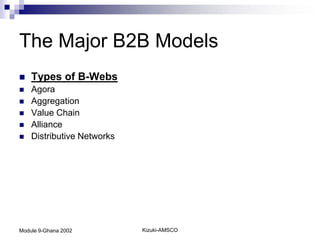
The Major B2B Models
   Types of B-Webs
   Agora
   Aggregation
   Value Chain
   Alliance
   Distributive Networks


Module 9-Ghana 2002         Kizuki-AMSCO
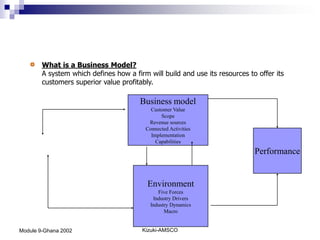
What is a Business Model?
        A system which defines how a firm will build and use its resources to offer its
        customers superior value profitably.

                                        Business model
                                           Customer Value
                                               Scope
                                          Revenue sources
                                         Connected Activities
                                           Implementation
                                             Capabilities
                                                                             Performance


                                          Environment
                                              Five Forces
                                            Industry Drivers
                                           Industry Dynamics
                                                 Macro


Module 9-Ghana 2002                     Kizuki-AMSCO
How do computers talk?
   Accomplished through
    Protocol Stack
   Protocol-a set of rules of
    standards that define certain
    relationships or behaviour.
   A stack-a layer of layers
   Internet uses the TCP/IP
    protocol stack.
   TCP-Transmission control
    Protocol
   IP-Internet Protocol


Module 9-Ghana 2002             Kizuki-AMSCO
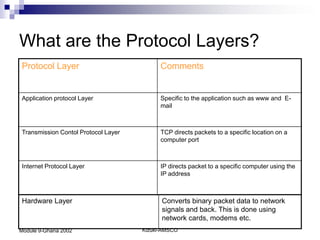
What are the Protocol Layers?
Protocol Layer                             Comments


Application protocol Layer                 Specific to the application such as www and E-
                                           mail


Transmission Contol Protocol Layer         TCP directs packets to a specific location on a
                                           computer port


Internet Protocol Layer                    IP directs packet to a specific computer using the
                                           IP address


Hardware Layer                             Converts binary packet data to network
                                           signals and back. This is done using
                                           network cards, modems etc.
Module 9-Ghana 2002                  Kizuki-AMSCO
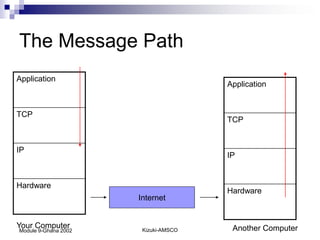
The Message Path
Application
                                      Application


TCP
                                      TCP


IP
                                      IP


Hardware
                                      Hardware
                      Internet


Your Computer          Kizuki-AMSCO    Another Computer
Module 9-Ghana 2002
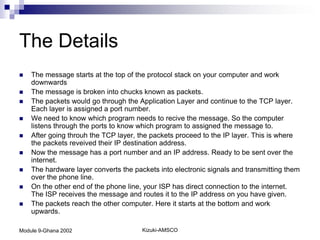
The Details
   The message starts at the top of the protocol stack on your computer and work
    downwards
   The message is broken into chucks known as packets.
   The packets would go through the Application Layer and continue to the TCP layer.
    Each layer is assigned a port number.
   We need to know which program needs to recive the message. So the computer
    listens through the ports to know which program to assigned the message to.
   After going throuh the TCP layer, the packets proceed to the IP layer. This is where
    the packets reveived their IP destination address.
   Now the message has a port number and an IP address. Ready to be sent over the
    internet.
   The hardware layer converts the packets into electronic signals and transmitting them
    over the phone line.
   On the other end of the phone line, your ISP has direct connection to the internet.
    The ISP receives the message and routes it to the IP address on you have given.
   The packets reach the other computer. Here it starts at the bottom and work
    upwards.

Module 9-Ghana 2002                    Kizuki-AMSCO
Understanding E-
                      Business Technology

                      Networking Infrastructure-
                      What actually makes up the
                      internet
Module 9-Ghana 2002       Kizuki-AMSCO
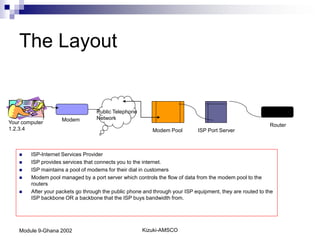
The Layout


                                   Public Telephone
                    Modem          Network
Your computer                                                                                              Router
1.2.3.4                                                   Modem Pool         ISP Port Server


       ISP-Internet Services Provider
       ISP provides services that connects you to the internet.
       ISP maintains a pool of modems for their dial in customers
       Modem pool managed by a port server which controls the flow of data from the modem pool to the
        routers
       After your packets go through the public phone and through your ISP equipment, they are routed to the
        ISP backbone OR a backbone that the ISP buys bandwidth from.


    Module 9-Ghana 2002                               Kizuki-AMSCO
Internet Infrastructure
   The Internet backbone is made up of many large
    networks which interconnet with each other. This
    larger network is known as Network Services
    Providers or NSPs
   Cerfnet, IBM, BBN Planet, SprintNet and PSINet
    are the well known
   Each of these is required to connect to three
    Network Access Points.


Module 9-Ghana 2002    Kizuki-AMSCO
Internet Routing
How does the packets find their way across the internet


   Through a router. A router is usually connected between networks to
    route packets between then.
   Each router knows about its subnetwork and which IP addresses
    they use.
   When a packet arrives at a router, the router examines the IP
    address put thier by the originating computer.
   The router checks its routing table. If the network containing the IP
    address is found, the packet is sent to that network.
   If not found, the router sends the packet to a default route.


Module 9-Ghana 2002             Kizuki-AMSCO
Understanding E-
                      Business Technology

                      Domain Names and Address
                      Resolutions


Module 9-Ghana 2002       Kizuki-AMSCO
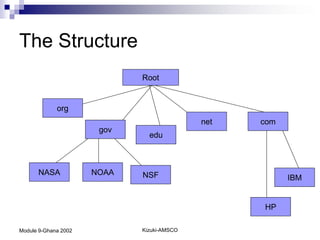
The Structure
                             Root


             org
                                            net   com
                       gov
                               edu


      NASA            NOAA   NSF                        IBM


                                                  HP

Module 9-Ghana 2002          Kizuki-AMSCO
The Important Point
 Domain names reside in a Domain Name
  Server-DNS
 DNS assigns an IP address to your
  domain name.


Module 9-Ghana 2002   Kizuki-AMSCO
Application Protocols
HTTP and WWW

   HTTP-Hyper Text Transfer Protocol. This is the protocol that web browsers
    and web servers use to comunicate with each other over the internet.
   Basically its the protocol used to send requests to web elements such as
    pages and images.
   When you type url into a web browser, the browser firsts connects to a
    domain name server and retrieves the corresponding IP address for the
    web server
   The web browser connects to the web server and sends an http requests to
    the desired web page.
   The web server receives the request and checks for the desired page. If the
    page exists, the server sends it. If the server cannot find it, it will send an
    HTTP 404 error message. (404 means Page not found).
   The web browser recieves the page back and the connection is closed.


Module 9-Ghana 2002                 Kizuki-AMSCO
Application Protocols
SMTP and Electronic Mail

   SMTP-Simple Mail Transfer
    Protocol. This is a text mail
    protocol for e-mail applications.


Module 9-Ghana 2002                     Kizuki-AMSCO
Wrap Up
   This is version 4 and it only allows 232
    addresses.
   Eventually, we will run out of IP
    addresses.
   Version 6 is currently been tested


Module 9-Ghana 2002                      Kizuki-AMSCO
Resources
   http://www.ietf.org is the home page of the
    Internet Engineering Task Force. It has
    responsibility for the development of internet
    protocols.
   http://www.internic.org is the organisation
    responsible for administering domain names
   http://www.internetweather.com shows animated
    maps of internet latency


Module 9-Ghana 2002    Kizuki-AMSCO
Module 9-Ghana 2002   Kizuki-AMSCO

Module9

  • 1.
    Company Centric B2B The B2B Field Module 9-Ghana 2002 Kizuki-AMSCO
  • 2.
    The Major B2BModels  Types of B-Webs  Agora  Aggregation  Value Chain  Alliance  Distributive Networks Module 9-Ghana 2002 Kizuki-AMSCO
  • 3.
    What is aBusiness Model? A system which defines how a firm will build and use its resources to offer its customers superior value profitably. Business model Customer Value Scope Revenue sources Connected Activities Implementation Capabilities Performance Environment Five Forces Industry Drivers Industry Dynamics Macro Module 9-Ghana 2002 Kizuki-AMSCO
  • 4.
    How do computerstalk?  Accomplished through Protocol Stack  Protocol-a set of rules of standards that define certain relationships or behaviour.  A stack-a layer of layers  Internet uses the TCP/IP protocol stack.  TCP-Transmission control Protocol  IP-Internet Protocol Module 9-Ghana 2002 Kizuki-AMSCO
  • 5.
    What are theProtocol Layers? Protocol Layer Comments Application protocol Layer Specific to the application such as www and E- mail Transmission Contol Protocol Layer TCP directs packets to a specific location on a computer port Internet Protocol Layer IP directs packet to a specific computer using the IP address Hardware Layer Converts binary packet data to network signals and back. This is done using network cards, modems etc. Module 9-Ghana 2002 Kizuki-AMSCO
  • 6.
    The Message Path Application Application TCP TCP IP IP Hardware Hardware Internet Your Computer Kizuki-AMSCO Another Computer Module 9-Ghana 2002
  • 7.
    The Details  The message starts at the top of the protocol stack on your computer and work downwards  The message is broken into chucks known as packets.  The packets would go through the Application Layer and continue to the TCP layer. Each layer is assigned a port number.  We need to know which program needs to recive the message. So the computer listens through the ports to know which program to assigned the message to.  After going throuh the TCP layer, the packets proceed to the IP layer. This is where the packets reveived their IP destination address.  Now the message has a port number and an IP address. Ready to be sent over the internet.  The hardware layer converts the packets into electronic signals and transmitting them over the phone line.  On the other end of the phone line, your ISP has direct connection to the internet. The ISP receives the message and routes it to the IP address on you have given.  The packets reach the other computer. Here it starts at the bottom and work upwards. Module 9-Ghana 2002 Kizuki-AMSCO
  • 8.
    Understanding E- Business Technology Networking Infrastructure- What actually makes up the internet Module 9-Ghana 2002 Kizuki-AMSCO
  • 9.
    The Layout Public Telephone Modem Network Your computer Router 1.2.3.4 Modem Pool ISP Port Server  ISP-Internet Services Provider  ISP provides services that connects you to the internet.  ISP maintains a pool of modems for their dial in customers  Modem pool managed by a port server which controls the flow of data from the modem pool to the routers  After your packets go through the public phone and through your ISP equipment, they are routed to the ISP backbone OR a backbone that the ISP buys bandwidth from. Module 9-Ghana 2002 Kizuki-AMSCO
  • 10.
    Internet Infrastructure  The Internet backbone is made up of many large networks which interconnet with each other. This larger network is known as Network Services Providers or NSPs  Cerfnet, IBM, BBN Planet, SprintNet and PSINet are the well known  Each of these is required to connect to three Network Access Points. Module 9-Ghana 2002 Kizuki-AMSCO
  • 11.
    Internet Routing How doesthe packets find their way across the internet  Through a router. A router is usually connected between networks to route packets between then.  Each router knows about its subnetwork and which IP addresses they use.  When a packet arrives at a router, the router examines the IP address put thier by the originating computer.  The router checks its routing table. If the network containing the IP address is found, the packet is sent to that network.  If not found, the router sends the packet to a default route. Module 9-Ghana 2002 Kizuki-AMSCO
  • 12.
    Understanding E- Business Technology Domain Names and Address Resolutions Module 9-Ghana 2002 Kizuki-AMSCO
  • 13.
    The Structure Root org net com gov edu NASA NOAA NSF IBM HP Module 9-Ghana 2002 Kizuki-AMSCO
  • 14.
    The Important Point Domain names reside in a Domain Name Server-DNS  DNS assigns an IP address to your domain name. Module 9-Ghana 2002 Kizuki-AMSCO
  • 15.
    Application Protocols HTTP andWWW  HTTP-Hyper Text Transfer Protocol. This is the protocol that web browsers and web servers use to comunicate with each other over the internet.  Basically its the protocol used to send requests to web elements such as pages and images.  When you type url into a web browser, the browser firsts connects to a domain name server and retrieves the corresponding IP address for the web server  The web browser connects to the web server and sends an http requests to the desired web page.  The web server receives the request and checks for the desired page. If the page exists, the server sends it. If the server cannot find it, it will send an HTTP 404 error message. (404 means Page not found).  The web browser recieves the page back and the connection is closed. Module 9-Ghana 2002 Kizuki-AMSCO
  • 16.
    Application Protocols SMTP andElectronic Mail  SMTP-Simple Mail Transfer Protocol. This is a text mail protocol for e-mail applications. Module 9-Ghana 2002 Kizuki-AMSCO
  • 17.
    Wrap Up  This is version 4 and it only allows 232 addresses.  Eventually, we will run out of IP addresses.  Version 6 is currently been tested Module 9-Ghana 2002 Kizuki-AMSCO
  • 18.
    Resources  http://www.ietf.org is the home page of the Internet Engineering Task Force. It has responsibility for the development of internet protocols.  http://www.internic.org is the organisation responsible for administering domain names  http://www.internetweather.com shows animated maps of internet latency Module 9-Ghana 2002 Kizuki-AMSCO
  • 19.
    Module 9-Ghana 2002 Kizuki-AMSCO