Module 5: Number Systems
Introduction to Networks v7.0
(ITN)
2
© 2016 Cisco and/or its affiliates. All rights reserved. Cisco Confidential
Module Objectives
Module Title: Number Systems
Module Objective: Calculate numbers between decimal, binary, and hexadecimal systems.
Topic Title Topic Objective
Binary Number System Calculate numbers between decimal and binary
systems.
Hexadecimal Number System Calculate numbers between decimal and
hexadecimal systems.
3
© 2016 Cisco and/or its affiliates. All rights reserved. Cisco Confidential
5.1 Binary Number System
4
© 2016 Cisco and/or its affiliates. All rights reserved. Cisco Confidential
Binary Number System
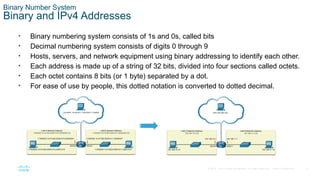
Binary and IPv4 Addresses
• Binary numbering system consists of 1s and 0s, called bits
• Decimal numbering system consists of digits 0 through 9
• Hosts, servers, and network equipment using binary addressing to identify each other.
• Each address is made up of a string of 32 bits, divided into four sections called octets.
• Each octet contains 8 bits (or 1 byte) separated by a dot.
• For ease of use by people, this dotted notation is converted to dotted decimal.
5
© 2016 Cisco and/or its affiliates. All rights reserved. Cisco Confidential
Binary Number System
Binary Positional Notation
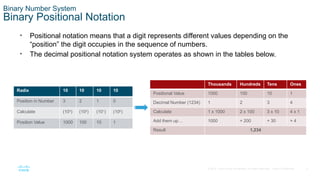
• Positional notation means that a digit represents different values depending on the
“position” the digit occupies in the sequence of numbers.
• The decimal positional notation system operates as shown in the tables below.
Radix 10 10 10 10
Position in Number 3 2 1 0
Calculate (103
) (102
) (101
) (100
)
Position Value 1000 100 10 1
Thousands Hundreds Tens Ones
Positional Value 1000 100 10 1
Decimal Number (1234) 1 2 3 4
Calculate 1 x 1000 2 x 100 3 x 10 4 x 1
Add them up… 1000 + 200 + 30 + 4
Result 1,234
6
© 2016 Cisco and/or its affiliates. All rights reserved. Cisco Confidential
Binary Number System
Binary Positional Notation (Cont.)
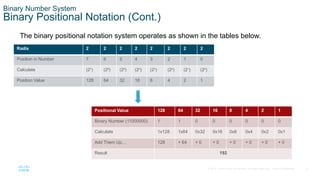
The binary positional notation system operates as shown in the tables below.
Radix 2 2 2 2 2 2 2 2
Position in Number 7 6 5 4 3 2 1 0
Calculate (27
) (26
) (25
) (24
) (23
) (22
) (21
) (20
)
Position Value 128 64 32 16 8 4 2 1
Positional Value 128 64 32 16 8 4 2 1
Binary Number (11000000) 1 1 0 0 0 0 0 0
Calculate 1x128 1x64 0x32 0x16 0x8 0x4 0x2 0x1
Add Them Up… 128 + 64 + 0 + 0 + 0 + 0 + 0 + 0
Result 192
7
© 2016 Cisco and/or its affiliates. All rights reserved. Cisco Confidential
Binary Number System
Convert Binary to Decimal
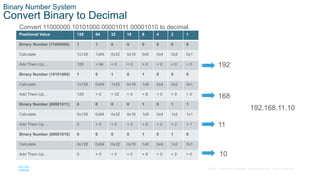
Convert 11000000.10101000.00001011.00001010 to decimal.
Positional Value 128 64 32 16 8 4 2 1
Binary Number (11000000) 1 1 0 0 0 0 0 0
Calculate 1x128 1x64 0x32 0x16 0x8 0x4 0x2 0x1
Add Them Up… 128 + 64 + 0 + 0 + 0 + 0 + 0 + 0
Binary Number (10101000) 1 0 1 0 1 0 0 0
Calculate 1x128 0x64 1x32 0x16 1x8 0x4 0x2 0x1
Add Them Up… 128 + 0 + 32 + 0 + 8 + 0 + 0 + 0
Binary Number (00001011) 0 0 0 0 1 0 1 1
Calculate 0x128 0x64 0x32 0x16 1x8 0x4 1x2 1x1
Add Them Up… 0 + 0 + 0 + 0 + 8 + 0 + 2 + 1
Binary Number (00001010) 0 0 0 0 1 0 1 0
Calculate 0x128 0x64 0x32 0x16 1x8 0x4 1x2 0x1
Add Them Up… 0 + 0 + 0 + 0 + 8 + 0 + 2 + 0
192
168
11
10
192.168.11.10
8
© 2016 Cisco and/or its affiliates. All rights reserved. Cisco Confidential
Binary Number System
Decimal to Binary Conversion
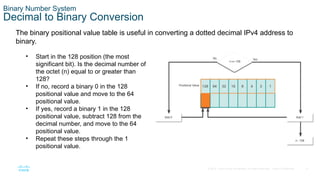
The binary positional value table is useful in converting a dotted decimal IPv4 address to
binary.
• Start in the 128 position (the most
significant bit). Is the decimal number of
the octet (n) equal to or greater than
128?
• If no, record a binary 0 in the 128
positional value and move to the 64
positional value.
• If yes, record a binary 1 in the 128
positional value, subtract 128 from the
decimal number, and move to the 64
positional value.
• Repeat these steps through the 1
positional value.
9
© 2016 Cisco and/or its affiliates. All rights reserved. Cisco Confidential
Binary Number System
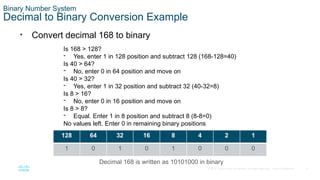
Decimal to Binary Conversion Example
• Convert decimal 168 to binary
Is 168 > 128?
- Yes, enter 1 in 128 position and subtract 128 (168-128=40)
Is 40 > 64?
- No, enter 0 in 64 position and move on
Is 40 > 32?
- Yes, enter 1 in 32 position and subtract 32 (40-32=8)
Is 8 > 16?
- No, enter 0 in 16 position and move on
Is 8 > 8?
- Equal. Enter 1 in 8 position and subtract 8 (8-8=0)
No values left. Enter 0 in remaining binary positions
128 64 32 16 8 4 2 1
1 0 1 0 1 0 0 0
Decimal 168 is written as 10101000 in binary
10
© 2016 Cisco and/or its affiliates. All rights reserved. Cisco Confidential
Binary Number System
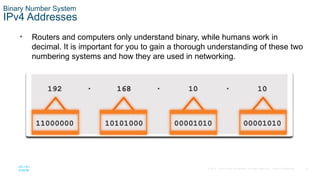
IPv4 Addresses
• Routers and computers only understand binary, while humans work in
decimal. It is important for you to gain a thorough understanding of these two
numbering systems and how they are used in networking.
11
© 2016 Cisco and/or its affiliates. All rights reserved. Cisco Confidential
5.2 Hexadecimal Number
System
12
© 2016 Cisco and/or its affiliates. All rights reserved. Cisco Confidential
Hexadecimal Number System
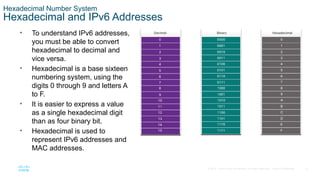
Hexadecimal and IPv6 Addresses
• To understand IPv6 addresses,
you must be able to convert
hexadecimal to decimal and
vice versa.
• Hexadecimal is a base sixteen
numbering system, using the
digits 0 through 9 and letters A
to F.
• It is easier to express a value
as a single hexadecimal digit
than as four binary bit.
• Hexadecimal is used to
represent IPv6 addresses and
MAC addresses.
13
© 2016 Cisco and/or its affiliates. All rights reserved. Cisco Confidential
Hexadecimal Number System
Hexadecimal and IPv6 Addresses (Cont.)
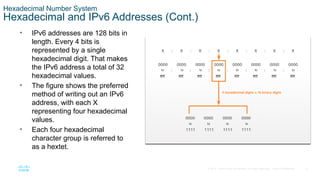
• IPv6 addresses are 128 bits in
length. Every 4 bits is
represented by a single
hexadecimal digit. That makes
the IPv6 address a total of 32
hexadecimal values.
• The figure shows the preferred
method of writing out an IPv6
address, with each X
representing four hexadecimal
values.
• Each four hexadecimal
character group is referred to
as a hextet.
14
© 2016 Cisco and/or its affiliates. All rights reserved. Cisco Confidential
Hexadecimal Number System
Decimal to Hexadecimal Conversions
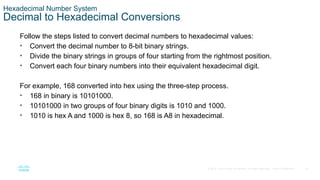
Follow the steps listed to convert decimal numbers to hexadecimal values:
• Convert the decimal number to 8-bit binary strings.
• Divide the binary strings in groups of four starting from the rightmost position.
• Convert each four binary numbers into their equivalent hexadecimal digit.
For example, 168 converted into hex using the three-step process.
• 168 in binary is 10101000.
• 10101000 in two groups of four binary digits is 1010 and 1000.
• 1010 is hex A and 1000 is hex 8, so 168 is A8 in hexadecimal.
15
© 2016 Cisco and/or its affiliates. All rights reserved. Cisco Confidential
Hexadecimal Number System
Hexadecimal to Decimal Conversions
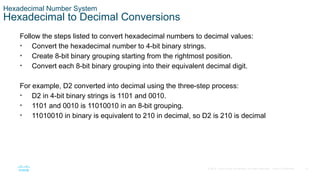
Follow the steps listed to convert hexadecimal numbers to decimal values:
• Convert the hexadecimal number to 4-bit binary strings.
• Create 8-bit binary grouping starting from the rightmost position.
• Convert each 8-bit binary grouping into their equivalent decimal digit.
For example, D2 converted into decimal using the three-step process:
• D2 in 4-bit binary strings is 1101 and 0010.
• 1101 and 0010 is 11010010 in an 8-bit grouping.
• 11010010 in binary is equivalent to 210 in decimal, so D2 is 210 is decimal
16
© 2016 Cisco and/or its affiliates. All rights reserved. Cisco Confidential
5.3 Module Practice and Quiz
17
© 2016 Cisco and/or its affiliates. All rights reserved. Cisco Confidential
Module Practice and Quiz
What did I learn in this module?
• Binary is a base two numbering system that consists of the numbers 0 and 1, called bits.
• Decimal is a base ten numbering system that consists of the numbers 0 through 9.
• Binary is what hosts, servers, and networking equipment uses to identify each other.
• Hexadecimal is a base sixteen numbering system that consists of the numbers 0 through 9 and the
letters A to F.
• Hexadecimal is used to represent IPv6 addresses and MAC addresses.
• IPv6 addresses are 128 bits long, and every 4 bits is represented by a hexadecimal digit for a total
of 32 hexadecimal digits.
• To convert hexadecimal to decimal, you must first convert the hexadecimal to binary, then convert
the binary to decimal.
• To convert decimal to hexadecimal, you must first convert the decimal to binary and then the binary
to hexadecimal.
CCNA 1-3 ITN_Module_5_Number Systems.pptx

CCNA 1-3 ITN_Module_5_Number Systems.pptx

  • 1.
    Module 5: NumberSystems Introduction to Networks v7.0 (ITN)
  • 2.
    2 © 2016 Ciscoand/or its affiliates. All rights reserved. Cisco Confidential Module Objectives Module Title: Number Systems Module Objective: Calculate numbers between decimal, binary, and hexadecimal systems. Topic Title Topic Objective Binary Number System Calculate numbers between decimal and binary systems. Hexadecimal Number System Calculate numbers between decimal and hexadecimal systems.
  • 3.
    3 © 2016 Ciscoand/or its affiliates. All rights reserved. Cisco Confidential 5.1 Binary Number System
  • 4.
    4 © 2016 Ciscoand/or its affiliates. All rights reserved. Cisco Confidential Binary Number System Binary and IPv4 Addresses • Binary numbering system consists of 1s and 0s, called bits • Decimal numbering system consists of digits 0 through 9 • Hosts, servers, and network equipment using binary addressing to identify each other. • Each address is made up of a string of 32 bits, divided into four sections called octets. • Each octet contains 8 bits (or 1 byte) separated by a dot. • For ease of use by people, this dotted notation is converted to dotted decimal.
  • 5.
    5 © 2016 Ciscoand/or its affiliates. All rights reserved. Cisco Confidential Binary Number System Binary Positional Notation • Positional notation means that a digit represents different values depending on the “position” the digit occupies in the sequence of numbers. • The decimal positional notation system operates as shown in the tables below. Radix 10 10 10 10 Position in Number 3 2 1 0 Calculate (103 ) (102 ) (101 ) (100 ) Position Value 1000 100 10 1 Thousands Hundreds Tens Ones Positional Value 1000 100 10 1 Decimal Number (1234) 1 2 3 4 Calculate 1 x 1000 2 x 100 3 x 10 4 x 1 Add them up… 1000 + 200 + 30 + 4 Result 1,234
  • 6.
    6 © 2016 Ciscoand/or its affiliates. All rights reserved. Cisco Confidential Binary Number System Binary Positional Notation (Cont.) The binary positional notation system operates as shown in the tables below. Radix 2 2 2 2 2 2 2 2 Position in Number 7 6 5 4 3 2 1 0 Calculate (27 ) (26 ) (25 ) (24 ) (23 ) (22 ) (21 ) (20 ) Position Value 128 64 32 16 8 4 2 1 Positional Value 128 64 32 16 8 4 2 1 Binary Number (11000000) 1 1 0 0 0 0 0 0 Calculate 1x128 1x64 0x32 0x16 0x8 0x4 0x2 0x1 Add Them Up… 128 + 64 + 0 + 0 + 0 + 0 + 0 + 0 Result 192
  • 7.
    7 © 2016 Ciscoand/or its affiliates. All rights reserved. Cisco Confidential Binary Number System Convert Binary to Decimal Convert 11000000.10101000.00001011.00001010 to decimal. Positional Value 128 64 32 16 8 4 2 1 Binary Number (11000000) 1 1 0 0 0 0 0 0 Calculate 1x128 1x64 0x32 0x16 0x8 0x4 0x2 0x1 Add Them Up… 128 + 64 + 0 + 0 + 0 + 0 + 0 + 0 Binary Number (10101000) 1 0 1 0 1 0 0 0 Calculate 1x128 0x64 1x32 0x16 1x8 0x4 0x2 0x1 Add Them Up… 128 + 0 + 32 + 0 + 8 + 0 + 0 + 0 Binary Number (00001011) 0 0 0 0 1 0 1 1 Calculate 0x128 0x64 0x32 0x16 1x8 0x4 1x2 1x1 Add Them Up… 0 + 0 + 0 + 0 + 8 + 0 + 2 + 1 Binary Number (00001010) 0 0 0 0 1 0 1 0 Calculate 0x128 0x64 0x32 0x16 1x8 0x4 1x2 0x1 Add Them Up… 0 + 0 + 0 + 0 + 8 + 0 + 2 + 0 192 168 11 10 192.168.11.10
  • 8.
    8 © 2016 Ciscoand/or its affiliates. All rights reserved. Cisco Confidential Binary Number System Decimal to Binary Conversion The binary positional value table is useful in converting a dotted decimal IPv4 address to binary. • Start in the 128 position (the most significant bit). Is the decimal number of the octet (n) equal to or greater than 128? • If no, record a binary 0 in the 128 positional value and move to the 64 positional value. • If yes, record a binary 1 in the 128 positional value, subtract 128 from the decimal number, and move to the 64 positional value. • Repeat these steps through the 1 positional value.
  • 9.
    9 © 2016 Ciscoand/or its affiliates. All rights reserved. Cisco Confidential Binary Number System Decimal to Binary Conversion Example • Convert decimal 168 to binary Is 168 > 128? - Yes, enter 1 in 128 position and subtract 128 (168-128=40) Is 40 > 64? - No, enter 0 in 64 position and move on Is 40 > 32? - Yes, enter 1 in 32 position and subtract 32 (40-32=8) Is 8 > 16? - No, enter 0 in 16 position and move on Is 8 > 8? - Equal. Enter 1 in 8 position and subtract 8 (8-8=0) No values left. Enter 0 in remaining binary positions 128 64 32 16 8 4 2 1 1 0 1 0 1 0 0 0 Decimal 168 is written as 10101000 in binary
  • 10.
    10 © 2016 Ciscoand/or its affiliates. All rights reserved. Cisco Confidential Binary Number System IPv4 Addresses • Routers and computers only understand binary, while humans work in decimal. It is important for you to gain a thorough understanding of these two numbering systems and how they are used in networking.
  • 11.
    11 © 2016 Ciscoand/or its affiliates. All rights reserved. Cisco Confidential 5.2 Hexadecimal Number System
  • 12.
    12 © 2016 Ciscoand/or its affiliates. All rights reserved. Cisco Confidential Hexadecimal Number System Hexadecimal and IPv6 Addresses • To understand IPv6 addresses, you must be able to convert hexadecimal to decimal and vice versa. • Hexadecimal is a base sixteen numbering system, using the digits 0 through 9 and letters A to F. • It is easier to express a value as a single hexadecimal digit than as four binary bit. • Hexadecimal is used to represent IPv6 addresses and MAC addresses.
  • 13.
    13 © 2016 Ciscoand/or its affiliates. All rights reserved. Cisco Confidential Hexadecimal Number System Hexadecimal and IPv6 Addresses (Cont.) • IPv6 addresses are 128 bits in length. Every 4 bits is represented by a single hexadecimal digit. That makes the IPv6 address a total of 32 hexadecimal values. • The figure shows the preferred method of writing out an IPv6 address, with each X representing four hexadecimal values. • Each four hexadecimal character group is referred to as a hextet.
  • 14.
    14 © 2016 Ciscoand/or its affiliates. All rights reserved. Cisco Confidential Hexadecimal Number System Decimal to Hexadecimal Conversions Follow the steps listed to convert decimal numbers to hexadecimal values: • Convert the decimal number to 8-bit binary strings. • Divide the binary strings in groups of four starting from the rightmost position. • Convert each four binary numbers into their equivalent hexadecimal digit. For example, 168 converted into hex using the three-step process. • 168 in binary is 10101000. • 10101000 in two groups of four binary digits is 1010 and 1000. • 1010 is hex A and 1000 is hex 8, so 168 is A8 in hexadecimal.
  • 15.
    15 © 2016 Ciscoand/or its affiliates. All rights reserved. Cisco Confidential Hexadecimal Number System Hexadecimal to Decimal Conversions Follow the steps listed to convert hexadecimal numbers to decimal values: • Convert the hexadecimal number to 4-bit binary strings. • Create 8-bit binary grouping starting from the rightmost position. • Convert each 8-bit binary grouping into their equivalent decimal digit. For example, D2 converted into decimal using the three-step process: • D2 in 4-bit binary strings is 1101 and 0010. • 1101 and 0010 is 11010010 in an 8-bit grouping. • 11010010 in binary is equivalent to 210 in decimal, so D2 is 210 is decimal
  • 16.
    16 © 2016 Ciscoand/or its affiliates. All rights reserved. Cisco Confidential 5.3 Module Practice and Quiz
  • 17.
    17 © 2016 Ciscoand/or its affiliates. All rights reserved. Cisco Confidential Module Practice and Quiz What did I learn in this module? • Binary is a base two numbering system that consists of the numbers 0 and 1, called bits. • Decimal is a base ten numbering system that consists of the numbers 0 through 9. • Binary is what hosts, servers, and networking equipment uses to identify each other. • Hexadecimal is a base sixteen numbering system that consists of the numbers 0 through 9 and the letters A to F. • Hexadecimal is used to represent IPv6 addresses and MAC addresses. • IPv6 addresses are 128 bits long, and every 4 bits is represented by a hexadecimal digit for a total of 32 hexadecimal digits. • To convert hexadecimal to decimal, you must first convert the hexadecimal to binary, then convert the binary to decimal. • To convert decimal to hexadecimal, you must first convert the decimal to binary and then the binary to hexadecimal.

Editor's Notes

  • #1 Cisco Networking Academy Program Introduction to Networks v7.0 (ITN) Module 5: Number Systems
  • #2 5.0- Introduction 5.0.2 – What will I learn in this module?
  • #3 5 -Number Systems 5.1 Binary Number System
  • #4 5 – Number Systems 5.1 – Binary Number Systems 5.1.1 – Binary and IPv4 Addresses
  • #5 5 – Number Systems 5.1 – Binary Number Systems 5.1.3 – Binary Positional Notation
  • #6 5 – Number Systems 5.1 – Binary Number Systems 5.1.3 – Binary Positional Notation 5.1.4 – Check Your Understanding – Binary Number System
  • #7 5 – Number Systems 5.1 – Binary Number Systems 5.1.5 - Convert Binary to Decimal 5.1.6 – Activity – Binary to Decimal Conversions
  • #8 5 – Number Systems 5.1 – Binary Number Systems 5.1.7 – Decimal to Binary Conversion
  • #9 5 – Number Systems 5.1 – Binary Number Systems 5.1.8 – Decimal to Binary Conversion Example 5.1.9 - Activity – Decimal to Binary Conversions 5.1.10 – Activity – Binary Game
  • #10 5 – Number Systems 5.1 – Binary Number Systems 5.1.11 – IPv4 Addresses
  • #11 5- Number Systems 5.2 - Hexadecimal Number System
  • #12 5 – Number Systems 5.2 – Hexadecimal Number Systems 5.2.1– Hexadecimal and IPv6 Addresses
  • #13 5 – Number Systems 5.2 – Hexadecimal Number Systems 5.2.1– Hexadecimal and IPv6 Addresses
  • #14 5 – Number Systems 5.2 – Hexadecimal Number Systems 5.2.3 – Decimal to Hexadecimal Conversions
  • #15 5 – Number Systems 5.2 – Hexadecimal Number Systems 5.2.4 - Hexadecimal to Decimal Conversions 5.2.5 – Check Your Understanding – Hexadecimal Number System
  • #16 5 - Number Systems 5.3 Module Practice and Quiz
  • #17 5 – Number Systems 5.3 - Module Practice and Quiz 5.3.1 – What Did I Learn In This Module? 5.3.2 – Module Quiz