EVOLUTION
C, C++, Java and
World Wide Web
Contents
• C, C++ and Java
• How Java is differ from C programming
• How Java is differ from C++ programming
• Java and Internet
• Java and World Wide Web
• Supported system, Hardware and Software
Requirements
• Java Environment
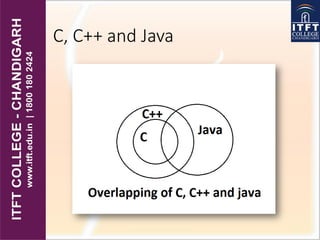
C, C++ and Java
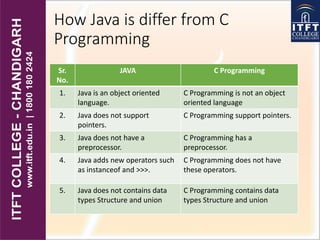
How Java is differ from C
Programming
Sr.
No.
JAVA C Programming
1. Java is an object oriented
language.
C Programming is not an object
oriented language
2. Java does not support
pointers.
C Programming support pointers.
3. Java does not have a
preprocessor.
C Programming has a
preprocessor.
4. Java adds new operators such
as instanceof and >>>.
C Programming does not have
these operators.
5. Java does not contains data
types Structure and union
C Programming contains data
types Structure and union
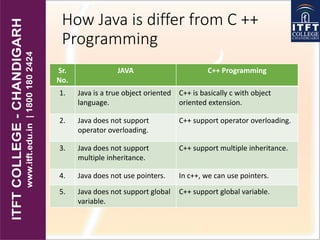
How Java is differ from C ++
Programming
Sr.
No.
JAVA C++ Programming
1. Java is a true object oriented
language.
C++ is basically c with object
oriented extension.
2. Java does not support
operator overloading.
C++ support operator overloading.
3. Java does not support
multiple inheritance.
C++ support multiple inheritance.
4. Java does not use pointers. In c++, we can use pointers.
5. Java does not support global
variable.
C++ support global variable.
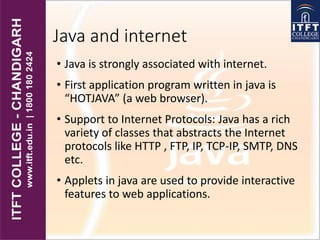
Java and internet
• Java is strongly associated with internet.
• First application program written in java is
“HOTJAVA” (a web browser).
• Support to Internet Protocols: Java has a rich
variety of classes that abstracts the Internet
protocols like HTTP , FTP, IP, TCP-IP, SMTP, DNS
etc.
• Applets in java are used to provide interactive
features to web applications.
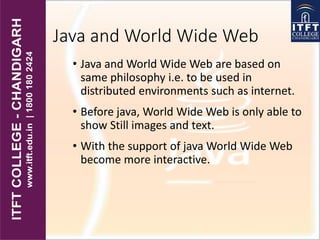
Java and World Wide Web
• Java and World Wide Web are based on
same philosophy i.e. to be used in
distributed environments such as internet.
• Before java, World Wide Web is only able to
show Still images and text.
• With the support of java World Wide Web
become more interactive.
Web Browsers
• Web Browser are used to navigate through the
information found in the internet.
• They allow us to retrieve information from the
internet.
• Examples of web browsers are:-
• Hot java, Netscape Navigator, internet Explorer.
Supported Systems, Hardware
and Software Requirements
• Java is currently supported on following
machines:-
• Windows, Linux, Mac OS X
• The minimum hardware & software
requirements for Windows XP SP1+ on Java:-
• RAM: 128 MB, 64 MB for Windows XP (32-bit)
• Disk space: 1GB
• Browsers: Internet Explorer 7.0 and above,
Firefox 3.6 and above, Chrome.
Java Environment
• Java Environment includes a large number of
development tools, hundreds of classes and
methods.
• Development tools are the part of system known as
JAVA DELOPMENT KIT(JDK).
• Methods and classes are the part of JAVA
STANDARD LIBRARY(JSL) or API.
ITFT- C,c++,java and world wide web

ITFT- C,c++,java and world wide web

  • 1.
    EVOLUTION C, C++, Javaand World Wide Web
  • 2.
    Contents • C, C++and Java • How Java is differ from C programming • How Java is differ from C++ programming • Java and Internet • Java and World Wide Web • Supported system, Hardware and Software Requirements • Java Environment
  • 3.
  • 4.
    How Java isdiffer from C Programming Sr. No. JAVA C Programming 1. Java is an object oriented language. C Programming is not an object oriented language 2. Java does not support pointers. C Programming support pointers. 3. Java does not have a preprocessor. C Programming has a preprocessor. 4. Java adds new operators such as instanceof and >>>. C Programming does not have these operators. 5. Java does not contains data types Structure and union C Programming contains data types Structure and union
  • 5.
    How Java isdiffer from C ++ Programming Sr. No. JAVA C++ Programming 1. Java is a true object oriented language. C++ is basically c with object oriented extension. 2. Java does not support operator overloading. C++ support operator overloading. 3. Java does not support multiple inheritance. C++ support multiple inheritance. 4. Java does not use pointers. In c++, we can use pointers. 5. Java does not support global variable. C++ support global variable.
  • 6.
    Java and internet •Java is strongly associated with internet. • First application program written in java is “HOTJAVA” (a web browser). • Support to Internet Protocols: Java has a rich variety of classes that abstracts the Internet protocols like HTTP , FTP, IP, TCP-IP, SMTP, DNS etc. • Applets in java are used to provide interactive features to web applications.
  • 7.
    Java and WorldWide Web • Java and World Wide Web are based on same philosophy i.e. to be used in distributed environments such as internet. • Before java, World Wide Web is only able to show Still images and text. • With the support of java World Wide Web become more interactive.
  • 8.
    Web Browsers • WebBrowser are used to navigate through the information found in the internet. • They allow us to retrieve information from the internet. • Examples of web browsers are:- • Hot java, Netscape Navigator, internet Explorer.
  • 9.
    Supported Systems, Hardware andSoftware Requirements • Java is currently supported on following machines:- • Windows, Linux, Mac OS X • The minimum hardware & software requirements for Windows XP SP1+ on Java:- • RAM: 128 MB, 64 MB for Windows XP (32-bit) • Disk space: 1GB • Browsers: Internet Explorer 7.0 and above, Firefox 3.6 and above, Chrome.
  • 10.
    Java Environment • JavaEnvironment includes a large number of development tools, hundreds of classes and methods. • Development tools are the part of system known as JAVA DELOPMENT KIT(JDK). • Methods and classes are the part of JAVA STANDARD LIBRARY(JSL) or API.