1
2
Software Testing
Cause Effect Graphing Technique
▪ Consider single input conditions
Steps
▪ do not explore combinations of input circumstances
1. Causes & effects in the specifications are identified.
A cause is a distinct input condition or an equivalence class of input conditions.
An effect is an output condition or a system transformation.
2. The semantic content of the specification is analyzed and transformed into a
Boolean graph linking the causes & effects.
3. Constraints are imposed
4. graph – limited entry decision table
Each column in the table represent a test case.
5. The columns in the decision table are converted into test cases.
3
Software Testing
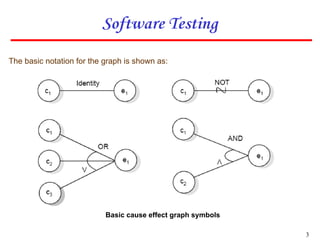
The basic notation for the graph is shown as:
Basic cause effect graph symbols
4
Software Testing
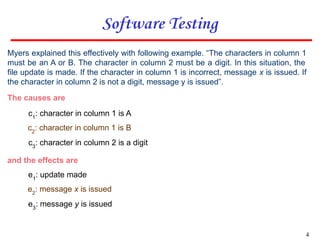
Myers explained this effectively with following example. “The characters in column 1
must be an A or B. The character in column 2 must be a digit. In this situation, the
file update is made. If the character in column 1 is incorrect, message x is issued. If
the character in column 2 is not a digit, message y is issued”.
The causes are
c1
: character in column 1 is A
c2
: character in column 1 is B
c3
: character in column 2 is a digit
and the effects are
e1
: update made
e2
: message x is issued
e3
: message y is issued
5
Software Testing
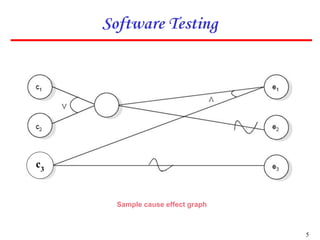
Sample cause effect graph
c3
6
Software Testing
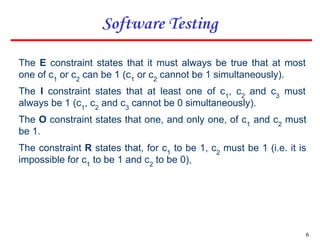
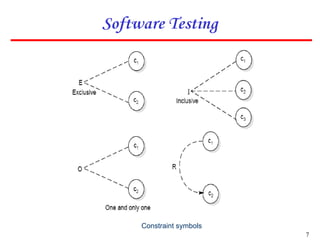
The E constraint states that it must always be true that at most
one of c1
or c2
can be 1 (c1
or c2
cannot be 1 simultaneously).
The I constraint states that at least one of c1
, c2
and c3
must
always be 1 (c1
, c2
and c3
cannot be 0 simultaneously).
The O constraint states that one, and only one, of c1
and c2
must
be 1.
The constraint R states that, for c1
to be 1, c2
must be 1 (i.e. it is
impossible for c1
to be 1 and c2
to be 0),
7
Software Testing
Constraint symbols
8
Software Testing
Symbol for masks constraint
If e1 is 1 the e2 forced to 0.
9
Software Testing
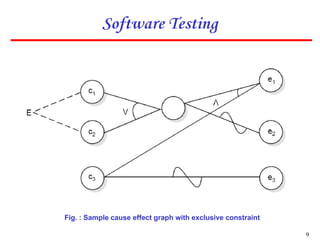
Fig. : Sample cause effect graph with exclusive constraint
10
Software Testing
Example
Consider a simple program to classify a triangle. Its inputs is a triple of
positive integers (say x, y, z) and the data type for input parameters ensures
that these will be integers greater than 0 and less than or equal to 100. The
program output may be one of the following words:
[Scalene; Isosceles; Equilateral; Not a triangle]
Draw the Cause effect graph and identify the test cases.
11
Software Testing
Solution
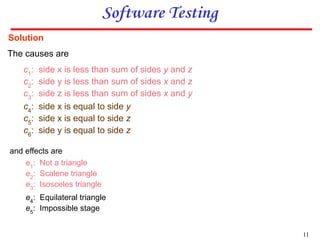
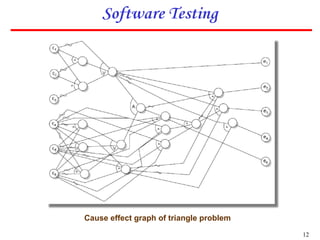
The causes are
and effects are
c1
: side x is less than sum of sides y and z
c2
: side y is less than sum of sides x and z
c3
: side z is less than sum of sides x and y
c4
: side x is equal to side y
c5
: side x is equal to side z
c6
: side y is equal to side z
e1
: Not a triangle
e2
: Scalene triangle
e3
: Isosceles triangle
e4
: Equilateral triangle
e5
: Impossible stage
12
Software Testing
Cause effect graph of triangle problem
13
Software Testing
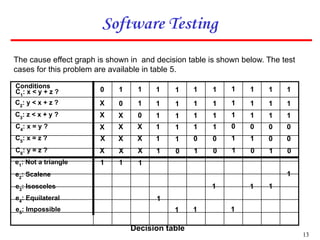
Conditions
C1
: x < y + z ? 1 1
X
1 1
X
1
X
1
X
1 1
1
1
X
1
0
1 1 1 1 1 1 1 1
1
0
0 1 1 1 1 1 1 1
1
X
X 1 1 1 1 0 0 0
0
X
X 1 1 0 0 1 1 0
0
X
X 1 0 1 0 1 0 0
1
X
1
1
1 1
1
1
1
1
1
1
C2
: y < x + z ?
C3
: z < x + y ?
C4
: x = y ?
C5
: x = z ?
C6
: y = z ?
e1
: Not a triangle
e2
: Scalene
e3
: Isosceles
e4
: Equilateral
e5
: Impossible
Decision table
The cause effect graph is shown in and decision table is shown below. The test
cases for this problem are available in table 5.

Cause effect graphing.ppt

  • 1.
  • 2.
    2 Software Testing Cause EffectGraphing Technique ▪ Consider single input conditions Steps ▪ do not explore combinations of input circumstances 1. Causes & effects in the specifications are identified. A cause is a distinct input condition or an equivalence class of input conditions. An effect is an output condition or a system transformation. 2. The semantic content of the specification is analyzed and transformed into a Boolean graph linking the causes & effects. 3. Constraints are imposed 4. graph – limited entry decision table Each column in the table represent a test case. 5. The columns in the decision table are converted into test cases.
  • 3.
    3 Software Testing The basicnotation for the graph is shown as: Basic cause effect graph symbols
  • 4.
    4 Software Testing Myers explainedthis effectively with following example. “The characters in column 1 must be an A or B. The character in column 2 must be a digit. In this situation, the file update is made. If the character in column 1 is incorrect, message x is issued. If the character in column 2 is not a digit, message y is issued”. The causes are c1 : character in column 1 is A c2 : character in column 1 is B c3 : character in column 2 is a digit and the effects are e1 : update made e2 : message x is issued e3 : message y is issued
  • 5.
  • 6.
    6 Software Testing The Econstraint states that it must always be true that at most one of c1 or c2 can be 1 (c1 or c2 cannot be 1 simultaneously). The I constraint states that at least one of c1 , c2 and c3 must always be 1 (c1 , c2 and c3 cannot be 0 simultaneously). The O constraint states that one, and only one, of c1 and c2 must be 1. The constraint R states that, for c1 to be 1, c2 must be 1 (i.e. it is impossible for c1 to be 1 and c2 to be 0),
  • 7.
  • 8.
    8 Software Testing Symbol formasks constraint If e1 is 1 the e2 forced to 0.
  • 9.
    9 Software Testing Fig. :Sample cause effect graph with exclusive constraint
  • 10.
    10 Software Testing Example Consider asimple program to classify a triangle. Its inputs is a triple of positive integers (say x, y, z) and the data type for input parameters ensures that these will be integers greater than 0 and less than or equal to 100. The program output may be one of the following words: [Scalene; Isosceles; Equilateral; Not a triangle] Draw the Cause effect graph and identify the test cases.
  • 11.
    11 Software Testing Solution The causesare and effects are c1 : side x is less than sum of sides y and z c2 : side y is less than sum of sides x and z c3 : side z is less than sum of sides x and y c4 : side x is equal to side y c5 : side x is equal to side z c6 : side y is equal to side z e1 : Not a triangle e2 : Scalene triangle e3 : Isosceles triangle e4 : Equilateral triangle e5 : Impossible stage
  • 12.
    12 Software Testing Cause effectgraph of triangle problem
  • 13.
    13 Software Testing Conditions C1 : x< y + z ? 1 1 X 1 1 X 1 X 1 X 1 1 1 1 X 1 0 1 1 1 1 1 1 1 1 1 0 0 1 1 1 1 1 1 1 1 X X 1 1 1 1 0 0 0 0 X X 1 1 0 0 1 1 0 0 X X 1 0 1 0 1 0 0 1 X 1 1 1 1 1 1 1 1 1 1 C2 : y < x + z ? C3 : z < x + y ? C4 : x = y ? C5 : x = z ? C6 : y = z ? e1 : Not a triangle e2 : Scalene e3 : Isosceles e4 : Equilateral e5 : Impossible Decision table The cause effect graph is shown in and decision table is shown below. The test cases for this problem are available in table 5.