Presentation on CATIA
Submitted By :-
Ankit raj
ME/20/15
Introduction to CATIA
 CATIA is also known as computer aided three diamensional Interactive application. CATIA was
started in 1977 by Frenc Aircraft Manufacturer Avions Marcel Dassault System .
 It is also used in aerospace, automotive, shipbuilding, and Other industries.
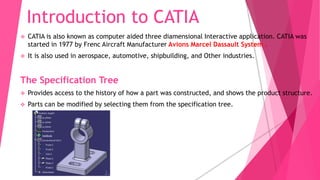
The Specification Tree
 Provides access to the history of how a part was constructed, and shows the product structure.
 Parts can be modified by selecting them from the specification tree.
CATIA Modules
 Sketcher
 Part Design
 Wireframe and Surface Design
 Assembly
 Drafting
SKETCHER
1. Profile Toolbar 2. Operations Toolbar
3. Constraint Toolbar
Part Design
 The part design application is used to create solid models of part.
 Solid part are usually created from 2D profiles that are extruded or resolved to
form a base feature.
Toolbars in Part Design
1. Sketch-Based Features 2. Dress-Up Features 3. Transformation Features
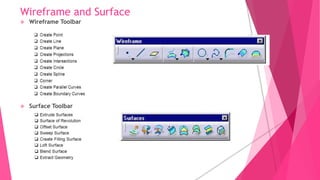
Wireframe and Surface
 Wireframe Toolbar
 Surface Toolbar
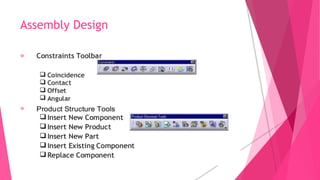
Assembly Design
 The Assembly Design application allows you to create a product model
from a number of separate parts.
 The parts in a product assembly are not joined together, but
assembled as they would be in a physical assembly.
 The product assembly structure is hierarchical and allows you to
model complex product relationships.
 Constrains can be applied between the parts in assembly to
define relationships between them.
Assembly Design


Drafting
 The drafting course teaches the essentials of the CATIA drafting
workbench.
 You'll learn how to create drawings and views, and add dimensions and
annotations.
 You'll also study geometry creation and modifications, as well as
dress-ups, borders, balloons, and customizations.
Sketch Part
Drafting
Bowl
Screw Nut
Assembly
DESIGNING A MOTOR BLOWER USING CATIA V5
Upper housing Lower housing
Shaft
Blower Motor
Cover
Assembly
Drafting

catia presentation.pptx

  • 1.
    Presentation on CATIA SubmittedBy :- Ankit raj ME/20/15
  • 2.
    Introduction to CATIA CATIA is also known as computer aided three diamensional Interactive application. CATIA was started in 1977 by Frenc Aircraft Manufacturer Avions Marcel Dassault System .  It is also used in aerospace, automotive, shipbuilding, and Other industries. The Specification Tree  Provides access to the history of how a part was constructed, and shows the product structure.  Parts can be modified by selecting them from the specification tree.
  • 3.
    CATIA Modules  Sketcher Part Design  Wireframe and Surface Design  Assembly  Drafting
  • 4.
    SKETCHER 1. Profile Toolbar2. Operations Toolbar 3. Constraint Toolbar
  • 5.
    Part Design  Thepart design application is used to create solid models of part.  Solid part are usually created from 2D profiles that are extruded or resolved to form a base feature. Toolbars in Part Design 1. Sketch-Based Features 2. Dress-Up Features 3. Transformation Features
  • 6.
    Wireframe and Surface Wireframe Toolbar  Surface Toolbar
  • 7.
    Assembly Design  TheAssembly Design application allows you to create a product model from a number of separate parts.  The parts in a product assembly are not joined together, but assembled as they would be in a physical assembly.  The product assembly structure is hierarchical and allows you to model complex product relationships.  Constrains can be applied between the parts in assembly to define relationships between them.
  • 8.
  • 9.
    Drafting  The draftingcourse teaches the essentials of the CATIA drafting workbench.  You'll learn how to create drawings and views, and add dimensions and annotations.  You'll also study geometry creation and modifications, as well as dress-ups, borders, balloons, and customizations.
  • 10.
  • 11.
  • 12.
    DESIGNING A MOTORBLOWER USING CATIA V5 Upper housing Lower housing Shaft
  • 13.
  • 14.
  • 15.