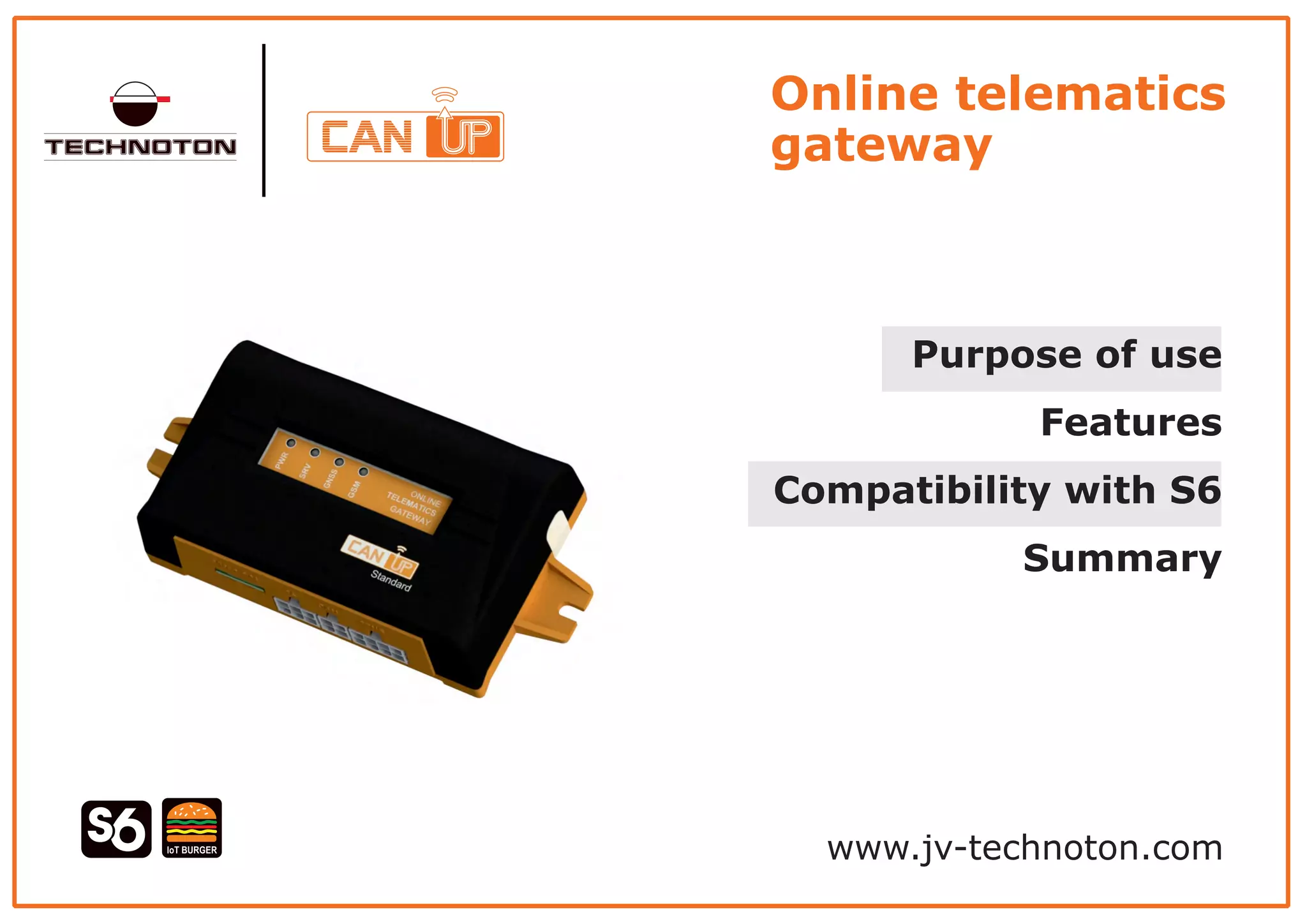
Online telematics
gateway
Purpose of use
Features
Compatibility with S6
Summary
www.jv-technoton.com
Online telematics gateway
EDC ABSADM ECAS SCR Dashboard
TCAN
MCAN
I CAN
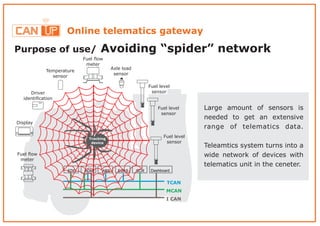
Purpose of use/ Avoiding “spider” network
Tracking
device
Fuel flow
meter
Axle load
sensor
Fuel level
sensor
Fuel level
sensor
Fuel level
sensor
Temperature
sensor
Driver
identification
Display
Fuel flow
meter
Large amount of sensors is
needed to get an extensive
range of telematics data.
Teleamtics system turns into a
wide network of devices with
telematics unit in the ceneter.
Online telematics gateway
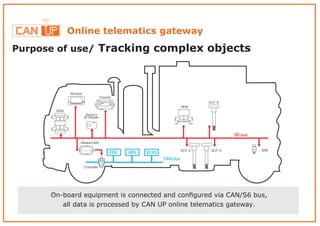
Purpose of use/ Tracking complex objects
On-board equipment is connected and configured via CAN/S6 bus,
all data is processed by CAN UP online telematics gateway.
Online telematics gateway
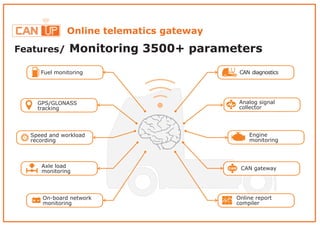
Features/ Monitoring 3500+ parameters
On-board network
monitoring
Online report
compiler
Fuel monitoring
Analog signal
collector
CAN gatewayAxle load
monitoring
CAN diagnostics
GPS/GLONASS
tracking
Speed and workload
recording
Engine
monitoring
Online telematics gateway
Features/ “On-board” data processing
IoT BURGER
IoT Burger technology ensures maximal processing of telematics data “on board”
of vehicle, what gives the following advantages:
< Flexible Reporting System - provides necessary data just in time when vehicle
operation parameters are changing
Reduces load on communication channels and telematics server<
Allows prompt reporting on important Events: trip start, fuel refill, speeding, etc.<
Online telematics gateway
Features/ Geolocation of objects
< real-time vehicle location;
vehicle route, stopping places;<
movement direction and speed.<
Features/ Sending Reports
Online telematics gateway
CAN UP 27
E-mails to 3 addresses SMS to 3 phone numbers To telematics server
and and
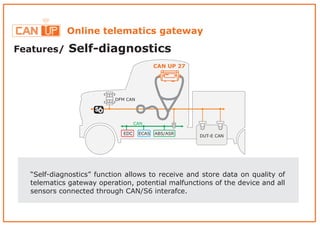
Features/ Self-diagnostics
“Self-diagnostics” function allows to receive and store data on quality of
telematics gateway operation, potential malfunctions of the device and all
sensors connected through CAN/S6 interafce.
EDC
DFM CAN
ECAS ABS/ASR
CAN
DUT-E CAN
CAN UP 27
Online telematics gateway
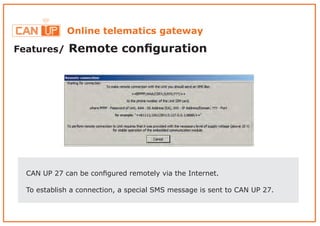
Features/ Remote configuration
Online telematics gateway
CAN UP 27 can be configured remotely via the Internet.
To establish a connection, a special SMS message is sent to CAN UP 27.
Online telematics gateway
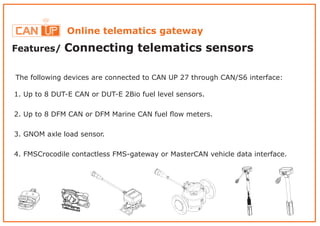
Features/ Connecting telematics sensors
The following devices are connected to CAN UP 27 through CAN/S6 interface:
1. Up to 8 DUT-E CAN or DUT-E 2Bio fuel level sensors.
2. Up to 8 DFM CAN or DFM Marine CAN fuel flow meters.
3. GNOM axle load sensor.
4. FMSCrocodile contactless FMS-gateway or MasterCAN vehicle data interface.
Online telematics gateway
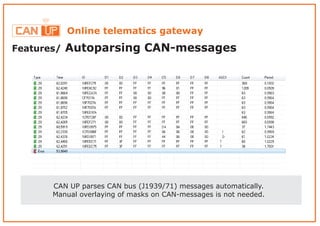
Features/ Autoparsing CAN-messages
CAN UP parses CAN bus (J1939/71) messages automatically.
Manual overlaying of masks on CAN-messages is not needed.
Online telematics gateway
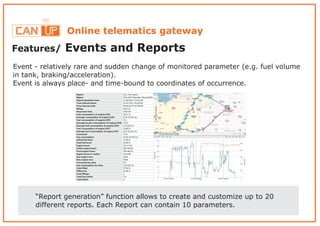
Features/ Events and Reports
“Report generation” function allows to create and customize up to 20
different reports. Each Report can contain 10 parameters.
Event - relatively rare and sudden change of monitored parameter (e.g. fuel volume
in tank, braking/acceleration).
Event is always place- and time-bound to coordinates of occurrence.
Online telematics gateway
EDC
DFM CAN
ECAS ABS/ASR
CAN
DUT-E CAN
FMS Crocodile
GNOM
DDE
Alarm
button
CAN UP 27
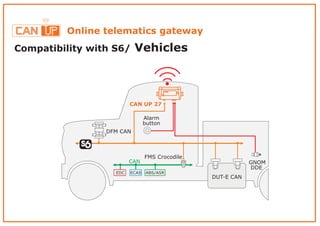
Compatibility with S6 Vehicles/
Online telematics gateway
SPN SPNSPN SPN
Tank TankBoiler Boiler
Object 1 Objects
2 – 7
Object 8
DUT-E CAN DUT-E CAN
DFM CAN DFM CAN
CAN UP 27
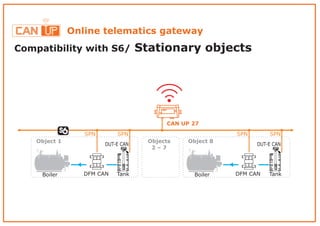
Compatibility with S6 Stationary objects/
Online telematics gateway
Summary
< Flexible reporting system parameters, 20 different Reports,- 3500
sending Reports regularly and on Event occurrence.
< Data processing “on board” of vehicle increases performance of server.
CAN< bus connection, automatic parsing of J1939/71 messages
without manual masks overlaying.
-< CAN/S6 telematics interface compatibility connection of 8 fuel level sensors,
8 fuel flow meters, CANbus reader, axle load sensor, digital-to-analog converter.
Data transfer costs reduction – operation with no monthly fee.<
Report sending to monitoring server, SMS and E-mail< .
Online telematics gateway
Learn more
Official web
CAN/S6 telematics interface
description
Document center
Official YouTube channel
Follow us in social networks
www.jv-technoton.com
/c/technotonen
/company/technoton
/technoton
www.s6.jv-technoton.com
www.docs.jv-technoton.com

CANUp Online telematics gateway (ENG)

  • 1.
    Online telematics gateway Purpose ofuse Features Compatibility with S6 Summary www.jv-technoton.com
  • 2.
    Online telematics gateway EDCABSADM ECAS SCR Dashboard TCAN MCAN I CAN Purpose of use/ Avoiding “spider” network Tracking device Fuel flow meter Axle load sensor Fuel level sensor Fuel level sensor Fuel level sensor Temperature sensor Driver identification Display Fuel flow meter Large amount of sensors is needed to get an extensive range of telematics data. Teleamtics system turns into a wide network of devices with telematics unit in the ceneter.
  • 3.
    Online telematics gateway Purposeof use/ Tracking complex objects On-board equipment is connected and configured via CAN/S6 bus, all data is processed by CAN UP online telematics gateway.
  • 4.
    Online telematics gateway Features/Monitoring 3500+ parameters On-board network monitoring Online report compiler Fuel monitoring Analog signal collector CAN gatewayAxle load monitoring CAN diagnostics GPS/GLONASS tracking Speed and workload recording Engine monitoring
  • 5.
    Online telematics gateway Features/“On-board” data processing IoT BURGER IoT Burger technology ensures maximal processing of telematics data “on board” of vehicle, what gives the following advantages: < Flexible Reporting System - provides necessary data just in time when vehicle operation parameters are changing Reduces load on communication channels and telematics server< Allows prompt reporting on important Events: trip start, fuel refill, speeding, etc.<
  • 6.
    Online telematics gateway Features/Geolocation of objects < real-time vehicle location; vehicle route, stopping places;< movement direction and speed.<
  • 7.
    Features/ Sending Reports Onlinetelematics gateway CAN UP 27 E-mails to 3 addresses SMS to 3 phone numbers To telematics server and and
  • 8.
    Features/ Self-diagnostics “Self-diagnostics” functionallows to receive and store data on quality of telematics gateway operation, potential malfunctions of the device and all sensors connected through CAN/S6 interafce. EDC DFM CAN ECAS ABS/ASR CAN DUT-E CAN CAN UP 27 Online telematics gateway
  • 9.
    Features/ Remote configuration Onlinetelematics gateway CAN UP 27 can be configured remotely via the Internet. To establish a connection, a special SMS message is sent to CAN UP 27.
  • 10.
    Online telematics gateway Features/Connecting telematics sensors The following devices are connected to CAN UP 27 through CAN/S6 interface: 1. Up to 8 DUT-E CAN or DUT-E 2Bio fuel level sensors. 2. Up to 8 DFM CAN or DFM Marine CAN fuel flow meters. 3. GNOM axle load sensor. 4. FMSCrocodile contactless FMS-gateway or MasterCAN vehicle data interface.
  • 11.
    Online telematics gateway Features/Autoparsing CAN-messages CAN UP parses CAN bus (J1939/71) messages automatically. Manual overlaying of masks on CAN-messages is not needed.
  • 12.
    Online telematics gateway Features/Events and Reports “Report generation” function allows to create and customize up to 20 different reports. Each Report can contain 10 parameters. Event - relatively rare and sudden change of monitored parameter (e.g. fuel volume in tank, braking/acceleration). Event is always place- and time-bound to coordinates of occurrence.
  • 13.
    Online telematics gateway EDC DFMCAN ECAS ABS/ASR CAN DUT-E CAN FMS Crocodile GNOM DDE Alarm button CAN UP 27 Compatibility with S6 Vehicles/
  • 14.
    Online telematics gateway SPNSPNSPN SPN Tank TankBoiler Boiler Object 1 Objects 2 – 7 Object 8 DUT-E CAN DUT-E CAN DFM CAN DFM CAN CAN UP 27 Compatibility with S6 Stationary objects/
  • 15.
    Online telematics gateway Summary <Flexible reporting system parameters, 20 different Reports,- 3500 sending Reports regularly and on Event occurrence. < Data processing “on board” of vehicle increases performance of server. CAN< bus connection, automatic parsing of J1939/71 messages without manual masks overlaying. -< CAN/S6 telematics interface compatibility connection of 8 fuel level sensors, 8 fuel flow meters, CANbus reader, axle load sensor, digital-to-analog converter. Data transfer costs reduction – operation with no monthly fee.< Report sending to monitoring server, SMS and E-mail< .
  • 16.
    Online telematics gateway Learnmore Official web CAN/S6 telematics interface description Document center Official YouTube channel Follow us in social networks www.jv-technoton.com /c/technotonen /company/technoton /technoton www.s6.jv-technoton.com www.docs.jv-technoton.com