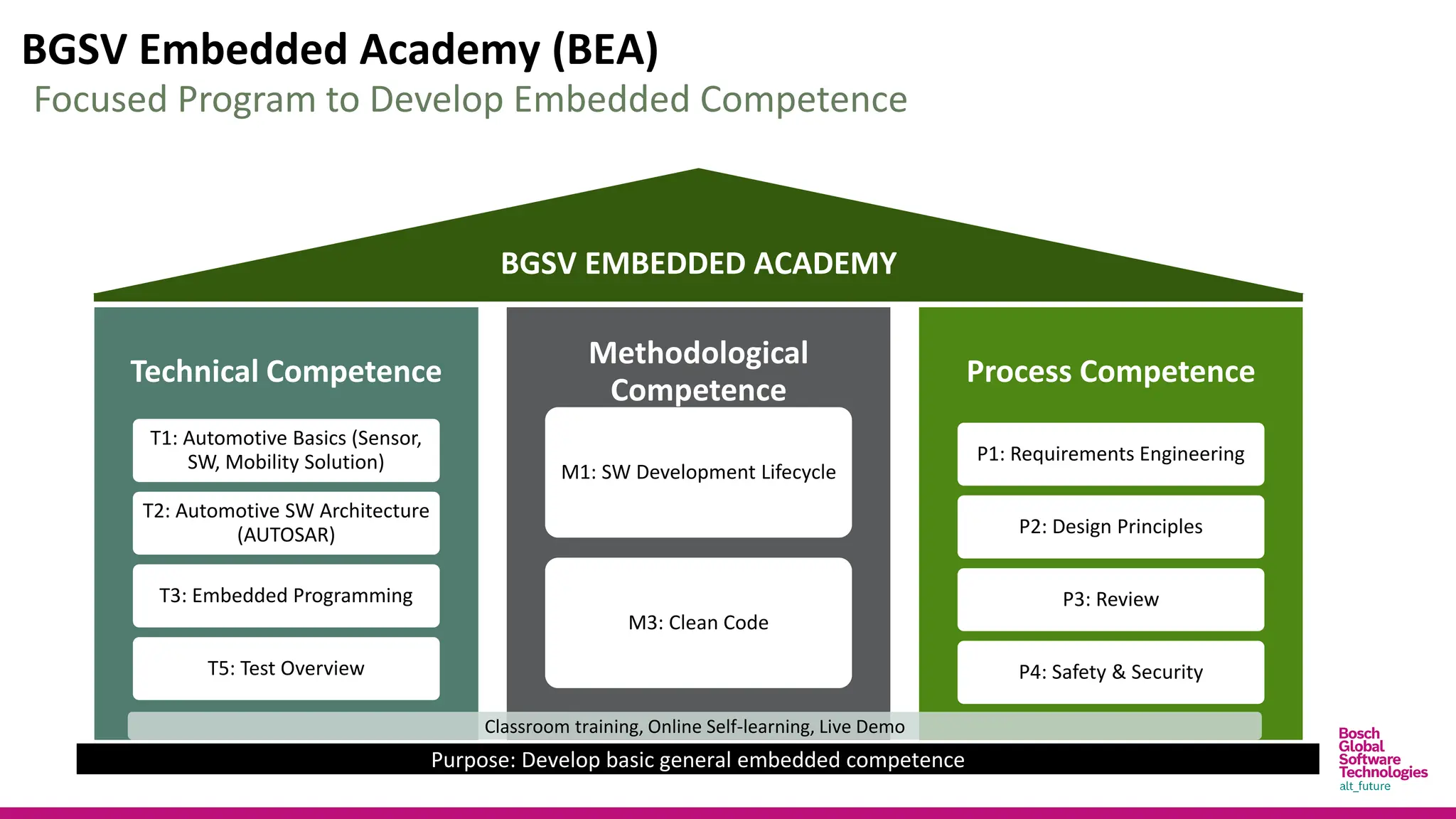
BGSV Embedded Academy (BEA)
Technical Competence
T1: Automotive Basics (Sensor,
SW, Mobility Solution)
T2: Automotive SW Architecture
(AUTOSAR)
T3: Embedded Programming
T5: Test Overview
Methodological
Competence
M1: SW Development Lifecycle
M3: Clean Code
Process Competence
P1: Requirements Engineering
P2: Design Principles
P3: Review
P4: Safety & Security
BGSV EMBEDDED ACADEMY
Purpose: Develop basic general embedded competence
Focused Program to Develop Embedded Competence
Classroom training, Online Self-learning, Live Demo
Disclaimer
 This slide is a part of BGSV Embedded Academy (BEA) program and only used for BEA training
purposes.
 This slide is Bosch Global Software Technology Company Limited’s internal property. All rights
reserved, also regarding any disposal, exploitation, reproduction, editing, distribution as well
as in the event of applications for industrial property rights.
 This slide has some copyright images and text, which belong to the respective organizations.
T2
AUTOMOTIVESOFTWARE
ARCHITECTURE
Agenda
5
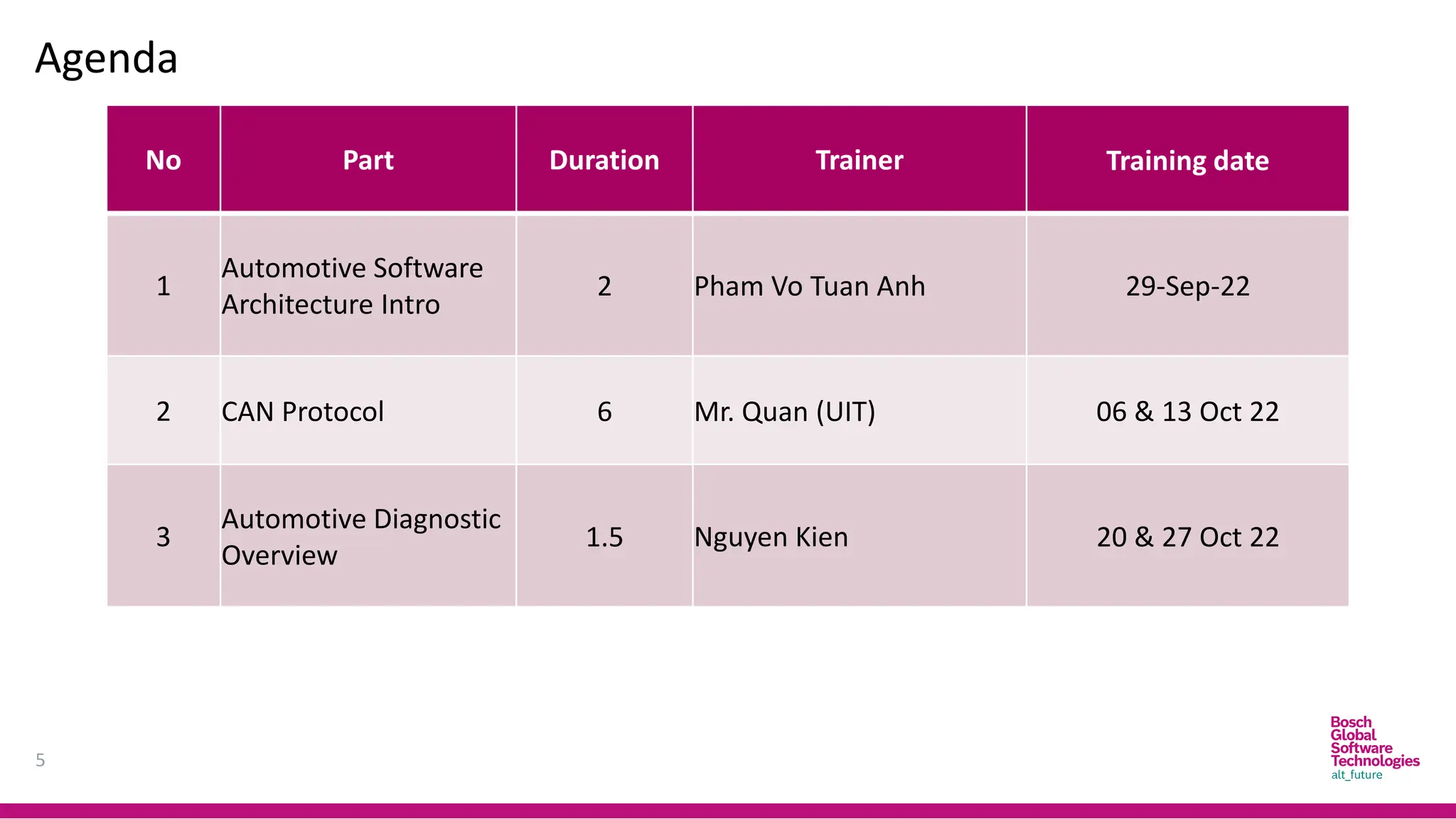
No Part Duration Trainer Training date
1
Automotive Software
Architecture Intro
2 Pham Vo Tuan Anh 29-Sep-22
2 CAN Protocol 6 Mr. Quan (UIT) 06 & 13 Oct 22
3
Automotive Diagnostic
Overview
1.5 Nguyen Kien 20 & 27 Oct 22
CAN
PROTOCOL
Introduction
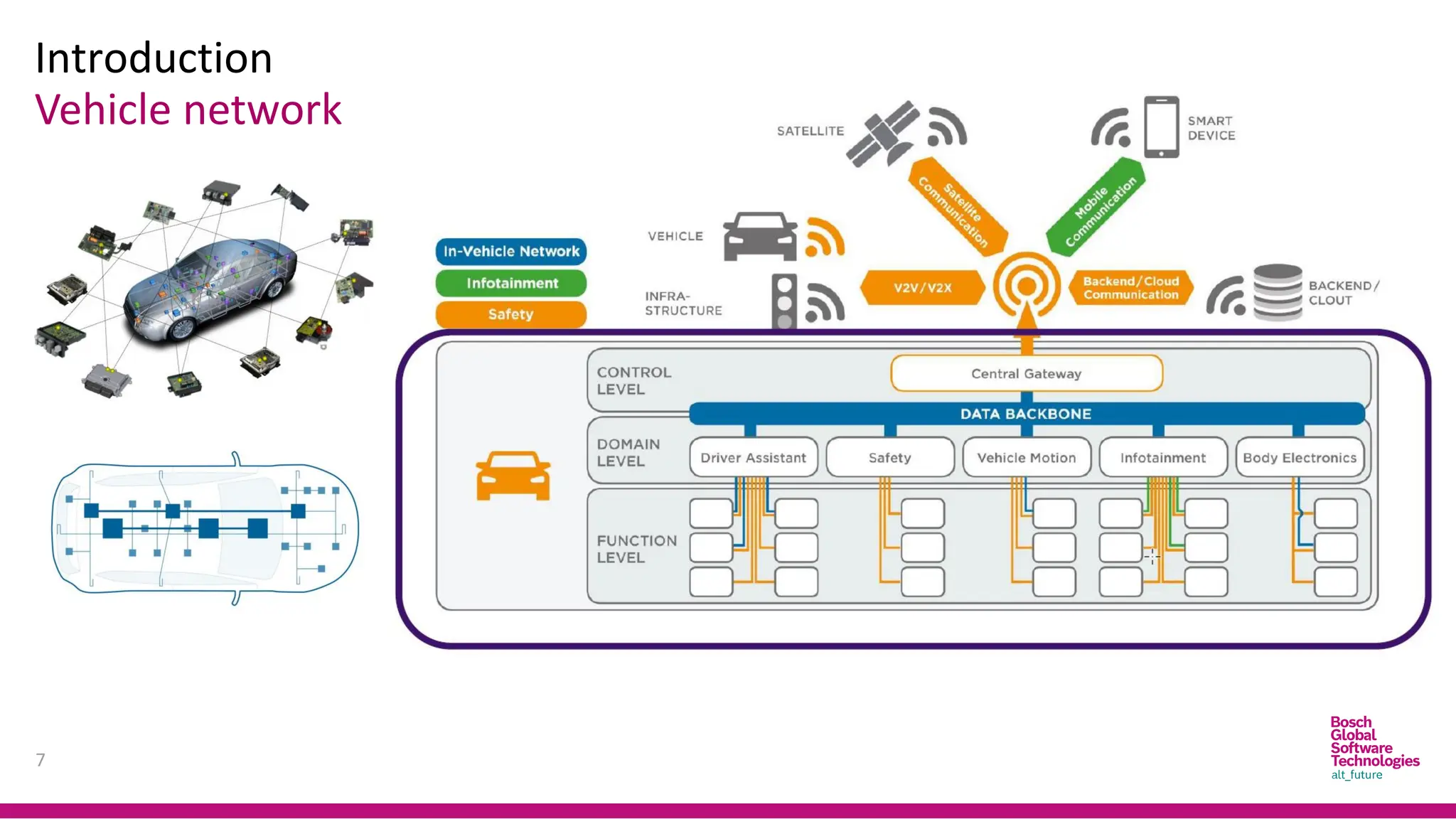
Vehicle network
7
Introduction
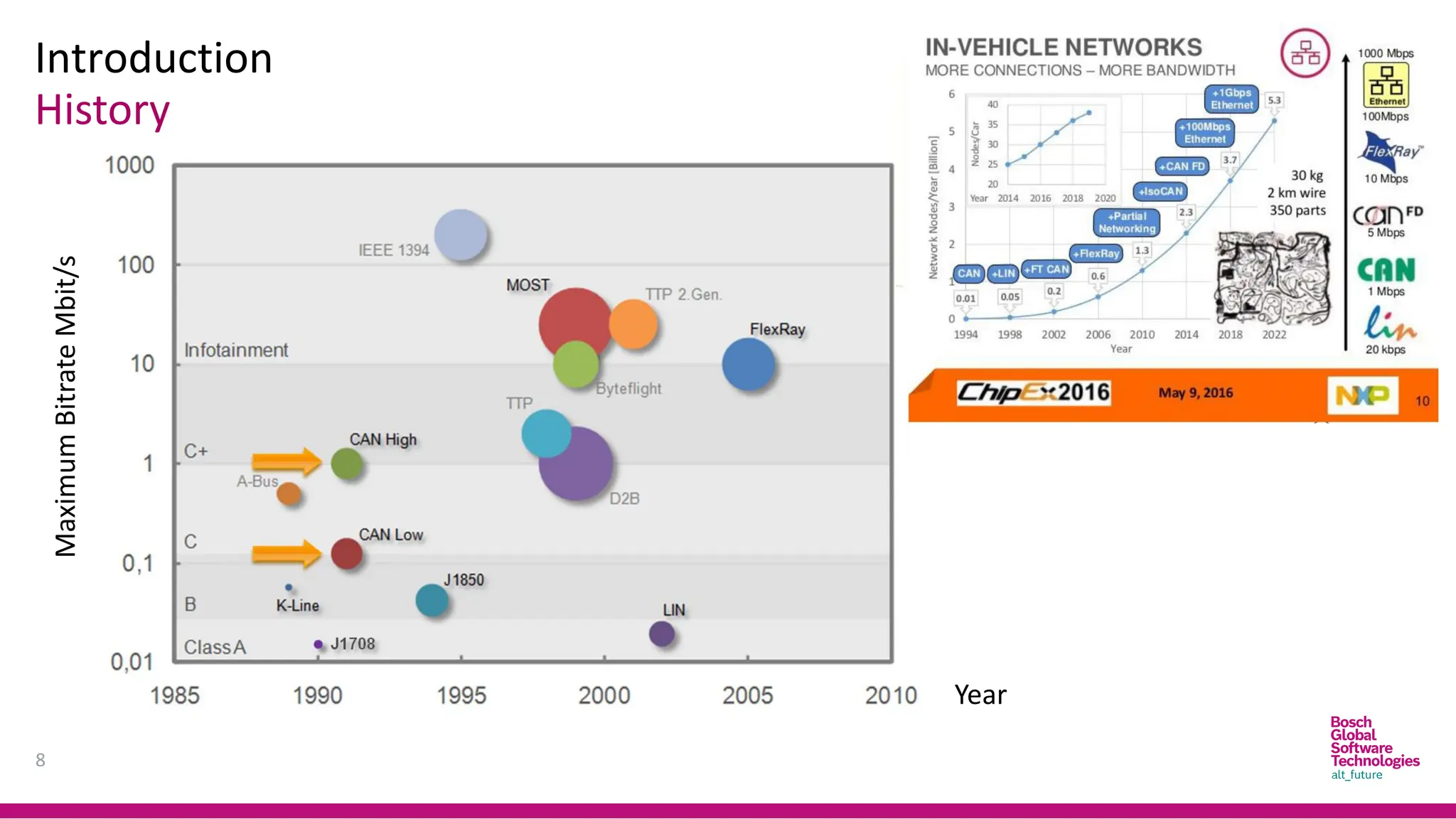
History
8
Year
Maximum
Bitrate
Mbit/s
Introduction
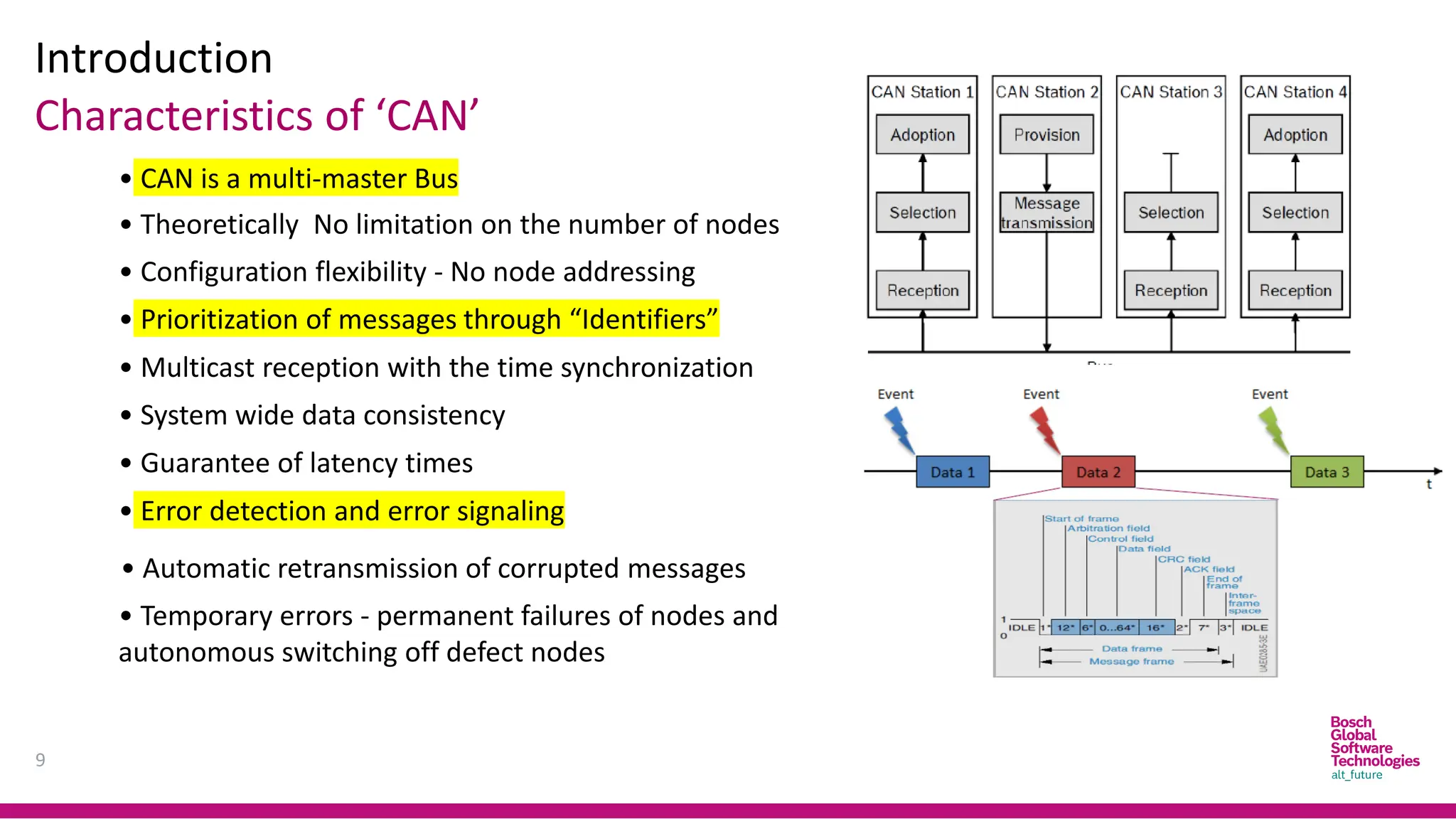
Characteristics of ‘CAN’
9
• CAN is a multi-master Bus
• Configuration flexibility - No node addressing
• Prioritization of messages through “Identifiers”
• Theoretically No limitation on the number of nodes
• Guarantee of latency times
• Multicast reception with the time synchronization
• System wide data consistency
• Error detection and error signaling
• Automatic retransmission of corrupted messages
• Temporary errors - permanent failures of nodes and
autonomous switching off defect nodes
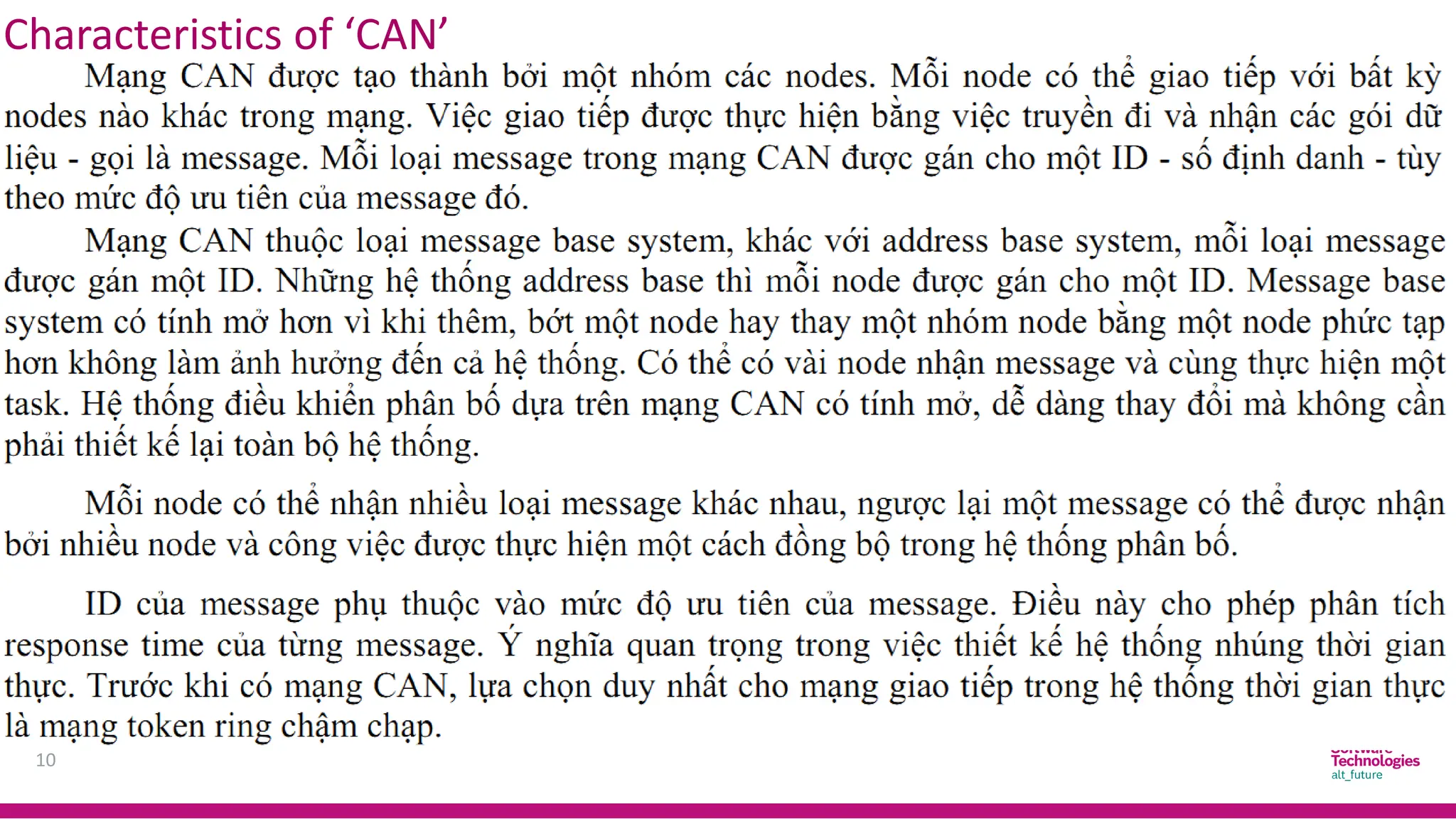
Characteristics of ‘CAN’
10
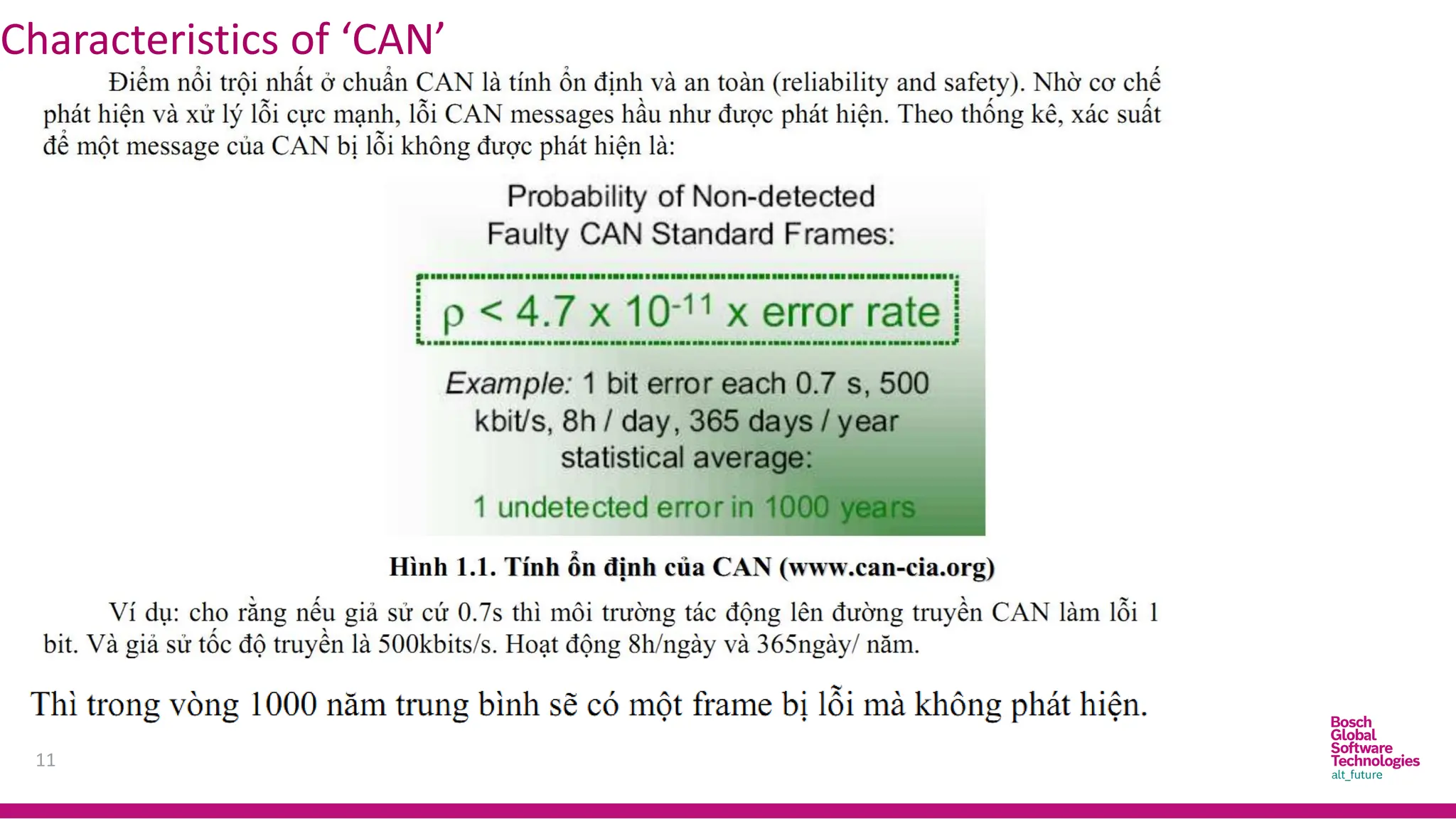
Characteristics of ‘CAN’
11
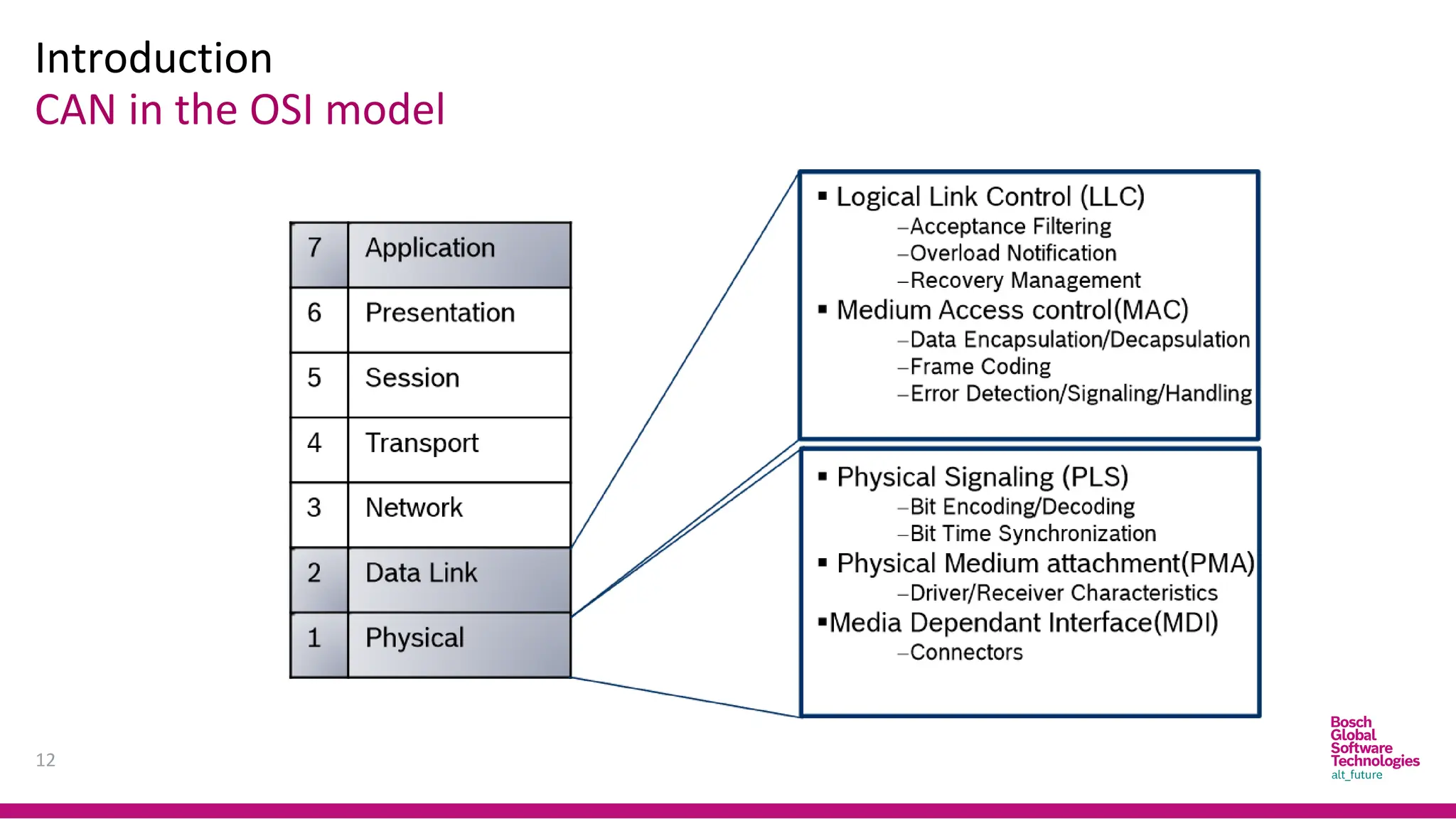
Introduction
CAN in the OSI model
12
CAN Protocol
13
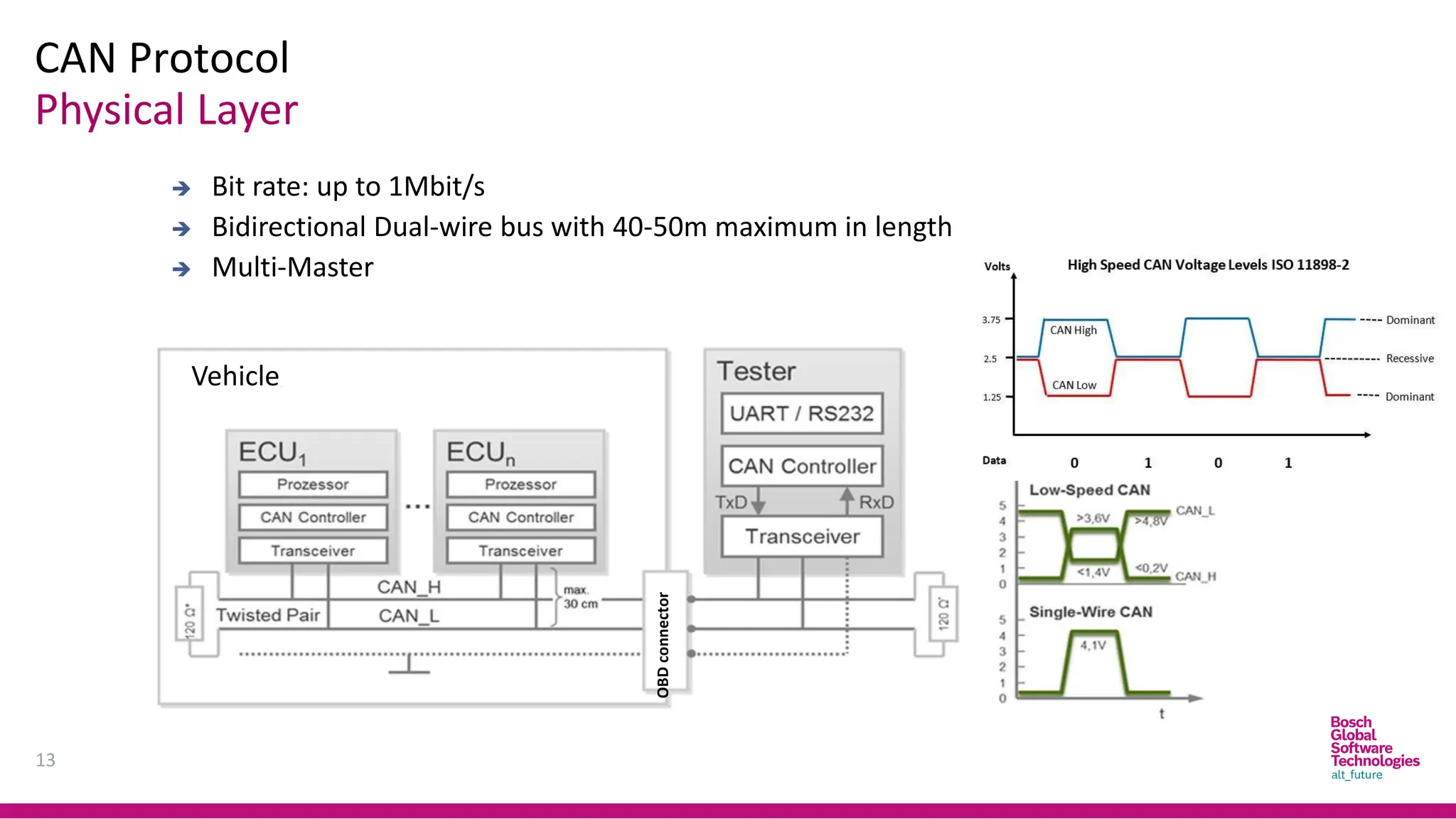
➔ Bit rate: up to 1Mbit/s
➔ Bidirectional Dual-wire bus with 40-50m maximum in length
➔ Multi-Master
Physical Layer
Vehicle
OBD
connector
CAN bus level
Volt
CAN Protocol
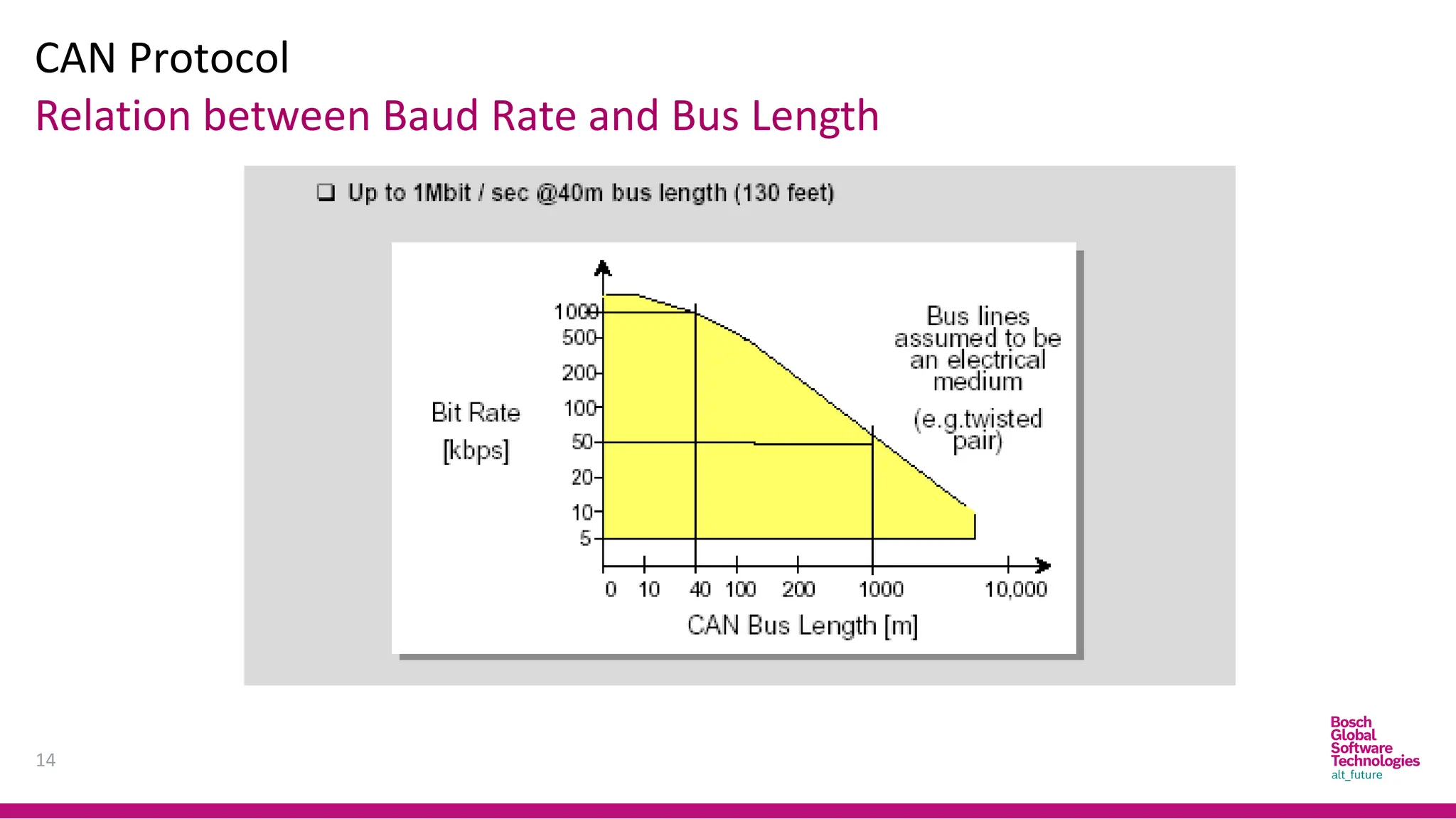
14
Relation between Baud Rate and Bus Length
CAN Protocol
15
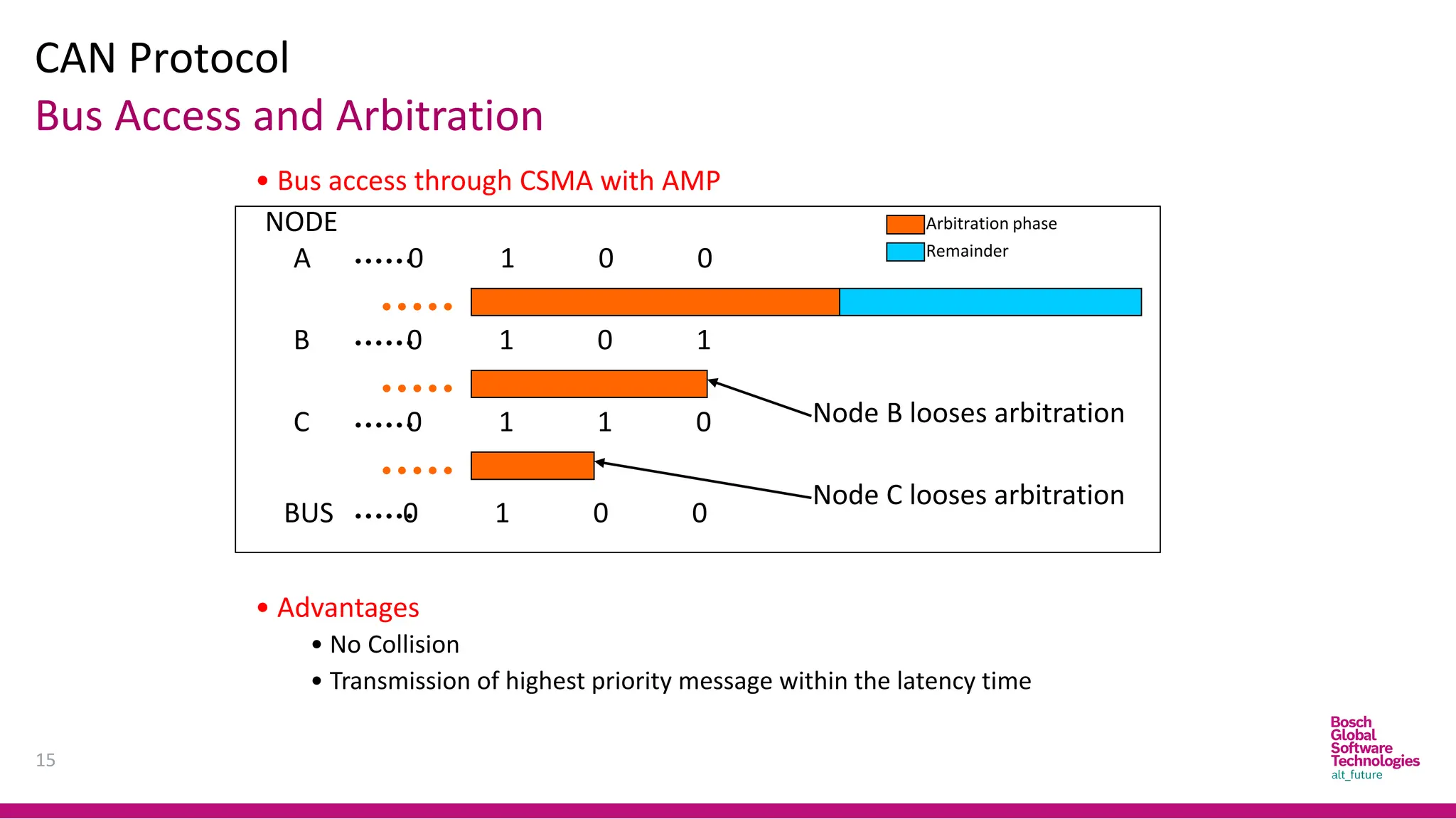
Bus Access and Arbitration
• Bus access through CSMA with AMP
A 0 1 0 0
B 0 1 0 1
C 0 1 1 0
BUS 0 1 0 0
NODE
Node B looses arbitration
Node C looses arbitration
Arbitration phase
Remainder
• Advantages
• No Collision
• Transmission of highest priority message within the latency time
CAN Protocol
16
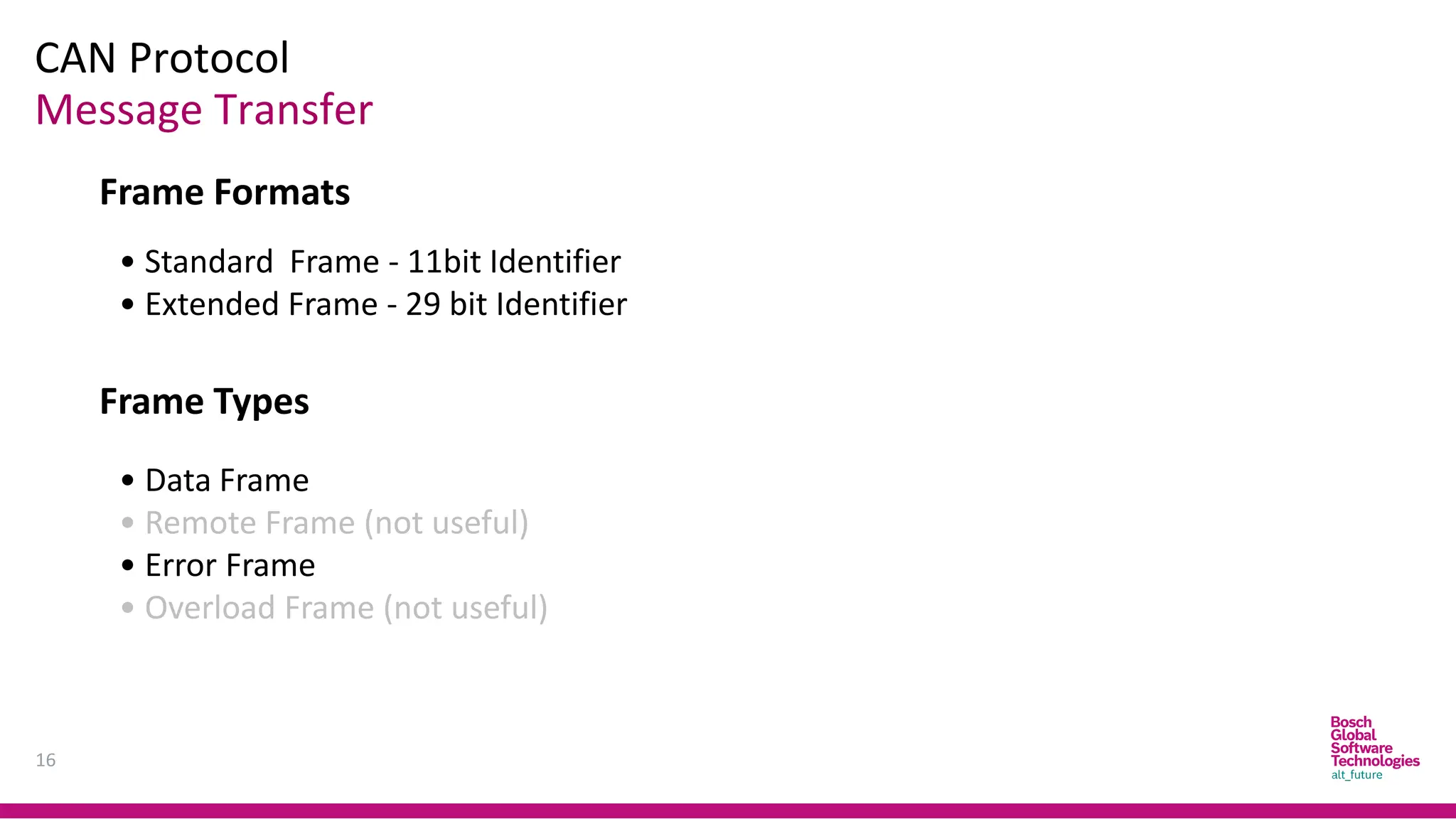
Message Transfer
Frame Formats
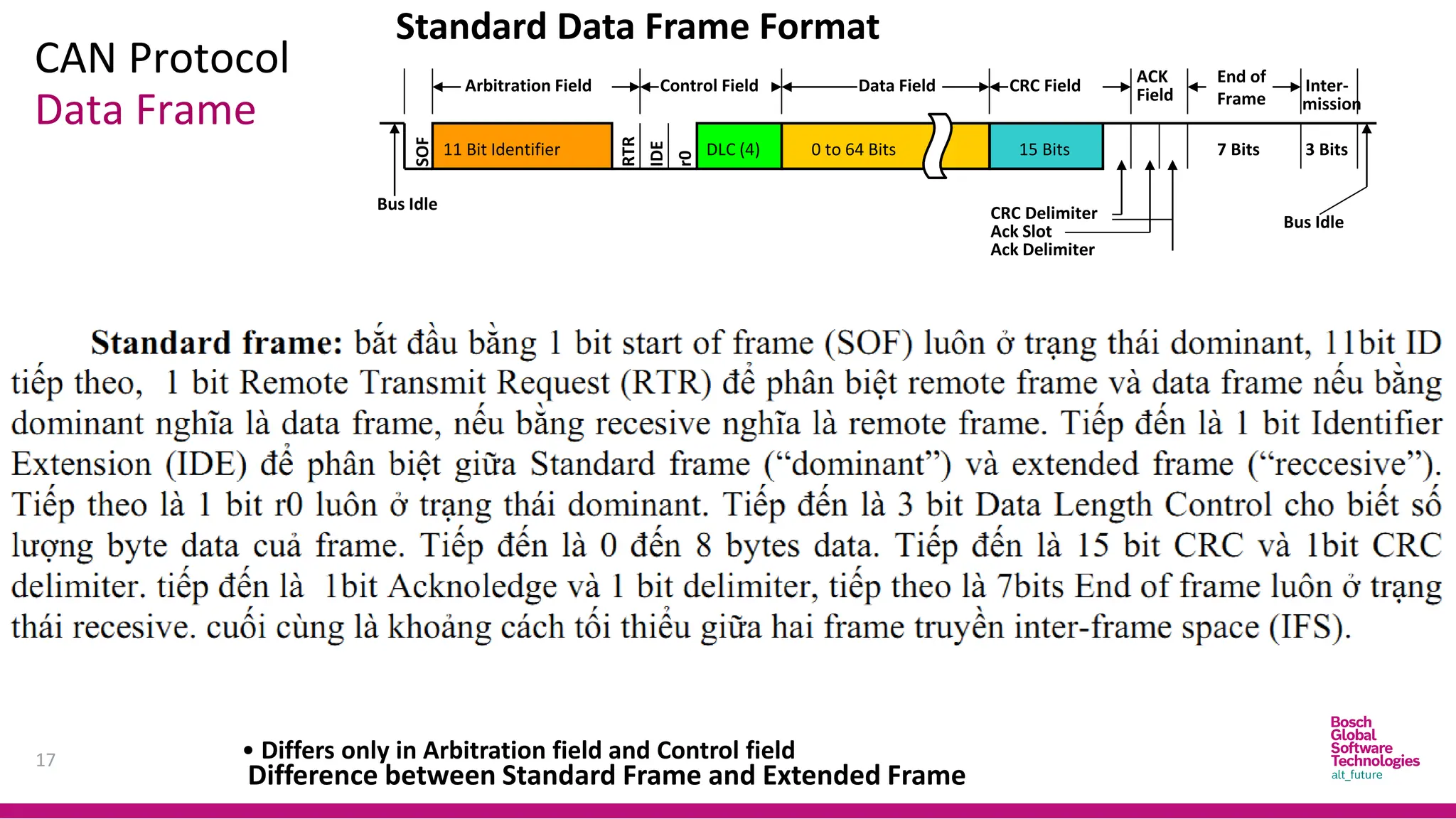
• Standard Frame - 11bit Identifier
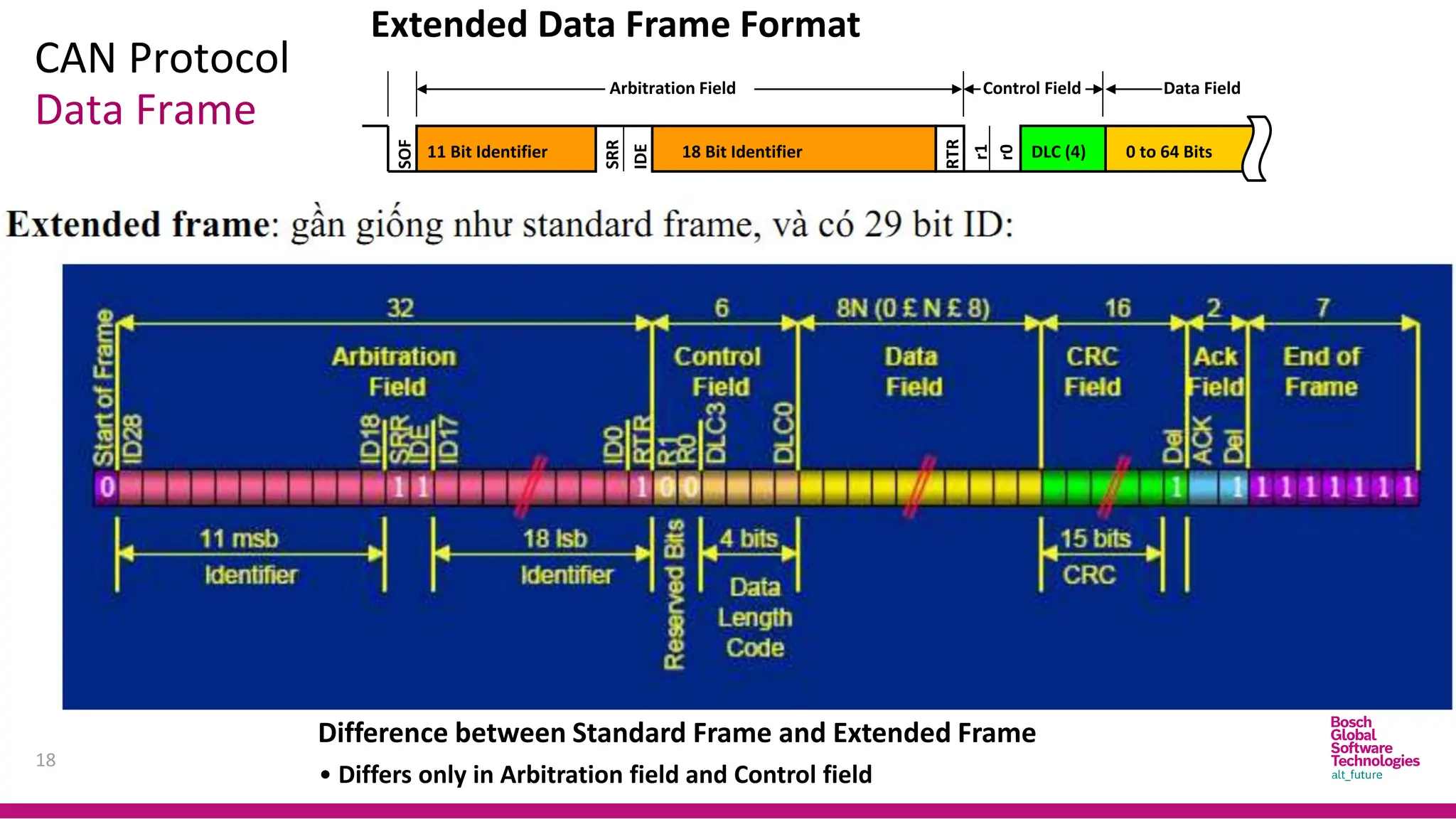
• Extended Frame - 29 bit Identifier
Frame Types
• Data Frame
• Remote Frame (not useful)
• Error Frame
• Overload Frame (not useful)
CAN Protocol
17
Data Frame
Control Field
SOF
RTR
11 Bit Identifier
Arbitration Field Data Field CRC Field
DLC (4)
IDE
r0
Field
ACK End of
Frame
0 to 64 Bits 15 Bits 7 Bits
Inter-
mission
Difference between Standard Frame and Extended Frame
• Differs only in Arbitration field and Control field
3 Bits
Bus Idle
Bus Idle
Ack Slot
CRC Delimiter
Ack Delimiter
Standard Data Frame Format
CAN Protocol
18
Data Frame
Extended Data Frame Format
SOF
SRR
11 Bit Identifier
Arbitration Field
18 Bit Identifier
Control Field
RTR
Data Field
DLC (4)
IDE
r1
r0
0 to 64 Bits
Difference between Standard Frame and Extended Frame
• Differs only in Arbitration field and Control field
CAN Protocol
19
Data Frame
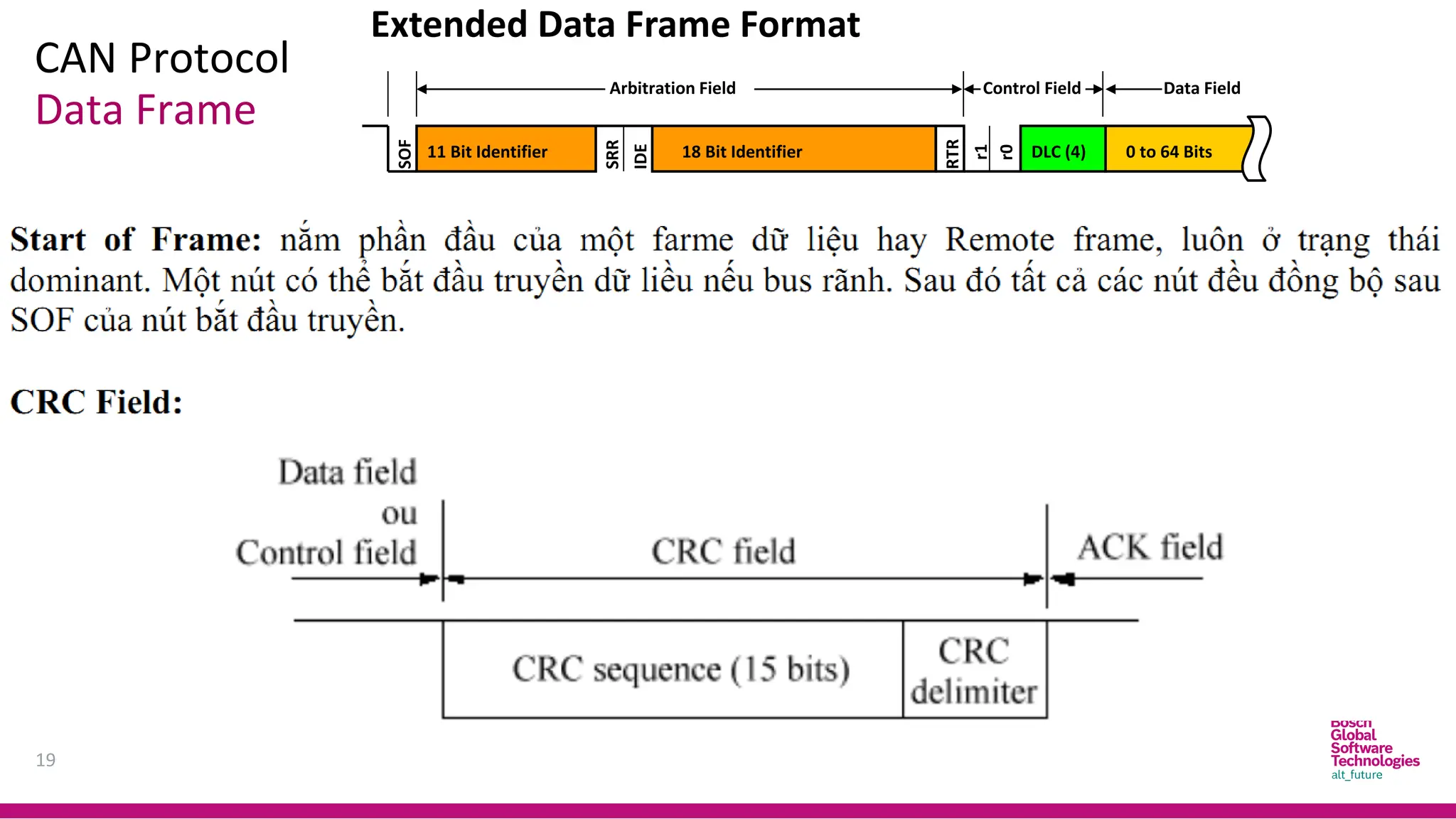
Extended Data Frame Format
SOF
SRR
11 Bit Identifier
Arbitration Field
18 Bit Identifier
Control Field
RTR
Data Field
DLC (4)
IDE
r1
r0
0 to 64 Bits
CAN Protocol
20
Data Frame
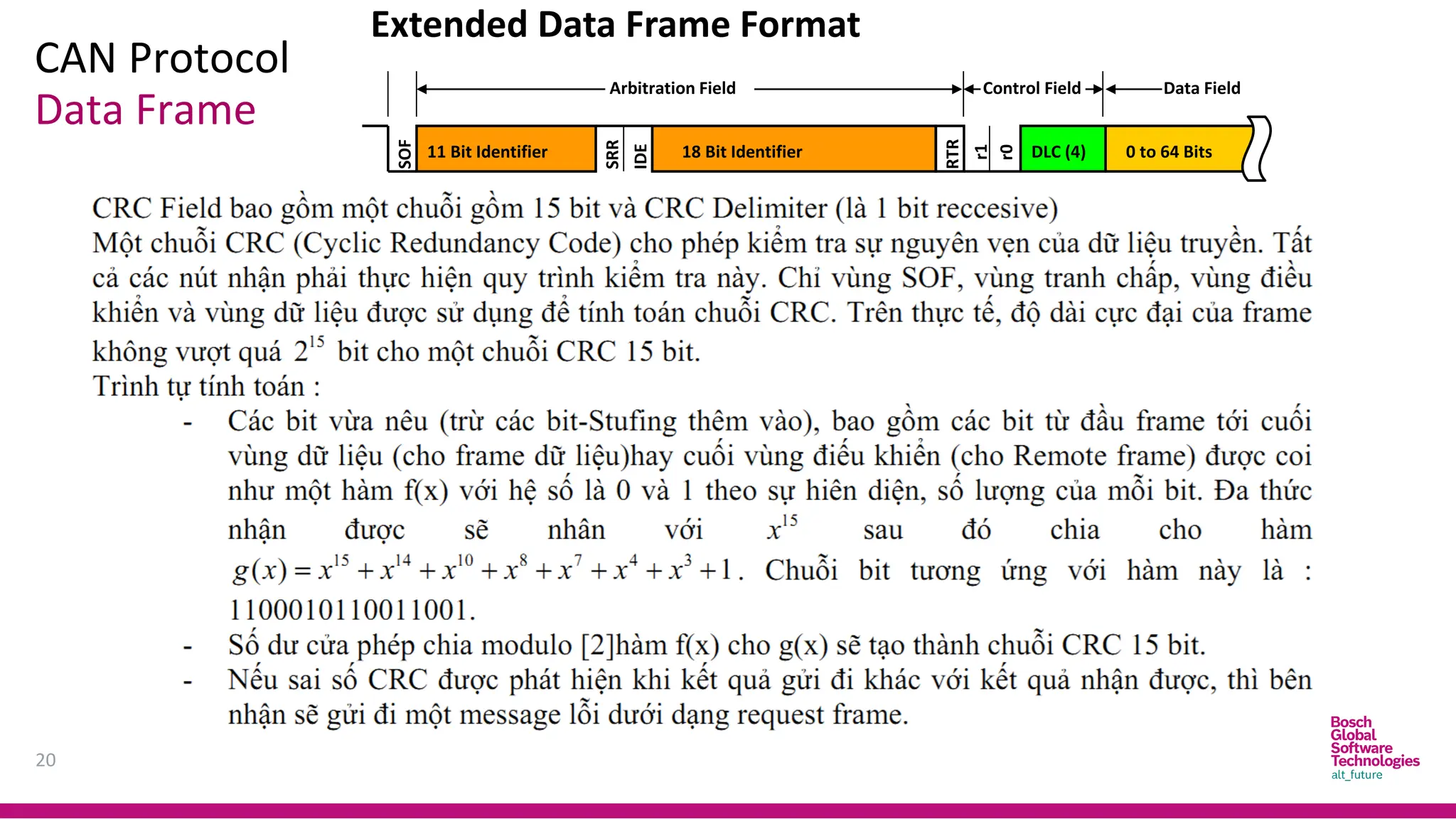
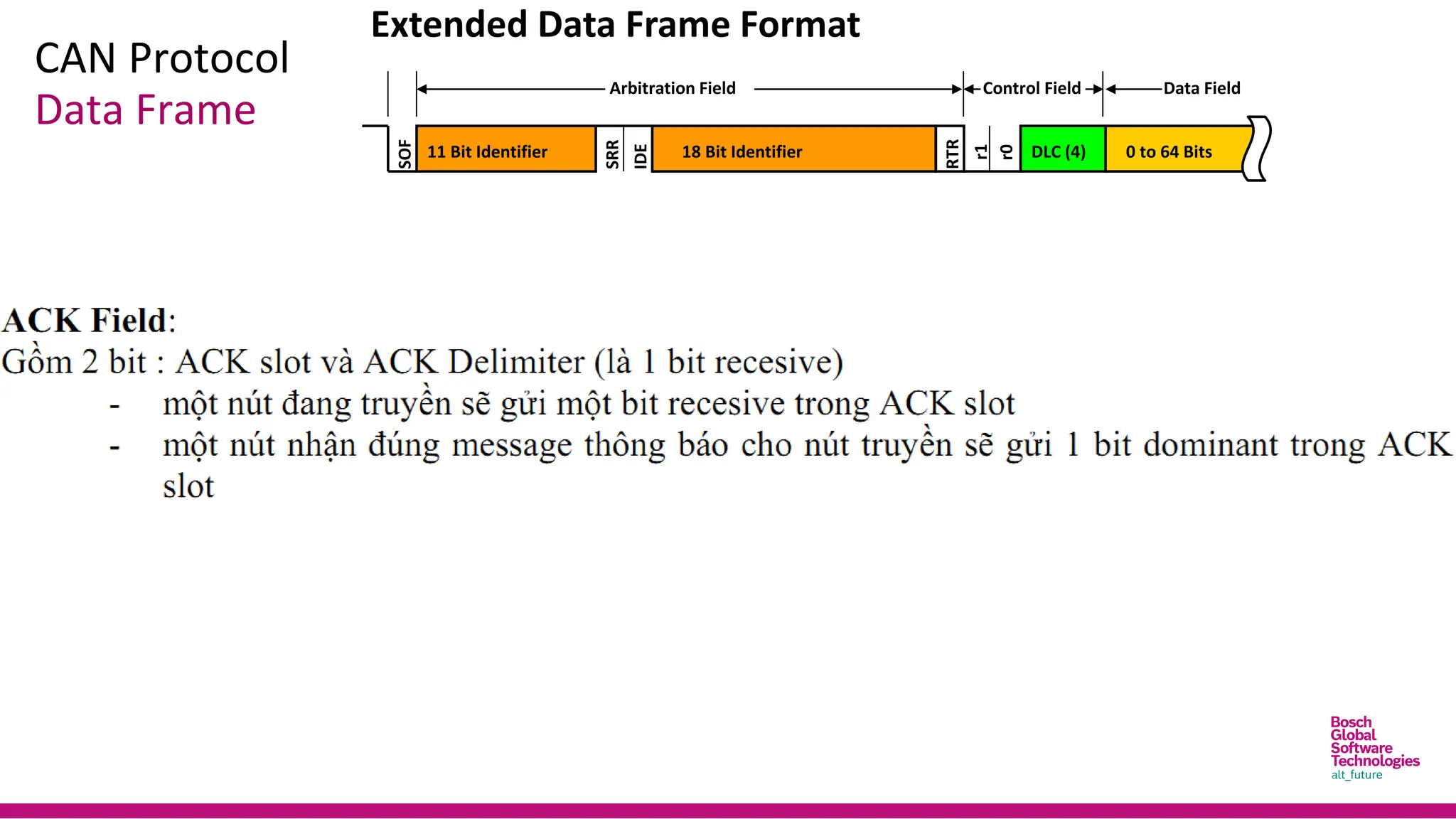
Extended Data Frame Format
SOF
SRR
11 Bit Identifier
Arbitration Field
18 Bit Identifier
Control Field
RTR
Data Field
DLC (4)
IDE
r1
r0
0 to 64 Bits
CAN Protocol
Data Frame
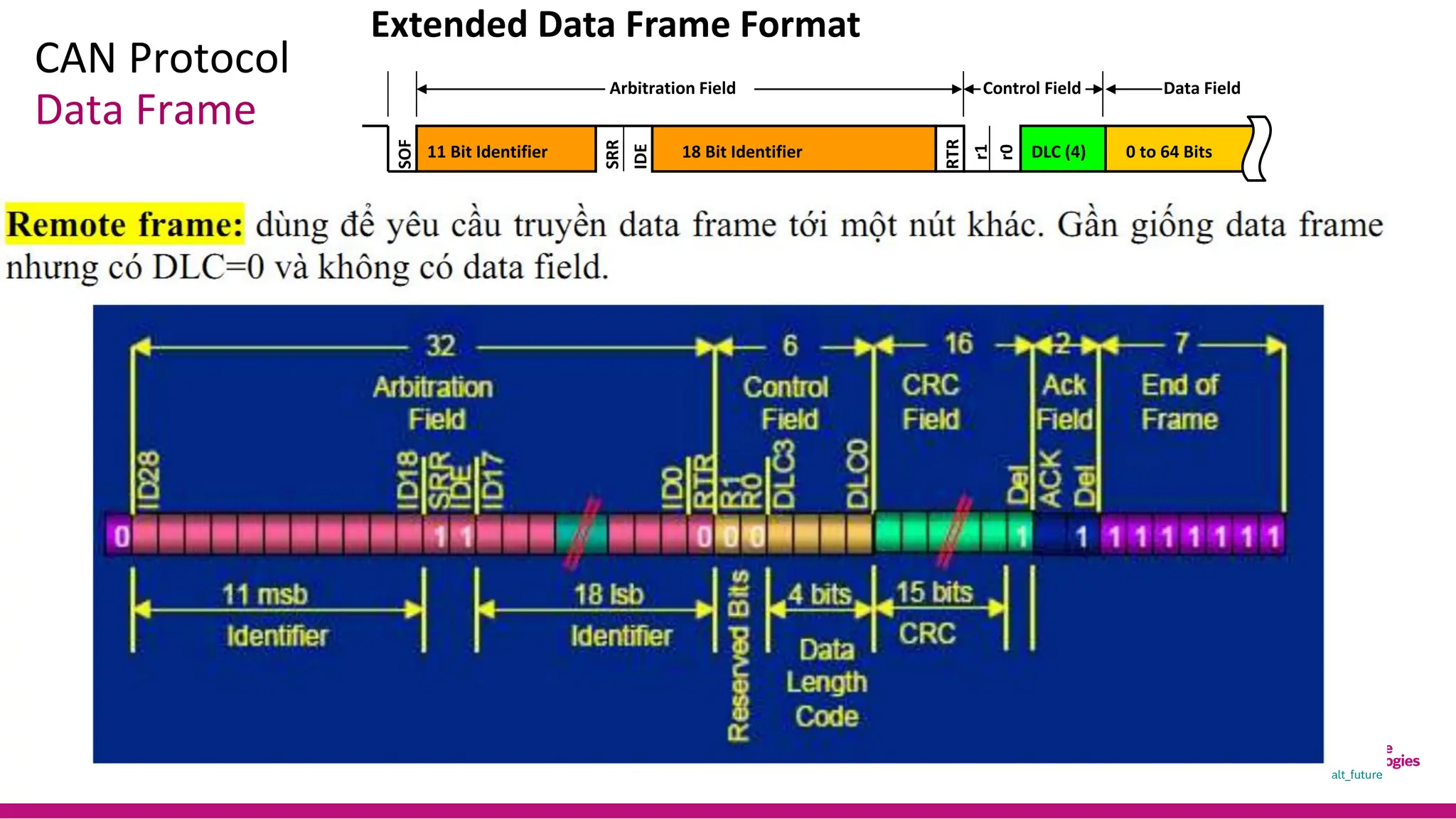
Extended Data Frame Format
SOF
SRR
11 Bit Identifier
Arbitration Field
18 Bit Identifier
Control Field
RTR
Data Field
DLC (4)
IDE
r1
r0
0 to 64 Bits
CAN Protocol
Data Frame
Extended Data Frame Format
SOF
SRR
11 Bit Identifier
Arbitration Field
18 Bit Identifier
Control Field
RTR
Data Field
DLC (4)
IDE
r1
r0
0 to 64 Bits
CAN Protocol
23
Data Frame
Extended Data Frame Format
SOF
SRR
11 Bit Identifier
Arbitration Field
18 Bit Identifier
Control Field
RTR
Data Field
DLC (4)
IDE
r1
r0
0 to 64 Bits
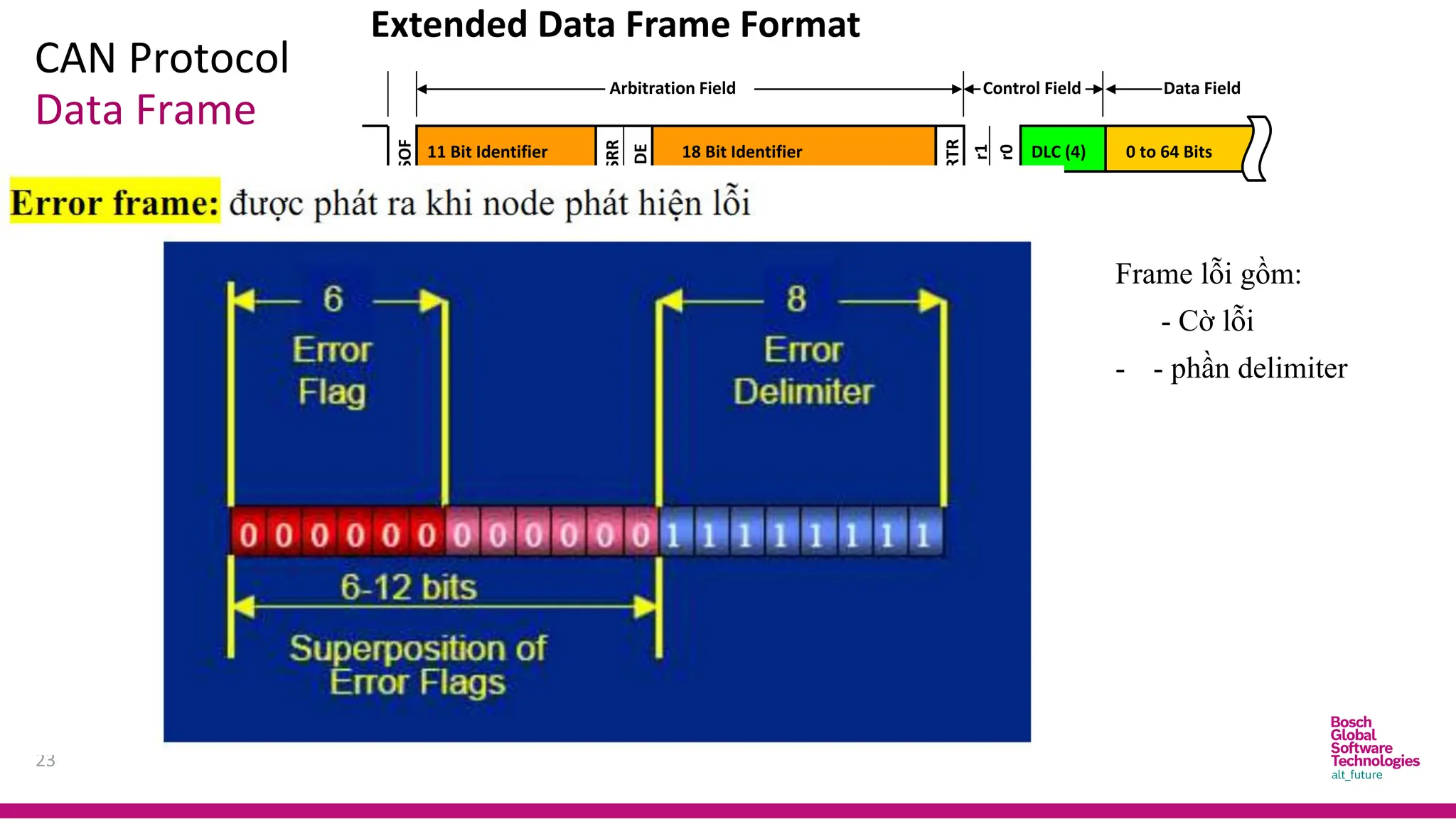
Frame lỗi gồm:
- Cờ lỗi
- - phần delimiter
CAN Protocol
24
Data Frame
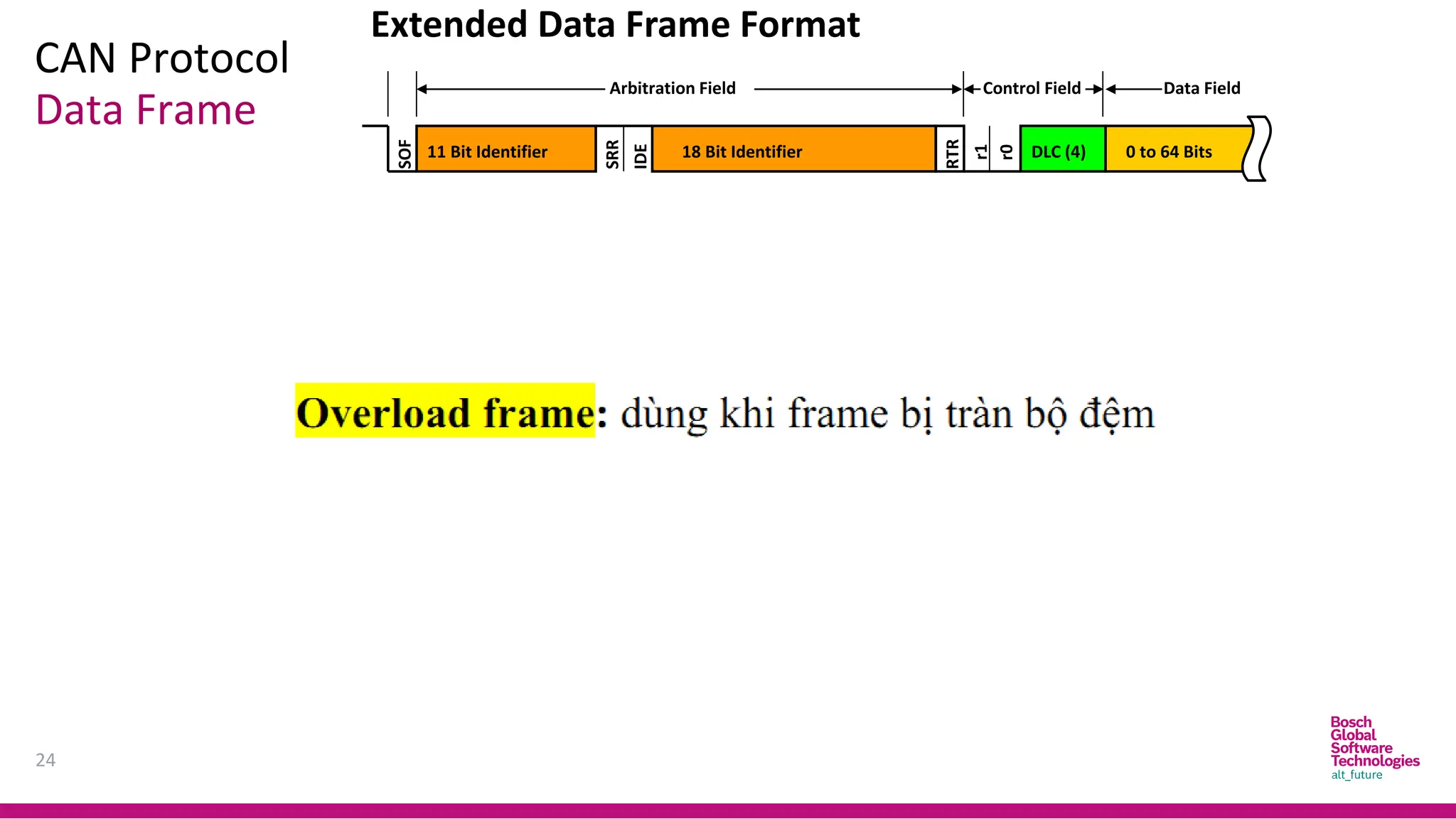
Extended Data Frame Format
SOF
SRR
11 Bit Identifier
Arbitration Field
18 Bit Identifier
Control Field
RTR
Data Field
DLC (4)
IDE
r1
r0
0 to 64 Bits
CAN Protocol
25
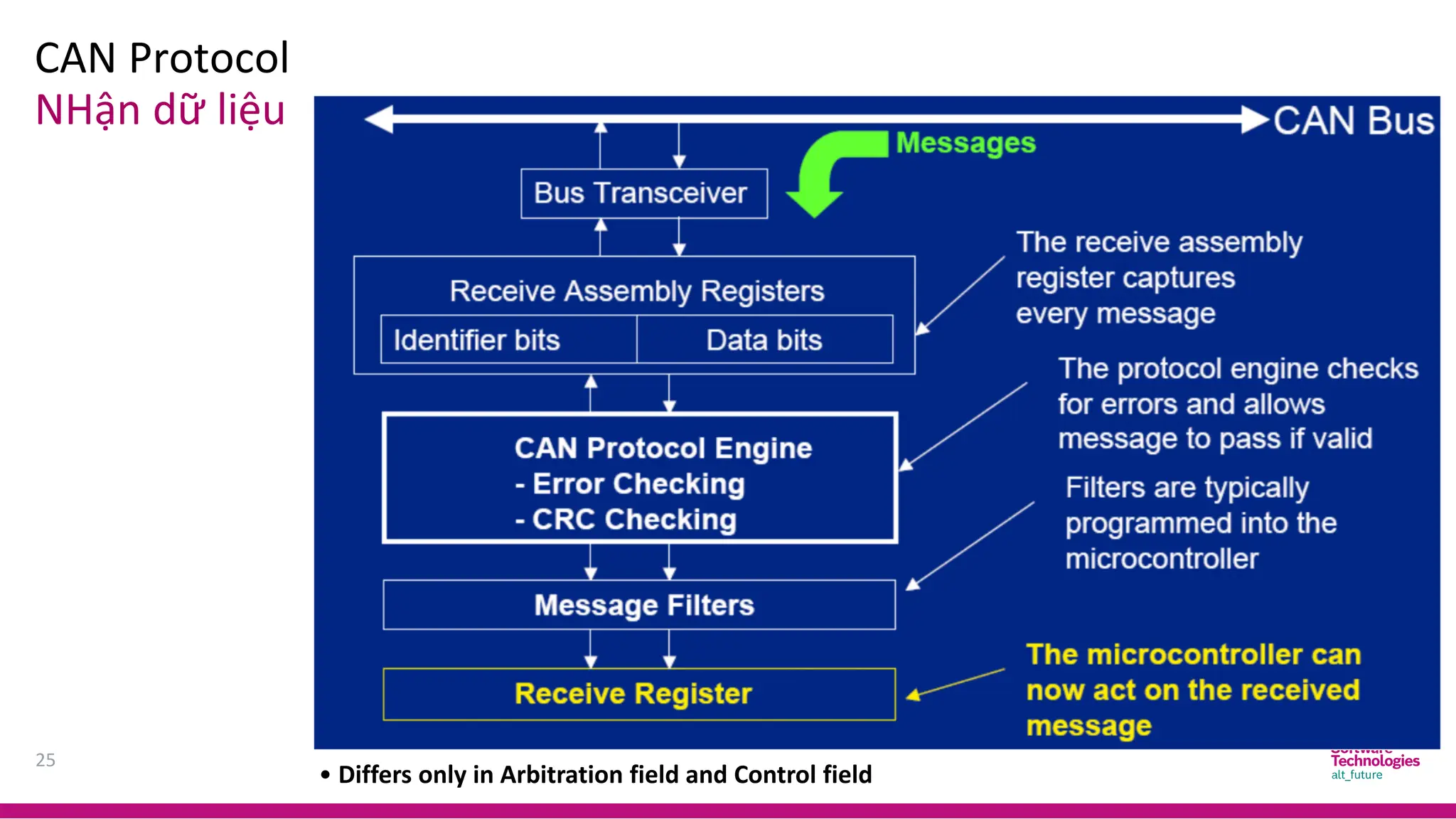
NHận dữ liệu
Difference between Standard Frame and Extended Frame
• Differs only in Arbitration field and Control field
CAN Protocol
26
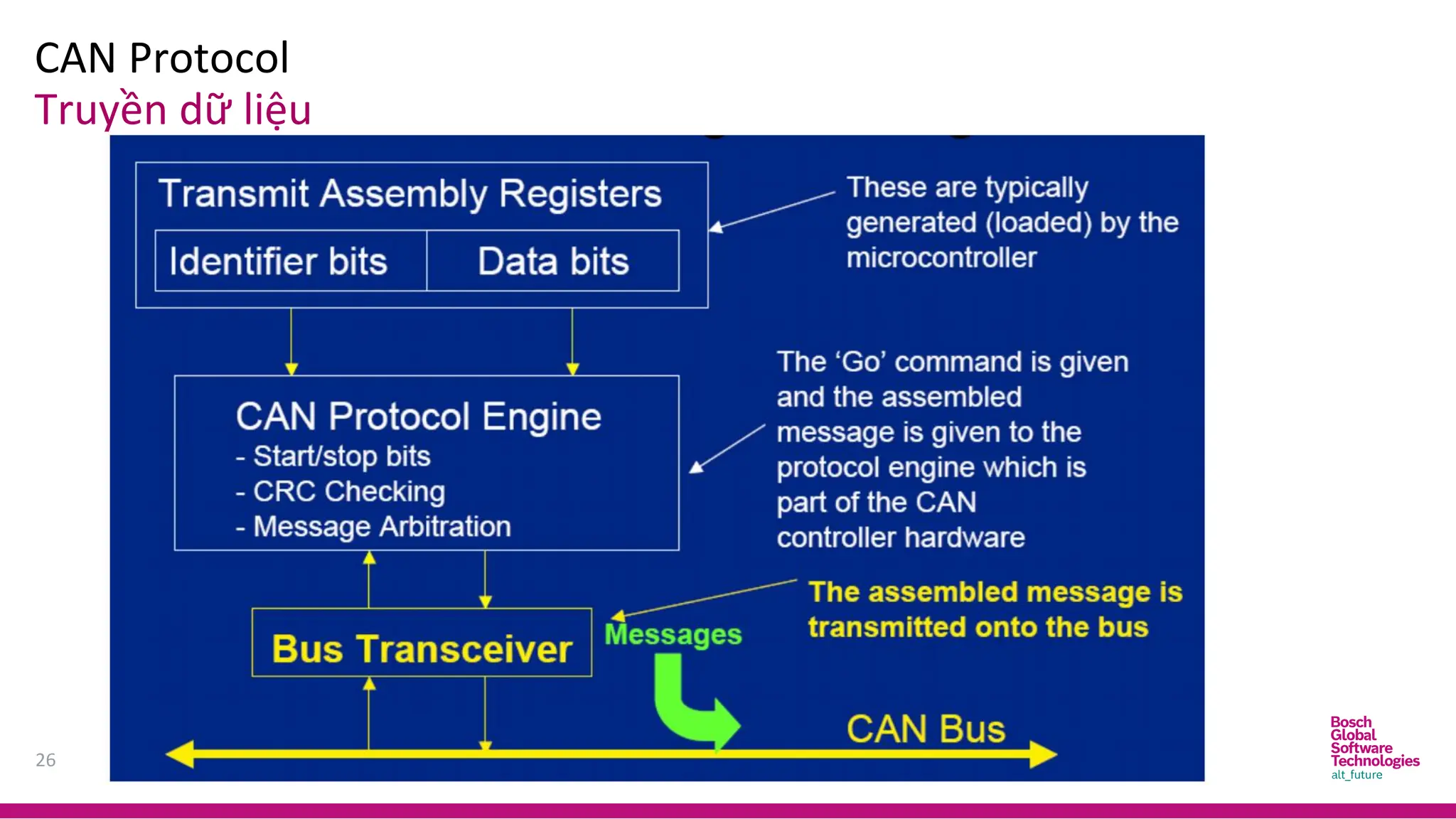
Truyền dữ liệu
CAN Protocol
27
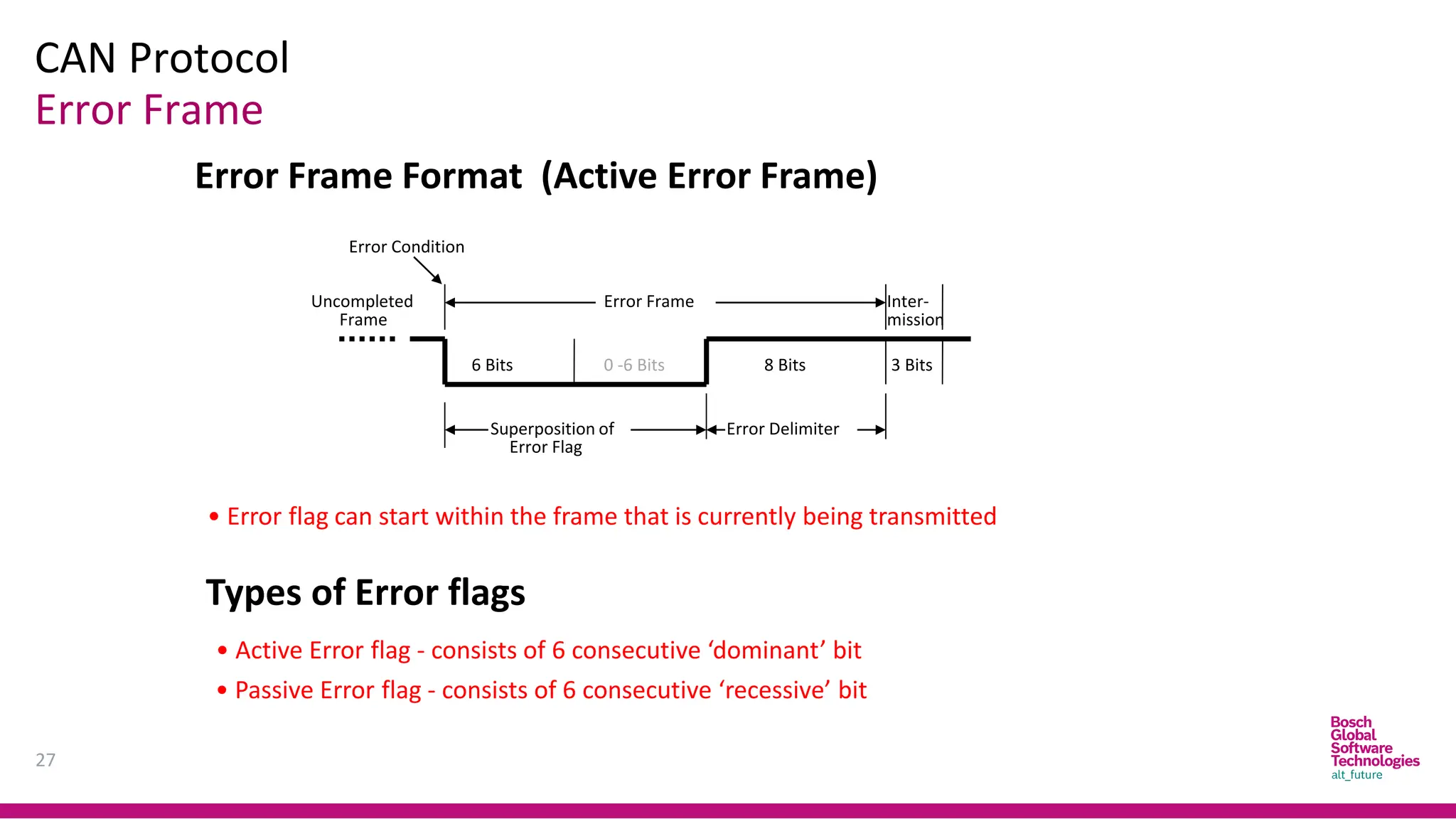
Error Frame
Error Frame
Frame
Uncompleted Inter-
mission
6 Bits 0 -6 Bits 8 Bits
Error Delimiter
Superposition of
Error Flag
Error Condition
3 Bits
• Error flag can start within the frame that is currently being transmitted
Types of Error flags
• Active Error flag - consists of 6 consecutive ‘dominant’ bit
• Passive Error flag - consists of 6 consecutive ‘recessive’ bit
Error Frame Format (Active Error Frame)
CAN Protocol
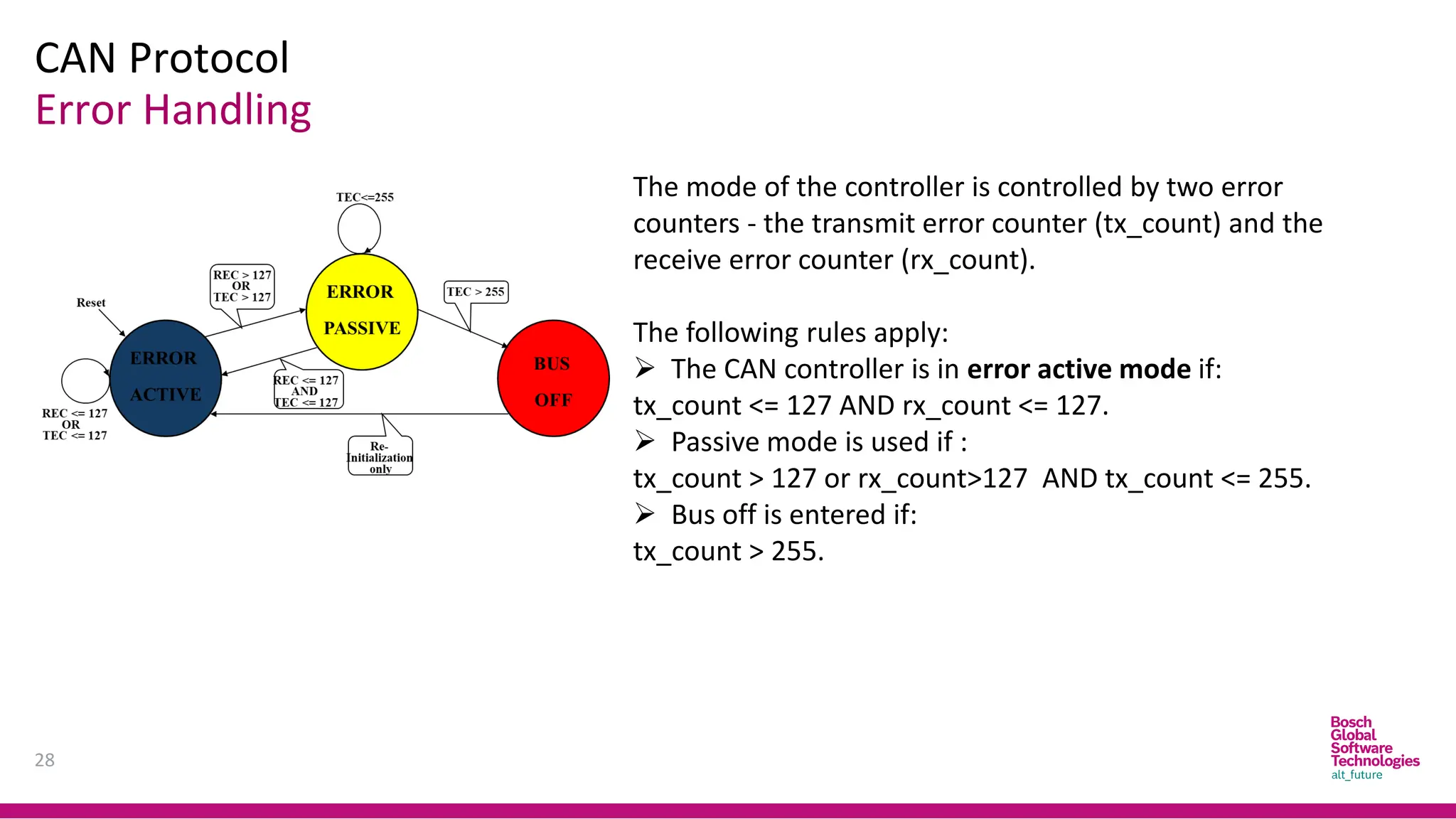
Error Handling
28
The mode of the controller is controlled by two error
counters - the transmit error counter (tx_count) and the
receive error counter (rx_count).
The following rules apply:
➢ The CAN controller is in error active mode if:
tx_count <= 127 AND rx_count <= 127.
➢ Passive mode is used if :
tx_count > 127 or rx_count>127 AND tx_count <= 255.
➢ Bus off is entered if:
tx_count > 255.
CAN Protocol
29
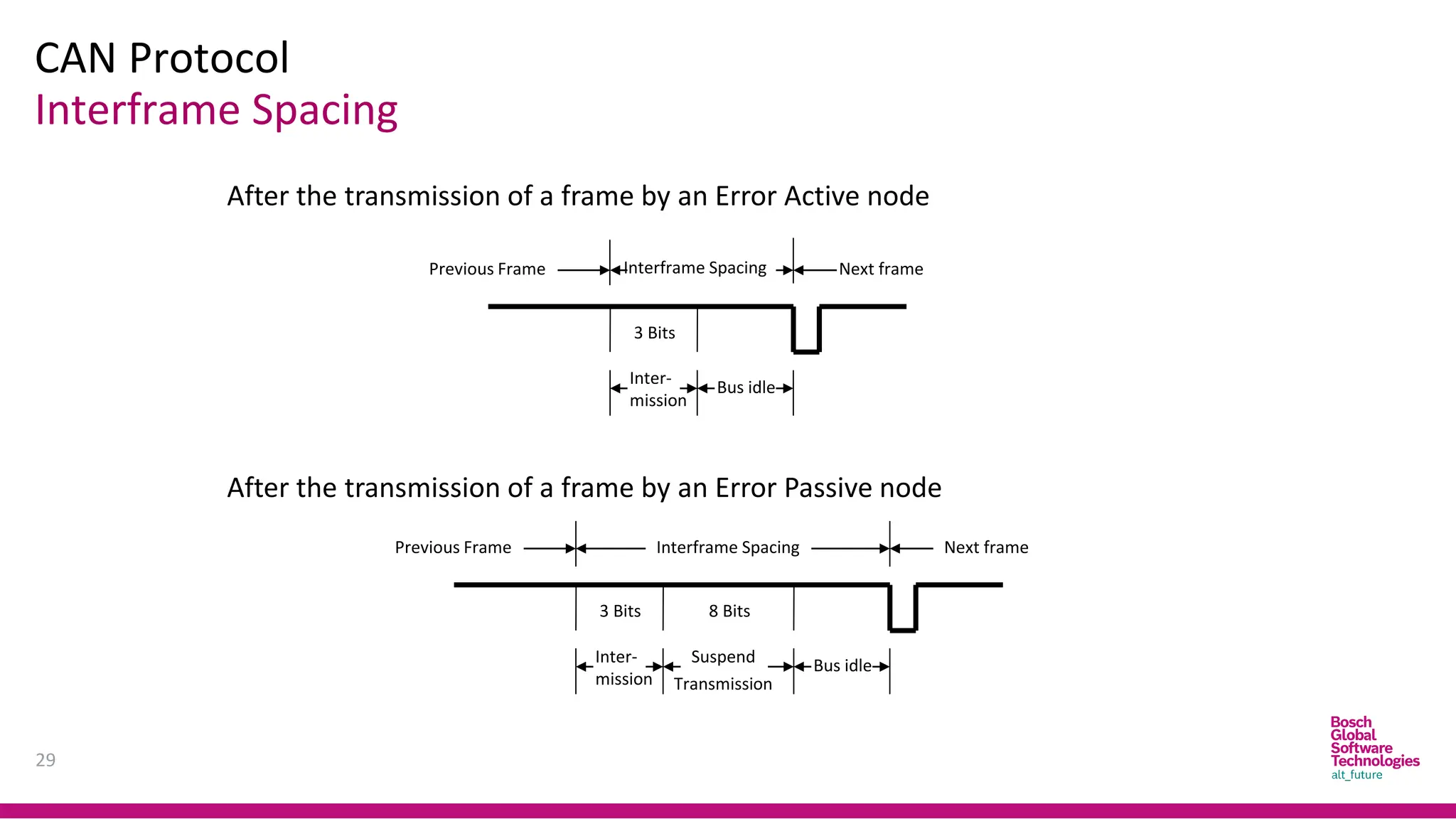
Interframe Spacing
8 Bits
3 Bits
Previous Frame Interframe Spacing Next frame
Inter-
mission
Bus idle
3 Bits
Previous Frame Interframe Spacing Next frame
Inter-
mission
Bus idle
Transmission
Suspend
After the transmission of a frame by an Error Active node
After the transmission of a frame by an Error Passive node
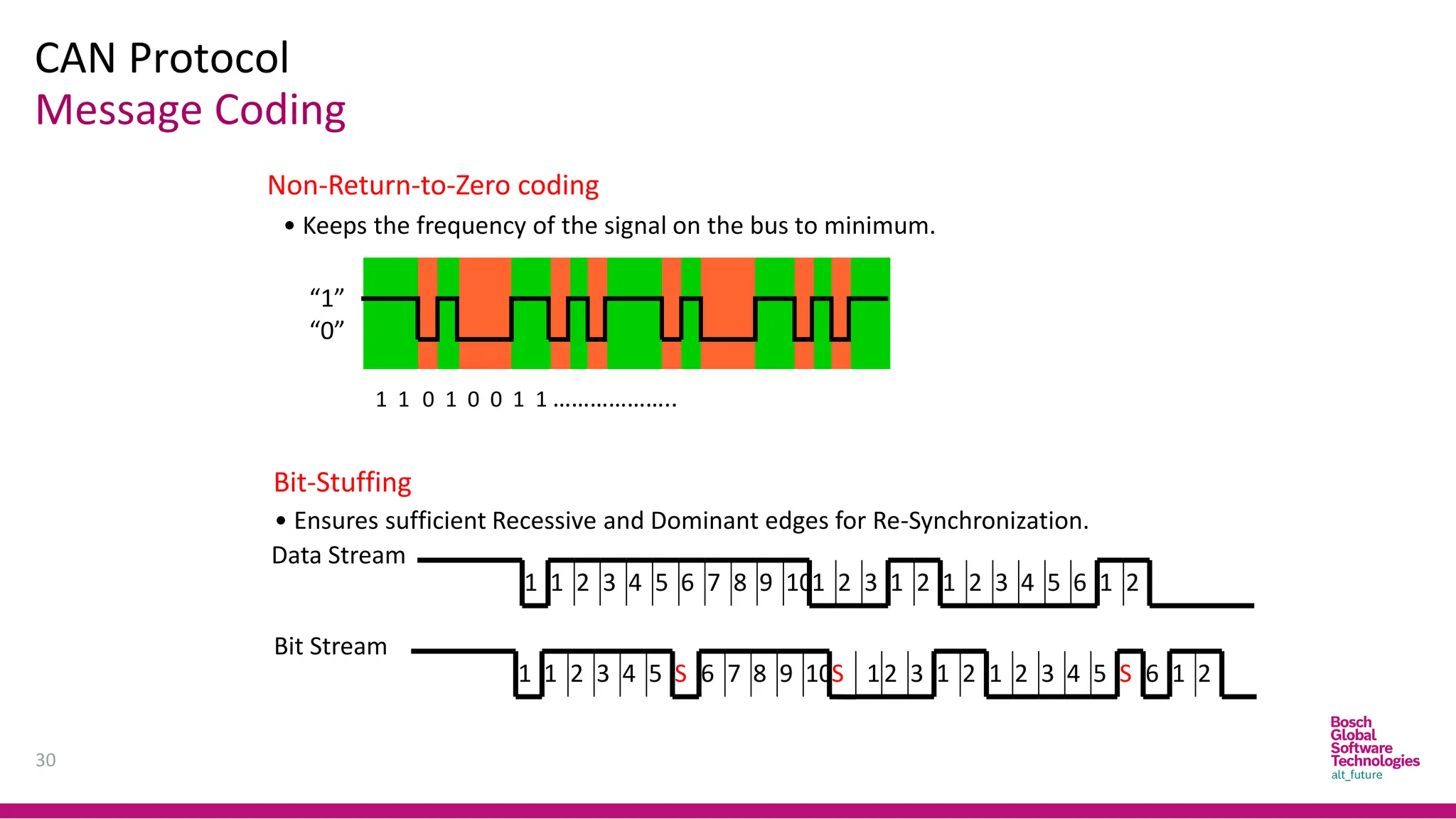
30
1 1 0 1 0 0 1 1 ………………..
“1”
“0”
Non-Return-to-Zero coding
• Keeps the frequency of the signal on the bus to minimum.
Bit-Stuffing
• Ensures sufficient Recessive and Dominant edges for Re-Synchronization.
7 10
9
8 1 2 3 1 2 1 2 3 5
4 6 1 2
Data Stream
1 2 3 5
4 6
1
1 2 3 5
4
1 7 9
8
6
S 10S 12 3 1 2 1 2 3 5
4 6
S 1 2
Bit Stream
CAN Protocol
Message Coding
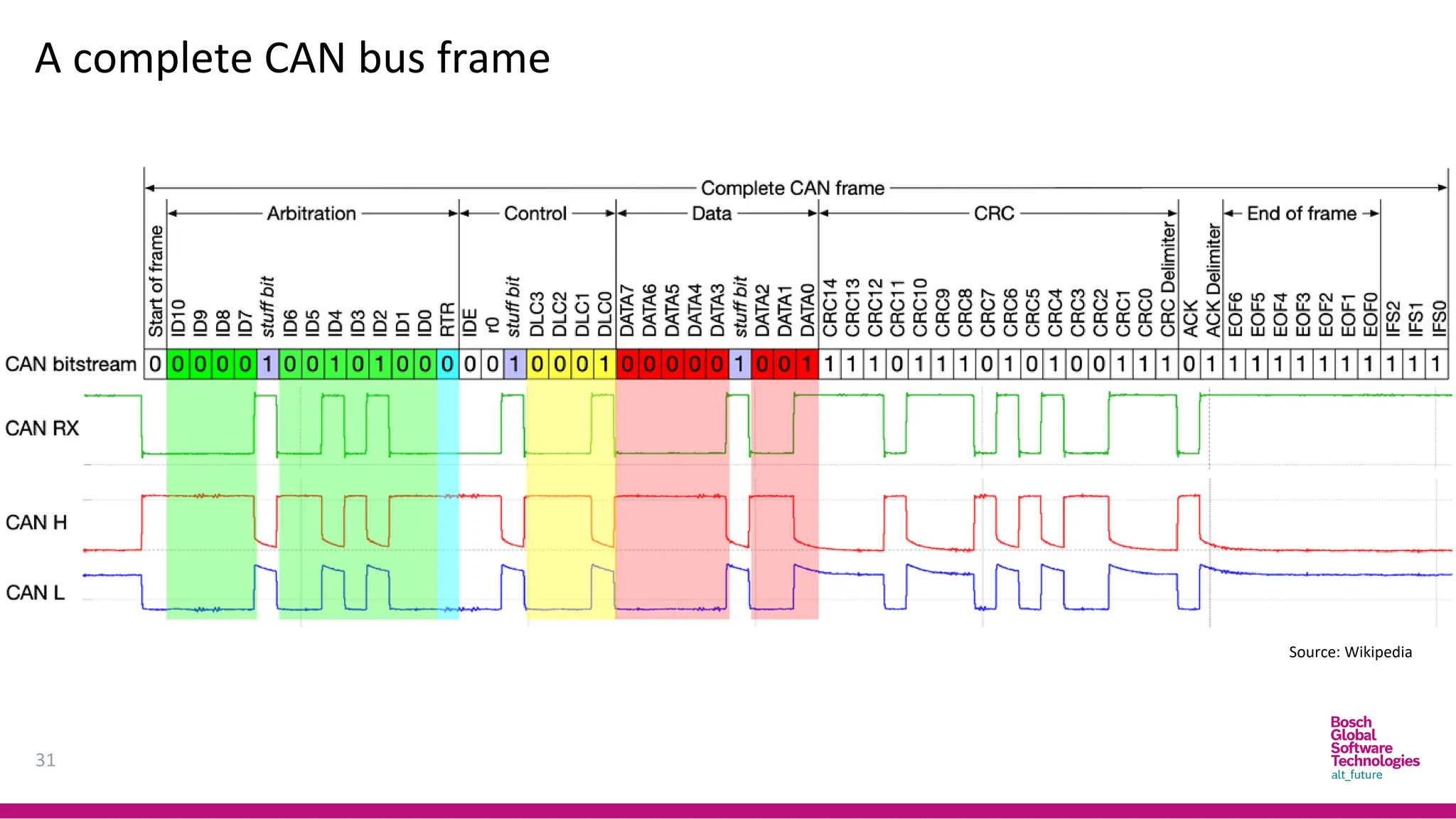
31
A complete CAN bus frame
Source: Wikipedia
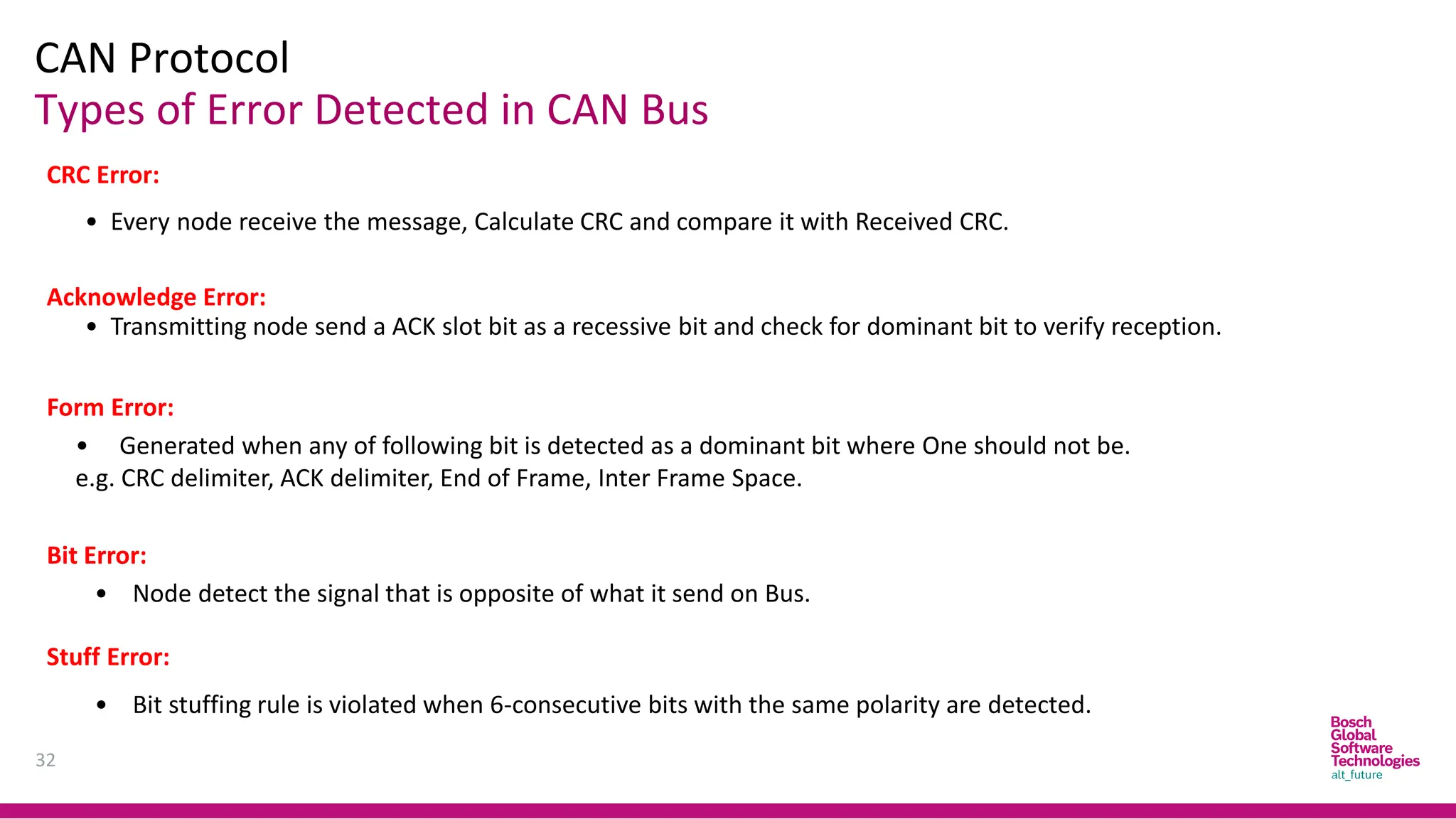
CAN Protocol
32
Types of Error Detected in CAN Bus
CRC Error:
• Every node receive the message, Calculate CRC and compare it with Received CRC.
Acknowledge Error:
• Transmitting node send a ACK slot bit as a recessive bit and check for dominant bit to verify reception.
Form Error:
• Generated when any of following bit is detected as a dominant bit where One should not be.
e.g. CRC delimiter, ACK delimiter, End of Frame, Inter Frame Space.
Stuff Error:
• Bit stuffing rule is violated when 6-consecutive bits with the same polarity are detected.
Bit Error:
• Node detect the signal that is opposite of what it send on Bus.
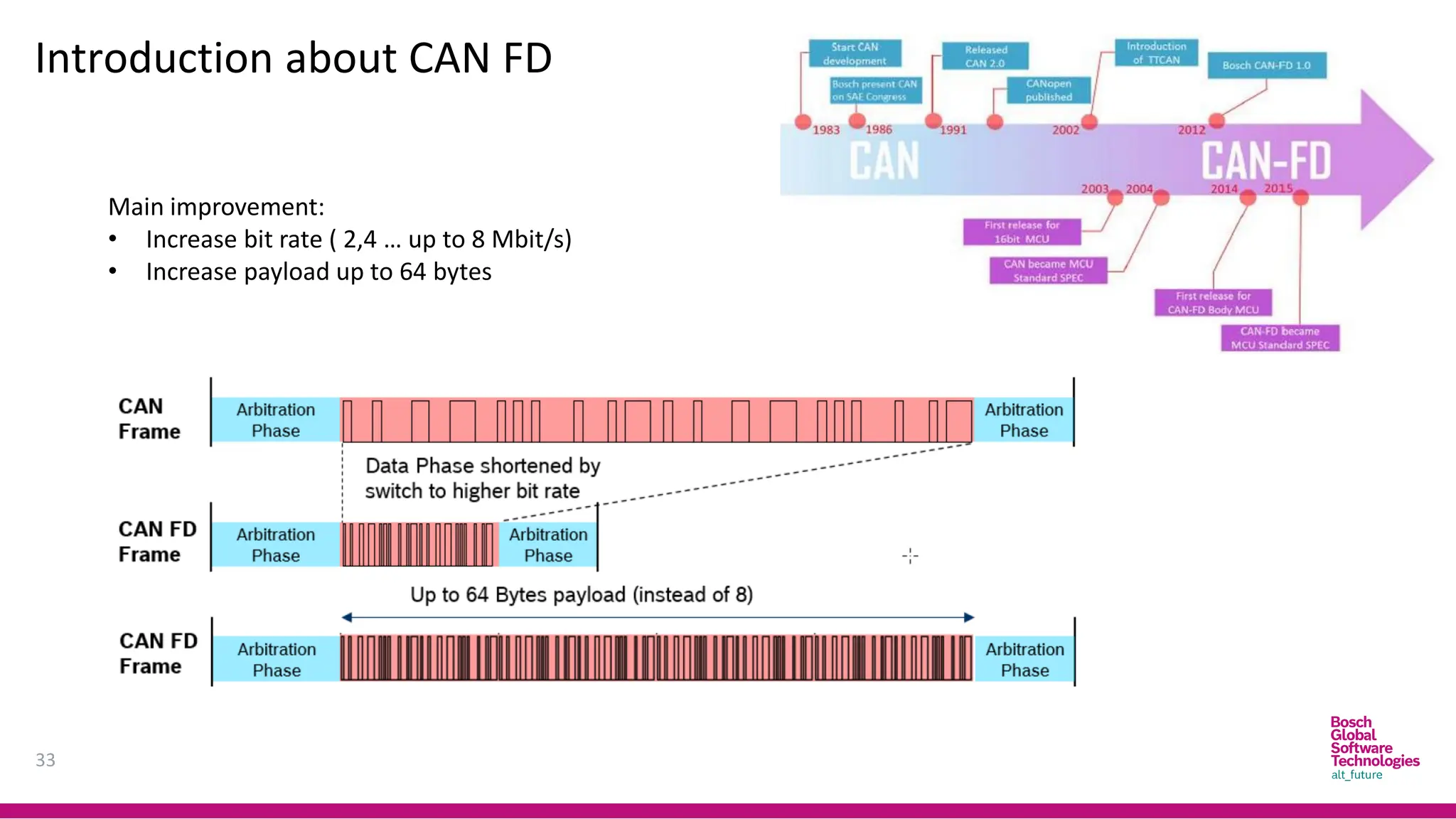
Introduction about CAN FD
33
Main improvement:
• Increase bit rate ( 2,4 … up to 8 Mbit/s)
• Increase payload up to 64 bytes
34
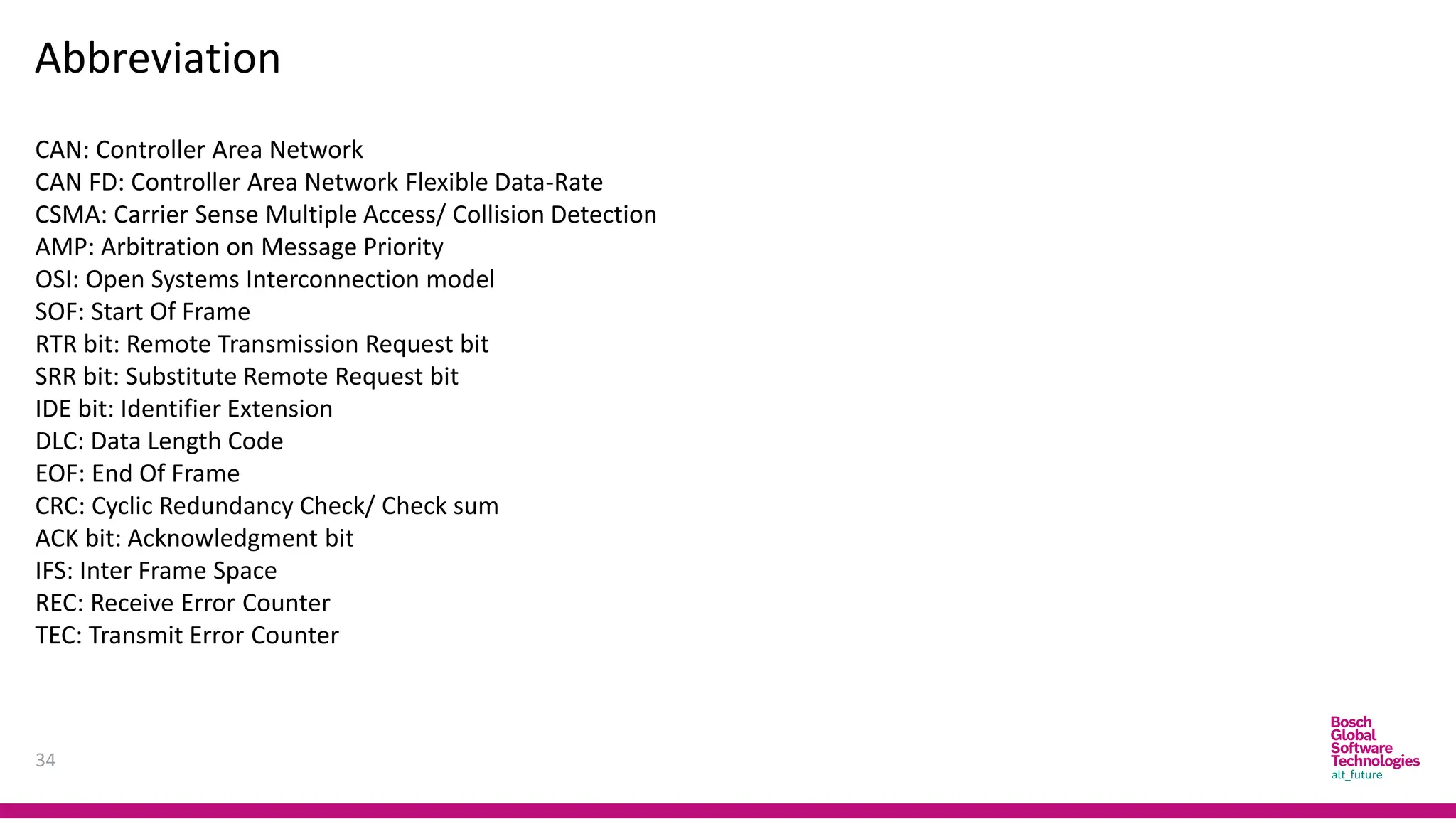
Abbreviation
CAN: Controller Area Network
CAN FD: Controller Area Network Flexible Data-Rate
CSMA: Carrier Sense Multiple Access/ Collision Detection
AMP: Arbitration on Message Priority
OSI: Open Systems Interconnection model
SOF: Start Of Frame
RTR bit: Remote Transmission Request bit
SRR bit: Substitute Remote Request bit
IDE bit: Identifier Extension
DLC: Data Length Code
EOF: End Of Frame
CRC: Cyclic Redundancy Check/ Check sum
ACK bit: Acknowledgment bit
IFS: Inter Frame Space
REC: Receive Error Counter
TEC: Transmit Error Counter
35
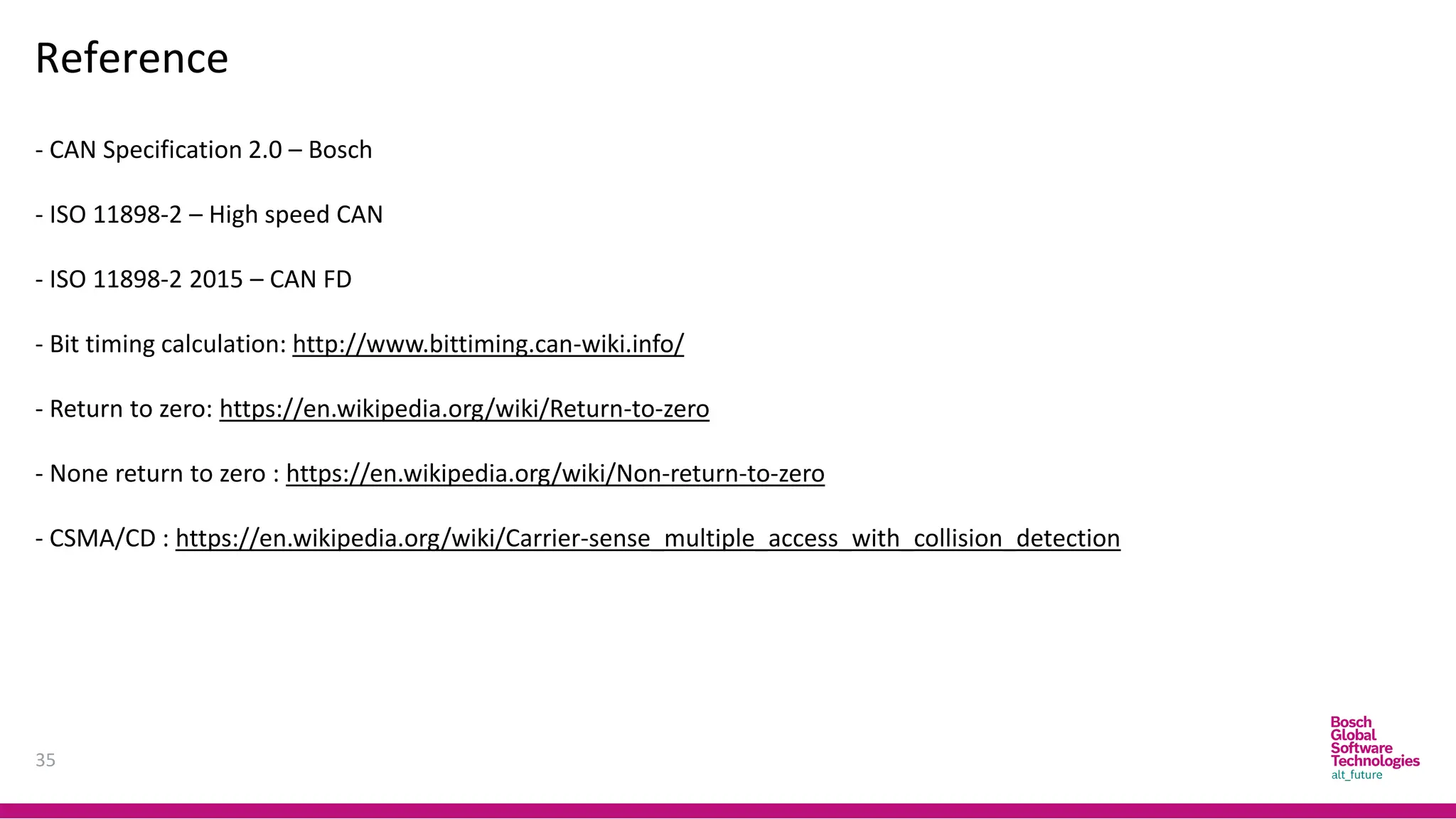
Reference
- CAN Specification 2.0 – Bosch
- ISO 11898-2 – High speed CAN
- ISO 11898-2 2015 – CAN FD
- Bit timing calculation: http://www.bittiming.can-wiki.info/
- Return to zero: https://en.wikipedia.org/wiki/Return-to-zero
- None return to zero : https://en.wikipedia.org/wiki/Non-return-to-zero
- CSMA/CD : https://en.wikipedia.org/wiki/Carrier-sense_multiple_access_with_collision_detection
DIAGNOSIS
OVERVIEW
Trainer Introduction
37
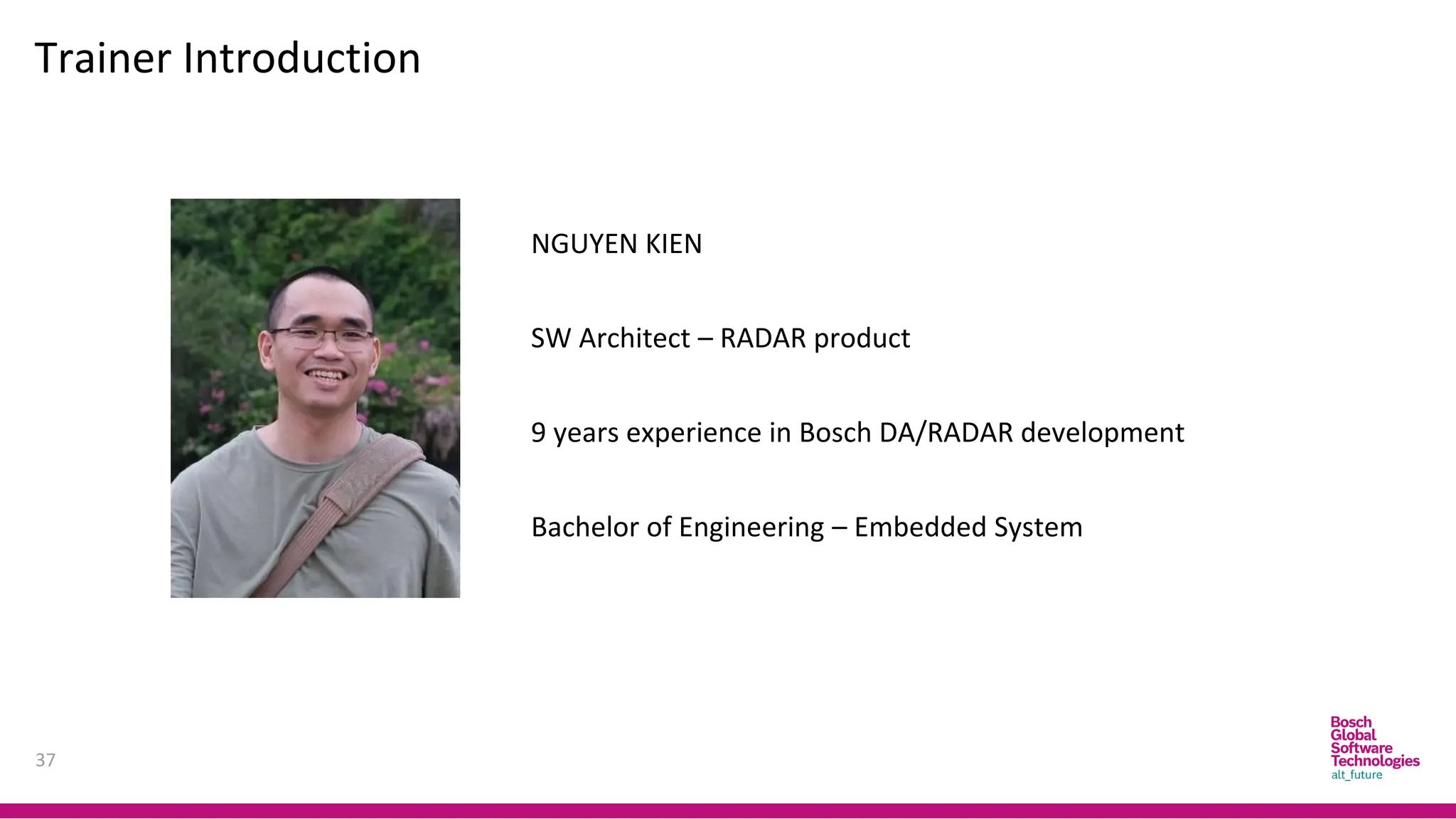
NGUYEN KIEN
SW Architect – RADAR product
9 years experience in Bosch DA/RADAR development
Bachelor of Engineering – Embedded System
Definitions
Diagnosis – What?
38
“In automotive engineering, Diagnosis is typically used to determine the causes
of symptoms and solutions to issues.”
 symptom(s) – what the user/operator/repairer of the system (vehicle or
whatever) notices;
 fault(s) – the error(s) in the system that result in the symptom(s);
 root cause(s) – the cause(s) of the fault.
Source: Advanced Automotive Fault Diagnosis- Automotive Technology: Vehicle
Maintenance and Repair
TOM DENTON
Definitions
Diagnosis – How?[1]
39
To do Diagnostic, Technician have to know how to use Diagnostic Tools and
Equipment.
Tool and Equipment could be classified into:
 Basic Equipment: such as Multi-meter
 Tracing Tool: like Oscilloscope
 Scanner/Fault Code Readers and Analyzers.
Definitions
Diagnosis – How?[2]
40
 The Equipment shall help technician indicate where is fault occurs in systems.
 In the other word, In Vehicle, Systems should have ability to provide
information in case request.
 This is the motivation of On-board diagnostics (OBD).
 On-board diagnostics (OBD) is a generic term referring to a vehicle’s self-
diagnostic and reporting system. OBD systems give the vehicle owner or a
technician access to information for various vehicle systems.
 OBD system illuminates a warning lamp known as the malfunction indicator
lamp (MIL) or malfunction indicator (MI) on the instrument cluster.
Definitions
Diagnosis – How?[3]
41
 When the fault occurs, the system stores a diagnostic trouble code (DTC), also
store important information of the vehicle when the fault was set.
 A service technician is able to connect a diagnostic scan tool or a code reader
that will communicate with the system and retrieve this information.
 As vehicles and their systems become more complex, the functionality of OBD
is being extended to cover vehicle systems and components that do not have
anything to do with vehicle emissions control: Vehicle body, chassis and
accessories
 OBD systems use a standardized communications port to provide data
 The Communication between Diagnostic Equipment and ECUs through Vehicle
Special Interface for Diagnosis purpose is called Diagnostic Communication.
Definitions
States and Events
42
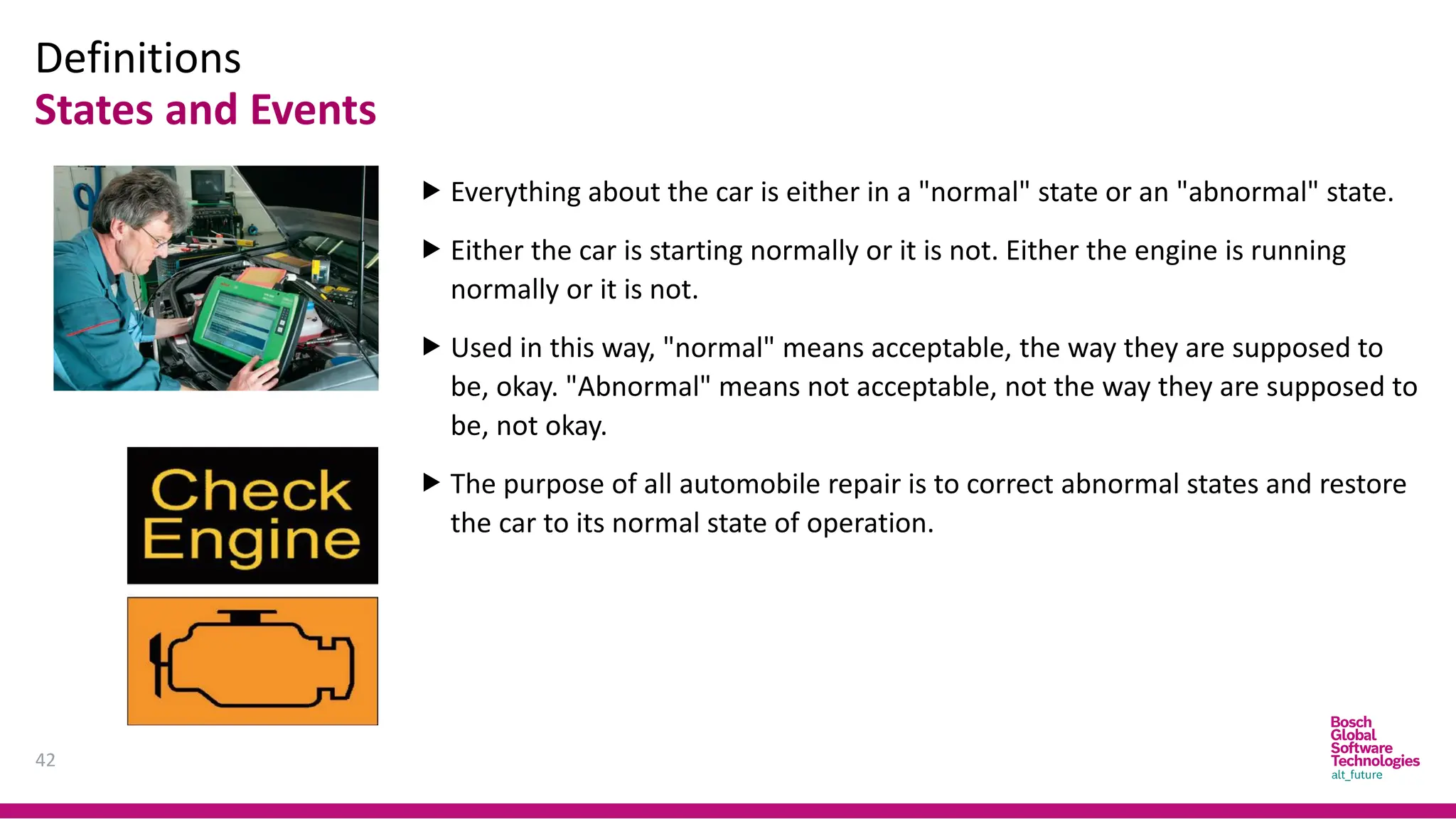
 Everything about the car is either in a "normal" state or an "abnormal" state.
 Either the car is starting normally or it is not. Either the engine is running
normally or it is not.
 Used in this way, "normal" means acceptable, the way they are supposed to
be, okay. "Abnormal" means not acceptable, not the way they are supposed to
be, not okay.
 The purpose of all automobile repair is to correct abnormal states and restore
the car to its normal state of operation.
Definitions
States and Events
43
 An "event" is when something happens: a spark plug fires, the brakes are
applied, a fuel injector opens, a relay closes.
 An event is a change of state, from one condition to another.
 A "normal event" occurs when something happens just as it is supposed to
happen.
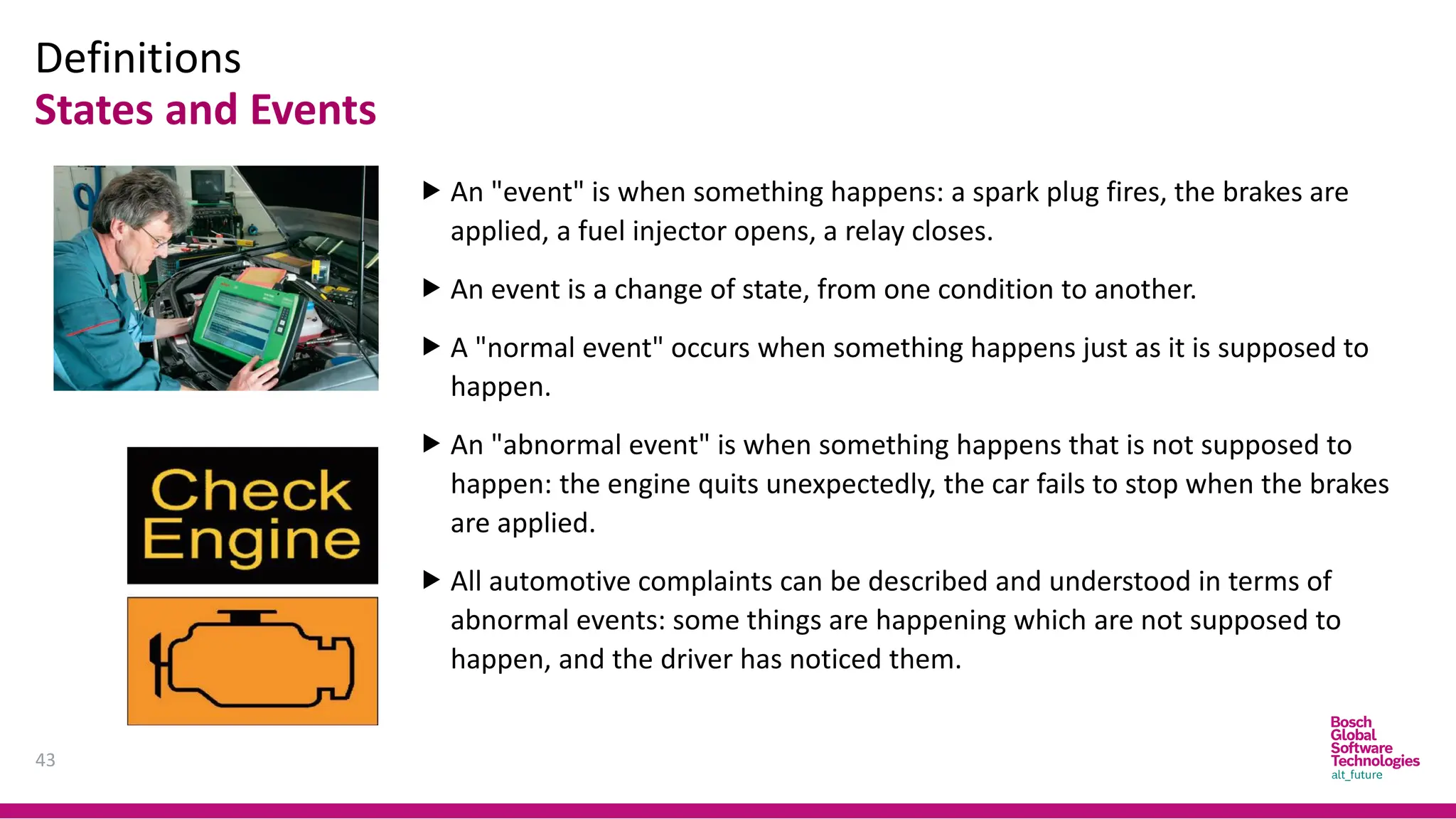
 An "abnormal event" is when something happens that is not supposed to
happen: the engine quits unexpectedly, the car fails to stop when the brakes
are applied.
 All automotive complaints can be described and understood in terms of
abnormal events: some things are happening which are not supposed to
happen, and the driver has noticed them.
Diagnosis Uses
44
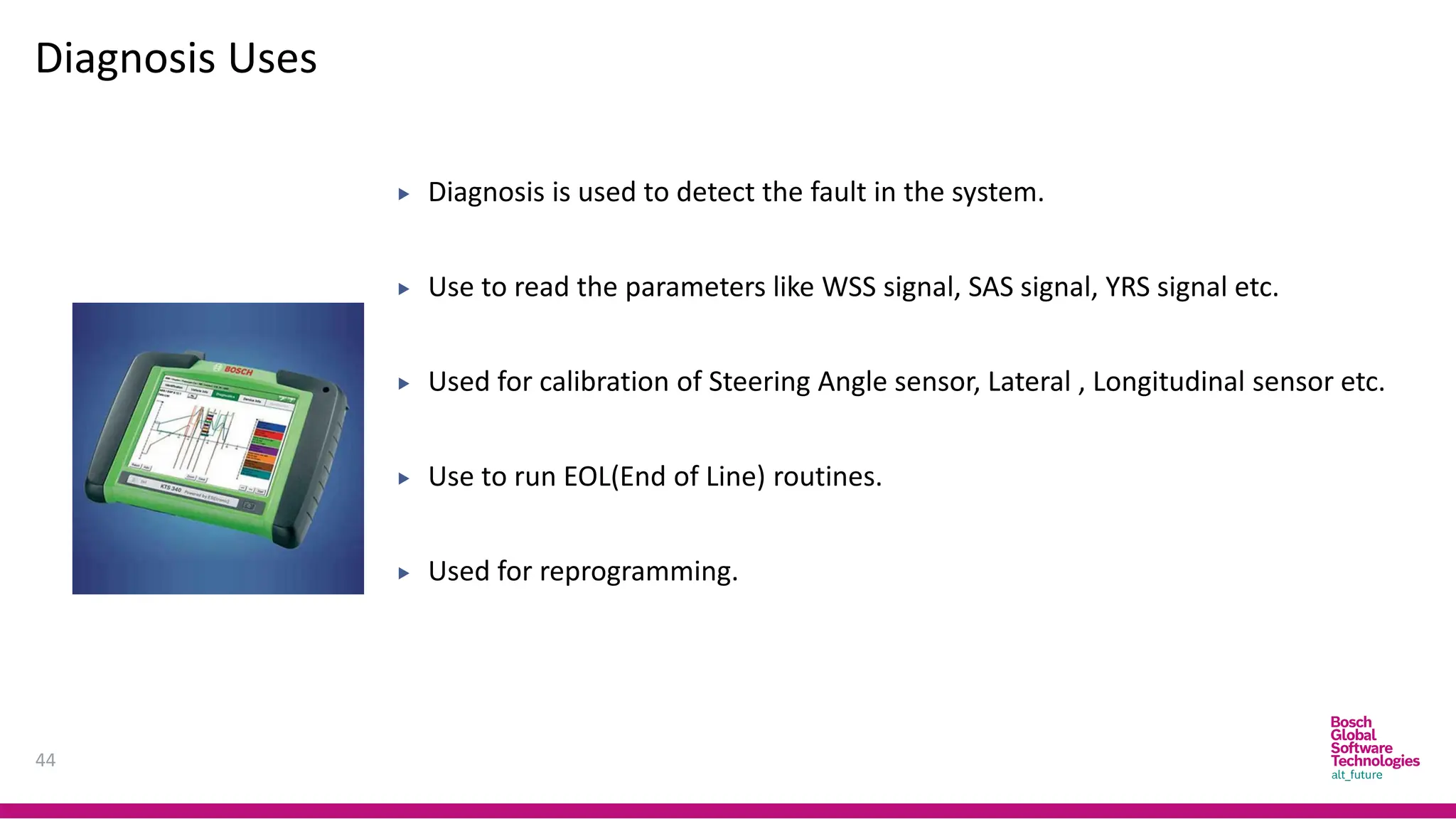
 Diagnosis is used to detect the fault in the system.
 Use to read the parameters like WSS signal, SAS signal, YRS signal etc.
 Used for calibration of Steering Angle sensor, Lateral , Longitudinal sensor etc.
 Use to run EOL(End of Line) routines.
 Used for reprogramming.
On board and Off board Diagnosis
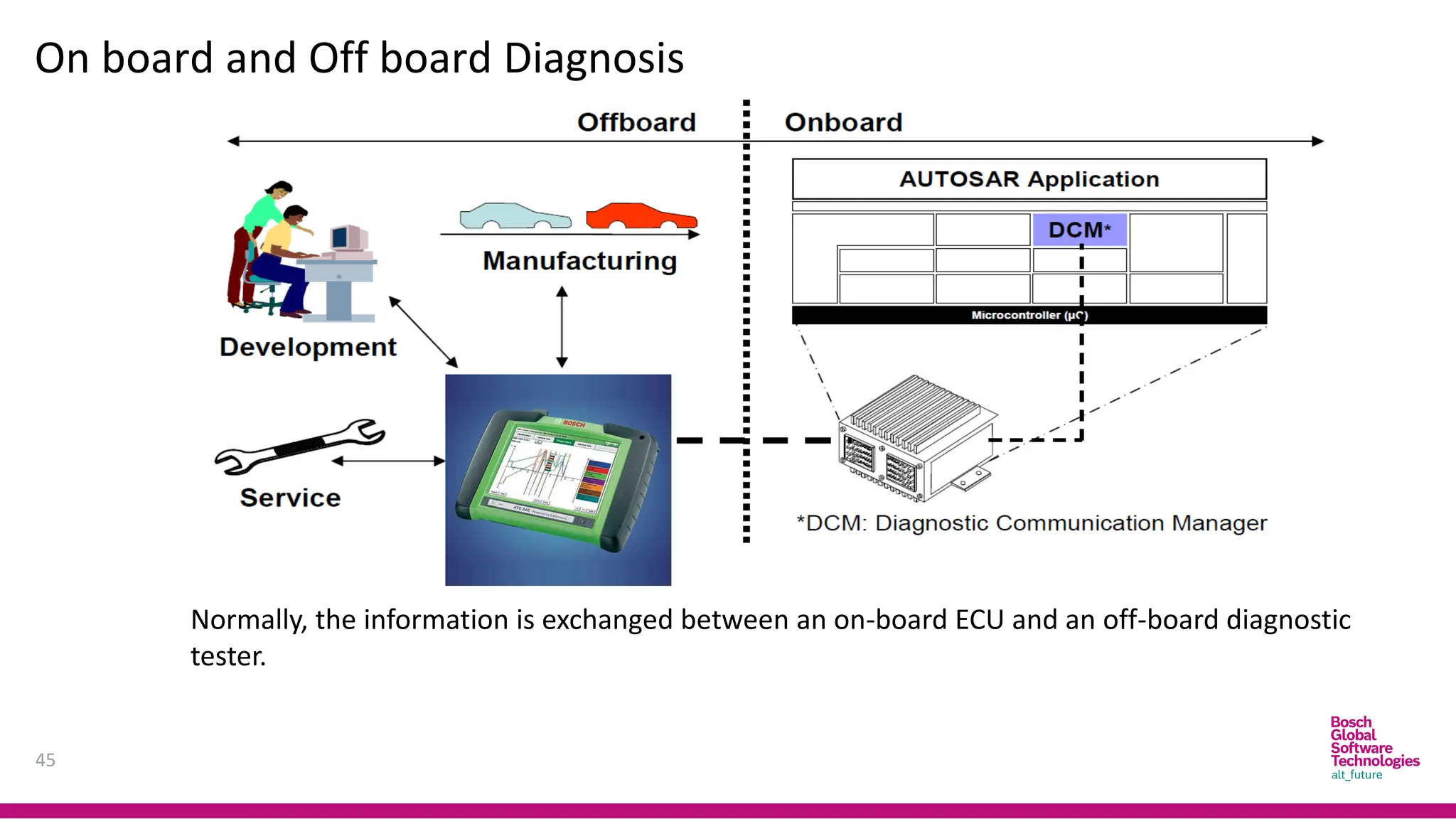
45
Normally, the information is exchanged between an on-board ECU and an off-board diagnostic
tester.
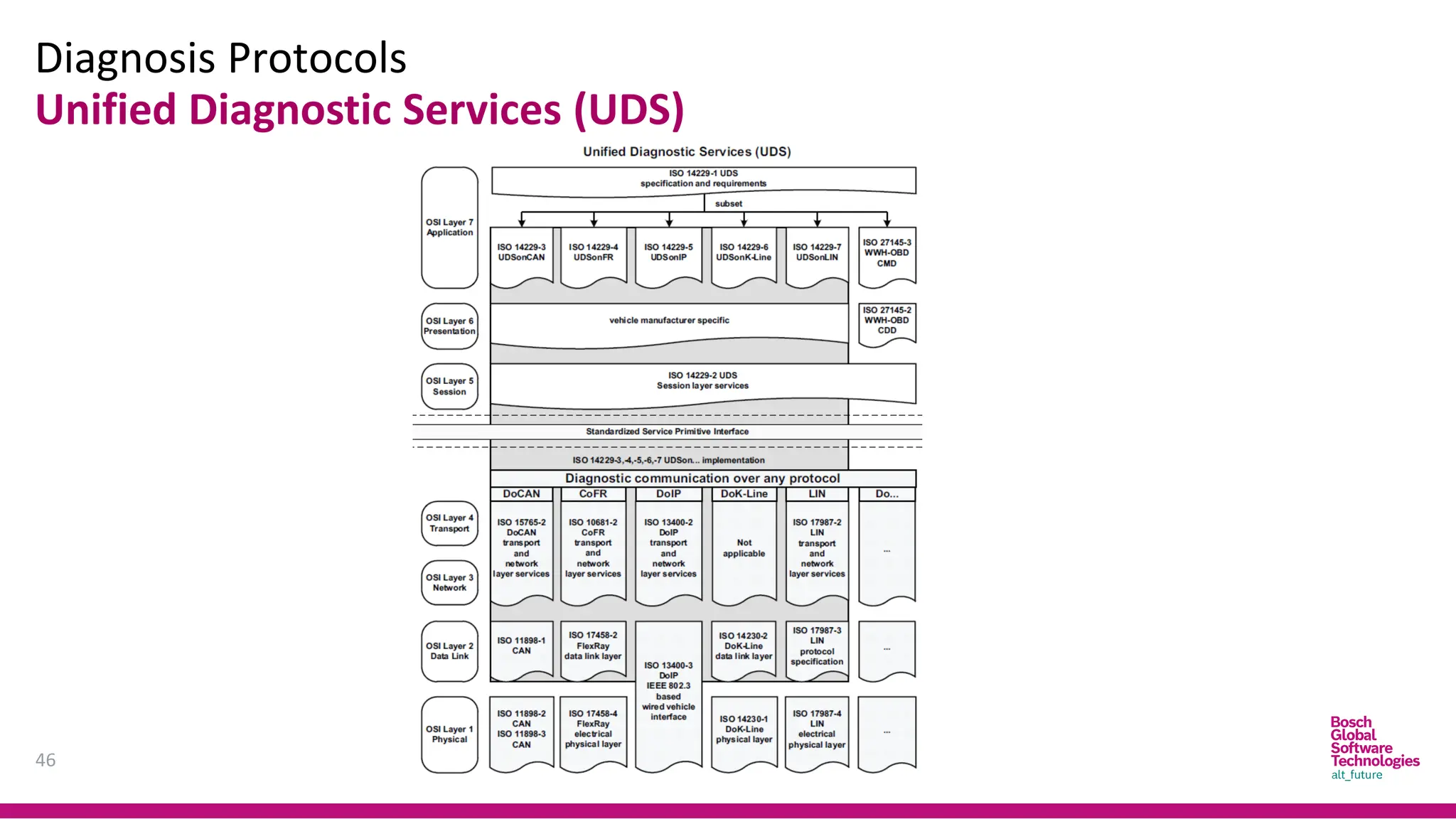
Diagnosis Protocols
46
Unified Diagnostic Services (UDS)
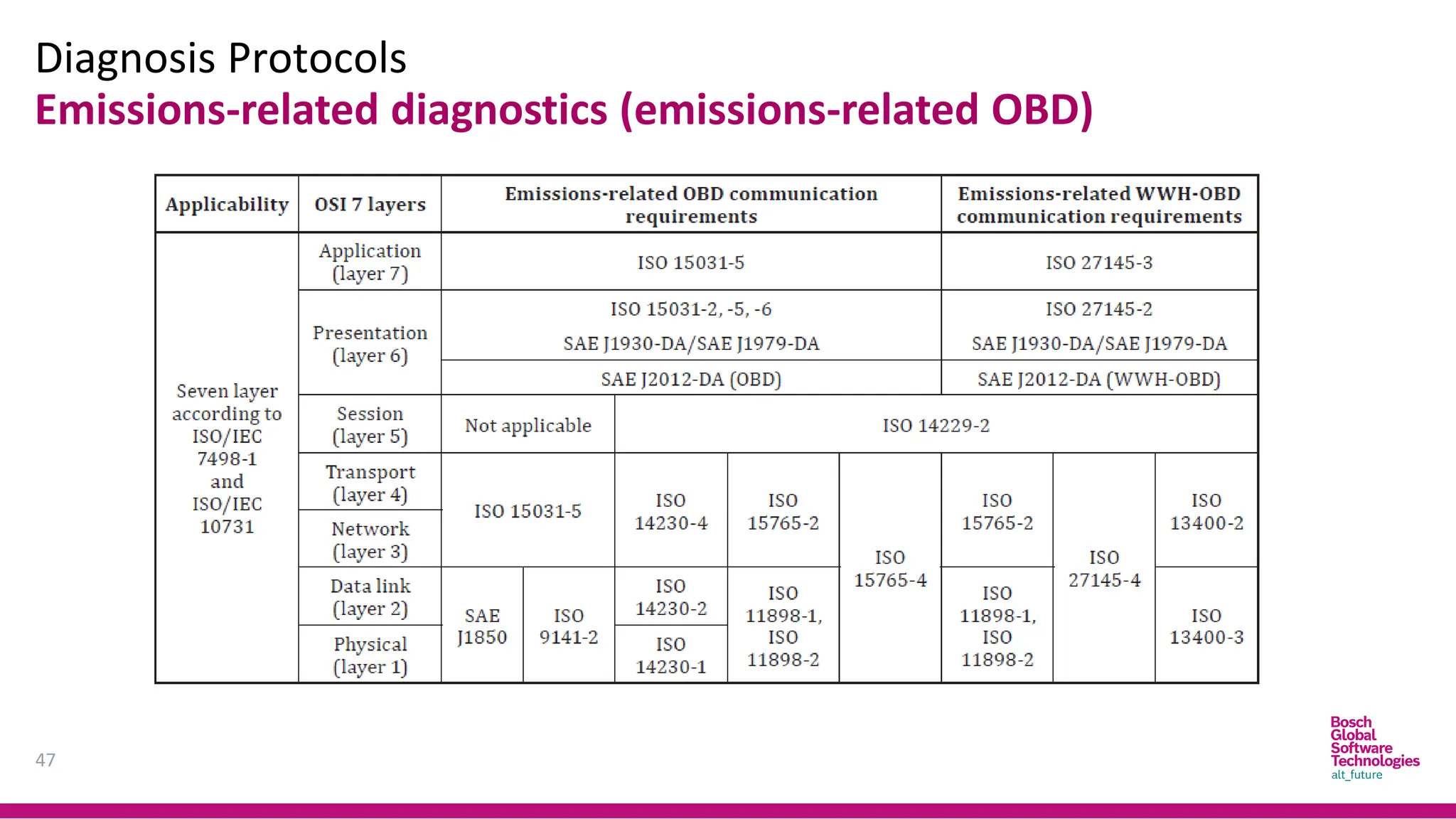
Diagnosis Protocols
47
Emissions-related diagnostics (emissions-related OBD)
Diagnosis Protocols
48
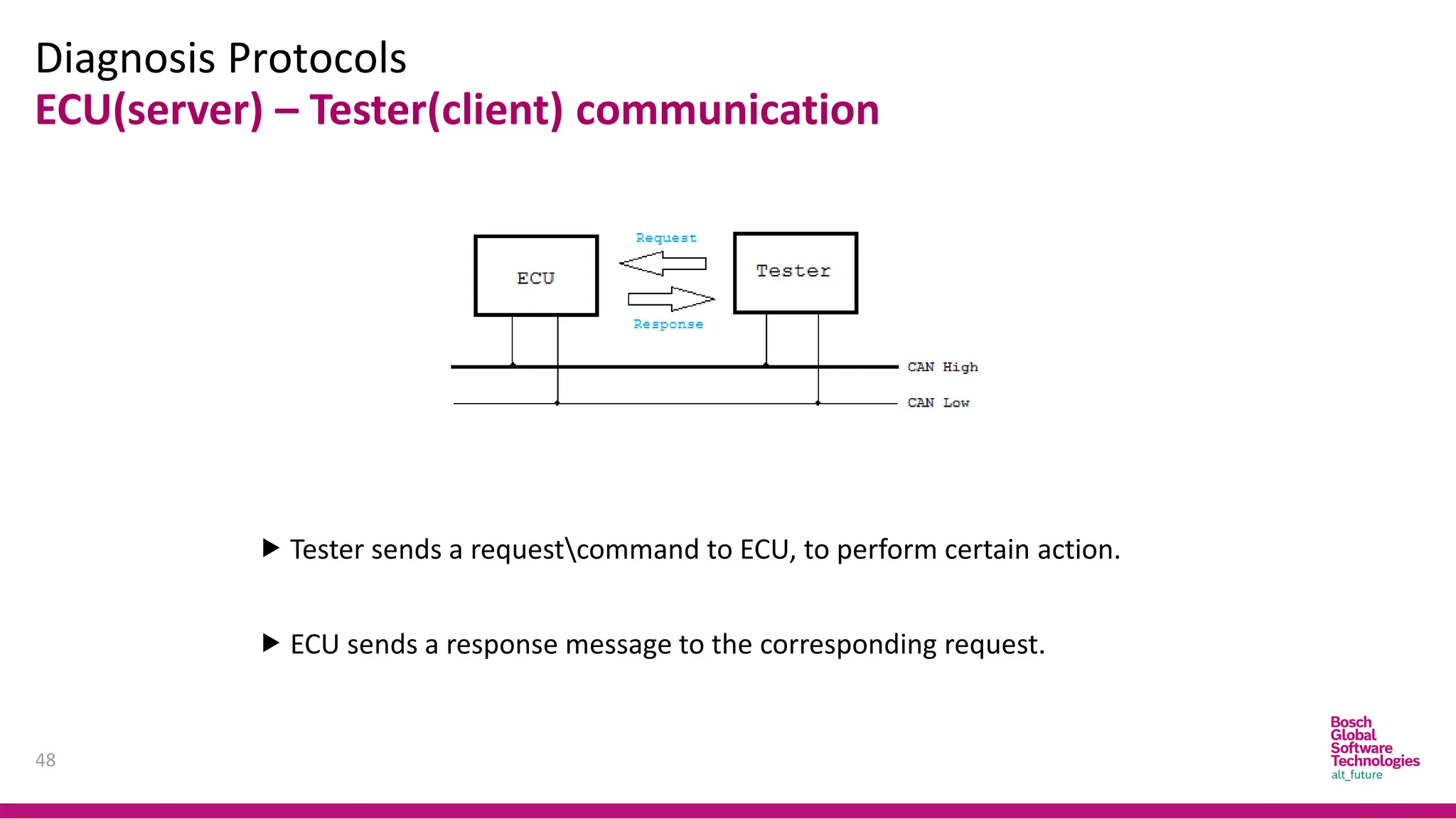
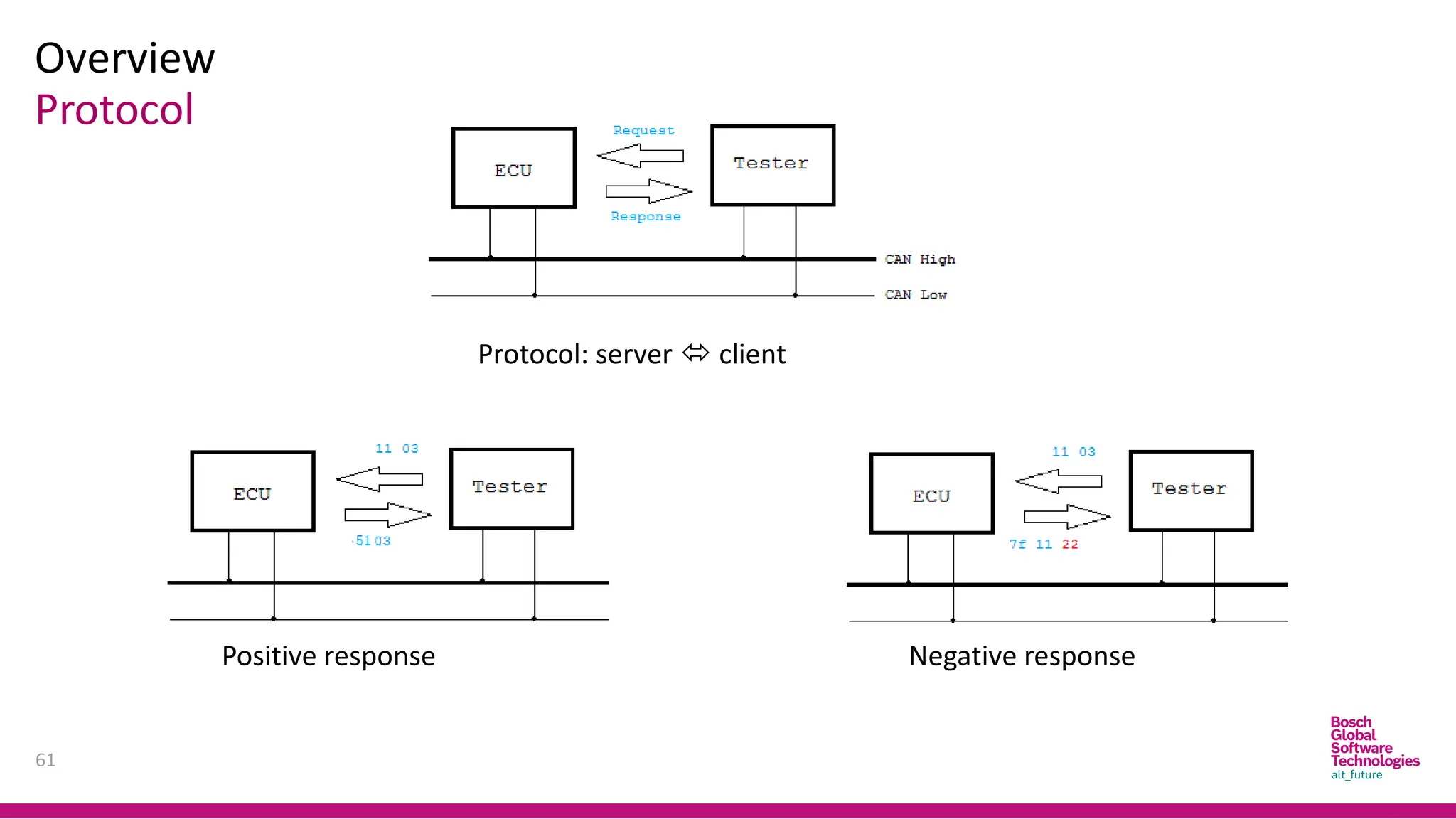
ECU(server) – Tester(client) communication
 Tester sends a requestcommand to ECU, to perform certain action.
 ECU sends a response message to the corresponding request.
Request and response
49
Overview
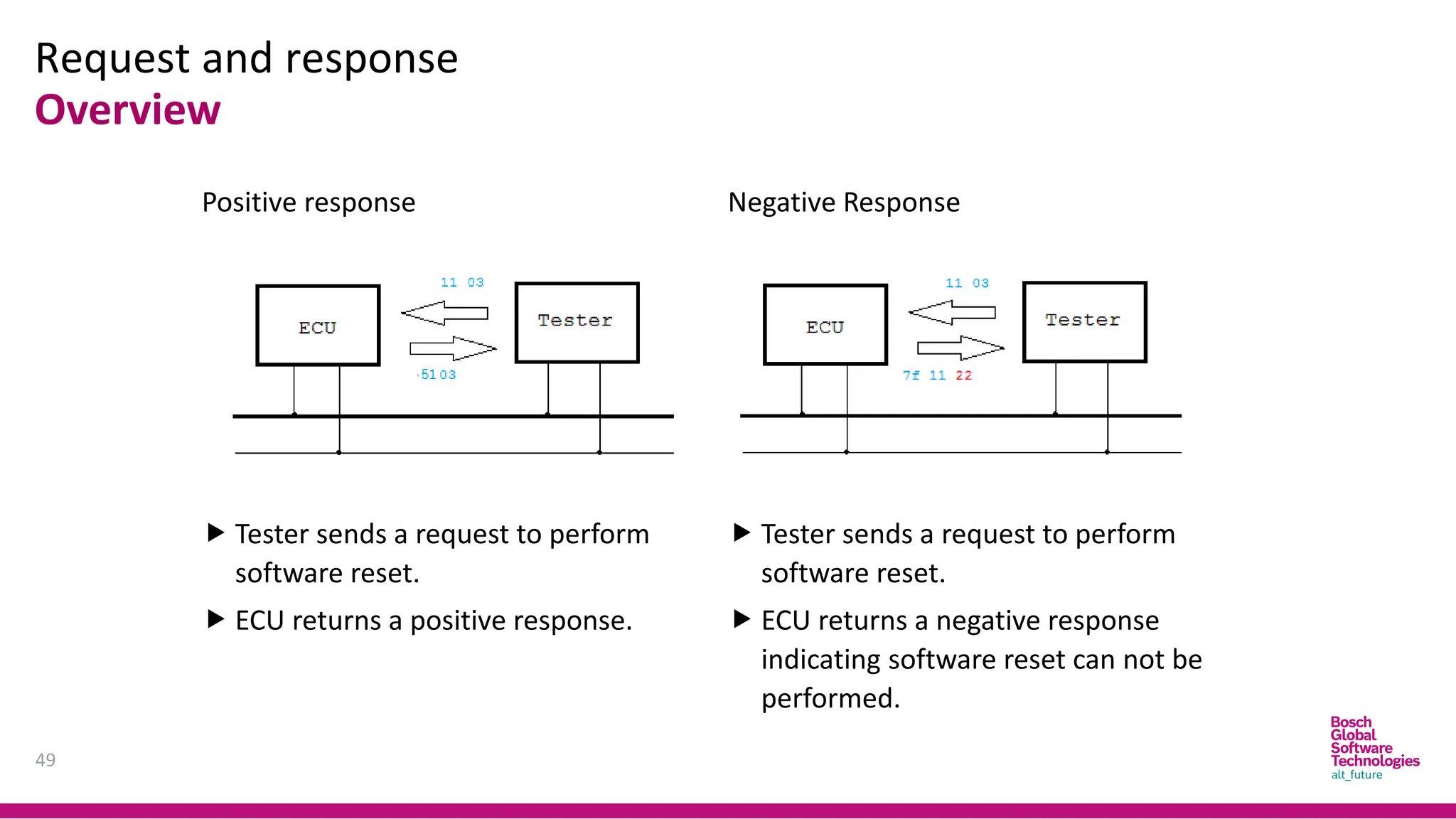
Positive response
 Tester sends a request to perform
software reset.
 ECU returns a positive response.
Negative Response
 Tester sends a request to perform
software reset.
 ECU returns a negative response
indicating software reset can not be
performed.
Request and response
50
Overview
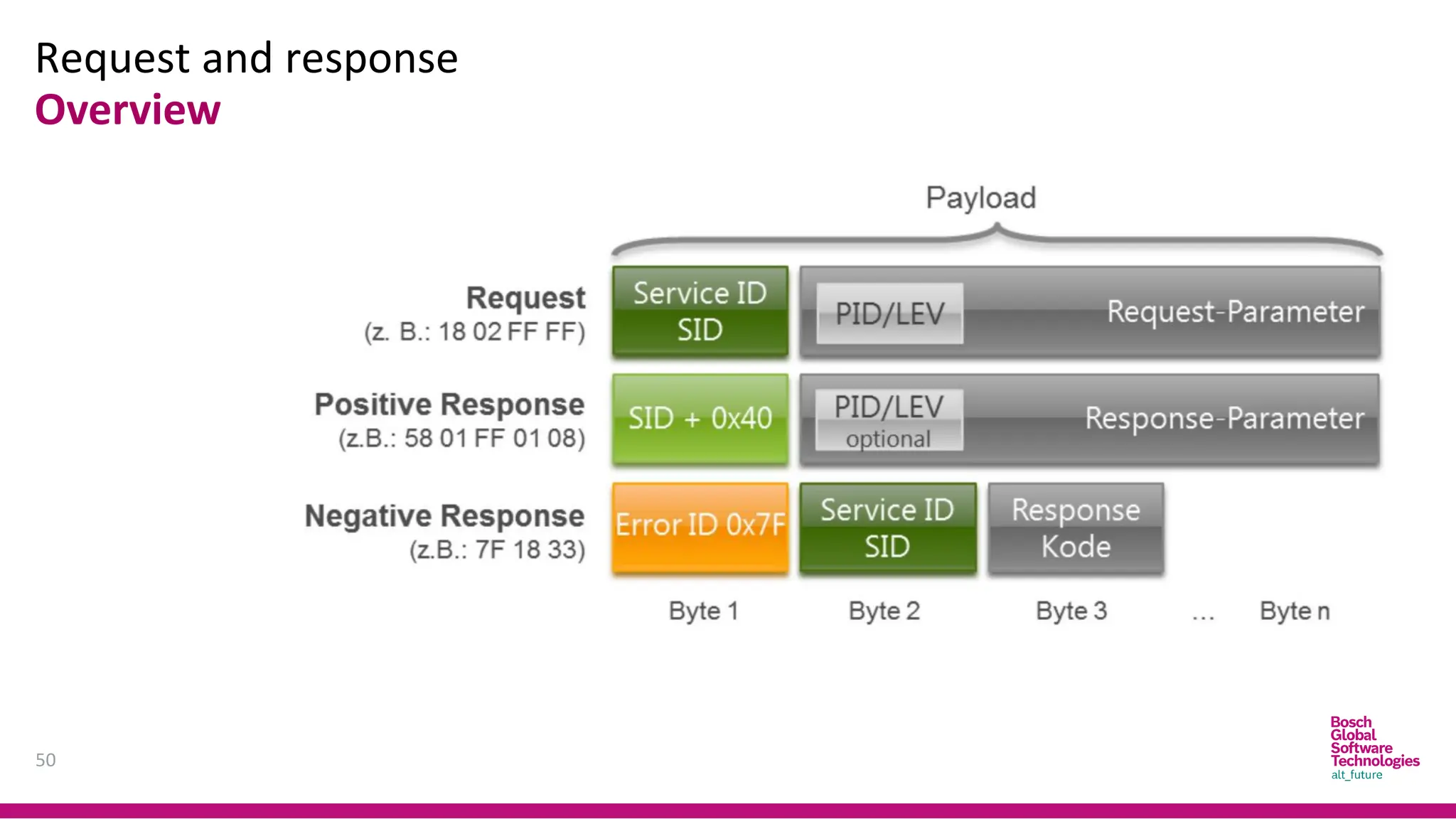
Request and response
51
Overview
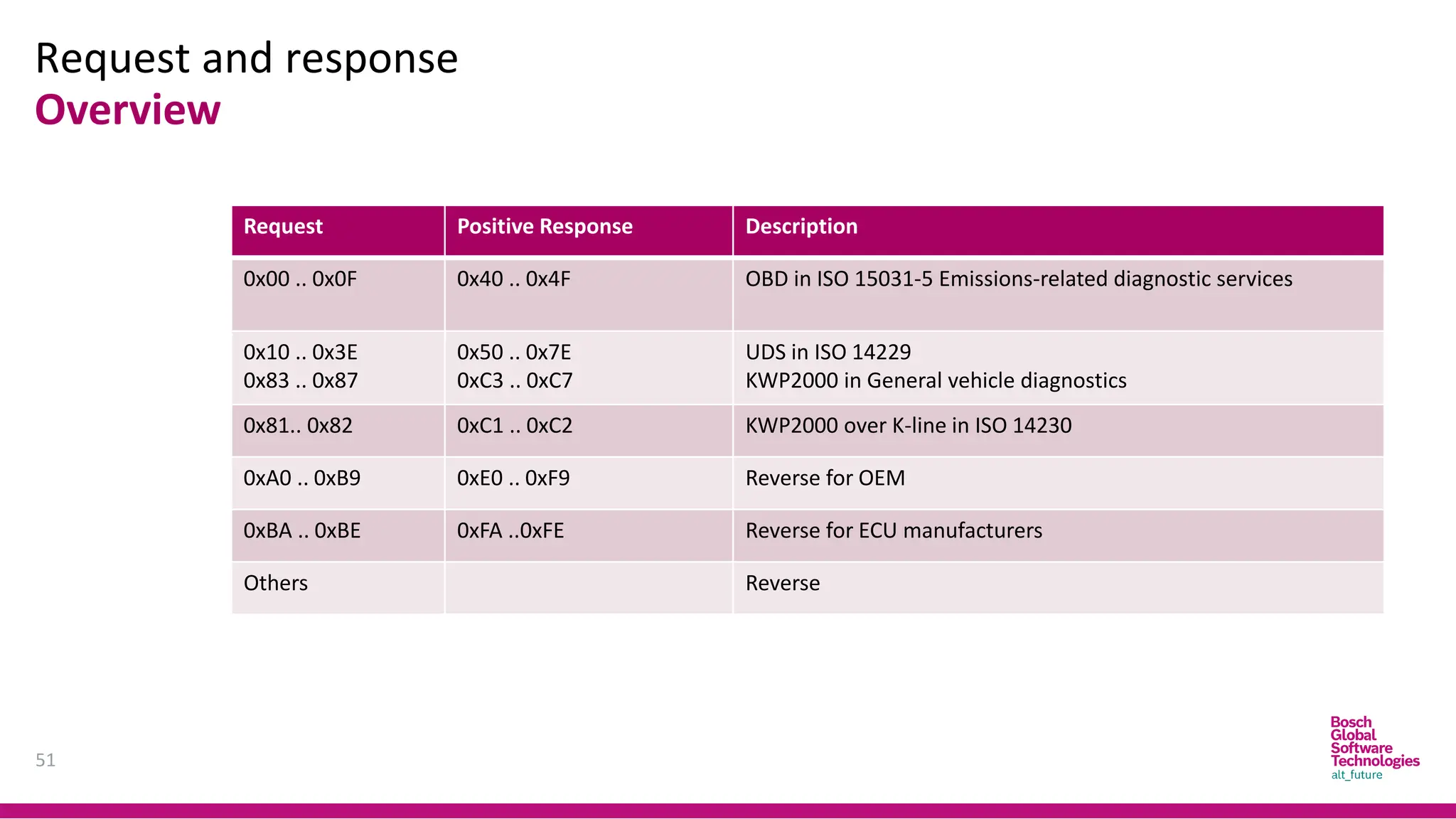
Request Positive Response Description
0x00 .. 0x0F 0x40 .. 0x4F OBD in ISO 15031-5 Emissions-related diagnostic services
0x10 .. 0x3E
0x83 .. 0x87
0x50 .. 0x7E
0xC3 .. 0xC7
UDS in ISO 14229
KWP2000 in General vehicle diagnostics
0x81.. 0x82 0xC1 .. 0xC2 KWP2000 over K-line in ISO 14230
0xA0 .. 0xB9 0xE0 .. 0xF9 Reverse for OEM
0xBA .. 0xBE 0xFA ..0xFE Reverse for ECU manufacturers
Others Reverse
Request and response
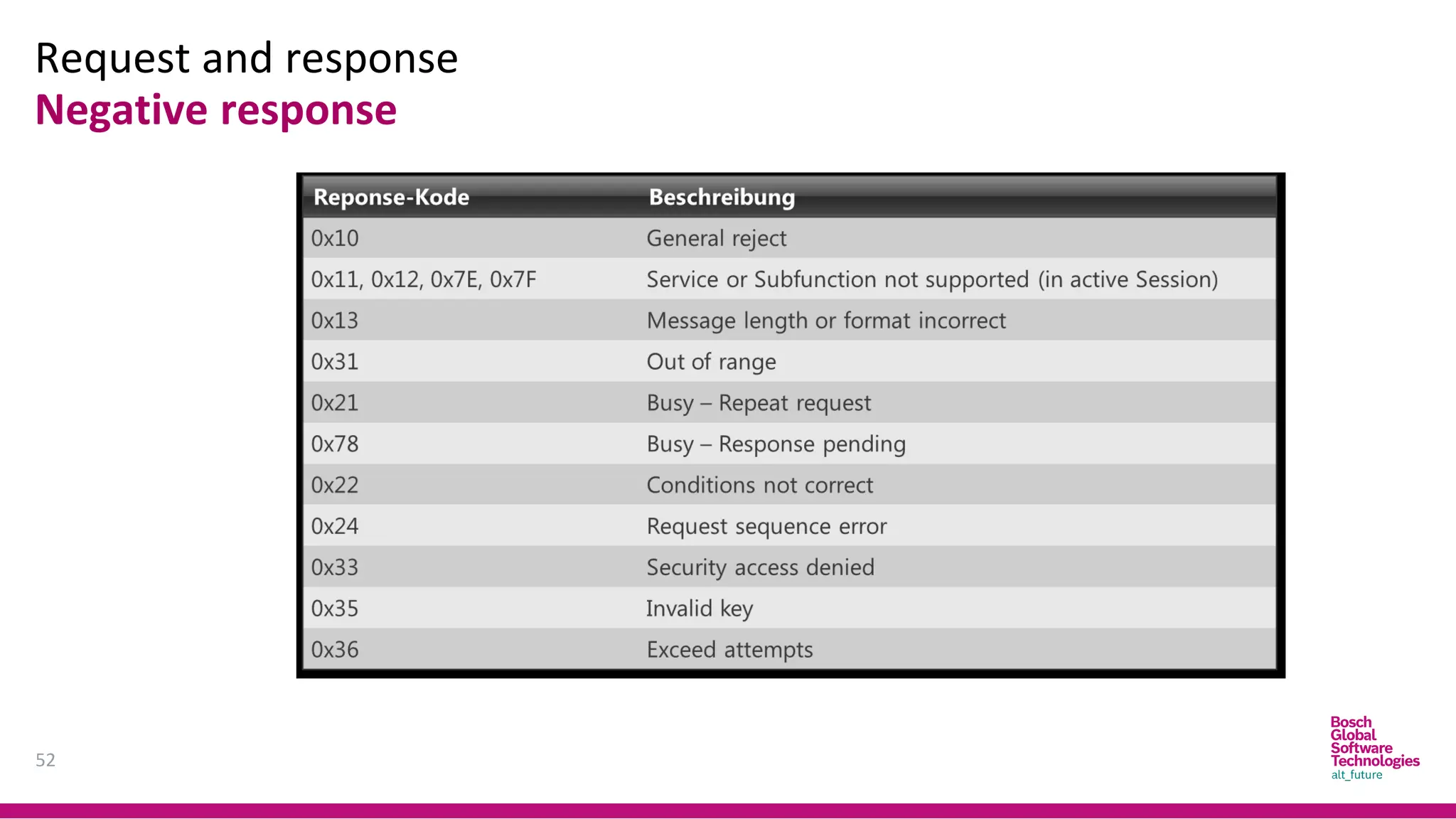
52
Negative response
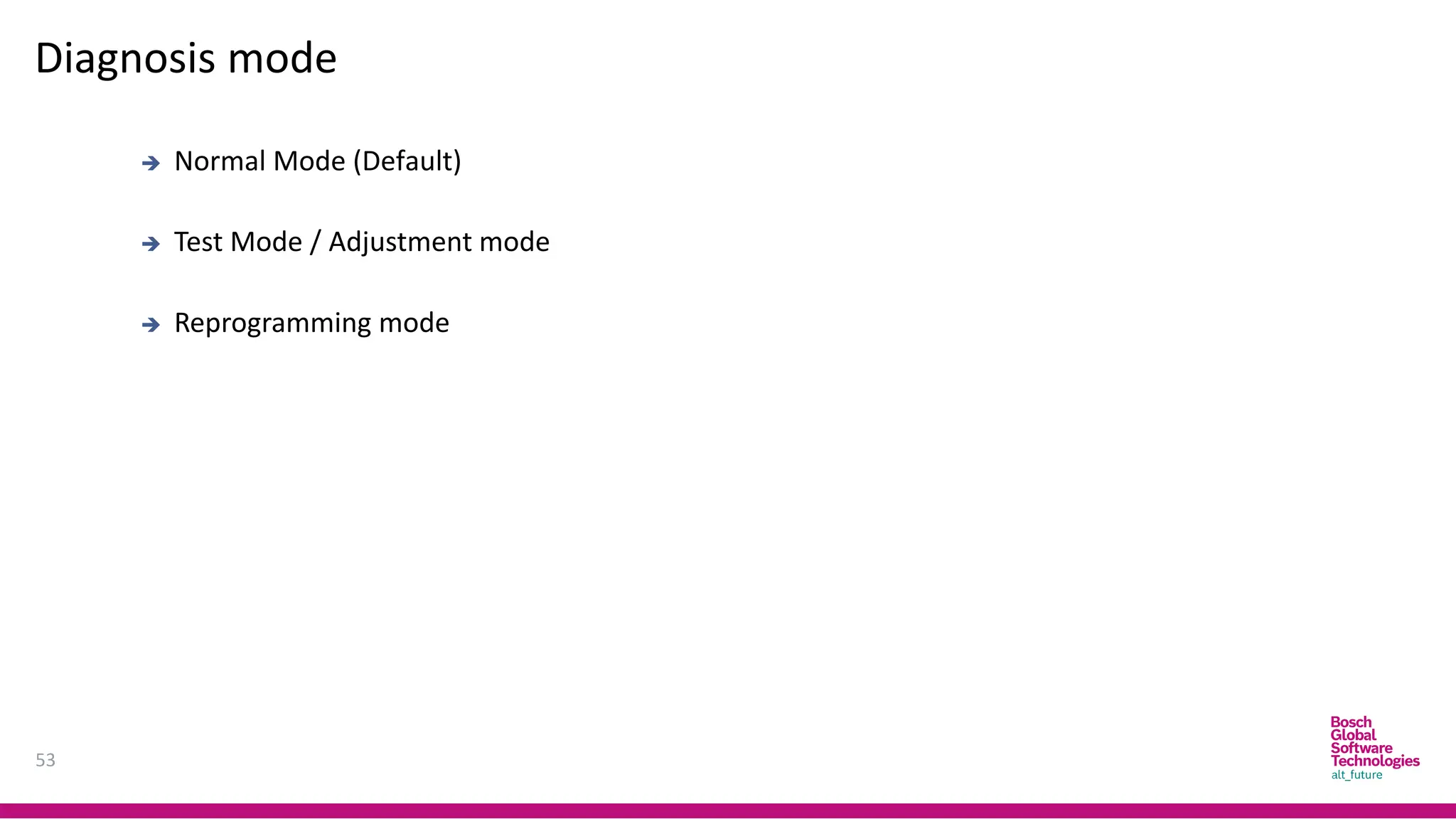
Diagnosis mode
53
➔ Normal Mode (Default)
➔ Test Mode / Adjustment mode
➔ Reprogramming mode
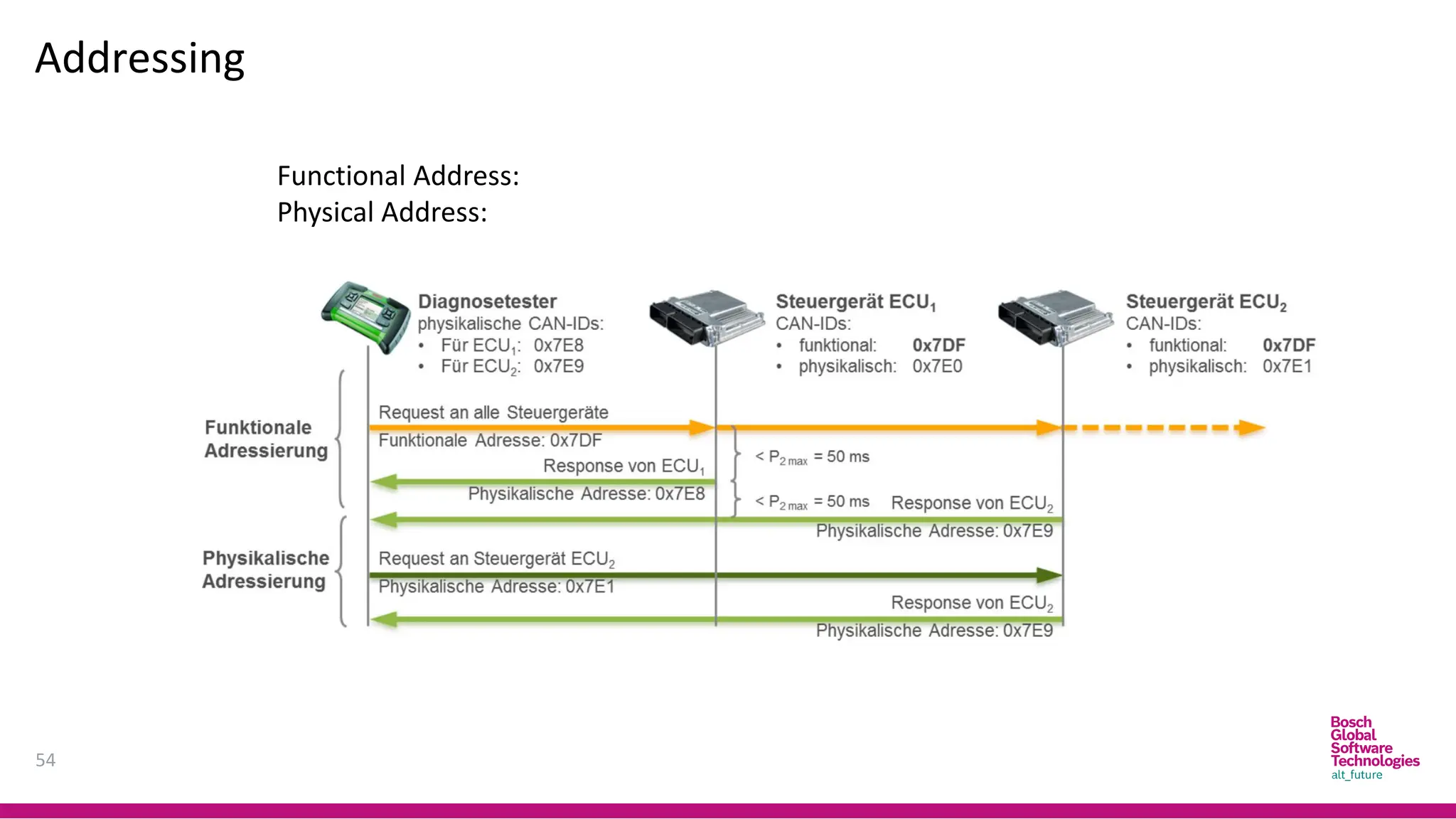
Addressing
54
Functional Address:
Physical Address:
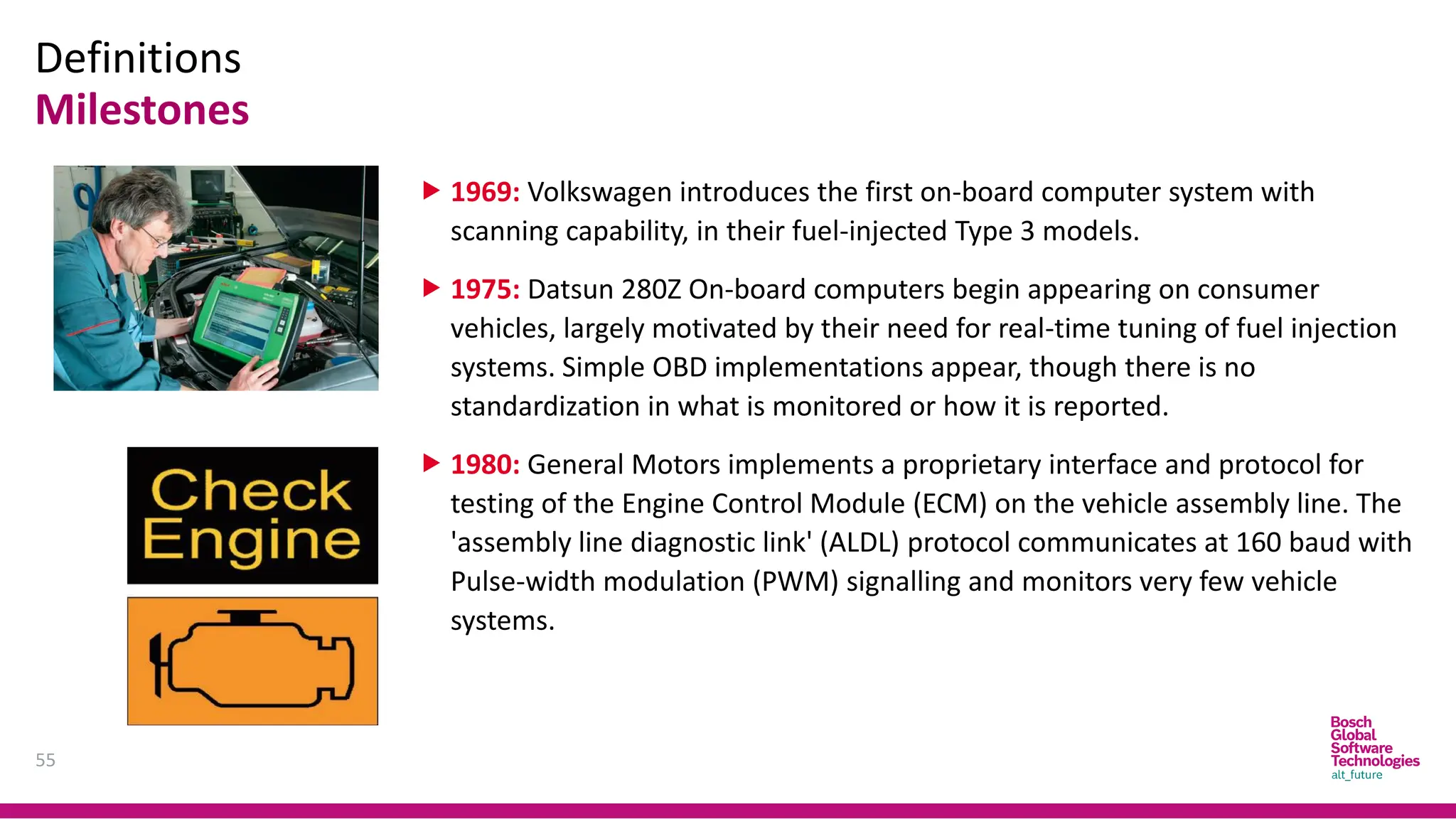
Definitions
Milestones
55
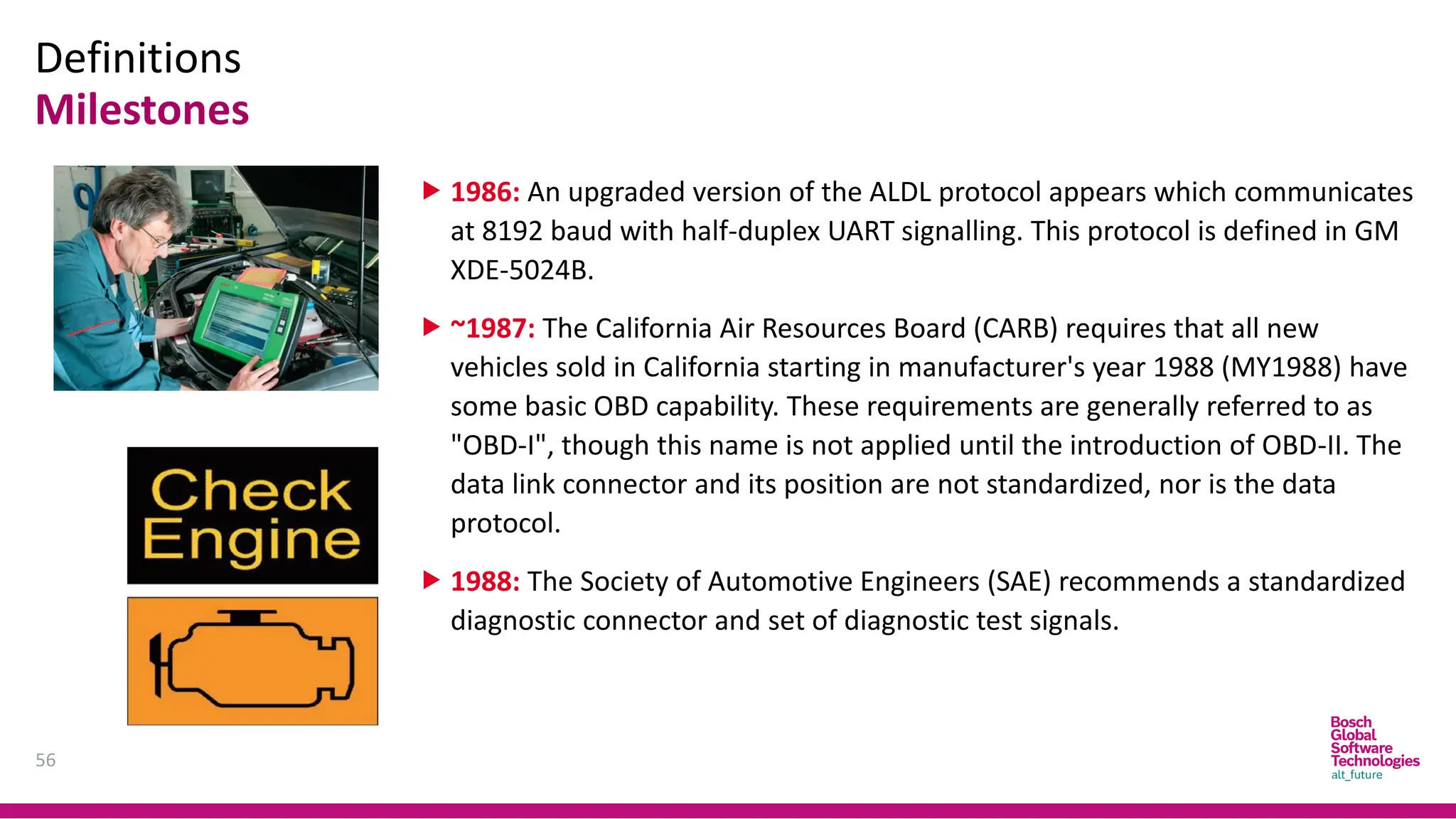
 1969: Volkswagen introduces the first on-board computer system with
scanning capability, in their fuel-injected Type 3 models.
 1975: Datsun 280Z On-board computers begin appearing on consumer
vehicles, largely motivated by their need for real-time tuning of fuel injection
systems. Simple OBD implementations appear, though there is no
standardization in what is monitored or how it is reported.
 1980: General Motors implements a proprietary interface and protocol for
testing of the Engine Control Module (ECM) on the vehicle assembly line. The
'assembly line diagnostic link' (ALDL) protocol communicates at 160 baud with
Pulse-width modulation (PWM) signalling and monitors very few vehicle
systems.
Definitions
Milestones
56
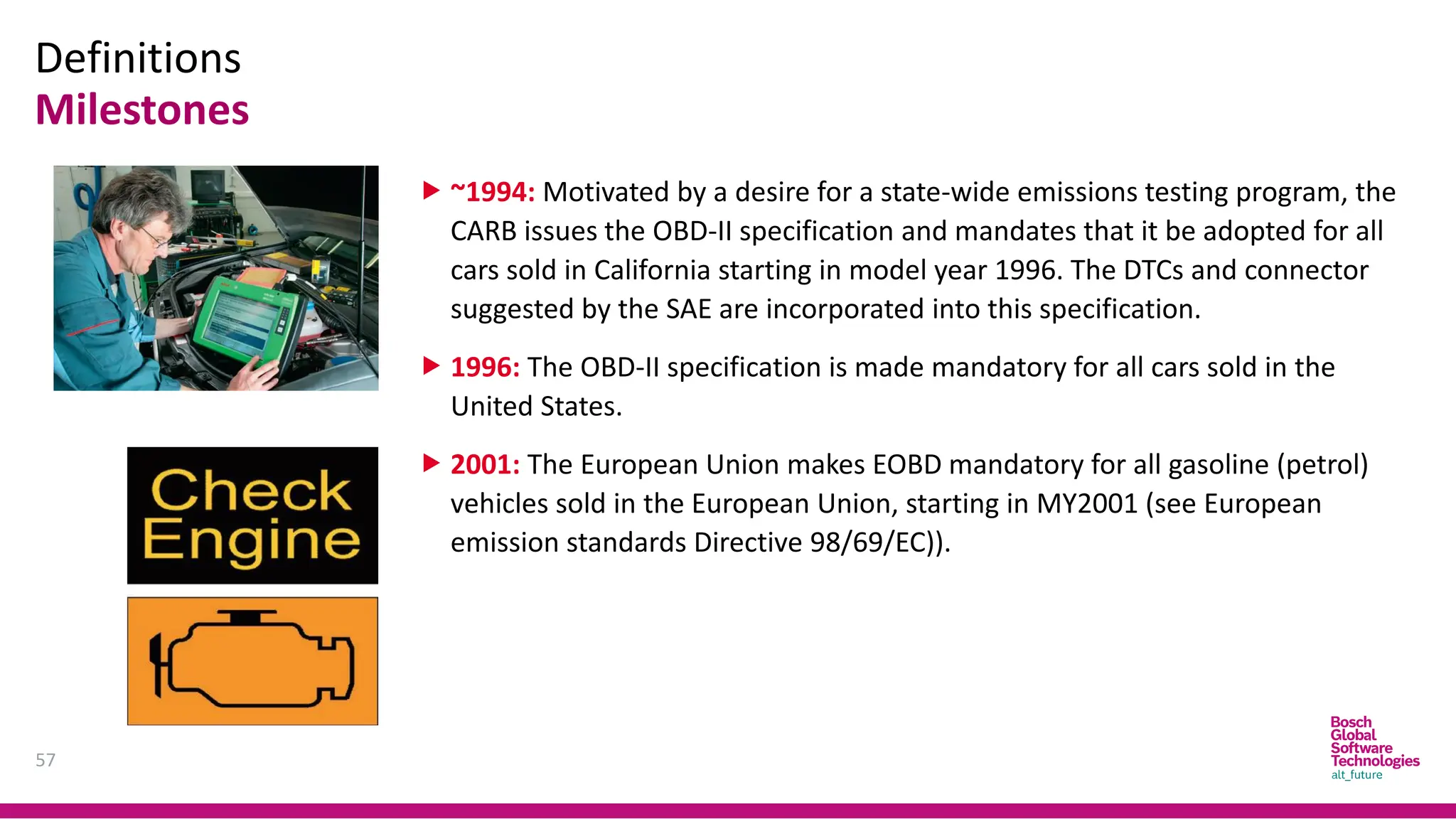
 1986: An upgraded version of the ALDL protocol appears which communicates
at 8192 baud with half-duplex UART signalling. This protocol is defined in GM
XDE-5024B.
 ~1987: The California Air Resources Board (CARB) requires that all new
vehicles sold in California starting in manufacturer's year 1988 (MY1988) have
some basic OBD capability. These requirements are generally referred to as
"OBD-I", though this name is not applied until the introduction of OBD-II. The
data link connector and its position are not standardized, nor is the data
protocol.
 1988: The Society of Automotive Engineers (SAE) recommends a standardized
diagnostic connector and set of diagnostic test signals.
Definitions
Milestones
57
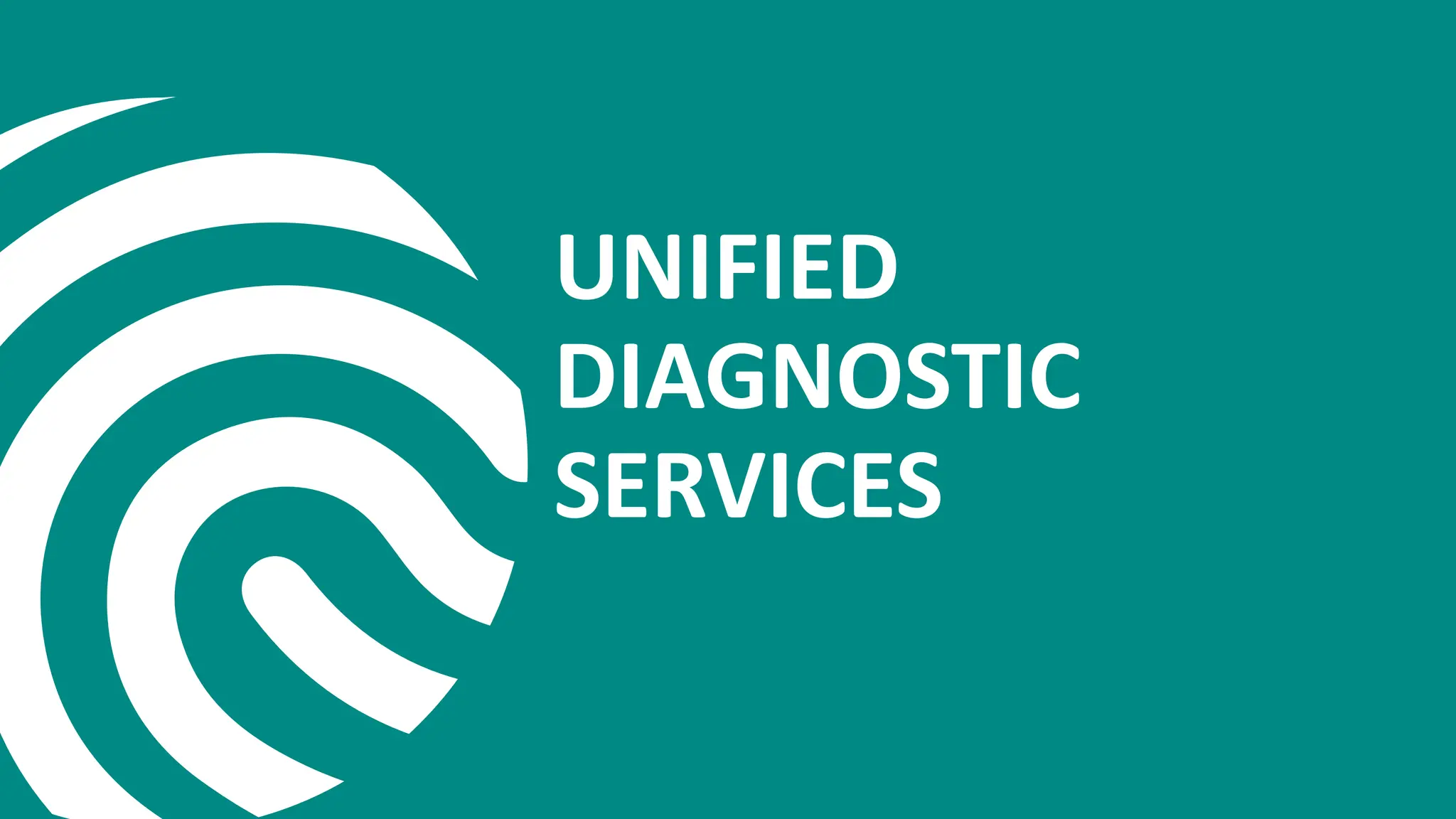
 ~1994: Motivated by a desire for a state-wide emissions testing program, the
CARB issues the OBD-II specification and mandates that it be adopted for all
cars sold in California starting in model year 1996. The DTCs and connector
suggested by the SAE are incorporated into this specification.
 1996: The OBD-II specification is made mandatory for all cars sold in the
United States.
 2001: The European Union makes EOBD mandatory for all gasoline (petrol)
vehicles sold in the European Union, starting in MY2001 (see European
emission standards Directive 98/69/EC)).
UNIFIED
DIAGNOSTIC
SERVICES
Agenda
59
1. Overview
1. UDS
2. Diagnostic Communication Protocol
3. Related ISO Standards
2. UDS In General
1. Application Layer
2. Session Layer
3. UDS In CAN Implementation
UDS
Overview
60
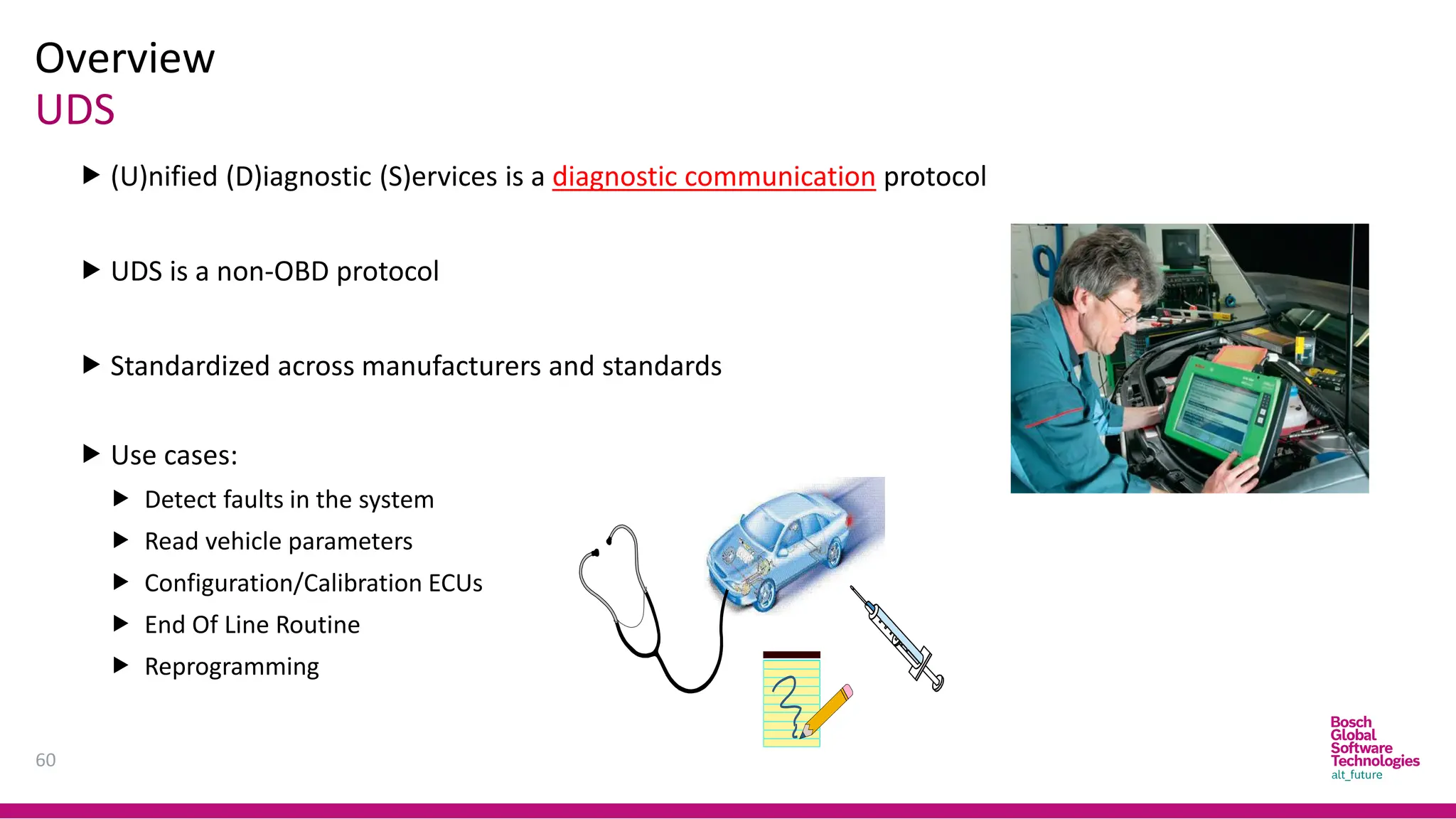
 (U)nified (D)iagnostic (S)ervices is a diagnostic communication protocol
 UDS is a non-OBD protocol
 Standardized across manufacturers and standards
 Use cases:
 Detect faults in the system
 Read vehicle parameters
 Configuration/Calibration ECUs
 End Of Line Routine
 Reprogramming
Protocol
Overview
61
Protocol: server  client
Positive response Negative response
Overview
Related ISO Standards
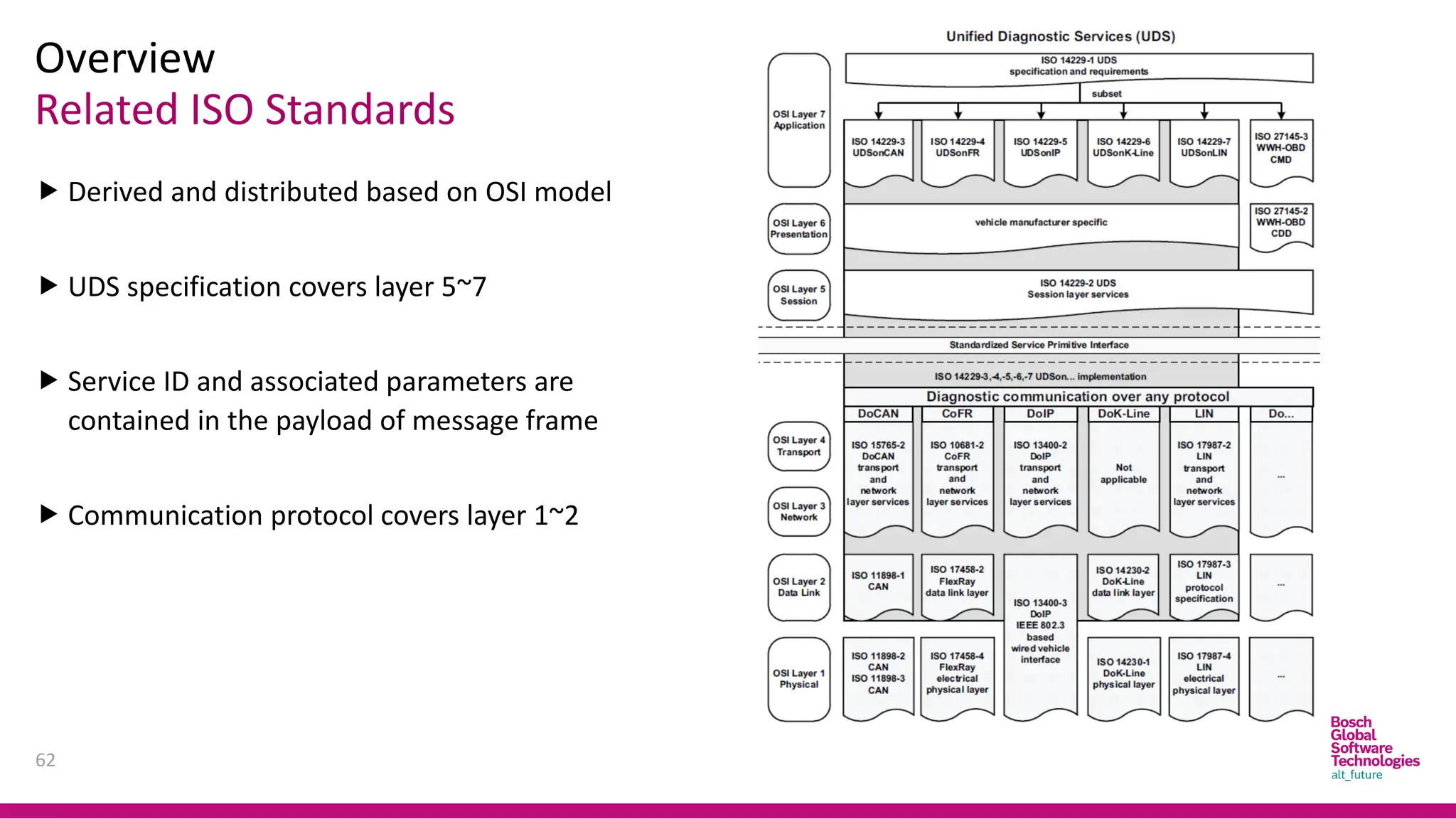
 Derived and distributed based on OSI model
 UDS specification covers layer 5~7
 Service ID and associated parameters are
contained in the payload of message frame
 Communication protocol covers layer 1~2
62
Application Layer – Services
UDS in General
63
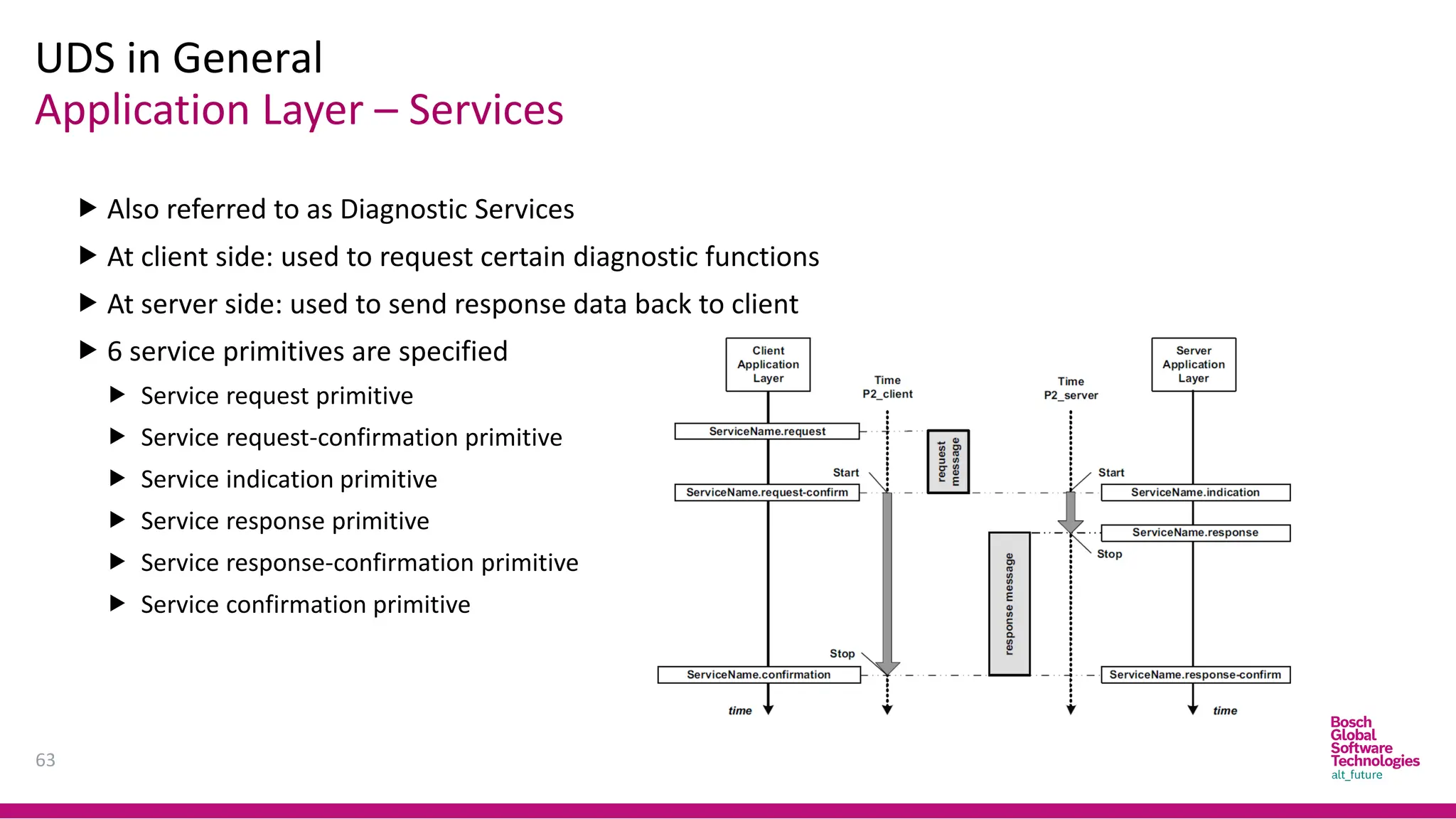
 Also referred to as Diagnostic Services
 At client side: used to request certain diagnostic functions
 At server side: used to send response data back to client
 6 service primitives are specified
 Service request primitive
 Service request-confirmation primitive
 Service indication primitive
 Service response primitive
 Service response-confirmation primitive
 Service confirmation primitive
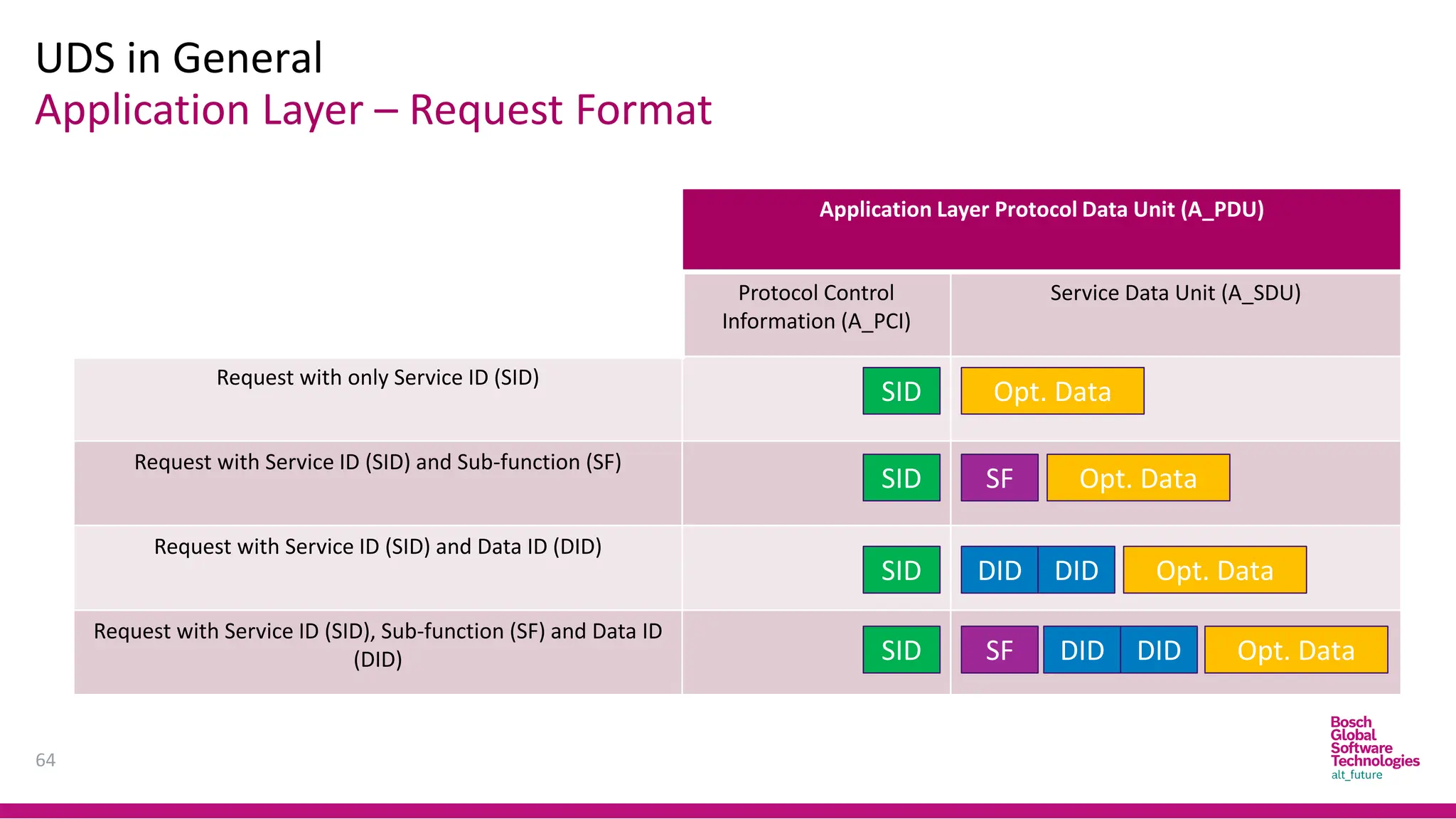
Application Layer – Request Format
UDS in General
64
Application Layer Protocol Data Unit (A_PDU)
Protocol Control
Information (A_PCI)
Service Data Unit (A_SDU)
Request with only Service ID (SID)
Request with Service ID (SID) and Sub-function (SF)
Request with Service ID (SID) and Data ID (DID)
Request with Service ID (SID), Sub-function (SF) and Data ID
(DID)
SID
SID
SID
SID
Opt. Data
Opt. Data
SF
Opt. Data
Opt. Data
SF
DID DID
DID DID
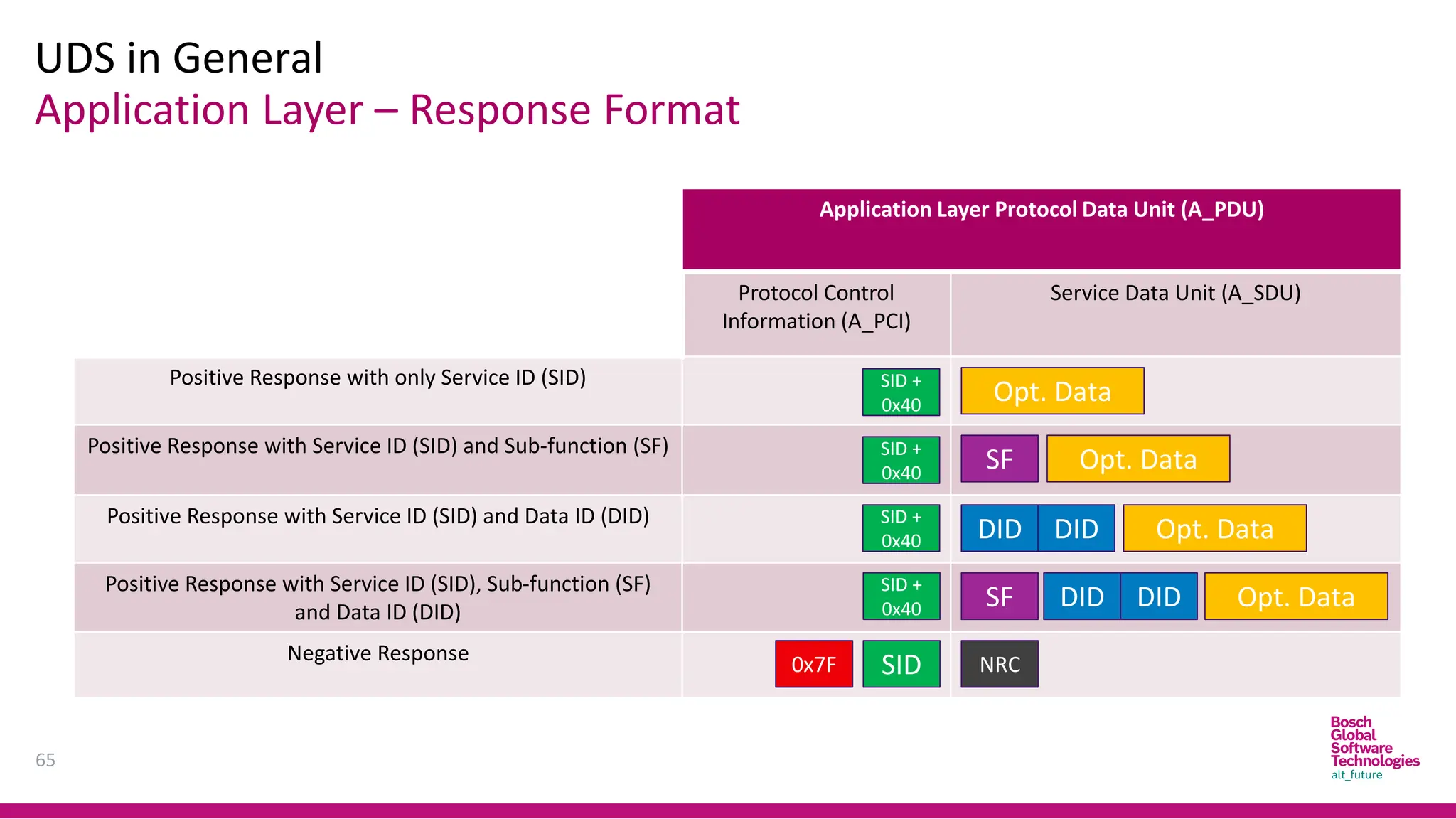
Application Layer – Response Format
UDS in General
65
Application Layer Protocol Data Unit (A_PDU)
Protocol Control
Information (A_PCI)
Service Data Unit (A_SDU)
Positive Response with only Service ID (SID)
Positive Response with Service ID (SID) and Sub-function (SF)
Positive Response with Service ID (SID) and Data ID (DID)
Positive Response with Service ID (SID), Sub-function (SF)
and Data ID (DID)
Negative Response
SID +
0x40
Opt. Data
Opt. Data
SF
Opt. Data
Opt. Data
SF
DID DID
DID DID
SID
0x7F NRC
SID +
0x40
SID +
0x40
SID +
0x40
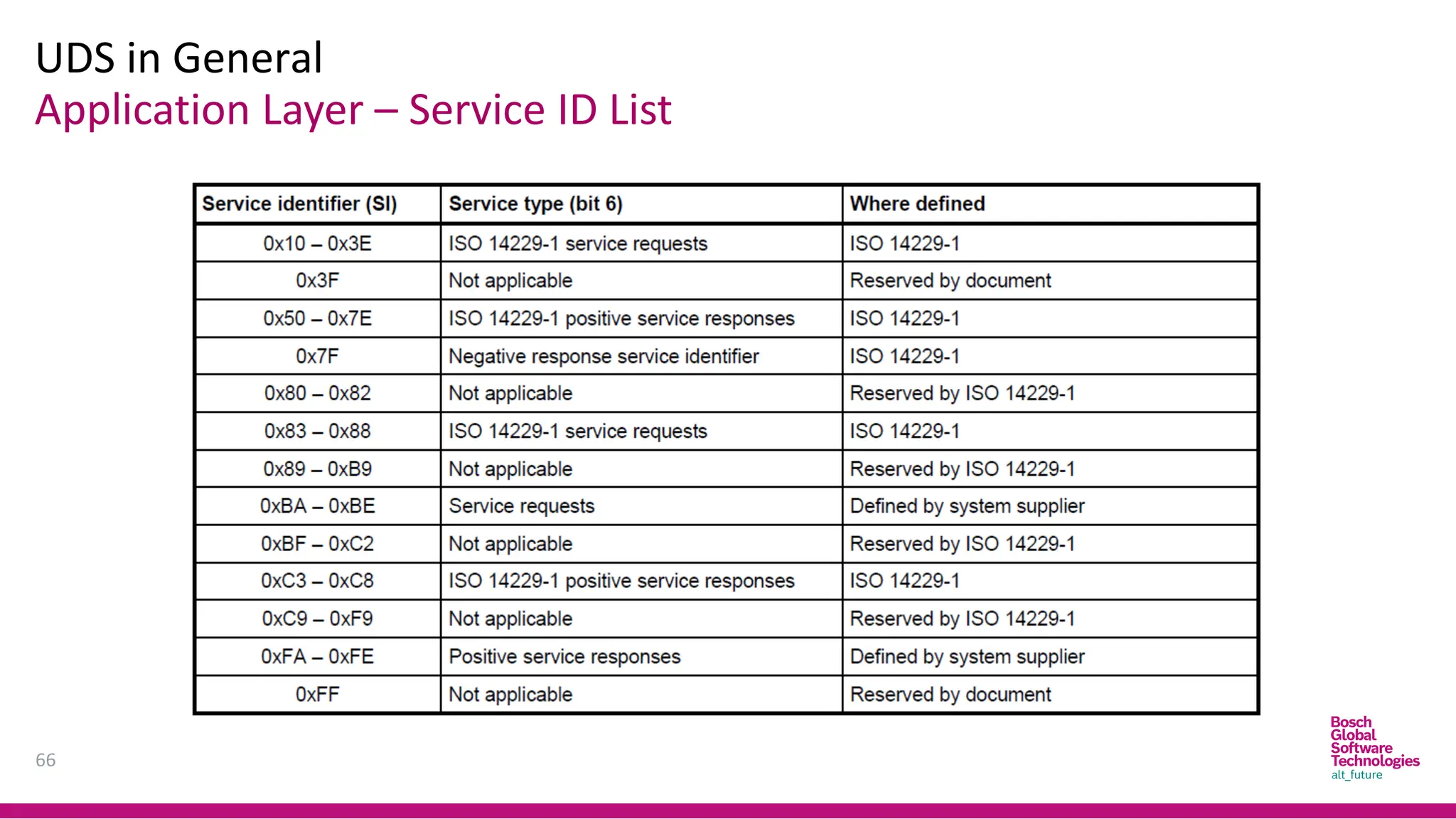
Application Layer – Service ID List
UDS in General
66
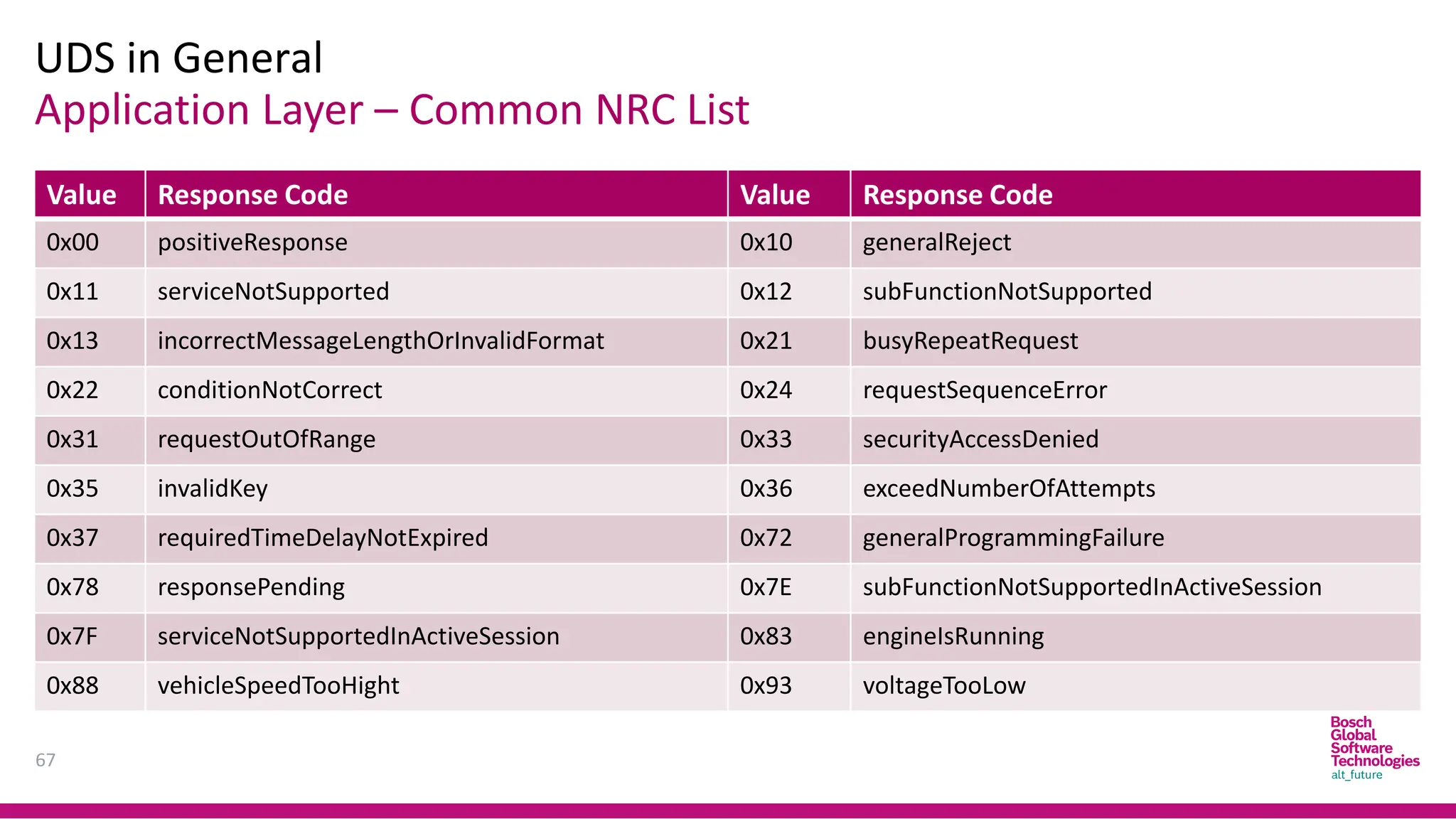
Application Layer – Common NRC List
UDS in General
67
Value Response Code Value Response Code
0x00 positiveResponse 0x10 generalReject
0x11 serviceNotSupported 0x12 subFunctionNotSupported
0x13 incorrectMessageLengthOrInvalidFormat 0x21 busyRepeatRequest
0x22 conditionNotCorrect 0x24 requestSequenceError
0x31 requestOutOfRange 0x33 securityAccessDenied
0x35 invalidKey 0x36 exceedNumberOfAttempts
0x37 requiredTimeDelayNotExpired 0x72 generalProgrammingFailure
0x78 responsePending 0x7E subFunctionNotSupportedInActiveSession
0x7F serviceNotSupportedInActiveSession 0x83 engineIsRunning
0x88 vehicleSpeedTooHight 0x93 voltageTooLow
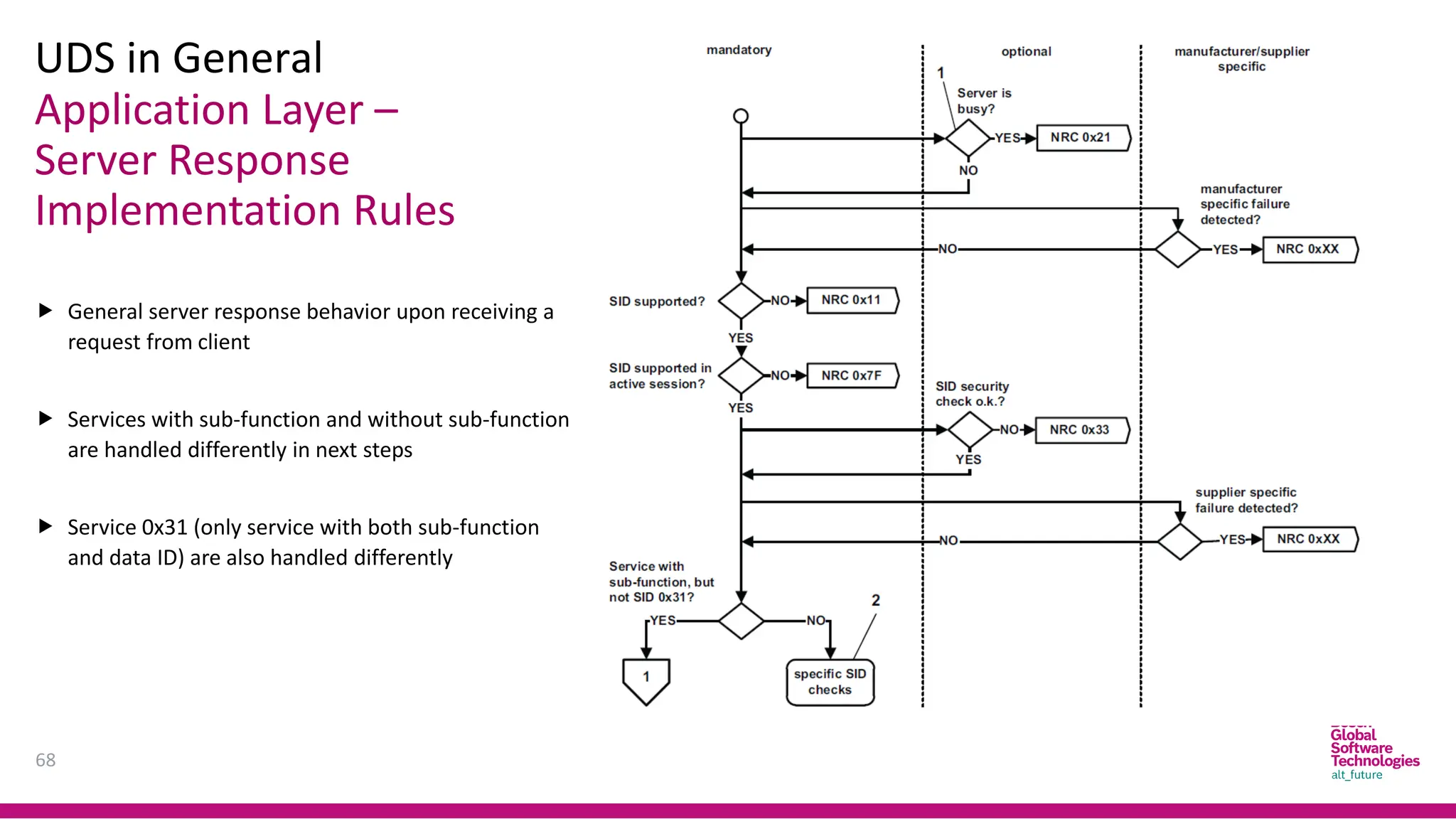
Application Layer –
Server Response
Implementation Rules
UDS in General
68
 General server response behavior upon receiving a
request from client
 Services with sub-function and without sub-function
are handled differently in next steps
 Service 0x31 (only service with both sub-function
and data ID) are also handled differently
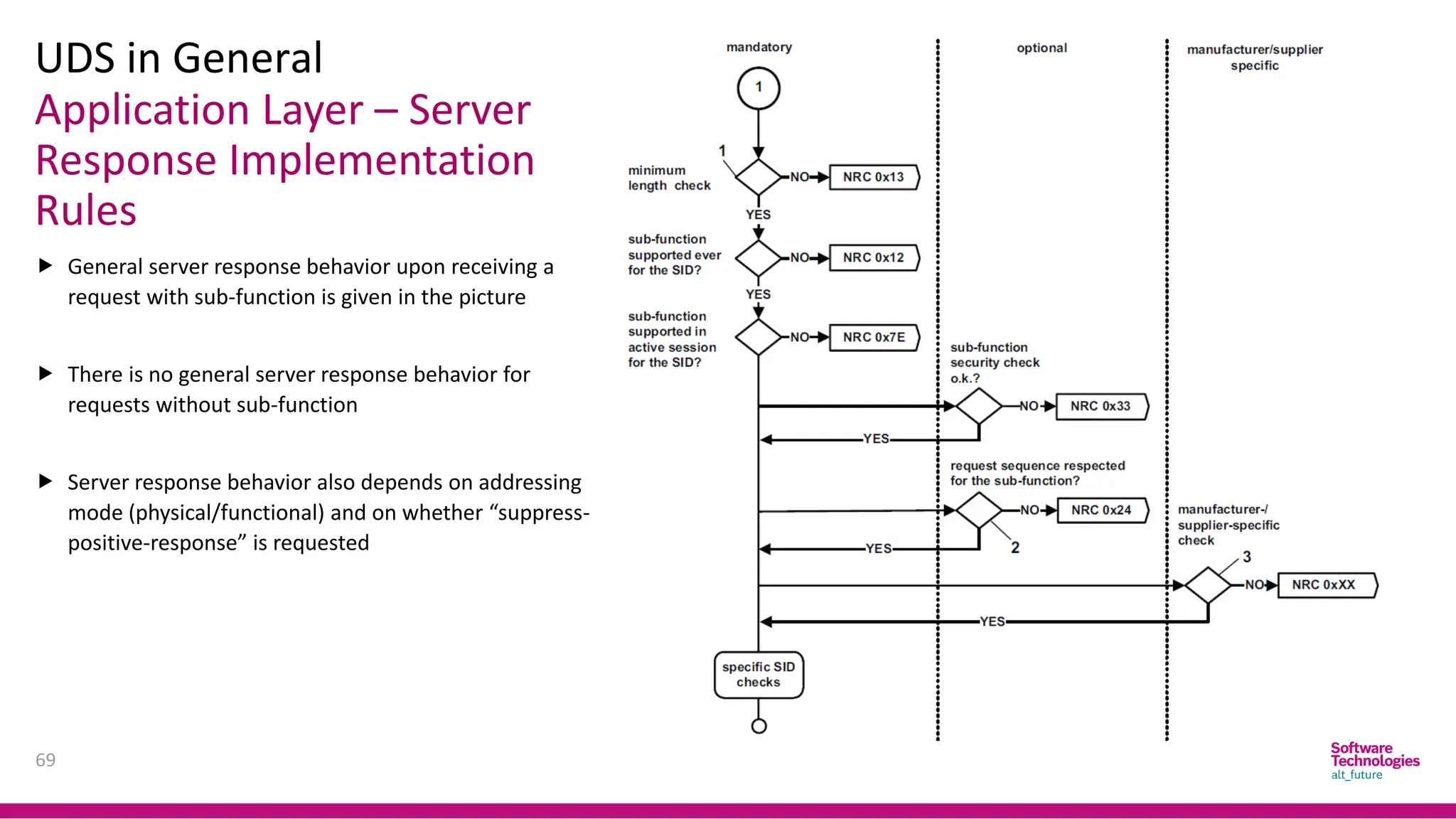
Application Layer – Server
Response Implementation
Rules
UDS in General
69
 General server response behavior upon receiving a
request with sub-function is given in the picture
 There is no general server response behavior for
requests without sub-function
 Server response behavior also depends on addressing
mode (physical/functional) and on whether “suppress-
positive-response” is requested
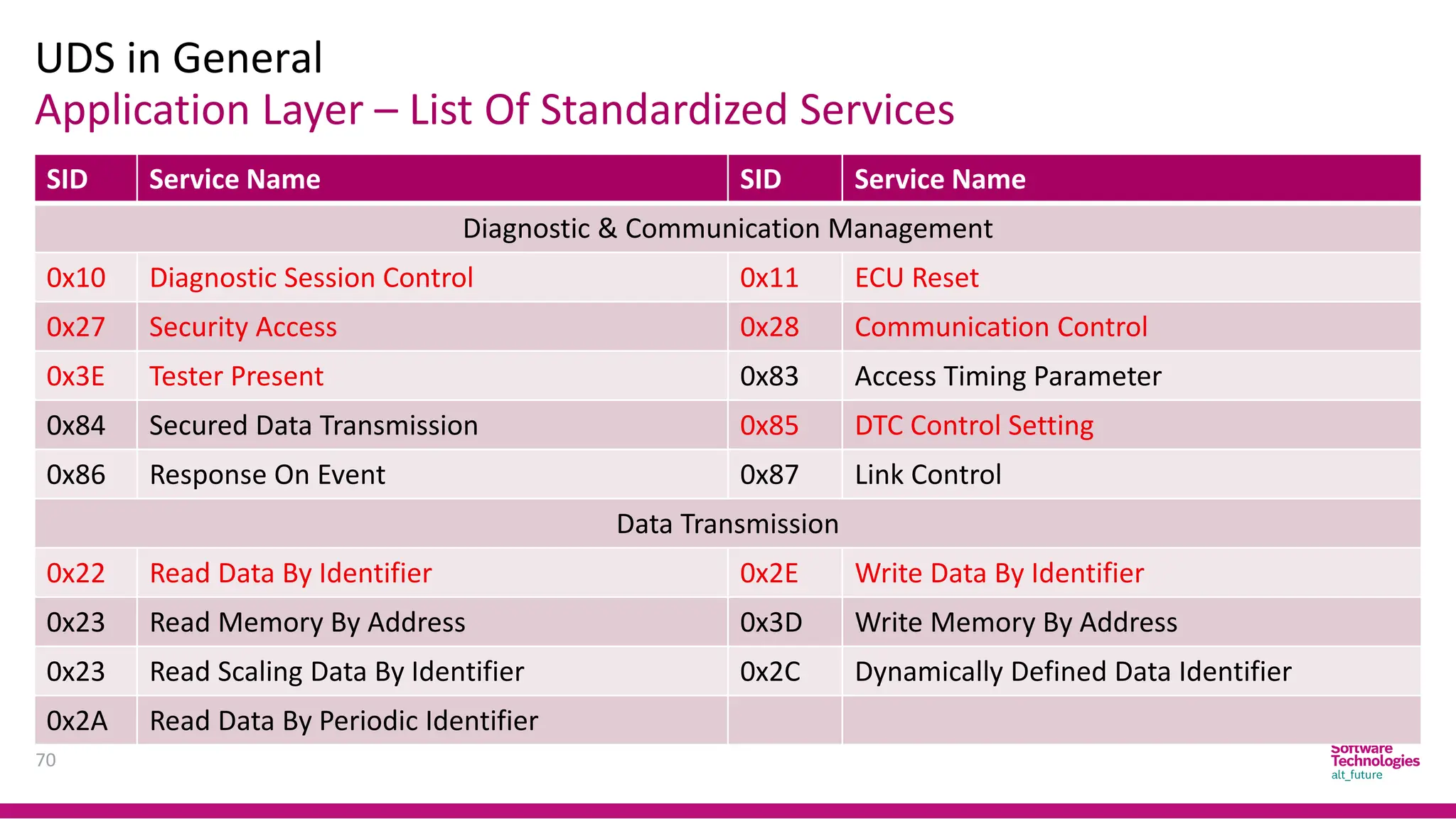
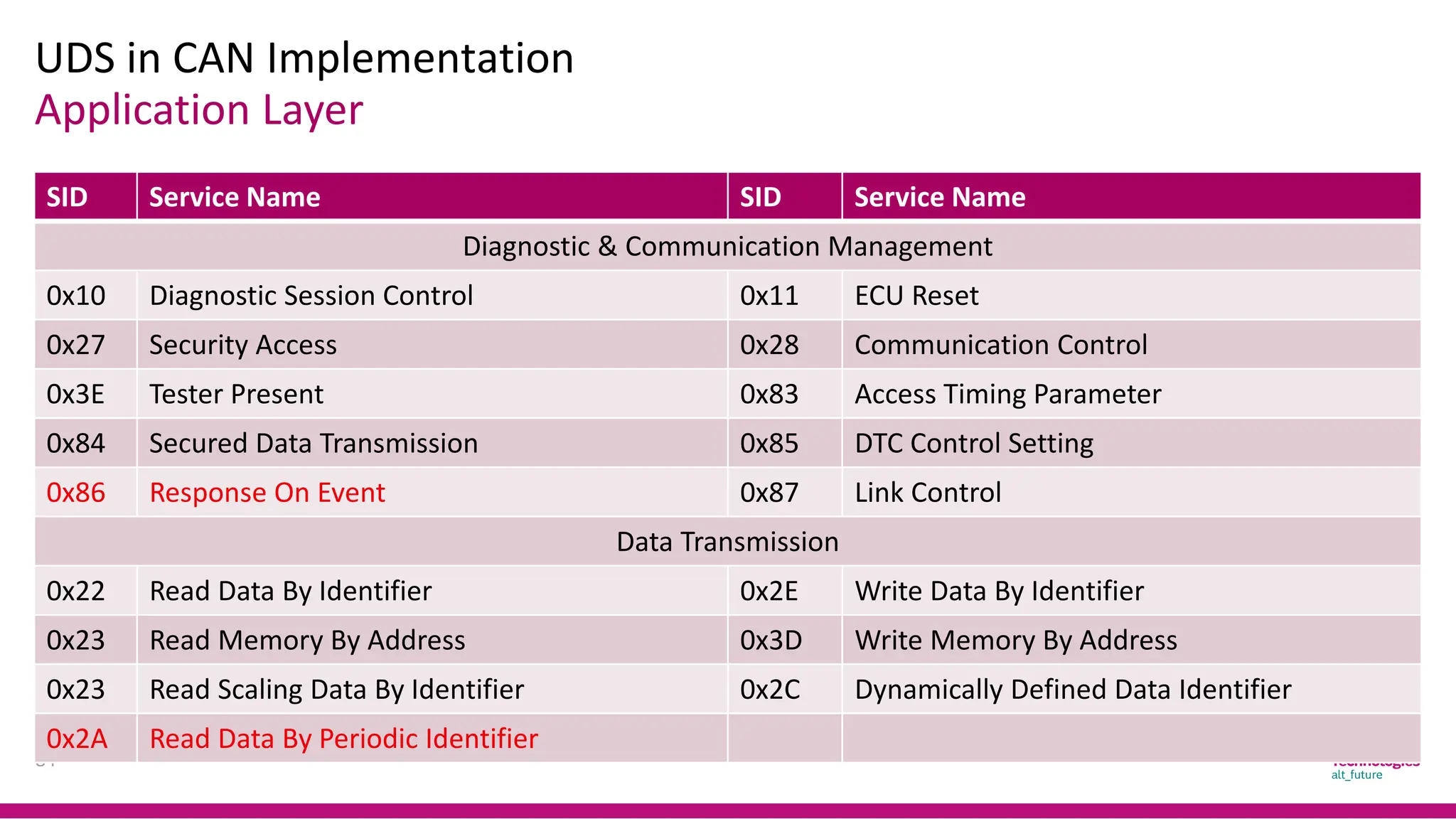
Application Layer – List Of Standardized Services
UDS in General
70
SID Service Name SID Service Name
Diagnostic & Communication Management
0x10 Diagnostic Session Control 0x11 ECU Reset
0x27 Security Access 0x28 Communication Control
0x3E Tester Present 0x83 Access Timing Parameter
0x84 Secured Data Transmission 0x85 DTC Control Setting
0x86 Response On Event 0x87 Link Control
Data Transmission
0x22 Read Data By Identifier 0x2E Write Data By Identifier
0x23 Read Memory By Address 0x3D Write Memory By Address
0x23 Read Scaling Data By Identifier 0x2C Dynamically Defined Data Identifier
0x2A Read Data By Periodic Identifier
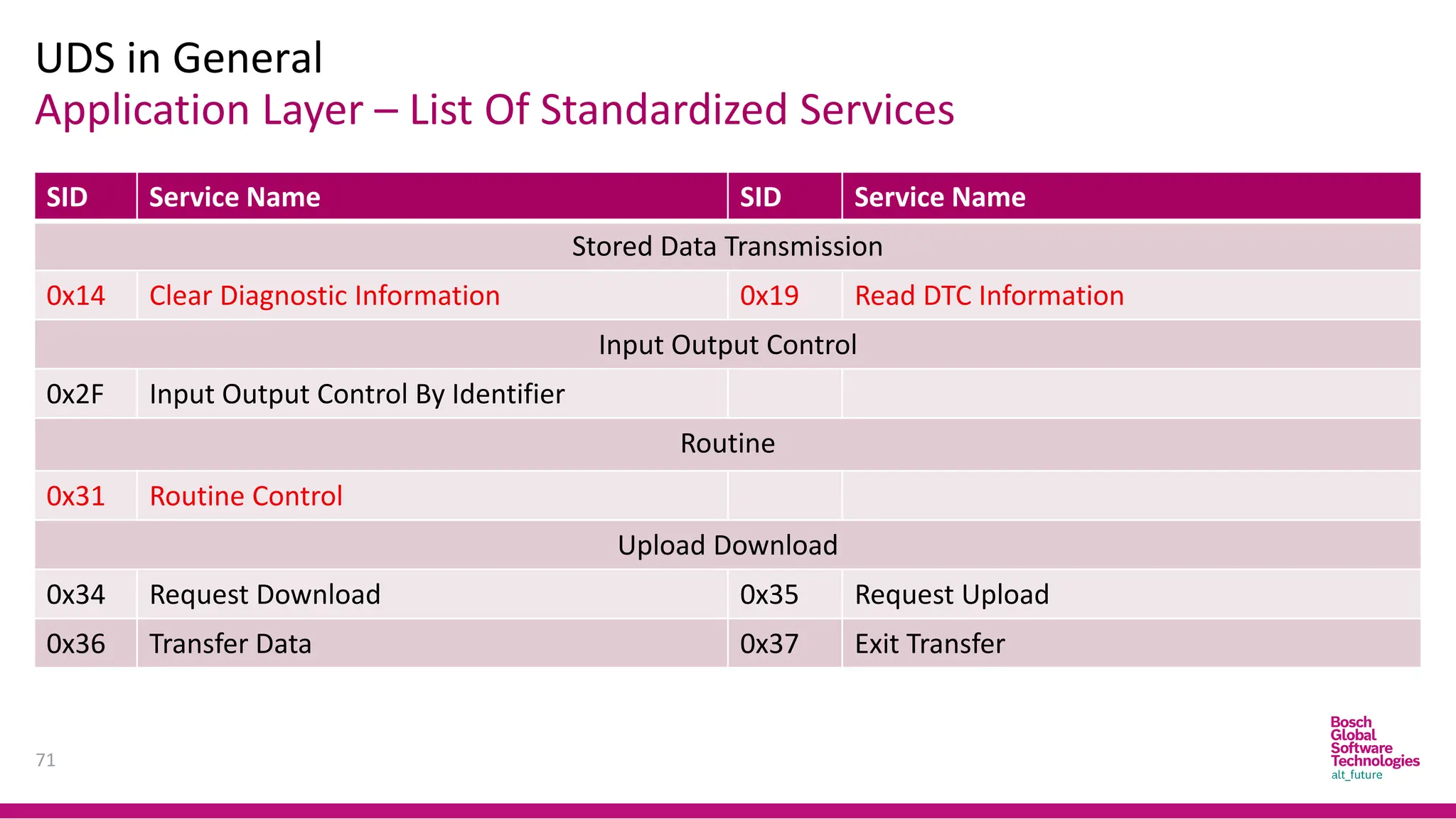
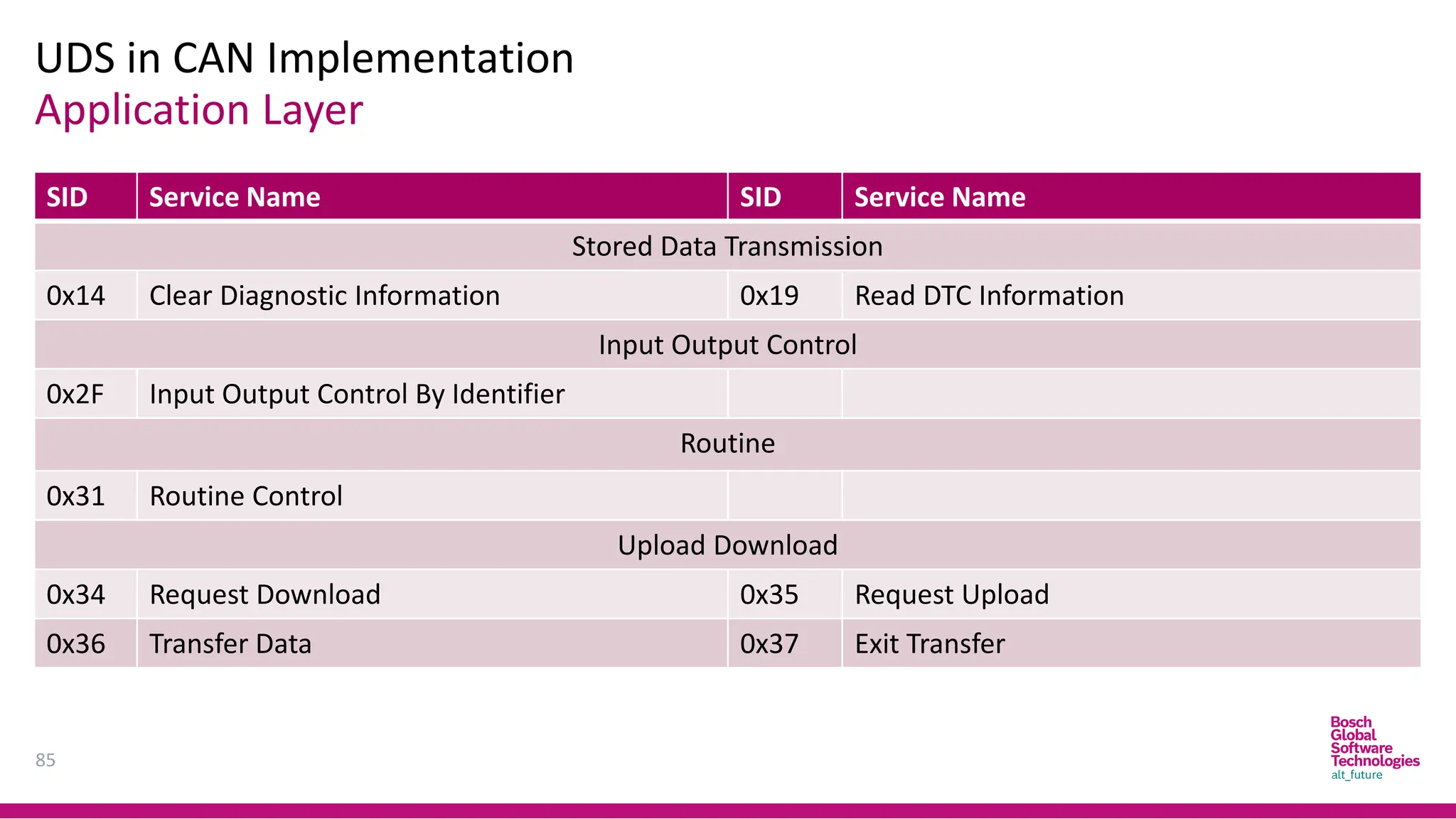
Application Layer – List Of Standardized Services
UDS in General
71
SID Service Name SID Service Name
Stored Data Transmission
0x14 Clear Diagnostic Information 0x19 Read DTC Information
Input Output Control
0x2F Input Output Control By Identifier
Routine
0x31 Routine Control
Upload Download
0x34 Request Download 0x35 Request Upload
0x36 Transfer Data 0x37 Exit Transfer
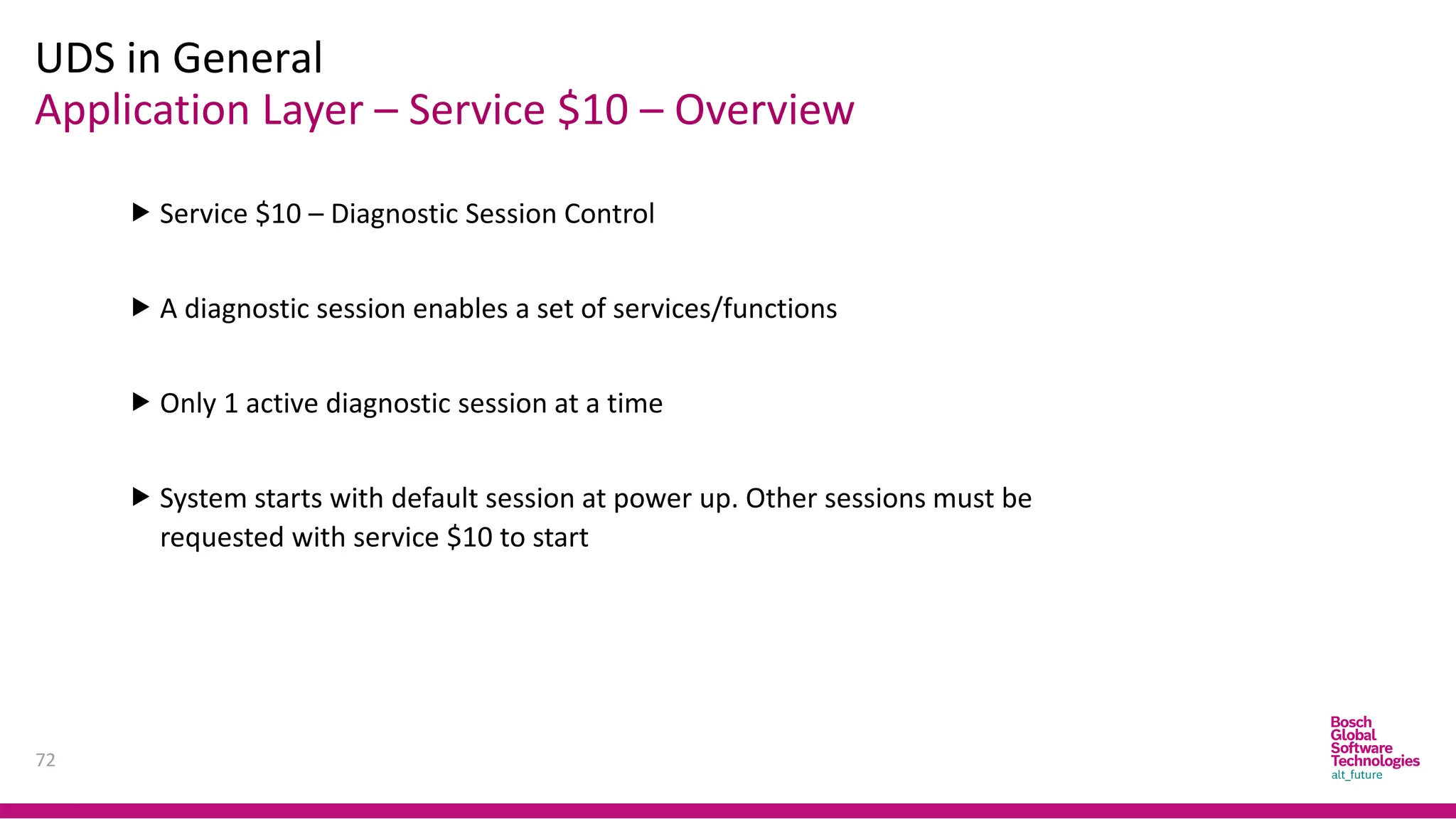
Application Layer – Service $10 – Overview
UDS in General
72
 Service $10 – Diagnostic Session Control
 A diagnostic session enables a set of services/functions
 Only 1 active diagnostic session at a time
 System starts with default session at power up. Other sessions must be
requested with service $10 to start
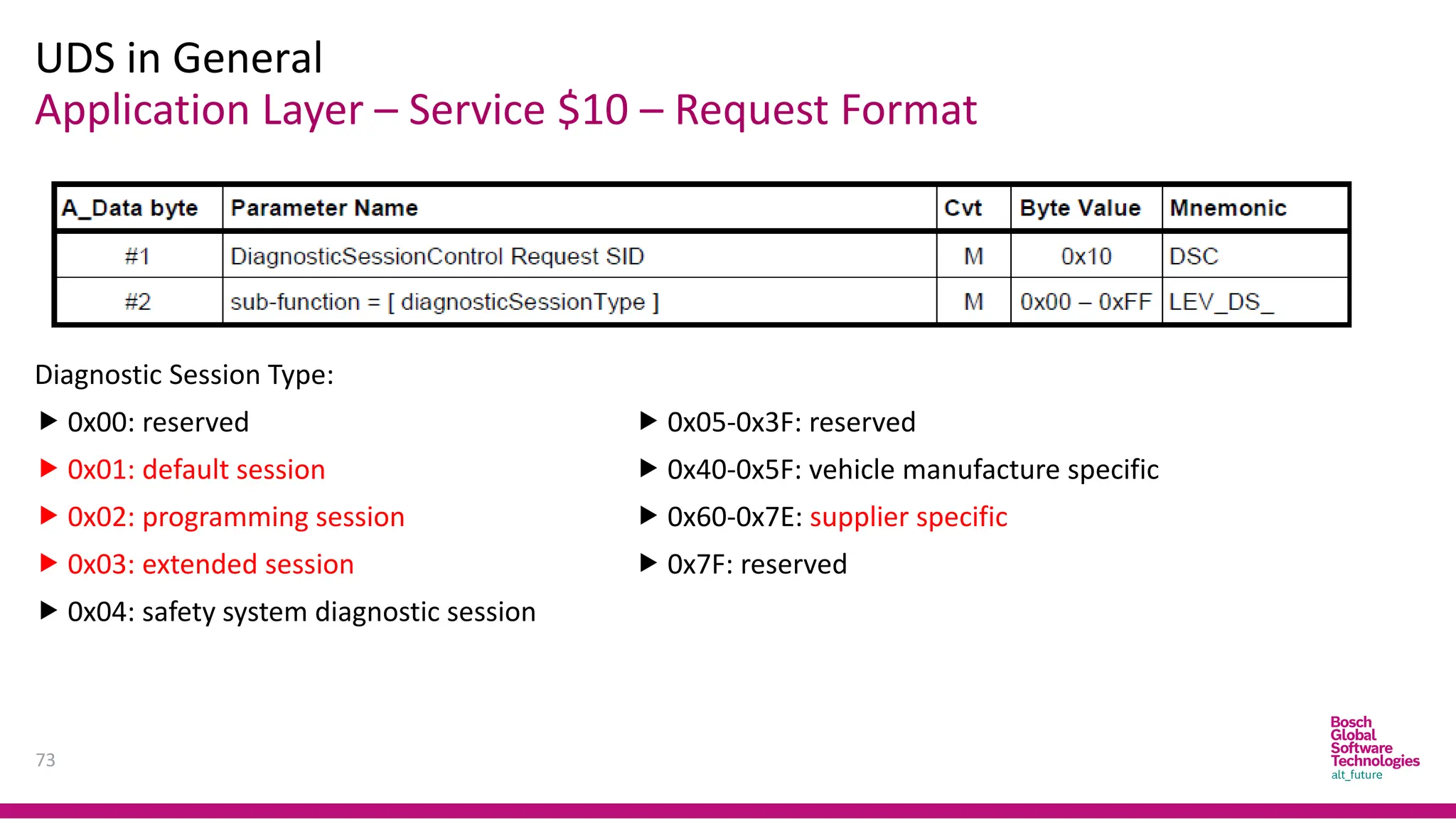
Application Layer – Service $10 – Request Format
UDS in General
73
Diagnostic Session Type:
 0x00: reserved
 0x01: default session
 0x02: programming session
 0x03: extended session
 0x04: safety system diagnostic session
 0x05-0x3F: reserved
 0x40-0x5F: vehicle manufacture specific
 0x60-0x7E: supplier specific
 0x7F: reserved
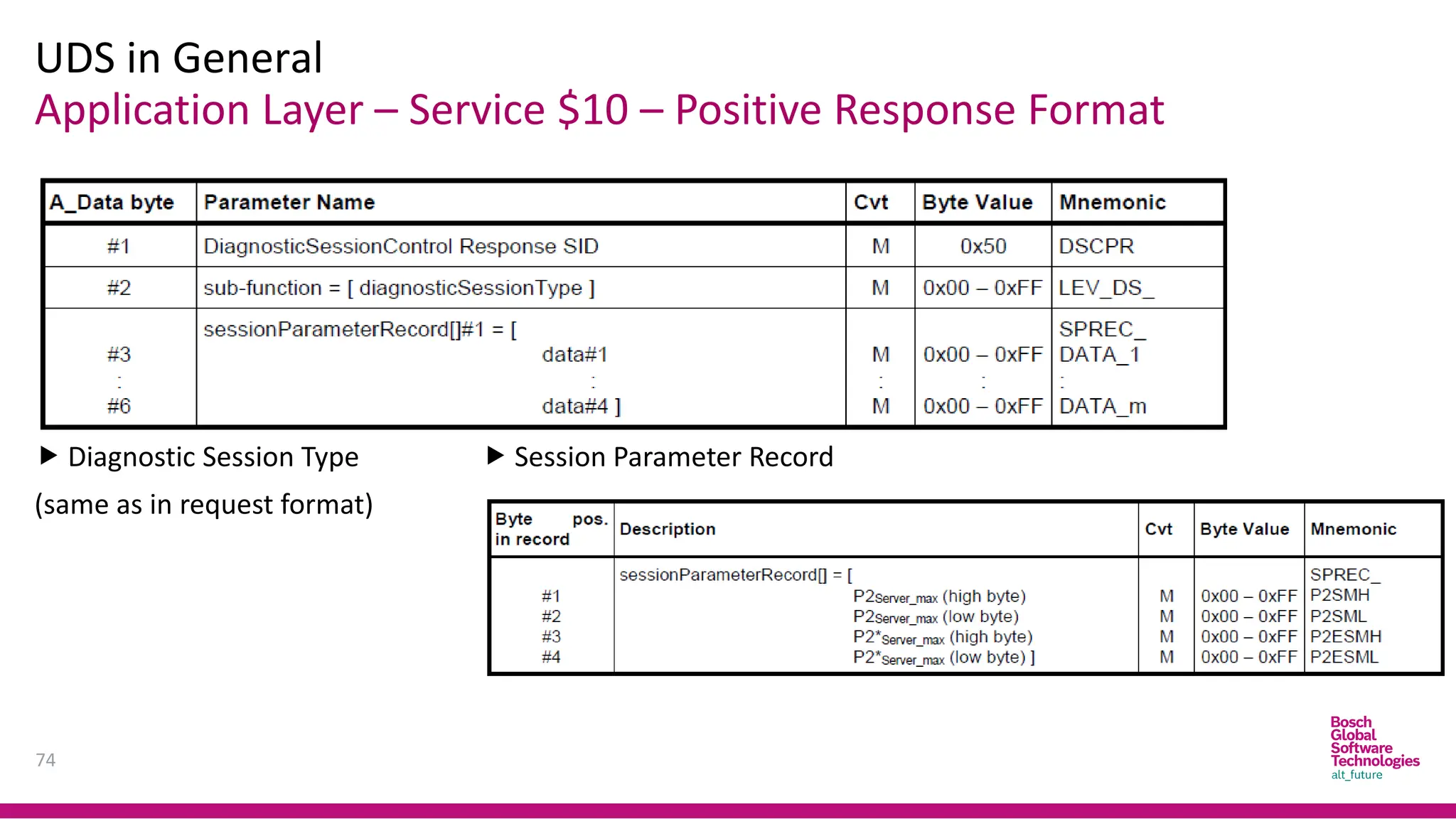
Application Layer – Service $10 – Positive Response Format
UDS in General
74
 Diagnostic Session Type
(same as in request format)
 Session Parameter Record
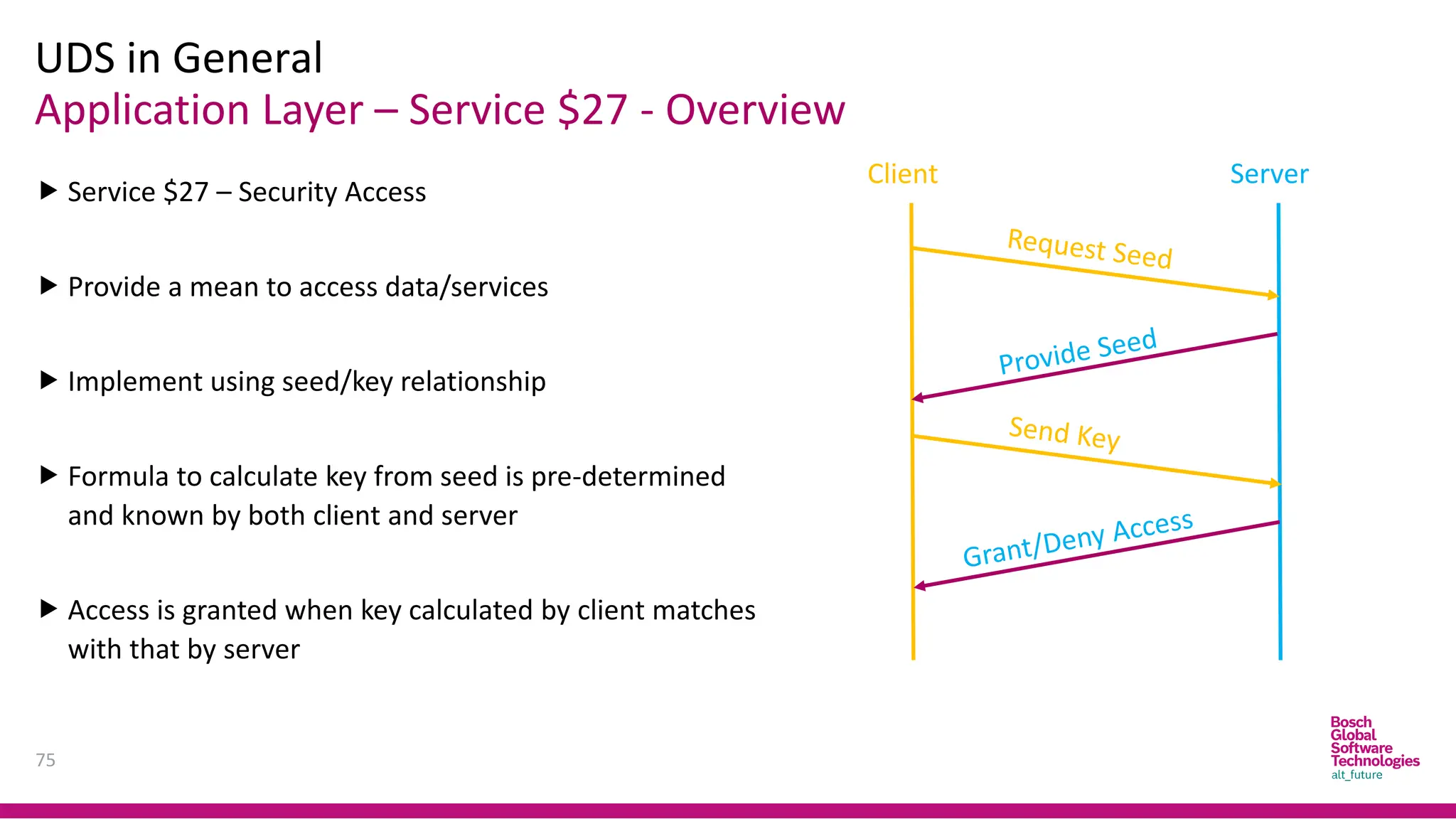
Application Layer – Service $27 - Overview
UDS in General
75
 Service $27 – Security Access
 Provide a mean to access data/services
 Implement using seed/key relationship
 Formula to calculate key from seed is pre-determined
and known by both client and server
 Access is granted when key calculated by client matches
with that by server
Client Server
Application Layer – Service $27 - Overview
UDS in General
76
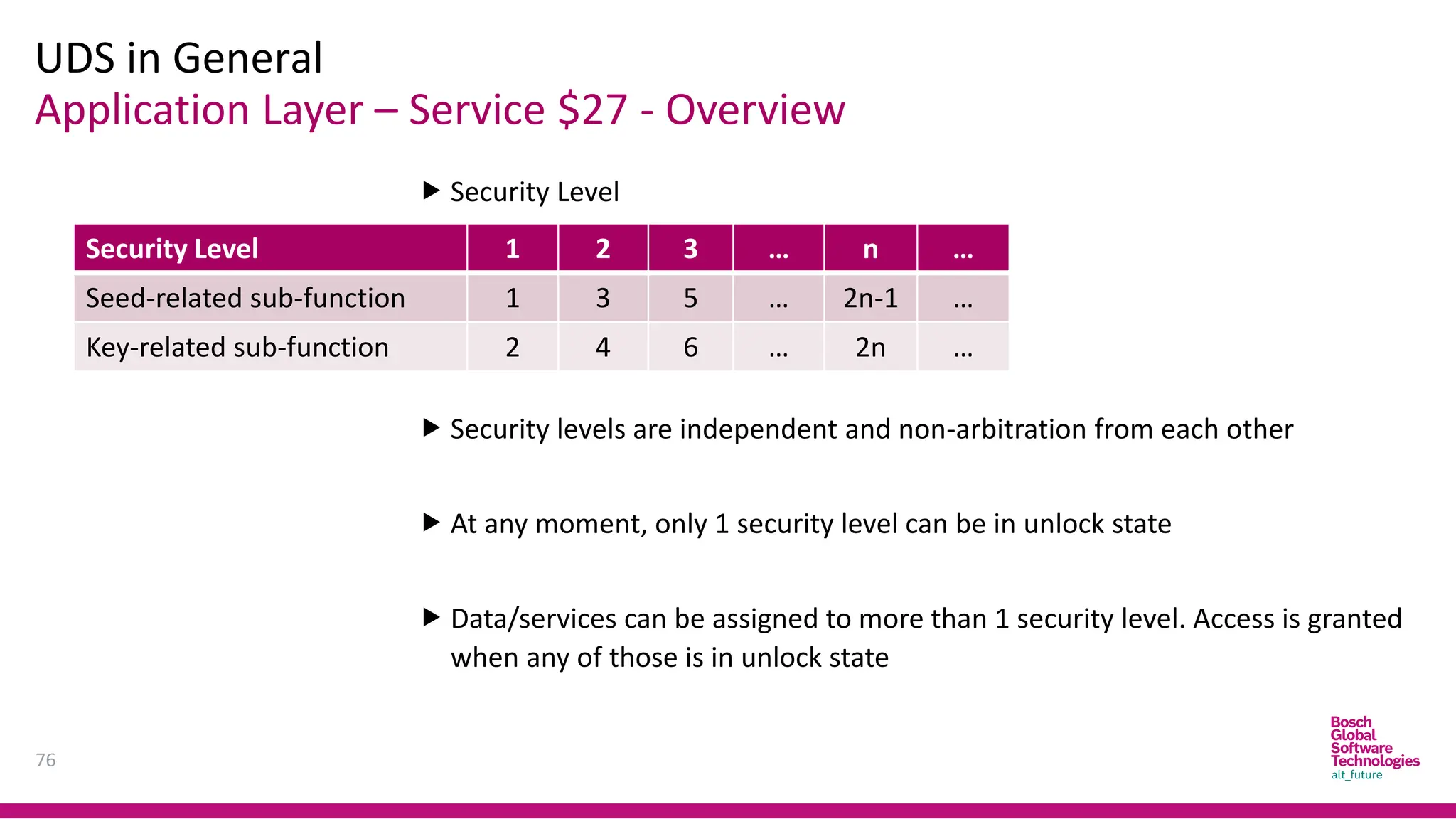
 Security Level
 Security levels are independent and non-arbitration from each other
 At any moment, only 1 security level can be in unlock state
 Data/services can be assigned to more than 1 security level. Access is granted
when any of those is in unlock state
Security Level 1 2 3 … n …
Seed-related sub-function 1 3 5 … 2n-1 …
Key-related sub-function 2 4 6 … 2n …
Application Layer – Service $27 – Request Format
UDS in General
77
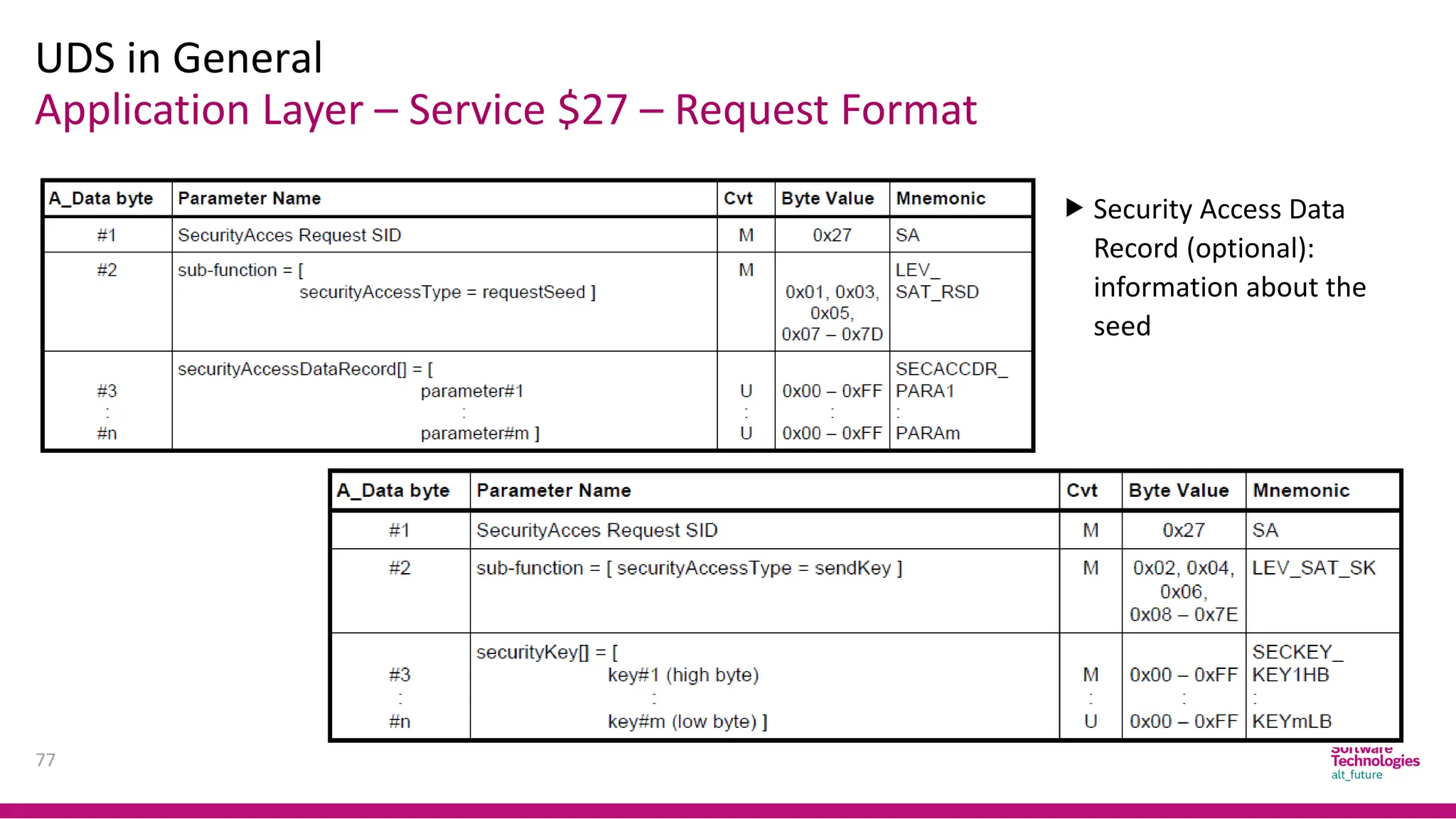
 Security Access Data
Record (optional):
information about the
seed
Application Layer – Service $27 – Response Format
UDS in General
78
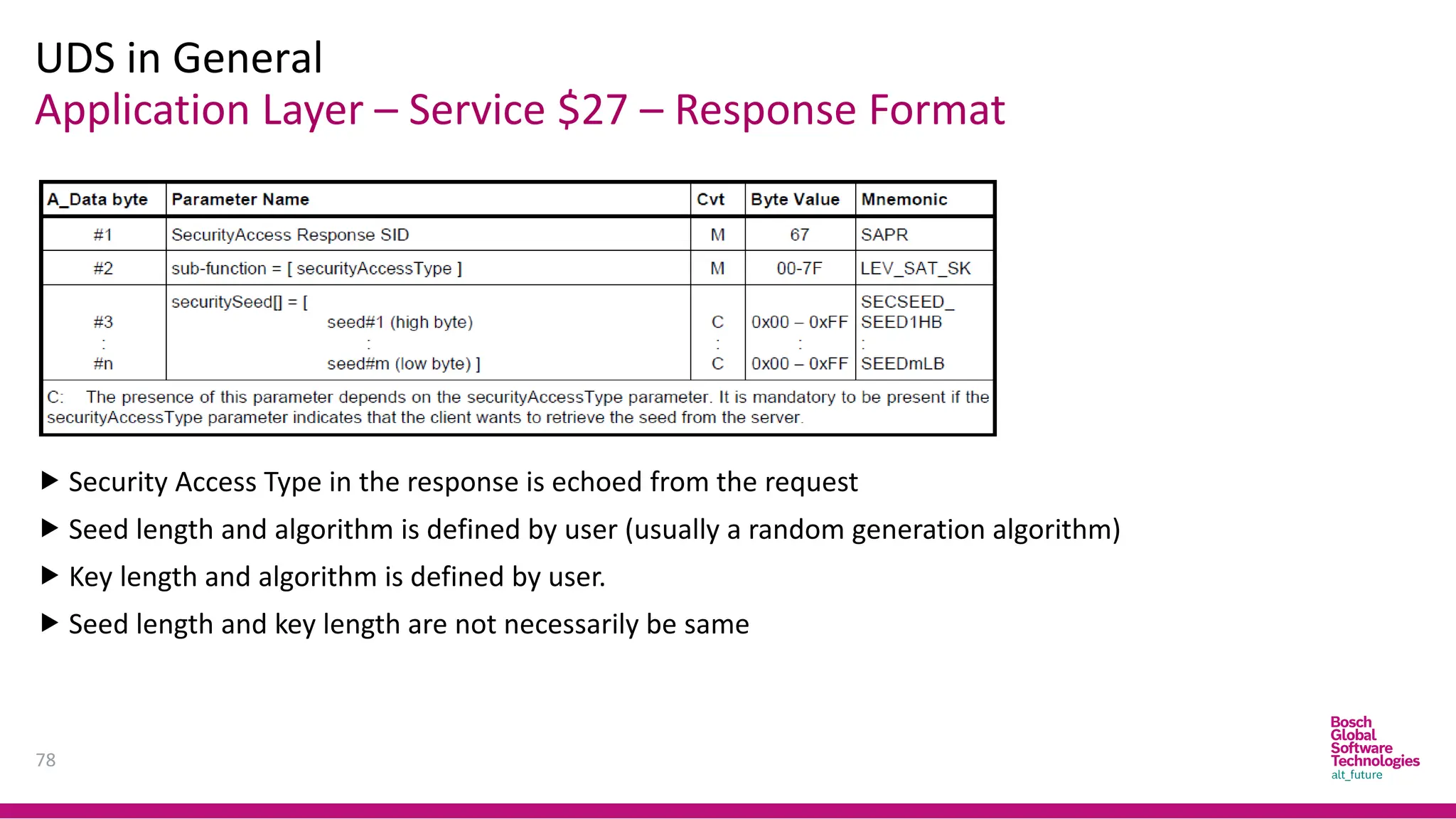
 Security Access Type in the response is echoed from the request
 Seed length and algorithm is defined by user (usually a random generation algorithm)
 Key length and algorithm is defined by user.
 Seed length and key length are not necessarily be same
Application Layer – Service $22/$2E – Overview
UDS in General
79
 Service $22 – Read Data by Identifier
 Service $2E – Write Data by Identifier
 Data Identifier (DID): 2 byte – mark for an internal location of a data record
 DID along with referred data length and format are pre-defined by user
 Service $2E might involve NVM-related services to store data
 Service $2E might involve certain security check methods
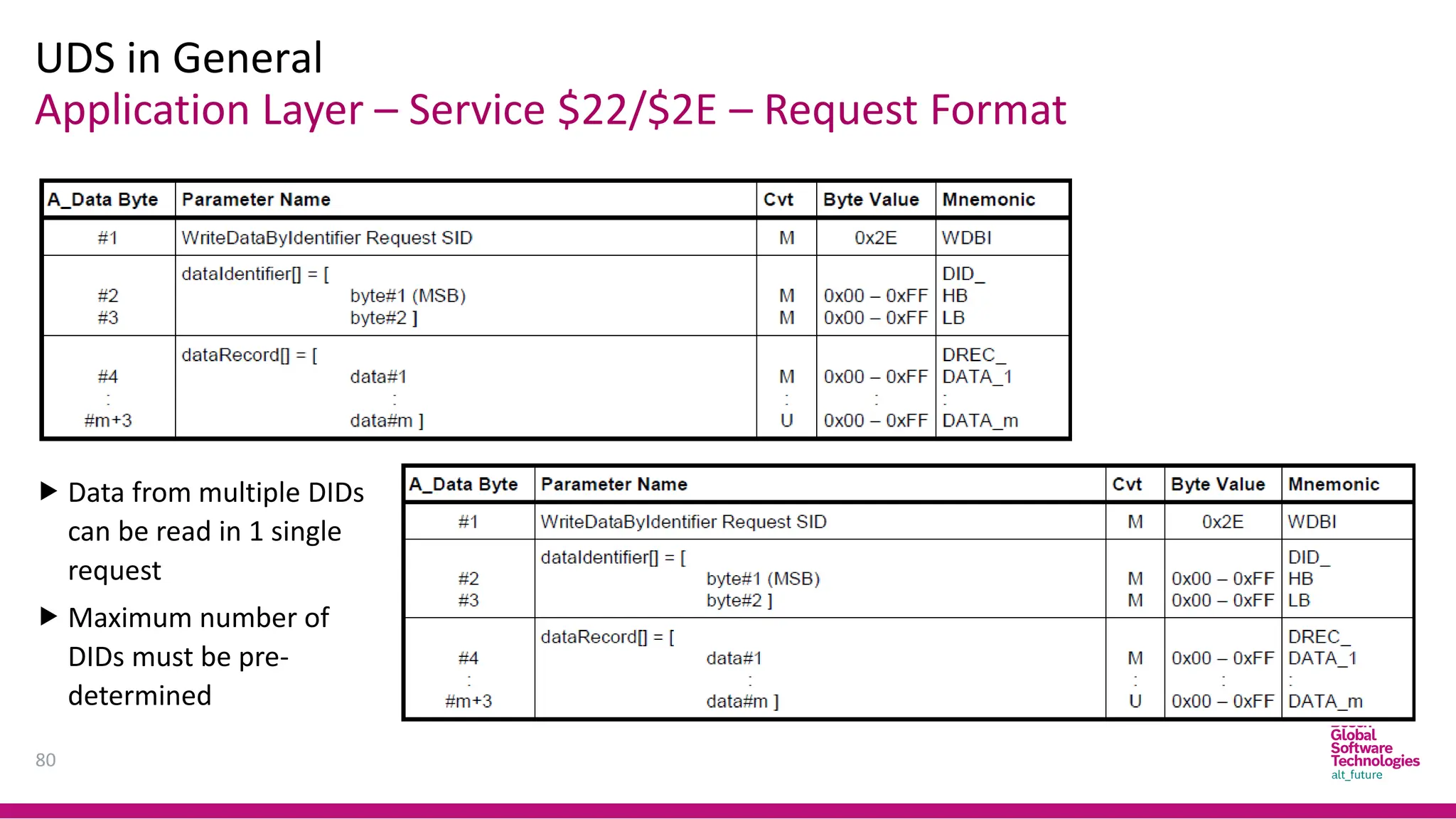
Application Layer – Service $22/$2E – Request Format
UDS in General
80
 Data from multiple DIDs
can be read in 1 single
request
 Maximum number of
DIDs must be pre-
determined
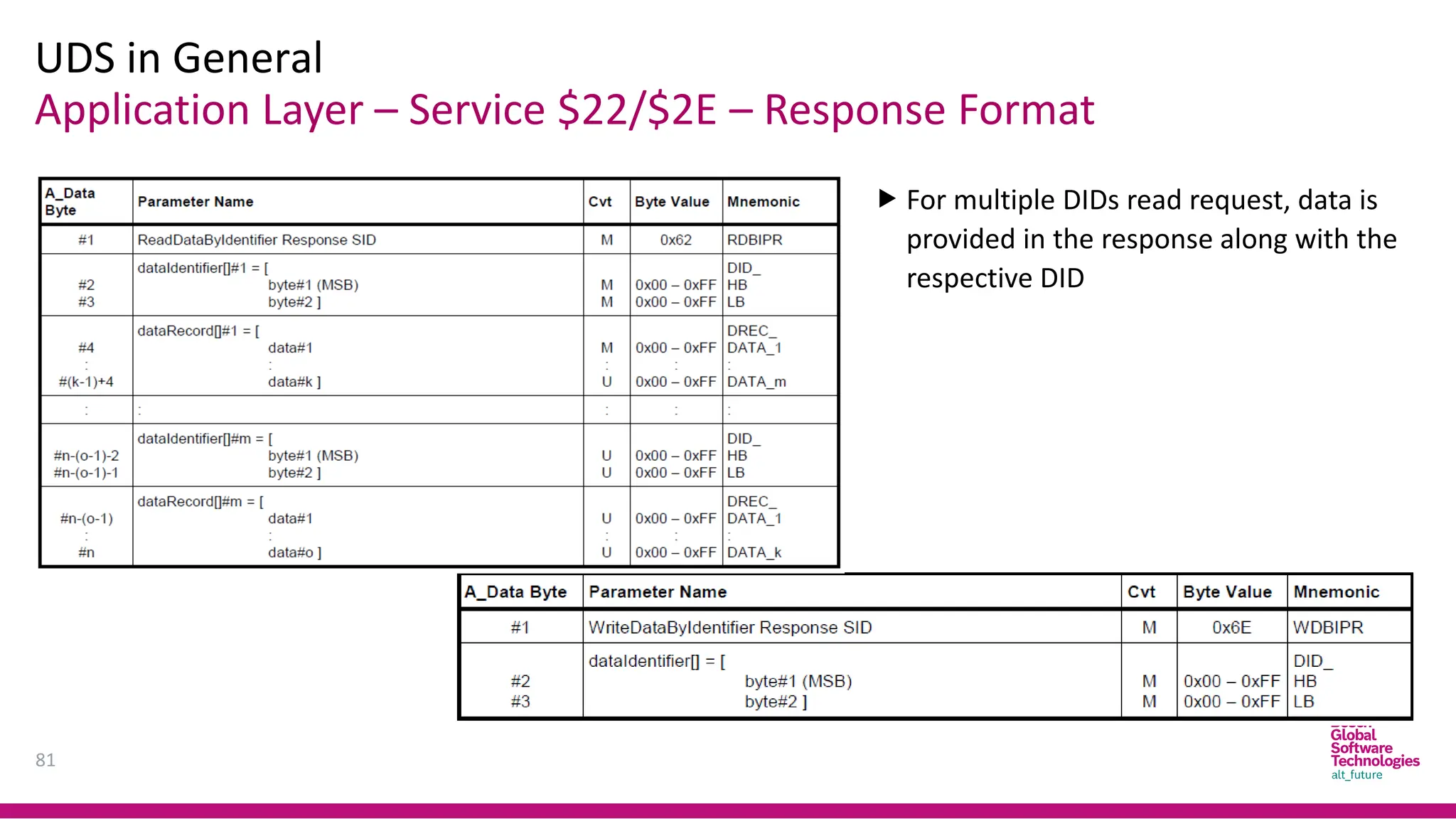
Application Layer – Service $22/$2E – Response Format
UDS in General
81
 For multiple DIDs read request, data is
provided in the response along with the
respective DID
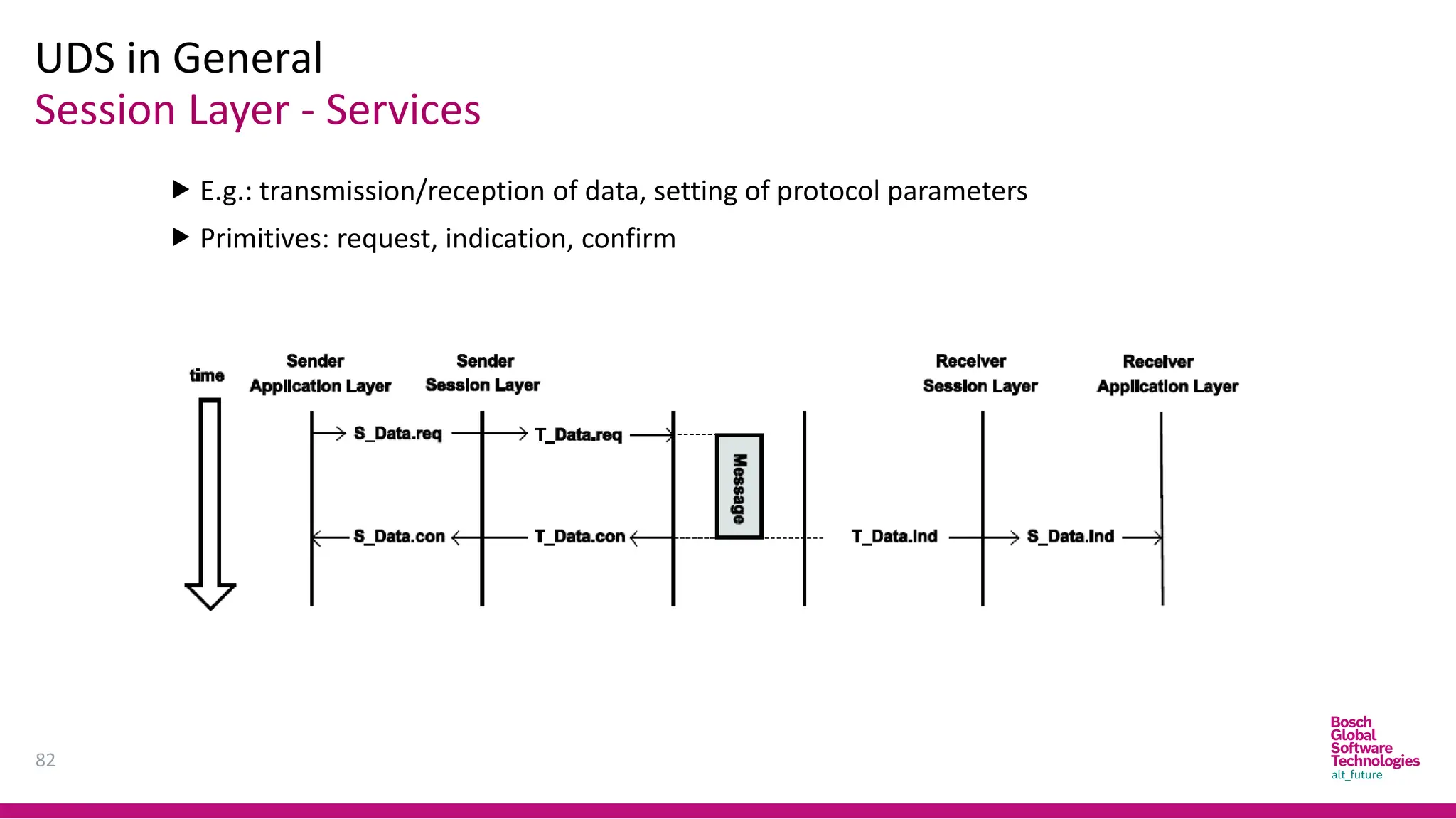
Session Layer - Services
UDS in General
82
 E.g.: transmission/reception of data, setting of protocol parameters
 Primitives: request, indication, confirm
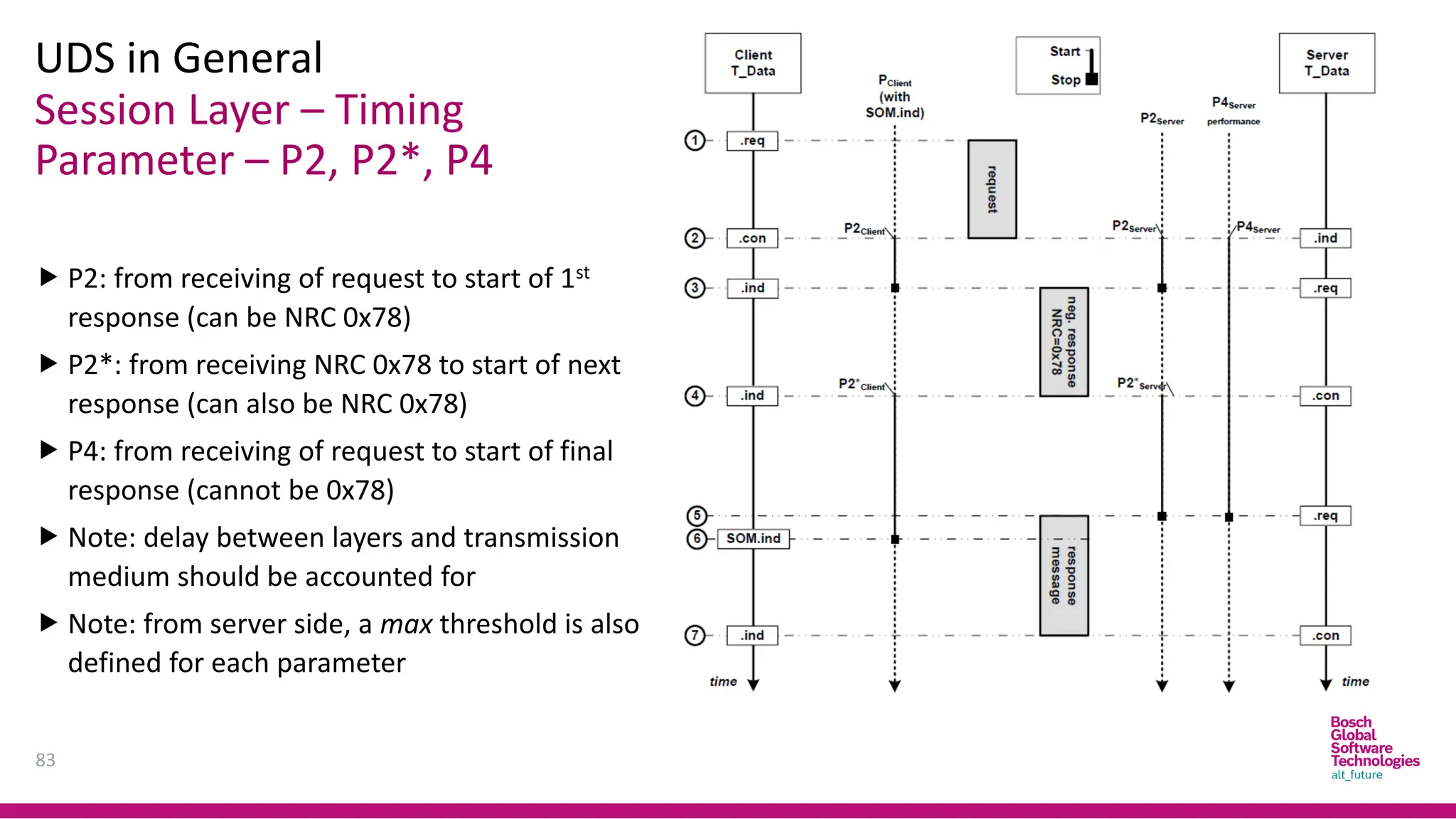
Session Layer – Timing
Parameter – P2, P2*, P4
UDS in General
83
 P2: from receiving of request to start of 1st
response (can be NRC 0x78)
 P2*: from receiving NRC 0x78 to start of next
response (can also be NRC 0x78)
 P4: from receiving of request to start of final
response (cannot be 0x78)
 Note: delay between layers and transmission
medium should be accounted for
 Note: from server side, a max threshold is also
defined for each parameter
Application Layer
UDS in CAN Implementation
84
SID Service Name SID Service Name
Diagnostic & Communication Management
0x10 Diagnostic Session Control 0x11 ECU Reset
0x27 Security Access 0x28 Communication Control
0x3E Tester Present 0x83 Access Timing Parameter
0x84 Secured Data Transmission 0x85 DTC Control Setting
0x86 Response On Event 0x87 Link Control
Data Transmission
0x22 Read Data By Identifier 0x2E Write Data By Identifier
0x23 Read Memory By Address 0x3D Write Memory By Address
0x23 Read Scaling Data By Identifier 0x2C Dynamically Defined Data Identifier
0x2A Read Data By Periodic Identifier
Application Layer
UDS in CAN Implementation
85
SID Service Name SID Service Name
Stored Data Transmission
0x14 Clear Diagnostic Information 0x19 Read DTC Information
Input Output Control
0x2F Input Output Control By Identifier
Routine
0x31 Routine Control
Upload Download
0x34 Request Download 0x35 Request Upload
0x36 Transfer Data 0x37 Exit Transfer
86
Q & A
DIAGNOSTIC
COMMUNICATION
OVER CAN
Agenda
88
1. Overview
1. Diagnostic over any protocol
2. OSI encapsulation model
2. Diagnostic over CAN
1. Problem
2. Single-frame transmission
3. Multi-frame transmission
4. N_PDU definition
5. Timing parameters
Diagnostic Over Any Protocol
Overview
89
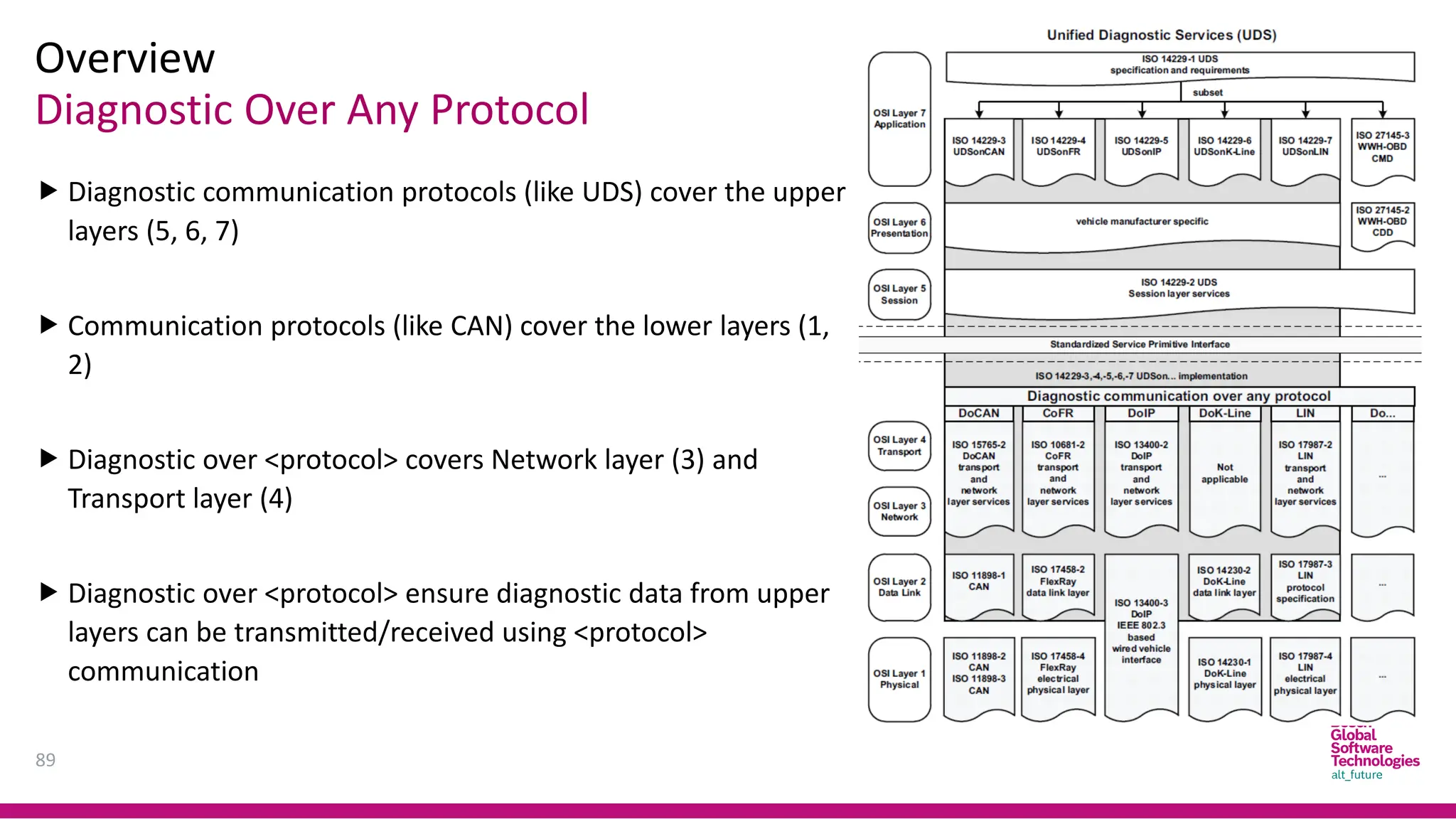
 Diagnostic communication protocols (like UDS) cover the upper
layers (5, 6, 7)
 Communication protocols (like CAN) cover the lower layers (1,
2)
 Diagnostic over <protocol> covers Network layer (3) and
Transport layer (4)
 Diagnostic over <protocol> ensure diagnostic data from upper
layers can be transmitted/received using <protocol>
communication
OSI Encapsulation Model
Overview
90
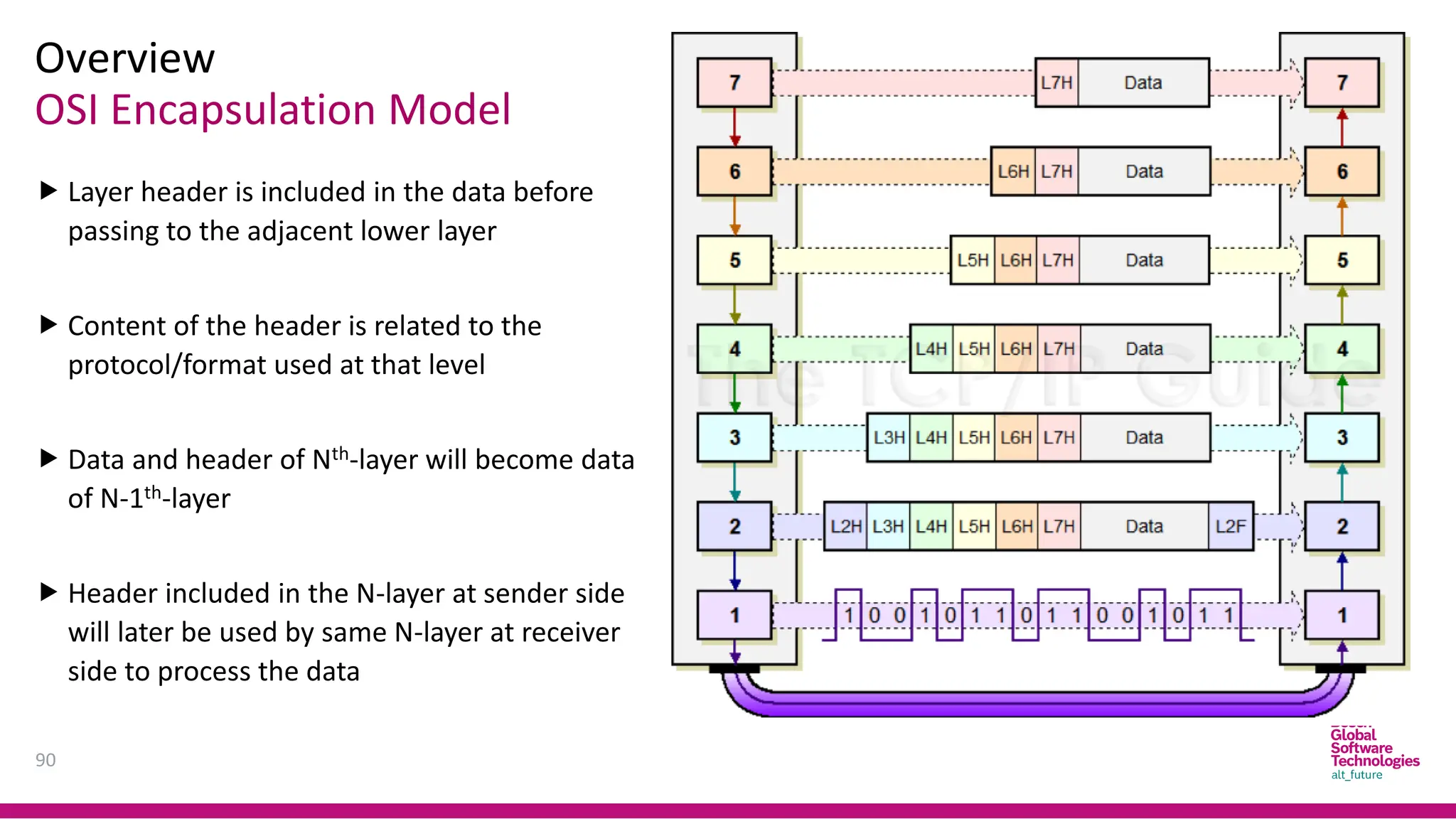
 Layer header is included in the data before
passing to the adjacent lower layer
 Content of the header is related to the
protocol/format used at that level
 Data and header of Nth-layer will become data
of N-1th-layer
 Header included in the N-layer at sender side
will later be used by same N-layer at receiver
side to process the data
OSI Encapsulation Model
Overview
91
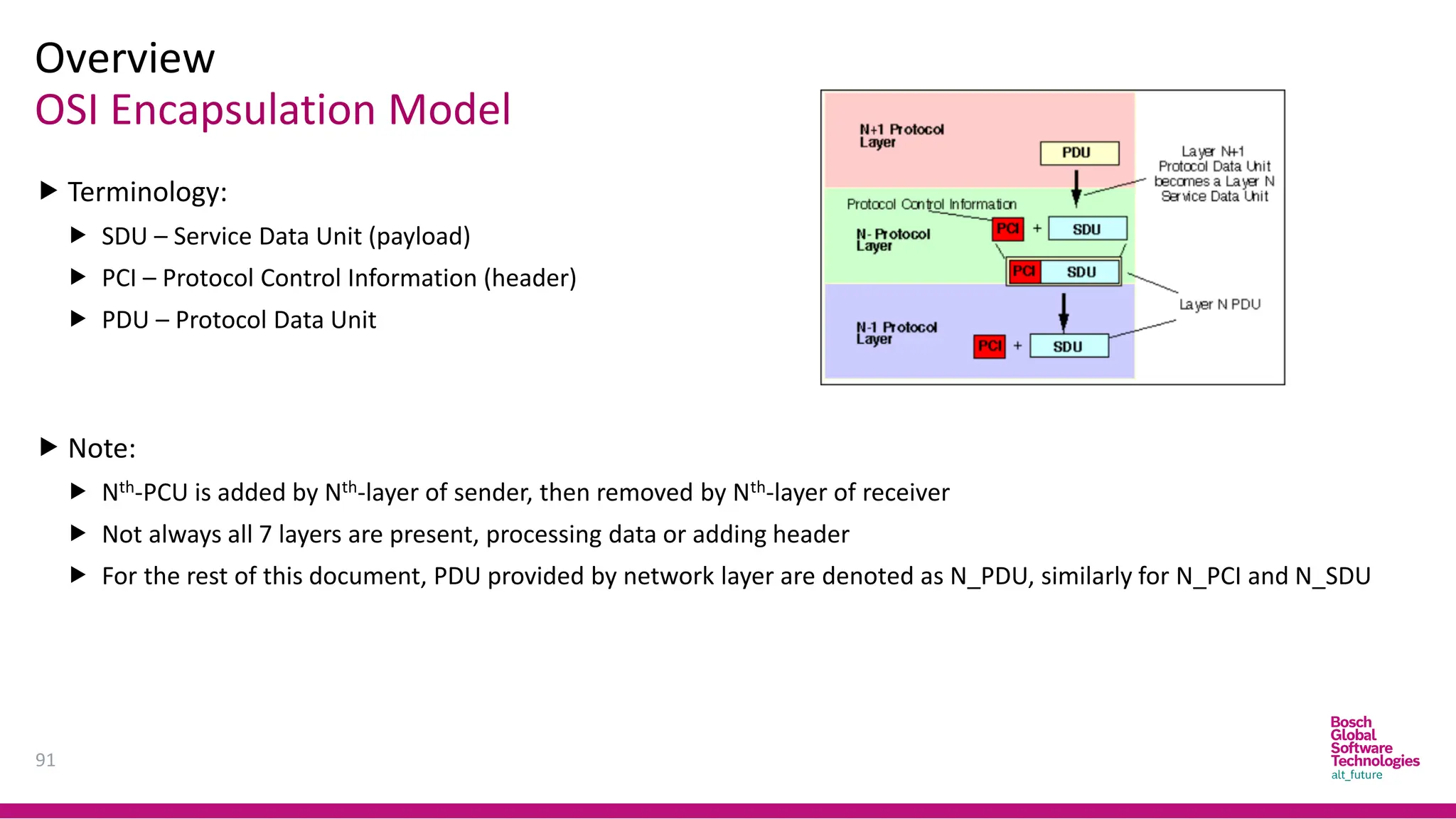
 Terminology:
 SDU – Service Data Unit (payload)
 PCI – Protocol Control Information (header)
 PDU – Protocol Data Unit
 Note:
 Nth-PCU is added by Nth-layer of sender, then removed by Nth-layer of receiver
 Not always all 7 layers are present, processing data or adding header
 For the rest of this document, PDU provided by network layer are denoted as N_PDU, similarly for N_PCI and N_SDU
Problem - Overview
Diagnostic Over CAN
92
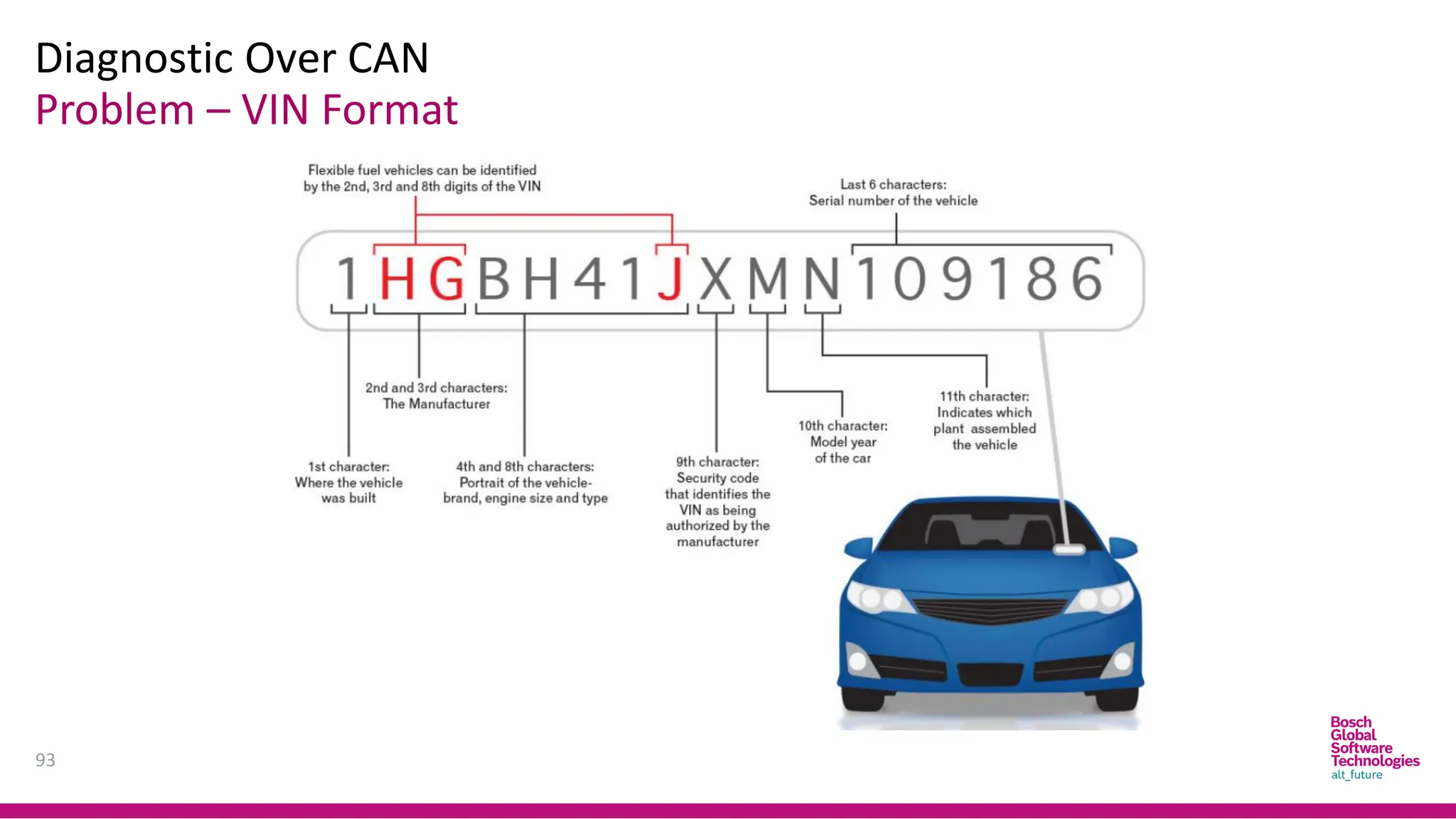
 Requirement: ECU must be able to provide Vehicle Identification Number (VIN)
via a diagnostic read service
Example
Tester: 22 F1 90
ECU: 62 F1 90 31 48 47 42 48 34 31 58 4A 4D 4E 31 30 39 31 38 36
(ASCII translation: 1HGBH41XJMN109186)
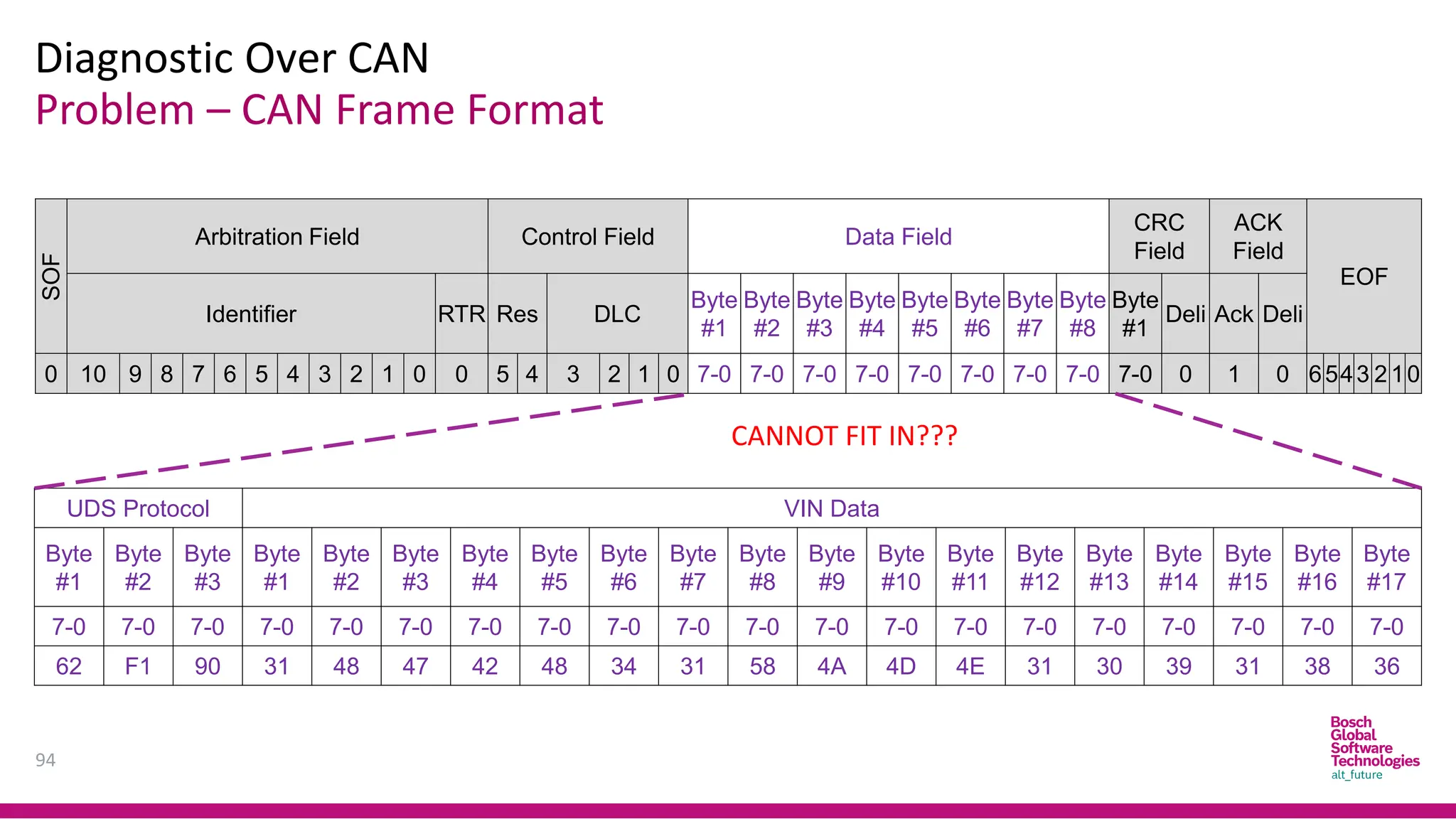
 Problem:
 VIN according to automotive standard are 17-byte long
 UDS protocol requires 3 more bytes to specify for the service
 CAN protocol only allows 8 bytes in the data field at max
Problem – VIN Format
Diagnostic Over CAN
93
Problem – CAN Frame Format
Diagnostic Over CAN
94
SOF
Arbitration Field Control Field Data Field
CRC
Field
ACK
Field
EOF
Identifier RTR Res DLC
Byte
#1
Byte
#2
Byte
#3
Byte
#4
Byte
#5
Byte
#6
Byte
#7
Byte
#8
Byte
#1
Deli Ack Deli
0 10 9 8 7 6 5 4 3 2 1 0 0 5 4 3 2 1 0 7-0 7-0 7-0 7-0 7-0 7-0 7-0 7-0 7-0 0 1 0 6543 2 10
UDS Protocol VIN Data
Byte
#1
Byte
#2
Byte
#3
Byte
#1
Byte
#2
Byte
#3
Byte
#4
Byte
#5
Byte
#6
Byte
#7
Byte
#8
Byte
#9
Byte
#10
Byte
#11
Byte
#12
Byte
#13
Byte
#14
Byte
#15
Byte
#16
Byte
#17
7-0 7-0 7-0 7-0 7-0 7-0 7-0 7-0 7-0 7-0 7-0 7-0 7-0 7-0 7-0 7-0 7-0 7-0 7-0 7-0
62 F1 90 31 48 47 42 48 34 31 58 4A 4D 4E 31 30 39 31 38 36
CANNOT FIT IN???
Single-frame Transmission
Diagnostic Over CAN
95
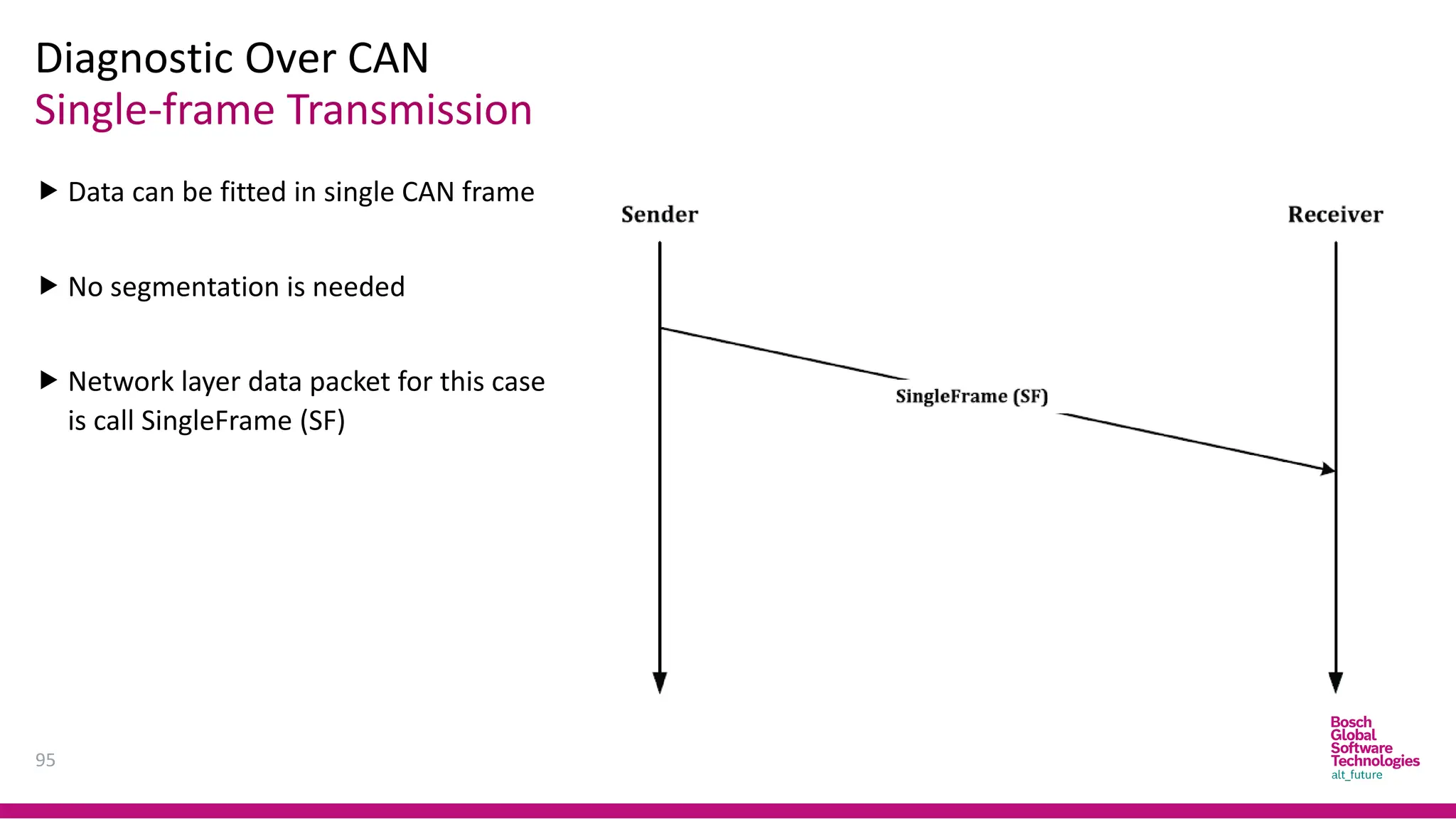
 Data can be fitted in single CAN frame
 No segmentation is needed
 Network layer data packet for this case
is call SingleFrame (SF)
Multi-frame Transmission
Diagnostic Over CAN
96
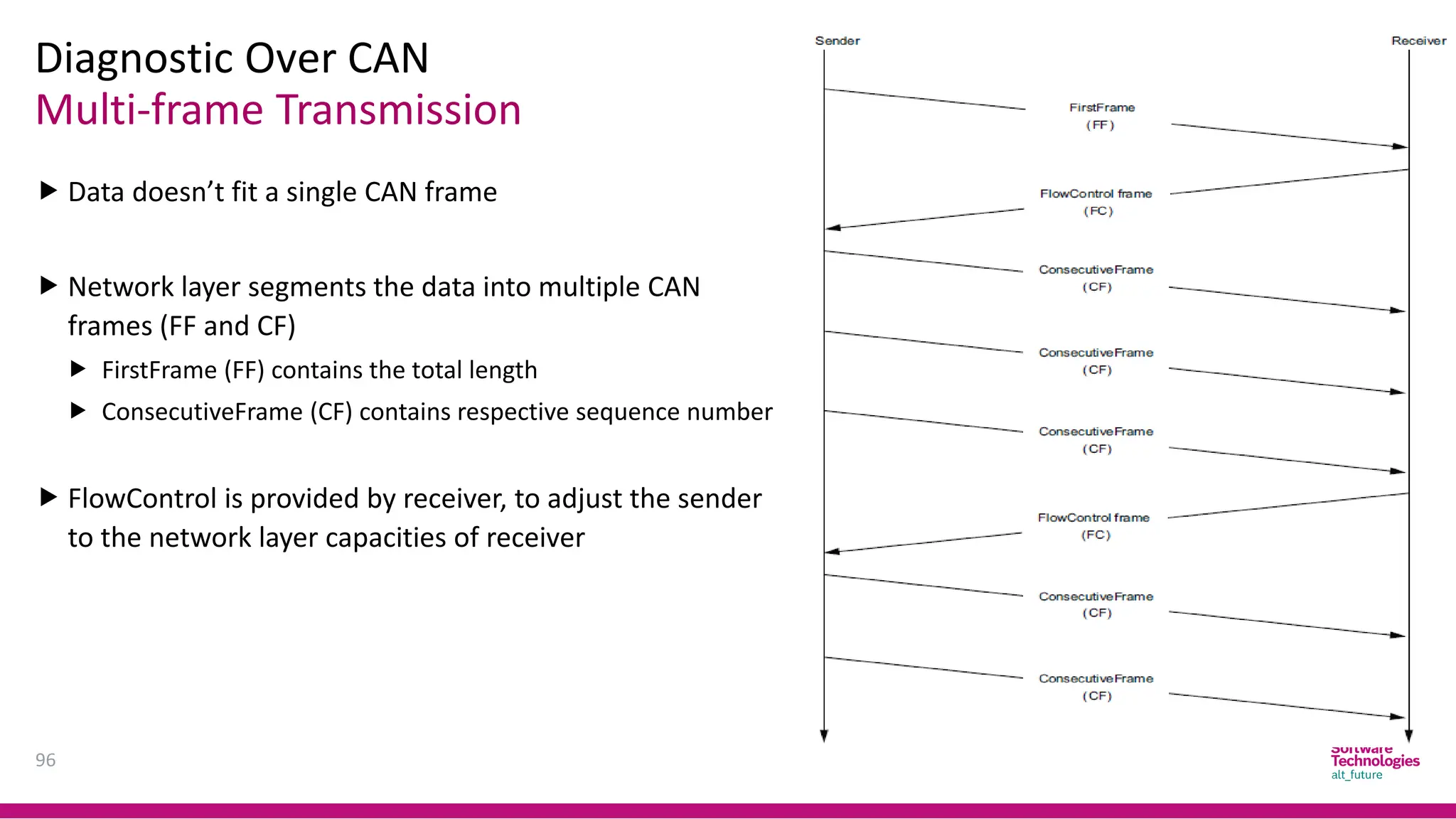
 Data doesn’t fit a single CAN frame
 Network layer segments the data into multiple CAN
frames (FF and CF)
 FirstFrame (FF) contains the total length
 ConsecutiveFrame (CF) contains respective sequence number
 FlowControl is provided by receiver, to adjust the sender
to the network layer capacities of receiver
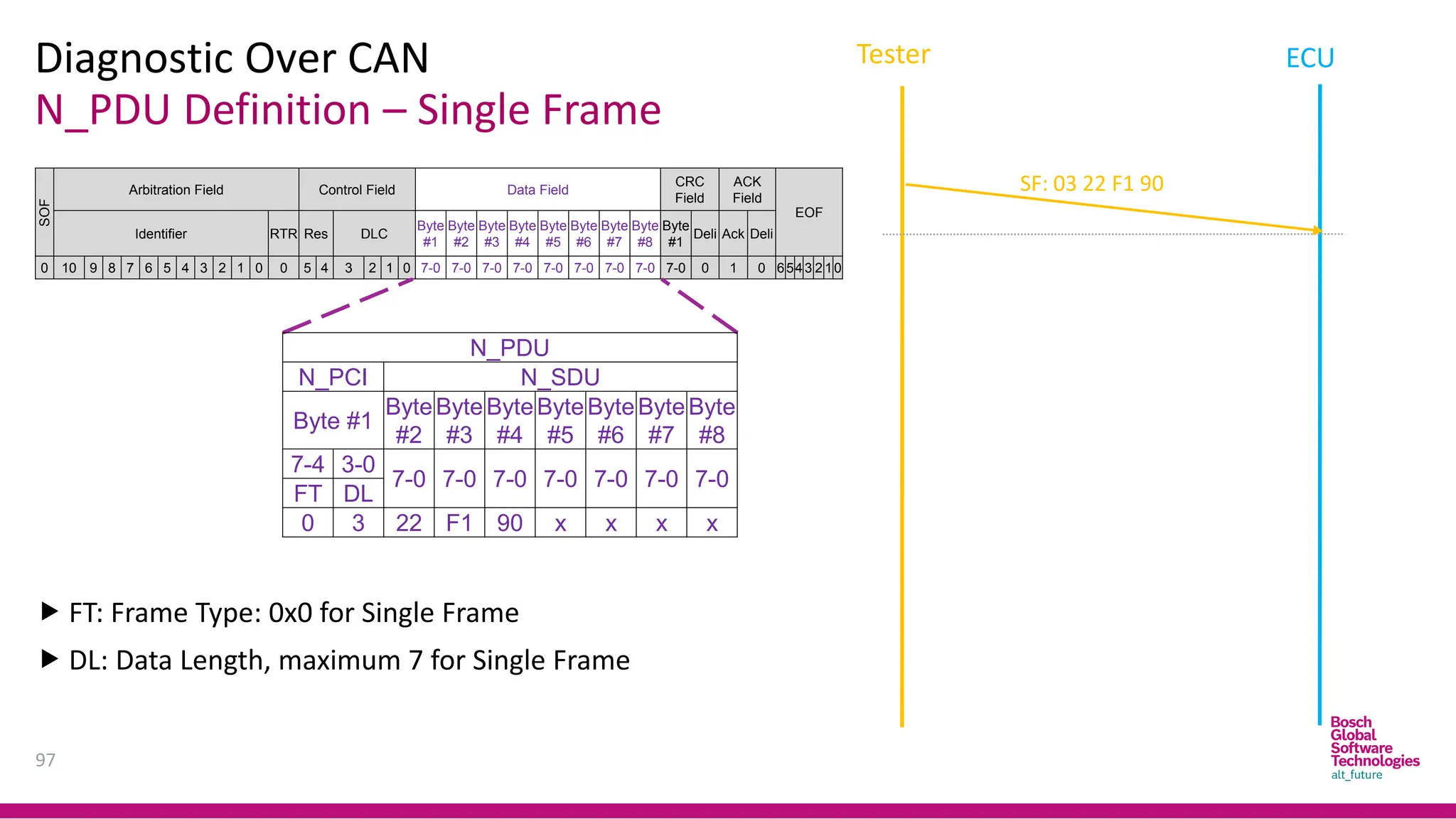
N_PDU Definition – Single Frame
Diagnostic Over CAN
97
SOF
Arbitration Field Control Field Data Field
CRC
Field
ACK
Field
EOF
Identifier RTR Res DLC
Byte
#1
Byte
#2
Byte
#3
Byte
#4
Byte
#5
Byte
#6
Byte
#7
Byte
#8
Byte
#1
Deli Ack Deli
0 10 9 8 7 6 5 4 3 2 1 0 0 5 4 3 2 1 0 7-0 7-0 7-0 7-0 7-0 7-0 7-0 7-0 7-0 0 1 0 6543 2 10
N_PDU
N_PCI N_SDU
Byte #1
Byte
#2
Byte
#3
Byte
#4
Byte
#5
Byte
#6
Byte
#7
Byte
#8
7-4 3-0
7-0 7-0 7-0 7-0 7-0 7-0 7-0
FT DL
0 3 22 F1 90 x x x x
 FT: Frame Type: 0x0 for Single Frame
 DL: Data Length, maximum 7 for Single Frame
SF: 03 22 F1 90
Tester ECU
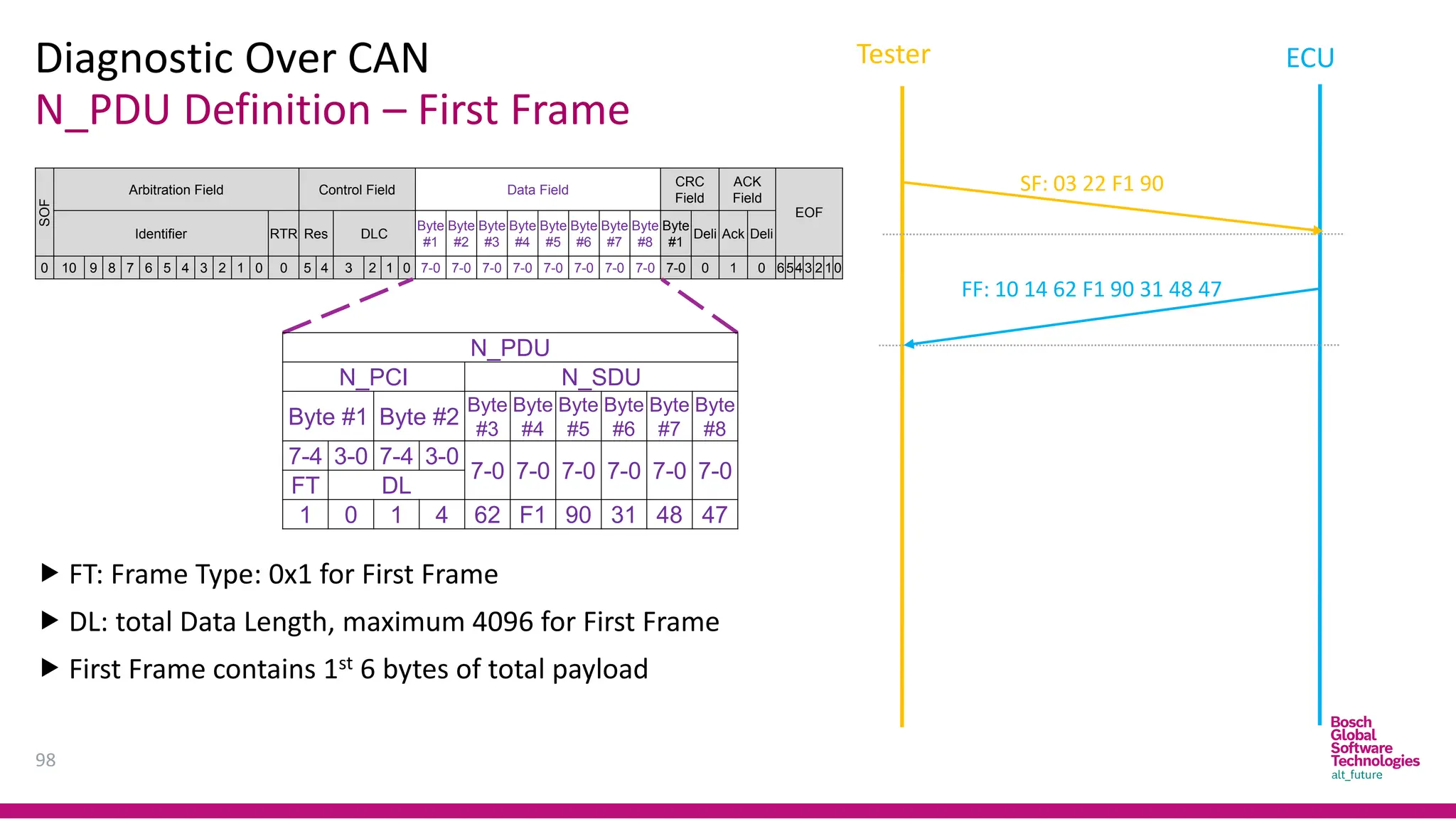
N_PDU Definition – First Frame
Diagnostic Over CAN
98
Tester ECU
SOF
Arbitration Field Control Field Data Field
CRC
Field
ACK
Field
EOF
Identifier RTR Res DLC
Byte
#1
Byte
#2
Byte
#3
Byte
#4
Byte
#5
Byte
#6
Byte
#7
Byte
#8
Byte
#1
Deli Ack Deli
0 10 9 8 7 6 5 4 3 2 1 0 0 5 4 3 2 1 0 7-0 7-0 7-0 7-0 7-0 7-0 7-0 7-0 7-0 0 1 0 6543 2 10
 FT: Frame Type: 0x1 for First Frame
 DL: total Data Length, maximum 4096 for First Frame
 First Frame contains 1st 6 bytes of total payload
N_PDU
N_PCI N_SDU
Byte #1 Byte #2
Byte
#3
Byte
#4
Byte
#5
Byte
#6
Byte
#7
Byte
#8
7-4 3-0 7-4 3-0
7-0 7-0 7-0 7-0 7-0 7-0
FT DL
1 0 1 4 62 F1 90 31 48 47
FF: 10 14 62 F1 90 31 48 47
SF: 03 22 F1 90
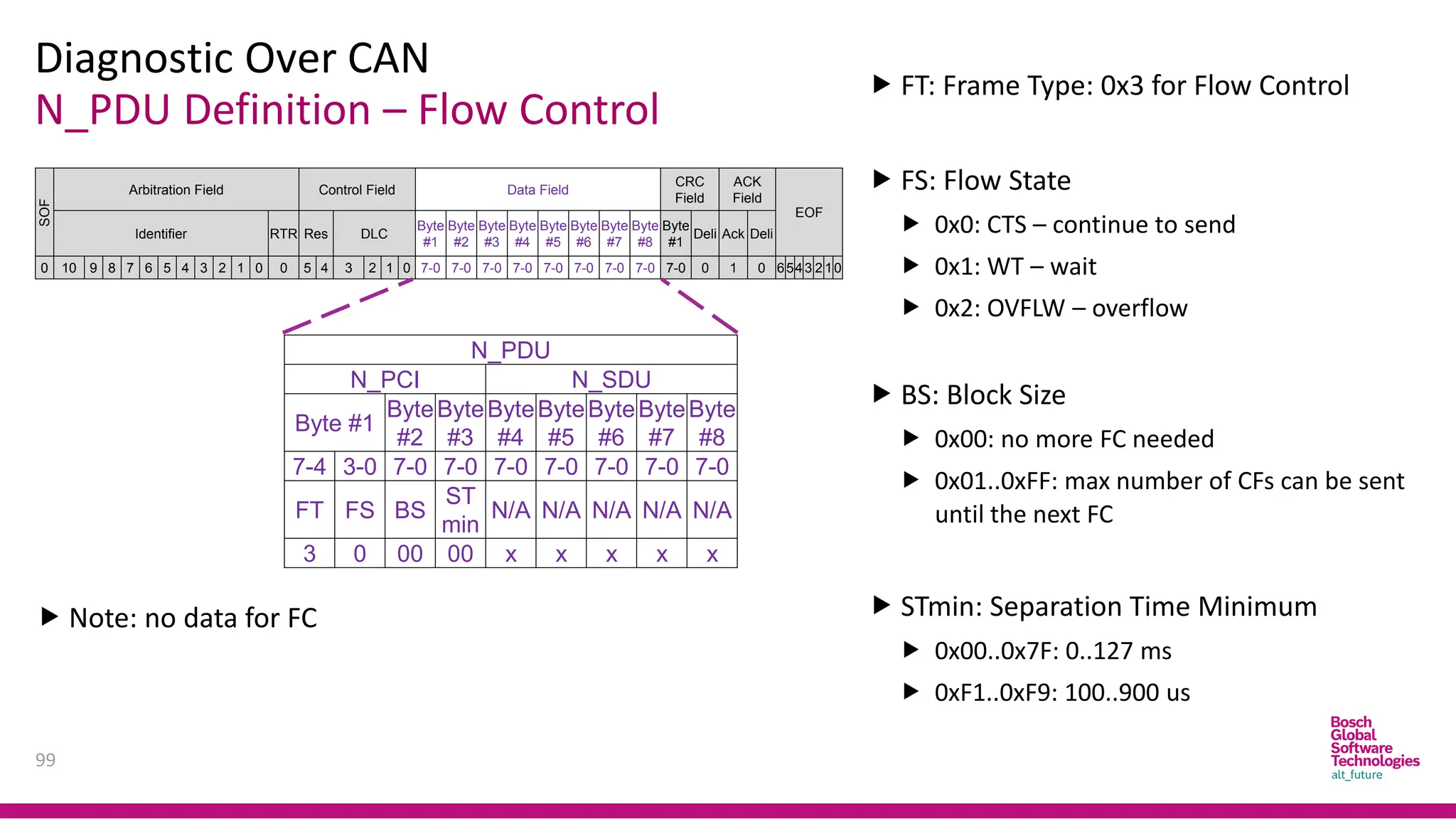
N_PDU Definition – Flow Control
Diagnostic Over CAN
99
SOF
Arbitration Field Control Field Data Field
CRC
Field
ACK
Field
EOF
Identifier RTR Res DLC
Byte
#1
Byte
#2
Byte
#3
Byte
#4
Byte
#5
Byte
#6
Byte
#7
Byte
#8
Byte
#1
Deli Ack Deli
0 10 9 8 7 6 5 4 3 2 1 0 0 5 4 3 2 1 0 7-0 7-0 7-0 7-0 7-0 7-0 7-0 7-0 7-0 0 1 0 6543 2 10
 FT: Frame Type: 0x3 for Flow Control
 FS: Flow State
 0x0: CTS – continue to send
 0x1: WT – wait
 0x2: OVFLW – overflow
 BS: Block Size
 0x00: no more FC needed
 0x01..0xFF: max number of CFs can be sent
until the next FC
 STmin: Separation Time Minimum
 0x00..0x7F: 0..127 ms
 0xF1..0xF9: 100..900 us
N_PDU
N_PCI N_SDU
Byte #1
Byte
#2
Byte
#3
Byte
#4
Byte
#5
Byte
#6
Byte
#7
Byte
#8
7-4 3-0 7-0 7-0 7-0 7-0 7-0 7-0 7-0
FT FS BS
ST
min
N/A N/A N/A N/A N/A
3 0 00 00 x x x x x
 Note: no data for FC
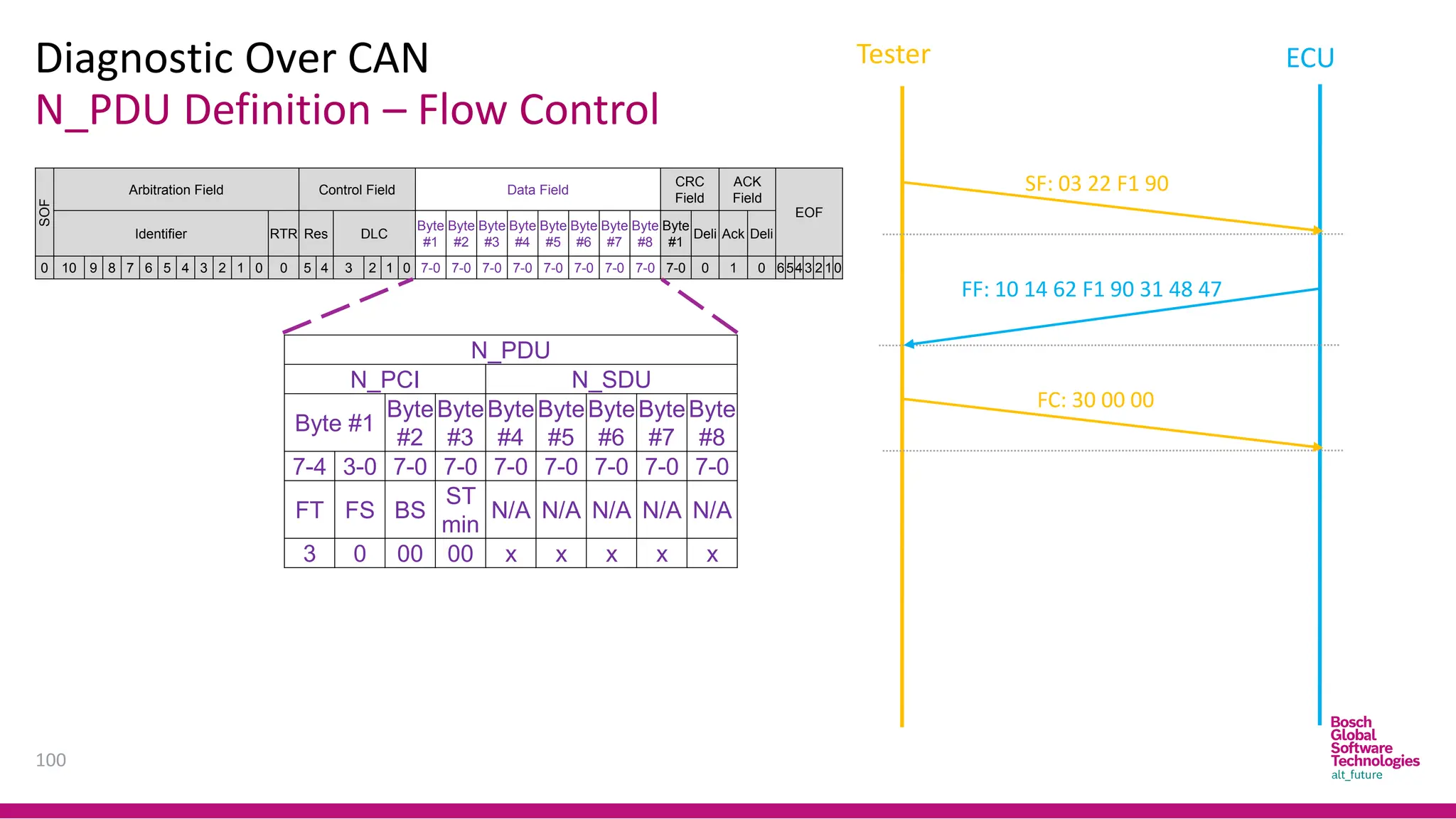
N_PDU Definition – Flow Control
Diagnostic Over CAN
100
SOF
Arbitration Field Control Field Data Field
CRC
Field
ACK
Field
EOF
Identifier RTR Res DLC
Byte
#1
Byte
#2
Byte
#3
Byte
#4
Byte
#5
Byte
#6
Byte
#7
Byte
#8
Byte
#1
Deli Ack Deli
0 10 9 8 7 6 5 4 3 2 1 0 0 5 4 3 2 1 0 7-0 7-0 7-0 7-0 7-0 7-0 7-0 7-0 7-0 0 1 0 6543 2 10
FF: 10 14 62 F1 90 31 48 47
SF: 03 22 F1 90
FC: 30 00 00
N_PDU
N_PCI N_SDU
Byte #1
Byte
#2
Byte
#3
Byte
#4
Byte
#5
Byte
#6
Byte
#7
Byte
#8
7-4 3-0 7-0 7-0 7-0 7-0 7-0 7-0 7-0
FT FS BS
ST
min
N/A N/A N/A N/A N/A
3 0 00 00 x x x x x
Tester ECU
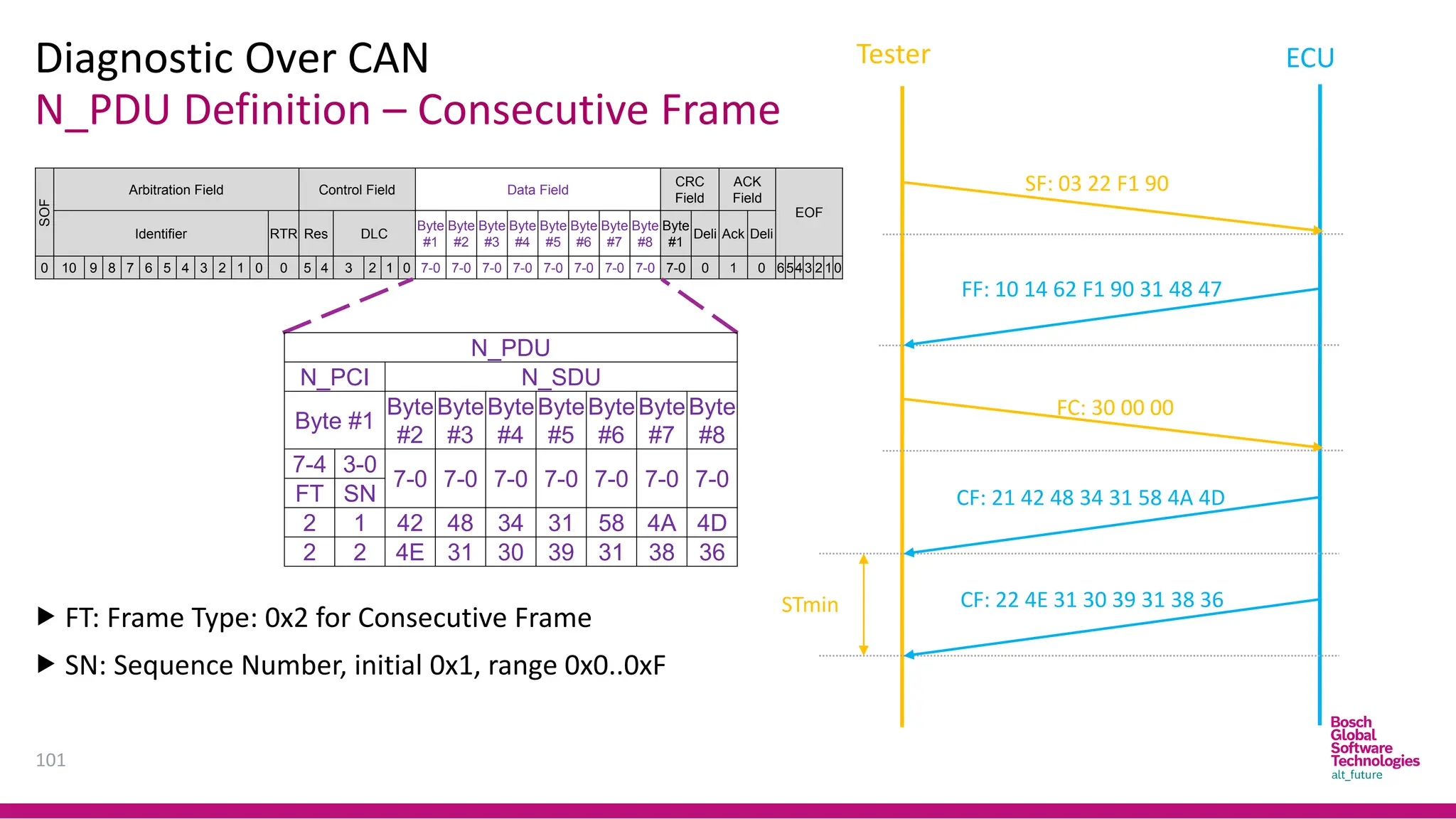
N_PDU Definition – Consecutive Frame
Diagnostic Over CAN
101
SOF
Arbitration Field Control Field Data Field
CRC
Field
ACK
Field
EOF
Identifier RTR Res DLC
Byte
#1
Byte
#2
Byte
#3
Byte
#4
Byte
#5
Byte
#6
Byte
#7
Byte
#8
Byte
#1
Deli Ack Deli
0 10 9 8 7 6 5 4 3 2 1 0 0 5 4 3 2 1 0 7-0 7-0 7-0 7-0 7-0 7-0 7-0 7-0 7-0 0 1 0 6543 2 10
FF: 10 14 62 F1 90 31 48 47
SF: 03 22 F1 90
STmin
N_PDU
N_PCI N_SDU
Byte #1
Byte
#2
Byte
#3
Byte
#4
Byte
#5
Byte
#6
Byte
#7
Byte
#8
7-4 3-0
7-0 7-0 7-0 7-0 7-0 7-0 7-0
FT SN
2 1 42 48 34 31 58 4A 4D
2 2 4E 31 30 39 31 38 36
 FT: Frame Type: 0x2 for Consecutive Frame
 SN: Sequence Number, initial 0x1, range 0x0..0xF
CF: 21 42 48 34 31 58 4A 4D
CF: 22 4E 31 30 39 31 38 36
FC: 30 00 00
Tester ECU
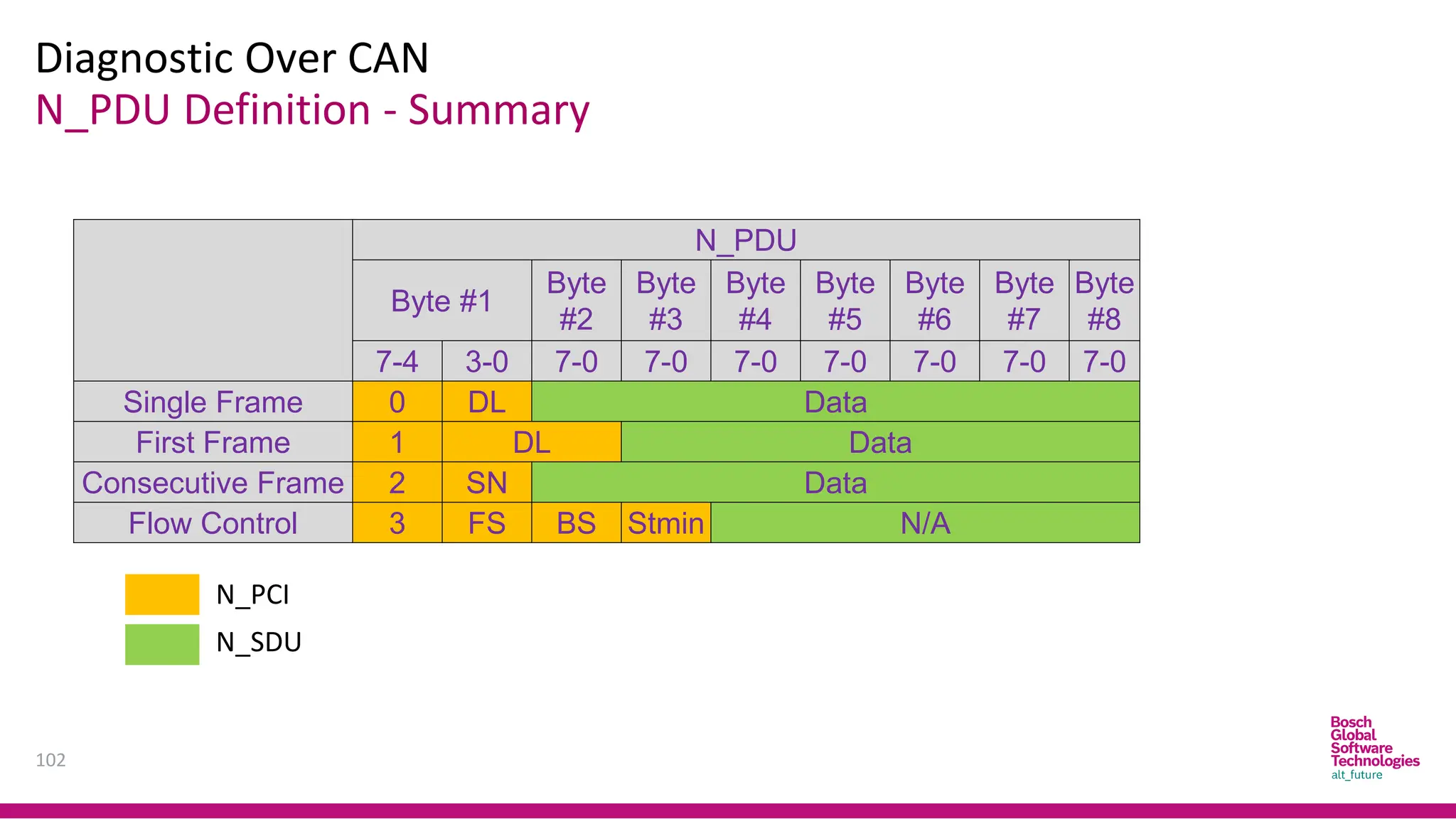
N_PDU Definition - Summary
Diagnostic Over CAN
102
N_PDU
Byte #1
Byte
#2
Byte
#3
Byte
#4
Byte
#5
Byte
#6
Byte
#7
Byte
#8
7-4 3-0 7-0 7-0 7-0 7-0 7-0 7-0 7-0
Single Frame 0 DL Data
First Frame 1 DL Data
Consecutive Frame 2 SN Data
Flow Control 3 FS BS Stmin N/A
N_PCI
N_SDU
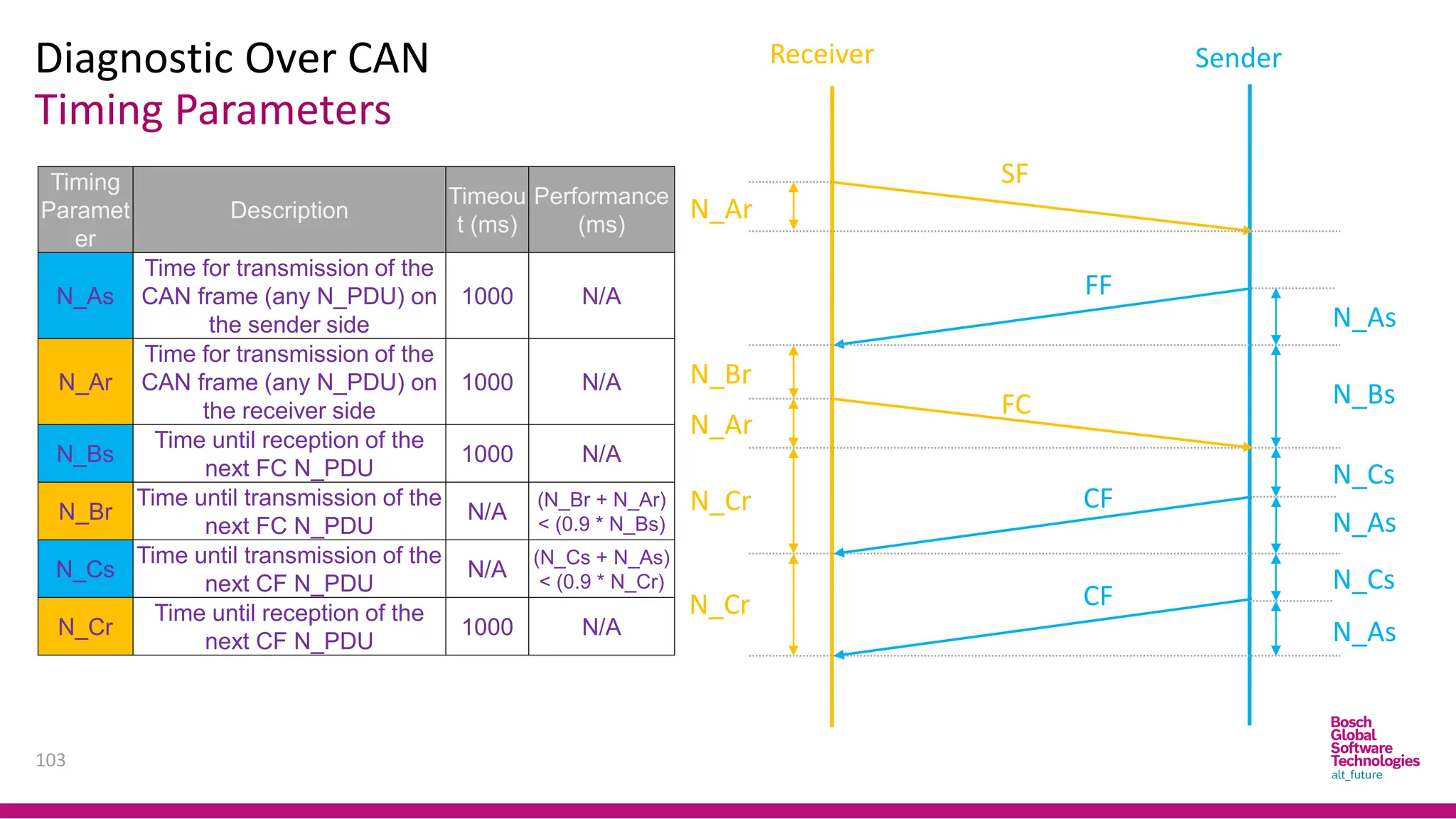
Timing Parameters
Diagnostic Over CAN
103
Receiver Sender
N_Ar
N_Ar
N_Br
N_Cr
N_Cr
N_As
N_As
N_As
N_Cs
N_Cs
N_Bs
Timing
Paramet
er
Description
Timeou
t (ms)
Performance
(ms)
N_As
Time for transmission of the
CAN frame (any N_PDU) on
the sender side
1000 N/A
N_Ar
Time for transmission of the
CAN frame (any N_PDU) on
the receiver side
1000 N/A
N_Bs
Time until reception of the
next FC N_PDU
1000 N/A
N_Br
Time until transmission of the
next FC N_PDU
N/A
(N_Br + N_Ar)
< (0.9 * N_Bs)
N_Cs
Time until transmission of the
next CF N_PDU
N/A
(N_Cs + N_As)
< (0.9 * N_Cr)
N_Cr
Time until reception of the
next CF N_PDU
1000 N/A
SF
FC
FF
CF
CF

10
4
Thank you!

Can Protocol 1 bosch embedded academy.pdf

  • 2.
    BGSV Embedded Academy(BEA) Technical Competence T1: Automotive Basics (Sensor, SW, Mobility Solution) T2: Automotive SW Architecture (AUTOSAR) T3: Embedded Programming T5: Test Overview Methodological Competence M1: SW Development Lifecycle M3: Clean Code Process Competence P1: Requirements Engineering P2: Design Principles P3: Review P4: Safety & Security BGSV EMBEDDED ACADEMY Purpose: Develop basic general embedded competence Focused Program to Develop Embedded Competence Classroom training, Online Self-learning, Live Demo
  • 3.
    Disclaimer  This slideis a part of BGSV Embedded Academy (BEA) program and only used for BEA training purposes.  This slide is Bosch Global Software Technology Company Limited’s internal property. All rights reserved, also regarding any disposal, exploitation, reproduction, editing, distribution as well as in the event of applications for industrial property rights.  This slide has some copyright images and text, which belong to the respective organizations.
  • 4.
  • 5.
    Agenda 5 No Part DurationTrainer Training date 1 Automotive Software Architecture Intro 2 Pham Vo Tuan Anh 29-Sep-22 2 CAN Protocol 6 Mr. Quan (UIT) 06 & 13 Oct 22 3 Automotive Diagnostic Overview 1.5 Nguyen Kien 20 & 27 Oct 22
  • 6.
  • 7.
  • 8.
  • 9.
    Introduction Characteristics of ‘CAN’ 9 •CAN is a multi-master Bus • Configuration flexibility - No node addressing • Prioritization of messages through “Identifiers” • Theoretically No limitation on the number of nodes • Guarantee of latency times • Multicast reception with the time synchronization • System wide data consistency • Error detection and error signaling • Automatic retransmission of corrupted messages • Temporary errors - permanent failures of nodes and autonomous switching off defect nodes
  • 10.
  • 11.
  • 12.
  • 13.
    CAN Protocol 13 ➔ Bitrate: up to 1Mbit/s ➔ Bidirectional Dual-wire bus with 40-50m maximum in length ➔ Multi-Master Physical Layer Vehicle OBD connector CAN bus level Volt
  • 14.
    CAN Protocol 14 Relation betweenBaud Rate and Bus Length
  • 15.
    CAN Protocol 15 Bus Accessand Arbitration • Bus access through CSMA with AMP A 0 1 0 0 B 0 1 0 1 C 0 1 1 0 BUS 0 1 0 0 NODE Node B looses arbitration Node C looses arbitration Arbitration phase Remainder • Advantages • No Collision • Transmission of highest priority message within the latency time
  • 16.
    CAN Protocol 16 Message Transfer FrameFormats • Standard Frame - 11bit Identifier • Extended Frame - 29 bit Identifier Frame Types • Data Frame • Remote Frame (not useful) • Error Frame • Overload Frame (not useful)
  • 17.
    CAN Protocol 17 Data Frame ControlField SOF RTR 11 Bit Identifier Arbitration Field Data Field CRC Field DLC (4) IDE r0 Field ACK End of Frame 0 to 64 Bits 15 Bits 7 Bits Inter- mission Difference between Standard Frame and Extended Frame • Differs only in Arbitration field and Control field 3 Bits Bus Idle Bus Idle Ack Slot CRC Delimiter Ack Delimiter Standard Data Frame Format
  • 18.
    CAN Protocol 18 Data Frame ExtendedData Frame Format SOF SRR 11 Bit Identifier Arbitration Field 18 Bit Identifier Control Field RTR Data Field DLC (4) IDE r1 r0 0 to 64 Bits Difference between Standard Frame and Extended Frame • Differs only in Arbitration field and Control field
  • 19.
    CAN Protocol 19 Data Frame ExtendedData Frame Format SOF SRR 11 Bit Identifier Arbitration Field 18 Bit Identifier Control Field RTR Data Field DLC (4) IDE r1 r0 0 to 64 Bits
  • 20.
    CAN Protocol 20 Data Frame ExtendedData Frame Format SOF SRR 11 Bit Identifier Arbitration Field 18 Bit Identifier Control Field RTR Data Field DLC (4) IDE r1 r0 0 to 64 Bits
  • 21.
    CAN Protocol Data Frame ExtendedData Frame Format SOF SRR 11 Bit Identifier Arbitration Field 18 Bit Identifier Control Field RTR Data Field DLC (4) IDE r1 r0 0 to 64 Bits
  • 22.
    CAN Protocol Data Frame ExtendedData Frame Format SOF SRR 11 Bit Identifier Arbitration Field 18 Bit Identifier Control Field RTR Data Field DLC (4) IDE r1 r0 0 to 64 Bits
  • 23.
    CAN Protocol 23 Data Frame ExtendedData Frame Format SOF SRR 11 Bit Identifier Arbitration Field 18 Bit Identifier Control Field RTR Data Field DLC (4) IDE r1 r0 0 to 64 Bits Frame lỗi gồm: - Cờ lỗi - - phần delimiter
  • 24.
    CAN Protocol 24 Data Frame ExtendedData Frame Format SOF SRR 11 Bit Identifier Arbitration Field 18 Bit Identifier Control Field RTR Data Field DLC (4) IDE r1 r0 0 to 64 Bits
  • 25.
    CAN Protocol 25 NHận dữliệu Difference between Standard Frame and Extended Frame • Differs only in Arbitration field and Control field
  • 26.
  • 27.
    CAN Protocol 27 Error Frame ErrorFrame Frame Uncompleted Inter- mission 6 Bits 0 -6 Bits 8 Bits Error Delimiter Superposition of Error Flag Error Condition 3 Bits • Error flag can start within the frame that is currently being transmitted Types of Error flags • Active Error flag - consists of 6 consecutive ‘dominant’ bit • Passive Error flag - consists of 6 consecutive ‘recessive’ bit Error Frame Format (Active Error Frame)
  • 28.
    CAN Protocol Error Handling 28 Themode of the controller is controlled by two error counters - the transmit error counter (tx_count) and the receive error counter (rx_count). The following rules apply: ➢ The CAN controller is in error active mode if: tx_count <= 127 AND rx_count <= 127. ➢ Passive mode is used if : tx_count > 127 or rx_count>127 AND tx_count <= 255. ➢ Bus off is entered if: tx_count > 255.
  • 29.
    CAN Protocol 29 Interframe Spacing 8Bits 3 Bits Previous Frame Interframe Spacing Next frame Inter- mission Bus idle 3 Bits Previous Frame Interframe Spacing Next frame Inter- mission Bus idle Transmission Suspend After the transmission of a frame by an Error Active node After the transmission of a frame by an Error Passive node
  • 30.
    30 1 1 01 0 0 1 1 ……………….. “1” “0” Non-Return-to-Zero coding • Keeps the frequency of the signal on the bus to minimum. Bit-Stuffing • Ensures sufficient Recessive and Dominant edges for Re-Synchronization. 7 10 9 8 1 2 3 1 2 1 2 3 5 4 6 1 2 Data Stream 1 2 3 5 4 6 1 1 2 3 5 4 1 7 9 8 6 S 10S 12 3 1 2 1 2 3 5 4 6 S 1 2 Bit Stream CAN Protocol Message Coding
  • 31.
    31 A complete CANbus frame Source: Wikipedia
  • 32.
    CAN Protocol 32 Types ofError Detected in CAN Bus CRC Error: • Every node receive the message, Calculate CRC and compare it with Received CRC. Acknowledge Error: • Transmitting node send a ACK slot bit as a recessive bit and check for dominant bit to verify reception. Form Error: • Generated when any of following bit is detected as a dominant bit where One should not be. e.g. CRC delimiter, ACK delimiter, End of Frame, Inter Frame Space. Stuff Error: • Bit stuffing rule is violated when 6-consecutive bits with the same polarity are detected. Bit Error: • Node detect the signal that is opposite of what it send on Bus.
  • 33.
    Introduction about CANFD 33 Main improvement: • Increase bit rate ( 2,4 … up to 8 Mbit/s) • Increase payload up to 64 bytes
  • 34.
    34 Abbreviation CAN: Controller AreaNetwork CAN FD: Controller Area Network Flexible Data-Rate CSMA: Carrier Sense Multiple Access/ Collision Detection AMP: Arbitration on Message Priority OSI: Open Systems Interconnection model SOF: Start Of Frame RTR bit: Remote Transmission Request bit SRR bit: Substitute Remote Request bit IDE bit: Identifier Extension DLC: Data Length Code EOF: End Of Frame CRC: Cyclic Redundancy Check/ Check sum ACK bit: Acknowledgment bit IFS: Inter Frame Space REC: Receive Error Counter TEC: Transmit Error Counter
  • 35.
    35 Reference - CAN Specification2.0 – Bosch - ISO 11898-2 – High speed CAN - ISO 11898-2 2015 – CAN FD - Bit timing calculation: http://www.bittiming.can-wiki.info/ - Return to zero: https://en.wikipedia.org/wiki/Return-to-zero - None return to zero : https://en.wikipedia.org/wiki/Non-return-to-zero - CSMA/CD : https://en.wikipedia.org/wiki/Carrier-sense_multiple_access_with_collision_detection
  • 36.
  • 37.
    Trainer Introduction 37 NGUYEN KIEN SWArchitect – RADAR product 9 years experience in Bosch DA/RADAR development Bachelor of Engineering – Embedded System
  • 38.
    Definitions Diagnosis – What? 38 “Inautomotive engineering, Diagnosis is typically used to determine the causes of symptoms and solutions to issues.”  symptom(s) – what the user/operator/repairer of the system (vehicle or whatever) notices;  fault(s) – the error(s) in the system that result in the symptom(s);  root cause(s) – the cause(s) of the fault. Source: Advanced Automotive Fault Diagnosis- Automotive Technology: Vehicle Maintenance and Repair TOM DENTON
  • 39.
    Definitions Diagnosis – How?[1] 39 Todo Diagnostic, Technician have to know how to use Diagnostic Tools and Equipment. Tool and Equipment could be classified into:  Basic Equipment: such as Multi-meter  Tracing Tool: like Oscilloscope  Scanner/Fault Code Readers and Analyzers.
  • 40.
    Definitions Diagnosis – How?[2] 40 The Equipment shall help technician indicate where is fault occurs in systems.  In the other word, In Vehicle, Systems should have ability to provide information in case request.  This is the motivation of On-board diagnostics (OBD).  On-board diagnostics (OBD) is a generic term referring to a vehicle’s self- diagnostic and reporting system. OBD systems give the vehicle owner or a technician access to information for various vehicle systems.  OBD system illuminates a warning lamp known as the malfunction indicator lamp (MIL) or malfunction indicator (MI) on the instrument cluster.
  • 41.
    Definitions Diagnosis – How?[3] 41 When the fault occurs, the system stores a diagnostic trouble code (DTC), also store important information of the vehicle when the fault was set.  A service technician is able to connect a diagnostic scan tool or a code reader that will communicate with the system and retrieve this information.  As vehicles and their systems become more complex, the functionality of OBD is being extended to cover vehicle systems and components that do not have anything to do with vehicle emissions control: Vehicle body, chassis and accessories  OBD systems use a standardized communications port to provide data  The Communication between Diagnostic Equipment and ECUs through Vehicle Special Interface for Diagnosis purpose is called Diagnostic Communication.
  • 42.
    Definitions States and Events 42 Everything about the car is either in a "normal" state or an "abnormal" state.  Either the car is starting normally or it is not. Either the engine is running normally or it is not.  Used in this way, "normal" means acceptable, the way they are supposed to be, okay. "Abnormal" means not acceptable, not the way they are supposed to be, not okay.  The purpose of all automobile repair is to correct abnormal states and restore the car to its normal state of operation.
  • 43.
    Definitions States and Events 43 An "event" is when something happens: a spark plug fires, the brakes are applied, a fuel injector opens, a relay closes.  An event is a change of state, from one condition to another.  A "normal event" occurs when something happens just as it is supposed to happen.  An "abnormal event" is when something happens that is not supposed to happen: the engine quits unexpectedly, the car fails to stop when the brakes are applied.  All automotive complaints can be described and understood in terms of abnormal events: some things are happening which are not supposed to happen, and the driver has noticed them.
  • 44.
    Diagnosis Uses 44  Diagnosisis used to detect the fault in the system.  Use to read the parameters like WSS signal, SAS signal, YRS signal etc.  Used for calibration of Steering Angle sensor, Lateral , Longitudinal sensor etc.  Use to run EOL(End of Line) routines.  Used for reprogramming.
  • 45.
    On board andOff board Diagnosis 45 Normally, the information is exchanged between an on-board ECU and an off-board diagnostic tester.
  • 46.
  • 47.
  • 48.
    Diagnosis Protocols 48 ECU(server) –Tester(client) communication  Tester sends a requestcommand to ECU, to perform certain action.  ECU sends a response message to the corresponding request.
  • 49.
    Request and response 49 Overview Positiveresponse  Tester sends a request to perform software reset.  ECU returns a positive response. Negative Response  Tester sends a request to perform software reset.  ECU returns a negative response indicating software reset can not be performed.
  • 50.
  • 51.
    Request and response 51 Overview RequestPositive Response Description 0x00 .. 0x0F 0x40 .. 0x4F OBD in ISO 15031-5 Emissions-related diagnostic services 0x10 .. 0x3E 0x83 .. 0x87 0x50 .. 0x7E 0xC3 .. 0xC7 UDS in ISO 14229 KWP2000 in General vehicle diagnostics 0x81.. 0x82 0xC1 .. 0xC2 KWP2000 over K-line in ISO 14230 0xA0 .. 0xB9 0xE0 .. 0xF9 Reverse for OEM 0xBA .. 0xBE 0xFA ..0xFE Reverse for ECU manufacturers Others Reverse
  • 52.
  • 53.
    Diagnosis mode 53 ➔ NormalMode (Default) ➔ Test Mode / Adjustment mode ➔ Reprogramming mode
  • 54.
  • 55.
    Definitions Milestones 55  1969: Volkswagenintroduces the first on-board computer system with scanning capability, in their fuel-injected Type 3 models.  1975: Datsun 280Z On-board computers begin appearing on consumer vehicles, largely motivated by their need for real-time tuning of fuel injection systems. Simple OBD implementations appear, though there is no standardization in what is monitored or how it is reported.  1980: General Motors implements a proprietary interface and protocol for testing of the Engine Control Module (ECM) on the vehicle assembly line. The 'assembly line diagnostic link' (ALDL) protocol communicates at 160 baud with Pulse-width modulation (PWM) signalling and monitors very few vehicle systems.
  • 56.
    Definitions Milestones 56  1986: Anupgraded version of the ALDL protocol appears which communicates at 8192 baud with half-duplex UART signalling. This protocol is defined in GM XDE-5024B.  ~1987: The California Air Resources Board (CARB) requires that all new vehicles sold in California starting in manufacturer's year 1988 (MY1988) have some basic OBD capability. These requirements are generally referred to as "OBD-I", though this name is not applied until the introduction of OBD-II. The data link connector and its position are not standardized, nor is the data protocol.  1988: The Society of Automotive Engineers (SAE) recommends a standardized diagnostic connector and set of diagnostic test signals.
  • 57.
    Definitions Milestones 57  ~1994: Motivatedby a desire for a state-wide emissions testing program, the CARB issues the OBD-II specification and mandates that it be adopted for all cars sold in California starting in model year 1996. The DTCs and connector suggested by the SAE are incorporated into this specification.  1996: The OBD-II specification is made mandatory for all cars sold in the United States.  2001: The European Union makes EOBD mandatory for all gasoline (petrol) vehicles sold in the European Union, starting in MY2001 (see European emission standards Directive 98/69/EC)).
  • 58.
  • 59.
    Agenda 59 1. Overview 1. UDS 2.Diagnostic Communication Protocol 3. Related ISO Standards 2. UDS In General 1. Application Layer 2. Session Layer 3. UDS In CAN Implementation
  • 60.
    UDS Overview 60  (U)nified (D)iagnostic(S)ervices is a diagnostic communication protocol  UDS is a non-OBD protocol  Standardized across manufacturers and standards  Use cases:  Detect faults in the system  Read vehicle parameters  Configuration/Calibration ECUs  End Of Line Routine  Reprogramming
  • 61.
    Protocol Overview 61 Protocol: server client Positive response Negative response
  • 62.
    Overview Related ISO Standards Derived and distributed based on OSI model  UDS specification covers layer 5~7  Service ID and associated parameters are contained in the payload of message frame  Communication protocol covers layer 1~2 62
  • 63.
    Application Layer –Services UDS in General 63  Also referred to as Diagnostic Services  At client side: used to request certain diagnostic functions  At server side: used to send response data back to client  6 service primitives are specified  Service request primitive  Service request-confirmation primitive  Service indication primitive  Service response primitive  Service response-confirmation primitive  Service confirmation primitive
  • 64.
    Application Layer –Request Format UDS in General 64 Application Layer Protocol Data Unit (A_PDU) Protocol Control Information (A_PCI) Service Data Unit (A_SDU) Request with only Service ID (SID) Request with Service ID (SID) and Sub-function (SF) Request with Service ID (SID) and Data ID (DID) Request with Service ID (SID), Sub-function (SF) and Data ID (DID) SID SID SID SID Opt. Data Opt. Data SF Opt. Data Opt. Data SF DID DID DID DID
  • 65.
    Application Layer –Response Format UDS in General 65 Application Layer Protocol Data Unit (A_PDU) Protocol Control Information (A_PCI) Service Data Unit (A_SDU) Positive Response with only Service ID (SID) Positive Response with Service ID (SID) and Sub-function (SF) Positive Response with Service ID (SID) and Data ID (DID) Positive Response with Service ID (SID), Sub-function (SF) and Data ID (DID) Negative Response SID + 0x40 Opt. Data Opt. Data SF Opt. Data Opt. Data SF DID DID DID DID SID 0x7F NRC SID + 0x40 SID + 0x40 SID + 0x40
  • 66.
    Application Layer –Service ID List UDS in General 66
  • 67.
    Application Layer –Common NRC List UDS in General 67 Value Response Code Value Response Code 0x00 positiveResponse 0x10 generalReject 0x11 serviceNotSupported 0x12 subFunctionNotSupported 0x13 incorrectMessageLengthOrInvalidFormat 0x21 busyRepeatRequest 0x22 conditionNotCorrect 0x24 requestSequenceError 0x31 requestOutOfRange 0x33 securityAccessDenied 0x35 invalidKey 0x36 exceedNumberOfAttempts 0x37 requiredTimeDelayNotExpired 0x72 generalProgrammingFailure 0x78 responsePending 0x7E subFunctionNotSupportedInActiveSession 0x7F serviceNotSupportedInActiveSession 0x83 engineIsRunning 0x88 vehicleSpeedTooHight 0x93 voltageTooLow
  • 68.
    Application Layer – ServerResponse Implementation Rules UDS in General 68  General server response behavior upon receiving a request from client  Services with sub-function and without sub-function are handled differently in next steps  Service 0x31 (only service with both sub-function and data ID) are also handled differently
  • 69.
    Application Layer –Server Response Implementation Rules UDS in General 69  General server response behavior upon receiving a request with sub-function is given in the picture  There is no general server response behavior for requests without sub-function  Server response behavior also depends on addressing mode (physical/functional) and on whether “suppress- positive-response” is requested
  • 70.
    Application Layer –List Of Standardized Services UDS in General 70 SID Service Name SID Service Name Diagnostic & Communication Management 0x10 Diagnostic Session Control 0x11 ECU Reset 0x27 Security Access 0x28 Communication Control 0x3E Tester Present 0x83 Access Timing Parameter 0x84 Secured Data Transmission 0x85 DTC Control Setting 0x86 Response On Event 0x87 Link Control Data Transmission 0x22 Read Data By Identifier 0x2E Write Data By Identifier 0x23 Read Memory By Address 0x3D Write Memory By Address 0x23 Read Scaling Data By Identifier 0x2C Dynamically Defined Data Identifier 0x2A Read Data By Periodic Identifier
  • 71.
    Application Layer –List Of Standardized Services UDS in General 71 SID Service Name SID Service Name Stored Data Transmission 0x14 Clear Diagnostic Information 0x19 Read DTC Information Input Output Control 0x2F Input Output Control By Identifier Routine 0x31 Routine Control Upload Download 0x34 Request Download 0x35 Request Upload 0x36 Transfer Data 0x37 Exit Transfer
  • 72.
    Application Layer –Service $10 – Overview UDS in General 72  Service $10 – Diagnostic Session Control  A diagnostic session enables a set of services/functions  Only 1 active diagnostic session at a time  System starts with default session at power up. Other sessions must be requested with service $10 to start
  • 73.
    Application Layer –Service $10 – Request Format UDS in General 73 Diagnostic Session Type:  0x00: reserved  0x01: default session  0x02: programming session  0x03: extended session  0x04: safety system diagnostic session  0x05-0x3F: reserved  0x40-0x5F: vehicle manufacture specific  0x60-0x7E: supplier specific  0x7F: reserved
  • 74.
    Application Layer –Service $10 – Positive Response Format UDS in General 74  Diagnostic Session Type (same as in request format)  Session Parameter Record
  • 75.
    Application Layer –Service $27 - Overview UDS in General 75  Service $27 – Security Access  Provide a mean to access data/services  Implement using seed/key relationship  Formula to calculate key from seed is pre-determined and known by both client and server  Access is granted when key calculated by client matches with that by server Client Server
  • 76.
    Application Layer –Service $27 - Overview UDS in General 76  Security Level  Security levels are independent and non-arbitration from each other  At any moment, only 1 security level can be in unlock state  Data/services can be assigned to more than 1 security level. Access is granted when any of those is in unlock state Security Level 1 2 3 … n … Seed-related sub-function 1 3 5 … 2n-1 … Key-related sub-function 2 4 6 … 2n …
  • 77.
    Application Layer –Service $27 – Request Format UDS in General 77  Security Access Data Record (optional): information about the seed
  • 78.
    Application Layer –Service $27 – Response Format UDS in General 78  Security Access Type in the response is echoed from the request  Seed length and algorithm is defined by user (usually a random generation algorithm)  Key length and algorithm is defined by user.  Seed length and key length are not necessarily be same
  • 79.
    Application Layer –Service $22/$2E – Overview UDS in General 79  Service $22 – Read Data by Identifier  Service $2E – Write Data by Identifier  Data Identifier (DID): 2 byte – mark for an internal location of a data record  DID along with referred data length and format are pre-defined by user  Service $2E might involve NVM-related services to store data  Service $2E might involve certain security check methods
  • 80.
    Application Layer –Service $22/$2E – Request Format UDS in General 80  Data from multiple DIDs can be read in 1 single request  Maximum number of DIDs must be pre- determined
  • 81.
    Application Layer –Service $22/$2E – Response Format UDS in General 81  For multiple DIDs read request, data is provided in the response along with the respective DID
  • 82.
    Session Layer -Services UDS in General 82  E.g.: transmission/reception of data, setting of protocol parameters  Primitives: request, indication, confirm
  • 83.
    Session Layer –Timing Parameter – P2, P2*, P4 UDS in General 83  P2: from receiving of request to start of 1st response (can be NRC 0x78)  P2*: from receiving NRC 0x78 to start of next response (can also be NRC 0x78)  P4: from receiving of request to start of final response (cannot be 0x78)  Note: delay between layers and transmission medium should be accounted for  Note: from server side, a max threshold is also defined for each parameter
  • 84.
    Application Layer UDS inCAN Implementation 84 SID Service Name SID Service Name Diagnostic & Communication Management 0x10 Diagnostic Session Control 0x11 ECU Reset 0x27 Security Access 0x28 Communication Control 0x3E Tester Present 0x83 Access Timing Parameter 0x84 Secured Data Transmission 0x85 DTC Control Setting 0x86 Response On Event 0x87 Link Control Data Transmission 0x22 Read Data By Identifier 0x2E Write Data By Identifier 0x23 Read Memory By Address 0x3D Write Memory By Address 0x23 Read Scaling Data By Identifier 0x2C Dynamically Defined Data Identifier 0x2A Read Data By Periodic Identifier
  • 85.
    Application Layer UDS inCAN Implementation 85 SID Service Name SID Service Name Stored Data Transmission 0x14 Clear Diagnostic Information 0x19 Read DTC Information Input Output Control 0x2F Input Output Control By Identifier Routine 0x31 Routine Control Upload Download 0x34 Request Download 0x35 Request Upload 0x36 Transfer Data 0x37 Exit Transfer
  • 86.
  • 87.
  • 88.
    Agenda 88 1. Overview 1. Diagnosticover any protocol 2. OSI encapsulation model 2. Diagnostic over CAN 1. Problem 2. Single-frame transmission 3. Multi-frame transmission 4. N_PDU definition 5. Timing parameters
  • 89.
    Diagnostic Over AnyProtocol Overview 89  Diagnostic communication protocols (like UDS) cover the upper layers (5, 6, 7)  Communication protocols (like CAN) cover the lower layers (1, 2)  Diagnostic over <protocol> covers Network layer (3) and Transport layer (4)  Diagnostic over <protocol> ensure diagnostic data from upper layers can be transmitted/received using <protocol> communication
  • 90.
    OSI Encapsulation Model Overview 90 Layer header is included in the data before passing to the adjacent lower layer  Content of the header is related to the protocol/format used at that level  Data and header of Nth-layer will become data of N-1th-layer  Header included in the N-layer at sender side will later be used by same N-layer at receiver side to process the data
  • 91.
    OSI Encapsulation Model Overview 91 Terminology:  SDU – Service Data Unit (payload)  PCI – Protocol Control Information (header)  PDU – Protocol Data Unit  Note:  Nth-PCU is added by Nth-layer of sender, then removed by Nth-layer of receiver  Not always all 7 layers are present, processing data or adding header  For the rest of this document, PDU provided by network layer are denoted as N_PDU, similarly for N_PCI and N_SDU
  • 92.
    Problem - Overview DiagnosticOver CAN 92  Requirement: ECU must be able to provide Vehicle Identification Number (VIN) via a diagnostic read service Example Tester: 22 F1 90 ECU: 62 F1 90 31 48 47 42 48 34 31 58 4A 4D 4E 31 30 39 31 38 36 (ASCII translation: 1HGBH41XJMN109186)  Problem:  VIN according to automotive standard are 17-byte long  UDS protocol requires 3 more bytes to specify for the service  CAN protocol only allows 8 bytes in the data field at max
  • 93.
    Problem – VINFormat Diagnostic Over CAN 93
  • 94.
    Problem – CANFrame Format Diagnostic Over CAN 94 SOF Arbitration Field Control Field Data Field CRC Field ACK Field EOF Identifier RTR Res DLC Byte #1 Byte #2 Byte #3 Byte #4 Byte #5 Byte #6 Byte #7 Byte #8 Byte #1 Deli Ack Deli 0 10 9 8 7 6 5 4 3 2 1 0 0 5 4 3 2 1 0 7-0 7-0 7-0 7-0 7-0 7-0 7-0 7-0 7-0 0 1 0 6543 2 10 UDS Protocol VIN Data Byte #1 Byte #2 Byte #3 Byte #1 Byte #2 Byte #3 Byte #4 Byte #5 Byte #6 Byte #7 Byte #8 Byte #9 Byte #10 Byte #11 Byte #12 Byte #13 Byte #14 Byte #15 Byte #16 Byte #17 7-0 7-0 7-0 7-0 7-0 7-0 7-0 7-0 7-0 7-0 7-0 7-0 7-0 7-0 7-0 7-0 7-0 7-0 7-0 7-0 62 F1 90 31 48 47 42 48 34 31 58 4A 4D 4E 31 30 39 31 38 36 CANNOT FIT IN???
  • 95.
    Single-frame Transmission Diagnostic OverCAN 95  Data can be fitted in single CAN frame  No segmentation is needed  Network layer data packet for this case is call SingleFrame (SF)
  • 96.
    Multi-frame Transmission Diagnostic OverCAN 96  Data doesn’t fit a single CAN frame  Network layer segments the data into multiple CAN frames (FF and CF)  FirstFrame (FF) contains the total length  ConsecutiveFrame (CF) contains respective sequence number  FlowControl is provided by receiver, to adjust the sender to the network layer capacities of receiver
  • 97.
    N_PDU Definition –Single Frame Diagnostic Over CAN 97 SOF Arbitration Field Control Field Data Field CRC Field ACK Field EOF Identifier RTR Res DLC Byte #1 Byte #2 Byte #3 Byte #4 Byte #5 Byte #6 Byte #7 Byte #8 Byte #1 Deli Ack Deli 0 10 9 8 7 6 5 4 3 2 1 0 0 5 4 3 2 1 0 7-0 7-0 7-0 7-0 7-0 7-0 7-0 7-0 7-0 0 1 0 6543 2 10 N_PDU N_PCI N_SDU Byte #1 Byte #2 Byte #3 Byte #4 Byte #5 Byte #6 Byte #7 Byte #8 7-4 3-0 7-0 7-0 7-0 7-0 7-0 7-0 7-0 FT DL 0 3 22 F1 90 x x x x  FT: Frame Type: 0x0 for Single Frame  DL: Data Length, maximum 7 for Single Frame SF: 03 22 F1 90 Tester ECU
  • 98.
    N_PDU Definition –First Frame Diagnostic Over CAN 98 Tester ECU SOF Arbitration Field Control Field Data Field CRC Field ACK Field EOF Identifier RTR Res DLC Byte #1 Byte #2 Byte #3 Byte #4 Byte #5 Byte #6 Byte #7 Byte #8 Byte #1 Deli Ack Deli 0 10 9 8 7 6 5 4 3 2 1 0 0 5 4 3 2 1 0 7-0 7-0 7-0 7-0 7-0 7-0 7-0 7-0 7-0 0 1 0 6543 2 10  FT: Frame Type: 0x1 for First Frame  DL: total Data Length, maximum 4096 for First Frame  First Frame contains 1st 6 bytes of total payload N_PDU N_PCI N_SDU Byte #1 Byte #2 Byte #3 Byte #4 Byte #5 Byte #6 Byte #7 Byte #8 7-4 3-0 7-4 3-0 7-0 7-0 7-0 7-0 7-0 7-0 FT DL 1 0 1 4 62 F1 90 31 48 47 FF: 10 14 62 F1 90 31 48 47 SF: 03 22 F1 90
  • 99.
    N_PDU Definition –Flow Control Diagnostic Over CAN 99 SOF Arbitration Field Control Field Data Field CRC Field ACK Field EOF Identifier RTR Res DLC Byte #1 Byte #2 Byte #3 Byte #4 Byte #5 Byte #6 Byte #7 Byte #8 Byte #1 Deli Ack Deli 0 10 9 8 7 6 5 4 3 2 1 0 0 5 4 3 2 1 0 7-0 7-0 7-0 7-0 7-0 7-0 7-0 7-0 7-0 0 1 0 6543 2 10  FT: Frame Type: 0x3 for Flow Control  FS: Flow State  0x0: CTS – continue to send  0x1: WT – wait  0x2: OVFLW – overflow  BS: Block Size  0x00: no more FC needed  0x01..0xFF: max number of CFs can be sent until the next FC  STmin: Separation Time Minimum  0x00..0x7F: 0..127 ms  0xF1..0xF9: 100..900 us N_PDU N_PCI N_SDU Byte #1 Byte #2 Byte #3 Byte #4 Byte #5 Byte #6 Byte #7 Byte #8 7-4 3-0 7-0 7-0 7-0 7-0 7-0 7-0 7-0 FT FS BS ST min N/A N/A N/A N/A N/A 3 0 00 00 x x x x x  Note: no data for FC
  • 100.
    N_PDU Definition –Flow Control Diagnostic Over CAN 100 SOF Arbitration Field Control Field Data Field CRC Field ACK Field EOF Identifier RTR Res DLC Byte #1 Byte #2 Byte #3 Byte #4 Byte #5 Byte #6 Byte #7 Byte #8 Byte #1 Deli Ack Deli 0 10 9 8 7 6 5 4 3 2 1 0 0 5 4 3 2 1 0 7-0 7-0 7-0 7-0 7-0 7-0 7-0 7-0 7-0 0 1 0 6543 2 10 FF: 10 14 62 F1 90 31 48 47 SF: 03 22 F1 90 FC: 30 00 00 N_PDU N_PCI N_SDU Byte #1 Byte #2 Byte #3 Byte #4 Byte #5 Byte #6 Byte #7 Byte #8 7-4 3-0 7-0 7-0 7-0 7-0 7-0 7-0 7-0 FT FS BS ST min N/A N/A N/A N/A N/A 3 0 00 00 x x x x x Tester ECU
  • 101.
    N_PDU Definition –Consecutive Frame Diagnostic Over CAN 101 SOF Arbitration Field Control Field Data Field CRC Field ACK Field EOF Identifier RTR Res DLC Byte #1 Byte #2 Byte #3 Byte #4 Byte #5 Byte #6 Byte #7 Byte #8 Byte #1 Deli Ack Deli 0 10 9 8 7 6 5 4 3 2 1 0 0 5 4 3 2 1 0 7-0 7-0 7-0 7-0 7-0 7-0 7-0 7-0 7-0 0 1 0 6543 2 10 FF: 10 14 62 F1 90 31 48 47 SF: 03 22 F1 90 STmin N_PDU N_PCI N_SDU Byte #1 Byte #2 Byte #3 Byte #4 Byte #5 Byte #6 Byte #7 Byte #8 7-4 3-0 7-0 7-0 7-0 7-0 7-0 7-0 7-0 FT SN 2 1 42 48 34 31 58 4A 4D 2 2 4E 31 30 39 31 38 36  FT: Frame Type: 0x2 for Consecutive Frame  SN: Sequence Number, initial 0x1, range 0x0..0xF CF: 21 42 48 34 31 58 4A 4D CF: 22 4E 31 30 39 31 38 36 FC: 30 00 00 Tester ECU
  • 102.
    N_PDU Definition -Summary Diagnostic Over CAN 102 N_PDU Byte #1 Byte #2 Byte #3 Byte #4 Byte #5 Byte #6 Byte #7 Byte #8 7-4 3-0 7-0 7-0 7-0 7-0 7-0 7-0 7-0 Single Frame 0 DL Data First Frame 1 DL Data Consecutive Frame 2 SN Data Flow Control 3 FS BS Stmin N/A N_PCI N_SDU
  • 103.
    Timing Parameters Diagnostic OverCAN 103 Receiver Sender N_Ar N_Ar N_Br N_Cr N_Cr N_As N_As N_As N_Cs N_Cs N_Bs Timing Paramet er Description Timeou t (ms) Performance (ms) N_As Time for transmission of the CAN frame (any N_PDU) on the sender side 1000 N/A N_Ar Time for transmission of the CAN frame (any N_PDU) on the receiver side 1000 N/A N_Bs Time until reception of the next FC N_PDU 1000 N/A N_Br Time until transmission of the next FC N_PDU N/A (N_Br + N_Ar) < (0.9 * N_Bs) N_Cs Time until transmission of the next CF N_PDU N/A (N_Cs + N_As) < (0.9 * N_Cr) N_Cr Time until reception of the next CF N_PDU 1000 N/A SF FC FF CF CF
  • 104.