Introduction to Camera RAW File
      and Camera RAW Workflow
                   Rachabodin Suwannakanthi
What is Camera RAW file?
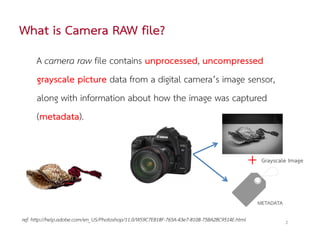
     A camera raw file contains unprocessed, uncompressed
     grayscale picture data from a digital camera’s image sensor,
     along with information about how the image was captured
     (metadata).


                                                                                              +    Grayscale Image


                                                                                                  METADATA

ref: http://help.adobe.com/en_US/Photoshop/11.0/WS9C7E818F-765A-43e7-8108-75BA2BC9514E.html                  2
Camera RAW Software
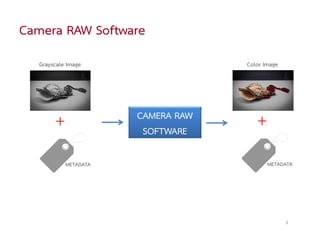
  Grayscale Image                  Color Image


       +              CAMERA RAW
                       SOFTWARE
                                      +
           METADATA                       METADATA


                                                 3
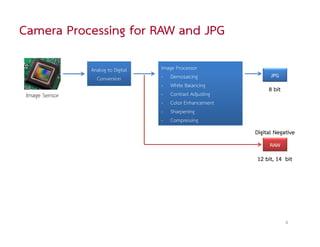
Camera Processing for RAW and JPG

                Analog to Digital   Image Processor
                  Conversion        - Demosaicing                JPG
                                    - White Balancing
                                                                8 bit
 Image Sensor                       - Contrast Adjusting
                                    - Color Enhancement
                                    - Sharpening
                                    - Compressing
                                                           Digital Negative
                                                                RAW
                                                           12 bit, 14 bit


                                                                        4
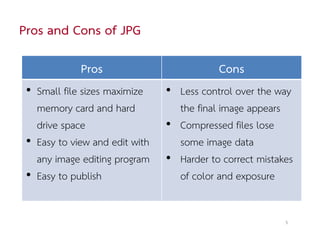
Pros and Cons of JPG

             Pros                          Cons
 • Small file sizes maximize    • Less control over the way
   memory card and hard           the final image appears
   drive space                  • Compressed files lose
 • Easy to view and edit with     some image data
   any image editing program    • Harder to correct mistakes
 • Easy to publish                of color and exposure


                                                          5
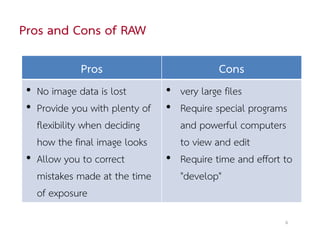
Pros and Cons of RAW

             Pros                          Cons
 • No image data is lost        • very large files
 • Provide you with plenty of   • Require special programs
   flexibility when deciding      and powerful computers
   how the final image looks      to view and edit
 • Allow you to correct         • Require time and effort to
   mistakes made at the time      "develop"
   of exposure
                                                          6
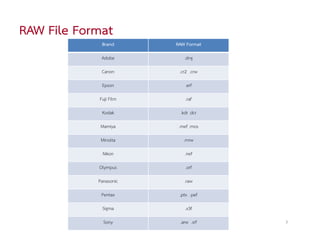
RAW File Format
             Brand      RAW Format

             Adobe         .dng

             Canon       .cr2 .crw

             Epson          .erf

            Fuji Film       .raf

             Kodak       .kdr .dcr

             Mamiya      .mef .mos

             Minolta       .mrw

             Nikon         .nef

            Olympus         .orf

            Panasonic      .raw

             Pentax      .ptx .pef

             Sigma         .x3f

              Sony       .arw .srf   7
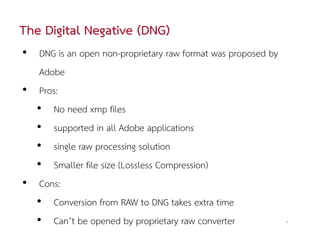
The Digital Negative (DNG)
• DNG is an open non-proprietary raw format was proposed by
   Adobe
• Pros:
  • No need xmp files
  • supported in all Adobe applications
  • single raw processing solution
  • Smaller file size (Lossless Compression)
• Cons:
  • Conversion from RAW to DNG takes extra time
  • Can’t be opened by proprietary raw converter              8
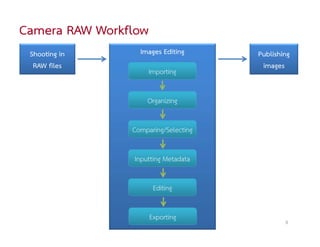
Camera RAW Workflow
 Shooting in      Images Editing      Publishing
  RAW files                            images
                      Importing


                     Organizing

                Comparing/Selecting


                 Inputting Metadata


                       Editing

                      Exporting               9
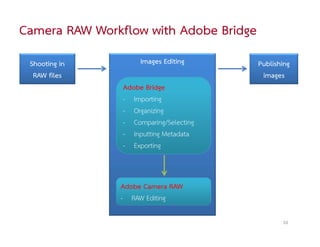
Camera RAW Workflow with Adobe Bridge
 Shooting in         Images Editing     Publishing
  RAW files                              images
                Adobe Bridge
                - Importing
                - Organizing
                - Comparing/Selecting
                - Inputting Metadata
                - Exporting


               Adobe Camera RAW
               - RAW Editing

                                               10
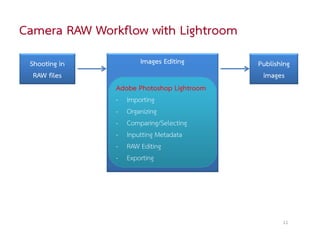
Camera RAW Workflow with Lightroom
 Shooting in         Images Editing        Publishing
  RAW files                                 images
               Adobe Photoshop Lightroom
               - Importing
               - Organizing
               - Comparing/Selecting
               - Inputting Metadata
               - RAW Editing
               - Exporting


                                                  11
Thank you
          Rachabodin Suwannakanthi
         http://www.rachabodin.com/
http://www.slideshare.net/rachabodin

Camera RAW Workflow

  • 1.
    Introduction to CameraRAW File and Camera RAW Workflow Rachabodin Suwannakanthi
  • 2.
    What is CameraRAW file? A camera raw file contains unprocessed, uncompressed grayscale picture data from a digital camera’s image sensor, along with information about how the image was captured (metadata). + Grayscale Image METADATA ref: http://help.adobe.com/en_US/Photoshop/11.0/WS9C7E818F-765A-43e7-8108-75BA2BC9514E.html 2
  • 3.
    Camera RAW Software Grayscale Image Color Image + CAMERA RAW SOFTWARE + METADATA METADATA 3
  • 4.
    Camera Processing forRAW and JPG Analog to Digital Image Processor Conversion - Demosaicing JPG - White Balancing 8 bit Image Sensor - Contrast Adjusting - Color Enhancement - Sharpening - Compressing Digital Negative RAW 12 bit, 14 bit 4
  • 5.
    Pros and Consof JPG Pros Cons • Small file sizes maximize • Less control over the way memory card and hard the final image appears drive space • Compressed files lose • Easy to view and edit with some image data any image editing program • Harder to correct mistakes • Easy to publish of color and exposure 5
  • 6.
    Pros and Consof RAW Pros Cons • No image data is lost • very large files • Provide you with plenty of • Require special programs flexibility when deciding and powerful computers how the final image looks to view and edit • Allow you to correct • Require time and effort to mistakes made at the time "develop" of exposure 6
  • 7.
    RAW File Format Brand RAW Format Adobe .dng Canon .cr2 .crw Epson .erf Fuji Film .raf Kodak .kdr .dcr Mamiya .mef .mos Minolta .mrw Nikon .nef Olympus .orf Panasonic .raw Pentax .ptx .pef Sigma .x3f Sony .arw .srf 7
  • 8.
    The Digital Negative(DNG) • DNG is an open non-proprietary raw format was proposed by Adobe • Pros: • No need xmp files • supported in all Adobe applications • single raw processing solution • Smaller file size (Lossless Compression) • Cons: • Conversion from RAW to DNG takes extra time • Can’t be opened by proprietary raw converter 8
  • 9.
    Camera RAW Workflow Shooting in Images Editing Publishing RAW files images Importing Organizing Comparing/Selecting Inputting Metadata Editing Exporting 9
  • 10.
    Camera RAW Workflowwith Adobe Bridge Shooting in Images Editing Publishing RAW files images Adobe Bridge - Importing - Organizing - Comparing/Selecting - Inputting Metadata - Exporting Adobe Camera RAW - RAW Editing 10
  • 11.
    Camera RAW Workflowwith Lightroom Shooting in Images Editing Publishing RAW files images Adobe Photoshop Lightroom - Importing - Organizing - Comparing/Selecting - Inputting Metadata - RAW Editing - Exporting 11
  • 12.
    Thank you Rachabodin Suwannakanthi http://www.rachabodin.com/ http://www.slideshare.net/rachabodin