22ME403 - SMART MANUFACTURING
(Theory Course with Laboratory Component)
OBJECTIVES:
The Course will enable learners to:
 Understand the advanced aspects of enabling computer aided technologies
used in design, manufacturing and rapid product development.
 Discuss the use of computers in mechanical component design.
 Explain the various CAD standards.
 Describe the application of computers in various aspects of Manufacturing.
 Discuss the types of Additive Manufacturing processes.
22ME403 - SMART MANUFACTURING
(Theory Course with Laboratory Component)
22ME403 - SMART MANUFACTURING
(Theory Course with Laboratory Component)
SYLLABUS
UNIT III CAD STANDARDS (6 + 6)
Standards for computer graphics - Graphical Kernel System (GKS) - standards for
exchange images - Open Graphics Library (OpenGL) - Data exchange standards -
IGES, STEP etc. - communication standards.
List of Exercise/Experiments
Creation of 3D assembly model of following machine elements using 3D Modelling
software
1. Universal Joint
2. Machine Vice
3. Stuffing box
UNIT III CAD STANDARDS
Standards for computer graphics:
Graphics Standards:
Standard graphics formats allow images to
be moved from machine to machine, while
standard graphics languages let graphics
programs be moved from machine to
machine. For example, GKS, PHIGS and
OpenGL are major graphics languages that
have been adopted by high-performance
workstation and CAD vendors.
UNIT III CAD STANDARDS
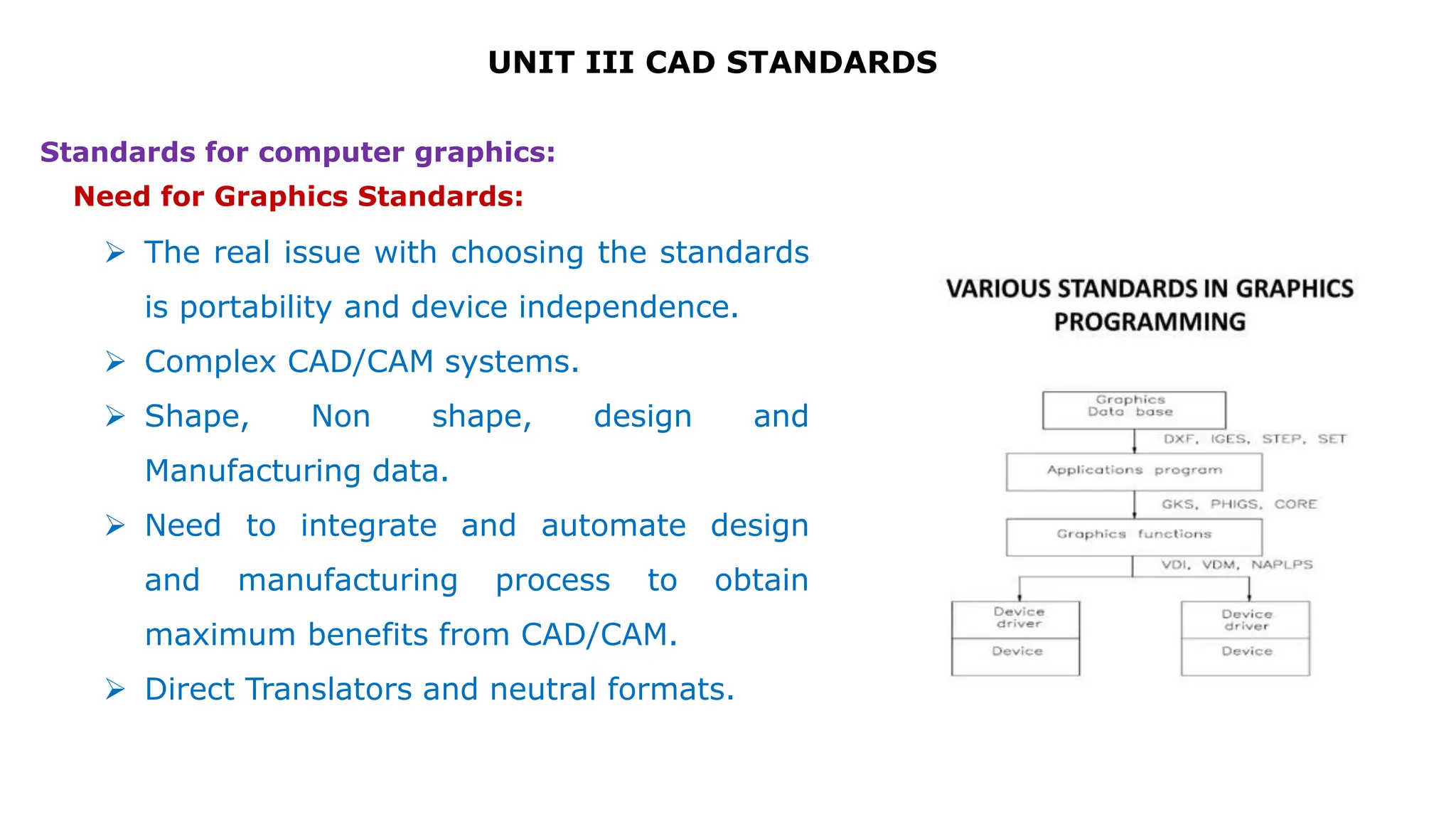
 The real issue with choosing the standards
is portability and device independence.
 Complex CAD/CAM systems.
 Shape, Non shape, design and
Manufacturing data.
 Need to integrate and automate design
and manufacturing process to obtain
maximum benefits from CAD/CAM.
 Direct Translators and neutral formats.
Standards for computer graphics:
Need for Graphics Standards:
UNIT III CAD STANDARDS
CAD Standards:
Standards for computer graphics:
 Graphics Standards
– GKS,PHIGS,NAPLPS,GKS 3D, IGES
 Standards for Exchange images
– Open GL
 Data Exchange Standards
– IGES,STEP,DXF,STL,CALS,PDES,VRML,CGM
 Communication Standards
– LAN,WAN,CGI,VDI
UNIT III CAD STANDARDS
Various Interface Standards Exchange Format
 GKS ( Graphical Kernel System)
 PHIGS (Programmer’s Hierarchical Interface for GraphicS)
 GKS -3D
 IGES (Initial Graphics Exchange Specification)
 DXF (Drawing eXchange Format)
 STEP (STandard for the Exchange of Product Model Data)
 CALS (Continuous Acquisition and Life cycle Support)
 ACIS ( *.sat ) [Alan, Charles, Ian's System]
 OpenGL – Open Graphics Laboratory
 DMIS (Dimensional Measurement Interface Specification)
 VDI (Virtual Device Interface)
 CGI (Computer Graphics Interface)
 VDM (Virtual DeviceMetafile)
 CGM (Computer Graphics Metafile)
 GKSM (GKS Metafile)
 PDES (Product Data Exchange Standards)
 VRML (Virtual Reality Modelling Language)
UNIT III CAD STANDARDS
Graphical Kernel System (GKS):
Graphical Kernel System is software which used for two-dimensional graphics.
It was adopted as first graphics software standard by International Standard
Organization (ISO). It has features for drawing in 2-dimensional vector
graphics which is suitable for charting and similar purpose. The 2-
dimensional computer graphics which is closely related to six output
functions of Graphical Kernel System (GKS).
UNIT III CAD STANDARDS
Graphical Kernel System (GKS):
1.Polyline – As from the name ‘poly’ means ‘many’. Polyline is function which has ability
to draw one or more straight lines through coordinates` which user has given to them.
2.Polymarker – This function is used to draw a symbol at coordinate which user has
provided. There are 5 types of symbols which is used by this software namely : x + * 0.
3.Text – This function is used to add text at given coordinates by user.
4.Fill-area – In this feature, it allows a polygon to be draw and it can be filled with
coordinates which are given. There is variety of fill-area which includes hollow, solid and
there is also variety of hatching and patterns.
5.Cell-array – In this firstly pattern is defined by user and it outputs in
rectangle according to given coordinates by user.
6.Generalized Drawing Primitives – It provides user various kinds of facilities. Mostly all
of systems has various kinds of software for arcs of circle or ellipse and also drawing of
a smooth curve with set of given points.
UNIT III CAD STANDARDS
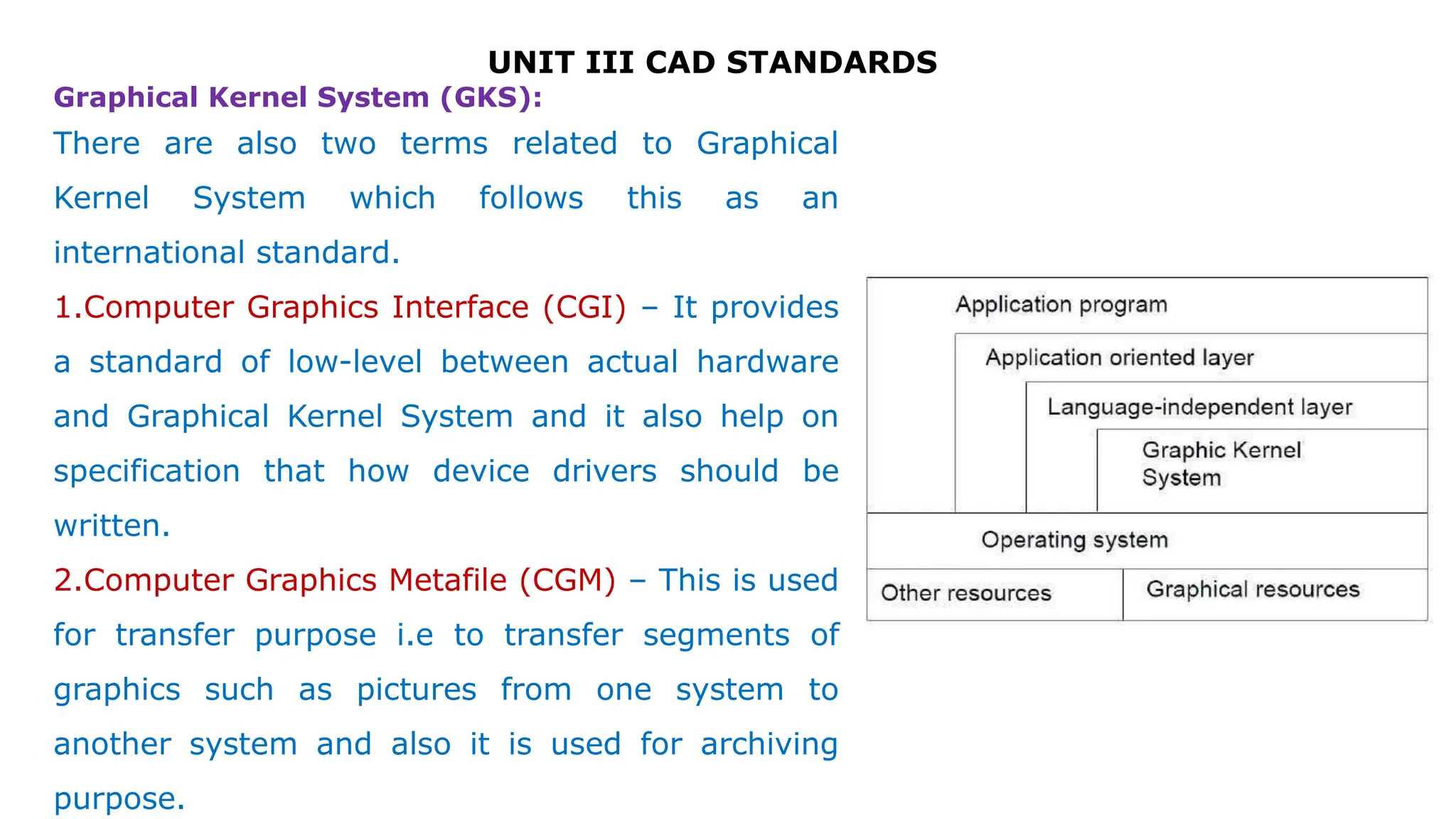
There are also two terms related to Graphical
Kernel System which follows this as an
international standard.
1.Computer Graphics Interface (CGI) – It provides
a standard of low-level between actual hardware
and Graphical Kernel System and it also help on
specification that how device drivers should be
written.
2.Computer Graphics Metafile (CGM) – This is used
for transfer purpose i.e to transfer segments of
graphics such as pictures from one system to
another system and also it is used for archiving
purpose.
Graphical Kernel System (GKS):
UNIT III CAD STANDARDS
Types of Translators:
 Direct Translators.
– Translating the CAD data directly from one CAD/CAM system to
another, in a single step.
 Indirect Translators.
– Translate the CAD data from one native format to another neutral
file which is independent of any existing CAD/CAM system, that all
systems can interpret and understand.
UNIT III CAD STANDARDS
Standards for exchange images:
 A graphics standard proposed for interactive Three Dimensional applications should
assure different criteria. It should be introduced on platforms with changing graphics
abilities without sacrificing the graphics quality of the primary hardware and without
compromising control over the hardware’s function. It must offer a normal interface
that permits a programmer to explain rendering processes quickly.
 To end with, the interface should be flexible adequate to contain additions, hence
that as new graphics operations become important, these operations can be given
without sacrificing the original interface.
 OpenGL meets these measures by giving a simple interface to the basic operations of
3D graphics rendering.
 It supports basic graphics primitives, basic rendering operations and lighting
calculations.
 It also helps advanced rendering attributes such as texture mapping.
UNIT III CAD STANDARDS
Standards for exchange images:
Open Graphics Library:
OpenGL draws primitives into a structured buffer focus to a various
selectable modes. Every Point, line, polygon, or bitmap are called as a
primitive. Each mode can be modified separately; the parameters of one do
not affect the parameters of others. Modes defined, primitives detailed, and
other OpenGL operations explained by giving commands in the form of
procedure calls.
UNIT III CAD STANDARDS
 Commands go into OpenGL on the left. The majority commands may be collected in
a ‘display list’ for executing at a later time. If not, commands are successfully sent
through a pipeline for processing.
 The first stage gives an effective means for resembling curve and surface geometry
by estimating polynomial functions of input data. The next stage works on geometric
primitives explained by vertices. In this stage vertices are converted, and primitives
are clipped to a seeing volume in creation for the next stage.
Open Graphics Library:
UNIT III CAD STANDARDS
 All ‘fragment’ created is supplied to the next stage that executes processes on
personal fragments before they lastly change the structural buffer. These operations
contain restricted updates into the structural buffer based on incoming and formerly
saved depth values, combination of incoming colors with stored colors, as well as
covering and other logical operations on fragment values.
 To end with, rectangle pixels and bitmaps by pass the vertex processing part of the
pipeline to move a group of fragments in a straight line to the individual fragment
actions, finally rooting a block of pixels to be written to the frame buffer. Values can
also be read back from the frame buffer or duplicated from one part of the frame
buffer to another. These transfers may contain several type of encoding or decoding.
Open Graphics Library:
Features of OpenGL:
UNIT III CAD STANDARDS
i) Based on IRIS GL
OpenGL is supported on Silicon Graphics’ Integrated Rater Imaging System
Graphics Library (IRIS GL). Though it would have been potential to have designed a
totally new Application Programmer’s Interface (API), practice with IRIS GL offered
insight into what programmers need and don’t need in a Three Dimensional
graphics API. Additional, creation of OpenGL similar to Integrated Rater Imaging
System Graphics Library where feasible builds OpenGL most likely to be admitted;
there are various successful IRIS GL applications, and programmers of IRIS GL will
have a simple time switching to OpenGL.
UNIT III CAD STANDARDS
ii) Low-Level
A critical target of OpenGL is to offer device independence while still permitting
total contact to hardware. Therefore the API gives permission to graphics
operations at the lowest level that still gives device independence. Hence, OpenGL
does not give a suggestion for modeling complex geometric objects.
Features of OpenGL:
UNIT III CAD STANDARDS
Features of OpenGL:
iii) Fine-Grained Control
Due to minimize the needs on how an application utilizing the Application
Programmer’s Interface must save and present its information, the API must give a
suggestion to state entity parts of geometric entities and operations on them. This
fine-grained control is necessary so that these mechanism and operations may be
defined in any order and so that control of rendering operations is comfortable to
contain the needs of various applications.
UNIT III CAD STANDARDS
Features of OpenGL:
iv) Modal
A modal Application Programmer’s Interface arises in executions in which processes
function in parallel on different primitives. In that cases, a mode modify must be
transmit to all processors so that all collects the new parameters before it processes
its next primitive. A mode change is thus developed serially, stopping primitive
processing until all processors have collected the modifications, and decreasing
performance accordingly.
UNIT III CAD STANDARDS
Features of OpenGL:
v) Frame buffer
Most of OpenGL needs that the graphics hardware has a frame buffer. This is a
realistic condition since almost all interactive graphics run on systems with frame
buffers. Some actions in OpenGL are attained only during exposing their execution
using a frame buffer. While OpenGL may be applied to give data for driving such
devices as vector displays, such use is minor.
UNIT III CAD STANDARDS
Features of OpenGL:
vi) Not Programmable
OpenGL does not give a programming language. Its function may be organized by
turning actions on or off or specifying factors to operations, but the rendering
algorithms are basically fixed. One basis for this decision is that, for performance
basis, graphics hardware is generally designed to apply particular operations in a
defined order; changing these operations with random algorithms is generally
infeasible. Programmability would variance with maintenance of the API close to the
hardware and thus with the objective of maximum performance.
UNIT III CAD STANDARDS
Features of OpenGL:
vii) Geometry and Images
OpenGL gives support for managing both 3D and 2D geometry. An Application
Programmer’s Interface for utilize with geometry should also give guidance for
reading, writing, and copying images, because geometry and images are regularly
joint, as when a Three Dimensional view is laid over a background image. Various per-
fragment processes that are applied to fragments beginning from geometric primitives
apply uniformly well to fragments corresponding to pixels in an image, making it
simple to mix images with geometry.
UNIT III CAD STANDARDS
Data exchange standards:
Data Exchange Standards facilitate the sharing of structured data across different
information systems. Data Exchange Standards are optimized to represent CDISC
content, and flexible enough to be used by information systems that haven't
implemented the Foundational Standards (e.g., legacy data, academic studies).
4
UNIT III CAD STANDARDS
 Geometric data exchange refers to conversion from one geometric data format to
another.
 CAD CAM software developers use different proprietary formats to store the
data.
 Fundamental incompatibilities among entity representations further complicate
exchanging the modeling data.
 As such, the Geometry data format in which part geometry information is
stored often varies from one CAD/CAM system to another and hence the
format need not be unique one.
Data exchange standards:
4
UNIT III CAD STANDARDS
Heterogenous expertise in industry
 In one organization expertise is available in one CAD package while in other
organization people are more conversant with other package.
 This heterogeneity will always exist as long as number of alternative packages are
available in market.
 That arises the need of data exchange.
Use of application specific packages
 Single package may not satisfy all the requirements of design and manufacturing.
 Even if only one versatile comprehensive package is used for all CAD/CAM operations,
still data exchange is needed from one module to another.
Need for exchange standards:
UNIT III CAD STANDARDS
Migration from one system to another
 May be because of availability of better package in the market.
 Lack of technical support from the parent company.
 Merger of two companies
Data exchange with collaborators/ customers/suppliers
 Because of technology transfer
 Data exchange between developer and beneficiary
Rapid pace of technological change
Need for exchange standards:
UNIT III CAD STANDARDS
Shape data
 Geometrical Information
 Topological Information
 Attributes such as font, colour, material
 Annotations
Non-shape data
 It includes graphics data such as shaded images
 Measuring units
 Resolution
Data that needs to be exchanged:
UNIT III CAD STANDARDS
Data exchange standards:
UNIT III CAD STANDARDS
Data exchange standards:
UNIT III CAD STANDARDS
Data exchange standards:
Design data
Information that designers generate from geometric models
for analysis purpose.
Mass property and finite element mesh data belong to this
type of data.
Manufacturing data
It consists of information as tooling, NC tool path.
Tolerancing, process planning, tool design and bill of materials.
UNIT III CAD STANDARDS
Direct Solution Vs Indirect Solution:
Direct Solution: (Features, advantages, etc.)
Calls for translating the modeling data directly from one CAD/CAM system to
another.
Usually in one step.
Direct translators run more quickly.
Data files are compact and smaller in size.
Not recommended for large number of CAD/CAM systems.
They are system based and can work only for given system.
UNIT III CAD STANDARDS
Direct Solution Vs Indirect Solution:
Indirect Solution: (Features, advantages, drawbacks etc.)
More general.
Adopts philosophy of creating a neutral database which is independent of any
existing or future CAD/CAM system.
It is most useful when there are large number of CAD CAM systems.
It is system independent.
Because of its generality nature, the size of the neutral database is larger.
and its access speed is slower.
It is suitable only for smaller number of CAD/CAM systems.
UNIT III CAD STANDARDS
Data exchange standards:
Options available for data exchange
Native format
Neutral format
Standard format
Binary format
ASCII format
UNIT III CAD STANDARDS
Data exchange standards:
Native format
This is Company's own format
Generally not disclosed
Always with some specific extension.
File can be read only by the same package.
It is not a standard.
It is not opened by another package unless there is a translator.
UNIT III CAD STANDARDS
Data exchange standards:
Neutral format:
package gives an optional format which can be very easily interpreted by the outside
world.
Generally it comes with all information like what type of data is stored , what is the
order of information etc…
It may come with manual wherein everything is mentioned about how data is stored.
Standard format:
Accepted by national or international standard.
UNIT III CAD STANDARDS
Data exchange standards:
Binary format:
A binary file is a computer file that is not a text file.
ASCII format:
American Standard Code for Information Interchange
It is a standard encoding for alphanumeric characters used in computers and related
devices.
ASCII was introduced by the United States of America Standards Institute (USASI) now
known as the American National Standards Institute.
Note: Generally neutral and standard format are in ASCII format whereas Native format is
of binary format, because input and output becomes faster
UNIT III CAD STANDARDS
Data exchange standards:
UNIT III CAD STANDARDS
Data exchange standards:
Different formats:
Some standard available formats are-
IGES, DXF, STL, STEP, PDES, ACIS, Parasolid
DXF- Drawing Exchange Format
IGES- Initial Graphics Exchange Format
STL- Standard Triangular Language
STEP- Standard for Exchange of Products data
UNIT III CAD STANDARDS
Data exchange standards:
IGES format:
Early attempts to design data format focused on CAD to CAD exchange where primarily
shape and non-shape data were to be transferred from one system to another.
E.g. IGES format
It is the first standard exchange format
IGES has been revised a few times since its version 1.0 was released in 1980.
The various IGES versions share common characteristics.
Each version must remain upwards compatible with previous version.
This means that a processor that is fully conforming to the latest version can correctly
interpret IGES files written in accordance with prior versions.
UNIT III CAD STANDARDS
Data exchange standards:
IGES format:
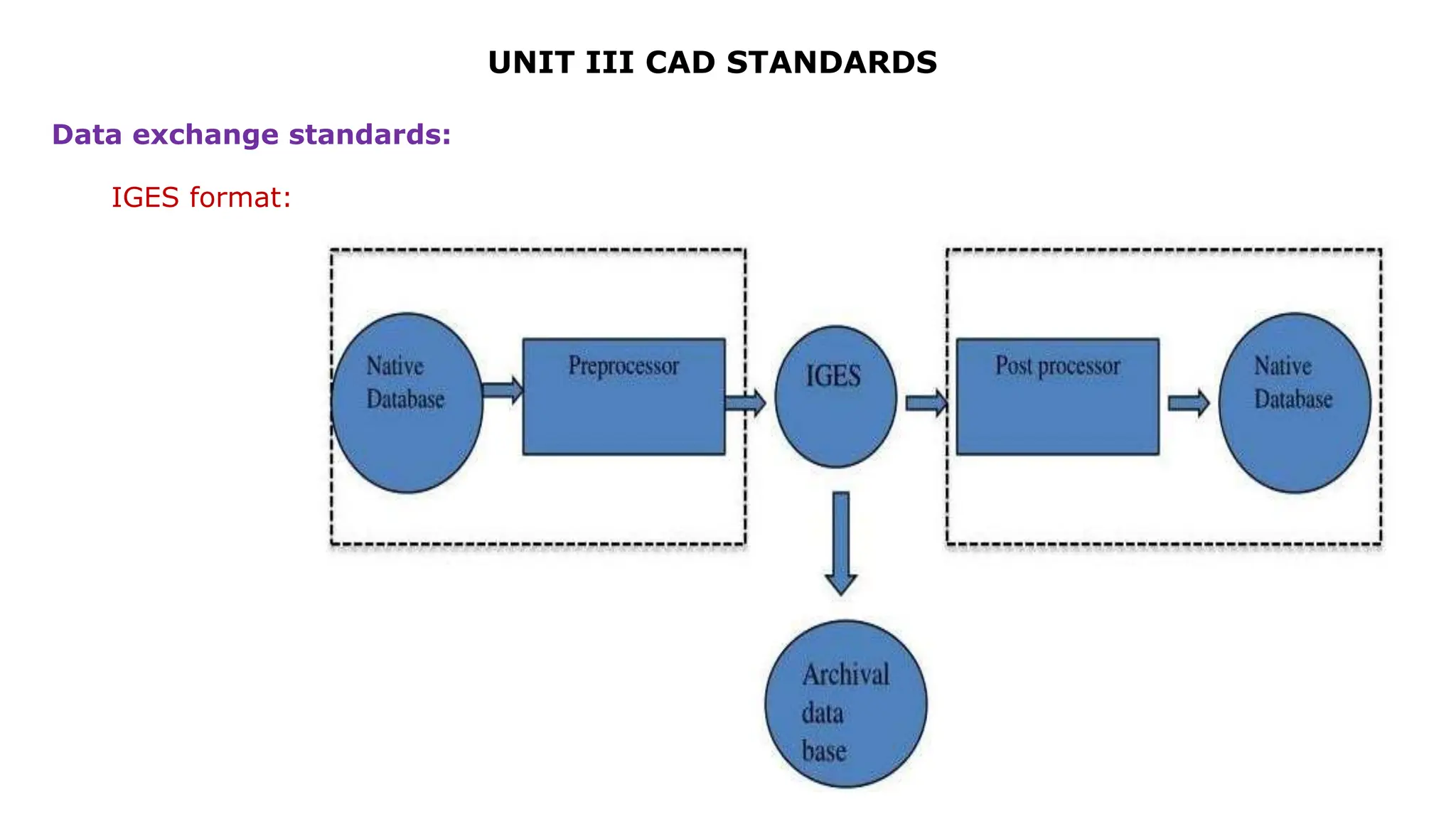
CAD/CAM vendors or companies specialized in database transfer must write software to
translate from their systems to IGES format and vice versa.
The software that translates from the native database
format of a given CAD/CAM system to the IGES format is called a
preprocessor.
The software that translates in a opposite way (from IGES to a CAD CAM system) is
called as postprocessor.
The preprocessors and postprocessors are also called as translators
UNIT III CAD STANDARDS
Data exchange standards:
IGES format:
IGES is a text-based format.
The IGES file has five sections: Start, General,
Directory, Parameters, Termination (some says 6)
Flag
Start……………………..…1
Global (or General)….2
Directory……………..……3
Parameters………….……4
Termination………….…..5
UNIT III CAD STANDARDS
Data exchange standards:
IGES format:
The sections are indicated by the characters S, G, D, P, or T in column 73.
Each line is 80 characters long. Some sections using tabulated representation.
Each entity type has a type-id (type number) and optional sub-type id (form number).
For instance a line is 110 Form 0 and B-Spline surface is 128.
UNIT III CAD STANDARDS
Data exchange standards:
IGES format:
UNIT III CAD STANDARDS
STEP format:
STEP, as STandard for Exchange of Product model data, is aimed to support a complete
and unambiguous description of industrial products all along their life cycle,
independently of any computer system (operating system, hardware, CAD software)
ISO 10303-21 specifies an exchange format, often known as a STEP-file, that allows
product data conforming to a schema in the EXPRESS data modeling language (ISO
10303-11) to be transferred among computer systems.
STEP is a 3D model file that is built in an ISO Standard Exchange format. Often it is the
format employed when users who are running different CAD software programs want to
exchange 3D models. Housed within the file is three-dimensional data that is
identifiable by a variety of software systems. STEP file format is modular in nature,
enabling developers to revise it according to their own specs. This file format dates
back to 1984, as a follow-up response to Initial Graphics Exchange Specification
(IGES). The first STEP standard wasn’t actually released until 1994, due to the file
format’s complexities. STEP is revised frequently. Its extensions include .step, .stp,
.stpz, .ste or .p21.
UNIT III CAD STANDARDS
STEP format:
UNIT III CAD STANDARDS
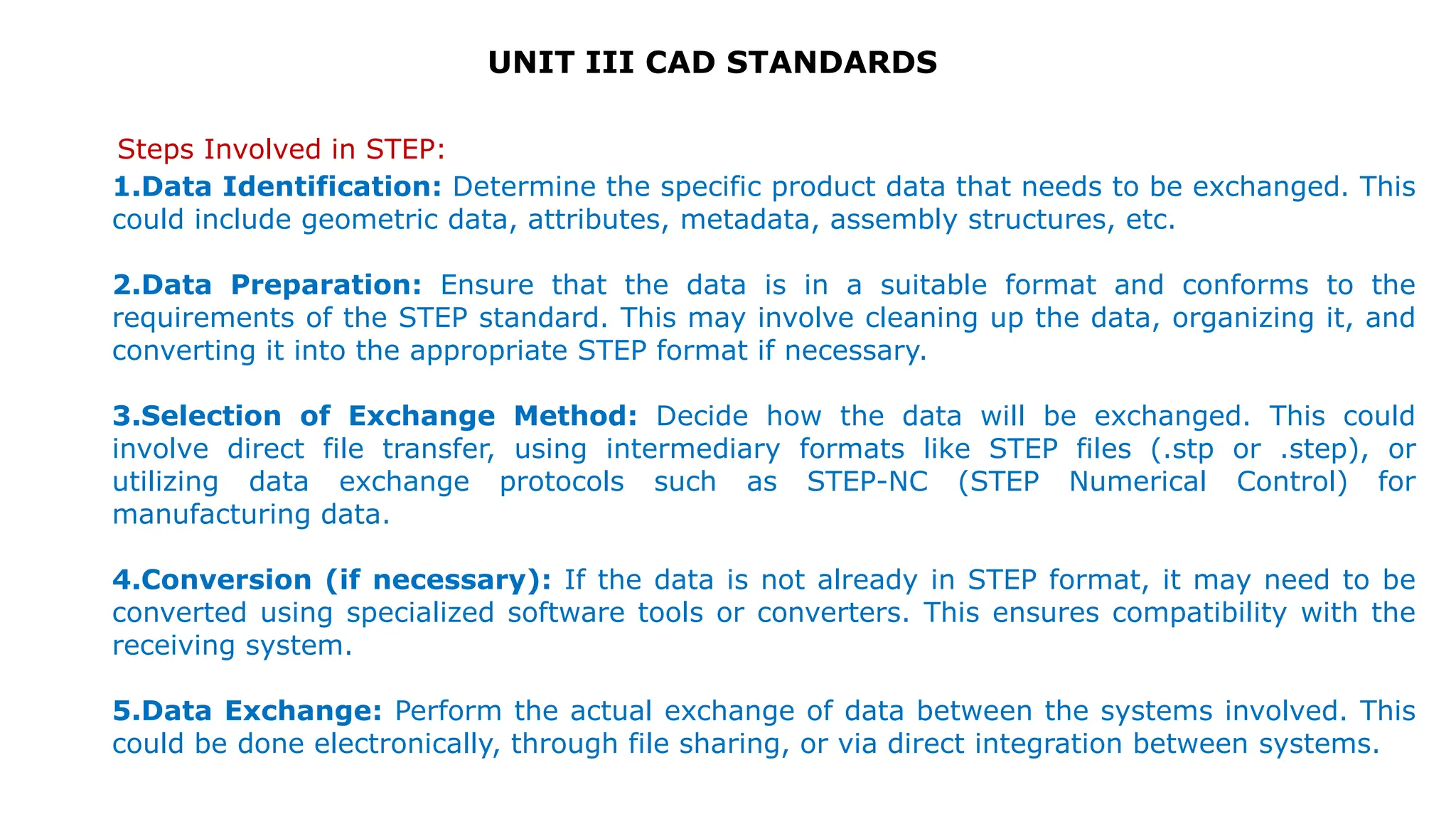
Steps Involved in STEP:
1.Data Identification: Determine the specific product data that needs to be exchanged. This
could include geometric data, attributes, metadata, assembly structures, etc.
2.Data Preparation: Ensure that the data is in a suitable format and conforms to the
requirements of the STEP standard. This may involve cleaning up the data, organizing it, and
converting it into the appropriate STEP format if necessary.
3.Selection of Exchange Method: Decide how the data will be exchanged. This could
involve direct file transfer, using intermediary formats like STEP files (.stp or .step), or
utilizing data exchange protocols such as STEP-NC (STEP Numerical Control) for
manufacturing data.
4.Conversion (if necessary): If the data is not already in STEP format, it may need to be
converted using specialized software tools or converters. This ensures compatibility with the
receiving system.
5.Data Exchange: Perform the actual exchange of data between the systems involved. This
could be done electronically, through file sharing, or via direct integration between systems.
UNIT III CAD STANDARDS
Steps Involved in STEP:
6. Validation: Validate the exchanged data to ensure accuracy and completeness. This
involves checking for errors, inconsistencies, or missing information, and verifying that
the data conforms to the STEP standard.
7. Integration (if necessary): If the exchanged data needs to be integrated with
existing data or systems, perform integration tasks to ensure compatibility and
consistency. This could involve mapping data fields, reconciling differences in data
structures, or updating databases.
8. Review and Feedback: Gather feedback from stakeholders involved in the data
exchange process. This helps identify any issues or areas for improvement and informs
future data exchange activities.
9. Documentation: Document the data exchange process, including details of the
exchanged data, exchange methods used, validation results, and any feedback
received. This documentation serves as a reference for future exchanges and ensures
consistency and traceability.
10.Maintenance: Regularly monitor and maintain the quality of exchanged data to
ensure it remains accurate, up-to-date, and relevant. This may involve updating data
schemas, addressing format changes, or resolving issues encountered during
subsequent exchanges.
UNIT III CAD STANDARDS
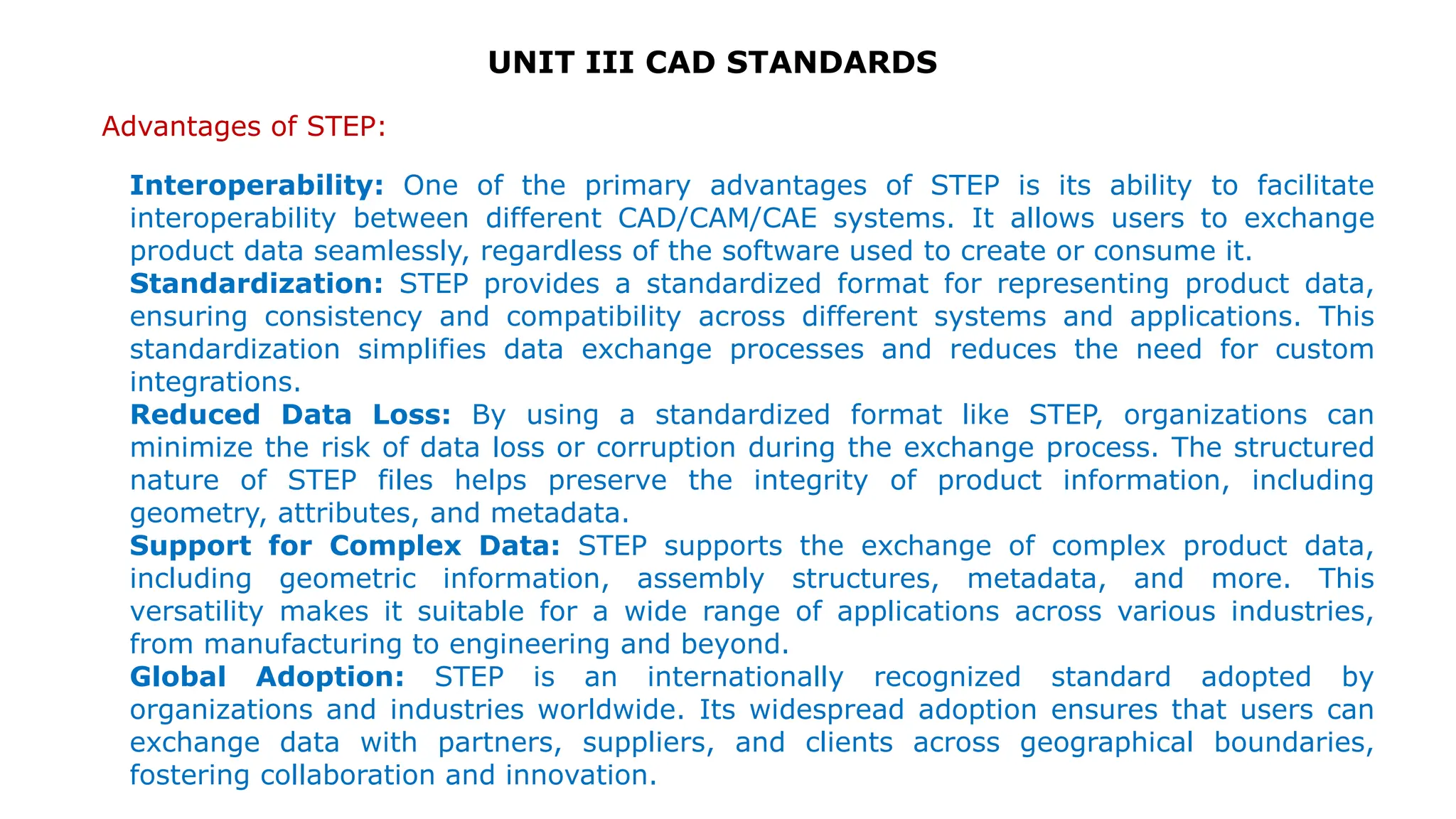
Advantages of STEP:
Interoperability: One of the primary advantages of STEP is its ability to facilitate
interoperability between different CAD/CAM/CAE systems. It allows users to exchange
product data seamlessly, regardless of the software used to create or consume it.
Standardization: STEP provides a standardized format for representing product data,
ensuring consistency and compatibility across different systems and applications. This
standardization simplifies data exchange processes and reduces the need for custom
integrations.
Reduced Data Loss: By using a standardized format like STEP, organizations can
minimize the risk of data loss or corruption during the exchange process. The structured
nature of STEP files helps preserve the integrity of product information, including
geometry, attributes, and metadata.
Support for Complex Data: STEP supports the exchange of complex product data,
including geometric information, assembly structures, metadata, and more. This
versatility makes it suitable for a wide range of applications across various industries,
from manufacturing to engineering and beyond.
Global Adoption: STEP is an internationally recognized standard adopted by
organizations and industries worldwide. Its widespread adoption ensures that users can
exchange data with partners, suppliers, and clients across geographical boundaries,
fostering collaboration and innovation.
UNIT III CAD STANDARDS
Disadvantages of STEP:
Complexity: Implementing and managing STEP data exchange processes can be
complex, especially for organizations with diverse CAD/CAM/CAE systems and workflows.
Dealing with large, multi-faceted STEP files may require specialized software tools and
expertise.
Resource Intensive: Converting data to and from the STEP format may require
significant computational resources, especially for large or complex datasets. This can
lead to increased processing times and resource consumption, particularly in
environments with limited computing resources.
Loss of Information: Despite its robustness, the STEP standard may not fully capture
all nuances of proprietary data formats. During the conversion process, some information
or features specific to certain CAD systems may be lost or not fully represented in the
STEP file.
Versioning Issues: Like any standard, STEP undergoes periodic updates and revisions,
leading to compatibility issues between different versions. Organizations may encounter
challenges when exchanging data between systems that use different versions of the
STEP standard.
Learning Curve: Working with STEP files and implementing STEP-based data exchange
processes requires specialized knowledge and training. Users may need to invest time
and resources to familiarize themselves with the intricacies of the standard and its
associated tools.

CAD STANDARDS - SMART MANUFACTURING MECH

  • 1.
    22ME403 - SMARTMANUFACTURING (Theory Course with Laboratory Component)
  • 2.
    OBJECTIVES: The Course willenable learners to:  Understand the advanced aspects of enabling computer aided technologies used in design, manufacturing and rapid product development.  Discuss the use of computers in mechanical component design.  Explain the various CAD standards.  Describe the application of computers in various aspects of Manufacturing.  Discuss the types of Additive Manufacturing processes. 22ME403 - SMART MANUFACTURING (Theory Course with Laboratory Component)
  • 3.
    22ME403 - SMARTMANUFACTURING (Theory Course with Laboratory Component) SYLLABUS UNIT III CAD STANDARDS (6 + 6) Standards for computer graphics - Graphical Kernel System (GKS) - standards for exchange images - Open Graphics Library (OpenGL) - Data exchange standards - IGES, STEP etc. - communication standards. List of Exercise/Experiments Creation of 3D assembly model of following machine elements using 3D Modelling software 1. Universal Joint 2. Machine Vice 3. Stuffing box
  • 4.
    UNIT III CADSTANDARDS Standards for computer graphics: Graphics Standards: Standard graphics formats allow images to be moved from machine to machine, while standard graphics languages let graphics programs be moved from machine to machine. For example, GKS, PHIGS and OpenGL are major graphics languages that have been adopted by high-performance workstation and CAD vendors.
  • 5.
    UNIT III CADSTANDARDS  The real issue with choosing the standards is portability and device independence.  Complex CAD/CAM systems.  Shape, Non shape, design and Manufacturing data.  Need to integrate and automate design and manufacturing process to obtain maximum benefits from CAD/CAM.  Direct Translators and neutral formats. Standards for computer graphics: Need for Graphics Standards:
  • 6.
    UNIT III CADSTANDARDS CAD Standards: Standards for computer graphics:  Graphics Standards – GKS,PHIGS,NAPLPS,GKS 3D, IGES  Standards for Exchange images – Open GL  Data Exchange Standards – IGES,STEP,DXF,STL,CALS,PDES,VRML,CGM  Communication Standards – LAN,WAN,CGI,VDI
  • 7.
    UNIT III CADSTANDARDS Various Interface Standards Exchange Format  GKS ( Graphical Kernel System)  PHIGS (Programmer’s Hierarchical Interface for GraphicS)  GKS -3D  IGES (Initial Graphics Exchange Specification)  DXF (Drawing eXchange Format)  STEP (STandard for the Exchange of Product Model Data)  CALS (Continuous Acquisition and Life cycle Support)  ACIS ( *.sat ) [Alan, Charles, Ian's System]  OpenGL – Open Graphics Laboratory  DMIS (Dimensional Measurement Interface Specification)  VDI (Virtual Device Interface)  CGI (Computer Graphics Interface)  VDM (Virtual DeviceMetafile)  CGM (Computer Graphics Metafile)  GKSM (GKS Metafile)  PDES (Product Data Exchange Standards)  VRML (Virtual Reality Modelling Language)
  • 8.
    UNIT III CADSTANDARDS Graphical Kernel System (GKS): Graphical Kernel System is software which used for two-dimensional graphics. It was adopted as first graphics software standard by International Standard Organization (ISO). It has features for drawing in 2-dimensional vector graphics which is suitable for charting and similar purpose. The 2- dimensional computer graphics which is closely related to six output functions of Graphical Kernel System (GKS).
  • 9.
    UNIT III CADSTANDARDS Graphical Kernel System (GKS): 1.Polyline – As from the name ‘poly’ means ‘many’. Polyline is function which has ability to draw one or more straight lines through coordinates` which user has given to them. 2.Polymarker – This function is used to draw a symbol at coordinate which user has provided. There are 5 types of symbols which is used by this software namely : x + * 0. 3.Text – This function is used to add text at given coordinates by user. 4.Fill-area – In this feature, it allows a polygon to be draw and it can be filled with coordinates which are given. There is variety of fill-area which includes hollow, solid and there is also variety of hatching and patterns. 5.Cell-array – In this firstly pattern is defined by user and it outputs in rectangle according to given coordinates by user. 6.Generalized Drawing Primitives – It provides user various kinds of facilities. Mostly all of systems has various kinds of software for arcs of circle or ellipse and also drawing of a smooth curve with set of given points.
  • 10.
    UNIT III CADSTANDARDS There are also two terms related to Graphical Kernel System which follows this as an international standard. 1.Computer Graphics Interface (CGI) – It provides a standard of low-level between actual hardware and Graphical Kernel System and it also help on specification that how device drivers should be written. 2.Computer Graphics Metafile (CGM) – This is used for transfer purpose i.e to transfer segments of graphics such as pictures from one system to another system and also it is used for archiving purpose. Graphical Kernel System (GKS):
  • 11.
    UNIT III CADSTANDARDS Types of Translators:  Direct Translators. – Translating the CAD data directly from one CAD/CAM system to another, in a single step.  Indirect Translators. – Translate the CAD data from one native format to another neutral file which is independent of any existing CAD/CAM system, that all systems can interpret and understand.
  • 12.
    UNIT III CADSTANDARDS Standards for exchange images:  A graphics standard proposed for interactive Three Dimensional applications should assure different criteria. It should be introduced on platforms with changing graphics abilities without sacrificing the graphics quality of the primary hardware and without compromising control over the hardware’s function. It must offer a normal interface that permits a programmer to explain rendering processes quickly.  To end with, the interface should be flexible adequate to contain additions, hence that as new graphics operations become important, these operations can be given without sacrificing the original interface.  OpenGL meets these measures by giving a simple interface to the basic operations of 3D graphics rendering.  It supports basic graphics primitives, basic rendering operations and lighting calculations.  It also helps advanced rendering attributes such as texture mapping.
  • 13.
    UNIT III CADSTANDARDS Standards for exchange images: Open Graphics Library: OpenGL draws primitives into a structured buffer focus to a various selectable modes. Every Point, line, polygon, or bitmap are called as a primitive. Each mode can be modified separately; the parameters of one do not affect the parameters of others. Modes defined, primitives detailed, and other OpenGL operations explained by giving commands in the form of procedure calls.
  • 14.
    UNIT III CADSTANDARDS  Commands go into OpenGL on the left. The majority commands may be collected in a ‘display list’ for executing at a later time. If not, commands are successfully sent through a pipeline for processing.  The first stage gives an effective means for resembling curve and surface geometry by estimating polynomial functions of input data. The next stage works on geometric primitives explained by vertices. In this stage vertices are converted, and primitives are clipped to a seeing volume in creation for the next stage. Open Graphics Library:
  • 15.
    UNIT III CADSTANDARDS  All ‘fragment’ created is supplied to the next stage that executes processes on personal fragments before they lastly change the structural buffer. These operations contain restricted updates into the structural buffer based on incoming and formerly saved depth values, combination of incoming colors with stored colors, as well as covering and other logical operations on fragment values.  To end with, rectangle pixels and bitmaps by pass the vertex processing part of the pipeline to move a group of fragments in a straight line to the individual fragment actions, finally rooting a block of pixels to be written to the frame buffer. Values can also be read back from the frame buffer or duplicated from one part of the frame buffer to another. These transfers may contain several type of encoding or decoding. Open Graphics Library:
  • 16.
    Features of OpenGL: UNITIII CAD STANDARDS i) Based on IRIS GL OpenGL is supported on Silicon Graphics’ Integrated Rater Imaging System Graphics Library (IRIS GL). Though it would have been potential to have designed a totally new Application Programmer’s Interface (API), practice with IRIS GL offered insight into what programmers need and don’t need in a Three Dimensional graphics API. Additional, creation of OpenGL similar to Integrated Rater Imaging System Graphics Library where feasible builds OpenGL most likely to be admitted; there are various successful IRIS GL applications, and programmers of IRIS GL will have a simple time switching to OpenGL.
  • 17.
    UNIT III CADSTANDARDS ii) Low-Level A critical target of OpenGL is to offer device independence while still permitting total contact to hardware. Therefore the API gives permission to graphics operations at the lowest level that still gives device independence. Hence, OpenGL does not give a suggestion for modeling complex geometric objects. Features of OpenGL:
  • 18.
    UNIT III CADSTANDARDS Features of OpenGL: iii) Fine-Grained Control Due to minimize the needs on how an application utilizing the Application Programmer’s Interface must save and present its information, the API must give a suggestion to state entity parts of geometric entities and operations on them. This fine-grained control is necessary so that these mechanism and operations may be defined in any order and so that control of rendering operations is comfortable to contain the needs of various applications.
  • 19.
    UNIT III CADSTANDARDS Features of OpenGL: iv) Modal A modal Application Programmer’s Interface arises in executions in which processes function in parallel on different primitives. In that cases, a mode modify must be transmit to all processors so that all collects the new parameters before it processes its next primitive. A mode change is thus developed serially, stopping primitive processing until all processors have collected the modifications, and decreasing performance accordingly.
  • 20.
    UNIT III CADSTANDARDS Features of OpenGL: v) Frame buffer Most of OpenGL needs that the graphics hardware has a frame buffer. This is a realistic condition since almost all interactive graphics run on systems with frame buffers. Some actions in OpenGL are attained only during exposing their execution using a frame buffer. While OpenGL may be applied to give data for driving such devices as vector displays, such use is minor.
  • 21.
    UNIT III CADSTANDARDS Features of OpenGL: vi) Not Programmable OpenGL does not give a programming language. Its function may be organized by turning actions on or off or specifying factors to operations, but the rendering algorithms are basically fixed. One basis for this decision is that, for performance basis, graphics hardware is generally designed to apply particular operations in a defined order; changing these operations with random algorithms is generally infeasible. Programmability would variance with maintenance of the API close to the hardware and thus with the objective of maximum performance.
  • 22.
    UNIT III CADSTANDARDS Features of OpenGL: vii) Geometry and Images OpenGL gives support for managing both 3D and 2D geometry. An Application Programmer’s Interface for utilize with geometry should also give guidance for reading, writing, and copying images, because geometry and images are regularly joint, as when a Three Dimensional view is laid over a background image. Various per- fragment processes that are applied to fragments beginning from geometric primitives apply uniformly well to fragments corresponding to pixels in an image, making it simple to mix images with geometry.
  • 23.
    UNIT III CADSTANDARDS Data exchange standards: Data Exchange Standards facilitate the sharing of structured data across different information systems. Data Exchange Standards are optimized to represent CDISC content, and flexible enough to be used by information systems that haven't implemented the Foundational Standards (e.g., legacy data, academic studies).
  • 24.
    4 UNIT III CADSTANDARDS  Geometric data exchange refers to conversion from one geometric data format to another.  CAD CAM software developers use different proprietary formats to store the data.  Fundamental incompatibilities among entity representations further complicate exchanging the modeling data.  As such, the Geometry data format in which part geometry information is stored often varies from one CAD/CAM system to another and hence the format need not be unique one. Data exchange standards:
  • 25.
    4 UNIT III CADSTANDARDS Heterogenous expertise in industry  In one organization expertise is available in one CAD package while in other organization people are more conversant with other package.  This heterogeneity will always exist as long as number of alternative packages are available in market.  That arises the need of data exchange. Use of application specific packages  Single package may not satisfy all the requirements of design and manufacturing.  Even if only one versatile comprehensive package is used for all CAD/CAM operations, still data exchange is needed from one module to another. Need for exchange standards:
  • 26.
    UNIT III CADSTANDARDS Migration from one system to another  May be because of availability of better package in the market.  Lack of technical support from the parent company.  Merger of two companies Data exchange with collaborators/ customers/suppliers  Because of technology transfer  Data exchange between developer and beneficiary Rapid pace of technological change Need for exchange standards:
  • 27.
    UNIT III CADSTANDARDS Shape data  Geometrical Information  Topological Information  Attributes such as font, colour, material  Annotations Non-shape data  It includes graphics data such as shaded images  Measuring units  Resolution Data that needs to be exchanged:
  • 28.
    UNIT III CADSTANDARDS Data exchange standards:
  • 29.
    UNIT III CADSTANDARDS Data exchange standards:
  • 30.
    UNIT III CADSTANDARDS Data exchange standards: Design data Information that designers generate from geometric models for analysis purpose. Mass property and finite element mesh data belong to this type of data. Manufacturing data It consists of information as tooling, NC tool path. Tolerancing, process planning, tool design and bill of materials.
  • 31.
    UNIT III CADSTANDARDS Direct Solution Vs Indirect Solution: Direct Solution: (Features, advantages, etc.) Calls for translating the modeling data directly from one CAD/CAM system to another. Usually in one step. Direct translators run more quickly. Data files are compact and smaller in size. Not recommended for large number of CAD/CAM systems. They are system based and can work only for given system.
  • 32.
    UNIT III CADSTANDARDS Direct Solution Vs Indirect Solution: Indirect Solution: (Features, advantages, drawbacks etc.) More general. Adopts philosophy of creating a neutral database which is independent of any existing or future CAD/CAM system. It is most useful when there are large number of CAD CAM systems. It is system independent. Because of its generality nature, the size of the neutral database is larger. and its access speed is slower. It is suitable only for smaller number of CAD/CAM systems.
  • 33.
    UNIT III CADSTANDARDS Data exchange standards: Options available for data exchange Native format Neutral format Standard format Binary format ASCII format
  • 34.
    UNIT III CADSTANDARDS Data exchange standards: Native format This is Company's own format Generally not disclosed Always with some specific extension. File can be read only by the same package. It is not a standard. It is not opened by another package unless there is a translator.
  • 35.
    UNIT III CADSTANDARDS Data exchange standards: Neutral format: package gives an optional format which can be very easily interpreted by the outside world. Generally it comes with all information like what type of data is stored , what is the order of information etc… It may come with manual wherein everything is mentioned about how data is stored. Standard format: Accepted by national or international standard.
  • 36.
    UNIT III CADSTANDARDS Data exchange standards: Binary format: A binary file is a computer file that is not a text file. ASCII format: American Standard Code for Information Interchange It is a standard encoding for alphanumeric characters used in computers and related devices. ASCII was introduced by the United States of America Standards Institute (USASI) now known as the American National Standards Institute. Note: Generally neutral and standard format are in ASCII format whereas Native format is of binary format, because input and output becomes faster
  • 37.
    UNIT III CADSTANDARDS Data exchange standards:
  • 38.
    UNIT III CADSTANDARDS Data exchange standards: Different formats: Some standard available formats are- IGES, DXF, STL, STEP, PDES, ACIS, Parasolid DXF- Drawing Exchange Format IGES- Initial Graphics Exchange Format STL- Standard Triangular Language STEP- Standard for Exchange of Products data
  • 39.
    UNIT III CADSTANDARDS Data exchange standards: IGES format: Early attempts to design data format focused on CAD to CAD exchange where primarily shape and non-shape data were to be transferred from one system to another. E.g. IGES format It is the first standard exchange format IGES has been revised a few times since its version 1.0 was released in 1980. The various IGES versions share common characteristics. Each version must remain upwards compatible with previous version. This means that a processor that is fully conforming to the latest version can correctly interpret IGES files written in accordance with prior versions.
  • 40.
    UNIT III CADSTANDARDS Data exchange standards: IGES format: CAD/CAM vendors or companies specialized in database transfer must write software to translate from their systems to IGES format and vice versa. The software that translates from the native database format of a given CAD/CAM system to the IGES format is called a preprocessor. The software that translates in a opposite way (from IGES to a CAD CAM system) is called as postprocessor. The preprocessors and postprocessors are also called as translators
  • 41.
    UNIT III CADSTANDARDS Data exchange standards: IGES format: IGES is a text-based format. The IGES file has five sections: Start, General, Directory, Parameters, Termination (some says 6) Flag Start……………………..…1 Global (or General)….2 Directory……………..……3 Parameters………….……4 Termination………….…..5
  • 42.
    UNIT III CADSTANDARDS Data exchange standards: IGES format: The sections are indicated by the characters S, G, D, P, or T in column 73. Each line is 80 characters long. Some sections using tabulated representation. Each entity type has a type-id (type number) and optional sub-type id (form number). For instance a line is 110 Form 0 and B-Spline surface is 128.
  • 43.
    UNIT III CADSTANDARDS Data exchange standards: IGES format:
  • 44.
    UNIT III CADSTANDARDS STEP format: STEP, as STandard for Exchange of Product model data, is aimed to support a complete and unambiguous description of industrial products all along their life cycle, independently of any computer system (operating system, hardware, CAD software) ISO 10303-21 specifies an exchange format, often known as a STEP-file, that allows product data conforming to a schema in the EXPRESS data modeling language (ISO 10303-11) to be transferred among computer systems. STEP is a 3D model file that is built in an ISO Standard Exchange format. Often it is the format employed when users who are running different CAD software programs want to exchange 3D models. Housed within the file is three-dimensional data that is identifiable by a variety of software systems. STEP file format is modular in nature, enabling developers to revise it according to their own specs. This file format dates back to 1984, as a follow-up response to Initial Graphics Exchange Specification (IGES). The first STEP standard wasn’t actually released until 1994, due to the file format’s complexities. STEP is revised frequently. Its extensions include .step, .stp, .stpz, .ste or .p21.
  • 45.
    UNIT III CADSTANDARDS STEP format:
  • 46.
    UNIT III CADSTANDARDS Steps Involved in STEP: 1.Data Identification: Determine the specific product data that needs to be exchanged. This could include geometric data, attributes, metadata, assembly structures, etc. 2.Data Preparation: Ensure that the data is in a suitable format and conforms to the requirements of the STEP standard. This may involve cleaning up the data, organizing it, and converting it into the appropriate STEP format if necessary. 3.Selection of Exchange Method: Decide how the data will be exchanged. This could involve direct file transfer, using intermediary formats like STEP files (.stp or .step), or utilizing data exchange protocols such as STEP-NC (STEP Numerical Control) for manufacturing data. 4.Conversion (if necessary): If the data is not already in STEP format, it may need to be converted using specialized software tools or converters. This ensures compatibility with the receiving system. 5.Data Exchange: Perform the actual exchange of data between the systems involved. This could be done electronically, through file sharing, or via direct integration between systems.
  • 47.
    UNIT III CADSTANDARDS Steps Involved in STEP: 6. Validation: Validate the exchanged data to ensure accuracy and completeness. This involves checking for errors, inconsistencies, or missing information, and verifying that the data conforms to the STEP standard. 7. Integration (if necessary): If the exchanged data needs to be integrated with existing data or systems, perform integration tasks to ensure compatibility and consistency. This could involve mapping data fields, reconciling differences in data structures, or updating databases. 8. Review and Feedback: Gather feedback from stakeholders involved in the data exchange process. This helps identify any issues or areas for improvement and informs future data exchange activities. 9. Documentation: Document the data exchange process, including details of the exchanged data, exchange methods used, validation results, and any feedback received. This documentation serves as a reference for future exchanges and ensures consistency and traceability. 10.Maintenance: Regularly monitor and maintain the quality of exchanged data to ensure it remains accurate, up-to-date, and relevant. This may involve updating data schemas, addressing format changes, or resolving issues encountered during subsequent exchanges.
  • 48.
    UNIT III CADSTANDARDS Advantages of STEP: Interoperability: One of the primary advantages of STEP is its ability to facilitate interoperability between different CAD/CAM/CAE systems. It allows users to exchange product data seamlessly, regardless of the software used to create or consume it. Standardization: STEP provides a standardized format for representing product data, ensuring consistency and compatibility across different systems and applications. This standardization simplifies data exchange processes and reduces the need for custom integrations. Reduced Data Loss: By using a standardized format like STEP, organizations can minimize the risk of data loss or corruption during the exchange process. The structured nature of STEP files helps preserve the integrity of product information, including geometry, attributes, and metadata. Support for Complex Data: STEP supports the exchange of complex product data, including geometric information, assembly structures, metadata, and more. This versatility makes it suitable for a wide range of applications across various industries, from manufacturing to engineering and beyond. Global Adoption: STEP is an internationally recognized standard adopted by organizations and industries worldwide. Its widespread adoption ensures that users can exchange data with partners, suppliers, and clients across geographical boundaries, fostering collaboration and innovation.
  • 49.
    UNIT III CADSTANDARDS Disadvantages of STEP: Complexity: Implementing and managing STEP data exchange processes can be complex, especially for organizations with diverse CAD/CAM/CAE systems and workflows. Dealing with large, multi-faceted STEP files may require specialized software tools and expertise. Resource Intensive: Converting data to and from the STEP format may require significant computational resources, especially for large or complex datasets. This can lead to increased processing times and resource consumption, particularly in environments with limited computing resources. Loss of Information: Despite its robustness, the STEP standard may not fully capture all nuances of proprietary data formats. During the conversion process, some information or features specific to certain CAD systems may be lost or not fully represented in the STEP file. Versioning Issues: Like any standard, STEP undergoes periodic updates and revisions, leading to compatibility issues between different versions. Organizations may encounter challenges when exchanging data between systems that use different versions of the STEP standard. Learning Curve: Working with STEP files and implementing STEP-based data exchange processes requires specialized knowledge and training. Users may need to invest time and resources to familiarize themselves with the intricacies of the standard and its associated tools.